Budderfly R0710021 Dual Band Outlet User Manual
Budderfly LLC Dual Band Outlet
User Manual
PartNoR0710021
Description:
InstallingaBudderflyadaptertransformsyourbuilding’sexistingwiringintothe“BudderflyOpenNetwork”andallowsthe
adaptertomonitorenergyconsumptionandcommunicatethedatatoafacilitycontroller.
Budderflyadaptorsusetheexistingpowerlineforcommunicationandthusrequirenore‐wiring.
UsingourBudderflysoftware,youcanvisualizeconsumptiondataandmanageeachindividualadapter.
TheBudderflyDualBandOutletisacomponentofBudderflysystemanddesignedtoworkwithallotherBudderflydevices.
Itisaplug‐and‐playreplacementforyourexistingOutlet.Onceinstalled,TheBudderflyoutletsalsoactasrepeatersto
extendtherangeofthenetworkandincreaseefficiency.
Installation:
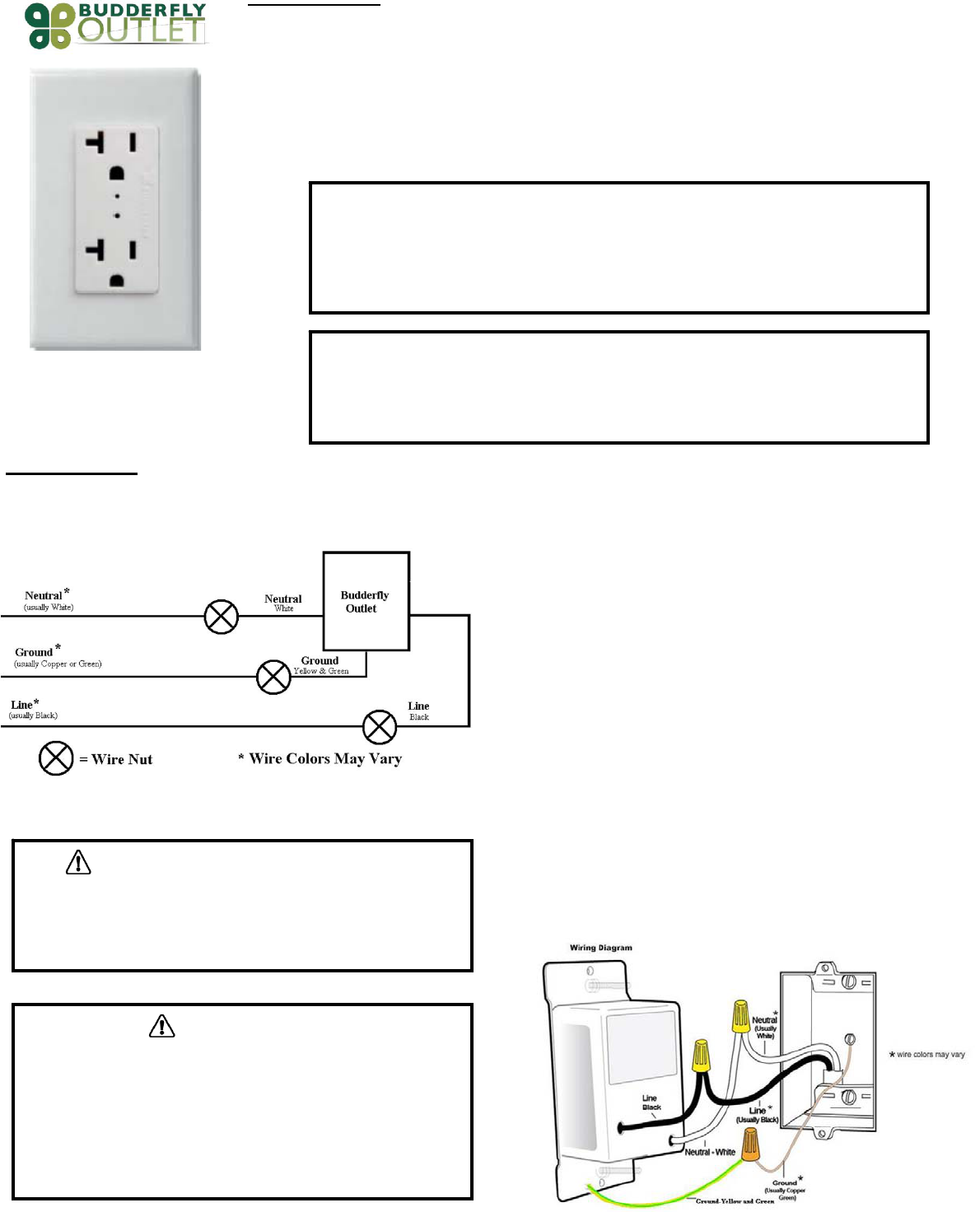
TheBudderflyDualBandOutletmaybeusedinnewinstallationsortoreplaceanexistingOutlet.Thewiringschematicwillbeasperbelow:
1. Atthecircuitbreakerorfusepanel,disconnectthepowerforallofthecircuits
intheswitchjunctionbox.
2. DoubleCheckthatthepowerisOFFtotheOutletbytryingtoturnona
deviceconnectedtotheplugbeforecontinuing.
3. Removethewallplatefromtheplugyouarereplacing.Then,unscrewthe
outletitselfandpullitoutfromthejunctionbox.
4. Disconnectthewiresfromtheoutletyouarereplacing.
5. FollowtheWiringinformationprovidedbelowandconnectthewiresas
follows:
‐ ConnecttheGROUNDwire(usuallyBareCopperorGreen)totheGroundwire
ofBudderflyDualBandOutlet(Yellow&Green).
‐ ConnecttheLINEwire(usuallyBlack)thatcomesfromtheelectricalservice
paneltotheHOTwireofBudderflyDualBandOutlet(Black).
‐ ConnecttheNEUTRALwire(usuallyWhite)totheNeutralwireofBudderfly
DualBandOutlet(White).
6. Afteryouhaveconnectedallofthewires,ensurethatallofthewire
connectorsarefirmlyattachedandthatthereisnoexposedcopperexceptfor
theGROUNDwire.
7. GentlyplaceBudderflyDualBandOutletintothejunctionbox.Then,screw
theOutletintoplace.
8. Reinstallthewallplate
9. EnablepowertotheOutletfromthecircuitbreakerorfusepanel
10. AddthedeviceaddresstotheBudderflysoftware.
WARNING:Ifyouarenotsureaboutanypartoftheaboveinstructions,consulta
qualifiedelectrician.
WARNING–ELECTRICALSHOCKHAZARD
• TheBudderflyDualBandOutletisintendedforinstallationinaccordancewiththe
NationalElectricCodeandlocalregulationsintheUnitedStates.
• Ifyouarenotknowledgeableorcomfortablewithelectricalcircuitry,youshouldhavea
qualifiedelectricianinstalltheBudderflyDualBandOutletforyou.
Warning
• InstalltheBudderflyDualBandOutletsindooronly.
• NeverusetheBudderlyOutletstopowermedicaland/orlifesupportequipment.
• TheequipmentpluggedintothisBudderflyDualBandOutletmustnotexceed
2400Wat120VAC.
WARNING–ELECTRICALSHOCKHAZARD
• TurnOFFthepowertothebranchcircuitfortheOutletatthe
servicepanel.
• AllwiringconnectionsmustbemadewiththePOWEROFFto
avoidpersonalinjuryand/ordamagetotheOutlet.
WiringInformation
• Important:BudderflyOutletisratedforandintendedtoonly
beusedwithcopperwire.
• Use12AWGorlargerwiressuitablefor80o.
• Remove3/4"(1.9cm)ofinsulationfromeachwire.
Connectasfollows:Twiststrandsofeachendtightlytogether.Hold
bareendsofwirestogetherandpushfirmlyintowireNut.ScrewNut
clockwisemakingsurethatnobareconductorshowsbelowthe
connector
Features:
‐ Abilitytocreateagroupofdevices
‐ Abilitytomonitorpowerconsumption
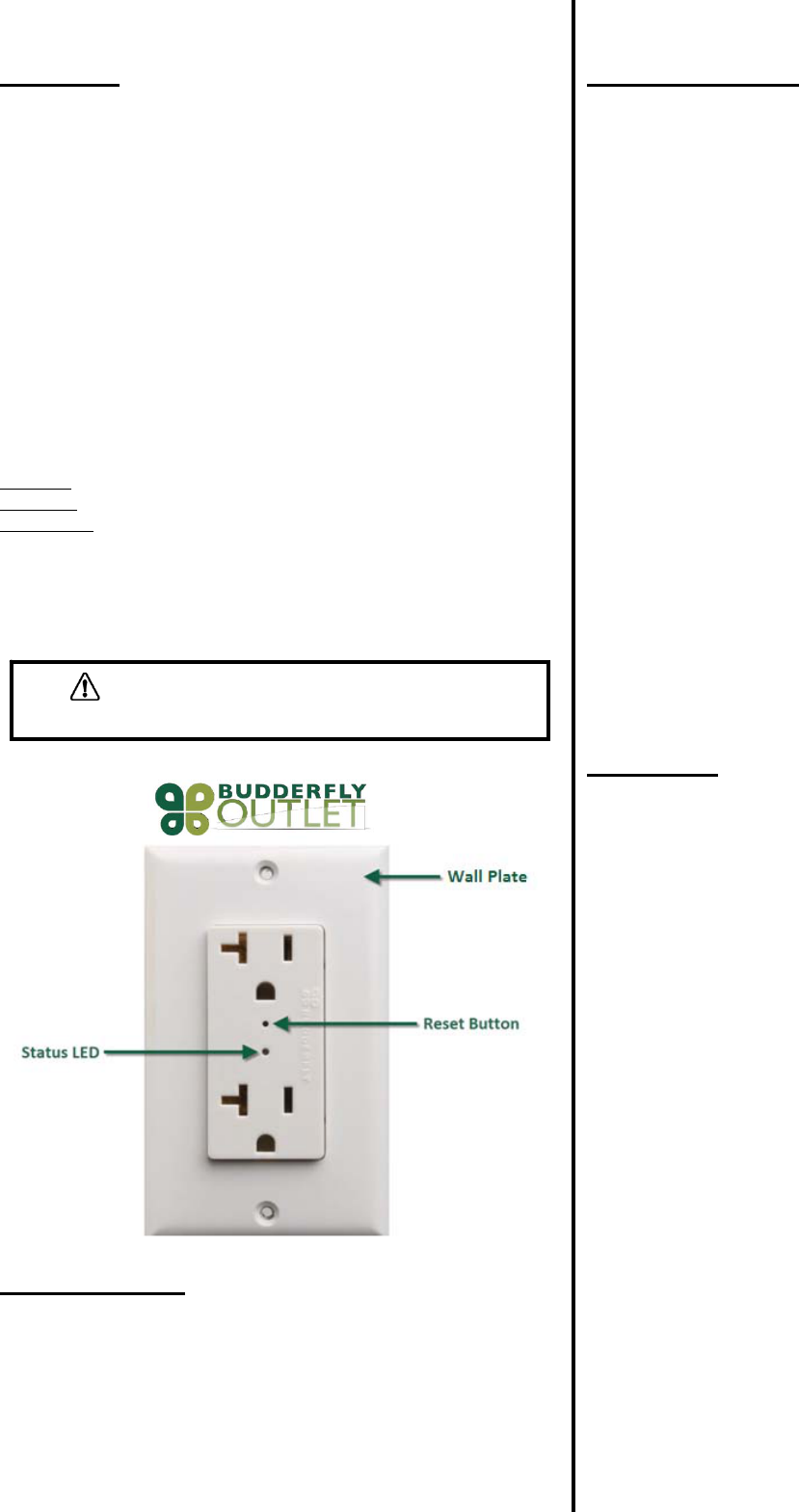
‐ LEDindicatortoshowthestateoftheOutlet
DeviceGrouping:
‐ UsingtheBudderflysoftware,itispossibletocreateaGroupof
Outlets.
Powerconsumption:
TheBudderflyDualBandOutletswillmeasurethecurrent,thevoltageandthe
powerconsumedbytheconnectedload,andwillstoretheminimum,
maximumandaveragedataforthepast7days.
ThedatacanbeaccessedatanytimethrutheBudderflysoftware.Theuser
cangeneratereports,monitortheconsumptionorcheckexpenses.
LEDIndicators:
TheBudderflyOutletsareequippedwith1bi‐ColorLEDthatwillindicatethe
stateofthedevice.
LEDisOff:TheBudderflyOutletisnotpowered.
LEDisRed:TheBudderflyOutletisOnandnotmemberofagroup.
LEDisGreen:TheBudderflyOutletisOnandismemberofagroup.
Reset:
Ifthedevicestopsresponding,itcanberestartedbypushingtheResetButton.
Anon‐metallicpinshouldbeusedtopushtheresetbutton.
Noneofthestoredparametersareaffected.
Specifications:
Power:120VAC/60Hz
MaximumLoads:2400W,20A(max),1HP.
OperatingTemperature:10oCto+40oC
Certification:ULCertificationisinprogress
Forindooruseonly
Specificationssubjecttochangewithoutnoticeduetocontinuingproduct
improvement.
Communication:
TheBudderflyDualBandOutletsusethepowerlineandradiofrequencyto
communicatewiththe“FacilityController”.
Theoutletscanreplytothefollowingcommands:
• Join/Disjoingroup“X”:TheoutletwillJoin/Disjointhegroup”X”.Each
outletcanbeamemberofseveralgroupsatthesametime.
• DirectRTCsynchronization:Theoutletcanreceiveacommandto
synchronizeits“RealTimeClock”
• GetActualMeasurement:Whentheoutletreceivesa“Get
Measurement”command,itwillsendbacktothefacilitycontrollera
stringofdatathatcontains:
‐ TheCurrentinAmpere“A”.
‐ ThePowerinWatt“W”.
‐ ATimestamp.
• GetStoredMeasurement:TheoutletwillsendbacktotheFacility
Controllerthestoredelectricalmeasurements.
• DirectResetCommands:Theoutletcanreceive3typesofreset
commands:
‐ HardReset:Thiscommandwillrestartthedevicewithout
affectinganystoredparameter.
‐ DataReset:Thiscommandwilleraseallthemeasurement
andRTCdatastoredinthenon‐volatilememory.
‐ GroupReset:Thiscommandwillremovethedevicefrom
allthejoinedgroups.
• GroupResetCommands:Theaboveresetcommandscanbe
directedtoagroupofdevicesinsteadofjustonedevice.
Warranty:
BudderflyLLCwarrantstotheoriginalconsumerpurchaserandnotforthe
benefitofanyoneelsethatthisproductatthetimeofitssalebyBudderflyisfree
ofdefectsinmaterialandworkmanshipundernormalandproperusefora
periodofthree(3)yearsfromdateofdeliverytoyou.Budderfly’sonlyobligation
istocorrectsuchdefectsbyrepairorreplacement,atitsoption,ifwithinsuch
threeyearperiodtheproductisreturnedprepaidviaBudderfly’sReturned
MaterialsAuthorization(RMA)processtoBudderflyLLC,Att:QualityAssurance
Department,2TrapFallsRoad,Suite507,Shelton,CT06484.Innocaseis
producttobereturnedwithoutfirstobtaininganRMA.
Thiswarrantyexcludesandthereisdisclaimedliabilityforlaborforremovalof
thisproductorreinstallation.Thiswarrantyisvoidifthisproductisinstalled
improperlyorinanimproperenvironment,overloaded,misused,opened,
abused,oralteredinanymanner,orisnotusedundernormaloperating
conditionsornotinaccordancewithanylabelsorinstructions.Thereareno
otherorimpliedwarrantiesofanykind,includingmerchantabilityandfitness
foraparticularpurpose,butifanyimpliedwarrantyisrequiredbytheapplicable
jurisdiction,thedurationofanysuchimpliedwarrantyisrequiredbythe
applicablejurisdiction,thedurationofanysuchimpliedwarranty,including
merchantabilityandfitnessforaparticularpurpose,islimitedtothreeyears.
Budderflyisnotliableforincidental,indirect,special,orconsequential
damages,includingwithoutlimitation,damageto,orlossofuseof,any
equipment,lostsalesorprofitsordelayorfailuretoperformthiswarranty
obligation.Budderfly’sliabilityonanyclaimfordamagesarisingoutofin
connectionwiththemanufacture,sales,installationdelivery,oruseofthe
productshallneverexceedthepurchasepriceoftheproduct.Theremedies
providedhereinaretheexclusiveremediesunderthiswarranty,whetherbased
oncontract,tortorotherwise.
WARNING–ELECTRICALSHOCKHAZARD
• Neveruseametallicpintopresstheresetbutton.
FCCID:QCVR0710021
MadeinChina
WARNING
Chan
g
esormodificationsnotex
p
ressl
y
a
pp
rovedb
y
the
p
art
y
res
p
onsibleforcom
p
liancecouldvoidtheuser’sauthorit
y
too
p
eratethise
q
ui
p
ment
FCCComplianceStatement
ThisdevicecomplieswithPart15oftheFCCRules.Operationissubjecttothefollowingtwoconditions:
(1) Thisdevicemaynotcauseharmfulinterferenceand
(2) Thisdevicemustacceptanyinterferencereceived,includinginterferencethatmaycauseundesiredoperation.
ThisequipmenthasbeentestedandfoundtocomplywiththelimitsforaclassBdigitaldevice,pursuanttopart15oftheFCCRules.Theselimits
aredesignedtoprovidereasonableprotectionagainstharmfulinterferenceinaresidentialinstallation.Thisequipmentgenerates,usesandcan
radiateradiofrequencyenergyandifnotinstalledandusedinaccordancewiththeinstructions,maycauseharmfulinterferencetoradio
communications.However,thereisnoguaranteethatinterferencewillnotoccurinaparticularinstallation.Ifthisequipmentdoescauseharmful
interferencetoradioortelevisionreception,whichcanbedeterminedbyturningtheequipmentoffandon,theuserisencouragedtotryto
correcttheinterferencebyoneormoreofthefollowingmeasures:
• Reorientorrelocatethereceivingantenna.
• Increasetheseparationbetweentheequipmentandreceiver.
• Connecttheequipmentintoanoutletonacircuitdifferentfromthattowhichthereceiverisconnected.
• Consultthedealeroranexperiencedradio/TVtechnicianforhelp.
Theuseriscautionedthatchangesandmodificationsmadetotheequipmentwithouttheapprovalofmanufacturercouldvoidtheuser'sauthorityto
operatethisequipment.