CLEVER BRIGHT BSEM-12 BLUETOOTH STEREO EARBUDS WITH BUILT-IN MIC User Manual
CLEVER BRIGHT INTERNATIONAL (H.K.) LTD. BLUETOOTH STEREO EARBUDS WITH BUILT-IN MIC Users Manual
User manual
Securityprecautions
Securityprecautions:Inordertohaveaproperandsafetyuseoftheheadset,pleasereadthis
usermanualindetailandsaveit.
Besuretoawarethefollowingguidelineswhenusingyourheadset.
1. Shouldadjustvolumeandtimereasonablywhenusingtheheadset.
2. Pleasestopusingtheheadsetinpotentiallyhazardoussituationtoensureyoursafety.
3. Pleaseavoidsuingheadsettolistentomusic,makeorreceivecallstoavoiddistractionwhile
driving.
4. Putthisproductanditsaccessoriessomewhereoutofthereachofchildren,toavoidafatal
dangercausedbyinappropriateuse.
5. Shouldkeepwaterfromenteringtheheadsetduringgrooming,whichmaycausedamageto
soundqualityorheadset.
6. Shouldavoidturningthevolumesohighthatyoucan’thearanythingaroundyou.Ifyoufeel
atinnitusorthevolumeistoohigh,pleasereducethevolume.
7. Stopusingtheheadsetifyoufeelobviousdiscomfort,irritationorhaveotheradverse
reactions.
8. Theheadsetshouldnotbestoredoruseattemperaturesbelow‐15℃(5℉)orabove55℃
(131℉)whichmayshortenheadsetorbatterylife.
Overviewofheadset
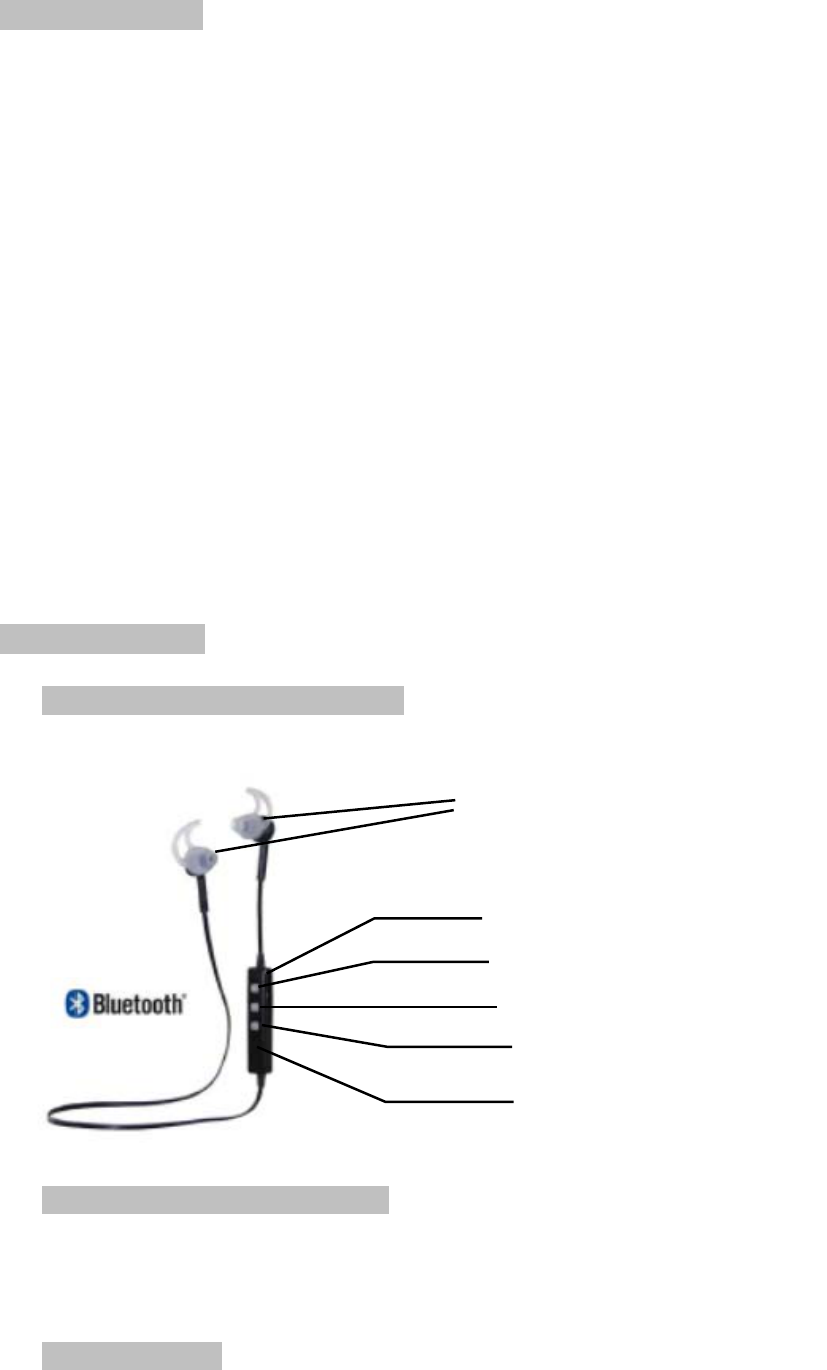
OverviewofI5Bluetoothstereoheadset:
S2Bluetoothsportsheadsetinthebox:
S2Bluetoothsportsheadset1pc
USBchargingcable1pc
User’smanual1pc
Chargerandbattery:
Earpiece
Microphone
Vol(+)NextTrack
MFbutton
Vol
(
‐
)/
PreviousTrack
LEDIndicator

PleasecheckthechargingcableisoriginalornotbeforechargingtheBluetoothheadset.
Warning:
MustuseoriginalchargecabletochargefortheBluetoothheadset,otherwiseitmaydamagethe
headset.Thus,voltageofchargermustbe5V,electriccurrentexceed100mA(5V/100mA).
HandsFree
Charging:
Thisheadsetusesanon‐detachablebuilt‐inrechargeablebattery.Inordertopreventdamageof
theheadset,pleasedonotremovethebattery.
1. Beforecharging,makesuretheheadsethasbeenswitchedoff.
2. PlugUSBcableintothechargingportofheadset;plugtheothersideofUSBcableintoUSB
chargerorotherchargingdevice.Chargingwillstartandtheredlightremainsbrightonthe
headset.
3. Chargingtimeofheadsettakesapproximatelyupto1.5–2hours,bluelightremainsbright
orredlightswitchoffafterchargingcompleted.
Pairingmode:
KeeppresstheMFbuttonuntilblueandredlightsblinkalternatively.
Reconnectionmode:
KeeppresstheMFbuttonuntilbluelightblinks.
Switchoff
KeeppresstheMFbuttonuntilredlightblinks.
Pairyourheadsetwithyourmobilephone:
1. Keepthedistancebetweentheheadsetandmobilephonewithin1meter.Thecloser,the
better.
2. KeeppresstheMFbuttonuntilblueandredlightsblinkalternatively.,enteredtopairing
mode.
3. InitiateBluetoothfunctionofmobilephone(orotherdeviceneededtobeconnected).Then
“S2”willbeshownonyourphone.
4. Select“S2”(somemobilephonesneedyoutoinputPIN“0000”aspassword)andthe
headsetwillautomaticallyconnectwithyourmobilephone.
※Attention:Generally,thereare120secondsatmaximumtopairheadsetwithyour
mobilephone,ortheheadsetwillpoweroffautomaticallywhenthelightgoesout.Please
retrysteps1to4topairagainifyouroperationdoesn’twork.
Disconnecttheheadsetwithyourmobilephone:
Switchofftheheadset.
OrclosetheBluetoothfunctionofyourmobilephone.
Ortaketheheadsetfromthephonetomorethan20m(60ft)away.
Reconnectthepairedheadsetwithyourmobilephone:
1. Keepdistanceoftheheadsetandmobilephonewithin1meter.Thecloser,thebetter.
2. Switchontheheadset,andensuretheheadsetentersintoreconnectionmodewhenthe
bluelightblinks.
3. SwitchonBluetoothsearchfunctioninyourmobilephoneofotherdeviceneededtobe

connected.Thentheheadsetwillautomaticallyreconnectwiththemobilephonewhichhas
connectedlasttime.
Pairyourheadsetwithtwomobilephone:
1. Keepdistancebetweentheheadsetandmobilephone1(orotherdeviceneededtobe
connected)within1meter.Thecloser,thebetter.
2. Ensurethattheheadsetentersintopairingmode.
Theblueandredlightsblinkalternatively.
3. SwitchonBluetoothsearchfunctionofphone1,thenpairheadsetwithphone1.
4. TurnofftheBluetoothfunctioninyourphone1andtheheadset.
5. Restarttheheadsetandensuretheheadsetenterstopairingmode.InitiateBluetooth
functioninyourphone2andconnectitwiththeheadset.
6. TurnontheBluetoothsearchfunctioninyourphone1andconnectitwiththepaired
headset.Thentheheadsetwillconnectwithtwomobilephonesatthesametime.
Answerincomingcall:
PresstheMFbuttononcetoanswerthecall.Oruseyourmobilephonetoanswerit.
Voicecommand:
Theheadsetwillissue“YES”or“NO”whenthereisanincomingcall.Speak“YES”toanswerit
or“NO”torejectit.
Hangupcall:
PresstheMFbuttononceoruseyourmobilephonetohangupyourcall.
Rejectacall:
Whenthereisanincomingcall,theheadsetwillissueasound,keeppressingtheMFbuttonfor
around2seconds,thenreleaseoruseyoumobilephonetorejectthecall.
Voicedialing:(Pleasemakesureyourmobilephonesupportsthisfunction)
KeeppressingtheMFbuttonfor2seconds,thenrelease,yourmobilephonewillenterintothe
voicedialinginterface.
Lastcallredialing:
Double–clicktheMFbutton.
Voiceswitch:(EnglishandChinese)
Underparingmode,keeppresstheMFbuttonandVOL(‐)atthesametimetoachieveit.
Three–waycalling:(Pleasemakesurewhetheryourphonesupportsthisfunction)
1. Whenmobilephone1isinconversation,therecomesacallfrommobilephone2;pressing
theMFbuttononce.Andyoucananswerthecallfrommobilephone2,andtheconversation
ofmobilephone1willbedropped.
2. Whenmobilephone1isinconversation,therecomesacallfrommobilephone2;pressing
theMFbuttonfor2seconds.Youcananswerthecallfrommobilephone2;andkeepthe
conversationofmobilephone1.
3. Whenmobilephone1isinconversation,youcankeeppressingtheMFbuttonforaround2
seconds.Theheadsetwillbeswitchedbacktomobilephone1.
4. Whenmobilephone2isinconversationandthemobilephone1isreserved.PresstheMF
buttononce,youcananswerthecallformobilephone1,andtheconversationofmobile
phone2willbedropped.
Musicplay/pause:
PresstheMFbuttononcetoplay/pausemusic.

Volumeadjustment/Musicselection:
KeeppressestheVOL(+)andVOL(‐)toadjustvolume.
PressVOL(+)andVOL(‐)oncetoselectprevioustrackornexttrack.
FAQ:
1. Headsetcannotpairwithmobilephone.
Ans:pleasecheckwhetheryourheadsetisinpairingmodeorreconnectionmode,checkwhether
Bluetoothsearchfunctionofyoumobilephonehasbeenopened.Thus,checkyourmobile
device’sBluetoothmenuanddelete/forgettheheadset,reconnecttheheadsetfollowing
instructionsofusermanual.
2. Headsetcannotbeswitchon.
Ans:Pleasecheckthebatterystatusofyourheadset.
3. CanIchangebatteryfortheheadset?
Ans:No,thisheadsetuseabuilt–innon–detachableLi–Polymerbattery,itcannotbe
removed.
4. CanIuseheadsetwhiledriving?
Ans:Forsafetyreason,westronglyrecommendnottouseover–earheadsettoavoiddistraction
whiledriving.
5. Headsetdisconnectwithyourmobilephonewithin10meter.
Ans:Pleasecheckifthereismetalorothermaterialwithinrelativelycloserangemayinterfere
Bluetoothconnection,asBluetoothisaradiotechnologythatissensitivetoobjectsbetweenthe
headsetandtheconnecteddevice.
6. Cannothearingasoundfromyourcomputerormobilephone.
Ans:PleasecheckwhethertheoutputchannelofyourcomputerisBluetoothAudioDeviceand
BluetoothfunctionofyourcomputersupportA2DPprofile.Andpleasecheckvolumeofyour
headset,andcomputer/mobilephone.
7. CannotusetheheadsettocontrolvolumeorselecttrackofAPPofyourmobilephone.
TechnicalSpecification
Ans:SoftwaresettingsofAPPmaybevariedledtosomefunctionsoftheAPPmaynotcontrolby
theheadset
Specification:
Bluetoothversion:BluetoothV3.0
Frequencyrange:2.4GHz–2.48GHz
Operatingdistance:upto10m(freespace)
Standbytime:upto180hrs
Talking/music–playingtime:about5hours
Chargingtime:about2hours
Bluetoothprofiles:A2DP、AVRCP、HSP、Hfp
Frequencyresponse:20Hz–20kHz
Operationaltemperature:‐10to50℃

Techn icalspecificationsaresubjecttochangewithoutnotice,weapologizeforanyinconvenience.
FCCSTATEMENT
ThisdevicecomplieswithPart15oftheFCCRules.Operationissubjecttothefollowingtwo
conditions:1.Thisdevicemaynotcauseharmfulinterference.2.Thisdevicemustacceptany
interferencereceived,includinginterferencethatmaycauseundesiredoperation.
Changesormodificationsnotexpresslyapprovedbythepartyresponsibleforcompliancecould
voidtheuser'sauthoritytooperatetheequipment.
RadiationExposureStatement:
ThisequipmentcomplieswithFCCradiationexposurerequirement.Thedevicecanbeusedin
portableexposureconditionwithoutRFstriction