CLEVER BRIGHT CB-M001 BLUETOOTH SPEAKER User Manual mushroom speaker FCC

CLEVER BRIGHT INTERNATIONAL (H.K.) LTD. BLUETOOTH SPEAKER mushroom speaker FCC

User Manual

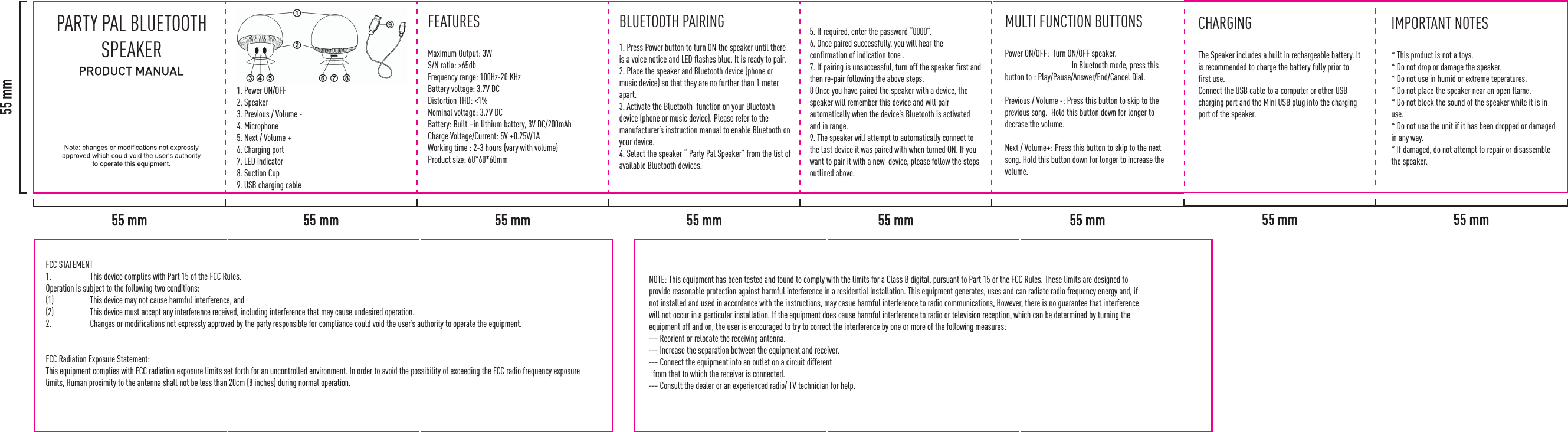
PARTY PAL BLUETOOTH SPEAKER1. Power ON/OFF2. Speaker3. Previous / Volume - 4. Microphone5. Next / Volume + 6. Charging port7. LED indicator8. Suction Cup 9. USB charging cable FEATURESMaximum Output: 3WS/N ratio: >65dbFrequency range: 100Hz-20 KHzBattery voltage: 3.7V DCDistortion THD: <1%Nominal voltage: 3.7V DCBattery: Built –in lithium battery, 3V DC/200mAhCharge Voltage/Current: 5V +0.25V/1AWorking time : 2-3 hours (vary with volume)Product size: 60*60*60mmBLUETOOTH PAIRING1. Press Power button to turn ON the speaker until there is a voice notice and LED flashes blue. It is ready to pair. 2. Place the speaker and Bluetooth device (phone or music device) so that they are no further than 1 meter apart. 3. Activate the Bluetooth  function on your Bluetooth device (phone or music device). Please refer to the manufacturer’s instruction manual to enable Bluetooth on your device. 4. Select the speaker “ Party Pal Speaker” from the list of available Bluetooth devices. 5. If required, enter the password “0000”.6. Once paired successfully, you will hear the confirmation of indication tone . 7. If pairing is unsuccessful, turn off the speaker first and then re-pair following the above steps.8 Once you have paired the speaker with a device, the speaker will remember this device and will pair automatically when the device’s Bluetooth is activated and in range. 9. The speaker will attempt to automatically connect to the last device it was paired with when turned ON. If you want to pair it with a new  device, please follow the steps outlined above. MULTI FUNCTION BUTTONSPower ON/OFF:  Turn ON/OFF speaker.                                    In Bluetooth mode, press this button to : Play/Pause/Answer/End/Cancel Dial. Previous / Volume -: Press this button to skip to the previous song.  Hold this button down for longer to decrase the volume. Next / Volume+: Press this button to skip to the next song. Hold this button down for longer to increase the volume. CHARGING The Speaker includes a built in rechargeable battery. It is recommended to charge the battery fully prior to first use. Connect the USB cable to a computer or other USB charging port and the Mini USB plug into the charging port of the speaker. IMPORTANT NOTES* This product is not a toys. * Do not drop or damage the speaker. * Do not use in humid or extreme teperatures. * Do not place the speaker near an open flame. * Do not block the sound of the speaker while it is in use.* Do not use the unit if it has been dropped or damaged in any way. * If damaged, do not attempt to repair or disassemble the speaker. NOTE: This equipment has been tested and found to comply with the limits for a Class B digital, pursuant to Part 15 or the FCC Rules. These limits are designed to provide reasonable protection against harmful interference in a residential installation. This equipment generates, uses and can radiate radio frequency energy and, if not installed and used in accordance with the instructions, may casue harmful interference to radio communications, However, there is no guarantee that interference will not occur in a particular installation. If the equipment does cause harmful interference to radio or television reception, which can be determined by turning the equipment off and on, the user is encouraged to try to correct the interference by one or more of the following measures:--- Reorient or relocate the receiving antenna.--- Increase the separation between the equipment and receiver.--- Connect the equipment into an outlet on a circuit different  from that to which the receiver is connected.--- Consult the dealer or an experienced radio/ TV technician for help.FCC STATEMENT1.  This device complies with Part 15 of the FCC Rules.Operation is subject to the following two conditions:(1)  This device may not cause harmful interference, and(2)  This device must accept any interference received, including interference that may cause undesired operation.2.  Changes or modifications not expressly approved by the party responsible for compliance could void the user’s authority to operate the equipment.FCC Radiation Exposure Statement: This equipment complies with FCC radiation exposure limits set forth for an uncontrolled environment. In order to avoid the possibility of exceeding the FCC radio frequency exposure limits, Human proximity to the antenna shall not be less than 20cm (8 inches) during normal operation.

Navigation menu