Canhold BTHF010D Bluetooth Portable Handsfree Car Kit with Caller ID Display User Manual BTHF010D V40 cert apply use indd
Canhold International Ltd. Bluetooth Portable Handsfree Car Kit with Caller ID Display BTHF010D V40 cert apply use indd
Canhold >
users manual
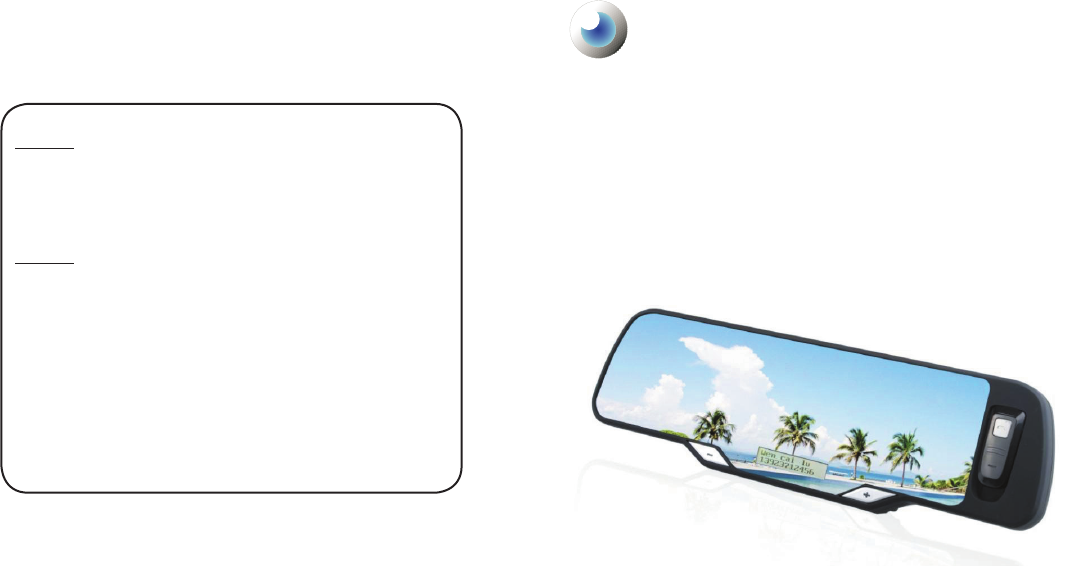
V4.0
User Manual
Bluetooth Handsfree Car Kit
With Caller ID Display & Phonebook
Installation (Multi-point)
BLUE MIRROR
For Model BTHF010D
Notice 1
You are cautioned that changes or modications not expressly approved by the
party responsible for compliance could void the user authority to operate the
equipment.
Notice 2
This equipment has been tested and found to comply with the limits for a Class B
digital device, pursuant to part 15 of the FCC rules. These limits are designed to
provide reasonable protection against harmful interference in a residential instal-
lation. This equipment generates, uses and can radiate radio frequency energy
and, if not installed and used in accordance with the instructions, may cause
harmful interference to radio communications.
This equipment complies with FCC radiation exposure limits set forth for an un-
controlled environment. End users must follow the specic operating instructions
for satisfying RF exposure compliance. This transmitter must not be co-located or
operating in conjunction with any other antenna or transmitter.

Contents
Overview.................................................
Use in car................................................
Detach / Insert the headset.....................
Quick User Guide....................................
Getting Started........................................
Charging..................................................
Switching On / Off....................................
Pairing with a phone................................
Connect / Reconnect to phone................
Handsfree functions................................
Phonebook..............................................
Care and maintenance............................
Specication............................................
FCC Notice..............................................
3
4
5
6-8
9
9
9
10
11
11-12
13-14
15
15
16
Care and Maintenance
g Check the laws and regulations on the use of mobile phones and handsfree equipment in
the area where you drive.
g Always give full attention to driving. In some areas, you are required to pull off the road and
park before making or answering a call.
g Do not expose the handsfree to extreme temperature or direct sunlight.
g Do not expose it to moisture or humidity. Keep it away from any liquid or chemicals.
g Do not keep the device in dusty or dirty area. Only use a soft damp cloth to clean it.
g Do not attempt to disassemble the handsfree and the chargers.
g Do not try to replace the rechargeable battery inside the handsfree.
g Charge the handsfree only with the supplied charger.
g Travel charger can only be used indoor under normal temperature and humidity.
Specication
Bluetooth Specication
Bluetooth Prole Supported
Frequency Range
Working Distance Range
Dimensions (main unit)
Weight
LCD Display
Phonebook
DSP
Pairing
Charging Time
Talking Time
Standby Time
Rechargeable Battery
Battery Protection
Input Current
Input Voltage
Speaker Power
Speaker Impedance
Sensitivity of Microphone
: Version 2.0 compliant
: Headset and Handsfree Proles
: 2.4 GHz spectrum
: 10 Meters (class 2)
: 280(L) x 85(W) x 22(T) mm
: 340 g (main unit), 9.8g (headset)
: Dot matrix rolling display, battery status icon,
backlight
: Bluetooth wireless download, stores up to 250
records.
: Full duplex transmission, noise suppression and
echo cancellation.
: Memorize up to 8 mobile phones simultaneously.
: Within 3 hours
: Up to 12 hours(main unit), 2 hours (headset)
: Up to 200 hours(main unit), 20 hours(headset)
: Lithium-ion, 3.7V, 950 mAh installed(main unit)
Lithium-ion, 3.7V, 90 mAh installed(headset)
: Over charge and over discharge protection
: 400 mA (internal controlled)
: DC 5V
: 2W (max)
: 4 ohm
: -60dB
14
Overview
Model BTHF010D
Bluetooth Handsfree Car Kit with Caller ID Display & Phonebook (Multi-point)
Thank you for selecting BTHF010D Bluetooth handsfree car kit. It is a rechargeable
speakerphone which is easy to operate in car. It is specially designed for connecting Bluetooth
compatible mobile phones without wires in car. No matter if the car is switched on or not, you
can enjoy the freedom of wireless communication. No power connection or connection to the
mobile phone is required. Using the single-button control of the handsfree, you can make and
answer calls without touching the phone. You can even leave the phone in pocket or anywhere
inside the car. With built-in DSP circuit, echo and background noise are cancelled and
suppressed effectively. Thus providing clear sound and high quality conversation even in noisy
environment.
This handsfree car kit is specially designed for Bluetooth mobile phones or other Bluetooth
compatible devices that support the Handsfree or Headset proles.
The Bluetooth wireless technology is a worldwide specication for a small form-factor, low-cost
and short-range (about 10 meters) radio solution providing links between mobile computers,
mobile phones, other portable and handheld devices and connectivity to the internet.
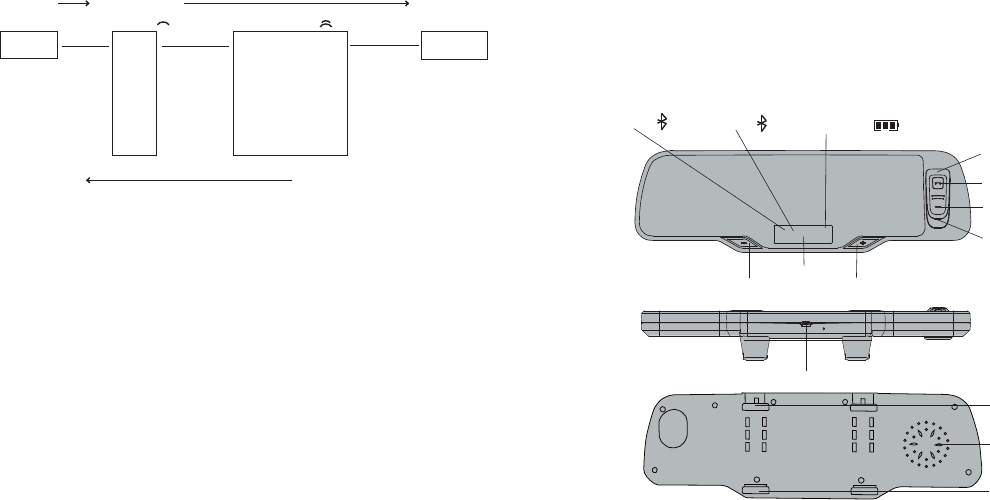
LED indicator
Multifunction Key
Volume upVolume down
microphone
extensible clip
LCD display
Charging port
inextensible clip
Speaker
Battery icon status
Detachable headset
Bluetooth icon ABluetooth icon B
3
Check records / Dial from phonebook
1. In stand by mode, press & hold ‘Volume -’ button for 2 seconds to enter phonebook menu.
2. LCD displays letter 'A'. This is the 1st level of the menu, click ‘Volume +’ or ‘Volume -’ to move
to other letters. The phonebook records of the 1st letter of the names are listed from A to Z in
alphabetical order. Other symbols are listed in '['.
3. Click Multifunction Key once to enter the desired letter. This is the 2nd level of the menu. The name
under the letter and the corresponding number will be shown. Click ‘Volume +’ or ‘Volume -’ to move
to other names.
4. Click Multifunction Key once to make a call.
Menu Structure
Press & hold Click Multifunction Key once
Volume -
for 2 sec.
Bluetooth
Double click Multifunction Key
1st Level 2nd Level
A
Ada 12345678 Make Call
B Alex 23456789
C Andy 34567890
D Aron 45678901
. .
. .
Z .
[ Barry 56789012
Exit phonebook
Double click Multifunction Key to go back to the pervious menu level or exit the menu.
(When there is an incoming call or making connection/disconnection with phone, the phone
book menu will be exited automatically.)
Erase all phonebook records
1. Disconnect the phone with BTHF010D.
2. Click together the volume ' + ' and ' - ' bottons once.
3. BTHF010D displays 'Erase?'. Press ' + ' to erase. Press ' - ' to leave.
4 13
Phonebook
You can wirelessly transfer your phonebook records from your phone to the memory of
BTHF010D. In the phonebook menu, you can check the contact name and number and then
dial out directly. When there is an incoming call and the number matches the phonebook
record, BTHF010D will show the caller name on the LCD.
Transfer phonebook records
You can transfer a single record or all the records from the phone at one time. Some phone
models support single record transfer only. The following are the general operating steps for
reference. For details, please refer to the user manual of the phone.
Note:
g When the memory (250 records) is full, BTHF010D will not receive any exceed records.
g Do not put punctuations for the rst letter of the contact names such as "." ";" "\" because
they would stop the record transfer process.
g Some phone models do not support transferring records from SIM card directly. In such
case, copy records from SIM card to phone rst.
g Don't press any button of BTHF010D during the record transfer process. It will cancel the
process.
Phonebook User Guide
1. Pair and connect BTHF010D with your Bluetooth enabled mobile phone.
2. Disconnect the phone with BTHF010D.
3. Find the target name contact(s) from contact list in your moblie phone.
4. *Select ‘Send Business Card' / 'Send Contact' / Or 'Send All' via Bluetooth.
5. Select HF010D from the Bluetooth device list.
6. BTHF010D will display the name contact(s) you send, and automatically store the
name contact(s) into handsfree memory (If you do not have more name contact(s) to send,
the last send contact name will stay on the screen for 5 seconds then LCD will show
'BLUETOOTH'.
* May various to different model of mobile phones.
5
Use in car
2
4
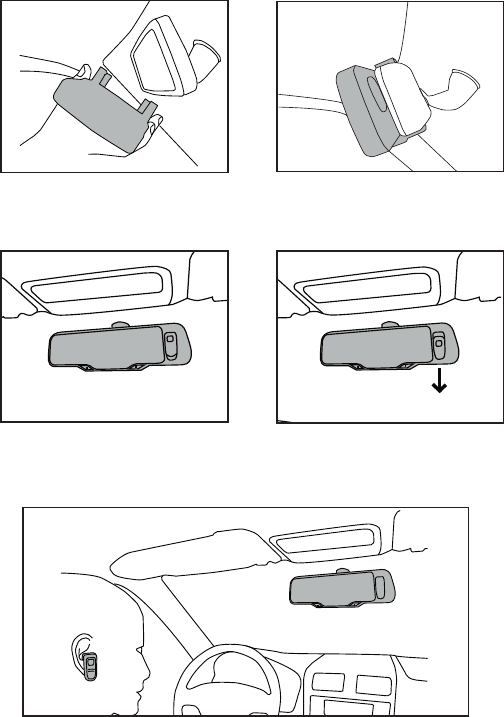
1. Fix the back of handsfree onto the front
of car rear view mirror as shown.
2. Make sure the handsfree is tightly
attached with the car rear view mirror.
3. Switch on the handsfree by pressing
and holding Multifunction Key for 3
seconds.
4. For private conversation and headset
using, pull the headset towards the
direction as shown.
5. You can now enjoy handsfree conversation both inside and outside the car.
1
3
12 5
Voice dial
Mute microphone
Adjust volume
Privacy
Disconnect with mobile
Shut down automatically
In standby mode, press Multifunction Key once. You will hear a
tone from the handsfree. It indicates the mobile phone is ready to
receive voice tag. Speak the name of the person you wish to call.
Then the mobile starts the voice dial automatically.
(Ensure the mobile phone supports Voice Control Dialing before
use.)
To temporarily mute the microphone, click together the volume ‘+’
and ‘-’ buttons once. This will allow you to hear the other side but
the other side does not hear you. Press ‘+’ and ‘-’ again for un-
mute.
Press ‘+’ or ‘-’ button to control volume up or down. LCD displays
the volume level.
Detach the headset from the carkit to initiate the private
conversation function.
In standby mode, press & hold the ‘+’ for 2 seconds. This function
is for connecting the handsfree to another mobile.
To reconnect to the phone, click Multifunction Key once.
Hansfree carkit will be switched off automatically if the connection
between the mobile phone and the handsfree breaks down for
more than 15 minutes.
* Functions ‘Redial the last number’, ‘Call waiting’ and ‘Call transfer’ are supported by
Handsfree Prole instead of Headset Prole. For using those functions, please check if the
mobile phone supports Handsfree Prole.
* Function ‘Volume Level ’ is available if the phone supports ‘Remote Volume Control’.
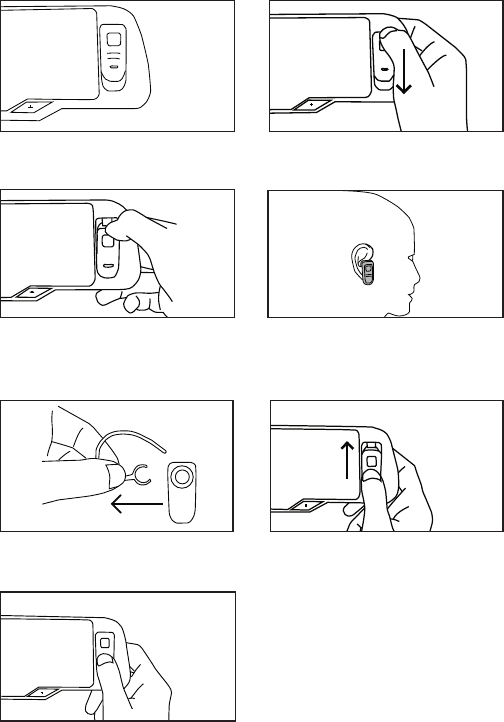
Detach the headset
1. Headset is connected to handsfree main
unit.
2. Place thumb at the location as shown
and pull the headset in the direction
indicated.
3. Headset is loosen from handsfree main
unit, LCD display turned off.
Insert the headset
4. Attach the earhook to the headset and
headset can be used.
1. Pull the earhook out from the headset as
shown.
2. Put heaset in the slot. Place the thumb
at the headset as picture show and push
the direction as indicated
3. LCD display turned on and handsfree
can be used in car.
1 2
3 4
1 2
3
* After taking the headset out of the
handsfree.Please insert the headset after
10 seconds, otherwise the handsfree
dysfunction and required to be turned off
and on.

611
Connect / Reconnect to phone
After the handsfree is switched on, it is in idle mode. It is waiting to be paired or connnected by
mobile phone. The LED indicator ashes blue every 5 seconds indicates this mode. When the
handsfree and the device are disconnected, the handsfree will return back to idle mode.
To connect with phone
EITHER
To connect with paired phone or reconnect with previously connected phone, click Multifunction
Key once. The handsfree will search and connect to the phone nearby automatically. (The LED
indicator ashes blue every second indicates the searching mode. The searching may last for
1/2 minute. If no phone can be found, the handsfree will return to idle mode.)
OR
To connect with the handsfree through the phone, in the setting menu of the phone, select
‘HF010D’ from ‘Paired Device’. Select ‘connect’ and the phone will connect to the handsfree.
Handsfree Functions
Receive call
Reject call
End call
Transfer to phone
(call transfer)
Redial the last number
When handsfree is ringing, press Multifunction Key once to
receive the call.
When handsfree is ringing, press Multifunction Key twice to
reject the call.
During a call, press Multifunction Key once.
During a call, press & hold Multifunction Key for 2 seconds.
To transfer back to handsfree, press Multifunction Key for 2
seconds again.
In standby mode, press Multifunction Key twice. The last number
will be redialed.
Quick User Guide
Status Operation LED Indicator &
Sound LCD Display
Switch On
Switch Off
Connect /
Reconnect in
side
(with paired
phone)
Connect /
Reconnect in
side
(with paired
phone)
Pairing
(for the
rst time
using the
handsfree)
Press and hold the Multifunction
Key for 3 seconds to turn on the
unit.
Press and hold the Multifunction
Key for 5 seconds.
In idle mode, press Multifunction
Key once
OR
Select paired device 'HF010D'
on mobile phone, and then select
'Connect'.
In idle mode, press Volume Key '-'
twice
OR
Press and hold the Multifunction
Key for 2 seconds, Handsfree
display 'BLUETOOTH'. Select
paired device 'HF010D' on mobile
phone, and then select 'Connect'.
1. Switch on the handsfree.
2. Enable Bluetooth feature of the
mobile phone.
3. In the Bluetooth menu, select
'add device' or 'search device'.
4. 'HF010D' appears in the device
list, press 'yes'.
5. Enter fixed pass key '0000'.
Pairing completes.
6. Edit the device name if you
would like to personalize it.
A low to high 'dodo' sou-
nd. Flashes blue every
5 seconds, indicates in
idle mode.
LED indicator goes off
Flashes blue every
5 seconds indicates
searching for paired
devices. If connected to
mobile with Handsfree
Profile, blue always on
indicates in standby
mode.
Flashes green every
5 seconds indicates
searching for paired
devices. If connected to
mobile with Handsfree
Profile, green always
on indicates in standby
mode.
Flashes blue every 5
seconds, indicates in
idle mode.
If connected with
Handsfree Prole, blue
always on indicates in
standby mode.
HF010D
>
BLUETOOTH
Power Off
BLUETOOTH
>
Connecting
>
Display
BLUETOOTH
>
Connecting
>
Display
BLUETOOTH
>
Connecting
>
Mobile phone
model name
,
Display
A
A
B
A
B

10 7
Pairing with a phone
Before using the handsfree, you must pair it with the mobile phone rst. Once the handsfree
and the phone has paired. they store the ID of each other. Thus they can connect each other
automatically. You can check, delete or rename the paired device in the devices list of the
mobile phone.
1. Place the Bluetooth handsfree and the Bluetooth mobile phone within a distance of 1 meter.
2. Switch on the Bluetooth mobile phone and enable Bluetooth feature.*If the phone has
'Prole' options, you are recommended to select 'Handsfree Prole' rather than 'Headset
Prole'
3. Turn on the handsfree. The LED indicator ashes blue every 5 seconds indicates it is in idle
mode.
4. On the Bluetooth mobile, searching for device, 'HF010D' will appear in the device list.
5. Select device 'HF010D' and enter fixed pass key '0000'. Pairing completed. The LED
indicator turns blue steadily indicates the handsfree is connected to the phone with
Handsfree Prole.
6. Make sure the paired mobile has returned to main menu.
7. The volume is automatically set to middle level. For best performance, press '+' or '-' to
adjust a suitable volume level.
To pair and connect a second mobile phone
With one phone already paired and connected,
1. Press the multi-function button for 2 to 3 seconds until ‘BLUETOOTH’ appears on the
display.
2. Search for Bluetooth devices from your second phone.
3. Select ‘HF010D’ from the list.
4. Enter the pairing code 0000 when prompted.
5. You should now be paired and connected. The Bluetooth name of your phone should
appear on the LCD screen. The LED indicator turns green steadily indicates the handsfree
is connected to the phone with Handsfree Prole.
Check if the mobile displays any message or icon which indicates the connecting status.
After pairing completed, some phones automatically connect to handsfree immediately. Some
phones keep waiting for builting up the connection manually. In this case, press Multifunction
Key once, BTHF010D will connect to the phone. Or you can select 'HF010D' from the "Paired
Device' of the phone. the phone will connect to the handsfree. Please refer to your phone's user
manual.
* ‘Handsfree Profile’ supports ‘Voice dial’, ‘Redial the last number’, ‘Call waiting’ and ‘Call
transfer’ functions. If the mobile phone only supports ‘Headset Prole’, those functions are
not available.
Status Operation LED Indicator &
Sound LCD Display
Pairing for
the second
phone
Receive Call
Reject Call
End Call
Transfer to
phone
Redial last
number
Voice dial
Mute
microphone
Adjust
Volume
Disconnect
with mobile
1. Press the multi-function
button for 2 to 3 seconds until
‘BLUETOOTH’ appears on the
display.
2. Search for Bluetooth devices
from your second phone.
3. Select ‘HF010D’ from the list.
4. Enter fixed pass key '0000'.
Pairing completes.
5. Edit the device name if you
would like to personalize it.
When handsfree is ringing, press
Multifunction Key once.
When handsfree is ringing, press
Multifunction Key twice.
During a call, press Multifunction
Key once.
Du r i n g a c a l l , pr e s s & ho l d
Multifunction Key for 3 seconds.
To transfer back, select function
key on mobile phone.
In standby mode, press Multi-
function Key twice.
In standby mode, press Multi-
function Key once.
During a call, click together '+'
and '-' buttons once. Click again
for un-mute.
Click '+' or '-' button to control the
volume up or down.
Press & hold '+' for 2 seconds.
To reconnect to phone, click
Multifunction Key once.
Flashes green every 5
seconds, indicates in
idle mode.
If connected with
Handsfree Profile,
green always on
indicates in standby
mode.
-
-
-
-
-
A tone from the hands-
free indicates the phone
is ready to receive voice
tag.
(You can still hear the
other side.)
-
-
BLUETOOTH
>
Connecting
>
Mobile phone
model name
,
Display
Call number
>
Active Call
Reject
Mobile phone
model name
-
Redial
>
Dialing
Voice Call
>
Dialing
MUTE MIC /
UNMUTE MIC
VOL
BLUETOOTH
AB