Canhold HF009 Bluetooth Handsfree Car Kit User Manual

Canhold International Ltd. Bluetooth Handsfree Car Kit

Users Manual Revised

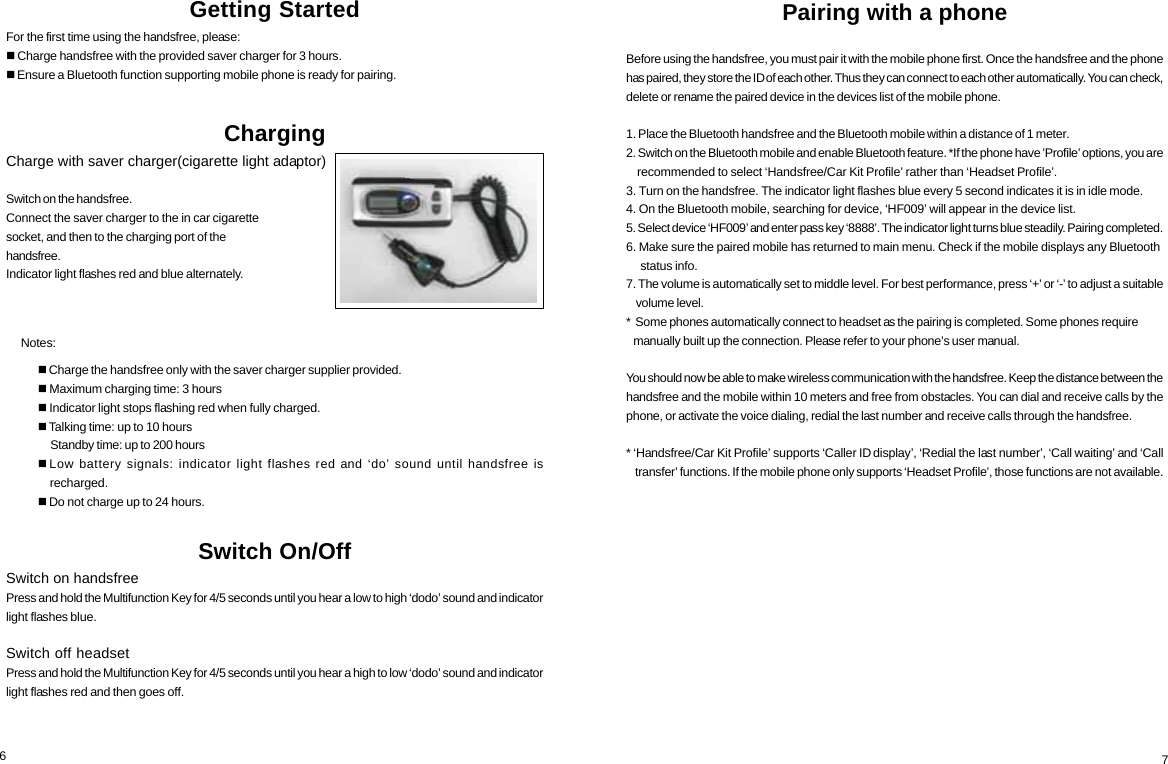
Getting StartedFor the first time using the handsfree, please: Charge handsfree with the provided saver charger for 3 hours. Ensure a Bluetooth function supporting mobile phone is ready for pairing.Charging     Notes:Switch On/OffSwitch on handsfreePress and hold the Multifunction Key for 4/5 seconds until you hear a low to high ‘dodo’ sound and indicatorlight flashes blue.Switch off headsetPress and hold the Multifunction Key for 4/5 seconds until you hear a high to low ‘dodo’ sound and indicatorlight flashes red and then goes off. Charge the handsfree only with the saver charger supplier provided. Maximum charging time: 3 hours Indicator light stops flashing red when fully charged. Talking time: up to 10 hours     Standby time: up to 200 hoursLow battery signals: indicator light flashes red and ‘do’ sound until handsfree is    recharged. Do not charge up to 24 hours.6Pairing with a phoneBefore using the handsfree, you must pair it with the mobile phone first. Once the handsfree and the phonehas paired, they store the ID of each other. Thus they can connect to each other automatically. You can check,delete or rename the paired device in the devices list of the mobile phone.1. Place the Bluetooth handsfree and the Bluetooth mobile within a distance of 1 meter.2. Switch on the Bluetooth mobile and enable Bluetooth feature. *If the phone have ’Profile’ options, you are    recommended to select ‘Handsfree/Car Kit Profile’ rather than ‘Headset Profile’.3. Turn on the handsfree. The indicator light flashes blue every 5 second indicates it is in idle mode.4. On the Bluetooth mobile, searching for device, ‘HF009’ will appear in the device list.5. Select device ‘HF009’ and enter pass key ‘8888’. The indicator light turns blue steadily. Pairing completed.6. Make sure the paired mobile has returned to main menu. Check if the mobile displays any Bluetooth     status info.7. The volume is automatically set to middle level. For best performance, press ‘+’ or ‘-’ to adjust a suitable    volume level.*  Some phones automatically connect to headset as the pairing is completed. Some phones require   manually built up the connection. Please refer to your phone’s user manual.You should now be able to make wireless communication with the handsfree. Keep the distance between thehandsfree and the mobile within 10 meters and free from obstacles. You can dial and receive calls by thephone, or activate the voice dialing, redial the last number and receive calls through the handsfree.* ‘Handsfree/Car Kit Profile’ supports ‘Caller ID display’, ‘Redial the last number’, ‘Call waiting’ and ‘Call    transfer’ functions. If the mobile phone only supports ‘Headset Profile’, those functions are not available.7Charge with saver charger(cigarette light adaptor)Switch on the handsfree.Connect the saver charger to the in car cigarettesocket, and then to the charging port of thehandsfree.Indicator light flashes red and blue alternately.
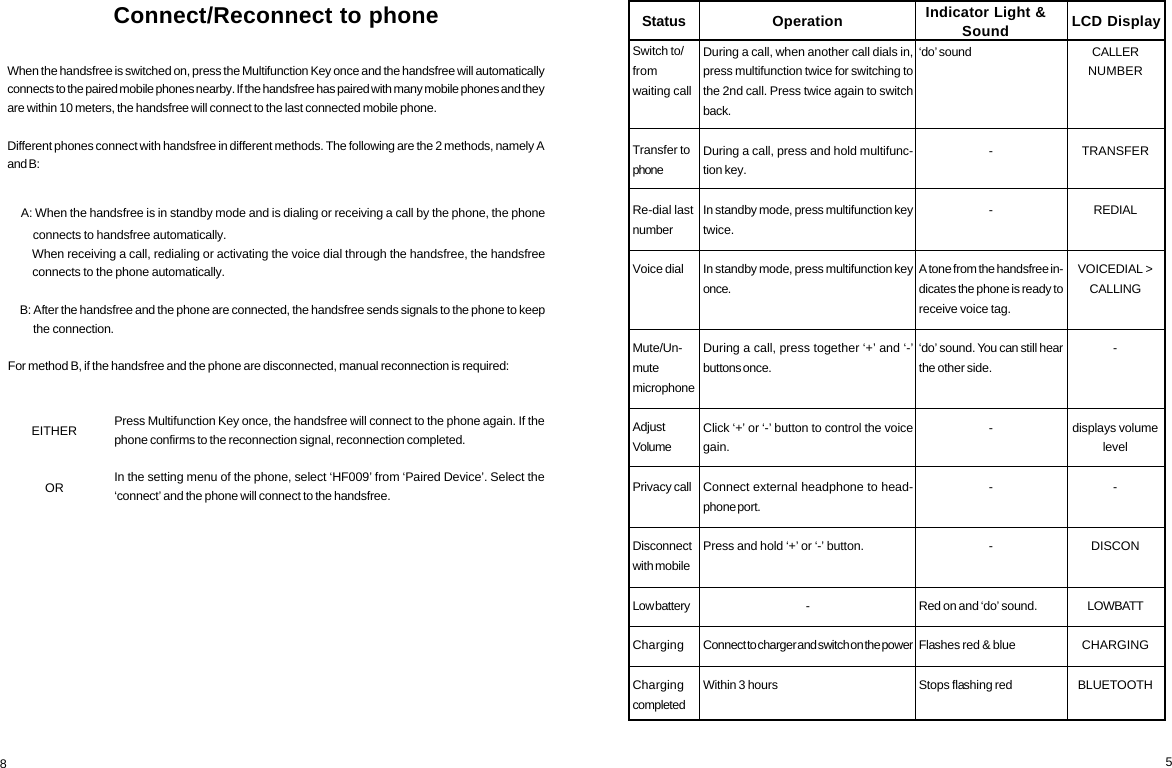
5Switch to/fromwaiting callTransfer tophoneRe-dial lastnumberVoice dialMute/Un-mutemicrophoneAdjustVolumePrivacy callDisconnectwith mobileLow batteryChargingChargingcompletedDuring a call, when another call dials in,press multifunction twice for switching tothe 2nd call. Press twice again to switchback.During a call, press and hold multifunc-tion key.In standby mode, press multifunction keytwice.In standby mode, press multifunction keyonce.During a call, press together ‘+’ and ‘-’buttons once.Click ‘+’ or ‘-’ button to control the voicegain.Connect external headphone to head-phone port.Press and hold ‘+’ or ‘-’ button.-Connect to charger and switch on the powerWithin 3 hours‘do’ sound--A tone from the handsfree in-dicates the phone is ready toreceive voice tag.‘do’ sound. You can still hearthe other side.---Red on and ‘do’ sound.Flashes red & blueStops flashing redCALLERNUMBERTRANSFERREDIALVOICEDIAL >CALLING-displays volumelevel-DISCONLOWBATTCHARGINGBLUETOOTHOperation Indicator Light &Sound LCD DisplayStatusConnect/Reconnect to phoneWhen the handsfree is switched on, press the Multifunction Key once and the handsfree will automaticallyconnects to the paired mobile phones nearby. If the handsfree has paired with many mobile phones and theyare within 10 meters, the handsfree will connect to the last connected mobile phone.Different phones connect with handsfree in different methods. The following are the 2 methods, namely Aand B:    A: When the handsfree is in standby mode and is dialing or receiving a call by the phone, the phone         connects to handsfree automatically.        When receiving a call, redialing or activating the voice dial through the handsfree, the handsfree         connects to the phone automatically.     B: After the handsfree and the phone are connected, the handsfree sends signals to the phone to keep         the connection.For method B, if the handsfree and the phone are disconnected, manual reconnection is required:Press Multifunction Key once, the handsfree will connect to the phone again. If thephone confirms to the reconnection signal, reconnection completed.In the setting menu of the phone, select ‘HF009’ from ‘Paired Device’. Select the‘connect’ and the phone will connect to the handsfree.8EITHEROR
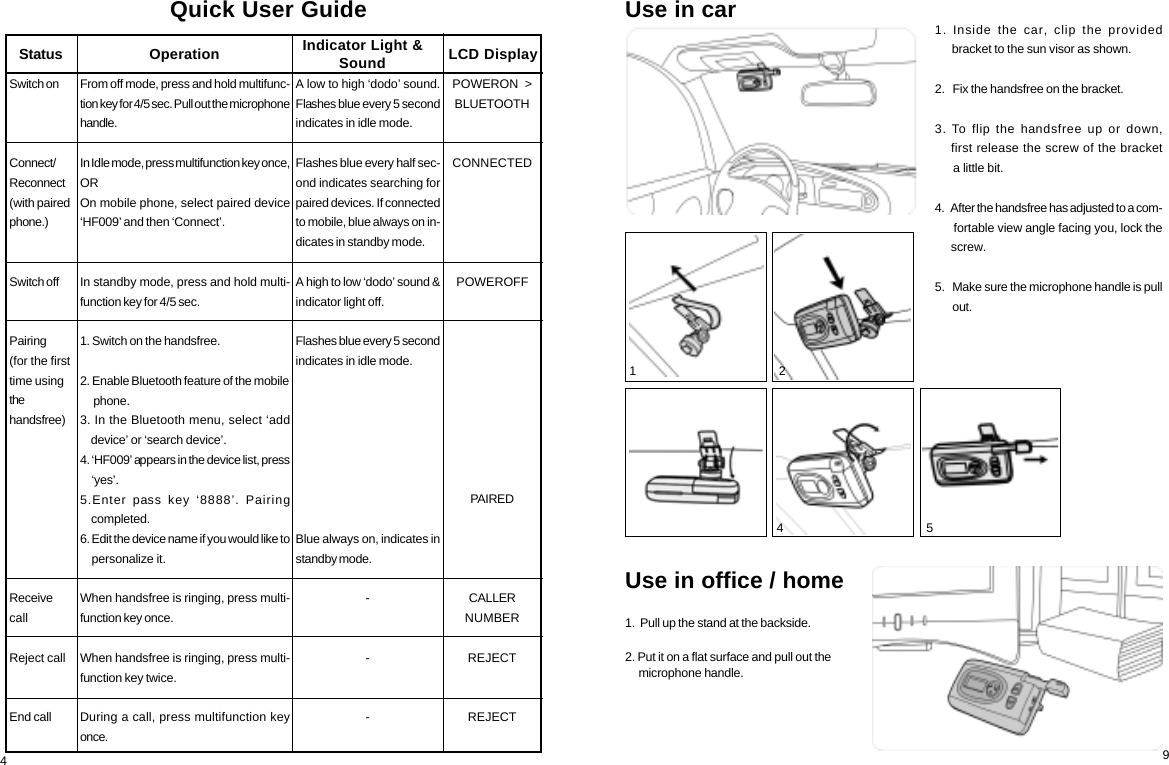
91. Inside the car, clip the provided      bracket to the sun visor as shown.2.   Fix the handsfree on the bracket.3. To flip the handsfree up or down,    first release the screw of the bracket      a little bit.4.   After the handsfree has adjusted to a com-      fortable view angle facing you, lock the     screw.5.   Make sure the microphone handle is pull      out.Use in carUse in office / home1.  Pull up the stand at the backside.2. Put it on a flat surface and pull out the     microphone handle. 3                                             4                                              5A low to high ‘dodo’ sound.Flashes blue every 5 secondindicates in idle mode.Flashes blue every half sec-ond indicates searching forpaired devices. If connectedto mobile, blue always on in-dicates in standby mode.A high to low ‘dodo’ sound &indicator light off.Flashes blue every 5 secondindicates in idle mode.Blue always on, indicates instandby mode.---POWERON  >BLUETOOTHCONNECTEDPOWEROFFPAIREDCALLERNUMBERREJECTREJECTQuick User GuideSwitch onConnect/Reconnect(with pairedphone.)Switch offPairing(for the firsttime usingthehandsfree)ReceivecallReject callEnd callOperation Indicator Light &SoundFrom off mode, press and hold multifunc-tion key for 4/5 sec. Pull out the microphonehandle.In Idle mode, press multifunction key once,OROn mobile phone, select paired device‘HF009’ and then ‘Connect’.In standby mode, press and hold multi-function key for 4/5 sec.1. Switch on the handsfree.2. Enable Bluetooth feature of the mobile     phone.3. In the Bluetooth menu, select ‘add    device’ or ‘search device’.4. ‘HF009’ appears in the device list, press    ‘yes’.5.Enter pass key ‘8888’. Pairing    completed.6. Edit the device name if you would like to    personalize it.When handsfree is ringing, press multi-function key once.When handsfree is ringing, press multi-function key twice.During a call, press multifunction keyonce.LCD DisplayStatus4 1                                              2
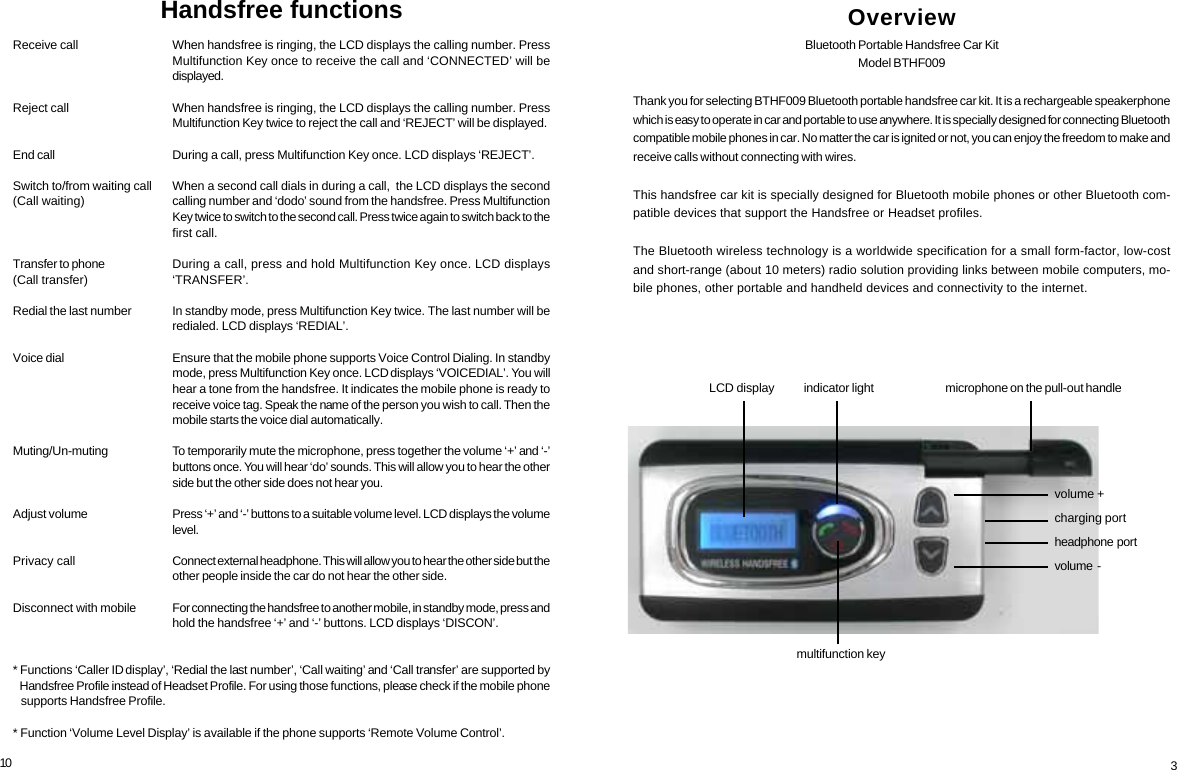
10Receive callReject callEnd callSwitch to/from waiting call(Call waiting)Transfer to phone(Call transfer)Redial the last numberVoice dialMuting/Un-mutingAdjust volumePrivacy callDisconnect with mobile* Functions ‘Caller ID display’, ‘Redial the last number’, ‘Call waiting’ and ‘Call transfer’ are supported by   Handsfree Profile instead of Headset Profile. For using those functions, please check if the mobile phone   supports Handsfree Profile.* Function ‘Volume Level Display’ is available if the phone supports ‘Remote Volume Control’.When handsfree is ringing, the LCD displays the calling number. PressMultifunction Key once to receive the call and ‘CONNECTED’ will bedisplayed.When handsfree is ringing, the LCD displays the calling number. PressMultifunction Key twice to reject the call and ‘REJECT’ will be displayed.During a call, press Multifunction Key once. LCD displays ‘REJECT’.When a second call dials in during a call,  the LCD displays the secondcalling number and ‘dodo’ sound from the handsfree. Press MultifunctionKey twice to switch to the second call. Press twice again to switch back to thefirst call.During a call, press and hold Multifunction Key once. LCD displays‘TRANSFER’.In standby mode, press Multifunction Key twice. The last number will beredialed. LCD displays ‘REDIAL’.Ensure that the mobile phone supports Voice Control Dialing. In standbymode, press Multifunction Key once. LCD displays ‘VOICEDIAL’. You willhear a tone from the handsfree. It indicates the mobile phone is ready toreceive voice tag. Speak the name of the person you wish to call. Then themobile starts the voice dial automatically.To temporarily mute the microphone, press together the volume ‘+’ and ‘-’buttons once. You will hear ‘do’ sounds. This will allow you to hear the otherside but the other side does not hear you.Press ‘+’ and ‘-’ buttons to a suitable volume level. LCD displays the volumelevel.Connect external headphone. This will allow you to hear the other side but theother people inside the car do not hear the other side.For connecting the handsfree to another mobile, in standby mode, press andhold the handsfree ‘+’ and ‘-’ buttons. LCD displays ‘DISCON’.Handsfree functions OverviewBluetooth Portable Handsfree Car KitModel BTHF009Thank you for selecting BTHF009 Bluetooth portable handsfree car kit. It is a rechargeable speakerphonewhich is easy to operate in car and portable to use anywhere. It is specially designed for connecting Bluetoothcompatible mobile phones in car. No matter the car is ignited or not, you can enjoy the freedom to make andreceive calls without connecting with wires.This handsfree car kit is specially designed for Bluetooth mobile phones or other Bluetooth com-patible devices that support the Handsfree or Headset profiles.The Bluetooth wireless technology is a worldwide specification for a small form-factor, low-costand short-range (about 10 meters) radio solution providing links between mobile computers, mo-bile phones, other portable and handheld devices and connectivity to the internet.microphone on the pull-out handlevolume +charging portheadphone  portvolume  -indicator lightmultifunction keyLCD display3
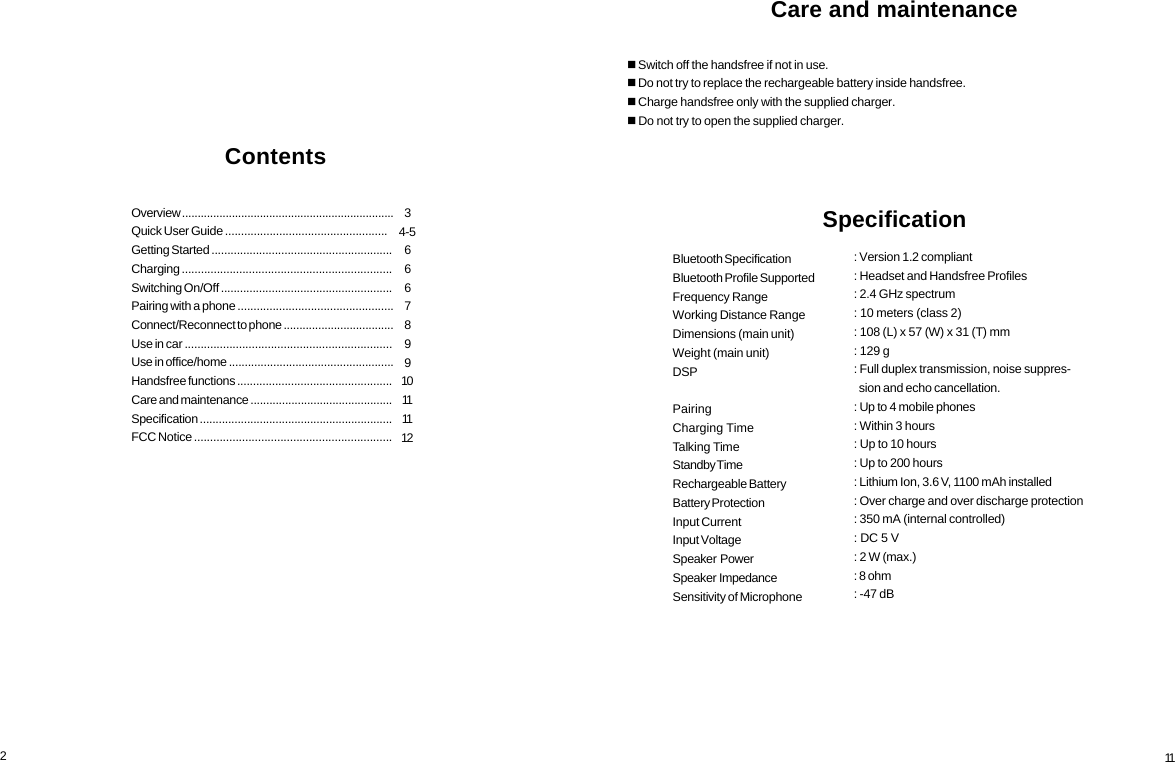
234-5666789910111112Overview ....................................................................Quick User Guide ...................................................Getting Started .........................................................Charging ..................................................................Switching On/Off ......................................................Pairing with a phone .................................................Connect/Reconnect to phone ...................................Use in car .................................................................Use in office/home ....................................................Handsfree functions .................................................Care and maintenance .............................................Specification .............................................................FCC Notice ..............................................................Contents11: Version 1.2 compliant: Headset and Handsfree Profiles: 2.4 GHz spectrum: 10 meters (class 2): 108 (L) x 57 (W) x 31 (T) mm: 129 g: Full duplex transmission, noise suppres-  sion and echo cancellation.: Up to 4 mobile phones: Within 3 hours: Up to 10 hours: Up to 200 hours: Lithium Ion, 3.6 V, 1100 mAh installed: Over charge and over discharge protection: 350 mA (internal controlled): DC 5 V: 2 W (max.): 8 ohm: -47 dBBluetooth SpecificationBluetooth Profile SupportedFrequency RangeWorking Distance RangeDimensions (main unit)Weight (main unit)DSPPairingCharging TimeTalking TimeStandby TimeRechargeable BatteryBattery ProtectionInput CurrentInput VoltageSpeaker  PowerSpeaker  ImpedanceSensitivity of MicrophoneCare and maintenance Switch off the handsfree if not in use. Do not try to replace the rechargeable battery inside handsfree. Charge handsfree only with the supplied charger. Do not try to open the supplied charger.Specification
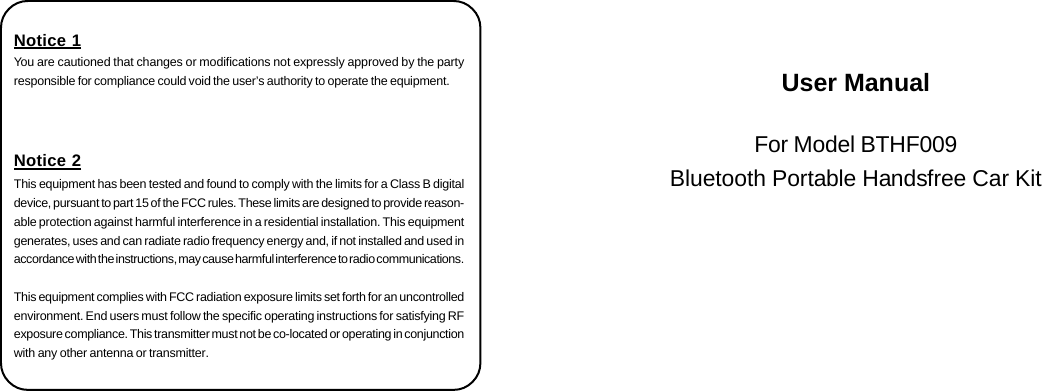
User ManualFor Model BTHF009Bluetooth Portable Handsfree Car KitNotice 1You are cautioned that changes or modifications not expressly approved by the partyresponsible for compliance could void the user’s authority to operate the equipment.Notice 2This equipment has been tested and found to comply with the limits for a Class B digitaldevice, pursuant to part 15 of the FCC rules. These limits are designed to provide reason-able protection against harmful interference in a residential installation. This equipmentgenerates, uses and can radiate radio frequency energy and, if not installed and used inaccordance with the instructions, may cause harmful interference to radio communications.This equipment complies with FCC radiation exposure limits set forth for an uncontrolledenvironment. End users must follow the specific operating instructions for satisfying RFexposure compliance. This transmitter must not be co-located or operating in conjunctionwith any other antenna or transmitter.

Navigation menu