Carbon Audio WLMS0002 WIRELESS POCKET SPEAKER User Manual O58WLMS 0002 FCC Manual
Carbon Audio, LLC WIRELESS POCKET SPEAKER O58WLMS 0002 FCC Manual
User Manual
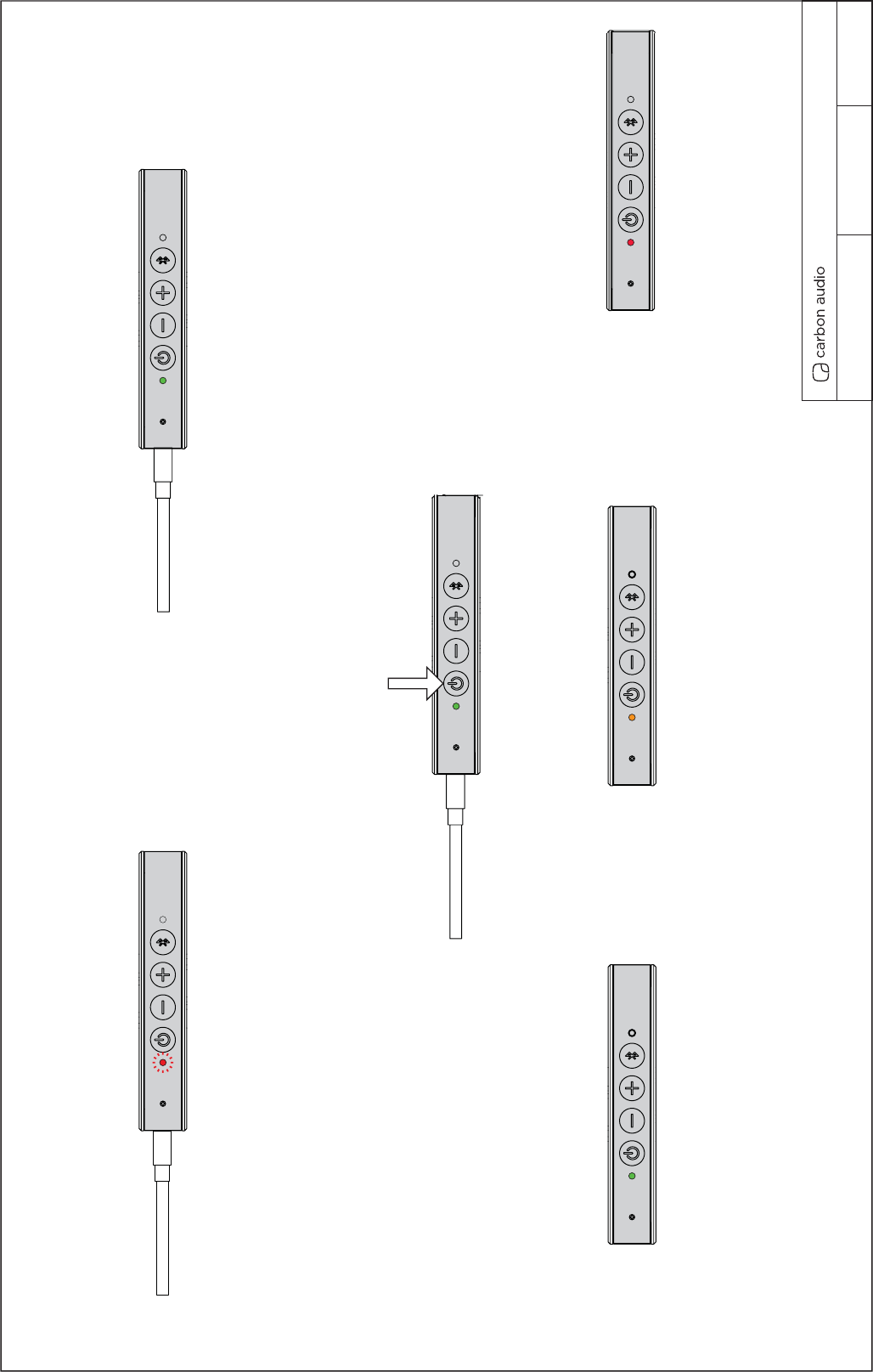
CHARGE / BATTERY UI
1. Plugged in charging Power LED blinks slowly RED.
2. Pocket Speaker does not power on when plugged in.
3. Only charges when USB power is plugged in.
4. You can manually turn on Pocket Speaker when charging.
5. When fully charged and plugged in LED will
show steady green LED.
6. Fully charged tone will play when full charge is reached.
Pocket Speaker UI REVISION 6.0 08/7/13
CHARGE UI
Charge time is 3 hours
Play time is up to 8 Hours
Can be used when charging.
When your plug in Pocket Speaker should not power on.
7. Can power on Pocket Speaker when plugged in manually.
8. Pocket Speaker can be used while charging.
press power button once to
power on
9. When unplugged and power is on LED is steady green. 10. When power <30% LED is steady amber. 11. When power <10% LED is steady red.
Wireless Pocket Speaker Usermanual WLMS-0002
POWER ON / OFF UI
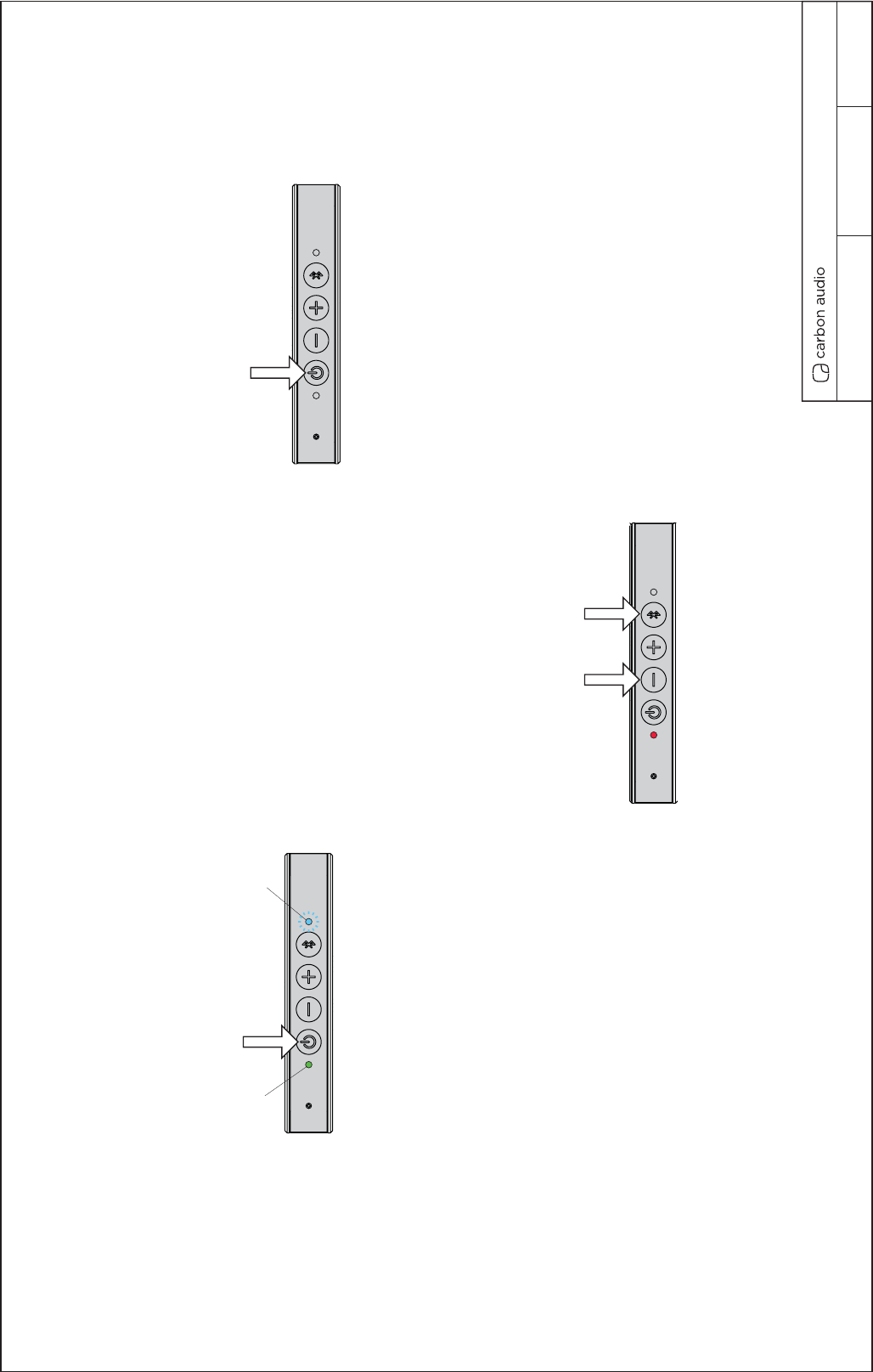
1. Press power button to power on.
2. Power LED turns steady Green and plays power on tone.
3. Bluetooth LED blinks fast blue and search tone is played.
4. Bluetooth LED turns steady blue when connection is established and
confirmed connection tone is played.
press power button once to
power on
5. Press power button once to power off.
LEDs turn off.
press power button once to
power off.
POWER ON POWER OFF
If Pocket Speaker is already paired with
a bluetooth device the bluetooth LED will
turn on and solid when device is found
If Pocket Speaker is not already paired with
a bluetooth device the bleutooth LED will
blink fast until a device is found.
green power LED blue BT LED
6. Push and hold Power and BT button simultaneously
for 5.0 seconds to reset Pocket Speaker to factory settings.
press and hold power and BT buttons
simultaneously for 5.0 seconds to reset unit.
Pocket Speaker UI REVISION 6.0 08/7/13
POWER ON/OFF UI
PAIR UI
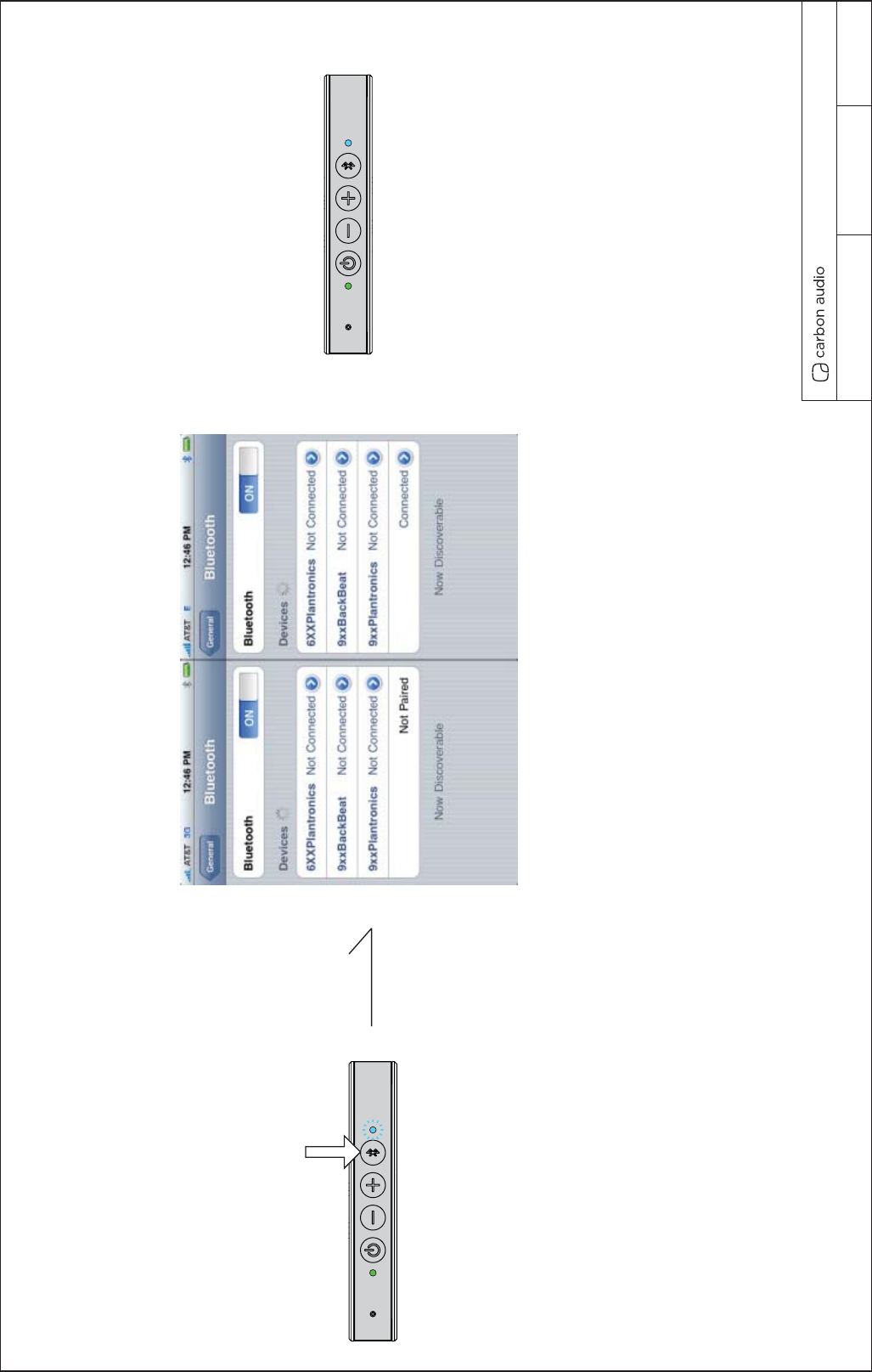
Press and hold the bluetooth button to
enter pair mode. Bluetooth LED blinks fast
and paring audio tone plays.
Charge is 3 hours
Play time 4 Hours (fill power)
Can be used when charging.
When your plug in Pocket Speaker should not power on.
press and hold bluetooth
button to enter pair mode.
After successful pairing the bluetooth
LED light will appear steady steady blue
and hear connected tone.
POCKET SPEAKER POCKET SPEAKER
Select POCKET SPEAKER on the source device.
Pocket Speaker UI REVISION 6.0 08/7/2013
PAIR UI
PAIR L/R UI 1
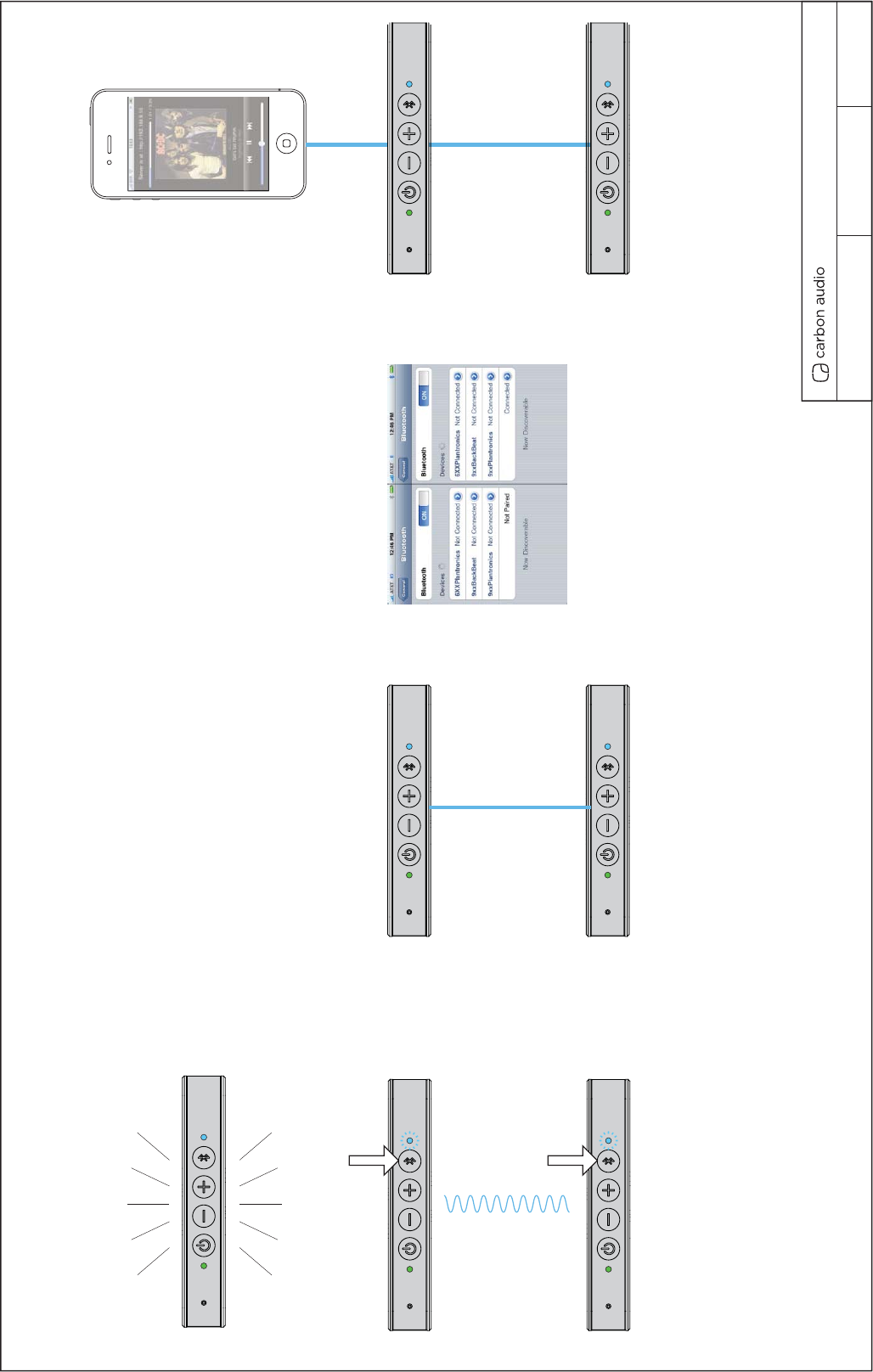
6. After successful pairing the bluetooth
LED light will light steady and hear connected
tone play along with “ Leftl.” and 2.0 seconds
later “Right.”
7. After L/R channel quote you will hear, “ready to connect
to Bluetooth device.”
8. Each blue tooth LED will be steady blue after connection.
2. Power on both speakers.
3. Press and hold each bluetooth buttons
simultaneously to enter L/R speaker pair mode.
4. Tone will play while searching for each pocket speaker.
5. Blue BT LED will blink fast until speakers are paired.
Scenario 1.
You have a Pocket Speaker already connected your BT device playing music
and you want to add a second Pocket Speaker for L/R channel.
POCKET SPEAKER POCKET SPEAKER
PS1
PS2
PS1
PS2 PS2
PS1
1. Pocket Speaker playing music.
True Wireless PS1 and PS2 Paired
PS1
True Wireless PS1 and PS2 Connected
True Wireless PS1 and PS2 connecting
BT Phone and PS1 Connected
6. Go into BT settings and re-select
Pocket Speaker to establish connection.
7. Once Pocket Speaker is selected you will
hear the Connected confirmation tone and
will be ready to play music.
Pocket Speaker UI REVISION 6.0 08/7/2013
PAIR L/R UI 1
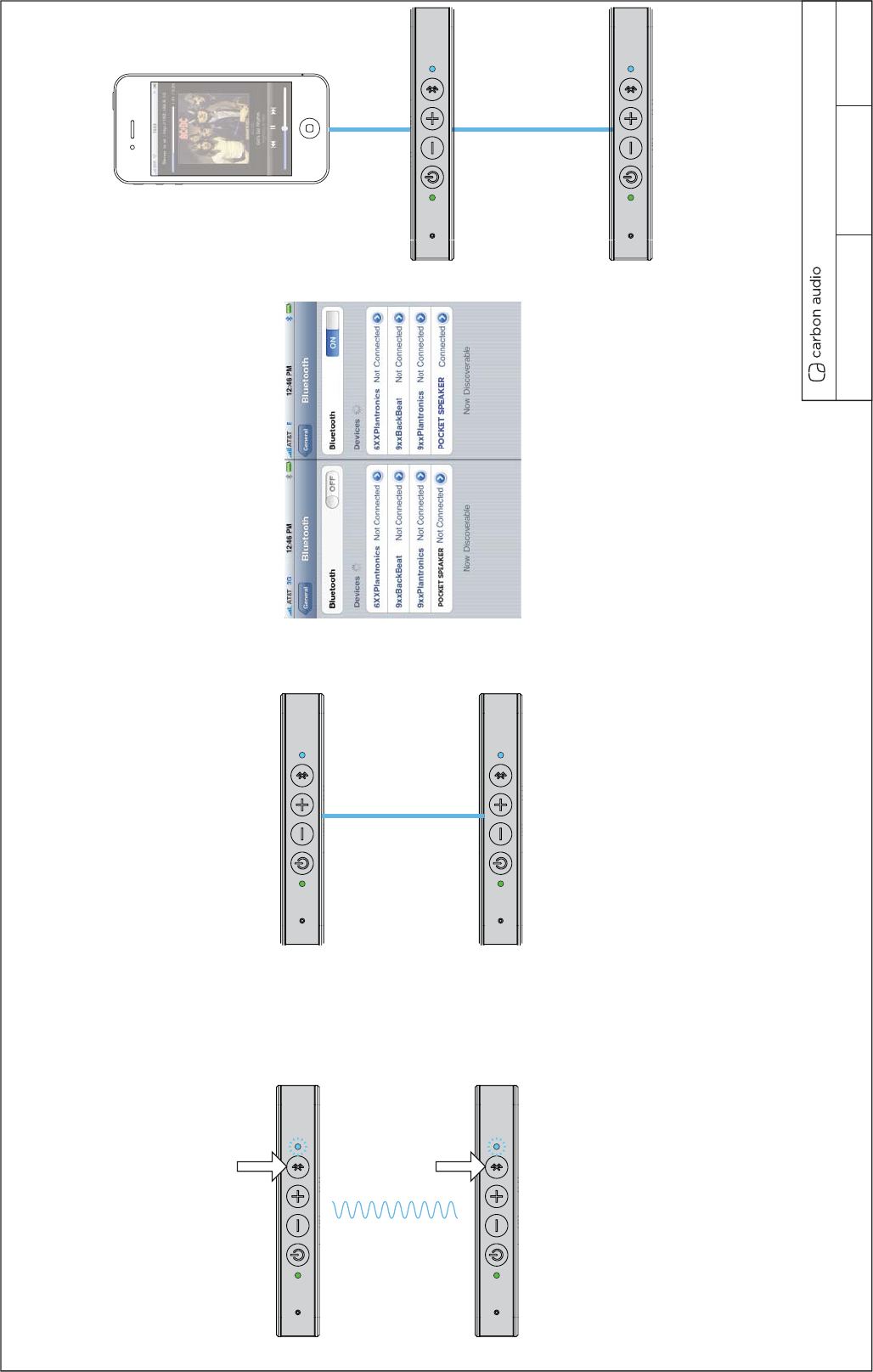
PAIR L/R UI 2
6. After successful pairing the bluetooth
LED light will light steady blue and hear connected
tone play along with “ Left.” and 2.0 seconds
later “Right.”
7. After L/R channel quote you will hear, “ready to connect
to Bluetooth device.”
8. Each blue tooth LED will be steady blue after connection.
2. Power on both speakers.
3. Press and hold each bluetooth buttons
simultaneously to enter L/R speaker pair mode.
4. Tone will play while searching for each pocket speaker.
5. Blue BT LED will blink fast until speakers are paired.
Scenario 2.
A. Your BT is turned of for quick set up.
B. You purchase two Pocket Speakers and pair them out of the box
before pairing to device.
PS1
PS2
PS1
PS2
PS2
True Wireless PS1 and PS2 Paired
PS1
True Wireless PS1 and PS2 Connected
True Wireless PS1 and PS2 connecting
BT Phone and PS1 Connected
6. Go into BT settings turn BT on to
establish connection.
7. Once Pocket Speaker is selected you will
hear the Connected confirmation tone and
will be ready to play music.
Pocket Speaker UI REVISION 6.0 08/7/2013
PAIR L/R UI 2
Pocket Speaker UI REVISION 6.0 08/7/2013
TONES VOICE UI
AUDIO TONE LIST
1. Power ON Tone (short 1-2 seconds) Descriptive of power on / start up.
2. BT Searching (loop lasts as long as connection established.) sonar / ping / search.
3. Connected (1 second confirmation of BT or L/R connected) simple quick positive confirmation tone.
4. Voice “Left” (Hot Chick with accent)
5. Voice “Right” (Hot Chick with accent)
6. Voice “Ready to connect to Bluetooth device” (Hot Chick with accent)
7. Max Volume (tone when maxmimum volume reached on Pocket Speaker) Short / not anoying high pitch / qick blip.
8. Pause Music / Pick Up Incoming Call (tone to identify pause in music) Short two quick blip descriptive of pause.
9. Full Charge Battery (tone to identify 100% fully charged battery).

FCC NOTE:
This device complies with Part 15 of the FCC Rules.
Operation is subject to the following two conditions: (1) this device may not cause
harmful interference, and (2) this device must accept any interference received,
including interference that may cause undesired operation.
THE MANUFACTURER IS NOT RESPONSIBLE FOR ANY RADIO OR TV
INTERFERENCE CAUSED BY UNAUTHORIZED MODIFICATIONS OR CHANGE
TO THIS EQUIPMENT. SUCH MODIFICATIONS OR CHANGE COULD VOID AND
CHANGE ANNTENA WHICH THE MANUFACTURER PROVIDES.
IT IS THE USER'S AUTHORITY TO OPERATE THE EQUIPMENT.
This equipment has been tested and found to comply with the limits for a Class B
digital device, pursuant to part 15 of the FCC Rules. These limits are designed to
provide reasonable protection against harmful interference in a resi dential installation.
This equipment generates, uses and can radiate radio frequenc y energy and, if not
installed and used in accordance with the in structions, may cause harmful interference
to radio communications. However, there is no guarantee that interference will not
occur in a particular insta llation. If this equipment does cause harmful interference to
radio or television reception, which can be determined by turning the equipment off
and on, the user is encouraged to try to corr ect the interference by one or more of the
following measures:
-- Reorient or relocate the receiving antenna.
-- Increase the separation between the equipment and receiver.
-- Connect the equipment into an outlet on a circuit different from that to which the
receiver is connected.
-- Consult the dealer or an experien ced radio/TV technician for help.
To maintain compliance with FCC’s RF exposure guidelines, this equipment should be
installed and operated with a minimum distance of 20cm between the radiator and your
body.