Chengdu Ledong Information Technology SWO1801 Runtopia S1 Smart GPS Sport Watch (BT LE) User Manual

Chengdu Ledong Information Technology Co., Ltd Runtopia S1 Smart GPS Sport Watch (BT LE)

user manual

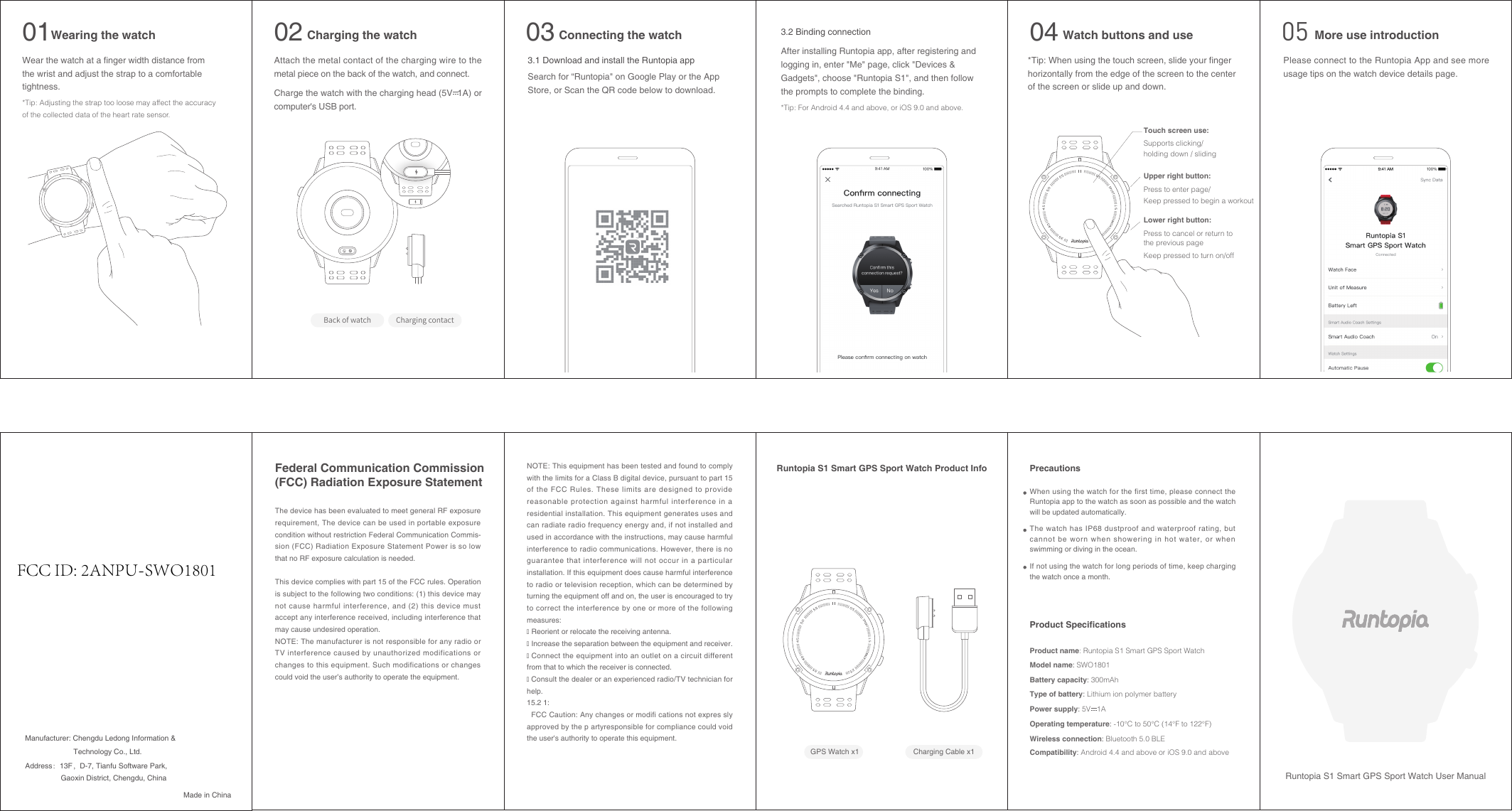
Runtopia S1 Smart GPS Sport Watch User ManualWear the watch at a finger width distance from the wrist and adjust the strap to a comfortable tightness.*Tip: Adjusting the strap too loose may affect the accuracy of the collected data of the heart rate sensor.Wearing the watch01Attach the metal contact of the charging wire to the metal piece on the back of the watch, and connect.Charge the watch with the charging head (5V  1A) or computer's USB port.Back of watch Charging contactCharging the watch023.1 Download and install the Runtopia appSearch for “Runtopia" on Google Play or the App Store, or Scan the QR code below to download. Connecting the watch03*Tip: When using the touch screen, slide your finger horizontally from the edge of the screen to the centerof the screen or slide up and down.Watch buttons and use04Upper right button:Keep pressed to begin a workoutPress to cancel or return tothe previous pageKeep pressed to turn on/offPress to enter page/Touch screen use:Supports clicking/ holding down / slidingLower right button:3.2 Binding connectionAfter installing Runtopia app, after registering and  logging in, enter "Me" page, click "Devices & Gadgets", choose "Runtopia S1", and then follow the prompts to complete the binding.*Tip: For Android 4.4 and above, or iOS 9.0 and above.Please connect to the Runtopia App and see more usage tips on the watch device details page.More use introduction05GPS Watch x1 Charging Cable x1Runtopia S1 Smart GPS Sport Watch Product InfoManufacturer: Chengdu Ledong Information & When using the watch for the first time, please connect the Runtopia app to the watch as soon as possible and the watch will be updated automatically.PrecautionsProduct SpecificationsThe watch has IP68 dustproof and waterproof rating, but cannot be worn when showering in hot water, or when swimming or diving in the ocean. If not using the watch for long periods of time, keep charging the watch once a month.Product name: Runtopia S1 Smart GPS Sport WatchModel name: SWO1801Battery capacity: 300mAhType of battery: Lithium ion polymer batteryOperating temperature: -10°C to 50°C (14°F to 122°F)Wireless connection: Bluetooth 5.0 BLECompatibility: Android 4.4 and above or iOS 9.0 and abovePower supply: 5V   1ANOTE: This equipment has been tested and found to comply with the limits for a Class B digital device, pursuant to part 15 of the FCC Rules. These limits are designed to provide reasonable protection against harmful interference in a residential installation. This equipment generates uses and can radiate radio frequency energy and, if not installed and used in accordance with the instructions, may cause harmful interference to radio communications. However, there is no guarantee that interference will not occur in a particular installation. If this equipment does cause harmful interference to radio or television reception, which can be determined by turning the equipment off and on, the user is encouraged to try to correct the interference by one or more of the following measures:� Reorient or relocate the receiving antenna.� Increase the separation between the equipment and receiver.� Connect the equipment into an outlet on a circuit different from that to which the receiver is connected.� Consult the dealer or an experienced radio/TV technician for help. 15.2 1:  FCC Caution: Any changes or modifi cations not expres sly approved by the p artyresponsible for compliance could void the user's authority to operate this equipment.The device has been evaluated to meet general RF exposure requirement, The device can be used in portable exposure condition without restriction Federal Communication Commis-sion (FCC) Radiation Exposure Statement Power is so low that no RF exposure calculation is needed.This device complies with part 15 of the FCC rules. Operation is subject to the following two conditions: (1) this device may not cause harmful interference, and (2) this device must accept any interference received, including interference that may cause undesired operation. NOTE: The manufacturer is not responsible for any radio or TV interference caused by unauthorized modifications or changes to this equipment. Such modifications or changes could void the user’s authority to operate the equipment.Federal Communication Commission (FCC) Radiation Exposure StatementMade in ChinaGaoxin District, Chengdu, ChinaAddress:13F,D-7, Tianfu Software Park, Technology Co., Ltd.FCC ID: 2ANPU-SWO1801

Navigation menu