Chuango Security Technology G5 GSM Alarm System User Manual G5 EN Oct 2012 V1

Chuango Security Technology Corporation GSM Alarm System G5 EN Oct 2012 V1

User Manual

Printed in Hong KongPA: OI-G5/EN-Oct.2012-V1.0GSM Alarm System
GSM Alarm SystemFCC Statement
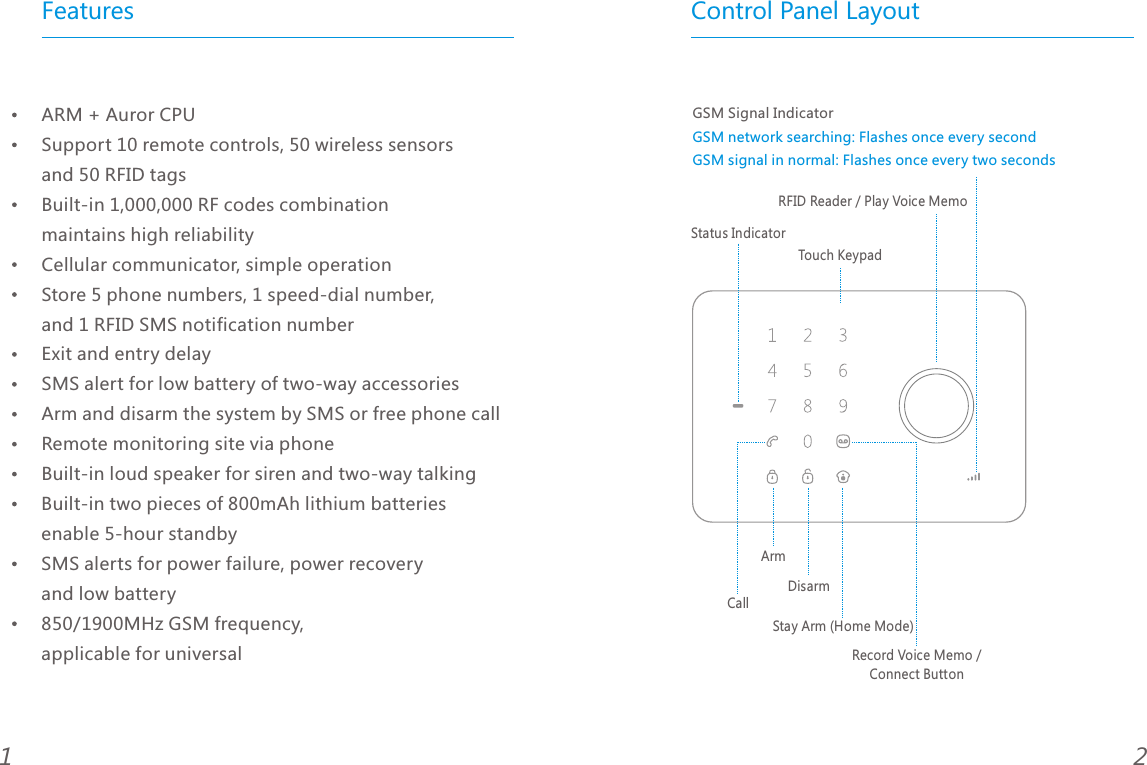
Features Control Panel Layout21ARM + Auror CPU Support 10 remote controls, 50 wireless sensors and 50 RFID tagsBuilt-in 1,000,000 RF codes combination maintains high reliabilityCellular communicator, simple operationStore 5 phone numbers, 1 speed-dial number, and 1 RFID SMS notification numberExit and entry delay SMS alert for low battery of two-way accessoriesArm and disarm the system by SMS or free phone call Remote monitoring site via phoneBuilt-in loud speaker for siren and two-way talkingBuilt-in two pieces of 800mAh lithium batteries enable 5-hour standbySMS alerts for power failure, power recovery and low battery 850/1900MHz GSM frequency, applicable for universal GSM Signal IndicatorGSM network searching: Flashes once every secondGSM signal in normal: Flashes once every two secondsTouch KeypadStatus IndicatorRFID Reader / Play Voice MemoStay Arm (Home Mode)DisarmArmCallRecord Voice Memo / Connect Button
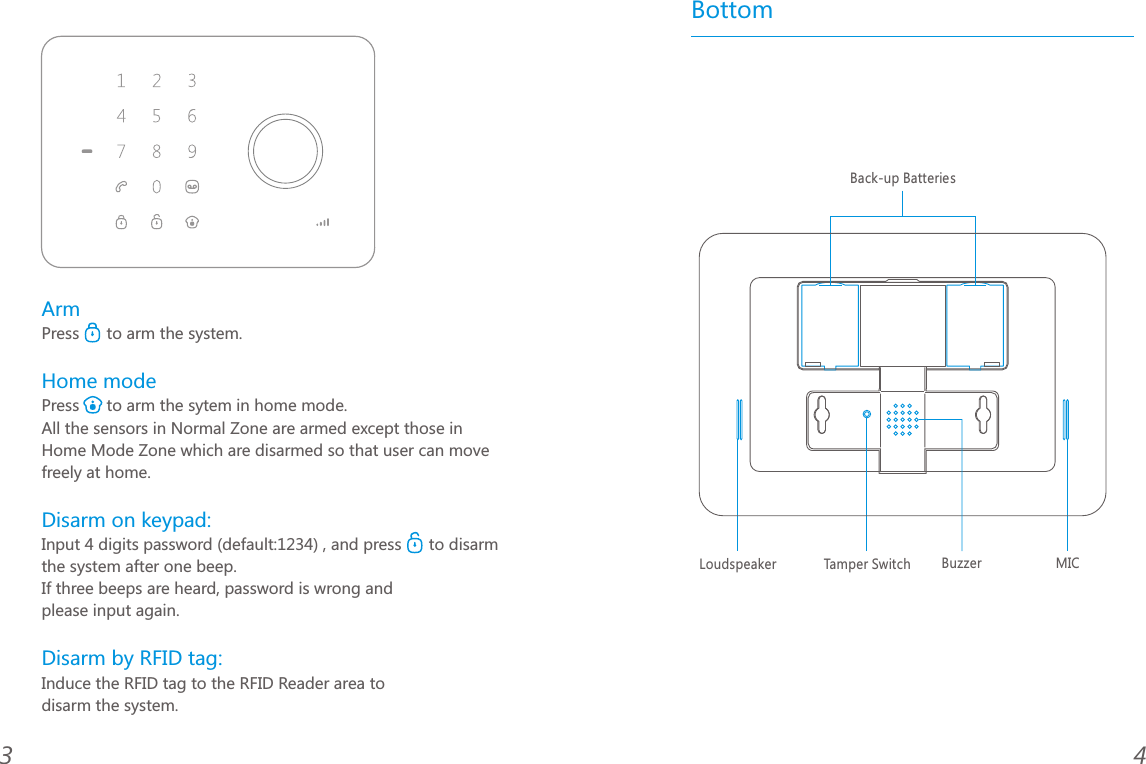
Bottom43ArmHome modeDisarm on keypad: Disarm by RFID tag: Press      to arm the system.Press      to arm the sytem in home mode.All the sensors in Normal Zone are armed except those in Home Mode Zone which are disarmed so that user can move freely at home.Input 4 digits password (default:1234) , and press      to disarm the system after one beep. If three beeps are heard, password is wrong and please input again.Induce the RFID tag to the RFID Reader area to disarm the system.MICBuzzerBack-up BatteriesLoudspeaker  Tamper Switch
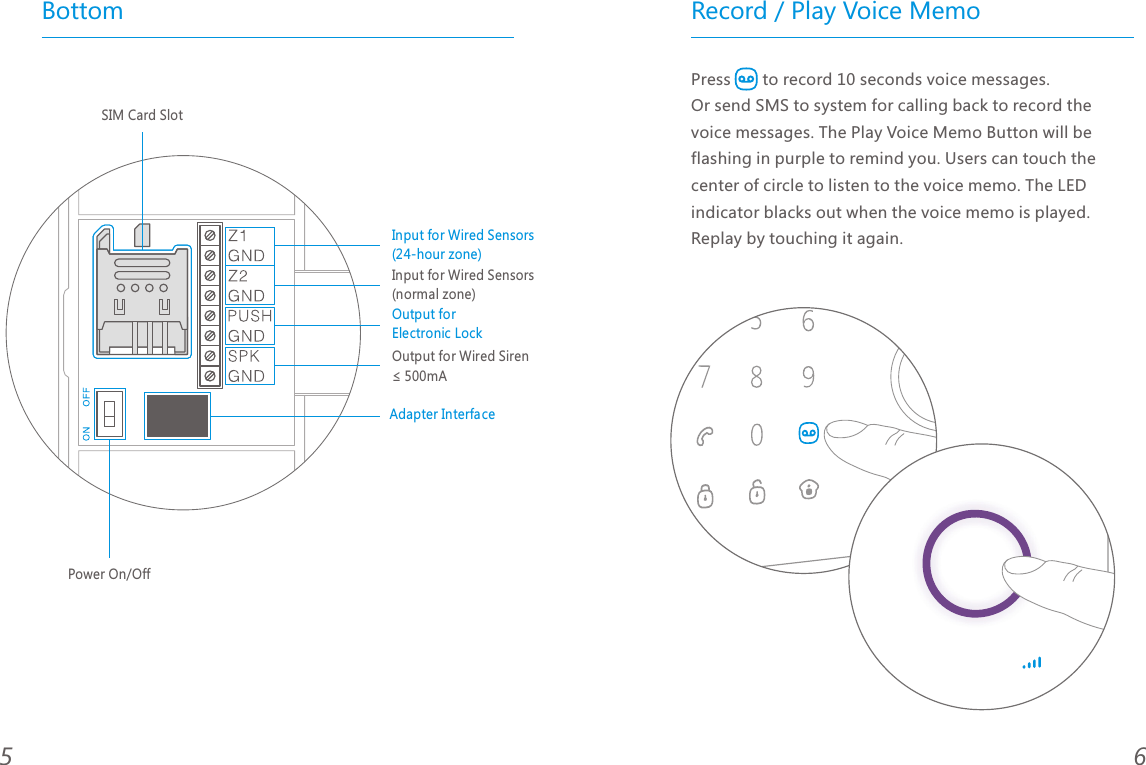
Record / Play Voice MemoPress       to record 10 seconds voice messages. Or send SMS to system for calling back to record the voice messages. The Play Voice Memo Button will be flashing in purple to remind you. Users can touch the center of circle to listen to the voice memo. The LED indicator blacks out when the voice memo is played. Replay by touching it again.65BottomSIM Card SlotPower On/Off Input for Wired Sensors(24-hour zone)Output for Electronic LockAdapter InterfaceOutput for Wired Siren ≤ 500mAInput for Wired Sensors(normal zone)
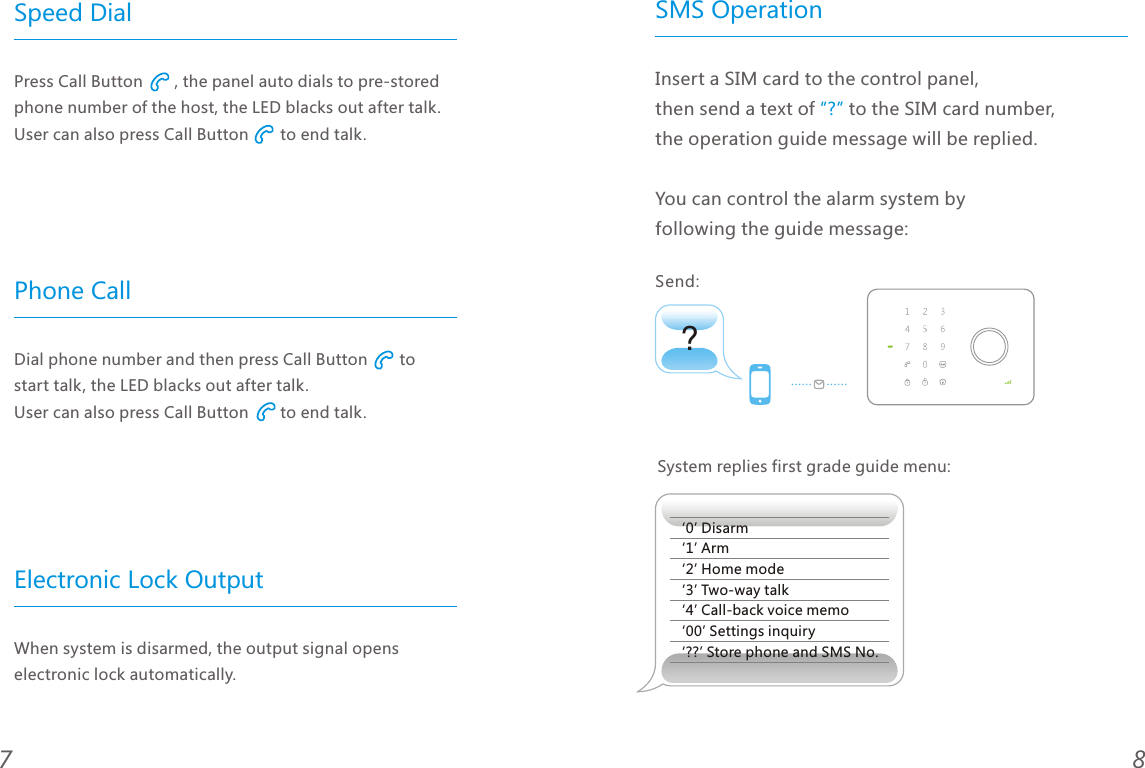
87Speed Dial Phone CallElectronic Lock OutputPress Call Button       , the panel auto dials to pre-stored phone number of the host, the LED blacks out after talk. User can also press Call Button       to end talk. Dial phone number and then press Call Button       to start talk, the LED blacks out after talk. User can also press Call Button       to end talk.When system is disarmed, the output signal opens electronic lock automatically.SMS Operation?Insert a SIM card to the control panel, then send a text of   to the SIM card number, the operation guide message will be replied.You can control the alarm system by following the guide message:“?”System replies first grade guide menu:‘0’ Disarm‘1’ Arm‘2’ Home mode‘3’ Two-way talk‘4’ Call-back voice memo‘00’ Settings inquiry‘??’ Store phone and SMS No.Send:
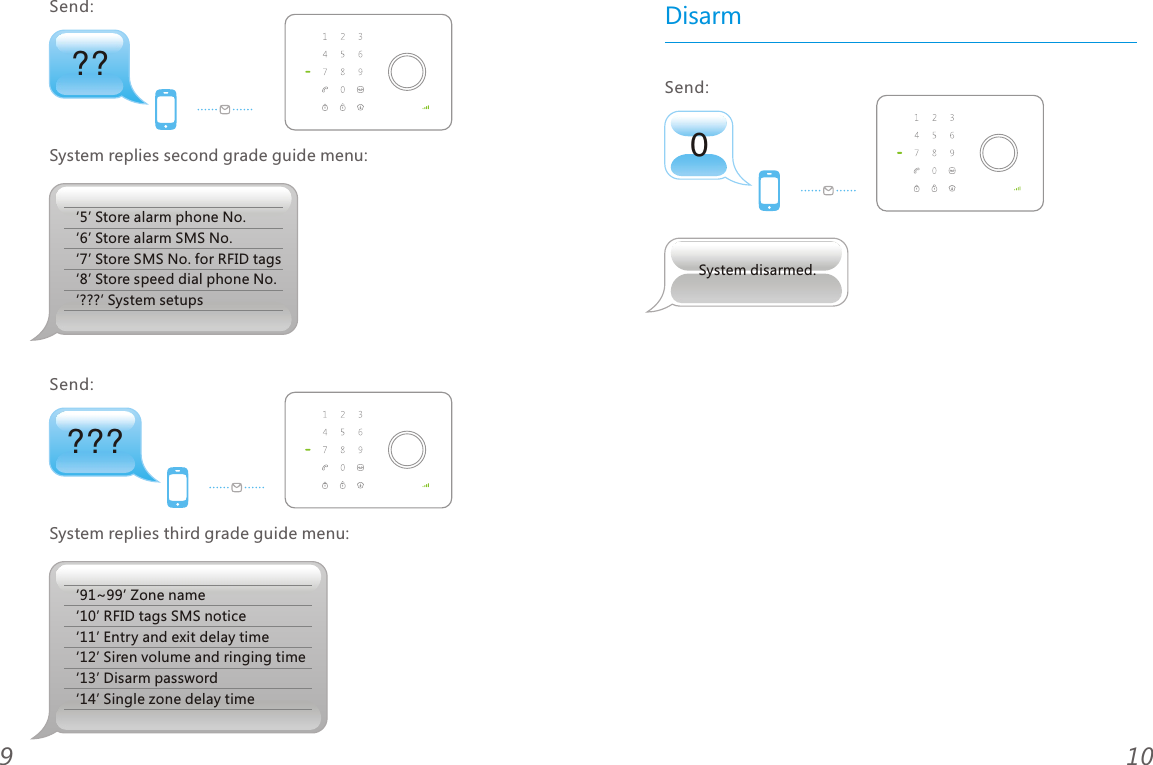
109???System replies third grade guide menu:‘91~99’ Zone name‘10’ RFID tags SMS notice‘11’ Entry and exit delay time‘12’ Siren volume and ringing time ‘13’ Disarm password‘14’ Single zone delay timeSend: ??‘5’ Store alarm phone No.‘6’ Store alarm SMS No.‘7’ Store SMS No. for RFID tags‘8’ Store speed dial phone No.‘???’ System setupsSystem replies second grade guide menu:Send: 0DisarmSend: System disarmed.
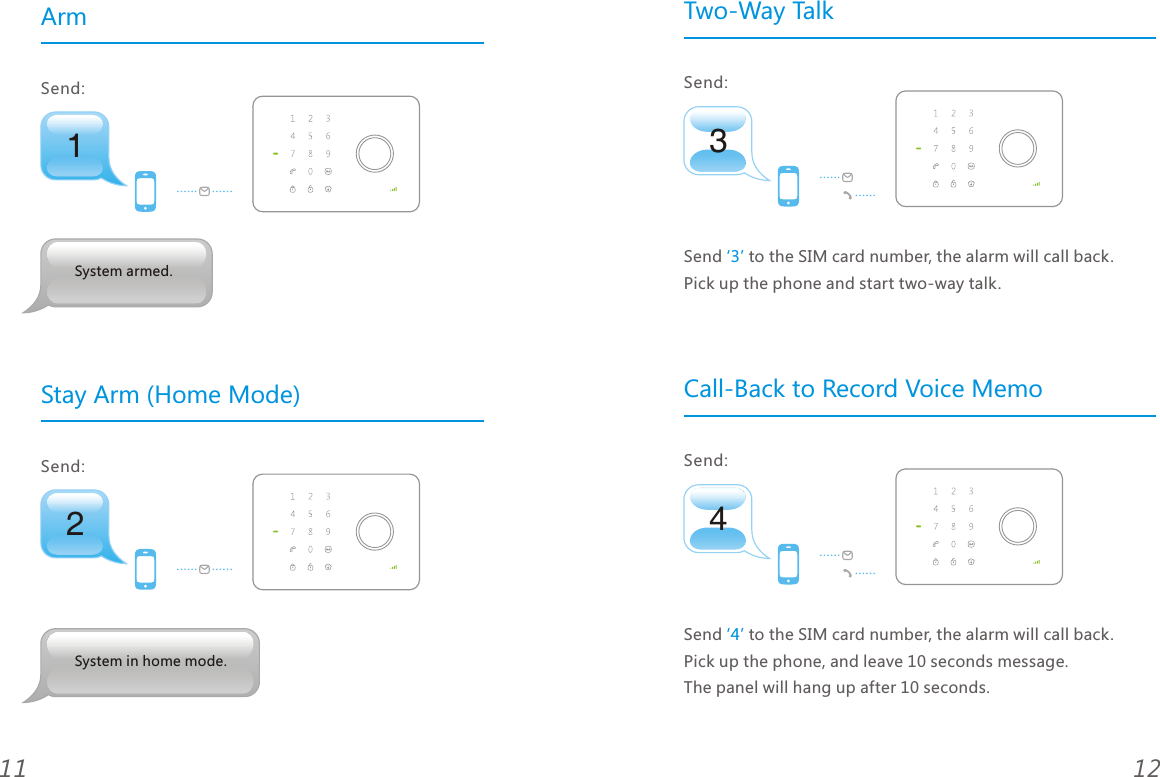
ArmStay Arm (Home Mode)12112Send: System in home mode.1Send: System armed.43Two-Way TalkSend to the SIM card number, the alarm will call back. Pick up the phone and start two-way talk. ‘3’ Call-Back to Record Voice MemoSend to the SIM card number, the alarm will call back. Pick up the phone, and leave 10 seconds message. The panel will hang up after 10 seconds. ‘4’ Send: Send:
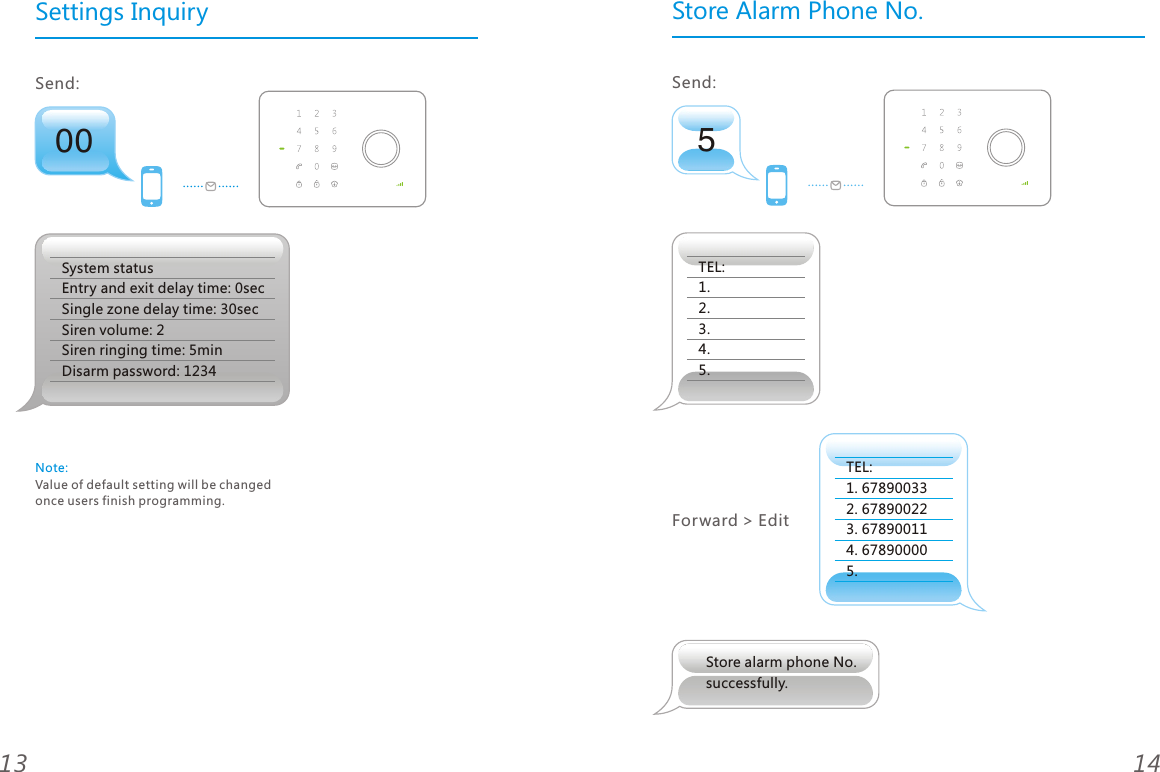
Settings Inquiry141300System statusEntry and exit delay time: 0secSingle zone delay time: 30sec Siren volume: 2Siren ringing time: 5minDisarm password: 1234 Send: Note: Value of default setting will be changed once users finish programming.5Send: Store Alarm Phone No.TEL:1.2.3.4.5.TEL:1. 678900332. 678900223. 678900114. 678900005.Forward > EditStore alarm phone No.successfully.
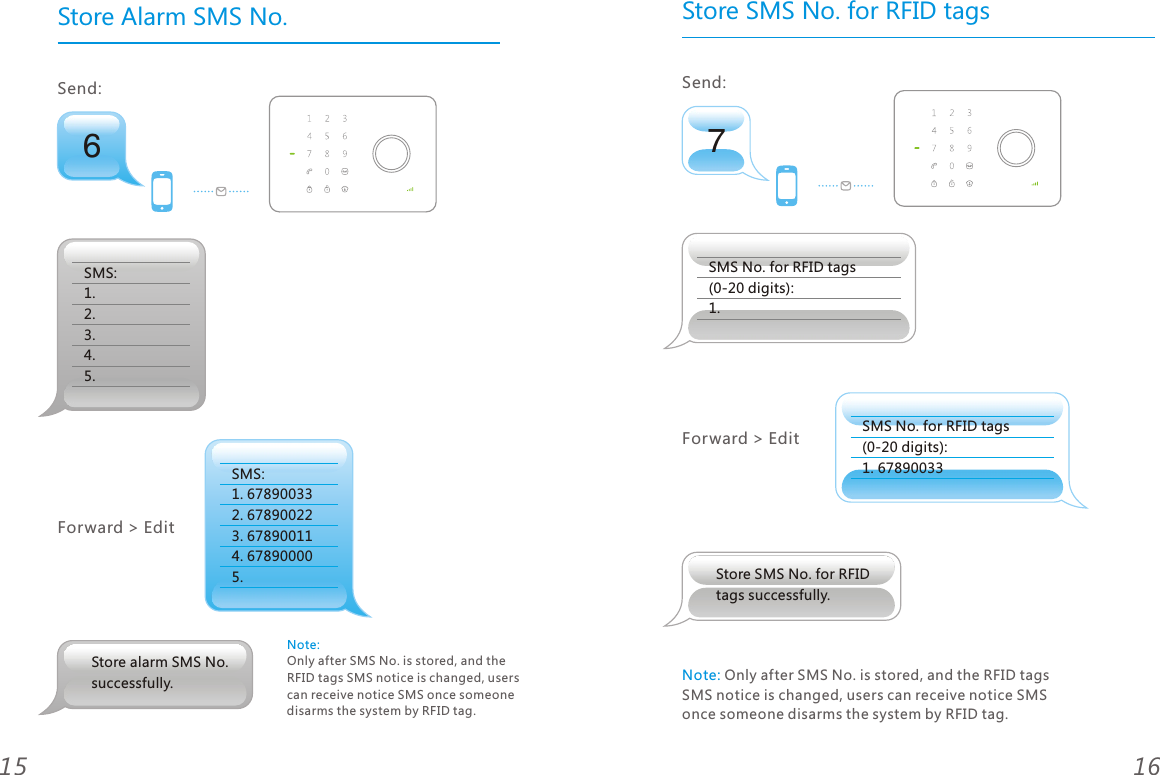
Store Alarm SMS No.16156Send: SMS:1.2.3.4.5.SMS:1. 678900332. 678900223. 678900114. 678900005.Forward > EditStore alarm SMS No. successfully.Note: Only after SMS No. is stored, and the RFID tags SMS notice is changed, users can receive notice SMS once someone disarms the system by RFID tag.7Store SMS No. for RFID tagsSend: Forward > EditStore SMS No. for RFID tags successfully.SMS No. for RFID tags (0-20 digits): 1.SMS No. for RFID tags (0-20 digits): 1. 67890033Note: Only after SMS No. is stored, and the RFID tags SMS notice is changed, users can receive notice SMS once someone disarms the system by RFID tag.
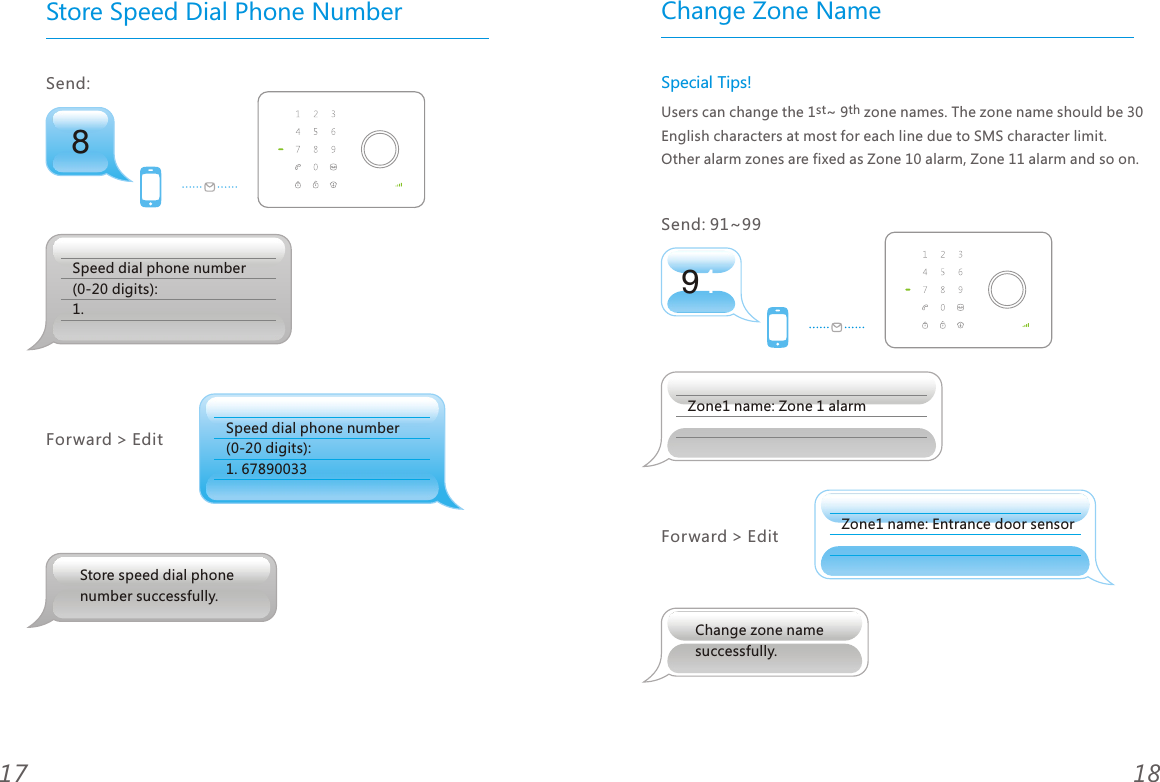
Store Speed Dial Phone Number18178Send: Speed dial phone number(0-20 digits):  1. 67890033Forward > EditStore speed dial phone number successfully.Speed dial phone number(0-20 digits): 1. 91Change Zone NameSpecial Tips!st thUsers can change the 1 ~ 9  zone names. The zone name should be 30 English characters at most for each line due to SMS character limit. Other alarm zones are fixed as Zone 10 alarm, Zone 11 alarm and so on.Send: 91~99 Zone1 name: Zone 1 alarmZone1 name: Entrance door sensorForward > EditChange zone name successfully.
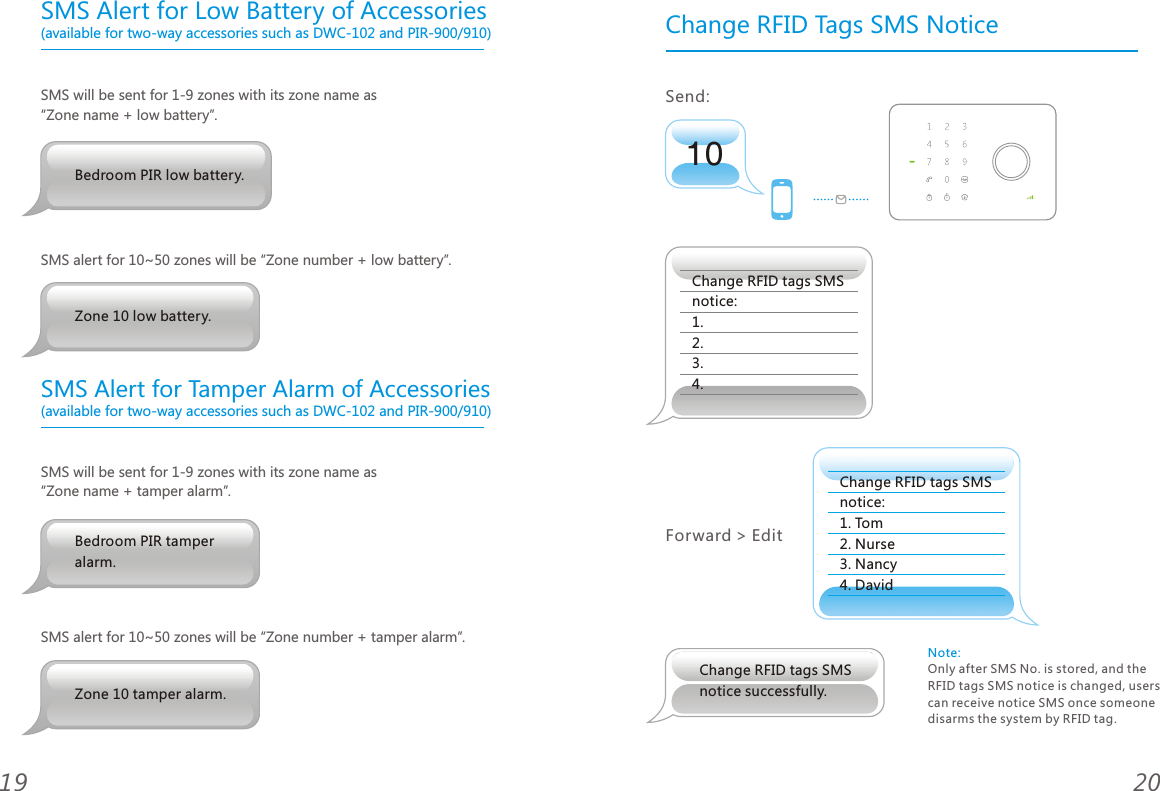
SMS Alert for Low Battery of Accessories (available for two-way accessories such as DWC-102 and PIR-900/910)SMS will be sent for 1-9 zones with its zone name as “Zone name + low battery”.SMS alert for 10~50 zones will be “Zone number + low battery”. (available for two-way accessories such as DWC-102 and PIR-900/910)SMS will be sent for 1-9 zones with its zone name as “Zone name + tamper alarm”.SMS alert for 10~50 zones will be “Zone number + tamper alarm”.2019Bedroom PIR tamper alarm.Zone 10 tamper alarm.Zone 10 low battery.Bedroom PIR low battery. SMS Alert for Tamper Alarm of Accessories10Change RFID Tags SMS NoticeSend: Change RFID tags SMS notice:1.2.3.4. Change RFID tags SMS notice:1. Tom 2. Nurse3. Nancy4. DavidForward > EditChange RFID tags SMS notice successfully.Note: Only after SMS No. is stored, and the RFID tags SMS notice is changed, users can receive notice SMS once someone disarms the system by RFID tag.
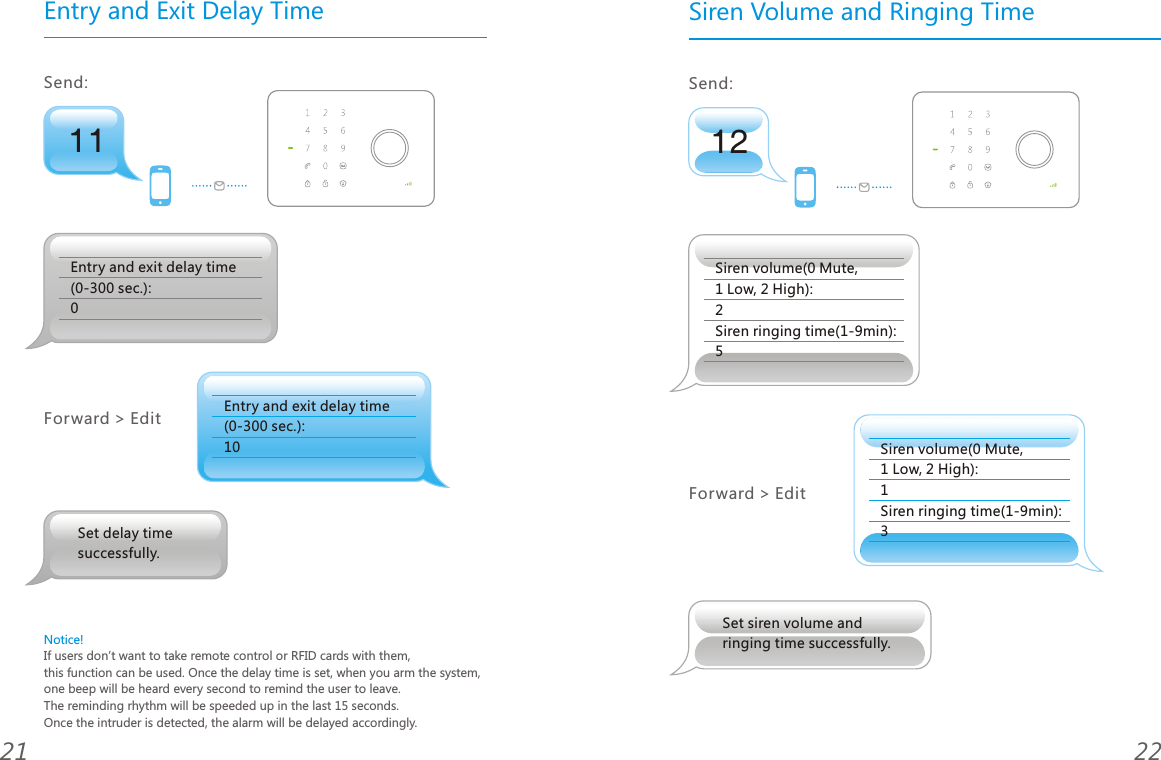
11Entry and Exit Delay TimeSend: Entry and exit delay time (0-300 sec.): 0Entry and exit delay time (0-300 sec.): 10Forward > EditNotice!If users don’t want to take remote control or RFID cards with them, this function can be used. Once the delay time is set, when you arm the system, one beep will be heard every second to remind the user to leave. The reminding rhythm will be speeded up in the last 15 seconds. Once the intruder is detected, the alarm will be delayed accordingly.2221Set delay time successfully.12Siren Volume and Ringing TimeSend: Siren volume(0 Mute, 1 Low, 2 High): 2Siren ringing time(1-9min): 5Forward > EditSet siren volume and ringing time successfully.Siren volume(0 Mute, 1 Low, 2 High): 1Siren ringing time(1-9min): 3
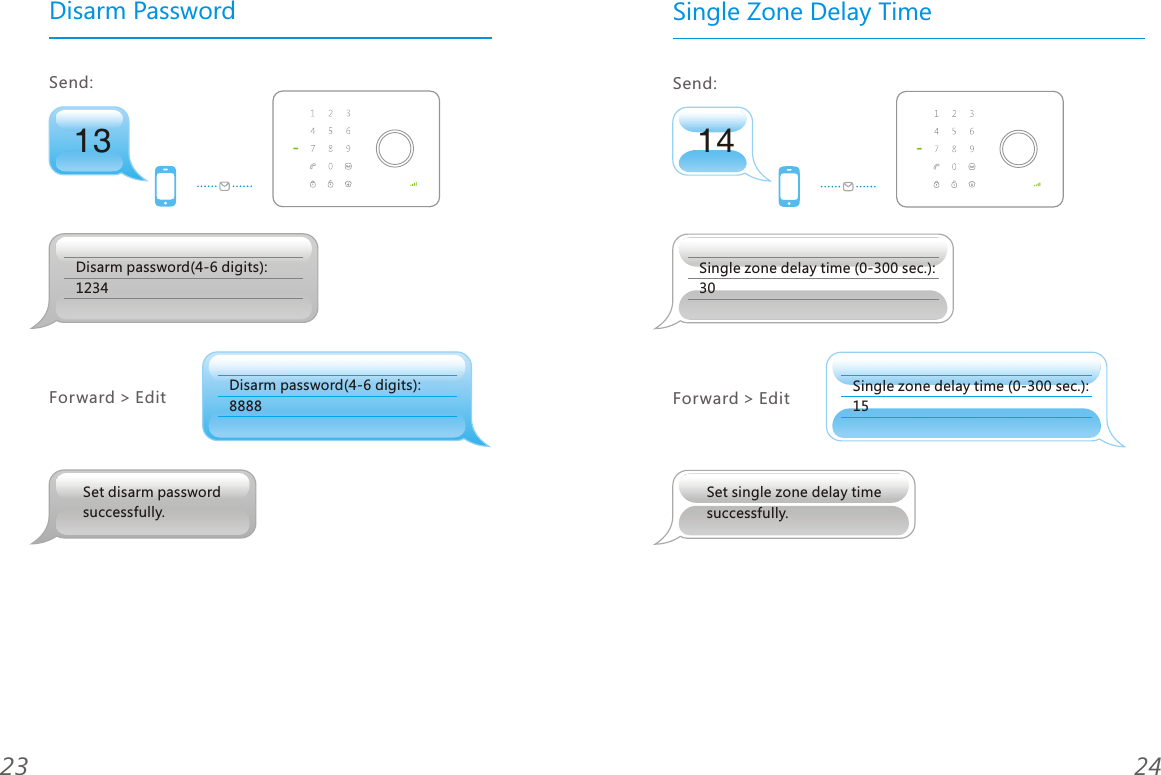
13Disarm PasswordSend: Disarm password(4-6 digits):1234Disarm password(4-6 digits):8888Forward > Edit2423Set disarm passwordsuccessfully.14Single Zone Delay TimeSend: Single zone delay time (0-300 sec.):30Single zone delay time (0-300 sec.):15Forward > EditSet single zone delay time successfully.
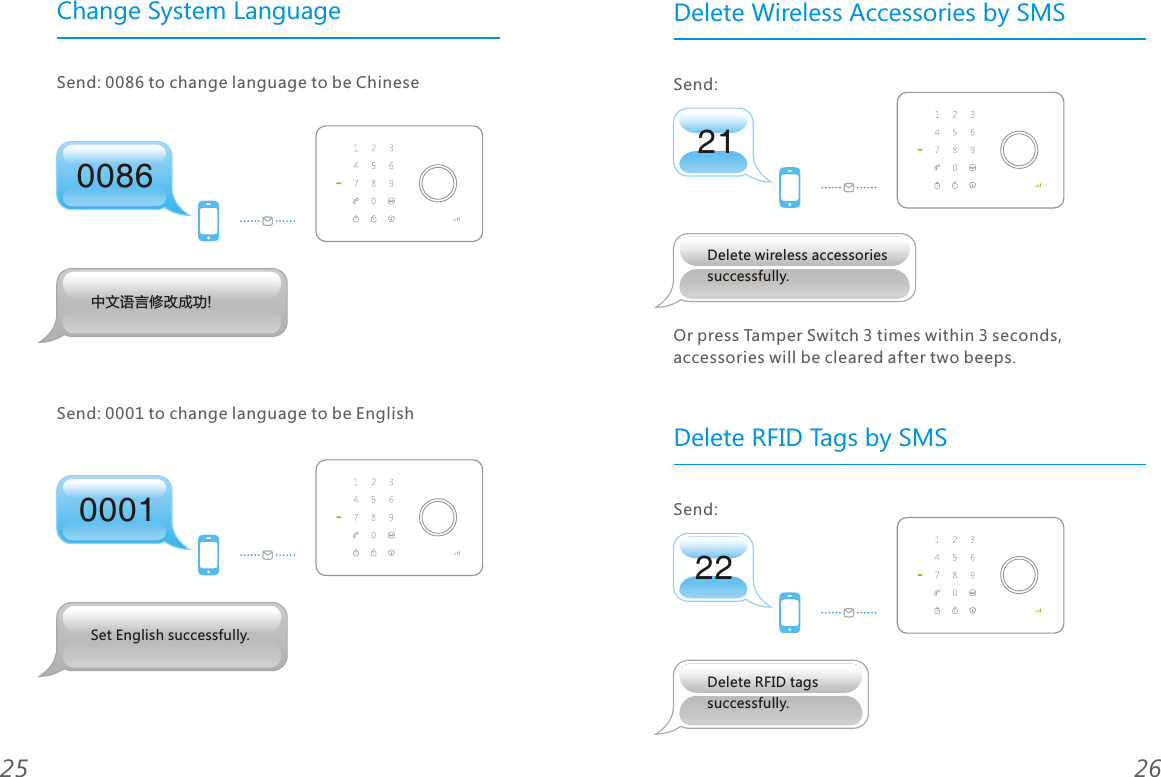
00860001Change System LanguageSend: 0086 to change language to be Chinese  Send: 0001 to change language to be English2625Set English successfully.中文语言修改成功!2122Delete Wireless Accessories by SMS Send: Send: Delete RFID Tags by SMSOr press Tamper Switch 3 times within 3 seconds, accessories will be cleared after two beeps.Delete wireless accessories successfully.Delete RFID tags successfully.
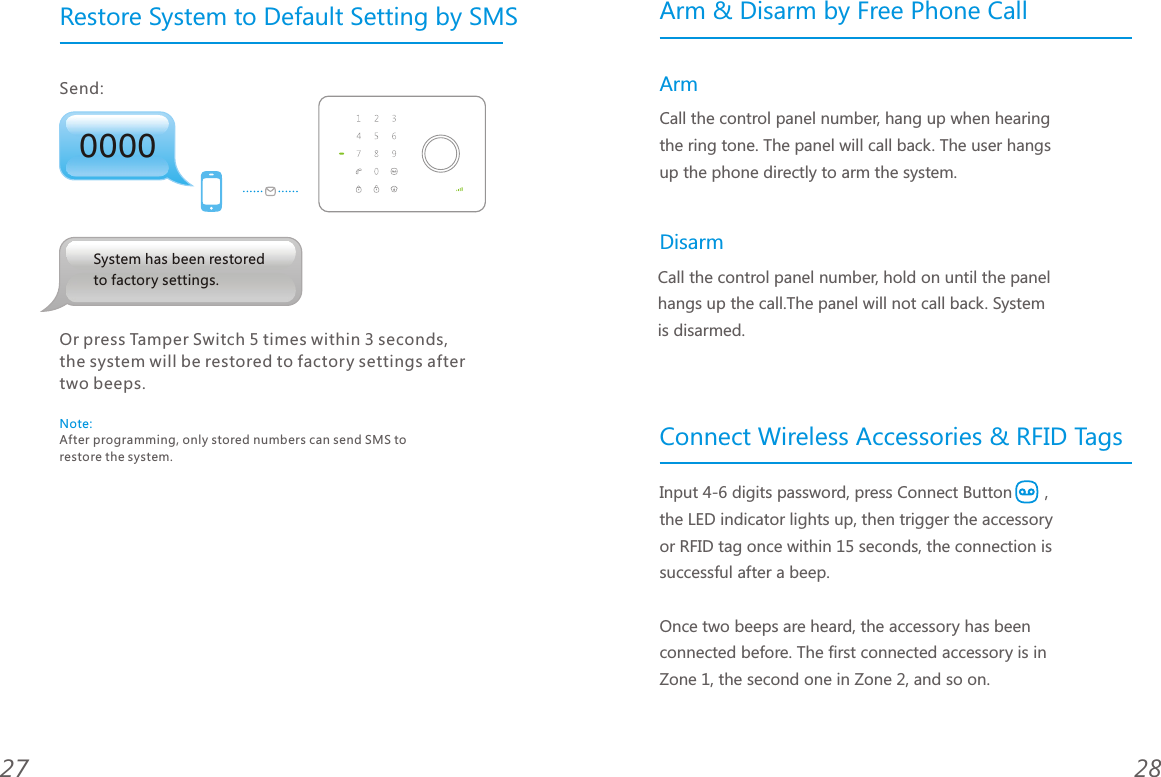
0000Restore System to Default Setting by SMSSend: 2827System has been restored to factory settings.Note: After programming, only stored numbers can send SMS to restore the system.Or press Tamper Switch 5 times within 3 seconds,the system will be restored to factory settings aftertwo beeps.Arm & Disarm by Free Phone CallConnect Wireless Accessories & RFID TagsArm DisarmCall the control panel number, hang up when hearing the ring tone. The panel will call back. The user hangs up the phone directly to arm the system. Call the control panel number, hold on until the panel hangs up the call.The panel will not call back. System is disarmed.Input 4-6 digits password, press Connect Button   , the LED indicator lights up, then trigger the accessory or RFID tag once within 15 seconds, the connection is successful after a beep.Once two beeps are heard, the accessory has been connected before. The first connected accessory is in Zone 1, the second one in Zone 2, and so on.
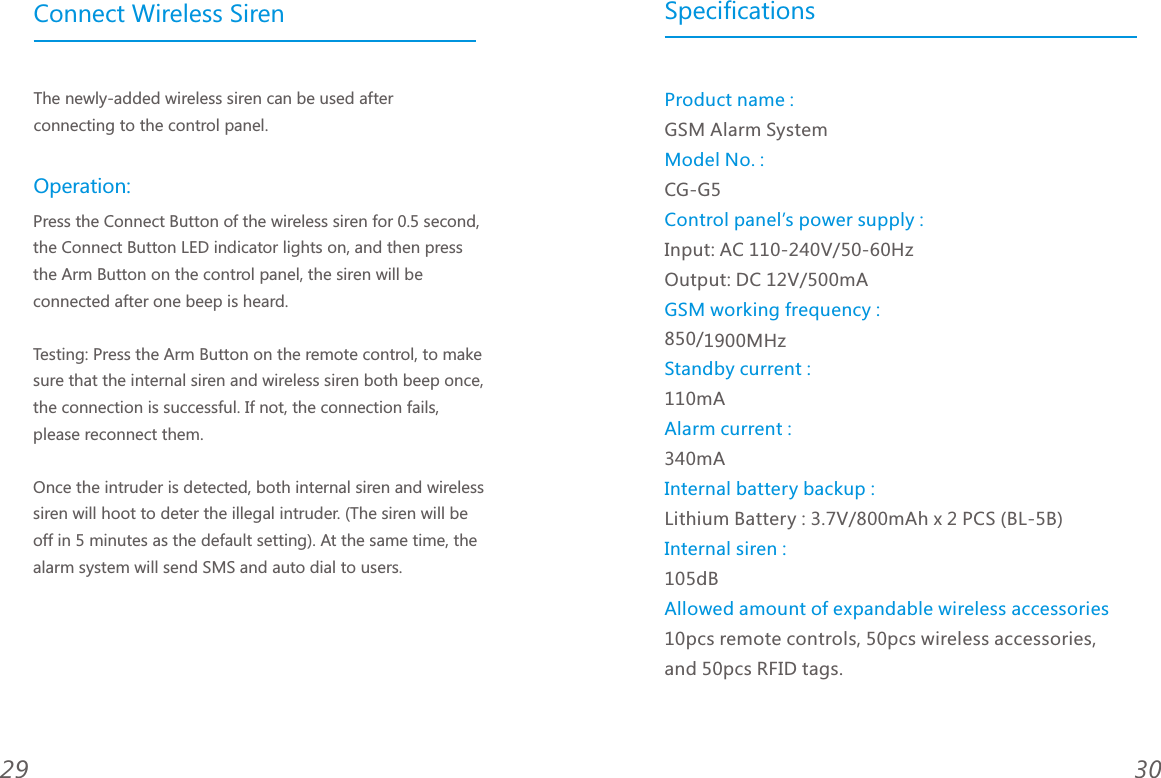
3029Connect Wireless SirenThe newly-added wireless siren can be used after connecting to the control panel.Press the Connect Button of the wireless siren for 0.5 second, the Connect Button LED indicator lights on, and then press the Arm Button on the control panel, the siren will be connected after one beep is heard. Testing: Press the Arm Button on the remote control, to make sure that the internal siren and wireless siren both beep once, the connection is successful. If not, the connection fails, please reconnect them. Once the intruder is detected, both internal siren and wireless siren will hoot to deter the illegal intruder. (The siren will be off in 5 minutes as the default setting). At the same time, the alarm system will send SMS and auto dial to users. Operation:SpecificationsGSM Alarm SystemCG-G5Input: AC 110-240V/50-60Hz    Output: DC 12V/500mA850/1900MHz 110mA340mALithium Battery : 3.7V/800mAh x 2 PCS (BL-5B)   105dB10pcs remote controls, 50pcs wireless accessories, and 50pcs RFID tags.Product name :Model No. :Control panel’s power supply :GSM working frequency :Standby current :Alarm current :Internal battery backup :Internal siren :Allowed amount of expandable wireless accessories
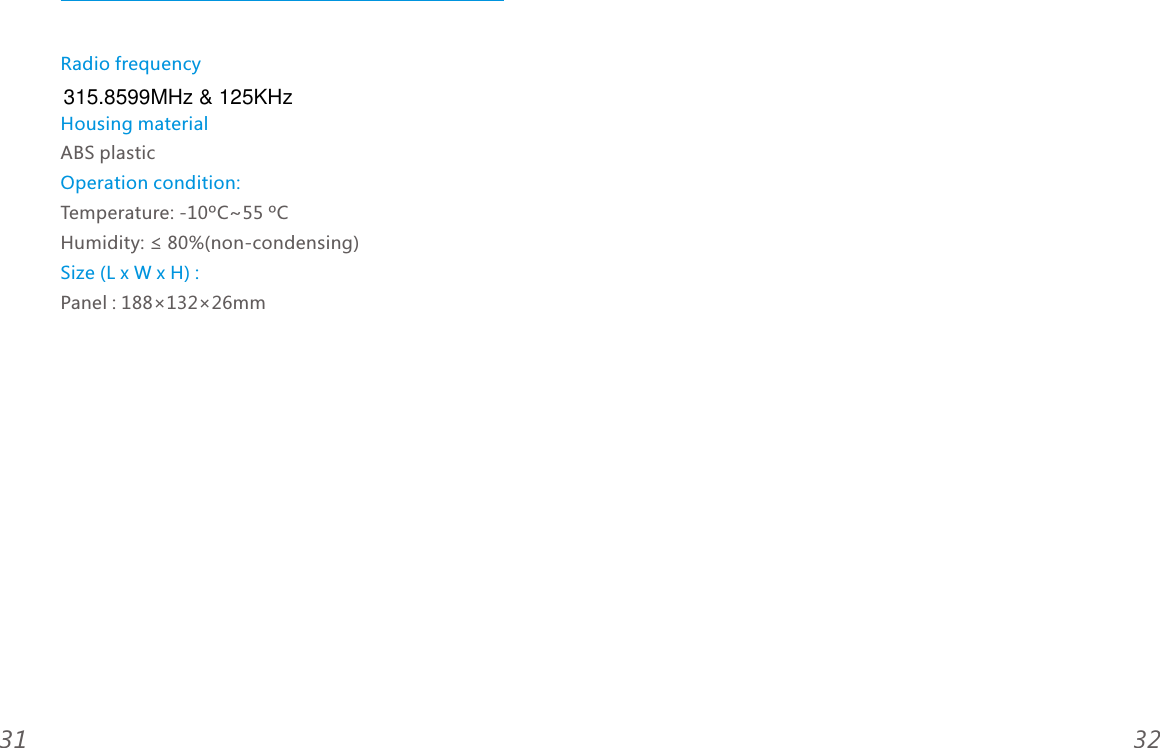
Radio frequencyHousing materialOperation condition:Size (L x W x H) : ABS plasticTemperature: -10ºC~55 ºCHumidity: ≤ 80%(non-condensing)Panel : 188×132×26mm3231315.8599MHz & 125KHz

Navigation menu