Chunghsin Technology Group E2SW5018 50inch FHD DLED TV User Manual T201803279A 50 6486
Chunghsin Technology Group CO.,LTD 50inch FHD DLED TV T201803279A 50 6486
Users Manual
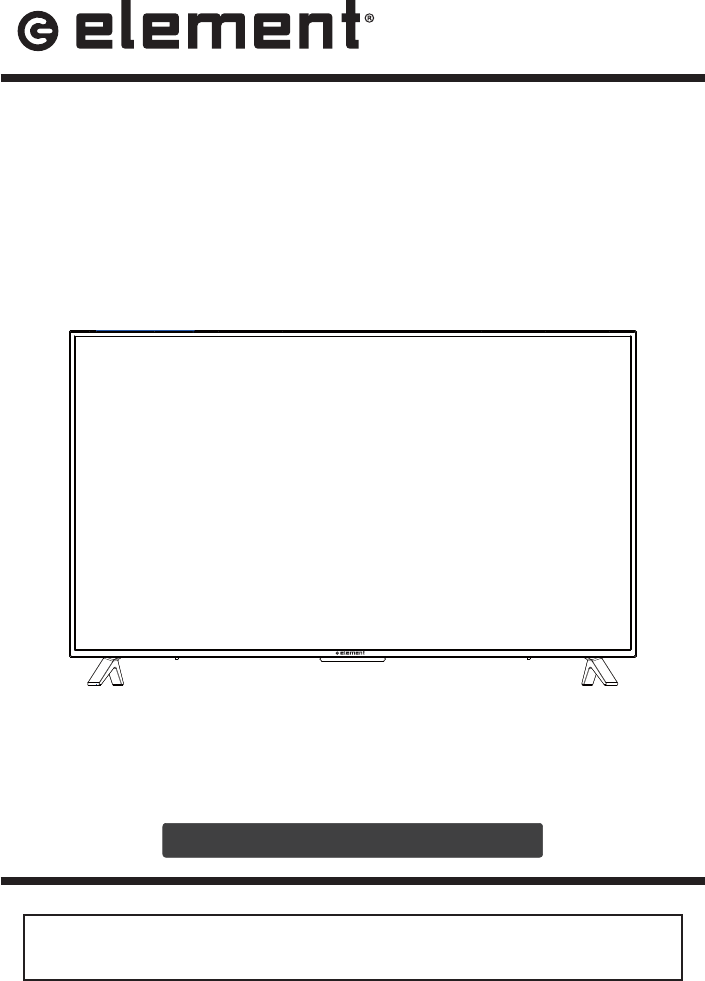
INSTRUCTION MANUAL
Please read all the instructions carefully before using this TV,
and keep the manual for future reference.
Digital LED TV
E2SW5018
Please refer to the actual product

1
CO
NTENT
S
Important
S
a
f
et
y
Instructions
2
A
dditional
S
a
f
et
y
In
f
ormation 3
P
re
p
arat
i
ons
4
W
ha
t's
I
ncluded
4
F
r
on
t
V
i
ew
5
Rear View
6
W
all Mounting
6
Remote Control
7
C
onnectin
g
External Devices
8
C
ustomizing TV
S
ettings
9
Turning On/Off Your TV 9
I
nitial Setu
p
9
S
ource 1
1
C
hannel
S
election
11
V
o
l
ume
Adj
ustmen
t
11
S
treamin
g
12
M
ed
i
a
1
3
V
i
ewin
g
P
h
o
to
s
13
Li
st
e
n
i
n
g
T
o
M
us
i
c
14
W
atc
hi
ng
Vid
eos
14
TV Settin
g
s
15
G
enera
l
16
Picture
S
ettings
18
Audio Settings 19
Network Settin
g
s 19
C
hannel
S
ettin
g
s
20
Time
S
ettings
20
Lock
S
etting
s
21
APP Settings
21
Parental
C
ontro
l
22
T
rou
bl
es
h
oot
i
ng
24
FCC
N
otes
27
O
TT APP
Se
rvi
ce
28
2
IM
PO
RT
AN
T
T
T
S
A
FET
Y
I
Y
N
S
T
RUC
TI
O
NS
t
Read
t
h
ese
in
st
r
uct
i
o
n
s
– All the safety
and operating instructions should be read
before this
p
roduct is o
p
erated.
t K
ee
p
t
h
ese
i
n
st
r
u
ct
i
on
s
– The safety
a
n
d
opera
t
i
ng
in
s
t
ruc
t
ion
s
s
hou
l
d
be
retained for future reference.
t
Hee
d
a
l
l
w
ar
nin
g
s
– Al
l
warnings
on
t
he
a
pp
lia
n
ce
a
n
d
in
t
he
opera
t
i
n
g
in
s
tr
uc
ti
o
n
s
s
h
ou
l
d
be
ad
h
e
r
ed
t
o
.
t
Fo
ll
ow
a
l
l
i
n
st
r
u
ct
i
on
s
–
A
ll
opera
t
i
n
g
a
n
d
use
in
s
tr
uc
ti
o
n
s
s
h
ou
l
d
be
f
o
ll
o
w
ed
.
t
Do
n
ot
u
se
th
i
s
a
pp
a
r
at
us
n
ear
w
at
e
r
– The a
pp
liance should not be used nea
r
water or moisture – for exam
p
le, in a wet
base
m
e
n
t
or
near
a
r
swimming
p
ool
,
an
d
th
e
lik
e.
C
lean only with dry cloth.
t
Do
no
t
bl
oc
k
an
yv
en
t
il
at
io
n
o
pen
i
ngs
.
I
n
st
a
ll i
n
acco
r
da
n
ce
wi
t
h
th
e
m
a
n
u
f
ac
t
u
r
e
r’
s
in
s
tr
uc
ti
o
n
s.
t
Do
n
ot
in
s
t
a
ll
near
an
y
hea
t
s
ources
suc
h
as
r
adiators
,
hea
t
r
e
g
isters
,
s
toves
,
or
o
ther apparatus
(
includin
g
that
p
roduce heat.
t
Do
no
t
de
f
ea
t
t
h
e
sa
fety
p
u
rpose
of
t
h
e
p
olarized
or
grounding
-
ty
pe
plu
g
. A
p
olar
i
z
ed
p
lu
g
ha
s
tw
o
b
l
ade
s
w
i
t
h
on
e
wi
de
r
t
h
an
t
he
o
t
he
r
.
A
g
roundin
g
-t
y
pe
plu
g
has
t
w
o
b
l
ades
a
n
d
a
t
h
ir
d
g
roundin
g
pr
o
ng
.T
h
e
wi
de
b
l
ade
o
r th
e
thir
d
pron
g
are
pro
v
ide
d
fo
r
y
o
u
r
sa
fety.
If
the
f
provided plug does not into your outlet,
con
s
u
l
t
an
ele
ct
r
icia
n
f
or
re
p
l
a
c
emen
t o
f
the obsolete outlet
.
P
rotect the power cord from bein
g
walked
on
or
p
inche
d
par
t
icularl
y
at plu
g
s,
c
on
v
enien
ce
recep
t
a
cle
s
,
and
t
he
p
oin
t
where the
y
exit from the apparatus.
O
nl
y
use att
a
c
hment
s
/
a
c
ces
sorie
s
by the manufacturer
.
U
se
o
nl
y
wi
t
hthe
car
t
,
s
tand
,
t
r
ip
o
d
,
b
racket
,
or
table
sp
ecifie
d
by
th
e
m
anufacturer, or sold with the a
pp
aratus.
W
h
e
n
a
car
t
i
s
u
s
e
d
,
u
se
cau
t
io
n
whe
n
movin
g
the cart/apparatus combination to
avoid in
j
ur
y
from tip-over.
U
nplug
t
hi
s
appara
t
us
durin
g
l
ig
h
t
n
i
n
g
s
t
orms
or
when
u
nused
f
or
l
on
g
p
eriod
s
o
f time.
Re
f
er
a
l
l
s
er
vicing to
q
ual
i
f
i
e
d
s
er
v
ice
pe
r
so
n
n
el.
S
er
v
icin
g
is
re
q
ui
r
ed whe
n
t
h
e
appara
t
u
s
h
a
s
bee
n
d
amage
d
in
an
y
w
a
y
,
s
uch
as
t
he
p
ower-su
pp
l
y
cor
d
or
pl
ug
is
d
am
ag
ed
,
li
q
u
i
d h
as
be
en
sp
il
l
ed
or objects have fallen into the apparatus,
t
h
e
appara
t
us
h
a
s
b
een
e
x
p
osed to
r
ai
n
o
r moisture, does not operate normally, or
has been dro
pp
ed.
P
lea
s
e k
eep
t
h
e
u
n
i
t
i
n
a
well
-
v
entilated
e
nvir
o
nm
e
nt
.
WARNIN
G:
T
o
r
educe
th
e
ri
s
k
of
o
r
e
l
ec
tri
c
s
ho
c
k,
d
o
no
t e
x
po
se t
h
i
s
appara
t
us to rai
n
or
m
oi
s
tu
r
e
.
T
h
e
a
pp
aratu
s
s
h
ou
l
d
not
be
e
x
po
s
ed
t
o
drippin
g
or
s
plashin
g
.
O
bj
e
ct
s
with li
q
uids, such as vases should not be
p
laced on a
pp
aratus.
WARNIN
G:
The batteries shall not be ex
p
osed
t
o excessive heat such as sunshine
,
or the
l
ike.
W
A
RNIN
G
:
T
he
m
ai
n
p
lu
g
is
used
as
d
isconnect device
,
the disconnect device shall
remain readil
y
operable
.
W
A
RNIN
G
:T
o
r
edu
ce
t
he
r
i
s
k
o
f
e
l
ec
t
ri
c
s
hock, do not remove cover (or back) as there
are
no
user
-
ser
v
i
ceab
l
e
p
art
s
in
s
i
de
.
Re
f
e
r
s
ervicing to
p
ersonne
l.
T
hi
s
ligh
t
n
i
n
g
f
la
sh
w
i
th
a
rr
o
w
hea
d
sy
mbo
l
wi
t
hin
an
equila
t
e
ra
l
t
rian
g
l
e
is
in
t
e
n
ded
to
aler
t
t
he
user
to
the presence of non-insulated “dan
g
erous volta
g
e”
wi
t
hi
n
t
h
e
prod
u
ct
’
s
en
c
l
o
s
u
re
tha
t
ma
y
be o
f
suff
i
c
i
e
n
t
magn
i
t
u
d
e
t
o c
o
n
st
i
tute a
ri
sk
of
ele
c
t
ri
c
shock
.
T
he exclam
a
t
i
on poi
n
t
wi
t
hin
an
e
q
u
il
atera
l
t
r
i
ang
l
e
is
i
nt
e
n
ded
to
ale
r
t
t
he
us
e
r t
o
t
he
p
re
s
e
n
ce
o
f
i
mportant operatin
g
and maintenance instructions in
th
e
li
terature accompany
i
ng t
h
e app
li
ance.
T
his
eq
u
ip
me
n
t
is
a
C
la
s
s
II
o
r
doubl
e
i
nsula
t
ed
elec
t
rica
l
appliance
.
I
t
h
a
s
b
ee
n
de
s
i
gne
d
in
suc
h
a wa
y
t
ha
t
it
does
no
t
re
q
u
i
r
e
a
sa
f
e
t
y
co
nn
e
ct
ion
t
o
electrical earth
.
RISQUE DE CHOC ELECTRIQUE NE
PAS OUVRIR

3
A
DDITI
O
NAL
S
AFETY INF
O
RMATI
O
N
T
o
ens
u
re
r
e
li
a
ble
a
n
d
s
afe
operat
i
o
n
o
f
thi
s
e
qu
i
pment, p
l
ea
se
rea
d
care
f
ully a
ll
th
e
i
nstructions in this user
g
uide, especiall
y
the sa
f
et
y
in
f
ormation below.
E
lectrical
S
a
f
ety
T
he
TV
se
t
should
on
l
y
be
c
o
nn
e
c
t
ed
t
o
a
mai
n
p
owe
r
s
u
pp
ly
wi
th
v
ol
t
a
g
e
t
ha
t
m
atches the label at the rear o
f
the product
.
To
pre
v
en
t
ov
e
rl
oad
,
do
no
t
s
ha
r
e
t
h
e
s
ame
power
s
r
uppl
y
socket w
i
th t
oo
man
y
oth
e
r
e
l
ectron
i
c com
p
onents
.
D
o not p
l
ace any connect
i
ng w
i
res w
h
ere t
h
ey may
b
e steppe
d
on or tr
i
ppe
d
over.
D
o not place heav
y
items on them, which ma
y
dama
g
e the leads
.
Hold the main plug, not the wires, when removing from a socket
.
D
uring a thunderstorm, or when not using the television
f
or extended period o
f
time,
turn o
ff
the power switch on the back o
f
the television.
Do not allow water or moisture to enter the TV or
p
ower ada
p
ter. Do NOT use in wet,
mo
i
st areas, suc
h
as
b
at
h
rooms, steamy
ki
tc
h
ens or near sw
i
mm
i
ng poo
l
s
.
P
u
ll th
e
plu
g
ou
t
i
mm
ed
i
a
t
e
l
y
,
a
n
d
s
ee
k
p
ro
f
e
ss
io
n
al
help i
f
th
e
m
a
in plu
g
or
cabl
e
i
s damaged, liquid is spilt onto the set, if accidentally exposed to water or moisture,
if
a
f
ny
thi
ng
ac
c
id
enta
ll
y
pe
n
et
r
a
te
s
th
e
v
e
n
til
a
t
i
o
n
s
l
ot
s
or
i
f
t
he
se
t
d
oes
n
o
t
w
o
rk
n
ormall
y.
D
o not remove the safet
y
covers. There are no user serviceable parts inside. Tr
y
in
g
to service the unit yoursel
f
is dangerous and may invalidate the product’s warranty.
personnel must onl
y
service this apparatus.
To
av
oid
ba
tt
er
y
l
ea
k
a
g
e, r
e
m
o
v
e
e
x
haus
t
ed
ba
tt
e
r
ies
f
r
o
m
the
re
m
o
t
e
c
ontro
l
,
or
when not using for long period
.
D
o not break open or throw exhausted batteries on a
Do
n
o
t m
i
x
old
a
n
d
n
e
w
ba
tt
e
r
ies
.
D
o
no
t
m
i
x
Alk
ali
ne
,S
tan
d
ar
d
(C
arbon
-
Z
i
nc
)
o
r
R
e
c
h
argea
bl
e
(
N
i
ck
el
C
admiu
m
)
o
r
(
Nickel Metal H
y
dride
)
batteries
.
P
hysical
S
a
f
ety
D
o not
bl
oc
k
vent
il
at
i
on s
l
ots
i
n t
h
e
b
ac
k
cover.
Y
ou may p
l
ace t
h
e
TV
i
n a ca
bi
net,
b
ut ensure at least 5cm
(
2''
)
clearance all around
.
D
o
no
t
t
ap
or
s
h
a
k
e
t
he
T
V
screen
,
or
you
may
dama
g
e
t
h
e
i
n
t
e
rn
al
c
ir
c
u
it
s
. T
a
k
e
good care of the remote control.
To clean the TV use a so
f
t dry cloth. Do not use solvents or petroleum based
D
o
no
t
i
ns
t
a
ll
near
any
he
a
t
s
o
u
r
c
es
such as radia
t
or
s
,he
a
t
re
gi
s
t
er
s, stoves
or
ot
r
he
r
a
pparatus
(
includin
g
that
p
roduce heat
.
Do not defeat the safety purpose of the polarized or grounding-type plug. A polarized
p
lu
g
h
a
s
tw
o
b
l
ade
s
w
i
t
h
one
wider
t
r
han
t
he
ot
h
e
r
.
A
g
roundin
g
t
y
pe
plu
g
ha
s
tw
o
b
lades and a third
g
roundin
g
pron
g
, the wide blade, or the third pron
g
is provided for
your safety. If the provided plug does not into your outlet, consult an electrician fo
r
r
eplacement o
f
the obsolete outlet.
Protect the power cord from bein
g
walked on or pinched particularl
y
at plu
g
s.
Unplug the apparatus during lightning storms or when unused for long periods.
R
e
f
e
r
al
l
s
ervicin
g
to a
se
rvi
c
e
personne
l
.
S
e
rvi
c
in
g
is require
d
wh
e
n
th
e
appa
r
a
t
u
s
has
been
dam
age
d
in
a
ny w
a
y
, suc
h
as
p
ow
e
r
-supp
l
y
co
r
d
o
r
plu
g
i
s
damaged, liquid has been spilled, or objects have
f
allen into the apparatus, has been
e
xposed to rain or moisture, does not operate normall
y
, or has been dropped.
P
lease
a
l
ways
c
o
nn
ec
t
y
ou
r
t
ele
v
is
ion
t
o
a
p
owe
r
ou
t
le
t
wi
t
h
p
r
o
te
ct
i
v
e
gro
u
d
c
onnect
i
on.
4
What is Included?
P
REPARATI
O
N
S
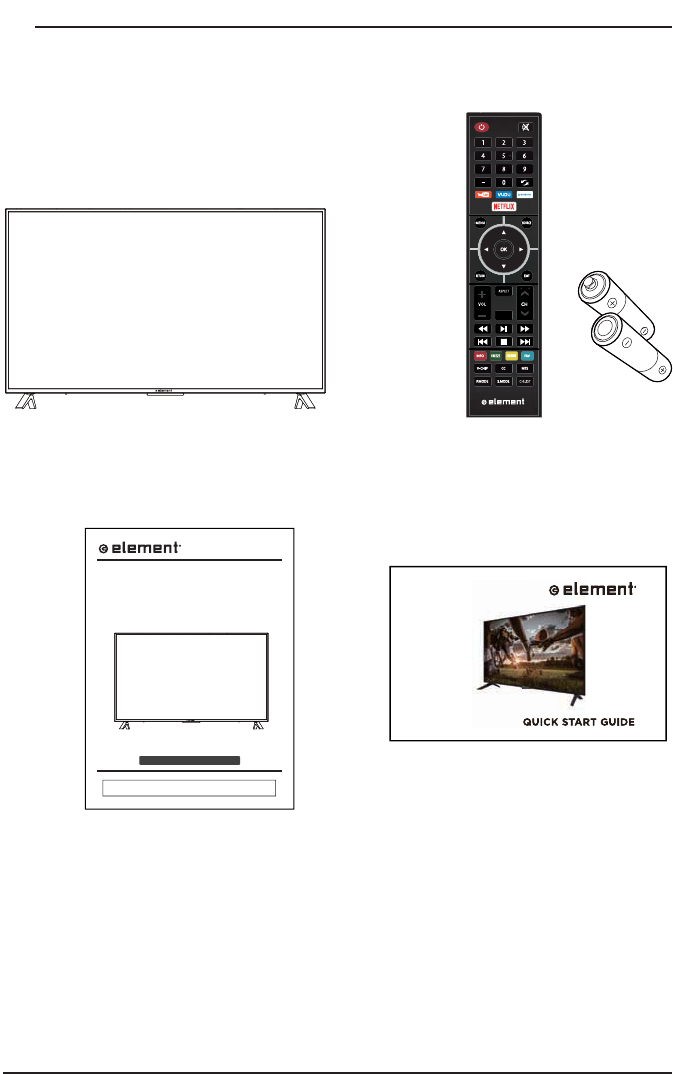
TV
Set
Re
m
ote
Co
n
t
r
o
l wi
t
h B
atte
ri
es
Use
r
Ma
n
ual
Q
uick
S
tart
G
uide
INSTRUCTION MANUAL
P
lease read all the instructions carefully before using this TV,
and keep the manual for future reference.
Di
g
i
ta
l
L
ED
TV
P
lease refer to the actual
p
roduct
TV
E2SW5018
5
P
REPARATI
O
N
S
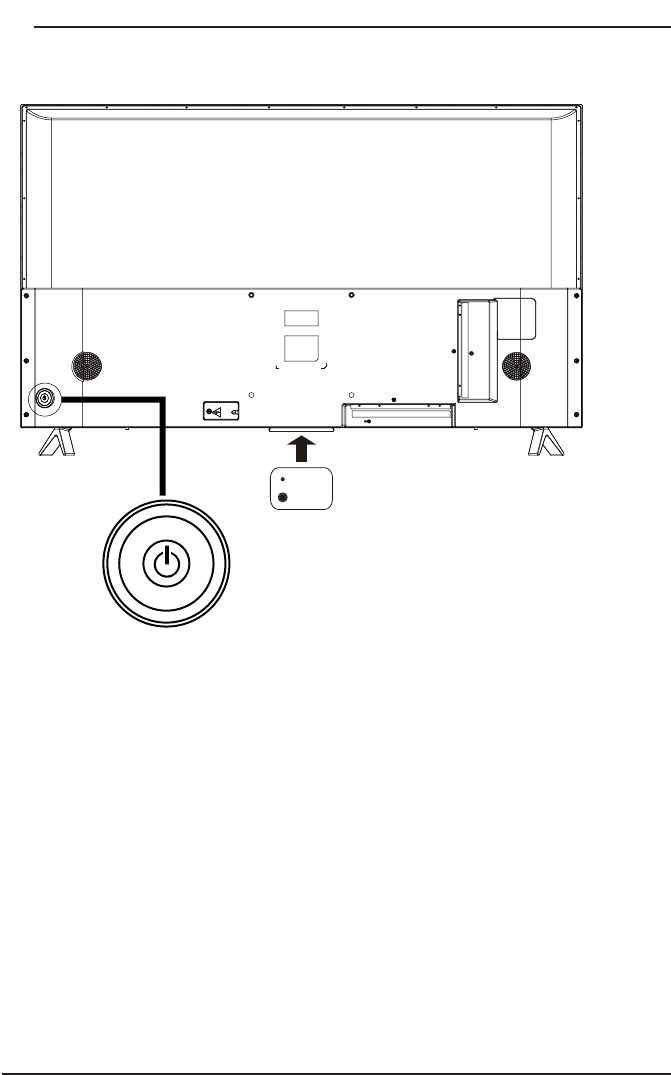
Front View
S
witch the TV between On and Standby mode.
PO
WER
t
C
H
P
r
ess
t
o
selec
t
a
cha
nn
el.
t
VO
L +
/-
+
/-
Press to ad
j
ust the volume
.
LED
IR
V
O
L+
V
O
L
-
C
H
+
C
H
-
6
P
REPARATI
O
N
S
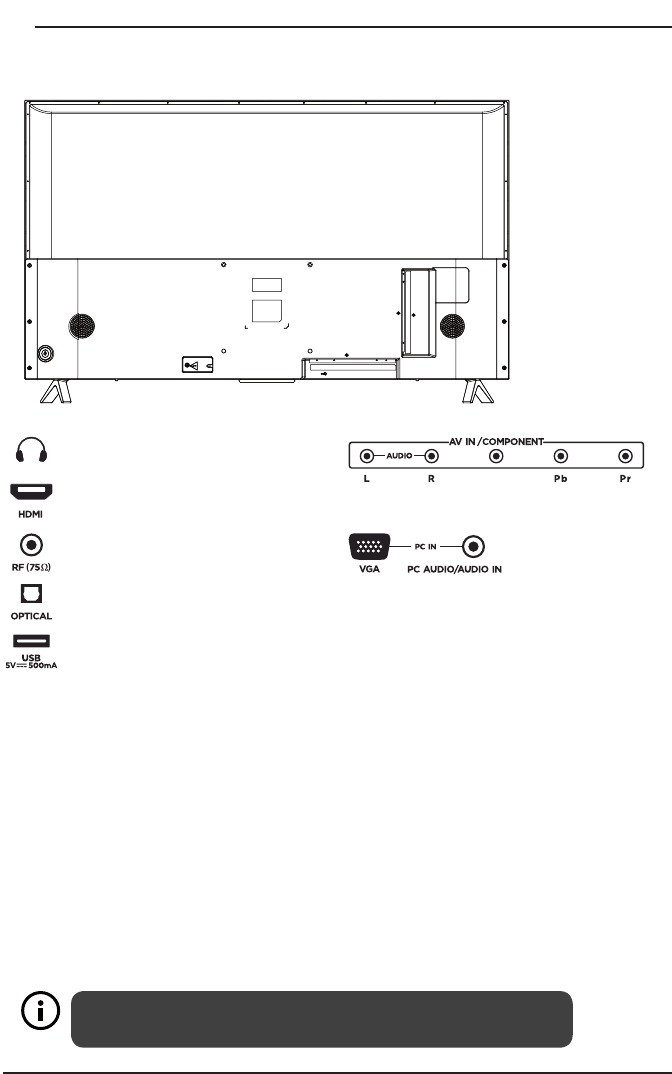
Rear View
Your new TV is heavy, please consult with professional wall
mount installer to perform this installation.
WARNIN
G
Ne
ver place a television set in an unstable location. A television set ma
y
fall, causin
g
s
er
ious
p
ersona
l
i
n
j
ury or
d
eat
h
.
M
any
i
n
j
ur
i
es, part
i
cu
l
ar
l
y to c
hild
ren, can
b
e avo
id
e
d
b
y ta
ki
ng
s
imple precautions such as:
-
Usin
g
cabinets or stands recommended b
y
the manufacturer of the television set
.
-
Ensuring the television set is not overhanging the edge of the supporting furniture.
-
Not placing the television set on tall
f
urniture
(f
or example, cupboards or bookcases
)
without anchorin
g
both the furniture and the television set to a suitable support
.
-
N
ot p
l
ac
i
ng t
h
e te
l
ev
i
s
i
on set on c
l
ot
h
or ot
h
er mater
i
a
l
s t
h
at may
b
e
l
ocate
d
b
etween t
h
e
television set and supporting
f
urniture
.
-
Educatin
g
children about the dan
g
ers of climbin
g
on furniture to reach the television
s
et or its controls.If your existing television set is being retained and relocated, the same
c
onsiderations as above should be applied.
Wall Mounting
H
eadphone
O
utput
H
DMI Input
A
ntenna Input
(
75Ω VHF
/
UHF
)
Op
tical
O
ut
p
ut
US
B In
p
ut
V
G
A In
p
ut
/
P
C
Audio In
p
ut
A
V
/C
omponent Input
VIDEO/Y
7
P
REPARATI
O
N
S
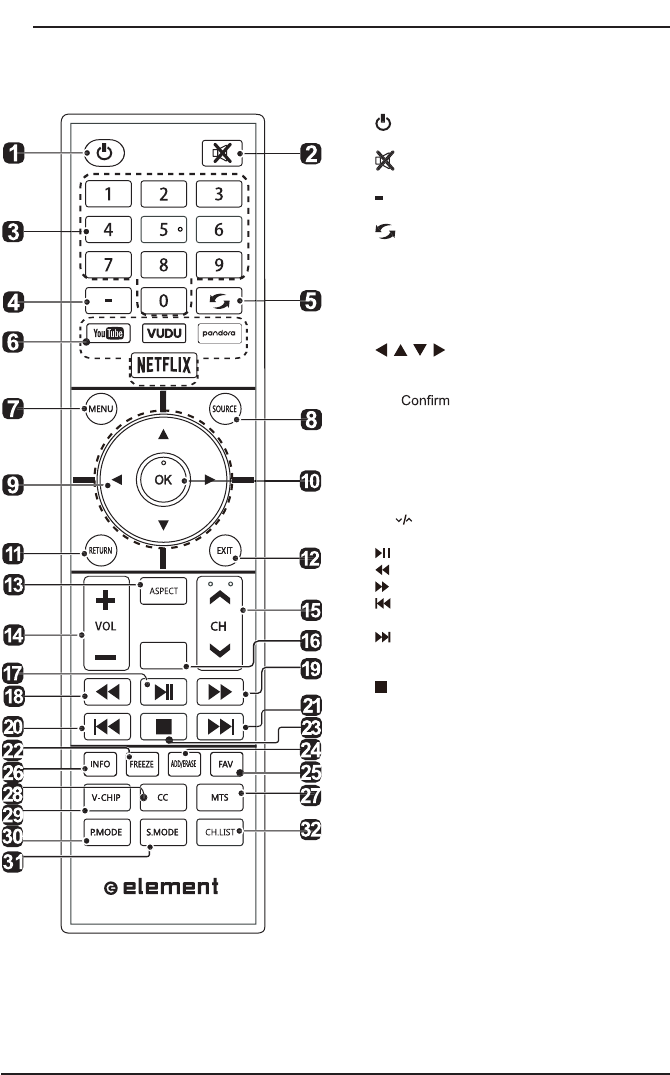
Remote Control
1.
:
S
wi
t
c
h
t
he
TV
be
t
w
een
O
n
an
d
S
tandb
y
mode.
2
.
:
M
ute and restore TV sound
.
3
.
0
~
9
:
S
elect a program.(ATV/DTV mode
)
4
.
:
E
nter multiple program channel numbe
r
suc
h
as
2-1.
5
.
:
Return to the previous viewin
g
c
hannel.
6
. APP
:
P
r
ess
t
o
selec
t t
he
desi
r
ed
APP
.
7
. MEN
U
:Displa
y
the main menu.
8
.
SOU
R
C
E:
S
elect among the different input
signal sources:TV/AV/COMPONENT/HDMI1/
HDMI2
/
HDMI
3/
V
G
A
/US
B.
9
.
:
Allows you to navigate the on
screen
di
sp
l
ay menus an
d
a
dj
ust t
h
e system
settin
g
s to
y
our pre
f
erence.
10
.
O
K: the selection.
11
. RET
U
RN:
R
eturn to
p
rev
i
ous menu
.
12
. EXIT
:
E
xit the on screen displa
y
menu
.
13
. A
S
PE
C
T:
S
elect the aspect ratio.
s
ettings:standard/wide/wide zoom/zoom/Just Scan
(
HDMI
)/
Dot b
y
Dot
(
V
G
A
)
.
1
4. V
O
L+/-
:
Adjust the volume.
15
.
C
H
:
Select the channel.
16
. TV:
I
nt
o
t
he
TV
cha
nn
el
.
17.
:
S
tart pla
y
back or pause.
18
.
:
R
everse p
l
ay
b
ac
k
rap
idl
y.
19
.
:
Ad
vance p
l
a
yb
ac
k
rap
idly.
20
.
:
Skip to the beginning of the previous
cha
p
ter/track/
p
hoto.
21
.
:
S
kip to the be
g
innin
g
o
f
the next chapter
/
track
/
photo
.
22. FREEZE:
F
reeze t
h
e
pi
cture.
23
.
:
S
top the pla
y
back.
2
4. ADD/ERA
S
E:
A
dd or delete Favorite channels.
25
. FAV
:
D
isplay the favorite channel list.
26
. INF
O:
Displa
y
the present screen in
f
ormation
s
uch as the current channel and in
p
ut source.
2
7. MT
S:
Switch among different audio
c
hannels:
S
TERE
O/
M
O
N
O/S
AP
.
28
.
CC:
Closed Caption selection:ON/OFF/CC On
Mu
t
e
.
29
. V-
C
HIP
:
S
et up parental control
.
30
. P.M
O
DE
:
Select picture mode:dynamic/movie
/
user/standard
.
3
1.
S
.M
O
DE:
S
elect sound mode:standard
/
music
/
m
ovie
/
user
.
3
2.
C
H.LI
S
T:
Di
sp
l
ay program
li
st.
TV
8
CO
NNE
C
TIN
G
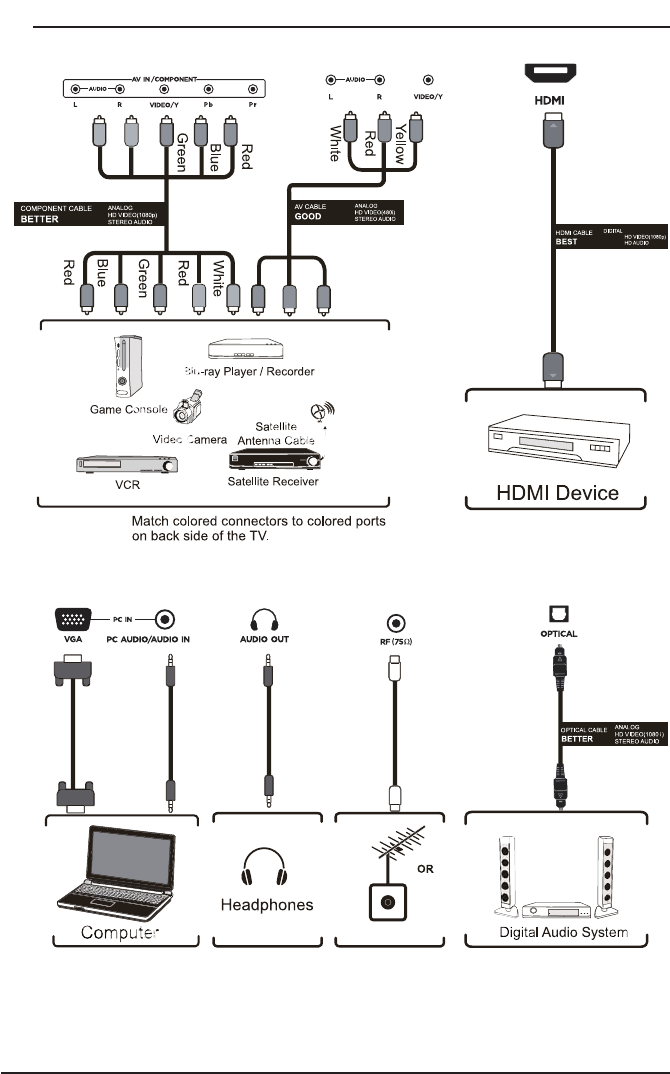
EXTERNAL DEVI
C
E
S
9
Turning On/Off Your TV
CUS
T
O
MIZIN
G
TV
S
ETTIN
GS
C
onnec
t
t
he
power
c
r
or
d
to
t
he
po
w
er
soc
k
e
t
a
f
te
r
y
ou
ha
v
e
c
omp
l
ete
d
a
ll
t
h
e
physical connections. At this stage, the TV will enter
S
tandby Mode and the red
LED
i
n
di
cator w
ill
ill
um
i
nate.
In
S
tandby Mode, press the
b
utton on t
h
e ma
i
n un
i
t or on t
h
e remote contro
l
to
turn t
h
e
TV
on.
Th
e re
d
LED
i
n
di
cator w
ill
turn
bl
ue
.
The POWER button on the main unit or on the remote control can only
switch the TV into standby. To completely turn off the TV, please disconnect
the power cord from the power socket.
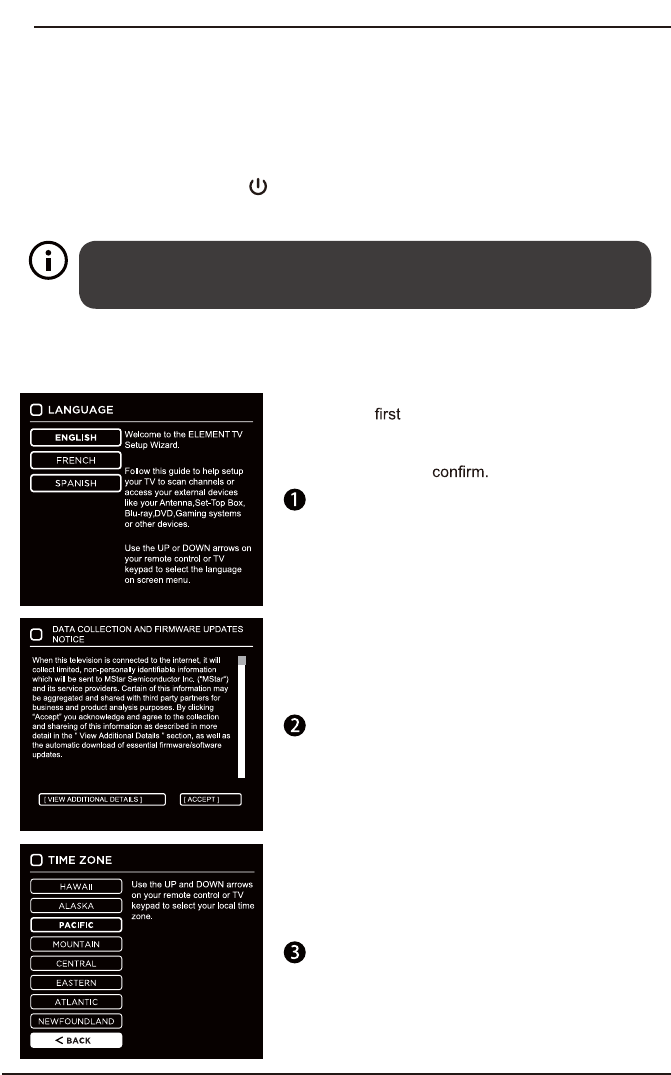
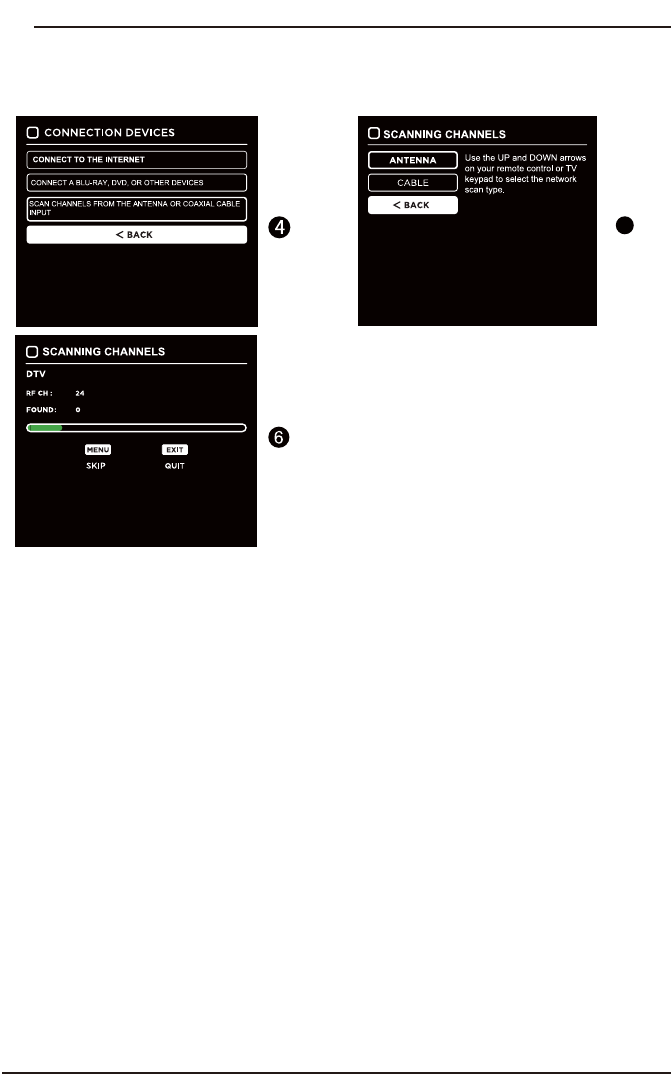
Initial Setup
The
t
i
me
y
ou turn t
h
e
TV
on,
i
t w
ill
g
o
i
nto
t
h
e
S
e
t
up
Wi
zar
d
.
P
r
e
ss
th
e
A
rr
ow
b
utton
s
to hi
g
hli
g
ht and select
y
our desired mode and
p
ress
O
Kt
o
10
CUS
T
O
MIZIN
G
TV
S
ETTIN
GS
Initial Setup
5
11
CUS
T
O
MIZIN
G
TV
S
ETTIN
GS
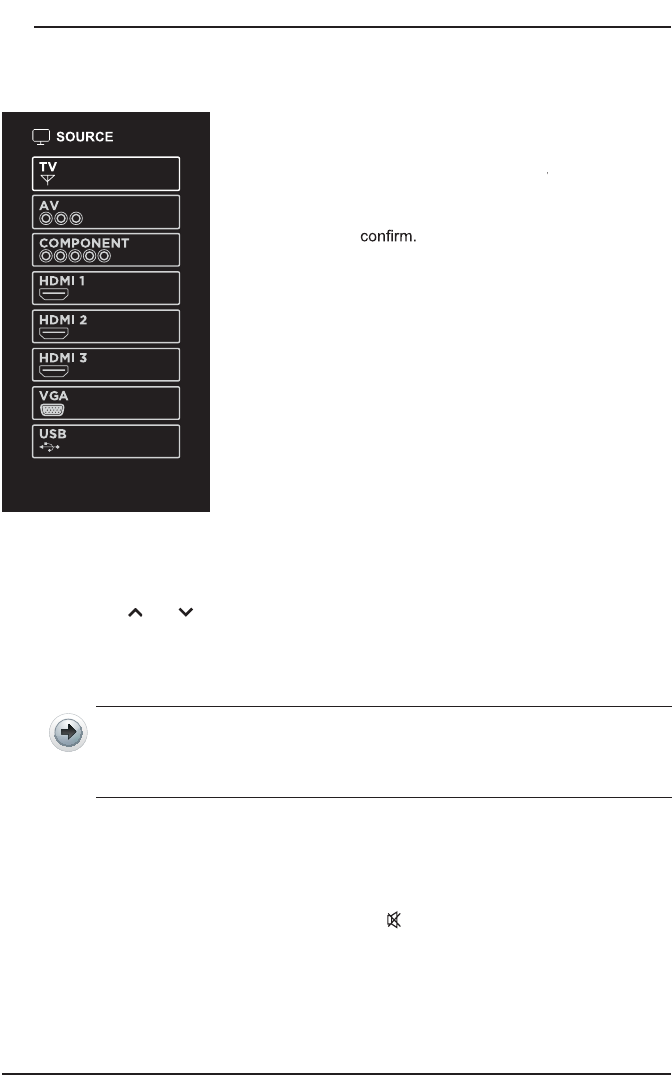
Source
P
r
e
ss
SO
U
R
C
E
on
t
he
r
e
m
o
t
e
c
o
n
t
r
ol
or
on
r
t
h
e ma
i
n un
i
t to
di
sp
l
ay t
h
e source menu, t
h
en
u
se
t
h
e
A
rr
ow
b
utton
s
to
cy
c
le
among
t
h
e
different in
p
ut sources:
TV/
A
/
/
V/
AA
CO
MP
O
NENT
/
HDMI
/
V
G
A
/
U
SB
,
t
h
en
use
th
e
A
rr
ow
b
utto
n
s
to hi
g
hli
g
h
t
t
h
e
d
esired
s
o
u
r
ce
a
n
d
pre
ss
O
K
t
o
Channel Selection
P
re
s
s
t
he
C
H
/
C
H
bu
tt
on
s
on
t
h
e ma
i
n un
it
or
on
t
h
e rem
o
t
e contro
l
repeate
dl
y
to se
l
ect t
h
e c
h
anne
l.
P
ress t
h
e
0
-
9
b
uttons on t
h
e remote contro
l
to se
l
ect t
h
e c
h
anne
l
di
rect
l
y
.
P
ress
"4"
, an
d
t
h
en press
OK
b
utton to se
l
ect c
h
anne
l
4.
P
ress
"4"
an
d
"
5
"
, an
d
t
h
en press
OK
b
utton to se
l
ect c
h
anne
l
4
5
.
Press "
1
", "
2
" and "
3
", and then press
OK
button to select channel
123.
P
ress t
h
eV
O
L+
/
-
b
uttons on t
h
e ma
i
n un
i
t or on t
h
e remote contro
l
to a
dj
ust t
h
e
vo
l
ume
.
I
f
you wish to switch the sound o
ff
, press th
e
MUTE
b
utton aga
i
n or t
h
eV
O
L+
b
utton to resume t
h
e soun
d.
Volume Adjustment
12
CUS
T
O
MIZIN
G
TV
S
ETTIN
GS
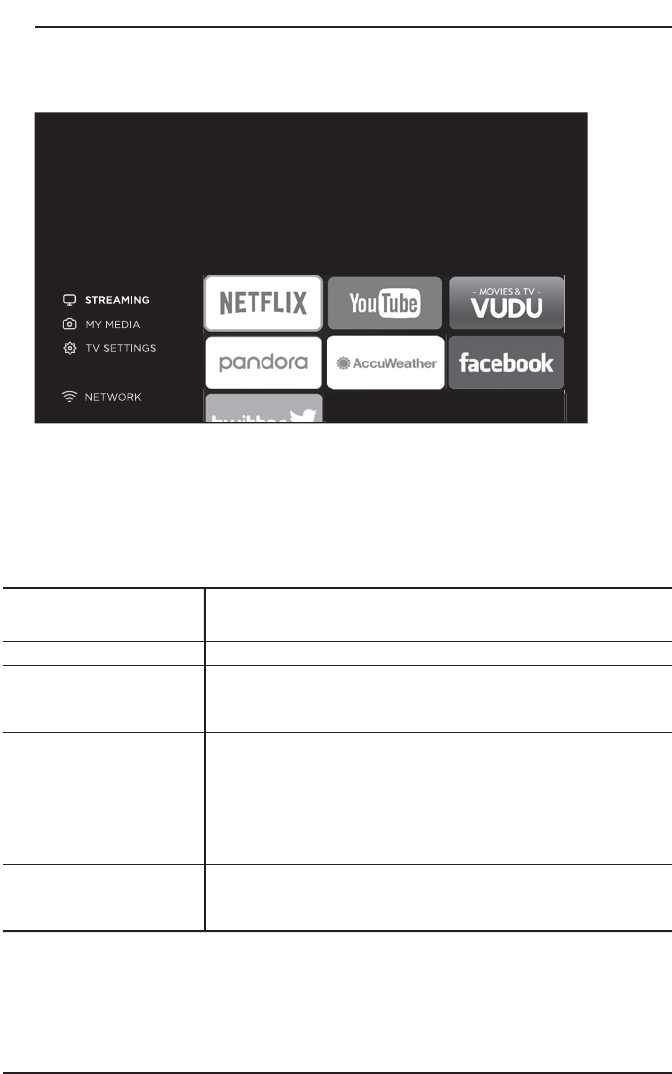
Streaming
NETF
L
IX
Enjoys TV shows
&
movies streamed instantly over the
I
nternet
.
YouTube
Y
ou
T
u
b
e your way on t
h
e
b
est screen
i
n your
h
ouse
.
VUDU
Di
s
co
v
e
r
,w
a
t
c
h
an
d
c
o
lle
c
t
t
he
la
te
s
t
mov
ie
s
an
d
TV
s
h
ow
s
in
hi
g
h
q
ua
li
t
y
1080
p
.
F
re
e
to
s
i
g
n
u
p.
N
o
subscriptions, late
f
ees or commitments.
Pa
n
do
r
a
F
re
e
persona
li
ze
d
ra
dio
t
h
a
t
o
f
f
er
s
e
f
f
ortles
s
an
d
en
dl
ess mus
i
c en
j
oyment an
d
di
scovery.
J
ust start w
i
t
h
t
he
name
o
f
one
o
f
y
our
fav
r
or
i
t
e
ar
t
i
s
t
s
,
s
ong
s,
genre
s
or composers and Pandora will do the rest. It
’
s easy to
cr
ea
te
pe
rs
on
a
li
ze
d
s
t
a
t
i
ons
t
h
a
t
p
l
a
y
on
ly
m
us
ic
you
’
ll
l
ove
.
AccuWeathe
r
Di
s
p
l
a
y
s
t
he
c
u
rren
t
w
ea
t
h
e
r
c
on
di
t
i
o
n
s
an
d
t
h
e
t
empera
t
u
re
anyw
h
er
e
in
t
he
wor
ld
in
c
en
t
i
gra
de
or
F
a
h
ren
h
e
i
t
.
Pr
ess
M
EN
U
bu
tt
on on
t
he
ma
i
n
u
n
i
t
or
on
t
he
remo
t
e
to
di
s
p
la
y
t
he
ma
i
n
i
nt
e
r
f
ace
.
The
n
u
se
t
h
e
A
rro
w
b
ut
t
ons
to
se
l
ec
t
S
TREA
M
IN
G
an
d
pre
ss
OK
t
o
enter.
U
se t
h
e
A
rr
ow
b
uttons to se
l
ect t
h
e
d
es
i
re
d
APP
an
d
press
OK
b
utton to
view.
O
r press th
e
h
ot
k
e
y
on t
h
e remote contro
l
to enter t
h
e
d
es
i
re
d
APP
di
rect
ly
.
For
f
ull listin
g
o
f
available Apps, please visit elementelectronics.com
.
13
CUS
T
O
MIZIN
G
TV
S
ETTIN
GS
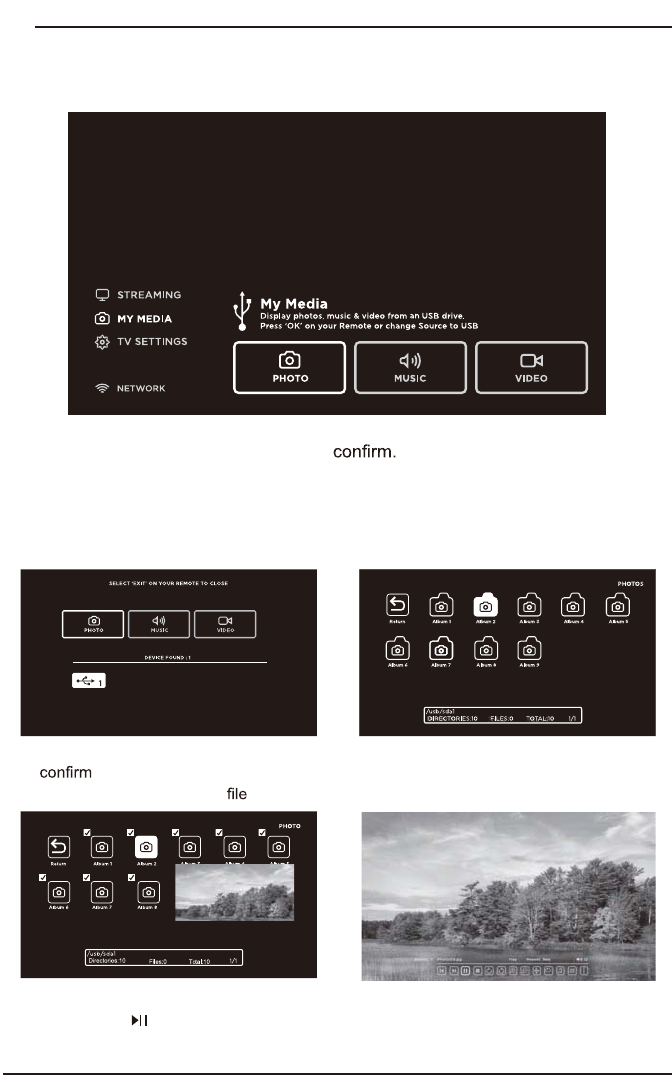
Media
Viewing Photos
Af
te
r
en
te
r
in
g
the pictu
re
f
i
l
e
,
u
se
t
h
e
Ar
r
ow
bu
tt
o
n
s
t
o
s
elect
t
h
e
d
esi
r
e
d
p
i
c
t
u
re
,
t
hen
pres
s
t
h
e to
di
s
pl
a
y
.
W
h
en
t
h
e
pi
c
t
u
re
is
pla
y
i
ng
,
t
h
e
pi
ct
ur
e
F
u
n
ct
i
on
B
a
r
will
b
e
di
sp
l
aye
d
.
U
se
t
h
e
Arr
o
w
bu
tt
o
n
s
t
o
se
l
ec
t th
e
des
ir
ed
f
u
n
c
ti
o
n
a
v
a
il
ab
l
e
o
n th
e
ba
r
.
U
se
t
h
e
Arr
ow
bu
tt
o
n
s
to hi
g
hli
g
ht the
P
H
O
T
OS
o
p
tion and
p
ress
OK
,
then it will
j
ump
t
o
th
e
i
ns
er
t
e
d
d
r
iv
e
,
p
res
s
OK
t
o
e
n
t
e
r
.
Aft
er
e
r
nt
e
rin
g
P
H
O
TOS
,
us
e
t
h
e
Ar
ro
w
bu
tt
o
n
s
to select the picture and press
O
Kt
o
e
nt
e
r
.
P
ress
MENU
button to display the main inter
f
ace, then use th
e
A
rr
o
w
b
uttons to
hi
g
hli
g
h
t
MY
MEDIA
an
d
press
OK
t
o
S
elect among Photos, Music and
Vid
eo to v
i
ew w
h
at you
lik
e.
Note:
Portable drives should be inserted be
f
ore entering
MY
MEDIA
men
u
.
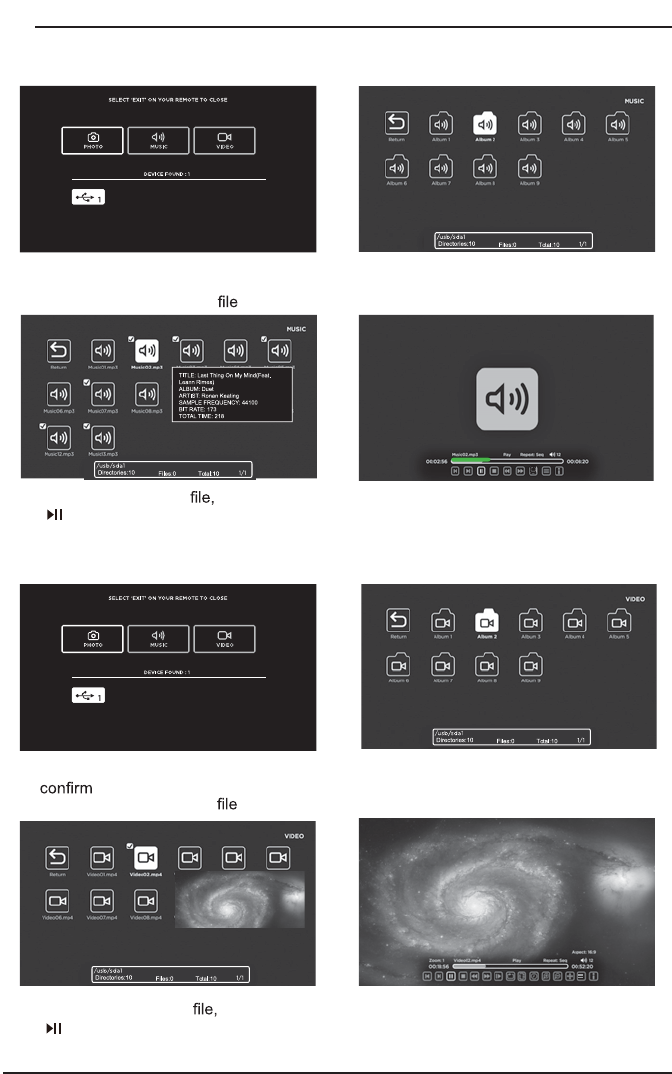
14
CUS
T
O
MIZIN
G
TV
S
ETTIN
GS
Listening To Music
Watching Videos
A
ft
e
r
en
t
e
rin
g
the
aud
i
o
us
e
t
h
e
Arr
o
w
bu
tt
o
n
s
t
o
s
e
l
e
c
t
t
h
e
de
s
i
r
ed
m
u
sic,
t
he
n
p
re
ss
t
he
to display. When the music is playing, the music Function Bar will be displayed. Use
t
h
e
Arr
o
w
bu
tt
o
n
s
t
o
se
l
ec
t th
e
des
ir
ed
f
u
n
c
ti
o
n
a
v
a
il
ab
l
e
o
n th
e
ba
r.
U
se t
he
A
rr
ow
bu
tt
on
s
t
o
h
ighlig
h
t
t
he
M
U
SI
C
op
t
i
on
a
nd
pres
s
O
K
,
t
h
en i
t
will
j
um
p
t
o
con
f
ir
m
t
h
e
i
nser
t
e
d
d
rive
,
press
O
K to
en
ter.
Aft
er
en
terin
g
MU
SI
C
,
use
t
he
A
rr
o
w
b
utton
s
t
o
se
l
ec
t th
e
aud
i
o
and press
O
Kt
o
e
nt
e
r.
Af
ter entering the video u
se
t
h
e
A
rr
o
w
b
uttons to select the desire video, then press
t
he to
d
ispl
a
y
. Whe
n
t
he video is pla
y
in
g
,
the
v
i
de
o
f
un
c
t
i
on
b
a
r
will be d
i
s
p
la
y
e
d.
U
se th
e
A
rr
o
w
bu
tt
o
n
s
t
o
se
l
ec
t th
e
des
ir
ed
fu
n
c
ti
o
n
a
v
a
il
ab
l
e
o
n th
e
ba
r
.
U
se th
e
Arr
ow
bu
tt
on
s
t
o
hi
g
hli
g
h
t
t
he
VI
D
EO
S
o
p
t
ion
a
n
d
p
r
e
ss
OK
,
t
he
n
i
t
will
j
um
p
t
o
th
e
i
n
s
e
r
te
d
d
r
iv
e
,
p
ress
OK
t
o
e
nt
e
r.
A
fte
r
e
n
t
er
i
ng
V
IDE
O
S
,
us
e
t
h
e
A
r
ro
w
b
utton
s
to se
l
ect t
h
e v
id
eo an
d
press
O
K
t
o en
t
er.
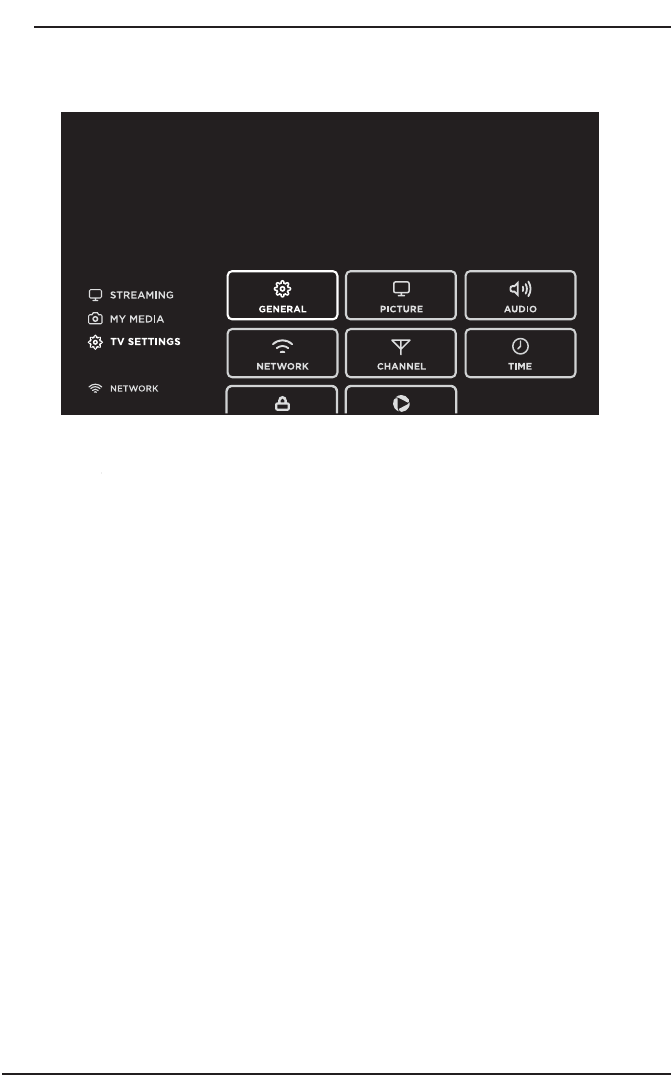
15
CUS
T
O
MIZIN
G
TV
S
ETTIN
GS
TV Settings
P
r
ess
th
e
M
EN
U
button on the main unit or on the remote control to displa
y
the
ma
in
in
t
er
face. T
rr
he
n
use
th
e
Arr
ow
bu
tt
o
n
s
t
o
h
i
g
hli
g
h
t
TV
S
ett
in
g
s
a
n
d
p
res
s
O
K
to
e
n
te
r. T
he
n
use
th
e
Arr
ow
bu
tt
o
n
s
to c
y
c
le
a
mon
g
t
he
f
o
llowin
g
op
t
io
n
s
a
n
d
se
l
ec
t th
e
des
ir
ed
o
n
e
t
o
e
nt
e
r.
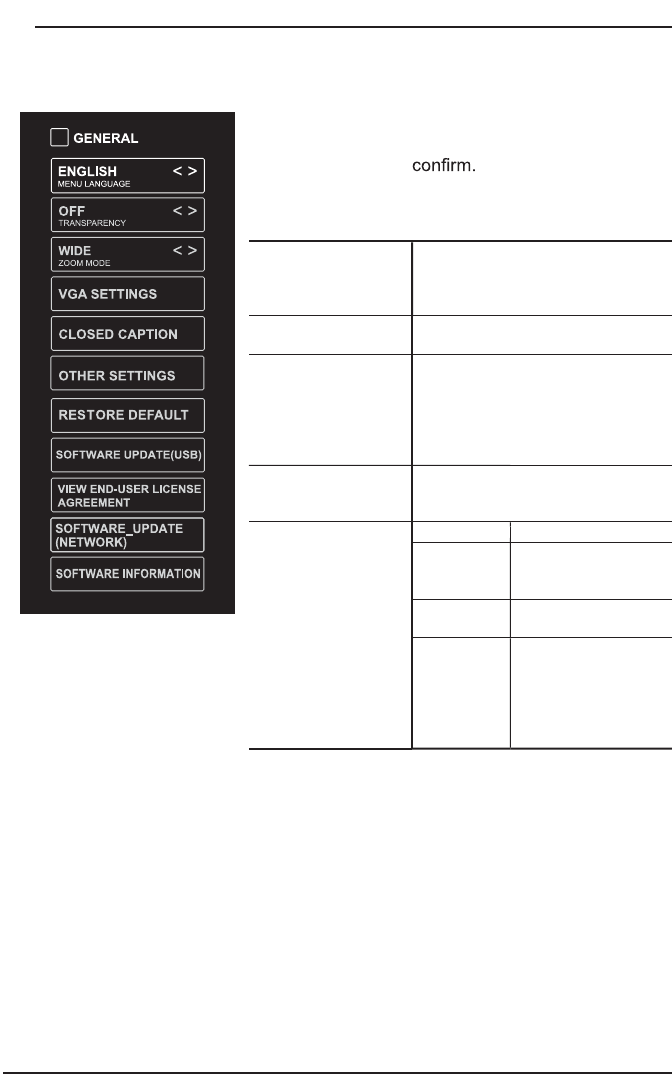
16
CUS
T
O
MIZIN
G
TV
S
ETTIN
GS
General
P
ress
MENU
t
o
di
sp
l
a
y
t
he
ma
in
in
t
er
f
ace,
t
he
n
use t
he
A
rr
ow
bu
tt
on
s
t
o
hi
g
hli
g
h
t
TV
S
ett
i
n
g
s
an
d
press
OK
t
o
U
se
th
e
A
rr
ow
b
utton
s
t
o cy
c
l
e
among
di
ff
eren
t
op
t
i
on
s
a
n
d
s
e
le
c
t
Ge
n
e
r
al
to enter an
d
a
dj
ust eac
h
opt
i
on sett
i
ng.
M
EN
U
LAN
GU
A
G
E
S
elect the menu language among
English, Français or Español. The
d
efault on-screen menu language is
English
.
TRAN
S
PAREN
CY
S
elect to turn On/Off transparenc
y
fu
n
c
ti
o
n.
ZOO
M M
O
DE
S
elect zoom mode:
Wide
/
Wide Zoom
/
Zoom
/S
tandard
/
J
ust
S
can
(
at HDMI mode
)/
Dot b
y
D
ot
(
at V
G
A mode
)
.
N
ote: With a di
ff
erent in
p
ut source
,
t
he zoom mode options ma
y
di
ff
er.
VG
A
S
ETTIN
GS
A
d
j
ust advanced option’s settin
g
:
H-POS, V-POS, Clock, Phase o
r
A
uto. (only available in VGA mode
)
C
L
OS
ED
C
APTI
O
N
CC mode On/Off/CC on Mute.
B
as
i
c
S
electio
n
CC
1,
CC
2,
CC
3,
CC
4
,
TEXT1,
TEXT2
,
T
EXT3, TEXT4,
O
FF.
Ad
v
a
n
ced
S
electio
n
S
ervice1/Service2.../
S
ervice6
.
Option
M
ode, Font St
y
le,
F
ont Size, Font Ed
g
e
S
t
y
le, Font Ed
g
e
Color, FG_ Color,
BG_ Color, FG_
O
p
ac
i
t
y
, BG_
O
pac
i
ty
.
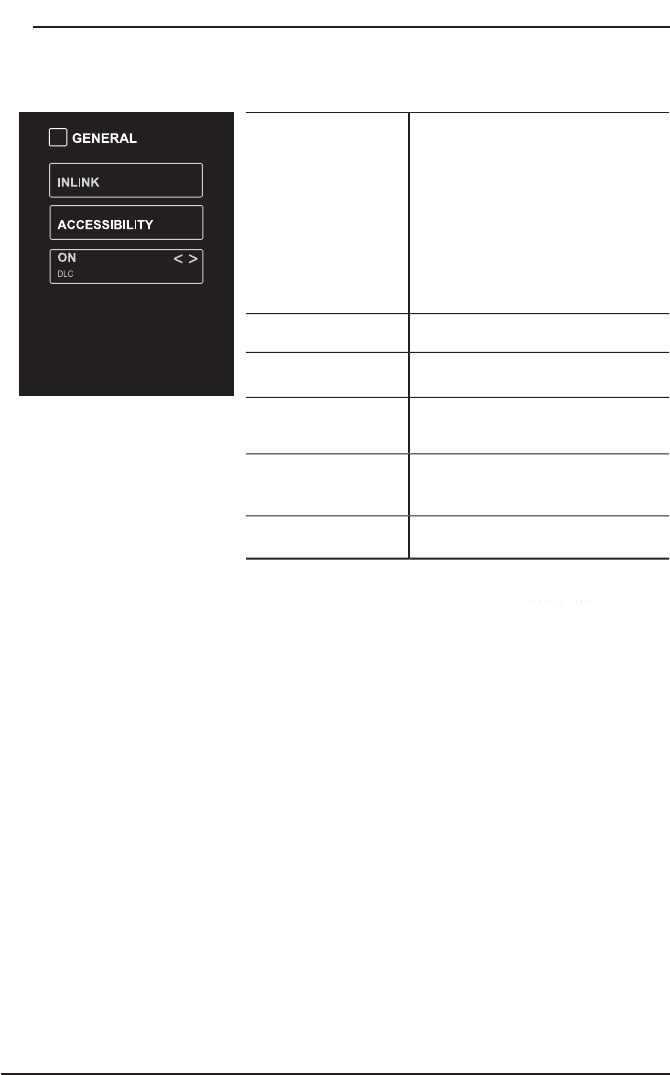
1
7
CUS
T
O
MIZIN
G
TV
S
ETTIN
GS
O
THER
S
ETTIN
GS
INLINK: LINLINK
CONTROL
,
DEVICE POWER
OFF
,
TV Auto Power On
,
AUDIO
RECEIVER
,
LINLINK DEVICE
LIST
,
ROOT MENU
.
A
ccessibility TTS
:
V
o
i
ce
Guide
,
VERBOISITY
,
RATE
SUPPORT
,
PITCH
SUPPORT
,
VOICE
,
Video
Description
,
V
D VOLUME
DLC:Select to turn On/Off DLC
.
R
E
S
T
O
RE DEFA
U
L
T
R
estore the TV to
f
actor
y
de
f
ault
s
ett
i
n
g
s.
SO
FTWARE
U
PDATE
(
U
S
B
)
S
o
f
tware U
p
date In the case o
f
a
US
B device
.
VIEW END-
US
ER
LIN
C
EN
S
E
AG
REEMENT
C
hoose "I have read the use
r
a
g
reement
"
to se
l
ect
A
ccept o
r
Decli
n
e
.
SO
FTWARE
_
UPDATE
(
NETW
O
RK
)
S
o
f
tware U
p
date In the case o
f
a
NETW
O
RK device
.
SO
FTWARE
INF
O
RMATI
O
N
C
heck Module
S
o
f
tware Version
N
et
R
ea
dy
D
ev
i
ce
ID.
H
ow to turn the Text-to-Speech
(
TTS
)
voice guide on or
off?
Press
“
MENU” key on the remote control
Turn the
G
ENERAL menu
.
Select “OTHER SETTING”
S
elect
“
Accessibility
”
S
elect “Voice
G
uide” and turn it on or off.
www.
e
l
e
m
e
n
te
l
ect
r
o
ni
cs
.
co
m
18
CUS
T
O
MIZIN
G
TV
S
ETTIN
GS
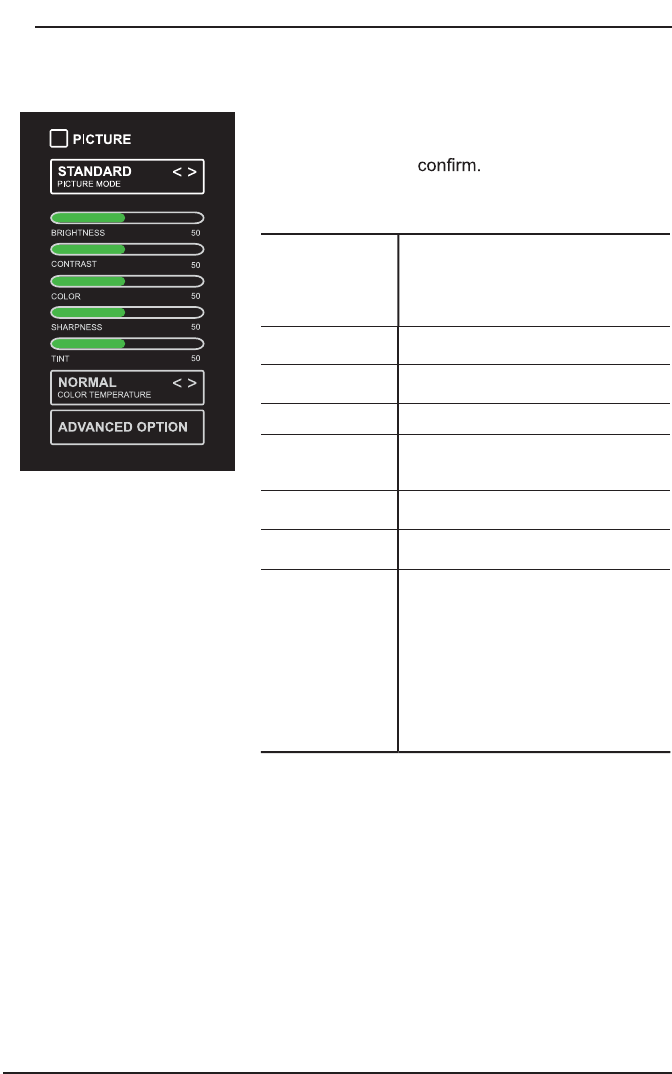
Picture Settings
P
I
C
T
U
RE M
O
DE
Cycle among picture modes:
Dynamic/Standard/Movie/User.
Alternative: Press P.MODE button on
rem
o
te control to set the
p
ic
tu
re
mode
d
irectly
.
B
RI
G
HTNE
SS
In
c
r
ease
o
r
dec
r
ease
th
e
a
m
ou
nt
of
w
hite in the picture
.
CO
NTRA
S
T
A
djust the di
ff
erence between light
an
d
d
ar
k
l
eve
l
s
i
n t
h
e
pi
ctures
.
CO
L
O
R
C
ontrol the color intensit
y
.
S
HARPNE
SS
Adj
ust cr
i
spness
l
eve
l
i
n e
dg
es
between li
g
ht and dark areas o
f
the
pi
cture.
T
IN
T
Ad
j
ust the balance between red and
green levels
.
CO
L
O
R
TEMPERATURE
Cy
cle amon
g
color temperatures:
Normal
/
Warm
/COO
L.
A
DVAN
C
ED
O
PTI
O
N
Set the followin
g
options:
N
o
i
se
R
educ
ti
o
n: R
educe
th
e
n
o
i
se
level of the connected device: OFF/
W
EAK/MEDIUM/STRONG.
W
hit
e
B
a
l
a
n
ce
: T
o
se
t th
e
d
iff
e
r
e
nt
options of white balance
.
R
ed Gain/Green Gain/Blue Gain/Red
O
ffset/Green Offset/Blue Offset
.
B
acklight: To set the value o
f
b
acklight
.
P
ress
MEN
U
t
o
di
sp
l
ay
th
e
m
a
i
n
i
nter
f
ace,
th
e
n
u
se
t
h
e
A
rr
ow
b
u
tt
ons
t
o
hi
g
hli
g
h
t
TV
S
ett
i
n
g
s
a
n
d
press
O
K
t
o
U
se t
h
e
A
rr
ow
b
uttons
t
o cy
cl
e
among
di
ff
eren
t
op
t
i
ons
a
n
d
s
e
l
ec
t
Pictu
r
e
to enter an
d
a
dj
ust eac
h
opt
i
on sett
i
ng.
19
CUS
T
O
MIZIN
G
TV
S
ETTIN
GS
Audio Settings
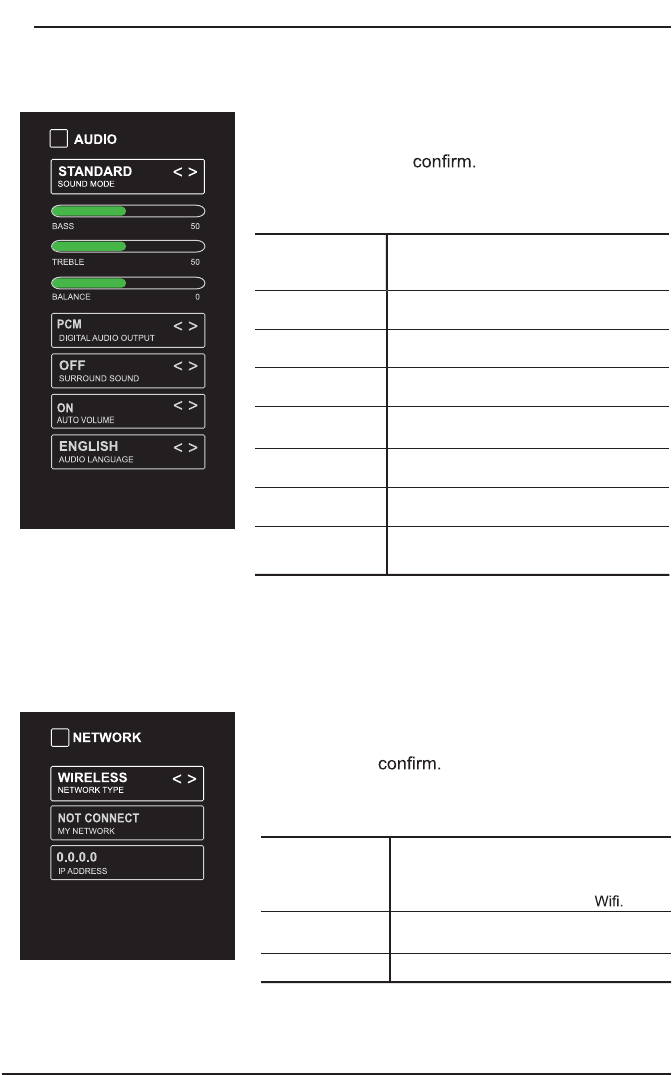
SOU
ND M
O
DE
A
ll
o
w th
e
se
l
ec
ti
o
n
o
f
a
n
aud
i
o-
enhancement technique: Standard/
Music
/
Movie
/U
ser.
B
A
SS
C
ontrol the relative intensit
y
o
f
lower-
pi
tc
h
e
d
soun
d
s
.
T
REBLE
C
ontrol the relative intensity of higher-
pitched sounds
.
B
ALAN
C
E
A
d
j
ust the relative volume of the
s
peaker in a multiple speaker s
y
stem
.
D
I
G
ITAL A
U
DI
O
OU
TP
U
T
Select the di
g
ital audio output mode
between P
C
M
/
RAW
.
SU
RR
OU
ND
SOU
ND
Turn On/Off to provide an enhanced
listenin
g
experience
.
AU
T
O
V
O
L
U
ME Turn
O
n
/Off
to automaticall
y
control
v
o
l
ume
l
eve
l
s
.
AU
DI
O
LAN
GU
A
G
E
S
elect audio lan
g
ua
g
e amon
g
: En
g
lish,
F
rench,
Sp
anish
.
P
r
e
s
s
M
EN
U
to
d
ispla
y
t
h
e
m
ain
i
n
t
e
r
f
a
ce
,
t
h
e
n
u
se
t
he
A
rr
ow
b
u
t
t
on
s
t
o
h
ighlight
TV
S
etti
ngs
a
nd press
O
K
t
o Use the
A
rr
ow
buttons
t
o cycle among di
ff
erent options and select
Aud
i
o
t
o enter and adjust each option setting.
N
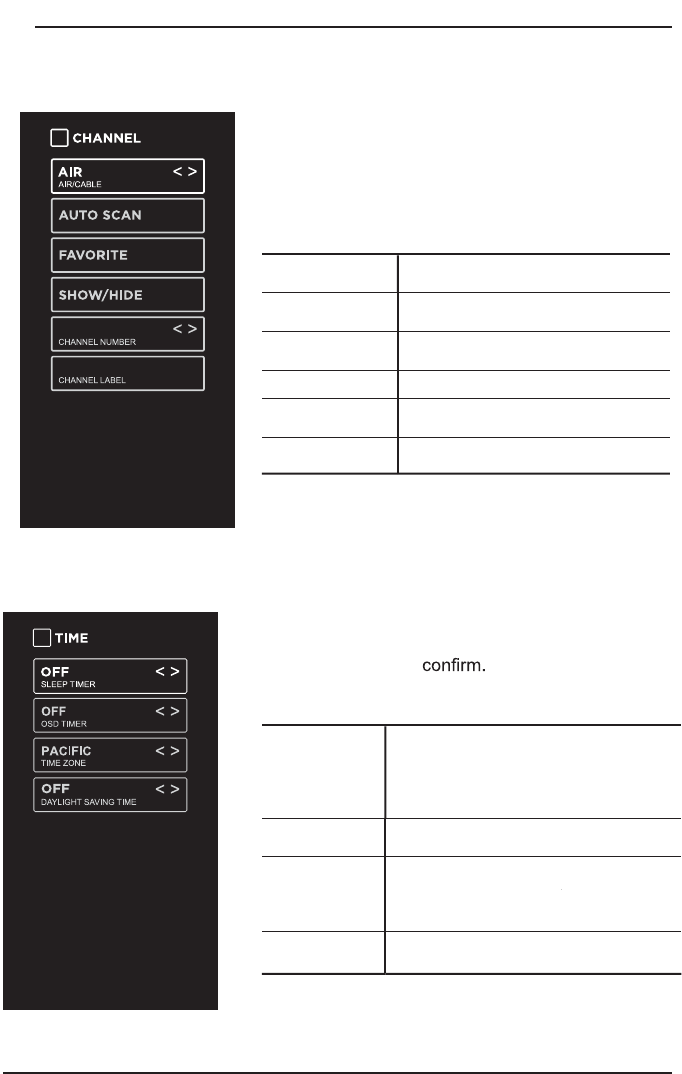
ETW
O
RK
TYPE
Select Wired and Wireless network,
then connect the TV to the wired
networ
k
or searc
h
t
h
e w
i
re
l
ess networ
k
t
h
roug
h
searc
hi
ng ava
il
a
bl
e
MY NETW
O
RK Display the current network which you
connect to
.
IP ADDRE
SS
Displa
y
the current IP information
.
Pr
es
s
M
ENU
t
o
di
s
p
la
y t
h
e
m
a
in
in
te
r
f
ace
,
u
s
e
the Arrow buttons to highlight TV
S
ETTIN
GS
and
pres
s
O
K to
T
h
e
n
Us
e
th
e
A
rro
w
bu
tt
on
s
to
s
e
le
ct
NE
TWO
R
K
to
en
t
e
r
an
d
a
dj
us
t
ea
c
h
option settin
g.
Network Settings
20
CUS
T
O
MIZIN
G
TV
S
ETTIN
GS
Channel Settings
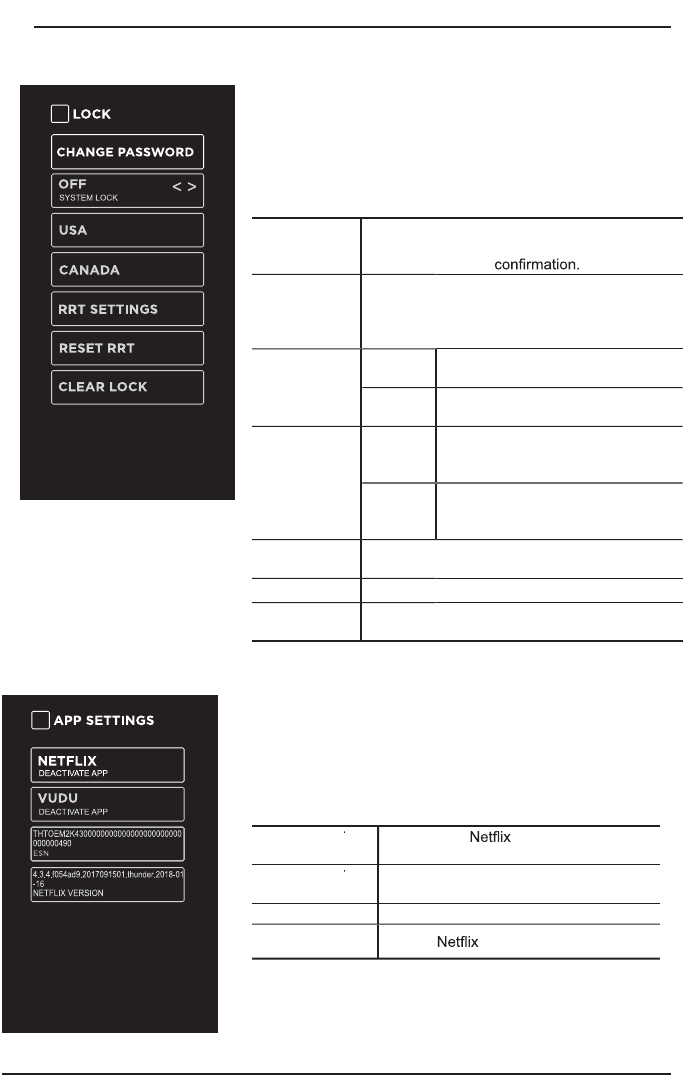
A
IR
/C
ABLE
S
elect antenna between Air and
C
able.
AU
T
O
SC
AN Select the Auto Scan feature to scan
your available Air and cable channels.
F
AV
O
RITE Set the selected channel as a favorite
c
h
a
nn
e
l
.
S
H
O
W
/
HIDE
S
how
/
Hide the selected channel
.
C
HANNEL
NU
MBER
D
ispla
y
the current channel number.
C
HANNEL
LABEL
Di
sp
l
a
y
t
h
e current c
h
anne
l
l
a
b
e
l.
P
re
ss
MENU
t
o
di
s
pl
a
y
t
h
e
m
a
i
n
i
n
t
er
face, t
r
r
h
e
n
u
se t
h
e
A
rr
ow
b
uttons to
hi
g
hli
g
h
t
T
V
S
ettings
.
U
se t
h
e
A
rr
ow
b
u
tt
o
ns
t
o
c
y
c
l
e among di
ff
erent
o
pt
i
ons
a
n
d
s
e
l
ect
C
h
a
nn
e
l
t
o
e
n
t
er
a
n
d
adj
us
t
e
ac
h
opt
i
on sett
i
ng.
Time Settings
P
re
ss
ME
NU
t
o
di
sp
l
a
y
t
he
ma
in
in
t
er
f
ace,
t
he
n
u
se
t
he
A
rr
ow
bu
tt
on
s
t
o
hi
g
hli
g
h
t
TV
S
ett
i
n
g
s
an
d
pre
ss
OK
t
o
U
se t
he
Arr
ow
bu
tt
on
s
t
o
c
y
c
le
a
mon
g
di
ff
e
r
e
n
t
o
p
t
io
n
s
a
n
d
sele
ct
Ti
m
e
to enter an
d
a
dj
ust eac
h
opt
i
on sett
i
n
g
.
S
LEEP TIMER
S
elect a period of time after which the TV
automatically switches to standby mode
:
Off/5/10/…/180/240 min.
OSD TIMER Set the OSD timer:
Off/15s/30s/60s/120s/240s.
T
IME Z
O
NE
S
elect a Time Zone:
P
A
C
IFI
C/
ALA
S
KA
/H
AW
AII/
WW
N
EWF
O
UNDLAND
/
ATLANTI
C/
EA
S
TERN
/C
ENTRAL
/
M
O
UNTAIN
.
D
AYLI
G
HT
S
AVIN
G
TIME
S
e
l
ec
t
to tu
rn
da
y
ligh
t
s
av
i
n
g
t
i
m
e
O
n
/Off.
21
CUS
T
O
MIZIN
G
TV
S
ETTIN
GS
Lock Settings
P
ress
M
EN
U
t
o
d
ispla
y
t
he
ma
in
in
t
e
r
f
ace
,
t
he
n
use
t
h
e
A
rr
ow
bu
tt
o
n
s
to
h
i
g
hli
g
ht
T
V
S
e
ttin
g
s
.
U
se th
e
Arr
ow
bu
tt
o
n
s
t
o
c
y
c
le
a
mon
g
d
i
ff
e
r
e
n
t
op
tions and select L
oc
kto enter and ad
j
ust each
o
ption settin
g
.
Note
:the default
p
assword is “0000”.
C
HAN
G
E
P
A
SS
W
O
RD
Use
0
-
9
buttons to input the old password and
t
hen input the new 4-digit password. Re-ente
r
new password for
S
Y
S
TEM
L
OC
K
S
elect to turn
O
n
/Off
s
y
stem lock. The
f
ollowin
g
options
(
U
S
A,
C
anada, RRT
S
ettin
g
and Reset RRT
)
will onl
y
be accessible when
y
ou turn t
h
e s
y
stem
l
oc
k
on.
US
A
TV
TV RATIN
G
: Press
O
K
b
utton to
l
oc
k
or un
l
oc
k
TV
rat
i
ng.
M
PA
A
S
elect MPAA rating : N/A,G, PG,
PG-13
,
R
,
NC-17
,
or X.
C
ANADA
C
anada
E
n
gli
s
h
S
elect MPAA ratin
g
f
or En
g
lish-
speakin
g
C
anada : E,
C
,
C
8+,
G
,
P
G
, 14+, 18+.
C
anada
F
renc
h
S
elect MPAA rating
f
or
Q
uebec
C
anada : E,
G
, 8 ans+, 13 ans+,
16 ans+, 18 ans+
.
R
RT
S
ETTIN
G
S
et Rating Region Table.
R
E
S
ET RRT
S
elect to reset the RRT setting.
C
LEAR
L
OC
K
C
lear all lock settin
g
s.
APP Settings
P
r
e
ss
MEN
U
t
o
dis
p
l
a
y
th
e
m
a
i
n
int
e
rf
a
c
e
,
th
e
n
use
A
rr
o
w
s
to hi
g
hli
g
ht TV
S
ettin
g
s.
U
se
A
rr
o
w
s
to c
y
c
l
e
amon
g
di
ff
e
r
en
t
o
p
t
i
on
s
a
n
d
se
l
ec
t
App
S
ettin
g
s to enter and ad
j
ust each option settin
g.
D
EA
C
T
I
VA
TE
A
A
APP
Dea
ct
iv
a
t
e
an
d
c
lea
r
t
he
a
cc
oun
t
in
fo
rm
a
ti
o
n
.
D
EA
C
T
I
VA
TE
A
A
APP
D
eact
i
vate
V
u
d
u an
d
c
l
ear t
h
e account
in
f
ormation
.
ES
NElectronic Serial Number
.
NETFLIX
V
ER
S
I
O
N
S
how
Ve
r
sion

22
P
r
es
s
t
he
MENU
bu
tt
on
on
t
he
mai
n
u
n
i
t
o
r
o
n t
he
re
m
o
te
c
on
t
r
ol
a
n
d
t
he
n
p
re
s
s
t
he
bu
tt
o
n
s
t
o
selec
tL
OC
Kmenu.
U
se t
h
e
0
-
9
b
uttons to
i
nput
4
-
di
g
i
t passwor
d
to enter
t
he
L
O
C
Kmen
u
.
If
use
d
,
t
hi
s
o
p
t
i
o
n
f
e
a
t
u
r
e
ca
n
"
bl
oc
k
''
u
n
d
es
i
ra
bl
e
p
rogramm
i
ng
f
ro
m
a
ppearin
g
on the TV. Parental
C
ontrol o
ff
ers the user a wide variet
y
o
f
options and settin
g
s
t
hat restrict or "block'' the pro
g
rammin
g
that can appear on the TV. Parental Control allows
t
h
e
user
t
r
h
e
c
a
p
a
bili
t
y of
de
f
i
n
i
n
g
w
hi
c
h
p
rogram
ra
t
i
n
g
t
h
e
y
c
ons
id
er
a
cce
p
t
able
to t
h
e
yo
u
nger
more
sens
i
t
ive
v
i
ew
e
r
. I
t
can
be
prese
t
a
n
d
t
u
rne
d
ei
t
h
er
on
or
o
ff
by
t
he
u
se
r
wh
o
t
h
e secret
4
-num
b
er co
d
e, t
h
e
p
a
ss
w
o
r
d
. Th
e
n
u
m
be
r
o
f h
ou
r
s
b
l
o
ck
ed
a
r
e
s
pec
i
f
i
e
d
.
G
enera
l
a
u
di
e
n
ces
an
d
c
hild
re
n
bl
o
ck
s
s
h
ou
ld
be
b
o
th
p
rogramme
d
i
nto t
h
e
T
V's memor
y
. Viewer ratin
g
s are
f
or both TV and the motion picture Industr
y
; both
r
ating systems should be used, for complete coverage. The ratings are based on the ages
o
f
children
.
O
v
e
rvi
ew
T
o ensure complete coverage
f
or all TV programs,
(
movies and regular TV shows
)
choose
a
ra
tin
g
f
or
M
P
AA,
P
P
f
rom
t
he
se
l
ec
t
io
n
s
be
l
o
w,
as
w
e
ll
as
ra
t
in
g
s
f
rom
th
e
T
V
P
aren
t
a
l
Guidelines Ratin
g
Sy
s
t
ems below, usin
g
the A
g
e Block option for General Audiences, and
f
or children. In addition to those, you may wish to add additional restrictions
f
rom the content
b
lock menu, and submenus examples below
.
Thin
g
s to
C
onsider be
f
ore
S
ettin
g
up Parental
C
ontro
l
D
etermine which ratin
g
y
ou consider acceptable to the viewer.
(
For example,i
f
y
ou choose
TV-PG, more restrictive ratin
g
s will be automaticall
y
blocked; the viewer will not be able to
see: TV-P
G
,TV-14,or TV-MA rated programming.
)
Do you want to block the auxiliary video
source entirel
y?
(
Blocks the si
g
nal sent b
y
the equipment, such as V
C
R, connected to the
TV A
udio
/
V
I
de
o
I
n
pu
t
Ja
cks
)
Or
lea
v
e
u
n
blo
ck
ed
,
t
he
n
c
hoo
se
allo
w
abl
e
ra
t
i
n
g
s
.
B
lo
ck
program "
C
ontent" based on individual parameters such as:
S
trong Dialog, Bad Language,
S
ex
S
c
ene
s
,
V
io
l
en
ce
Sc
ene
s, or F
a
nt
a
sy
.
V
io
l
en
t
Sc
ene
s; in
C
o
n
t
en
t Blk
o
ptio
n
.
S
e
l
e
c
t
a
s
ec
r
e
t
pa
s
s
w
o
r
d
,
in
t
he
Set P
ass
w
o
r
d
o
p
t
ion
,
u
s
i
n
g
t
he
nu
m
ber
s
k
e
y
s
on
t
he
re
m
o
t
e
c
on
t
rol
.
D
o not
f
orget the password, it is the only way you can access the Parenta
l
C
ontrol menu
and chan
g
e ratin
g
selections, or turn Parental
C
ontrol o
ff
.Do
y
ou want the Parental
C
ontrol
to be active at all times? If not, you can turn it on or off with the Lock On/Off option.
You can set di
ff
erent Parental
C
ontrol viewin
g
restrictions
f
or
g
eneral audiences and
f
or
c
hild
ren,
b
ot
h
can
b
e act
i
ve at t
h
e same t
i
me.
S
i
mp
l
y
s
pecif
y
f
f
i
n
g
one
c
o
n
t
en
t
bl
o
c
k
s
uc
h
as
S
e
x
S
cenes,
w
ill
n
o
t
a
utomat
i
c
all
y
re
s
t
r
i
ct
the pro
g
rammin
g
that appears
f
rom the video sources.
E
ve
n
If
y
f
ou
c
hoo
se
t
o
lea
v
e
the
AUX
I
n
p
ut
s
u
n
blo
ck
ed,
the
rat
i
n
g
s
y
ou
s
pe
c
if
y
wil
l
automatically restrict the programming that appears
f
rom the video sources.
Y
ou can not
Y
Y
d
i
sab
l
e
P
a
rental
C
ontrol b
y
di
sc
onne
c
t
in
g
t
h
e
T
V
f
r
o
m
po
w
e
r
.
B
l
o
c
k
hou
r
s
wi
l
l
b
e automat
i
ca
ll
y reset to t
h
e or
i
g
i
na
l
bl
oc
k
t
i
me sett
i
ng if
p
ower is disconnected
.
CUS
T
O
MIZIN
G
TV
S
ETTIN
GS
Parental Control
23
Motion Picture Association o
f
America
(
MPAA
)
Ratin
g
Sy
stem
Grade Meaning
G
General Audiences Content not offensive to most viewers.
PG
Parental Guidance
S
uggested
Con
t
en
t
i
s suc
h
t
h
a
t
p
are
n
ts
ma
y
n
o
t
wa
n
t
t
heir children to view the program.
PG
-1
3
Parents
S
tron
g
l
y
C
autione
d
Pro
g
ram is inappropriate for pre-teens, with a
grea
t
er
d
egree o
f
o
f
f
fen
f
f
s
i
v
e
mater
i
a
l
s
u
gge
s
t
e
d
t
han a P
G
rated pro
g
ram
.
R
R
es
tri
c
t
ed
Not
for
child
r
e
n
u
n
de
r17
,
s
t
ron
g
ele
m
e
nt
o
f
sex and
/
or violence
.
NC
-17 N
o
c
hil
d
r
e
n
u
n
der
a
ge 1
7
N
o
t f
or
c
hil
d
r
en
u
n
de
r
17
u
n
der
a
n
y
circumstances. Strong sexual content
.
X
Hard Core Films Same as NC-17 rating.
N
o
R
at
i
n
g
N
o
R
at
i
n
g
MPAA
No
t
Ra
t
ed
TV Parental
G
uideline Rating
S
ystem
Grade Meaning
TV-
Y
A
ll
C
hildre
n
C
ontent not o
ff
ensive to most viewers
.
TV-Y7
D
irected to
O
lde
r
C
hildre
n
C
o
n
s
ide
r
ed
s
ui
t
able
f
or
c
r
hild
r
e
n
o
v
er
7,
r
ma
y
c
ontain fantasy violence scenes
.
TV-
G
G
eneral Audience
C
onsidere
d
sui
t
ab
l
e
for
al
l
aud
i
e
n
ce
;
c
hil
d
r
e
n
m
a
y
watc
h
unatten
d
e
d
.
TV-P
G
P
arental Guidance
S
uggeste
d
S
u
gge
s
t
ed
un
s
ui
t
able
f
or
yo
u
nger
c
hildren
,
m
a
y
c
o
nt
a
in
s
u
gg
estiv
e
l
an
g
u
a
g
e
,
ba
d
l
anguage, sex an
d
v
i
o
l
ence scenes
.
TV
-
14
P
arents Strongly
C
autione
d
u
nsui
t
abl
e
f
or
c
r
hildren unde
r
14
,
may
c
on
t
a
i
n
s
tron
g
l
an
g
ua
g
e
,
bad
l
an
g
ua
g
e
,
se
x
a
n
d
vi
o
l
ence scenes
.
TV
-
MA
M
a
t
u
r
e
A
ud
i
e
n
ce
Only
A
dults onl
y
, ma
y
contain stron
g
lan
g
ua
g
e, bad
l
anguage, sex an
d
v
i
o
l
ence scenes
.
C
anadian Ratin
g
:
C
anadian English is used throughout all English-speaking
C
anada
(C
,
C
8+,
G
, P
G
,14+, 18+
).
C
anadian French is used in Quebec (G,8 ans+, 13 ans+,16 ans+, 18 ans+).
CUS
T
O
MIZIN
G
TV
S
ETTIN
GS
The V-Chip will automatically block certain categories that are "more
restrictive".If you block TV-Y category,then TV-Y7 will be automatically
blocked. Similarly,if you block TV-G category, then allthe categories in the
"young adult" will be blocked (TV-G, TV-PG,TV-14,and TV-MA).
24
TR
OU
BLE
S
H
OO
TIN
G
If
y
f
our
TV
doe
s
n
o
t
o
p
er
a
t
e
n
o
rm
a
l
l
y
or
ca
nn
o
t
be
t
u
rn
ed
on
,
p
leas
e
c
h
e
c
k
t
h
e
f
ollowin
g
t
r
oub
l
es
h
oo
t
in
g
q
u
e
st
i
o
n
s
.
R
e
m
e
m
ber
a
l
so
t
o
c
h
eck
an
y
o
t
h
e
r
c
o
nn
ec
t
ed
e
l
e
ct
r
o
n
i
c
de
v
i
ce
,
such
as
DVD
or
blu-ra
y
pla
y
e
r
t
o
p
in
p
oi
n
t th
e
problem. If the TV still fails to operate normall
y
, please contact technical support
(
Refer to Warrat
y
pa
g
e
).
SYMPTOM POSSIBLE CAUSE REMEDY
Dead. No LED lit No power to the TV.
Check a
ll
c
onnect
i
on
s
to t
h
e
TV's A
C
socket.
Dead. No LED lit red Set in standby mode.
P
r
ess
ei
t
he
r t
he
Po
w
e
r
bu
tt
o
n
or
t
h
e
S
tan
db
y
bu
tt
on
on
t
h
e
re
m
o
t
e
co
ntr
o
l.
Bl
ue screen
N
o s
i
gna
l.
P
re
ss
the
S
O
UR
C
E
b
utton
t
o
se
l
ec
t th
e
co
rr
ec
t
sou
r
ce.
In
co
rr
ec
t
sou
r
ce
selec
t
ed.
Noi
s
y,
s
n
ow
y
,
gh
o
st
in
g
p
icture
(
TV
)
Poor antenna si
g
nal
.
If
using an indoor antenna, try
a
d
ju
st
i
n
g
t
he
a
n
t
e
nn
a
po
s
i
t
i
on
.
Check antenna connections
.
No
sou
n
d
S
ound "Mute"
.
T
u
rn
sou
n
d
"M
u
t
e
"
off.
V
o
l
ume set too
l
ow.
Check volume settings.
E
xternal leads
n
o
t
co
nn
ec
t
ed
"if
used
".
C
hec
k
t
ha
t
a
ll
ex
ternal lead
s
a
re connecte
d
proper
ly
.
P
A
SS
W
O
RD
L
ost
p
assword
Select the SET Password settin
g
in the LOCK menu, the
n
enter the following master password “8899”. The maste
r
password clears your previous password and allows you t
o
enter a new
p
assword
.
25
Before contactin
g
the service technician, perform the followin
g
simple checks. I
f
an
y
problem still persists, unplu
g
the LED TV and call for assistance
.
P
R
O
BLEM
POSS
IBLE
SO
L
U
TI
O
N
S
N
o sound and picture
Ch
ec
k
t
ha
t
th
e
m
a
in
pl
ug
ha
s
be
en connec
t
ed
t
o a
w
a
ll
ou
tl
e
t.
C
h
e
ck
t
ha
t
y
ou
ha
v
e
p
re
s
sed
t
he
PO
W
E
R
on
t
he
front of the TV set.
C
heck
t
h
e
p
i
ct
ure
con
t
ra
st
a
n
d
t
h
e
b
ri
g
h
t
ne
ss
settin
g.
R
e
d
LED
i
n
di
cator
li
g
h
t
s
S
et in standby mode. Press either the Power button
or the
S
tandb
y
button on the remote control.
N
o
rm
al
pi
ct
u
r
e
bu
tn
o
sou
n
d
Check the volume
.
S
ound muted
?
Press the M
U
TE button.
Tr
y
a
n
o
t
her
c
r
ha
nn
el
,
t
he
p
roblem
ma
y
be
with th
e
b
r
oadcas
t.
A
re the audio cables installed properl
y?
T
h
e
re
m
o
t
e
c
on
t
r
ol
does
n
o
t
wor
k
C
hec
k
t
o
see
if th
e
r
e
a
r
e
an
y
o
b
j
e
c
ts
be
t
w
een
th
e
TV
an
d
remote contro
l
caus
i
ng o
b
struct
i
on.
A
re batteries installed with correct polarit
y
(
+
/
-
)?
Correct remote operatin
g
mode set: TV, VCR, etc?
I
nsta
ll
new
b
atter
i
es.
Power suddenl
y
turns o
ff
I
s the slee
p
timer set
?
Ch
e
ck
t
he
p
owe
r
co
nn
ec
t
ion
,
p
ower ma
y
be
i
nterrupte
d
.
No
b
r
oadcas
t
o
n th
e
s
t
a
ti
o
n t
u
n
ed
.
P
icture appears slowl
y
after
s
w
i
tc
hi
ng on
Thi
s
i
s norma
l
, t
h
e
i
mage
i
s mute
d
d
ur
i
ng t
h
e pro
d
uct
s
t
ar
t
u
p
proces
s.
P
l
eas
e
con
t
ac
t
a serv
i
ce
pro
v
ider
if
r
the
p
icture has not a
pp
eared after 5 minutes.
Poor color or
p
ictur
e
Adj
ust t
h
e co
l
or
i
n
M
enu opt
i
on
.
K
eep a distance between the
p
roduct and
the VCR.
Try
ano
t
her
c
r
h
annel
,
t
h
e problem
ma
y
b
e
w
i
th the
b
r
oadcas
t.
A
re the VIDEO cables installed properly
?
A
ctivate any
f
unction to restore the brightness o
f
the
p
icture
.
H
or
i
zon
t
a
l
/v
e
r
t
i
ca
l
b
a
r
s o
r
p
icture shakin
g
Check
f
or
l
o
c
a
l
in
t
e
r
f
erenc
e
,
suc
h
a
s
an
el
ec
t
ri
ca
l
appliance or power tool
.
Blue
sc
r
ee
n
P
ress the SOURCE button to select correct source
.
P
oor reception on
so
m
e
c
h
a
nn
e
l
s
S
tatio
n
or
cable experiencin
g
p
roblems. T
une
t
o
a
n
o
th
e
r
s
t
a
ti
o
n.
S
t
at
i
on s
i
gna
l
i
s wea
k,
reor
i
e
n
t
a
n
t
e
nn
a
f
or
b
e
tt
e
r
r
eception.
C
heck for sources of
p
ossible interference.
Li
nes or strea
k
s
i
n
pi
ctures
C
heck
t
h
e
an
t
enna
(
change
t
h
e
di
rec
t
i
on o
f
the
antenna
)
.
No
ou
t
p
u
t
f
r
om
o
n
e
o
f th
e
s
pea
k
ers
A
d
j
ust balance in the Menu option
.
TR
OU
BLE
S
H
OO
TIN
G

26
T
R
OU
BLE
S
H
OO
TIN
G
Note: When there is a problem in VGA mode
(
onl
y
when VGA mode is applied
)
.
P
R
O
BLEM
POSS
IBLE
SO
L
U
TI
O
N
S
T
he si
g
nal is out o
f
ran
g
e
A
dj
us
t
r
e
s
olu
t
ion
,
ho
r
i
z
o
n
t
al
o
r
v
er
t
ical
f
requency.
C
heck whether the si
g
nal cable is connected or
loose.
Check the in
p
ut source.
V
e
rti
c
a
l
bar
or
s
tri
p
on
t
h
e
ba
ck
groun
d
,
ho
r
i
z
on
t
al
n
oi
se
an
d
i
ncorrect pos
i
t
i
on
S
et the auto or a
dj
ust c
l
oc
k
, p
h
ase, or
H/
V position.
S
creen
c
olor
is
r
u
ns
t
a
ble
or
i
s
a
s
in
g
le color
C
heck the si
g
nal cable.
Reinstall the P
C
video card.
Mai
n
te
n
a
n
ce
E
ar
ly
m
al
f
un
ct
ion
c
an
be
pre
v
en
t
ed
.
C
ar
e
f
ul
a
n
d
re
g
u
l
a
r
c
l
ean
i
n
g
can
ex
t
en
d
the amount of time
y
ou will have with
y
our new TV. Be sure to turn the power of
f
and unplu
g
the power cord before
y
ou be
g
in an
y
cleanin
g.
Do not use your TV in areas that are too hot or too cold, because the cabinet
ma
y
warp or the screen ma
y
malfunction. Your TV works best in temperatures
that are com
f
ortable to you
.
S
tora
g
e temperatures are 32
°
to 122
°
F
(
0
°
to 50
°C).
Working temperatures are 32
°
to 95
°
F
(
0
°
to 35
°C).
D
o not p
l
ace your
TV
i
n
di
rect sun
li
g
h
t or near a
h
eat source
.
-minimum 5cm distances around the a
pp
aratus
f
o
r
v
e
ntil
a
ti
on
;
-the ventilation should not be impeded by covering the ventilation openings with
i
tems, suc
h
as newspapers, ta
bl
e-c
l
ot
h
s, curta
i
ns, etc.
;
-
no
n
a
k
ed
f
l
a
m
e
source
s,
such
as
li
gh
t
ed
ca
n
d
l
es
,
s
h
ou
l
d
be
p
l
a
c
ed
on
th
e
appara
t
us
;
-attention should be drawn to the environmental aspects of batter
y
disposal
.
C
l
ea
n
t
h
e
sc
r
een
A
g
re
a
t
t
i
p
to du
s
t off
y
ou
r
s
c
ree
n
:w
e
t a s
o
f
t
c
l
o
t
hi
n
ami
x
t
ur
e
o
f
l
u
k
ewa
r
m
water and a little fabric softener or dish washing detergent. Wring the cloth until
it’s almost dry, and then use to wipe the screen
.
Make sure the excess water is off the screen, then let air-dry before you turn on
the TV.
C
leaning the cabinet
To remove dirt or dust, wipe the cabinet with a soft, dr
y
, line-free cloth. Please
be
su
r
e
n
o
t t
o
use
a
w
e
t
c
l
o
th
.

2
7
FCC
N
O
TE
S
FCC
S
TATEMENT
T
his device complies with Part 15 o
f
the F
CC
Rules.
O
peration is sub
j
ect to the
f
ollowin
g
two
conditions
:
(
1
)
This device ma
y
not cause harm
f
ul inter
f
erence, an
d
(
2
)
This device must accept an
y
inter
f
erence received, includin
g
inter
f
erence that ma
y
cause
u
ndesired operation.
C
han
g
es or not expressl
y
approved b
y
the part
y
responsible
f
or compliance could void the user's
a
uthorit
y
to operate the equipment.
N
O
TE: This equipment has been tested and
f
ound to compl
y
with the limits
f
or a
C
lass B di
g
ital device,
pursuant to Part 15 o
f
the F
CC
Rules. These limits are desi
g
ned to provide reasonable protection
ag
ainst harm
f
ul inter
f
erence in a residential installation.
T
his equipment
g
enerates uses and can radiate radio
f
requenc
y
ener
gy
and, i
f
not installed and used
in ac
c
ord
a
nce with the instructions, ma
y
cause
ha
r
m
f
ul inter
f
eren
ce
t
o radio c
ommu
nications.
H
ow
e
v
er
,
t
here is no
g
uarantee that inter
f
erence will not occur in a particular installation. I
f
this equipment does
cause harm
f
ul inter
f
erence to radio or television reception, which can be determined b
y
turnin
g
the
equipment o
ff
and on, the user is encoura
g
ed to tr
y
to correct the inter
f
erence b
y
one or more o
f
the
f
ollowin
g
measures:
Reorient or relocate the receivin
g
antenna.
Increase the separation between the equipment and receiver.
C
onnect the equipment into an outlet on a circuit di
ff
erent
f
rom that to which the receiver is connected.
C
onsult the dealer or an experienced radio
/
TV technician
f
or help.
FCC
Radiation Ex
p
osure
S
tatement
This equipment complies with F
CC
radiation exposure limits set
f
orth
f
or an uncontrolled environment.
This equipment should be installed and operated with minimum distance 20cm between the radiator
&
y
our bod
y.
For customer support:
1
-
888
-
8
4
2
-
3
57
7
P
lease send all corres
p
ondence to:
E
lement TV
C
ompany, LP.
C
ustomer
S
ervice
c
ustomerservice
@
elementelectronics.com
www.
e
l
e
m
e
n
te
l
ect
r
o
ni
cs
.
co
m
28
O
TT APP
S
ERVI
C
E
If y
ou
y
y
w
a
nt t
o
kn
o
w
ab
out
t
h
ese
APP
in
f
orm
f
f
a
t
i
on
or
g
et
mo
re
se
rvice. Please refer to f
o
ll
f
f
o
wi
ng
c
on
t
en
t.
t
Y
ou can call the
f
ollowing telephone
f
or more help:
8
66-579-7172
I
f
y
our matter is regarding customer serv
i
ce
, please refer to
ee
for
alternative contact in
f
ormation
.
t
Y
ou
T
ube
Y
ou can
b
r
o
wse the
f
ollowing website
f
or more help:
https://productforums.g
pp g
oo
gle.com/forum/#!categories/youtube/smart-tvs
ggy
t
V
UD
U
Y
ou can call the following telephone for more help:
888
-554-
8838
t
Pa
n
do
ra
You can send E-mail to Pandora
f
or more help:
pandora-support@pandora.com
ppp@p
t
A
c
cu
We
a
t
h
e
r
You can send E-mail to AccuWeather for more help:
C
ustomerServ
i
ce
@
@
A
ccuWeat
h
er.co
m
OTT APP SERVICE

This product contains electrical or electronic materials. The presence of these materials may, if
not disposed of properly, have potential adverse effects on the environment and human health.
Presence of this label on the product means it should not be disposed of as unsorted waste
and must be collected separately. As a consumer, you are responsible for ensuring that this
product is disposed of properly.