Code Gears CGVID24 Bluetooth Sensor for KINDOO Smart System User Manual Manuel Kindoo EN

Code Gears LTD Bluetooth Sensor for KINDOO Smart System Manuel Kindoo EN

user manual

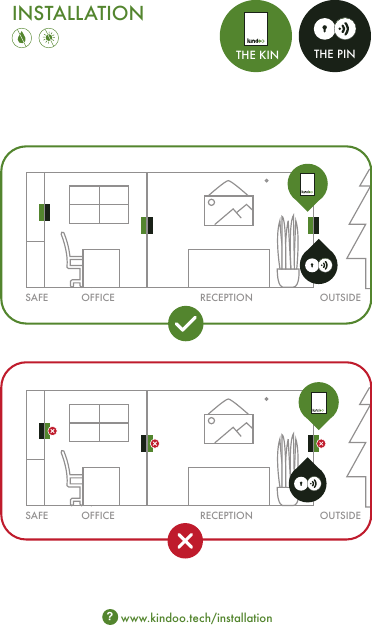
INSTALLATIONwww.kindoo.tech/installation?RECEPTIONOFFICESAFE OUTSIDERECEPTIONOFFICESAFE OUTSIDE THE KIN THE PIN
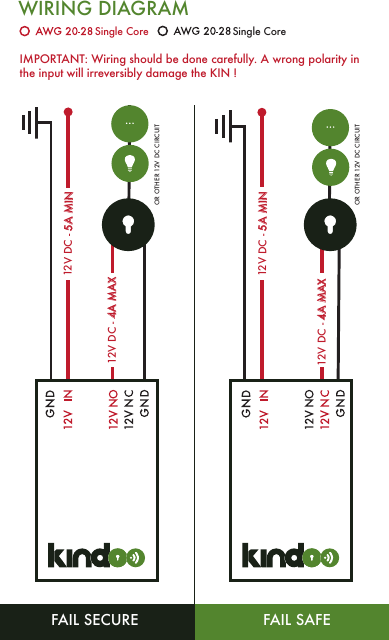
WIRING DIAGRAMOR OTHER 12V DC CIRCUITFAIL SAFEFAIL SECURE12V DC - 4A MAX12V DC - 4A MAX OR OTHER 12V DC CIRCUIT12V DC - 5A MIN12V DC - 5A MINIMPORTANT: Wiring should be done carefully. A wrong polarity in the input will irreversibly damage the KIN !Single Core Single Core
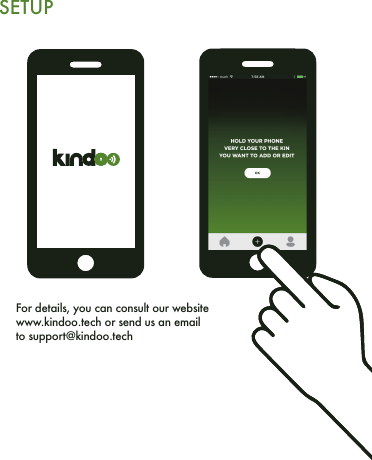
SETUPFor details, you can consult our website www.kindoo.tech or send us an email to support@kindoo.tech
ENGWARNINGThis product shall only be connected to an external power supply rated at 12V DC with a minimum current of 5A for input, and has an output voltage of 12V DC with a maximum current 4A. Any external power supply used with the KIN shall comply with relevant regulations and standards applicable in the country of intended use.The connection of incompatible devices to the KIN may affect compliance or result in damage to the unit and invalidate the warranty.When commanding a lock with KINDOO, make sure you place your KIN in an environment that is physically unreachable by ill intended individuals. (Check the installation graphics)Use single core wires in order to avoid shorts when attaching to the connection terminals of the KIN.This Limited Warranty applies to KINs, and only for the KINs purchased from your local reseller.The Warranty Period for KINs is 1 year from date of purchase.A replacement KIN has a warranty period of 1 year from date of replacement.To obtain warranty service, please contact your local reseller.This Limited Warranty does not cover any problem that is caused by: Conditions, malfunctions or damage not resulting from defects in material or workmanship.WARRANTY DISCLAIMERIMPORTANT: Wiring should be done carefully. A wrong polarity in the input will irreversibly damage the KIN !
ENGKINDOO is a product of Code Gears LTDPalm Grove House   Wickhams Cay   Road TownTortola   British Virgin Islands.INSTRUCTIONS FOR SAFE USETo avoid malfunction or damage to your KIN please observe the following:Do not expose it to water or moisture.Do not expose it to heat from any source: the KIN is designed for reliable operation at normal ambient room temperatures.Take care whilst handling to avoid mechanical or electrical damage to the circuit board and connectors.NC stands for Normally Closed CircuitNO stands for Normally Open CircuitWhen using KINDOO and any related Hardware or Software you fully agree to all the terms of KINDOO GENERAL TERMS AND CONDITIONS defined on our website :www.kindoo.tech/generaltermsandconditions. If you do not agree with any of the terms please return the package and the devices unused and unworn.END USERACKNOWLEDGMENTCE Compliance StatementThis device is in compliancewith the essential requiermentsand other relevant provisions of the Radio Equipment Directive 2014/53/EUFCC Compliance StatementThis device complies with part 15 of the FCC rules. Operation is subjectto the following two conditions: (1) this device may not cause harmful interference, and (2) this device must accept any interference received, including interference that may cause undesired operation.Changes or modifications not expressly approved by the party responsible for compliance could void the user's authority to operate the equipment.
       NOTE: This equipment has been tested and found to comply with the limits for a Class B digital device, pursuant to part 15 of the FCC Rules. These limits are designed to provide reasonable protection against harmful interference in a residential installation. This equipment generates uses and can radiate radio frequency energy and, if not installed and used in accordance with the instructions, may cause harmful interference to radio communications. However, there is no guarantee that interference will not occur in a particular installation. If this equipment does cause harmful interference to radio or television reception, which can be determined by turning the equipment off and on, the user is encouraged to try to correct the interference by one or more of the following measures:      - Reorient or relocate the receiving antenna. - Increase the separation between the equipment and receiver. -Connect the equipment into an outlet on a circuit different from that to which the receiver is connected. -Consult the dealer or an experienced radio/TV technician for help

Navigation menu