Coen Consultant VDUL5NA Modular transmitter User Manual VDU user s guide v2 20

Coencorp Consultant Corporation Modular transmitter VDU user s guide v2 20

Contents

VDU Manual

       8 Place du Commerce, suite 100,  Brossard QC Canada J4W 3H2 http://www.coencorp.com mailto:info@coencorp.com         Tel: 1-450-672-4222    Toll free (US & Canada):         1-866-COENCORP    Fax: 1-450-672-6038     Created on: 5/15/2009 12:39 PM Created by: Serge Kopikov Document revision: 2.20               FleetZone Vehicle Data Unit (VDU) User’s Guide
VDU User’s Guide rev. 2.20     Page 2 of 31              Copyright This document cannot be redistributed to third party, reproduced or modified without written permission from Coencorp.    Disclaimer The information in this document is subject to change without notice. While the information contained herein is assumed to be accurate, Coencorp assumes no responsibility for any errors or omissions.
VDU User’s Guide rev. 2.20     Page 3 of 31 Table of contents  FCC Information ................................................................................................................................................................. 4 1 Introduction ................................................................................................................................................................. 6 2 VDU types................................................................................................................................................................... 8 2 Specifications .............................................................................................................................................................. 9 3 VDU connections ...................................................................................................................................................... 10 3.1 CON 1 – RF connector................................................................................................................................... 10 3.2 CON 2 – Primary interface connector ............................................................................................................ 11 3.3 CON 3 – vehicle ring antenna connector........................................................................................................ 11 3.4 CON 4 – Extended interface connector.......................................................................................................... 11 3.5 Reset button.................................................................................................................................................... 12 3.6 LED................................................................................................................................................................ 13 4 VDU wiring............................................................................................................................................................... 15 4.1 VSS wiring..................................................................................................................................................... 15 4.2 SAE J1708 on the primary interface connector.............................................................................................. 17 4.3 SAE J1708, SAE J1939 and OBD-2 on the secondary interface connector................................................... 17 5 VDU - theory of operation......................................................................................................................................... 17 5.1 Plug-and-Play interface and RF settings detection......................................................................................... 17 5.2 Odometer and hour meter data collection and post-processing...................................................................... 18 5.3 Idle time computing........................................................................................................................................ 19 5.4 Fault Codes recording .................................................................................................................................... 20 5.5 Fuel consumption accumulation..................................................................................................................... 20 5.6 Data acquisition.............................................................................................................................................. 20 5.7 Vehicle ring operation with pump tags........................................................................................................... 21 6 Data Collector types .................................................................................................................................................. 22 Appendix A. VDU accessories.......................................................................................................................................... 23 Appendix B. Using VDURF software to test the VDU installation .................................................................................. 24 a. Connecting a portable Data Collector to a laptop........................................................................................... 24 b. Installing VDU RF ......................................................................................................................................... 24 c. Using the VDURF application to test a VDU ................................................................................................ 27 d. Scanning VDUs with VDURF ....................................................................................................................... 30
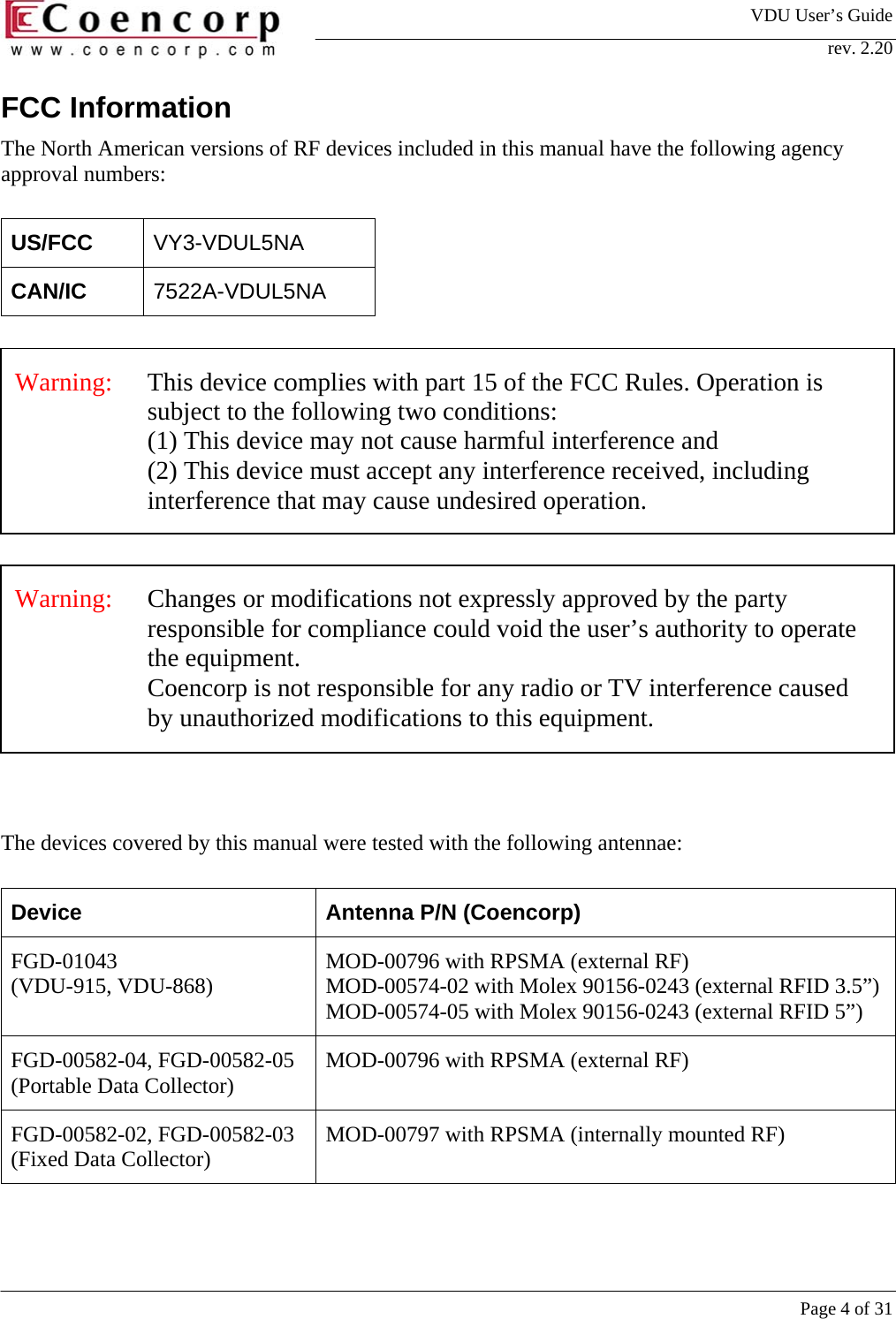
VDU User’s Guide rev. 2.20     Page 4 of 31 FCC Information The North American versions of RF devices included in this manual have the following agency approval numbers:  US/FCC  VY3-VDUL5NA CAN/IC  7522A-VDUL5NA     The devices covered by this manual were tested with the following antennae:  Device  Antenna P/N (Coencorp) FGD-01043  (VDU-915, VDU-868)  MOD-00796 with RPSMA (external RF) MOD-00574-02 with Molex 90156-0243 (external RFID 3.5”)MOD-00574-05 with Molex 90156-0243 (external RFID 5”) FGD-00582-04, FGD-00582-05 (Portable Data Collector)  MOD-00796 with RPSMA (external RF) FGD-00582-02, FGD-00582-03 (Fixed Data Collector)  MOD-00797 with RPSMA (internally mounted RF) Warning:   Changes or modifications not expressly approved by the party responsible for compliance could void the user’s authority to operate the equipment.  Coencorp is not responsible for any radio or TV interference caused by unauthorized modifications to this equipment.  Warning:   This device complies with part 15 of the FCC Rules. Operation is subject to the following two conditions:  (1) This device may not cause harmful interference and (2) This device must accept any interference received, including interference that may cause undesired operation.
VDU User’s Guide rev. 2.20     Page 5 of 31 Warning:  Any antenna not in this list must be tested to comply with FCC section15.203 for unique antenna connectors and section 15.249 for emissions.
VDU User’s Guide rev. 2.20     Page 6 of 31  1 Introduction The Vehicle Data Unit (VDU) is a module collecting the data from vehicle Engine Control Module and sending it over the RF link to a SiteController. The VDU can also assist the automated refueling on the sites equipped with Coencorp FuelZone system.  The VDU RF communication uses 915 MHz (North American) or 868 MHz (European) frequency bands. The VDU only sends data in response to requests from Data Collector module. The communication has a typical range of 300-600 ft (100-200 m) from the Data Collector.  The VDU supports a variety of vehicle interfaces: generic VSS/Ignition (RPM) discrete signals, different types of the OBD-2 diagnostic interfaces for light engines, heavy engine interface SAE J1708 and SAE J1939.  In the North America SAE J1708 became the standard de facto for heavy engine communication after mid-90s. Some of the international manufacturers also used this standard in their vehicles. SAE J1939 is an international standard for heavy engine communication and diagnostics, replacing SAE J1708 in newer vehicles. OBD-2 is an internationally recognized set of standards of the on-board diagnostic system for light passenger vehicles. All passenger cars sold in NA since 1996 must comply with OBD-2 regulations.  The VDU may collect and send the following information (depending on the data availability with the actual vehicle interface type): odometer and engine hours, trip distance and motor run time, idle motor time, fuel consumption and diagnostic fault codes. The data available on different interface types is represented in Table 1. Different interfaces and data available are discussed in section 5 (VDU operation).  To assist in the automated fueling, the VDU has a built-in RFID interface capable of reading special tags attached to the dispenser nozzle and send the tag ID to the Data Collector. Typical tag reading distance is 2-6 in (5-15 cm). See section 5.7 for the details on Pump Tag operation.  Typically a VDU does not require any parameter configuration upon the installation. RF and interface settings are detected automatically in so-called Plug-and-Play procedure. The VDU reset, PnP interface and RF parameters detection are discussed in sections 3.5-3.6 and 5.1.
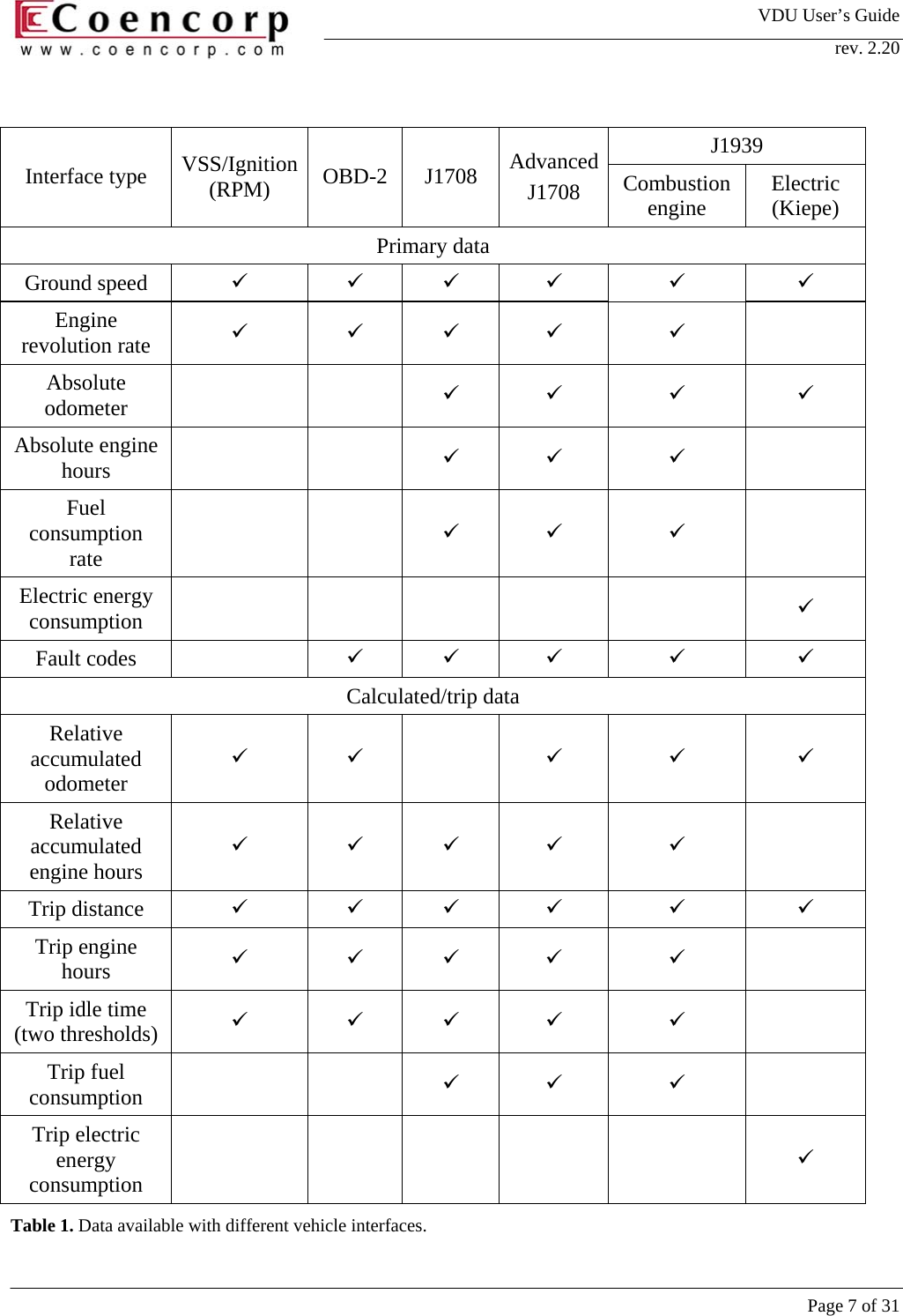
VDU User’s Guide rev. 2.20     Page 7 of 31  J1939 Interface type  VSS/Ignition (RPM)  OBD-2 J1708 AdvancedJ1708  Combustion engine  Electric (Kiepe) Primary data Ground speed  9 9 9 9 9 9 Engine revolution rate  9 9 9 9 9  Absolute odometer    9 9 9 9 Absolute engine hours    9 9 9  Fuel consumption rate    9 9 9  Electric energy consumption         9 Fault codes    9 9 9 9 9 Calculated/trip data Relative accumulated odometer 9 9  9 9 9 Relative accumulated engine hours 9 9 9 9 9  Trip distance  9 9 9 9 9 9 Trip engine hours  9 9 9 9 9  Trip idle time (two thresholds)  9 9 9 9 9  Trip fuel consumption    9 9 9  Trip electric energy consumption         9 Table 1. Data available with different vehicle interfaces.
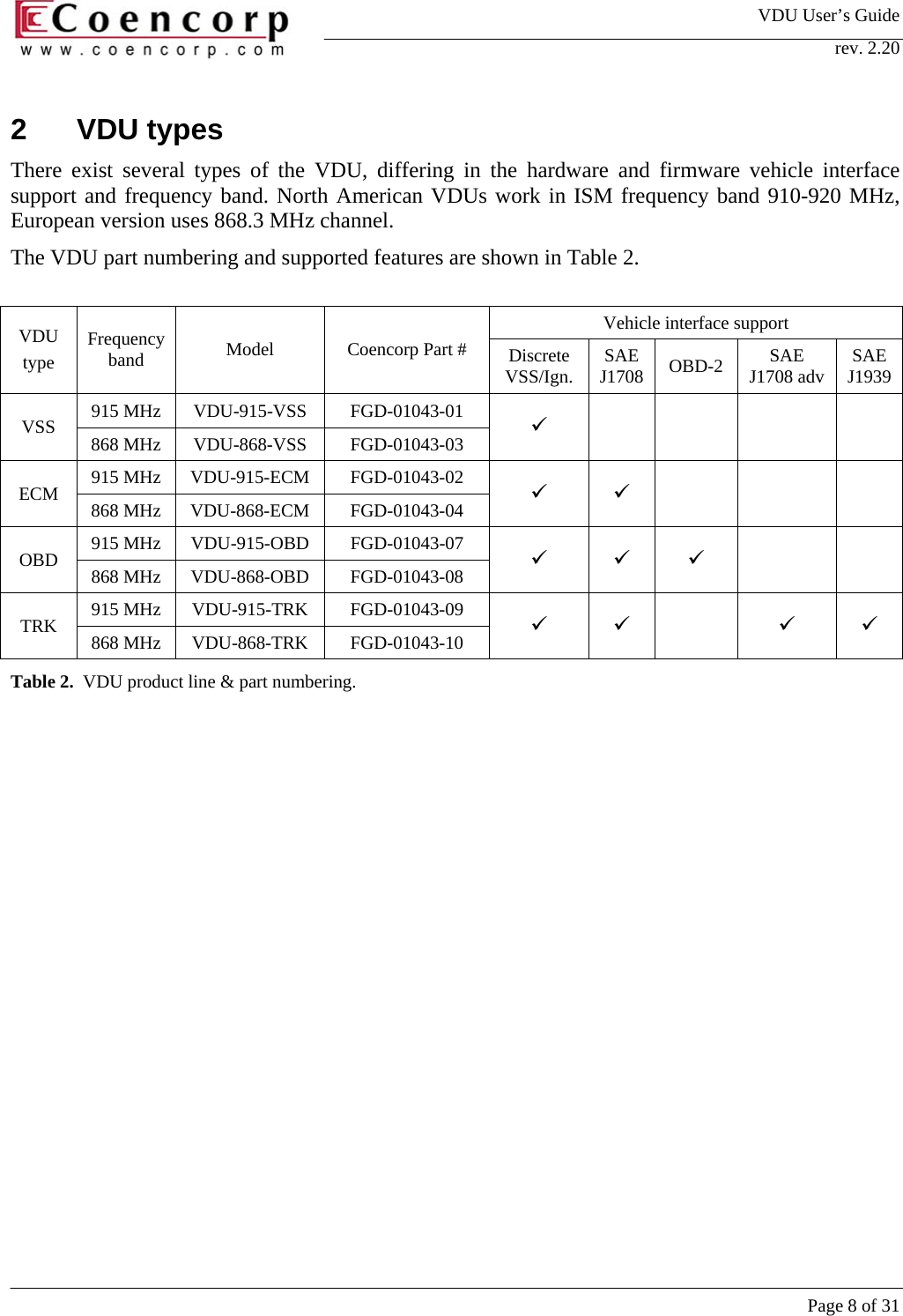
VDU User’s Guide rev. 2.20     Page 8 of 31 2 VDU types There exist several types of the VDU, differing in the hardware and firmware vehicle interface support and frequency band. North American VDUs work in ISM frequency band 910-920 MHz, European version uses 868.3 MHz channel.  The VDU part numbering and supported features are shown in Table 2.   Vehicle interface support VDU type Frequency band  Model  Coencorp Part #  Discrete VSS/Ign.  SAE J1708  OBD-2  SAE J1708 adv  SAE J1939 915 MHz  VDU-915-VSS   FGD-01043-01  VSS  868 MHz  VDU-868-VSS  FGD-01043-03  9       915 MHz  VDU-915-ECM   FGD-01043-02  ECM  868 MHz  VDU-868-ECM  FGD-01043-04  9 9    915 MHz  VDU-915-OBD   FGD-01043-07  OBD  868 MHz  VDU-868-OBD  FGD-01043-08  9 9 9   915 MHz  VDU-915-TRK   FGD-01043-09  TRK  868 MHz  VDU-868-TRK  FGD-01043-10  9 9  9 9 Table 2.  VDU product line & part numbering.
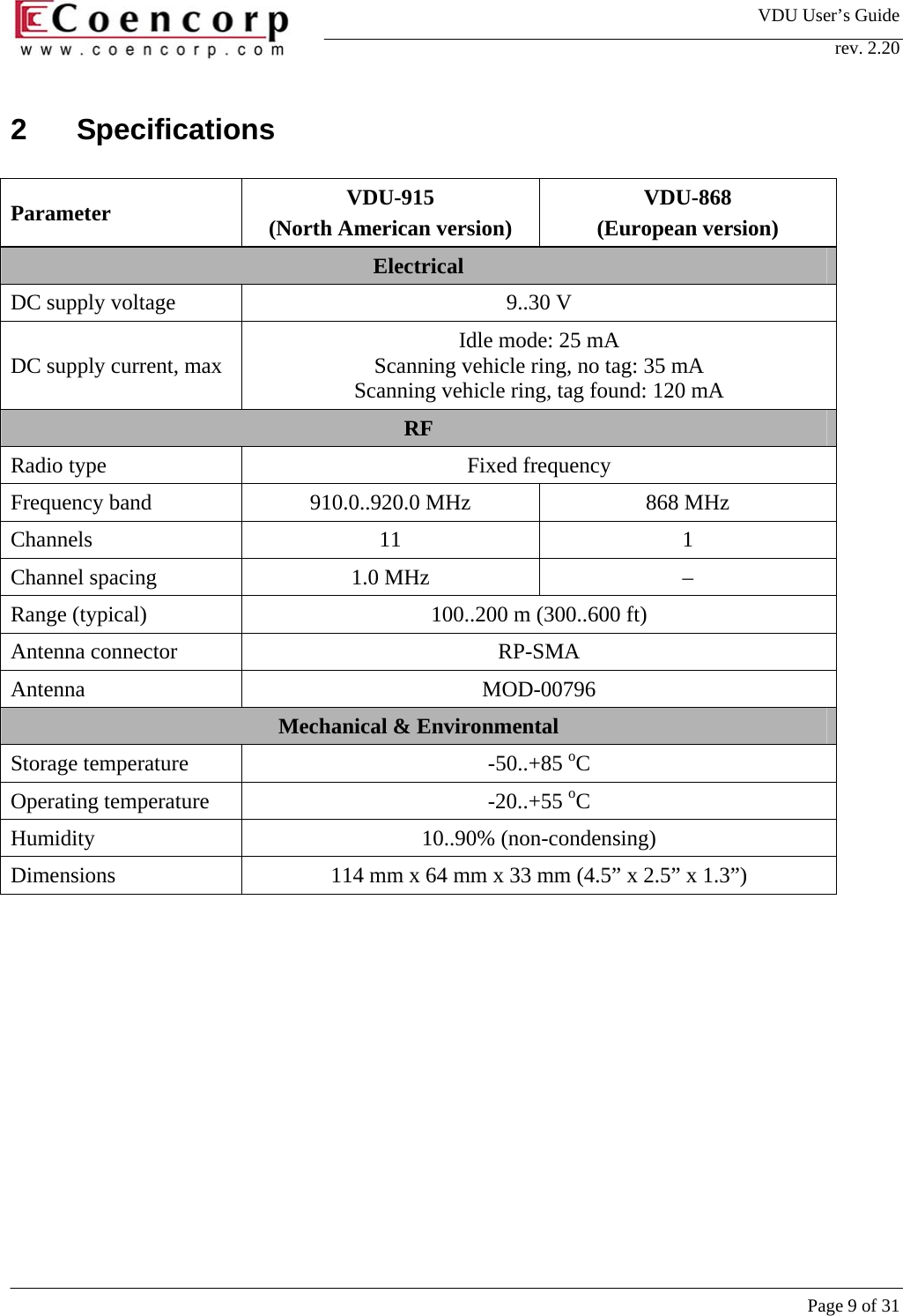
VDU User’s Guide rev. 2.20     Page 9 of 31 2 Specifications  Parameter  VDU-915 (North American version) VDU-868 (European version) Electrical DC supply voltage  9..30 V DC supply current, max  Idle mode: 25 mA Scanning vehicle ring, no tag: 35 mA Scanning vehicle ring, tag found: 120 mA RF Radio type  Fixed frequency Frequency band  910.0..920.0 MHz  868 MHz Channels 11 1 Channel spacing  1.0 MHz  – Range (typical)  100..200 m (300..600 ft) Antenna connector  RP-SMA Antenna MOD-00796 Mechanical & Environmental Storage temperature  -50..+85 oC Operating temperature  -20..+55 oC Humidity 10..90% (non-condensing) Dimensions  114 mm x 64 mm x 33 mm (4.5” x 2.5” x 1.3”)
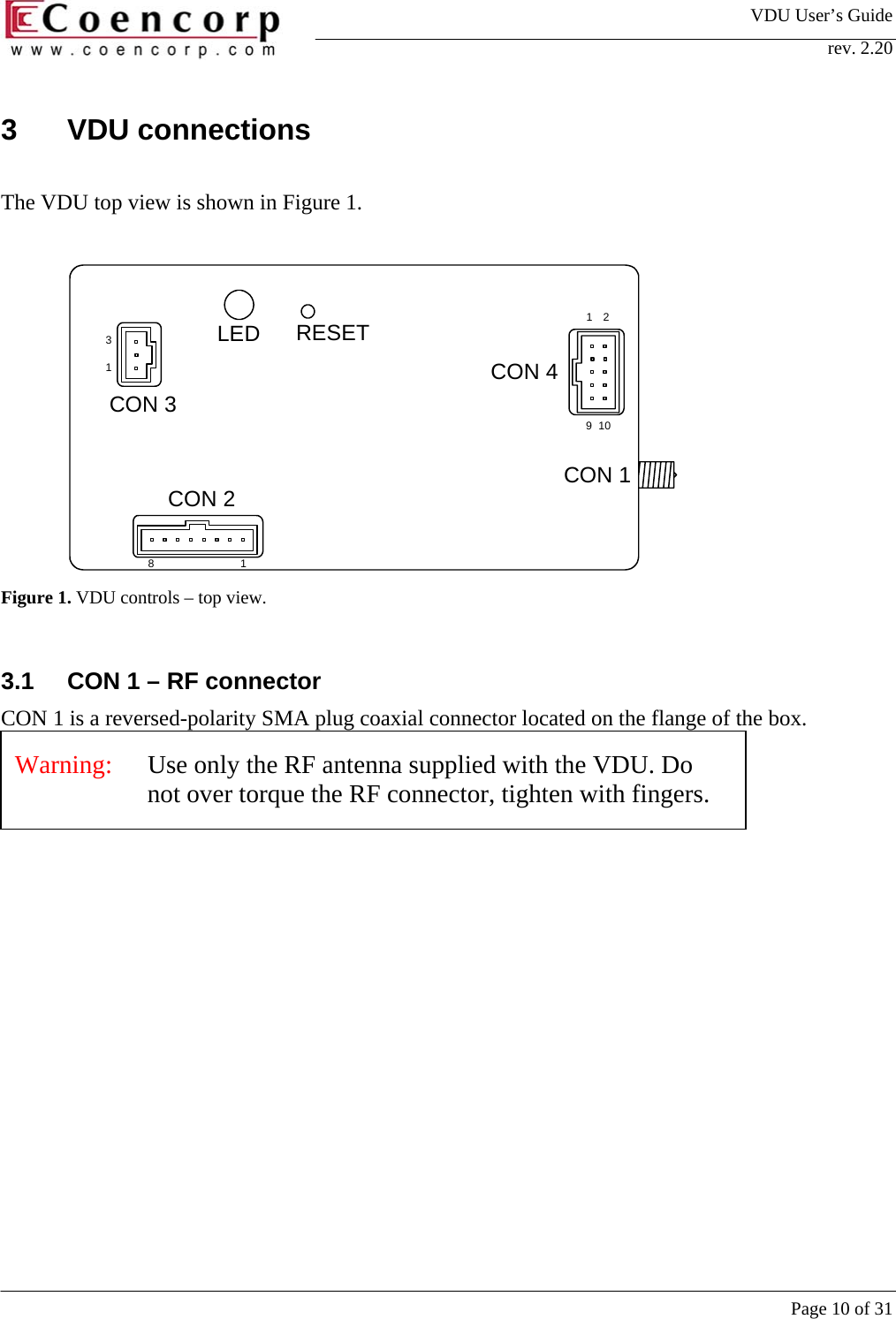
VDU User’s Guide rev. 2.20     Page 10 of 31 3 VDU connections  The VDU top view is shown in Figure 1.  129101831CON 1CON 2CON 3CON 4LED RESET Figure 1. VDU controls – top view.  3.1  CON 1 – RF connector CON 1 is a reversed-polarity SMA plug coaxial connector located on the flange of the box.    Warning:   Use only the RF antenna supplied with the VDU. Do not over torque the RF connector, tighten with fingers.
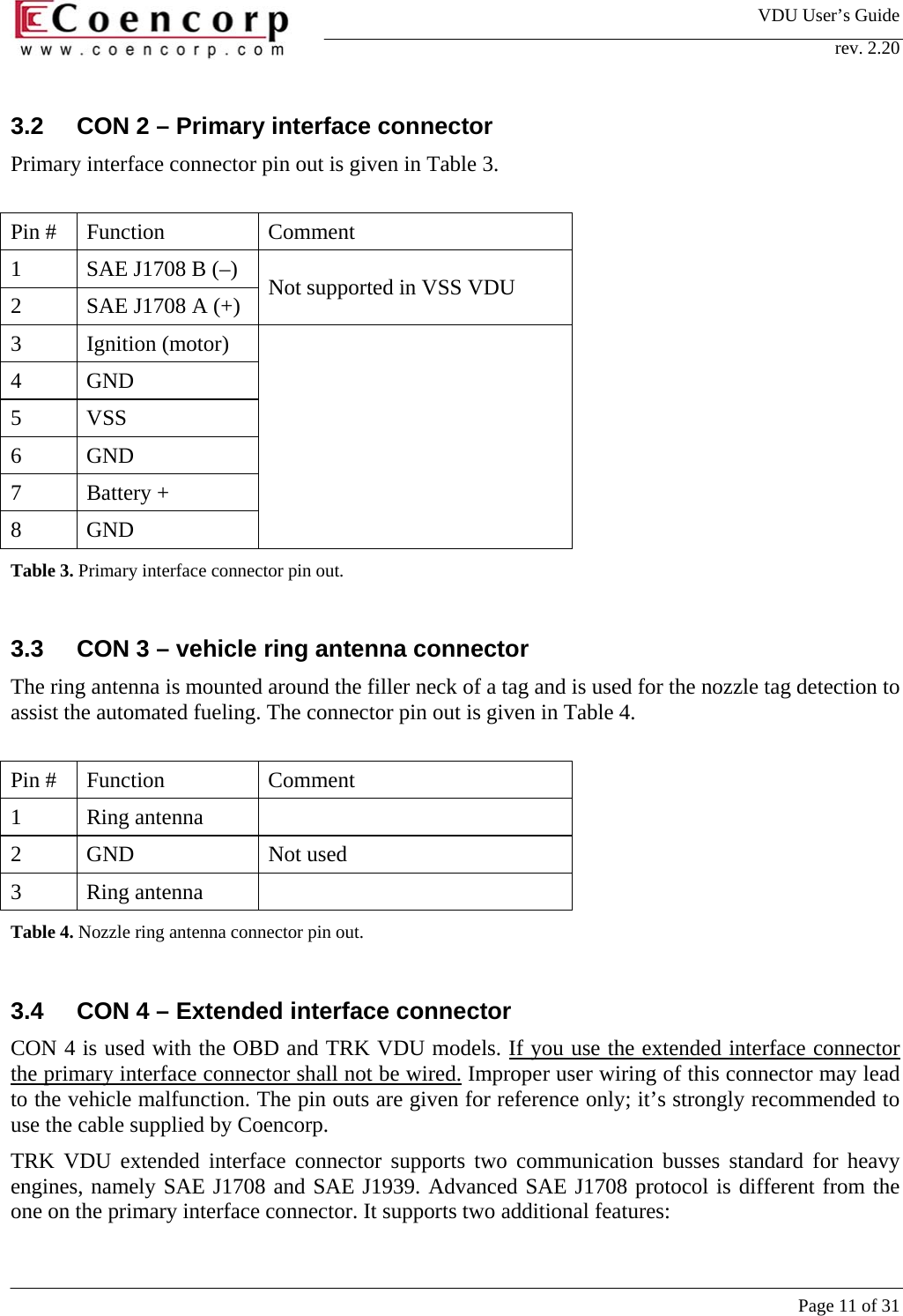
VDU User’s Guide rev. 2.20     Page 11 of 31 3.2  CON 2 – Primary interface connector Primary interface connector pin out is given in Table 3.   Pin #  Function  Comment 1  SAE J1708 B (–)  2  SAE J1708 A (+)  Not supported in VSS VDU 3 Ignition (motor) 4 GND 5 VSS 6 GND 7 Battery + 8 GND  Table 3. Primary interface connector pin out.   3.3  CON 3 – vehicle ring antenna connector The ring antenna is mounted around the filler neck of a tag and is used for the nozzle tag detection to assist the automated fueling. The connector pin out is given in Table 4.   Pin #  Function  Comment 1  Ring antenna    2 GND  Not used 3 Ring antenna  Table 4. Nozzle ring antenna connector pin out.   3.4  CON 4 – Extended interface connector CON 4 is used with the OBD and TRK VDU models. If you use the extended interface connector the primary interface connector shall not be wired. Improper user wiring of this connector may lead to the vehicle malfunction. The pin outs are given for reference only; it’s strongly recommended to use the cable supplied by Coencorp.  TRK VDU extended interface connector supports two communication busses standard for heavy engines, namely SAE J1708 and SAE J1939. Advanced SAE J1708 protocol is different from the one on the primary interface connector. It supports two additional features:
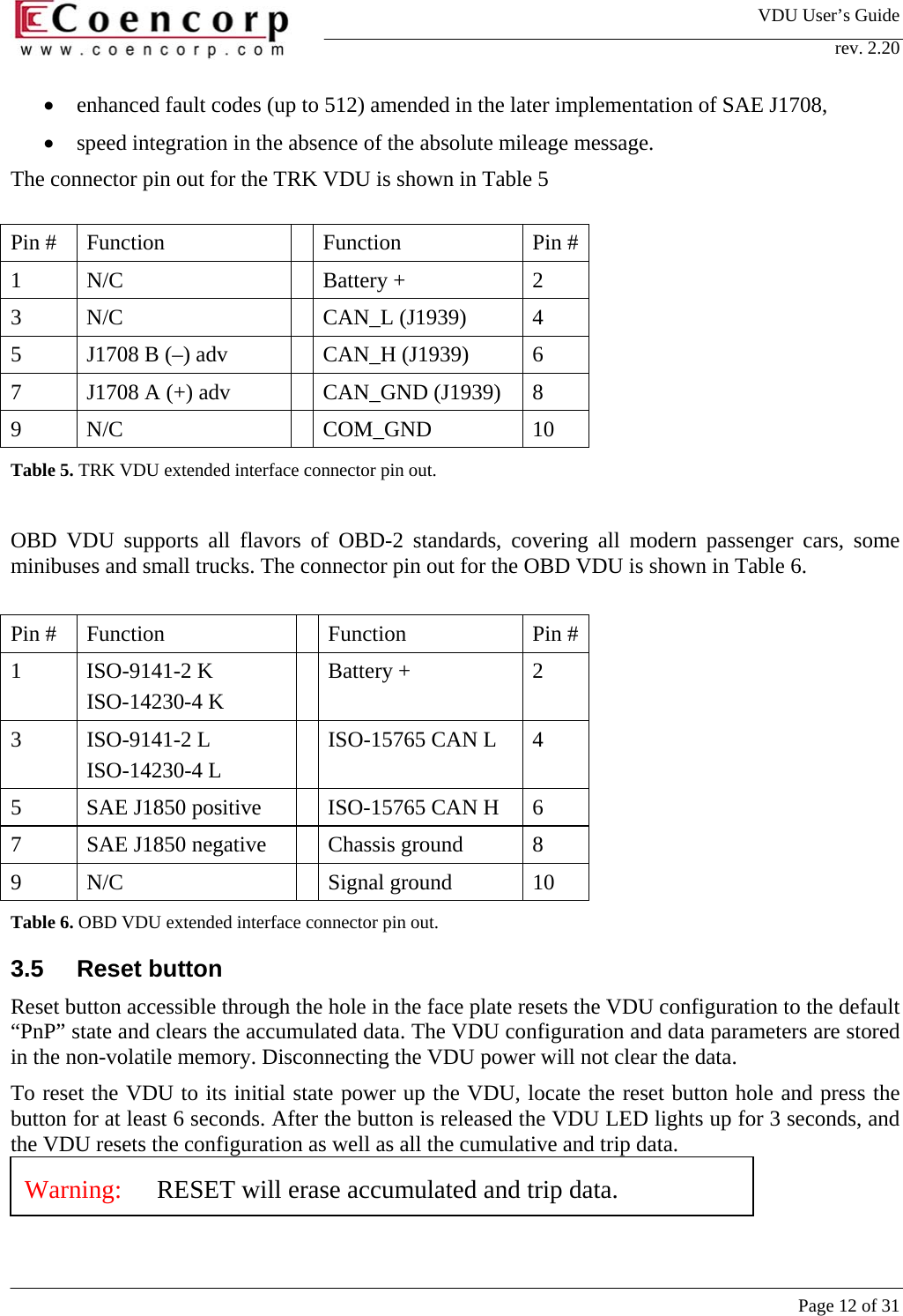
VDU User’s Guide rev. 2.20     Page 12 of 31 •  enhanced fault codes (up to 512) amended in the later implementation of SAE J1708,  •  speed integration in the absence of the absolute mileage message.  The connector pin out for the TRK VDU is shown in Table 5  Pin #  Function    Function  Pin #1 N/C   Battery +  2 3 N/C   CAN_L (J1939) 4 5  J1708 B (–) adv    CAN_H (J1939)  6 7  J1708 A (+) adv    CAN_GND (J1939)  8 9 N/C   COM_GND  10 Table 5. TRK VDU extended interface connector pin out.   OBD VDU supports all flavors of OBD-2 standards, covering all modern passenger cars, some minibuses and small trucks. The connector pin out for the OBD VDU is shown in Table 6.    Pin #  Function    Function  Pin #1 ISO-9141-2 K ISO-14230-4 K  Battery +  2 3 ISO-9141-2 L ISO-14230-4 L   ISO-15765 CAN L  4 5  SAE J1850 positive    ISO-15765 CAN H   6 7  SAE J1850 negative    Chassis ground  8 9 N/C   Signal ground  10 Table 6. OBD VDU extended interface connector pin out.  3.5 Reset button Reset button accessible through the hole in the face plate resets the VDU configuration to the default “PnP” state and clears the accumulated data. The VDU configuration and data parameters are stored in the non-volatile memory. Disconnecting the VDU power will not clear the data.  To reset the VDU to its initial state power up the VDU, locate the reset button hole and press the button for at least 6 seconds. After the button is released the VDU LED lights up for 3 seconds, and the VDU resets the configuration as well as all the cumulative and trip data.   Warning:   RESET will erase accumulated and trip data.
VDU User’s Guide rev. 2.20     Page 13 of 31 3.6 LED The VDU LED lighting or blinking pattern gives some information on the VDU PnP status.  3.6.1 LED off VDU is not powered.  3.6.2  LED steady on Nozzle tag is detected by the vehicle ring. 3.6.3  LED is blinking  The blinking period indicates the vehicle interface detection status. After the reset the period is 1 second. If a smart interface is detected and the vehicle locks on it, the blinking slows down to 1.5 or 2 blinks a second.   LED flashing period, s LED flashing freq., Hz VSS VDU VSS mode (other than VSS VDU)  J1708  J1708 adv  J1939 OBD-2 1.0 1.0  always not detected  not detected not detected  not detected 1.5 0.67      detected detected detected, reading mode 2.0 0.5 always  detected    detected, standby modeTable 7. LED flashing period (frequency)  The blink duration displays the RF detection status. After the reset the VDU flashes with long ½ second blinks. If an actively polling Data Collector is detected, the VDU locks on its company ID and the periodic blinks will shorten down to approx. 1/25 sec.
VDU User’s Guide rev. 2.20     Page 14 of 31 Here are a few examples of regular blinking patterns:  3.6.3.1  Non-initialized VDU (VDU after reset)   3.6.3.2  VDU has detected an RF Data Collector, but no interface is detected (or VSS)   3.6.3.3  VDU has detected the Data Collector and the vehicle network type (J1708 adv, J1939 or OBD-2 active):
VDU User’s Guide rev. 2.20     Page 15 of 31 8721VSSIgnitionBattery +CON 2N/CN/C 3.6.3.4  VDU has detected the Data Collector and the vehicle network type (J1708 or OBD-2 standby):    Besides the regular pattern, the VDU also gives a short (1/50 sec) blink on every RF packet being sent to Data Collector. If the VDU power is cycled within the reading range of a Data Collector, a burst of quick blinks will follow indicating data exchange between the VDU and the Data Collector.   4 VDU wiring 4.1 VSS wiring Wiring of the VDU of any type to the discrete interface is shown in Figure 2.           Figure 2. VSS VDU wiring diagram
VDU User’s Guide rev. 2.20     Page 16 of 31 Battery+12..24VVSS orIgnition/RPMinput1 - 10 kOhm 1 - 10 kOhmDry contactsensoroutputOptocouplersensoroutputBattery+12..24VVSS orIgnition/RPMinputThe VDU requires 2 signals to be connected: •  VSS (Vehicle Speed Sensor) – pulse signal with frequency proportional to the vehicle speed. The VSS pulses may be unipolar (positive) or bipolar; the VDU adapts to a wide range of amplitudes and has floating threshold following the baseline of the input signal. The VSS frequency shall not exceed 2 kHz (50% duty cycle). •  Ignition – static positive-logic signal. VI = 0 Volts indicates motor off, VI = +10..30 Volts indicates motor on. The threshold of the ignition input is around 2.5 Volts. Ignition input may also be connected to a pulse signal (RPM sensor or non-rectified alternator output) providing it is below threshold when the motor is off.   If the VSS or Ignition/RPM signals have open collector or dry contact outputs, a pull-up or pull-down resistors might be necessary to shape the voltage. A preferable way of shaping the signal is shown in Figure 3.               Figure 3. Shaping VSS/Ignition/RPM input from a pick up sensor.  For specific classes of equipment only one of the two inputs may be wired. Vehicles not having the speed sensor (construction equipment, lawn mowers, generators etc.) may have only motor sensor (Ignition/RPM) input to be wired. In this case:  a)  vehicle will not show up mileage in DataZone transactions,  b)  after a successful data transaction the VDU will not respond to polling requests from Data Collectors until an internal timeout (typically 16 hours) expires.  If the vehicle does not have a motor sense signal wired (e.g. electric equipment)  a)  vehicle will not count the motor run time,  b)  vehicle will not show up any idle time data,  c)  VDU looses the capability of automated fueling with the ring (the ring detection is only enabled a certain time, ½ hour being the default, after the motor is turned off).
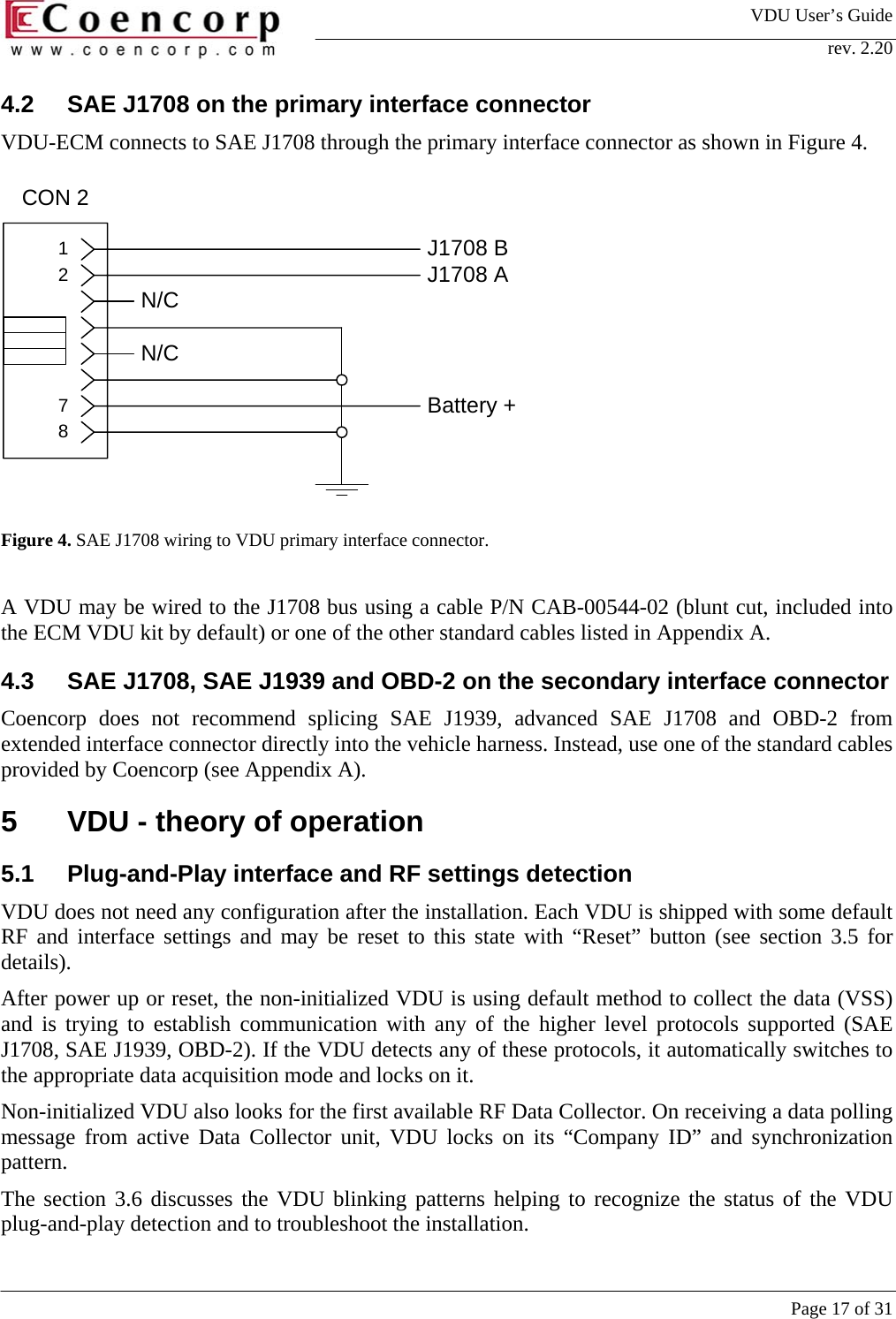
VDU User’s Guide rev. 2.20     Page 17 of 31 8721CON 2N/CN/CBattery +J1708 BJ1708 A4.2  SAE J1708 on the primary interface connector VDU-ECM connects to SAE J1708 through the primary interface connector as shown in Figure 4.            Figure 4. SAE J1708 wiring to VDU primary interface connector.   A VDU may be wired to the J1708 bus using a cable P/N CAB-00544-02 (blunt cut, included into the ECM VDU kit by default) or one of the other standard cables listed in Appendix A.   4.3  SAE J1708, SAE J1939 and OBD-2 on the secondary interface connector Coencorp does not recommend splicing SAE J1939, advanced SAE J1708 and OBD-2 from extended interface connector directly into the vehicle harness. Instead, use one of the standard cables provided by Coencorp (see Appendix A).  5  VDU - theory of operation 5.1  Plug-and-Play interface and RF settings detection VDU does not need any configuration after the installation. Each VDU is shipped with some default RF and interface settings and may be reset to this state with “Reset” button (see section 3.5 for details).  After power up or reset, the non-initialized VDU is using default method to collect the data (VSS) and is trying to establish communication with any of the higher level protocols supported (SAE J1708, SAE J1939, OBD-2). If the VDU detects any of these protocols, it automatically switches to the appropriate data acquisition mode and locks on it.  Non-initialized VDU also looks for the first available RF Data Collector. On receiving a data polling message from active Data Collector unit, VDU locks on its “Company ID” and synchronization pattern.  The section 3.6 discusses the VDU blinking patterns helping to recognize the status of the VDU plug-and-play detection and to troubleshoot the installation.
VDU User’s Guide rev. 2.20     Page 18 of 31 Upon the installation or reset it is recommended to write down the vehicle’s odometer and/or hour meter to adjust the offset in the SiteManager (if applicable).  5.2  Odometer and hour meter data collection and post-processing While some of the interfaces give out absolute odometer and motor run time, others only provide relative data (data starting from zero at the time of installation or VDU reset). This data requires special post-processing done in the upper-level software (SiteController or SiteLink) to approximate the absolute values. The relative data are accumulated by VDU in non-volatile memory and are not reset if the VDU power is cycled.  The SiteManager has 3 parameters (odometer offset, odometer multiplier, hours offset) to convert the values read from a VDU to values displayed by the SiteManager as follows: TSM = TVDU + Toffset DSM = (DVDU*Kmult) + Doffset where  TVDU, DVDU – respectively motor time and distance received by DataCollector,  TSM, DSM – respectively motor time and distance displayed in the SiteManager,  Toffset – motor time offset,  Doffset – odometer offset,  Kmult – odometer multiplier,   5.2.1  VSS interface mode In VSS interface mode both odometer and hour meter collected by VDU are relative, starting from 0. Moreover, the odometer is collected in arbitrary units, which must be converted to the actual distance units with a multiplier set in the SiteManager. By default, the VDU have conversion rate 5000 pulses per distance unit (ppu). If the actual vehicle’s VSS signal has rate 4000 pulses per mile, the multiplier must be set to 1.25.  5.2.2  OBD-2 interface mode OBD-2 interface does not provide a unique reliable way of getting an absolute odometer value or the motor run time. However the OBD VDU may integrate fairly well approximated value of relative odometer using the speed messages. The resulting relative odometer must be corrected by the offset (dashboard odometer at the time of the installation of last reset). The integration for OBD-2 may have some systematic drift from the actual value at the level of 0..3% depending on the vehicle model and typical usage profile. If this drift is critical for the application, it may be corrected with the small multiplier deviation 0.97..1.03, otherwise the multiplier must be set equal to 1.  The engine run time is also relative to the moment of the installation.   5.2.3  SAE J1708 interface mode In SAE J1708 interface mode the odometer reported by the VDU is usually the absolute odometer value as reported by Engine Control Module. It will not necessarily be the same as shown by
VDU User’s Guide rev. 2.20     Page 19 of 31 dashboard odometer or wheel hub. If one of these values was used as reference, an offset must be provided to compensate the difference. The odometer multiplier for J1708 must always be set equal to 1.  The hour meter on SAE J1708 is usually relative, but VDU may pick up and keep following the absolute value if some other device (e.g. diagnostic scanner or some other on-board communication device) interrogates the Engine Control Module and the absolute value is passed on the data bus.  5.2.4  SAE J1939 interface mode Both odometer and hour meter on SAE J1939 are usually absolute ECM values and do not require any correction unless the dashboard or wheel hub value are taken as primary value.  There exist some vehicles with reduced protocol support on J1708 or J1939 bus not reporting absolute odometer values at any conditions. However, if the speed information is present in the data set, J1939 or advanced J1708 interface on the secondary interface connector of VDU may fall back to the integration mode similar to the one supported by OBD-2 interface and calculate a relative distance traveled since the installation or reset. The integration precision in these interface modes is usually much better than in OBD-2 mode and does not have any systematic offset hence the multiplier must be set to 1.  5.3   Idle time computing The VDU can accumulate and report the overall time of engine idling since the last reading. The algorithm counting the idle time allows the VDU to keep track and count the overall time of short stops (from 3 to 30 minutes) and long stops (more 30 minutes) during the vehicle trip. The two accumulated values are transferred to the Data Collector at the end of the trip.  The algorithm counting the idle time works as explained below.  The VDU keeps a current idle timer and two – short idle time and long (sleep) idle time – accumulators.  The VDU increments the idle timer every second if: •  The vehicle is not moving •  The engine is running If one of the conditions disappears (the vehicle takes off or the engine shuts down) the idle timer value is compared with short and sleep idle thresholds. If the timer exceeds the sleep idle threshold (30 minutes) its value is added to the sleep idle accumulator. If the timer counted less than the sleep idle threshold but more than short idle threshold (3 minutes) its value is added to the short idle accumulator. If the timer counted less than the short idle threshold, its value is discarded. After processing the idle timer is reset.  Of course, the idle time processing only make sense if both odometer and hour meter are present in the Data Set, i.e. it will not be applicable to a VSS VDU connected only to one signal (VSS or Ignition/RPM).
VDU User’s Guide rev. 2.20     Page 20 of 31 5.4  Fault Codes recording  The VDU connected to an intelligent vehicle data bus (J1708, J1939 or OBD-2) may collect the fault codes reported by engine computer during the operation and send them back to the Data Collector in the Data Transaction. VDU does not generate any fault codes by itself; all of them originate from vehicle data bus. If the same code repeats more than once, only one instance per trip is stored. The number of codes retained per trip (i.e. the fault code stack depth) depends on the interface type. The fault codes format is also different for different interface types. SiteManager does not translate the fault codes; their descriptions may be found in appropriate standards or looked up on the Internet.  5.4.1  OBD-2 interface mode SiteManager reports OBD-2 Diagnostic Trouble Codes (DTC) in standard form containing one capital character and 4 digits (e.g. P1234) as specified in SAE J1979. 5 DTCs per trip may be recorded.  5.4.2  Basic SAE J1708 interface (primary interface connector) SiteManager reports SAE J1708 fault codes sent in over-range/under-range messages. The code is represented as number from 1 to 255. 10 codes per trip may be recorded.  5.4.3  Advanced SAE J1708 interface (secondary interface connector) SiteManager reports advanced SAE J1708 fault codes sent in Diagnostic Code message as specified in SAE J1587 standard. The code is represented as SPXXXFMYY, where XXX is SID or PID of a fault code from 1 to 511 and YY is Falure Mode Identifier from 0 to 15. 5 codes per trip may be recorded.  5.4.4  SAE J1939 interface SiteManager reports SAE J1939 fault codes sent in DM1 telegram as specified in SAE J1939-73 standard. The code is represented as SPXXXFMYY, where XXX is SID or PID of a fault code from 1 to 524287 and YY is Falure Mode Identifier from 0 to 31. 3 codes per trip may be recorded.  5.5  Fuel consumption accumulation The VDU connected to SAE J1708 or SAE J1939 bus may count the fuel consumption during the trip (if this information is present on the data bus). The fuel consumption is reported by the SiteManager as liters per 100 km or miles per gallon depending on the user’s choice.  5.6 Data acquisition The data from VDUs are collected by Data Collectors – RF modems driven by SiteController or by a test program. The VDUs in the communication with Data Collectors are distinguished by there unique serial numbers (written on a sticker); the vehicle ID is not stored anywhere in the VDU and is associated with VDU S/N only in the SiteManager/SiteController database.  5.6.1 Data polling A Data Collector may contiguously poll for the new data available from VDUs. With respect to the data polling a VDU may me either in “active” (have new data – ready to respond polling request) or
VDU User’s Guide rev. 2.20     Page 21 of 31 in “passive” state (not responding polling requests). Note that here active” or “passive” state does not refer to VDU capability of collecting the data or reading pump tags.  The data collected by a VDU are divided in two groups:  •  total data comprising total odometer and total hour meter  •  trip data comprising trip odometer, trip hour meter, trip fuel consumption, trip idle time accumulators (short and sleep) and the fault codes. When a Data Collector polling for new data receives a reply from an “active” VDU, it retrieves the full set of total and trip data and generates a data transaction. After successful transaction the Data Collector resets VDU’s trip data and puts it into a “passive” state. The VDU may return to an “active” state upon one of the following conditions:  •  power up •  vehicle traveled more than 5 distance units •  a timeout (typically 16 hours) expired since the last successful data transaction Once the VDU returns in “active” state it stays active until it gets into the reading range of Data Collector and sends out the next data transaction.  5.6.2  Addressed transaction request Even if the VDU is in the “passive” state and does not reply to the data polling packets it may still give out a data transaction if a Data Collector sends an addressed request. This request may follow some identification event, for instance vehicle identification at the startup of fueling transaction.  The VDU will be read the same way as in the polling sequence, the trip data will be reset and the VDU will be sent into the “passive” state.  5.6.3  Short form data read In the same addressed data request, instead or reading the full set of trip and total data and generating the data transaction, the Data Collector may only read back the total values (odometer and hour meter). These values may be read and attached to the fueling transaction without generating data transaction and resetting the VDU trip data.  5.7 Vehicle ring operation with pump tags VDUs are equipped with built-it short range RFID readers to detect Pump Tags – special RFID tags mounted on hose nozzles – and to activate automated fueling transactions. The reading is performed by a special ring antenna mounted around the filler neck. This antenna connects to VDU connector CON 3 (see section 3.3).  A VDU only starts scanning for Pump Tags when the motor turns off (or when the VDU power is cycled) and keeps doing it for 30 minutes. If the motor is restarted during this time, the VDU immediately stops scanning for the tags (if there’s an automated fueling transaction in progress it may be interrupted). When the motor is shut down again, the scanning is restarted with the same timeout. When the timeout is expired the vehicle staying at the gas pumps cannot be fueled automatically.  When a Pump Tag is detected, the VDU LED lights up solid.
VDU User’s Guide rev. 2.20     Page 22 of 31 The Data Collector may periodically send Pump Tag polling packets similar to data polling packets. If a VDU has a Pump Tag in range, it may reply to the request by sending its VDU S/N to originate/keep running an automated fueling transaction.  6  Data Collector types The part numbers of Data Collector modules capable of communicating with VDUs are given in Table 8.  Coencorp P/N  Description FGD-00582-02  North American version, fixed (wall-mount) FGD-00582-03 European version, fixed (wall-mount) FGD-00582-04  North American version, portable  FGD-00582-05  European version, portable Table 8. Data Collector types and part numbers  For installation and connection of fixed Data Collectors please refer to the “Data Collector Installation Guide”.  Appendix B describes how to use a portable Data Collector to test a VDU installation.
VDU User’s Guide rev. 2.20     Page 23 of 31 Appendix A. VDU accessories  Cable  Interfaces  Vehicle end  VDU end  Length  Comments CAB-00544-02 VSS,  SAE J1708  Blunt cut   Primary int. connector  4’ (120 cm)  Supplied with VSS and ECM VDUs CAB-02451-03 SAE J1708  HD16-6-12S-B010 (Deutsch)  Primary int. connector    CAB-02451-04 SAE J1708  HD16-9-1939S (Deutsch)  Primary int. connector    CAB-01001 OBD-2  SAE J1962  Secondary int. conn.  4’ (120 cm)  Supplied with OBD VDUs CAB-02452-01 SAE J1708, SAE J1939  DT04-3P-E008 (Deutsch)  Secondary int. conn.    CAB-02452-02 SAE J1939  DT06-3S-E008 (Deutsch)  Secondary int. conn.    Table 9. List of standard interface cables for VDUs  Antenna Connector  Description Cable length Comments MOD-00796  RPSMA plug  RF antenna  (round patch 2”)  10’ (300 cm)  Supplied with all VDUs MOD-00574-02  Molex 90156-0143  RFID ring antenna – diameter 3.5”  22’ (670 cm)   MOD-00574-03  Molex 90156-0143  RFID ring antenna – diameter 5”  22’ (670 cm)   Table 10. List of approved antennae for VDUs
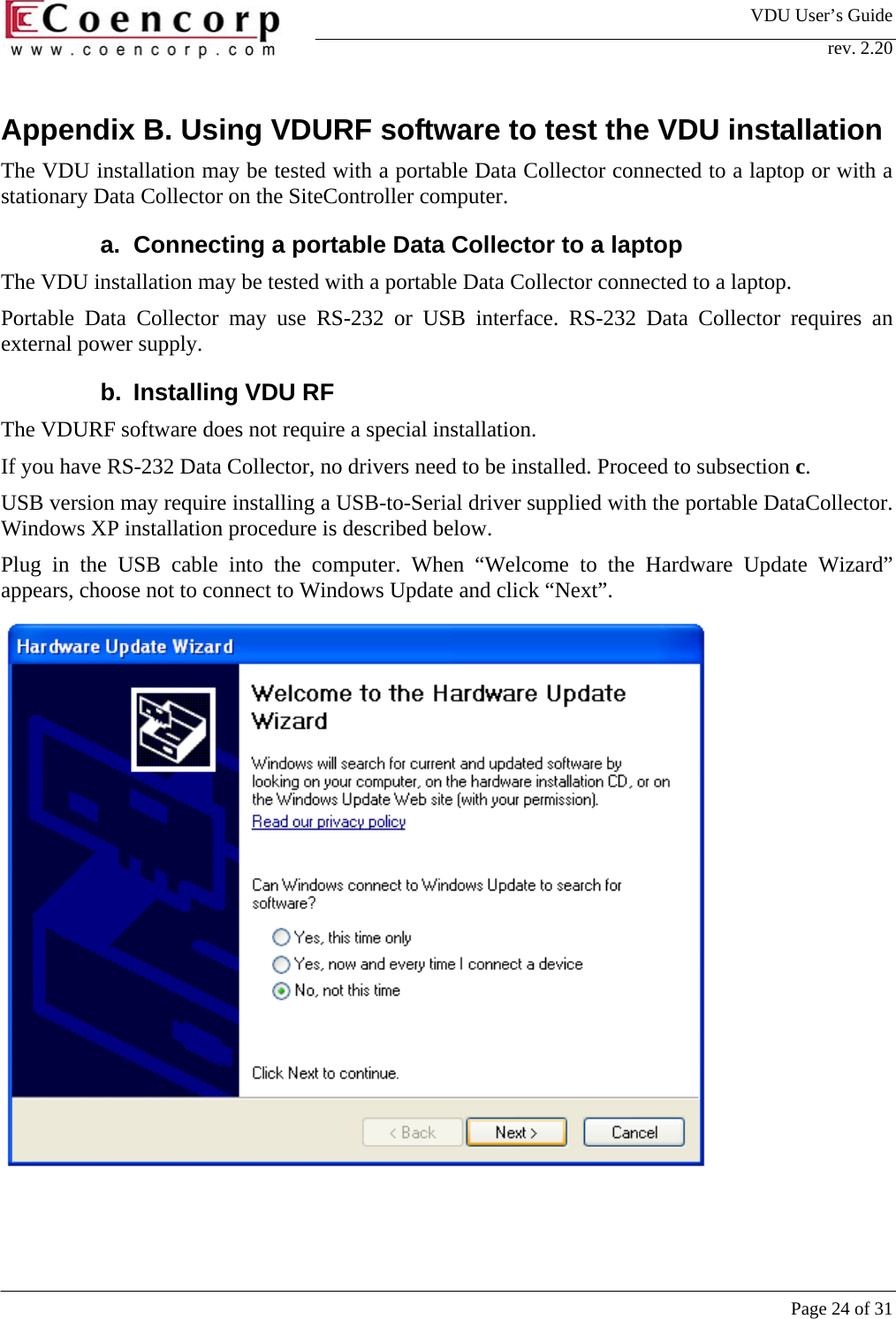
VDU User’s Guide rev. 2.20     Page 24 of 31 Appendix B. Using VDURF software to test the VDU installation The VDU installation may be tested with a portable Data Collector connected to a laptop or with a stationary Data Collector on the SiteController computer.  a.  Connecting a portable Data Collector to a laptop The VDU installation may be tested with a portable Data Collector connected to a laptop.  Portable Data Collector may use RS-232 or USB interface. RS-232 Data Collector requires an external power supply.  b. Installing VDU RF The VDURF software does not require a special installation.  If you have RS-232 Data Collector, no drivers need to be installed. Proceed to subsection c.  USB version may require installing a USB-to-Serial driver supplied with the portable DataCollector. Windows XP installation procedure is described below.  Plug in the USB cable into the computer. When “Welcome to the Hardware Update Wizard” appears, choose not to connect to Windows Update and click “Next”.
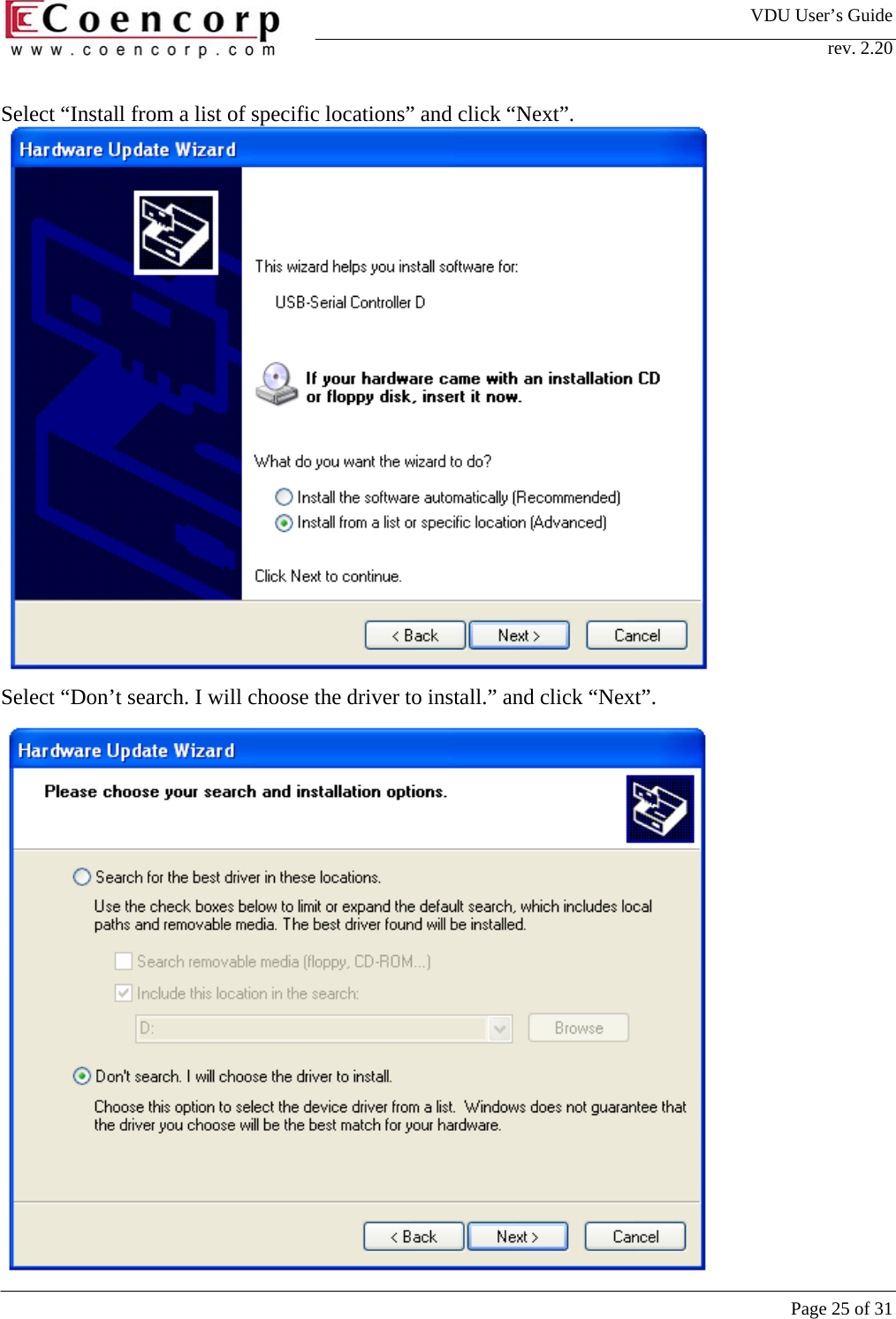
VDU User’s Guide rev. 2.20     Page 25 of 31 Select “Install from a list of specific locations” and click “Next”.                Select “Don’t search. I will choose the driver to install.” and click “Next”.
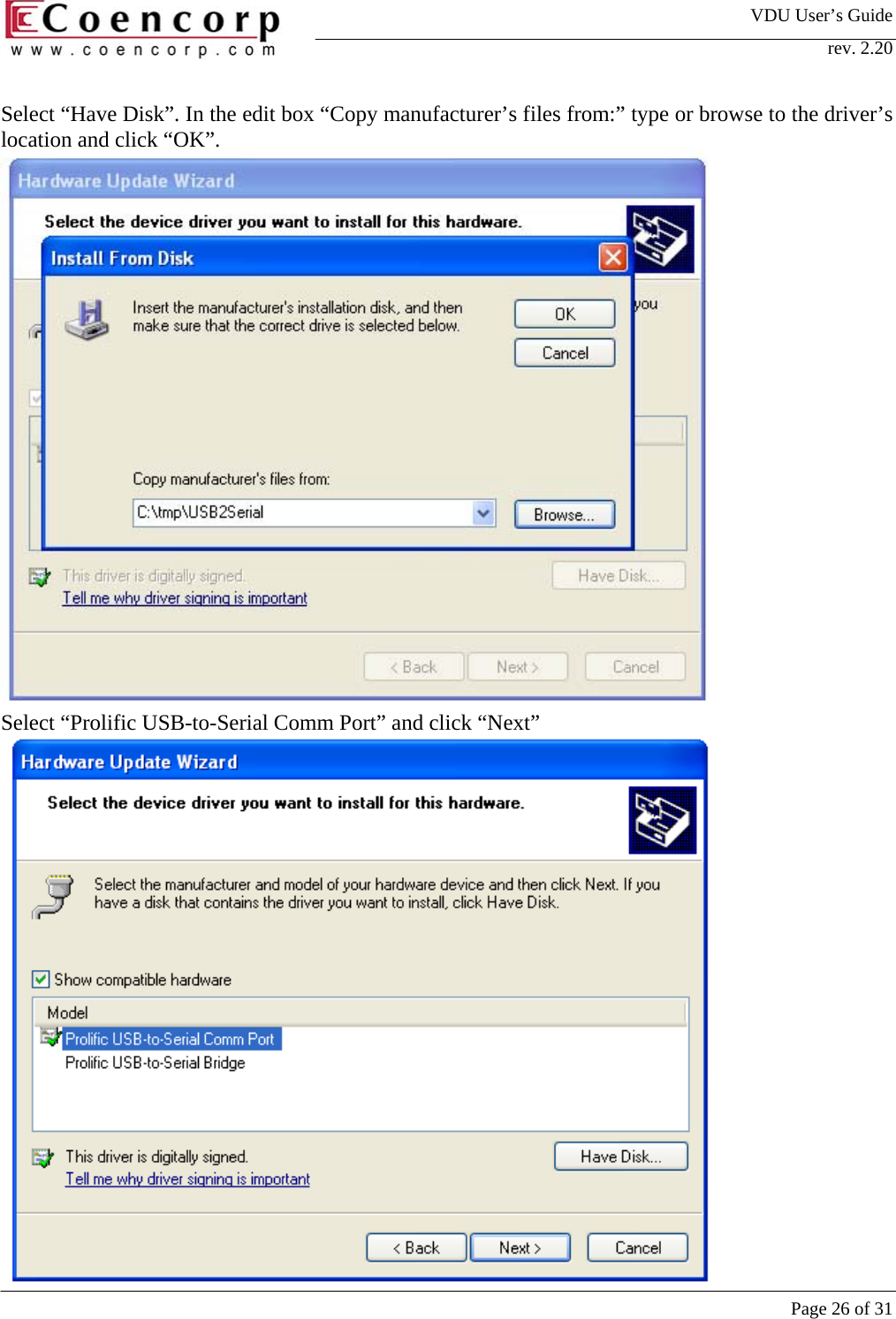
VDU User’s Guide rev. 2.20     Page 26 of 31 Select “Have Disk”. In the edit box “Copy manufacturer’s files from:” type or browse to the driver’s location and click “OK”.                 Select “Prolific USB-to-Serial Comm Port” and click “Next”
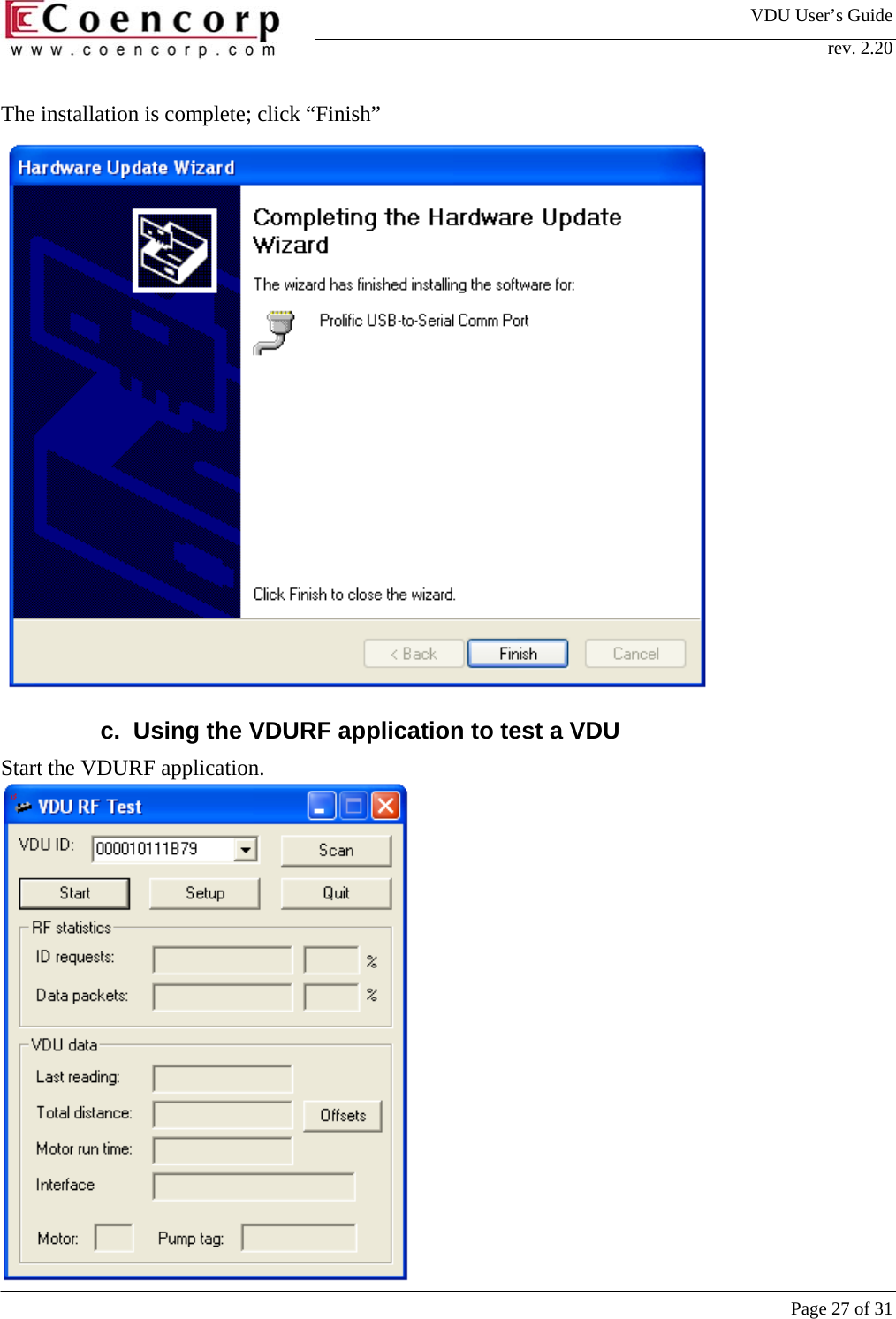
VDU User’s Guide rev. 2.20     Page 27 of 31 The installation is complete; click “Finish”  c.  Using the VDURF application to test a VDU Start the VDURF application.
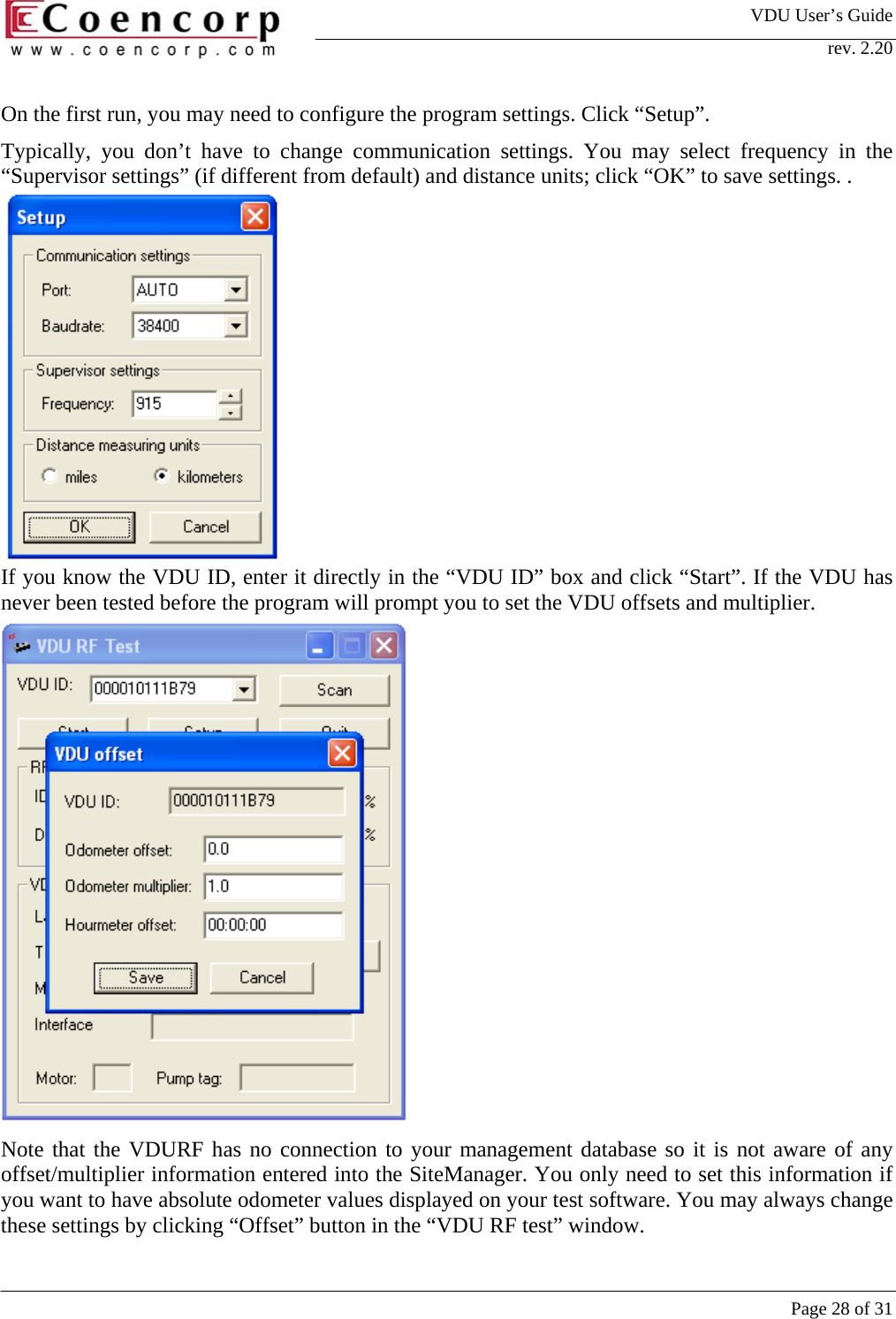
VDU User’s Guide rev. 2.20     Page 28 of 31 On the first run, you may need to configure the program settings. Click “Setup”. Typically, you don’t have to change communication settings. You may select frequency in the “Supervisor settings” (if different from default) and distance units; click “OK” to save settings. .            If you know the VDU ID, enter it directly in the “VDU ID” box and click “Start”. If the VDU has never been tested before the program will prompt you to set the VDU offsets and multiplier.                Note that the VDURF has no connection to your management database so it is not aware of any offset/multiplier information entered into the SiteManager. You only need to set this information if you want to have absolute odometer values displayed on your test software. You may always change these settings by clicking “Offset” button in the “VDU RF test” window.
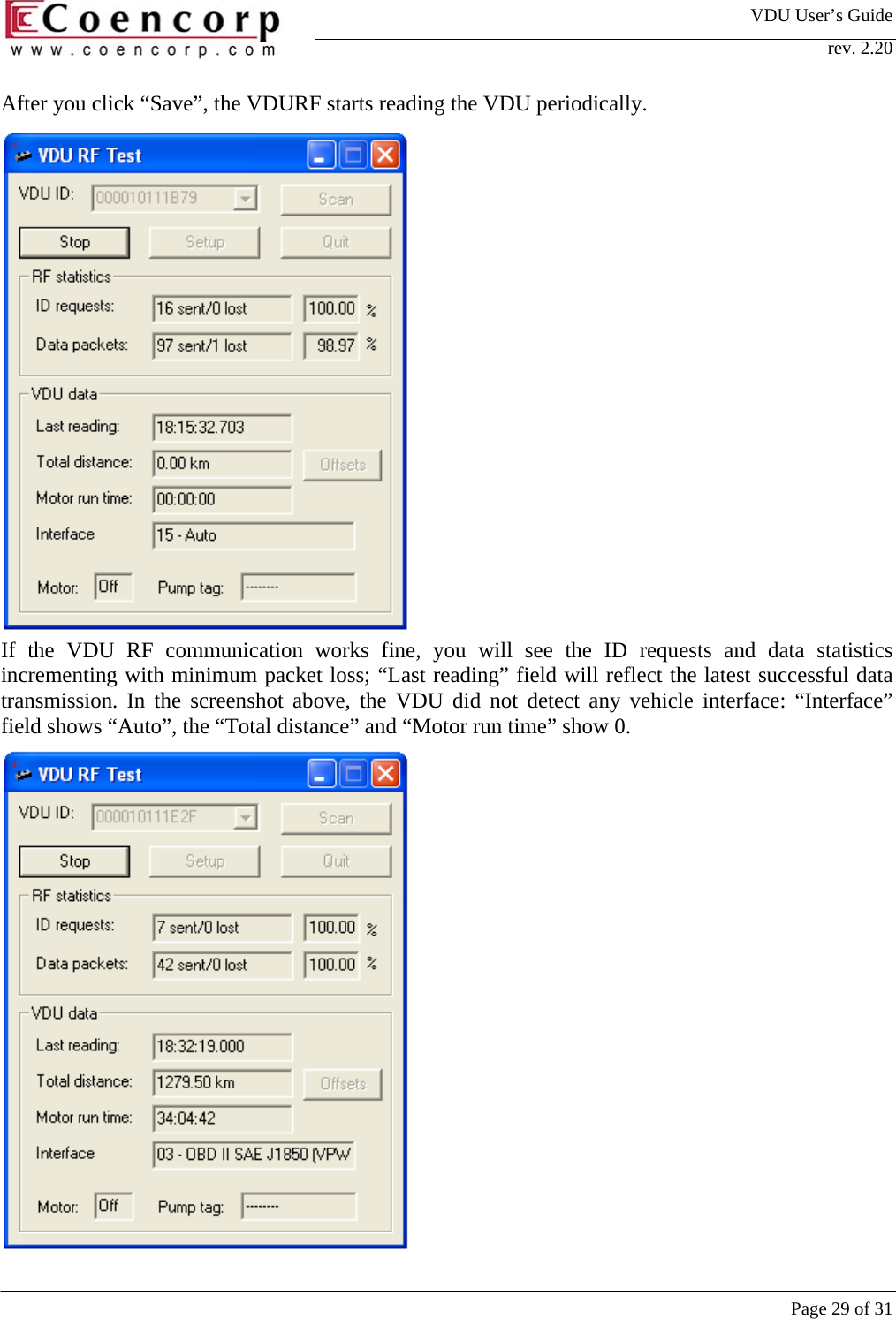
VDU User’s Guide rev. 2.20     Page 29 of 31 After you click “Save”, the VDURF starts reading the VDU periodically.                If the VDU RF communication works fine, you will see the ID requests and data statistics incrementing with minimum packet loss; “Last reading” field will reflect the latest successful data transmission. In the screenshot above, the VDU did not detect any vehicle interface: “Interface” field shows “Auto”, the “Total distance” and “Motor run time” show 0.
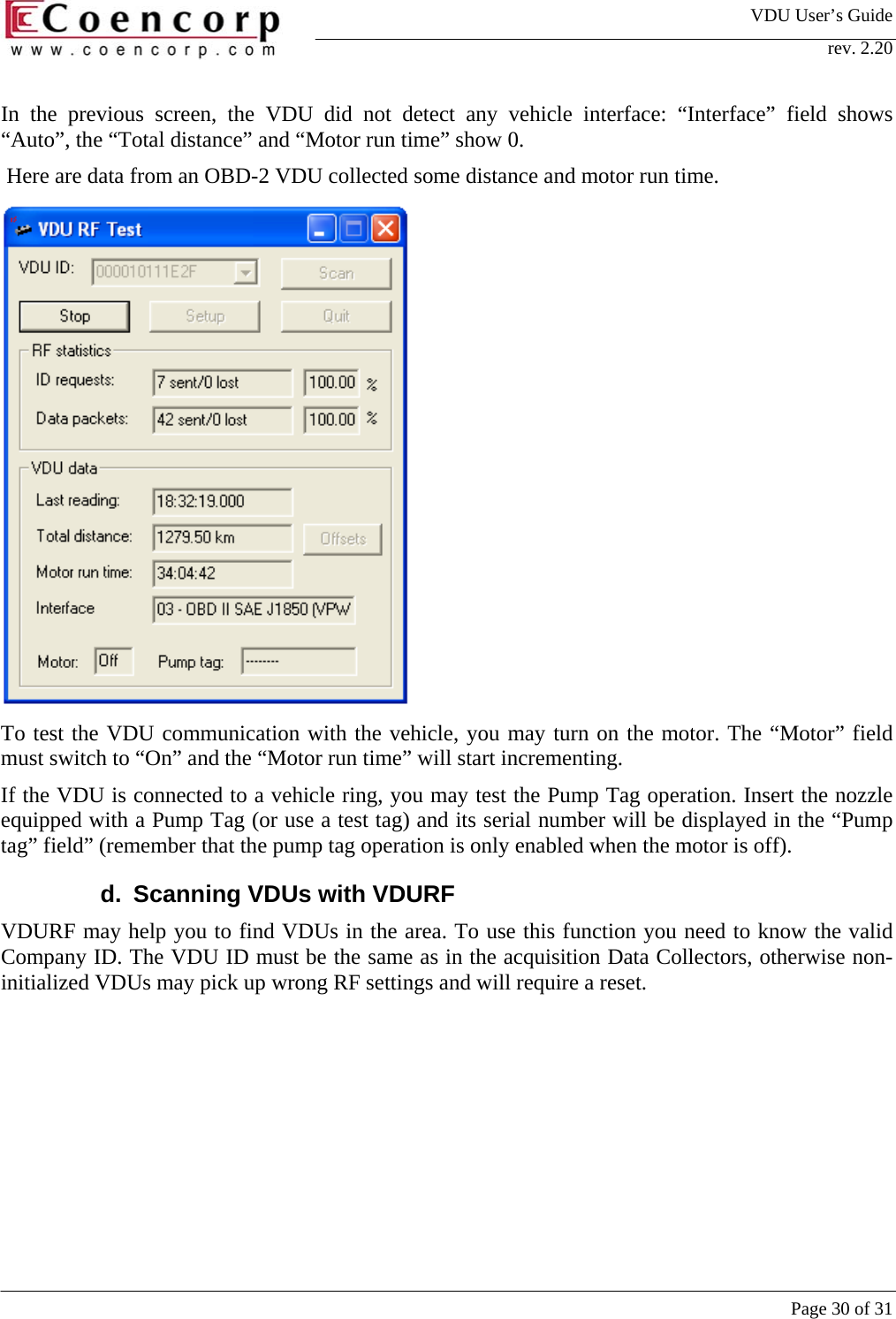
VDU User’s Guide rev. 2.20     Page 30 of 31 In the previous screen, the VDU did not detect any vehicle interface: “Interface” field shows “Auto”, the “Total distance” and “Motor run time” show 0.  Here are data from an OBD-2 VDU collected some distance and motor run time.   To test the VDU communication with the vehicle, you may turn on the motor. The “Motor” field must switch to “On” and the “Motor run time” will start incrementing.  If the VDU is connected to a vehicle ring, you may test the Pump Tag operation. Insert the nozzle equipped with a Pump Tag (or use a test tag) and its serial number will be displayed in the “Pump tag” field” (remember that the pump tag operation is only enabled when the motor is off).  d.  Scanning VDUs with VDURF VDURF may help you to find VDUs in the area. To use this function you need to know the valid Company ID. The VDU ID must be the same as in the acquisition Data Collectors, otherwise non-initialized VDUs may pick up wrong RF settings and will require a reset.
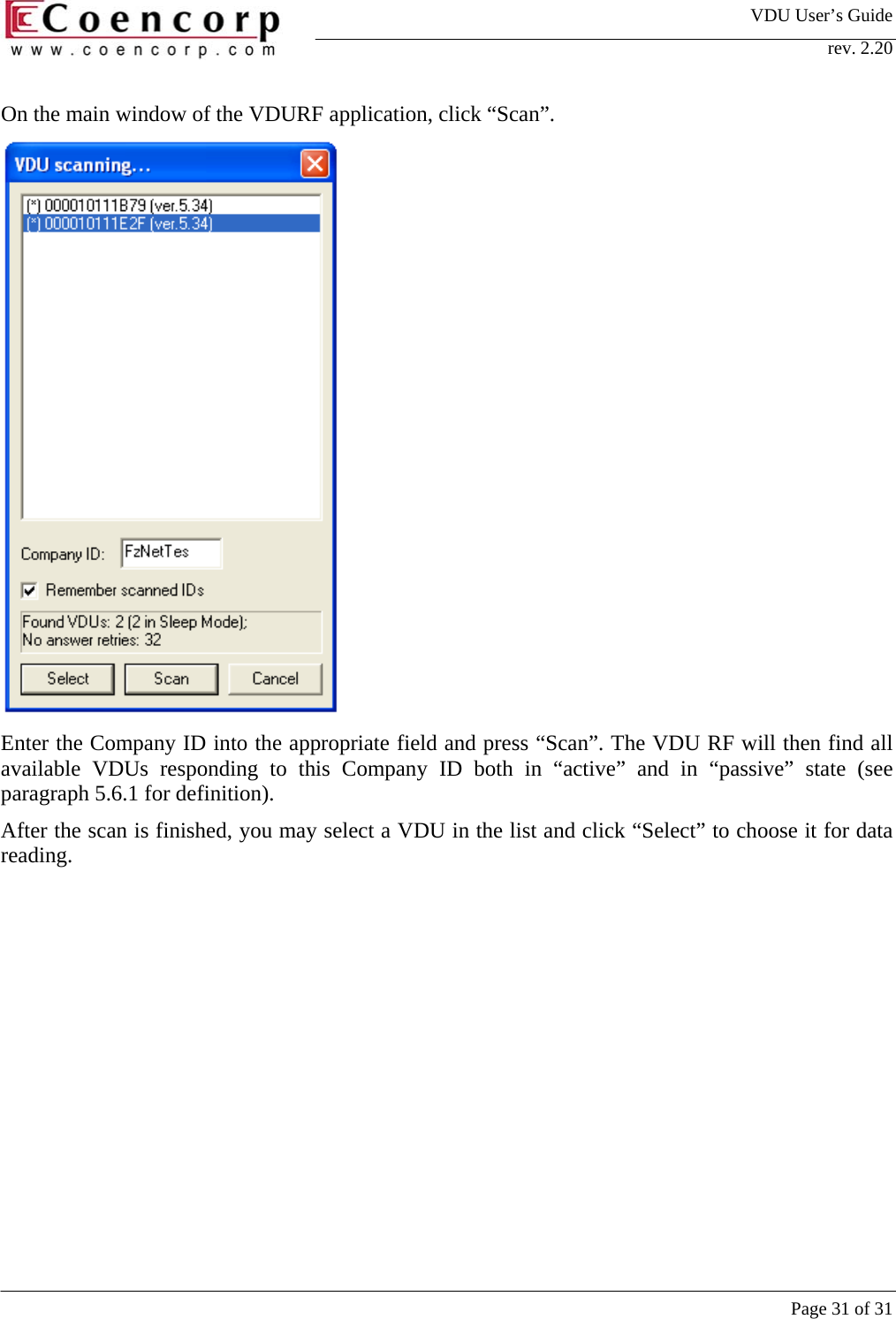
VDU User’s Guide rev. 2.20     Page 31 of 31 On the main window of the VDURF application, click “Scan”.   Enter the Company ID into the appropriate field and press “Scan”. The VDU RF will then find all available VDUs responding to this Company ID both in “active” and in “passive” state (see paragraph 5.6.1 for definition).  After the scan is finished, you may select a VDU in the list and click “Select” to choose it for data reading.

Navigation menu