Comelit Group Spa CM96201FRW-CMS Smart video doorbell User Manual MT VISTO wifi EN FR ES 2ed cod 2G40002055 indd

Comelit Group Spa Smart video doorbell MT VISTO wifi EN FR ES 2ed cod 2G40002055 indd

User Manual

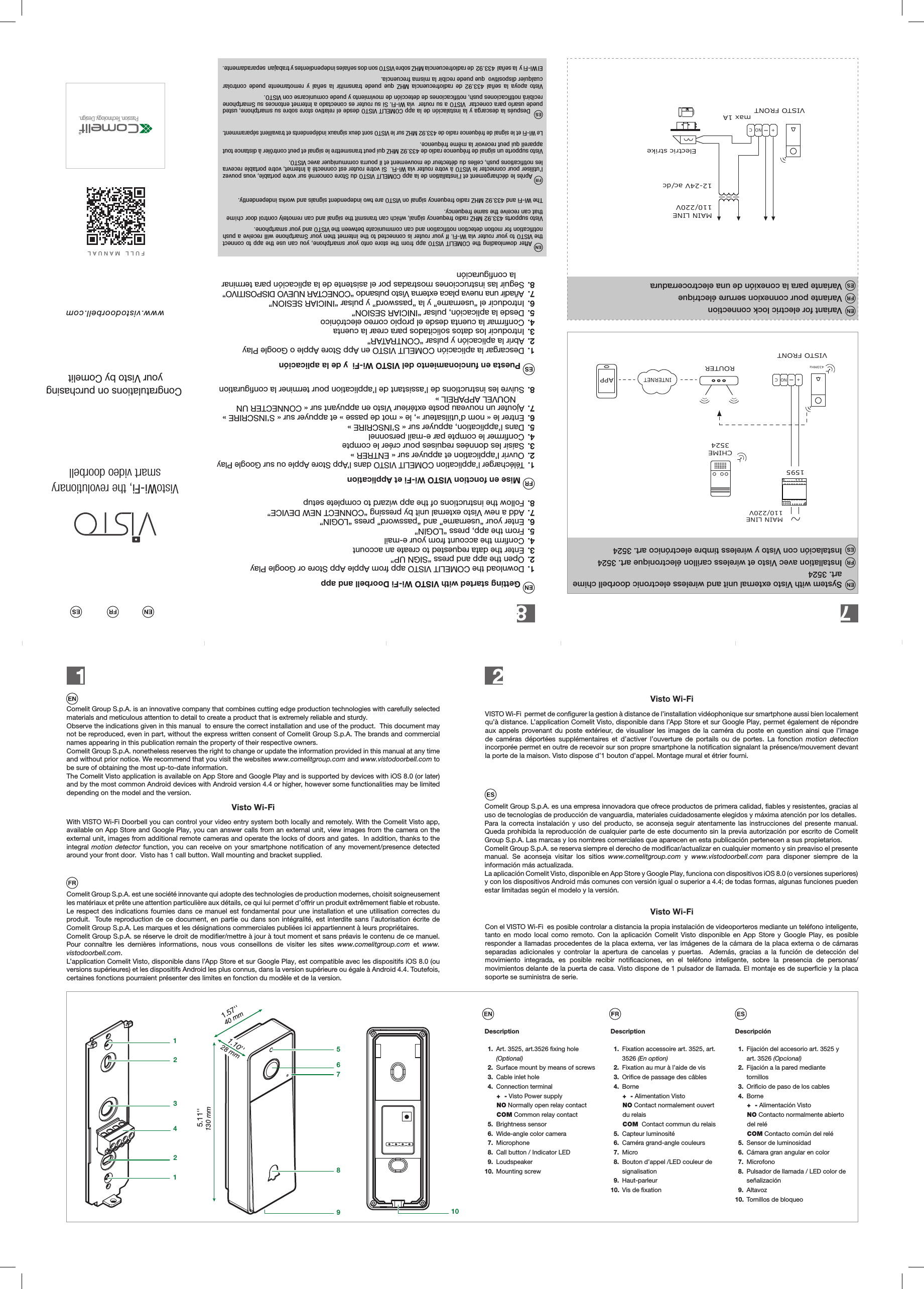
Passion.Technology.Design.www.vistodoorbell.comFULL MANUALVistoWi-Fi, the revolutionarysmart video doorbell Congratulations on purchasingyour Visto by Comelit1221345678910130 mm5.11''40 mm1.57''28 mm1.10'' Getting started with VISTO Wi-Fi Doorbell and app1.  Download the COMELIT VISTO app from Apple App Store or Google Play2.  Open the app and press “SIGN UP”3.  Enter the data requested to create an account4.  Confirm the account from your e-mail5.  From the app, press “LOGIN” 6.  Enter your “username” and “password” press “LOGIN” 7.  Add a new Visto external unit by pressing “CONNECT NEW DEVICE”8.  Follow the instructions of the app wizard to complete setup Mise en fonction VISTO Wi-Fi et Application1.  Télécharger l’application COMELIT VISTO dans l’App Store Apple ou sur Google Play2.  Ouvrir l’application et appuyer sur « ENTRER »3.  Saisir les données requises pour créer le compte4.  Confirmer le compte par e-mail personnel5.  Dans l’application, appuyer sur « S’INSCRIRE » 6.  Entrer le « nom d’utilisateur », le « mot de passe » et appuyer sur « S’INSCRIRE » 7.  Ajouter un nouveau poste extérieur Visto en appuyant sur « CONNECTER UN NOUVEL APPAREIL »8.  Suivre les instructions de l’assistant de l’application pour terminer la configuration Puesta en funcionamiento del VISTO Wi-Fi  y de la aplicación1.  Descargar la aplicación COMELIT VISTO en App Store Apple o Google Play2.  Abrir la aplicación y pulsar “CONTRATAR”3.  Introducir los datos solicitados para crear la cuenta4.  Confirmar la cuenta desde el propio correo electrónico5.  Desde la aplicación, pulsar “INICIAR SESION” 6.  Introducir el “username” y la “password” y pulsar “INICIAR SESION”7.  Añadir una nueva placa externa Visto pulsando “CONECTAR NUEVO DISPOSITIVO”8.  Seguir las instrucciones mostradas por el asistente de la aplicación para terminar la configuración After downloading the COMELIT VISTO app from the store onto your smartphone, you can use the app to connect the VISTO to your router via Wi-Fi. If your router is connected to the internet then your Smartphone will receive a push notification for motion detection notification and can communicate between the VISTO and your smartphone. that can receive the same frequency.  Après le déchargement et l’installation de la app COMELIT VISTO du Store concerné sur votre portable, vous pouvez l’utiliser pour connecter le VISTO à votre router via Wi-Fi.  Si votre router est connecté à Internet, votre portable recevra les notifications push, celles du détecteur de mouvement et il pourra communiquer avec VISTO.Visto supporte un signal de fréquence radio de 433.92 MHZ qui peut transmettre le signal et peut contrôler à distance tout appareil qui peut recevoir la même fréquence.  Le Wi-Fi et le signal de fréquence radio de 433.92 MHZ sur le VISTO sont deux signaux indépendents et travaillent séparamment.  Después la descarga y la instalación de la app COMELIT VISTO desde el relativo store sobre su smartphone, usted puede usarlo para conectar  VISTO a su router  vía Wi-Fi. Si su router es conectado a Internet entonces su Smartphone recibirá notificaciones push, notificaciones de detección de movimiento y puede comunicarse con VISTO.Visto apoya la señal 433.92 de radiofrecuencia MHZ que puede transmitir la señal y remotamente puede controlar cualquier dispositivo  que puede recibir la misma frecuencia.El Wi-Fi y  la señal  433.92  de radiofrecuencia MHZ sobre VISTO son dos señales independientes y trabajan  separadamente.Comelit Group S.p.A. is an innovative company that combines cutting edge production technologies with carefully selected materials and meticulous attention to detail to create a product that is extremely reliable and sturdy.Observe the indications given in this manual  to ensure the correct installation and use of the product.  This document may not be reproduced, even in part, without the express written consent of Comelit Group S.p.A. The brands and commercial names appearing in this publication remain the property of their respective owners.Comelit Group S.p.A. nonetheless reserves the right to change or update the information provided in this manual at any time and without prior notice. We recommend that you visit the websites www.comelitgroup.com and www.vistodoorbell.com to be sure of obtaining the most up-to-date information.The Comelit Visto application is available on App Store and Google Play and is supported by devices with iOS 8.0 (or later) and by the most common Android devices with Android version 4.4 or higher, however some functionalities may be limited depending on the model and the version.Comelit Group S.p.A. es una empresa innovadora que ofrece productos de primera calidad, fiables y resistentes, gracias al uso de tecnologías de producción de vanguardia, materiales cuidadosamente elegidos y máxima atención por los detalles.Para la correcta instalación y uso del producto, se aconseja seguir atentamente las instrucciones del presente manual.  Queda prohibida la reproducción de cualquier parte de este documento sin la previa autorización por escrito de Comelit Group S.p.A. Las marcas y los nombres comerciales que aparecen en esta publicación pertenecen a sus propietarios.Comelit Group S.p.A. se reserva siempre el derecho de modificar/actualizar en cualquier momento y sin preaviso el presente manual. Se aconseja visitar los sitios www.comelitgroup.com y www.vistodoorbell.com para disponer siempre de la información más actualizada.La aplicación Comelit Visto, disponible en App Store y Google Play, funciona con dispositivos iOS 8.0 (o versiones superiores) y con los dispositivos Android más comunes con versión igual o superior a 4.4; de todas formas, algunas funciones pueden estar limitadas según el modelo y la versión.Comelit Group S.p.A. est une société innovante qui adopte des technologies de production modernes, choisit soigneusement les matériaux et prête une attention particulière aux détails, ce qui lui permet d’orir un produit extrêmement fiable et robuste.Le respect des indications fournies dans ce manuel est fondamental pour une installation et une utilisation correctes du produit.  Toute reproduction de ce document, en partie ou dans son intégralité, est interdite sans l’autorisation écrite de Comelit Group S.p.A. Les marques et les désignations commerciales publiées ici appartiennent à leurs propriétaires.Comelit Group S.p.A. se réserve le droit de modifier/mettre à jour à tout moment et sans préavis le contenu de ce manuel. Pour connaître les dernières informations, nous vous conseillons de visiter les sites www.comelitgroup.com et www.vistodoorbell.com.L’application Comelit Visto, disponible dans l’App Store et sur Google Play, est compatible avec les dispositifs iOS 8.0 (ou versions supérieures) et les dispositifs Android les plus connus, dans la version supérieure ou égale à Android 4.4. Toutefois, certaines fonctions pourraient présenter des limites en fonction du modèle et de la version.With VISTO Wi-Fi Doorbell you can control your video entry system both locally and remotely. With the Comelit Visto app, available on App Store and Google Play, you can answer calls from an external unit, view images from the camera on the external unit, images from additional remote cameras and operate the locks of doors and gates.  In addition, thanks to the integral motion detector function, you can receive on your smartphone notification of any movement/presence detected around your front door.  Visto has 1 call button. Wall mounting and bracket supplied.VISTO Wi-Fi  permet de configurer la gestion à distance de l’installation vidéophonique sur smartphone aussi bien localement qu’à distance. L’application Comelit Visto, disponible dans l’App Store et sur Google Play, permet également de répondre aux appels provenant du poste extérieur, de visualiser les images de la caméra du poste en question ainsi que l’image de caméras déportées supplémentaires et d’activer l’ouverture de portails ou de portes. La fonction motion detection incorporée permet en outre de recevoir sur son propre smartphone la notification signalant la présence/mouvement devant la porte de la maison. Visto dispose d’1 bouton d’appel. Montage mural et étrier fourni.Con el VISTO Wi-Fi  es posible controlar a distancia la propia instalación de videoporteros mediante un teléfono inteligente, tanto en modo local como remoto. Con la aplicación Comelit Visto disponible en App Store y Google Play, es posible responder a llamadas procedentes de la placa externa, ver las imágenes de la cámara de la placa externa o de cámaras separadas adicionales y controlar la apertura de cancelas y puertas.  Además, gracias a la función de detección del movimiento integrada, es posible recibir notificaciones, en el teléfono inteligente, sobre la presencia de personas/movimientos delante de la puerta de casa. Visto dispone de 1 pulsador de llamada. El montaje es de superficie y la placa soporte se suministra de serie.Visto Wi-FiVisto Wi-FiVisto Wi-FiDescription 1. Art. 3525, art.3526 fixing hole   (Optional) 2. Surface mount by means of screws 3. Cable inlet hole 4. Connection terminal+  - Visto Power supplyNO Normally open relay contactCOM Common relay contact 5. Brightness sensor 6. Wide-angle color camera 7. Microphone 8. Call button / Indicator LED 9. Loudspeaker10. Mounting screwDescription 1. Fixation accessoire art. 3525, art.   3526 (En option) 2. Fixation au mur à l’aide de vis  3. Orifice de passage des câbles 4. Borne+  - Alimentation VistoNO Contact normalement ouvert du relaisCOM  Contact commun du relais 5. Capteur luminosité 6. Caméra grand-angle couleurs 7. Micro 8. Bouton d’appel /LED couleur de   signalisation 9. Haut-parleur10.  Vis de fixationDescripción 1. Fijación del accesorio art. 3525 y    art. 3526 (Opcional) 2. Fijación a la pared mediante    tornillos   3. Orificio de paso de los cables 4. Borne+  - Alimentación VistoNO Contacto normalmente abierto del reléCOM Contacto común del relé 5. Sensor de luminosidad 6. Cámara gran angular en color 7. Microfono 8. Pulsador de llamada / LED color de      señalización 9. Altavoz10.  Tornillos de bloqueo+-VISTO FRONTElectric strikeNO C12-24V ac/dc110/220VMAIN LINEmax 1AINTERNETVISTO FRONT110/220VMAIN LINE433MHzROUTERCHIME35241595+-NO CAPPSystem with Visto external unit and wireless electronic doorbell chime art. 3524Variant for electric lock connectionInstallation avec Visto et wireless carillon électronique art. 3524Variante pour connexion serrure électriqueInstalación con Visto y wireless timbre electrónico art. 3524Variante para la conexión de una electrocerraduraVisto supports 433.92 MHZ radio frequency signal, which can transmit the signal and can remotely control door ch mendependently.The Wi-Fi and 433.92 MHZ radio frequency signal on VISTO are two independent signals and works ii
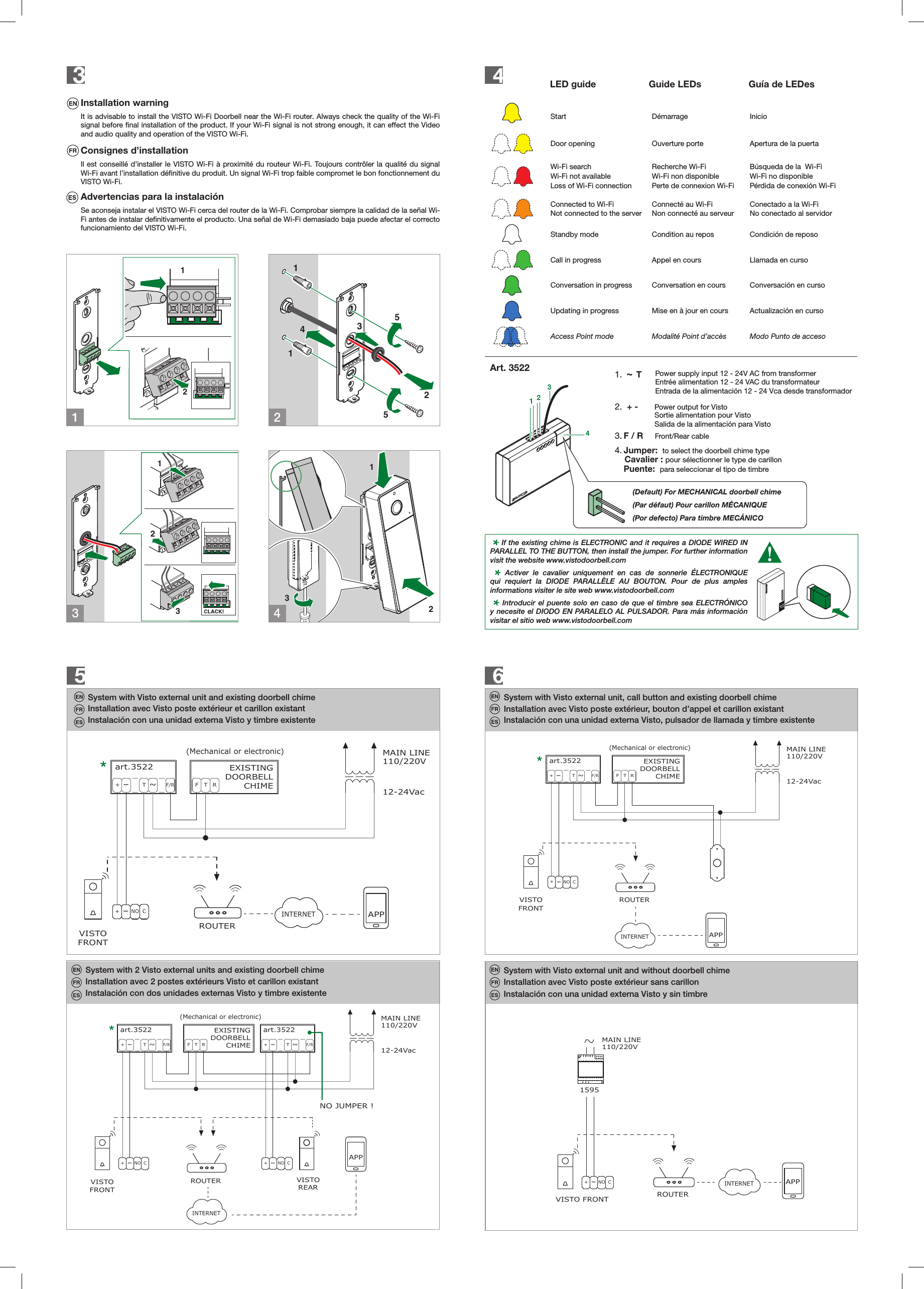
12LLCFP1CFP212311432551231324LED guide           Guide LEDs      Guía de LEDes   Start Démarrage InicioDoor opening  Ouverture porte Apertura de la puertaWi-Fi searchWi-Fi not availableLoss of Wi-Fi connectionRecherche Wi-FiWi-Fi non disponiblePerte de connexion Wi-FiBúsqueda de la  Wi-FiWi-Fi no disponiblePérdida de conexión Wi-FiConnected to Wi-FiNot connected to the serverConnecté au Wi-FiNon connecté au serveurConectado a la Wi-FiNo conectado al servidorStandby mode Condition au repos Condición de reposoCall in progress Appel en cours Llamada en cursoConversation in progress Conversation en cours Conversación en cursoUpdating in progress Mise en à jour en cours Actualización en cursoAccess Point mode Modalité Point d’accès Modo Punto de accesoInstallation warningIt is advisable to install the VISTO Wi-Fi Doorbell near the Wi-Fi router. Always check the quality of the Wi-Fi signal before final installation of the product. If your Wi-Fi signal is not strong enough, it can effect the Video and audio quality and operation of the VISTO Wi-Fi.Consignes d’installationIl est conseillé d’installer le VISTO Wi-Fi à proximité du routeur Wi-Fi. Toujours contrôler la qualité du signal Wi-Fi avant l’installation définitive du produit. Un signal Wi-Fi trop faible compromet le bon fonctionnement du VISTO Wi-Fi.Advertencias para la instalaciónSe aconseja instalar el VISTO Wi-Fi cerca del router de la Wi-Fi. Comprobar siempre la calidad de la señal Wi-Fi antes de instalar definitivamente el producto. Una señal de Wi-Fi demasiado baja puede afectar el correcto funcionamiento del VISTO Wi-Fi. System with Visto external unit and existing doorbell chime System with Visto external unit, call button and existing doorbell chimeInstallation avec Visto poste extérieur, bouton d’appel et carillon existantInstalación con una unidad externa Visto, pulsador de llamada y timbre existenteSystem with 2 Visto external units and existing doorbell chimeInstallation avec Visto poste extérieur et carillon existantInstallation avec 2 postes extérieurs Visto et carillon existantInstalación con una unidad externa Visto y timbre existenteInstalación con dos unidades externas Visto y timbre existente+-ROUTER+-T~F/RVISTOFEXISTINGDOORBELLCHIMET R(Mechanical or electronic)+-T~F/RFRONT+-VISTOREAR12-24Vac110/220VMAIN LINEart.3522 art.3522INTERNETNO C NO CNO JUMPER !APPROUTER+-T~F/RVISTOF T R(Mechanical or electronic)FRONT12-24Vac110/220VMAIN LINEEXISTINGDOORBELLCHIMEart.3522INTERNET+-NO CAPPROUTER+-T~F/RVISTOF T R(Mechanical or electronic)FRONT12-24Vac110/220VMAIN LINEEXISTINGDOORBELLCHIMEart.3522INTERNET+-NO CAPP1234EXISTINGELECTRONIC CHIMEEXISTINGMECHANICAL CHIME 1.  ~ T   2.  + - 3. F / R     Front/Rear cable 4. Jumper:  to select the doorbell chime type      Cavalier : pour sélectionner le type de carillon  Puente:  para seleccionar el tipo de timbrePower supply input 12 - 24V AC from transformerEntrée alimentation 12 - 24 VAC du transformateurEntrada de la alimentación 12 - 24 Vca desde transformadorPower output for VistoSortie alimentation pour VistoSalida de la alimentación para Visto    Activer le cavalier uniquement en cas de sonnerie ÉLECTRONIQUE qui requiert la DIODE PARALLÈLE AU BOUTON. Pour de plus amples informations visiter le site web www.vistodoorbell.com   If the existing chime is ELECTRONIC and it requires a DIODE WIRED IN PARALLEL TO THE BUTTON, then install the jumper. For further information visit the website www.vistodoorbell.com    Introducir el puente solo en caso de que el timbre sea ELECTRÓNICO y necesite el DIODO EN PARALELO AL PULSADOR. Para más información visitar el sitio web www.vistodoorbell.comArt. 3522(Default) For MECHANICAL doorbell chime(Par défaut) Pour carillon MÉCANIQUE(Por defecto) Para timbre MECÁNICOINTERNETVISTO FRONTROUTER1595110/220VMAIN LINE+-NO CAPPSystem with Visto external unit and without doorbell chimeInstallation avec Visto poste extérieur sans carillonInstalación con una unidad externa Visto y sin timbre
    FCC Warning  This device complies with Part 15 of the FCC Rules. Operation is subject to the following two conditions: (1) This device may not cause harmful interference, and (2) this device must accept any interference received, including interference that may cause undesired operation.  NOTE 1: This equipment has been tested and found to comply with the limits for a Class B digital device, pursuant to part 15 of the FCC Rules. These limits are designed to provide reasonable protection against harmful interference in a residential installation. This equipment generates, uses and can radiate radio frequency energy and, if not installed and used in accordance with the instructions, may cause harmful interference to radio communications. However, there is no guarantee that interference will not occur in a particular installation. If this equipment does cause harmful interference to radio or television reception, which can be determined by turning the equipment off and on, the user is encouraged to try to correct the interference by one or more of the following measures: - Reorient or relocate the receiving antenna. - Increase the separation between the equipment and receiver. -Connect the equipment into an outlet on a circuit different from that to which the receiver is connected. -Consult the dealer or an experienced radio/TV technician for help.  NOTE 2: Any changes or modifications to this unit not expressly approved by the party responsible for compliance could void the user's authority to operate the equipment.

Navigation menu