Conexant Systems 36342U Spread Spectrum Transmitter User Manual AN9949

Conexant Systems Inc. Spread Spectrum Transmitter AN9949

Contents

Manual

1TMINCHECKINGAN9949ISL36342U-EVAL PRISM II 11Mbps USB WirelessLAN Evaluation Kit User’s GuideIntroductionThis kit allows evaluation of theIntersil PRISM® II Direct Sequencechip set design in a Wireless LocalArea Network (WLAN) USB Card implementation.Software drivers are included allowing data to be transmittedbetween cards at 1, 2, 5.5 and 11Mbps transfer rates, with adiagnostic program to display the real data throughput fromsystem to system.Included in the kit are PRISM II chip set data sheets withapplication notes describing the implementation of awireless networking card using the chip set.Contents of Your Evaluation KitYour PC Card Wireless LAN Evaluation Kit contains thefollowing items:Should you discover that your PC Card Wireless LANEvaluation Kit is incomplete, please contact IntersilCorporation.Overview of IEEE 802.11The IEEE 802.11 specification is a standard for wirelessconnectivity for fixed, portable, and moving stations within alocal area.The IEEE 802.11 standard describes the services requiredby a compliant device to operate within an “ad hoc” or“infrastructure” network, as well as dealing with the issuesrelated to mobility within those networks. Spread spectrumtechniques are used to tolerate mobility and multipatheffects. They are also a requirement for compliance withFCC, ETSI and those of other regulatory authorities whenoperating within the Industrial, Scientific, and Medical (ISM)frequency band.An ad hoc communications network is created quickly andinformally for a temporary time period. An infrastructurenetwork usually requires more planning so that wirelessstations can communicate over longer distances throughaccess points, and may also communicate with existingwired LANs using portals.The IEEE 802.11 standard describes Media Access Control(MAC) procedures. The principal method of communicationis the Carrier Sense Multiple Access with CollisionAvoidance (CSMA-CA) protocol. Using this protocol, eachstation senses the communications medium (RF channel),and does not transmit until the channel is clear. This avoidscollisions and minimizes the retransmission of subsequentpackets.The standard also supports the operation of a station withina wireless LAN that may coexist with several overlappingwireless LANs. To accomplish this, a scheme ofchannelization and spread spectrum techniques is used.Direct Sequence (DSSS) and Frequency Hopping (FHSS)spread spectrum techniques are supported by the standardand both operate in the 2.4GHz to 2.4835GHz frequencyband (the unlicensed ISM band). An infrared technique isalso supported for indoor applications. The standardsupports a 1Mbps and 2Mbps data rate for both DSSS andFHSS and has recently introduced a high data rate standardsupporting 5.5Mbps and 11Mbps DSSS usingComplementary Code Keying (CCK) modulation.The standard has also specified the requirements and servicesthat enable private and secure communications to occur.Wireless LAN ConfigurationsFor ease of use in evaluating these cards, an ad hocnetwork for peer to peer communications can be created.An ad hoc network is usually created for a specific purpose(such as file transfer or accessing a database). Ad hocnetworks simplify the process of creating and dissolvingnetworks for nontechnical users of the network facilities.Two cards form an IEEE 802.11 Independent Basic ServiceSet (IBSS), the simplest ad hoc network. The cardscommunicate with each other directly and must remainwithin radio range. When both cards are on, theyimmediately “see” each other and the ad hoc network isformed without user intervention.TousethecardsinaninfrastructureBSS(alsocalledanExtended Service Set) where the two cards may not be in directradio contact, access points are needed. The associationbetween a card (station) and an infrastructure BSS - wherecommunication occurs only between a station and an accesspoint and not between stations directly is dynamic.QUANTITY DESCRIPTION2 PRISMIIWirelessLANPCCards1 ISL36342U Wireless LAN Evaluation Kit User’sGuide, AN99491 PRISM II Chip Set Data Sheets1 PRISM II Application Notes1 Microsoft® Windows® 98, 98SE, MS, Win2000Drivers1 PRISM® Test Utilities (PTU) Software1 Features/Benefits Card1 Product Registration Form1 Notification CardApplication Note June 2001Author: Richard L. Abrahams1-888-INTERSIL or 321-724-7143 |Intersil and Design is a trademark of Intersil Americas Inc.Copyright © Intersil Americas Inc. 2001, All Rights ReservedPRISM® is a registered trademark of Intersil Americas Inc. PRISM and design is a trademark of Intersil Americas Inc.Microsoft® Windows® and Windows NT® are registered trademarks of Microsoft Corporation. LINUX® is a registered trademark of Linus Torvalds.
2The IEEE 802.11 protocols are implemented in the firmwareso that file transfers or database access can beginimmediately.Direct Sequence Spread Spectrum ApproachThe use of spread spectrum techniques for wirelesscomputer communications is widely accepted because ofits robustness against multipath effects and interferencefrom intentional or unintentional radiators. The use ofspread spectrum techniques in the ISM frequency bandalso allows products to be deployed without the need for anFCC license.The two main methods by which spread spectrumcommunications can be achieved are Direct SequenceSpread Spectrum (DSSS) and Frequency Hopping SpreadSpectrum (FHSS). This wireless LAN PC card uses theDSSS technique. DSSS transmission has the bestperformance in terms of multipath immunity and jammingrejection. In an office environment, jamming sources arelikely to be unintentional such as emissions frommicrowave ovens. Even though unintentional, they pose athreat to the communications network. Direct sequencetechniques are superior to frequency hopping systems inthis case because FHSS gains its immunity to jamming byavoiding the location of a single tone jammer (such asother FHSS users). When collisions occur, data is lost. Witha DSSS system, the despreading function in the receivergives immunity to jamming by spreading the interferingenergy by the Pseudo Random Number (PN) code over thewhole bandwidth. This selective despreading attenuatesthe jamming power while despreading the desired signal.In the office environment, multipath effects may degradenetwork communications. Direct sequence techniques offerbetter protection than slower frequency hopping systems inthe presence of multipath interference. With frequencyhopped systems, if the hopper jumps to a frequency where anull resides, then data is lost until the next hop. Multipathsignals can be thought of as a special case of unintentionaljamming. In the DSSS approach, nulls resulting frommultipath fading only eliminate a fraction of the signal powersince the bandwidth in the DSSS case is very large. Asignificant amount of energy still remains in the signal andeffective despreading still occurs. The probability of bursterrors is reduced significantly.An often overlooked factor when comparing IEEE 802.11compliant DSSS and FSSS implementations, is theachievable data rate. A frequency hopping occupiedbandwidth of 1MHz as specified by the FCC acts as alimitation when using data rates beyond 2Mbps. A similarbandwidth limitation has not been imposed when using thedirect sequence implementation. In the new 802.11 high datarate (11Mbps) standard utilizing Complementary CodeKeying (CCK) modulation, the 5-1/2 times increase in datarate has been achieved in the same 17MHz bandwidth! Thisis accomplished by encoding 6 bits of data in one out of apossible 64 orthogonal PN spreading sequences. Moreinformation on the new high data rate standard may befound in Applications Note AN9850 “Complementary CodeKeying Made Simple” which may be found on the IntersilWeb Site.Installation of ISL36342U WindowsDriversPRISM Test Utility (PTU) SoftwareInstallationNOTE: Perform after Windows Driver Installation.Step 1. Boot your PC under Microsoft Windows.Step 2. Once your system has booted and is idle, insertPRISM II Driver for Windows, Disk #1 into the “A”Floppy Drive. On the Desktop, left click on<Start>-><RUN> then type A:SETUP <Enter>Follow the on-screen instructions. Accept all defaults.Step 3. When the preliminary installation is complete,connect the wireless LAN PC card to the computervia the USB cable.Step 4. Windows should automatically recognize that thecard has been inserted. It then displays a dialog boxtitled “New Hardware Found”.Step 5. Insert PRISM II Driver for Windows, Disk #1 intothe floppy drive. Tell Windows that the driver islocated on drive “A”. Accept all defaults.Step 6. Follow the on-screen instructions to completeinstallation of the driver. When complete, the NDCdriver icon should appear in the system area on thedesktop (computer monitor with antenna). Clicking onthis icon enables setting of channel, mode, etc.Step 7. If operating in the Pseudo IBSS mode, you mustassign a unique IP address to the computer inorder for the card to be operable. Left click on<Start>-><Settings>-><Control Panel>.Double click on Network. Select TCP/IP ... PRISMIEEE 802.11 PC Card .... and click on Properties.Select the IP Address tab. Click on Obtain an IPAddress. Enter a valid IP address. Enter a validSubnet Mask (suggest 255 255 255 0). Clickon OK.Step 1. Insert the PTU disk #1 into the floppy drive.Step 2. On the Desktop, left click on <Start>-><RUN>then type A:setup <Enter>. Follow the on-screeninstructions. Accept all defaults. When theinstallation is complete, an icon shouldautomatically appear on the Desktop.Application Note 9949
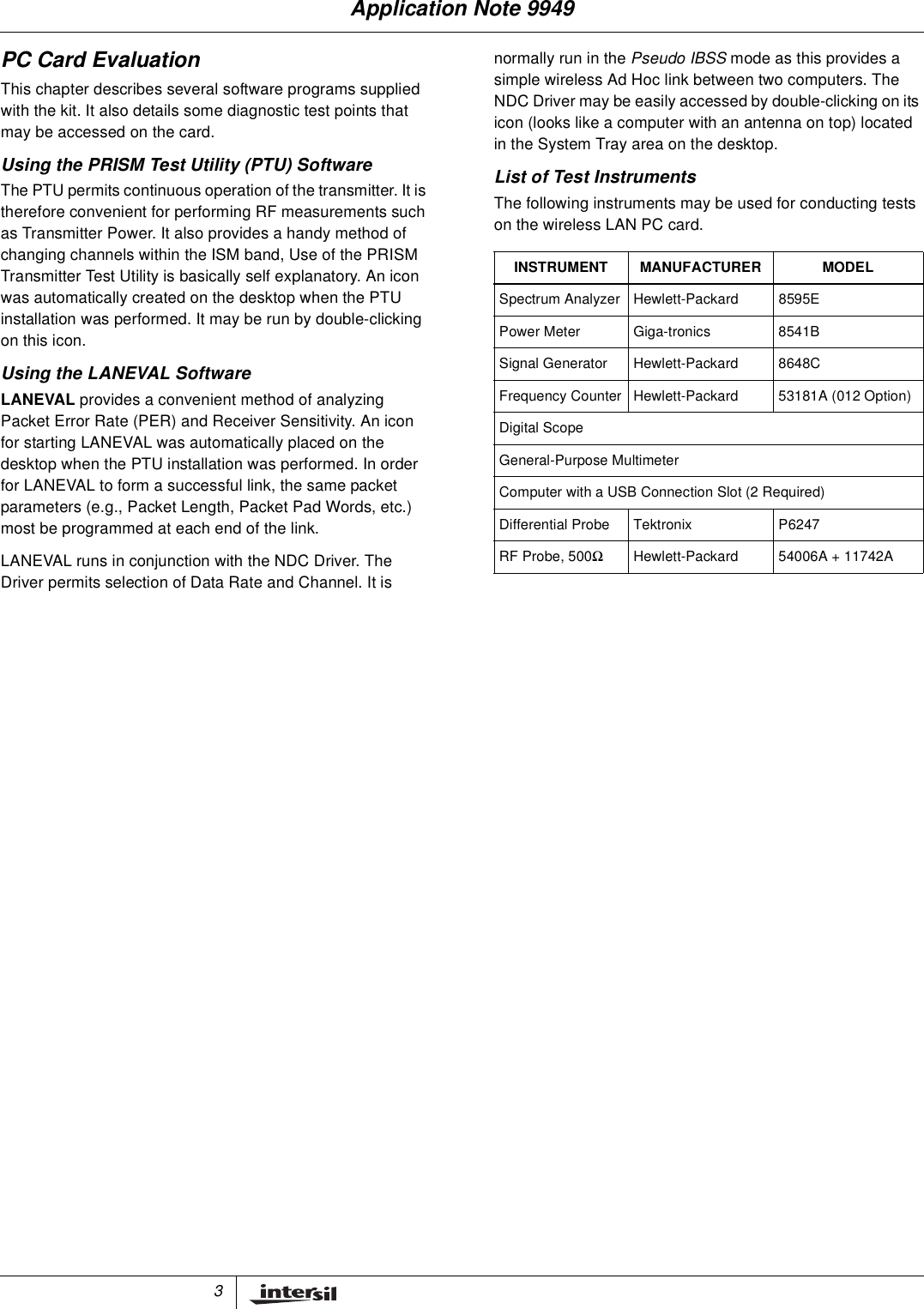
3PC Card EvaluationThis chapter describes several software programs suppliedwith the kit. It also details some diagnostic test points thatmay be accessed on the card.Using the PRISM Test Utility (PTU) SoftwareThe PTU permits continuous operation of the transmitter. It istherefore convenient for performing RF measurements suchas Transmitter Power. It also provides a handy method ofchanging channels within the ISM band, Use of the PRISMTransmitter Test Utility is basically self explanatory. An iconwas automatically created on the desktop when the PTUinstallation was performed. It may be run by double-clickingon this icon.Using the LANEVAL SoftwareLANEVAL provides a convenient method of analyzingPacket Error Rate (PER) and Receiver Sensitivity. An iconfor starting LANEVAL was automatically placed on thedesktop when the PTU installation was performed. In orderfor LANEVAL to form a successful link, the same packetparameters (e.g., Packet Length, Packet Pad Words, etc.)most be programmed at each end of the link.LANEVAL runs in conjunction with the NDC Driver. TheDriver permits selection of Data Rate and Channel. It isnormally run in the Pseudo IBSS mode as this provides asimple wireless Ad Hoc link between two computers. TheNDC Driver may be easily accessed by double-clicking on itsicon (looks like a computer with an antenna on top) locatedin the System Tray area on the desktop.List of Test InstrumentsThe following instruments may be used for conducting testson the wireless LAN PC card.INSTRUMENT MANUFACTURER MODELSpectrum Analyzer Hewlett-Packard 8595EPower Meter Giga-tronics 8541BSignal Generator Hewlett-Packard 8648CFrequency Counter Hewlett-Packard 53181A (012 Option)Digital ScopeGeneral-Purpose MultimeterComputer with a USB Connection Slot (2 Required)Differential Probe Tektronix P6247RF Probe, 500ΩHewlett-Packard 54006A + 11742AApplication Note 9949
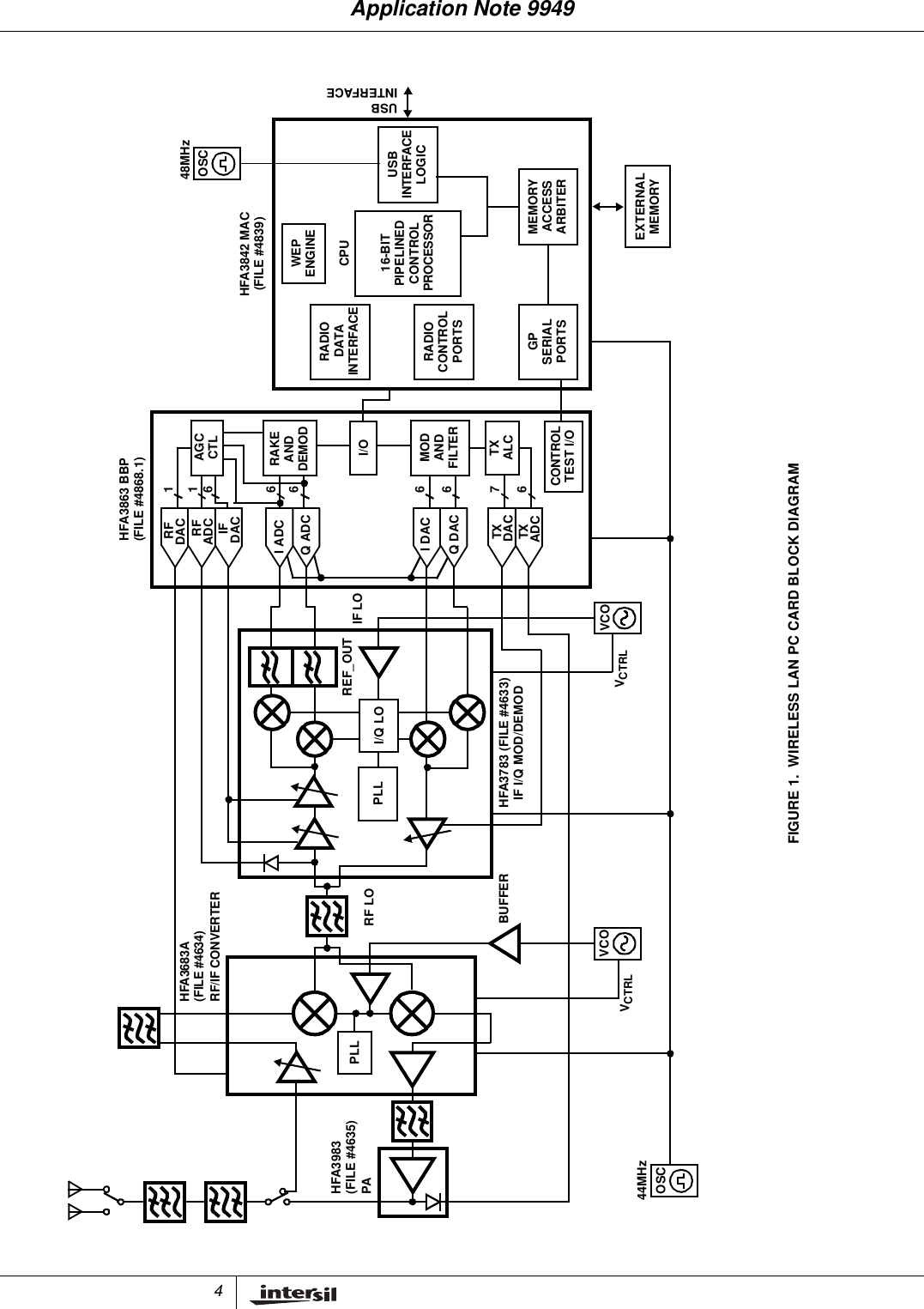
4FIGURE 1. WIRELESS LAN PC CARD BLOCK DIAGRAM676666611HFA3863 BBPAGCCTLRAKETXALCANDDEMODRFDACRFADCIFDACI ADCQ ADCTXDACTXADCI DACQ DACMODI/OANDFILTERIF LOI/Q LOPLLHFA3783 (FILE #4633)IF I/Q MOD/DEMODRF LOPLLHFA3683ARF/IF CONVERTERHFA3983PAREF_OUTCONTROLTEST I/OHFA3842 MAC(FILE #4839)USBINTERFACEMEMORYACCESSARBITERUSBINTERFACELOGICRADIODATAINTERFACERADIOCONTROLPORTSGPSERIALPORTSWEPENGINECPU16-BITPIPELINEDCONTROLPROCESSOREXTERNALMEMORY(FILE #4635)(FILE #4634)(FILE #4868.1)VCOVCOOSCBUFFERVCTRLVCTRL44MHzOSC48MHzApplication Note 9949
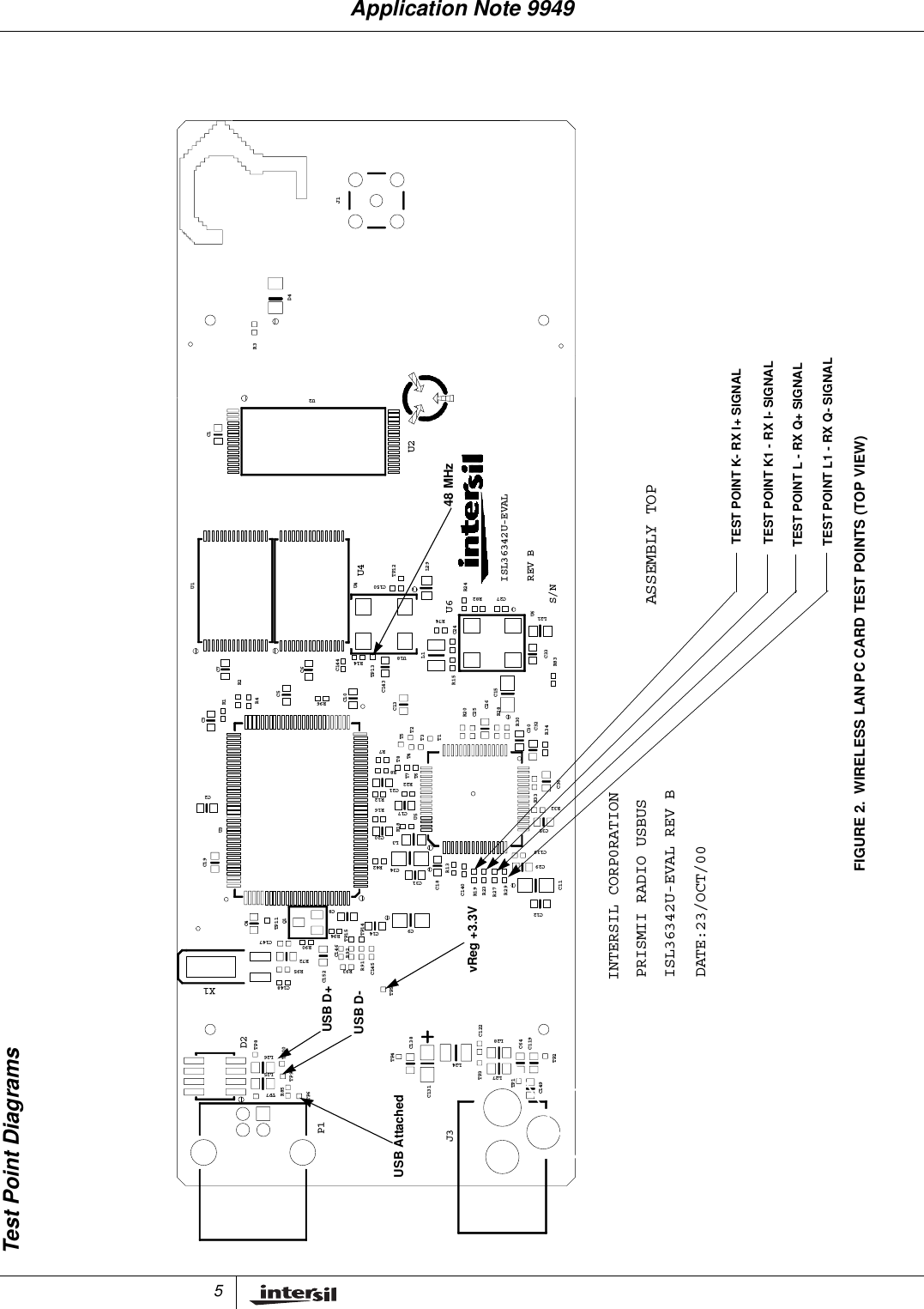
5Test Point DiagramsFIGURE 2. WIRELESS LAN PC CARD TEST POINTS (TOP VIEW)U2U4U6ISL36342U-EVALS/NREV BX1INTERSIL CORP0RATIONISL36342U-EVAL REV BPRISMII RADIO USBUSDATE:23/OCT/00D2P1J3J1D4R3C1U2U1U4C150TP12L29R74R82R24C27L21U6R2C7C6C144R14TP13L1U18R15 C24R83C33R4R1C3C5R96R7C10C143C13T5T3T2T1R20R28C25C26C15R34R30C30C32C2R16R12R22R8C17C21T8T7T6T4R32R33C36C19U3R42C20R18R13L3C34U5C139C29C35C4TP11Q1C14C8TP15TP14R94C31C18C9C140R29R27R23R19C12C11R90C152C147R72R95C148R93R92R91C146C145TP5TP8L26TP10C138TP4C122L28C64C119TP2R85L25TP9TP7TP6C131L24L27TP3TP1C149ASSEMBLY TOPUSB AttachedUSB D-USB D+48 MHzTEST POINT K- RX I+ SIGNALTEST POINT L - RX Q+ SIGNALTEST POINT L1 - RX Q- SIGNALTEST POINT K1 - RX I- SIGNALvReg +3.3VApplication Note 9949
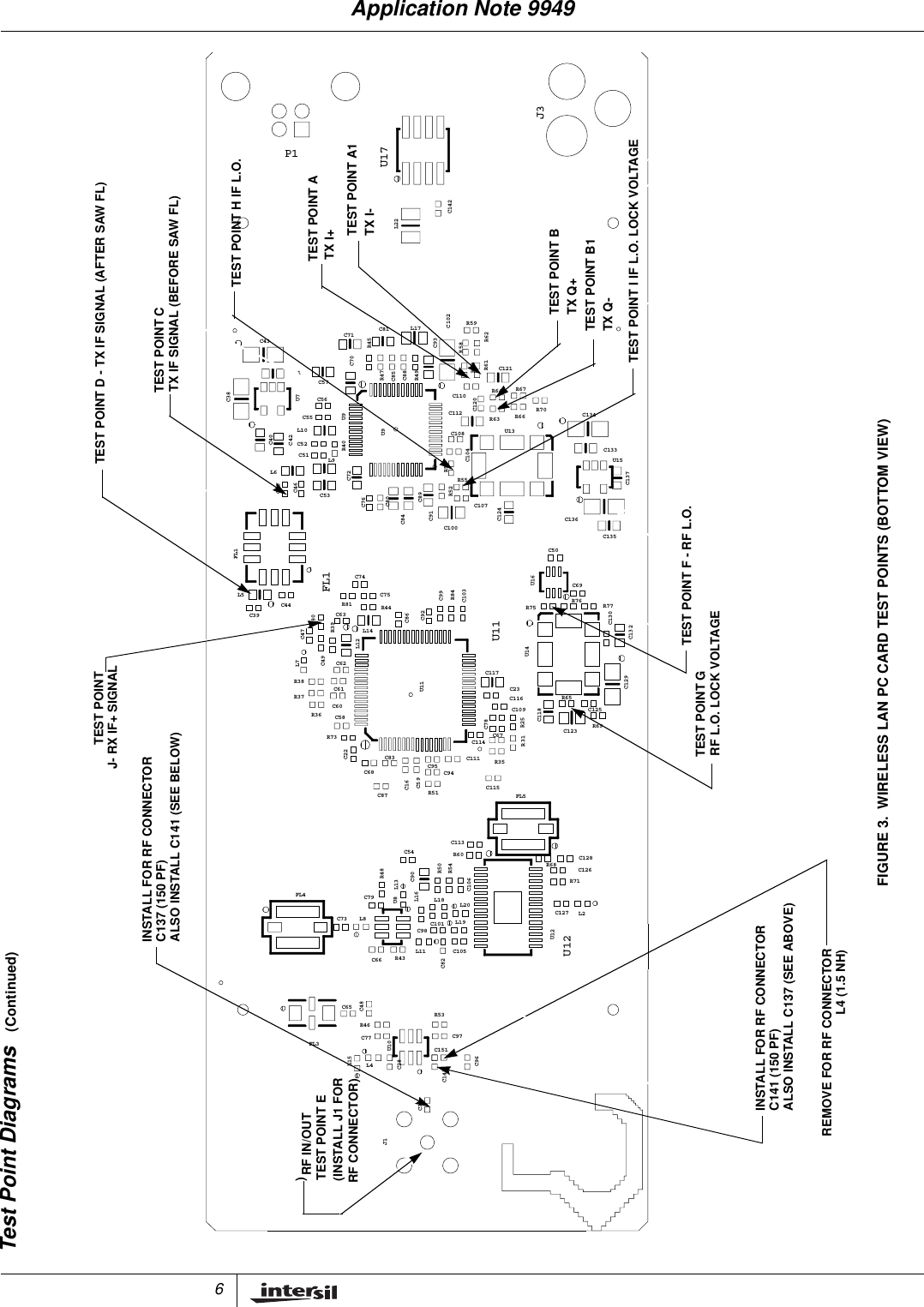
6FIGURE 3. WIRELESS LAN PC CARD TEST POINTS (BOTTOM VIEW)Test Point Diagrams (Continued)C37J1L15L4C77R46FL3U10C28C96C97C141C151C65C48L11C66 R43C82C105R53L8FL4C73U8 L13C79C98L16L19L20C106C101L18U12C127R71U12L2C90R50R48C54C113R60R54R68C128C126C22C68C59C95C83C87 R51C16C111C115C114C94R35FL5R31C58C60C61R38R37R36R73U11C117C67C78C118C123C116 R65C23R25C109C129C125R69L7C44C39C62C49C47R39C63R81R80L12C92C86R44L14U11U14R75C132R77R76C130FL1L5FL1C74C75C103C99R84U16C50C135C69L6C46C45L9C72C53C76C84C89C91C80C124C100R55R52C107R56C136U15C137C38U7C40C42U9L10C55C51C52C56R40U9C112R63C108C104C110C120U13R70R66 C134C133C43C41C71C57C70R45C93C81 L17R49R47C88C85R64R61R57R58R59R62C121R67C102L22C142P1U17J3INSTALL FOR RF CONNECTORTEST POINT D - TX IF SIGNAL (AFTER SAW FL)REMOVE FOR RF CONNECTORC141 (150 PF)L4 (1.5 NH)INSTALL FOR RF CONNECTORC137 (150 PF)ALSO INSTALL C141 (SEE BELOW)ALSO INSTALL C137 (SEE ABOVE)RF IN/OUTTEST POINT E(INSTALL J1 FOR)RF CONNECTOR)J- RX IF+ SIGNALTEST POINTTEST POINT CTX IF SIGNAL (BEFORE SAW FL)TEST POINT F - RF L.O.TEST POINT GRF L.O. LOCK VOLTAGETEST POINT ATX I+TEST POINT A1TX I-TEST POINT BTX Q+TEST POINT B1TX Q-TEST POINT I IF L.O. LOCK VOLTAGETEST POINT H IF L.O.Application Note 9949
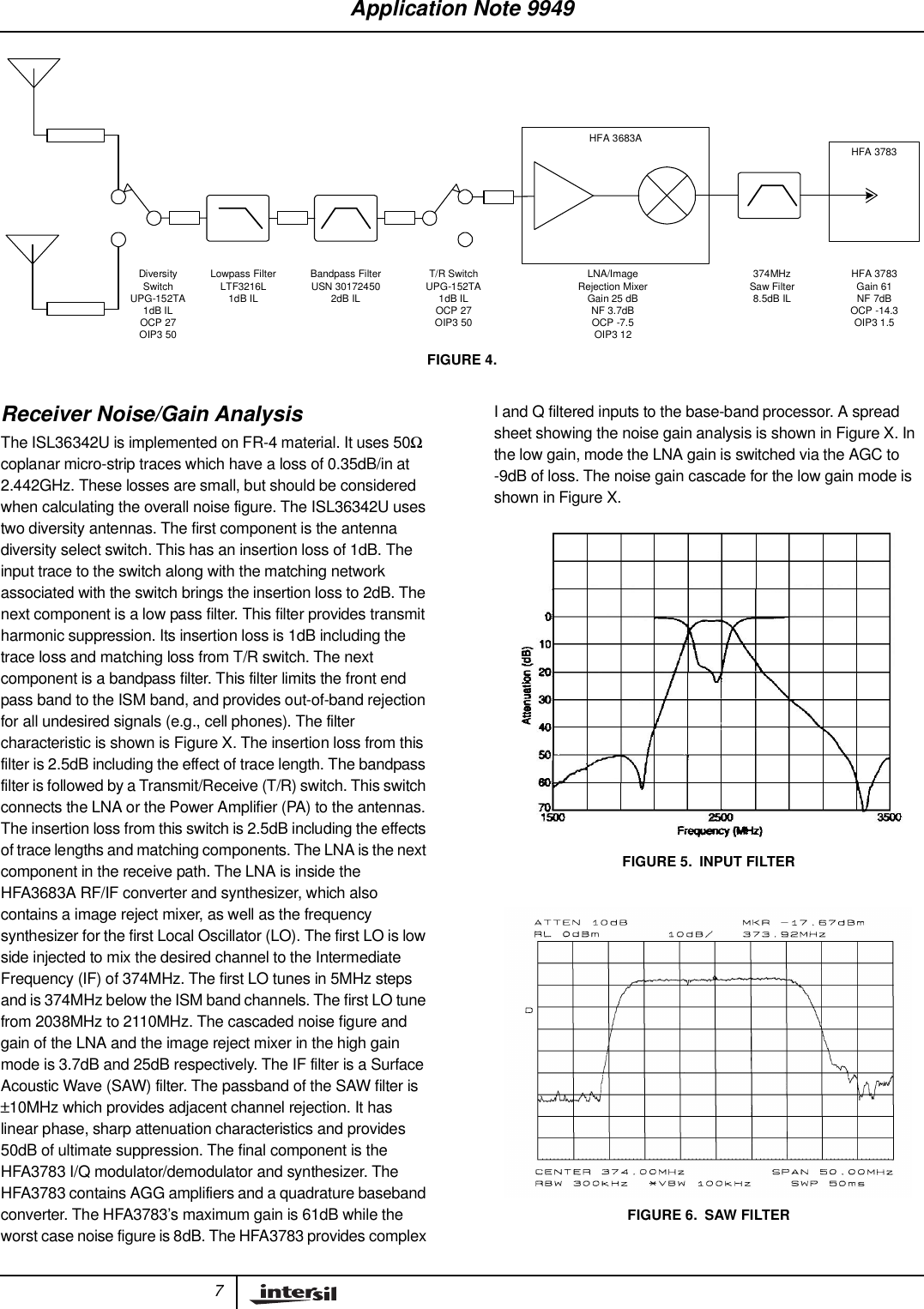
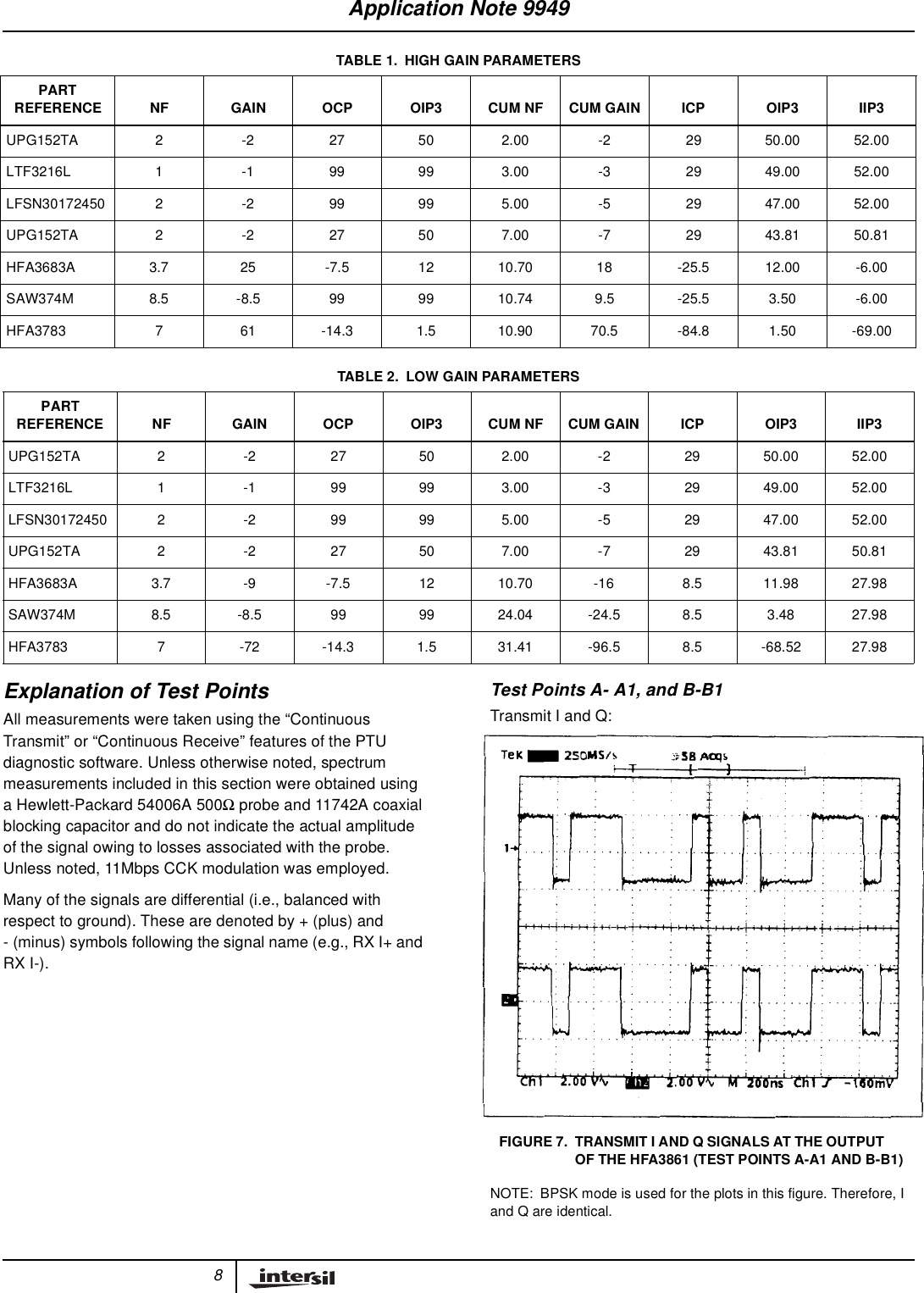
7Receiver Noise/Gain AnalysisThe ISL36342U is implemented on FR-4 material. It uses 50Ωcoplanar micro-strip traces which have a loss of 0.35dB/in at2.442GHz. These losses are small, but should be consideredwhen calculating the overall noise figure. The ISL36342U usestwo diversity antennas. The first component is the antennadiversity select switch. This has an insertion loss of 1dB. Theinput trace to the switch along with the matching networkassociated with the switch brings the insertion loss to 2dB. Thenext component is a low pass filter. This filter provides transmitharmonic suppression. Its insertion loss is 1dB including thetrace loss and matching loss from T/R switch. The nextcomponent is a bandpass filter. This filter limits the front endpass band to the ISM band, and provides out-of-band rejectionfor all undesired signals (e.g., cell phones). The filtercharacteristic is shown is Figure X. The insertion loss from thisfilter is 2.5dB including the effect of trace length. The bandpassfilter is followed by a Transmit/Receive (T/R) switch. This switchconnects the LNA or the Power Amplifier (PA) to the antennas.The insertion loss from this switch is 2.5dB including the effectsof trace lengths and matching components. The LNA is the nextcomponent in the receive path. The LNA is inside theHFA3683A RF/IF converter and synthesizer, which alsocontains a image reject mixer, as well as the frequencysynthesizer for the first Local Oscillator (LO). The first LO is lowside injected to mix the desired channel to the IntermediateFrequency (IF) of 374MHz. The first LO tunes in 5MHz stepsand is 374MHz below the ISM band channels. The first LO tunefrom 2038MHz to 2110MHz. The cascaded noise figure andgain of the LNA and the image reject mixer in the high gainmode is 3.7dB and 25dB respectively. The IF filter is a SurfaceAcoustic Wave (SAW) filter. The passband of the SAW filter is±10MHz which provides adjacent channel rejection. It haslinear phase, sharp attenuation characteristics and provides50dB of ultimate suppression. The final component is theHFA3783 I/Q modulator/demodulator and synthesizer. TheHFA3783 contains AGG amplifiers and a quadrature basebandconverter. The HFA3783’s maximum gain is 61dB while theworst case noise figure is 8dB. The HFA3783 provides complexI and Q filtered inputs to the base-band processor. A spreadsheet showing the noise gain analysis is shown in Figure X. Inthe low gain, mode the LNA gain is switched via the AGC to-9dB of loss. The noise gain cascade for the low gain mode isshown in Figure X.HFA 3683AHFA 3783Bandpass FilterUSN 301724502dB ILT/R SwitchUPG-152TA1dB ILOCP 27OIP3 50DiversitySwitchUPG-152TA1dB ILOCP 27OIP3 50Lowpass FilterLTF3216L1dB ILLNA/ImageRejection MixerGain 25 dBNF 3.7dBOCP -7.5OIP3 12374MHzSaw Filter8.5dB ILHFA 3783Gain 61NF 7dBOCP -14.3OIP3 1.5FIGURE 4.FIGURE 5. INPUT FILTERFIGURE 6. SAW FILTERApplication Note 9949
8Explanation of Test PointsAll measurements were taken using the “ContinuousTransmit” or “Continuous Receive” features of the PTUdiagnostic software. Unless otherwise noted, spectrummeasurements included in this section were obtained usinga Hewlett-Packard 54006A 500Ωprobe and 11742A coaxialblocking capacitor and do not indicate the actual amplitudeof the signal owing to losses associated with the probe.Unless noted, 11Mbps CCK modulation was employed.Many of the signals are differential (i.e., balanced withrespect to ground). These are denoted by + (plus) and- (minus) symbols following the signal name (e.g., RX I+ andRX I-).Test Points A- A1, and B-B1Transmit I and Q:NOTE: BPSK mode is used for the plots in this figure. Therefore, Iand Q are identical.TABLE 1. HIGH GAIN PARAMETERSPARTREFERENCE NF GAIN OCP OIP3 CUM NF CUM GAIN ICP OIP3 IIP3UPG152TA2 -227502.00-22950.0052.00LTF3216L 1 -1 99 99 3.00 -3 29 49.00 52.00LFSN30172450 2 -2 99 99 5.00 -5 29 47.00 52.00UPG152TA2 -227507.00-72943.8150.81HFA3683A 3.7 25 -7.5 12 10.70 18 -25.5 12.00 -6.00SAW374M 8.5 -8.5 99 99 10.74 9.5 -25.5 3.50 -6.00HFA3783 7 61 -14.3 1.5 10.90 70.5 -84.8 1.50 -69.00TABLE 2. LOW GAIN PARAMETERSPARTREFERENCE NF GAIN OCP OIP3 CUM NF CUM GAIN ICP OIP3 IIP3UPG152TA 2 -2 27 50 2.00 -2 29 50.00 52.00LTF3216L 1 -1 99 99 3.00 -3 29 49.00 52.00LFSN30172450 2 -2 99 99 5.00 -5 29 47.00 52.00UPG152TA 2 -2 27 50 7.00 -7 29 43.81 50.81HFA3683A 3.7 -9 -7.5 12 10.70 -16 8.5 11.98 27.98SAW374M 8.5 -8.5 99 99 24.04 -24.5 8.5 3.48 27.98HFA3783 7 -72 -14.3 1.5 31.41 -96.5 8.5 -68.52 27.98FIGURE 7. TRANSMIT I AND Q SIGNALS AT THE OUTPUTOF THE HFA3861 (TEST POINTS A-A1 AND B-B1)Application Note 9949
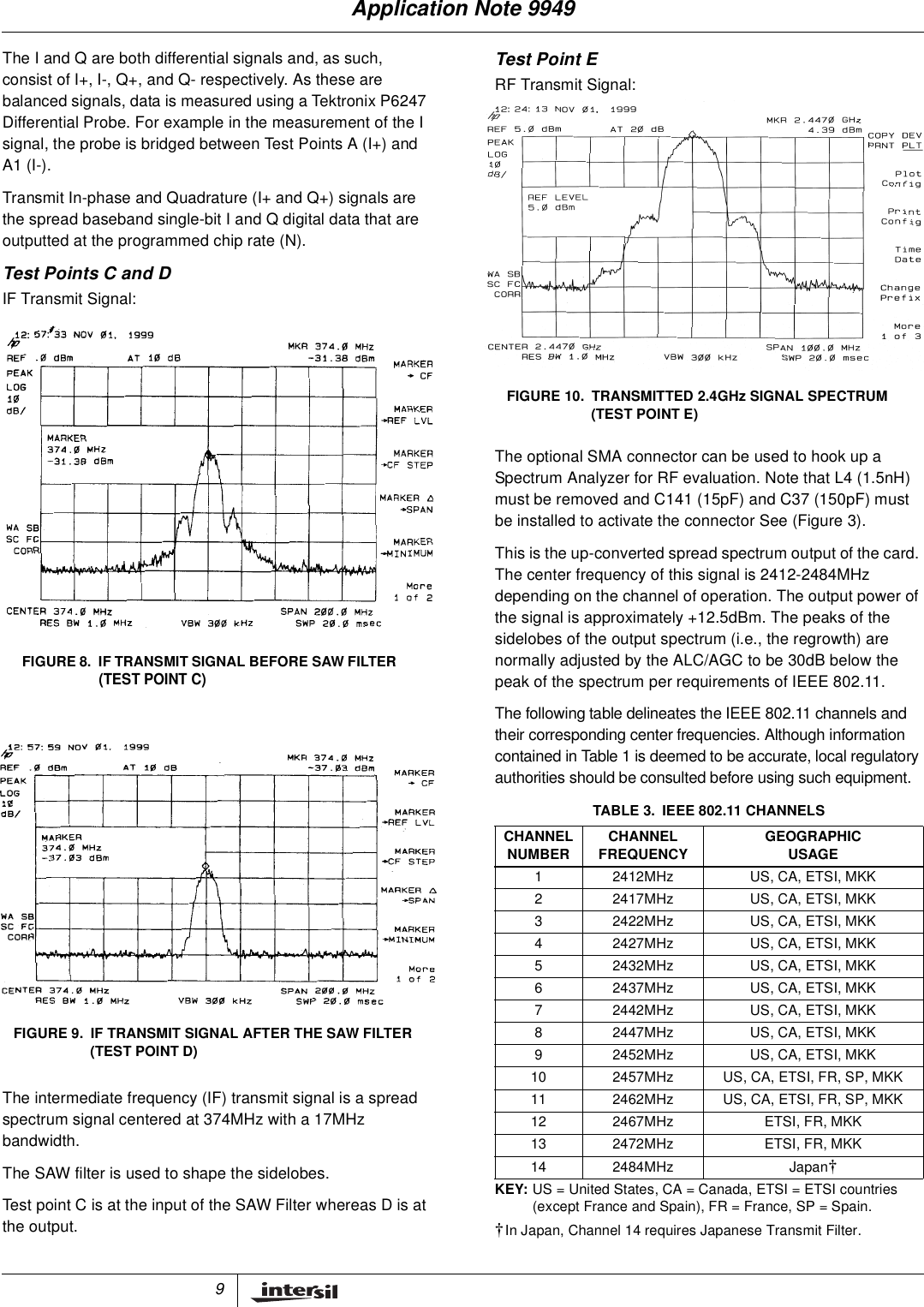
9The I and Q are both differential signals and, as such,consist of I+, I-, Q+, and Q- respectively. As these arebalanced signals, data is measured using a Tektronix P6247Differential Probe. For example in the measurement of the Isignal, the probe is bridged between Test Points A (I+) andA1 (I-).Transmit In-phase and Quadrature (I+ and Q+) signals arethe spread baseband single-bit I and Q digital data that areoutputted at the programmed chip rate (N).Test Points C and DIF Transmit Signal:The intermediate frequency (IF) transmit signal is a spreadspectrum signal centered at 374MHz with a 17MHzbandwidth.The SAW filter is used to shape the sidelobes.Test point C is at the input of the SAW Filter whereas D is atthe output.Test Point ERF Transmit Signal:The optional SMA connector can be used to hook up aSpectrum Analyzer for RF evaluation. Note that L4 (1.5nH)must be removed and C141 (15pF) and C37 (150pF) mustbe installed to activate the connector See (Figure 3).This is the up-converted spread spectrum output of the card.The center frequency of this signal is 2412-2484MHzdepending on the channel of operation. The output power ofthe signal is approximately +12.5dBm. The peaks of thesidelobes of the output spectrum (i.e., the regrowth) arenormally adjusted by the ALC/AGC to be 30dB below thepeak of the spectrum per requirements of IEEE 802.11.The following table delineates the IEEE 802.11 channels andtheir corresponding center frequencies. Although informationcontained in Table 1 is deemed to be accurate, local regulatoryauthorities should be consulted before using such equipment.FIGURE 8. IF TRANSMIT SIGNAL BEFORE SAW FILTER(TEST POINT C)FIGURE 9. IF TRANSMIT SIGNAL AFTER THE SAW FILTER(TEST POINT D)TABLE 3. IEEE 802.11 CHANNELSCHANNELNUMBER CHANNELFREQUENCY GEOGRAPHICUSAGE1 2412MHz US, CA, ETSI, MKK2 2417MHz US, CA, ETSI, MKK3 2422MHz US, CA, ETSI, MKK4 2427MHz US, CA, ETSI, MKK5 2432MHz US, CA, ETSI, MKK6 2437MHz US, CA, ETSI, MKK7 2442MHz US, CA, ETSI, MKK8 2447MHz US, CA, ETSI, MKK9 2452MHz US, CA, ETSI, MKK10 2457MHz US, CA, ETSI, FR, SP, MKK11 2462MHz US, CA, ETSI, FR, SP, MKK12 2467MHz ETSI, FR, MKK13 2472MHz ETSI, FR, MKK14 2484MHz Japan†KEY: US = United States, CA = Canada, ETSI = ETSI countries(except France and Spain), FR = France, SP = Spain.†In Japan, Channel 14 requires Japanese Transmit Filter.FIGURE 10. TRANSMITTED 2.4GHz SIGNAL SPECTRUM(TEST POINT E)Application Note 9949
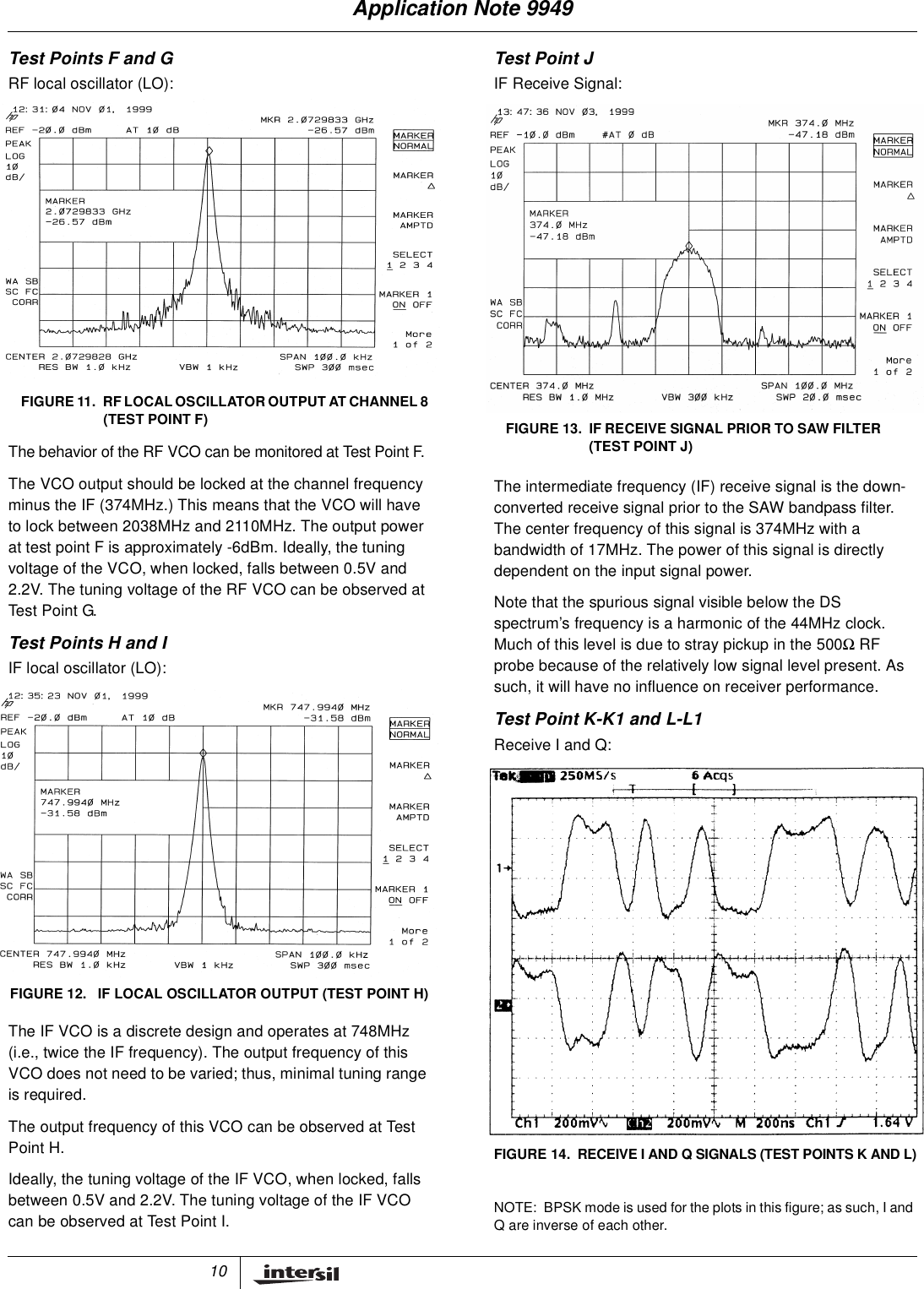
10Test Points F and GRF local oscillator (LO):The behavior of the RF VCO can be monitored at Test Point F.The VCO output should be locked at the channel frequencyminus the IF (374MHz.) This means that the VCO will haveto lock between 2038MHz and 2110MHz. The output powerat test point F is approximately -6dBm. Ideally, the tuningvoltage of the VCO, when locked, falls between 0.5V and2.2V. The tuning voltage of the RF VCO can be observed atTes t Point G.Test Points H and IIF local oscillator (LO):The IF VCO is a discrete design and operates at 748MHz(i.e., twice the IF frequency). The output frequency of thisVCO does not need to be varied; thus, minimal tuning rangeis required.The output frequency of this VCO can be observed at TestPoint H.Ideally, the tuning voltage of the IF VCO, when locked, fallsbetween 0.5V and 2.2V. The tuning voltage of the IF VCOcan be observed at Test Point I.Test Point JIF Receive Signal:The intermediate frequency (IF) receive signal is the down-converted receive signal prior to the SAW bandpass filter.The center frequency of this signal is 374MHz with abandwidth of 17MHz. The power of this signal is directlydependent on the input signal power.Note that the spurious signal visible below the DSspectrum’s frequency is a harmonic of the 44MHz clock.Much of this level is due to stray pickup in the 500ΩRFprobe because of the relatively low signal level present. Assuch, it will have no influence on receiver performance.Test Point K-K1 and L-L1Receive I and Q:NOTE: BPSK mode is used for the plots in this figure; as such, I andQareinverseofeachother.FIGURE 11. RF LOCAL OSCILLATOR OUTPUT AT CHANNEL 8(TEST POINT F)FIGURE 12. IF LOCAL OSCILLATOR OUTPUT (TEST POINT H)FIGURE 13. IF RECEIVE SIGNAL PRIOR TO SAW FILTER(TEST POINT J)FIGURE 14. RECEIVE I AND Q SIGNALS (TEST POINTS K AND L)Application Note 9949
11The receive In-phase and Quadrature (I and Q) signals arethe demodulated lowpass-filtered data that are coupled tothe HFA3861. The output levels of these two signals areapproximately 500mVP-P. As these are balanced signals,data is taken using a Tektronix P6247 Differential Probe.• Test point K for RXI+ signal is at the 0Ωjumper, R19.• Test point K1 for RXI- signal is at the 0Ωjumper, R23• Test point L for RXQ+ signal is at the 0Ωjumper, R27• Test point L1 for RXQ- signal is at the 0Ωjumper, R29.Operational CharacteristicsSee the iSL36342U-EVAL data sheet, Intersil File NumberFN8018, for more detailed specifications.ReferencesFor Intersil documents available on the internet, see web sitewww.intersil.com[1] iSL36342U-EVAL Data Sheet, Intersil Corporation.[2] AN9850 Application Note, Intersil Corporation,“Complementary Code Keying Made Simple”.NoticesElectronic Emission NoticesThis device complies with Part 15 of the FCC rules.Operation is subject to the following two conditions:1. This device may not cause harmful interference.2. This device must accept any interference received,including interference that may cause undesiredoperation.FCC Radio Frequency Interference StatementThe wireless LAN PC card is subject to the rules of theFederal Communications Commission (FCC). This card isconsidered an intentional radiator as per the FCC guidelines.NOTE: This equipment has been tested and found to comply withthe limits for a Class B digital device, pursuant to Part 15 of the FCCrules. These limits are designed to provide reasonable protectionagainst harmful interference in a residential installation. Thisequipment generates, uses and can radiate radio frequency energyand, if not installed and used in accordance with the instructionmanual, may cause harmful interference to radio communications.However, there is no guarantee that interference will not occur in aparticular installation. If this equipment does cause harmfulAbsolute Maximum RatingsSupplyVoltage..........................-0.3Vto7.0V(Max)StorageTemperature(Note1).................. -20oCto65oCOperating ConditionsTemperatureRange........................ 0oC≤ TA≤55oCSupplyVoltageRange.......................... 4.20Vto7VCaution: These are the absolute maximum ratings for the PC Card product.Exceeding these limits could cause permanent damage to the card.NOTE:1. All temperature references refer to ambient conditions.TABLE 4. GENERAL SPECIFICATIONSSPECIFICATION VALUETargeted Standard IEEE 802.11Data Rate 1Mbps DBPSK2Mbps DQPSK5.5Mbps CCK11Mbps CCKRange (11Mbps Data Rate) 120ft (37M) Indoor (Typ)400ft (122M) Outdoor (Typ)Center Frequency Range 2412MHz - 2484MHzStep Size 1MHzIF Frequency 374MHz1.875"FIGURE 15. EDGE VIEW, USB CARDIF Bandwidth 17MHzRX/TX Switching Speed 2µs(Typ)Average Current withoutPower Save2% Transmit, 98% Receive187mA (Typ)Average Current with PowerSave2% TX, 8% RX, 90% Standby43mA (Typ)Current in Continuous TXmode300mA (Typ)Current in Continuous RXMode185mA (Typ)Standby Current 25mA (Typ)Mechanical PC Card, with Antenna ExtensionOutput Power +11.5dBm (Typ)Transmit Spectral Mask -30dBc at First Side LobesAntenna Interface SMA, 50Ω (for Testing Only)Dual Diversity Printed AntennaTABLE 4. GENERAL SPECIFICATIONSSPECIFICATION VALUEApplication Note 9949
12All Intersil products are manufactured, assembled and tested utilizing ISO9000 quality systems.Intersil Corporation’s quality certifications can be viewed at website www.intersil.com/design/qualityIntersil products are sold by description only. Intersil Corporation reserves the right to make changes in circuit design and/or specifications at any time without notice.Accordingly, the reader is cautioned to verify that data sheets are current before placing orders. Information furnished by Intersil is believed to be accurate and reliable. How-ever, no responsibility is assumed by Intersil or its subsidiaries for its use; nor for any infringements of patents or other rights of third parties which may result from its use. Nolicense is granted by implication or otherwise under any patent or patent rights of Intersil or its subsidiaries.For information regarding Intersil Corporation and its products, see web site www.intersil.cominterference to radio ortelevision reception, which can be determinedby turning the equipment off and on, the user is encouraged to try tocorrect the interference by one or more of the following measures:• Reorient or relocate the receiving antenna• Increase the separation between the equipment and thereceiver• Connect the equipment into an outlet on a circuit differentfrom that to which the receiver is connected• Consult the dealer or an experienced ratio/TV technician forhelpWARNING! Any changes or modifications of equipment notexpressly approved by Intersil could void the user’s authority tooperate the equipment.PackagingApplication Note 9949

Navigation menu