Covert Scouting Cameras 5472 Code Black LTE User Manual L4 AG Manual V0 0 1
Covert Scouting Cameras, Inc Code Black LTE L4 AG Manual V0 0 1
User manual
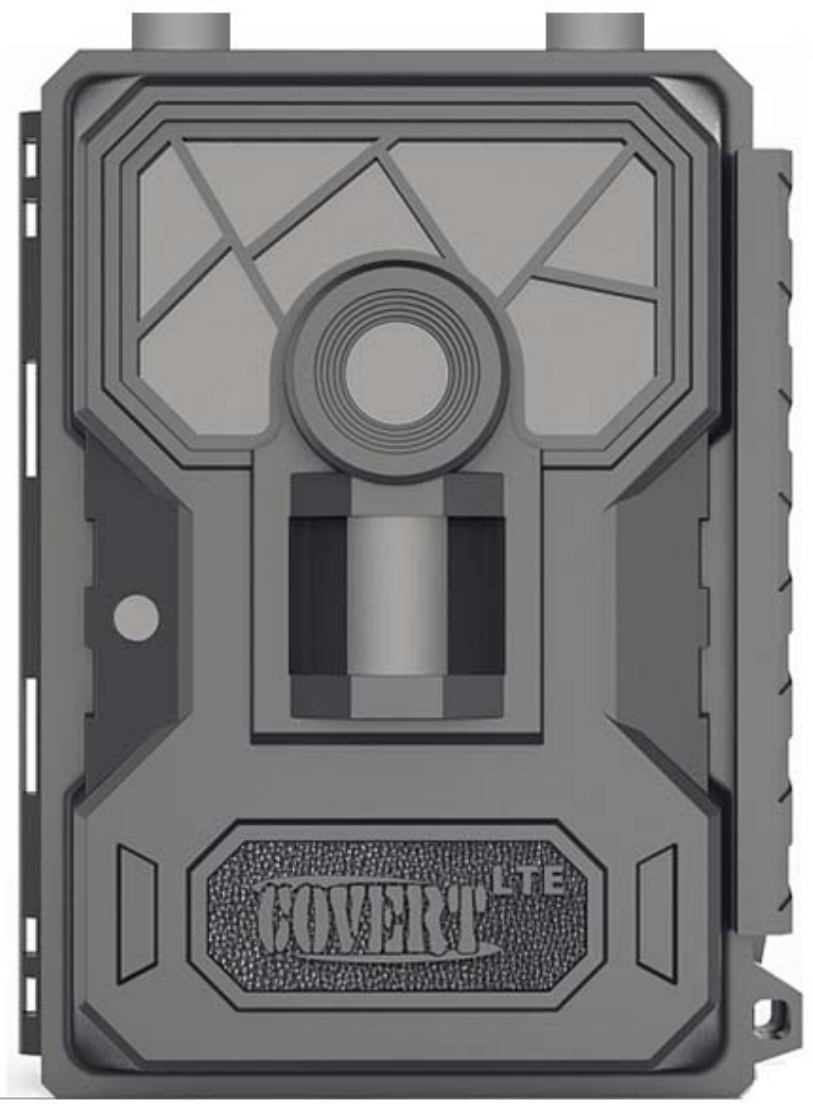
CodeBlackLTE
5472
Usermanual
Watch
the
set
up
video
on
our
website
at:
www.covertscoutingcameras.com

What
you
will
need
to
set
this
camera
up:
‐InternetAccesstoChooseYourPlan.
https://secure.covert‐wireless.com
‐Atleast4AABatteries
‐SDCard
.
Table
of
Contents
CameraButtonControlDiagram.......................... 05
MainScreenInfo................................................... 06
InstallingtheBatteries.......................................... 07
DownloadingtheMobileApp............................... 08
PurchasingYourPlan............................................ 09
SettinguptheWirelessNetwork.......................... 14
SendaTestPhoto................................................. 16
CustomizingCameraSettings............................... 18
PIRTab.................................................................. 21
SYSTab................................................................. 26
FormattingtheSDCard........................................ 30
ViewingPhotosonColorDisplay.......................... 31
Troubleshooting................................................... 33
TricksandTipsonFieldSetup.............................. 35
WarrantyPolicy.................................................... 37
InternationalWarrantyPolicy.............................. 39
TechnicalSpecifications........................................ 45
Congratulationsonyourpurchaseofthe5472
CovertScoutingCamera!Wetrulyvalueyour
businessandwillcontinuetoprovideyoutop
qualitycustomerserviceshouldyoueverneedhelp
withanyofourproducts.
Checkoutourotherproductsonourwebsiteat:
www.covertscoutingcameras.com
Wehopeyouenjoyhasslefreeperformancefrom
thisqualityproductforyearstocome.
CovertScoutingCameras,Inc.
4338GreenridgeSpaRoad
Lewisburg,KY42256
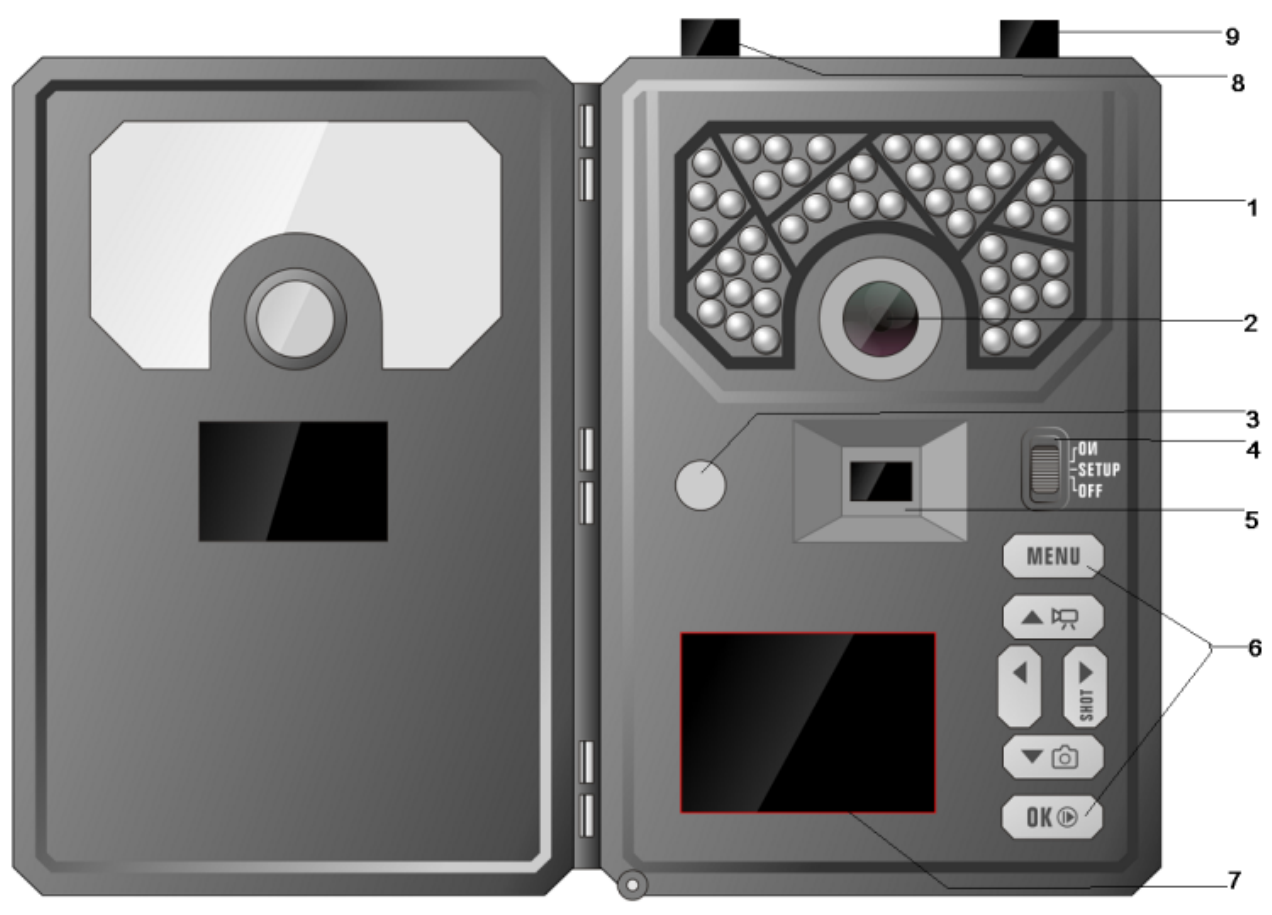
Camera
overview:
1:BlackvisionIRflash
2:Lens
3:Lightsensor
4:Powerswitch
5:PIRsensor
6:Keyboard
7:HDTFTscreen
8:LTEManiantenna
9:LTEDVIantenna

Installing
the
batteries:
Your5472canfunctionshorttermon4‐
AAbatteries.Improvedbatterylifeon8‐AA,butwe
suggestyouuse12‐AAbatteriestogetthemostout
ofyourcamerasbatterylife.UsingCovert
rechargeableNiMH,2300mAh,AAbatterieswill
extendthebatterylifesignificantlywhenpaired
withaCovertSolarPanel.
DISCLAIMER:Donotuseexternalpowersource
(Example:SolarPanel)with
non‐rechargeable
AA
batteriesinstalledincamera.
Installbatteriesbyslidingthetopbatteryintothe
sleeve,thendepressingthespringwiththeother
batteryandsnappingdowninplace.Payattention
tothe(+)or(‐)moldedintoeachsleeveto
determineifyouinsertthepositiveornegativeend
intothesleevefirst.Negativebatteryterminal
alwayscontactsthespring.

Downloading
the
Mobile
App:
Search"
Covert
Wireless
"inyourGooglePlayStore
orAppleAppStore.
Accessing
the
Web
Portal:
Openyourwebbrowserto:
www.covert‐wireless.com

Purchasing
your
Plan:
Followthesesimplestepstoactivateorrenewan
AT&T
plan:
1.Openyourwebbrowserto:
https://secure.covert-wireless.com
2.Selectthetypeofplanyou'dliketoadd
3.Followthepromptstoselectyour
rate
plan
,
enteryour
personal/billing
information
andcompleteyourpurchase.
4.Logbackintoyouraccount.
5.EntertheICCIDnumberlocatedontheSIM
cardincludedwithyourcamera.Then
entertheIMEIforyourcamera
foundontheinsidewhitelabelofthe
cameraorontheouterpackaging.(Figure5.)
Figure
5
6.Clickthegreenactivatebuttonandrefresh
yourpage.
7.Renameyourcamerainthenicknamefield
provided.(OPTIONAL)
Activating
Multiple
Cameras:
Same
Rate
Plan‐
Toactivatemultiplecamerason
thesamerateplan,simplyentertheICCIDandIMEI
numberundersaidrateplanandclickactivate.
Note:Youcanactivateasmanycamerasasyou’d
likeonarateplan.Rateplansareaperdevice
charge.
Different
Rate
Plan
‐
Toactivatecamerasona
differentrateplan,scrollto
Purchase
Additional
Subscription
Plans.
Selecttheproviderandtherate
planofyourchoice.Thiswilladdtherateplan
optionunder
My
Services
and
Equipment.
Other
Plan
Information:
Auto
Renew:
CovertWirelessplansautomatically
renew,howeverthereisnolong‐termcontract.To
optoutofyourbillingforcertainmonths,simply
hoveroverthe“active”buttonandclick.Youwill
nolongerbebilledforservicesuntilyoulogback
intoyouraccountand“clicktoactivate.”
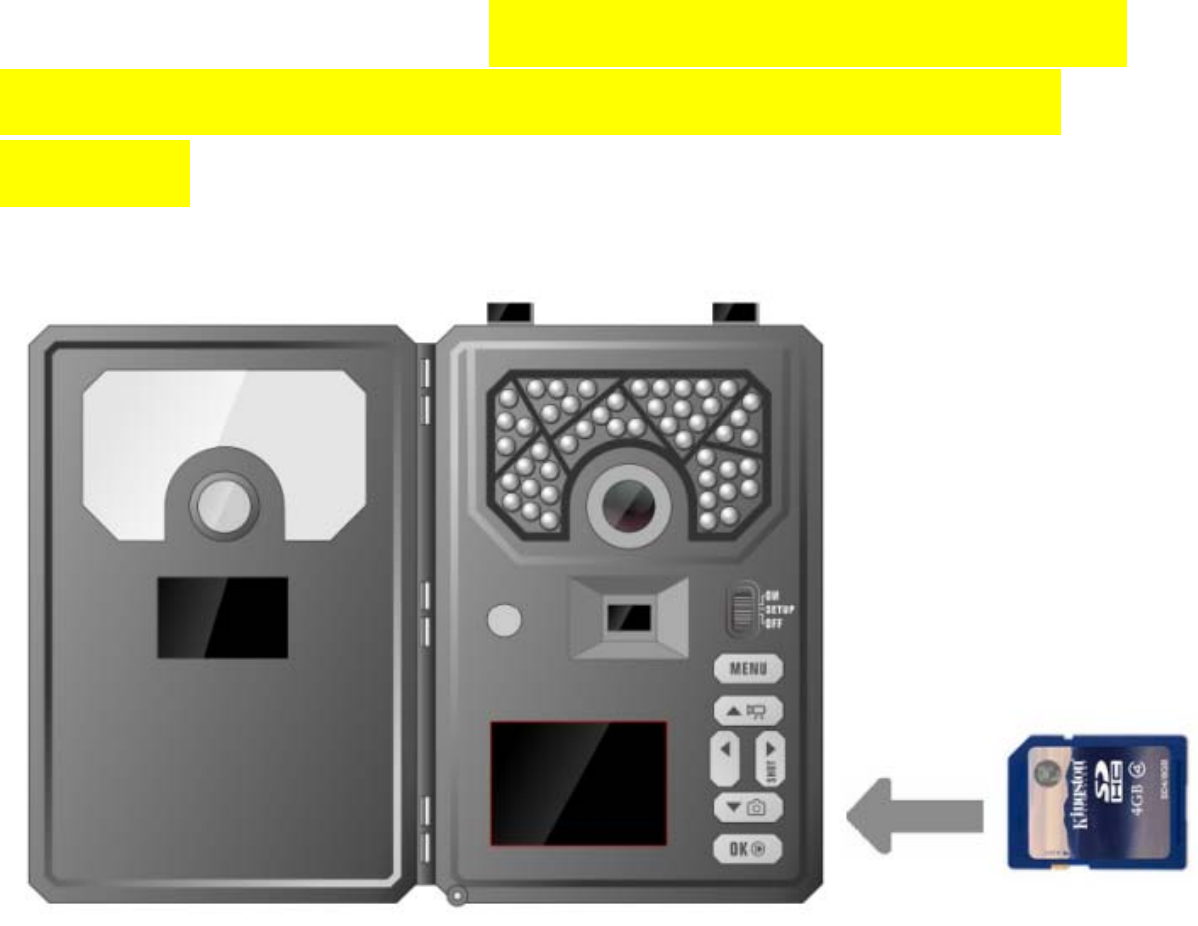
NowthatyouhaveactivatedyourAT&Tplan,you
willneedtoinstallaSDcardinthebottomofthe
camera,(CovertSDcardrecommended).SeeFigure
8forcardorientation.Pushinuntilitclicksand
release.Toremove,repeatthatprocess,thecard
willpopoutenoughtoremove.YoucanuseanySD
cardsizeupto64GB.YoumusthavetheSDcardin
thecameratobeabletoturnthecameraonand
setitup.
Setting
up
the
wireless
network:
NET
tab:
Whilefindingthenetworkyouwillseethewords
Searching
Signal
,inredonthescreen.Thecamera
willthensay
Connecting
to
Server
asitis
connectingtotheserver.OnceyouseeAT&Tinthe
toprightcorner,youarereadytomoveon.
Quick
Tip:
Ifyourcamerasays
Connection
Failed
,
turnthecamera
OFF
thenback
ON
.(PowerCycle.)
Definitions:
INSTANT:
Turnswirelessfeature
ON
tosenda
pictureeverytimethecameraistriggered.

Download
Firmware:
Anytimeyourcameraneedsafirmwareupdate,it
willbeautomaticallypushedtoyourcamera.When
yougocheckyourcamera,weencourageyouto
scrolltotheNETTabanddownloadthelatest
firmwareversionincasethere’sbeenanupdate.
ThentakeoutyourSDcard,lockitandputitinyour
camera.Turnyourcameraontosetup,scrolltothe
SYStabandscrolldowntodefaultset.PressOK.
Thenturnyourcameraoff,unlockyourSDcardand
putinbackinyourcamera.
ImportantNote:
Anytimeyoumakechanges
directlytothecamera,press
OK
tosavethe
changesonyourcameraandchoose“Uploadsettings”
inSYStosyncthechangesdirectlytothewebportal.
Send
a
test
photo:
Thisisagreatwaytomakesurethatyourcamerais
workingproperlybeforeleavingyourcamerasetup
remotely.
1)Pressthebuttonthathasthe
CAMERA
symbol
onit(1)timetomanuallytakeaphotowiththe
camera.Youwillknowthataphotohasbeen
takenbecausethephotocounteronthescreen
willsay
001
.
2)Pressthe
PLAY
button,locatedunder
MENU
,to
enterthePlaymodeandthenpressthe
MENU
button.Youwillseethefollowingscreen.
3)Pressthe▼tohighlightthe
SEND
optionand
press
OK
.
4)TheLCDscreenwillstarttocountupfromstep
1to4withbriefpausesbetweennumbers.
OnceyouseeSendSuccessful,youhave
successfullysentyourfirstphotoandyour
cameraisreadytotakephotos.Press
PLAY
to
returntothemainmenu

Customizing
the
camera
settings
:
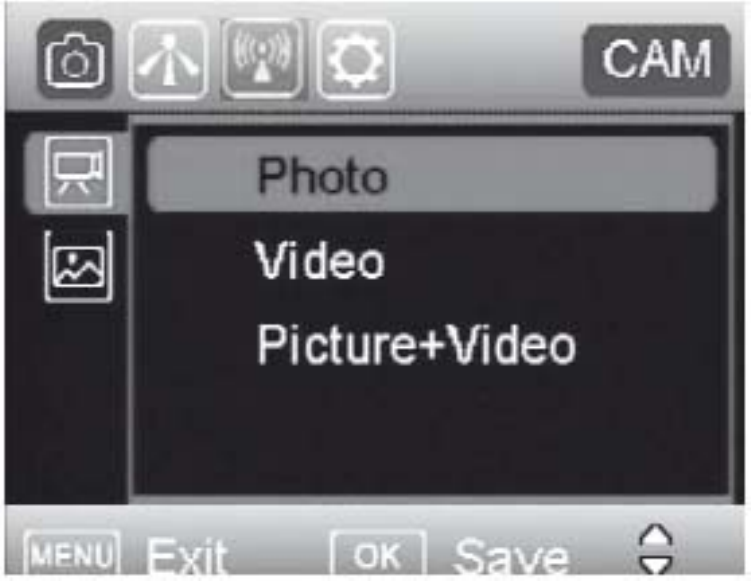
Camera Mode
Photo Mode: You can change Photo Size, set
Flash power, and Photo Burst in Custom Settings.
Video Mode: You can further set the Video Size
and Video Length.
Picture +Video Mode: You can further set the
Custom Settings, Video Size and Video Length.
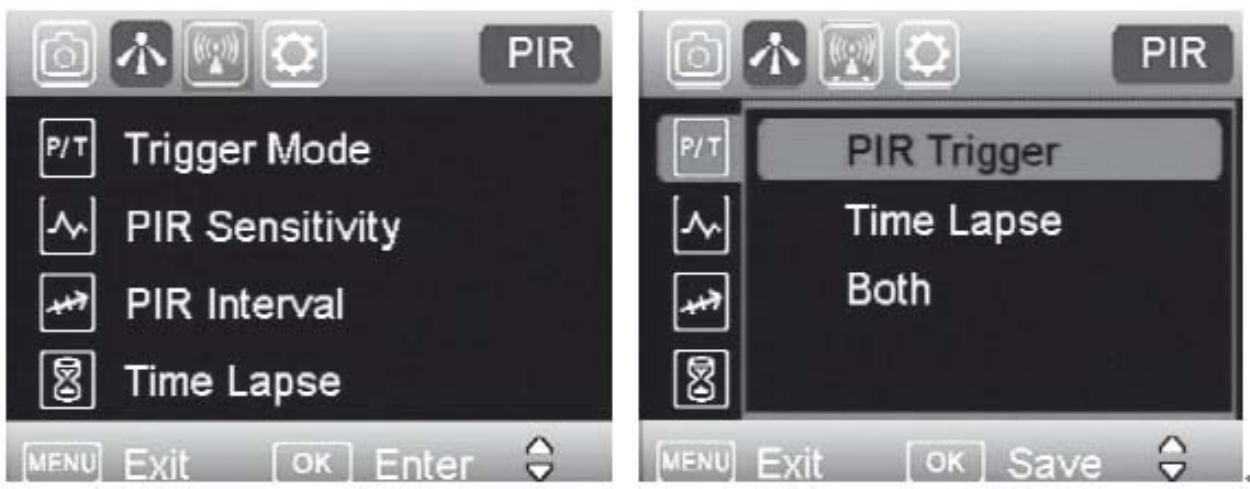
Trigger Mode Settings
PIR Sensitivity: The camera will react on movements and
temperature changes.
Low
Auto
High
PIR Interval: The PIR sensor takes a break in order to
avoid unnecessary recordings.
0 seconds means the PIR function is opened all the
time.
5-60 seconds in 5 seconds steps
1-5 minutes in steps of 1 minute
5-60 minutes in steps of 5 minutes
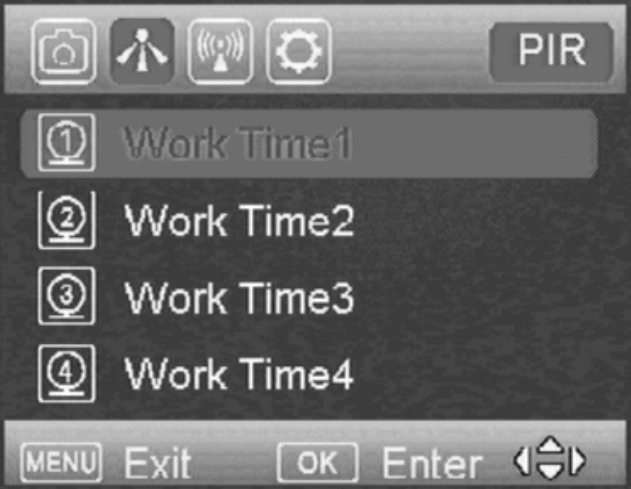
Time Lapse: Camera release at defined intervals:
5-60 seconds in 5 seconds steps
1-5 minutes in steps of 1 minute
5-60 minutes in steps of 5 minutes
1-8 hours in steps of 1 hour
12,16,20,24 hours in steps of 4 hours.
Time Frame Setting
Select ”ON” or” OFF”. Select a work time for the
activity of the camera. You can select the weekdays
and start-stop time.
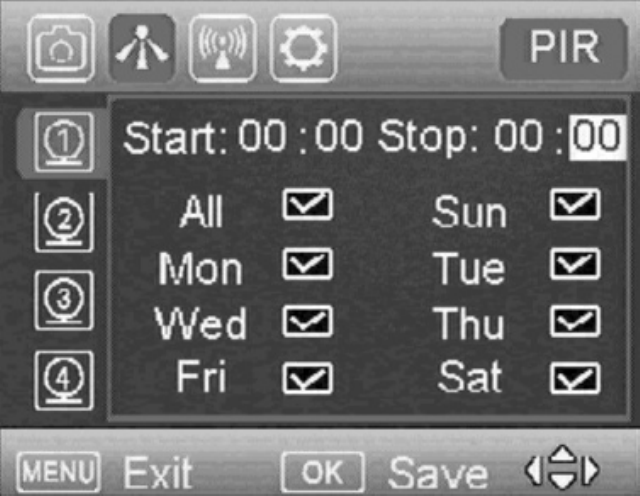
If you wish the camera to be active permanently, select the
time frame menu and switch it “OFF”.
Note:
1. Work hour: 00:00-00:00 means 24 hours.
2. Start: 20:00 Stop: 10:00 means 00:00-10:00 am and
20:00-24:00 of the chosen day.
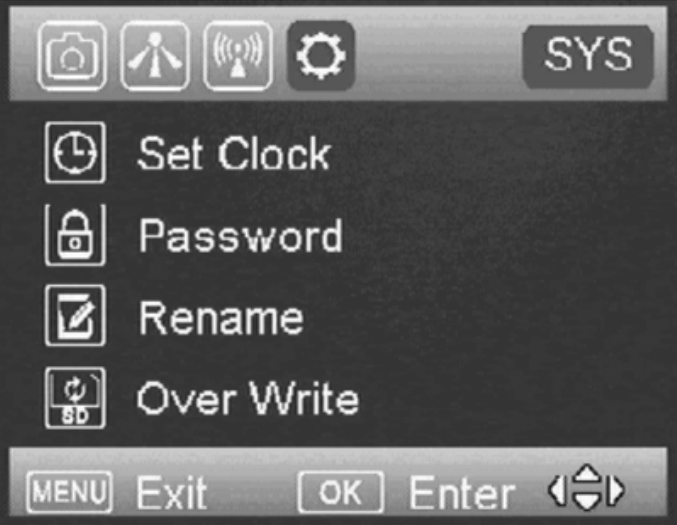
System Settings
The following settings can be done. (Information about
navigation please see chapter camera programming)
Set Clock
You can choose different date formats according to
different countries to set date and time.
Password:
Select ”On” and enter a 4 digit code to protect the camera
from unauthorized use. Be sure to note the password and store
the code at a safe place. It will not be possible to reset the code
on your own. Select “Off”, if you do not wish to use a password.
The pre-set code is 0000.
Rename:
Enter a name that will be shown on each picture stamp.
Overwrite
Save the new data file to overwrite the old data file when
SD card is full.
SD card formatting:
Delete all data of your memory card. Be sure that you won’t
need the data any more.
Default:
With a reset to factory settings, all your own settings will be
lost.
Software Version:
Indicate the software version in case of contact to our
service agents.
AUXILIARY
POWER:
Yourcameracomeswitha
standard4mmAuxiliarypowerjack.Covertoffers
anauxiliarycabletoextendyourbatterylifewithan
external6,9or12voltbattery.Inordertouse12
volt,youmustusetheCovertauxiliarybattery
cable.WealsosellaCovertSolarPaneltodirectly
hookuptoyourcameraforoptimalbatteryusage.
MINI
USB:
YourcameracanuseaminiUSBcableto
hookuptoyourcomputerorTVtolookatthe
photos.
Troubleshooting:
COMMON
ERROR
MESSAGES
:
“LOG
IN
FAIL”
“SEND
FAIL”
“NETWORK
BUSY”
Reasons
for
error:
LoginFail:
1.Theserviceinyourareaisinsufficienttorunthe
camera.
2.Makesurethatyourantennaisattached
securely.
3.Makesurethefirmwareonyourdeviceisthe
mostup‐to‐dateversion.
SendFail:
1.Thecameradoesnothavesufficientserviceto
sendthepicture.Makesureyouhavesetupan
accountandselectedarateplanfrom
secure.covert‐wireless.com
2.YouhaveenteredyourICCIDand/orIMEInumber
incorrectly.ClicktheRedXtodeletethecamera
fromyoursecure.covert‐wireless.comaccountand
addthecorrectinformation.
NetworkBusy:
1.TheAT&TNetworkserviceproviderisbusy.
2.Thecameradoesnothavesufficientserviceto
sendthepicture.
3.Networkbusycanalsomeanthereisn’tenough
moneyonyouraccountwithAT&T.
NoSIM:
1.TaketheSIMcardoutandreinsertit.Ensureit
clicksintoplace.
Ifit’sacellularserviceissueyoumayneedto
purchaseaboosterantennafromCovertScouting
Camerastohelpboostthesignal.Thesecanbevery
effectiveinboostingthesignaltoyourcameraina
poorsignalarea.

Ifyouarestillhavingproblems,contact
customerserviceat
877‐462‐1799
ore‐mail
support@dlccovert.com
Ifyoue‐mailorhavetoleaveamessage,wewill
getbacktoyouasquicklyaswecan.
Cannot
access
the
SET‐UP
menu:
Reasons
for
issue:
1)SDcardnotinserted
2)SDcardiscorrupted
3)Batteriesarelow
Suggestions
to
remedy
1)InstallnewSDcard
2)Replacebatteries
Tricks
and
tips
on
field
setup:
Forbestresults,mountthecamera
approximately3feetoffthegroundfacing
straightforward,aslevelaspossible.
Toenhancetheflash,werecommend
positioningthecamerainanareawitha
backdroptoreflectthemaximumamountof
light.Forinstance,placethecamera20‐30’
fromafieldedgefacingthewoods.Forthe
insideoftimber,positioningthecamerafacinga
thicketapproximately20‐30’away.
Trytosetthecameraupsoit’snotfacing
directlyintothesuneitherinthemorningor
theeveningwhengamemovementisatits
peak.
UsetheCovertTree60mountingsystemto
mountthecamerauphigherpointingdownon
themforabetterlook.Worksgreatwhenyou
don’thaveastraighttreetoattachto.
Includedinthismanualisanextra“O”ring/seal
foryourCovert5472.Youdon’t
needtodoanythingwiththisseal.
TheFWversionisreferencetoourengineersto
ensureaspeedyandefficientwarrantyrepair
shouldtheneedarise.

Covert
Scouting
Cameras
Warranty:
CovertScoutingCameraswarrantiesthisproduct
foraperiodoftwo(2)yearsfromthedateof
purchase.Thiswarrantyonlycoversmanufacturer’s
defectsanddoesnotcoverdamagecausedby
misuseorabuseoftheproduct.Thiswarranty
includestwoyearsrepairorreplacementserviceon
productfromdateofpurchase.Ifyouhave
problemswiththisproduct,pleasedonotcontact
thestoreyoupurchaseditfrom.ContactCovert
ScoutingCamerasCustomerServicetollfreeat877‐
462‐1799ore‐mailsupport@dlccovert.com.
**Proofofpurchaserequiredforreplacement**
Covert
Warranty
Policy
and
Procedure:
ToreceiverepairorreplacementbyCovertScouting
Camerastwoyearwarranty,weaskyoutodothe
following:

‐AllreturnsmusthaveaReturnAuthorization
(RA#)priortosendinginthecamera.
1.E‐mailorcallourcustomerservicedepartment.
‐support@dlccovert.com
‐tollfree:877‐462‐1799
Pleaseexplaintothetechnicianwhatissuesyou
arehavingwithyourcamera.
2.Ifyouareaskedtoreturnyourcamerato
CovertScoutingCameras,youwillbe
responsibleforthecostofshippingtoCovert
ScoutingCameras.Inreturn,Covertwill
providefastandexceptionalserviceaswellas
incurthecostofshippingbacktoyou.(Only
withintheContinentalUnitedStates.)
3.Pleaseincludethefollowinginformationwhen
sendinginyourcamera.
‐RA#onoutsideofpackage
‐Returnaddress
‐TelephoneandEmailaddress
‐Briefdescriptionoftheproblem
‐Copyofproofofpurchase

4.Pleasemakesurealltheaccessoriesare
removed(i.e.SDCards,batteries,solarpanels
SIMcards,straps,ETC.)beforeshipping.All
accessoriesreceivedbyCovertScouting
CameraswillNOTbereturned.
5.Thiswarrantyonlycoversmanufacturer’s
defectsanddoesnotcoverdamagedcausedby
misuseorabuseoftheproduct.
Covert
International
Warranty
Policy
and
Procedure:
1.OutsidetheUS,serviceistheavailablethrough
thedistributor/resellerofpurchase.
2.AllreturnsmusthaveanRA#providedbyCovert.
CopyofProofofPurchaseisrequiredforallreturns.
3.Covertisnotresponsibleforlostordamaged
productsincurredduringtheshippingprocess.
4.Insuranceforreturnsisatthediscretionofthe
customer.Additionalchargesapplyforreturn
shipping.
Inthemaintenanceoftheproduct,CovertScouting
Camerasmayuseneworlike‐newassembliesor
productsforequalorimprovedquality.All
defectiveparts,assemblies,andproductsbecome
thepropertyofCovert.Returnsandclaimswillbe
handledaccordingtothecurrentCovertScouting
Cameras,Inc.procedure.
Thesewarrantiesshallnotapplytoanydefect,
failureordamagecausedbyimproperuseor
inadequatemaintenanceandcare.Covertshallnot
beobligatedunderthesewarrantiestorepair:
a.Damageresultingfromattemptsby
personnelotherthanCovert
representativestoinstall,repairorservice
theproductunlessdirectedbyaCovert
representative.
b.Damage,malfunctionordegradationof
performanceresultingfromimproperuse
orconnectiontoincompatibleequipment
ormemory.
c.Damage,malfunction,ordegradationof
performancecausedbytheuseofnon‐
Covertsuppliesorconsumablesortheuse
ofCovertsuppliesnotspecifiedforusewith
thisproduct.
d.Anitemthathasbeenmodifiedor
integratedwithotherproductswhenthe
effectofsuchmodificationorintegration
increasesthetimeordifficultyofservicing
theproductordegradesperformanceor
reliability.
e.Toperformusermaintenanceorcleaningor
torepairdamage,malfunction.
f.Damage,malfunctionordegradationof
performanceresultingfromuseofthe
productinanenvironmentnotmeetingthe
operatingspecificationssetforthintheuser
manual.

g.Damage,malfunctionordegradationof
performanceresultingfromfailureto
properlyprepareandtransporttheproduct
asprescribedinpublishedproduct
materials.
h.Anyfailuretoregistertheproductwarranty
within10daysofpurchase.
i.Toreplaceitemsthathavebeenrefilled,are
usedup,abused,misused,ortampered
withinanyway.
j.Toinstallreplacementitemsthatarenot
consideredcustomerreplaceable.
k.TosupportsoftwarenotsuppliedbyCovert
l.Toprovidesoftwareorfirmwareupdatesor
upgrades.
Anyserviceidentifiedintheabovelistandprovided
byCovertattheCustomer’srequestshallbe
invoicedtothecustomer,atCovert’sthencurrent
ratesforparts,laborandshipping.
THEABOVEWARRANTIESAREGIVENBYCOVERT
WITHRESPECTTOTHISPRODUCTANDITSRELATED
ITEMSINLIEUOFANYOTHERWARRANTIES,
EXPRESSORIMPLIED.COVERTANDITSVENDORS
DISCLAIMANYIMPLIEDWARRANTIESOF
MERCHANTABILITYORFITNESSFORAPARTICULAR
PURPOSEORANYSIMILARSTANDARDIMPOSEDBY
APPLICABLELEGISLATION.COVERT’S
REPONSIBILITYTOREPAIRORREPLACE,FOR
DEFECTIVEPRODUCTSANDRELATEDITEMSISSOLE
ANDEXCLUSIVEREMEDYPROVIDEDTOTHE
CUSTOMERFORBREACHOFTHESEWARRANTIES.
Somestates,provinces,andcountriesdonotallow
theexclusionorlimitationofincidentalor
consequentialdamagesorexclusionsorlimitation
onthedurationofimpliedwarrantiesorconditions,
sotheabovelimitationsorexclusionsmaynotapply
toyou.Thiswarrantygivesyouspecificlegalrights,
andyoumayhaveotherrightsthatvarybystate,
province,orcountry.
TOTHEEXTENTALLOWEDBYLOCALLAW,EXCEPT
FORTHEOBLIGATIONSSPECIFICALLYSETFORTHIN
THISWARRANTYSTATEMENT,INNOEVENTSHALL
COVERTANDITSVENDORSBELIABLEFORANY
INDIRECT,SPECIAL,INCIDENTALOR
CONSEQUENTIALDAMAGES(INCLUDINGLOSSOF
PROFITS)WHETHERBASEDONCONTRACT,TORT,
ORANYOTHERLEGALTHEORYANDIRRESPECTIVE
OFWHETHERCOVERTORTHEVENDORHAS
ADVANCENOTICEOFTHEPOSSIBILITYOFSUCH
DAMAGES.
Appendix
One:
TechnicalSpecifications
Picture
Resolution
12MP
Lens
F/NO=2.2FOV(FieldofView)=58°
Frequency Bands: FDD‐LTE:B2/B4/B12;
WCDMA:B2/B4/B5;GSM:Notsupported
Flash
Power
Full,
Low
Display
Screen
2.0”LCD
Memory
Card
Upto64GB
Video
Resolution
1080P,720P,WVGA
PIR
Sensor
MultiZone
PIR
Sensitivity
Adjustable(High/Normal/Low)
Trigger
Time
0.6s
Weight
Lessthan1Pound(withoutbatteries)
Operation/Storage
Tem.
‐20‐+60°C/‐30‐
+70°C
Trigger
Interval
0s–60min.
Time
lapse
5‐55second(in5secondincrements);
1‐59minutes(in1minuteincrements);
1‐8hours(in1hourincrements);
12h,16h,20h,24h;
Photo
Burst
1–10
Video
Length
1–60s
Power
Supply
4AA,8AAor12AA
Stand‐by
Current
<0.25mA(<6mAh/Day)
Power
Consumption
600videos(interval=5min,video
Length=10s);
>800MMS(use12*AAbatteries)
Low
Battery
Alert
LEDIndicator
Mounting
Rope/Belt/Pythonlock
Dimensions
140mmX95mmX57mm
(5.51”X3.74”X2.24”)
Weight
474g
Operation
Humidity
5%‐90%
Security
authentication
FCCID,AT&T
FCCStatement
ThisdevicecomplieswithPart15oftheFCCrules.
Operationissubjecttothefollowingtwoconditions:
1)thisdevicemaynotcauseharmfulinterference,and
2)thisdevicemustacceptanyinterferencereceived,
includinginterferencethatmaycauseundesired
operation.
Note:Thisequipmenthasbeentestedandfoundto
complywiththelimitsforaClassBdigitaldevice,
pursuanttopart15oftheFCCRules.Theselimitsare
designedtoprovidereasonableprotectionagainst
harmfulinterferenceinaresidentialinstallation.
Thisequipmentgeneratesusesandcanradiate
radiofrequencyenergyand,ifnotinstalledand
usedinaccordancewiththeinstructions,maycause
harmfulinterferencetoradiocommunications.
However,thereisnoguaranteethatinterference
willnotoccurinparticularinstallation.Ifthis
equipmentdoescauseharmfulinterferenceto
radioortelevisionreception,whichcanbe
determinedbyturningtheequipmentoffandon,
theuserisencouragedtotrytocorrectthe
interferencebyoneormoreofthefollowing
measures:
‐‐Reorientorrelocatethereceivingantenna.
‐‐Increasetheseparationbetweenthe
equipmentandreceiver.
‐‐Connecttheequipmentintoanoutleton
acircuitdifferentfromthattowhichthe
receiverisconnected.
‐‐Consultthedealeroranexperiencedradio/TV
technicianforhelp.
Changesormodificationsnotexpresslyapproved
bythepartyresponsibleforcompliancecould
voidtheuser’sauthoritytooperatetheequipment.
RF Exposure Statement
ThisequipmentcomplieswithFCCradiation
exposurelimitssetforthforanuncontrolled
environment.Thisequipmentnormaluseshouldbe
installedandoperatedwithminimumdistance
20cmbetweentheradiator&yourbody.