D and S Creation NOTTI6820 Notti User Manual Instruction Manual 11 12 2014
D&S; Creation Limited Notti Instruction Manual 11 12 2014
User Manual

Instruction Manual
for
NOTTI
Visit our tutorial page for more video and info
http://www.wittidesign.com/tutorial/notti
NOTTI Instruction Manual
The WITTI logo and NOTTI are trademarks of D&S Creation Limited. All other trademarks are properties of their respective owners. And any use of such marks by WITTI is under license.
Assembled in China www.wittidesign.com ©2014 D&S Creation Ltd. All Rights Reserved
Page: 1/3
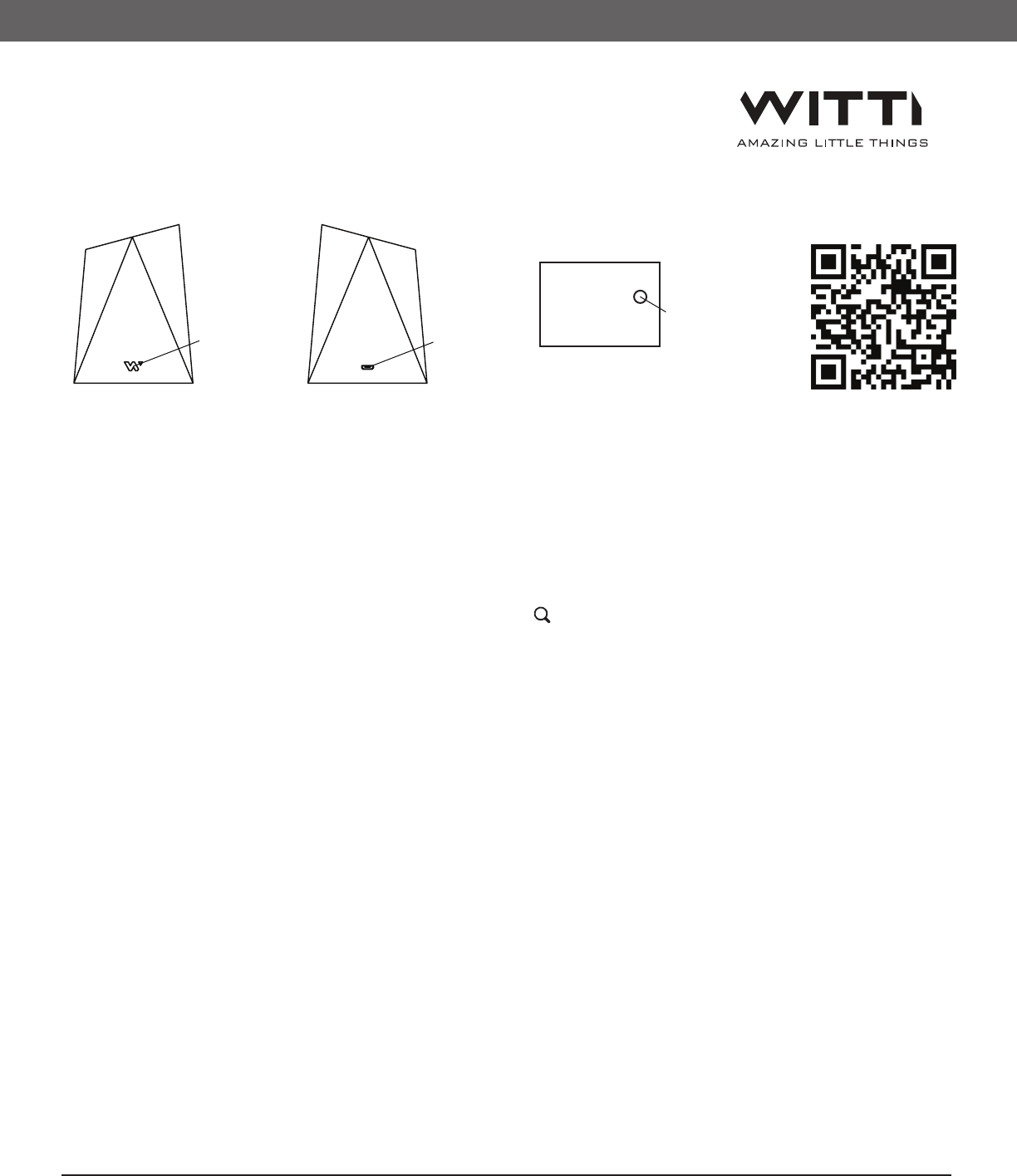
Power Button
Reset Button
Micro USB Port
Turning On/Off NOTTI
1) Press and hold the Power button for 2s to power on/off NOTTI.
2) Quickly press the power button once to switch the light off. Please note that notifications can still be
received when light is off.
Connecting and Using NOTTI
1) Download the NOTTI free App from App Store or Google Play. Keyword Search: Notti.
2) To connect to NOTTI, open the App, press the "Search" icon, click on "NOTTI". When prompt for pairing
password, please enter "123456"
3) You can use NOTTI App to do the following:
• Adjust Light color and brightness, color changing.
• Customize Notifications
• Play Music
• Set Wake Up light
• Set NOTTI default light color when turned on.
• Rename NOTTI
4) If NOTTI is on, and Bluetooth is turned on, your smartphone will be connected to NOTTI automatically
once in range.
Receiving Notifications
If you received a notification, corresponding light color will blink. If you received more than 1 notification,
all corresponding light color will cycle through.
If you read the notification on your phone, the corresponding light color on NOTTI will be off. You can also
press the Power button on NOTTI to clear all notifications on NOTTI (phone notifications will still exist)
Charging NOTTI
Use a Micro USB cable to charge NOTTI via Micro USB port. Input 5V.
The Battery Indicator light will flash while charging, and will stay on when NOTTI is fully charged
NOTTI should take around 2 to 3 hours until fully charged
The Battery Indicator light will flash for 30s if NOTTI is low in battery
NOTTI User Manual
http://www.wittidesign.com/manuals/notti/
Notti App
http://www.wittidesign.com/download/notti/
Keyword: Notti
Resetting NOTTI
If NOTTI becomes non-responsive, you can reset NOTTI by using a small pin to push the reset button located
at the bottom of NOTTI
Renaming NOTTI
If you have more than one NOTTI, you can rename NOTTI at the settings tab to differentiate between the
various NOTTI. Please note that the word “- NOTTI” will be appended to the name you specified
Reusable Packaging
The inner part can be folded onto a phone stand. Please watch the how-to-use video to see how to make it.
Troubleshoot
- Light does not turn on
Please plug in USB cable to make sure NOTTI is charged. Press the Power button for 3 seconds to make sure
the unit is turned on.
- NOTTI App cannot control NOTTI
Please make sure Bluetooth is on. Sometimes the App might be disconnected to NOTTI. Click the search Icon
again and reselect the corresponding NOTTI. If problem persists, restart both NOTTI and the App. For iOS,
you can try to unpair NOTTI in the iOS settings (Bluetooth), and try to reconnect again
- Notifications cannot be received
Please make sure Bluetooth is on. If only one specific Notification cannot be received, please switch off and
switch on that Notification again. If all Notifications cannot be received, please try to switch unpair and
restart NOTTI, and reconnect again.
- NOTTI name does not change after set
Sometimes the Bluetooth module needs to be restarted before the name change takes effect. Please restart
NOTTI and the name should be updated
For further Assistance, please contact us at service@wittidesign.com
The WITTI logo and NOTTI are trademarks of D&S Creation Limited. All other trademarks are properties of their respective owners. And any use of such marks by WITTI is under license.
Assembled in China www.wittidesign.com ©2014 D&S Creation Ltd. All Rights Reserved
Page: 2/3
Limited Warranty 1 year. http://www.wittidesign.com/warranty
The WITTI logo and NOTTI are trademarks of D&S Creation Limited. All other trademarks are properties of their respective owners. And any use of such marks by WITTI is under license.
Assembled in China www.wittidesign.com ©2014 D&S Creation Ltd. All Rights Reserved
Page: 3/3
This device complies with part 15 of the FCC rules. Operation is subject to the following two conditions: (1) this device
may not cause harmful interference, and (2) this device must accept any interference received, including interference
that may cause undesired operation.
NOTE: The manufacturer is not responsible for any radio or TV interference caused by unauthorized modifications to
this equipment. Such modifications could void the user’s authority to operate the equipment.
NOTE: This equipment has been tested and found to comply with the limits for a Class B digital device, pursuant to
part 15 of the FCC Rules. These limits are designed to provide reasonable protection against harmful interference in a
residential installation. This equipment generates uses and can radiate radio frequency energy and, if not installed
and used in accordance with the instructions, may cause harmful interference to radio communications. However,
there is no guarantee that interference will not occur in a particular installation. If this equipment does cause harmful
interference to radio or television reception, which can be determined by turning the equipment off and on, the user is
encouraged to try to correct the interference by one or more of the following measures:
- Reorient or relocate the receiving antenna.
- Increase the separation between the equipment and receiver.
-Connect the equipment into an outlet on a circuit different from that to which the receiver is connected.
-Consult the dealer or an experienced radio/TV technician for help
Due to the used enclosure material, the GSM mobile phone shall only be connected to a USB
Interface of version 2.0 or higher. The connection to so called power USB is prohibited.
Do not use the mobile phone in the environment at too high or too low temperature,
never expose the mobile phone under strong sunshine or too wet environment.
The suitable temperature for the phone and accessories is 0℃-40℃.
CAUTION RISK OF EXPLOSION IF BATTERY IS REPLACED BY AN INCORRECT TYPE. DISPOSE OF USED BATTERIES
ACCORDING TO THE INSTRUCTIONS
Regulatory Conformance
Hereby, Corporation declares that this device is in compliance with the essential requirements and other relevant
provisions of Directive 1999/5/EC.
For the declaration of conformity, visit the Web site www.wittidesign.com/certification.
Notice: Observe the national local regulations in the location where the device is to be used. This device may be
restricted for use in some or all member states of the European Union (EU)