DANE ELEC MEMORY PVR HDD Multimedia Player User Manual QSG So Smart PVR ENG FR SP NL Final fcc indd

DANE-ELEC MEMORY HDD Multimedia Player QSG So Smart PVR ENG FR SP NL Final fcc indd

User manaul

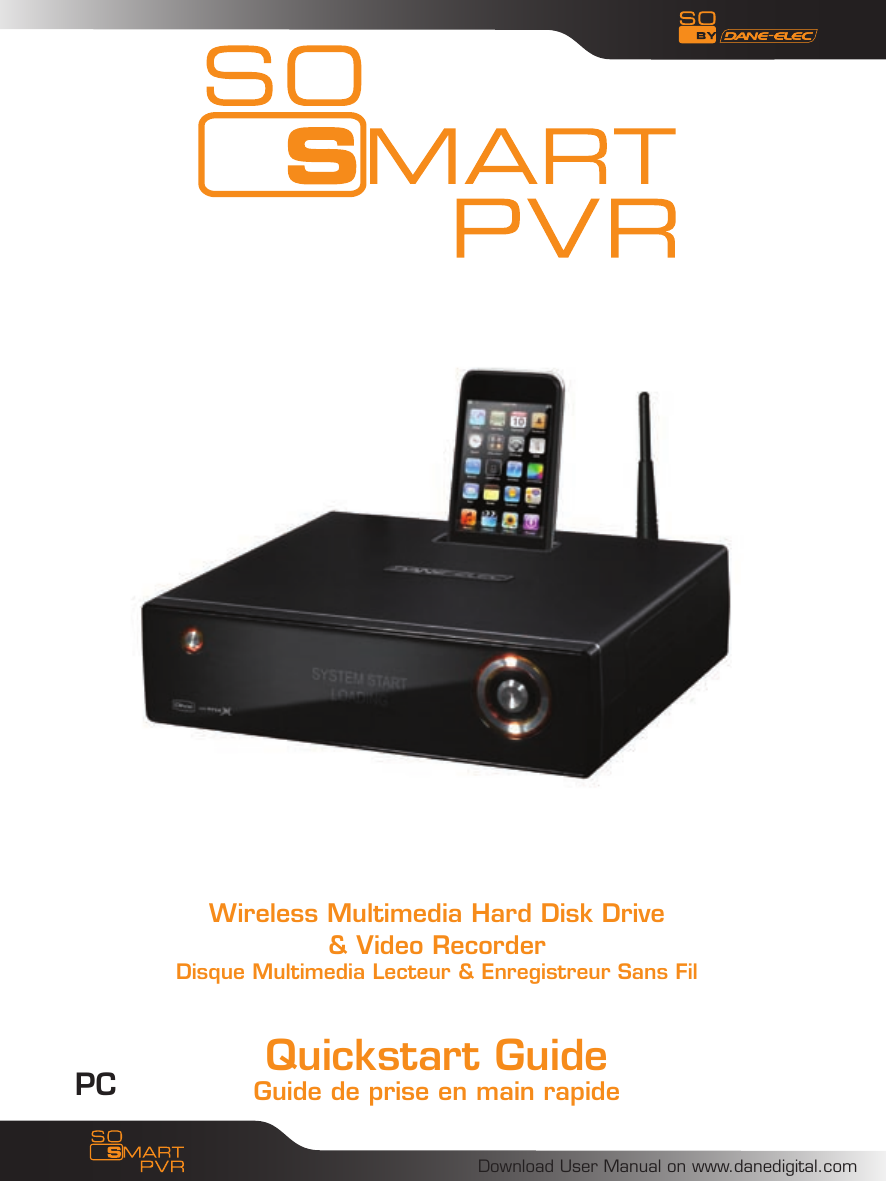
Download User Manual on www.danedigital.comQuickstart GuideGuide de prise en main rapide Wireless Multimedia Hard Disk Drive& Video RecorderDisque Multimedia Lecteur & Enregistreur Sans FilPC
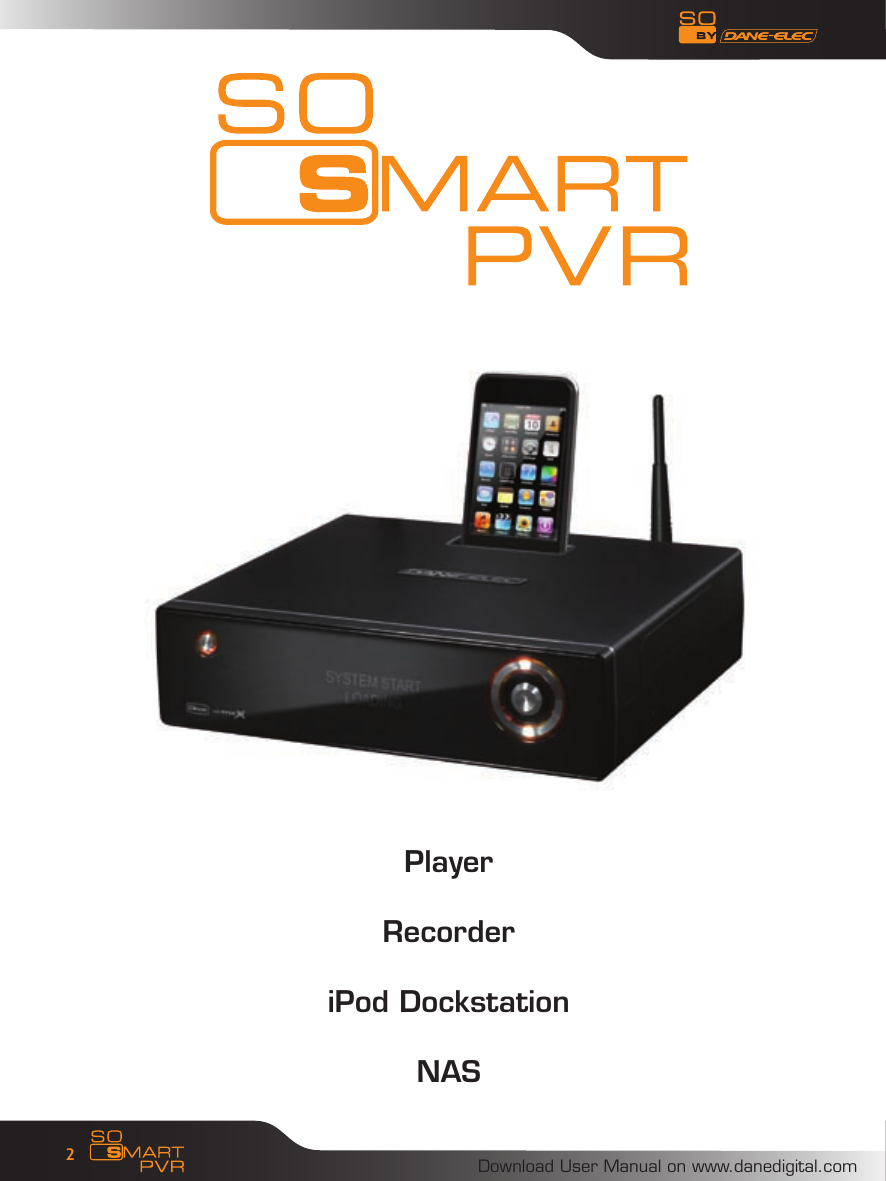
Download User Manual on www.danedigital.com2PlayerRecorderiPod DockstationNAS
Download User Manual on www.danedigital.com3ENGLISH                    4FRANÇAIS                   29ESPAÑOL                  55NEDERLANDS                81Other languages preloaded on the hard disk or CD ROMAutres langues préchargées sur le disque dur ou le CD ROMOtros idiomas precargados en el disco duro o CD-ROMOutras línguas preloaded no disco rígido ou CD-ROMAndre sprog indlæst på harddisken eller cd-romAndere Sprachen vorinstalliert auf der Festplatte oder CD-ROMAndere talen voorgeladen op de harde schijf of cd-romAltre lingue precaricato sul disco rigido o CD-ROM
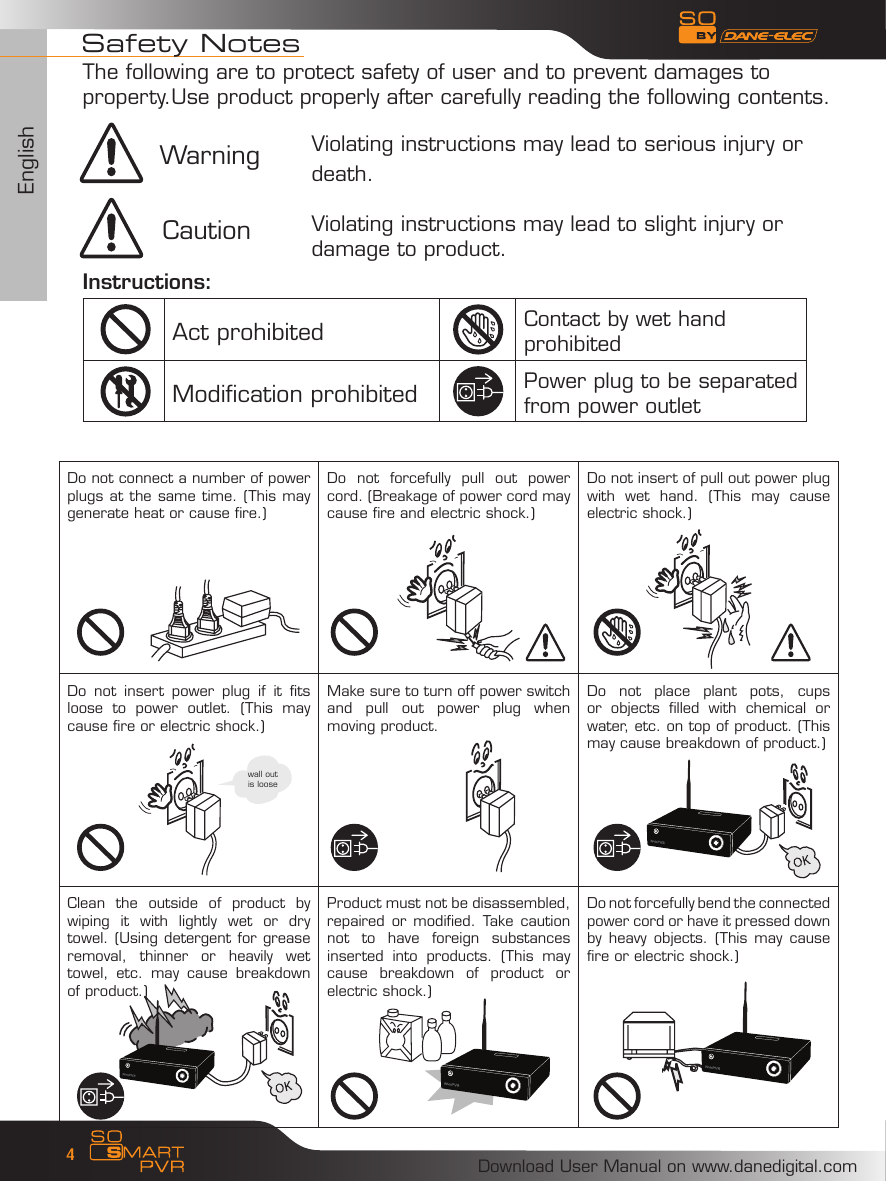
EnglishDownload User Manual on www.danedigital.com4Do not connect a number of power plugs at the same time. (This may generate heat or cause fire.)Do  not  forcefully  pull  out  power cord. (Breakage of power cord may cause fire and electric shock.)Do not insert of pull out power plug with  wet  hand.  (This  may  cause electric shock.)Do  not  insert  power  plug  if  it  fits loose  to  power  outlet.  (This  may cause fire or electric shock.)Make sure to turn off power switch and  pull  out  power  plug  when moving product.Do  not  place  plant  pots,  cups or  objects  filled  with  chemical  or water, etc. on top of product. (This may cause breakdown of product.)Clean  the  outside  of  product  by wiping  it  with  lightly  wet  or  dry towel. (Using detergent for grease removal,  thinner  or  heavily  wet towel,  etc.  may  cause  breakdown of product.)Product must not be disassembled, repaired or modified.  Take  caution not  to  have  foreign  substances inserted  into  products.  (This  may cause  breakdown  of  product  or electric shock.)Do not forcefully bend the connected power cord or have it pressed down by heavy  objects.  (This  may cause fire or electric shock.)Instructions:Act prohibited Contact by wet hand prohibitedModification prohibited Power plug to be separated from power outletSafety NotesViolating instructions may lead to serious injury or death.Violating instructions may lead to slight injury or damage to product.The following are to protect safety of user and to prevent damages to property.Use product properly after carefully reading the following contents.WarningCautionwall out is loose
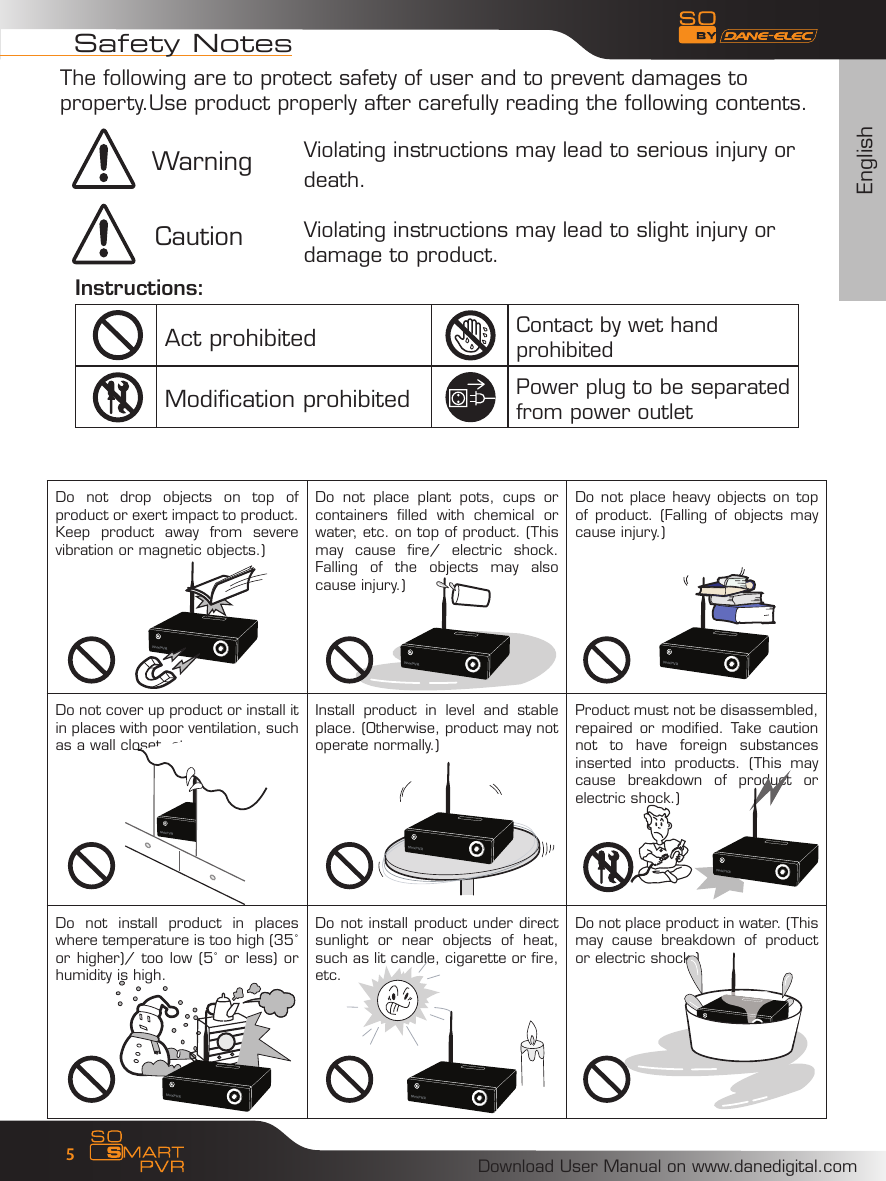
EnglishDownload User Manual on www.danedigital.com5Do  not  drop  objects  on  top  of product or exert impact to product. Keep  product  away  from  severe vibration or magnetic objects.)Do  not  place  plant  pots,  cups  or containers  filled  with  chemical  or water, etc. on top of product. (This may  cause  fire/  electric  shock. Falling  of  the  objects  may  also cause injury.)Do not place heavy objects on top of product.  (Falling  of objects may cause injury.)Do not cover up product or install it in places with poor ventilation, such as a wall closet, etc. Install  product  in  level  and  stable place. (Otherwise, product may not operate normally.)Product must not be disassembled, repaired or modified.  Take  caution not  to  have  foreign  substances inserted  into  products.  (This  may cause  breakdown  of  product  or electric shock.)Do  not  install  product  in  places where temperature is too high (35˚ or higher)/ too low (5˚ or less) or humidity is high.Do not install product under direct sunlight  or  near  objects  of  heat, such as lit candle, cigarette or fire, etc.Do not place product in water. (This may  cause  breakdown  of  product or electric shock.)Instructions:Act prohibited Contact by wet hand prohibitedModification prohibited Power plug to be separated from power outletSafety NotesViolating instructions may lead to serious injury or death.Violating instructions may lead to slight injury or damage to product.The following are to protect safety of user and to prevent damages to property.Use product properly after carefully reading the following contents.WarningCaution
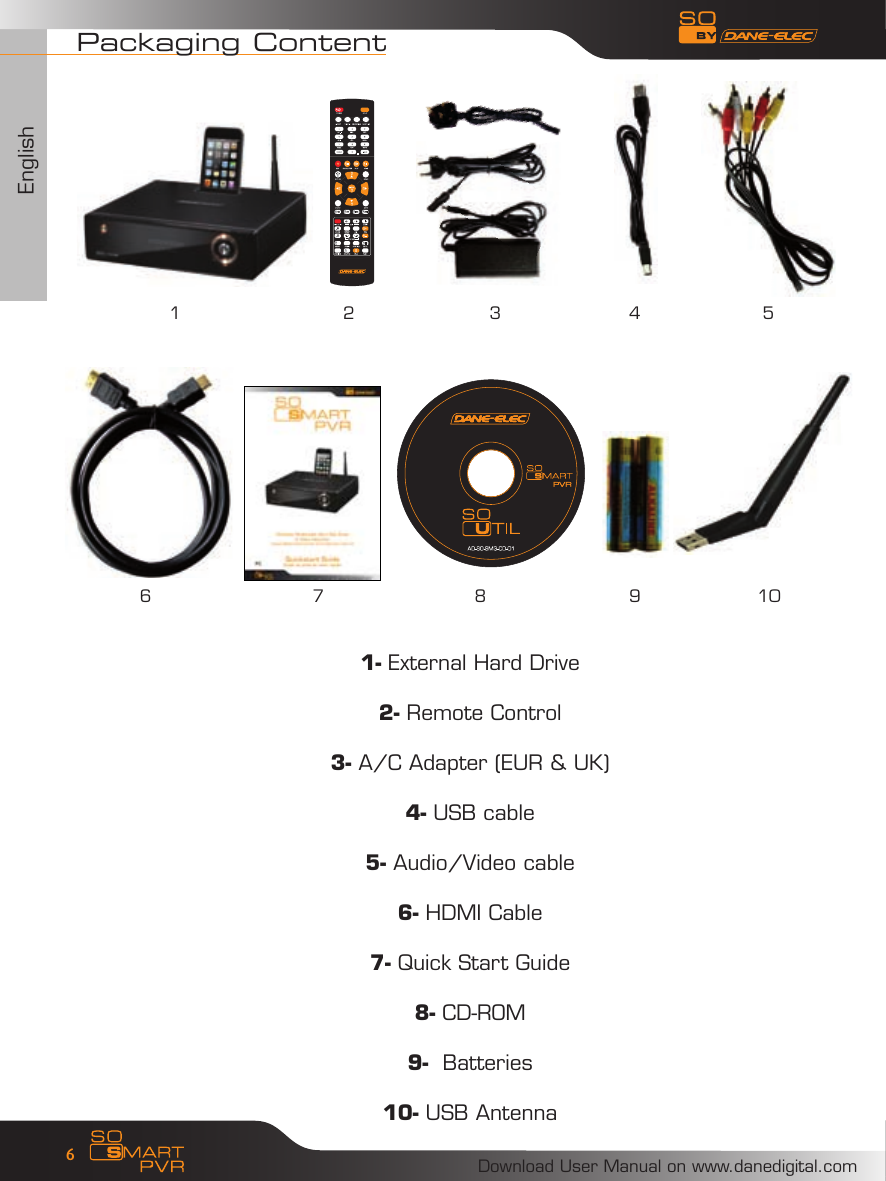
EnglishDownload User Manual on www.danedigital.com61- External Hard Drive2- Remote Control3- A/C Adapter (EUR & UK)4- USB cable5- Audio/Video cable6- HDMI Cable7- Quick Start Guide8- CD-ROM9-  Batteries10- USB AntennaPackaging Content21 4 56 7 8 9 103
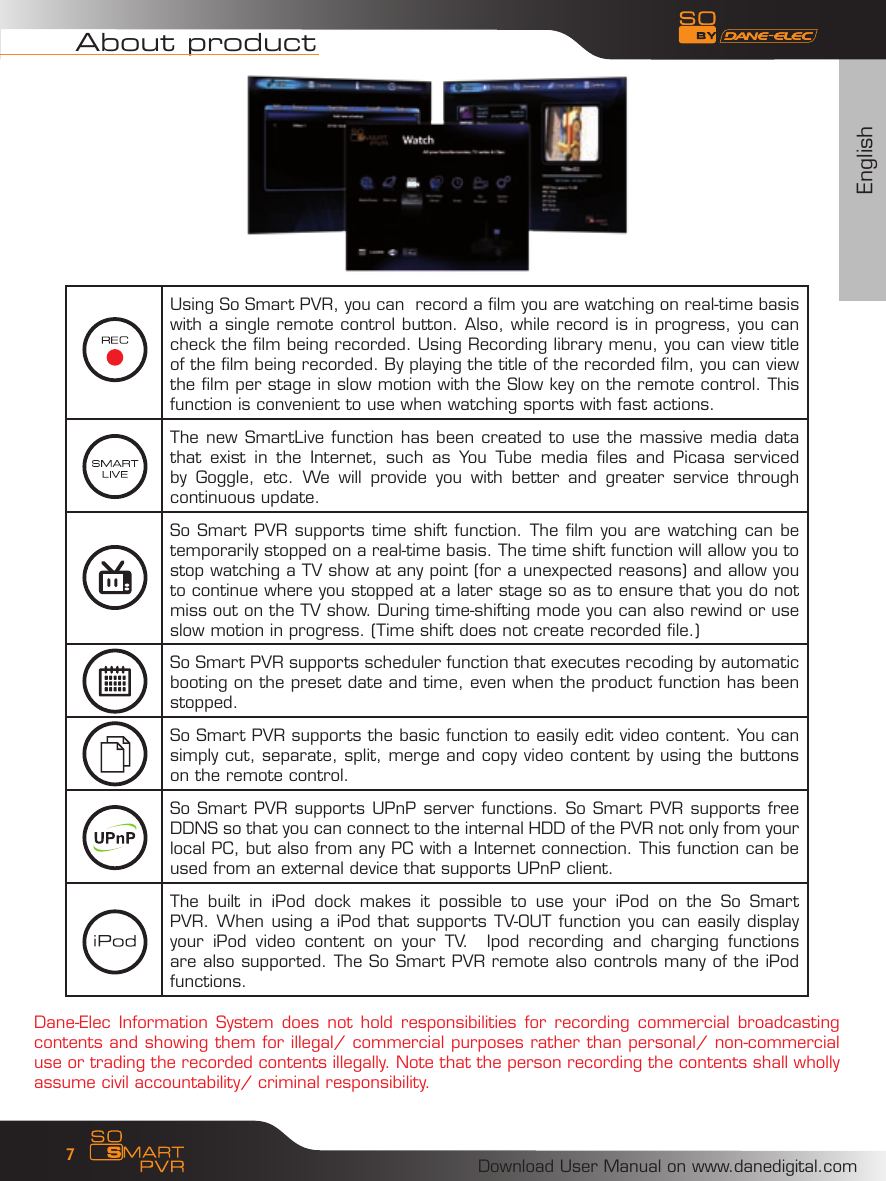
EnglishDownload User Manual on www.danedigital.com7About productUsing So Smart PVR, you can  record a film you are watching on real-time basis with a single remote control button. Also, while record is in progress, you can check the film being recorded. Using Recording library menu, you can view title of the film being recorded. By playing the title of the recorded film, you can view the film per stage in slow motion with the Slow key on the remote control. This function is convenient to use when watching sports with fast actions.The new SmartLive function has been created to use the massive media data that  exist  in  the  Internet,  such  as  You  Tube  media  files  and  Picasa  serviced by  Goggle,  etc.  We  will  provide  you  with  better  and  greater  service  through continuous update.So Smart PVR supports time shift function. The film you are watching can be temporarily stopped on a real-time basis. The time shift function will allow you to stop watching a TV show at any point (for a unexpected reasons) and allow you to continue where you stopped at a later stage so as to ensure that you do not miss out on the TV show. During time-shifting mode you can also rewind or use slow motion in progress. (Time shift does not create recorded file.)So Smart PVR supports scheduler function that executes recoding by automatic booting on the preset date and time, even when the product function has been stopped.So Smart PVR supports the basic function to easily edit video content. You can simply cut, separate, split, merge and copy video content by using the buttons on the remote control.So Smart PVR supports UPnP server functions. So Smart PVR supports free DDNS so that you can connect to the internal HDD of the PVR not only from your local PC, but also from any PC with a Internet connection. This function can be used from an external device that supports UPnP client. The  built  in  iPod  dock  makes  it  possible  to  use  your  iPod  on  the  So  Smart PVR. When using a iPod that supports TV-OUT function you can easily display your  iPod  video  content  on  your  TV.    Ipod  recording  and  charging  functions are also supported. The So Smart PVR remote also controls many of the iPod functions. Dane-Elec Information System  does not  hold responsibilities  for  recording commercial  broadcasting contents and showing them for illegal/ commercial purposes rather than personal/ non-commercial use or trading the recorded contents illegally. Note that the person recording the contents shall wholly assume civil accountability/ criminal responsibility.
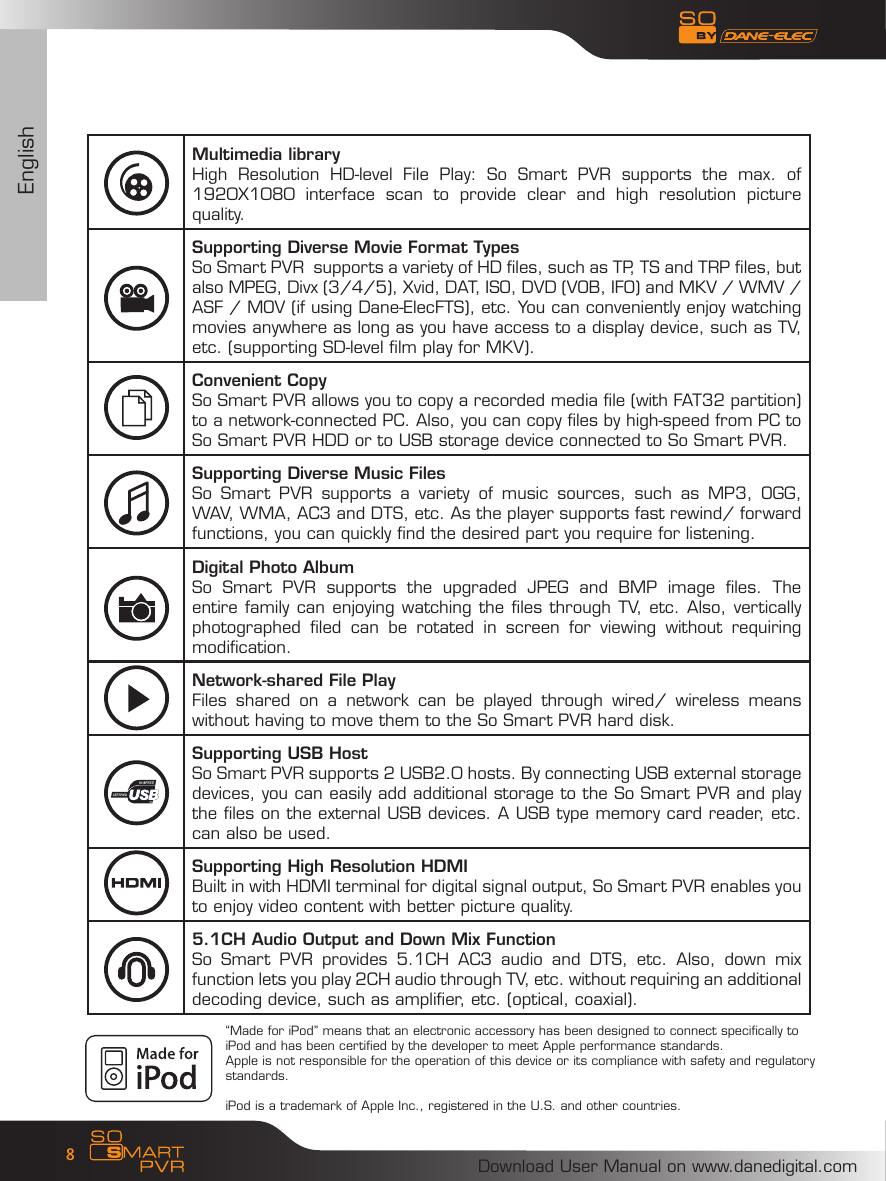
EnglishDownload User Manual on www.danedigital.com8Multimedia libraryHigh  Resolution  HD-level  File  Play:  So  Smart  PVR  supports  the  max.  of 1920X1080  interface  scan  to  provide  clear  and  high  resolution  picture quality. Supporting Diverse Movie Format TypesSo Smart PVR  supports a variety of HD files, such as TP, TS and TRP files, but also MPEG, Divx (3/4/5), Xvid, DAT, ISO, DVD (VOB, IFO) and MKV / WMV / ASF / MOV (if using Dane-ElecFTS), etc. You can conveniently enjoy watching movies anywhere as long as you have access to a display device, such as TV, etc. (supporting SD-level film play for MKV). Convenient Copy So Smart PVR allows you to copy a recorded media file (with FAT32 partition) to a network-connected PC. Also, you can copy files by high-speed from PC to So Smart PVR HDD or to USB storage device connected to So Smart PVR.Supporting Diverse Music Files So  Smart  PVR  supports  a  variety  of  music  sources,  such  as  MP3,  OGG, WAV, WMA, AC3 and DTS, etc. As the player supports fast rewind/ forward functions, you can quickly find the desired part you require for listening.  Digital Photo AlbumSo  Smart  PVR  supports  the  upgraded  JPEG  and  BMP  image  files.  The entire family can enjoying watching the files through TV, etc. Also, vertically photographed  filed  can  be  rotated  in  screen  for  viewing  without  requiring modification. Network-shared File PlayFiles  shared  on  a  network  can  be  played  through  wired/  wireless  means without having to move them to the So Smart PVR hard disk.Supporting USB HostSo Smart PVR supports 2 USB2.0 hosts. By connecting USB external storage devices, you can easily add additional storage to the So Smart PVR and play the files on the external USB devices. A USB type memory card reader, etc. can also be used.Supporting High Resolution HDMIBuilt in with HDMI terminal for digital signal output, So Smart PVR enables you to enjoy video content with better picture quality.5.1CH Audio Output and Down Mix Function  So  Smart  PVR  provides  5.1CH  AC3  audio  and  DTS,  etc.  Also,  down  mix function lets you play 2CH audio through TV, etc. without requiring an additional decoding device, such as amplifier, etc. (optical, coaxial).“Made for iPod” means that an electronic accessory has been designed to connect specifically to iPod and has been certified by the developer to meet Apple performance standards. Apple is not responsible for the operation of this device or its compliance with safety and regulatory standards.iPod is a trademark of Apple Inc., registered in the U.S. and other countries.
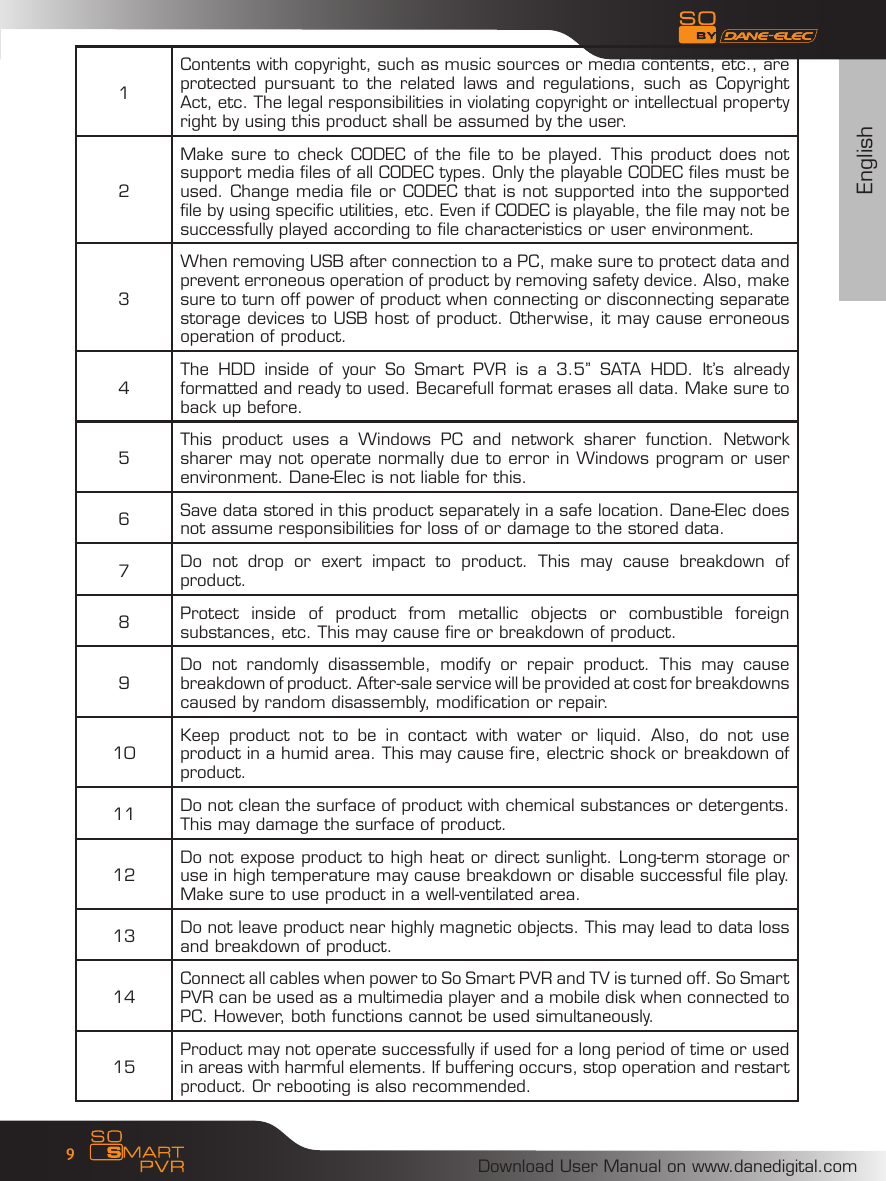
EnglishDownload User Manual on www.danedigital.com91Contents with copyright, such as music sources or media contents, etc., are protected  pursuant to  the  related laws  and  regulations, such  as  Copyright Act, etc. The legal responsibilities in violating copyright or intellectual property right by using this product shall be assumed by the user. 2Make sure to  check CODEC of the  file to be played. This product does not support media files of all CODEC types. Only the playable CODEC files must be used. Change media file or CODEC that is not supported into the supported file by using specific utilities, etc. Even if CODEC is playable, the file may not be successfully played according to file characteristics or user environment. 3When removing USB after connection to a PC, make sure to protect data and prevent erroneous operation of product by removing safety device. Also, make sure to turn off power of product when connecting or disconnecting separate storage devices to USB host of product. Otherwise, it may cause erroneous operation of product. 4The  HDD  inside  of  your  So  Smart  PVR  is  a  3.5’’  SATA  HDD.  It’s  already formatted and ready to used. Becarefull format erases all data. Make sure to back up before.5This  product  uses  a  Windows  PC  and  network  sharer  function.  Network sharer may not operate normally due to error in Windows program or user environment. Dane-Elec is not liable for this. 6Save data stored in this product separately in a safe location. Dane-Elec does not assume responsibilities for loss of or damage to the stored data. 7Do  not  drop  or  exert  impact  to  product.  This  may  cause  breakdown  of product. 8Protect  inside  of  product  from  metallic  objects  or  combustible  foreign substances, etc. This may cause fire or breakdown of product. 9Do  not  randomly  disassemble,  modify  or  repair  product.  This  may  cause breakdown of product. After-sale service will be provided at cost for breakdowns caused by random disassembly, modification or repair. 10 Keep  product  not  to  be  in  contact  with  water  or  liquid.  Also,  do  not  use product in a humid area. This may cause fire, electric shock or breakdown of product. 11 Do not clean the surface of product with chemical substances or detergents. This may damage the surface of product. 12 Do not expose product to high heat or direct sunlight. Long-term storage or use in high temperature may cause breakdown or disable successful file play. Make sure to use product in a well-ventilated area. 13 Do not leave product near highly magnetic objects. This may lead to data loss and breakdown of product. 14 Connect all cables when power to So Smart PVR and TV is turned off. So Smart PVR can be used as a multimedia player and a mobile disk when connected to PC. However, both functions cannot be used simultaneously. 15 Product may not operate successfully if used for a long period of time or used in areas with harmful elements. If buffering occurs, stop operation and restart product. Or rebooting is also recommended.
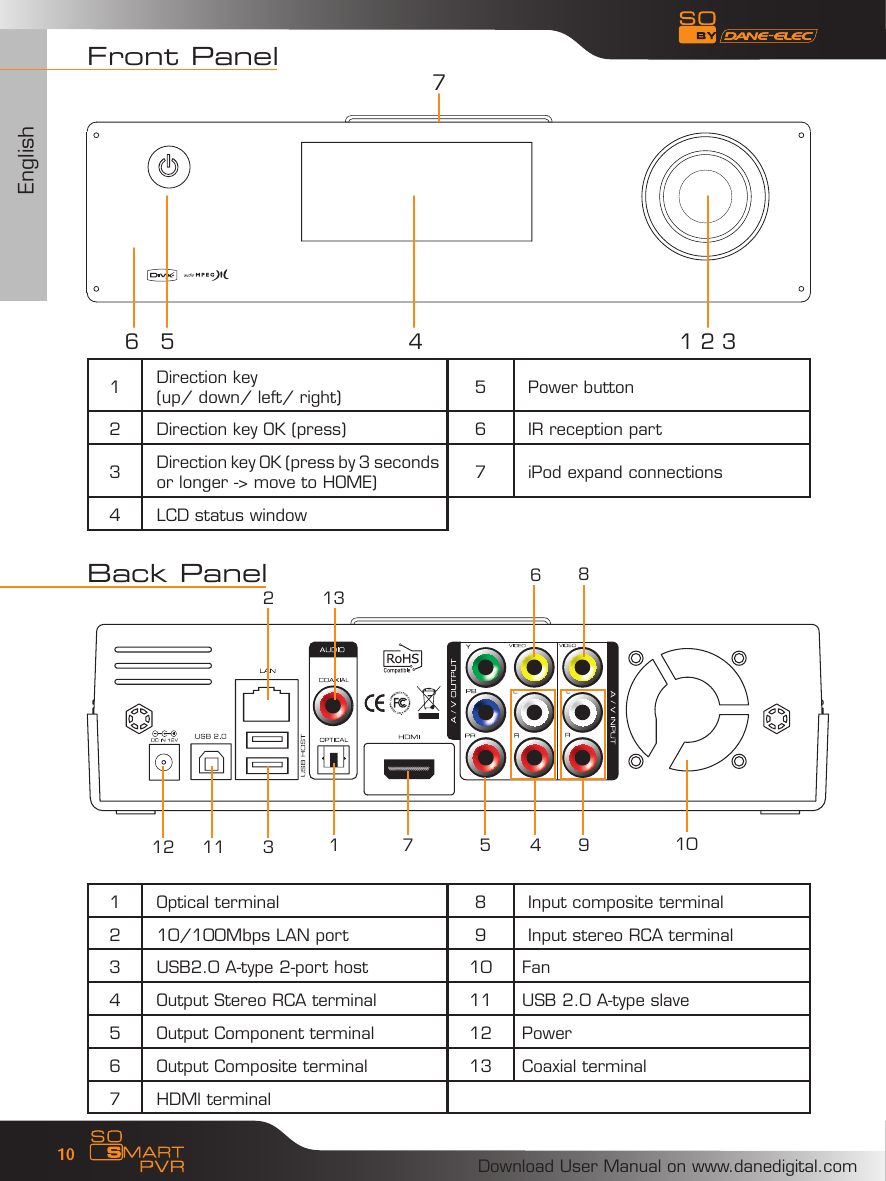
EnglishDownload User Manual on www.danedigital.com10Front Panel1Direction key (up/ down/ left/ right) 5 Power button2 Direction key OK (press) 6 IR reception part3Direction key OK (press by 3 seconds or longer -> move to HOME) 7 iPod expand connections4 LCD status windowBack Panel1 Optical terminal 8 Input composite terminal2 10/100Mbps LAN port 9 Input stereo RCA terminal3 USB2.0 A-type 2-port host 10 Fan4 Output Stereo RCA terminal 11 USB 2.0 A-type slave5 Output Component terminal 12 Power6 Output Composite terminal 13 Coaxial terminal7 HDMl terminal76 5 4 1 2 31 7 5 4 9810311122 136
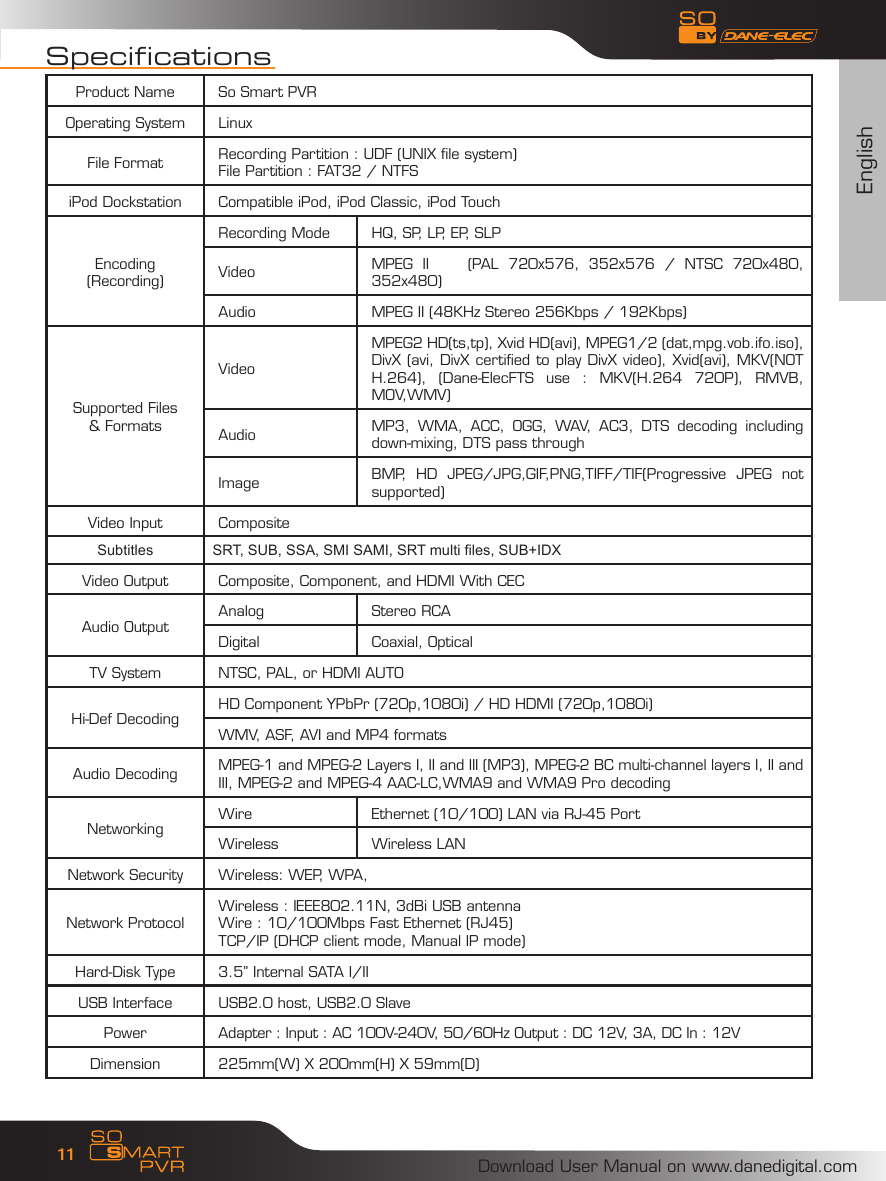
EnglishDownload User Manual on www.danedigital.com11SpecificationsProduct Name So Smart PVROperating System LinuxFile Format Recording Partition : UDF (UNIX file system)File Partition : FAT32 / NTFSiPod Dockstation Compatible iPod, iPod Classic, iPod TouchEncoding(Recording)Recording Mode HQ, SP, LP, EP, SLPVideo MPEG  II        (PAL  720x576,  352x576  /  NTSC  720x480, 352x480)Audio MPEG II (48KHz Stereo 256Kbps / 192Kbps)Supported Files& FormatsVideoMPEG2 HD(ts,tp), Xvid HD(avi), MPEG1/2 (dat,mpg.vob.ifo.iso), DivX (avi, DivX certified to play DivX video), Xvid(avi), MKV(NOT H.264),  (Dane-ElecFTS  use  :  MKV(H.264  720P),  RMVB, MOV,WMV)Audio MP3,  WMA,  ACC,  OGG,  WAV,  AC3,  DTS  decoding  including down-mixing, DTS pass through Image BMP,  HD  JPEG/JPG,GIF,PNG,TIFF/TIF(Progressive  JPEG  not supported)Video Input CompositeSubtitles SRT, SUB, SSA, SMI SAMI, SRT multi les, SUB+IDXVideo Output Composite, Component, and HDMI With CECAudio Output Analog Stereo RCADigital Coaxial, OpticalTV System NTSC, PAL, or HDMI AUTO Hi-Def Decoding  HD Component YPbPr (720p,1080i) / HD HDMI (720p,1080i)WMV, ASF, AVI and MP4 formats Audio Decoding  MPEG-1 and MPEG-2 Layers I, II and III (MP3), MPEG-2 BC multi-channel layers I, II and III, MPEG-2 and MPEG-4 AAC-LC,WMA9 and WMA9 Pro decodingNetworking Wire Ethernet (10/100) LAN via RJ-45 Port Wireless Wireless LANNetwork Security  Wireless: WEP, WPA,Network ProtocolWireless : IEEE802.11N, 3dBi USB antenna Wire : 10/100Mbps Fast Ethernet (RJ45)TCP/IP (DHCP client mode, Manual IP mode)Hard-Disk Type  3.5” Internal SATA I/IIUSB Interface USB2.0 host, USB2.0 SlavePower Adapter : Input : AC 100V-240V, 50/60Hz Output : DC 12V, 3A, DC In : 12VDimension 225mm(W) X 200mm(H) X 59mm(D)
EnglishDownload User Manual on www.danedigital.com12Connect to your PC:Connect the A/C adapter• Connect the USB Cable• Disconnect the So Smart PVR :• 1: Click on               2 : Disconnect
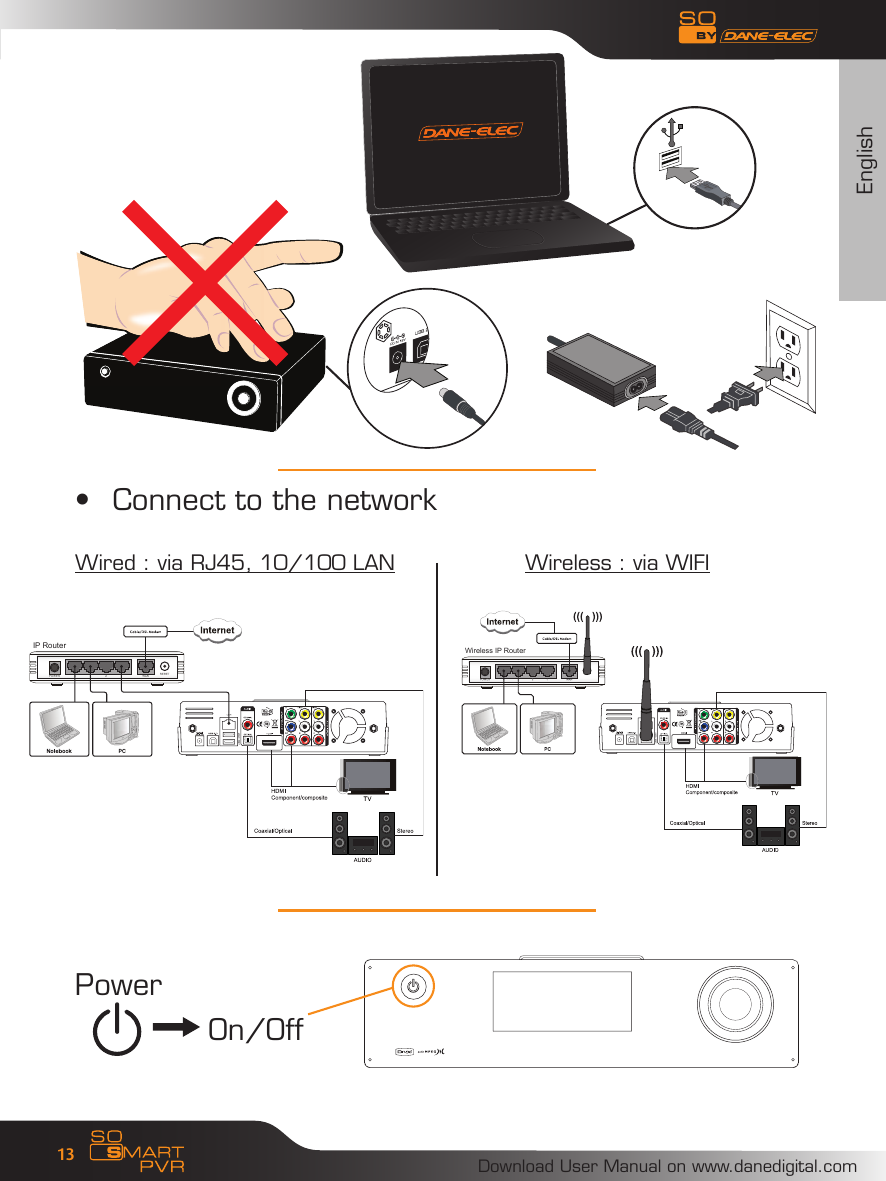
EnglishDownload User Manual on www.danedigital.com13Connect to the network• Wired : via RJ45, 10/100 LAN   Wireless : via WIFIPowerOn/OffIP RouterWireless IP Router
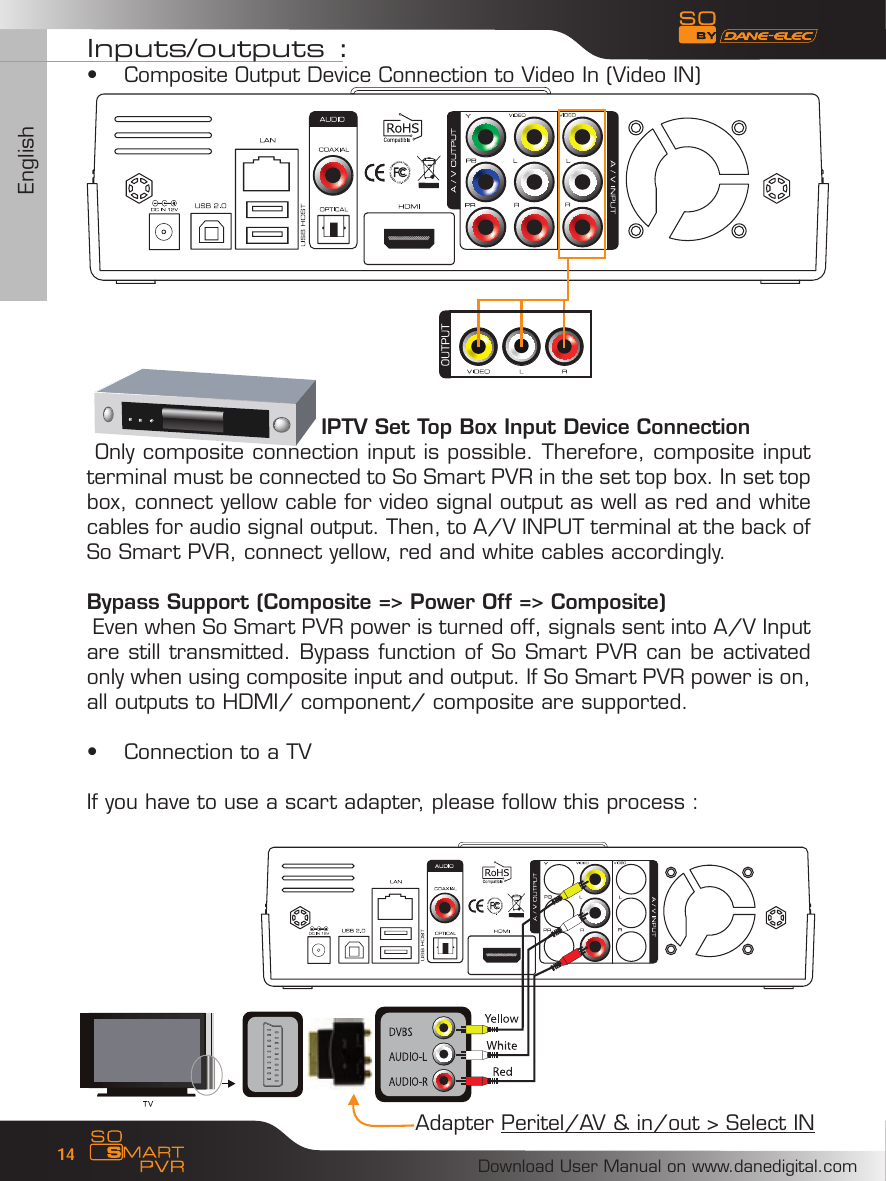
EnglishDownload User Manual on www.danedigital.com14Inputs/outputs :Composite Output Device Connection to Video In (Video IN)•                                 IPTV Set Top Box Input Device Connection Only composite connection input is possible. Therefore, composite input terminal must be connected to So Smart PVR in the set top box. In set top box, connect yellow cable for video signal output as well as red and white cables for audio signal output. Then, to A/V INPUT terminal at the back of So Smart PVR, connect yellow, red and white cables accordingly.Bypass Support (Composite => Power Off => Composite) Even when So Smart PVR power is turned off, signals sent into A/V Input are still transmitted. Bypass function of So Smart PVR can be activated only when using composite input and output. If So Smart PVR power is on, all outputs to HDMI/ component/ composite are supported.Connection to a TV• If you have to use a scart adapter, please follow this process :Adapter Peritel/AV & in/out > Select IN
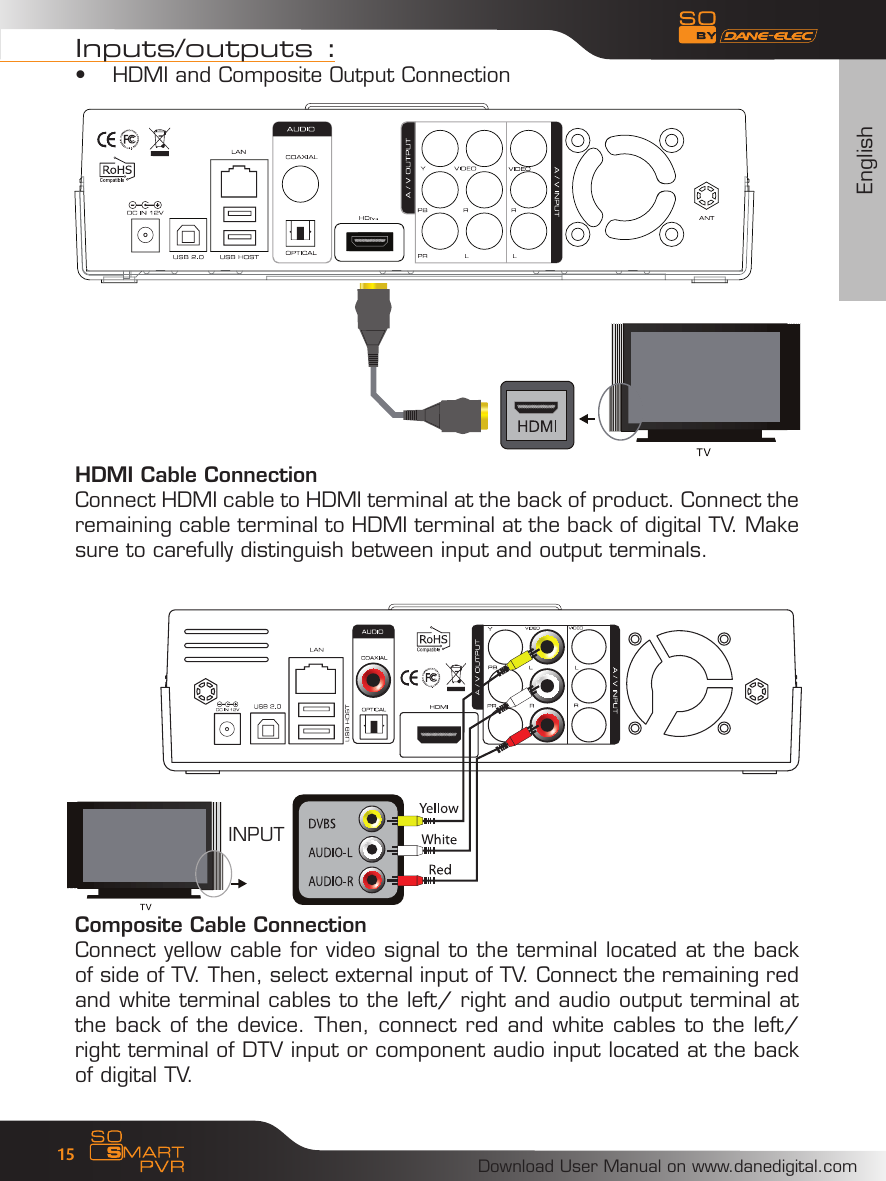
EnglishDownload User Manual on www.danedigital.com15Inputs/outputs :HDMI and Composite Output Connection• HDMI Cable Connection Connect HDMI cable to HDMI terminal at the back of product. Connect the remaining cable terminal to HDMI terminal at the back of digital TV. Make sure to carefully distinguish between input and output terminals.Composite Cable ConnectionConnect yellow cable for video signal to the terminal located at the back of side of TV. Then, select external input of TV. Connect the remaining red and white terminal cables to the left/ right and audio output terminal at the back of the device. Then, connect red and white cables to the left/ right terminal of DTV input or component audio input located at the back of digital TV.INPUT
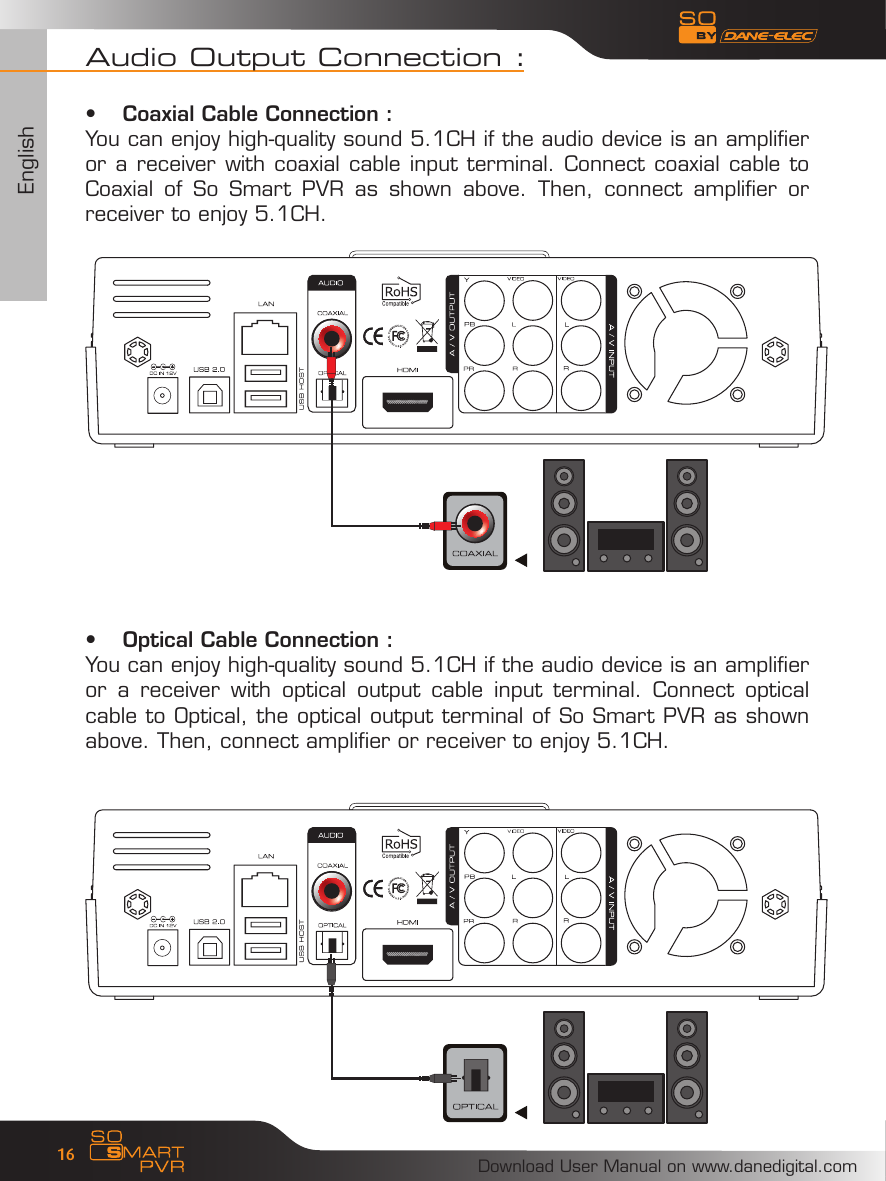
EnglishDownload User Manual on www.danedigital.com16Audio Output Connection :Coaxial Cable Connection :•You can enjoy high-quality sound 5.1CH if the audio device is an amplifier or a receiver with coaxial cable input terminal. Connect coaxial cable to Coaxial  of  So  Smart  PVR  as  shown  above.  Then,  connect  amplifier  or receiver to enjoy 5.1CH.Optical Cable Connection :•You can enjoy high-quality sound 5.1CH if the audio device is an amplifier or  a  receiver  with  optical  output  cable  input  terminal.  Connect  optical cable to Optical, the optical output terminal of So Smart PVR as shown above. Then, connect amplifier or receiver to enjoy 5.1CH.
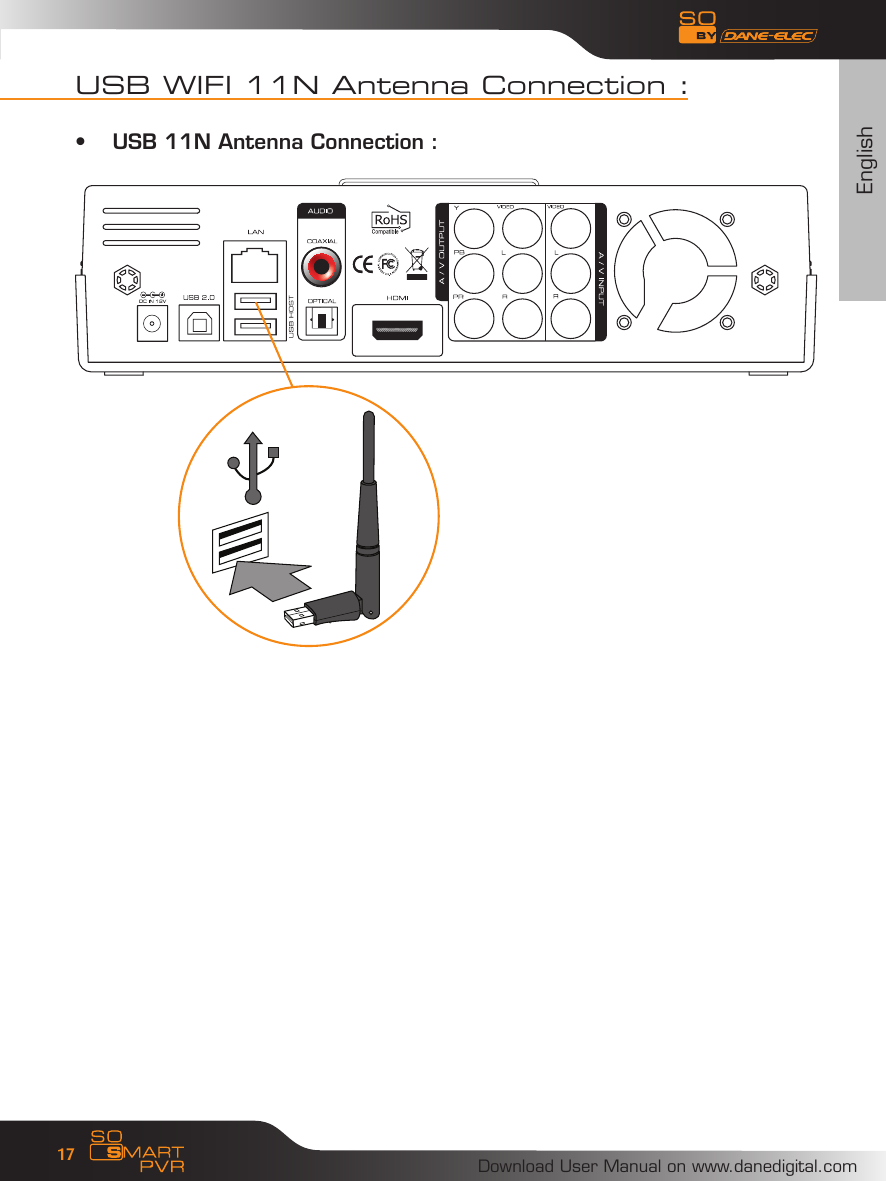
EnglishDownload User Manual on www.danedigital.com17USB WIFI 11N Antenna Connection :USB 11N Antenna Connection :•
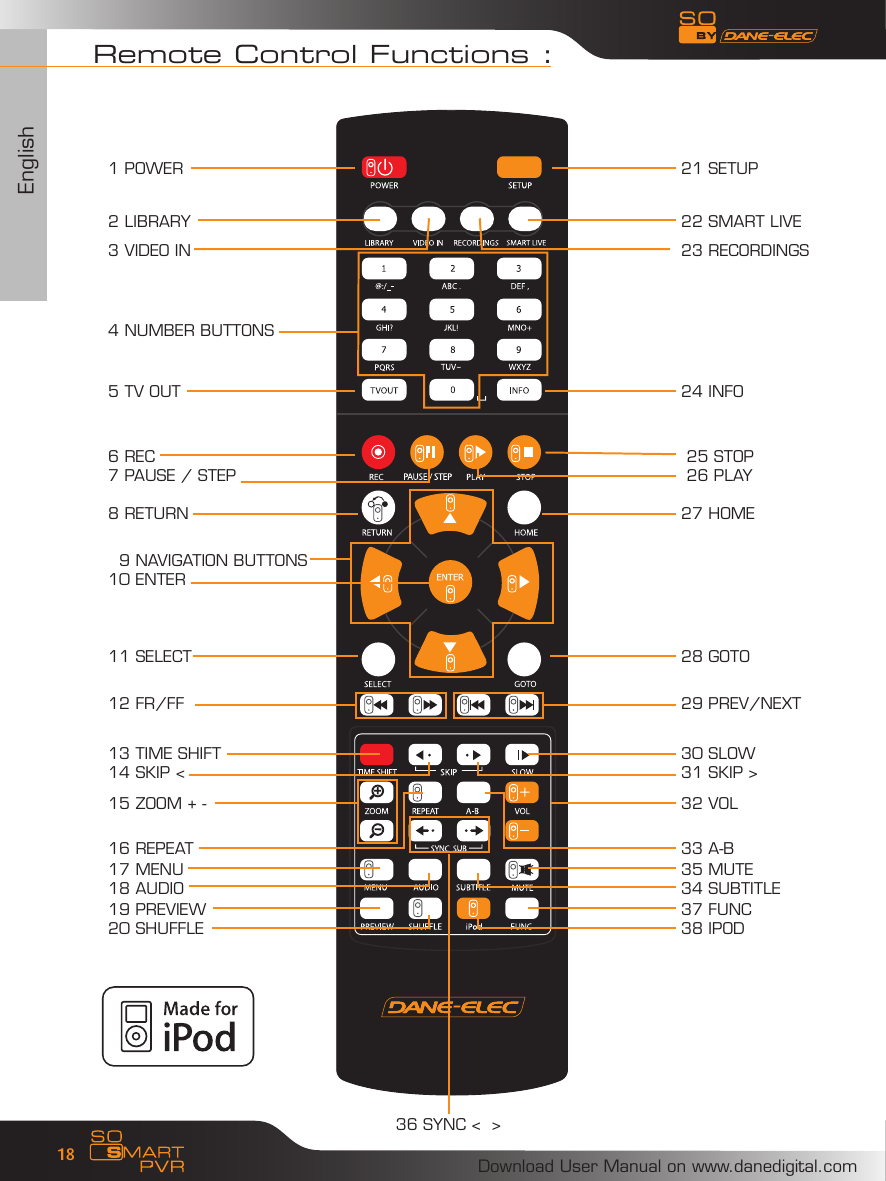
EnglishDownload User Manual on www.danedigital.com18Remote Control Functions :  9 NAVIGATION BUTTONS10 ENTER1 POWER2 LIBRARY3 VIDEO IN4 NUMBER BUTTONS5 TV OUT6 REC7 PAUSE / STEP8 RETURN11 SELECT12 FR/FF13 TIME SHIFT14 SKIP <15 ZOOM + -36 SYNC <  >16 REPEAT19 PREVIEW20 SHUFFLE17 MENU18 AUDIO21 SETUP22 SMART LIVE23 RECORDINGS24 INFO 25 STOP 26 PLAY27 HOME28 GOTO29 PREV/NEXT30 SLOW31 SKIP >32 VOL33 A-B37 FUNC38 IPOD35 MUTE34 SUBTITLE
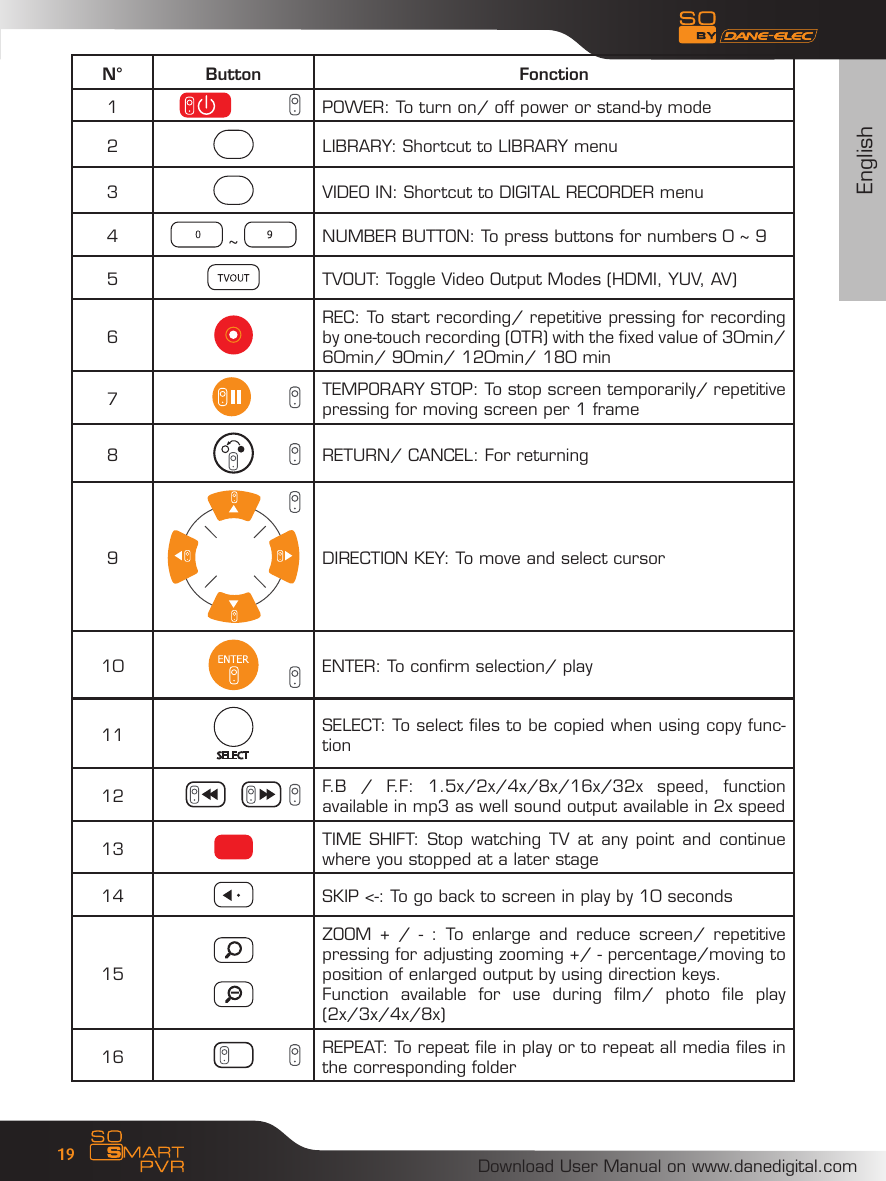
EnglishDownload User Manual on www.danedigital.com19N° Button Fonction1       POWER: To turn on/ off power or stand-by mode2LIBRARY: Shortcut to LIBRARY menu3VIDEO IN: Shortcut to DIGITAL RECORDER menu4 ~  NUMBER BUTTON: To press buttons for numbers 0 ~ 95TVOUT: Toggle Video Output Modes (HDMI, YUV, AV)6REC: To start recording/ repetitive pressing for recording by one-touch recording (OTR) with the fixed value of 30min/ 60min/ 90min/ 120min/ 180 min7                 TEMPORARY STOP: To stop screen temporarily/ repetitive pressing for moving screen per 1 frame 8        RETURN/ CANCEL: For returning 9DIRECTION KEY: To move and select cursor10         ENTER: To confirm selection/ play11 SELECT: To select files to be copied when using copy func-tion 12 F.B  /  F.F:  1.5x/2x/4x/8x/16x/32x  speed,  function available in mp3 as well sound output available in 2x speed13 TIME SHIFT:  Stop watching TV  at any  point and  continue where you stopped at a later stage14 SKIP <-: To go back to screen in play by 10 seconds15ZOOM  +  /  -  :  To  enlarge  and  reduce  screen/  repetitive pressing for adjusting zooming +/ - percentage/moving to position of enlarged output by using direction keys.Function  available  for  use  during  film/  photo  file  play (2x/3x/4x/8x)16 REPEAT: To repeat file in play or to repeat all media files in the corresponding folder
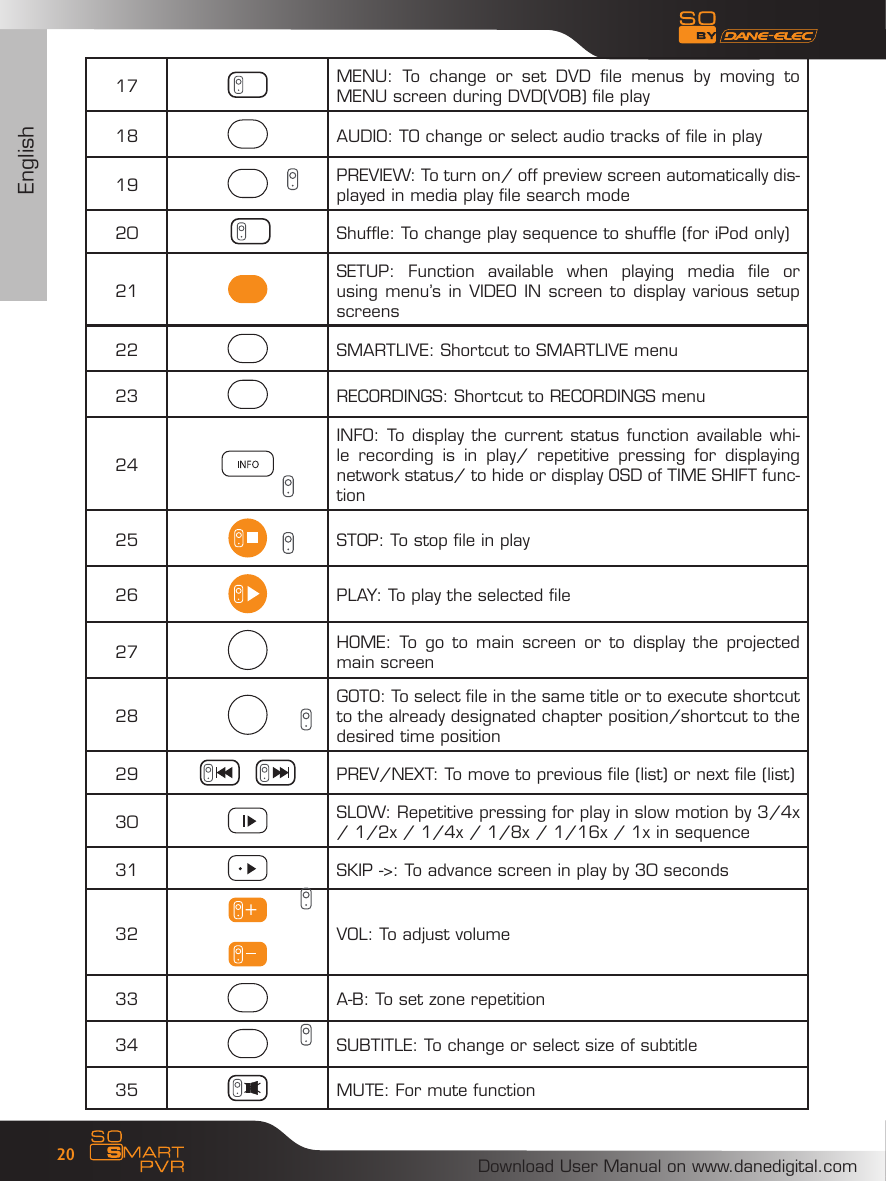
EnglishDownload User Manual on www.danedigital.com2017 MENU:  To  change  or  set  DVD  file  menus  by  moving  to MENU screen during DVD(VOB) file play18 AUDIO: TO change or select audio tracks of file in play19 PREVIEW: To turn on/ off preview screen automatically dis-played in media play file search mode20            Shuffle: To change play sequence to shuffle (for iPod only)21SETUP:  Function  available  when  playing  media  file  or using menu’s in VIDEO IN screen to display various setup screens22 SMARTLIVE: Shortcut to SMARTLIVE menu23 RECORDINGS: Shortcut to RECORDINGS menu24INFO: To display the current status function available whi-le  recording  is  in  play/  repetitive  pressing  for  displaying network status/ to hide or display OSD of TIME SHIFT func-tion25 STOP: To stop file in play26 PLAY: To play the selected file27 HOME: To  go to  main screen  or to  display  the projected main screen28GOTO: To select file in the same title or to execute shortcut to the already designated chapter position/shortcut to the desired time position 29 PREV/NEXT: To move to previous file (list) or next file (list)30 SLOW: Repetitive pressing for play in slow motion by 3/4x / 1/2x / 1/4x / 1/8x / 1/16x / 1x in sequence31 SKIP ->: To advance screen in play by 30 seconds32       VOL: To adjust volume33 A-B: To set zone repetition34 SUBTITLE: To change or select size of subtitle35 MUTE: For mute function
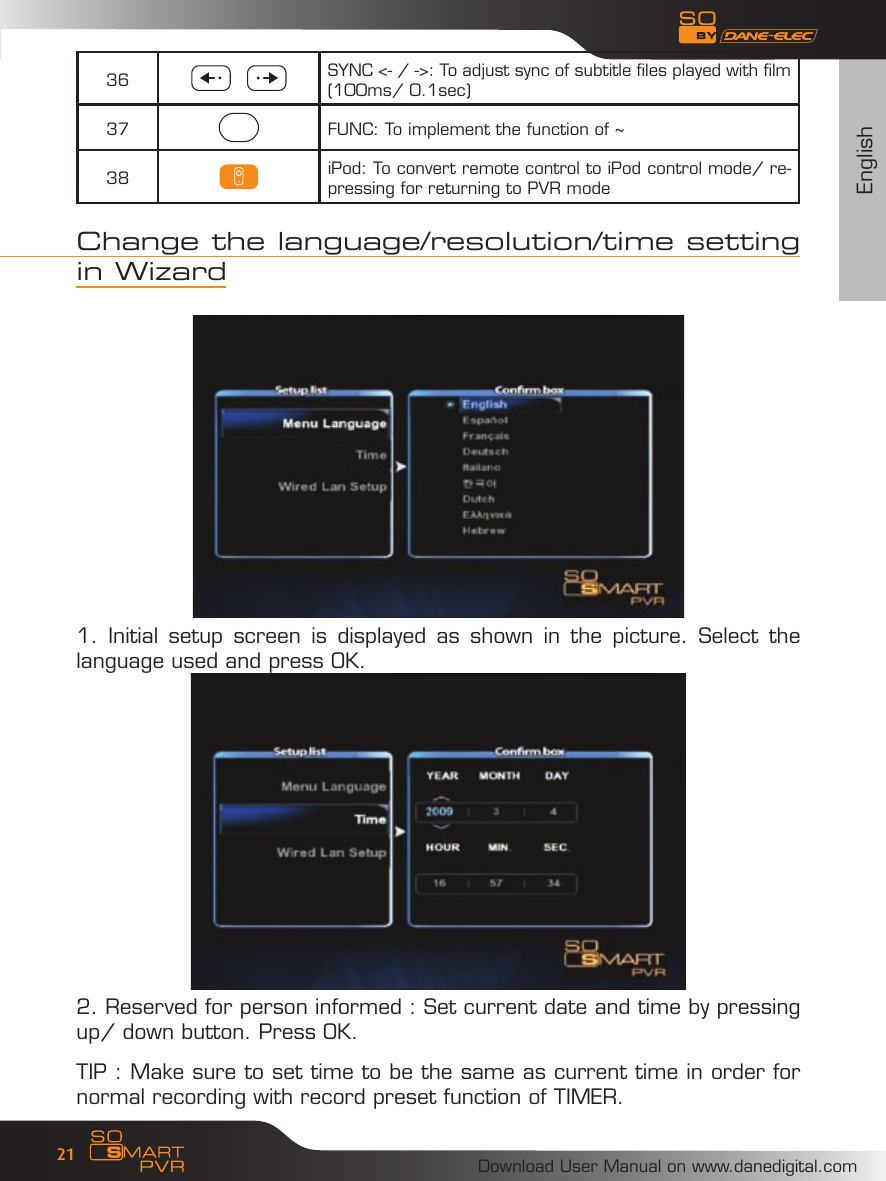
EnglishDownload User Manual on www.danedigital.com2136 SYNC <- / ->: To adjust sync of subtitle files played with film (100ms/ 0.1sec)37 FUNC: To implement the function of ~38 iPod: To convert remote control to iPod control mode/ re-pressing for returning to PVR modeChange the language/resolution/time setting in Wizard1.  Initial  setup  screen  is  displayed  as  shown  in  the  picture.  Select  the language used and press OK.2. Reserved for person informed : Set current date and time by pressing up/ down button. Press OK.TIP : Make sure to set time to be the same as current time in order for normal recording with record preset function of TIMER.
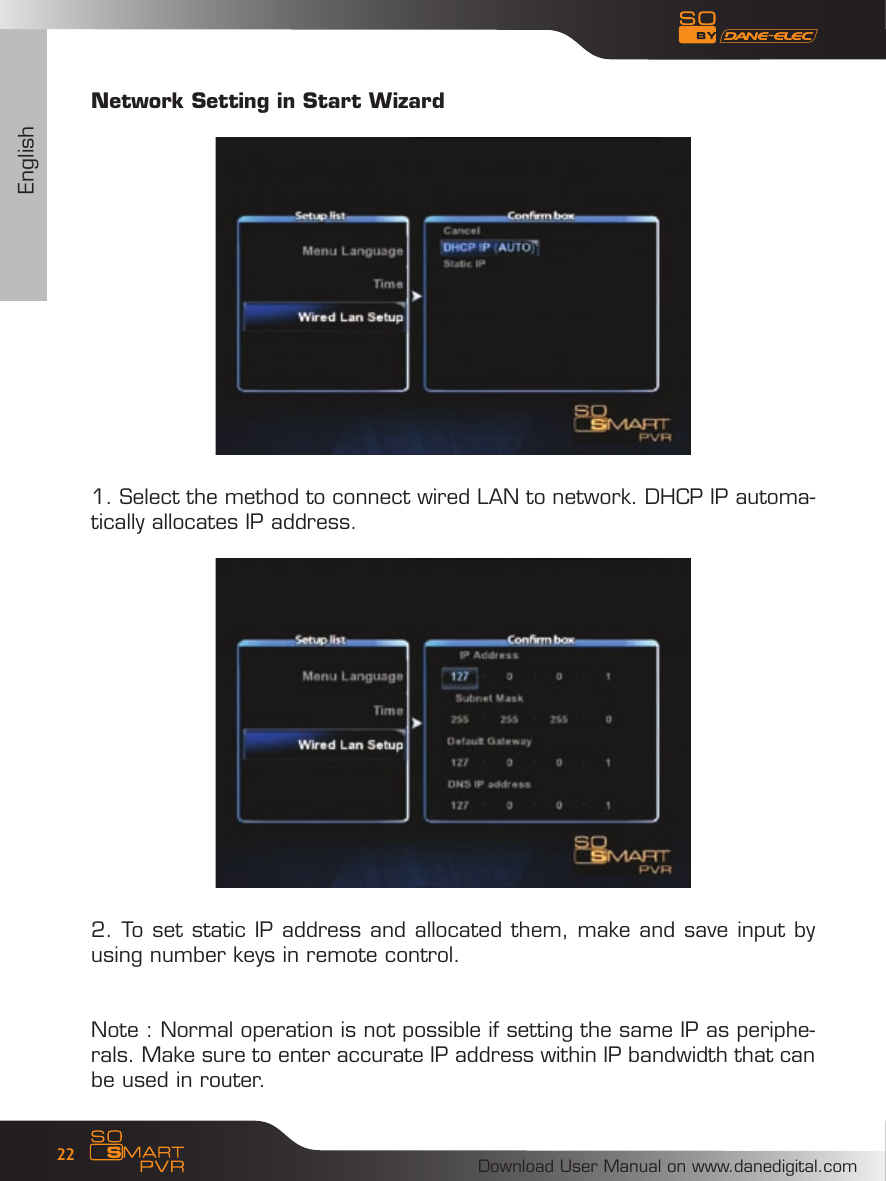
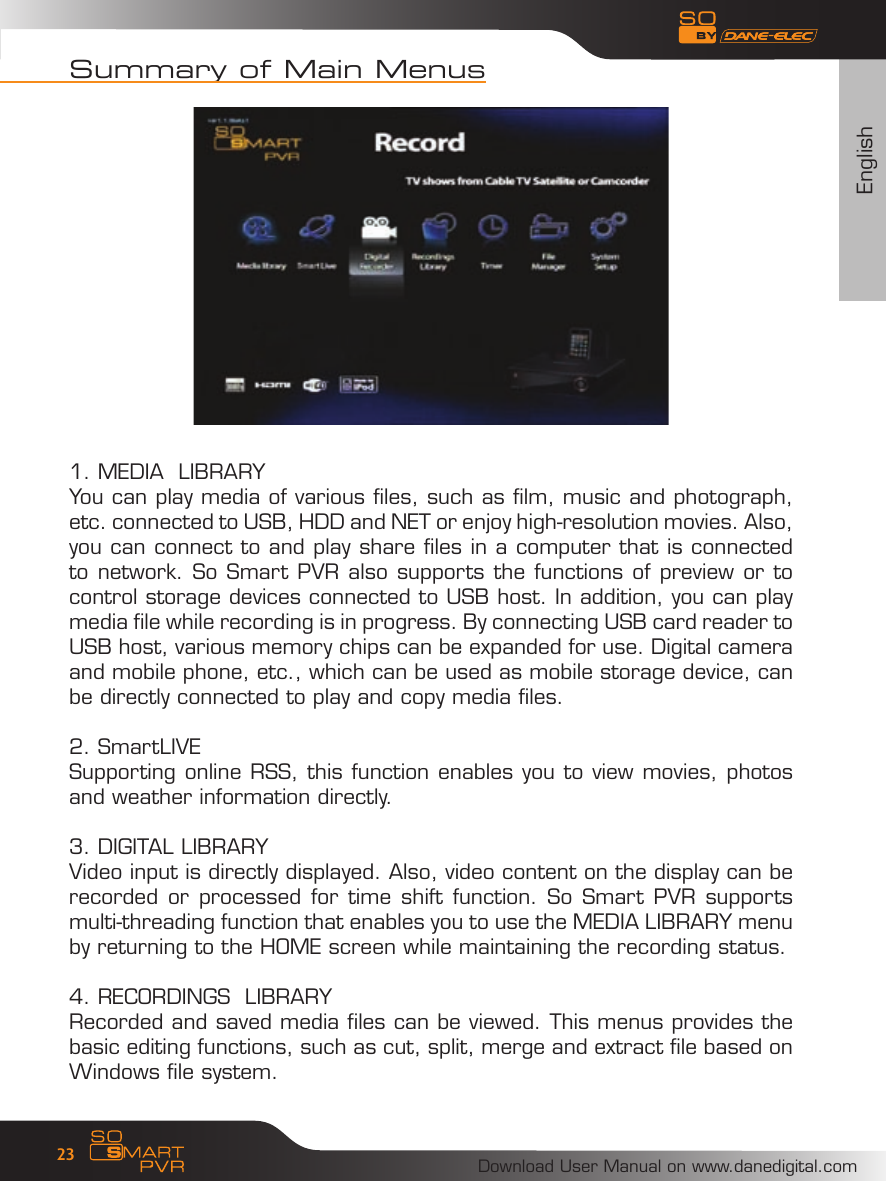
EnglishDownload User Manual on www.danedigital.com22Network Setting in Start Wizard1. Select the method to connect wired LAN to network. DHCP IP automa-tically allocates IP address. 2. To set static IP address and allocated them, make and save input by using number keys in remote control. Note : Normal operation is not possible if setting the same IP as periphe-rals. Make sure to enter accurate IP address within IP bandwidth that can be used in router.
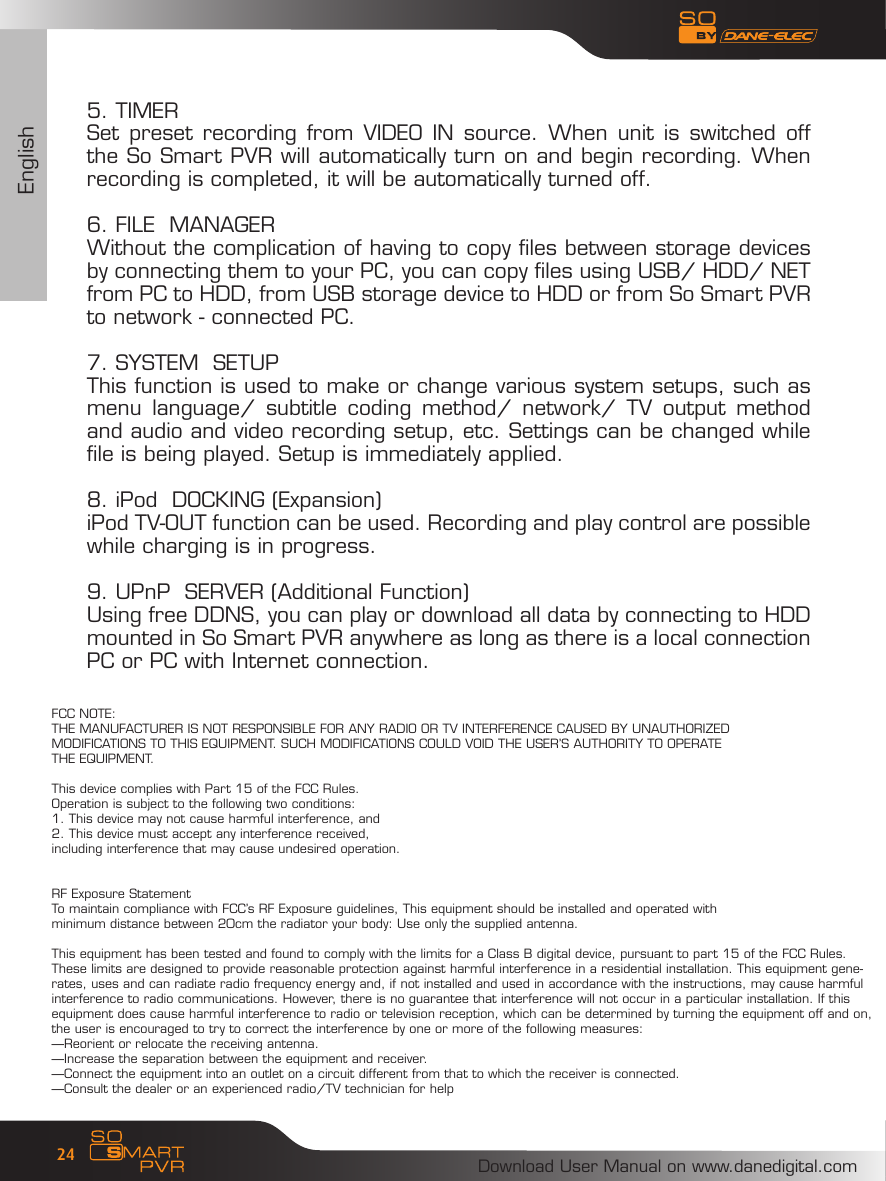
EnglishDownload User Manual on www.danedigital.com23Summary of Main Menus1. MEDIA  LIBRARYYou can play media of various files, such as film, music and photograph, etc. connected to USB, HDD and NET or enjoy high-resolution movies. Also, you can connect to and play share files in a computer that is connected to network. So Smart PVR also supports the functions of preview or to control storage devices connected to USB host. In addition, you can play media file while recording is in progress. By connecting USB card reader to USB host, various memory chips can be expanded for use. Digital camera and mobile phone, etc., which can be used as mobile storage device, can be directly connected to play and copy media files.2. SmartLIVESupporting online RSS, this function enables you to view movies, photos and weather information directly. 3. DIGITAL LIBRARYVideo input is directly displayed. Also, video content on the display can be recorded or processed for time  shift function. So Smart PVR supports multi-threading function that enables you to use the MEDIA LIBRARY menu by returning to the HOME screen while maintaining the recording status.  4. RECORDINGS  LIBRARYRecorded and saved media files can be viewed. This menus provides the basic editing functions, such as cut, split, merge and extract file based on Windows file system.
EnglishDownload User Manual on www.danedigital.com245. TIMERSet preset  recording  from  VIDEO  IN  source. When unit is switched off the So Smart PVR will automatically turn on and begin recording. When recording is completed, it will be automatically turned off. 6. FILE  MANAGERWithout the complication of having to copy files between storage devices by connecting them to your PC, you can copy files using USB/ HDD/ NET from PC to HDD, from USB storage device to HDD or from So Smart PVR to network - connected PC. 7. SYSTEM  SETUPThis function is used to make or change various system setups, such as menu  language/  subtitle  coding  method/  network/  TV  output  method and audio and video recording setup, etc. Settings can be changed while   file is being played. Setup is immediately applied.8. iPod  DOCKING (Expansion)iPod TV-OUT function can be used. Recording and play control are possible while charging is in progress.9. UPnP  SERVER (Additional Function)Using free DDNS, you can play or download all data by connecting to HDD mounted in So Smart PVR anywhere as long as there is a local connection PC or PC with Internet connection. FCC NOTE:THE MANUFACTURER IS NOT RESPONSIBLE FOR ANY RADIO OR TV INTERFERENCE CAUSED BY UNAUTHORIZED MODIFICATIONS TO THIS EQUIPMENT. SUCH MODIFICATIONS COULD VOID THE USER’S AUTHORITY TO OPERATE THE EQUIPMENT.This device complies with Part 15 of the FCC Rules.Operation is subject to the following two conditions:1. This device may not cause harmful interference, and2. This device must accept any interference received,including interference that may cause undesired operation.RF Exposure StatementTo maintain compliance with FCC’s RF Exposure guidelines, This equipment should be installed and operated with minimum distance between 20cm the radiator your body: Use only the supplied antenna.This equipment has been tested and found to comply with the limits for a Class B digital device, pursuant to part 15 of the FCC Rules. These limits are designed to provide reasonable protection against harmful interference in a residential installation. This equipment gene-rates, uses and can radiate radio frequency energy and, if not installed and used in accordance with the instructions, may cause harmful interference to radio communications. However, there is no guarantee that interference will not occur in a particular installation. If this equipment does cause harmful interference to radio or television reception, which can be determined by turning the equipment off and on, the user is encouraged to try to correct the interference by one or more of the following measures:—Reorient or relocate the receiving antenna.—Increase the separation between the equipment and receiver.—Connect the equipment into an outlet on a circuit different from that to which the receiver is connected.—Consult the dealer or an experienced radio/TV technician for help
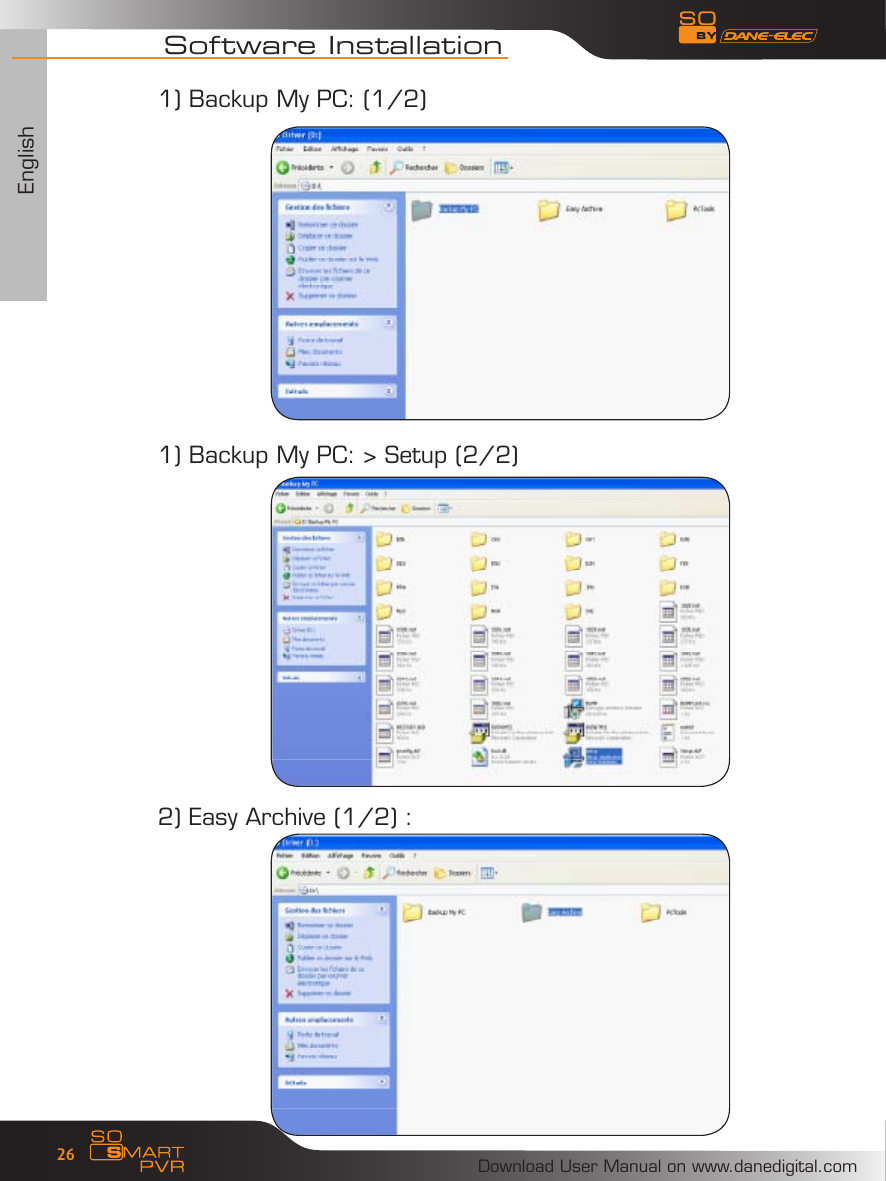
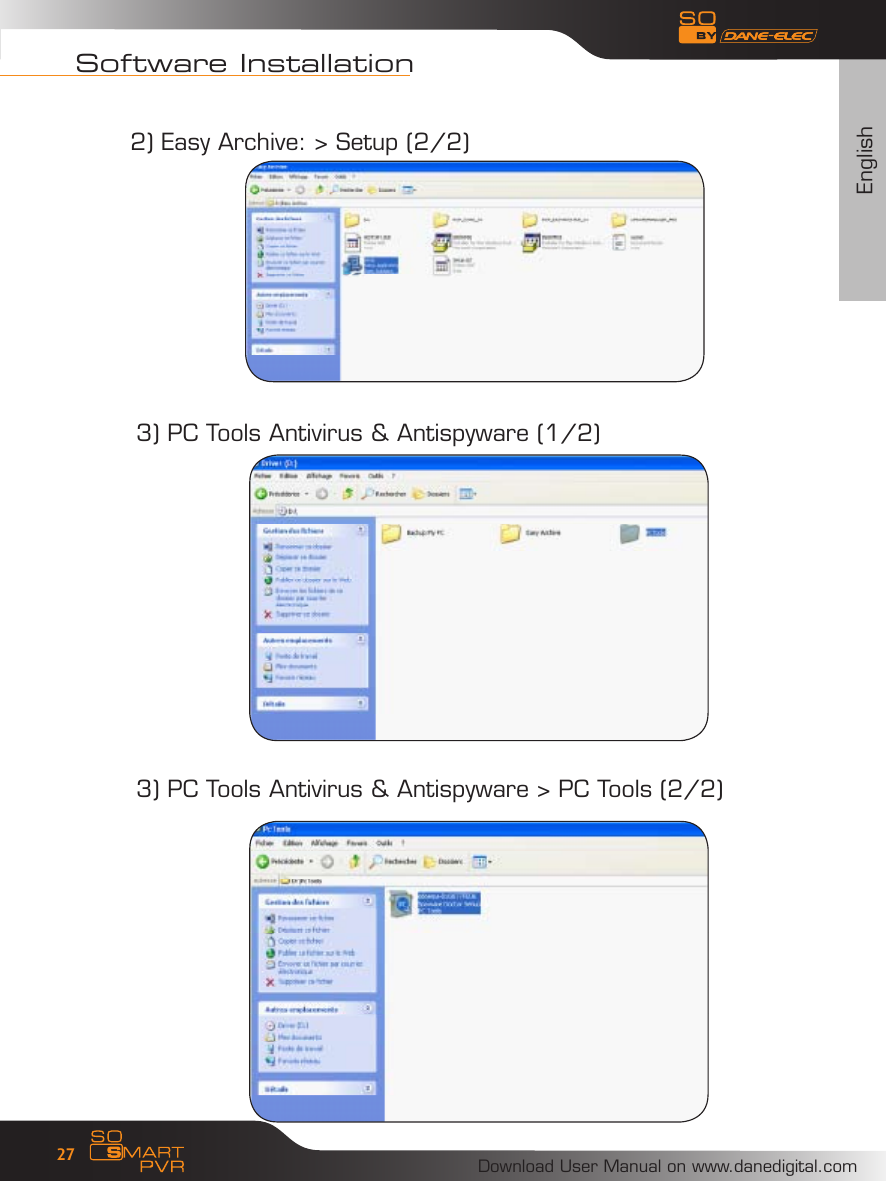
EnglishDownload User Manual on www.danedigital.com25Easy Archive : Choisissez les données que vous voulez sauvegarderBack Up My PC : Copiez une image de votre disque pour tout retrouverPC Tools Antivirus avec mise à jour antivirus offerte pendant 3 moisPC Tools Antispyware : Logiciel anti-espion avec mise à jour offerte pendant 3 moisEasy Archive: Choose the data that you want to saveBack Up My PC: Make an image of your hard drivePC Tools Antivirus with free updates for 3 monthsPC Tools Antispyware : Anti-spyware with free updates for 3 monthsEasy Archive : Zur Auswahl der zu speichernden DatenBack Up My PC : Zum Erstellen eines Festplattenabbildes, um alle Daten einfach wiederzufindenPC Tools Antivirus inklusive drei Monaten kostenloser AktualisierungenPC Tools Antispyware : Anti-spyware-Programm inklusive drei Monaten kostenloser AktualisierenEasy Archive : Vælg de data, du ønsker at gemmeBack Up My PC : Et virtuelt billede af din disk, for at være i stand til finde alle dine dataPC Tools Antivirus med gratis antivirus opdatering i 3 månederPC Tools Antispyware : antispion program med gratis opdatering i 3 månederEasy Archive : Seleccione los datos que desea guardarBack Up My PC : Copie una imagen de su disco duro parapoder recuperar todo en caso de problemasPC Tools Antivirus con actualización del antivirus gratuita durante 3 mesesPC Tools Antispyware : software Anti-Spy con actualización gratuita durante 3 mesesEasy Archive : Escolha os dados que quer salvaguardarBack Up My PC : Copie uma imagem do seu disco para encontrar tudo novamentePC Tools Antivirus com oferta da actualização antivirus durante 3 mesesPC Tools Antispyware : software Anti-Spy com oferta da actualização durante 3 mesesEasy Archive : Kies de gegevens die u wenst te bewarenBack Up My PC : Kopieer een afbeelding van uw schijf om alles terug te vindenPC Tools Antivirus met gratis actualisering antivirus gedurende 3 maandenPC Tools Antispyware : antispy-software met gratis actualisering gedurende 3 maandenEasy Archive : Scegli i dati che desideri salvareBack Up My PC : Copia un’immagine del tuo disco per ritrovarlaPC Tools Antivirus con aggiornamento antivirus gratuito per 3 mesiPC Tools Antispyware : software antispyware con aggiornamento antivirus gratuito per 3 mesizAbout DivX : ABOUT DivX VIDEO: DivX® is a digital video format created by DivX, Inc. This is an official DivX Certified device that plays DivX video. Visit www.DivX.com for more information and software tools to convert your files into DivX video.ABOUT DivX VIDEO-ON-DEMAND: This DivX Certified® device must  be  registered  in  order  to  play  DivX  Video-on-Demand (VOD) content. To generate the registration code, locate the DivX VOD section in the device setup menu. Go to vod.DivX.com with this code to complete the registration process and learn more about DivX VOD.Software Installation :
EnglishDownload User Manual on www.danedigital.com26Software Installation1) Backup My PC: (1/2)1) Backup My PC: > Setup (2/2)2) Easy Archive (1/2) :
EnglishDownload User Manual on www.danedigital.com27Software Installation3) PC Tools Antivirus & Antispyware (1/2)3) PC Tools Antivirus & Antispyware > PC Tools (2/2)2) Easy Archive: > Setup (2/2)
Download User Manual on www.danedigital.com28www.danedigital.comwww.dane-elec.com
Download User Manual on www.danedigital.com29Garantie :
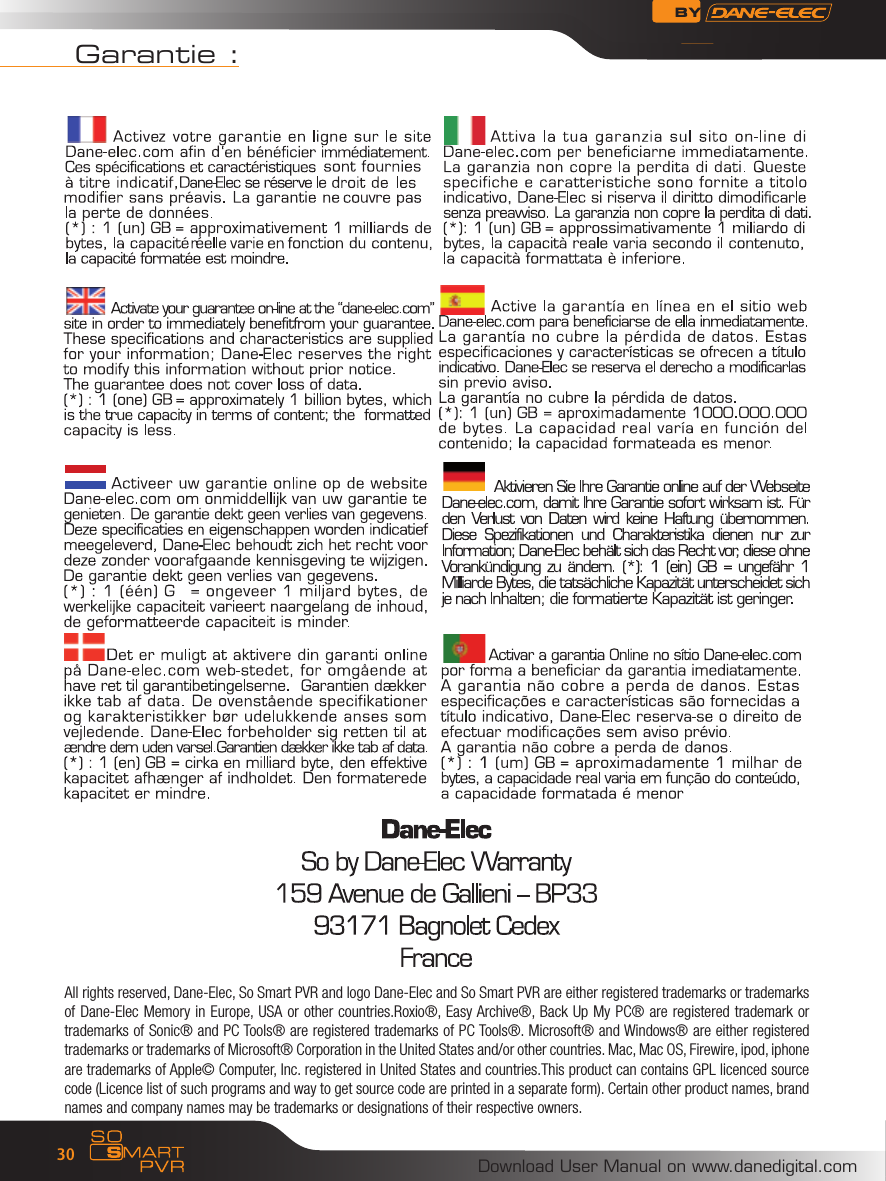
Download User Manual on www.danedigital.com30Garantie :All rights reserved, Dane-Elec, So Smart PVR and logo Dane-Elec and So Smart PVR are either registered trademarks or trademarks of Dane-Elec Memory in Europe, USA or other countries.Roxio®, Easy Archive®, Back Up My  PC® are registered trademark or trademarks of Sonic® and PC Tools® are registered trademarks of PC Tools®. Microsoft® and Windows® are either registered trademarks or trademarks of Microsoft® Corporation in the United States and/or other countries. Mac, Mac OS, Firewire, ipod, iphone are trademarks of Apple© Computer, Inc. registered in United States and countries.This product can contains GPL licenced source code (Licence list of such programs and way to get source code are printed in a separate form). Certain other product names, brand names and company names may be trademarks or designations of their respective owners.
Download User Manual on www.danedigital.com31R&TTE CertificationČesky [Czech] : Dane-Elec tímto prohlašuje, že tento So Smart PVR je ve shodě se základními požadavky a dalšími příslušnými ustanoveními směrnice 1999/5/ES. Dansk [Danish] : Undertegnede Dane-Elec erklærer herved, at følgende udstyr So Smart PVR overholder de væsentlige krav og øvrige relevante krav i direktiv 1999/5/EF. Deutsch  [German]  :  Hiermit  erklärt  Dane-Elec  dass  sich  das  Gerät  So  Smart PVR  in  Übereinstimmung  mit  den  grundlegenden Anforderungen  und  den  übrigen einschlägigen Bestimmungen der Richtlinie 1999/5/EG bendet. Eesti [Estonian] : Käesolevaga kinnitab Dane-Elec seadme So Smart PVR vastavust direktiivi  1999/5/EÜ  põhinõuetele  ja  nimetatud  direktiivist  tulenevatele  teistele asjakohastele sätetele. English : Hereby, Dane-Elec, declares that this So Smart PVR is in compliance with the essential requirements and other relevant provisions of Directive 1999/5/EC. Español [Spanish] : Por medio de la presente Dane-Elec declara que el So Smart PVR cumple con los requisitos esenciales y cualesquiera otras disposiciones aplicables o exigibles de la Directiva 1999/5/CE.  Ελληνική  [Greek]  :  ΜΕ  ΤΗΝ  ΠΑΡΟΥΣΑ  Dane-Elec ΔΗΛΩΝΕΙ  ΟΤΙ  So  Smart PVR ΣΥΜΜΟΡΦΩΝΕΤΑΙ ΠΡΟΣ ΤΙΣ ΟΥΣΙΩΔΕΙΣ ΑΠΑΙΤΗΣΕΙΣ ΚΑΙ ΤΙΣ ΛΟΙΠΕΣ ΣΧΕΤΙΚΕΣ ΔΙΑΤΑΞΕΙΣ ΤΗΣ ΟΔΗΓΙΑΣ 1999/5/ΕΚ. Français [French] : Par la présente Dane-Elec déclare que l’appareil So Smart PVR est  conforme  aux  exigences  essentielles  et  aux  autres  dispositions pertinentes de la directive 1999/5/CE. Italiano [Italian] : Con la presente Dane-Elec dichiara che questo So Smart PVR è  conforme  ai  requisiti  essenziali ed  alle  altre  disposizioni  pertinenti  stabilite  dalla direttiva 1999/5/CE. Latviski [Latvian] : Ar šo Dane-Elec deklarē, ka So Smart PVR atbilst Direktīvas 1999/5/EK būtiskajām prasībām un citiem ar to saistītajiem noteikumiem. Lietuvių [Lithuanian] : Šiuo Dane-Elec deklaruoja, kad šis So Smart PVR atitinka esminius reikalavimus ir kitas 1999/5/EB Direktyvos nuostatas. Nederlands [Dutch] : Hierbij verklaart Dane-Elec dat het toestel So Smart PVR in overeenstemming is met de essentiële eisen en de andere relevante bepalingen van richtlijn 1999/5/EG. Malti [Maltese] : Hawnhekk, Dane-Elec, jiddikjara li dan So Smart PVR jikkonforma mal-ħtiġijiet  essenzjali  u  ma  provvedimenti  oħrajn  relevanti  li  hemm  d-Dirrettiva 1999/5/EC. Magyar [Hungarian] : Alulírott, Dane-Elec nyilatkozom, hogy a So Smart PVR megfelel  a  vonatkozó  alapvetõ  követelményeknek  és  az  1999/5/EC  irányelv  egyéb elõírásainak. Polski [Polish] : Niniejszym Dane-Elec oświadcza, że So Smart PVR jest zgodny z zasadniczymi wymogami oraz pozostałymi stosownymi postanowieniami Dyrektywy 1999/5/EC.
Download User Manual on www.danedigital.com32 Português [Portuguese] : Dane-Elec declara que este So Smart PVR está conforme com os requisitos essenciais e outras disposições da Directiva 1999/5/CE.Slovensko  [Slovenian]  :  Dane-Elec  izjavlja,  da  je  ta  So  Smart  PVR  v  skladu  z bistvenimi zahtevami in ostalimi relevantnimi določili direktive 1999/5/ES. Slovensky [Slovak] : Dane-Elec týmto vyhlasuje, že So Smart PVR spĺňa základné požiadavky a všetky príslušné ustanovenia Smernice 1999/5/ES.  Svenska  [Swedish]  : Härmed  intygar  Dane-Elec  att denna  So  Smart  PVR står  I överensstämmelse med de väsentliga egenskapskrav och övriga relevanta bestämmelser som framgår av direktiv 1999/5/EG.Íslenska [Icelandic] : Hér með lýsir Dane-Elec yr því að So Smart PVR er í samræmi við grunnkröfur og aðrar kröfur, sem gerðar eru í tilskipun 1999/5/EC.  Norsk  [Norwegian]  :  Dane-Elec  erklærer  herved at  utstyret  So  Smart  PVR er  i samsvar med de grunnleggende krav og øvrige relevante krav i direktiv 1999/5/EF. [Israël] : 1999/5/ CE   מתואם לדרישות התקן המחמירות של «So Smart PVR»חברת «דאן-אלק» מצהירה בזאת שהמוצר
Download User Manual on www.danedigital.com33Part of this product software falls under open source licence (GPL).For more information about GPL see : http://www.gnu.org/licenses/gpl.htmlA copy of GPL license at the end of this document.The GPL’ed source code used in this product falls into a number of categories:1-The compiler toolchain used to build the software.2-The linux kernel 2.6.12 used as the operating system3-Other third parties software :MTDThis program is used to erase ash memory, and is a utility from the Memory Technology Device (MTD) subsystem for Linux. The ofcial MTD site is:http://www.linux-mtd.infradead.org/The version we used (unmodied) can be downloaded from:http://www.linux-mtd.infradead.org/source.htmldosfstoolsThese tools are used to check and optionally repair FAT lesystems. The ofcial site for dosfstools is:ftp://ftp.uni-erlangen.de/pub/Linux/LOCAL/dosfstools/The base version we used can be downloaded from:ftp://ftp.uni-erlangen.de/pub/Linux/LOCAL/dosfstools/dosfstools-2.11.src.tar.gzSource cod e is freely available (three years from date of purchase) upon written request to:Dane Elec MemoryLegal Department159 avenue Gallieni93171 BagnoletFranceA fee of 10€ will be requested for CDROM duplication and delivery fees only.
Download User Manual on www.danedigital.com34 Each version is given a distinguishing version number. If the Program species a version number of this License which appliesto it and «any later version», you have the option of following the terms and conditions either of that version or of any later versionpublished by the Free Software Foundation. If the Program does not specify a version number of this License, you may choose anyversion ever published by the Free Software Foundation. 10. If you wish to incorporate parts of the Program into other free programs whose distribution conditions are different, write tothe author to ask for permission. For software which is copyrighted by the Free Software Foundation, write to the Free SoftwareFoundation; we sometimes make exceptions for this. Our decision will be guided by the two goals of preserving the free status ofall derivatives of our free software and of promoting the sharing and reuse of software generally.NO WARRANTY 11. BECAUSE THE PROGRAM IS LICENSED FREE OF CHARGE, THERE IS NO WARRANTY FOR THE PROGRAM, TOTHE EXTENT PERMITTED BY APPLICABLE LAW. EXCEPT WHEN OTHERWISE STATED IN WRITING THE COPYRIGHTHOLDERS AND/OR OTHER PARTIES PROVIDE THE PROGRAM «AS IS» WITHOUT WARRANTY OF ANY KIND, EITHEREXPRESSED OR IMPLIED, INCLUDING, BUT NOT LIMITED TO, THE IMPLIED WARRANTIES OF MERCHANTABILITYAND FITNESS FOR A PARTICULAR PURPOSE. THE ENTIRE RISK AS TO THE QUALITY AND PERFORMANCE OF THEPROGRAM IS WITH YOU. SHOULD THE PROGRAM PROVE DEFECTIVE, YOU ASSUME THE COST OF ALL NECESSARYSERVICING, REPAIR OR CORRECTION. 12. IN NO EVENT UNLESS REQUIRED BY APPLICABLE LAW OR AGREED TO IN WRITING WILL ANY COPYRIGHT HOLDER,OR ANY OTHER PARTY WHO MAY MODIFY AND/OR REDISTRIBUTE THE PROGRAM AS PERMITTED ABOVE, BE LIABLETO YOU FOR DAMAGES, INCLUDING ANY GENERAL, SPECIAL, INCIDENTAL OR CONSEQUENTIAL DAMAGES ARISINGOUT OF THE USE OR INABILITY TO USE THE PROGRAM (INCLUDING BUT NOT LIMITED TO LOSS OF DATA OR DATABEING RENDERED INACCURATE OR LOSSES SUSTAINED BY YOU OR THIRD PARTIES OR A FAILURE OF THE PROGRAMTO OPERATE WITH ANY OTHER PROGRAMS), EVEN IF SUCH HOLDER OR OTHER PARTY HAS BEEN ADVISED OF THEPOSSIBILITY OF SUCH DAMAGES.END OF TERMS AND CONDITIONSHow to Apply These Terms to Your New Programs ? If you develop a new program, and you want it to be of the greatest possible use to the public, the best way to achieve this is tomake it free software which everyone can redistribute and change under these terms. To do so, attach the following notices to the program. It is safest to attach them to the start of each source le to most effectivelyconvey the exclusion of warranty; and each le should have at least the «copyright» line and a pointer to where the full notice isfound.      <one line to give the program’s name and a brief idea of what it does.>      Copyright (C) <year> <name of author> This program is free software; you can redistribute it and/or modify it under the terms of the GNU General Public License aspublished by the Free Software Foundation; either version 2 of the License, or (at your option) any later version. This program is distributed in the hope that it will be useful, but WITHOUT ANY WARRANTY; without even the implied warranty ofMERCHANTABILITY or FITNESS FOR A PARTICULAR PURPOSE. See the GNU General Public License for more details.You should have received a copy of the GNU General Public License along with this program; if not, write to the Free SoftwareFoundation, Inc., 59 Temple Place, Suite 330, Boston, MA 02111-1307 USAAlso add information on how to contact you by electronic and paper mail.If the program is interactive, make it output a short notice like this when it starts in an interactive mode:   Gnomovision version 69, Copyright (C) year name of author Gnomovision comes with ABSOLUTELY NO WARRANTY; fordetails type `show w’. This is free software, and you are welcome to redistribute it under certain conditions; type `show c’ fordetails. The hypothetical commands `show w’ and `show c’ should show the appropriate parts of the General Public License. Of course,the commands you use may be called something other than `show w’ and `show c’; they could even be mouse-clicks or menuitems--whatever suits your program. You should also get your employer (if you work as a programmer) or your school, if any, to sign a «copyright disclaimer» for the program, if necessary. Here is a sample; alter the names: Yoyodyne, Inc., hereby disclaims all copyright interest in the program `Gnomovision’ (which makes passes at compilers) writtenby James Hacker.        <signature of Ty Coon>, 1 April 1989      Ty Coon, President of Vice This General Public License does not permit incorporating your program into proprietary programs. If your program is a subroutinelibrary, you may consider it more useful to permit linking proprietary applications with the library. If this is what you want to do, usethe GNU Library General Public License instead of this License.
Download User Manual on www.danedigital.com35GNU GENERAL PUBLIC LICENSEVersion 2, June 1991A French translation of the Licence is available on http://www.linux-france.org/article/these/gpl.htmlCopyright (C) 1989, 1991 Free Software Foundation, Inc.  59 Temple Place, Suite 330, Boston, MA 02111-1307 USAEveryone is permitted to copy and distribute verbatim copies of this license document, but changing it is not allowed.Preamble The licenses for most software are designed to take away your freedom to share and change it. By contrast, the GNU GeneralPublic License is intended to guarantee your freedom to share and change free software--to make sure the software is free for allits users. This General Public License applies to most of the Free Software Foundation’s software and to any other program whoseauthors commit to using it. (Some other Free Software Foundation software is covered by the GNU Library General Public Licenseinstead.) You can apply it to your programs, too. When we speak of free software, we are referring to freedom, not price. Our General Public Licenses are designed to make surethat you have the freedom to distribute copies of free software (and charge for this service if you wish), that you receive sourcecode or can get it if you want it, that you can change the software or use pieces of it in new free programs; and that you know youcan do these things. To protect your rights, we need to make restrictions that forbid anyone to deny you these rights or to ask you to surrender the rights.These restrictions translate to certain responsibilities for you if you distribute copies of the software, or if you modify it. For example, if you distribute copies of such a program, whether gratis or for a fee, you must give the recipients all the rights thatyou have. You must make sure that they, too, receive or can get the source code. And you must show them these terms so theyknow their rights. We protect your rights with two steps: (1) copyright the software, and (2) offer you this license which gives you legal permission tocopy, distribute and/or modify the software. Also, for each author’s protection and ours, we want to make certain that everyone understands that there is no warranty for thisfree software. If the software is modied by someone else and passed on, we want its recipients to know that what they have is notthe original, so that any problems introduced by others will not reect on the original authors’ reputations. Finally, any free program is threatened constantly by software patents. We wish to avoid the danger that redistributors of a freeprogram will individually obtain patent licenses, in effect making the program proprietary. To prevent this, we have made it clear thatany patent must be licensed for everyone’s free use or not licensed at all. The precise terms and conditions for copying, distribution and modication follow.GNU GENERAL PUBLIC LICENSE TERMS AND CONDITIONS FOR COPYING, DISTRIBUTION AND MODIFICATION 0. This License applies to any program or other work which contains a notice placed by the copyright holder saying it may bedistributed under the terms of this General Public License. The «Program», below, refers to any such program or work, and a «workbased on the Program» means either the Program or any derivative work under copyright law: that is to say, a work containing theProgram or a portion of it, either verbatim or with modications and/or translated into another language. (Hereinafter, translation isincluded without limitation in the term «modication».) Each licensee is addressed as «you». Activities other than copying, distribution and modication are not covered by this License; they are outside its scope. The act ofrunning the Program is not restricted, and the output from the Program is covered only if its contents constitute a work based on theProgram (independent of having been made by running the Program). Whether that is true depends on what the Program does. 1. You may copy and distribute verbatim copies of the Program’s source code as you receive it, in any medium, provided that youconspicuously and appropriately publish on each copy an appropriate copyright notice and disclaimer of warranty; keep intact allthe notices that refer to this License and to the absence of any warranty; and give any other recipients of the Program a copy ofthis License along with the Program. You may charge a fee for the physical act of transferring a copy, and you may at your option offer warranty protection in exchangefor a fee. 2. You may modify your copy or copies of the Program or any portion of it, thus forming a work based on the Program, and copy anddistribute such modications or work under the terms of Section 1 above, provided that you also meet all of these conditions: a) You must cause the modied les to carry prominent notices stating that you changed the les and the date of any change. b) You must cause any work that you distribute or publish, that in whole or in part contains or is derived from the Program or anypart thereof, to be licensed as a whole at no charge to all third parties under the terms of this License. c) If the modied program normally reads commands interactively when run, you must cause it, when started running for suchinteractive use in the most ordinary way, to print or display an announcement including an appropriate copyright notice and a noticethat there is no warranty (or else, saying that you provide a warranty) and that users may redistribute the program under theseconditions, and telling the user how to view a copy of this License. (Exception: if the Program itself is interactive but does notnormally print such an announcement, your work based on the Program is not required to print an announcement.)
Download User Manual on www.danedigital.com36 These requirements apply to the modied work as a whole. If identiable sections of that work are not derived from the Program,and can be reasonably considered independent and separate works in themselves, then this License, and its terms, do not applyto those sections when you distribute them as separate works. But when you distribute the same sections as part of a whole whichis a work based on the Program, the distribution of the whole must be on the terms of this License, whose permissions for otherlicensees extend to the entire whole, and thus to each and every part regardless of who wrote it.  Thus, it is not the intent of this section to claim rights or contest your rights to work written entirely by you; rather, the intent is toexercise the right to control the distribution of derivative or collective works based on the Program.  In addition, mere aggregation of another work not based on the Program with the Program (or with a work based on the Program)on a volume of a storage or distribution medium does not bring the other work under the scope of this License.  3. You may copy and distribute the Program (or a work based on it, under Section 2) in object code or executable form under theterms of Sections 1 and 2 above provided that you also do one of the following:  a) Accompany it with the complete corresponding machine-readable source code, which must be distributed under the terms ofSections 1 and 2 above on a medium customarily used for software interchange; or,b) Accompany it with a written offer, valid for at least three years, to give any third party, for a charge no more than your cost ofphysically performing source distribution, a complete machine-readable copy of the corresponding source code, to be distributedunder the terms of Sections 1 and 2 above on a medium customarily used for software interchange; or,c) Accompany it with the information you received as to the offer to distribute corresponding source code. (This alternative isallowed only for noncommercial distribution and only if you received the program in object code or executable form with such anoffer, in accord with Subsection b above.)The source code for a work means the preferred form of the work for making modications to it. For an executable work, completesource code means all the source code for all modules it contains, plus any associated interface denition les, plus the scriptsused to control compilation and installation of the executable. However, as a special exception, the source code distributed neednot include anything that is normally distributed (in either source or binary form) with the major components (compiler, kernel, and soon) of the operating system on which the executable runs, unless that component itself accompanies the executable. If distributionof executable or object code is made by offering access to copy from a designated place, then offering equivalent access to copythe source code from the same place counts as distribution of the source code, even though third parties are not compelled to copythe source along with the object code. 4. You may not copy, modify, sublicense, or distribute the Program except as expressly provided under this License. Any attemptotherwise to copy, modify, sublicense or distribute the Program is void, and will automatically terminate your rights under thisLicense. However, parties who have received copies, or rights, from you underthis License will not have their licenses terminated so long as such parties remain in full compliance.  5. You are not required to accept this License, since you have not signed it. However, nothing else grants you permission to modifyor distribute the Program or its derivative works. These actions are prohibited by law if you do not accept this License. Therefore,by modifying or distributing the Program (or any work based on the Program), you indicate your acceptance of this License to do so,and all its terms and conditions for copying, distributing or modifying the Program or works based on it. 6. Each time you redistribute the Program (or any work based on the Program), the recipient automatically receives a license fromthe original licensor to copy, distribute or modify the Program subject to these terms and conditions. You may not impose any furtherrestrictions on the recipients’ exercise of the rights granted herein.You are not responsible for enforcing compliance by third parties to this License. 7. If, as a consequence of a court judgment or allegation of patent infringement or for any other reason (not limited to patentissues), conditions are imposed on you (whether by court order, agreement or otherwise) that contradict the conditions of thisLicense, they do not excuse you from the conditions of this License. If you cannot distribute so as to satisfy simultaneously yourobligations under this License and any other pertinent obligations, then as a consequence you may not distribute the Program at all.For example, if a patent license would not permit royalty-free redistribution of the Program by all those who receive copies directlyor indirectly through you, then the only way you could satisfy both it and this License would be to refrain entirely from distributionof the Program.If any portion of this section is held invalid or unenforceable under any particular circumstance, the balance of the section isintended to apply and the section as a whole is intended to apply in other circumstances. It is not the purpose of this section to induce you to infringe any patents or other property right claims or to contest validity ofany such claims; this section has the sole purpose of protecting the integrity of the free software distribution system, which isimplemented by public license practices. Many people have made generous contributions to the wide range of software distributedthrough that system in reliance on consistent application of that system; it is up to the author/donor to decide if he or she is willingto distribute software through any other system and a licensee cannot impose that choice. This section is intended to make thoroughly clear what is believed to be a consequence of the rest of this License. 8. If the distribution and/or use of the Program is restricted in certain countries either by patents or by copyrighted interfaces,the original copyright holder who places the Program under this License may add an explicit geographical distribution limitationexcluding those countries, so that distribution is permitted only in or among countries not thus excluded. In such case, this Licenseincorporates the limitation as if written in the body of this License. 9. The Free Software Foundation may publish revised and/or new versions of the General Public License from time to time. Suchnew versions will be similar in spirit to the present version, but may differ in detail to address new problems or concerns.
Download User Manual on www.danedigital.comwww.danedigital.comwww.dane-elec.com

Navigation menu