DONGGUAN YUJIA INDUSTRY HF391 QUADPOD User Manual Quadpod Specificationx
Dongguan Yujia Industry Co.,Ltd QUADPOD Quadpod Specificationx
User Manual
HF‐391Instructionmanual
Introduction:
Please read below before your using.
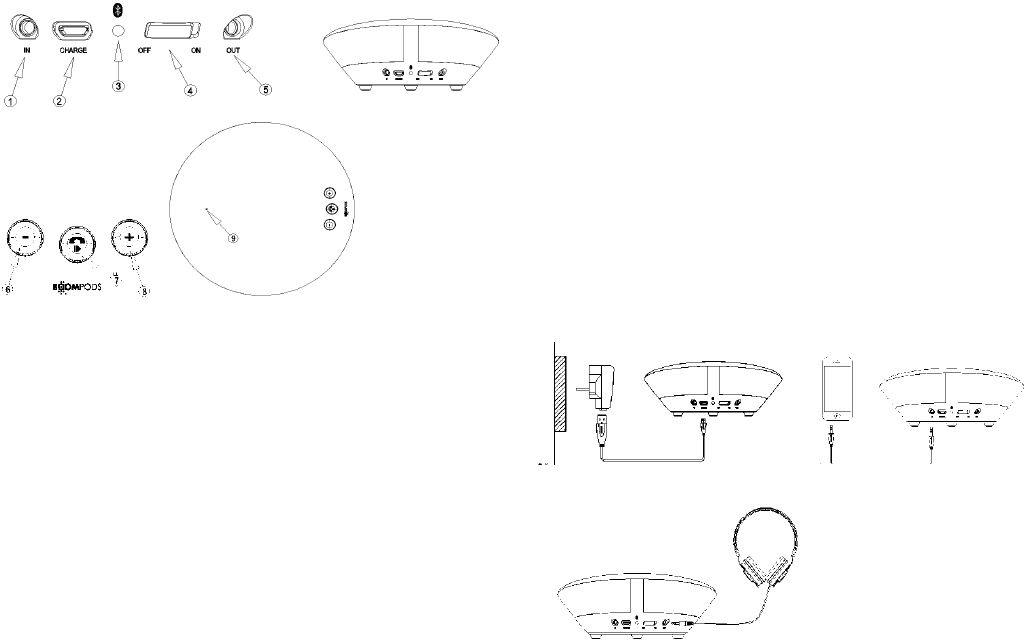
① LINE IN ② CHARGE ③Warning LED ④Power ON/OFF
⑤ Headset OUT ⑥ “-”quickly press : volumce decrease/long pres
s :last song ⑦ “+”quickly press : play、stop、answer calls、hang
up/long press : start to pair agian ⑧quickly press: volumce increas
e/long press : next song ⑨MIC
Operation:
1.switch the “Power on/off”button on,you can hear the warning sound
s“hello”which means in pairing mode.
2. 1.Active your pnone’s Bluetoon function and the enter Bluetooth de
vice’s searching mode, find out “Quadpod”device and start pairing.
3.successfully connected.,you can hear the warning sounds “Your d
evice is connected”,and now you can play music/talk on phone/telec
onference.
4.when the power of battery is less than 10%, you will hear another
sounds “Battery low”, and please charge it in time.
5. switch off the “Power on/ off” button, you will find the device is
turned off and said “Goodbye”.
LINEInmanual:
1.switch the “power on /off ”, connect the 3.5mm line-in cable to your
audio source and the other port to the speaker “IN”。
2.start playing music. ()
charging:
to charge , connect the USB cable directly to a laptop or mains USB to
your speaker ,the Micro USB connected into the“CHARGE” hole. The
LED will turn red whilst charging
Headphone connected
it is able to connect with the headphone too when connect the 3.5 line-in
cable
to your headphone and the other port into the “OUT” hole
See from Blow drawing
charging/LINE IN / LINE OUT
ChargingLINEIN
HeadsetOUT
Technical details:
●Power supplier:DC5V---1A
●Output power:10W(1khz,THD3%)
●Frequency: 120HZ---15000HZ
●Speaker:OD40mm (4 OHM 3W*2)+OD32mm(4OHM3W*2)
●effective distance:≦10m
●Li-ion:3.7V 40 mm X 30 mm X 16mm(1000mA)
●full charing:3 hours
●Playing :50% volumce ≥6 hours
●S/N:≥65dB
●Bluetooth version : Bluetooth 4.0
●APTX audio processing

FCC NOTE:
This device complies with Part 15 of the FCC Rules.
Operation is subject to the following two conditions: (1) this device may not cause
harmful interference, and (2) this device must accept any interference received,
including interference that may cause undesired operation.
THE MANUFACTURER IS NOT RESPONSIBLE FOR ANY RADIO OR TV
INTERFERENCE CAUSED BY UNAUTHORIZED MODIFICATIONS OR CHANGE
TO THIS EQUIPMENT. SUCH MODIFICATIONS OR CHANGE COULD VOID AND
CHANGE ANNTENA WHICH THE MANUFACTURER PROVIDES.
IT IS THE USER'S AUTHORITY TO OPERATE THE EQUIPMENT.
This equipment has been tested and found to comply with the limits for a Class B
digital device, pursuant to part 15 of the FCC Rules. These limits are designed to
provide reasonable protection against harmful interference in a resi dential installation.
This equipment generates, uses and can radiate radio frequenc y energy and, if not
installed and used in accordance with the in structions, may cause harmful interference
to radio communications. However, there is no guarantee that interference will not
occur in a particular insta llation. If this equipment does cause harmful interference to
radio or television reception, which can be determined by turning the equipment off
and on, the user is encouraged to try to corr ect the interference by one or more of the
following measures:
-- Reorient or relocate the receiving antenna.
-- Increase the separation between the equipment and receiver.
-- Connect the equipment into an outlet on a circuit different from that to which the
receiver is connected.
-- Consult the dealer or an experien ced radio/TV technician for help.
To maintain compliance with FCC’s RF exposure guidelines, this equipment should be
installed and operated with a minimum distance of 20cm between the radiator and your
body.