Digital China Networks DCWL-7962OT Outdoor Access Point User Manual

Digital China Networks (Beijing) Limited Outdoor Access Point

User Manual

           DCWL-7962OT Outdoor AP Installation Manual  DCWL-7962OT 室外型无线接入点产品 安装指导  Manual Version: v1.1
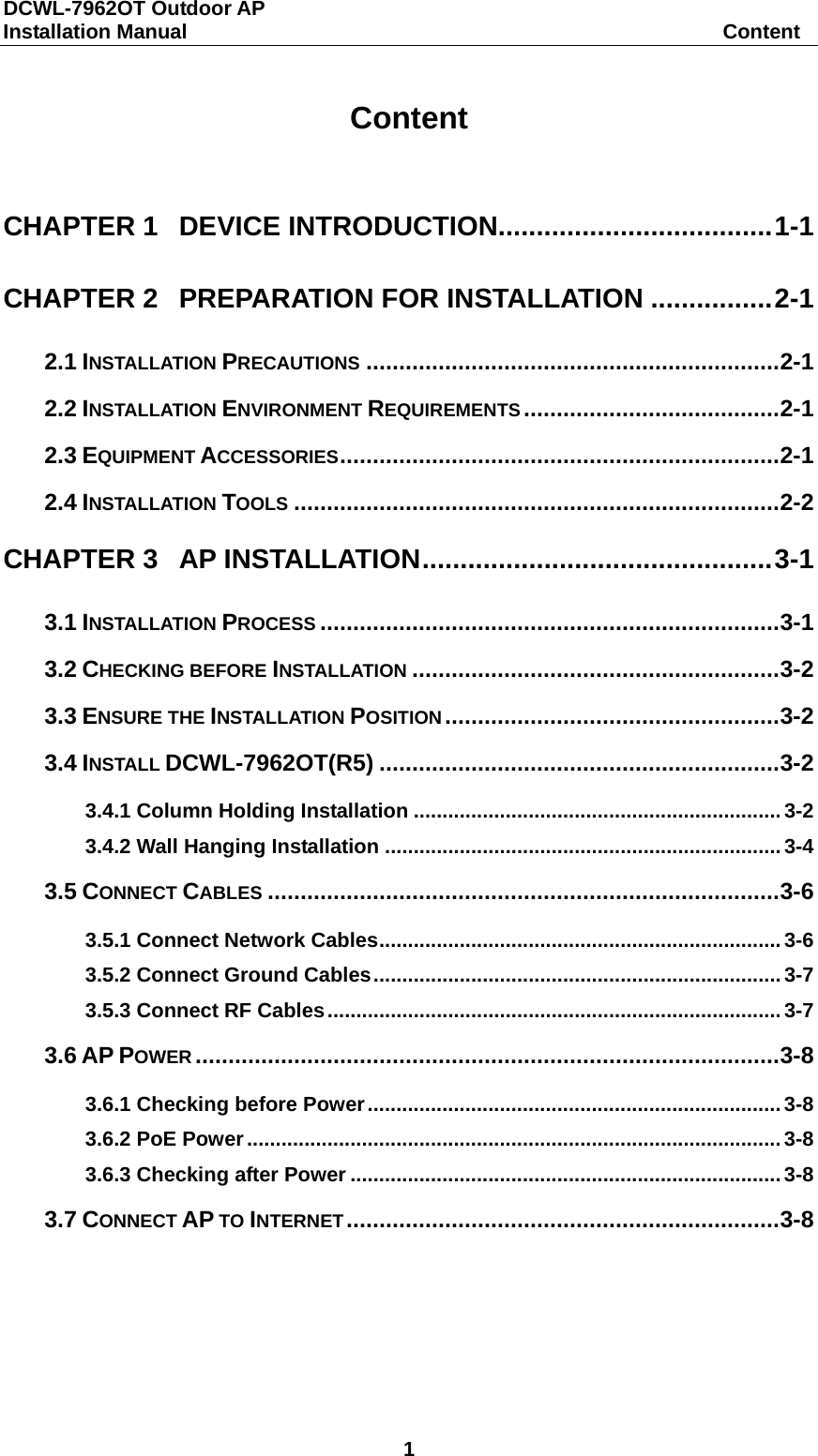
DCWL-7962OT Outdoor AP Installation Manual                                                    Content 1  Content  CHAPTER 1 DEVICE INTRODUCTION.................................... 1-1 CHAPTER 2 PREPARATION FOR INSTALLATION ................ 2-1 2.1 INSTALLATION PRECAUTIONS ............................................................... 2-1 2.2 INSTALLATION ENVIRONMENT REQUIREMENTS ....................................... 2-1 2.3 EQUIPMENT ACCESSORIES ................................................................... 2-1 2.4 INSTALLATION TOOLS .......................................................................... 2-2 CHAPTER 3 AP INSTALLATION .............................................. 3-1 3.1 INSTALLATION PROCESS ...................................................................... 3-1 3.2 CHECKING BEFORE INSTALLATION ........................................................ 3-2 3.3 ENSURE THE INSTALLATION POSITION ................................................... 3-2 3.4 INSTALL DCWL-7962OT(R5) ............................................................. 3-2 3.4.1 Column Holding Installation ................................................................ 3-2 3.4.2 Wall Hanging Installation ..................................................................... 3-4 3.5 CONNECT CABLES .............................................................................. 3-6 3.5.1 Connect Network Cables ...................................................................... 3-6 3.5.2 Connect Ground Cables ....................................................................... 3-7 3.5.3 Connect RF Cables ............................................................................... 3-7 3.6 AP POWER ......................................................................................... 3-8 3.6.1 Checking before Power ........................................................................ 3-8 3.6.2 PoE Power ............................................................................................. 3-8 3.6.3 Checking after Power ........................................................................... 3-8 3.7 CONNECT AP TO INTERNET .................................................................. 3-8
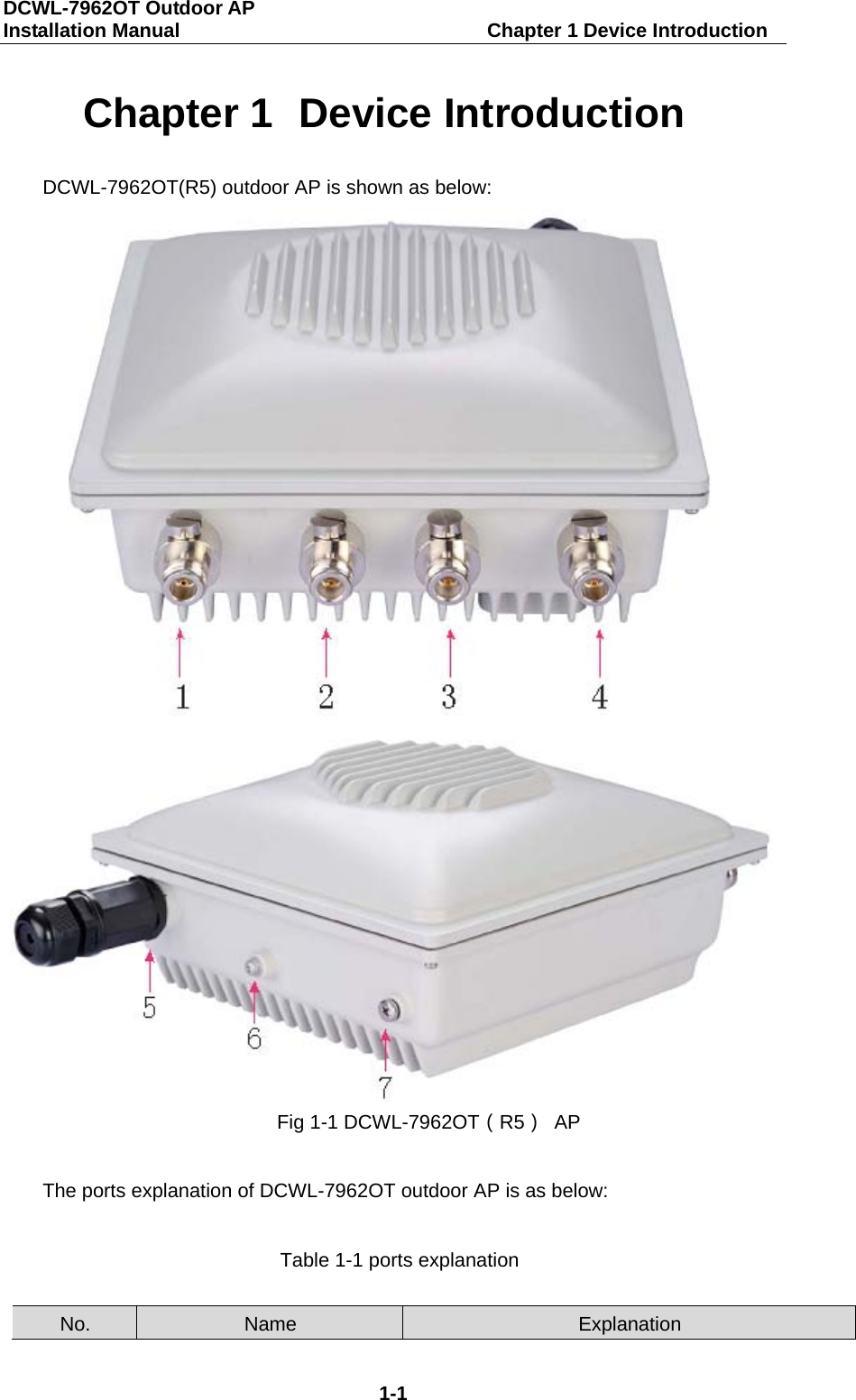
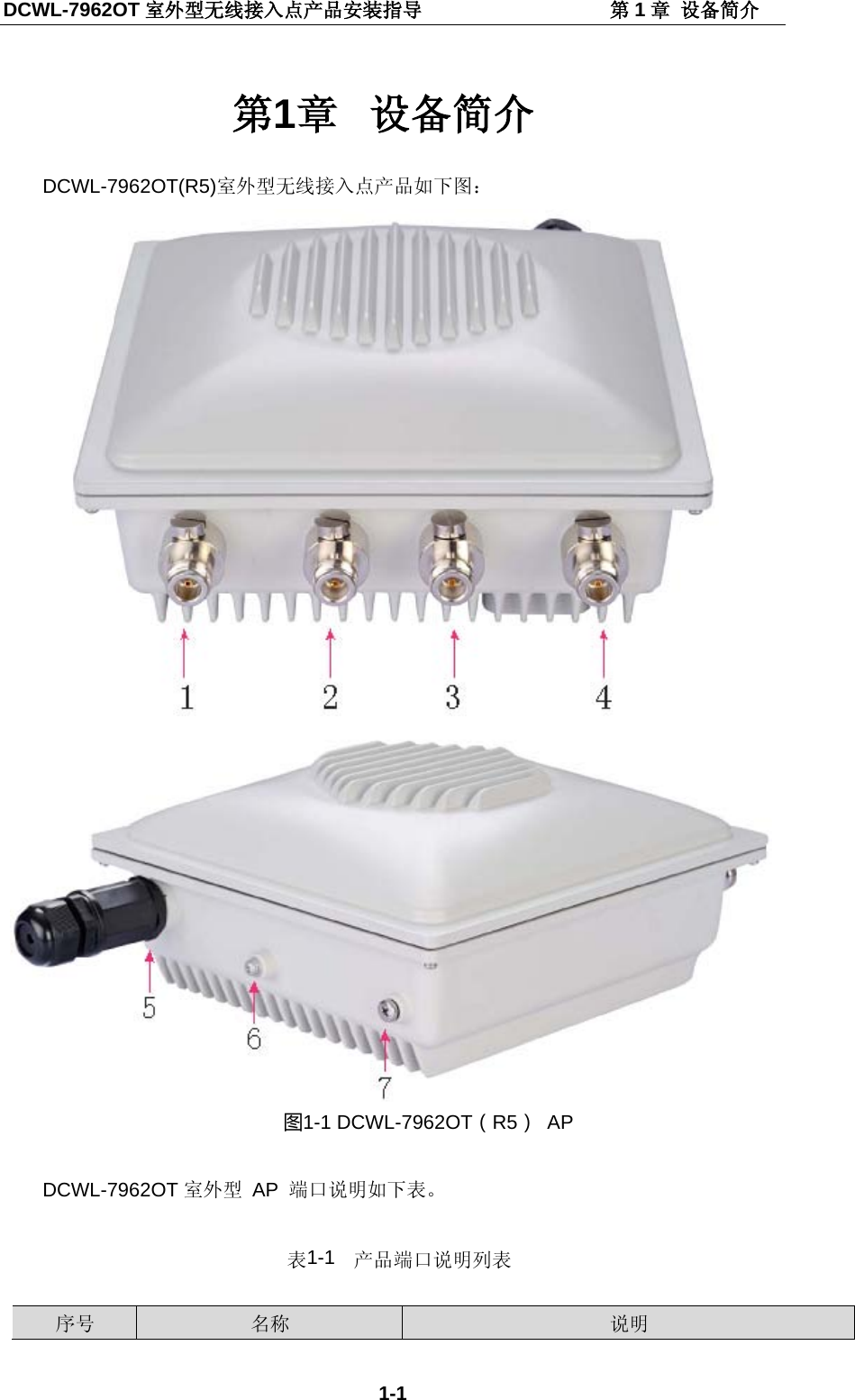
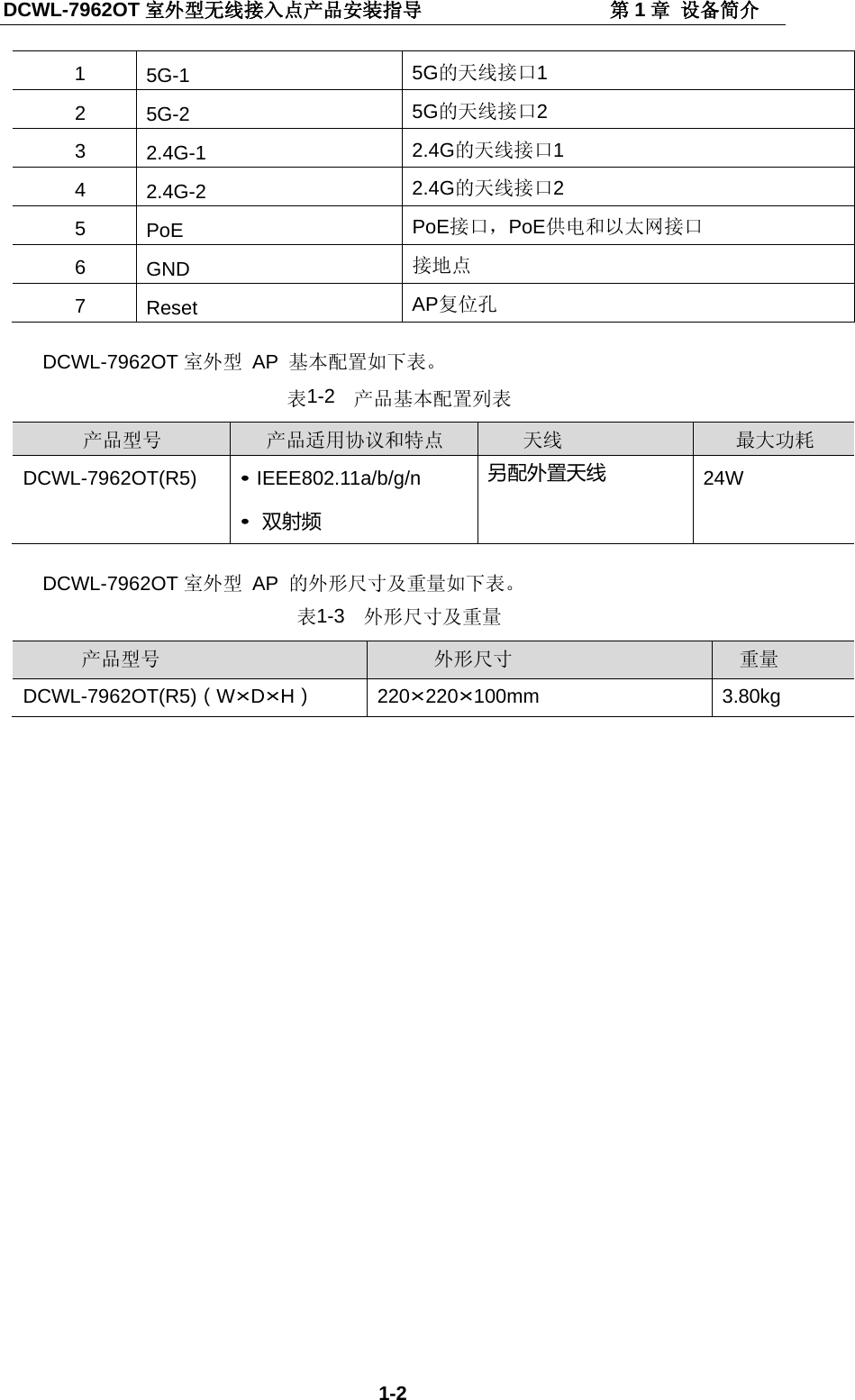
DCWL-7962OT Outdoor AP   Installation Manual                               Chapter 1 Device Introduction 1-1 Chapter 1  Device Introduction DCWL-7962OT(R5) outdoor AP is shown as below:   Fig 1-1 DCWL-7962OT(R5) AP  The ports explanation of DCWL-7962OT outdoor AP is as below:  Table 1-1 ports explanation  No. Name Explanation
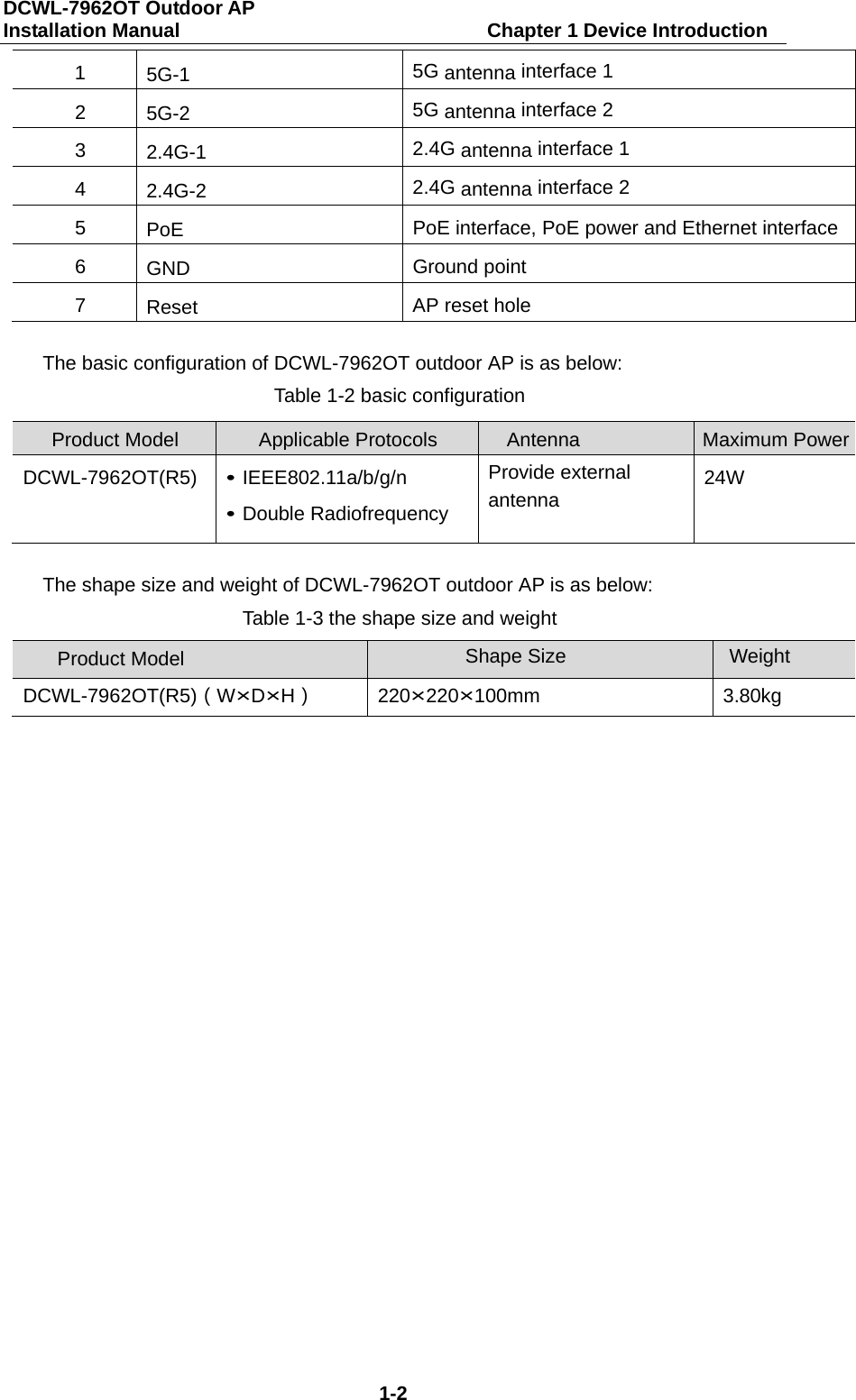
DCWL-7962OT Outdoor AP   Installation Manual                               Chapter 1 Device Introduction 1-2 1  5G-1  5G antenna interface 1 2  5G-2  5G antenna interface 2 3  2.4G-1  2.4G antenna interface 1 4  2.4G-2  2.4G antenna interface 2 5  PoE  PoE interface, PoE power and Ethernet interface 6  GND Ground point 7  Reset AP reset hole  The basic configuration of DCWL-7962OT outdoor AP is as below: Table 1-2 basic configuration  Product Model Applicable Protocols      Antenna Maximum Power  DCWL-7962OT(R5) • IEEE802.11a/b/g/n • Double Radiofrequency Provide external antenna 24W  The shape size and weight of DCWL-7962OT outdoor AP is as below: Table 1-3 the shape size and weight  Product Model Shape Size Weight DCWL-7962OT(R5)(W×D×H) 220×220×100mm 3.80kg
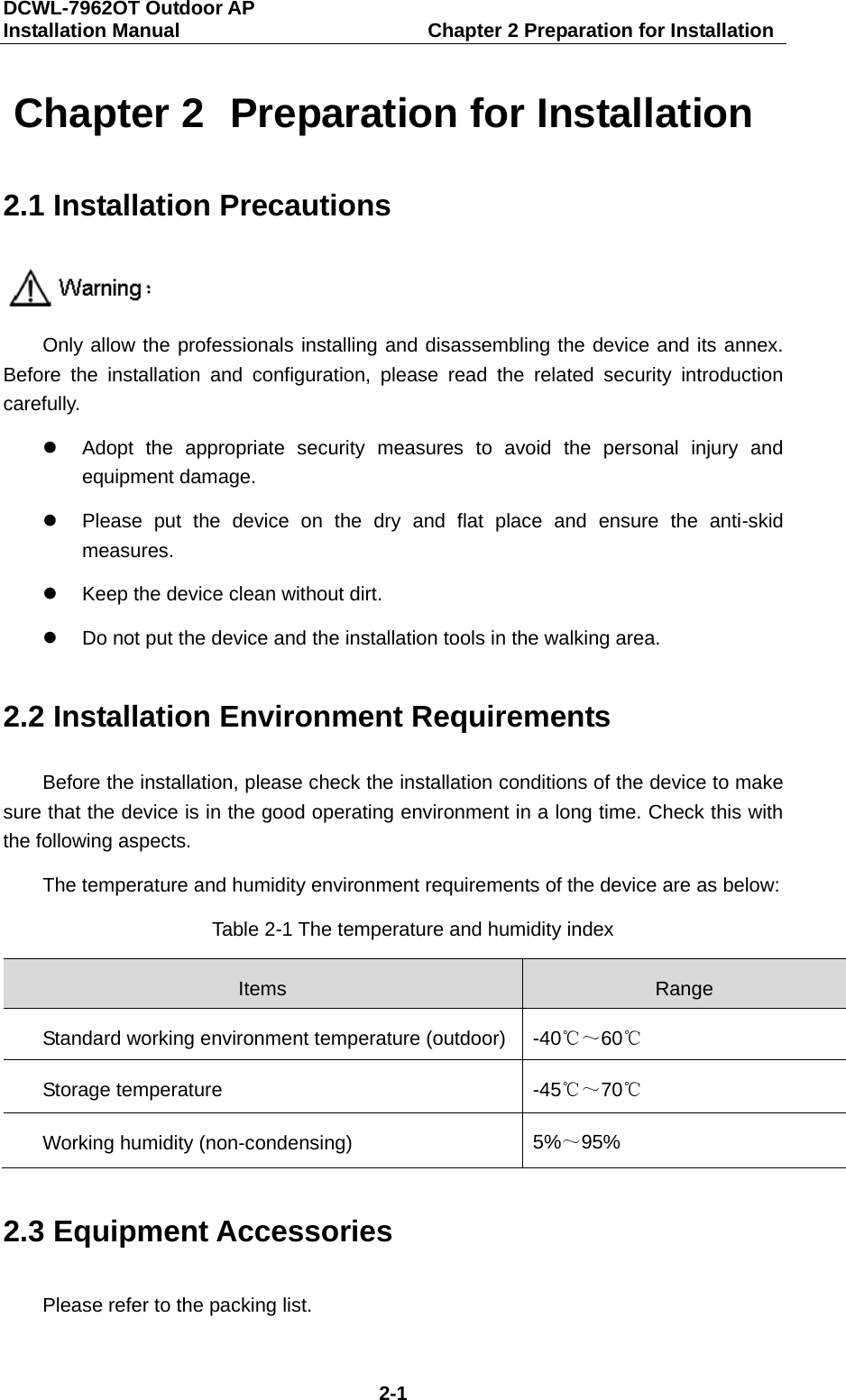
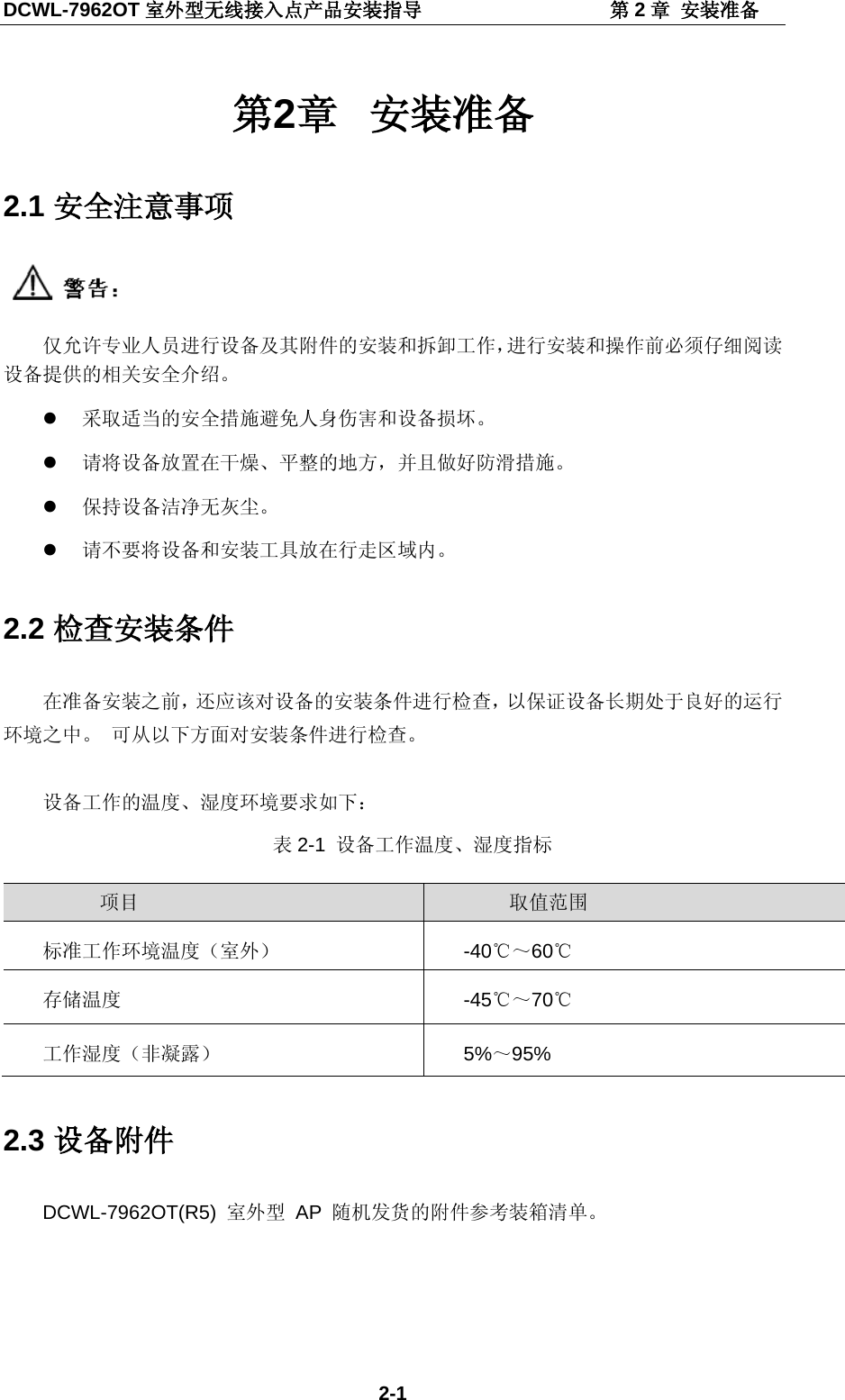
DCWL-7962OT Outdoor AP   Installation Manual                         Chapter 2 Preparation for Installation 2-1 Chapter 2  Preparation for Installation 2.1 Installation Precautions  Only allow the professionals installing and disassembling the device and its annex. Before the installation and configuration, please read the related security introduction carefully.  Adopt the appropriate security measures to avoid the personal injury and equipment damage.  Please put the device on the dry and flat place and ensure the anti-skid measures.  Keep the device clean without dirt.  Do not put the device and the installation tools in the walking area. 2.2 Installation Environment Requirements Before the installation, please check the installation conditions of the device to make sure that the device is in the good operating environment in a long time. Check this with the following aspects. The temperature and humidity environment requirements of the device are as below: Table 2-1 The temperature and humidity index Items Range Standard working environment temperature (outdoor) -40℃~60℃ Storage temperature -45℃~70℃ Working humidity (non-condensing) 5%~95% 2.3 Equipment Accessories Please refer to the packing list.
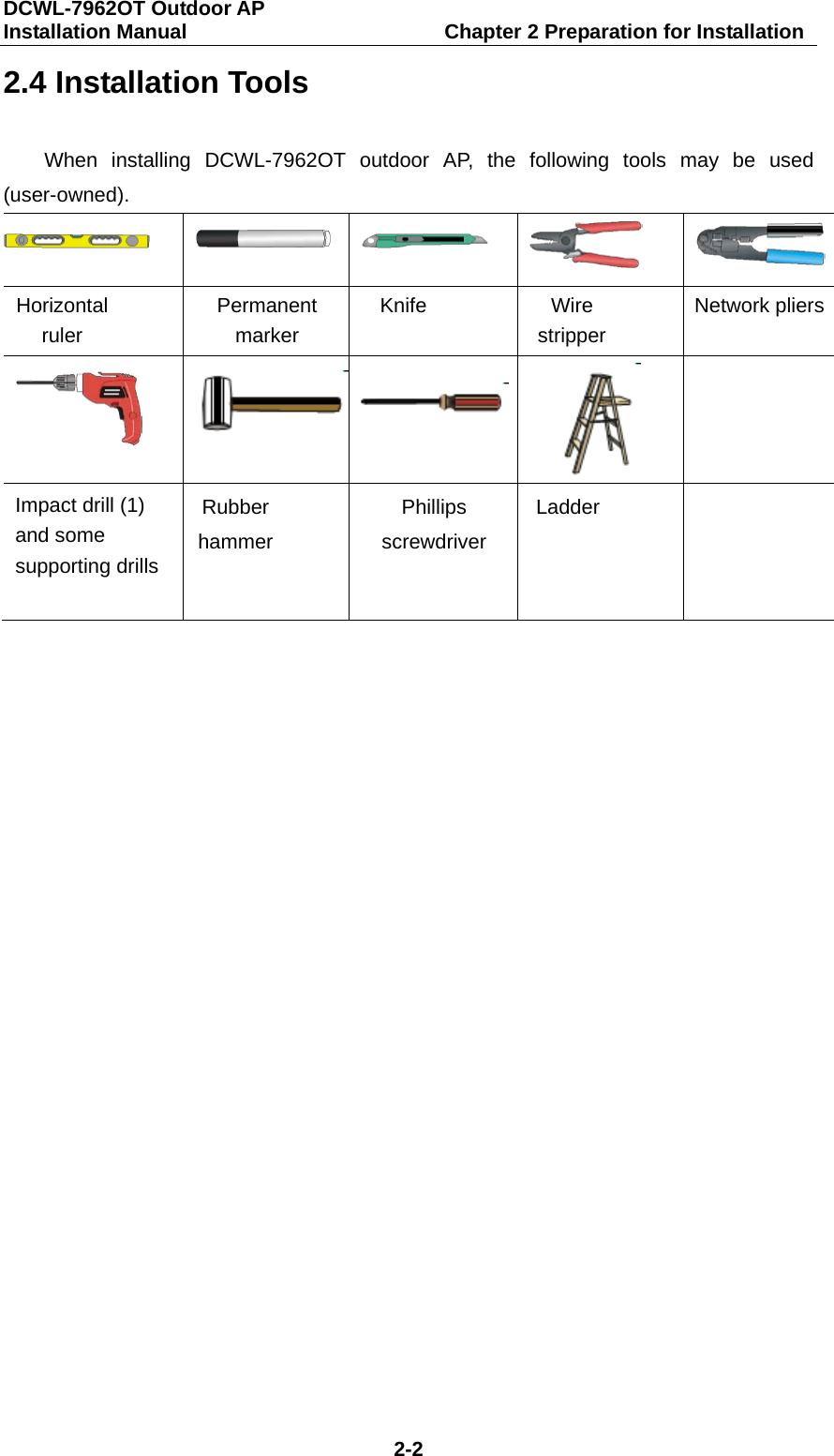
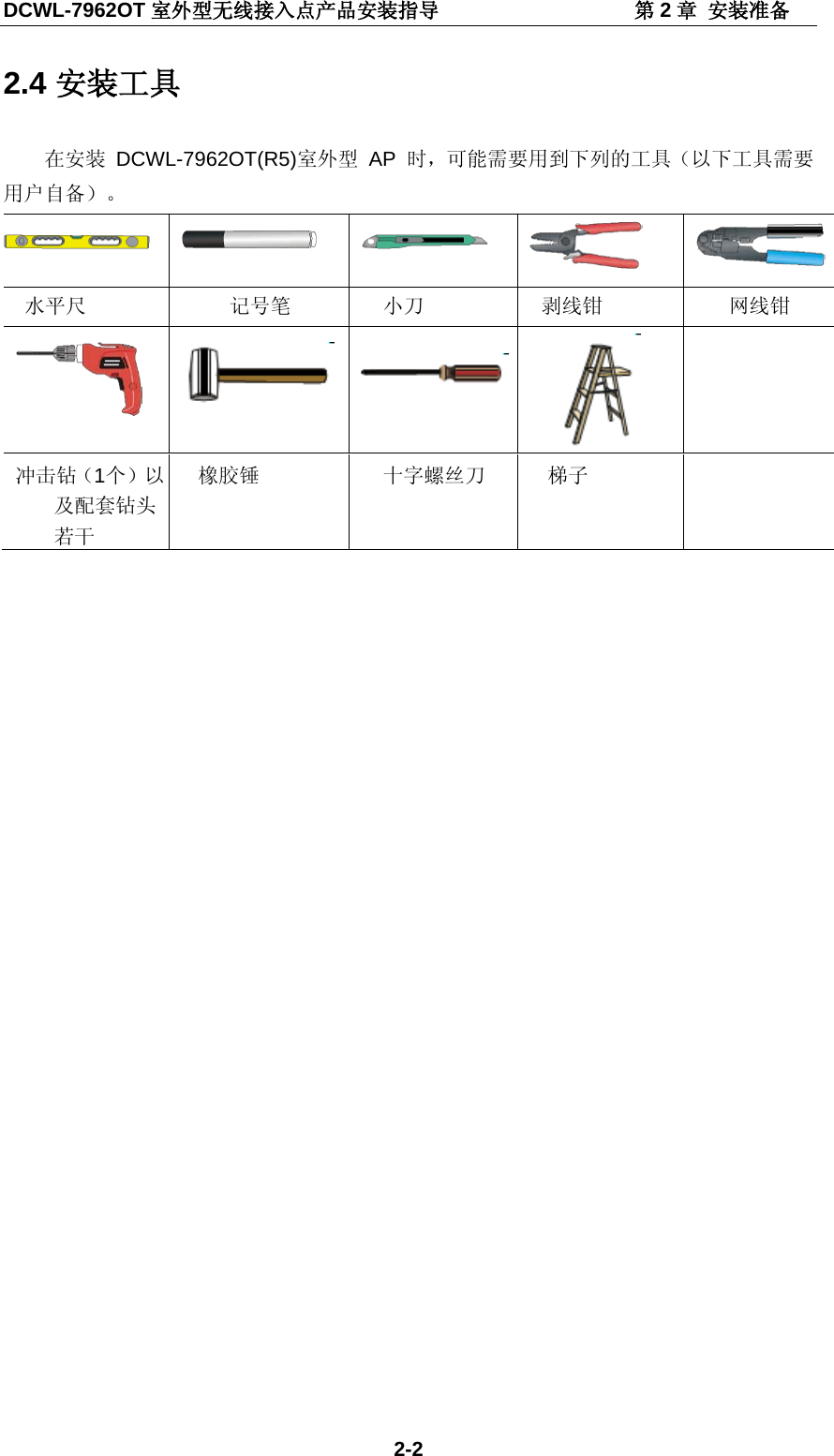
DCWL-7962OT Outdoor AP   Installation Manual                         Chapter 2 Preparation for Installation 2-2 2.4 Installation Tools When installing DCWL-7962OT outdoor AP, the following tools may be used (user-owned).       Horizontal ruler Permanent marker Knife Wire stripper Network pliers      Impact drill (1) and some supporting drills Rubber hammer Phillips screwdriver Ladder
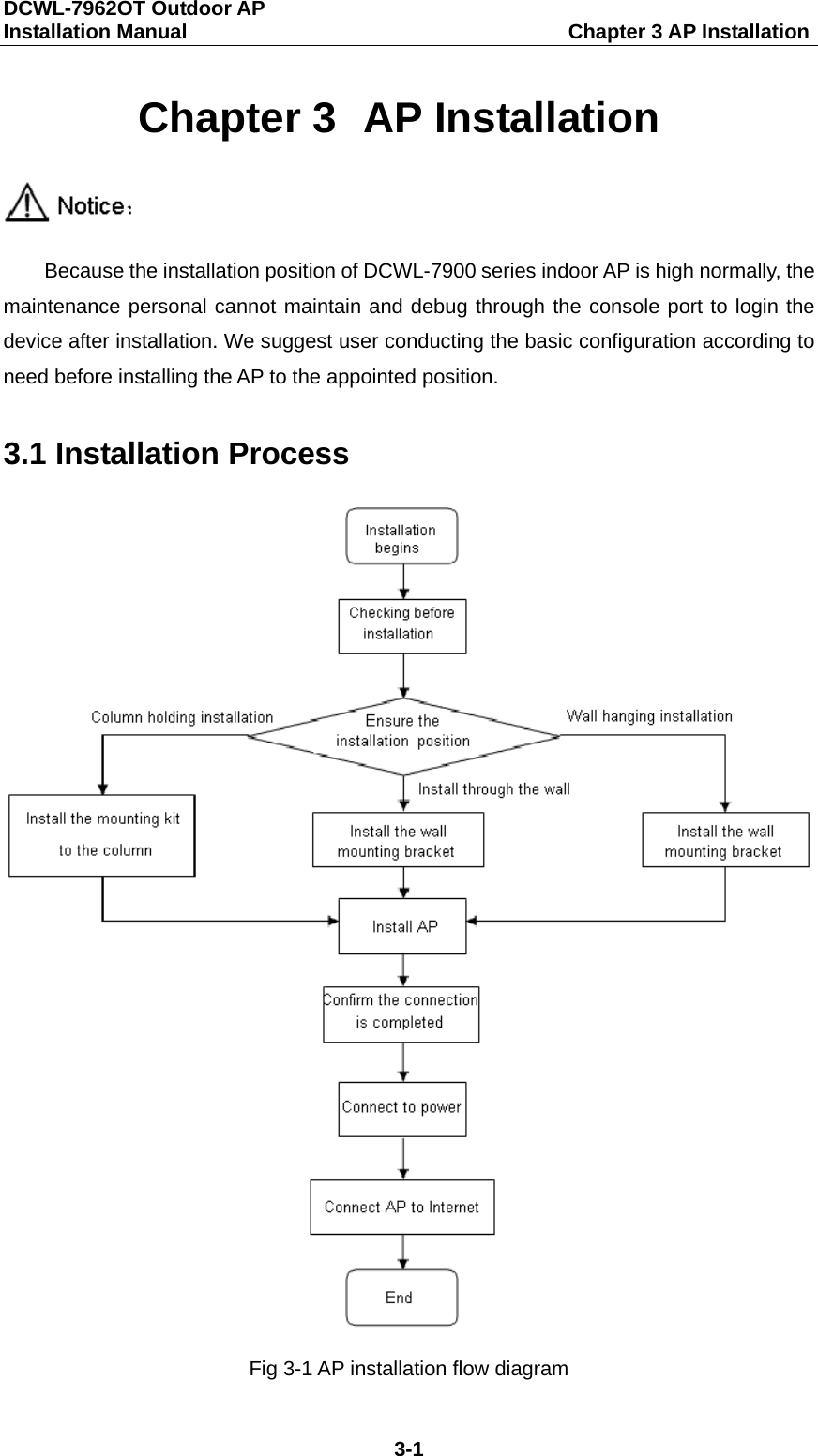
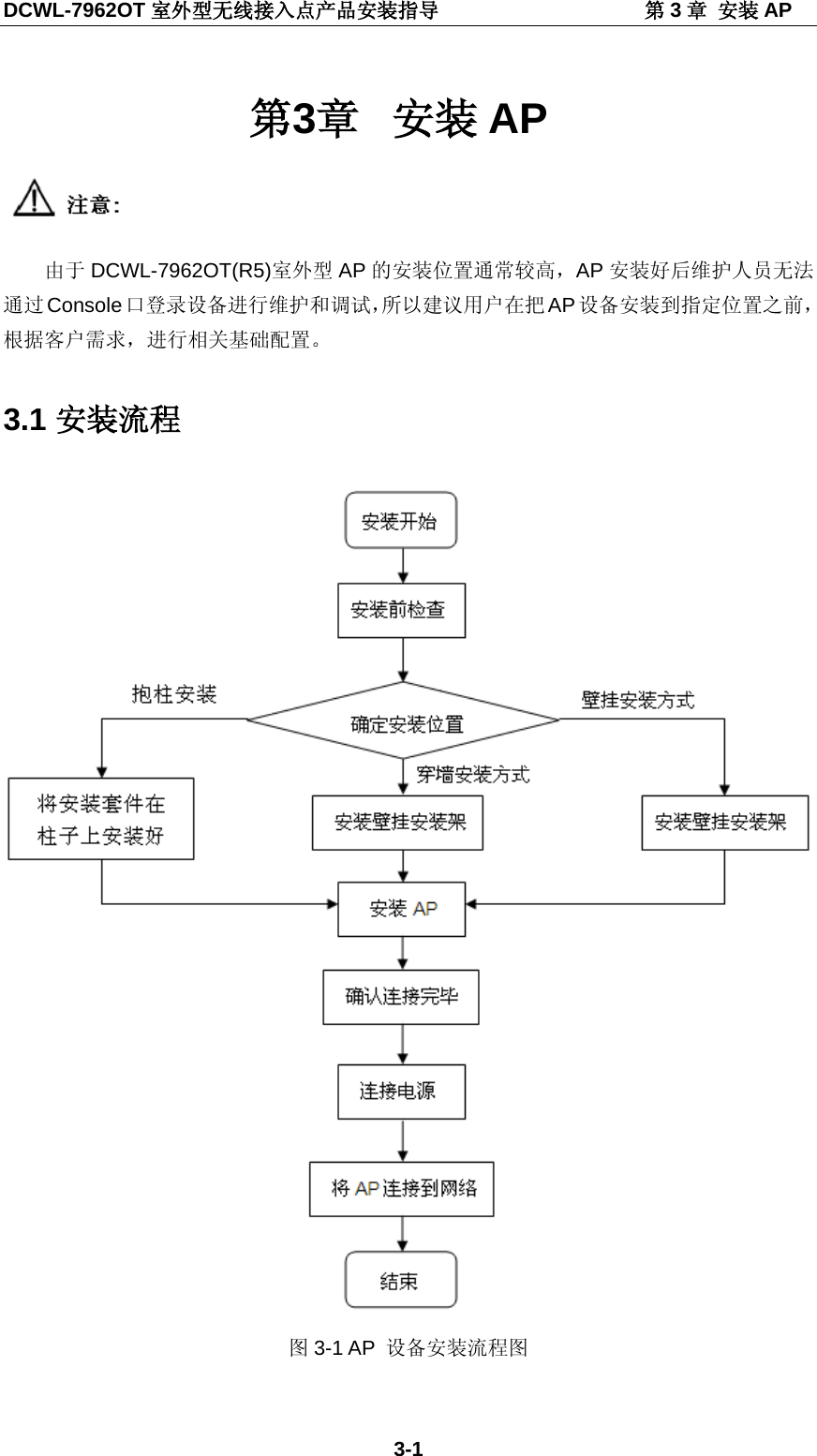
DCWL-7962OT Outdoor AP   Installation Manual                                     Chapter 3 AP Installation 3-1 Chapter 3  AP Installation  Because the installation position of DCWL-7900 series indoor AP is high normally, the maintenance personal cannot maintain and debug through the console port to login the device after installation. We suggest user conducting the basic configuration according to need before installing the AP to the appointed position. 3.1 Installation Process  Fig 3-1 AP installation flow diagram
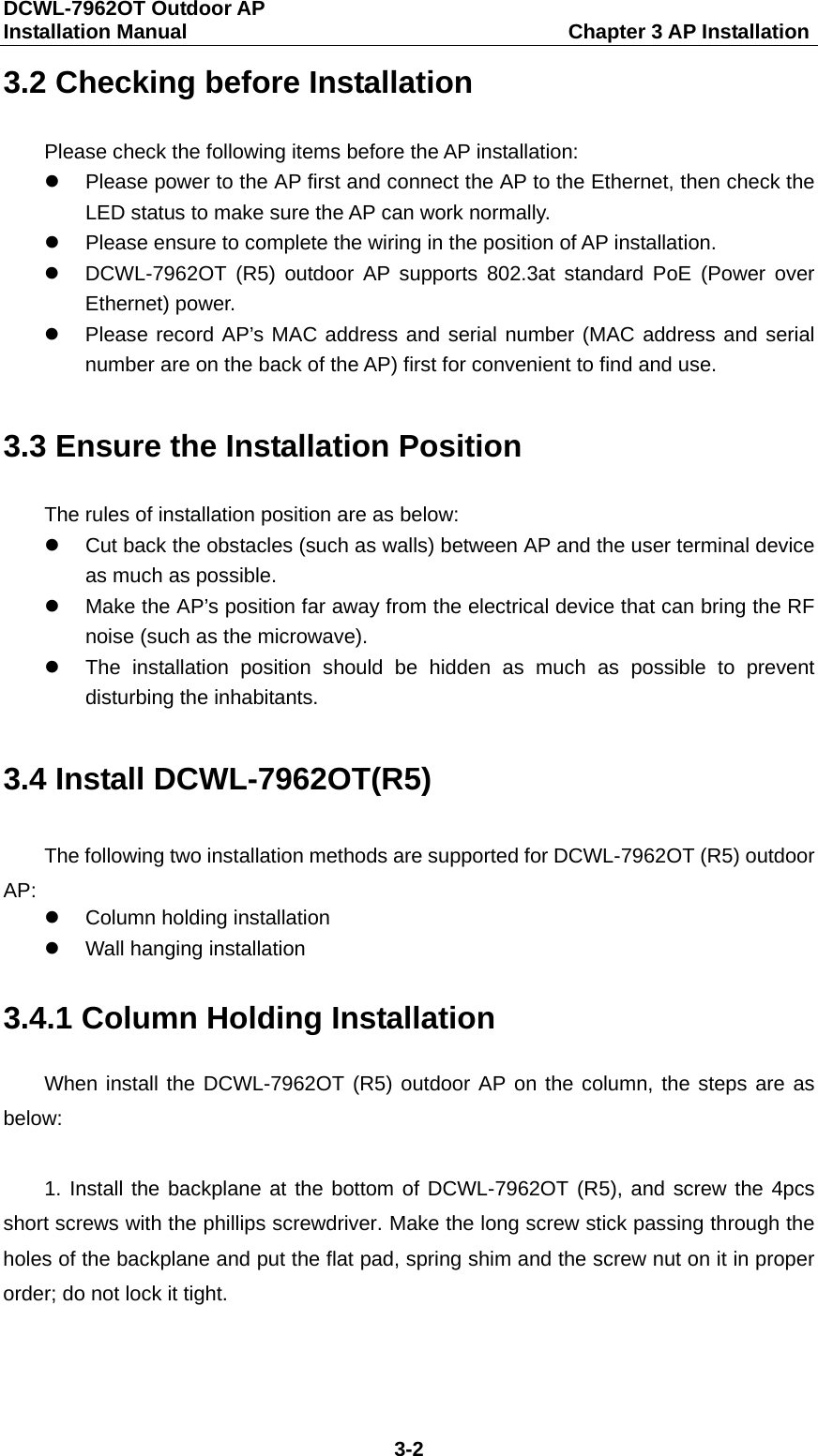
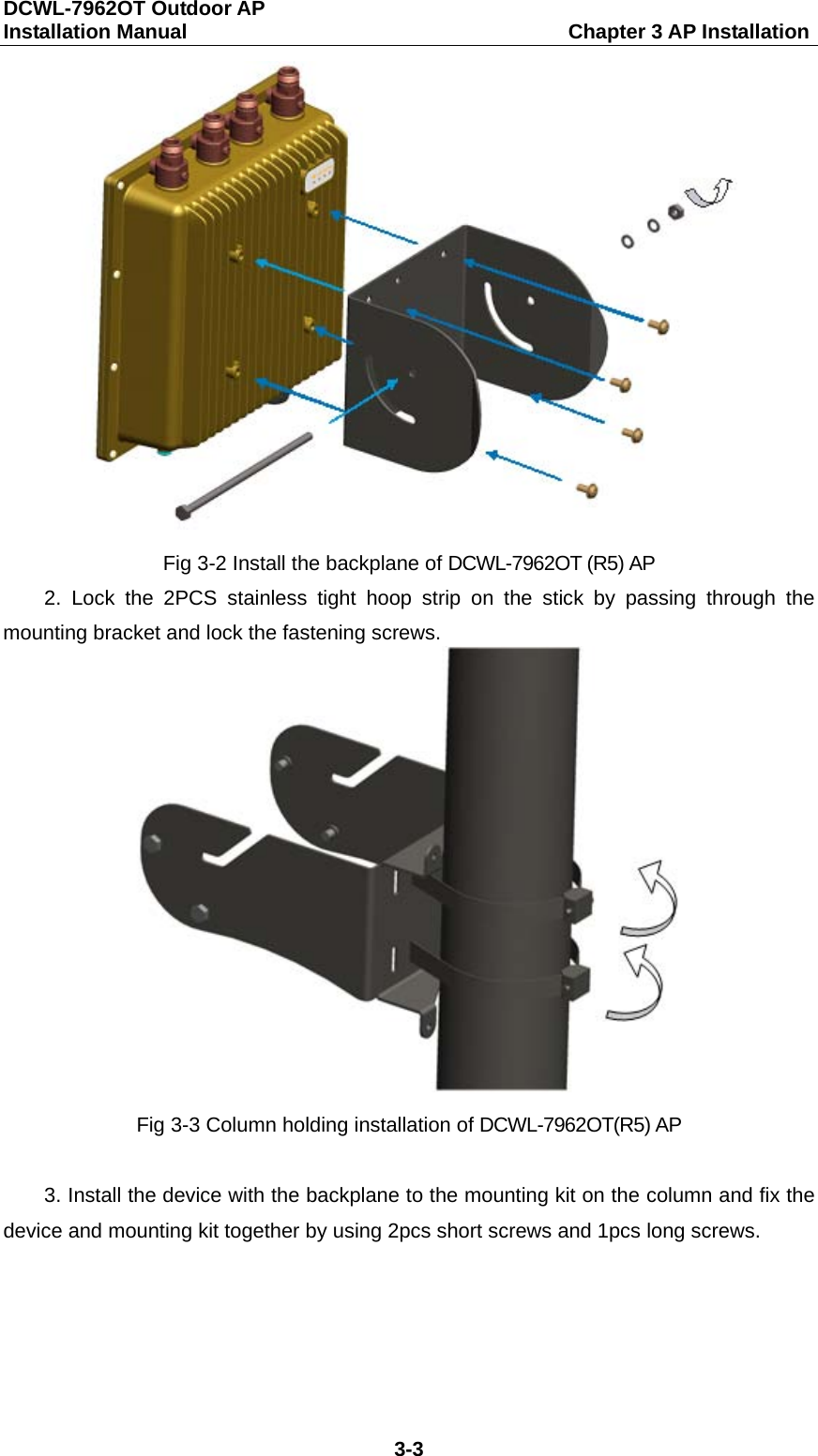
DCWL-7962OT Outdoor AP   Installation Manual                                     Chapter 3 AP Installation 3-2 3.2 Checking before Installation Please check the following items before the AP installation:  Please power to the AP first and connect the AP to the Ethernet, then check the LED status to make sure the AP can work normally.    Please ensure to complete the wiring in the position of AP installation.  DCWL-7962OT (R5) outdoor AP supports 802.3at standard PoE (Power over Ethernet) power.  Please record AP’s MAC address and serial number (MAC address and serial number are on the back of the AP) first for convenient to find and use. 3.3 Ensure the Installation Position The rules of installation position are as below:  Cut back the obstacles (such as walls) between AP and the user terminal device as much as possible.  Make the AP’s position far away from the electrical device that can bring the RF noise (such as the microwave).  The installation position should be hidden as much as possible to prevent disturbing the inhabitants. 3.4 Install DCWL-7962OT(R5) The following two installation methods are supported for DCWL-7962OT (R5) outdoor AP:  Column holding installation  Wall hanging installation 3.4.1 Column Holding Installation When install the DCWL-7962OT (R5) outdoor AP on the column, the steps are as below:  1. Install the backplane at the bottom of DCWL-7962OT (R5), and screw the 4pcs short screws with the phillips screwdriver. Make the long screw stick passing through the holes of the backplane and put the flat pad, spring shim and the screw nut on it in proper order; do not lock it tight.
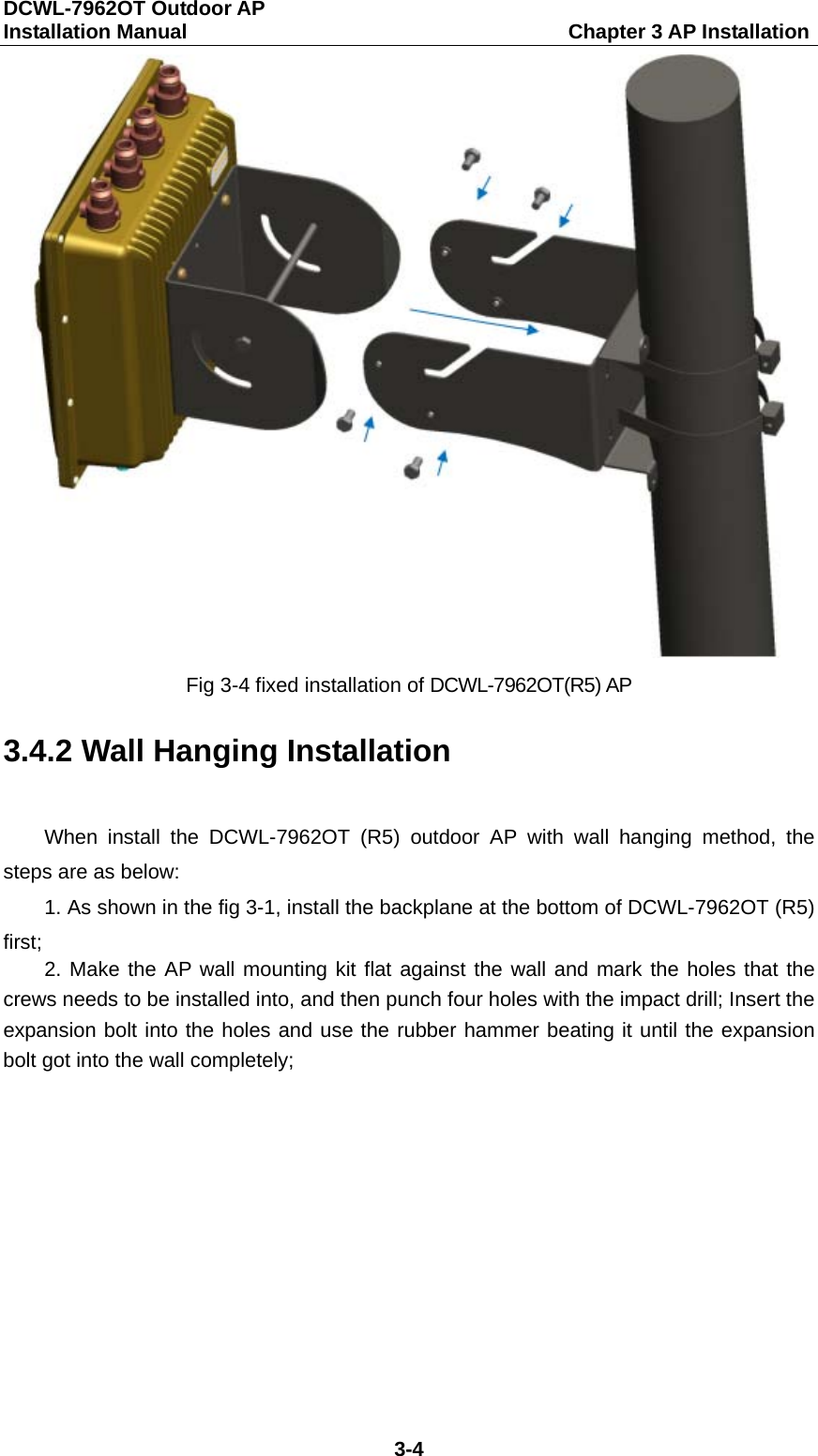
DCWL-7962OT Outdoor AP   Installation Manual                                     Chapter 3 AP Installation 3-3  Fig 3-2 Install the backplane of DCWL-7962OT (R5) AP 2.  Lock the 2PCS stainless tight hoop strip on the stick by passing through the mounting bracket and lock the fastening screws.  Fig 3-3 Column holding installation of DCWL-7962OT(R5) AP  3. Install the device with the backplane to the mounting kit on the column and fix the device and mounting kit together by using 2pcs short screws and 1pcs long screws.
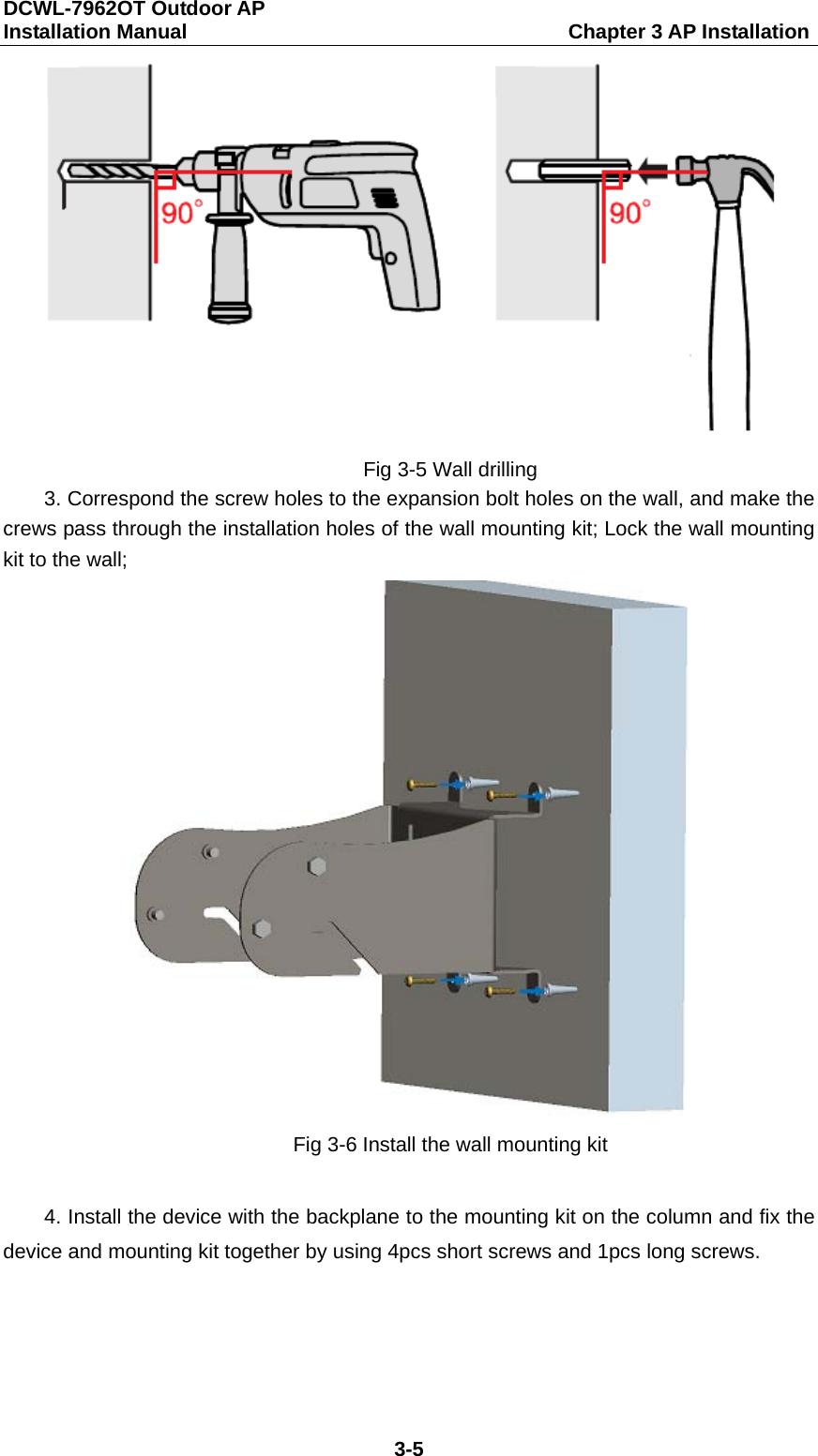
DCWL-7962OT Outdoor AP   Installation Manual                                     Chapter 3 AP Installation 3-4  Fig 3-4 fixed installation of DCWL-7962OT(R5) AP 3.4.2 Wall Hanging Installation   When install the DCWL-7962OT (R5) outdoor AP with wall hanging method, the steps are as below: 1. As shown in the fig 3-1, install the backplane at the bottom of DCWL-7962OT (R5) first; 2. Make the AP wall mounting kit flat against the wall and mark the holes that the crews needs to be installed into, and then punch four holes with the impact drill; Insert the expansion bolt into the holes and use the rubber hammer beating it until the expansion bolt got into the wall completely;
DCWL-7962OT Outdoor AP   Installation Manual                                     Chapter 3 AP Installation 3-5  Fig 3-5 Wall drilling 3. Correspond the screw holes to the expansion bolt holes on the wall, and make the crews pass through the installation holes of the wall mounting kit; Lock the wall mounting kit to the wall;  Fig 3-6 Install the wall mounting kit  4. Install the device with the backplane to the mounting kit on the column and fix the device and mounting kit together by using 4pcs short screws and 1pcs long screws.
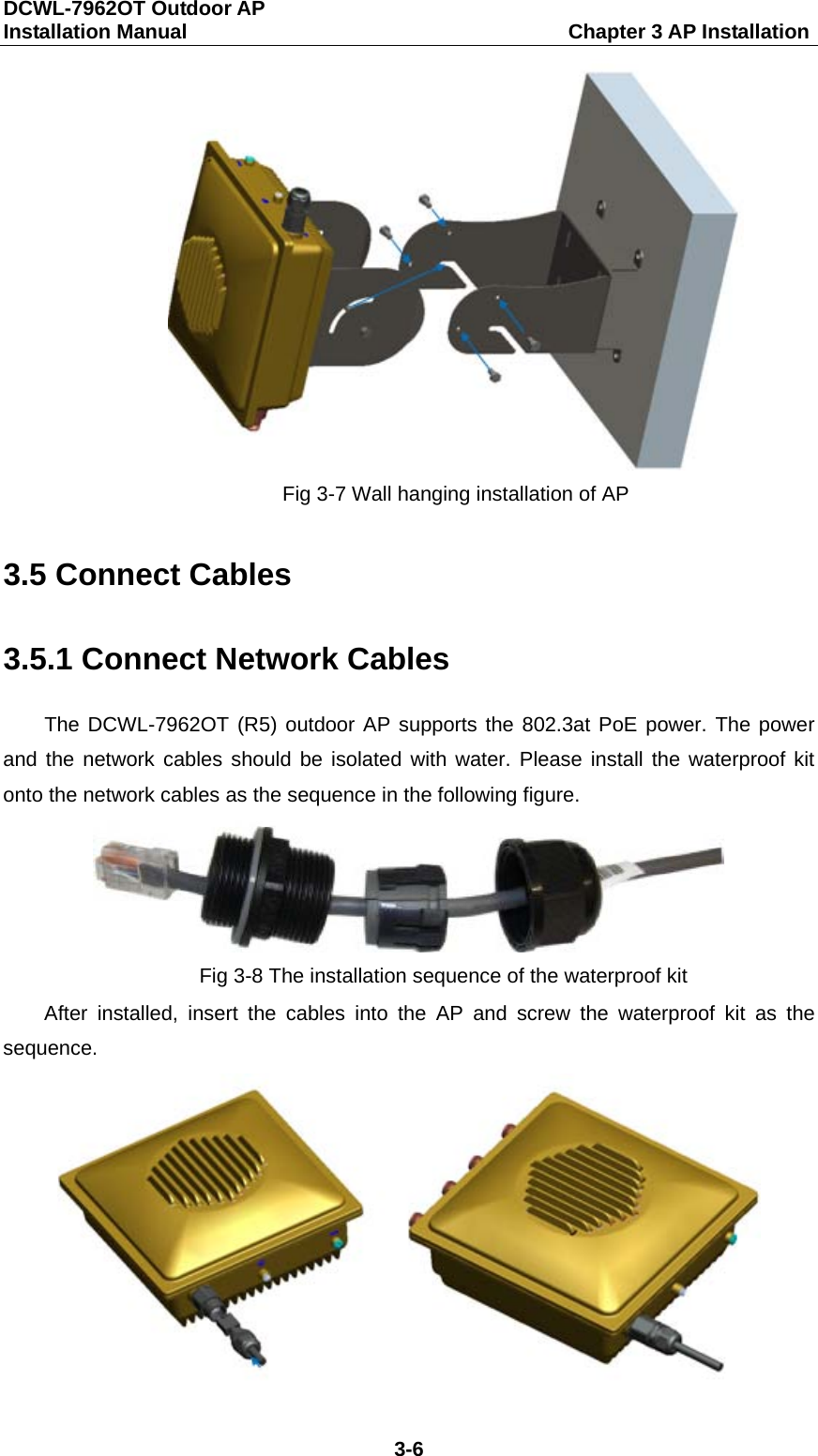
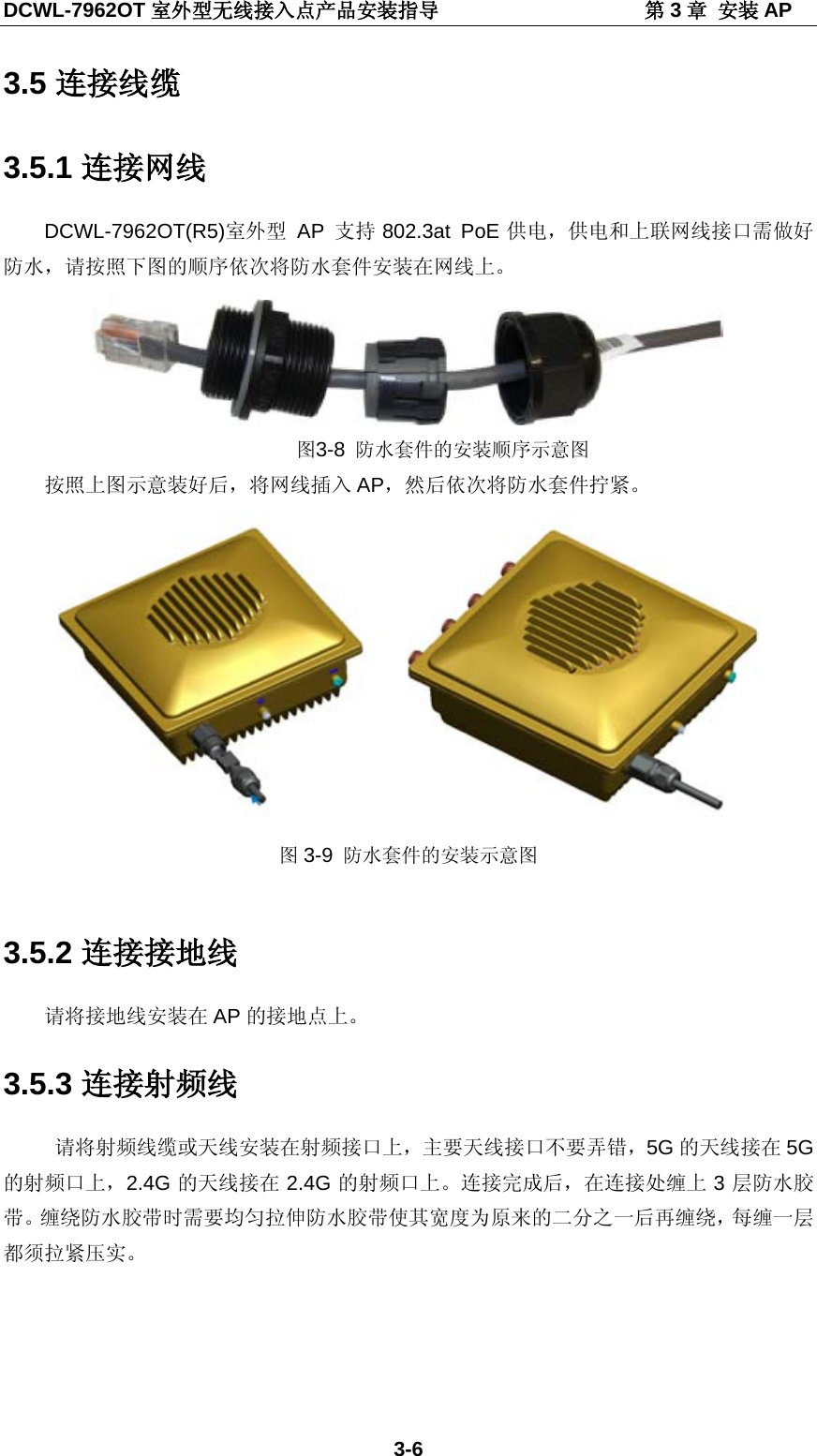
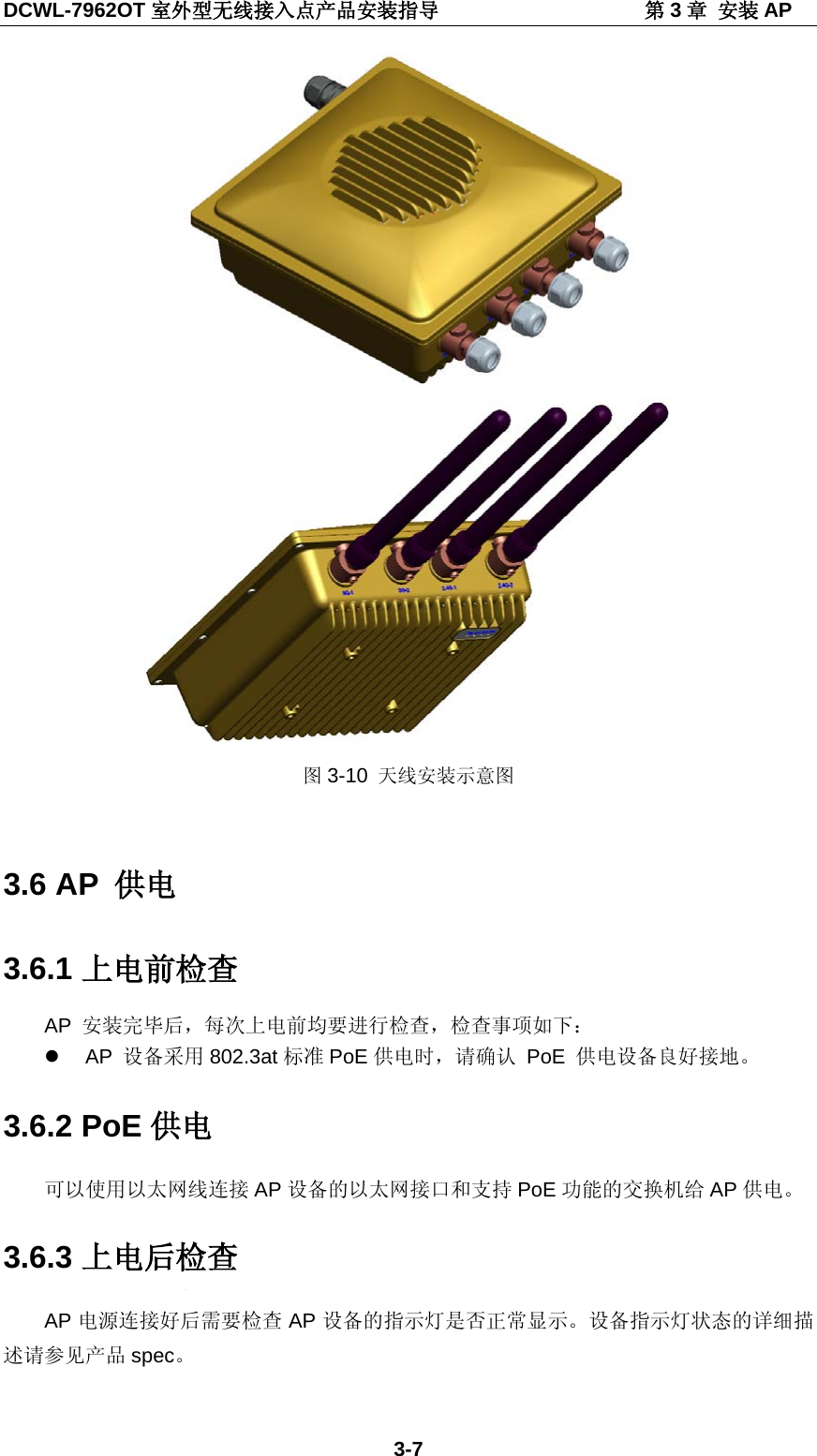
DCWL-7962OT Outdoor AP   Installation Manual                                     Chapter 3 AP Installation 3-6  Fig 3-7 Wall hanging installation of AP 3.5 Connect Cables 3.5.1 Connect Network Cables The DCWL-7962OT (R5) outdoor AP supports the 802.3at PoE power. The power and the network cables should be isolated with water. Please install the waterproof kit onto the network cables as the sequence in the following figure.  Fig 3-8 The installation sequence of the waterproof kit After  installed,  insert the cables into the AP and screw the waterproof kit as the sequence.
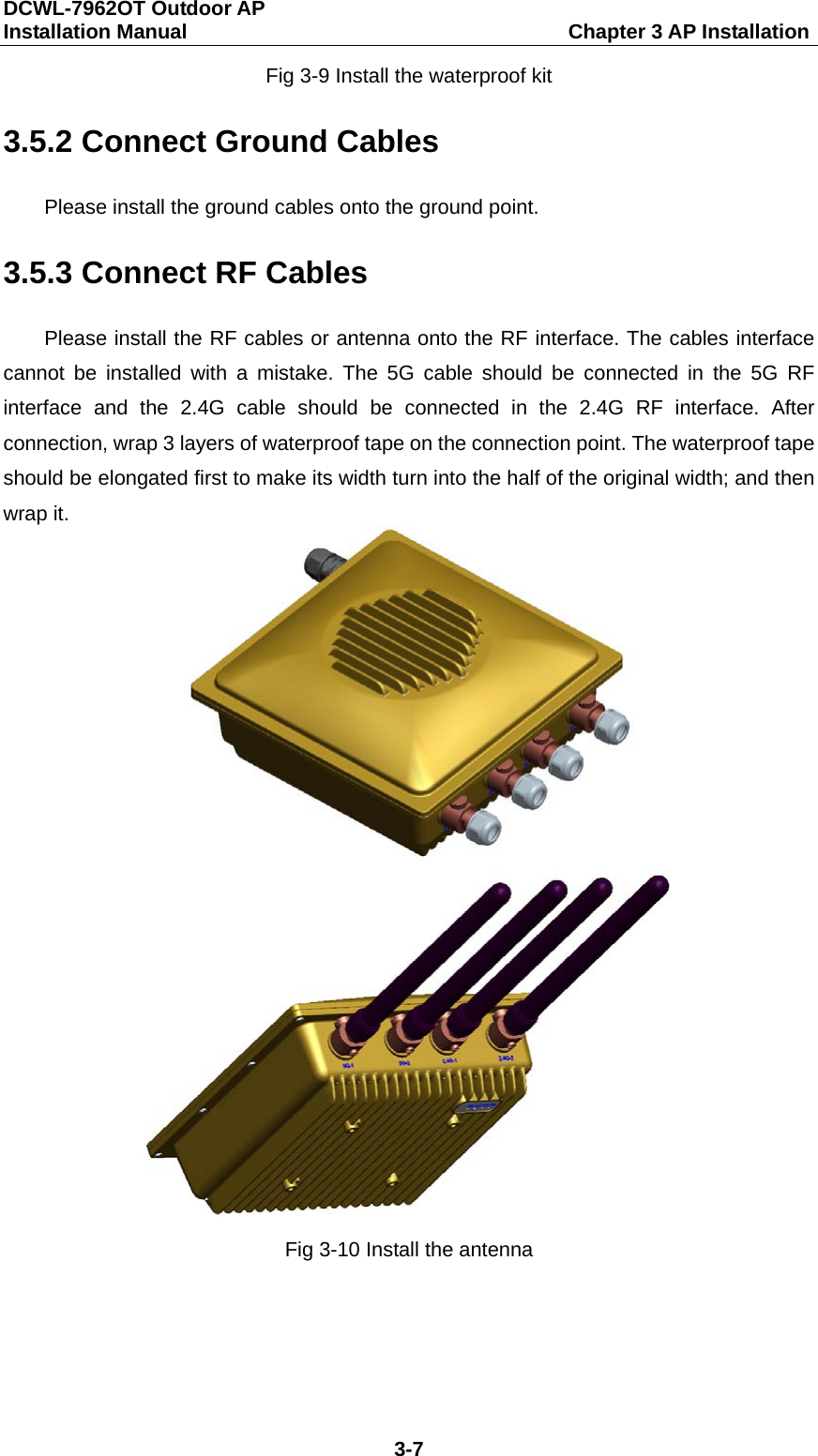
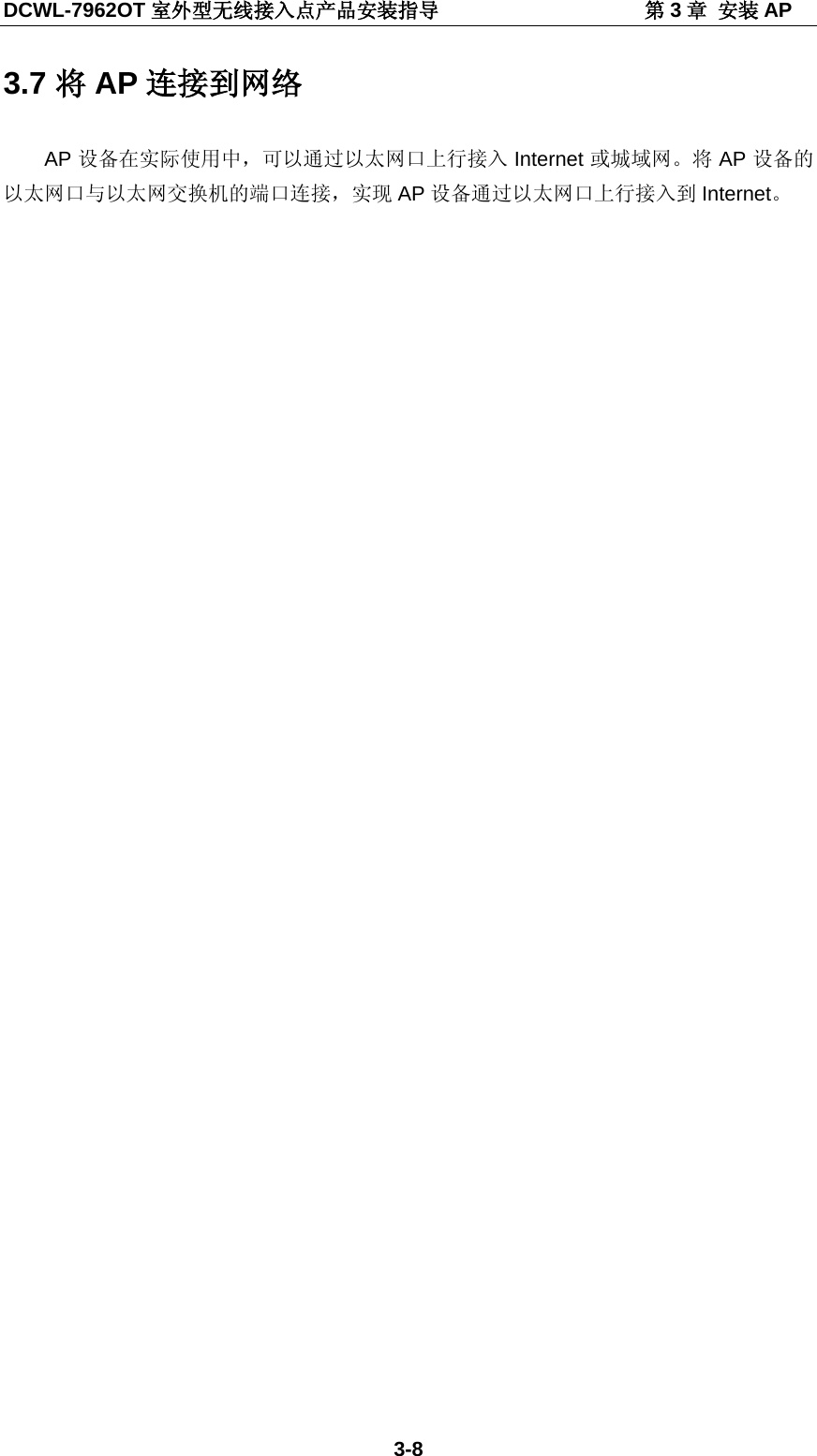
DCWL-7962OT Outdoor AP   Installation Manual                                     Chapter 3 AP Installation 3-7 Fig 3-9 Install the waterproof kit 3.5.2 Connect Ground Cables Please install the ground cables onto the ground point. 3.5.3 Connect RF Cables Please install the RF cables or antenna onto the RF interface. The cables interface cannot be installed with a mistake. The 5G cable should be connected in the 5G RF interface and the 2.4G cable should be connected in the 2.4G RF interface. After connection, wrap 3 layers of waterproof tape on the connection point. The waterproof tape should be elongated first to make its width turn into the half of the original width; and then wrap it.   Fig 3-10 Install the antenna
DCWL-7962OT Outdoor AP   Installation Manual                                     Chapter 3 AP Installation 3-8 3.6 AP Power 3.6.1 Checking before Power After installing the AP, user should check it before power every time as below:  When AP use the 802.3at standard PoE power, please ensure the power is connected normally to ground. 3.6.2 PoE Power User can use the Ethernet cable to connect the Ethernet interface of the AP and the switch which supports PoE function to power to the AP. 3.6.3 Checking after Power Check if the LED of AP works normally after connecting the power. The explanation of LED status is seen in the product spec. 3.7 Connect AP to Internet In the actual use, AP can be uplink connected to the Internet or MAN through the Ethernet port. Connect the Ethernet port of the AP to the switch port to achieve the uplink connection.
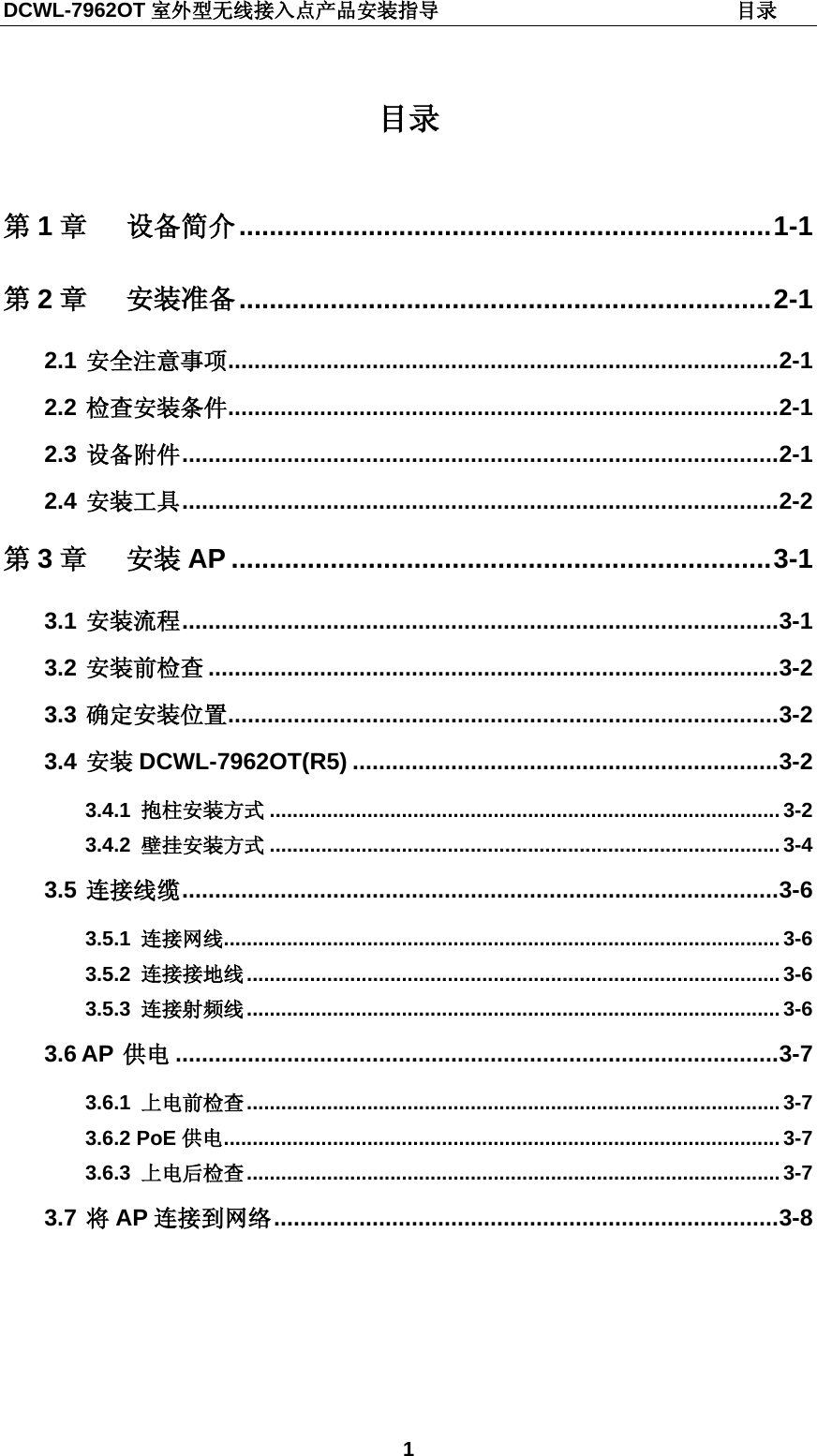
DCWL-7962OT 室外型无线接入点产品安装指导                             目录 1  目录  第1章 设备简介 ...................................................................... 1-1 第2章 安装准备 ...................................................................... 2-1 2.1 安全注意事项 .................................................................................... 2-1 2.2 检查安装条件 .................................................................................... 2-1 2.3 设备附件 ........................................................................................... 2-1 2.4 安装工具 ........................................................................................... 2-2 第3章 安装 AP ....................................................................... 3-1 3.1 安装流程 ........................................................................................... 3-1 3.2 安装前检查 ....................................................................................... 3-2 3.3 确定安装位置 .................................................................................... 3-2 3.4 安装 DCWL-7962OT(R5) ................................................................. 3-2 3.4.1 抱柱安装方式 ......................................................................................... 3-2 3.4.2 壁挂安装方式 ......................................................................................... 3-4 3.5 连接线缆 ........................................................................................... 3-6 3.5.1 连接网线 ................................................................................................. 3-6 3.5.2 连接接地线 ............................................................................................. 3-6 3.5.3 连接射频线 ............................................................................................. 3-6 3.6 AP 供电 ............................................................................................ 3-7 3.6.1 上电前检查 ............................................................................................. 3-7 3.6.2 PoE 供电 ................................................................................................. 3-7 3.6.3 上电后检查 ............................................................................................. 3-7 3.7 将AP 连接到网络 ............................................................................. 3-8
DCWL-7962OT 室外型无线接入点产品安装指导                   第1章 设备简介 1-1 第1章 设备简介 DCWL-7962OT(R5)室外型无线接入点产品如下图:   图1-1 DCWL-7962OT(R5) AP  DCWL-7962OT 室外型 AP  端口说明如下表。  表1-1 产品端口说明列表  序号 名称 说明
DCWL-7962OT 室外型无线接入点产品安装指导                   第1章 设备简介 1-2 1  5G-1  5G的天线接口1 2  5G-2  5G的天线接口2 3  2.4G-1  2.4G的天线接口1 4  2.4G-2  2.4G的天线接口2 5  PoE  PoE接口,PoE供电和以太网接口 6  GND 接地点 7  Reset AP复位孔  DCWL-7962OT 室外型 AP  基本配置如下表。 表1-2 产品基本配置列表  产品型号 产品适用协议和特点 天线 最大功耗 DCWL-7962OT(R5) • IEEE802.11a/b/g/n • 双射频 另配外置天线 24W  DCWL-7962OT 室外型 AP  的外形尺寸及重量如下表。 表1-3 外形尺寸及重量  产品型号 外形尺寸 重量 DCWL-7962OT(R5)(W×D×H) 220×220×100mm 3.80kg
DCWL-7962OT 室外型无线接入点产品安装指导                   第2章 安装准备 2-1 第2章 安装准备 2.1 安全注意事项  仅允许专业人员进行设备及其附件的安装和拆卸工作,进行安装和操作前必须仔细阅读设备提供的相关安全介绍。  采取适当的安全措施避免人身伤害和设备损坏。  请将设备放置在干燥、平整的地方,并且做好防滑措施。  保持设备洁净无灰尘。  请不要将设备和安装工具放在行走区域内。 2.2 检查安装条件 在准备安装之前,还应该对设备的安装条件进行检查,以保证设备长期处于良好的运行环境之中。 可从以下方面对安装条件进行检查。  设备工作的温度、湿度环境要求如下: 表2-1  设备工作温度、湿度指标  项目 取值范围 标准工作环境温度(室外)  -40℃~60℃ 存储温度  -45℃~70℃ 工作湿度(非凝露) 5%~95% 2.3 设备附件 DCWL-7962OT(R5) 室外型 AP  随机发货的附件参考装箱清单。
DCWL-7962OT 室外型无线接入点产品安装指导                   第2章 安装准备 2-2 2.4 安装工具 在安装 DCWL-7962OT(R5)室外型 AP  时,可能需要用到下列的工具(以下工具需要用户自备)。       水平尺 记号笔 小刀 剥线钳 网线钳      冲击钻(1个)以及配套钻头若干 橡胶锤 十字螺丝刀 梯子
DCWL-7962OT 室外型无线接入点产品安装指导                    第3章 安装 AP 3-1 第3章 安装 AP  由于 DCWL-7962OT(R5)室外型 AP 的安装位置通常较高,AP 安装好后维护人员无法通过 Console 口登录设备进行维护和调试,所以建议用户在把 AP设备安装到指定位置之前,根据客户需求,进行相关基础配置。 3.1 安装流程  图3-1 AP  设备安装流程图
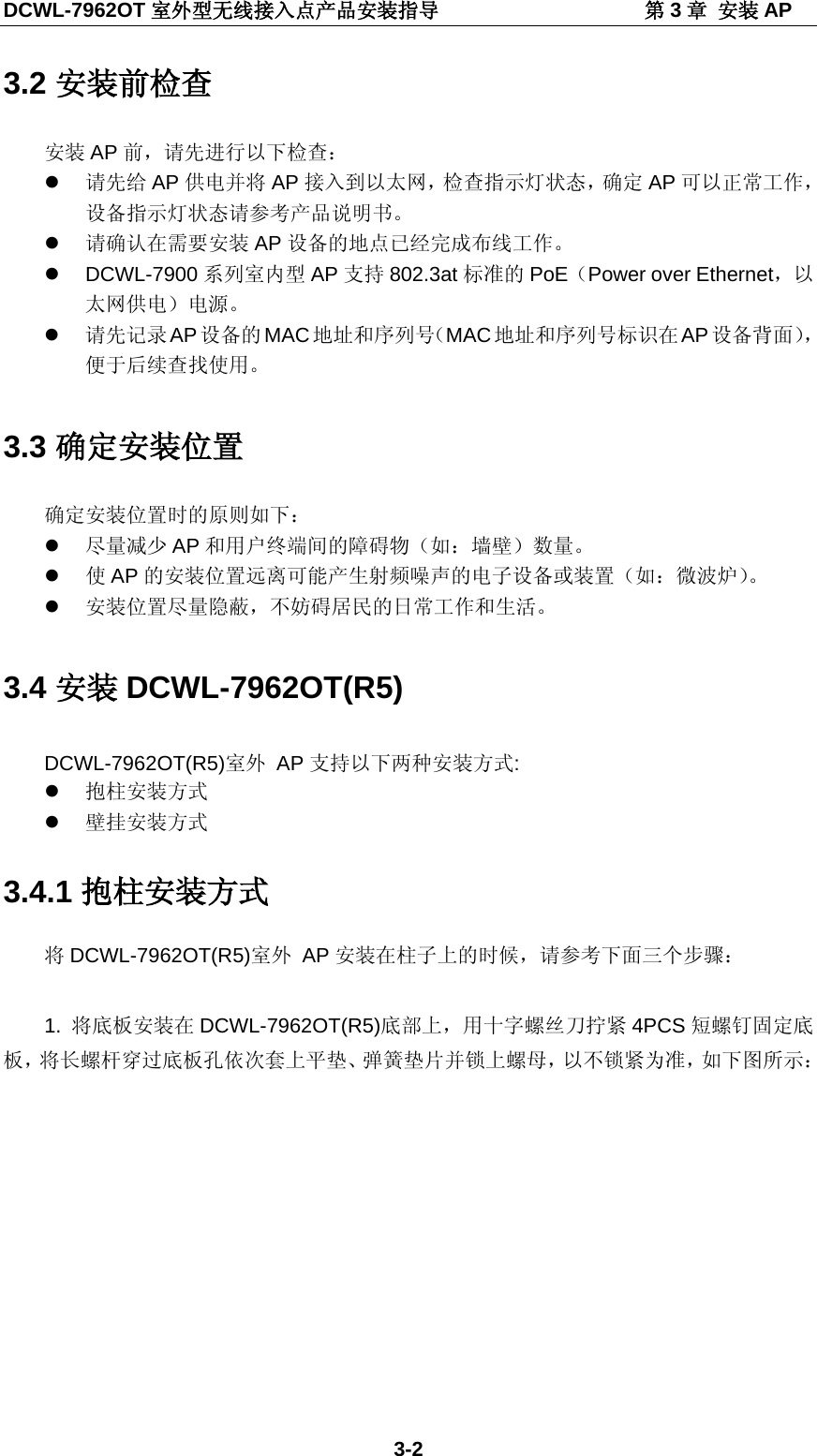
DCWL-7962OT 室外型无线接入点产品安装指导                    第3章 安装 AP 3-2 3.2 安装前检查 安装 AP 前,请先进行以下检查:  请先给 AP 供电并将 AP 接入到以太网,检查指示灯状态,确定 AP 可以正常工作,设备指示灯状态请参考产品说明书。  请确认在需要安装 AP 设备的地点已经完成布线工作。  DCWL-7900 系列室内型 AP 支持 802.3at标准的 PoE(Power over Ethernet,以太网供电)电源。  请先记录 AP设备的 MAC地址和序列号(MAC地址和序列号标识在 AP 设备背面),便于后续查找使用。 3.3 确定安装位置 确定安装位置时的原则如下:  尽量减少 AP 和用户终端间的障碍物(如:墙壁)数量。  使AP 的安装位置远离可能产生射频噪声的电子设备或装置(如:微波炉)。  安装位置尽量隐蔽,不妨碍居民的日常工作和生活。 3.4 安装 DCWL-7962OT(R5) DCWL-7962OT(R5)室外 AP 支持以下两种安装方式:  抱柱安装方式  壁挂安装方式 3.4.1 抱柱安装方式 将DCWL-7962OT(R5)室外 AP 安装在柱子上的时候,请参考下面三个步骤:  1. 将底板安装在 DCWL-7962OT(R5)底部上,用十字螺丝刀拧紧 4PCS 短螺钉固定底板,将长螺杆穿过底板孔依次套上平垫、弹簧垫片并锁上螺母,以不锁紧为准,如下图所示:
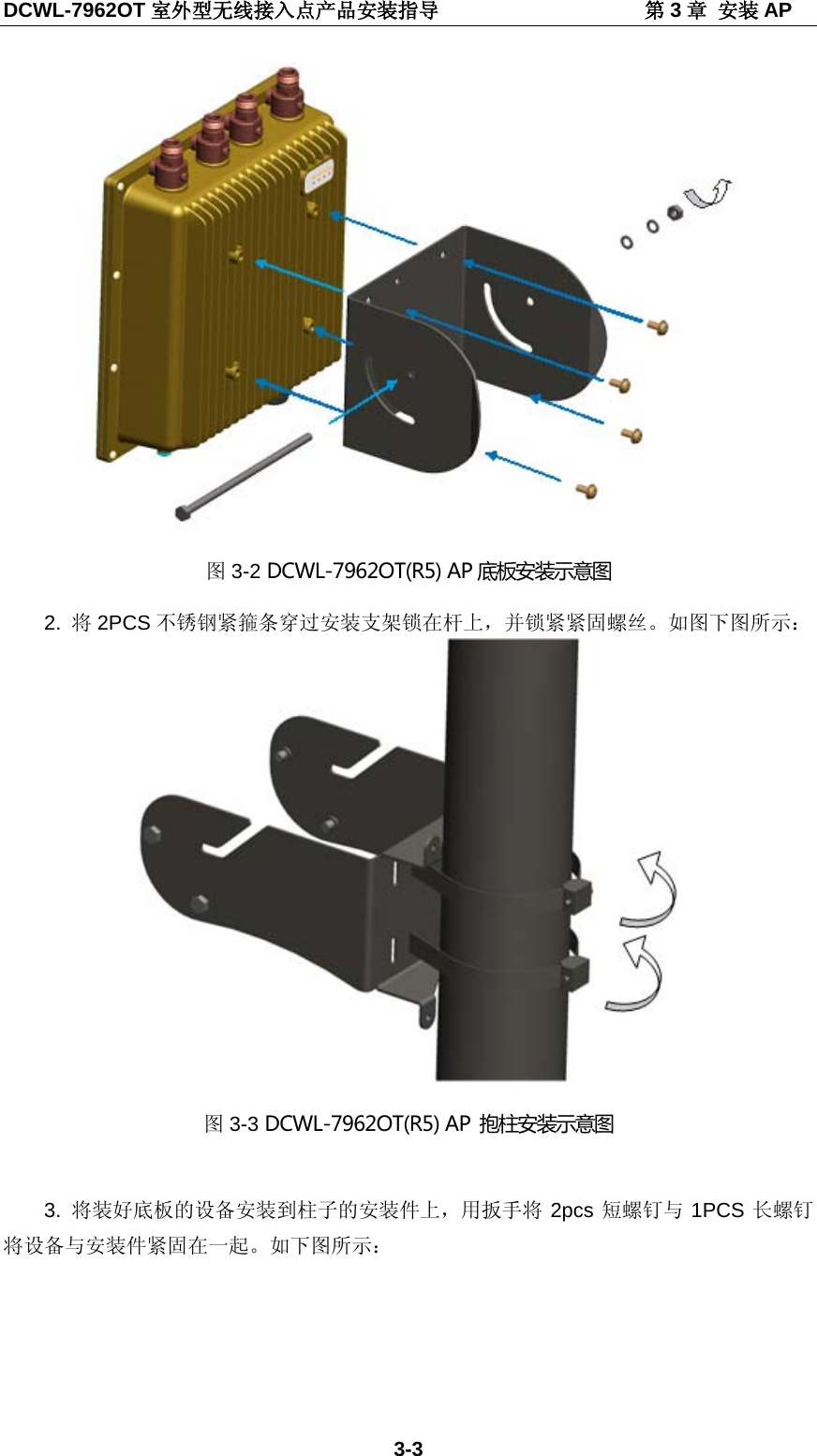
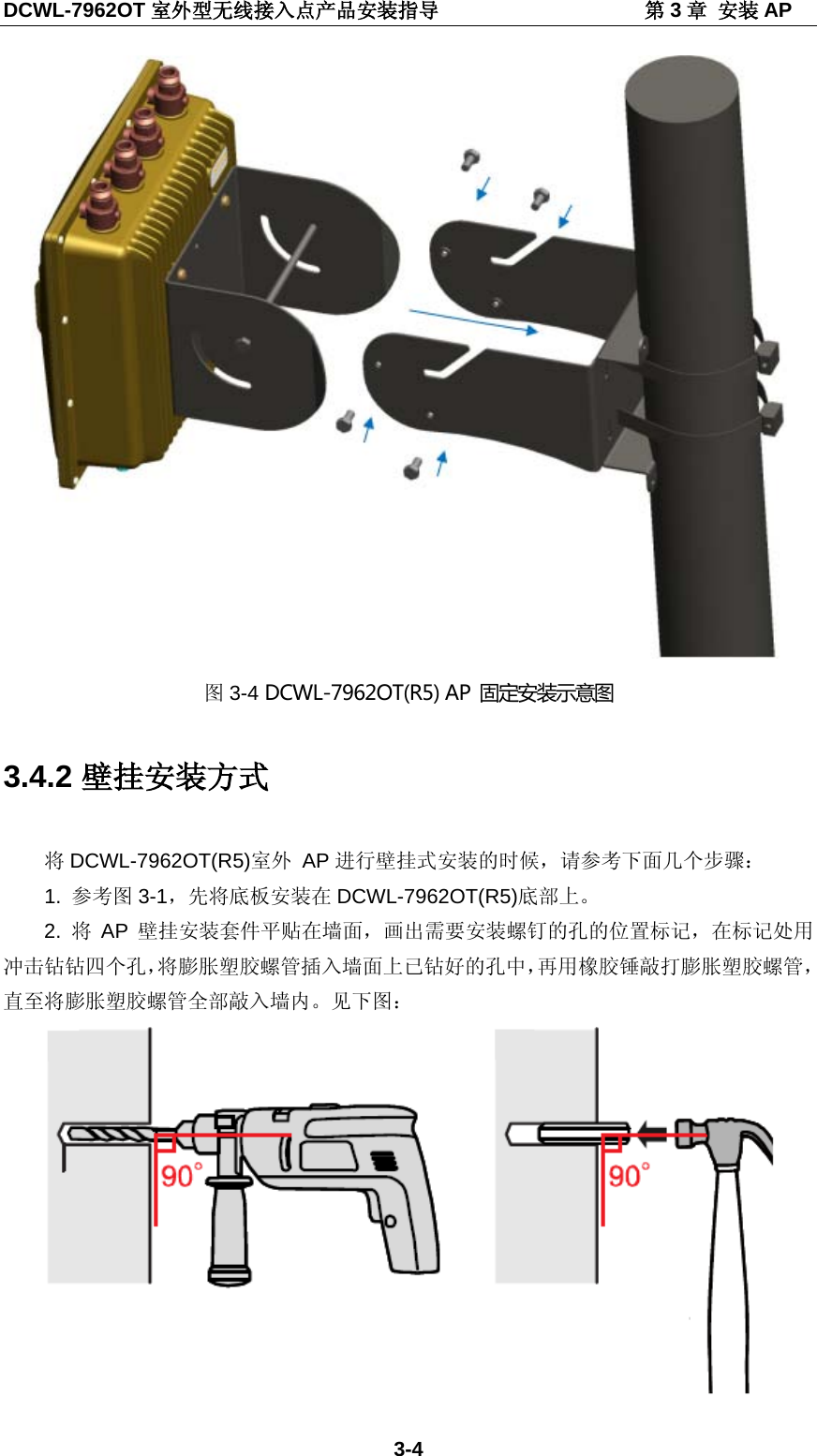
DCWL-7962OT 室外型无线接入点产品安装指导                    第3章 安装 AP 3-3  图3-2 DCWL-7962OT(R5) AP 底板安装示意图 2.  将2PCS 不锈钢紧箍条穿过安装支架锁在杆上,并锁紧紧固螺丝。如图下图所示:  图3-3 DCWL-7962OT(R5) AP  抱柱安装示意图  3.  将装好底板的设备安装到柱子的安装件上,用扳手将 2pcs 短螺钉与 1PCS 长螺钉将设备与安装件紧固在一起。如下图所示:
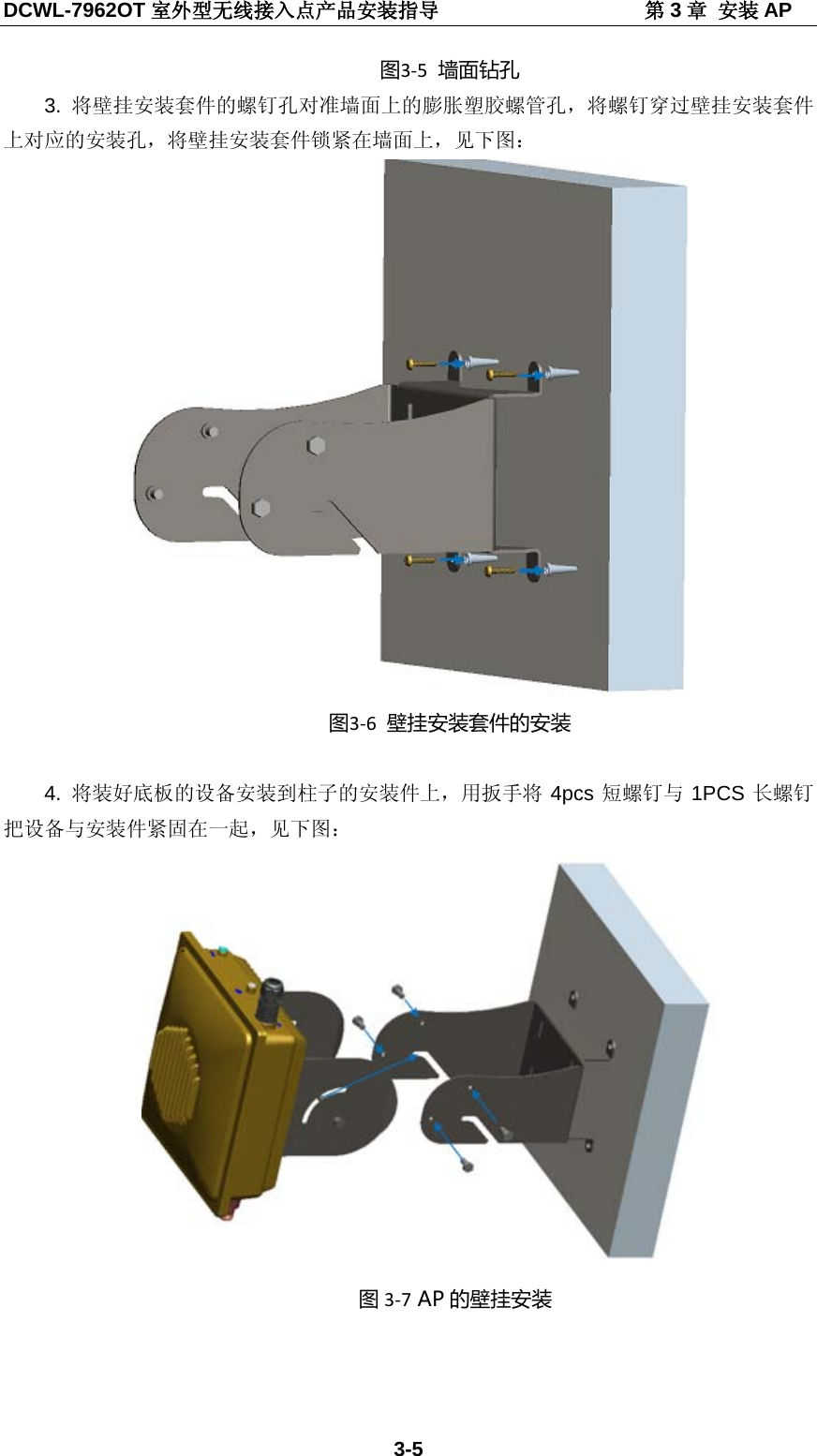
DCWL-7962OT 室外型无线接入点产品安装指导                    第3章 安装 AP 3-4  图3-4 DCWL-7962OT(R5) AP  固定安装示意图 3.4.2 壁挂安装方式   将DCWL-7962OT(R5)室外 AP 进行壁挂式安装的时候,请参考下面几个步骤: 1. 参考图 3-1,先将底板安装在 DCWL-7962OT(R5)底部上。 2.  将AP 壁挂安装套件平贴在墙面,画出需要安装螺钉的孔的位置标记,在标记处用冲击钻钻四个孔,将膨胀塑胶螺管插入墙面上已钻好的孔中,再用橡胶锤敲打膨胀塑胶螺管,直至将膨胀塑胶螺管全部敲入墙内。见下图:
DCWL-7962OT 室外型无线接入点产品安装指导                    第3章 安装 AP 3-5 图3-5 墙面钻孔 3.  将壁挂安装套件的螺钉孔对准墙面上的膨胀塑胶螺管孔,将螺钉穿过壁挂安装套件上对应的安装孔,将壁挂安装套件锁紧在墙面上,见下图:  图3-6 壁挂安装套件的安装  4.  将装好底板的设备安装到柱子的安装件上,用扳手将 4pcs 短螺钉与 1PCS 长螺钉把设备与安装件紧固在一起,见下图:  图3-7 AP 的壁挂安装
DCWL-7962OT 室外型无线接入点产品安装指导                    第3章 安装 AP 3-6 3.5 连接线缆 3.5.1 连接网线 DCWL-7962OT(R5)室外型 AP  支持 802.3at PoE 供电,供电和上联网线接口需做好防水,请按照下图的顺序依次将防水套件安装在网线上。  图3-8 防水套件的安装顺序示意图 按照上图示意装好后,将网线插入 AP,然后依次将防水套件拧紧。  图3-9 防水套件的安装示意图  3.5.2 连接接地线 请将接地线安装在 AP 的接地点上。 3.5.3 连接射频线  请将射频线缆或天线安装在射频接口上,主要天线接口不要弄错,5G 的天线接在 5G的射频口上,2.4G 的天线接在 2.4G 的射频口上。连接完成后,在连接处缠上 3层防水胶带。缠绕防水胶带时需要均匀拉伸防水胶带使其宽度为原来的二分之一后再缠绕,每缠一层都须拉紧压实。
DCWL-7962OT 室外型无线接入点产品安装指导                    第3章 安装 AP 3-7  图3-10 天线安装示意图  3.6 AP  供电 3.6.1 上电前检查 AP  安装完毕后,每次上电前均要进行检查,检查事项如下:  AP  设备采用 802.3at标准 PoE 供电时,请确认 PoE  供电设备良好接地。 3.6.2 PoE 供电 可以使用以太网线连接 AP 设备的以太网接口和支持 PoE 功能的交换机给 AP 供电。 3.6.3 上电后检查 AP 电源连接好后需要检查 AP 设备的指示灯是否正常显示。设备指示灯状态的详细描述请参见产品 spec。
DCWL-7962OT 室外型无线接入点产品安装指导                    第3章 安装 AP 3-8 3.7 将AP 连接到网络 AP 设备在实际使用中,可以通过以太网口上行接入 Internet 或城域网。将 AP 设备的以太网口与以太网交换机的端口连接,实现 AP 设备通过以太网口上行接入到 Internet。
DCWL-7962OT Outdoor Wireless AP
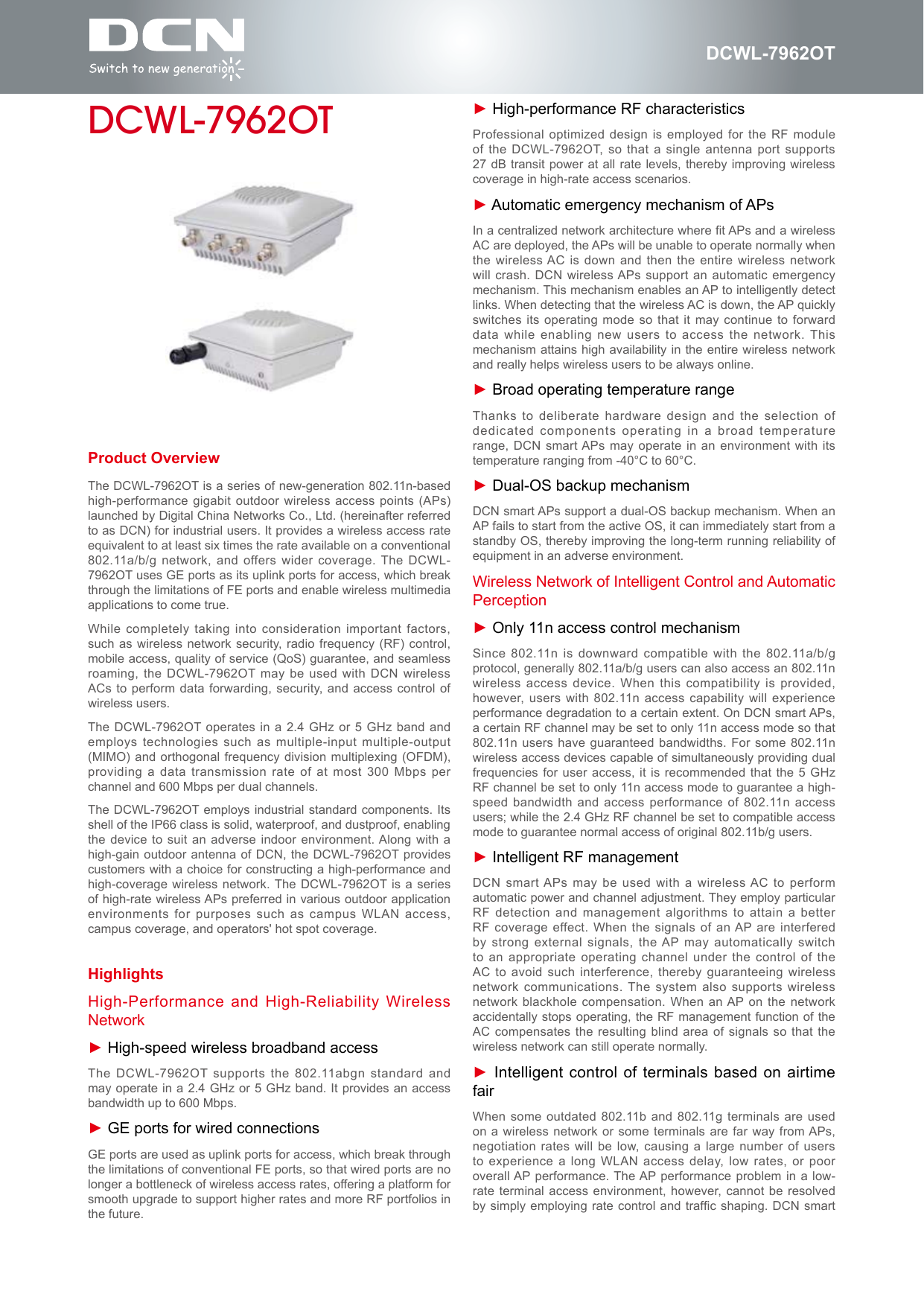
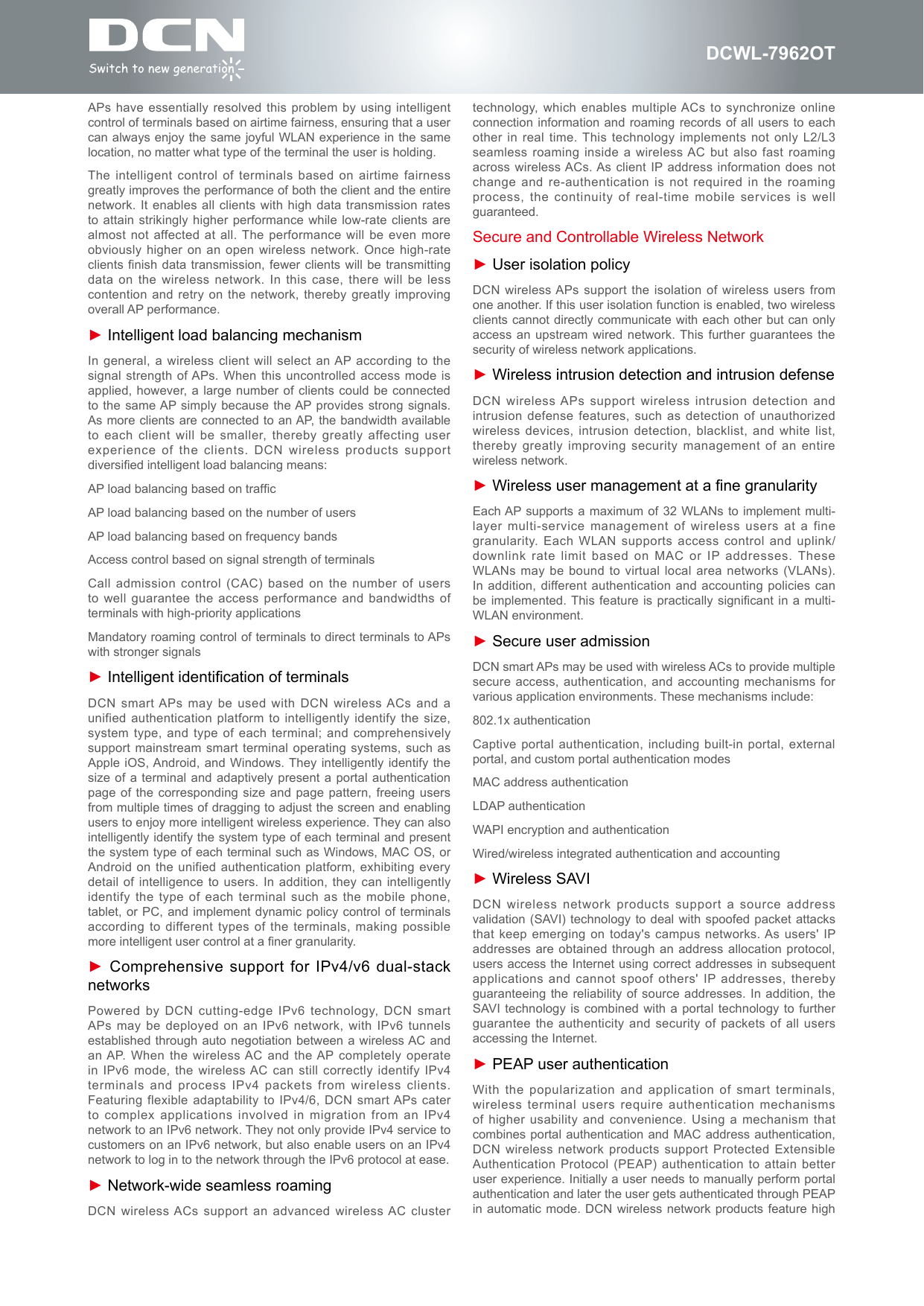
DCWL-7962OTProduct OverviewThe DCWL-7962OT is a series of new-generation 802.11n-based high-performance gigabit outdoor wireless  access points (APs) launched by Digital China Networks Co., Ltd. (hereinafter referred to as DCN) for industrial users. It provides a wireless access rate equivalent to at least six times the rate available on a conventional 802.11a/b/g network, and offers wider  coverage. The DCWL-7962OT uses GE ports as its uplink ports for access, which break through the limitations of FE ports and enable wireless multimedia applications to come true.While completely taking into  consideration important factors, such as wireless network  security, radio frequency (RF) control, mobile access, quality of service (QoS) guarantee, and seamless roaming, the DCWL-7962OT may be used with DCN wireless ACs to perform data forwarding, security, and access control  of wireless users.The DCWL-7962OT operates in  a 2.4 GHz or  5 GHz  band and employs technologies such as  multiple-input multiple-output (MIMO) and orthogonal frequency division multiplexing (OFDM), providing a  data transmission rate  of at most  300 Mbps per channel and 600 Mbps per dual channels.The DCWL-7962OT employs  industrial standard components.  Its shell of the IP66 class is solid, waterproof, and dustproof, enabling the device to suit  an adverse indoor  environment. Along with a high-gain outdoor antenna of DCN, the DCWL-7962OT provides customers with a choice for constructing a high-performance and high-coverage wireless network. The DCWL-7962OT is a series of high-rate wireless APs preferred in various outdoor application environments for  purposes such as  campus WLAN access, campus coverage, and operators' hot spot coverage.DCWL-7962OTHighlightsHigh-Performance and High-Reliability Wireless Network► High-speed wireless broadband accessThe DCWL-7962OT supports the 802.11abgn standard and may operate in a 2.4 GHz or 5 GHz band. It provides an access bandwidth up to 600 Mbps.► GE ports for wired connectionsGE ports are used as uplink ports for access, which break through the limitations of conventional FE ports, so that wired ports are no longer a bottleneck of wireless access rates, offering a platform for smooth upgrade to support higher rates and more RF portfolios in the future.► High-performance RF characteristicsProfessional optimized design is employed for the RF module of the DCWL-7962OT,  so that a  single antenna port supports 27 dB transit power  at all rate  levels, thereby improving wireless coverage in high-rate access scenarios.► Automatic emergency mechanism of APsIn a centralized network architecture where t APs and a wireless AC are deployed, the APs will be unable to operate normally when the wireless AC is down and then the entire wireless network will crash. DCN wireless APs support an automatic  emergency mechanism. This mechanism enables an AP to intelligently detect links. When detecting that the wireless AC is down, the AP quickly switches its operating mode  so that it may continue  to forward data while enabling new  users to access the network. This mechanism attains high availability in the entire wireless network and really helps wireless users to be always online.► Broad operating temperature rangeThanks to deliberate hardware  design and the  selection of dedicated components operating in a broad temperature range, DCN smart APs may operate in an environment with its temperature ranging from -40°C to 60°C.► Dual-OS backup mechanismDCN smart APs support a dual-OS backup mechanism. When an AP fails to start from the active OS, it can immediately start from a standby OS, thereby improving the long-term running reliability of equipment in an adverse environment.Wireless Network of Intelligent Control and Automatic Perception► Only 11n access control mechanismSince 802.11n is downward compatible with the 802.11a/b/g protocol, generally 802.11a/b/g users can also access an 802.11n wireless access device. When  this compatibility is  provided, however, users with 802.11n access capability will experience performance degradation to a certain extent. On DCN smart APs, a certain RF channel may be set to only 11n access mode so that 802.11n users have guaranteed bandwidths. For some 802.11n wireless access devices capable of simultaneously providing dual frequencies for user access, it is recommended that the 5 GHz RF channel be set to only 11n access mode to guarantee a high-speed bandwidth and access  performance of 802.11n access users; while the 2.4 GHz RF channel be set to compatible access mode to guarantee normal access of original 802.11b/g users.► Intelligent RF managementDCN smart APs may be used with a wireless AC to perform automatic power and channel adjustment. They employ particular RF detection and management algorithms to attain a better RF coverage effect. When the signals of an AP are interfered by strong external signals,  the AP may  automatically switch to an appropriate operating  channel under the control of  the AC to avoid such  interference, thereby guaranteeing wireless network communications. The  system also supports wireless network blackhole compensation. When  an AP on the network accidentally stops operating, the RF management function of the AC compensates the resulting  blind area of signals so  that the wireless network can still operate normally.► Intelligent control of terminals based on airtime fairWhen some outdated 802.11b and 802.11g terminals  are used on a wireless network  or some terminals  are far way from APs, negotiation rates will be  low, causing a  large number of  users to experience a long  WLAN access delay, low  rates, or poor overall AP performance. The AP performance problem  in a low-rate terminal access environment, however, cannot be resolved by simply employing rate  control and trafc shaping. DCN  smart
DCWL-7962OTAPs have essentially resolved  this problem by using intelligent control of terminals based on airtime fairness, ensuring that a user can always enjoy the same joyful WLAN experience in the same location, no matter what type of the terminal the user is holding.The intelligent control of terminals  based on airtime fairness greatly improves the performance of both the client and the entire network. It enables all  clients with high  data transmission rates to attain strikingly higher  performance while low-rate  clients are almost not affected at all. The performance will be even more obviously higher on an open wireless network. Once high-rate clients nish data transmission,  fewer clients will be transmitting data on the wireless network. In this case, there will be  less contention and retry on  the network, thereby  greatly improving overall AP performance.► Intelligent load balancing mechanismIn general, a wireless client will select an AP according to the signal strength of APs. When this uncontrolled access mode is applied, however, a large number of clients  could be connected to the same AP simply because the AP provides strong signals. As more clients are connected to an AP, the bandwidth available to each client will  be smaller, thereby  greatly affecting user experience of the clients.  DCN wireless products support diversied intelligent load balancing means:AP load balancing based on trafcAP load balancing based on the number of usersAP load balancing based on frequency bandsAccess control based on signal strength of terminalsCall admission control (CAC)  based on the number of  users to well guarantee the  access performance and bandwidths of terminals with high-priority applicationsMandatory roaming control of terminals to direct terminals to APs with stronger signals► Intelligent identication of terminalsDCN smart APs  may be used with DCN wireless ACs and a unified authentication platform to  intelligently identify the  size, system type, and type of each terminal; and comprehensively support mainstream smart terminal operating systems,  such as Apple iOS, Android,  and Windows. They intelligently  identify the size of a terminal  and adaptively present  a portal authentication page of the corresponding  size and page  pattern, freeing users from multiple times of dragging to adjust the screen and enabling users to enjoy more intelligent wireless experience. They can also intelligently identify the system type of each terminal and present the system type of each terminal such as Windows, MAC OS, or Android on the unified  authentication platform, exhibiting  every detail of intelligence to  users. In addition, they can  intelligently identify the type of  each terminal such  as the mobile phone, tablet, or PC, and  implement dynamic policy control of  terminals according to different types of the  terminals, making possible more intelligent user control at a ner granularity.► Comprehensive support for IPv4/v6 dual-stack networksPowered by DCN cutting-edge  IPv6 technology, DCN smart APs may be deployed  on an IPv6  network, with IPv6 tunnels established through auto negotiation between a  wireless AC and an AP. When  the wireless AC and the AP completely operate in  IPv6  mode,  the  wireless AC  can  still  correctly  identify  IPv4 terminals and process IPv4  packets from wireless clients. Featuring flexible adaptability to  IPv4/6, DCN smart APs cater to complex applications involved in migration from an  IPv4 network to an IPv6 network. They not only provide IPv4 service to customers on an IPv6 network, but also enable users on an IPv4 network to log in to the network through the IPv6 protocol at ease.► Network-wide seamless roamingDCN wireless ACs support an advanced wireless AC cluster technology, which enables multiple ACs  to synchronize online connection information and roaming records of all users to each other in real time. This technology implements not only  L2/L3 seamless roaming inside a  wireless AC but also fast roaming across wireless ACs. As  client IP address information  does not change and re-authentication is  not required in the roaming process, the continuity of real-time mobile services is  well guaranteed.Secure and Controllable Wireless Network► User isolation policyDCN wireless APs support the isolation of wireless users from one another. If this user isolation function is enabled, two wireless clients cannot directly communicate with each other but can only access an upstream wired  network. This further guarantees the security of wireless network applications.► Wireless intrusion detection and intrusion defenseDCN wireless APs support wireless intrusion detection and intrusion defense features, such  as detection of  unauthorized wireless devices, intrusion detection,  blacklist, and white list, thereby greatly improving security  management of an  entire wireless network.► Wireless user management at a ne granularityEach AP supports a  maximum of 32 WLANs to  implement multi-layer multi-service management of wireless users at a  fine granularity. Each WLAN supports access control and uplink/downlink rate limit based  on MAC or  IP addresses. These WLANs may be bound  to virtual local area networks (VLANs). In addition, different authentication and  accounting policies can be implemented. This  feature is practically  signicant in a  multi-WLAN environment.► Secure user admissionDCN smart APs may be used with wireless ACs to provide multiple secure access, authentication, and  accounting mechanisms for various application environments. These mechanisms include:802.1x authenticationCaptive portal authentication, including built-in portal, external portal, and custom portal authentication modesMAC address authenticationLDAP authenticationWAPI encryption and authenticationWired/wireless integrated authentication and accounting► Wireless SAVIDCN wireless network products  support a source  address validation (SAVI) technology to deal  with spoofed packet attacks that keep emerging on today's campus networks. As users' IP addresses are obtained through  an address allocation  protocol, users access the Internet using correct addresses in subsequent applications and cannot spoof others' IP addresses, thereby guaranteeing the reliability of source addresses. In addition, the SAVI technology is  combined with a portal technology  to further guarantee the authenticity and security of  packets of all users accessing the Internet.► PEAP user authenticationWith the popularization and  application of smart  terminals, wireless terminal users require  authentication mechanisms of higher usability and convenience. Using a mechanism that combines portal authentication and  MAC address authentication, DCN wireless network products  support Protected Extensible Authentication Protocol  (PEAP) authentication to attain better user experience. Initially a user needs to manually perform portal authentication and later the user gets authenticated through PEAP in automatic  mode. DCN wireless  network products feature high
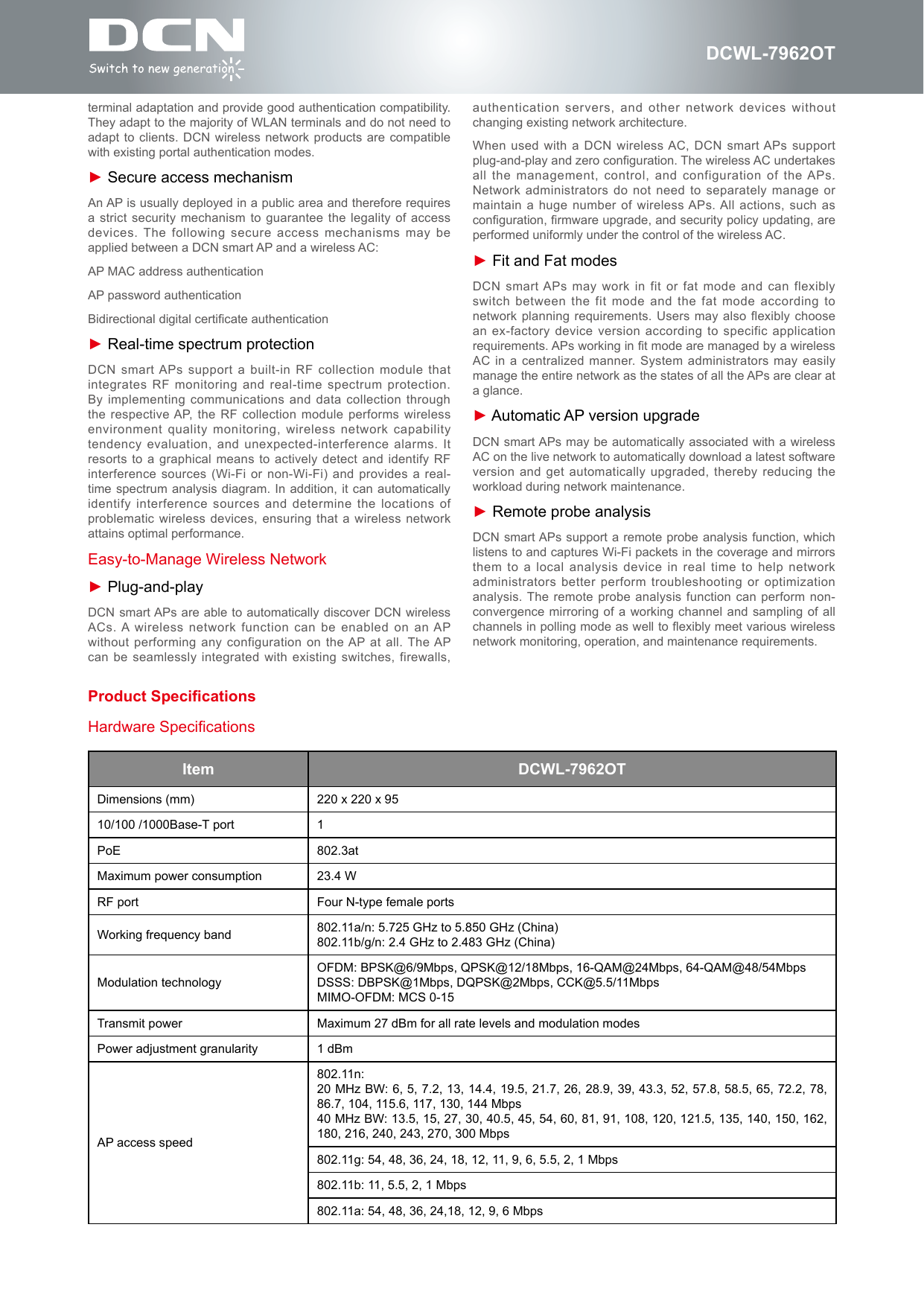
DCWL-7962OTterminal adaptation and provide good authentication compatibility. They adapt to the majority of WLAN terminals and do not need to adapt to clients. DCN  wireless network products are compatible with existing portal authentication modes.► Secure access mechanismAn AP is usually deployed in a public area and therefore requires a strict security mechanism to  guarantee the legality of access devices. The following secure access mechanisms may be applied between a DCN smart AP and a wireless AC:AP MAC address authenticationAP password authenticationBidirectional digital certicate authentication► Real-time spectrum protectionDCN smart APs support a built-in RF collection  module that integrates RF monitoring and  real-time spectrum protection. By implementing communications and  data collection through the respective AP, the RF collection module  performs wireless environment quality monitoring, wireless network capability tendency evaluation, and unexpected-interference  alarms. It resorts to a graphical means to actively detect and identify RF interference sources (Wi-Fi or  non-Wi-Fi) and provides a real-time spectrum analysis diagram.  In addition, it  can automatically identify interference sources and  determine the locations of problematic wireless devices, ensuring  that a wireless network attains optimal performance.Easy-to-Manage Wireless Network► Plug-and-playDCN smart APs are  able to automatically discover DCN wireless ACs. A wireless  network function can be enabled on an AP without performing any configuration on the AP at  all. The AP can be seamlessly integrated  with existing switches, firewalls, Item DCWL-7962OTDimensions (mm) 220 x 220 x 9510/100 /1000Base-T port 1PoE 802.3atMaximum power consumption 23.4 WRF port Four N-type female portsWorking frequency band 802.11a/n: 5.725 GHz to 5.850 GHz (China)802.11b/g/n: 2.4 GHz to 2.483 GHz (China)Modulation technologyOFDM: BPSK@6/9Mbps, QPSK@12/18Mbps, 16-QAM@24Mbps, 64-QAM@48/54MbpsDSSS: DBPSK@1Mbps, DQPSK@2Mbps, CCK@5.5/11Mbps MIMO-OFDM: MCS 0-15Transmit power Maximum 27 dBm for all rate levels and modulation modesPower adjustment granularity 1 dBmAP access speed802.11n: 20 MHz BW: 6, 5, 7.2, 13, 14.4, 19.5, 21.7, 26, 28.9, 39, 43.3, 52, 57.8, 58.5, 65, 72.2, 78, 86.7, 104, 115.6, 117, 130, 144 Mbps40 MHz BW: 13.5, 15, 27, 30, 40.5, 45, 54, 60, 81, 91, 108, 120, 121.5, 135, 140, 150, 162, 180, 216, 240, 243, 270, 300 Mbps802.11g: 54, 48, 36, 24, 18, 12, 11, 9, 6, 5.5, 2, 1 Mbps802.11b: 11, 5.5, 2, 1 Mbps802.11a: 54, 48, 36, 24,18, 12, 9, 6 MbpsHardware Specificationsauthentication servers, and other network devices  without changing existing network architecture.When used with a  DCN wireless AC, DCN  smart APs support plug-and-play and zero conguration. The wireless AC undertakes all  the  management,  control,  and  configuration  of  the APs. Network administrators do not  need to separately manage or maintain a huge number  of wireless APs. All actions,  such as conguration, rmware upgrade, and security policy updating, are performed uniformly under the control of the wireless AC.► Fit and Fat modesDCN smart APs  may work in fit or fat mode and  can flexibly switch between the fit  mode and the  fat mode according to network planning requirements. Users may also  flexibly choose an ex-factory device version according to specific application requirements. APs working in t mode are managed by a wireless AC in a centralized  manner. System administrators may easily manage the entire network as the states of all the APs are clear at a glance.► Automatic AP version upgradeDCN smart APs may be automatically associated with a wireless AC on the live network to automatically download a latest software version and get automatically  upgraded, thereby reducing the workload during network maintenance.► Remote probe analysisDCN smart APs support a remote probe analysis function, which listens to and captures Wi-Fi packets in the coverage and mirrors them to a local  analysis device in  real time to help network administrators better perform troubleshooting  or optimization analysis. The remote probe analysis  function can perform non-convergence mirroring of a working channel and sampling of all channels in polling mode as well to exibly meet various wireless network monitoring, operation, and maintenance requirements.Product Specications
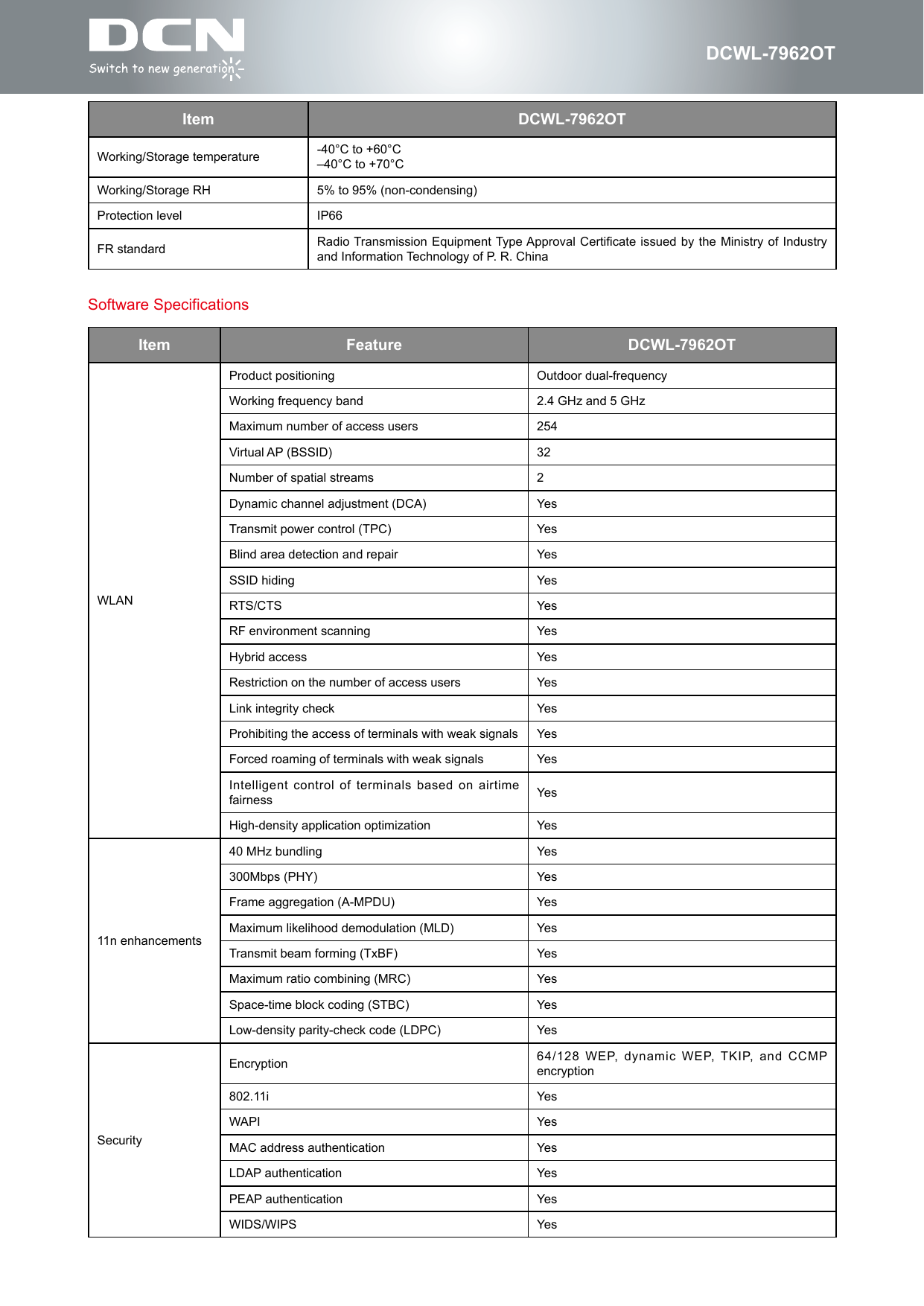
DCWL-7962OTSoftware SpecificationsItem Feature DCWL-7962OTWLANProduct positioning Outdoor dual-frequencyWorking frequency band 2.4 GHz and 5 GHzMaximum number of access users 254Virtual AP (BSSID)  32Number of spatial streams 2Dynamic channel adjustment (DCA) YesTransmit power control (TPC) YesBlind area detection and repair YesSSID hiding YesRTS/CTS YesRF environment scanning YesHybrid access YesRestriction on the number of access users YesLink integrity check YesProhibiting the access of terminals with weak signals YesForced roaming of terminals with weak signals YesIntelligent control of terminals  based on airtime fairness YesHigh-density application optimization Yes11n enhancements40 MHz bundling Yes300Mbps (PHY) YesFrame aggregation (A-MPDU) YesMaximum likelihood demodulation (MLD) YesTransmit beam forming (TxBF) YesMaximum ratio combining (MRC) YesSpace-time block coding (STBC) YesLow-density parity-check code (LDPC) YesSecurityEncryption 64/128 WEP, dynamic WEP, TKIP, and CCMP encryption802.11i YesWAPI YesMAC address authentication YesLDAP authentication YesPEAP authentication YesWIDS/WIPS YesItem DCWL-7962OTWorking/Storage temperature -40°C to +60°C–40°C to +70°CWorking/Storage RH 5% to 95% (non-condensing)Protection level IP66FR standard Radio Transmission Equipment Type Approval Certicate  issued by the  Ministry of Industry and Information Technology of P. R. China
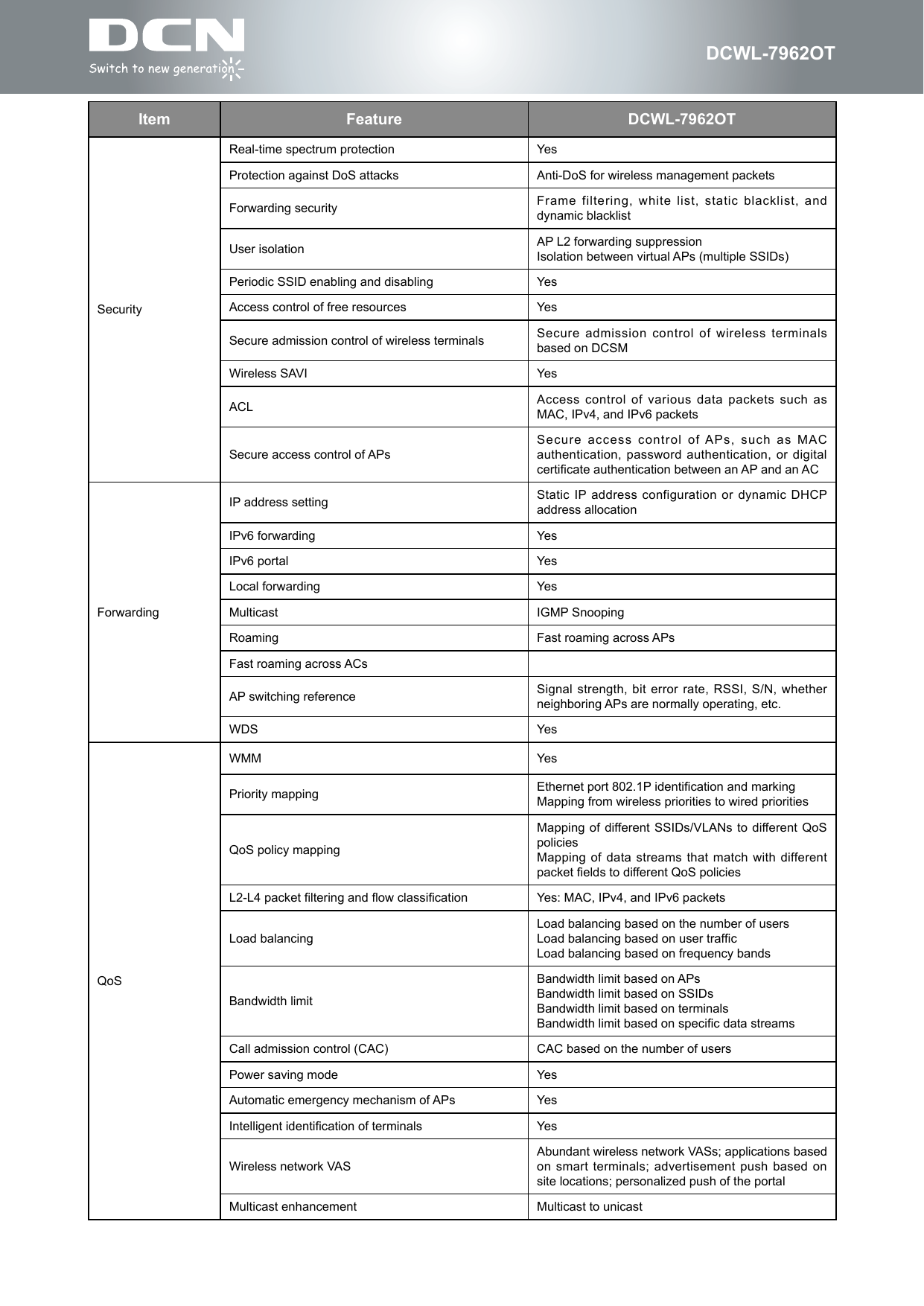
DCWL-7962OTItem Feature DCWL-7962OTSecurityReal-time spectrum protection YesProtection against DoS attacks Anti-DoS for wireless management packetsForwarding security Frame filtering,  white list, static  blacklist, and dynamic blacklistUser isolation AP L2 forwarding suppressionIsolation between virtual APs (multiple SSIDs)Periodic SSID enabling and disabling YesAccess control of free resources YesSecure admission control of wireless terminals Secure admission control of wireless terminals based on DCSMWireless SAVI YesACL Access  control  of  various  data  packets  such  as MAC, IPv4, and IPv6 packetsSecure access control of APsSecure access control of APs, such as MAC authentication, password authentication, or  digital certicate authentication between an AP and an ACForwardingIP address setting Static IP address  configuration or dynamic  DHCP address allocationIPv6 forwarding YesIPv6 portal YesLocal forwarding YesMulticast IGMP Snooping Roaming Fast roaming across APsFast roaming across ACsAP switching reference Signal strength, bit error  rate, RSSI, S/N, whether neighboring APs are normally operating, etc.WDS YesQoSWMM YesPriority mapping Ethernet port 802.1P identication and markingMapping from wireless priorities to wired prioritiesQoS policy mappingMapping of different SSIDs/VLANs to different QoS policiesMapping of data streams  that match with different packet elds to different QoS policiesL2-L4 packet ltering and ow classication Yes: MAC, IPv4, and IPv6 packetsLoad balancingLoad balancing based on the number of usersLoad balancing based on user trafcLoad balancing based on frequency bandsBandwidth limitBandwidth limit based on APsBandwidth limit based on SSIDsBandwidth limit based on terminalsBandwidth limit based on specic data streamsCall admission control (CAC) CAC based on the number of usersPower saving mode YesAutomatic emergency mechanism of APs YesIntelligent identication of terminals YesWireless network VASAbundant wireless network VASs; applications based on smart terminals; advertisement  push based on site locations; personalized push of the portalMulticast enhancement Multicast to unicast
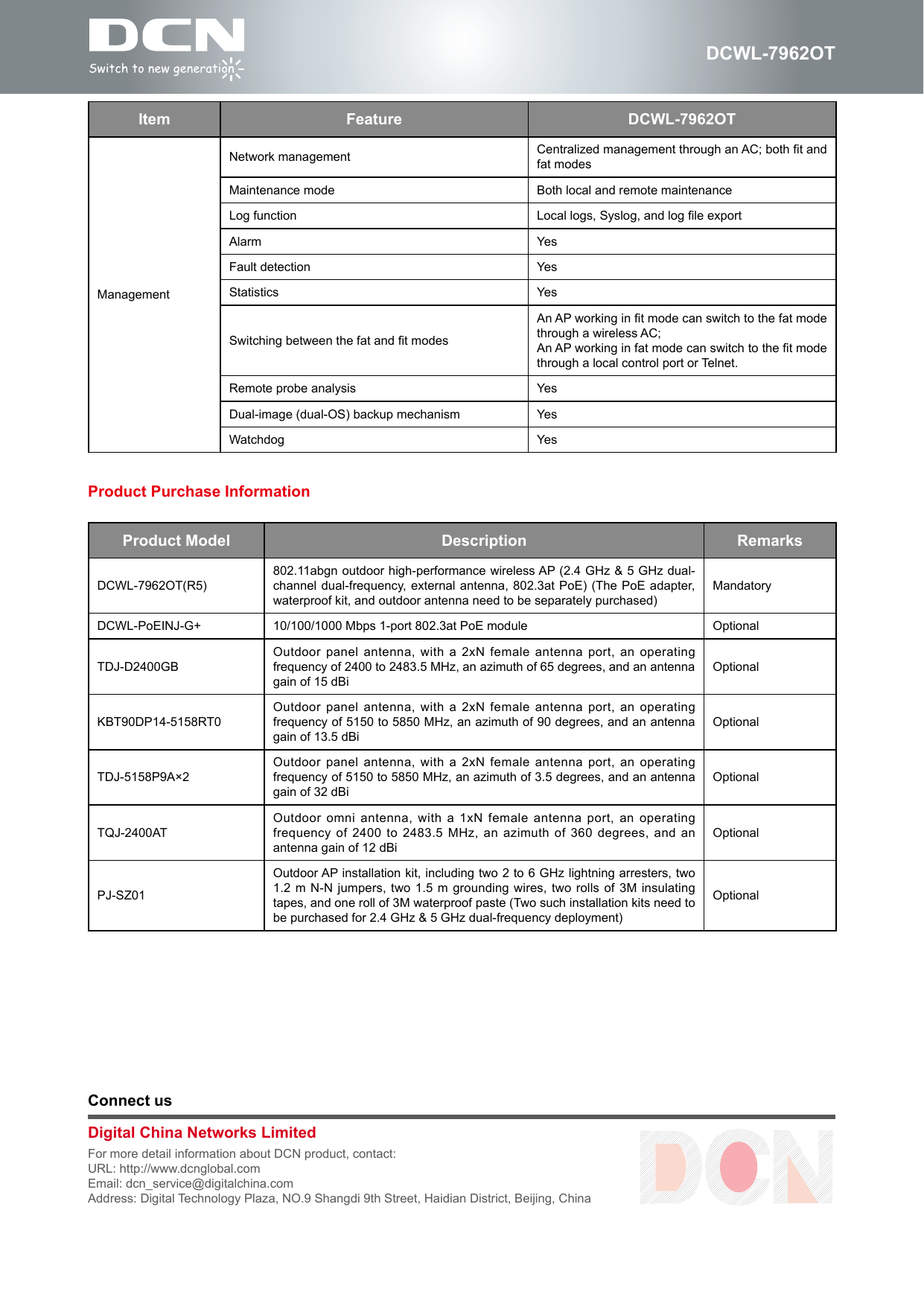
DCWL-7962OTItem Feature DCWL-7962OTManagementNetwork management Centralized management through an AC; both t and fat modesMaintenance mode Both local and remote maintenanceLog function Local logs, Syslog, and log le exportAlarm YesFault detection YesStatistics YesSwitching between the fat and t modesAn AP working in t mode can switch to the fat mode through a wireless AC;An AP working in fat mode can switch to the t mode through a local control port or Telnet.Remote probe analysis YesDual-image (dual-OS) backup mechanism YesWatchdog YesConnect usDigital China Networks LimitedFor more detail information about DCN product, contact:URL: http://www.dcnglobal.comEmail: dcn_service@digitalchina.comAddress: Digital Technology Plaza, NO.9 Shangdi 9th Street, Haidian District, Beijing, ChinaProduct Purchase InformationProduct Model Description RemarksDCWL-7962OT(R5)802.11abgn outdoor high-performance wireless AP (2.4 GHz & 5 GHz dual-channel dual-frequency, external  antenna, 802.3at PoE)  (The PoE adapter, waterproof kit, and outdoor antenna need to be separately purchased)MandatoryDCWL-PoEINJ-G+ 10/100/1000 Mbps 1-port 802.3at PoE module OptionalTDJ-D2400GBOutdoor panel antenna, with a 2xN female antenna port, an operating frequency of 2400 to 2483.5 MHz, an azimuth of 65 degrees, and an antenna gain of 15 dBiOptionalKBT90DP14-5158RT0 Outdoor panel antenna, with a 2xN female antenna port, an operating frequency of 5150 to 5850 MHz, an azimuth of 90 degrees, and an antenna gain of 13.5 dBiOptionalTDJ-5158P9A×2Outdoor panel antenna, with a 2xN female antenna port, an operating frequency of 5150 to 5850 MHz, an azimuth of 3.5 degrees, and an antenna gain of 32 dBiOptionalTQJ-2400ATOutdoor omni antenna, with a 1xN  female antenna port, an operating frequency of 2400 to 2483.5 MHz, an azimuth of 360 degrees,  and an antenna gain of 12 dBiOptionalPJ-SZ01Outdoor AP installation kit, including two 2 to 6 GHz lightning arresters, two 1.2 m N-N jumpers,  two 1.5 m grounding wires,  two rolls of 3M insulating tapes, and one roll of 3M waterproof paste (Two such installation kits need to be purchased for 2.4 GHz & 5 GHz dual-frequency deployment)Optional
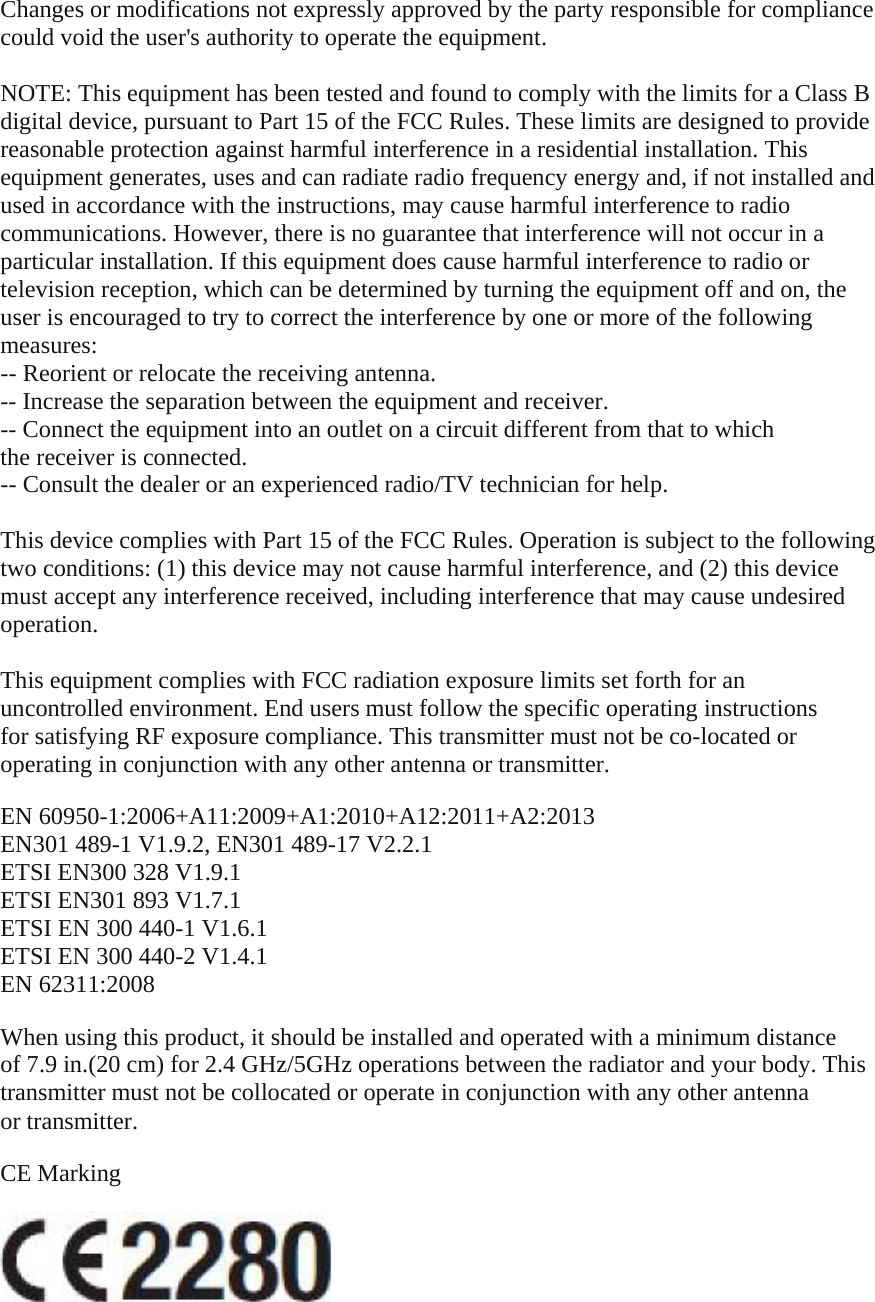
Changes or modifications not expressly approved by the party responsible for compliance could void the user's authority to operate the equipment.  NOTE: This equipment has been tested and found to comply with the limits for a Class B digital device, pursuant to Part 15 of the FCC Rules. These limits are designed to provide reasonable protection against harmful interference in a residential installation. This equipment generates, uses and can radiate radio frequency energy and, if not installed and used in accordance with the instructions, may cause harmful interference to radio communications. However, there is no guarantee that interference will not occur in a particular installation. If this equipment does cause harmful interference to radio or television reception, which can be determined by turning the equipment off and on, the user is encouraged to try to correct the interference by one or more of the following measures: -- Reorient or relocate the receiving antenna. -- Increase the separation between the equipment and receiver. -- Connect the equipment into an outlet on a circuit different from that to which the receiver is connected. -- Consult the dealer or an experienced radio/TV technician for help.  This device complies with Part 15 of the FCC Rules. Operation is subject to the following two conditions: (1) this device may not cause harmful interference, and (2) this device must accept any interference received, including interference that may cause undesired operation.  This equipment complies with FCC radiation exposure limits set forth for an uncontrolled environment. End users must follow the specific operating instructions for satisfying RF exposure compliance. This transmitter must not be co-located or operating in conjunction with any other antenna or transmitter.  EN 60950-1:2006+A11:2009+A1:2010+A12:2011+A2:2013 EN301 489-1 V1.9.2, EN301 489-17 V2.2.1 ETSI EN300 328 V1.9.1 ETSI EN301 893 V1.7.1 ETSI EN 300 440-1 V1.6.1 ETSI EN 300 440-2 V1.4.1 EN 62311:2008  When using this product, it should be installed and operated with a minimum distance of 7.9 in.(20 cm) for 2.4 GHz/5GHz operations between the radiator and your body. This transmitter must not be collocated or operate in conjunction with any other antenna or transmitter.  CE Marking

Navigation menu