819 6467 Church's QR FEB 09 CM4 S(T)
User Manual: CM4-S(T)
Open the PDF directly: View PDF  .
.
Page Count: 6
CM4-S(t) COMPUTER OPERATION
(PROGRAMMED FOR CHURCH’S CHICKEN)
1
Setting up the Fryer for Initial Use
Follow these instructions for the initial filling of a new fryer:
1. Boil out the frypot as described on page 5 of this chapter to clear any debris
associated with manufacturing.
2. Fill the frypot with liquid shortening to the
lower of the two etched marks in the frypot. If
using solid shortening, cut the shortening
into small squares and pack tightly into the
frypot. Lift the elements on an electric fryer
to pack the lower frypot. Press the elements
into the shortening until they assume their normal position (a safety switch
prevents element operation if the elements are not in the "down" position).
Continue to pack shortening around the elements until reaching the lower etched
line in the frypot. Pack the shortening tightly around and under the tubes of a gas
fryer.
Setting the Computer for French Fry or Chicken Operation
To set the computer for Chicken, follow these steps:
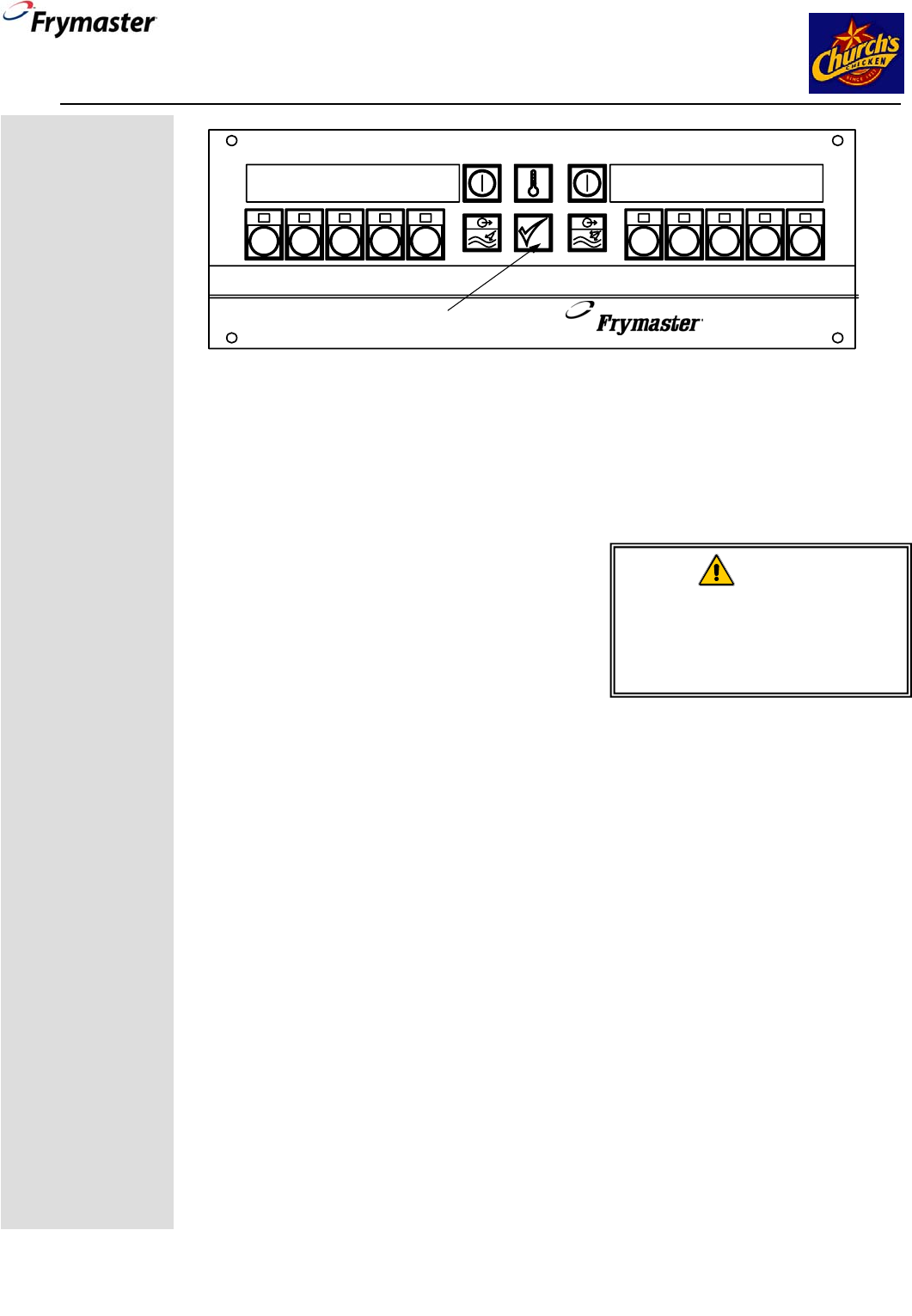
1. With the display showing OFF. Press the programming key. See Figure 1 above.
2. With the numbered keys, enter 1113. Chicken Fryer will be displayed for
about 10 seconds and the fryer will return to OFF.
3. Press the ON button. The fryer will begin to heat to setpoint.
4. Press the number 1 key and the LEDs in all programmed product keys will light.
5. When the fryer reaches setpoint the computer will display dashed lines. Press a
product button to launch a cook cycle.
6. Flip menu strip in computer if necessary to reflect menu items.
Church’s
Chicken
Operation
CM4-S computers
on fryers prepared
for Church’s
Chicken are
specially
programmed for
use with either the
restaurant's
chicken or french
fried items.
The cooking
programs are
different and the
computers must be
set for their
intended menu.
The computer is
set by the factory
to the chicken
menu. Follow the
instructions at right
to set the computer
to either menu.
.
12345 6 7 8 9 10
CM4-S
12 3 45 67 8 910
Programming Key
Figure 1: CM4-S Computer
WARNING
Never set a complete block of
shortening on top of heating
elements or heating tubes. To do
so will damage the fryer and void
the warranty.
FEB 2009
*
8196467
*
8700 Line Ave.
Shreveport, LA 71106
Service Hotline 800-551-8633
CM4-S COMPUTER OPERATION
(PROGRAMMED FOR CHURCH’S CHICKEN)
2
To set the computer for french fries follow these steps:
1. With the display showing OFF. Press the programming key. See Figure1.
2. With the numbered keys, enter 1114. French Fryer will be displayed for
about 10 seconds and the fryer will return to OFF
3. Press the ON button. The fryer will begin to heat to setpoint.
4. Press a product key and the LEDs in all programmed product keys will light.
5. When the fryer reaches setpoint, the computer will display dashed lines. Press a
product button to launch a cook cycle.
6. Flip menu strip in computer if necessary to reflect menu items.
Operating the Fryer after Setting for Church’s Chicken Operation
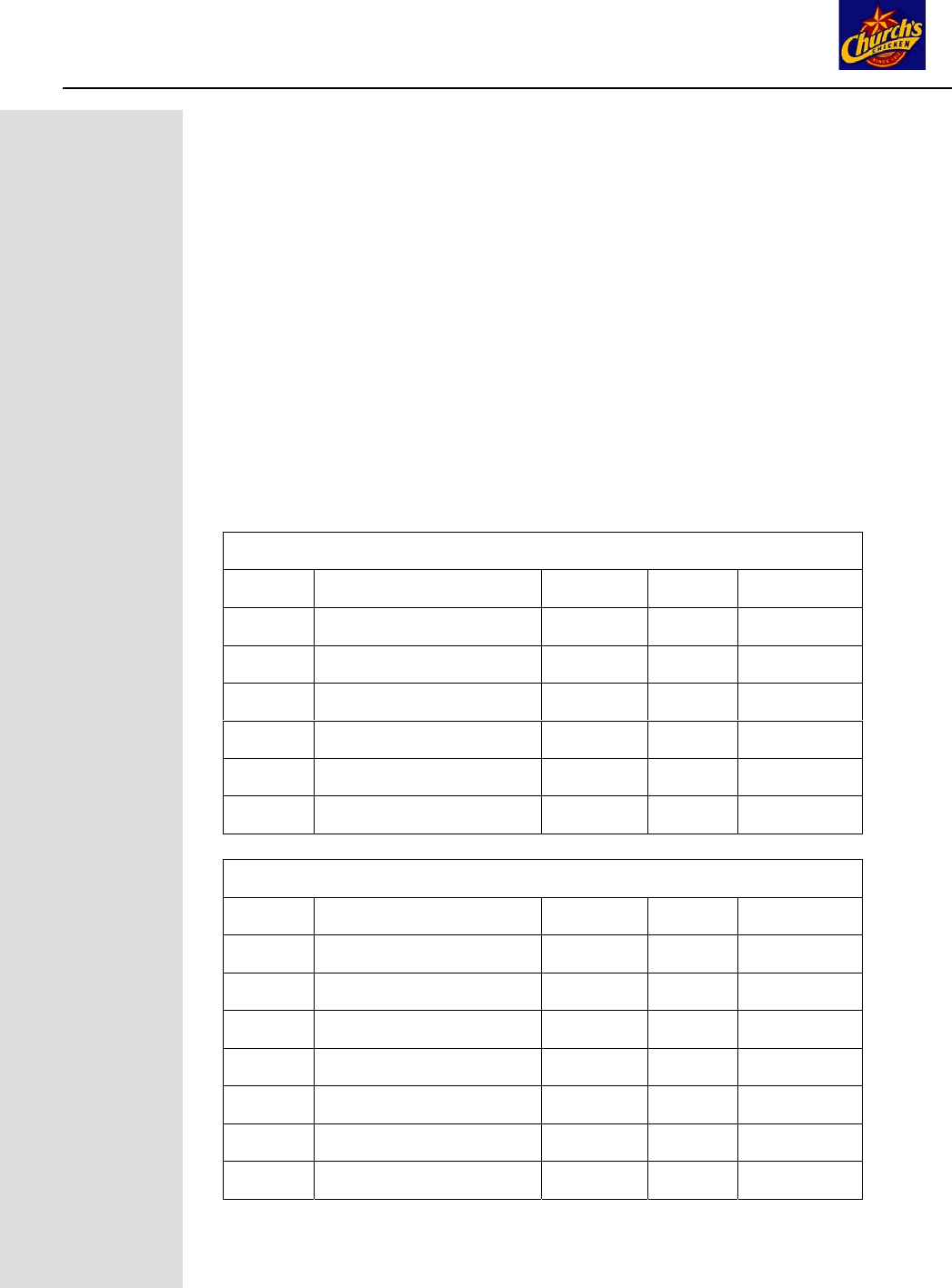
With the computer set for the appropriate menu, product keys will be programmed as
indicated in the grids below.
Church’s Chicken Menu
Key Product Time Temp Filter Count
1 40 pieces, dark meat 15:00 340°F 5
2 40 pieces, white meat 12:30 340°F 5
3 24 pieces or less 15:00 340°F 3
4 Tenders 3:30 340°F 3
5 Steak 4:00 340°F
6 Wings 7:00 340°F 3
Church’s French Fry Menu
Key Product Time Temp Filter Count
1 Fries 3:30 360°F 1
2 Fries 3:30 360°F 1
3 Okra 3:30 360°F 1
4 Okra 3:30 360°F 1
5 Pies 6:00 360°F
6 Bombers 2:00 360°F
7 Hushpuppies 2:30 360°F
CM4-S COMPUTER OPERATION
(PROGRAMMED FOR CHURCH’S CHICKEN)
3
Daily operation with the fryer set to either Chicken or French Fry Mode
1. Turn the fryer on by pressing the button on the comptuer.
2. The display will show LOW as the fryer enters a melt cycle, slowly heating the
shortening.
3. When the fryer reaches setpoint, dashed lines appear on the computer display.
4. Press a product key for the desired product.
5. The cook cycle begins. Self-canceling alarms sound, indicating the product
should be shaken at preset points in the cook cycle.
6. DONE is displayed on the computer at the end of the cook cycle.
7. Press the product button to end display.
Filtration
The filter pan must be clean before beginning filtration. Follow these steps to
prepare the filter pan for filtration:
1. Open fryer cabinet doors and remove the pan from the fryer cabinet.
2. Remove crumb tray, hold-down ring, filter paper and inner screen.
3. Clean inner screen and pan interior.
4. Clean the crumb tray and place debris in a fireproof container.
5. Return components to the filter pan in this order: inner screen, filter paper, hold-
down ring and crumb tray.
6. Add filter powder.
7. Replace filter pan lids and return filter pan to fryer cabinet.
8. Ensure the connection to the fryer’s oil-return line is properly connected.
9. Close fryer cabinet doors.
Computer Prompts for Filtration
The computer display will flash FILTER at the completion of a cook cycle,
indicating the completion of a preset number of cook cycles and must be filtered.
Follow these steps to filter the fryer. The fryer must be at operating temperature to
filter.
1. Computer flashes FILTER.
2. Leave the computer ON.
3. Ensure the filter pan is prepared for filtering (see
above). Ensure the connections are properly
connected.
4. Use the fine-mesh skimmer to remove large particles and debris from shortening
prior to draining frypot.
5. Open the drain valve with the red-handled lever in the fryer cabinet. As the
shortening drains, use a metal scraper to gently remove debris from walls above
shortening level in frypot.
6. OPEN DRAIN is displayed on the computer. Shortening flows from the frypot
to the filter pan.
7. While the frypot is draining, connect the rinse hose to the connection inside the
filter cabinet. After all shortening has drained, remove the frypot wire rack. Use
a dry scrub pad to clean the walls of the vat.
8. Position the hose nozzle inside the frypot. Press the wand/disposal rocker
switch on the fryer topcap to ON and rotate the blue wand/dispose handle in the
WARNING
Hot oil is extremely dangerous.
Wear proper protective clothing and
use caution.
CM4-S COMPUTER OPERATION
(PROGRAMMED FOR CHURCH’S CHICKEN)
4
cabinet to the open position to start the 3-minute rinse process. Do not
remove the hose nozzle from frypot during the rinse process.
9. Hold the hose nozzle at a 45-degree angle toward the back of the frypot.
This washes debris toward the drain valve and helps prevent the drain
valve from becoming clogged. Rinse the frypot for approximately 2-½
minutes (allow 30 seconds to disconnect and drain the hose wand).
Press the wand/disposal rocker switch to OFF and rotate the blue
wand/dispose handle to the closed position. Disconnect and drain the
rinse hose into the filter pan.
10. At 3 minutes after opening the drain valve, the computer display will
alternate between OPEN DRAIN and a countdown of the filtering time.
Replace the frypot wire rack before continuing.
11. Turn the filter pump on with the yellow-handled lever that coincides with
the frypot being filtered. Leave the drain valve open. Allow the
shortening to circulate through the frypot for the remainder of the 10-
minute cycle. This process is known as "polishing".
12. At the completion of the filter cycle, the computer display will change to
FILL.
13. Close the drain valve with the red-handled drain valve lever. The frypot
will fill.
14. As the filter pan is emptied, bubbles will form in the frypot. An audible
alarm sounds when the frypot is full.
15. Turn off the filter pump with the yellow-handled filter pump handle. Add
new shortening to bring level to the upper OIL LEVEL line. Remember,
the shortening is at operating temperature.
16. Press the button. The fryer will return to operating temperature.
Continue to filter other frypots as needed.
Delaying Filtration
The filtration can be delayed, if necessary, by following these steps.
1. At the completion of a cook cycle, the computer display flashes
FILTER.
2. Press the button to turn computer OFF.
3. Press the programming button. See Figure 1.
4. CODE is displayed on the left side of the computer.
5. Enter 1111 with the numbered keys. The display changes to a steady
display of FILTER.
6. Cook cycles can be launched; however, FILTER will be displayed until
a filter operation is completed.
DANGER
Never drain more than one fryer at a
time. The filter pan will overflow.
When unclogging a valve, do not
insert anything into the drain from the
front. Hot oil will rush out, creating an
extreme hazard.
DANGER
The crumb tray must be emptied into a
fireproof container at the end of frying
operations each day. Some food particles
can spontaneously combust if left soaking
in certain shortening material.
CM4-S COMPUTER OPERATION
(PROGRAMMED FOR CHURCH’S CHICKEN)
5
Canceling Filtration Prompt
The filtration can be eliminated, if necessary, by following these steps. This process
zeros the filter count
1. At the completion of a cook cycle, the computer
display flashes FILTER.
2. Press the button to turn computer OFF.
3. Press the programming button. See Figure 1.
4. CODE is displayed on the left side of the
computer.
5. Enter 1119 with the numbered keys.
6. CLR FLTR FUNCTION flashes in display and computer displays OFF
7. Turn the computer on to continue cooking.
Boil Out
Boil out is necessary before using a fryer for the first time and at prescribed times as
part of preventive maintenance. Follow these steps to boil out a frypot if the fryer is
connected to an oil disposal system:
1. Ensure the shortening is at
operating temperature.
2. Press the button to turn
computer OFF.
3. Open the drain with the red-
handled drain-valve lever. The
shortening will flow into the filter
pan.
4. Close the drain valve when all
shortening is drained.
5. If a shortening disposal system
is present, ensure it is
connected to the fryer and
working properly. Use the
cabinet-mounted rocker switch and the blue handle in the filter cabinet to
DISPOSE of spent shortening in the filter pan. Ensure all shortening is pumped
from filter pan and lines before turning off the pump. Remove and thoroughly
clean filter pan and components. Do not replace filter pan until boil-out procedure
is completed.
6. Fill the frypot to the top OIL LEVEL line with clean water.
7. Pour in boil-out cleaning detergent.
8. Press the programming key on the computer (See Figure 1).
9. CODE appears on the left display of the computer.
10. Enter 1115.
11. Boil Out appears in the left display. Press Check to Start appears
in the right display.
12. Press the button.
DANGER
Never leave the fryer unattended during boil
out. If the boil-out solution boils over, turn
the computer off immediately and let the
solution cool before resuming the process.
WARNING
Do not drain boil-out solution into the built-in
filtration system. It can damage the filter
pump.
Note: Using the 1119 code
zeros out the cook count,
which triggers the filter prompt.
A filter prompt will not
reappear until the cook count
again reaches the preset
number for a filter prompt.
CM4-S COMPUTER OPERATION
(PROGRAMMED FOR CHURCH’S CHICKEN)
6
13. Boil Out appears in the left display; a time display, which starts at 30:00,
appears in the right and counts down the boil out.
14. The water/detergent solution heats to 195°F.
15. The computer displays DONE and beeps at the end of the boil out.
16. Press the button to turn
computer OFF.
17. Drain the boil-out solution into a
metal stockpot capable of holding
the complete contents of the frypot
and discard.
18. Rinse frypot with clean water, drain into stockpot and dry the frypot.
19. Fill with fresh shortening to the lower OIL LEVEL line on the back of the frypot.
20. Replace the filter pan.
21. Press the button to turn the computer ON. The oil will heat.
Follow these instructions if there is no oil disposal system:
1. Press the button to turn computer OFF and allow the oil to cool to
approximately 100°F (38°C).
2. Remove and clean the filter pan.
3. Position a shortening disposal unit or a metal container suitable to handle hot
liquid under the drain valve.
4. Open the drain with the red-handled drain-valve lever. The shortening will flow
out. Do not overfill the container. Repeat draining process as necessary.
5. Close the drain valve when all shortening is drained.
6. Fill the frypot to the top OIL LEVEL line with clean water.
7. Pour in boil-out cleaning detergent.
8. Press the programming key on the computer (See Figure 1).
9. CODE appears on the left display of the computer.
10. Enter 1115.
11. Boil Out appears in the left display. Press Check to Start
appears in the right display.
12. Press the button.
13. Boil Out appears in the left display; a time display, which starts at 30:00,
appears in the right and counts down the boil out.
14. The water/detergent solution heats to 195°F.
15. The computer displays DONE and beeps at the end of the boil out.
16. Press the button to turn
computer OFF.
17. Drain the boil-out solution into a
metal stockpot capable of holding
the complete contents of the frypot
and discard.
18. Rinse frypot with clean water, drain into stockpot and dry the frypot.
19. Fill with fresh shortening to the lower OIL LEVEL line on the back of the frypot.
20. Replace the filter pan.
21. Press the button to turn the computer ON. The oil will heat.
DANGER
Remove all drops of water from the frypot
before filling with oil. Failure to do so may
cause spattering of hot liquid when the oil is
heated to cooking temperature.
DANGER
Remove all drops of water from the frypot
before filling with oil. Failure to do so may
cause spattering of hot liquid when the oil is
heated to cooking temperature.
