FA142cprogform FA142C Program Manual
User Manual: FA142C Program Manual AlarmHow.net Library
Open the PDF directly: View PDF  .
.
Page Count: 24

PROGRAMMING GUIDE
(Includes Programming Form)
FA142C SECURITY SYSTEM
NN7227–1 PRFA 4/97
Addition of new 5800 series transmitters with this
control panel is prohibited, other than for repair of
existing installations. Non-permitted use voids U.S.
warranty.

– 2 –
TABLE OF CONTENTS
Programming Form ................................................................................................ 3
Mechanics of Programming .................................................................................. 7
General Programming Information.................................................................... 7
Entering the Programming Mode....................................................................... 7
Programming a Data Field ................................................................................. 8
Reviewing a Data Field/Erasing an Entry in a Data Field ............................... 8
Interactive Menu Mode Programming (✱56, ✱80, ✱81, ✱82, & ✱83 .................. 8
Loading Factory Defaults ................................................................................... 8
Programming System Setup Fields .................................................................... 8
Exiting the Programming Mode ......................................................................... 8
5800 Series Transmitter Input Loop Identification ........................................ 9
Alpha Vocabulary List (For Entering Zone Descriptors) ................................... 10
Character (ASCII) Chart (For Adding Custom Words) ...................................... 10
Zone Response Type Definitions ....................................................................... 11
Data Field Descriptions ....................................................................................... 13
Remote Programming and Control (Downloading) ...................................... 20
General Information .......................................................................................... 20
Equipment Required ......................................................................................... 20
Initial Download ................................................................................................ 20
Remote Programming Information .................................................................. 20
Remote Programming Advisory Notes ............................................................. 21
Summary of Connections Diagram ........................................ Inside Back Cover (23)
– 3 –
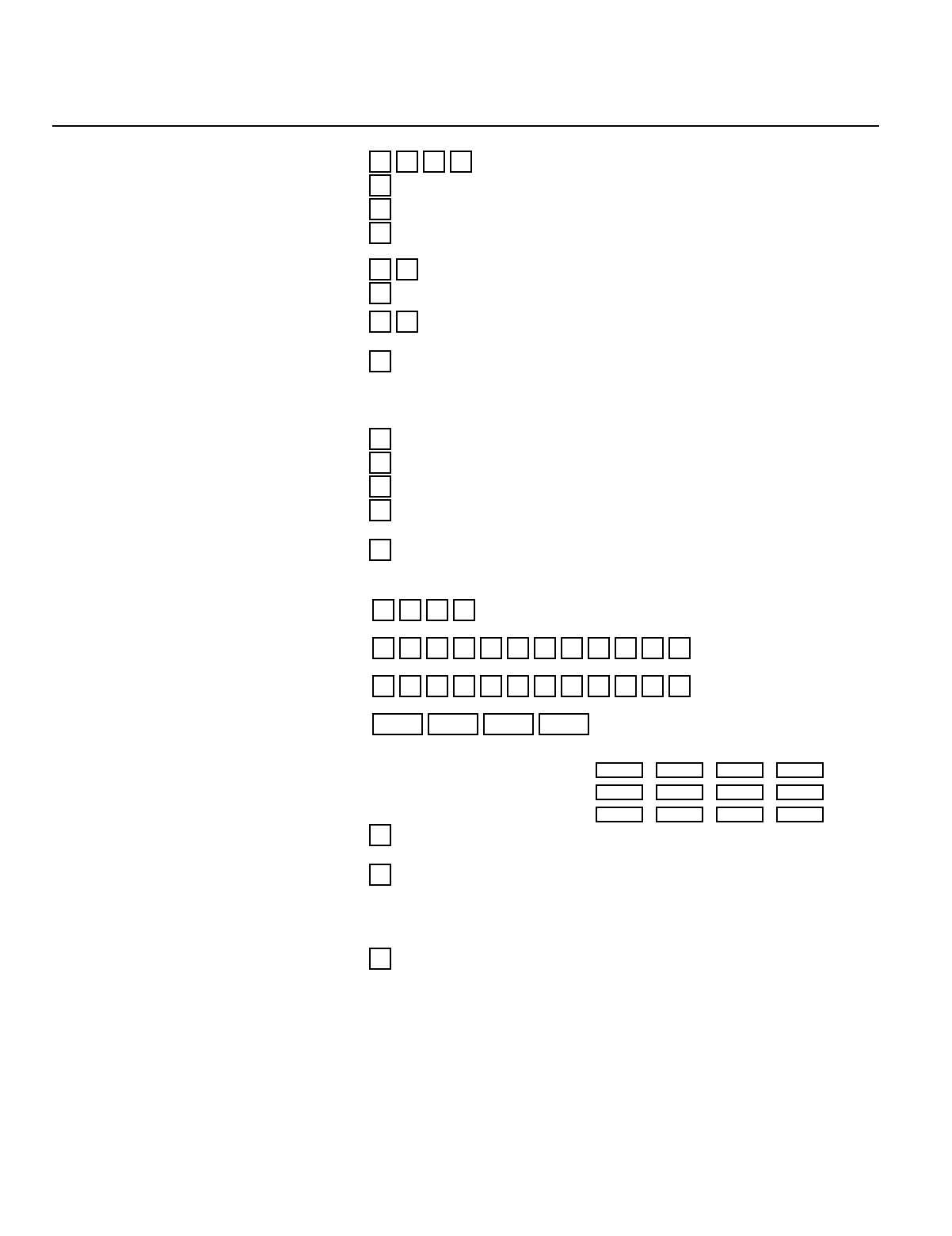
FA142C PROGRAMMING FORM
Local programming requires the use of a 2-line Alpha keypad (e.g., FA550KP) .
To set all program fields to First Alert default values: Key
✱97.
Field Function Programmed Values [ ] = Default Value
SYSTEM SETUP (✱20-✱27)
✱20 INSTALLER CODE Enter 4 digits, 0-9...[4] [1] [1] [1]
✱21 QUICK ARM ENABLE [0 = no]; 1 = yes
✱22 RF SYSTEM TYPE [0 = none]; 1 = 5700 (4281); 2 = 5800 (5881)
✱23 FORCED BYPASS FUNCTION [0 = none]; 1 = bypass open zones
2 = bypass open zones + (if in system) zones 17, 30, 31, 46, 47.
✱24 RF HOUSE ID CODE [0][0] MUST enter (01-31) for 5700 System. Enter also for 5827 or
✱25 WIRED EXPANSION/RELAY USED Ê [0 = none]; 1 = 4219; 2 = 4229; 3 = 4204 5827BD Keypad.
✱26 VOICE MODULE ACCESS CODE 1st digit: Enter 1Ð9; 2nd digit: Enter only #+11 for '✴', #+12 for '#'.
[0] in either position = disabled.
✱27 OUTPUT TO LONG RANGE RADIO ÊÊ ÊÊ[0 = no]; 1 = yes If yes selected, dialer reports to PRIMARY No. (field
ÊÊÊ ✴47) will also be sent via LRR. All dialer and LRR reports will be in Contact
ÊÊÊID format (overriding field ✴46 selection).
ZONE SOUNDS AND TIMING (✱28-✱39)
✱28 SINGLE ALARM SOUNDING/ZONEÊÊÊ [0 = no]; 1 = yes
✱29 FIRE SOUNDER TIMEOUT [0 = fire sounder timeout]; 1 = no fire sounder timeout
✱30 ALARM BELL TIMEOUT 0 = none; [1= 4 min]; 2 = 8 min; 3 = 12 min; 4 = 16 min.
✱38 ENTRY DELAY 0 = 0 sec ; 1= 20 sec; [2 = 30 sec]; 3 = 45 sec; 4 = 60 sec; 5 = 90 sec
EXIT Delay = ENTRY Delay + 15 sec
✱39 AUDIBLE EXIT WARNING 0 = no; [1 = yes]
DIALER PROGRAMMING (✱40-✱50) In fields ✴40, ✴41, ✴42, enter up to the number of digits shown. Do not fill unused spaces.
Enter 0-9; #+11 for '✴'; #+12 for '#'; #+13 for a pause.
✱40 PABX ACCESS CODE Enter up to 4 digits.
If fewer than 4 digits entered, exit by pressing ✴ (and press 41, if entering next field). To clear entries from field, press ✴40 ✴.
✱41 PRIMARY PHONE No. Enter up to 12 digits.
If fewer than 12 digits entered, exit by pressing ✴ (and press 42, if entering next field). To clear entries from field, press ✴41 ✴.
✱42 SECONDARY PHONE No. Enter up to 12 digits.
If fewer than 12 digits entered, exit by pressing ✴ (and press 43, if entering next field). To clear entries from field, press ✴42 ✴.
✱43 SUBSCRIBER ACCT No. Enter 0-9; #+11 for B; #+12 for C; #+13 for D;
#+14 for E; [#+15 for F]. Enter ✴ as 4th digit, if 3+1 dialer reporting is to be used.
If only 3 digits used, exit by pressing ✴(and press next field). To clear entries from field, press ✴43 ✴.
Examples:
For Acct No. 1234 , enter: 1234
For Acct No. B234, enter: #+11 2 3 4
For Acct No. 123, enter: 1 2 3 ✴
✱45 PHONE SYSTEM SELECT If Cent. Sta.
IS NOT
on a WATS line:[0 = Pulse Dial]; 1 = Tone Dial
If Cent. Sta.
IS
on
a WATS line: 2 = Pulse Dial ; 3 = Tone Dial
✱46 REPORT FORMAT Also see field ✴27.
ÊEntry of a number other than one [0 = 3+1, 4+1 ADEMCO L/S STANDARD]
ÊÊÊspecified will give unpredictable 1 = 3+1, 4+1 RADIONICS STANDARD
ÊÊÊresults. 2 = 4+2 ADEMCO L/S STANDARD
3 = 4+2 RADIONICS STANDARD
6 or undefined = 4+2 ADEMCO EXPRESS
7 = ADEMCO CONTACT ID REPORTING
8 = 3+1, 4+1 ADEMCO L/S EXPANDED
9 = 3+1, 4+1 RADIONICS EXPANDED
✱47 SPLIT/DUAL REPORTING [0] ÊÊÊÊÊÊÊÊÊ0 = Disable (Backup report only)
TO PRIMARY PHONE No. TO SECONDARY PHONE No.
1 = Alarms, Restore, Cancel Other Reports
2 = All Reports except Open/Close, Test Open/Close, Test
3 = Alarms, Restore, Cancel All Reports
4 = All Reports except Open/Close, Test All Reports
5 = All Reports (
Dual Reporting)
All Reports
** A 10-digit code is sent to the pager consisting of
ÊÊÊÊa 4-digit Subscriber #, a 3-digit Event code, & a
ÊÊÊÊ3-digit User or Zone #. See DATA FIELD
ÊÊÊÊDESCRIPTIONS in this manual for an
ÊÊÊÊexplanation of the 10-digit code.
TO PRIMARY PHONE No. TO PAGING No.* (SECONDARY)
6 = All reports except Open/Close ** Alarms, Open/Close, Troubles
7 = All reports ** Alarms, Troubles
8 = All reports ** Alarms, Open/Close, Troubles
9 = All reports except Open/Close ** Alarms, Open/Close for Users 5 Ð25,
* Can only be used if Primary reporting is Ademco Contact ID.
– 4 –
✱48 15 SEC DIALER DELAY (BURG) [0 = no]; 1 = yes
✱49 PERIODIC TEST MESSAGE [0 = none]; 1 = 24 hrs; 2 = wkly; 3 = monthly. Enter Test Code in field ✴64.
✱50 SESCOA/RADIONICS SELECT [0 = Radionics (0-9, B-F reporting)]; 1 = SESCOA (0-9 only reporting)
ÊSelect 0 for all other formats.
✱51 CONFIRMATION OF ARMING DING [0 = no]; 1 = yes; 2 = yes, but with RF arming only.
✱52 ZONE 3 RESPONSE TO OPEN [0 = 400 ms nominal]; 1 = 10 ms nominal
ÊEntry of a number other than one specified will give unpredictable results.
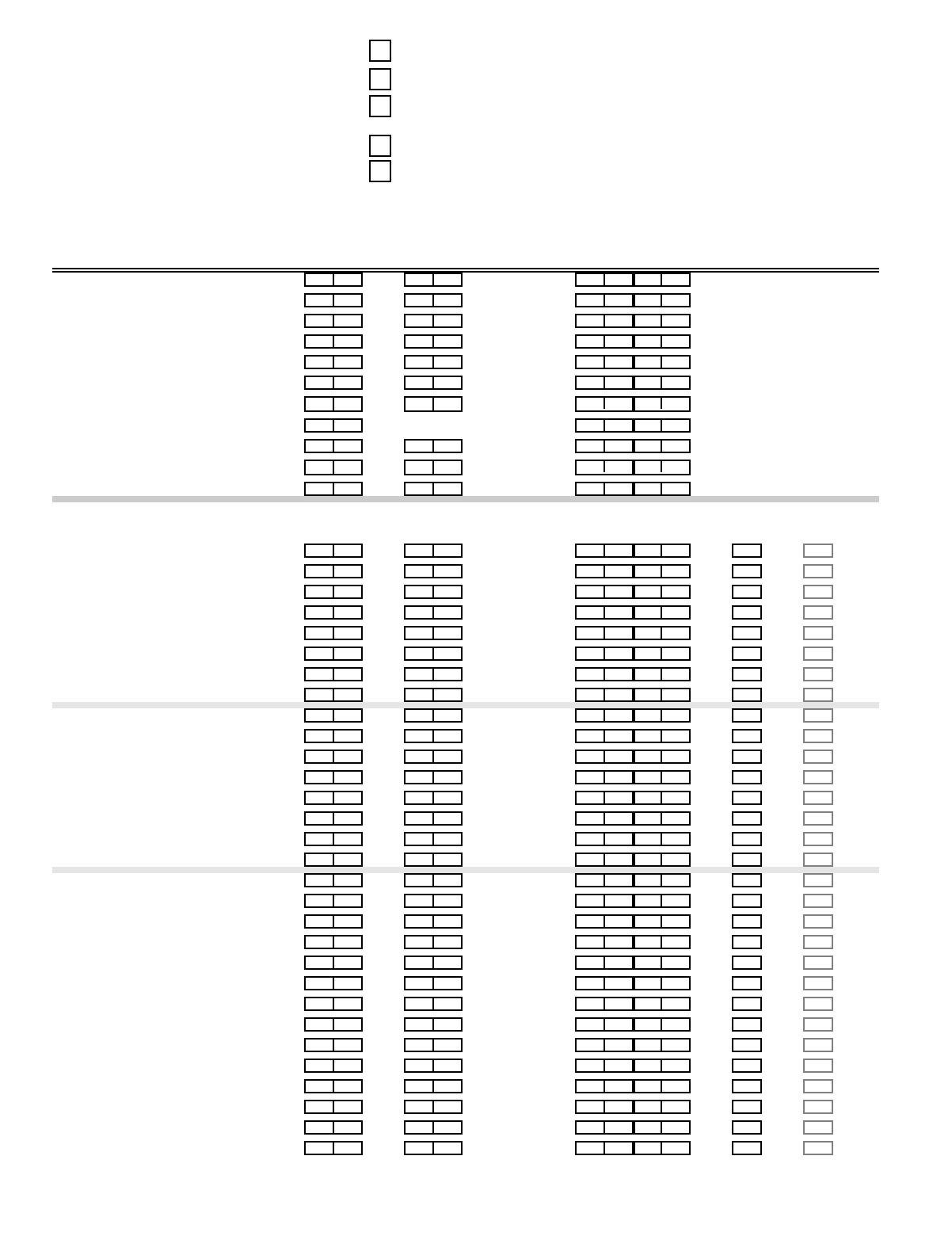
✱56 ZONE ASSIGNMENT/ALARM REPORT CODES (See explanation on next page) →
ZONE ZONE ALARM RPT CODE INPUT ENROLLED
ZONE No. TYPE (Hex) DEVICE RF INPUT
DESCRIPTION (Zn) (ZT) (RC) (In) (L)
Wired Zone 1 0 1 HW Ñ
Wired Zone 2 0 2 HW Ñ
Wired Zone 3 0 3 HW Ñ
Wired Zone 4 0 4 HW Ñ
Wired Zone 5 0 5 HW Ñ
Wired Zone 6 0 6 HW Ñ
Keypad Panic (✴ & #, or B) 07Ñ Ñ
Duress 0 8 Ñ Ñ ÑÑ
Tamper 0 9 0 5 ÑÑ
Keypad Panic (1 & ✴, or A) 95Ñ Ñ
Keypad Panic (3 & #, or C) 9 6 ÑÑ
EXPANSION ZONES: 4219/4229 can add up to 8 wired expansion zones. With 4281L, up to 4 RF expansion
zones also available; 4281M/5881L, up to 8; 5881M, up to 16; 4281H/5881H, up to 30 ENTER FOR
(minus, in the last case, the number of 4219/4229 zones used). 5800 0NLY
4219/4229 Loop A, 1st Exp'n Zone
B, 2nd
C, 3rd
D, 4th
E, 5th
F, 6th
G, 7th
H, 8th
9th
10th
11th
12th
13th
14th
15th
16th
17th
18th
19th
20th
21st
22nd
23rd
24th
25th
26th
27th
28th
29th
30th
– 5 –
I N TH E P R E V I O U S P A G E ' S Z O N E A S S I G N M E N T T A B L E :
Zn = ZONE NUMBER Zone Nos. are from 01 to 63, 95, 96. Some are pre-assigned.
With Field ✴25 set for auxiliary wired loops (4219 or 4229), use Zone Nos. 10Ð17 for loops A-H.
With Field ✴22 set for RF (5700 or 5800), use Zone Nos. 18-63 if 4219/4229 is ALSO used,
or 10-63 if 4219/4229 is NOT used.
ZT = ZONE TYPE 00 = Zone Not Used
01 = Entry/Exit
02 =
Do not use
03 = Perimeter
04 = Interior Follower
05 = Trouble Day/Alarm
ÊÊÊÊÊÊÊÊÊNight
06 = 24 Hr Silent
07 = 24 Hr Audible
08 = 24 Hr Aux
09 = Fire
10 = Interior w/Delay
20 = ArmÐStay*
21 = ArmÐAway*
22 = Disarm*
23 = No Alarm
ÊÊÊÊÊÊÊÊResponse
DEFAULT VALUES
Zn: 01 02 03 04 05
ZT: [01] [04] [03] [03] [09]
Zn: 06 07 95 96
ZT: [07] [06] [00] [00]
* Used for 5800 RF systems only
RC = ALARM REPORT CODE Two Hex Digits. For each Hex Digit, enter: 00Ð09 for 0Ð9,
10 for A, 11 for B, 12 for C, 13 for D, 14 for E, 15 for F.
If "00" is entered in the first pair of boxes, there will be no report for that zone.
For contact ID reporting, this is an enabling code only. Make any hex digit entry (other than "00") in the first
pair of boxes. The second pair of boxes will be ignored.
In = LOOP INPUT DEVICE HW: Hard Wire
AW: Aux Wire (4219 or 4229) Enter 3 for RF: Supervised RF
Enter 4 for UR: Unsupervised RF
Enter 5 for BR: Button Type RF
These are automatically
assigned, except "UR"
and "BR" for 5800 RF.
L = RF INPUT LOOP Used with 5800 RF Loop Input Devices.
TO PROGRAM SYSTEM STATUS, & RESTORE REPORT
CODES (✴60-✴75):
With a 3+1 or 4+1 Standard Format: Enter a code in the
first
box:
1-9, 0, B, C, D, E, or F. Enter "#+10" for 0, "#+11" for B, "#+12" for
C, "#+13" for D, "#+14" for E, "#+15" for F.
A "0" (
not
"#+10") in the
first
box will disable a report.
A "0" (
not
"#+10") in the
second
box will result in automatic
advance to the next field when programming.
With an Expanded or 4+2 Format: Enter codes in
both
boxes (1st
and 2nd digits) for 1-9, 0, or B-F, as described above.
A "0" (
not
"#+10") in the
second
box will eliminate the expanded
message for that report.
A "0" (
not
"#+10") in
both
boxes will disable the report.
With Ademco Contact ID Reporting: Enter any digit (other than
"0") in the
first
box, to enable zone to report (entries in the
second
boxes will be ignored).
A "0" (
not
"#+10") in the
first
box will disable the report.
Examples:
For Code 3 (Single Digit), enter: 30
For Code 32 (Two Digits), enter: 32
For Code B2 (Hexadecimal) enter: #+11 2
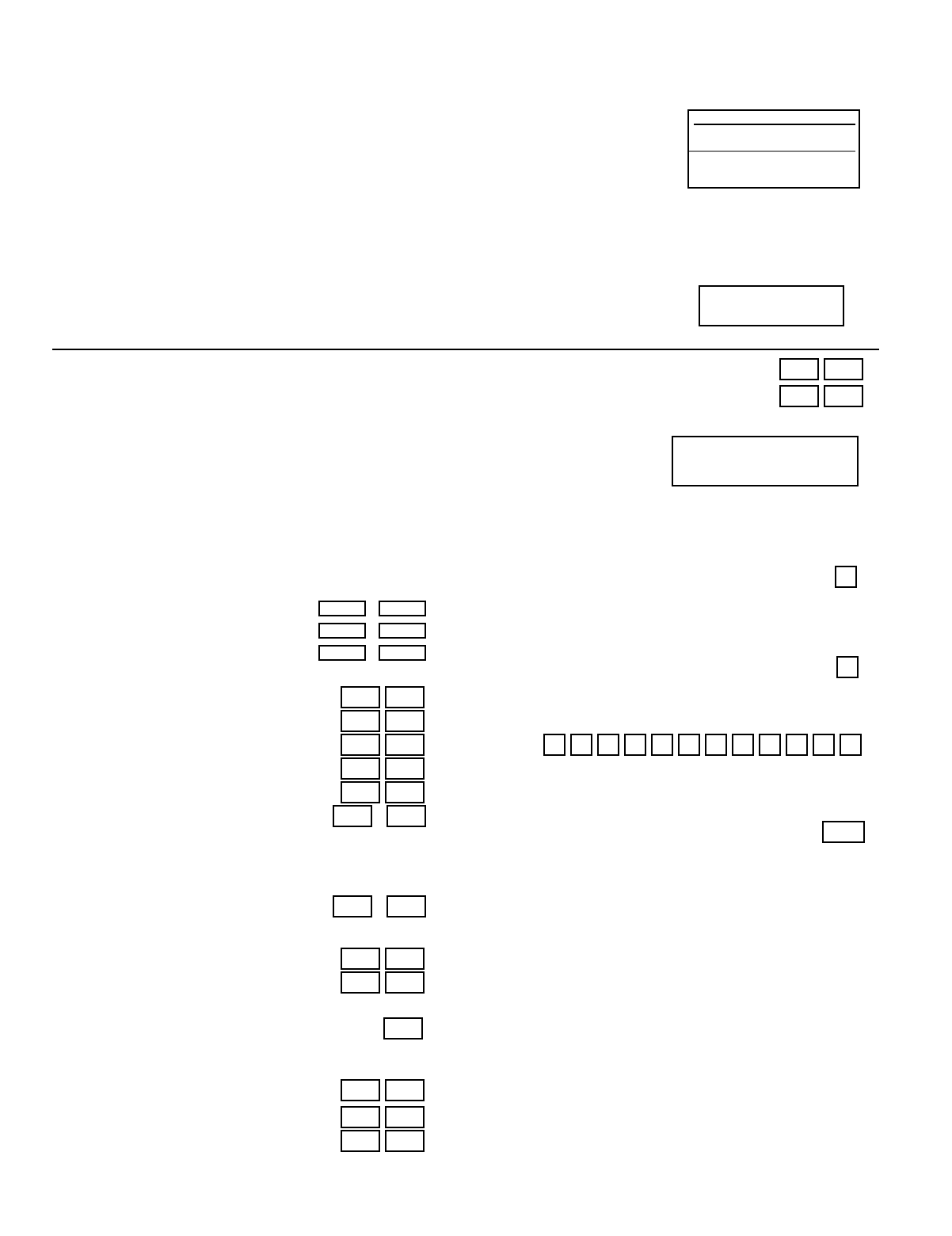
SYSTEM STATUS REPORT CODES (✱60-✱68)
✱60 TROUBLE REPORT CODE
✱61 BYPASS REPORT CODE
✱62 AC LOSS REPORT CODE
✱63 LOW BATTERY REPORT CODE
✱64 TEST REPORT CODE
✱65 OPEN/EXIT ALARM RPRT CODE /
2nd digit of OPEN REPORT is automatically sent as the user
number if expanded or 4+2 reporting is selected.
2nd digit of EXIT ALARM REPORT is automatically sent as
the 2nd digit of the zone alarm report code programmed in
✴56, if expanded or 4+2 reporting is selected.
✱66 AWAY/STAY CLOSE RPRT CODE /
2nd digit of any CLOSE REPORT is automatically sent as the
user number, if expanded or 4+2 reporting is selected.
✱67 RF XMTR LOW BAT RPRT CODE
✱68 CANCEL REPORT CODE
RESTORE REPORT CODES (✱70-✱75)
✱70 ALARM RESTORE RPRT CODE
2nd digit is automatically sent as the 2nd digit of the
zone alarm report code programmed in ✴56, if
expanded or 4+2 re porting is selected.
✱71 TROUBLE RESTORE RPRT CODE
✱72 BYPASS RESTORE RPRT CODE
✱73 AC RESTORE RPRT CODE
✱74 LOW BAT RESTORE RPRT CODE
✱75 RF XMTR LO BAT RST RPRT CODEÊ
OUTPUT AND SYSTEM SETUP (✱80-✱92)
✱80 OUTPUT RELAYS
✱81 ZONE LISTS FOR
OUTPUT RELAYS
Program only if Relays are to
be used. See next page.
✱82 CUSTOM ALPHA EDITING: (Also entered from field
✴56):
See procedure in instructions.
✱83 SEQUENTIAL MODE (Used for enrolling transmitters in
a 5800 RF system after all other zone information has
been programmed.)
✱91 CUSTOM OPTION SELECTION
(See field ✴98)
ÊÊ[0 = None selected] 4 = AAV (Audio 6 = Sounder Delay
1 = Local Lockout Alarm Veri- + AAV
2 = Sounder Delay fication) 7 = Local Lockout
3 = Local Lockout 5 = Local Lockout + Sounder Delay
+ Sounder Delay + AAV + AAV
✱92 REPORTS PER ARMED PERIOD
[0 = 10 max total alarm + alarm restore], 1 = unlimited
DOWNLOAD INFO (✱94, ✱95)
✱94 DOWNLOAD PHONE No.
Enter up to 12 digits: 0-9; #+11 for '✴'; #+12 for '#'; #+13
for a pause. Do not fill unused spaces. If fewer than 12
digits entered, exit field by pressing ✴ (and press 95, if
entering next field).
To clear entries from field, press ✴94 ✴.
✱95 RING DET COUNT FOR DOWNLOADING
[0=Disable Station Initiated Download]; 1Ð14 = number of
rings (1-9, #+10=10, #+11=11, #+12=12, #+13 =13,
#+14=14); 15=answering machine defeat (#+15 =15)
✱96 INITIALIZES DOWNLOAD ID , SUBSCRIBER
ACCOUNT No. FOR INITIAL DOWNLOAD:
No entry required.
✱97 SETS ALL PROGRAM FIELDS TO DEFAULT
VALUES: No entry required.
TO EXIT PROGRAM MODE (✱98 or ✱99)
Press ✴98 or ✴99 if exiting programming, or next field
number if continuing.
✱98 EXITS PROGRAMMING MODE and
prevents
re-entry by (or, if Local Lockout has been chosen
in field ✴91,
allows
re-entry
only
by):
Master Code + Code + 0.
✱99 EXITS PROGRAMMING MODE and
allows
re-entry by: Master Code + Code + 0
or by: Power-up + ✴ + #.
– 6 –
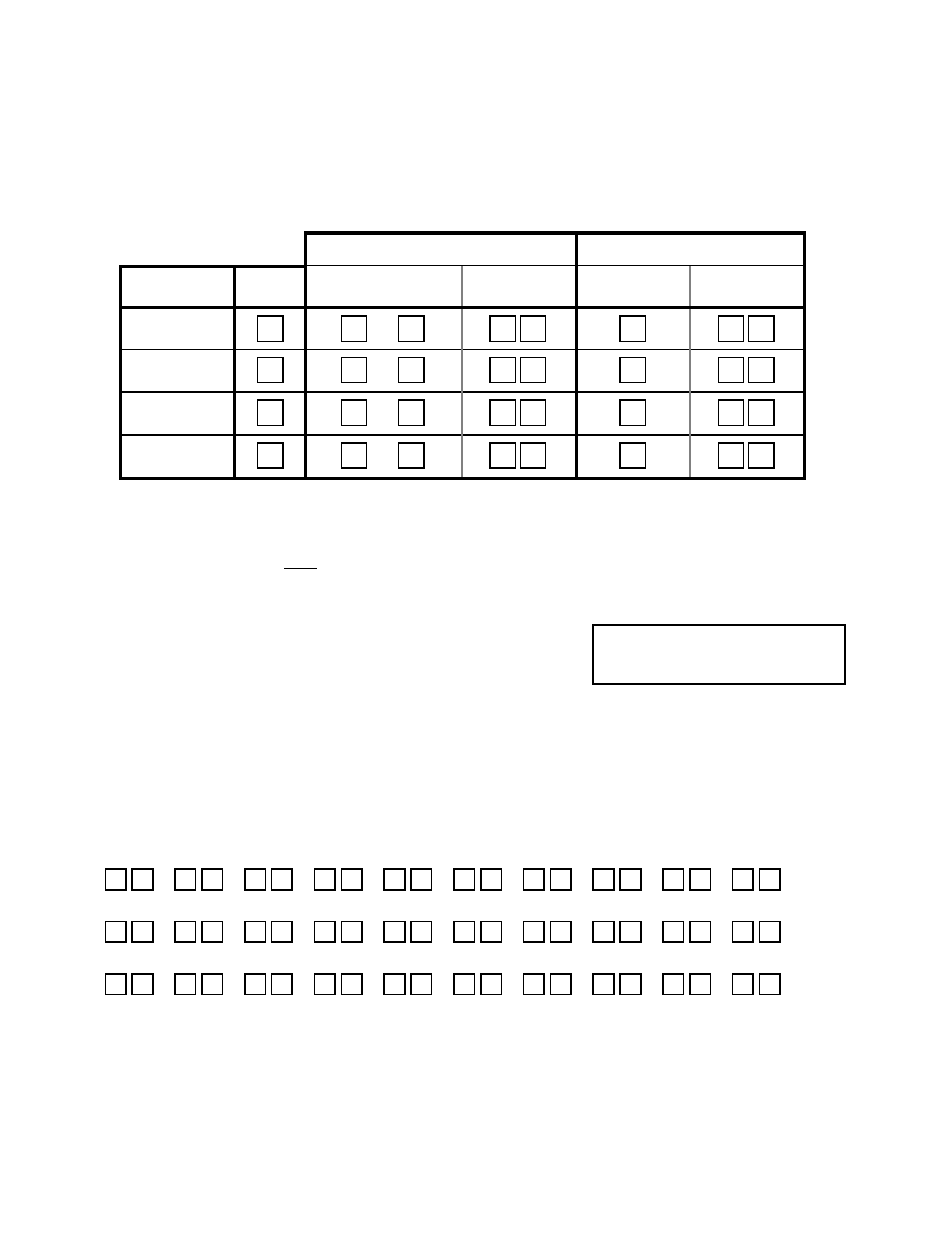
OUTPUT RELAYS WORKSHEET FOR FIELDS ✱80, and ✱81.
Applicable only if relays are to be used.
Fill in required data and follow detailed programming procedure described for Output Relays in the
Installation Instructions.
✱80 OUTPUT RELAYS
Notes:
1. Field ✴25 must be programmed for a 4229 (Relays 01 and 02) or a 4204 (Relays 01 to 04).
2. If an AAV (Audio Alarm Verification) option is selected in field ✴91,
Relay 01 should
not
be programmed here.
3. Tampers of contacts or expansion units cannot be used to operate relays.
S T A R T
either or both
S T O P
either or both
OUTPUT
RELAY
RELAY
ACTION
(A)
ZONE
EVENT LIST
(EV) (ZL)
ZONE TYPE
/SYST OP'N
(ZT)
"RESTORE of"
ZONE LIST
(ZL)
ZONE TYPE
/SYST OP'N
(ZT)
01
SEE NOTE 2 ABOVE
02
03
04
Where: A = RELAY ACTION 0 = No Response; 1 = Close for 2 sec; 2 = Close and stay closed; 3 = Pulse on and off
EV = EVENT 0 = Not used; 1 = Alarm; 2 = Fault; 3 = Trouble
ZL = ZONE LIST 1, 2, or 3 (from Field ✴81) or 0 = Not Used.
START ZONE LIST : Upon alarm, fault, or trouble of ANY zone on this list, relay action will START.
STOP
"RESTORE
of"
ZONE LIST: Upon restore of ALL zones on this list, relay action will STOP.
ÊÊÊÊÊIt need not be same list as used for START.
ZT = ZONE TYPE/SYSTEM OPERATION
Choices for Zone Types are:
00 = Not Used 06 = 24 Hr Silent
01 = Entry/Exit 07 = 24 Hr Audible
03 = Perimeter 08 = 24 Hr Aux
04 = Interior Follower 09 = Fire Trouble
05 = Trouble Day/Alarm Night 10 = Interior w/Delay
Note :
Any
zone in "ZT" going into alarm,
fault, or trouble will actuate relay.
Any
zone of that type that restores
will stop relay action.
Choices for System Operation are:
20 = ArmingÐStay 33 = Any Burglary Alarm 39 = Any Fire Alarm
21 = ArmingÐAway 34 = Code + # + 7 Key Entry 40 = Bypassing
22 = Disarming (Code + OFF) 35 = Code + # + 8 Key Entry 41 = AC Power Failure
31 = End of Exit Time 36 = At Bell Timeout** 42 = System Battery Low
32 = Start of Entry Time 38 = Chime 58 = Duress
**Or at Disarming, whichever occurs earlier.
✱81 ZONE LISTS FOR OUTPUT RELAYS Record desired zone numbers. More or fewer boxes than shown may be
needed, since any list may include
any
or
all
of system's zone numbers.
Zone List 1: Started or stopped by zone numbers (enter 00 to end entries).
, , , , , , , , , ...etc.
Zone List 2: Started or stopped by zone numbers (enter 00 to end entries).
, , , , , , , , , ...etc.
Zone List 3: Started or stopped by zone numbers (enter 00 to end entries).
, , , , , , , , , ...etc.
– 7 –
MECHANICS OF PROGRAMMING
This section provides information on how programming is performed in this
system. It will enable you to understand how to enter and exit the programming
mode, and how to program the data fields and the user-friendly interactive menu
modes (✱56, ✱80, ✱81, ✱82, ✱83). We therefore urge you to read and understand
the following before proceeding with any programming.
The following program fields must be programmed (as required) before doing
any programming.
✱22. RF SYSTEM
✱25. OUTPUT RELAY MODULE
See Programming System Setup Fields on next page.
General Programming Information
Characteristics for each installation are stored in non-removable, electrically
erasable, non-volatile EEROM memory. These must be programmed for the
particular installation to establish its specific alarm and reporting features.
It is possible to program the system at any time, even at the installer's premises
prior to the actual installation. Simply apply power temporarily to the control
and then program the unit as desired.
Note: You cannot enter the programming mode unless the system is
disarmed.
There are two programming modes: data field programming and interactive
menu mode programming. Data field programming is used for setting various
system options and menu mode programming is used for programming zone
information, programming relay outputs, and for entering 5800 series
transmitter serial numbers.
To program the system, you must use an FA550KP 2-line Alpha keypad
connected to the keypad terminals on the control (4, 5, 6, & 7). The Alpha
keypad need not necessarily remain in the system after programming.
Programming can also be performed remotely from the installerÕs office/home,
using an IBM personal computer, a modem, and appropriate downloading
software. See the REMOTE PROGRAMMING AND CONTROL
(DOWNLOADING) section in this manual.
Entering the Program Mode
You may use one of the following methods:
(a) Press both the [✱] and [#] keys at the same time within 50 seconds after
power is applied to the Control, or
(b) After power up, enter the INSTALLER code (4 1 1 1) + 8 + 0.
Method (b) is disabled if you exit the program mode using ✱98 instead of
✱99. See ÒExiting the Program ModeÓ paragraph later in this section.
If a different INSTALLER code is subsequently programmed, use it instead
of 4111 to gain access to the Programming mode.
Following entry into the program mode, data field ✱20 will be displayed (this is
the first field in the system). The system will now accept entries for field ✱20.
You can then proceed with the required programming (see the next paragraph
ÒProgramminng a Data FieldÓ).
Programming a Data Field
1. Press [✱] plus Field No. (for example, ✱21), then make the desired entry.
2. When you have completely programmed a data field, the keypad will ÒbeepÓ
three times and then automatically display the next data field in sequence.
To go to a different field, press [✱] plus the desired field No.
– 8 –
3. If the number of digits that you need to enter in a data field is less than the
maximum digits available (for example, the phone number field), enter the
desired data, then press ✱ and the next data field number to be programmed.
4. If you try to enter a non-existent field, an Alpha keypad will display NOT
USED and EE ( Entry Error). Simply key [✱] again plus a valid field number.
Reviewing a Data Field/Erasing an Entry in a Data Field
Press [#] plus Field No. Data will be displayed for that field number. No
changes will be accepted in this mode.
To delete an entry in a field, press [✱] plus Field No. + [✱]. (Applies only to
fields ✱40 Ð ✱42, and ✱94.)
Interactive Menu Mode Programming (✱56, ✱80, ✱81, ✱82 and ✱83)
Typical prompt displayed
during interactive menu
mode programming
Enter Zn Num.
(00 = Quit) 01
ÊZone Number ↑
Press [✱] plus menu mode No. (for example, ✱56). The Alpha keypad will
display the first of a series of prompts requesting entries.
A detailed procedure (with displays of prompts) is provided in those sections in
the Installation Instructions where programming in the menu mode is to be
performed.
Menu Mode Used To Program
✱56 Zone Programming Zone characteristics, report codes, alpha descrip-
tors and serial numbers for 5800 transmitters
✱80 Relay Programming 4204 Relay modules
✱81 Zone List Programming Zone Lists for 4204 relay activation
✱82 Alpha Programming Zone alpha descriptors
✱83 Sequential Mode 5800 series transmitter serial numbers
Loading Factory Defaults (✱97)
To load the factory defaults, enter the programming mode, press ✱97, then exit
the programming mode.
Do not press ✱97 to load defaults if any programming has been done
previouslyÑdata already programmed into the system will be changed!
✱96 resets the Subscriber Account number and CSID in preparation for an
initial download.
Programming System Setup Fields
The following program fields MUST be programmed before doing any
programming.
✱22 RF SYSTEMÊÊÊ(Default is 0).
Enter Ò1Ó if 5700 RF system type is being used; enter Ò2Ó if a 5800
RF system type is being used; enter Ò0Ó if no RF is being used.
✱25 WIRED EXPANSION/OUTPUT RELAYÊÊ(Default is 0).
Enter Ò1Ó if a 4219 wired expansion unit is used, Ò2Ó if a 4229 wired
expansion/ relay unit is used, Ò3Ó if a 4204 relay is being used, or
Ò0Ó if none are being used.
Exiting the Programming Mode
✱98 EXITS PROGRAMMING MODE and prevents re-entry by Installer
Code + [Code] + [0] . To enter the programming mode if ✱98 was used to
exit, you must first power the system down. Then power up again, and
press [✱] and [#] both at once, within 50 seconds of powering up.
✱99 EXITS PROGRAMMING MODE and allows re-entry by:
Installer Code + [Code] + [0] or by:
Pressing [✱] and [#] at the same time, within 50 seconds of powering up
the system.
– 9 –
5800 Series Transmitter Input Loop Identification
¥ All of the transmitters illustrated below have one or more unique factory assigned input (loop) ID codes.
Each of the inputs requires its own programming zone (e.g., a 5804's four inputs require four programming
zones).
¥ Transmitter inputs entered as:
"RF" (Supervised RF) Type send periodic check-in signals, as well as fault, restore and low battery
signals. The transmitter must remain within the receiver's range.
ÒUR" (Unsupervised RF) Type send all the signals that the "RF" Type does, but the control does
not supervise the check-in signals. The transmitter may, therefore, be carried off-premises.
"BR" (Unsupervised Button RF) Type only send fault signals. Restore or check-in signals are not
sent, but low battery signals are sent when a button is pressed. The transmitter may be carried off-
premises. The transmitter may be carried off-premises.
3
4
1
2
(ALWAYS USE)
INPUT
(LOOP)
5801
LEARN AS "UR" OR "RF"
INPUT
(LOOP)
1
5802MN
LEARN AS "UR" OR "RF"
YOU MUST
LEARN THIS
BUTTON
LOOP 3
LOOP 1
LOOP 2
LOOP 4
INPUT
(LOOP)
1
5808
LEARN AS "RF"
5804
LEARN
AS "BR"
5817
LEARN AS "RF"
INPUT
(LOOP)
1
(PRIMARY)
2
(AUX. CENTER)
3
(AUX. RIGHT)
INPUT
(LOOP)
1
(MOTION)
5890
LEARN AS "RF"
5816
LEARN AS "RF"
INPUT
(LOOP)
2
(REED)
LOOP 1
(TERMINALS)
5827
SET HOUSE CODE
5827BD
SET HOUSE CODE
5816MN
LEARN AS "RF"
INPUT
(LOOP)
2
(REED)
LOOP 1
(TERMINALS)
5819
LEARN AS "RF"
INPUT
(LOOP)
2
(REED)
LOOP 1
(TERMINALS)
ALTERNATE
POSITION
FOR LOOP2
LOOP 3
(TERMINALS)
5819S (WHS & BRS)
LEARN AS "RF"
INPUT
(LOOP)
2
(REED)
LOOP 1
(INTERNAL
SHOCK
SENSOR)
LOOP 3
(TERMINALS)
5850 (GBD)
LEARN AS "RF"
(Green)
(Red)
(Yellow)
(DIP SWITCHES)
5827
SET HOUSE ID
5827BD
SET HOUSE ID
(KEYPAD PROGRAMMABLE)

– 10 –
ALPHA VOCABULARY LIST
(For Entering Zone Descriptors)
NOTE: Some rarely-used words appearing in previously published lists have been deleted from the list
below. Use only this list for selecting zone descriptors.
000
(Word Space)
A
¥ 001 AIR
¥ 002 ALARM
004 ALLEY
005 AMBUSH
¥ 006 AREA
¥ 007 APARTMENT
¥ 009 ATTIC
010 AUDIO
B
¥ 012 BABY
¥ 013 BACK
¥ 014 BAR
¥ 016 BASEMENT
¥ 017 BATHROOM
¥ 018 BED
¥ 019 BEDROOM
020 BELL
¥ 021 BLOWER
¥ 022 BOILER
023 BOTTOM
025 BREAK
¥ 026 BUILDING
C
028 CABINET
¥ 029 CALL
030 CAMERA
031 CAR
033 CASH
034 CCTV
035 CEILING
036 CELLAR
¥ 037 CENTRAL
038 CIRCUIT
¥ 040 CLOSED
¥ 046 COMPUTER
047 CONTACT
D
¥ 048 DAUGHTERS
049 DELAYED
¥ 050 DEN
051 DESK
¥ 052 DETECTOR
¥ 053 DINING
054 DISCRIMINATOR
055 DISPLAY
¥ 057 DOOR
¥ 059 DOWN
¥ 060 DOWNSTAIRS
061 DRAWER
¥ 062 DRIVEWAY
¥ 064 DUCT
E
¥ 065 EAST
066 ELECTRIC
067 EMERGENCY
068 ENTRY
¥ 069 EQUIPMENT
¥ 071 EXIT
072 EXTERIOR
F
¥ 073 FACTORY
075 FAMILY
¥ 076 FATHERS
¥ 077 FENCE
¥ 079 FIRE
¥ 080 FLOOR
081 FLOW
082 FOIL
¥ 083 FOYER
084 FREEZER
¥ 085 FRONT
G
¥ 089 GARAGE
¥ 090 GAS
091 GATE
¥ 092 GLASS
093 GUEST
094 GUN
H
¥ 095 HALL
¥ 096 HEAT
098 HOLDUP
099 HOUSE
100 INFRARED
¥ 101 INSIDE
102 INTERIOR
103 INTRUSION
J
104 JEWELRY
K
¥ 105 KITCHEN
L
¥ 106 LAUNDRY
¥ 107 LEFT
108 LEVEL
¥ 109 LIBRARY
¥ 110 LIGHT
111 LINE
¥ 113 LIVING
¥ 114 LOADING
115 LOCK
116 LOOP
117 LOW
¥ 118 LOWER
M
¥ 119 MACHINE
121 MAIDS
122 MAIN
¥ 123 MASTER
¥ 125 MEDICAL
126 MEDICINE
128 MONEY
129 MONITOR
¥ 130 MOTHERS
¥ 131 MOTION
132 MOTOR
N
¥ 134 NORTH
135 NURSERY
O
¥ 136 OFFICE
¥ 138 OPEN
139 OPENING
¥ 140 OUTSIDE
142 OVERHEAD
P
143 PAINTING
¥ 144 PANIC
145 PASSIVE
¥ 146 PATIO
147 PERIMETER
¥ 148 PHONE
150 POINT
151 POLICE
152 POOL
¥ 153 POWER
R
155 RADIO
¥ 156 REAR
R
155 RADIO
¥ 156 REAR
157 RECREATION
159 REFRIGERATION
160 RF
¥ 161 RIGHT
¥ 162 ROOM
163 ROOF
S
164 SAFE
165 SCREEN
166 SENSOR
¥ 167 SERVICE
¥ 168 SHED
169 SHOCK
¥ 170 SHOP
171 SHORT
¥ 173 SIDE
174 SKYLIGHT
175 SLIDING
¥ 176 SMOKE
¥ 178 SONS
¥ 179 SOUTH
180 SPRINKLER
¥ 182 STATION
184 STORE
¥ 185 STORAGE
186 STORY
190 SUPERVISED
191 SUPERVISION
192 SWIMMING
193 SWITCH
T
194 TAMPER
196 TELCO
197 TELEPHONE
¥ 199 TEMPERATURE
200 THERMOSTAT
¥ 201 TOOL
202 TRANSMITTER
U
¥ 205 UP
¥ 206 UPPER
¥ 207 UPSTAIRS
¥ 208 UTILITY
V
209 VALVE
210 VAULT
212 VOLTAGE
W
213 WALL
214 WAREHOUSE
¥ 216 WEST
¥ 217 WINDOW
¥ 219 WING
220 WIRELESS
X
222 XMITTER
Y
223 YARD
Z
224 ZONE (No.)
¥ 225 ZONE
¥ 226 0
¥ 227 1
¥ 228 1ST
¥ 229 2
¥ 230 2ND
¥ 231 3
¥ 232 3RD
¥ 233 4
¥ 234 4TH
¥ 235 5
¥ 236 5TH
¥ 237 6
¥ 238 6TH
¥ 239 7
¥ 240 7TH
¥ 241 8
¥ 242 8TH
¥ 243 9
¥ 244 9TH
250 Custom Word #1
251 Custom Word #2
252 Custom Word #3
253 Custom Word #4
254 Custom Word #5
Note: Bulleted (¥) words in boldface type are those that are also available for use by the 4285 Phone Module. If using a
Phone module, and words other than these are selected for Alpha descriptors, the module will not provide annunciation
of those words. CHARACTER (ASCII) CHART
(For Adding Custom Words)
32 (space)
33 !
34 "
35 #
36 $
37 %
38 &
39 '
40 (
41 )
42 ✴
43 +
44 ,
45 Ð
46 .
47 /
48 0
49 1
50 2
51 3
52 4
53 5
54 6
55 7
56 8
57 9
58 :
59 ;
60 <
61 =
62 >
63 ?
64 @
65 A
66 B
67 C
68 D
69 E
70 F
71 G
72 H
73 I
74 J
75 K
76 L
77 M
78 N
79 O
80 P
81 Q
82 R
83 S
84 T
85 U
86 V
87 W
88
89 Y
90 Z
ÊÊ

– 11 –
ZONE RESPONSE TYPE DEFINITIONS
Type 00
Zone Not Used
Program a zone with this zone type if the zone is not used.
Type 01
Entry/Exit Burglary
Type 02
This zone type provides entry delay whenever the zone is faulted if the control
is armed in the AWAY or STAY modes. When the panel is armed in the
Instant or Maximum modes, no entry delay is provided. Exit delay begins
whenever the control is armed, regardless of the arming mode selected. These
delays are programmable. This zone type is usually assigned to sensors or
contacts on doors through which primary entry and exit will take place.
Not used in this system
Type 03
Perimeter Burglary
This zone type gives an instant alarm if the zone is faulted when the panel is
armed in the AWAY, STAY, INSTANT or MAXIMUM modes. This zone type
is usually assigned to all sensors or contacts on exterior doors and windows.
Type 04
Interior, Follower
This zone type is active when the panel is armed in the AWAY or MAXIMUM
modes. Entry delay (using the programmed entry time) results if the panel is
armed in the AWAY mode and the entry/exit zone is faulted first. Otherwise
this zone type gives an instant alarm. Exit delay is present for any arming
mode. This zone type is usually assigned to a zone covering an area such as a
foyer, lobby, or hallway through which one must pass (upon entry, after
faulting the entry/exit zone) to reach the keypad to disarm the system. Since
this zone type is designed to provide an instant alarm if the entry/exit zone is
not violated first, it will protect an area in the event an intruder hides on the
premises prior to the system being armed, or gains access to the premises
through an unprotected area. This zone type is bypassed automatically
when the panel is armed STAY or INSTANT.
Type 05
Trouble by Day/
Alarm by Night
This zone type will give an instant alarm if faulted when armed in the AWAY,
STAY, INSTANT or MAXIMUM (night) modes. During the disarmed state
(day), the system will provide a latched trouble sounding from the keypad
(and a central station report, if desired). This zone type is usually assigned to
a zone which contains a foil-protected door or window (such as in a store), or
to a zone covering a "sensitive" area such as a stock room, drug supply room,
etc. This zone type can also be used on a sensor or contact in an area where
immediate notification of an entry is desired.
Type 06
24-hour Silent Alarm
This zone type sends a report to the Central Station but provides no keypad
display or sounding. This zone type is usually assigned to a zone containing
an Emergency button.
Type 07
24-hour Audible Alarm
This zone type sends a report to the Central Station, and provides a rapid
beeping sound at the keypad, and an audible external alarm. This zone type
is usually assigned to a zone that has an Emergency button.
Type 08
24-hour
Auxiliary Alarm
This zone type sends a report to the Central Station and provides a rapid
beeping sound at the keypad. (No bell output is provided). This zone type
is usually assigned to a zone containing a button for use in personal
emergencies, or to a zone containing monitoring devices such as water or
temperature sensors, etc.
Type 09
Supervised Fire
This zone type provides a fire alarm on short circuit and a trouble condition
on open circuit. The bell output will pulse when this zone type is faulted. This
zone type is always active and cannot be bypassed. This zone type can be
assigned to control panel wired zone 5 and to certain wireless zones.
Type 10
Interior w/Delay
This zone type gives entry delay (using the programmed entry time), if tripped
when the panel is armed in the Away mode, regardless of whether or not an
entry/exit delay zone was tripped first. This zone type is also active during
MAXIMUM mode, but no entry delay is provided (an alarm occurs
immediately if the zone is tripped). Exit delay is present for any arming
mode. This zone type is bypassed automatically when the panel is
armed Stay or Instant .

– 12 –
Type 20
ArmÐStay
This is a special-purpose zone type used with 5800 series wireless pushbutton
units which will result in arming the system in the STAY mode when the
zone is activated. Pushbutton units send zone number as a user number to
central station when arming or disarming.
Type 21
ArmÐAway
This is a special-purpose zone type used with 5800 series wireless pushbutton
units which will result in arming the system in the AWAY mode when the
zone is activated. Pushbutton units send zone number as a user number to
central station when arming or disarming.
Type 22
Disarm
This is a special-purpose zone type used with 5800 series wireless pushbutton
which will result in disarming the system when the zone is activated.
Type 23
No Alarm Response
This can be used on a zone when an output relay action is desired, but with
no accompanying alarm (e.g., lobby door access).
By using a 4281/5881 type RF Receiver and the appropriate 5700/5800 series transmitters, all
of the zone types listed* are available for the wireless portion of the system.
* Note: Zone Types 20, 21, and 22 cannot be used in a 5700 RF system.

– 13 –
DATA FIELD DESCRIPTIONS
The blank programming form in this manual should be used to record the data for this installation.
The following is a list of all data fields in this control (presented in numerical order). This
list provides an explanation of each data field, and will serve as a reference for all fields in
the system. Defaults (where applicable) are indicated in the text for each field in this list.
✱20 INSTALLER CODE Default is 4-1-1-1.
The Installer code is used to program the system, and to assign the
4-digit Master security code in the normal operation mode, via
the keypad See "Master Code" in the SYSTEM OPERATION section
in the Installation Instructions for the procedure. Enter 4 digits, 0Ð9.
✱21 QUICK ARM ENABLE (1-Digit Entry) Default is 0.
If enabled, the [#] key can be used instead of the security code when
arming the system. Enter 0 for disabled or 1 for enabled. This feature
will function only if the Master Code is programmed.
✱22 RF SYSTEM (1-Digit Entry) Default is 0 (none).
This option is enabled if a wireless receiver is used.
Enter 1 for 4281 series RF receivers, 2 for 5881* series RF receivers.
Enter 0 if no receiver is being used.
* 5882 series RF receivers in Canada.
✱23 FORCED BYPASS FUNCTION (1-Digit Entry) Default is 0.
This feature allows all open zones to be bypassed automatically.
Ò1Ó will bypass all open zones, Ò2Ó will bypass all open zones, plus zones
17, 30, 31, 46, and 47 (whether open or not)
All zones that are bypassed by this function will be displayed after the
bypass is initiated:
✱24 RF HOUSE ID CODE (2-Digit Entry) Default is 00 .
The House ID identifies receivers and wireless keypads in a 5700 type
system, and must be assigned (01Ð31).
If a 5827 or 5827BD Wireless keypad is to be used in a 5800 RF system,
a House ID code MUST also be entered (01Ð31), and the keypad should
be set to the same ID. In a 5800 system with no 5827 or 5827BD
wireless keypad, enter 00 (no House ID).
✱25 WIRED EXPANSION/OUTPUT RELAY USEDÊÊÊÊ (1-Digit Entry)
Enter Ò1Ó if a 4219 wired expansion unit is used, Ò2Ó if a 4229 wired
expansion/ relay unit is used, Ò3Ó if a 4204 relay is being used, or Ò0Ó if
none are being used (Ò0Ó is the default).
✱26 VOICE (PHONE) MODULE
ACCESS CODE (2-Digit Entry) Default is 00 .
The use of a 4285 Phone Module requires a 2-digit phone access code.
Enter as follows: ÊFor first digit, enter any digit from 1 to 9; for second
digit, enter # +11 for "✱", or # +12 for "#".
Example: If the desired access code is 7✱, 7 is the first entry, and
# + 11 (for ✱) is the second entry.
Ò00Ó = Phone Module disabled. Note: A Ò0Ó in either digit will disable
the 4285 Phone Module.
Note:ÊThe Radio should
be programmed for device
address 3 on the keypad
lines.
✱27 OUTPUT TO LONG RANGE RADIO (1-Digit Entry) Default is 0.
0= no, 1 = yes. If output to LRR is selected here (1), all messages that
are programmed to go to the primary telephone line receiver will also be
sent to the radio (e.g., 7720 PLUS or 7820). These messages will always
be in Contact ID format (overriding the selection in field ✱46). The data
line is supervised ,as well as certain functions in the radio.
If communication is lost or a trouble develops, a message will be
attempted to be sent via both radio and telephone to the central station.
Normal trouble restore report (✱71) is sent on restore of the condition.
– 14 –
ZONE SOUNDS AND
TIMING
(✱28Ð✱39)
✱28 SINGLE ALARM SOUNDING PER ZONE Default is 0.
(Per Armed Period) (1-Digit Entry)
This field limits external alarm sounding to once per arming period for
a given zone. Enter 1 for yes; 0 for no.
ULFor UL installations, enter 0 for unlimited Alarm Soundings
✱29 FIRE SOUNDER TIMEOUT (1-Digit Entry) Default is 0.
This field determines whether the external sounder will shut off after
time allotted, or continue until manually turned off. Enter 0 for sounder
timeout, or 1 for no timeout.
✱30 ALARM BELL TIMEOUT (1-Digit Entry) Default is 1.
This field determines whether the external sounder will shut off after
time allotted, or continue until manually turned off. Enter as follows:
0 = No timeout; 1 = 4 min (default); 2 = 8 min; 3 = 12 min; 4 = 16 min.
✱38 ENTRY DELAY (1-Digit Entry) Default is 2.
System will wait the time allotted before sounding alarm upon entering.
May be selected individually
0 = 0 secs; 1 = 20 secs; 2 = 30 secs; 3 = 45 secs; 4 = 60 secs; 5 = 90 secs.
(EXIT delay = Entry delay plus 15 seconds).
ULFor UL installations, entry delay can be no greater than 45 seconds.
✱39 AUDIBLE EXIT WARNING (1-Digit Entry) Default is 1.
If enabled, this field provides exit warning sound when armed AWAY or
MAXIMUM.
Warning sound consists of slow continuous beeps until last 5 seconds,
when it changes to fast beeps. The warning sound will end at the
termination of Exit time. 0 = no; 1 = yes.
DIALER
PROGRAMMING
(✱40Ð✱50)
✱40 PABX ACCESS CODE (See Box at Left)
Enter up to 4 digits if PABX is needed to access an outside line. If
fewer than 4 digits are needed to be entered, exit by pressing ✱ and
next field number (e.g., 41). To clear entries from field, press ✱40✱.
Fields ✱40, ✱41, ✱42:
Enter up to the number
of digits shown. Do not
fill unused spaces.
Enter 0Ð9,
# + 11 for Ô✱Õ
# + 12 for Ô#Õ
# + 13 for a pause
(2.5 secs)
✱41 PRIMARY PHONE No. (See Box at Left)
Enter up to 12 digits. If fewer than 12 digits entered, exit by pressing ✱
and next field number (e.g., 42). To clear entries from field, press ✱41✱.
Note: Back-up reporting (8 calls are made to the secondary phone
number if no kiss-off is received after 8 attempts to primary
number) is automatic only if there is a secondary phone number
(field ✱42).
✱42 SECONDARY PHONE No. (See Box at Left)
Enter up to 12 digits. If fewer than 12 digits entered, exit by pressing
✱ and next field number (e.g., 43). To clear entries from field, press
✱42✱. See Note in field ✱41 also.
Note: If you wish to send a report to a pager, see field ✱47 on
next page .
✱43 SUBSCRIBER ACCOUNT. No. (Enter 4 digits).
Enter digits 0Ð9, #+11=B, #+12=C, #+13=D, #+14=E, or #+15=F.
See the Programming Form for examples.
Enter 0 as the first digit of a 4-digit account No.
Note: Do not enter Ò0Ó as the first digit if you intend to use the Paging
feature (see selections 6Ð9 in field ✱47). Some paging systems
have voice mail capability, activated by a leading Ò0Ó in the
message.
End field by pressing ✱ (and press next field).
This field is also used as the Long Range Radio Subscriber Account #.
– 15 –
✱45 PHONE SYSTEM SELECT (1-Digit Entry) Default is 0.
If Central Station Receiver is not on WATS line:
0 = Pulse Dial 1 = Tone Dial
If Central Station Receiver is on WATS line:
2 = Pulse Dial 3 = Tone Dial
For an explanation of these
formats, see the SYSTEM
COMMUNICATION
section in the Installation
Instructions.
✱46 REPORT FORMAT (1-Digit Entry) Default is 0.
Determine which format is to be used to report to the central station.
Enter 1 digit (0Ð9).
0 = 3+1; 4+1 ADEMCO Lo Speed Standard (this is the default)
1 = 3+1; 4+1 Radionics Standard
2 = 4+2 ADEMCO Lo Speed Standard
3 = 4+2 Radionics Standard
6 = 4+2 ADEMCO Express
7 = ADEMCO Contact ID Reporting
8 = 3+1; 4+1 ADEMCO Lo Speed Expanded
9 = 3+1; 4+1 Radionics Expanded
(Enter ✱ as the 4th digit of ✱43 if 3+1 dialer reporting is to be used.)
Note: The maximum number of alarm and alarm restore reports
during one armed period is determined by field ✱92.
See field ✱27, which may override this fieldÕs selection.
✱47 SPLIT/DUAL REPORTING (1-Digit Entry) Default is 0.
Enter 0 to disable (Backup report only).
Entries 1 through 9 can be made, as indicated in the table below. Entries
6 through 9 will send a report to a pager (in addition to the selected
primary phone number), but you must enter the pager number as the
secondary phone number in field
✱
42.
Ê*Can only be used if the
Primary reporting format
is Ademco Contact ID.
If reporting to a Pager,
choose from 6, 7, 8, or 9,
as desired.
TO PRIMARY PHONE # TO SECONDARY PHONE #
Ê1 = Alarms, Restore, Cancel Other Reports
Ê2 = All except Open/Close, Test Open/Close, Test
Ê3 = Alarms, Restore, Cancel All reports
Ê4 = All except Open/Close, Test All reports
Ê5 = All reports All reports
TO PRIMARY PHONE # TO PAGING No.* (Secondary)
Ê6 = All reports except Open/Close Alarms/Open/Close, Troubles
Ê7 = All reports Alarms, Troubles
Ê8 = All reports Alarms/Open/Close, Troubles
Ê9 = All reports except Open/Close Alarms, Open/Close for users #5Ð25à,
Troubles
à Will report only Users 5, 6 & 8. If using 5800 series wireless button-type
devices, the zone number of the arm or disarm button (10Ð25) will be sent as
the user number.
Entries 6 through 9 will send a report to a pager (in addition to the selected
primary phone number), but you must enter the pager number as the secondary
phone number in field ✱42.
A 10-digit code is sent to the pager which will take the following format:
4-digit Subscriber No. →ÊÊ SSSSÐEEE ÐNNN ← 3-digit User or Zone No.
Ê(as entered in field ✱43) ↑
3-Digit Event Code (EEE), as follows:
911 = Alarm (NNN = Zone No.)
001 = Open, System disarmed (NNN = User No.)
002 = Close, System armed ( NNN = User No.)
811 = Trouble ( NNN = Zone No.)
The first digit of the Subscriber No. entered in field ✱43 must be 1Ð9 (do not use 0); the
ÊÊÊlast 3 digits can be 0Ð9. Failure to observe this requirement may interfere with
ÊÊÊpaging services.
(Continued)
– 16 –
Example 1.ÊÊ Pager displays:ÊÊ1234Ð911Ð004
This indicates that Subscriber No. 1234Õs system is reporting an
Alarm (911), due to zone 4 being faulted (004).
Example 2.ÊÊPager displays:ÊÊ1234Ð001Ð005
This indicates that Subscriber No. 1234Õs system is reporting an
opening (001) by User 5 (005).
Note that no restore reports are sent to the pager.
Important:
AAV should not be used when Paging or Alarm Reports are being sent to a
Secondary number. If this is done, the call to the Secondary number by the
communicator after the alarm report will prevent the AAV from taking control
of the telephone line, and the AAV ÒListen inÓ session cannot then take place.
✱48 15-SECOND DIALER DELAY (BURGLARY) Default is 0.
Single-digit entry. If selected, will provide 15-second delay of burglary
alarm report to the central station. Allows time for subscriber to avoid a
false alarm transmission.
0 for no delay, or 1 for 15-second delay.
✱49 PERIODIC TEST REPORT (1-Digit Entry) Default is 0.
Select the desired test report interval.
0 = none; 1 = 24 hours; 2 = weekly; 3 = 30 days.
Test Report code entered in field ✱64 is sent; reports with Subscriber No.
UL For UL installations, 24 hours (1) must be selected
✱50 SESCOA/RADIONICS SELECT (1-Digit Entry) Default is 0.
0 = Radionics (0Ð9, BÐF reporting)
1 = SESCOA (0Ð9 only reporting)
Select 0 for all other formats.
✱51 CONFIRMATION OF ARMING DING (1-Digit Entry) Default is 0.
Enter 1 to enable 1/2 second external alarm sounding ÒdingÓ when
closing report goes in, or at the end of exit delay. Enter 2 for alarm
sounding ding with RF arming only (this will work with either a button
RF unit or a 5827.
0 disables the ÒdingÓ.
✱52 ZONE 3 RESPONSE TIME TO OPEN (1-Digit Entry) Default is 0.
0 = 400ms nominal; 1 = 10ms nominal.
✱56 ÊÊ ZONE ASSIGNMENT/ALARM REPORT CODES
This is an interactive menu mode that is used to program zone
numbers, zone types, alarm and report codes, and to identify the
type of loop input device.
This mode can also be used for entering 5800 series transmitter serial
numbers (serial numbers can also be entered using the Sequential Mode
in ✱83, but only after all other zone programming has been completed in
✱
56).
Alpha descriptors can also be entered for zones in ✱56 (alternatively,
Alpha descriptors can be entered in menu mode ✱82).
Refer to the BASIC HARDWIRED ZONES 1Ð6 section in the Installation
Instructions for detailed hardwired zone programming, and the
WIRELESS (RF) ZONE EXPANSION (5700 & 5800 RF SYSTEMS ) section for
detailed wireless zone expansion programming.
Refer also to the zone assignment table for ✱56 in the programming form
in this manual.
– 17 –
TO PROGRAM
SYSTEM STATUS
AND RESTORE
REPORT CODES
(✱60 Ð ✱68, ✱70 Ð ✱75)
With a 3+1 or 4+1 Standard Format: Enter a code in the first digit box:
1Ð9, 0, B, C, D, E, or F. Enter "# + 10" for 0, "# + 11" for B, "# + 12" for C,
"# + 13" for D, "# + 14" for E, "# + 15" for F.
A "0" (not "# + 10") in the first digit box will disable a report.
A "0" (not "# + 10") in the second digit box (if any) will result in automatic
advance to the next field when programming.
With an Expanded or 4+2 Format: Enter codes in both boxes (1st and 2nd
digits) for 1Ð9, 0, or BÐF, as described above.
A "0" (not "# + 10") in the second box will eliminate the expanded message
for that report.
A "0" (not "# + 10") in both boxes will disable the report.
With Ademco Contact ID Reporting: Enter any digit (other than "0") in
the first box, to enable zone to report This is an "enabling" code only and is
disregarded in the actual reporting to the central office. Entries in the second
boxes will be ignored.
A "0" (not "# + 10") in the first box will disable the report.
Examples:
For Code 3 (Single Digit), enter: ÊÊÊÊ3ÊÊÊÊ ÊÊÊÊ0ÊÊÊÊ
For Code 32 (Two Digits), enter: ÊÊÊÊ3ÊÊÊÊ ÊÊÊÊ2ÊÊÊÊ
For Code B2 (Hexadecimal) enter: #Ê+Ê11ÊÊÊÊÊ2ÊÊÊÊ
SYSTEM STATUS
REPORT CODES
(✱60 Ð✱68)
✱60 TROUBLE REPORT CODEÊÊ(See box above.) (2-Digit Entry)
✱61 BYPASS REPORT CODEÊ (See box above.) (2-Digit Entry)
✱62 AC LOSS REPORT CODEÊ (See box above.) (2-Digit Entry)
Reports with Subscriber No. Timing of this report is random with up to
a 48-minute delay. The Restore report has a random delay of up to about
12 minutes. If AC restores before the report goes out, there is no AC
restore report.
✱63 LOW BAT REPORT CODE (See box above.) (2-Digit Entry)
Reports with Subscriber No.
✱64 TEST REPORT CODE (See box above.) (2-Digit Entry)
Periodic Reports with Subscriber No.
✱65 OPEN/EXIT ALARM REPORT CODE, 1st DIGITS (2-Digit Entry)
Open Report Code : To enable, enter a code (or 0 to disable) in the left-
hand box (see box above).
For expanded or 4+2 reporting, 2nd digit = User #.
Exit Alarm Report Code: To enable, enter a code (or 0 to disable) in
the right-hand box (see box above).
If enabled, any alarm from an exit or interior zone occurring
within two minutes after the end of the exit delay will send a
special message indicating exit alarm to the central station, and a zone
indication and "Exit Alarm" or "EA" is displayed on the keypad.
If an exit or interior zone contains a fault as the exit delay ends,
the local bell and keypad sound continuously.
a) If the subscriber then disarms the system before the ensuing Entry
delay ends, no message is transmitted to the central station, but a
zone indication and "Canceled Alarm" or "CA" is displayed on the
keypad.
b) If the system is not disarmed before that entry delay ends, a special
message indicating Exit Alarm is sent to the central station and a
zone indication and "Exit Alarm" or "EA" is displayed on the keypad.
For expanded or 4+2 reporting, a 2nd digit is sent, and is the same as the
2nd digit of the zone alarm report code programmed in field ✱56.
For Contact ID reporting, Event code 374 and the zone number is sent.
There is no restore message for an Exit Alarm report.

– 18 –
✱66 AWAY/STAY CLOSE REPORT CODE (2-Digit Entry)
(See box on previous page.) To enable, enter a code (or 0 to disable) in
either or both boxes. For expanded or 4+2 reporting, 2nd digit for each =
User # .
✱67 RF XMTR. LOW BATTERY REPORT CODE (2-Digit Entry)
(See box on previous page).
✱68 CANCEL REPORT CODE (2-Digit Entry) (See box on previous page.)
RESTORE
REPORT CODES
(✱70 Ð ✱75)
✱70 ALARM RESTORE REPORT CODE
(See box on previous page). For expanded or 4+2 reporting, a 2nd digit is
automatically sent, and is the same as the 2nd digit of the zone alarm
report code programmed in field ✱56.
✱71 TROUBLE RESTORE REPORT CODE (2-Digit Entry)
(See box on previous page). This is sent when a trouble in a zone is
restored.
✱72 BYPASS RESTORE REPORT CODE (2-Digit Entry)
(See box on previous page) . This is sent when a zone that has been
bypassed is un-bypassed.
✱73 AC RESTORE REPORT CODE (2-Digit Entry)
(See box on previous page) . Reports with Subscriber No.
✱74 LOW BAT RESTORE REPORT CODE (2-Digit Entry)
(See box on previous page). Reports with Subscriber No.
✱75 RF XMTR. LOW BATTERY RESTORE CODE (2-Digit Entry)
(See box on previous page). This is sent when a transmitter that
previously sent in a low battery message has sent a message indicating
it no longer has a low battery condition.
✱80 OUTPUT RELAYS
This is an interactive menu mode that is applicable only if a 4229 wired
expansion/relay unit or 4204 relays are to be used (Ò2Ó and Ò3Ó
respectively in field ✱25). See the RELAY OUTPUTS section in the
Installation Instructions for a detailed programming procedure. Also
refer to the OUTPUT RELAY table for field ✱80 in the Programming
Form in this manual.
✱81 ZONE LISTS FOR OUTPUT DEVICES
This is an interactive menu mode that is applicable only if field ✱25 is
programmed for 4229 or 4204 relays. Refer to the RELAY OUTPUTS
section in the Installation Instructions for a detailed programming
procedure. Also refer to the ZONE LISTS FOR OUTPUT RELAYS table
for ✱81 in the Programming Form in this manual.
✱82 CUSTOM ALPHA EDITING
See the ALPHA DESCRIPTION PROGRAMMING section in the
Installation Instructions for procedure.
✱83 SEQUENTIAL MODE
May be used for enrolling transmitters in a 5800 RF system after all
other zone information has been programmed in ✱56. See the
Installation Instructions for a detailed programming procedure.
✱91 CUSTOM OPTION SELECTION (1-Digit Entry) Default is 0.
Select one of the following
0 = None selected 5 = Local lockout + AAV
1 = Local lockout 6 = Sounder delay + AAV
2 = Sounder delay 7 = Local lockout + Sounder delay
3 = Local lockout + Sounder delay ÊÊÊÊÊ+ AAV
4 = AAV (Audio Alarm Verification)
Local lockout: Exiting by ✱98 will allow re-entry into programming
mode at the keypad only by:ÊÊInstaller Code + 8 + 0 (not by: Power-up +
[✱] & [#]).
– 19 –
Sounder delay: Delays the external sounder by 15 seconds for Fire and
Burglary. Internal sounder is immediate on alarm. Communicator (dialer)
delay is still set by field ✱48.
AAV (Audio Alarm Verification): Cuts off internal and external
sounders for that alarm at termination of communicator report of alarm,
and causes Output Relay 01 to energize for 2 seconds to trigger AAV Unit.
ULFor UL installations, the AAV option cannot be used (do not select 4, 5, 6,
or 7).
AAV should not be used when Paging or Alarm Reports are being sent
to a Secondary number. If this is done, the call to the Secondary
number by the communicator after the alarm report will prevent the
AAV from taking control of the telephone line, and the AAV ÒListen inÓ
session cannot take place.
✱92 NUMBER OF REPORTS IN ARMED PERIOD Default is 0.
(1-Digit Entry). This option can be used to limit the number of messages
(alarm & alarm restore reports) sent to the central station in an armed
period. Ò0Ó limits reports to a total of 10; Ò1Ó allows an unlimited
number of reports.
ULÒ1Ó must be selected for UL installations
DOWNLOAD
INFORMATION
(✱94, ✱95)
✱94 DOWNLOAD PHONE NUMBER
Enter up to 12 digits; 0Ð9, # +11 for Ò✱Ó, # + 12 for Ò#Ó, # + 13 for a
pause. Do not fill unused spaces. If fewer than 12 digitsare entered,
exit field by entering ✱ (and press 95 if entering next field) .
To clear entries from field, press ✱94✱.
✱95 RING DETECTION COUNT FOR DOWNLOADING Default is 0.
Enter number of rings before control picks up phone line (or 0 or 15).
Refer to the chart below and program this field accordingly.
ÊPhone Answering
Module ÊÊMachine Downloading Field
✱95
Yes No No Set for value other than Ò0Ó (1Ð14). This will
enable the control panel to answer the phone
call. Otherwise, it will not be possible to
access the Phone Module
Yes Yes No Set for a value higher than the number of
rings for which the answering machine is set.
Example: if machine is set for 4 rings, use a
value of 5 or higher. This is recommended so
that the Phone Module can still be accessed if
the answering machine is turned off and does
not answer the phone call.
Yes No Yes Set for value other than Ò0Ó (1Ð14).
Yes Yes Yes Enter Ò15Ó to bypass answering machine.
No No No Enter Ò0Ó.
No Yes No Enter Ò0Ó.
No No Yes Enter 1Ð14.
No Yes Yes Enter 15. See Important Note below.
Important Note: If Ò15Ó is entered in field ✱95 to bypass an answering machine, and a 4285 Phone
Module is included in the installation, you should note the following:
When calling in from an off-premises phone (to receive a status report or to execute a command),
the user should make the initial call, allow 1 to 3 rings only, and hang up. Then call in again Ð the
Phone Module will now seize the line, and 2 long tones will be heard, followed by the usual voice
prompt for the 2-digit phone access code. If this procedure is not followed, Phone Module operation
will not be possible.

– 20 –
✱96 INITIALIZE DOWNLOAD ID AND SUBSCRIBER ACCT. No.
FOR DOWNLOADING
(No data entry required; press ✱96)
✱97 SET ALL PROGRAM FIELDS TO DEFAULT VALUES
(No data entry required; pressing ✱97 automatically loads all First Alert
defaults). Do not use if previously programmed with other values.
TO EXIT
PROGRAMMING MODE
(✱98 or ✱99)
✱98 EXITS PROGRAMMING MODE and prevents re-entry by :
INSTALLER Code + 8 + 0 .
To enter the programming mode if ✱98 was used to exit, you must
first power the system down. Then power up again, and depress [✱]
and [#] both at once, within 50 seconds of powering up.
✱99 EXITS PROGRAMMING MODE and allows re-entry by:
INSTALLER Code + 8 + 0 or by method described in paragraph
above (power down, power up and depress [✱] and [#] both at once,
within 50 seconds of powering up.).
– 21 –
REMOTE PROGRAMMING AND CONTROL (DOWNLOADING)
General Information
The FA142C can be remotely programmed from an IBM compatible Personal
Computer (PC), a HAYES Modem, and Downloading Software (as specified
below).
Programming the control from a remote location is protected against
compromise by someone attempting to defeat the system, using multi-levels of
security protection:
1. Security Code Handshake: An 8-digit download ID code must be
matched between the control and the downloader.
2. Site-Initiated Remote Programming: Telco Hand-off feature allows the
technician at the site to call the downloading facility from the control panel
phone line, initiate a site download (Installer or Master Code + # + 1), and
the control will immediately be on-line with the modem at the downloading
facility. Also, if a local computer has a modem, the telephone line terminals
of the control can be connected to the modem, and a direct download
connection can be established with the new downloader program.
3. Station-Initiated Remote Programming: The operator calls the site
from your office to initiate the download call. The control hangs up and then
calls back the PC via the preprogrammed telephone number. The unit can
then be uploaded, downloaded, or controlled from your office.
The control can also be set for no callback by the downloader.
4. Data Encryption: Data passed between the PC and the control is en-
crypted for security so that it is very difficult for a foreign device tapped
into the phone line to take over communication and substitute system
compromising information.
ULDownloading is not permissible for UL installations unless an installer is
present at the installation site.
Equipment Required
At the premises:
• FA142C Control and keypad.
At the installer's office/home:
• An IBM PC compatible computer.
•Either a HAYES brand SMARTMODEM 1200 [Level 1.2 or higher external or
Level 1.1 or higher (with 4 position DIP switch) internal style],or a HAYES
brand Optima 24 Plus FAX96 Modem.
•First Alert’s FADL Downloading Software (Rev 4 or higher), or Compass
Windows downloading software (at revision level 1.0.1.0. or higher).
•Appropriate interconnecting cables.
Remote Programming Information
The downloading system can perform many functions when in communication
with the control unit. Besides uploading and downloading, the status of the sys-
tem can be observed and various commands can be initiated, as follows:
• Arm the System in the Away Mode; Disarm the System.
• Bypass a Zone.
• Shut Down Communication (dialer) Functions (non-payment of monitoring
fees in an owned system).
• Shut Down all Security System Functions (non-payment for a leased system).

– 22 –
• Inhibit Local Keypad Programming (prevents account takeover).
• Read: Arming Status, AC Power Status, Lists of Faulted Zones, Bypassed
Zones, Zones Currently in Alarm, Zones Currently in Trouble, and RF
Sensors with Low Battery Conditions.
Note: After the control and the PC have established valid communication, each keypad
on the system will become inactive and will display "CC" or "MODEM COMM.".
The control, however, will still be scanning its zones and looking for alarms. If
an alarm does occur, after communication is broken off, alarms are sounded and
the proper dialer reports are sent to the central station. The keypads will
become active after the download communication is terminated.
The detailed operation of the download functions is covered in the installation
instructions for the Downloading Software .
Remote Programming Advisory Notes
• Alarm and trouble reporting may be delayed during the time that the system
and the Downloader are linked to each other following a valid exchange of
codes, but the proper message will get through to the Central Station after
the link is broken.
• Keypad entries are ignored during the time interval stated above.
• A copy of the program downloaded may be produced from the IBM PC
compatible computer, using the product's internal report generator, when an
optional printer is connected (consult your PC manual for proper printer and
connections).
• Program Upload or Download TimeÑApproximately one minute fifteen
seconds for a complete program.
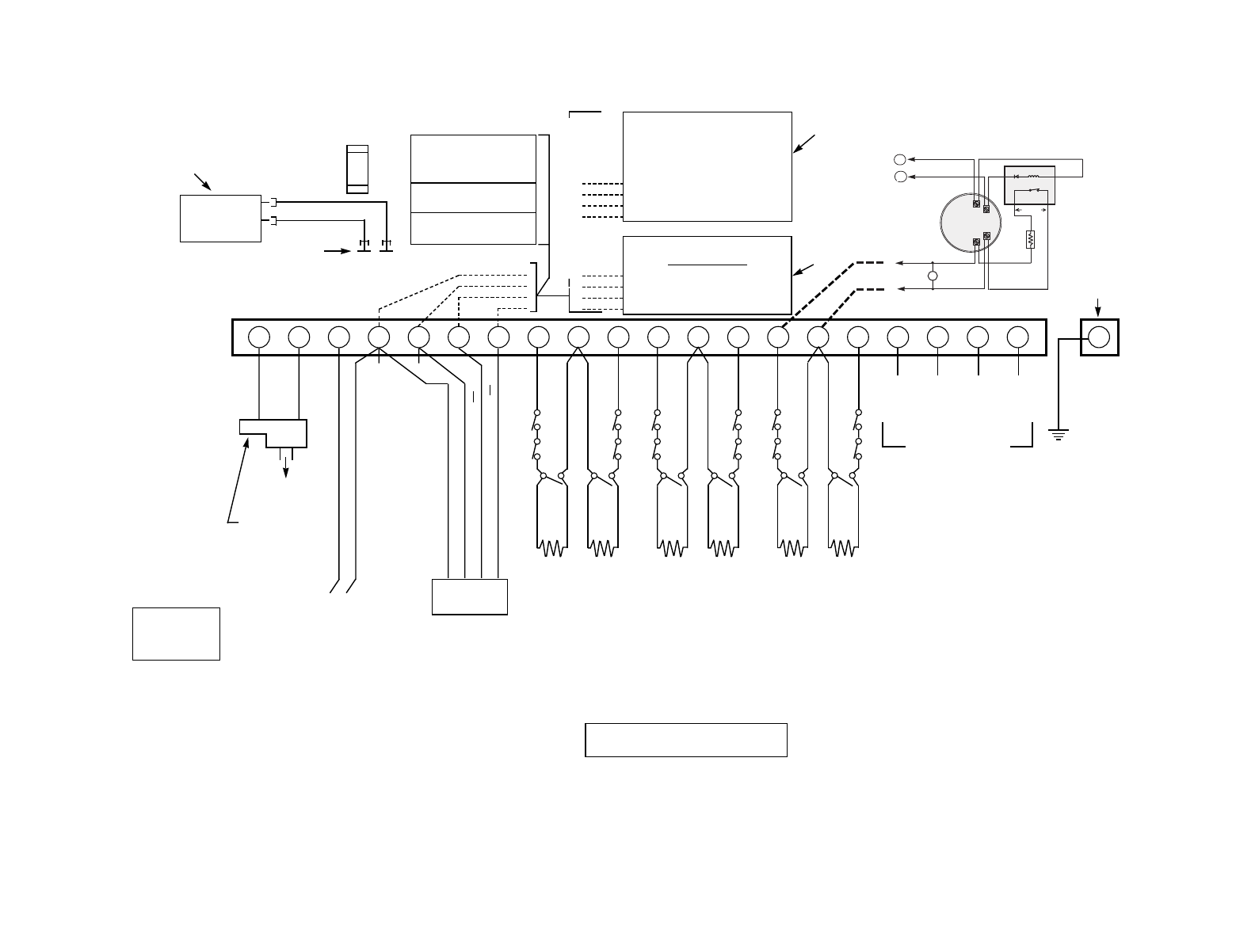
– 2
3
–
OPTIONAL
FOR UP TO 30 ADDITIONAL ZONES
(ONE FROM EITHER OR BOTH GROUPS)
ADEMCO 4281 or 5881* Type
RF RECEIVER
WIRELESS ZONES
4281L: UP TO 4
4281M/5881L: UP TO 8
5881M: UP TO 16
4281H/5881H/5881EH: UP TO 30
*5882 TYPE IN CANADA (See Instructions)
ADEMCO No. 4219
WIRED EXPANSION MODULE
(8 ADD'L EOLR WIRED ZONES)
-OR-
ADEMCO No. 4229
WIRED EXPANSION/RELAY MODULE
(8 ADD'L EOLR WIRED ZONES PLUS 2
OUTPUT RELAYS)
-OR-
ADEMCO No. 4204 RELAY MODULE
(4 OUTPUT RELAYS)
BLK
RED
GRN
YEL
CONNECTION OF THE FIRE ALARM SIGNAL TO A FIRE ALARM
HEADQUARTERS OR A CENTRAL STATION SHALL BE PERMITTED
ONLY WITH THE PERMISSION OF THE LOCAL AUTHORITY HAVING
JURISDICTION. THE BURGLAR ALARM SIGNAL SHALL NOT BE
CONNECTED TO A POLICE EMERGENCY NUMBER.
1234567891011121314151617181920 21
LOCATED AT
LOWER RIGHT
OF CIRCUIT
BOARD
SEE INSTRUCTIONS
FOR PROPER
GROUNDING
TELEPHONE WIRING
(VIA RJ31X* JACK DIRECT
CONNECT CORD)
*IN CANADA, CA38A JACK
DOC LOAD NO.: 3
REMOTE KEYPADS
SYSTEM
MUST
BE
PROGRAMMED WITH AN
FA510KP OR FA550KP. IT NEED
NOT REMAIN IN SYSTEM.
AFTER PROGRAMMING,
THE SYSTEM CAN USE:
FA210KP (30mA),
FA250KP (120mA), OR
FA550KP (140mA).
MULTIPLE
KEYPADS
MAY BE
USED, BUT USE MAX. OF 220 FT.
OF #22 WIRE OR 550 FT. OF #18.
BLACK: KEYPAD GROUND (–) RETURN
RED: KEYPAD PWR (+)
GREEN: DATA IN FROM KEYPAD
YELLOW: DATA OUT TO KEYPAD
▲
▲
REMOTE
KEYPAD
AUX. POWER
OUTPUT
10.5-13.8VDC
500mA MAX.
INTERRUPTS
FOR FIRE
ALARM RESET
NOTE:
KEYPAD
CURRENT
MUST BE
INCLUDED
IN AUX.
CURRENT
DRAIN
CALCULATIONS
}
GEL LEAD ACID TYPE.
BATTERY NORMALLY NEED NOT BE
REPLACED FOR AT LEAST 3 YRS.
BATTERY CAPACITY FOR EMERGENCY
STANDBY USE AT LEAST 4 HOURS.
COMPLIES WITH FCC RULES, PART 68
FCC REGISTRATION NO. AC398U-68192-AL-E
RINGER EQUIVALENCE: 0.7B.
WARNING:
TO PREVENT RISK OF SHOCK,
DISCONNECT TELEPHONE LINE
AT TELCO JACK BEFORE
SERVICING THIS UNIT.
THIS EQUIPMENT SHOULD BE INSTALLED IN
ACCORDANCE WITH THE NATIONAL FIRE
PROTECTION ASSOCIATION'S STANDARD 74
(NATIONAL FIRE PROTECTION ASSOC.,
BATTERYMARCH PARK, QUINCY, MA 02269).
PRINTED INFORMATION DESCRIBING PROPER
INSTALLATION, OPERATION, TESTING,
MAINTENANCE, EVACUATION PLANNING AND
REPAIR SERVICE IS TO BE PROVIDED WITH
THIS EQUIPMENT.
CHARGING
VOLTAGE
13.8VDC
BATTERY
12V, 4AH
(e.g. ADEMCO
No. 467)
OR 12V, 1.2AH
–
+
–
+
CONNECTOR TABS
FOR COMPLETE
INFORMATION,
SEE
INSTRUCTIONS
PLUG-IN
TRANSFORMER
16.5VAC, 25VA
(e.g. ADEMCO
No. 1321.
USE No. 1321CN
IN CANADA)
TO 110VAC
UNSWITCHED
OUTLET (24HR)
–
+
ALARM OUTPUT
10.5-13.8VDC, 2A MAX.
(600mA MAX FOR UL USAGE,
INCLUDING AUX. POWER)
STEADY FOR BURGLARY/PANIC,
PULSING FOR FIRE (e.g. USE
ADEMCO No. 740 SOUNDER,
No.702 OR 719 SIREN, OR 12V BELL)
3A
BLK
RED
GRN
YEL
BLK
RED
GRN
YEL
AND/OR
1000
OHMS
EOLR
1000
OHMS
EOLR
ZONE 5
ZONE 6
HI
LO
HI
LO
WARNING: OWNER'S INSTRUCTION NOTICE NOT TO BE REMOVED. WEEKLY
TESTING IS REQUIRED TO ENSURE PROPER OPERATION OF THIS SYSTEM.
TIP
(BROWN) RING
(GRAY) TIP
(GREEN) RING
(RED)
}
}
INCOMING
PHONE
LINE
HANDSET
BLACK
RED
–+
ADEMCO No. 5800TM
TRANSMITTER MODULE
(20mA)
(for No. 5827BD
Wireless Bidirectional Keypad)
AND/OR
FA4285
VOICE MODULE (160mA)
AND/OR
ADEMCO
LONG RANGE RADIO
1000
OHMS
EOLR
1000
OHMS
EOLR
ZONE 1
ZONE 2
HI
LO
HI
LO
1000
OHMS
EOLR
1000
OHMS
EOLR
ZONE 3
ZONE 4
HI
LO
HI
LO
• MAXIMUM LOOP RESISTANCE: (EACH ZONE) 300 OHMS (PLUS EOLR)
• RESPONSE, ZONES 1-6: 300-500MSEC
• ZONE 3 CAN BE PROGRAMMED FOR N.C. SENSOR
FAST RESPONSE TO AN OPEN: 10MSEC MAX
• ZONE 5 CAN BE PROGRAMMED FOR USE AS
A FIRE ZONE. SEE DIAGRAM.
TO DETERMINE TOTAL STANDBY LOAD
ON BATTERY, ADD 100mA TO TOTAL OF
AUX. POWER OUTPUT AND REMOTE
KEYPAD CURRENTS.
USE UL LISTED LIMITED
ENERGY CABLE FOR
ALL CONNECTIONS
FA142C SUMMARY OF CONNECTIONS
BATTERY FUSE
(e.g. ADEMCO No. 90-12)
FOR REPLACEMENT
USE SAME VALUE
AUX PWR
OUTPUT
TERMS
+
-
TO HI SIDE OF SELECTED ZONE
TO LO SIDE OF SELECTED ZONE
+
-
-
+
•
EOL
POWER
SUPER-
VISION
RELAY
MODULE
A77-716B
•
•
5
4
4-WIRE SMOKE
OR COMBUSTION
DETECTOR 2000
OHMS
EOLR
HEAT
DETECTOR
ZONES 2–7*
+RED
BLK –
*IF PROGRAMMED FOR FIRE
VIOLET
* IF PROGRAMMED FOR FIRE
TO ZONE 5*
SET RECEIVER’S
DIP SWITCH FOR
DEVICE ADDRESS
OF “0”.
See receiver’s
instructions.
SET UNIT’S DIP
SWITCH
FOR DEVICE ADDRESS
OF “1”
See unit’s instructions.
1000
OHMS
EOLR
THESE OPTIONAL ITEMS
MAY ALSO BE USED
SEE THEIR INSTRUCTIONS
EARTH
GROUND
TERMINAL
EARTH
GROUND
THIS DEVICE COMPLIES WITH PART 15 OF FCC RULES.
OPERATION IS SUBJECT TO THE FOLLOWING TWO
CONDITIONS: (1) THIS DEVICE MAY NOT CAUSE HARMFUL INTER-
FERENCE, AND (2) THIS DEVICE MUST ACCEPT ANY INTERFER-
ENCE RECEIVED, INCLUDING INTERFERENCE THAT MAY CAUSE
UNDESIRED OPERATION.

172 Michael Drive
Syosset, New York 11791
Copyright © 1997 PITTWAY CORPORATION
