Panasonic KX T7667 Quick Reference Guide VOICESONIC
KX-T7667 to the manual e87bdc6a-5532-4bef-baba-987f2ab41eca
User Manual: VOICESONIC KX-T7667
Open the PDF directly: View PDF  .
.
Page Count: 16
Quick Reference Guide
Important Information
Digital Proprietary Telephone
WARNING:
TO PREVENT POSSIBLE FIRE OR ELECTRIC SHOCK, DO NOT EXPOSE THIS PRODUCT
TO RAIN OR MOISTURE. THIS HANDSET EARPIECE IS MAGNETIZED AND MAY RETAIN
SMALL FERROUS OBJECTS.
DISCONNECT THE TELEPHONE LINE CORD FROM THIS PRODUCT IF THIS PRODUCT
EMITS SMOKE, AN ABNORMAL SMELL OR MAKES UNUSUAL NOISE.
THESE CONDITIONS CAN CAUSE FIRE OR ELECTRIC SHOCK. CONFIRM THAT SMOKE
HAS STOPPED AND CONTACT AN AUTHORIZED SERVICENTER.
IMPORTANT NOTICE:
Under power failure conditions, this telephone may not operate. Please ensure that a
separate telephone, not dependent on local power, is available for use in an emergency.
Included Accessories: (for extra orders, call toll free 1-800-332-5368)
Handset . . . . . . . . . . . . . . . 1 Handset Cord . . . . . . . . . 1
Telephone Line Cord . . . . . 1 Stand . . . . . . . . . . . . . . . . 1
I
f you are having problems making calls, unplug the extension and connect a known
working telephone. If the known working telephone operates properly, have the
defective telephone repaired by an authorized Panasonic Factory Servicenter. If the
known working telephone does not operate properly, check the KX-TDA series
Business Telephone Systems and the internal extension wiring.
Keep the unit away from heating appliances and devices that generate electrical
noise, such as fluorescent lamps, motors and televisions. These noise sources can
interfere with the performance of the unit.
This unit should not be placed in rooms where the temperature is less than 5
˚
C
(41
˚
F) or greater than 40
˚
C (104
˚
F). Allow 10 cm (3-15/16 in) clearance around the
unit for proper ventilation.
Avoid environments with excessive smoke, dust, mechanical vibration, shock, or
direct sunlight.
Wipe the unit with a soft cloth. Do not clean the unit with abrasive powders or with
chemical agents such as benzine or thinner.
Use only the correct Panasonic handset.
Do not disassemble this unit. Dangerous electrical shock could result. The unit must
only be disassembled and repaired by qualified service technicians.
If damage to this unit exposes any internal parts, immediately disconnect the
telephone line and mains supply. Then return the unit to a servicenter.
Never attempt to insert wires, pins, etc. into the vents or other holes of this unit.
Please read other important information on pages 11-13 before use.
Document Version: 2006-05
Panasonic KX-T7667
Panasonic Telephone Systems
www.voicesonic.com
Phone: 877-289-2829
Panasonic KX-T7667, Panasonic KXT7667, KX T7667, KX-T7667, KX-T7667B, KX-T7667W, KX-T7667
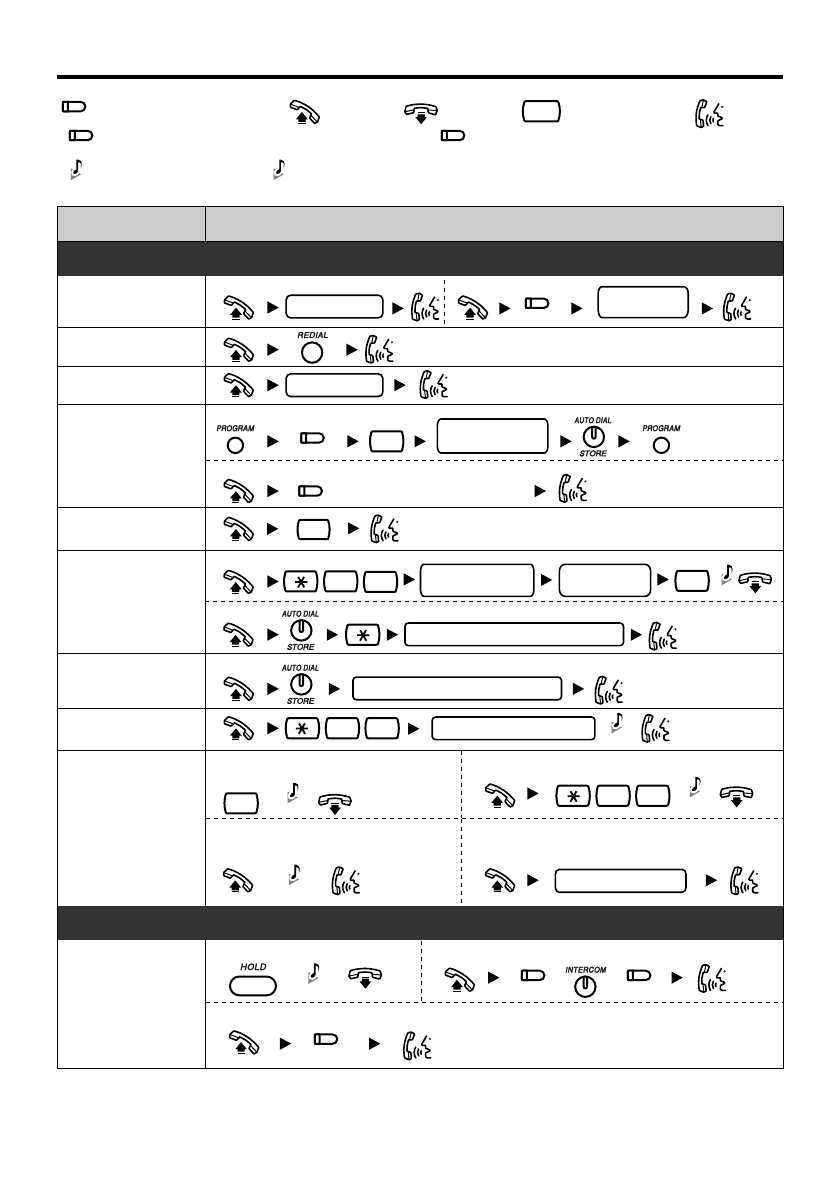
Off-hookOutside (CO) Line button
Incoming Call Distribution Group button
On-hook Feature number Talk
Direct Station Selection button
Features List
Confirmation Tone
C. Tone Ringback Tone
R.B. Tone
Call Hold
To hold To retrieve a call at the holding extension
To retrieve an outside call from another extension
//
C. Tone
(ICD Group)
(DSS)
(CO)
(CO)
(CO)
(ICD Group)
Operation
To dial
To an extension
assigned as a One-touch
Dialing button
To dial
To store
To store
personal speed
dial no. (2 digits)
desired no.
(max. 32 digits)
#
3
2
0
Redial
Quick Dialing
One-touch
Dialing
Operator Call
Personal
Speed Dialing
System
Speed Dialing
Doorphone Call
Automatic
Callback Busy
Making Calls
quick dial no.
Calling
extension no.
To an outside party
doorphone no. (2 digits)
To set To cancel
4 6
6
While hearing a busy tone
To answer from an idle extension
While hearing a callback ring
To answer from an idle outside line
While hearing a callback ring
outside phone no.
system speed dial no. (3 digits)
To dial
personal speed dial no. (2 digits)
3 1
outside
phone no.
desired no.
(max. 32 digits)
Feature
C. Tone
C. Tone
C. Tone
C. Tone
R.B. Tone
Making Calls
During a Conversation
(CO)
(CO)
0
—
2
—
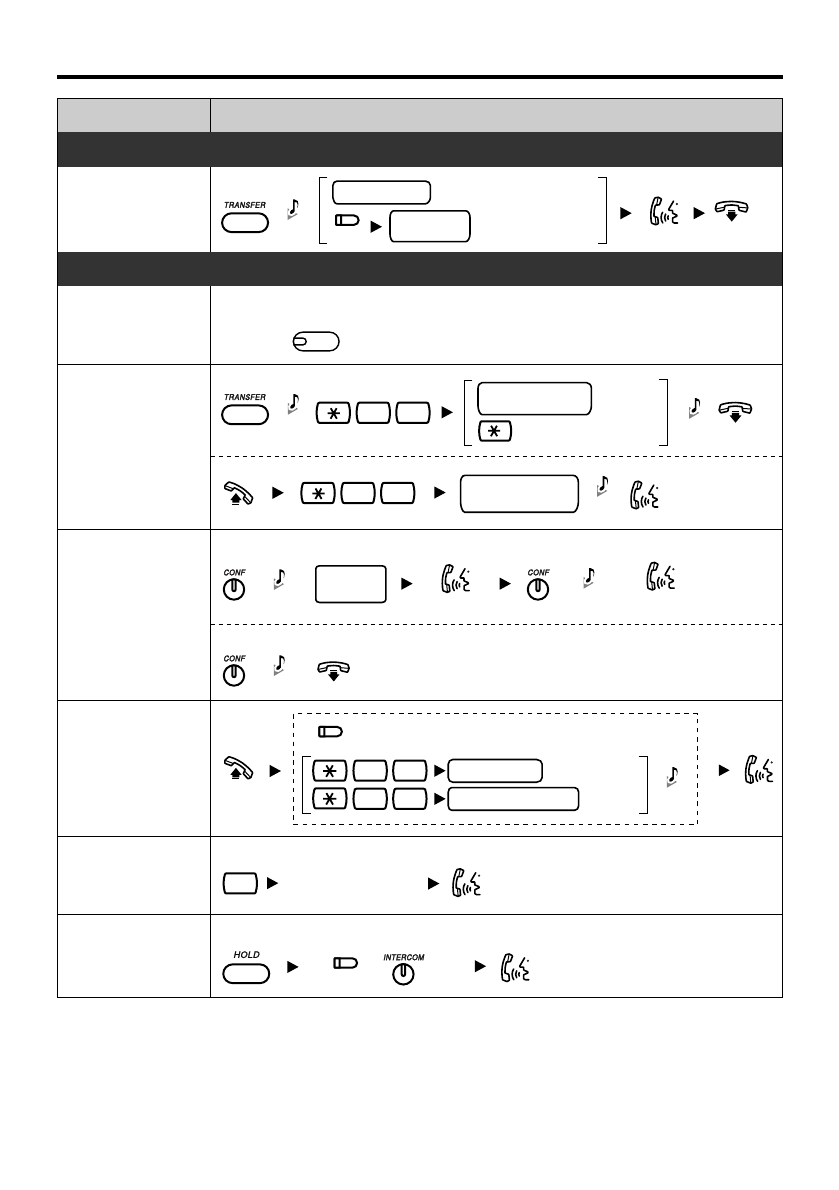
Feature Operation
Multiple Party
Conversation To leave a conference
To add other parties during a conversation
desired
phone no.
Call Park
To set
5 2 Specified
Auto
parking zone no.
Talk to the
new party.
Talk with
multiple parties.
(2 digits)
Call Transfer
During a Conversation
outside
phone no.
To an extension
To an outside party
extension no.
Answering a
Call Waiting
Features List
C. Tone
C. Tone
C. Tone
C. Tone
C. Tone
Useful Features
Off-hook Monitor
During a conversation using the handset
To set/cancel
Call Pickup
Sending a Call
Waiting Tone 1
While hearing a busy tone
Wait for an answer.
To retrieve
5 2
stored parking
zone no.
(2 digits)
C. Tone
C. Tone
To hold the current call then talk to the new party
/
Group
4 0
Directed
extension no.
4 1
group no. (2 digits)
C. Tone
*
*
Disregard this step if both parties are extensions.
SP
SP
-PHONE
(CO)
(DSS)
(CO)
—
3
—
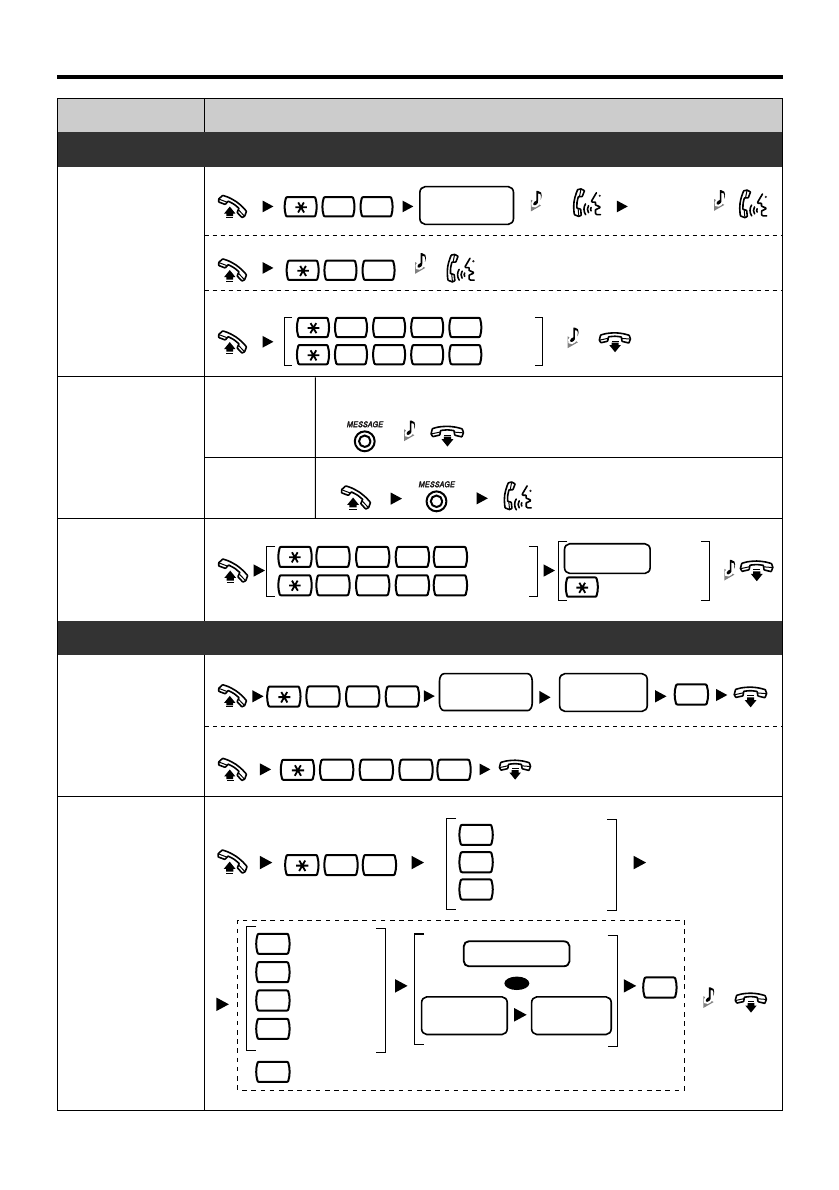
Features List
Feature Operation
Useful Features
3 3
To page
To answer
To allow/deny a paged announcement
7 2 1
7 2 1
Deny
Allow
1
0
Announce.
Wait for
an answer.
4 3
paging group
no. (2 digits)
Paging
Message
Waiting
Caller
Called
extension
To leave a message waiting indication
When the called extension is busy or does not answer
To call back
C. Tone
C. Tone C. Tone
C. Tone
C. Tone
For Log-in
For Log-out
1736
0736
extension no.
ICD Group
Specified
All
Log-in/Log-out
C. Tone
Before Leaving Your Desk
Setting Absent
Message
message no.
(1-9)
To set
To cancel
0
parameter
(if required)
7 5 0
7 5 0 #
Call
Forwarding
0
Busy
Cancel
No answer
Busy/
No answer
CO line
access no.
All calls
extension no.
outside
phone no.
Both Calls
Outside Calls
Intercom Calls
OR
C. Tone
1
2
2
3
4
5
0
#
7 1
—
4
—
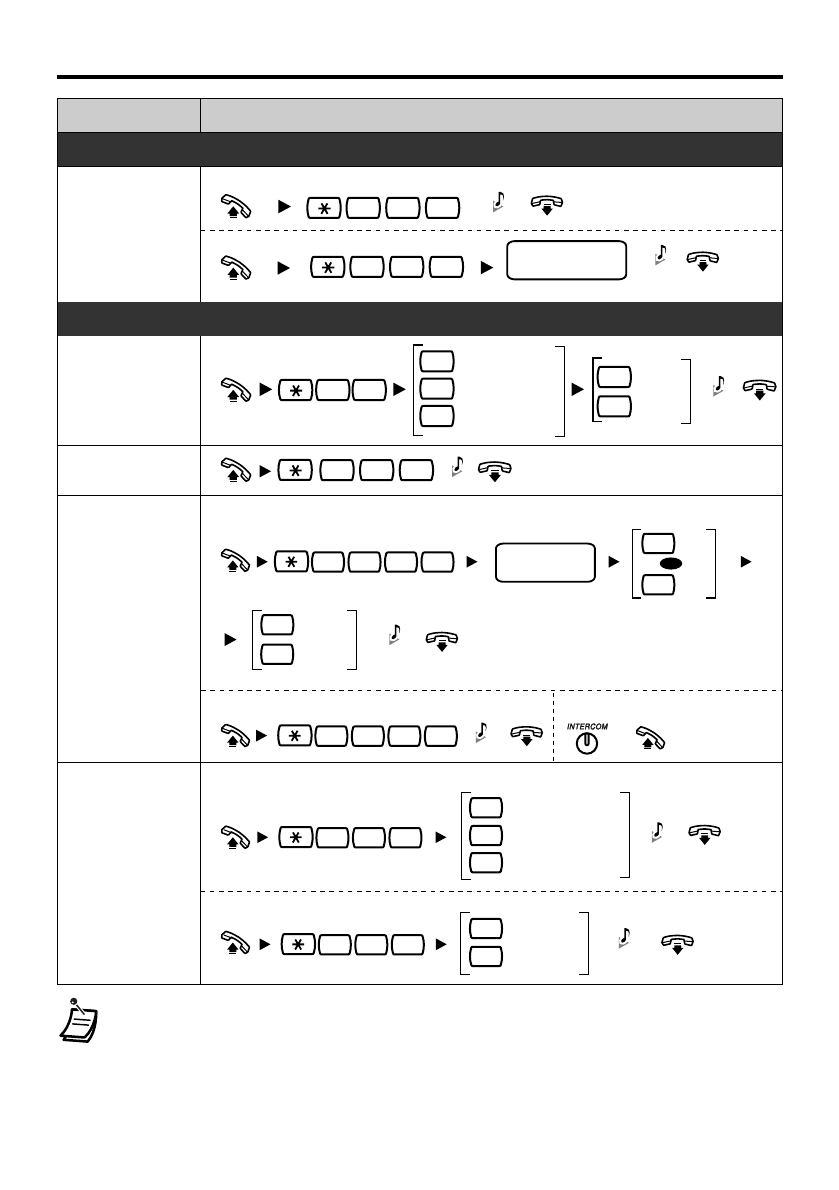
Feature
Operation
Features List
Before Leaving Your Desk
To lock
C. Tone
7 7 1
extension PIN*
(max. 10 digits)
To unlock
7 7 0
Extension
Dial Lock
Setting the Telephone According to Your Needs
Set
Cancel C. Tone
0Both Calls
Outside Calls
Intercom Calls
1
2
1
0
Extension
Feature Clear
Do Not Disturb
790
C. Tone
To set
AM
PM
7 6 0 1
0
1
once
daily C. Tone
0
1
hour/minute
(4 digits)
To cancel To stop or answer the ring back
7 6 0 0
C. Tone /
Timed
Reminder
Receiving
Call Waiting
Tone
To set/cancel for outside calls
To set/cancel for intercom calls
No Call
Whisper OHCA C. Tone
7 3 1
0
1
3
732 Tone
No tone
0
1C. Tone
C. Tone
•
For more details, refer to the Business Telephone System User Manual or consult
your dealer.
• You can change the flexible CO buttons to the feature buttons.
• “Location of Controls” is shown on pages 7-8.
71
*PIN: Personal Identification Number
—
5
—
OR
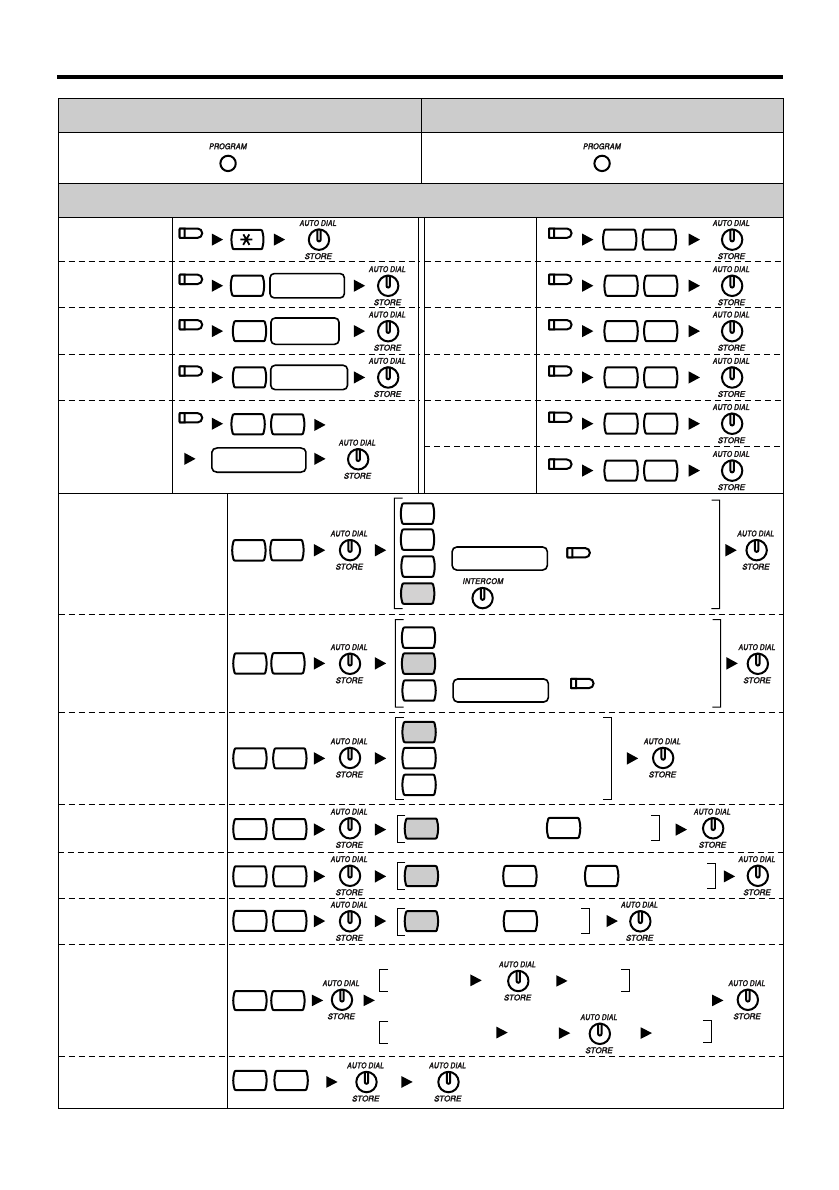
Settings on the Programming Mode
To exitTo enter the program mode
Operation
Call Waiting Tone
Type Selection
Alternate Receiving-
Ring/Voice
9 0
extension PIN same
PIN
Tone 1 Tone 2
01
/
0
1
Ringing (Tone Call)
Ring only
2
Directly
To set an extension PIN
To change a stored extension PIN to new one
2 1
stored extension PIN same PINnew PIN
3 2
Intercom
1
0
1
2
No line
An idle outside line
A CO/ICD Group
button
CO button no.
9
Station Programming
Data Default Set #
Direct Station
Selection
One-touch
Dialing
FWD/DND
- Both calls
1
extension
no.
2
desired no.
4 1
Account
Conference
48
4 9
/
+
/
2
0
2
No line
The longest
ringing line
An assigned
outside button
CO button no.
0
/
+
4 2
4 3
FWD/DND
- Outside calls
FWD/DND
- Intercom calls
Incoming Call
Distribution
Group (ICD
Group)
ICD Group no.
30
5 5
Log in/
Log-out
Call Waiting for
Outside calls No (No tone) Yes (Tone)
01
/
No Call Tone
01
/
Whisper OHCA
3
/
3 0
3 1
Preferred Line
Assignment-Outgoing
Preferred Line
Assignment-Incoming
Call Waiting
Selection
#
Loop-CO
(L-CO)
Single-CO
(S-CO) 0
CO line no.
(Voice Call)
Extension PIN
[Personal Identification
Number]
(PIN-max.10 digits)
3
1
(CO)
(CO)
(CO)
(CO)
(CO)
(CO)
(CO)
(CO)
(CO)
(CO)
(CO)
(CO)
(CO)
—
6
—
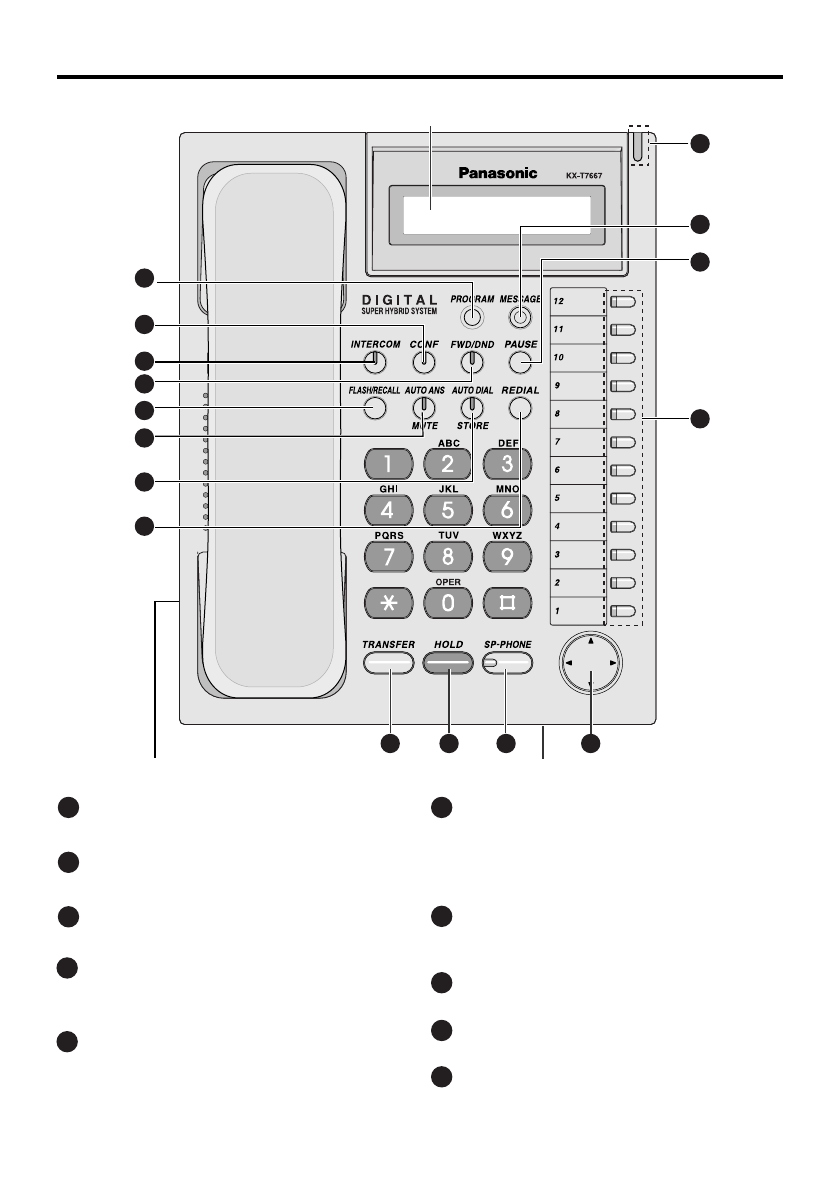
Location of Controls
1PROGRAM: Used to enter and exit
the personal programming mode.
4FWD/DND (Call Forwarding/Do Not
Disturb): Used to perform Call
Forwarding or Do Not Disturb.
2CONF (Conference): Used to
establish a multiple party conversation.
3INTERCOM: Used to make or receive
intercom calls.
6AUTO ANS (Auto Answer)/MUTE:
Used to receive an incoming call in
hands-free mode or mute the
microphone/handset during a
conversation.
5FLASH/RECALL: Used to disconnect
the current call and make another call
without hanging up.
7AUTO DIAL/STORE: Used for
System/Personal Speed Dialing or
storing program changes.
8REDIAL: Used to redial the last
dialed number.
TRANSFER: Used to transfer a call
to another party.
9
10
HOLD: Used to place a call on hold.
—
7
—
16
14
15
13
9 10 11
MicrophoneHeadset Jack
1
2
3
4
6
7
8
5
LCD (Liquid Crystal Display) with Backlight
12
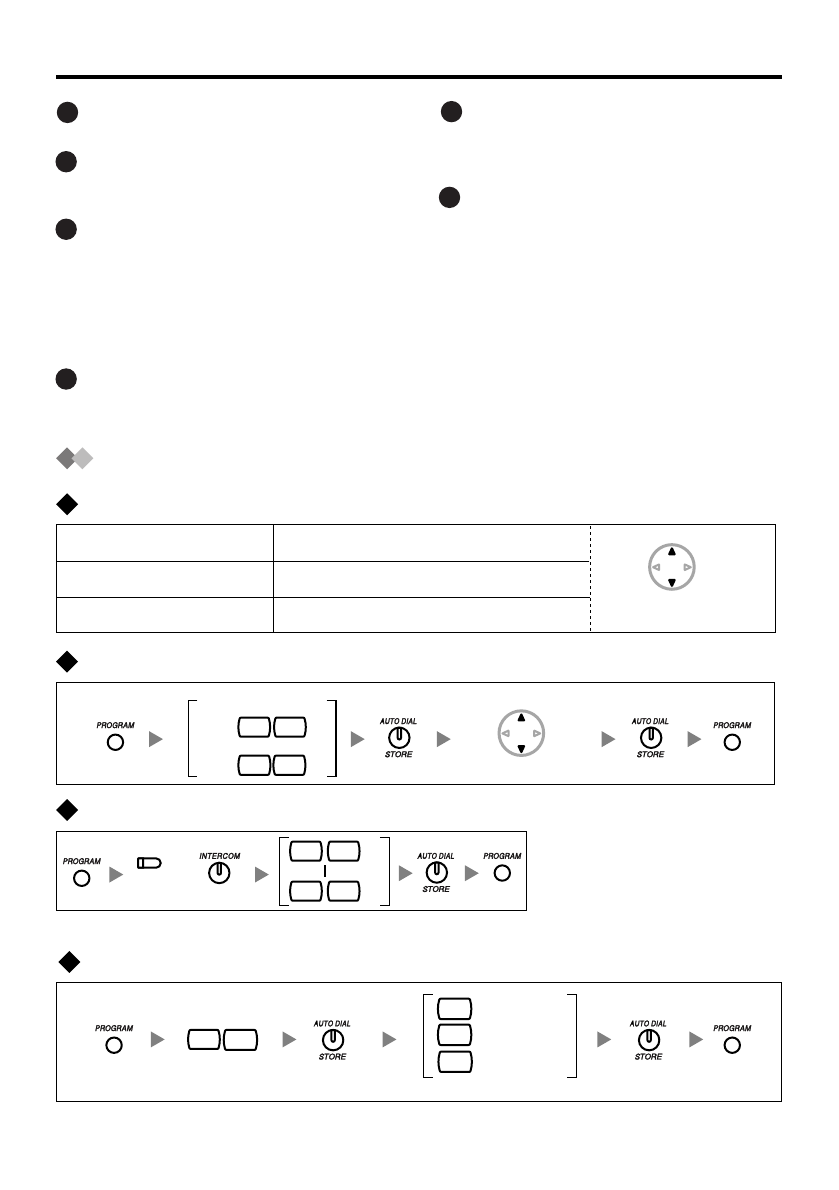
11
SP-PHONE (Speakerphone): Used
for the hands-free operation.
12
Navigator Key: Used to adjust the
volume and select desired items for
each function.
14
PAUSE: Used to insert a pause
during dialing.
15
MESSAGE: Used to leave a message
waiting indication or call back the
party who left the message waiting
indication.
13
Flexible Outside (CO) Line Button:
Used to make or receive an outside
call. Pressing this button seizes an
idle outside line automatically. (Button
assignment is required.) Also used as
feature buttons. (Button assignment is
required.)
Location of Controls
16
Message/Ringer Lamp: When you
receive a call, the lamp flashes red.
When someone has left you a
message, the lamp stays on red.
Setting
0 1
While on-hook
LCD Contrast/Headset Mode
Ring Tone
0 1
0 8
Press Twice.
*1
The ring tone pattern of patterns 09 to 30 is the same as pattern 01.
6 1
LCD Contrast
Headset Mode
(CO)
/
Speaker/Ringer/Handset/Headset Volume
Speaker Volume
Handset/Headset Volume
Press UP or DOWN.
Ringer Volume
While on-hook or receiving a call
While in hands-free conversation
While using the handset or headset
Press UP or DOWN.
—
8
—
0
While on-hook
LCD Backlight
4
0
1
2
Automatic
Always On
Always Off
*2
*1
*2 Default setting: Automatic
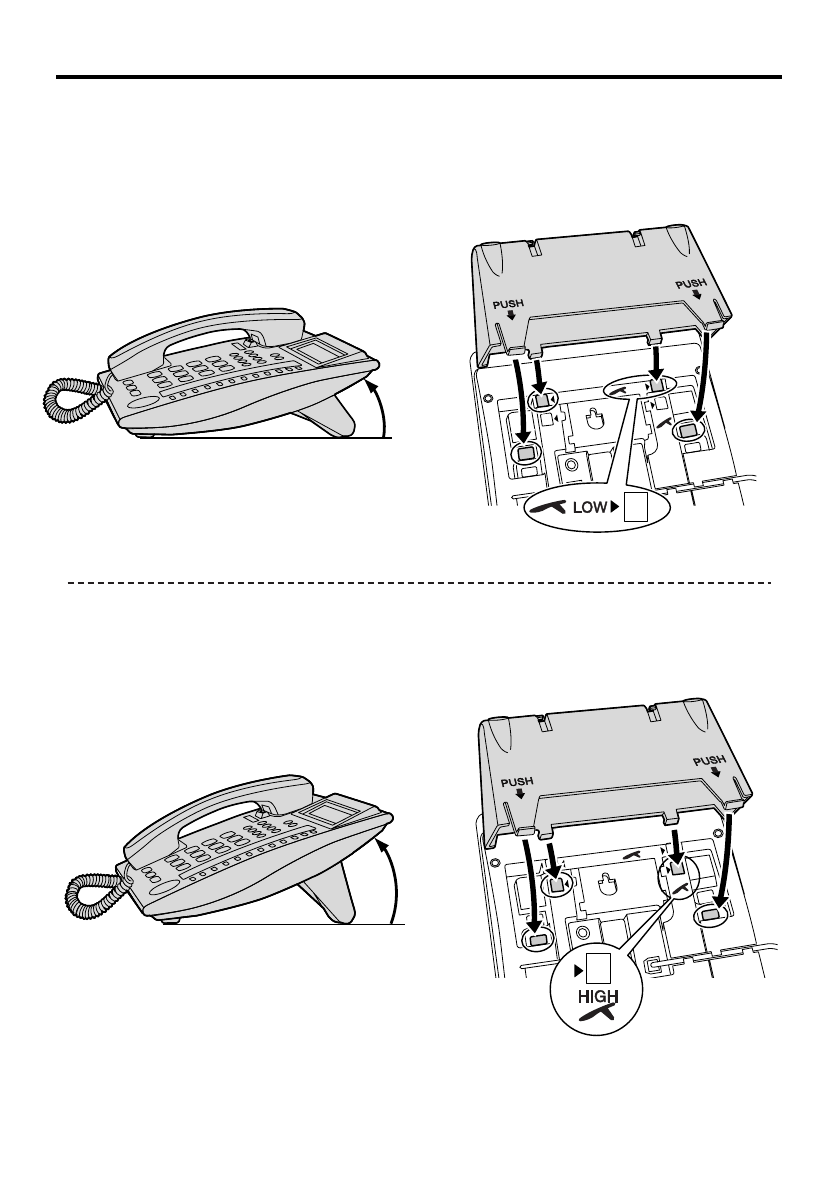
Tilt Angle
< LOW >
< HIGH >
The tilt angle of the unit can be adjusted.
To adjust the angle, insert the stand into the desired holes as shown below.
HIGH
LOW
PUSH
PUSH
PUSH
PUSH
HIGH
LOW
—
9
—
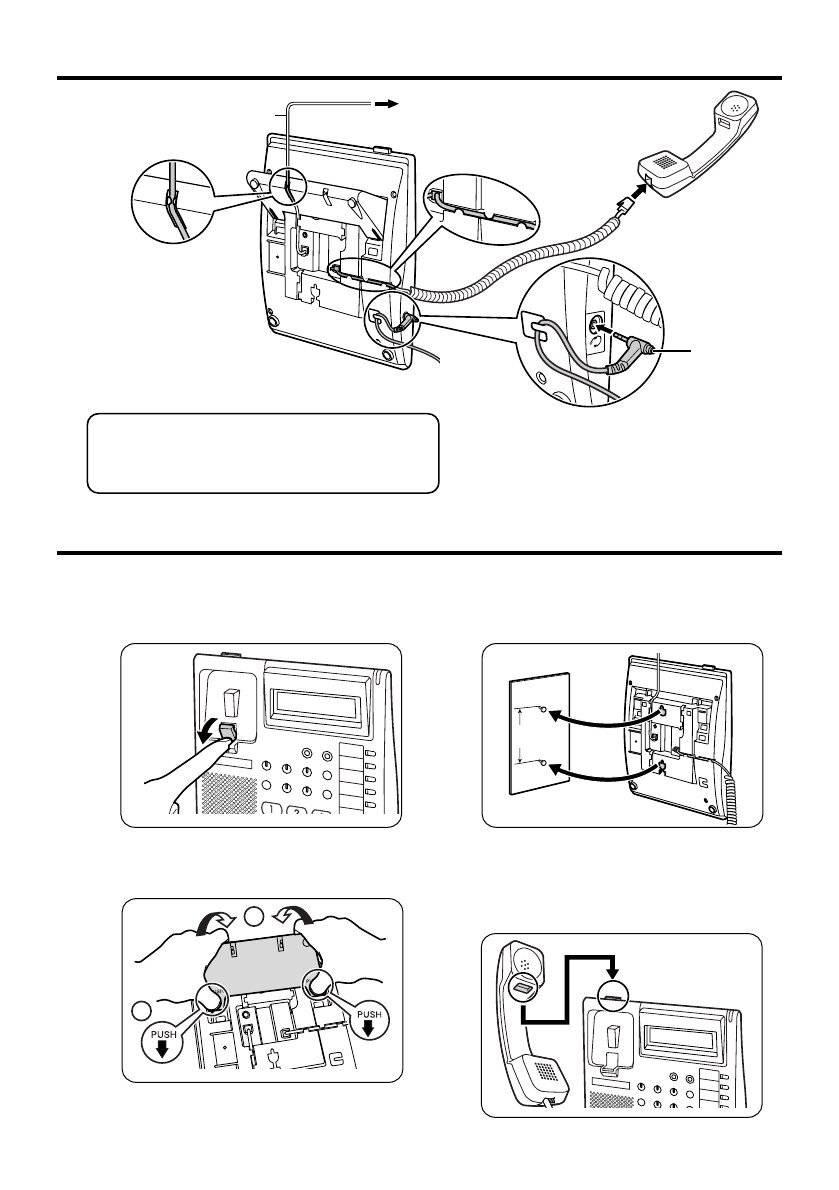
Connection
Wall Mounting
1
Pull down the handset hook until it locks,
so the tab holds the handset.
2
Remove the attached stand.
3
Mount the unit on the wall.
To temporarily place the handset down
during a conversation, hook it over the
top edge of the phone as shown.
CAUTION
Ensure the cord is inserted in the groove
to prevent damage to the connector.
To the main unit ( )
The telephone line cord
(included)
< Back view >
TO MAIN UNIT
/PABX
Headset
2
1
Headset (not included)
Recommendable: KX-TCA86, KX-TCA91,
KX-TCA92
Not compatible: KX-T7090
83 mm
(3-1/4 in)
—
10
—

Important Safety Instructions
When using this unit, basic safety
precautions, including those below, should
always be followed to reduce the risk of
fire, electric shock and injury to persons.
1. Read and understand all instructions.
2. Follow all warnings and instructions
marked on this unit.
3. Unplug this unit from the main unit
before cleaning. Do not use liquid or
aerosol cleaners. Clean with a damp
cloth.
4. Do not use the unit near water, for
example, near a bathtub, kitchen sink,
or laundry tub, in a wet basement, or
near a swimming pool.
5. Place this unit on a flat surface.
Serious damage and/or injury may
result if the unit falls.
6. The unit should never be placed near
or over a radiator or other heat source.
7. Do not allow anything to rest on the
extension cord. Do not locate this unit
where the cord may be stepped on or
tripped on.
8. To reduce the risk of fire or electric
shock, do not overload wall outlets and
extension cords.
9. Do not insert objects of any kind into
this unit through openings, as they
may touch dangerous voltage points or
short out parts that could result in a
risk of fire or electric shock. Never spill
liquid of any kind on the unit.
10. To reduce the risk of electric shock, do
not disassemble this unit. Only
qualified personnel should service this
unit. Opening or removing covers may
expose you to dangerous voltages or
other risks. Incorrect reassembly can
cause electric shock.
11. Unplug this unit from the main unit
and have the unit serviced by
qualified service personnel in the
following cases:
A. When the extension cord is
damaged or frayed.
B. If liquid has been spilled on the
unit.
C. If the unit has been exposed to rain
or water.
D. If the unit does not work normally
by following the manual. Adjust
only controls covered by the
manual. Improper adjustment may
require repair by an authorized
servicenter.
E. If the unit has been dropped, or
damaged.
F. If the unit's performance
deteriorates.
12. Avoid using a telephone (other than
a cordless type) during an electrical
storm. There is a remote risk of
electric shock from lightning.
13. Do not use the telephone in the
vicinity of a gas leak to report the
leak.
SAVE THESE
INSTRUCTIONS
—
11
—

FCC Information
NOTE:
This equipment has been tested and found to comply with the limits for a Class B
digital device, pursuant to Part 15 of the FCC Rules. These limits are designed to
provide reasonable protection against harmful interference in a residential
installation. This equipment generates, uses, and can radiate radio frequency
energy and, if not installed and used in accordance with the instructions, may
cause harmful interference to radio communications. However, there is no
guarantee that interference will not occur in a particular installation. If this
equipment does cause harmful interference to radio or television reception, which
can be determined by turning the equipment off and on, the user is encouraged to
try to correct the interference by one or more of the following measures:
– Reorient or relocate the receiving antenna.
– Increase the separation between the equipment and receiver.
– Connect the equipment to an outlet on a circuit different from that to which the
receiver is connected.
– Consult the dealer or an experienced radio/TV technician for help.
CAUTION:
To assure continued compliance with FCC rules, do not make any unauthorized
changes or modifications to this equipment would void the user's authority to
operate this device.
When programming emergency numbers and/or making test calls to emergency
numbers:
1) Remain on the line and briefly explain to the dispatcher the reason for the call
before hanging up.
2) Perform such activities in the off peak hours, such as early morning hours or
late evenings.
—
12
—

Customer Information
Hearing Aid Compatibility:
This telephone provides magnetic coupling for hearing aids.
Use only handsets or other acoustic devices with this equipment that are
compliant with the hearing aid compatibility requirements of FCC Part 68.
This equipment complies with Part 68 of the FCC rules and the requirements
adopted by the ACTA. On the bottom of the cabinet of this equipment is a label
that contains, among other information, a product identifier in the format
US: AAAEQ##Txxxx. If requested, this number must be provided to the telephone
company.
If trouble is experienced with this equipment KX-T7667, for repair or warranty
information, please contact:
Panasonic Services Company
BTS Center
1225 Northbrook Parkway Suite
1-216 Suwanee
GA 30024
If the equipment is causing harm to the telephone network, the telephone
company may request that you disconnect the equipment until the problem is
resolved.
When you ship the product:
Carefully pack and send it prepaid, adequately insured and preferably in the
original carton. Attach a postage-paid letter, detailing the symptom to the outside
of the carton.
DO NOT send the product to the Executive or Regional Sales offices. They are
NOT equipped to make repairs.
Product service:
Panasonic Servicenters for this product are listed in the servicenter directory.
Consult your certified Panasonic dealer for detailed instructions.
Other Important Information
—
13
—

Note
—
14
—

Note
—
15
—
PSQX4167ZA-BM KK0506SY0(M)
SERIAL NO.
(found on the bottom of the unit)
DATE OF PURCHASE
NAME OF DEALER
For your future reference
DEALER'S ADDRESS
DEALER'S TEL. NO.
Copyright:
This material is copyrighted by Panasonic Communications Co., Ltd., and may be
reproduced for internal use only. All other reproduction, in whole or in part, is prohibited
without the written consent of Panasonic Communications Co., Ltd.
2006 Panasonic Communications Co., Ltd. All Rights Reserved.
See More
Panasonic Manuals
www.voicesonic.com
Phone: 877-289-2829
3DQDVRQLF7HOHSKRQH6\VWHPV
