MTKIT13_3L_01 89_ MT_KIT_13 MT KIT 13
User Manual: MT_KIT_13
Open the PDF directly: View PDF  .
.
Page Count: 82
KIT VIDEO
MAESTRO KIT COLOR
COLOR MAESTRO KIT
COLOR MAESTRO KIT
TECHNICAL
MANUAL
MANUALE
TECNICO
MANUEL
TECHNIQUE
ENIT FR
Assistenza tecnica Italia 0346/750090
Commerciale Italia 0346/750091
Technical service abroad (+39) 0346750092
Export department (+39) 0346750093
MT KIT 13
Comelit Group S.p.A. - Via Don Arrigoni 5 - 24020 Rovetta S. Lorenzo BG Italy - tel. (+39) 0346 750 011 - fax (+39) 0346 71436
www.comelit.eu www.simplehome.eu info@comelit.it commerciale.italia@comelit.it export.department@comelit.it
GROUP S.P.A.
MT KIT 13
IT AVVERTENZE
• Effettuare lʼinstallazione seguendo scrupolosamente le istruzioni fornite dal costruttore ed in conformità alle norme vigenti.
• Tutti gli apparecchi devono essere destinati esclusivamente allʼuso per cui sono stati concepiti. Comelit Group S.p.A. declina ogni responsabilità per un utilizzo improprio
degli apparecchi, per modifiche effettuate da altri a qualunque titolo e scopo, per lʼuso di accessori e materiali non originali.
• Tutti i prodotti sono conformi alle prescrizioni delle direttive 2006/95/CE (che sostituisce la direttiva 73/23/CEE e successivi emendamenti) e ciò è attestato dalla presenza
della marcatura CE sugli stessi.
• Evitare di porre i fili di montante in prossimità di cavi di alimentazione (230/400V).
EN WARNING
• Install the equipment by carefully following the instructions given by the manufacturer and in compliance with the legislation in force.
• All the equipment must only be used for the purpose it was built for. Comelit Group S.p.A. declines any responsibility for improper use of the apparatus, for modifications
made by others under any title or purpose, and for the use of non-original accessories and materials.
• All the products comply with the requirements of the 2006/95/CE directives (which replace the 73/23/CEE directives and the successive amendments). This is proved by
the CE mark on the products.
• Do not run the riser wires in proximity of the power supply cables (230/400V).
FR AVERTISSEMENT
• Effectuer lʼinstallation en suivant scrupuleusement les instructions fournies par le constructeur et conformément aux normes en vigueur.
• Tous les appareils doivent être strictement destinés à lʼemploi pour lequel ils ont été conçus. Comelit Group S.p.A. décline toute responsabilité en cas de mauvais usage
des appareils, pour des modifications effectuées par dʼautres personnes pour nʼimporte quelle raison et pour lʼ utilisation dʼaccessoires non d'origine par nous.
• Tous les produits sont conformes aux prescriptions des directives 2006/95/CE (qui remplacent les directives 73/23/CEE et amendements successifs). Cette conformité est
signalée par le symbole CE figurant sur les produits.
• Eviter de placer les fils de montant à proximité des câbles dʼalimentation (230/400 V).

ITALIANO
MT KIT 13
SOMMARIO
•GENERALITÀ pag. 2
•POSTI ESTERNI
- Posto esterno Art. 4875KC e Art. 4876KC pag. 2
- Regolazione volume audio Art. 4875KC e Art. 4876KC pag. 2
- Caratteristiche tecniche alimentatore Art. 1205/B pag. 2
- Istruzione di installazione Art. 4875KC, 4876KC pag. 3
•POSTI INTERNI
- Caratteristiche tecniche Monitor a colori Art. 5900 pag. 4
- Staffa di fissaggio del Monitor Art. 5914KC pag. 4
- Installazione Monitor Art. 5900 a parete pag. 5
- Montaggio Monitor Art. 5900 sulla base da tavolo
Art. 5912 pag. 5
- Istruzioni per installazione citofono Style Art. 2608,
2628 e 2610 pag. 6
- Citofono Style Art. 2608 pag. 7
- Citofono Style Art. 2628 pag. 8
- Citofono Style Art. 2610 pag. 9
•INDICAZIONI GENERALI DI INSTALLAZIONE
E FUNZIONAMENTO
- Tabella cavi e distanze pag. 10
- Tabella impostazioni Art. 1216 pag. 11
•IMPOSTAZIONI E DESCRIZIONE FUNZIONAMENTO
SISTEMA MAESTRO KIT
- Impostazioni Staffa e Citofoni pag. 12
- Tabella di programmazione micro interruttori
per codice utente su staffe e citofoni pag. 13
- Impostazione staffa Art. 5914KC principale
o secondaria pag. 13
- Tabella impostazioni funzioni Staffa Art. 5914KC pag. 14
- Descrizione impostazioni e funzione pulsanti pag. 15
- Procedura selezione suoneria Monitor pag. 16
- Impostazione citofono opzionale Art. 2610 pag. 17
- Funzione Autoaccensione e Richiesta video pag. 17
- Servizi Privacy e Dottore pag. 17
- Programmazioni speciali Art. 4660KC pag. 18
•ESPANDIBILITÀ DEL SISTEMA MAESTRO KIT
- Programmazione Art. 4660KC pag. 19
•MESSA IN FUNZIONE/VERIFICA TENSIONI
DI IMPIANTO A RIPOSO pag. 60
KIT VIDEO MAESTRO-KIT COLOR
MT KIT 13
1
•SCHEMI DI COLLEGAMENTO
- MK/01C Schema base per kit monofamiliari Art. 8493 pag. 61
- MK/02BC Schema base per kit bifamiliari Art. 8494
con collegamento in derivazione pag. 62
- MK/02AC Schema base per kit bifamiliari Art. 8494
con collegamento in cascata pag. 63
- MK/03BC Schema per kit bifamiliari Art. 8494 ampliati con
un secondo Art. 4876KC. Collegamento in derivazione pag. 64
- MK/03AC Schema per kit bifamiliari Art. 8494 ampliati
con un secondo Art. 4876KC. Collegamento in cascata pag. 65
- MK/04BC Schema per kit bifamiliari ampliati con un secondo
Art. 4876KC, un ulteriore monitor secondario e un citofono per
ciascuna unitaʼ familiare. Collegamento in derivazione pag. 66
- MK/04AC Schema per kit bifamiliari ampliati con un secondo
Art. 4876KC, un ulteriore monitor principale e un citofono
per ciascuna unitaʼ familiare. Collegamento in cascata pag. 67
- MK/01/AC Schema per kit monofamiliare con alimentatore
aggiuntivo Art. 1395 pag. 68
•VARIANTI DI COLLEGAMENTO
- MK/05C Utilizzo modulo telecamera scorporata
Art. 1259C pag. 69
- SB2/AAR Collegamento amplificatore video Art. 4833C pag. 70
- MK/HC Aggiunta di un monitor principale in parallelo,
collegamento in cascata pag. 70
- MK/IC Aggiunta di un monitor principale in parallelo,
collegamento in derivazione pag. 71
- MK/CC Collegamento in cascata di un monitor principale
e di un monitor secondario con lo stesso codice utente pag. 71
- MK/DC Aggiunta di un citofono in parallelo in derivazione
dal montante pag. 72
- MK/AAB Collegamento citofoni aggiuntivi in derivazione
dal monitor pag. 72
- MK/AAA Collegamento citofoni aggiuntivi in cascata
dal monitor pag. 73
- BK/EC Aggiunta pilotaggio luce esterna tramite Art. 1256 pag. 73
- MK/AC Aggiunta attuatore Art. 1256 pag. 74
- BK/OC Variante collegamento apriporta locale
temporizzato pag. 74
- BK/OAC Variante utilizzo segnalazione PORTA APERTA pag. 75
- SB2/AAK Connessione di dispositivi di ripetizione
di chiamata (Art. 1229 o Art. 1122/A) pag. 75
- Variante A:
Abilitazione (ON) / disabilitazione (OFF) risposta automatica pag. 76
- Variante B:
Abilitazione (ON) / disabilitazione (OFF) suoneria durante
la funzione Dottore pag. 76
- Variante C: Aggiunta pulsante di chiamata fuori porta pag. 76
- MK/PC Utilizzo pulsante 5 per usi vari pag. 77
- MK/NC Variante per utilizzo Morsetti +LED -LED pag. 77
- MK/EN/100C Schema per connessione a porta principale
di 3 MAESTRO KIT tramite Art. 4834/9 pag. 78
- MK/EN/101C Schema di connessione a porta principale
con centralino Art. 1998A (opzionale) di 30 MAESTRO KIT
(massimo). Derivazione Maestro Kit da 1214KC pag. 80
GENERALITÀ
I Kit Video Citofonici Monofamiliare Art. 8493, 8493B, 8493G e
Bifamiliare Art. 8494, 8494B, 8494G sono utilizzabili in edifici civili o
terziari dove è richiesto unʼefficace controllo di accesso a fronte di
semplici operazioni di installazione.
Infatti bastano 2 conduttori tra il posto esterno e il/i monitor interni
per attivare il sistema (chiamata, fonica, video, autoaccensione), più
due fili per alimentare a 12V AC il posto esterno e lʼelettroserratura.
É disponibile inoltre una vasta gamma di accessori per risolvere
facilmente ogni esigenza di impianto: infatti oltre a interessanti
accessori di tipo standard è possibile ampliare lʼimpianto
aggiungendo Videocitofoni e/o Citofoni e/o posti esterni.
In questo modo si può raggiungere un massimo di due posti esterni
con tre posti interni tra Citofoni e Videocitofoni per la
configurazione monofamiliare e due posti esterni con sei posti
interni tra Citofoni e Videocitofoni (tre per Pulsante di chiamata) per
la configurazione bifamiliare.
Tramite opportuni impostazioni (come da tabella riportata a
pagina 14) è possibile effettuare comunicazioni intercomunicanti
monofamiliari (cioè tra utenti con il medesimo codice utente) e
comunicazioni intercomunicanti bifamiliari (cioè tra utenti che
non hanno il medesimo codice utente) utilizzando sia
Videocitofoni che Citofoni.
Più Kit possono essere connessi a una porta principale Simplebus
e/o a un centralino Art. 1998A.
POSTI ESTERNI
Caratteristiche tecniche
Connessione al monitor con 2 fili per audio, video, apriporta e
chiamata più 2 fili per alimentazione da Art. 1205/B.
Telecamera orientabile ad alta sensibilità con sensore CCD 1/3”.
Illuminazione a LED bianchi.
Regolazione volume microfono e altoparlante. Pulsante di
chiamata in alluminio con etichetta estraibile anteriormente. Telaio
porta moduli in alluminio pressofuso.
Dimensione scatola da incasso: 127x127x45 mm.
Il pulsante dell'articolo 4875KC è impostato di fabbrica per
effettuare la chiamata all'indirizzo 1 mentre per l'articolo 4876KC i
pulsanti sono impostati per effettuare chiamate agli indirizzi 1
(pulsante sinistro) e 2 (pulsante destro).
Dimensione posto esterno: 125x125 mm.
Descrizione morsettiera
LL connessione monitor (video, chiamata, fonica, apriporta)
SE-SE connessione elettroserratura
~ ~ alimentazione posto esterno
PR morsetto di programmazione
-morsetto negativo da utilizzare in fase di programmazione
S morsetto di programmazione
RTE ingresso apriporta locale temporizzato OCC., V+ (non usati)
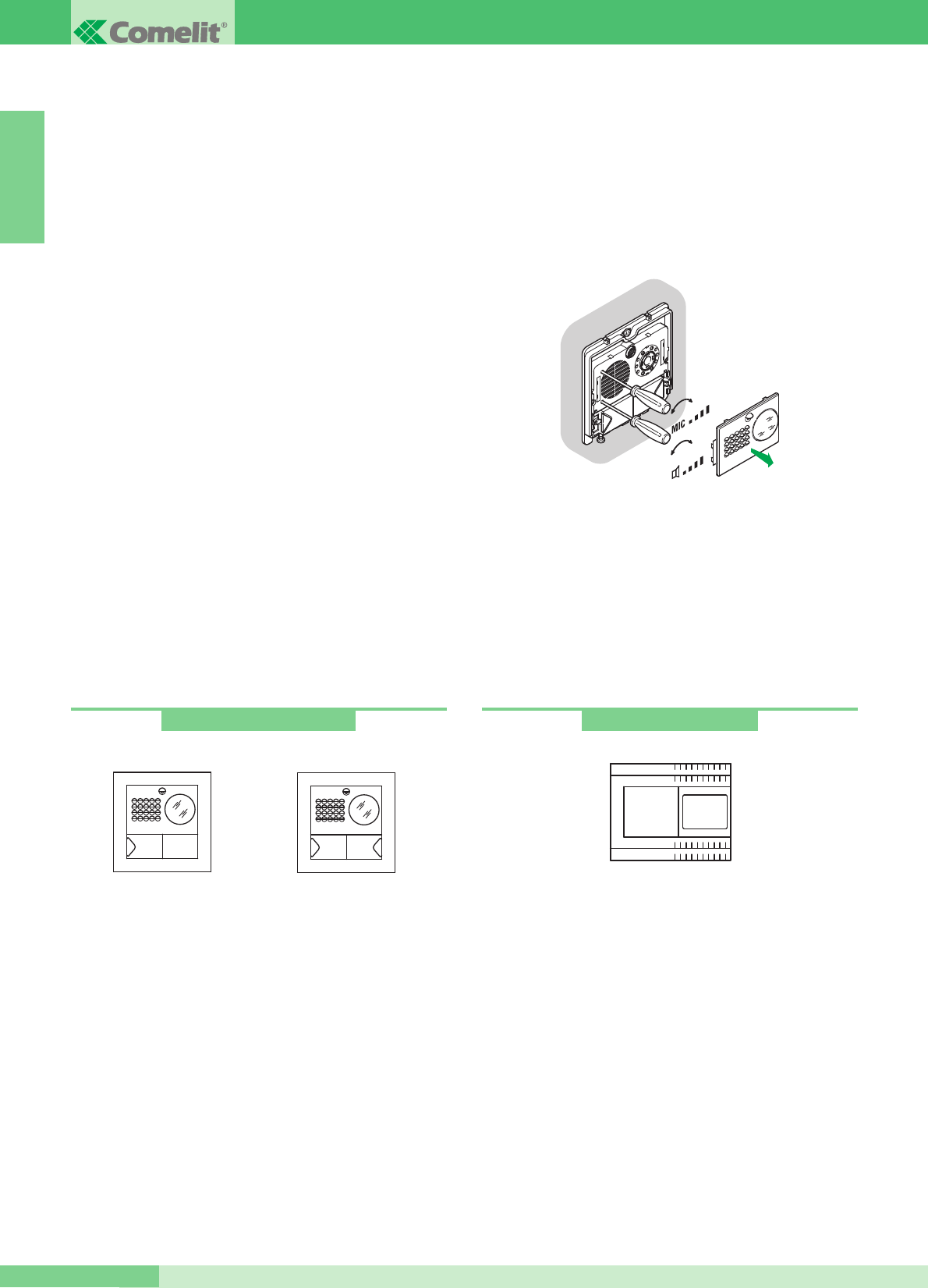
Regolazione volume audio
Il modulo del posto esterno è dotato di due regolazioni:
volume posto esterno, contraddistinto dal simbolo dellʼaltoparlante,
e regolazione del volume posto interno contraddistinto dal simbolo
del microfono.
Regolazione orientamento telecamera
Se è necessario modificare la regolazione della telecamera
procedere come indicato a pagina 3.
112
Art. 4875KC - 4876KC
Art. 4875KC Art. 4876KC
+-
+-
Caratteristiche tecniche
Il trasformatore prevede 2 uscite: una per alimentare il posto
esterno e lʼelettroserratura, lʼaltra per alimentare il monitor.
Dimensioni: 105x85x85 mm (6 moduli DIN).
Fusibile di protezione 500mA ritardato.
Descrizione morsettiera
AC230V ingresso tensione di rete
~~ uscita AC per posto esterno e elettroserratura
+ - uscita 20V DC di alimentazione del monitor
Art. 1205/B
2
GROUP S.P.A.
MT KIT 13
ITALIANO
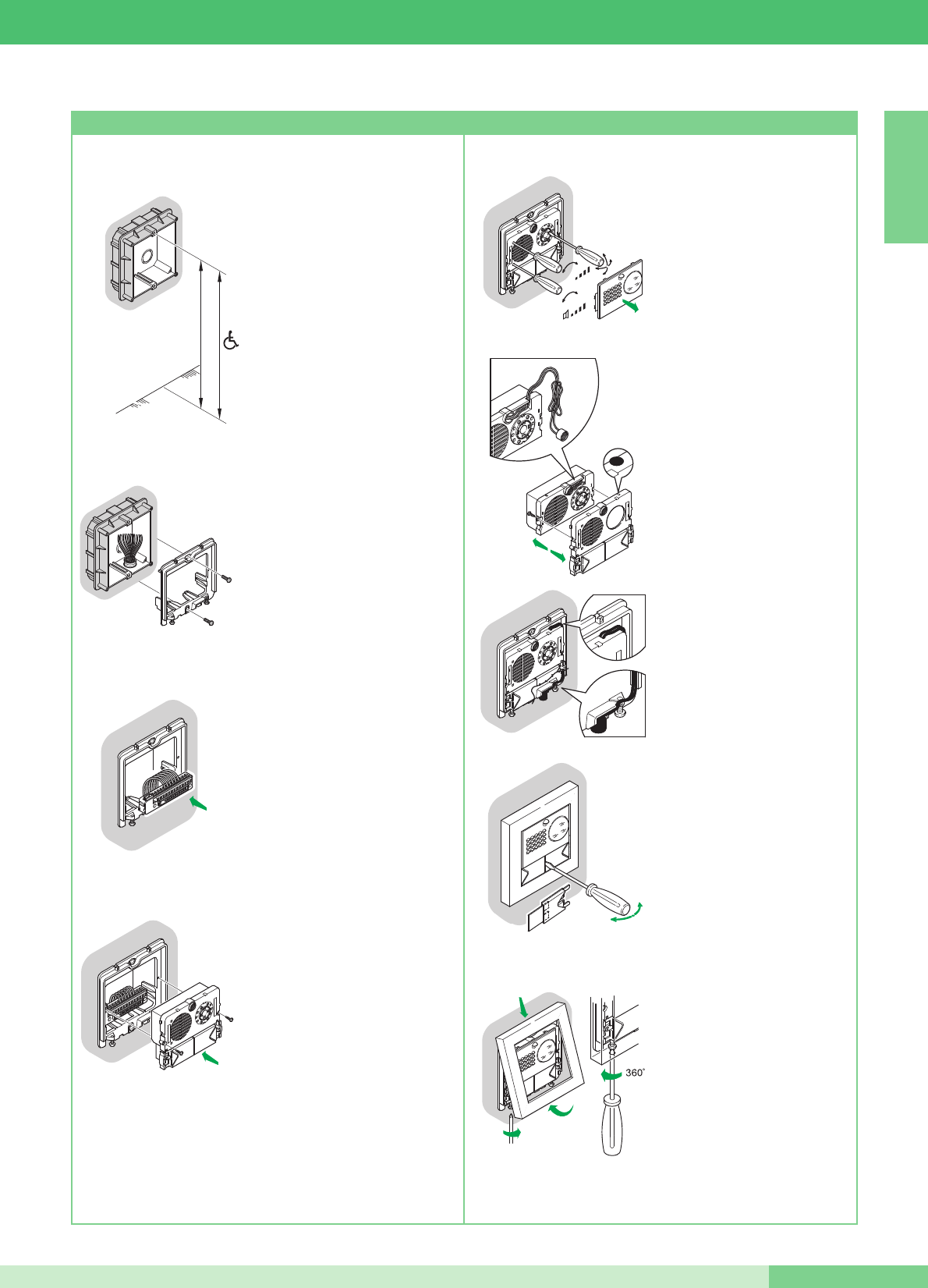
• Murare la scatola a 160÷165 cm
dal pavimento finito,
in una zona agevole per la
ripresa del visitatore.
Possibilmente non contro sole o
rivolte contro fonti di luce diretta
(lampade, superfici riflettenti,
ecc.)
• Fissare il telaio sulla scatola
da incasso utilizzando
le 2 viti in dotazione.
• Inserire la morsettiera ed
eseguire il collegamento
dei conduttori come da
schema.
• Inserire il modulo ad innesto
automatico sul morsetto
e fissarlo con le 2 viti in
dotazione.
160 - 165 cm
135 - 140 cm
OPEN
1
2
3
CLOSE
MIC
4
5
2
3
1
• Togliere il frontalino in acciaio
inox per eseguire le regolazioni
dei volumi e lʼorientamento
della telecamera.
N.B. Allentare leggermente le
quattro viti per sbloccare
lʼorientamento della telecamera.
• Posizione alternativa del
microfono.
• Per togliere il cartellino
porta nome inserire nella
fessura centrale la punta
del cacciavite ed estrarlo.
• A regolazioni ultimate fissare
la cornice agendo sulle 2 viti
inferiori.
N.B. Per togliere la cornice
svitare le 2 viti inferiori con una
rotazione di MAX 360°.
Istruzioni di installazione Art. 4875KC, 4876KC
3
MT KIT 13
MT KIT 13
ITALIANO
6
3
4
5
9
10
8
7
2
1
Art. 5914KC
POSTI INTERNI
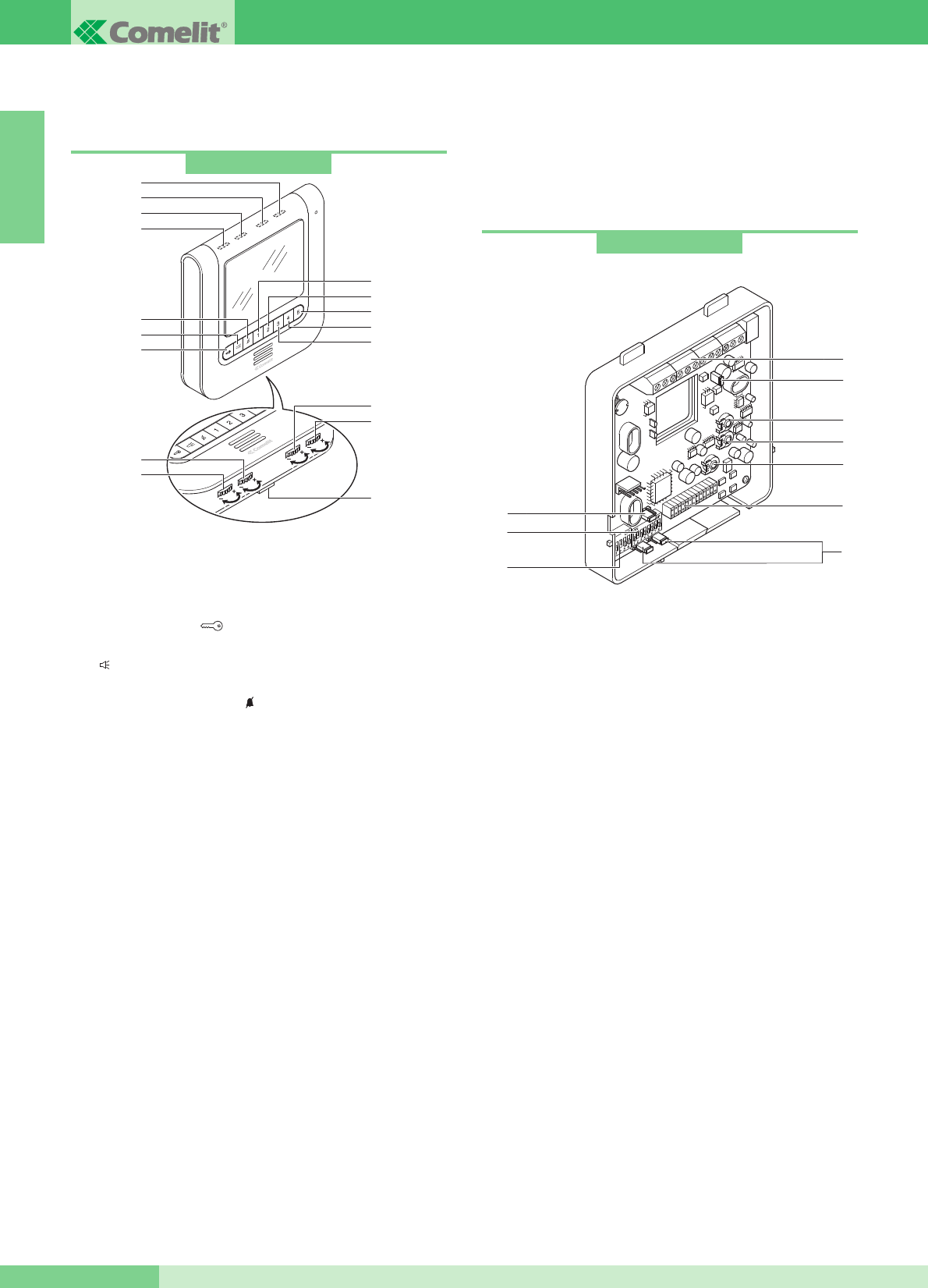
Caratteristiche tecniche Monitor a colori Art. 5900
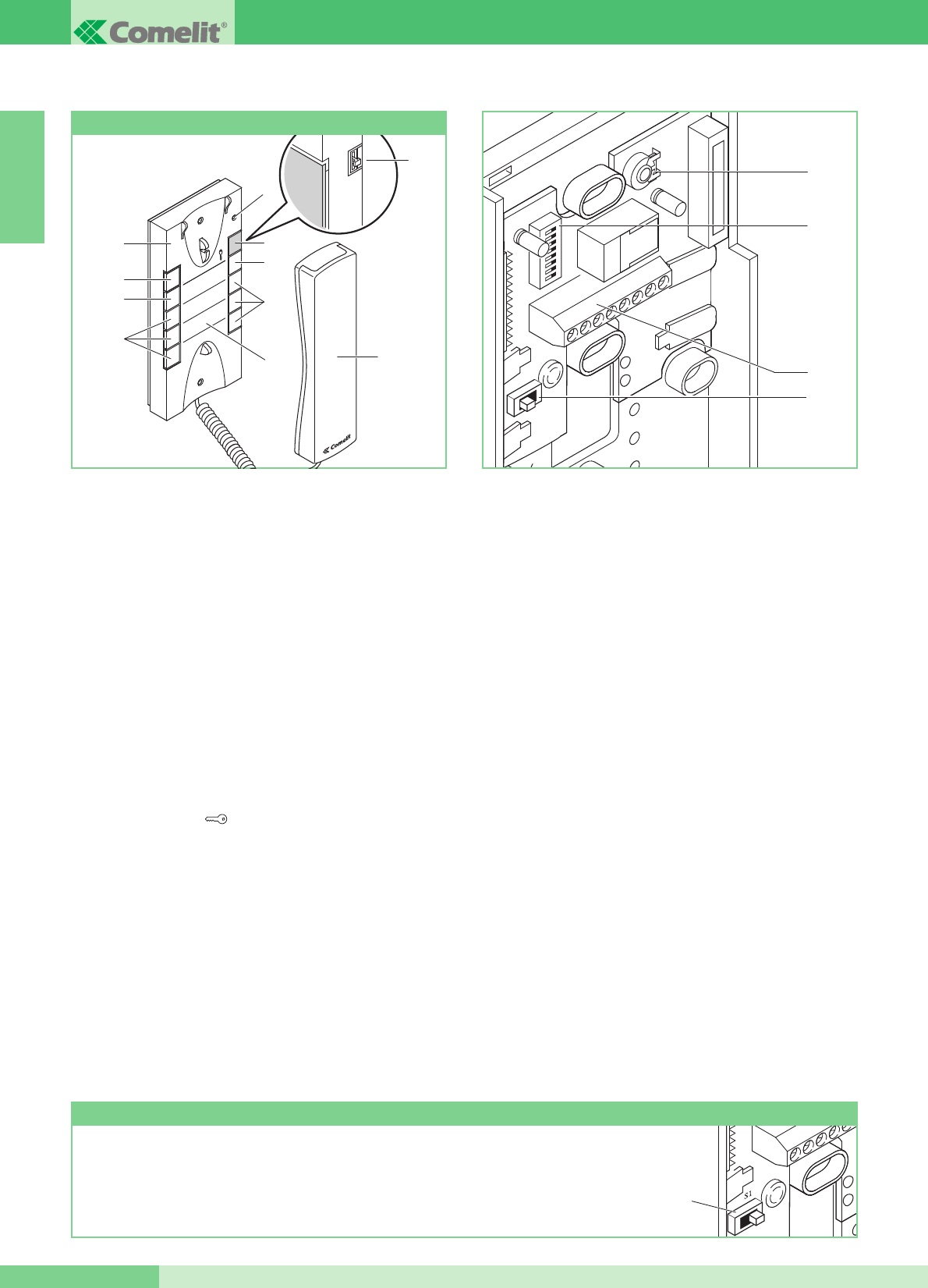
Monitor della serie Maestro di dimensioni 185x185x38 mm da
parete, con schermo a colori da 5,6ʼʼ. Il Monitor è installabile anche
su tavolo mediante lʼapposito supporto Art. 5912.
1Pulsante Apriporta .
2Pulsante per attivare e disattivare la fonica dopo una chiamata
( ). Dopo lʼattivazione (led blu acceso) la conversazione è in
modalità Parla/Ascolta automatica.
3Pulsante servizio Privacy . Per servizio privacy si intende
lʼesclusione della chiamata dal posto esterno o dal centralino di
portineria; lʼattivazione della funzione Privacy è evidenziata
dallʼaccensione del LED rosso.
4Pulsante 1 di default per funzione Chiamata a centralino. (A)
5Pulsante 2 di default per funzione Autoaccensione. (A)
6Pulsante 3 di default per funzione Attuatore. (A)
7 Pulsante 4 di default per funzione PARLA/ASCOLTA manuale:
con monitor in fonica premere il pulsante per parlare e
rilasciarlo per ascoltare. (A)
8 Pulsante 5 di fabbrica programmato per attivazione funzione
Dottore.(A) (B)
9Led giallo di segnalazione porta aperta o segnalazioni varie
(vedi MK/NC, pag. 77).
10 Led blu di segnalazione fonica (lʼaccensione indica che la
fonica è attivata).
11 Led verde di segnalazione, durante una comunicazione
segnala lo stato della conversazione:
- spento: a questo Monitor si sente la fonica proveniente dal
posto esterno o da un altro apparecchio intercomunicante;
- acceso: la fonica proveniente da questo Monitor si sente
presso il posto esterno o presso un altro apparecchio
intercomunicante.
12 Led rosso di segnalazione interno occupato servizi Privacy o
Dottore attivi.
13 Regolazione intensità colore.
14 Regolazione luminosità.
15 Regolazione volume suoneria.
16 Regolazione volume fonica.
17 Ganci di fissaggio.
Staffa di fissaggio del monitor
La staffa di fissaggio Art. 5914KC consente lʼinstallazione del
Monitor a muro o tramite la base da tavolo Art. 5912 (per maggiori
informazioni vedi pag. 5).
Caratteristiche tecniche
1 Connettore Staffa-Monitor.
2Morsettiera per connessione impianto:
CFP CFP Ingresso chiamata da piano (vedi variante C pag. 76).
+ -
Morsetti per connessione con Art. 1205/B o 1212/B.
L L Morsetti di connessione linea Bus.
P5 C5 Contatti per Pulsante 5 usato per usi vari (vedi variante
MK/PC pag. 77).
Per utilizzare i morsetti P5 C5 come contatto libero, spostare
CV3 e CV4 in posizione C.NO.
+S -S Morsetti per dispositivo ripetizione di chiamata (vedi
variante SB2/AAK pag. 75).
+LED -LED Morsetti ingresso LED per usi vari (vedi variante
MK/NC pag. 77).
3JP1Jumper per programmare la staffa come Principale (P) o
Secondaria (S) (vedi pag. 13).
4S1Micro-interruttori per programmazione codice utente.
5S2Micro-interruttori per impostazioni varie.
6 CV3 CV4 Jumper per liberare Pulsante 5 (contatto C. NO. 24V-
100mA max).
7CV5Jumper chiusura video.
8TM1Volume Microfono.
9TM2Volume Altoparlante.
10 TM3 Sensibilità del Microfono per la commutazione dei canali
di fonica (regolata in posizione ideale dal produttore).
Art. 5900
1
2
3
6
7
8
5
4
9
11
10
12
13
14
16
15
17
(A)
Pulsante di serie disponibile per diverse funzioni come riportato a pag. 14
(B) Pulsante liberabile
È possibile utilizzare nella stessa unità familiare fino a un massimo
di 3 Monitor.
4
GROUP S.P.A.
MT KIT 13
ITALIANO
2
21
3
CLICK!
115 - 120 cm
140 - 145 cm
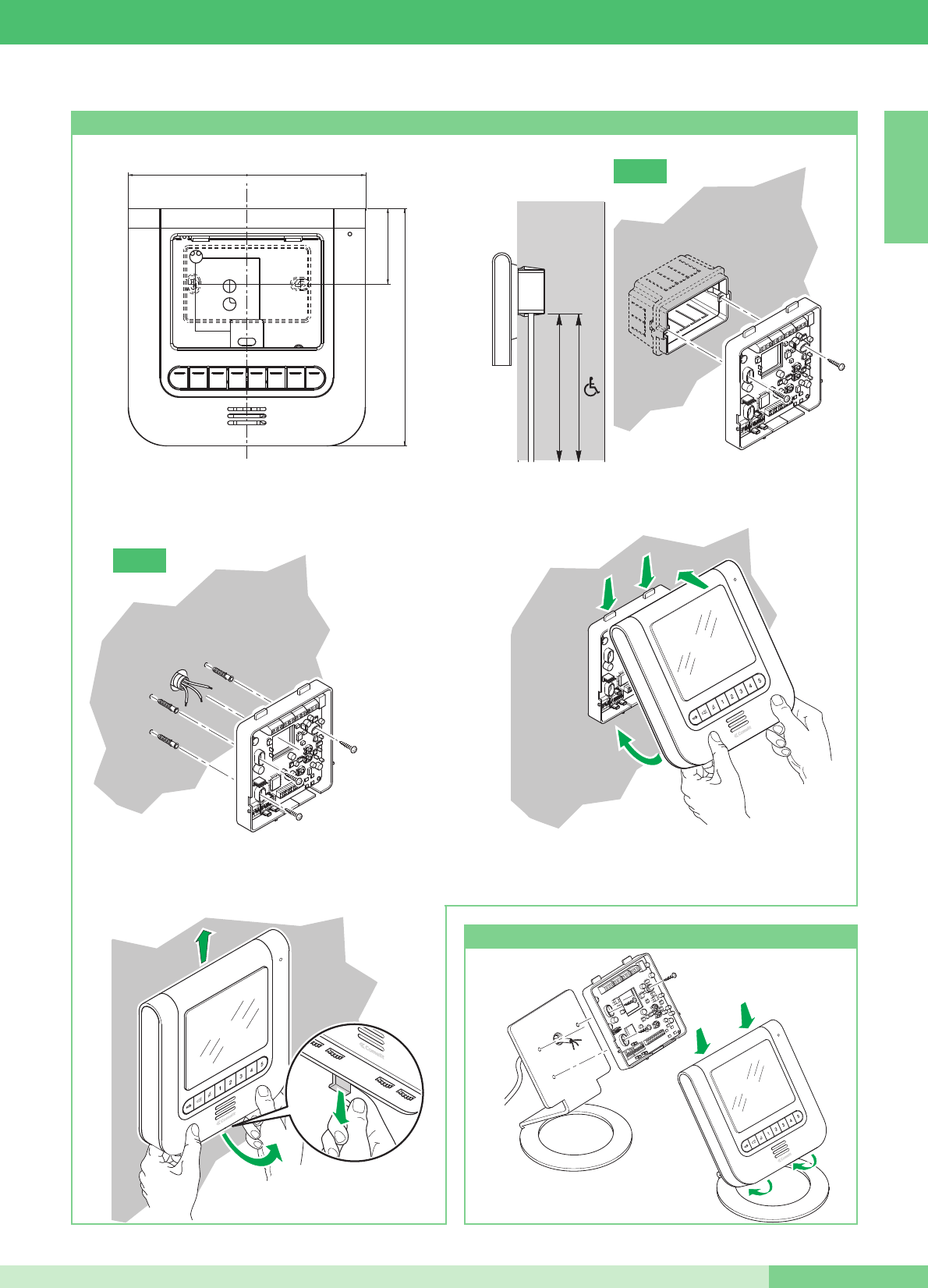
Installazione monitor Art. 5900 a parete
2
1
1
2
Art. 5912
Montaggio Monitor Art. 5900 sulla base da tavolo Art. 5912
==
18,5 cm
5,9 cm
18,5 cm
3
2
1
5
MT KIT 13
MT KIT 13
ITALIANO
A
B
GROUP S.P.A.
ITALIANO
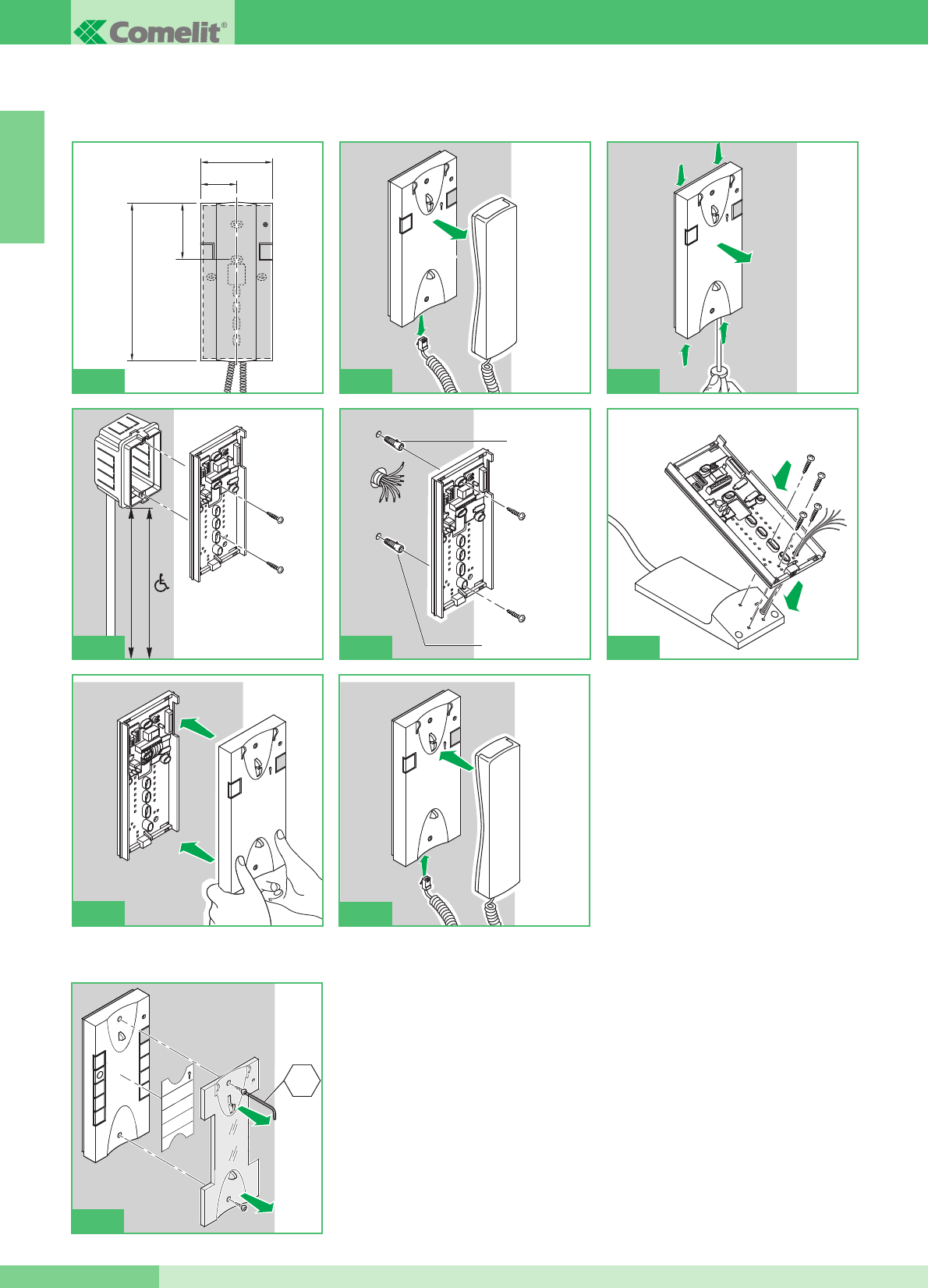
Istruzioni per installazione citofono Style Art. 2608, 2628 e 2610
Cover intercambiabile disponibile per gli Art. 2628 e Art. 2610
1
2
115 - 120 cm
140 - 145 cm
4A
Ø 5mm max
Ø 5mm max
4B
95mm
47,5mm
75,5mm
215mm
1
1
1
1
1
2
3
1
4
2
2
56
2
4
6
1
3
5
7
9
2
8
CH2
7
1
2
4C
6
MT KIT 13
MT KIT 13
ITALIANO
c
A
3
9
8
5
7
6
JP1
4
1
2
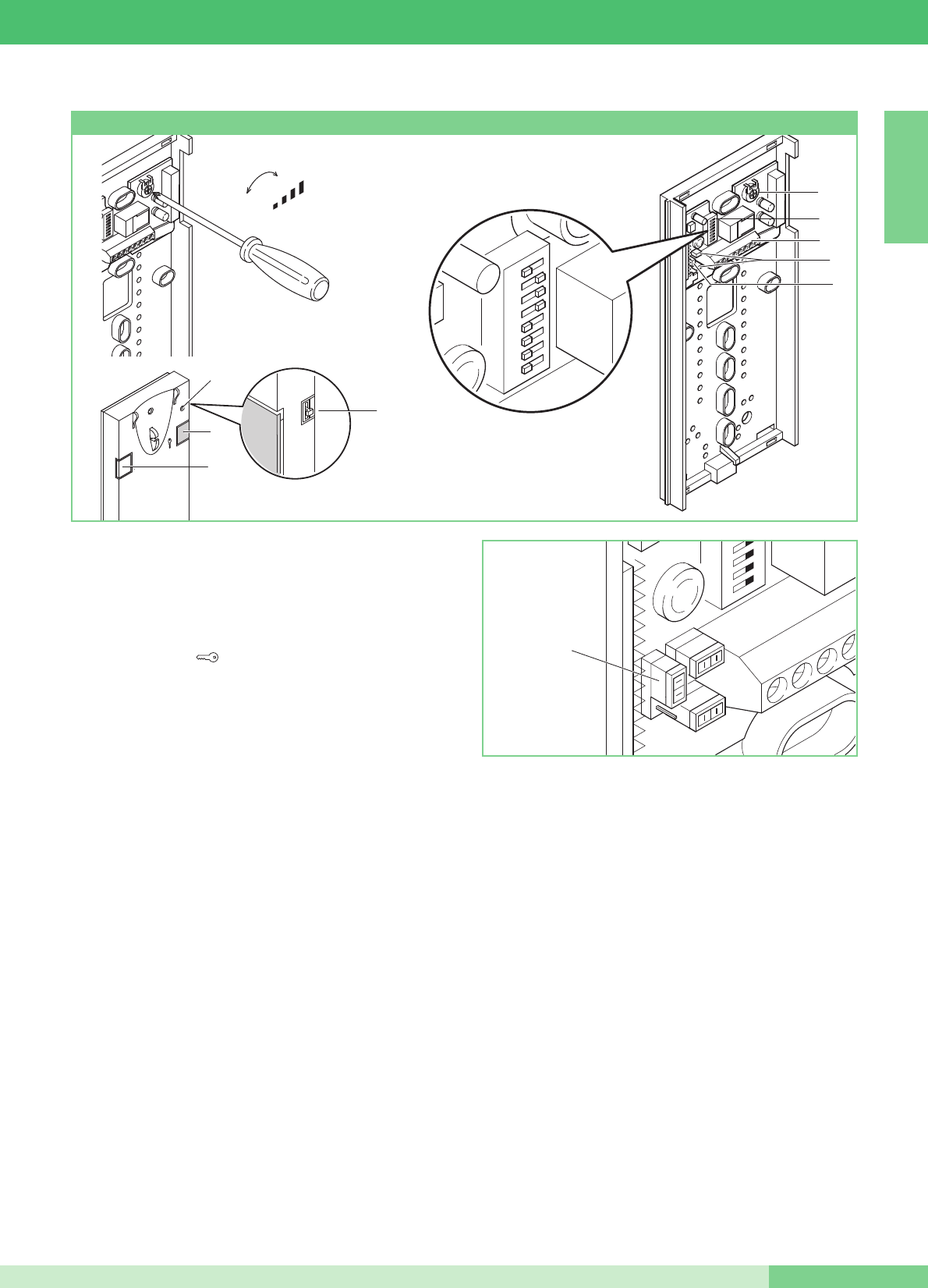
Citofono Basic con 2 pulsanti di serie.
Non è utilizzabile per sfruttare la funzione intercomunicante.
Il Citofono va montato sempre utilizzando lʼArt. 1214/2C come
mostrato nello schema di collegamento MK/DC a pagina 72.
1. Pulsante Apriporta .
2. Pulsante P1 chiamata centralino / attuatore generico / pulsante
per usi vari presente in morsettiera (P1 C1).
3. Selettore suoneria/servizio Privacy a 3 posizioni:
Posizione alto: Suoneria volume massimo.
Posizione centrale: Suoneria volume medio.
Posizione basso: Attivazione funzione privacy
(per servizio privacy si intende lʼesclusione della suoneria di
chiamata dal posto esterno e centralino; lʼattivazione della
funzione è evidenziata dalla comparsa di un indicatore rosso in
alto a destra).
4. Indicatore funzione Privacy.
5. Morsetti connessione impianto:
L L connessione alla linea bus.
CFP CFP ingresso chiamata da piano.
P1 C1 morsetti pulsante P1 C. NO. 24V 100mA dedicato a
servizi vari (rimuovere CV1 e CV2).
S+ S- morsetti per dispositivo ripetizione di chiamata.
6. JP1 jumper per selezionare la funzione Chiamata centralino
(posizione C) / Attuatore generico (posizione A) del pulsante P1
(vedi figura a lato).
7. CV1 CV2 jumper da rimuovere per avere contatto pulito C. NO.
sul pulsante P1.
8. Dip switch per impostazione codice utente (vedi tabella a pag. 13).
9. Trimmer regolazione volume microfono.
Pulire con un panno inumidito con acqua. Evitare Alcool e altri
prodotti aggressivi.
+
-
MIC
12345678
Citofono Style Art. 2608
7MT KIT 13
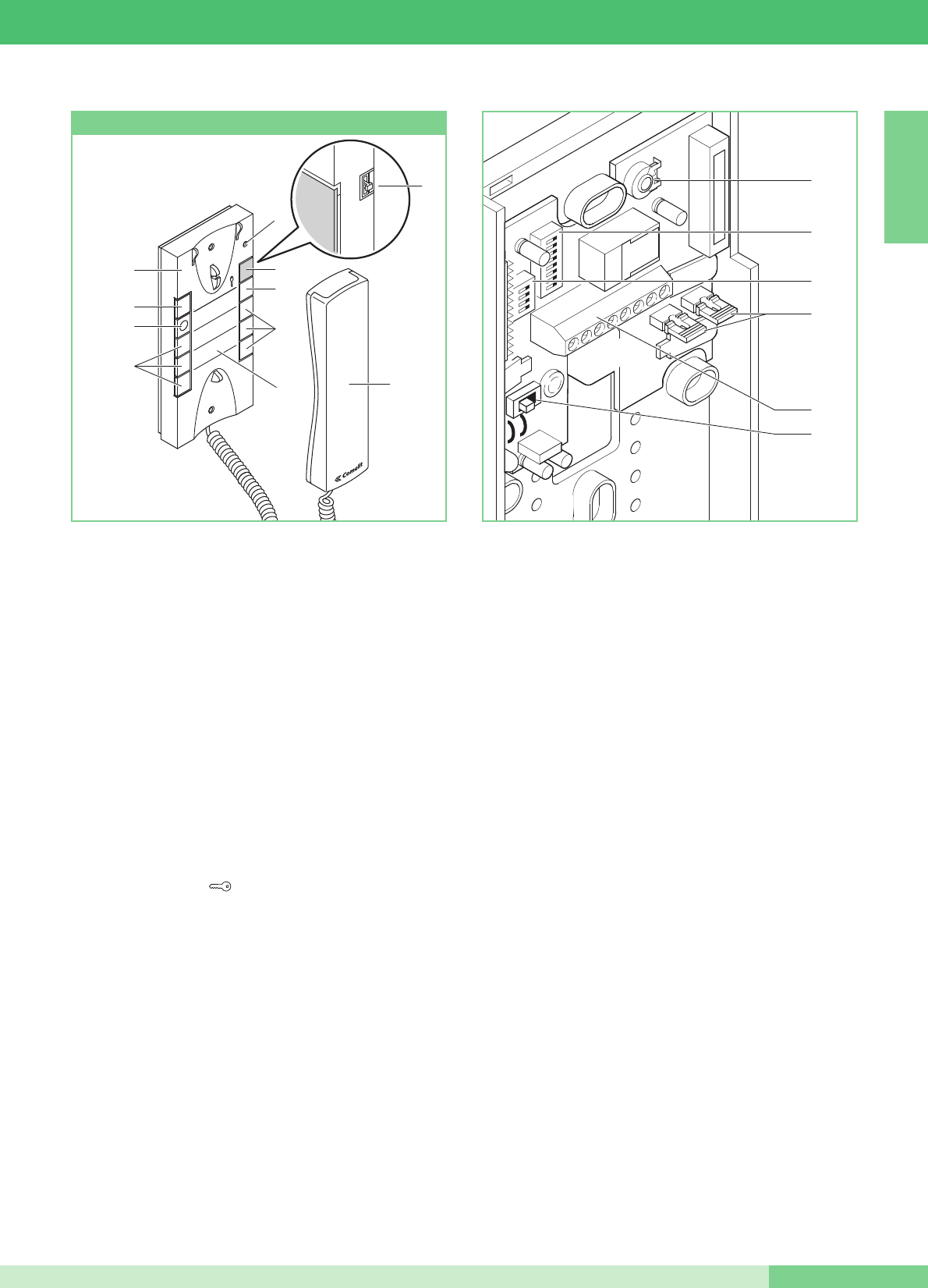
Citofono Elegance con funzioni e pulsanti supplementari.
Non è utilizzabile per sfruttare la funzione intercomunicante.
Il Citofono va montato sempre utilizzando lʼArt. 1214/2C come
mostrato nello schema di collegamento MK/DC a pagina 72.
Importante: per il corretto settaggio dell'articolo in fase di
installazione allʼinterno di un sistema MAESTRO KIT, fare
riferimento alla nota sotto.
1. Selettore suoneria/servizio Privacy a 3 posizioni:
Posizione alto: Suoneria volume massimo.
Posizione centrale: Suoneria volume medio.
Posizione basso : Attivazione funzione Privacy
(per servizio Privacy si intende lʼesclusione della chiamata
dal posto esterno o centralino; lʼattivazione della funzione
Privacy è evidenziata dalla comparsa di un indicatore rosso
in alto a destra).
2. Indicatore funzione Privacy.
3. Pulsante 1 disponibile di serie per funzione Attuatore generico.
4. Pulsante Apriporta .
5. Pulsante 2 disponibile di serie per funzione chiamata a
centralino.
6. Pulsante 3 per usi vari presente in morsettiera (P3 C3).
7. Pulsanti C. NO. o Led (MAX 3) opzionali per funzioni
supplementari. (A)
8. Cover intercambiabile Fig. 7 pag. 6.
9. Etichetta memo-pulsanti su cui è possibile riportare la funzione
dei pulsanti del citofono (da applicare sotto la cover
intercambiabile) Fig. 7 pag. 6.
10. Cornetta citofono (sollevare la cornetta per iniziare la
comunicazione).
(A) Pulsante disponibile con scheda opzionale Art. 1626.
Led di visualizzazione disponibile con scheda opzionale Art. 1627.
11. Morsetti connessione impianto:
L L connessione alla linea bus.
CFP CFP ingresso chiamata da piano.
P3 C3 morsetti pulsante P3 C. NO. 24V 100mA dedicato a
servizi vari.
S+ S- morsetti per dispositivo ripetizione di chiamata.
12. SW3 Jumper per la selezione tra modalità Simplebus 1 e
Simplebus 2.
13. Dip switch U2 per impostazione codice utente (vedi tabella a
pag. 13).
14. Trimmer regolazione volume microfono.
Pulire con un panno inumidito con acqua. Evitare Alcool e altri
prodotti aggressivi.
ATTENZIONE !
14
13
11
12
PER UTILIZZARE IL CITOFONO ART. 2628 IN IMPIANTI MAESTRO KIT È NECESSARIO
SPOSTARE IL SELETTORE SW3 IN POSIZIONE S1.
8
3
6
7
9
7
5
4
2
1
10
SW3
1
32
54
76
98
Citofono Style Art. 2628
ITALIANO
GROUP S.P.A.
8
MT KIT 13
1
32
54
76
98
Citofono Elegance con funzioni e pulsanti supplementari e
servizio intercomunicante.
LʼArt. 2610 ha la possibilità, (mediante apposito settaggio) di
gestire comunicazioni intercomunicanti e altre funzioni
supplementari (vedi tabella riassuntiva riportata a pagina 14).
Il Citofono va montato sempre utilizzando lʼArt. 1214/2C come
mostrato nello schema di collegamento MK/DC a pagina 72.
1. Selettore suoneria/servizio Privacy a 3 posizioni:
Posizione alto: Suoneria volume massimo.
Posizione centrale: Suoneria volume medio.
Posizione basso : Attivazione funzione Privacy
(per servizio Privacy si intende lʼesclusione della chiamata
dal posto esterno e centralino; lʼattivazione della funzione
Privacy è evidenziata dalla comparsa di un indicatore rosso
in alto a destra).
2. Indicatore funzione Privacy.
3. Led di segnalazione (disponibile di serie).
4. Pulsante Apriporta .
5. Pulsante 1 disponibile di serie (programmabile con varie
funzioni, vedi tabella a pag. 17. Di fabbrica programmato
per funzione Attuatore generico).
6. Pulsante 2 disponibile di serie (liberabile, o programmabile
con varie funzioni, vedi tabella a pag. 17).
Di fabbrica programmato per funzione chiamata a
centralino.
7. Pulsanti C. NO. o Led (MAX 3) opzionali per funzioni
supplementari. (A)
8. Cover intercambiabile Fig 7 a pag. 6.
9. Etichetta memo-pulsanti su cui è possibile riportare la
funzione dei pulsanti del citofono (da applicare sotto la
cover intercambiabile), Fig. 7 a pag. 6.
10. Cornetta citofono (sollevare la cornetta per iniziare la
comunicazione).
(A) Pulsante disponibile con scheda opzionale Art. 1626.
Led di visualizzazione disponibile con scheda opzionale
Art. 1627.
11. Morsetti connessione impianto:
L L connessione alla linea bus.
CFP CFP ingresso chiamata da piano.
P2 C2 morsetti pulsante P2 C. NO. 24V 100mA dedicato a
servizi vari (rimuovere CV2 e CV3).
S+ S- morsetti per dispositivo ripetizione di chiamata.
12. SW3 Jumper per la selezione tra modalità Simplebus 1 e
Simplebus 2.
13. CV3 CV2 Jumper da rimuovere per avere il pulsante P2 C. NO.
14. Dip switch U2 per impostazione codice utente (vedi tabella a
pag. 13).
15. Dip switch U4 per la programmazione del pulsanti P1 e P2
(vedi tabella a pag. 17).
16. Trimmer regolazione volume microfono.
Pulire con un panno inumidito con acqua. Evitare Alcool e altri
prodotti aggressivi.
16
14
15
13
11
12
8
3
6
7
9
7
5
4
2
1
10
Citofono Style Art. 2610
MT KIT 13
ITALIANO
9MT KIT 13
ITALIANO
GROUP S.P.A.
MT KIT 13 10
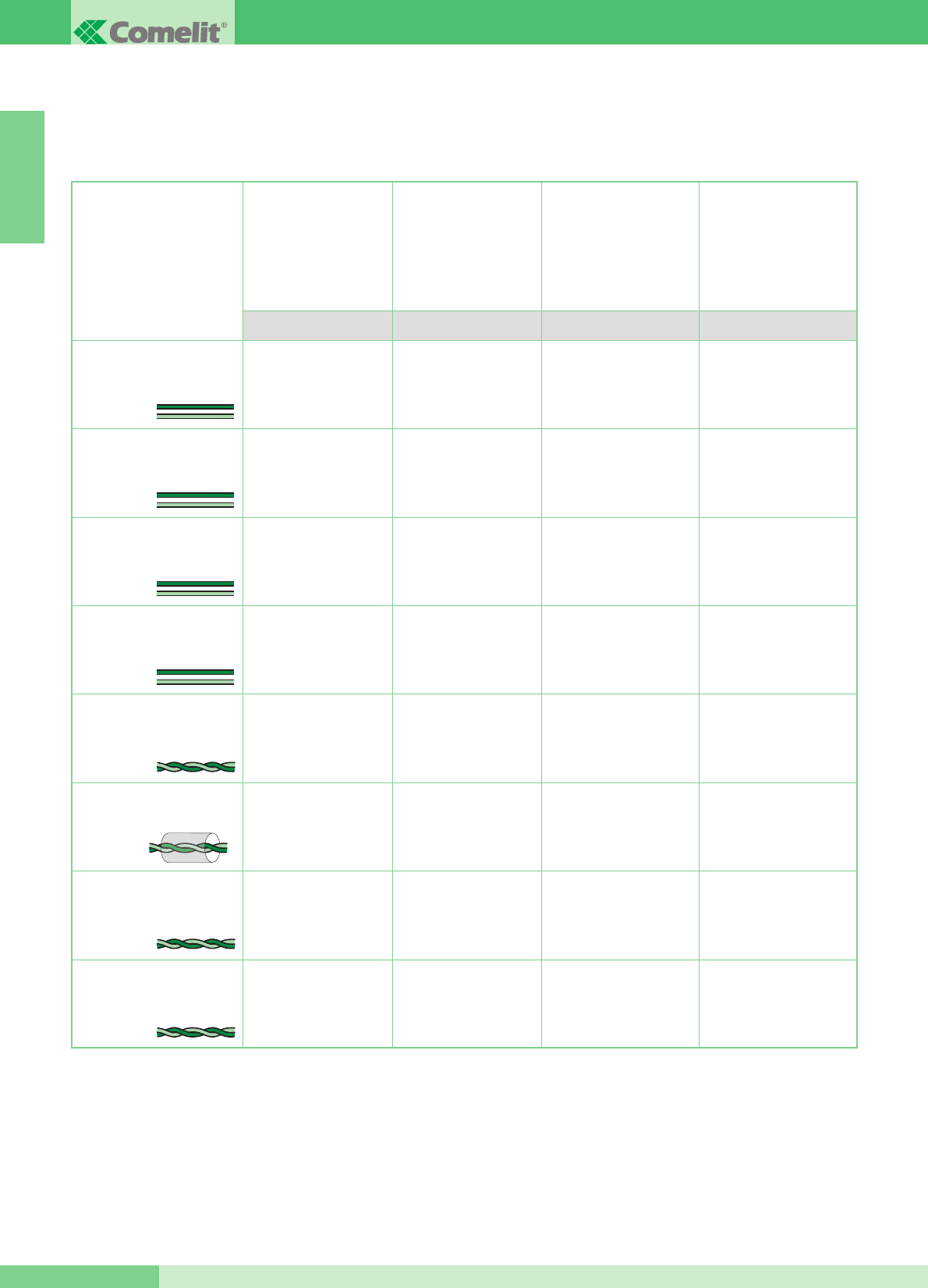
Distanza massima tra posto
esterno 4875KC o 4876KC
e il 4833C o 1214/2
più lontano. Distanza
massima tra 4833C
e il 1214KC più lontano
Distanza massima
tra il monitor e il 1214KC
In questa sezione del manuale si riportano tutte le indicazioni riguardanti la fase di installazione del sistema MAESTRO KIT.
La distanza massima totale tra il posto esterno e il monitor più lontano è 400 m.
INDICAZIONI GENERALI DI INSTALLAZIONE E FUNZIONAMENTO
Sezione
o tipo di cavo
Distanza massima
tra alimentatore 1205/B
o 1395 e posto esterno
4875KC e 4876KC
Distanza massima
tra alimentatore
1205/B o 1212/B
e monitor alimentato
A/G B/E C/F D
Cavo bifilare (sez. 0,5 mm2
Ø 0,8 mm AWG 20)**
Cavo bifilare (sez. 1 mm2
Ø 1,2 mm AWG 17)**
Cavo bifilare (sez. 1,5 mm2
Ø 1,4 mm AWG 15)**
Cavo bifilare (sez. 2,5 mm2
Ø 1,8 mm AWG 13)**
Doppino telefonico twistato
(sez. 0,28 mm2 Ø 0,6 mm
AWG 23)*
Cavo intrecciato e schermato
(sez. 1 mm2 Ø 1,2 mm
AWG 17)*
UTP5 Cat 5 (sez. 0,2 mm2
Ø 0,5 mm AWG 24)*
Cavo Comelit Art. 4576
e Art. 4578 (sez. 0,5 mm2
Ø 0,8 mm AWG 20)*
* Nel caso si utilizzi un cavo multicoppiola usare una sola delle coppiole disponibili.
Nel caso sia necessario diminuire le cadute resistive utilizzare la singola coppiola come singolo filo.
** Nel caso si utilizzi un cavo multipolare usare solo due dei fili disponibili e non utilizzare mai fili in parallelo.
20 m
(65 feet)
40 m
(130 feet)
60 m
(195 feet)
100 m
(325 feet)
25 m
(85 feet)
50 m
(165 feet)
100 m
(325 feet)
150 m
(495 feet)
150 m
(495 feet)
150 m
(495 feet)
150 m
(495 feet)
150 m
(495 feet)
100 m
(325 feet)
150 m
(495 feet)
150 m
(495 feet)
40 m
(130 feet)
40 m
(130 feet)
40 m
(130 feet)
40 m
(130 feet)
20 m
(65 feet)
40 m
(130 feet)
50 m
(165 feet)
MT KIT 13
11 MT KIT 13
ITALIANO
4875KC
4876KC
1205/B
1214KC
1216
C
A
B
D
1214KC
1216
F
F
4833C
1205/B
4875KC
4876KC
1212/B
E
1395
4875KC
4876KC
G
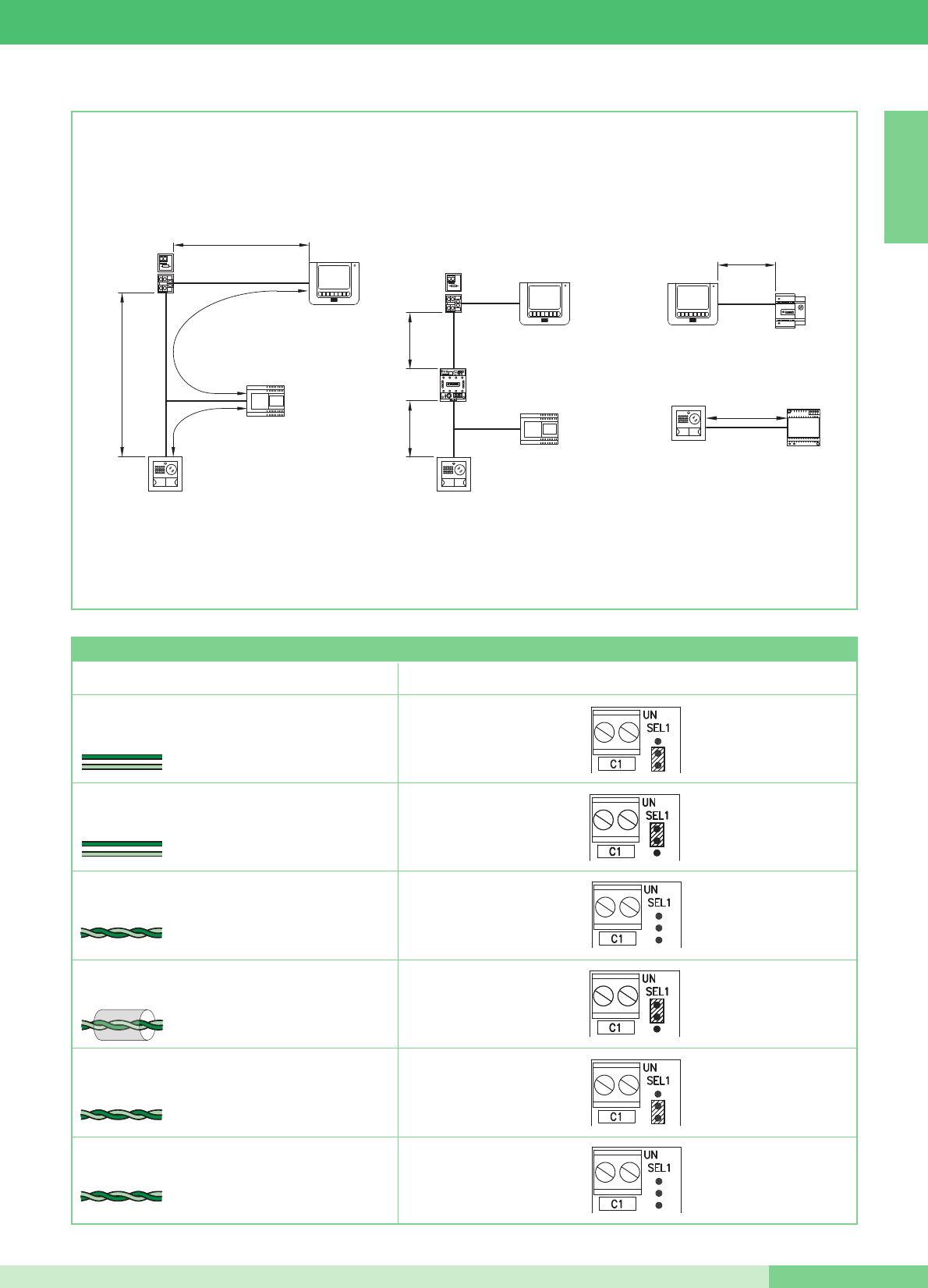
Tipo di cavo Impostazione Art. 1216
Cavo bifilare (sez. 1,5 mm2 Ø 1,4 mm AWG 15)
Cavo bifilare (sez. 1 mm2 Ø 1,2 mm AWG 17)
Doppino telefonico twistato
(sez. 0,28 mm2 Ø 0,6 mm AWG 23)
Cavo UTP5 cat 5
(sez. 0,2 mm2 Ø 0,5 mm AWG 24)
2
1
Cavo Comelit Art. 4576 e Art. 4578
(sez. 0,5 mm2 Ø 0,8 mm AWG 20)
Cavo bifilare
(sez. 0,5 mm2 Ø 0,8 mm AWG 20)
2
Cavo intrecciato e schermato
(sez. 1 mm2 Ø 1,2 mm AWG 17)
1
Tabella Impostazioni dellʼArt. 1216 in funzione del tipo di cavo di connessione utilizzato
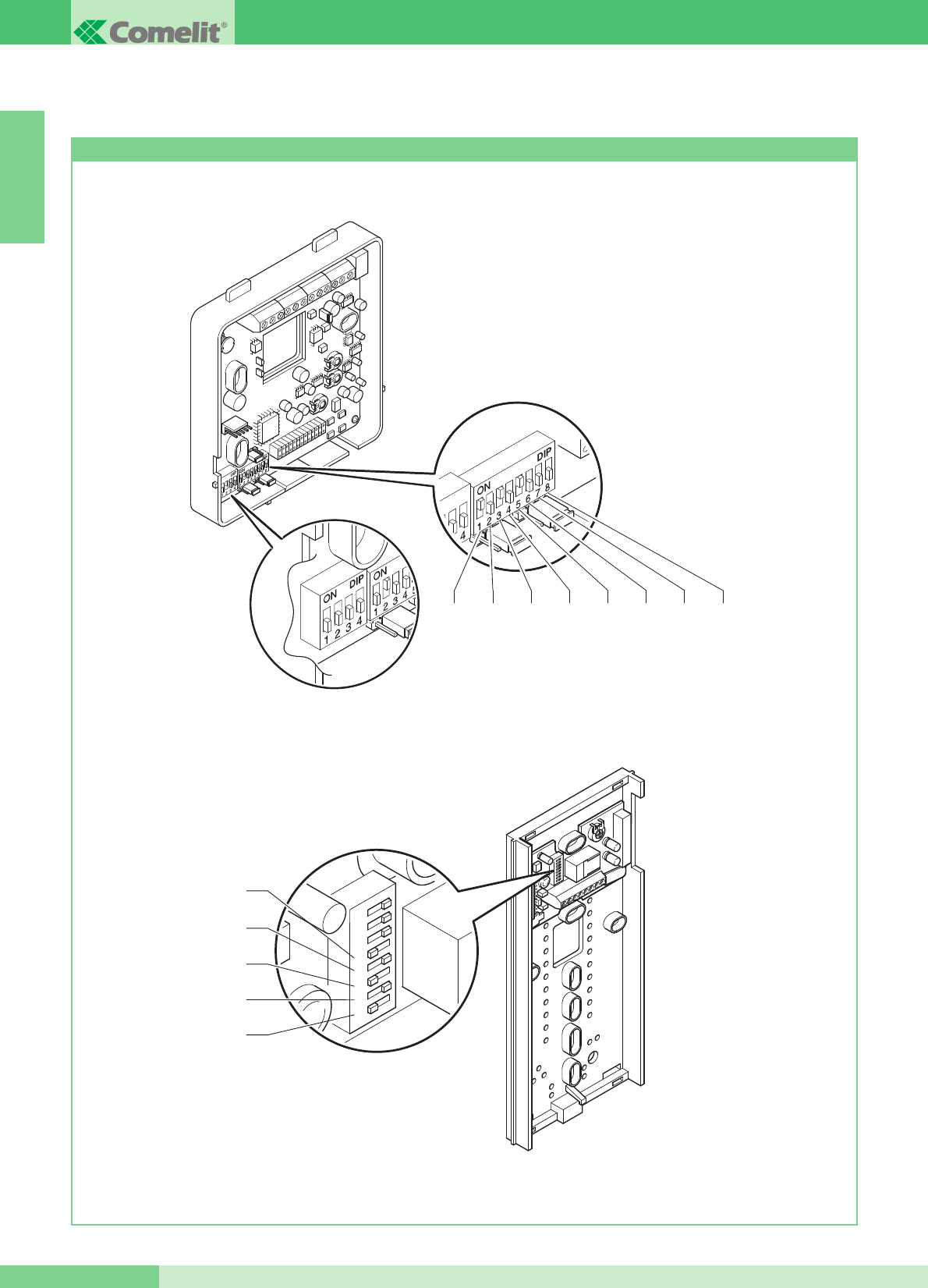
Impostazioni staffa Art. 5914KC e citofoni Style Art. 2608, 2628 e 2610
IMPOSTAZIONI E DESCRIZIONE FUNZIONAMENTO SISTEMA MAESTRO KIT
S1-5
S1-4
S1-3
S1-2
S1-1
12345678
S1
S1-1 S1-2 S1-3 S1-4 S1-5 S1-6 S1-7 S1-8
S2 P
La figura seguente mostra la posizione dei micro-interruttori della staffa 5914KC e dei micro-interruttori dei citofoni Style Art. 2608,
2628 e 2610.
ITALIANO
GROUP S.P.A.
MT KIT 13 12
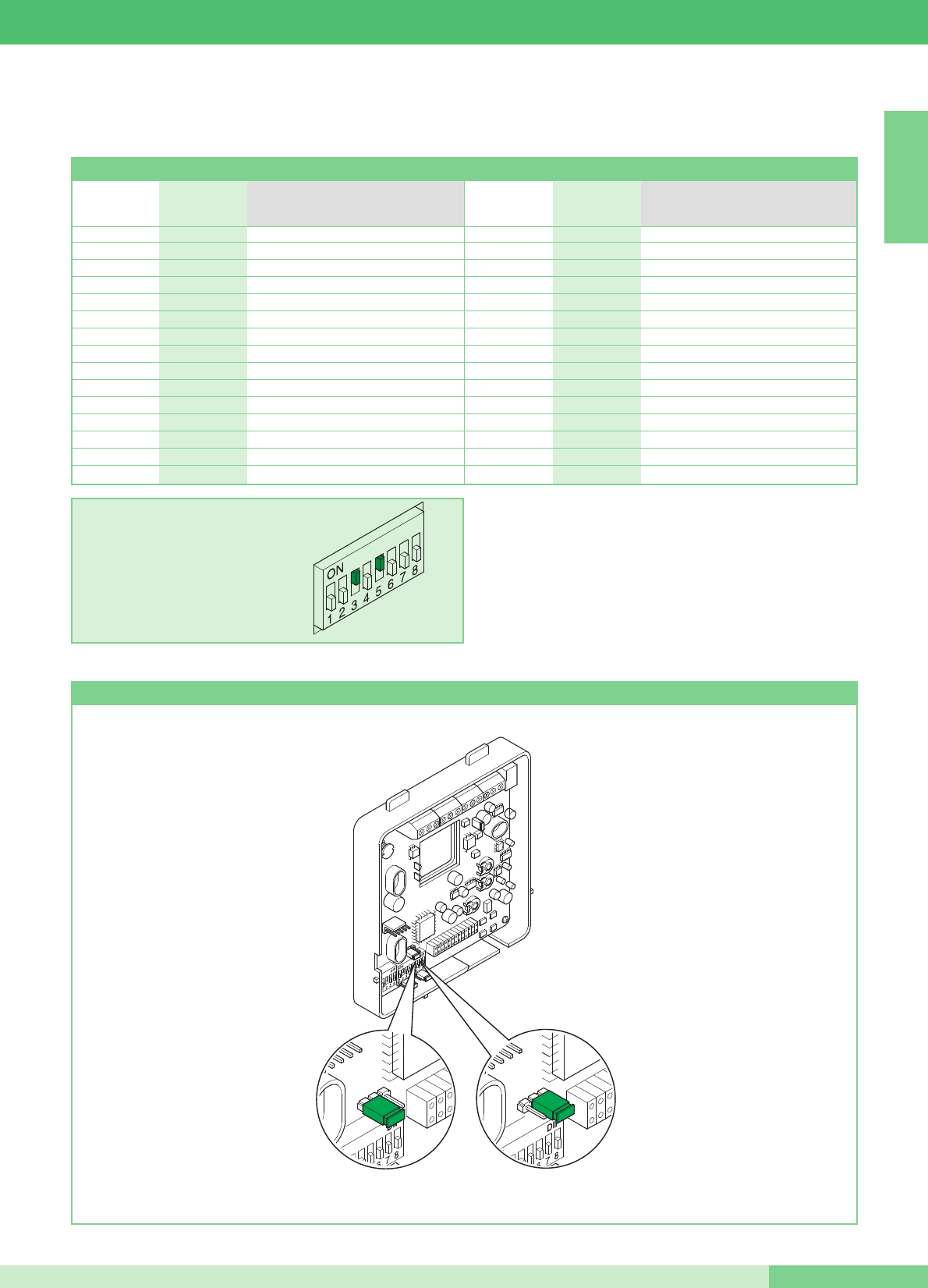
Impostazione staffa Art. 5914KC principale o secondaria
I valori di S1-1, S1-2, S1-3, S1-4 e S1-5 definiscono lʼindirizzo di chiamata.
Per la codifica sia della staffa che dei citofoni fare riferimento alla seguente tabella.
ATTENZIONE: SUI CITOFONI 2608, 2628 E 2610 POSIZIONARE
SU OFF I DIP 6, 7, 8
La chiamata intercomunicante bifamiliare (tra citofoni e/o
videocitofoni) è possibile solo se i due utenti sono impostati su codici
di chiamata contigui (contrassegnati dalla stessa lettera AA…CC..YY
nella tabella di programmazione dei Micro interruttori riportata qui
sopra).
Tabella di programmazione dei Micro interruttori per codice utente su Staffe e citofoni
ESEMPIO impostazione codice 20.
H16 5
I17 1,5
I18 2,5
J 19 1,2,5
J20 3,5
K 21 1,3,5
K 22 2,3,5
L 23 1,2,3,5
L24 4,5
M 25 1,4,5
M 26 2,4,5
N 27 1,2,4,5
N 28 3,4,5
O 29 1,3,4,5
O 30 2,3,4,5
A1 1
A2 2
B3 1,2
B4 3
C5 1,3
C6 2,3
D 7 1,2,3
D8 4
E9 1,4
E10 2,4
F 11 1,2,4
F12 3,4
G 13 1,3,4
G 14 2,3,4
H 15 1,2,3,4
Riferimento per
intercomunicante Codice utente Micro interruttori su ON
bifamiliare
Riferimento per
intercomunicante Codice utente Micro interruttori su ON
bifamiliare
JP1
PS
JP1
PS
Secondaria
Principale
MT KIT 13
ITALIANO
13 MT KIT 13
ITALIANO
GROUP S.P.A.
MT KIT 13 14
I valori di S1-6, S1-7 e S1-8 del dip-switch S1 della staffa Art. 5914KC, definiscono la modalità operativa in cui opererà il Sistema Maestro
KIT, come riportato nella seguente tabella.
(1) La chiamata intercomunicante bifamiliare (tra citofoni e/o videocitofoni) è possibile solo se i due utenti sono impostati su codici di
chiamata contigui (contrassegnati dalla stessa lettera AA…CC..YY nella tabella di programmazione dei Micro interruttori riportata a
pagina 13).
OFF
(0)
OFF
(0)
OFF
(0)
S1-6 S1-7 S1-8 Button functions
Pulsante 1
Pulsante 2
Pulsante 3
Pulsante 4
Pulsante 5
Chiamata a centralino
Autoaccensione
Comando Attuatore
Press-to-talk/Dottore
Chiamata intercomunicante Monofamiliare
ON
(1)
OFF
(0)
OFF
(0)
Pulsante 1
Pulsante 2
Pulsante 3
Pulsante 4
Pulsante 5
Chiamata intercomunicante Monofamiliare
Autoaccensione
Comando Attuatore
Press-to-talk/Dottore
Chiamata a centralino
OFF
(0)
ON
(1)
OFF
(0)
Pulsante 1
Pulsante 2
Pulsante 3
Pulsante 4
Pulsante 5
Chiamata intercomunicante Bifamiliare (1)
Autoaccensione
Comando Attuatore
Press-to-talk/Dottore
Chiamata a centralino
ON
(1)
ON
(1)
OFF
(0)
Pulsante 1
Pulsante 2
Pulsante 3
Pulsante 4
Pulsante 5
Chiamata a centralino
Autoaccensione
Comando Attuatore
Press-to-talk/Dottore
Chiamata intercomunicante Bifamiliare (1)
OFF
(0)
OFF
(0)
ON
(1)
Pulsante 1
Pulsante 2
Pulsante 3
Pulsante 4
Pulsante 5
Chiamata intercomunicante Monofamiliare
Autoaccensione
Chiamata intercomunicante Bifamiliare (1)
Press-to-talk/Dottore
Comando Attuatore
ON
(1)
OFF
(0)
ON
(1)
Pulsante 1
Pulsante 2
Pulsante 3
Pulsante 4
Pulsante 5
Chiamata intercomunicante Monofamiliare
Chiamata intercomunicante Bifamiliare (1)
Comando Attuatore
Press-to-talk/Dottore
Autoaccensione
OFF
(0)
ON
(1)
ON
(1)
Pulsante 1
Pulsante 2
Pulsante 3
Pulsante 4
Pulsante 5
Chiamata a centralino
Autoaccensione
Comando Attuatore
Chiamata intercomunicante Monofamiliare
Chiamata intercomunicante Bifamiliare (1)
ITALIANO
MT KIT 13
15 MT KIT 13
MICRO-INTERRUTTORI S1-1, S1-2, S1-3, S1-4 E S1-5
I valori dei micro-interruttori S1-1, S1-2, S1-3, S1-4 e S1-5
definiscono lʼindirizzo di chiamata della staffa in oggetto nei
confronti del posto esterno di chiamata.
Per utilizzare la funzione di chiamata intercomunicante bifamiliare
gli utenti (citofoni e/o videocitofoni) devono essere impostati su
indirizzi di chiamata contigui contrassegnati nella tabella riportata
a pagina 13 con la stessa lettera (AA…CC….YY).
Funzionamento
• Il visitatore premendo il tasto di chiamata accende i LED bianchi
per lʼilluminazione del soggetto, aziona la suoneria interna di
chiamata (se la funzione privacy non è abilitata) e fa apparire
lʼimmagine sul/sui monitor principale/i per circa 60”.
Nel caso invece, si entri in comunicazione, la durata massima
della conversazione potrà essere di 90ʼʼ.
Al posto esterno si ha un tono di avvenuta chiamata; se in
impianti con 2 o più ingressi all'atto della chiamata, il posto
esterno emette un tono di occupato invece che la replica della
suoneria, significa che un'altra comunicazione è già in atto verso
un altro posto esterno.
In caso di cortocircuito persistente sulla linea bus il posto esterno
emette un tono di segnalazione intermittente.
• Al posto interno la conversazione avviene sollevando la cornetta.
• Il comando di luminosità e il comando per la regolazione del
volume suoneria è posto sul lato sinistro del Monitor.
• Il tasto contraddistinto dal simbolo della chiave sul Monitor
agisce sullʼelettroserratura attivandola per circa 2 sec.
• Lʼautoaccensione del Monitor principale avviene premendo il
Pulsante 2 a funzione abilitata (vedi descrizione a pagina 17).
In impianti dotati di 2 posti esterni è possibile visualizzare
alternativamente lʼimmagine da un posto esterno o dallʼaltro
(funzione ʻʼbasculaʼʼ) con successive pressioni del Pulsante 2.
Non è possibile auto accendere il Monitor durante unʼaltra
conversazione.
• Per le funzionalità intercomunicanti del Sistema MAESTRO KIT,
fare riferimento alla pagina 14.
• Per la programmazione di indirizzi utente diversi da quelli
impostati di fabbrica (1 e 2) fare riferimento a pag. 13.
• La somma totale del numero di posti interni con stesso codice
utente e del numero di dispositivi di ripetizione chiamata collegati
ai suddetti posti interni non può superare il numero di 4.
Connettere un solo dispositivo di ripetizione chiamata per ogni
posto interno. La distanza MAX del collegamento tra posto
interno e dispositivo di ripetizione chiamata è di 20m; utilizzare
cavo schermato per il collegamento e non far passare i cavi in
prossimità di carichi induttivi pesanti o cavi di alimentazione
(230V / 400V).
In caso di connessione di carichi induttivi si consiglia la
connessione di una capacità di 470nF in parallelo ai contatti
C.NO. dellʼArt. 1122/A.
Monitor supplementari principali o secondari
Lʼimpostazione di JP1 definisce se la staffa in oggetto verrà gestita
come principale o come secondaria. Il posto esterno può gestire
fino a un massimo di 3 Videocitofoni o Citofoni per Pulsante di
chiamata. Quando dal posto esterno si effettua una chiamata, il
monitor che il sistema accenderà sarà quello del Videocitofono
principale.
Gli altri eventuali monitor secondari della medesima unità familiare
resteranno spenti. Rispondendo alla chiamata del posto esterno da
un Videocitofono secondario, l'immagine viene automaticamente
visualizzata sul Monitor.
A questo punto il monitor del Videocitofono principale verrà spento
e lʼimmagine verrà visualizzata sul monitor del Videocitofono di cui
è stato premuto il Pulsante 2 - richiesta video.
Per visualizzare lʼimmagine senza attivare la fonica con il posto
esterno, premere il Pulsante 2.
Nella configurazione classica del MAESTRO KIT, quindi, si
possono avere al massimo 2 Videocitofoni secondari e 1
Videocitofono principale per Pulsante di chiamata tutti alimentati
dallo stesso Art. 1205/B (Variante MK/CC pag. 71).
Vi è la possibilità di gestire fino a 3 Videocitofoni principali
allʼinterno della stessa unità familiare (cioè impostati sul medesimo
codice utente). In questa particolare configurazione, i Videocitofoni
principali addizionali dovranno essere alimentati ognuno
dallʼapposito Art. 1212/B (Variante MK/HC e MK/IC pag. 70,71).
Alla chiamata del posto esterno, lʼimmagine verrà visualizzata su
ognuno dei Videocitofoni principali connessi al sistema.
Ricordiamo che comunque, anche con lʼutilizzo dellʼArt. 1212/B, il
numero massimo di Videocitofoni collegabili per la medesima unità
familiare è di 3. Per nessun Citofono opzionale è necessaria
unʼalimentazione dedicata.
S1-6, S1-7, S1-8
Impostazione della modalità di funzionamento MAESTRO KIT
La tabella riportata a pagina 14 mostra le funzioni dei singoli
pulsanti del Monitor in funzione di come vengono impostati i micro-
interruttori S1-6, S1-7, S1-8.
Descrizione funzioni Pulsanti
Apriporta ➔La pressione del Pulsante Apriporta attiva la
serratura connessa al posto esterno.
Attuatore ➔La pressione del Pulsante impostato nella modalità
Attuatore permette lʼattivazione dellʼArt. 1256 che può essere
utilizzato ad esempio per attivare lʼapertura di cancelli, porte
basculanti o per l'attivazione del modulo telecamere cicliche Art.
1259C.
Pulsante Libero ➔Lʼindicazione Pulsante libero indica la possibilità
di utilizzare il Pulsante come contatto C.NO. in morsettiera,
mediante opportune impostazioni come illustrato nella variante
MK/PC a pagina 77.
Autoaccensione / Richiesta Video ➔La pressione del Pulsante 2
impostato in questa modalità, permette di visualizzare sullo
schermo del Monitor lʼimmagine trasmessa dal posto esterno
anche se non è stata effettuata nessuna chiamata.
Per l'utilizzo e l'abilitazione del servizio vedi pagina 17. In
impianti dotati di due posti esterni, è possibile visualizzare
alternativamente lʼimmagine da un posto esterno o dallʼaltro
(funzione ʻʼbasculaʼʼ) con successive pressioni del Pulsante.
Su Monitor secondari il Pulsante 2 ha anche la funzione di
richiesta video (per maggiori informazioni vedere a pagina 17).
Chiamata a centralino ➔La pressione del Pulsante impostato in
questa modalità permette di inviare una chiamata al Centralino di
portineria dellʼimpianto.
Chiamata intercomunicante Monofamiliare ➔La pressione del
Pulsante impostato in questa modalità permette di inviare una
chiamata agli altri apparecchi (Videocitofoni e/o Citofoni) impostati
sullo stesso indirizzo di chiamata.
Il ricevente della chiamata alzando la cornetta entra così in
comunicazione con il chiamante.
Riagganciando la cornetta la comunicazione viene terminata.
Una chiamata da posto esterno è comunque sempre prioritaria
rispetto ad una comunicazione intercomunicante. In questo caso gli
utenti che si trovano già in conversazione sentiranno in cornetta un
tono simile a quello di chiamata se questʼultima è indirizzata a loro
o un triplice tono di segnalazione in caso contrario.
Per rispondere alla chiamata da posto esterno è sufficiente
sollevare la cornetta da qualunque apparecchio libero o
riagganciare e sollevare la cornetta da un apparecchio impegnato
nella comunicazione intercomunicante.
Lʼattivazione della comunicazione con il posto esterno interrompe
la conversazione intercomunicante precedentemente in corso.
Una chiamata intercomunicante non è prioritaria rispetto ad una
conversazione/chiamata con il posto esterno.
In questo caso, durante un tentativo di chiamata intercomunicante,
il LED di segnalazione lampeggerà per alcuni secondi per
segnalare che il sistema è occupato.
Chiamata intercomunicante Bifamiliare ➔La pressione del
Pulsante impostato in questa modalità permette di inviare una
chiamata agli apparecchi (Videocitofoni e/o Citofoni) impostati
sullʼindirizzo di chiamata Bifamiliare rispetto al proprio, come
indicato nella tabella riportata a pagina 13.
Il ricevente della chiamata alzando la cornetta entra così in
comunicazione con il chiamante. Riagganciando la cornetta la
comunicazione viene terminata.
Una chiamata da posto esterno è comunque sempre prioritaria
rispetto ad una comunicazione intercomunicante.
In questo caso gli utenti che si trovano già in conversazione sentiranno
in cornetta un tono simile a quello di chiamata se questʼultima è
indirizzata a loro o un triplice tono di segnalazione in caso contrario.
Per rispondere alla chiamata da posto esterno è sufficiente
sollevare la cornetta da qualunque apparecchio libero o
riagganciare e sollevare la cornetta da un apparecchio impegnato
nella comunicazione intercomunicante.
Lʼattivazione della comunicazione con il posto esterno interrompe
la conversazione intercomunicante precedentemente in corso.
Una chiamata intercomunicante non è prioritaria rispetto ad una
conversazione/chiamata con il posto esterno.
In questo caso, durante un tentativo di chiamata intercomunicante,
il LED di segnalazione lampeggerà per alcuni secondi per
segnalare che il sistema è occupato.
Gestione funzione Dottore ➔La funzione Dottore permette
lʼazionamento automatico dellʼapriporta su chiamata allʼindirizzo del
Videocitofono e/o Citofono dove la funzione è stata attivata, da
parte del posto esterno.
A funzione attivata il led di segnalazione rimane acceso.
Lʼabilitazione o la disabilitazione della funzione Dottore avviene
premendo per 2 secondi il pulsante impostato per tale funzione.
Gestione funzione Privacy ➔La funzione Privacy permette
l'esclusione della chiamata dal posto esterno e dal centralino.
N.B. La funzione Dottore e la funzione Privacy NON possono
essere abilitate contemporaneamente.
Operazioni per selezionare la suoneria Monitor
Lʼutente può selezionare la suoneria del Monitor tra una lista di
suonerie disponibili, seguendo la seguente procedura:
1Tenere premuto il Pulsante fino a che non verrà emesso
un suono di conferma (lʼoperazione è possibile solo con
lʼimpianto in situazione di riposo; in caso contrario il led di
segnalazione lampeggerà per avvisare lʼutente).
2Premere e rilasciare il Pulsante :
1 volta (viene emesso un tono di conferma) per modificare la
suoneria di chiamata da posto esterno.
2 volte (vengono emessi 2 toni di conferma) per modificare la
suoneria di chiamata da centralino.
3 volte (vengono emessi 3 toni di conferma) per modificare la
suoneria del campanello di piano.
Ulteriori pressioni del Pulsante ripetono la sequenza
appena descritta.
Dopo lʼultima pressione del Pulsante attendere un suono
di conferma selezione prima di passare alla fase seguente.
3Premere e rilasciare il Pulsante per scorrere in sequenza
le varie suonerie disponibili. Nel caso si voglia riascoltare più
volte la stessa suoneria mantenere premuto il Pulsante .
4Premere il tasto per confermare la scelta dellʼultima
suoneria ascoltata e per uscire (in qualunque momento) dalla
modalità di variazione suoneria Monitor. Allʼuscita dalla
modalità di variazione suoneria Monitor verrà emesso un
suono di conferma.
GROUP S.P.A.
ITALIANO
MT KIT 13 16
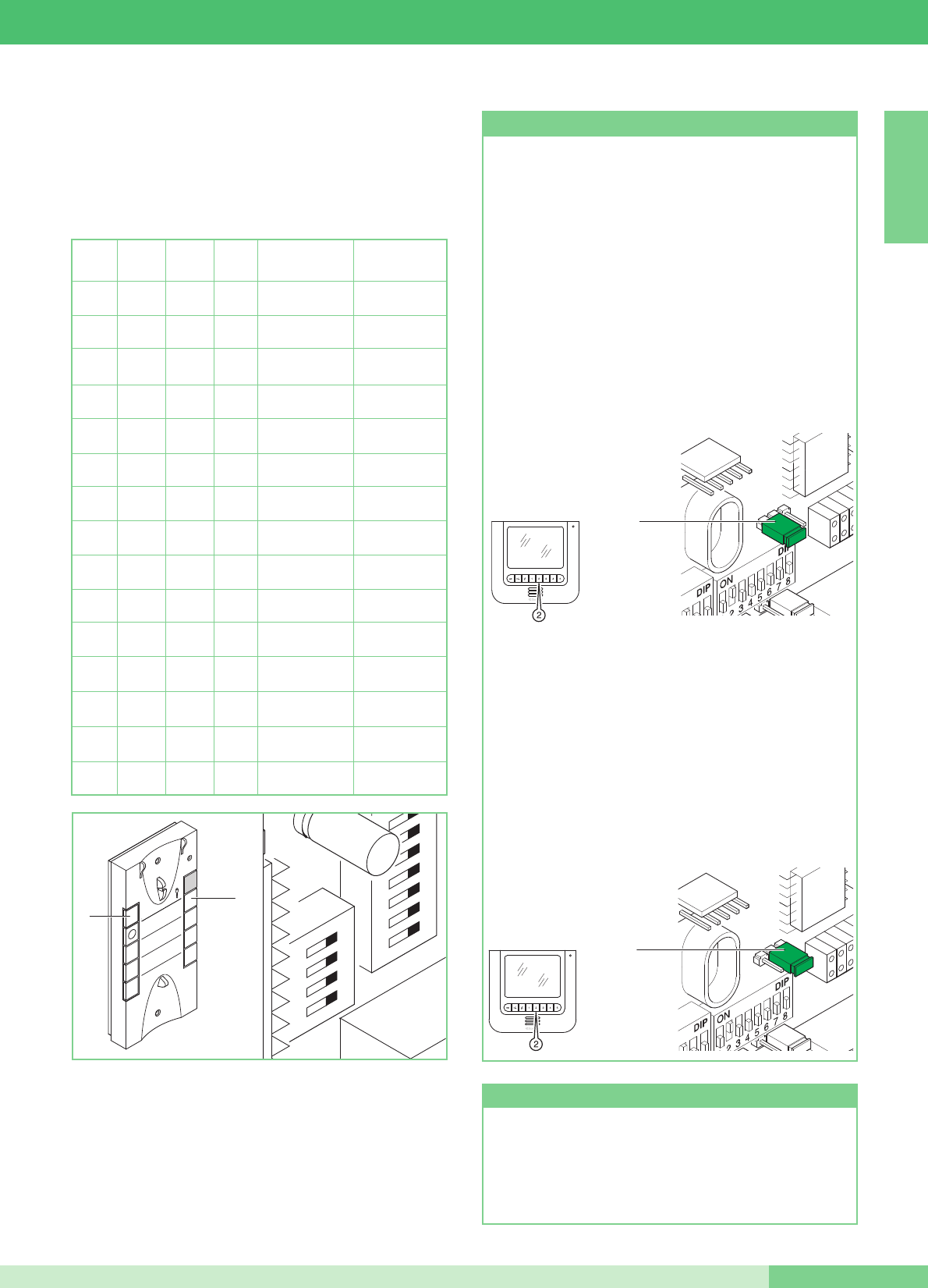
Impostazione citofono (opzionale) Art. 2610
Nel caso si decida di ampliare il sistema MAESTRO KIT con
lʼaggiunta di un Citofono opzionale Art. 2610, qui di seguito è
riportata la tabella necessaria per definire le funzionalità che il
Citofono dovrà eseguire.
DIP 1 DIP 2 DIP3 DIP 4 Funzione tasto 1 Funzione tasto 2
0 0 0 0
Attuatore generico Chiamata
a centralino
1
0 0 0
Chiamata
a centralino Inter. Monofamiliare
0
1
0 0
Chiamata
a centralino Inter. Bifamiliare
1 1
0 0
Attuatore generico Inter. Monofamiliare
0 0
1
0
Attuatore generico Inter. Bifamiliare
1
0
1
0
Dottore Chiamata
a centralino
0
1 1
0
Dottore Attuatore generico
1 1 1
0
Dottore Inter. Monofamiliare
0 0 0
1Dottore Inter. Bifamiliare
1
0 0
1Inter. Monofamiliare Inter. Bifamiliare
0
1
0
1Chiamata
a centralino Autoaccensione
1 1
0
1Attuatore generico Autoaccensione
0 0
1 1 Dottore Autoaccensione
1
0
1 1 Inter. Monofamiliare Autoaccensione
0
1 1 1 Inter. Bifamiliare Autoaccensione
2
ON
U4
4
3
1
1
32
54
76
98
P1
P2
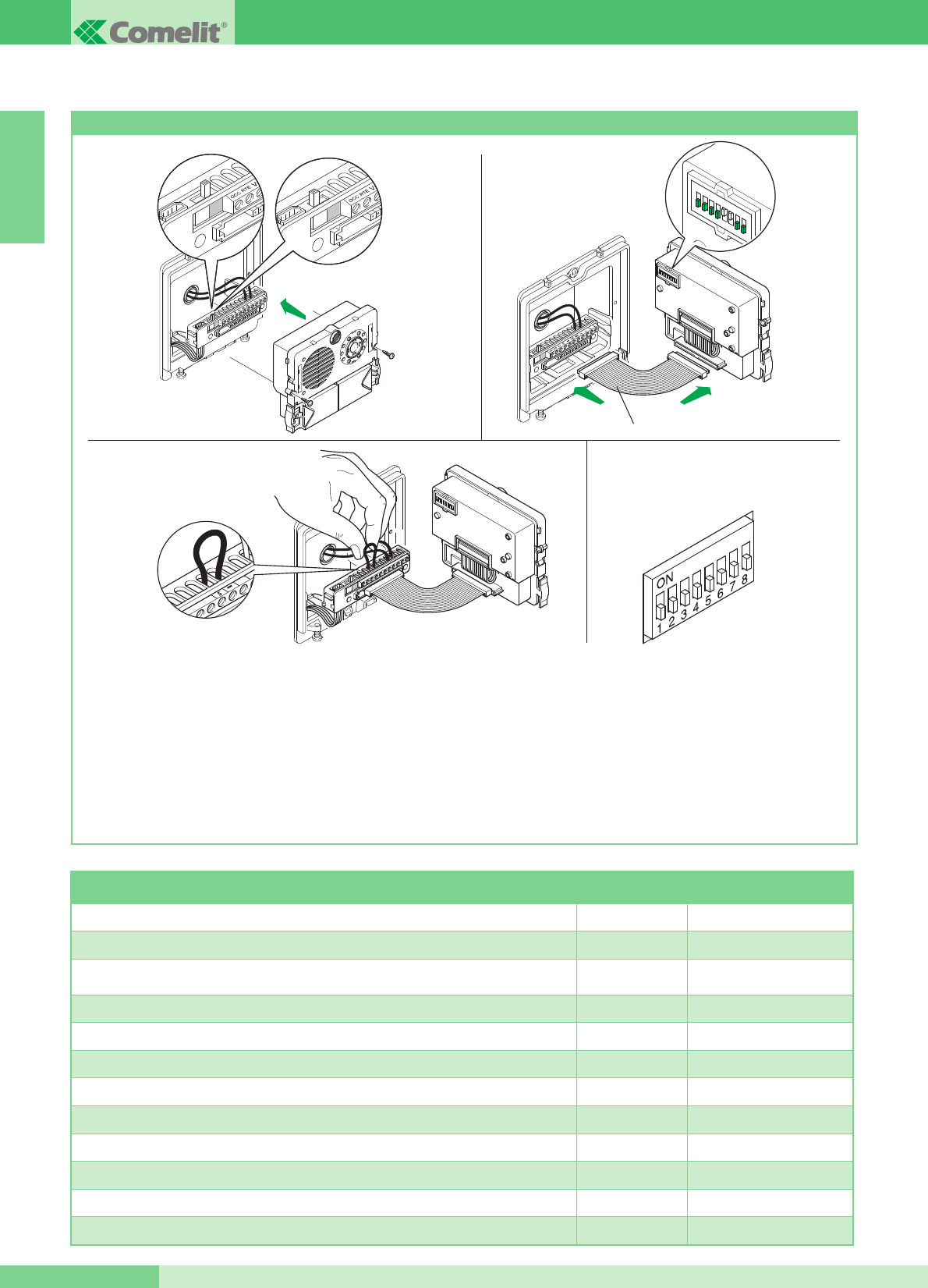
Funzione Autoaccensione (consigliata solo per impianti con 1 o
2 ingressi). Lʼ accensione del monitor avviene premendo e
rilasciando immediatamente il pulsante dedicato (pulsante 2- se
mantenute le impostazioni di fabbrica). Lʼautoaccensione è
possibile solo con impianto a riposo.
Lʼ autoaccensione può essere disabilitata. Per disabilitare la
funzione è necessario tener premuto il pulsante dedicato
allʼautoaccensione del monitor per un tempo superiore a 6 sec.
Allʼavvenuta impostazione si ode, un singolo tono di conferma.
Per abilitare tener premuto lo stesso pulsante per un tempo
superiore a 4 sec. In questo caso si ode, un duplice tono di
conferma.
Funzione Autoaccensione e Richiesta Video
Richiesta Video su monitor con staffe Art. 5914KC impostate
come Secondario (vedi JP1 di figura, in posizione S).
La funzione di Richiesta video non richiede abilitazione; essa
permette di accendere un monitor in seguito ad una chiamata
da posto esterno per lʼutente.
Utilizzo della funzione Richiesta Video: lʼaccensione del monitor
avviene premendo e rilasciando immediatamente il Pulsante 2
(prestare attenzione alla modalità MAESTRO KIT impostata
mediante i micro interruttori di programmazione).
JP1
PS
JP1
JP1
PS
JP1
MT KIT 13
17 MT KIT 13
ITALIANO
Per attivare o disattivare le funzioni Privacy o Dottore tenere
premuto il pulsante dedicato fino allʼaccensione o spegnimento
del LED rosso.
Servizi Privacy e Dottore
GROUP S.P.A.
MT KIT 13
ITALIANO
18
Programmazioni speciali Art. 4660KC
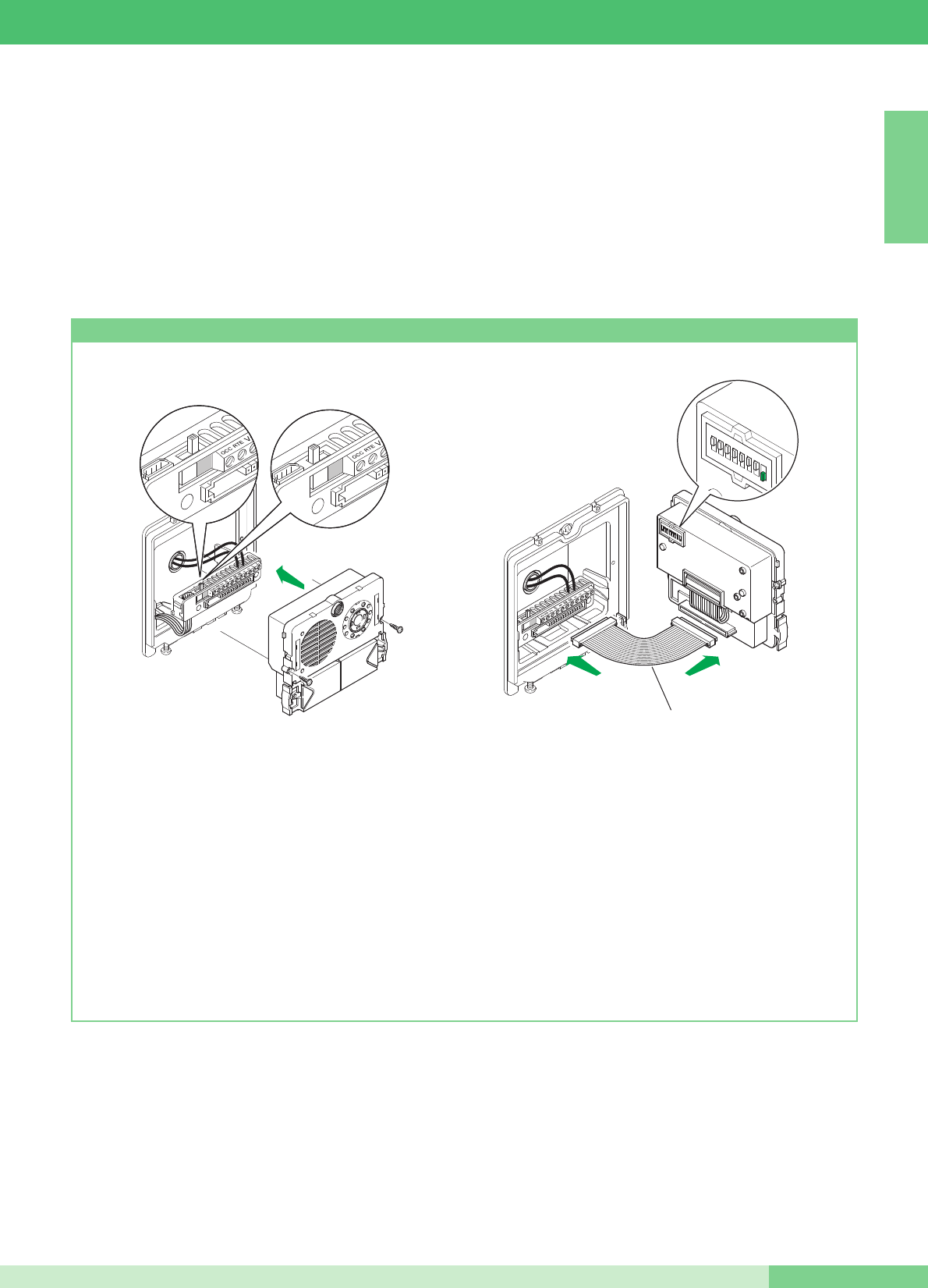
SullʼArt. 4660KC è possibile effettuare una serie di programmazioni
speciali in funzione delle varie esigenze di impianto.
1. Sulla morsettiera degli articoli 4660KC spostare lʼinterruttore in
posizione di programmazione (quadrato rosso) (Figura 1A) .
2. Impostare sui micro interruttori dell'articolo (Figura 2) il codice
relativo alla funzione che si desidera programmare. Usare
come riferimento la tabella sotto.
3. Sulla morsettiera degli articoli 4660KC connettere il
morsetto S con – (Figura 3).
4. Attendere che venga emesso un tono di conferma avvenuta
programmazione e rimuovere il cavallotto tra il morsetto S e -.
5. Al termine della procedura assicurarsi di avere rimesso
lʼinterruttore in posizione di riposo (quadrato bianco) (Figura 2A),
di aver rimosso il cavallotto tra S e - e riposizionare tutti i micro
interruttori in posizione OFF (0) come mostrato in Figura 4.
Per effettuare un'altra programmazione speciale, ripetere le
operazioni descritte dal punto 1 al punto 5.
12345678
ON DIP
Art. 3309
Fig. 1A Fig. 2A
Fig. 1
Fig. 3
Fig. 2
Fig. 4
Dip switch su ON Numero di riferimento
configurazione
Tempo attesa reset 10 secondi (impostazione di fabbrica) 1,2,5,6,7,8 243
Tempo attesa reset 1 secondo 3,5,6,7,8 244
Disattivazione tono conferma serratura e impostazione tempo serratura 2 sec.
(impostazioni di fabbrica) 1,3,5,6,7,8 245
Attivazione tono conferma serratura 2,3,5,6,7,8 246
Tempo serratura 8 secondi 1,2,3,5,6,7,8 247
Invio chiamata singola (impostazione di fabbrica) 4,5,6,7,8 248
Invio chiamata ripetuta 3 volte 1,4,5,6,7,8 249
Comando apriporta normalmente aperto (NO) (impostazione di fabbrica) 2,4,5,6,7,8 250
Comando Apriporta normalmente chiuso (NC) 1,2,4,5,6,7,8 251
Apriporta attivo anche in assenza di chiamata (impostazione di fabbrica) 3,4,5,6,7,8 252
Apriporta abilitato solo per l'utente chiamato 1,3,4,5,6,7,8 253
Ripristino di tutte le impostazioni di fabbrica 2,3,4,5,6,7,8 254
MT KIT 13
19 MT KIT 13
ITALIANO
ESPANDIBILITÀ DEL SISTEMA MAESTRO KIT
dell'Art. 4660C a bordo dell'Art. 4875KC o 4876KC come descritto
nella seguente procedura e le staffe 5914KC con il codice
corrispondente (come riferimento vedi tabella a pagina 13).
Per maggiori informazioni sull'integrazione dei MAESTRO KIT in
impianti Simplebus e per la programmazione della porta
principale (Art. 4660C) fare riferimento al catalogo Simplebus
Color (Catalogo no. 102) al manuale tecnico MT/SBC/01 e al
foglio tecnico FT/SBC/04 o FT/SBC/01.
Negli schemi MK/EN/100C e MK/EN/101C a pag. 78, 80 viene
mostrata una possibile configurazione di impianto che offre la
possibilità di gestire fino a un massimo di 30 MAESTRO KIT da
parte di un Art. 4660C posto per esempio allʼingresso di un
complesso residenziale.
Utilizzando questi schemi di impianto è possibile chiamare uno
dei MAESTRO KIT dall'ingresso principale dotato di Art. 4660C.
In questa configurazione è necessario programmare i pulsanti
Programmazione Art. 4660KC
1. Sulla morsettiera del modulo Art. 4660KC collegare
lʼalimentazione su ~ ~, spostare lʼinterruttore in posizione di
programmazione (rosso) (vedi figura 1A).
Connettere la morsettiera al modulo Art. 4660KC assemblato
come indicato precedentemente.
N.B.: per il collegamento tra la morsettiera e il modulo Art.
4660KC in fase di programmazione è possibile usare il
cavetto Art. 3309 disponibile come accessorio opzionale
(figura 2).
2. Impostare il Dip switch posto sul retro del modulo audio-video
con lo stesso codice assegnato al citofono o monitor secondo
la corrispondenza descritta nella tabella di programmazione a
pagina 13.
3. Premere il pulsante che si desidera associare alla chiamata
del citofono o monitor. Lʼavvenuta programmazione viene
segnalata con un tono di conferma.
4. Al termine della programmazione riposizionare lʼinterruttore in
posizione di standby (bianco) (figura 2A).
12345678
ON DIP
Art. 3309
Fig. 1A Fig. 2A
Fig. 1 Fig. 2

MT KIT 13
ENGLISH
CONTENTS
•GENERAL INFORMATION page 22
•EXTERNAL UNITS
- External unit Art. 4875KC and Art. 4876KC page 22
- Audio volume adjustment Art. 4875KC and Art. 4876KC page 22
- Technical characteristics of power supply Art. 1205/B page 22
- Installation instructions Art. 4875KC, 4876KC page 23
•INTERNAL UNITS
- Technical characteristics Colour monitor Art. 5900 page 24
- Monitor fixing bracket Art. 5914KC page 24
- Wall mounting of monitor Art. 5900 page 25
- Mounting monitor Art. 5900 on desk base Art. 5912 page 25
- Installation instructions for Style door-entry phone
Art. 2608, 2628 and 2610 page 26
- Style door-entry phone Art. 2608 page 27
- Style door-entry phone Art. 2628 page 28
- Style door-entry phone Art. 2610 page 29
•GENERAL INSTALLATION AND OPERATION INSTRUCTIONS
- Table of cables and distances page 30
- Table of settings Art. 1216 page 31
•MAESTRO KIT SYSTEM SETTINGS AND DESCRIPTION OF
OPERATION
- Door-entry phone and Bracket settings page 32
- Table of microswitch programming by user code
on brackets and door-entry phones page 33
- Setting of bracket Art. 5914KC as main or secondary page 33
- Table of bracket function settings Art. 5914KC page 34
- Description of pushbutton functions and settings page 35
- Monitor ringtone selection procedure page 36
- Setting of optional door-entry phone Art. 2610 page 37
- Self-ignition and Video Request function page 37
- Privacy and Doctor services page 37
- Special programming Art. 4660KC page 38
•MAESTRO KIT SYSTEM EXPANDABILITY
- Programming Art. 4660KC page 39
•
SWITCHING ON/VOLTAGE CHECK WITH SYSTEM IN STANBY
page 60
MAESTRO-KIT VIDEO KIT COLOR
•CONNECTION DIAGRAMS
- MK/01C Basic wiring diagram for single-residence kits
Art. 8493 page 61
- MK/02BC Basic wiring diagram for two-residence kits
Art. 8494 with branched connection page 62
- MK/02AC Basic diagram for two-residence kits Art. 8494
with connection in cascade page 63
- MK/03BC Wiring diagram for two-residence kits Art. 8494
expanded with a second Art. 4876KC. Branched connection page 64
- MK/03AC Wiring diagram for two-residence kits Art. 8494
expanded with a second Art. 4876KC. Cascade connection page 65
- MK/04BC Wiring diagram for two-residence kits extended with a
second Art. 4876KC, another secondary monitor and an
door-entry phone for each residence unit. Branched connection page 66
- MK/04AC Wiring diagram for two-residence kits expanded with a
second Art. 4876KC, an additional secondary monitor and an
door-entry phone for each residence unit. Cascade connection page 67
- MK/01/AC Diagram for single-residence kit
with additional power supply Art. 1395 page 68
•CONNECTION VARIANTS
- MK/05C Use of remote camera module Art. 1259C page 69
- SB2/AAR Connection of video amplifier Art. 4833C page 70
- MK/HC Addition of a main monitor in parallel,
connection in cascade page 70
- MK/IC Addition of a main monitor in parallel,
branched connection page 71
- MK/CC Connection in cascade of a main monitor
and a secondary monitor with the same user code page 71
- MK/DC Addition of an door-entry phone in parallel branched
connection from riser page 72
- MK/AAB Connection of additional door-entry phones branched
connection from monitor page 72
- MK/AAA Connection of additional door-entry phones
connection in cascade from monitor page 73
- BK/EC Addition of external light control using Art. 1256 page 73
- MK/AC Addition of actuator Art. 1256 page 74
- BK/OC Timed local door-release connection variant page 74
- BK/OAC DOOR OPEN signalling use variant page 75
- SB2/AAK Connection of call repetition device
(Art. 1229 or Art. 1122/A) page 75
- Variant A:
Enabling (ON) / disabling (OFF) automatic response page 76
- Variant B:
Enabling (ON) / disabling (OFF) the ringtone during the
Doctor function page 76
- Variant C: Addition of door call pushbutton page 76
- MK/PC Using Pushbutton 5 for various purposes page 77
- MK/NC Variant for use of terminals +LED -LED page 77
- MK/EN/100C Wiring diagram for connection of 3 MAESTRO KITS
to main entrance panel using Art. 4834/9 page 78
- MK/EN/101C Wiring diagram for connection of 30 MAESTRO KITS
(max.) to main entrance panel with switchboard Art. 1998A
(optional). Maestro Kit branched from 1214KC page 80
MT KIT 13
21
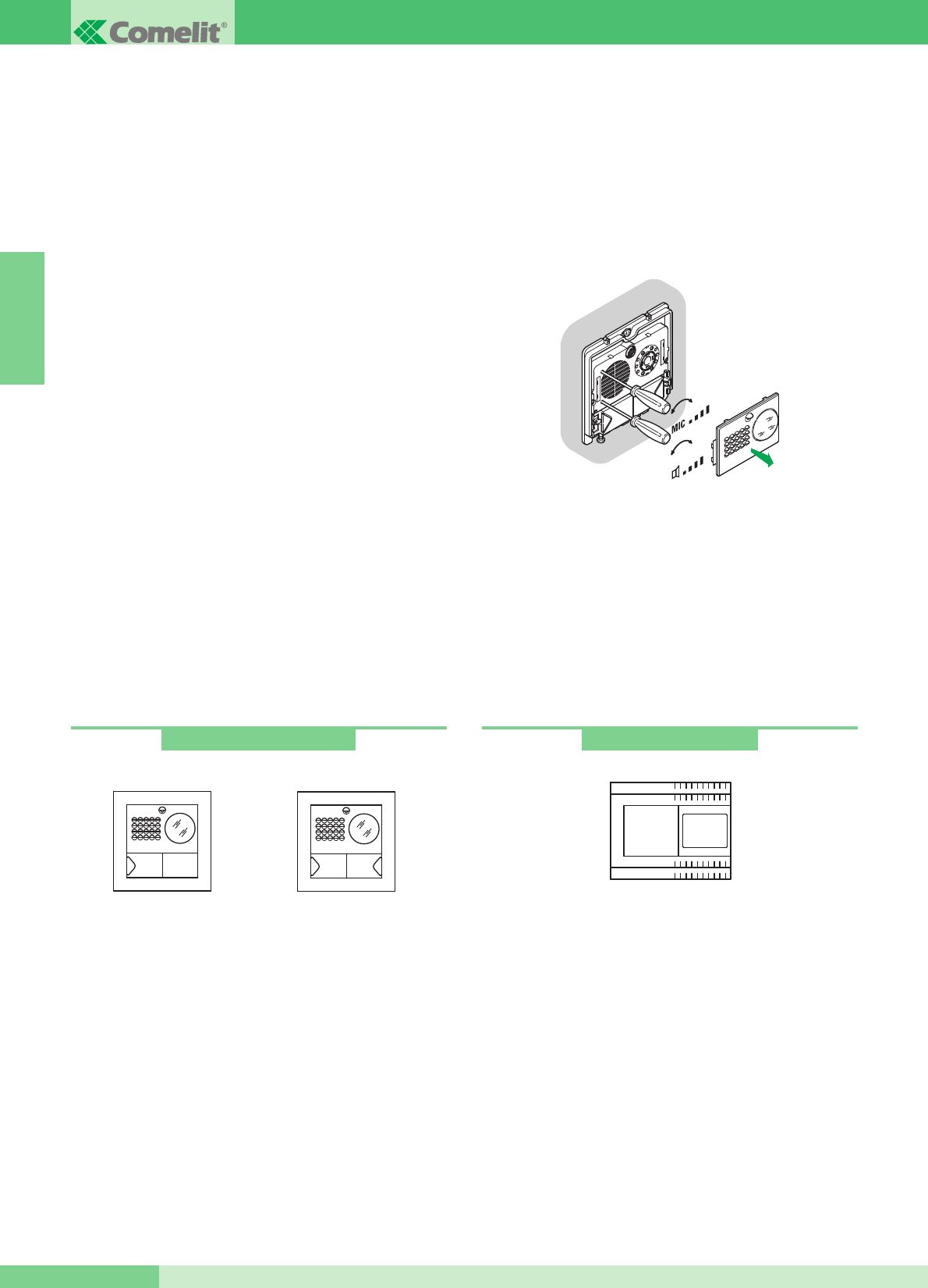
GENERAL INFORMATION
The Single-Residence Video door-entry phone Kits Art. 8493,
8493B, 8493G and Two-Residence Video door-entry phone Kits
Art. 8494, 8494B, 8494G can be used in residential or service
sector buildings where effective access control and simple
installation operations are required.
In effect it only requires 2 wires between the external unit and the
internal monitor/s to activate the system (audio, intercom, video,
self-ignition), plus two wires to supply 12V AC power to the external
unit and electronic door-release device.
A wide range of accessories is also available to deal with the needs
of any type of system. In addition to interesting standard type
accessories, the system can also be expanded by adding video
door-entry phones and/or door-entry phones and/or external units.
In this way it is possible to have a maximum of two external units
with three internal units including door-entry phones and video
door-entry phones for the single-residence configuration, and two
external units with six internal units including door-entry phones
and video door-entry phones (three for each call button) for the
two-residence configuration.
By means of appropriate settings (according to the table on page
34), single-residence intercommunications (i.e. between users with
the same user code) and two-residence intercommunications (i.e.
between users which do not have the same user code) are possible
using video door-entry phones as well as door-entry phones.
Several kits can be connected to a Simplebus main entrance panel
and/or a switchboard Art. 1998A.
EXTERNAL UNITS
Technical characteristics
Connection to monitor with 2 wires for audio, video, door lock
release and call plus 2 wires for power supply from Art. 1205/B.
High sensitivity, adjustable camera with 1/3” CCD sensor. White-
light LED illumination.
Microphone and speaker volume adjustment. Aluminium call button
with label removable from the front. Die-cast aluminium module-
holder frame.
Flush-mounted box dimensions: 127x127x45 mm.
The pushbutton of article 4875KC is factory-set to call address 1,
whereas for article 4876KC the pushbuttons are set to call
addresses 1 (left pushbutton) and 2 (right pushbutton).
External unit dimensions: 125x125 mm.
Description of terminal block
LL monitor connection (video, call, audio, door request exit button )
SE-SE electronic door-release
~ ~ external unit power supply
PR programming terminal
-negative terminal to be used in programming stage
S programming terminal
RTE timed local door lock release input OCC., V+ (not used)
Audio volume adjustment
The external unit module has two adjustments:
external unit volume, marked with the loudspeaker symbol, and
internal unit volume adjustment, marked with the microphone
symbol.
Camera direction adjustment
To adjust the camera, proceed as described on page 23.
112
Art. 4875KC - 4876KC
Art. 4875KC Art. 4876KC
+-
+-
Technical characteristics
The transformer has 2 outputs: one to supply the external unit and
the electronic door-release device, the other to supply the monitor.
Dimensions: 105x85x85 mm (6 DIN modules).
500mA delayed protection fuse.
Description of terminal block
AC230V mains voltage input
~~ AC output for external unit and electronic door-release
+ - monitor power supply 20Vdc output
Art. 1205/B
ENGLISH
GROUP S.P.A.
MT KIT 13 22

• Wall-mount the box 160÷165
cm above the level of the
finished floor, in an area where
it is easy to view the visitor.
If possible it should not point
into the sun or at other direct
light sources (lamps, reflective
surfaces, etc.)
• Fix the frame on the flush-
mounting box using the 2
screws supplied.
• Insert the terminal block and
connect the wires according to
the diagram.
• Fit the snap-on module onto
the terminal and fix it with the 2
screws provided.
• Remove the stainless steel
front to carry out volume
adjustments and adjust the
camera.
NOTE Loosen the four screws
slightly to unlock the camera
and allow adjustment.
• Alternative microphone
position.
• To remove the name tag
holder, insert the tip of a
screwdriver into the middle
opening and extract it.
• After adjusting, fix the trim by
means of the 2 bottom screws.
NOTE To remove the trim,
undo the 2 bottom screws,
turning max. 360°.
Installation instructions Art. 4875KC, 4876KC
ENGLISH
MT KIT 13
23 MT KIT 13
160 - 165 cm
135 - 140 cm
OPEN
1
2
3
CLOSE
MIC
4
5
2
3
1
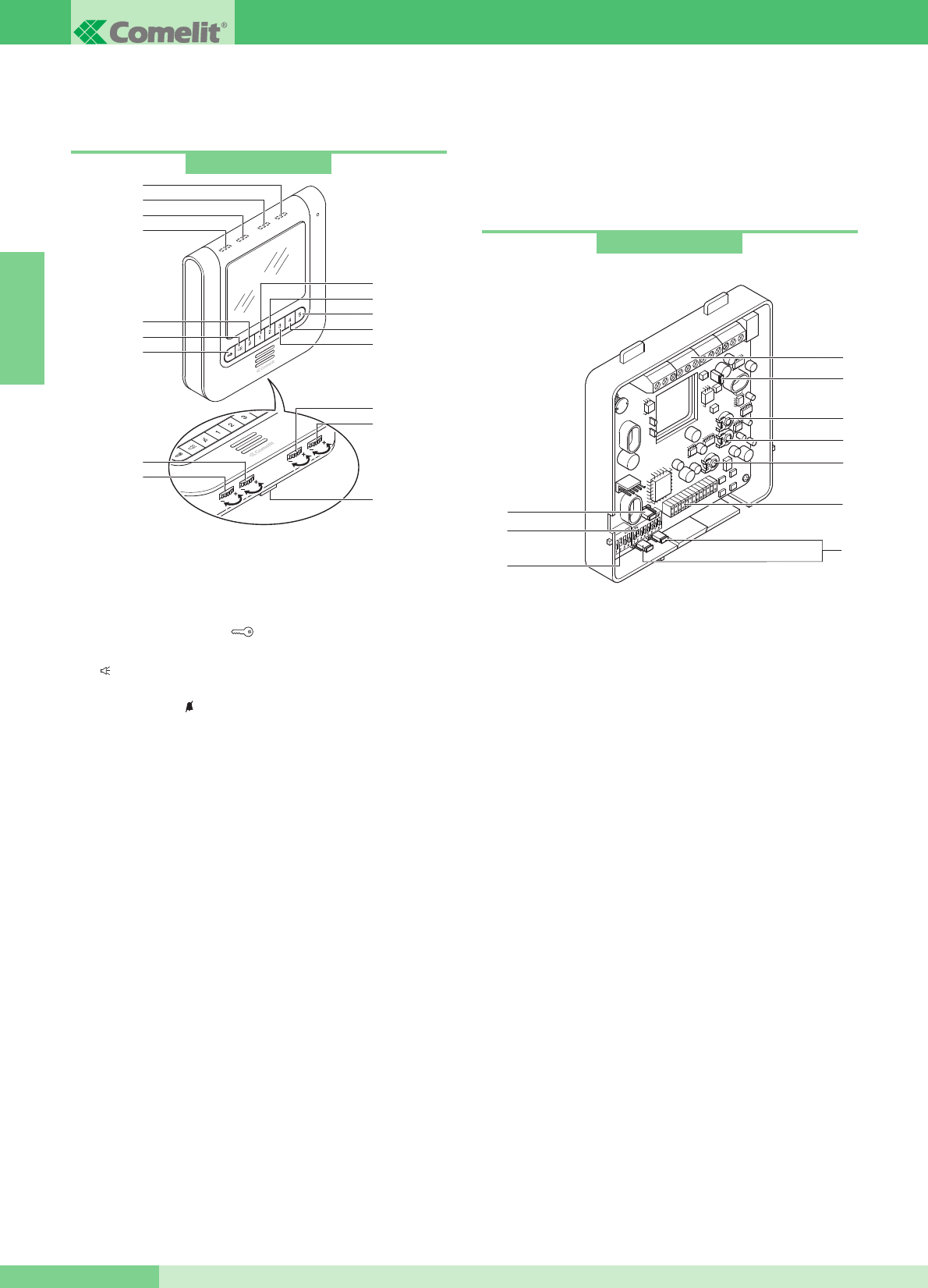
Art. 5914KC
INTERNAL UNITS
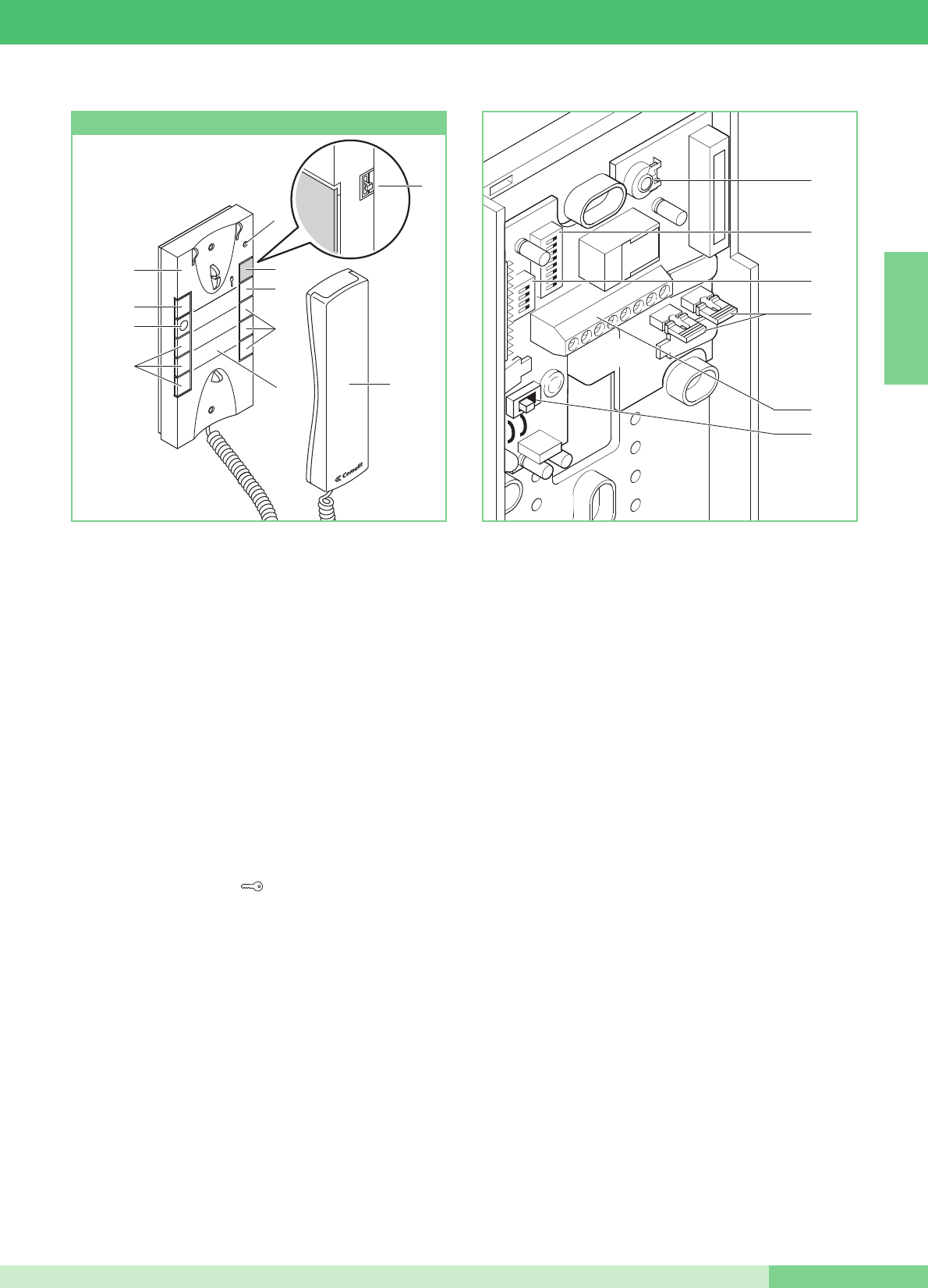
Technical characteristics Colour monitor Art. 5900
Maestro series wall-mounting monitor 185x185x38 mm, with 5,6ʼʼ
colour screen. The monitor can also be installed on a desktop by
means of special support Art. 5912.
1Door request exit button .
2Pushbutton to activate and deactivate the intercom after a call
( ). Once enabled (blue LED on) the conversation is in
automatic Speak/Listen mode.
3Privacy service . Privacy service means the exclusion of the
call from the external unit or switchboard; the activation of the
Privacy function is signalled by the red LED lighting up.
4Default pushbutton 1 for Switchboard call function. (A)
5Default pushbutton 2 for Self-ignition function. (A)
6Default pushbutton 3 for Actuator function. (A)
7 Default pushbutton 4 for manual SPEAK/LISTEN function:
when the monitor is in audio mode, press the pushbutton to
speak and release it to listen. (A)
8 Factory setting button 5, programmed to activate the Doctor
function. (A) (B)
9Yellow LED indicating door open or providing other signals
(see variant MK/NC, pag. 77).
10 Blue LED indicating audio function (the audio function is active
when the LED is on).
11 Green indicator LED, during communication it indicates the
status of the conversation:
- off : sounds from the external unit or from another intercom
device are heard on this monitor;
- on : sounds from this monitor are heard on the external unit or
on another intercom device.
12 Red indicator LED signalling internal extension engaged,
Privacy or Doctor services active.
13 Colour intensity adjustment.
14 Brightness control.
15 Ringtone volume adjustment.
16 Audio volume adjustment.
17 Hooking bracket.
Monitor fixing bracket
The fixing bracket Art. 5914KC enables wall-mounting of the
monitor or installation using the desk base Art. 5912 (for more
information see page 25).
Technical characteristics
1Monitor-bracket connector.
2Terminal block for system connection:
CFP CFP Local floor call input (see variant C pag. 76).
+ - Terminals for connection to Art. 1205/B or 1212/B.
L L Bus line connection terminals.
P5 C5 Contacts for pushbutton 5 used for various purposes (see
variant MK/PC pag. 77).
To use the terminals P5 C5 as free contacts, move CV3 and
CV4 to the C.NO position.
+S -S Terminals for call repetition device (see variant SB2/AAK
pag. 75).
+LED -LED LED input terminals for various uses (see variant
MK/NC pag. 77).
3JP1Jumper to set bracket as Main (P) or Secondary (S) (see
pag. 33).
4S1User code programming microswitches.
5S2Microswitches for various setting procedures.
6 CV3 CV4 Jumper for freeing pushbutton 5 (contact C.NO. 24V-
100mA max).
7 CV5 Jumper for closing video.
8 TM1 Microphone volume.
9 TM2 Loudspeaker volume.
10 TM3 Microphone sensitivity for switching intercom channels
(factory-set to optimal position).
Art. 5900
1
2
3
6
7
8
5
4
9
11
10
12
13
14
16
15
17
(A) Standard pushbutton available for different functions as listed
on page 34
(B) Freeable pushbutton
Up to a max. of 3 monitors can be used in the same residence unit.
ENGLISH
GROUP S.P.A.
MT KIT 13 24
6
3
4
5
9
10
8
7
2
1

2
21
3
CLICK!
115 - 120 cm
140 - 145 cm
Wall-mounting of monitor Art. 5900
2
1
1
2
Art. 5912
Mounting Monitor Art. 5900 on desk base Art. 5912
==
18,5 cm
5,9 cm
18,5 cm
3
2
1
ENGLISH
MT KIT 13
25 MT KIT 13
B
A

Installation instructions for Style door-entry phone Art. 2608, 2628 and 2610
Interchangeable cover available for Art. 2628 and Art. 2610
1
2
115 - 120 cm
140 - 145 cm
4A
Ø 5mm max
Ø 5mm max
4B
95mm
47,5mm
75,5mm
215mm
1
1
1
1
1
2
3
1
4
2
2
56
2
4
6
1
3
5
7
9
2
8
CH2
7
1
2
4C
ENGLISH
GROUP S.P.A.
MT KIT 13 26
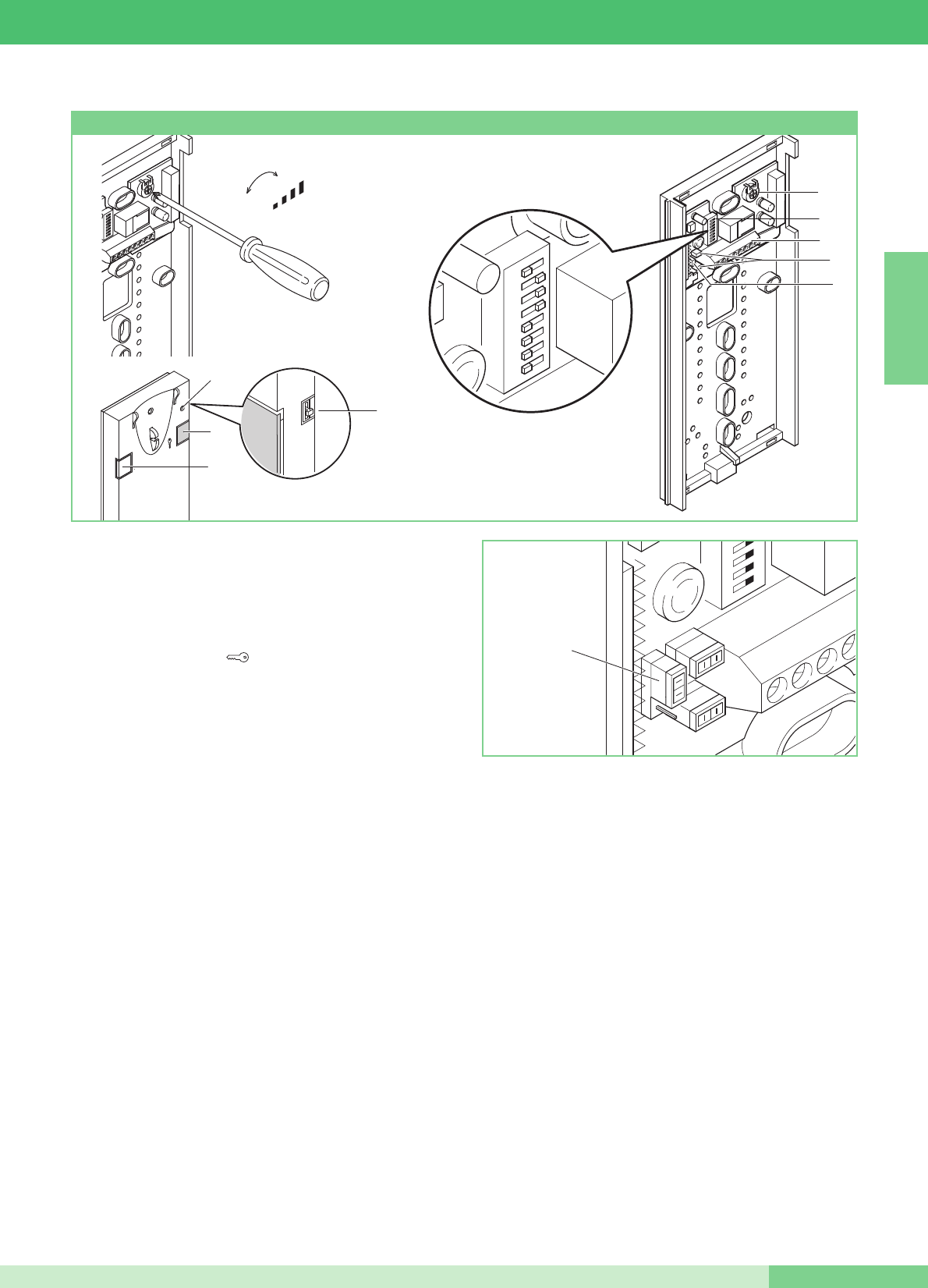
+
-
MIC
12345678
c
A
3
9
8
5
7
6
JP1
4
1
2
Basic door-entry phone with 2 pushbuttons as standard.
Cannot be used for the intercom function.
The door-entry phone must always be mounted using Art. 1214/2C
as shown in the MK/DC connection diagram on page 72.
1. Door request exit button .
2. Pushbutton P1 switchboard call / generic actuator / pushbutton
for various uses present on terminal block (P1 C1).
3. 3-position ringtone/Privacy service selector:
High position: Max. ringtone volume.
Middle position: Medium ringtone volume.
Low position: Privacy function activation
(Privacy service means exclusion of the call ringtone from the
external unit and switchboard; activation of this function is
signalled by a red indicator appearing in the top right-hand
corner).
4. Privacy function indicator.
5. System connection terminals:
L L bus line connection.
CFP CFP floor door call input.
P1 C1 terminals for pushbutton P1 C. NO. 24V 100mA
dedicated to various services (remove CV1 and CV2).
S+ S- Terminals for call repetition device.
6. JP1 jumper for selecting switchboard call (position C) / Generic
actuator (position A) function of pushbutton P1 (see figure
opposite).
7. CV1 CV2 jumper to be removed for potential-free C.NO. contact
on pushbutton P1.
8. Dip switch for setting user code (see table on page 33).
9. Microphone volume control trimmer.
Clean using a damph clot. Do not use alcohol or other aggressive
products.
Style door-entry phone Art. 2608
ENGLISH
MT KIT 13
27 MT KIT 13
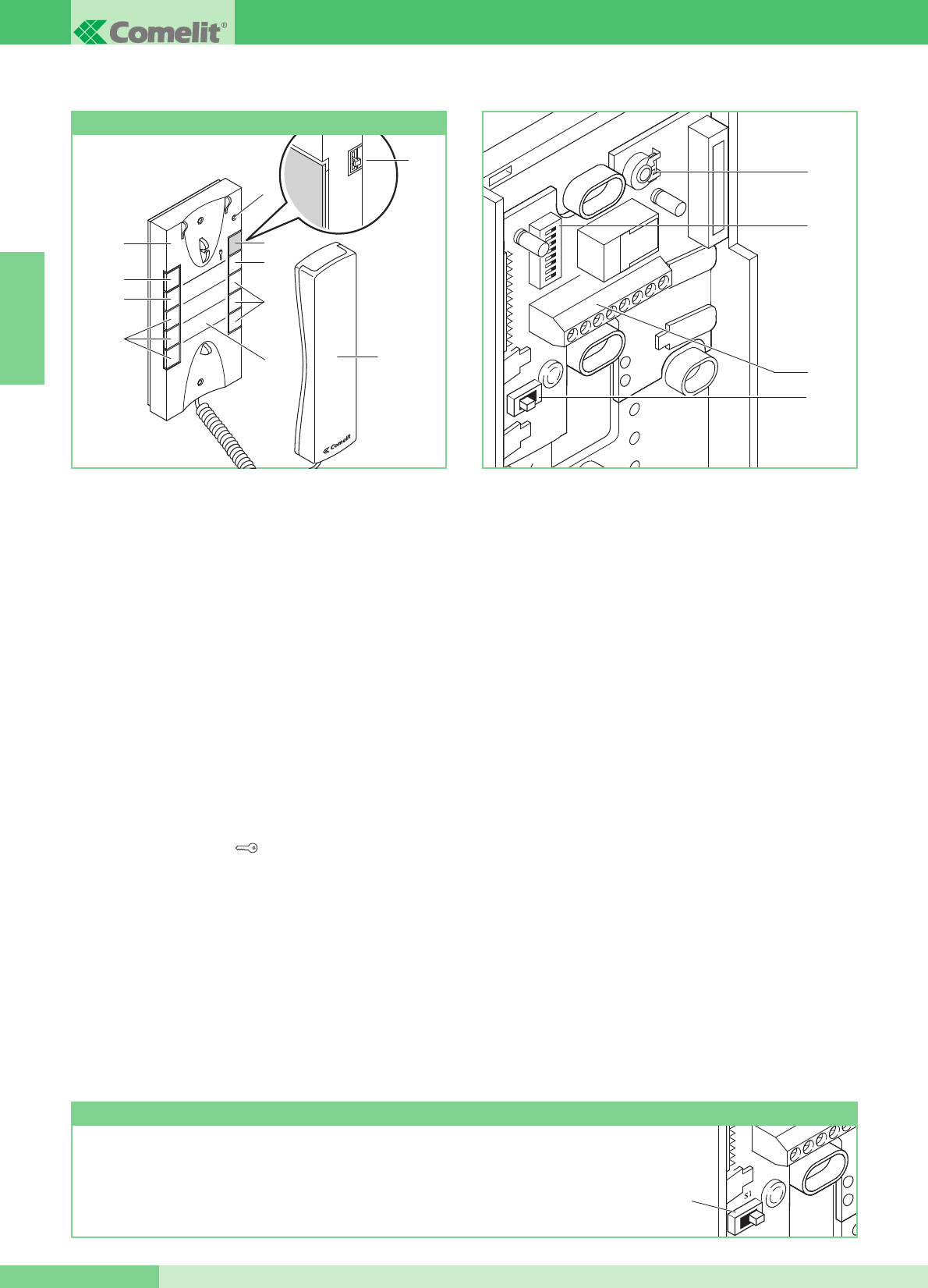
Elegance door-entry phone with additional functions and pushbuttons.
Cannot be used for the intercom function.
The door-entry phone must always be mounted using Art. 1214/2C
as shown in the MK/DC connection diagram on page 72.
Important: for correct setting of the Article during installation inside
a MAESTRO KIT system, refer to the note below.
1. 3-position ringtone/Privacy service selector:
High position: Max. ringtone volume.
Middle position: Medium ringtone volume.
Low position: Privacy function activation
(Privacy service means exclusion of the call ringtone from
the external unit and switchboard; activation of the Privacy
function is signalled by a red indicator appearing in the top
right-hand corner).
2. Privacy function indicator.
3. Pushbutton 1 available as standard for generic actuator
function.
4. Door request exit button .
5. Pushbutton 2 available as standard for switchboard call
function.
6. Pushbutton 3 for various uses present on terminal block (P3 C3).
7. Optional pushbuttons C. NO. or LEDs (MAX 3) for additional
functions. (A)
8. Interchangeable cover Fig. 7 page 26.
9. Pushbutton memo label for indicating the door-entry phone
pushbutton functions can be indicated (to be applied under the
interchangeable cover as shown in Fig. 7 page 26).
10. Telephone handset (lift the handset to start communication).
(A) Pushbutton available with optional card Art. 1626.
Display LED available with optional card Art. 1627.
11. System connection terminals:
L L bus line connection.
CFP CFP floor door call input.
P3 C3 terminals for pushbutton P3 C. NO. 24V 100mA
dedicated to various services.
S+ S- Terminals for call repetition device.
12. SW3 Jumper for selection of Simplebus 1 and Simplebus 2
mode.
13. Dip switch U2 for setting user code (see table on page 33).
14. Microphone volume control trimmer.
Clean using a damp cloth. Do not use alcohol or other aggressive
products.
WARNING!
TO USE DOOR-ENTRY PHONE ART. 2628 IN MAESTRO KIT SYSTEMS, SELECTOR SW3 MUST
BE MOVED TO POSITION S1.
ENGLISH
GROUP S.P.A.
MT KIT 13 28
14
13
11
12
8
3
6
7
9
7
5
4
2
1
10
1
32
54
76
98
Style door-entry phone Art. 2628
SW3
1
32
54
76
98
Elegance door-entry phone with additional functions and
pushbuttons and intercom service.
By means of special setting, Art. 2610 can manage intercom calls
and other additional functions (see summary table on page 34).
The door-entry phone must always be mounted using Art.
1214/2C as shown in the MK/DC connection diagram on page
72.
1. 3-position ringtone/Privacy service selector:
High position: Max. ringtone volume.
Middle position: Medium ringtone volume.
Low position: Privacy function activation
(Privacy service means exclusion of the call ringtone from
the external unit and switchboard; activation of the Privacy
function is signalled by a red indicator appearing in the top
right-hand corner).
2. Privacy function indicator.
3. Signalling LED (available as standard).
4. Door request exit button .
5. Pushbutton 1 available as standard (programmable with
various functions, see table on page 37. Factory-set for
Generic actuator function).
6. Pushbutton 2 available as standard (freeable, or
programmable with various functions, see table on page
37).
Factory-set to switchboard call.
7. Optional pushbuttons C. NO. or LEDs (MAX 3) for
additional functions. (A)
8. Interchangeable cover Fig. 7 page 26.
9. Pushbutton memo label for indicating the door-entry phone
pushbutton functions (to be applied under the
interchangeable cover, Fig. 7 page 26).
10. Door-entry phone handset (lift the handset to start
communication).
(A) Pushbutton available with optional card Art. 1626.
Display LED available with optional card Art. 1627.
11. System connection terminals:
L L bus line connection.
CFP CFP floor door call input.
P2 C2 pushbutton P2 C terminals. NO. 24V 100mA dedicated
to various services (remove CV2 and CV3).
S+ S- Terminals for call repetition device.
12. SW3 Jumper for selection of Simplebus 1 and Simplebus 2
mode.
13. CV3 CV2 Jumper to be removed for pushbutton P2 C. NO.
14. Dip switch U2 for setting user code (see table on page 33).
15. Dip switch U4 for programming pushbuttons P1 and P2 (see
table on page 37).
16. Microphone volume control trimmer.
Clean using a damp cloth. Do not use alcohol or other aggressive
products.
8
3
6
7
9
7
5
4
2
10
Style door-entry phone Art. 2610
1
ENGLISH
MT KIT 13
29 MT KIT 13
16
14
15
13
11
12
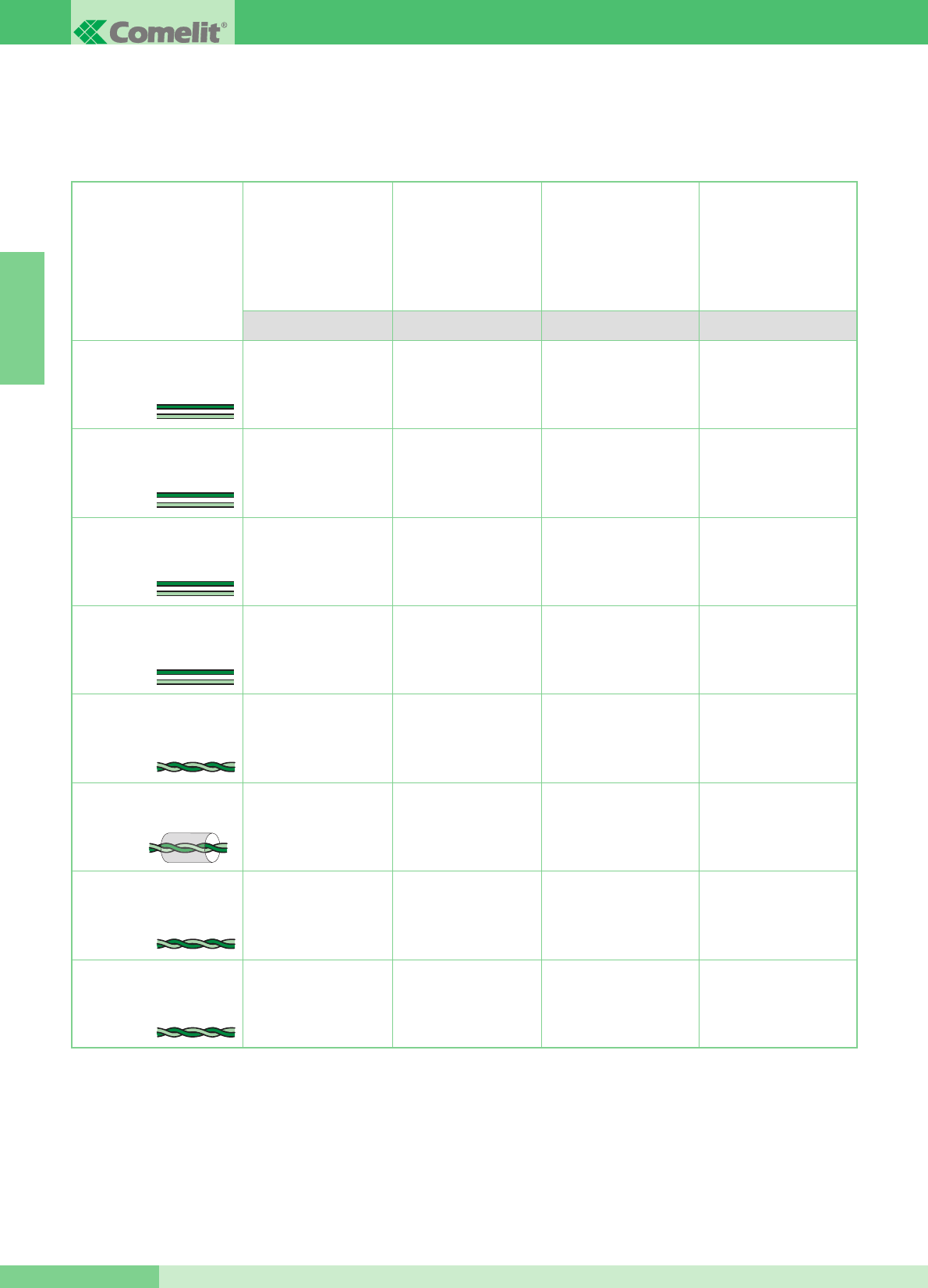
Maximum distance between
external unit 4875KC or
4876KC and the furthest
4833C or 1214/2. Maximum
distance between 4833C
and the furthest 1214KC
Maximum distance
between monitor and
1214KC
This section of the manual contains all the information relating to installation of the MAESTRO KIT system.
The maximum total distance between the external unit and the furthest monitor is 400 m.
GENERAL INSTALLATION AND OPERATION INSTRUCTIONS
Cable section or type Maximum distance
between power supply
1205/B or 1395 and
external unit 4875KC and
4876KC
Maximum distance
between power supply
1205/B or 1212/B and
powered monitor
A/G B/E C/F D
Double-wire cable
(cross-sect. 0.5 mm2
Ø 0.8 mm AWG 20)**
Double-wire cable
(cross-sect. 1 mm2
Ø 1.2 mm AWG 17)**
Double-wire cable
(cross-sect. 1.5 mm2
Ø 1.4 mm AWG 15)**
Double-wire cable
(cross-sect. 2.5 mm2
Ø 1.8 mm AWG 13)**
Twisted door-entry phone
pair (cross-sect. 0.28 mm2 Ø
0.6 mm AWG 23)*
Braided and screened cable
(cross-sect. 1 mm2Ø 1.2 mm
AWG 17)*
UTP5 Cat. 5 (cross-sect. 0.2
mm2Ø 0.5 mm AWG 24)*
Comelit cable Art. 4576
and Art. 4578 (cross-sect.
0.5 mm2Ø 0.8 mm AWG 20)*
* In case of multipair cable, it is advisable to use only one of the pairs for the system.
To reduce resistive drops, use a single pair as a single wire.
** In case of multicore cable, use only two of the available wires and never use wires in parallel.
20 m
(65 feet)
40 m
(130 feet)
60 m
(195 feet)
100 m
(325 feet)
25 m
(85 feet)
50 m
(165 feet)
100 m
(325 feet)
150 m
(495 feet)
150 m
(495 feet)
150 m
(495 feet)
150 m
(495 feet)
150 m
(495 feet)
100 m
(325 feet)
150 m
(495 feet)
150 m
(495 feet)
40 m
(130 feet)
40 m
(130 feet)
40 m
(130 feet)
40 m
(130 feet)
20 m
(65 feet)
40 m
(130 feet)
50 m
(165 feet)
ENGLISH
GROUP S.P.A.
MT KIT 13 30
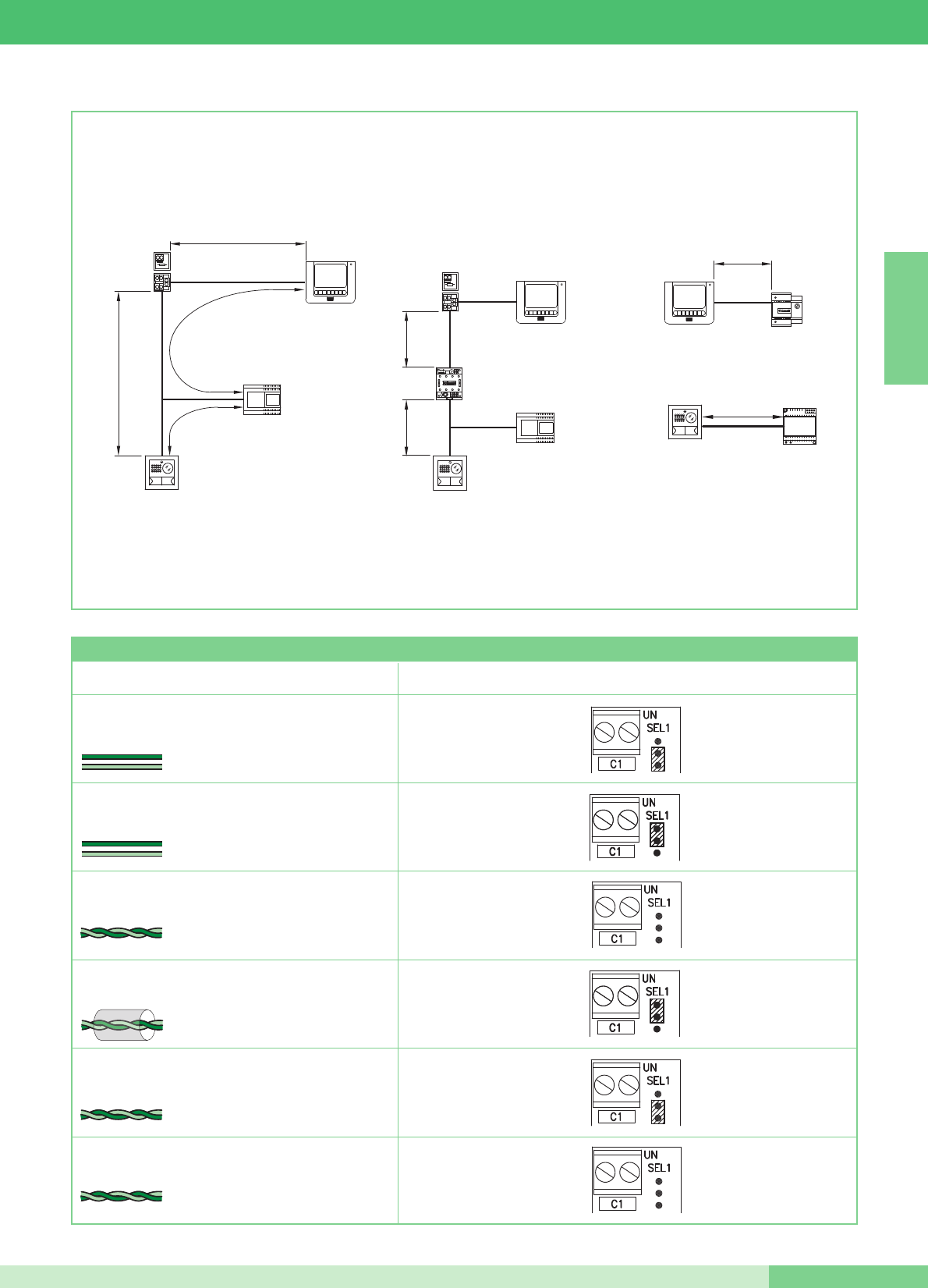
4875KC
4876KC
1205/B
1214KC
1216
C
A
B
D
1214KC
1216
F
F
4833C
1205/B
4875KC
4876KC
1212/B
E
1395
4875KC
4876KC
G
Type of cable Setting Art. 1216
Double-wire cable (cross-sect. 1.5 mm2 Ø 1.4 mm AWG 15)
Double-wire cable (cross-sect. 1 mm2 Ø 1.2 mm AWG 17)
Twisted door-entry phone pair
(cross sect. 0.28 mm2 Ø 0.6 mm AWG 23)
UTP5 cable cat. 5
(cross-sect. 0.2 mm2 Ø 0.5 mm AWG 24)
2
1
Comelit cable Art. 4576 and Art. 4578 (cross-sect. 0.5
mm2 Ø 0.8 mm AWG 20)
Double-wire cable
(cross-sect. 0.5 mm2Ø 0.8 mm AWG 20)
2
Braided and screened cable
(cross-sect. 1 mm2 Ø 1.2 mm AWG 17)
1
Settings Table Art. 1216 according to the type of connection cable used
ENGLISH
MT KIT 13
31 MT KIT 13
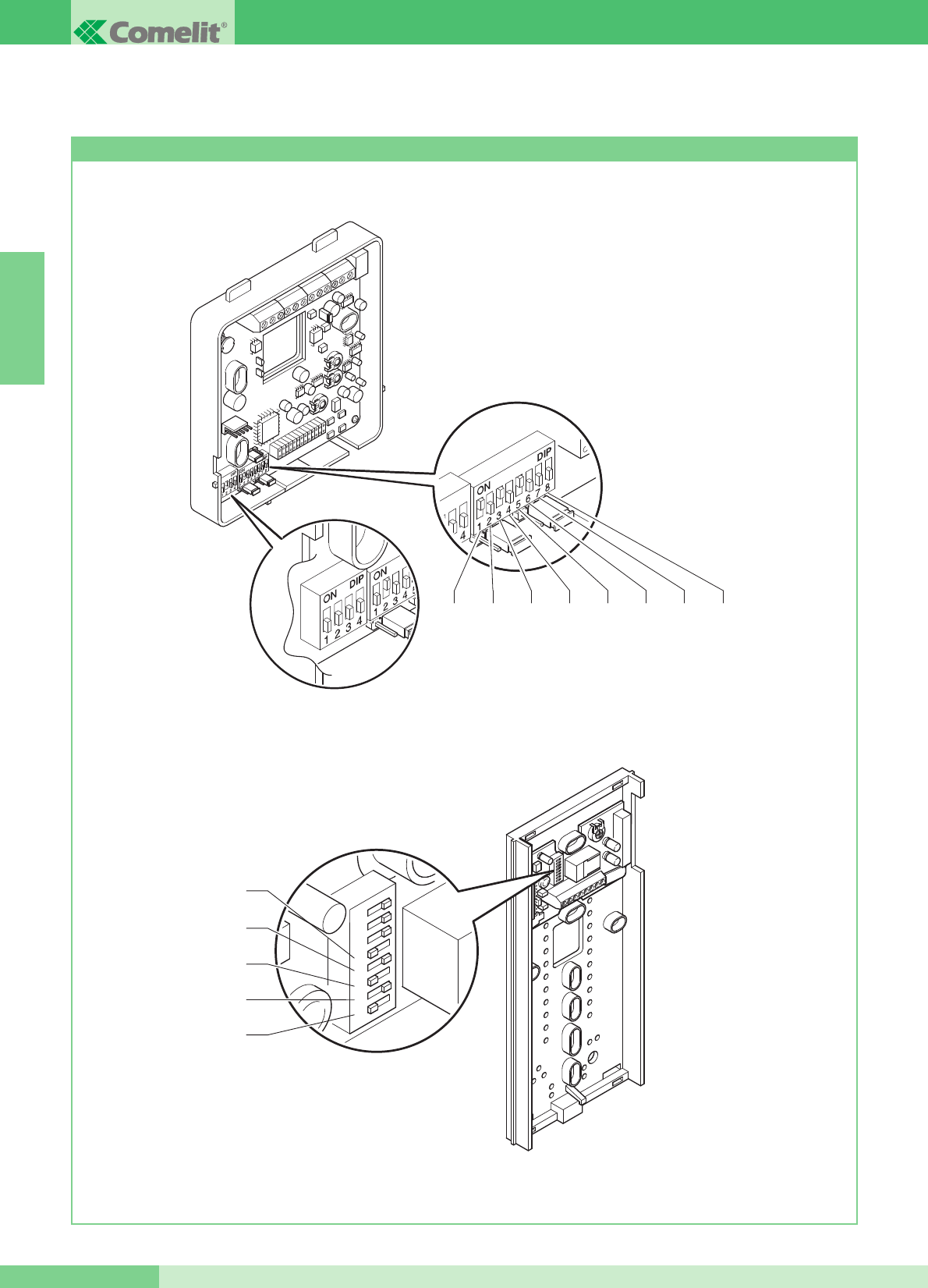
Settings for bracket Art. 5914KC and Style door-entry phones Art. 2608, 2628 and 2610
MAESTRO KIT SYSTEM SETTINGS AND DESCRIPTION OF OPERATION
S1-5
S1-4
S1-3
S1-2
S1-1
12345678
The following figure shows microswitch positions for bracket 5914KC and Style door-entry phones Art. 2608, 2628 and 2610.
ENGLISH
GROUP S.P.A.
MT KIT 13 32
S1
S1-1 S1-2 S1-3 S1-4 S1-5 S1-6 S1-7 S1-8
S2 P
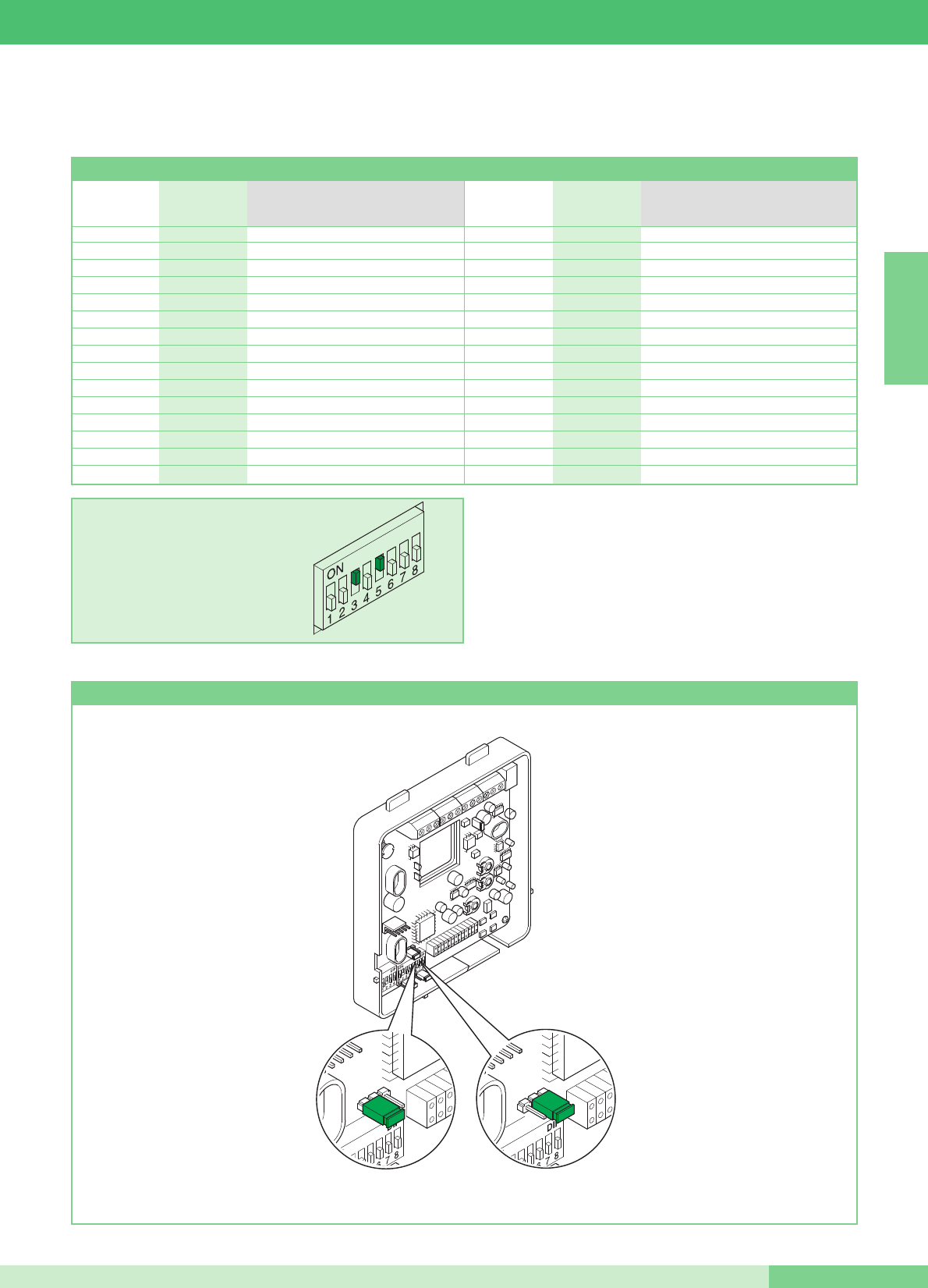
Setting bracket Art. 5914KC as main or secondary
The values of S1-1, S1-2, S1-3, S1-4 and S1-5 define the call address.
Refer to the following table for the coding of the bracket and door-entry phones.
WARNING: ON DOOR-ENTRY PHONES 2608, 2628 AND 2610
SET POSITION OF DIP SWITCHES 6, 7, 8 TO OFF
The two-residence intercom call (between door-entry phones and/or
video door-entry phones) is possible only if the two users are set to
contiguous call codes (marked with the same letter AA…CC..YY in
the Microswitch programming table shown above).
Table of microswitch programming by user code on brackets and door-entry phones
EXAMPLE setting code 20.
H16 5
I17 1,5
I18 2,5
J 19 1,2,5
J20 3,5
K 21 1,3,5
K 22 2,3,5
L 23 1,2,3,5
L24 4,5
M 25 1,4,5
M 26 2,4,5
N 27 1,2,4,5
N 28 3,4,5
O 29 1,3,4,5
O 30 2,3,4,5
A1 1
A2 2
B3 1,2
B4 3
C5 1,3
C6 2,3
D 7 1,2,3
D8 4
E9 1,4
E10 2,4
F 11 1,2,4
F12 3,4
G 13 1,3,4
G 14 2,3,4
H 15 1,2,3,4
User code Microswitches ON User code Microswitches ON
Reference for
two-residence
intercom
Reference for
two-residence
intercom
ENGLISH
MT KIT 13
33 MT KIT 13
JP1
PS
JP1
PS
Secondary
Main
The values S1-6, S1-7 and S1-8 of dip-switch S1 on bracket Art. 5914KC, define the mode in which the Maestro KIT System will operate, as
shown in the following table.
(1) The two-residence intercom call (between door-entry phones and/or video door-entry phones) is possible only if the two users are set
to contiguous call codes (marked with the same letter AA…CC..YY in the Microswitch programming table shown on page 33).
OFF
(0)
OFF
(0)
OFF
(0)
S1-6 S1-7 S1-8 Button functions
Pushbutton 1
Pushbutton 2
Pushbutton 3
Pushbutton 4
Pushbutton 5
Switchboard call
Self-ignition
Actuator control
Press-to-talk/Doctor
Single-residence intercom call
ON
(1)
OFF
(0)
OFF
(0)
Pushbutton 1
Pushbutton 2
Pushbutton 3
Pushbutton 4
Pushbutton 5
Single-residence intercom call
Self-ignition
Actuator control
Press-to-talk/Doctor
Switchboard call
OFF
(0)
ON
(1)
OFF
(0)
Pushbutton 1
Pushbutton 2
Pushbutton 3
Pushbutton 4
Pushbutton 5
Two-residence intercom call (1)
Self-ignition
Actuator control
Press-to-talk/Doctor
Switchboard call
ON
(1)
ON
(1)
OFF
(0)
Pushbutton 1
Pushbutton 2
Pushbutton 3
Pushbutton 4
Pushbutton 5
Switchboard call
Self-ignition
Actuator control
Press-to-talk/Doctor
Two-residence intercom call (1)
OFF
(0)
OFF
(0)
ON
(1)
Pushbutton 1
Pushbutton 2
Pushbutton 3
Pushbutton 4
Pushbutton 5
Single-residence intercom call
Self-ignition
Two-residence intercom call (1)
Press-to-talk/Doctor
Actuator control
ON
(1)
OFF
(0)
ON
(1)
Pushbutton 1
Pushbutton 2
Pushbutton 3
Pushbutton 4
Pushbutton 5
Single-residence intercom call
Two-residence intercom call (1)
Actuator control
Press-to-talk/Doctor
Self-ignition
OFF
(0)
ON
(1)
ON
(1)
Pushbutton 1
Pushbutton 2
Pushbutton 3
Pushbutton 4
Pushbutton 5
Switchboard call
Self-ignition
Actuator control
Single-residence intercom call
Two-residence intercom call (1)
ENGLISH
GROUP S.P.A.
MT KIT 13 34

MICROSWITCHES S1-1, S1-2, S1-3, S1-4 AND S1-5
The values of the microswitches S1-1, S1-2, S1-3, S1-4 and S1-
5 define the call address of the bracket in question with respect
to the external call unit.
To use the two-residence intercom call function, the users (door-
entry phones and/or video door-entry phones) must be set to
contiguous call addresses marked with the same letter
(AA…CC….YY) in the table on page 33.
Operation
• By pressing the call button, the visitor activates the white LEDs
for illuminating the person, the internal call ringtone (if the
Privacy function is not enabled) and displays the image on the
main monitor/s for approx. 60 seconds.
On answering the communication, the maximum duration of the
conversation is 90 seconds.
A call confirmation tone sounds at the external unit; in systems
with 2 or more entrances, if the external unit emits an engaged
tone instead of the ringtone this means that another
communication is already in progress with another external unit.
In case of a persistent short-circuit on the bus line, the external
unit emits an intermittent signalling tone.
• Communication occurs at the internal unit by lifting the handset.
• The brightness control and ringtone volume control are located
on the left-hand side of the monitor.
• The button marked with the key symbol acts on the electronic
door-release, activating it for about 2 sec.
• Self-ignition of the main monitor occurs by pressing Pushbutton
2 with the function enabled (see description on page 37).
In systems with 2 external units, it is possible to view the image
from one external unit or the other alternately (“toggle” function)
by pressing Pushbutton 2.
Monitor self-ignition is not possible during another conversation.
• For the intercom functions of the MAESTRO KIT System, refer to
page 34.
• For programming user addresses different from the factory
settings (1 and 2) refer to page 33.
• The total number of internal units with the same user code and
call repetition devices connected to the above internal units
cannot exceed 4. Connect only one call repetition device for
each internal unit. The MAX connection distance between the
internal unit and call repetition device is 20 m; use a screened
cable for the connection and do not run the cables near heavy
inductive loads or power cables (230V / 400V).
If inductive loads are connected, the connection of a 470nF
capacitor in parallel with the C.NO. contacts of Art. 1122/A is
recommended.
Main or secondary additional monitors
The setting of JP1 defines whether the bracket in question will be
managed as main or secondary. The external unit can manage up
to a maximum of 3 video door-entry phones or door-entry phones
for each Call button. When a call is made from the external unit, the
monitor switched on by the system will be that of the main video
door-entry phone.
Any other secondary monitors in the same residence unit will remain
off. By answering the external unit call from a secondary video door-
entry phone, the image is automatically displayed on the monitor.
The monitor of the main video door-entry phone will be switched off
and the image will be displayed on the monitor of the video door-
entry phone on which Pushbutton 2 - video request was pressed.
To display the image without activating audio communication with
the external unit, press Pushbutton 2.
In the classic MAESTRO KIT configuration, it is therefore possible
to have at most 2 secondary video door-entry phones and 1 main
video door-entry phone for each Call button, all powered by the
same Art. 1205/B (Variant MK/CC page 71).
It is possible to manage up to 3 main video door-entry phones
within the same residence unit (i.e. set to the same user code). In
this particular configuration, the additional main video door-entry
phones must each be powered by the special Art. 1212/B (Variant
MK/HC and MK/IC page 70, 71).
On receipt of a call from the external unit, the image will be
displayed on each of the main video door-entry phones connected
to the system.
In any case, even when using Art. 1212/B, a max. of 3 video door-
entry phones can be connected for the same residence unit. A
dedicated power supply is not necessary for any optional door-
entry phone.
S1-6, S1-7, S1-8
Setting the MAESTRO KIT operating mode
The table on page 34 shows the functions of the individual monitor
pushbuttons according to how the microswitches S1-6, S1-7, S1-8
are set.
Description of pushbutton functions
Door request exit button ➔Pressing the Door request exit
button releases the lock connected to the external unit.
Actuator ➔Pressing the pushbutton set in Actuator mode
enables activation of Art. 1256, which can be used to open
gates, up&over doors, etc., or to activate the cyclic camera
module Art. 1259C.
Free Pushbutton ➔ The indication Free Pushbutton means that the
pushbutton can be used as a C.NO. contact in the terminal block,
by means of suitable settings as illustrated in the MK/PC variant on
page 77.
Video request / Self-ignition ➔Press Pushbutton 2 in this mode to
display the image on the monitor transmitted by the external unit,
even if no call has been made.
For use and activation of the service, see page 37. In systems
with two external units, it is possible to view the image from one
external unit or the other alternately (“toggle” function) by
pressing the pushbutton again.
ENGLISH
MT KIT 13
35 MT KIT 13
On secondary monitors, Pushbutton 2 also has the video request
function (for more information see page 37).
Switchboard call ➔Press the pushbutton set in this mode to send
a call to the system porter Switchboard.
Single-residence intercom call ➔Press the pushbutton set in this
mode to send a call to the other units (video door-entry phones
and/or door-entry phones) set to the same call address.
By lifting the handset, the receiver of the call communicates with
the caller.
The communication is ended by hanging up the handset.
In any case, a call from the external unit always has priority over an
intercom call. In this situation, users who are already speaking will
hear a tone similar to the ringtone in the handset if the latter is for
them, otherwise a triple signal tone will sound.
To answer the call from the external unit, simply lift the handset of
any free unit or hang up and lift the handset of a unit engaged in
the intercom call.
Activation of communication with the external unit interrupts the
intercom conversation previously in progress.
An intercom call does not have priority over a conversation/call with
the external unit.
In this case, during an intercom call attempt, the LED will flash for a
few seconds to signal that the system is engaged.
Two-residence intercom call ➔Press the pushbutton set in this
mode to send a call to the other units (video door-entry phones
and/or door-entry phones) set to the two-residence call address, as
indicated in the table on page 33.
By lifting the handset, the receiver of the call communicates with
the caller. The communication is ended by hanging up the handset.
In any case, a call from the external unit always has priority over an
intercom call.
In this situation, users who are already speaking will hear a tone
similar to the ringtone in the handset if the latter is for them, otherwise
a triple signal tone will sound.
To answer the call from the external unit, simply lift the handset of
any free unit or hang up and lift the handset of a unit engaged in
the intercom call.
Activation of communication with the external unit interrupts the
intercom conversation previously in progress.
An intercom call does not have priority over a conversation/call with
the external unit.
In this case, during an intercom call attempt, the LED will flash for a
few seconds to signal that the system is engaged.
Doctor function management ➔The Doctor function enables
automatic activation of the door lock release device with a call to
the address of the video door-entry phone and/or door-entry phone
where the function was activated, by the external unit.
With the function activated, the signalling LED stays on. The Doctor
function is enabled or disabled by pressing the pushbutton set for
that function for 2 seconds.
Privacy Service management ➔The Privacy function enables the
exclusion of calls from the external unit or switchboard.
NOTE The Doctor and Privacy functions may NOT be activated at
the same time.
ENGLISH
GROUP S.P.A.
MT KIT 13 36
Monitor ringtone selection procedure
The user can select the monitor ringtone from a list of available
ringtones, carrying out the following procedure:
1Keep the pushbutton pressed until a confirmation tone
sounds (this operation is only possible with the system in
standby mode; otherwise the signalling LED will flash to warn
the user).
2Press and release the pushbutton:
once (a confirmation tone sounds) to change the call ringtone
from the external unit.
twice (2 confirmation tones sound) to change the switchboard
call tone.
three times (3 confirmation tones sound) to change the door
bell ringtone.
Any further pressing of the pushbutton repeats the
sequence described above.
After the last time the pushbutton is pressed, wait for a
confirmation tone before proceeding to the next stage.
3Press and release the pushbutton to scroll through the
various available ringtones in sequence. If you want to hear the
same ringtone several times, keep the pushbutton
pressed.
4Press the key to confirm selection of the last ringtone heard
and to exit (at any time) the monitor ringtone selection mode.
On exiting monitor ringtone selection mode a confirmation tone
will sound.
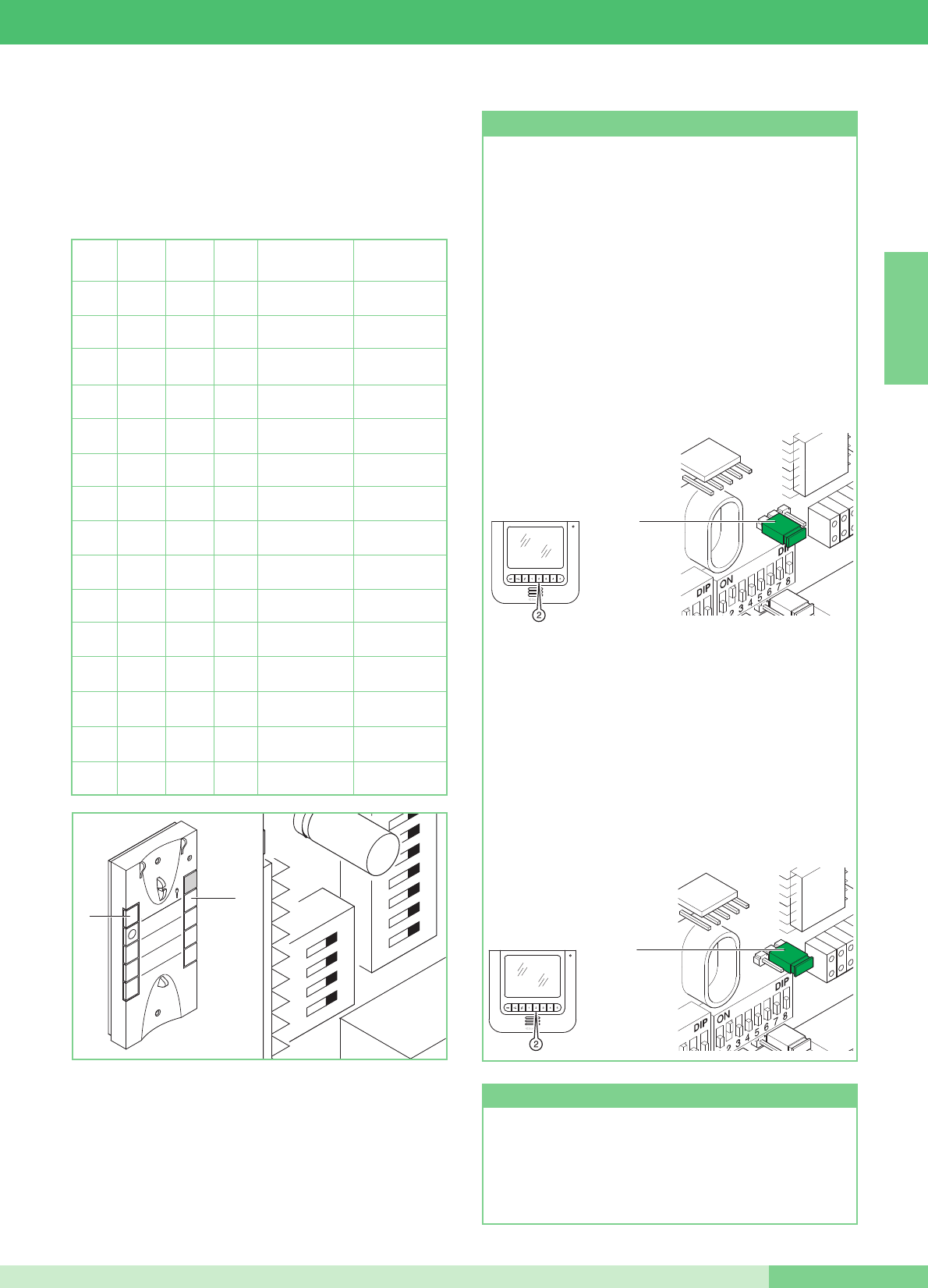
Setting door-entry phone (optional) Art. 2610
To extend the MAESTRO KIT system by adding the optional
door-entry phone Art. 2610, the table necessary for defining the
required door-entry phone functions is shown below.
DIP 1 DIP 2 DIP3 DIP 4 Button 1 function Button 2 function
0 0 0 0
Generic actuator Call
to switchboard
1
0 0 0
Call
to switchboard
Single-residence
Inter.
0
1
0 0
Call
to switchboard Two-residence Inter.
1 1
0 0
Generic actuator Single-residence
Inter.
0 0
1
0
Generic actuator Two-residence Inter.
1
0
1
0
Doctor Call
to switchboard
0
1 1
0
Doctor Generic actuator
1 1 1
0
Doctor Single-residence
Inter.
0 0 0
1Doctor Two-residence Inter.
1
0 0
1Single-residence
Inter. Two-residence Inter.
0
1
0
1Switchboard call Automatic switch-on
1 1
0
1Generic actuator Automatic switch-on
0 0
1 1 Doctor Automatic switch-on
1
0
1 1 Single-residence
Inter. Automatic switch-on
0
1 1 1 Two-residence Inter. Automatic switch-on
2
ON
U4
4
3
1
1
32
54
76
98
P1
P2
Self-ignition function (recommended only for systems with 1 or
2 entrances). Press and immediately release the dedicated
pushbutton (pushbutton 2 - if the factory settings have been
kept) to switch on the monitor. Self-ignition is possible only
when the system is in standby.
Self-ignition can be disabled.To disable the function, press and
hold the special monitor self-ignition pushbutton for more than 6
sec. When the setting has been completed, a single
confirmation tone will sound. To enable it, press and hold the
same pushbutton for more than 4 sec. In this case, a double
confirmation tone is heard.
Self-ignition and Video request function
Video Request on monitor with brackets Art. 5914KC set as
Secondary (see JP1 in figure, in position S).
The Video Request function does not need enabling; it allows a
monitor to be switched on following a call for the user from the
external unit.
Use of Video Request function: press and immediately release
Pushbutton 2 (pay attention to the MAESTRO KIT mode set by
means of the programming microswitches) to switch on the
monitor.
ENGLISH
MT KIT 13
37 MT KIT 13
JP1
PS
JP1
JP1
PS
JP1
To activate or deactivate the Privacy or Doctor functions, press
and hold the corresponding button until the red LED lights up or
goes out.
Privacy and Doctor services
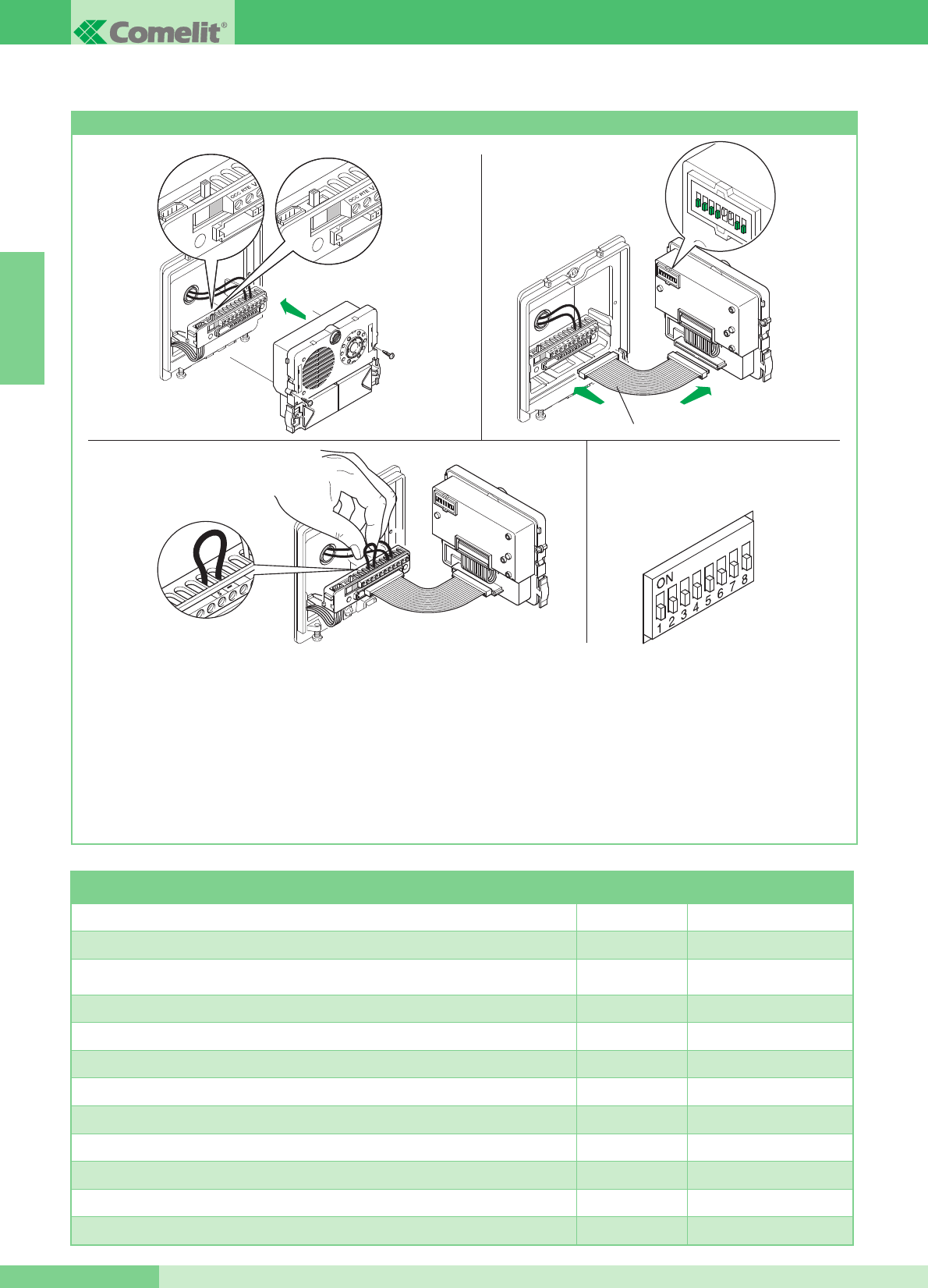
Special programming Art. 4660KC
A number of special programming operations can be carried out on
Art. 4660KC according to the various system requirements.
1. On the terminal block of article 4660KC, set the switch to
programming (red) (Figure 1A).
2. Using the microswitches of the article (Figure 2), set the code
for the function to be programmed. Use the following table as
a reference.
3. On the terminal block of article 4660KC, connect terminal S
with – (Figure 3).
4. Wait for a programming confirmation tone and remove the
jumper between terminal S and -.
5. At the end of the procedure, make sure you have set the switch
to standby (white) (Figure 2A), removed the jumpers between
terminals S and - and turned all the microswitches to OFF (0) as
shown in Figure 4.
To carry out further special programming, repeat the above
operations from point 1 to point 5.
12345678
ON DIP
Art. 3309
Fig. 1A Fig. 2A
Fig. 1
Fig. 3
Fig. 2
Fig. 4
Dip switches ON Configuration reference
number
10-second reset wait time (factory setting) 1,2,5,6,7,8 243
1-second reset wait time 3,5,6,7,8 244
Deactivation tone to confirm door lock release and door lock release time setting 2 seconds
(factory settings) 1,3,5,6,7,8 245
Activation of door lock release confirmation tone 2,3,5,6,7,8 246
Door lock release time 8 seconds 1,2,3,5,6,7,8 247
Sending single call (factory setting) 4,5,6,7,8 248
Sending call repeated 3 times 1,4,5,6,7,8 249
Door lock release control normally open (NO) (factory setting) 2,4,5,6,7,8 250
Door lock release control normally closed (NC) 1,2,4,5,6,7,8 251
Door lock release active even with no call (factory setting) 3,4,5,6,7,8 252
Door lock release only enabled for the user called 1,3,4,5,6,7,8 253
Reset of all factory settings 2,3,4,5,6,7,8 254
ENGLISH
GROUP S.P.A.
MT KIT 13 38
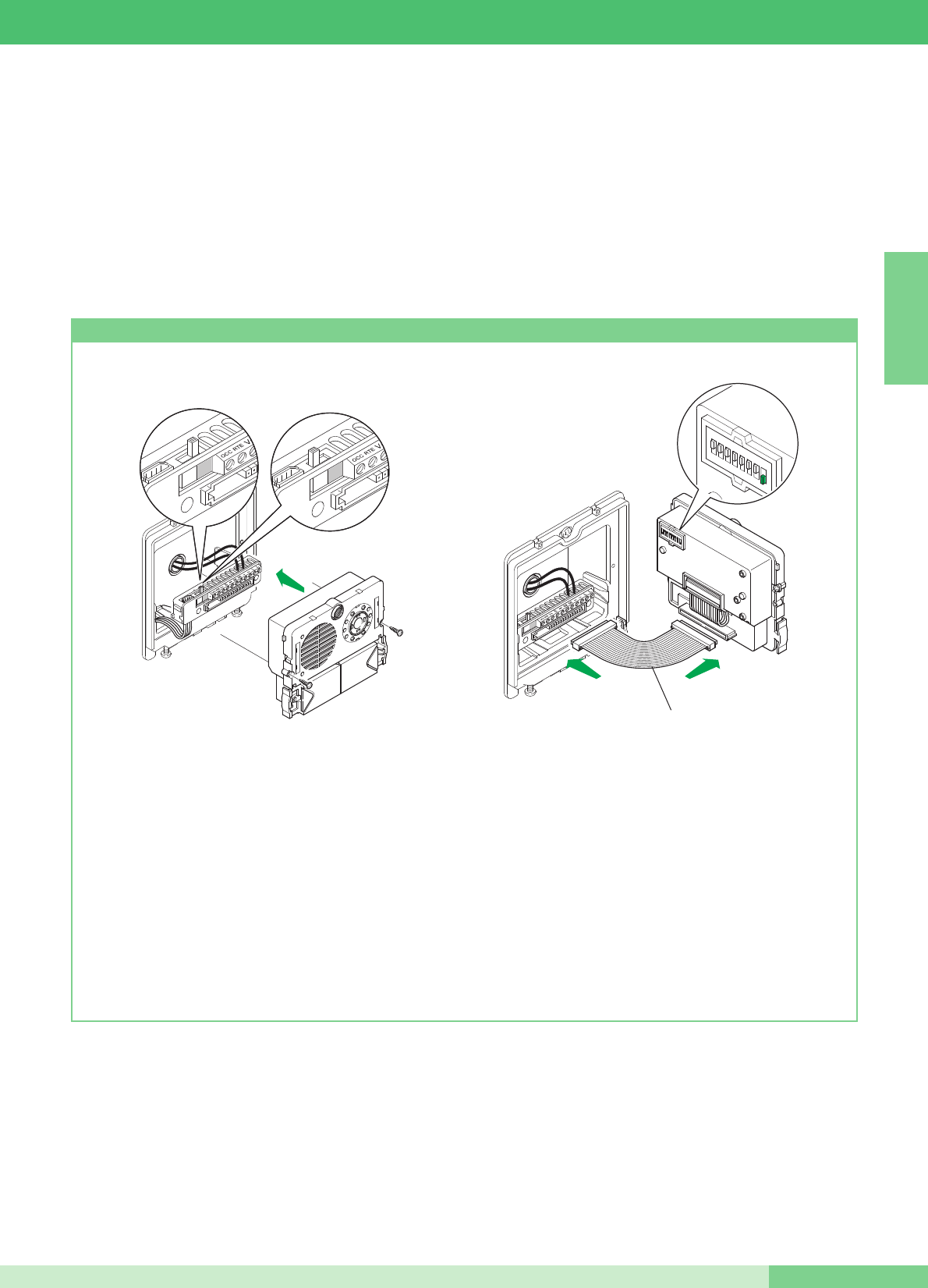
MAESTRO KIT SYSTEM EXPANDABILITY
procedure, and the brackets 5914KC with the corresponding code
(see table on page 33).
For further information on integration of the MAESTRO KITS in
Simplebus systems and for programming the main entrance panel
(Art. 4660C), refer to the Simplebus Color catalogue (Catalogue
no. 102), the MT/SBC/01 technical manual and the FT/SBC/04 or
FT/SBC/01 technical sheet.
The diagrams MK/EN/100C and MK/EN/101C on pages 78 and 80
show a possible system configuration for managing up to a max. of
30 MAESTRO KITS with one Art. 4660C placed, for example, at
the entrance of a residential complex.
With these system diagrams it is possible to call one of the
MAESTRO KITS from the main entrance equipped with Art. 4660C.
In this configuration it is necessary to program the pushbuttons of
Art. 4660C on Art. 4875KC or 4876KC as described in the following
Programming Art. 4660KC
1. On the terminal board of module Art. 4660KC connect the
power supply to ~~, set the switch to the programming
position (red) (Figure 1A).
Connect the terminal block to module Art. 4660KC assembled
as shown above.
NOTE: For connection between the terminal block and
module Art. 4660KC during the programming stage it is
possible to use the cable Art. 3309, available as an optional
accessory (figure 2).
2. Set the Dip switch located on the back of the audio-video
module, with the same code assigned to the door-entry phone
or monitor according to the alignment described in the
programming table on page 33.
3. Press the pushbutton to be associated with the door-entry
phone call or monitor. A confirmation tone signals that
programming has taken place.
4. At the end of programming, set the switch to standby (white)
(figure 2A).
12345678
ON DIP
Art. 3309
Fig. 1A Fig. 2A
Fig. 1 Fig. 2
ENGLISH
MT KIT 13
39 MT KIT 13

SOMMAIRE
•GÉNÉRALITÉS page 42
•POSTES EXTÉRIEURS
- Poste exterieur Art. 4875KC et Art. 4876KC page 42
- Réglage volume audio Art. 4875KC et Art. 4876KC page 42
- Caractéristiques techniques alimentateur Art. 1205/B page 42
- Instructions dʼinstallation Art. 4875KC, 4876KC page 43
•POSTES INTÉRIEURS
- Caractéristiques techniques moniteur couleurs Art. 5900 page 44
- Bride de fixation du moniteur Art. 5914KC page 44
- Installation murale moniteur Art. 5900 page 45
- Montage moniteur Art. 5900 sur la base de table Art. 5912 page 45
- Instructions pour installation combiné parlophonique Style
Art. 2608, 2628 et 2610 page 46
- Combiné parlophonique Style Art. 2608 page 47
- Combiné parlophonique Style Art. 2628 page 48
- Combiné parlophonique Style Art. 2610 page 49
•INDICATIONS GÉNÉRALES DʼINSTALLATION
ET FONCTIONNEMENT
- Tableau câbles et distances page 50
- Tableau programmations Art. 1216 page 51
•PROGRAMMATIONS ET DESCRIPTION
FONCTIONNEMENT SYSTÈME MAESTRO KIT
- Programmation Bride et Combiné parlophoniques page 52
- Tableau de programmation DIP switches pour code
usager sur brides et Combiné parlophoniques page 53
- Programmation bride Art. 5914KC principale ou secondaire page 53
- Tableau programmations fonctions Bride Art. 5914KC page 54
- Description programmations et fonctions boutons page 55
- Procédure sélection sonnerie Moniteur page 56
- Programmation Combiné parlophoniques en option Art. 2610 page 57
- Fonction Auto-allumage et Demande vidéo page 57
- Service Privacy et Docteur page 57
- Programmations spéciales Art. 4660KC page 58
•MODULARITÉ DU SYSTÈME MAESTRO KIT
- Programmation Art. 4660KC page 59
•MISE EN SERVICE/VÉRIFICATIONS TENSIONS
DʼINSTALLATION AU REPOS page 60
KIT VIDÉO MAESTRO-KIT COLOR
•SCHÉMAS DE BRANCHEMENT
- MK/01C Schéma base pour kit un appartement Art. 8493 page 61
- MK/02BC Schéma base pour kit deux appartements
Art. 8494 avec connexion en dérivation page 62
- MK/02AC Schéma base pour kit deux appartements
Art. 8494 avec connexion en cascade page 63
- MK/03BC Schéma pour kit deux appartements Art. 8494 complétés
avec un second Art. 4876KC. Connexion en dérivation page 64
- MK/03AC Schéma pour kit deux appartements Art. 8494 complétés
avec un second Art. 4876KC. Connexion en cascade page 65
- MK/04BC Schéma pour kit deux appartements complétés avec
un second Art. 4876KC, un autre moniteur secondaire et un
combiné parlophonique pour chaque famille. Connexion en
dérivation page 66
- MK/04AC Schéma pour kit deux appartements complétés avec
un second Art. 4876KC, un autre moniteur principal et un
combiné parlophonique pour chaque appartement.
Connexion en cascade page 67
- MK/01/AC Schéma pour kit un appartement avec alimentation
complémentaire Art. 1395 page 68
•VARIANTES DE CONNEXION
- MK/05C Emploi module caméra déportée Art. 1259C page 69
- SB2/AAR Connexion amplificateur vidéo Art. 4833C page 70
- MK/HC Adjonction dʼun moniteur principal en parallèle,
connexion en cascade page 70
- MK/IC Adjonction dʼun moniteur principal en parallèle,
connexion en dérivation page 71
- MK/CC Connexion en cascade dʼun moniteur principal
et dʼun moniteur secondaire avec le même code usager page 71
- MK/DC Adjonction dʼun combiné en parallèle en
dérivation du montant page 72
- MK/AAB Connexion combinés supplémentaires
en dérivation du moniteur page 72
- MK/AAA Connexion combinés supplémentaires
en cascade du moniteur page 73
- BK/EC Adjonction pilotage éclairage extérieur par Art. 1256 page 73
- MK/AC Adjonction actionneur Art. 1256 page 74
- BK/OC Variante connexion ouvre-porte local temporisé page 74
- BK/OAC Variante utilisation signalisation PORTE OUVERTE page 75
- SB2/AAK Connexion de dispositifs de répétition dʼappel
(Art. 1229 ou Art. 1122/A) page 75
- Variante A :
Validation (ON) / invalidation (OFF) réponse automatique page 76
- Variante B :
Validation (ON) / invalidation (OFF) sonnerie durant la
fonction Docteur page 76
- Variante C : Adjonction bouton dʼappel hors-porte page 76
- MK/PC Utilisation bouton 5 pour divers usages page 77
- MK/NC Variante pour utilisation bornes +LED -LED page 77
- MK/EN/100C Schéma pour connexion à porte principale de
3 MAESTRO KIT par Art. 4834/9 page 78
- MK/EN/101C Schéma de connexion à porte principale avec
standard Art. 1998A (option) de 30 MAESTRO KIT (maximum).
Dérivation Maestro Kit de 1214KC page 80
FRANÇAIS
MT KIT 13
MT KIT 13
41
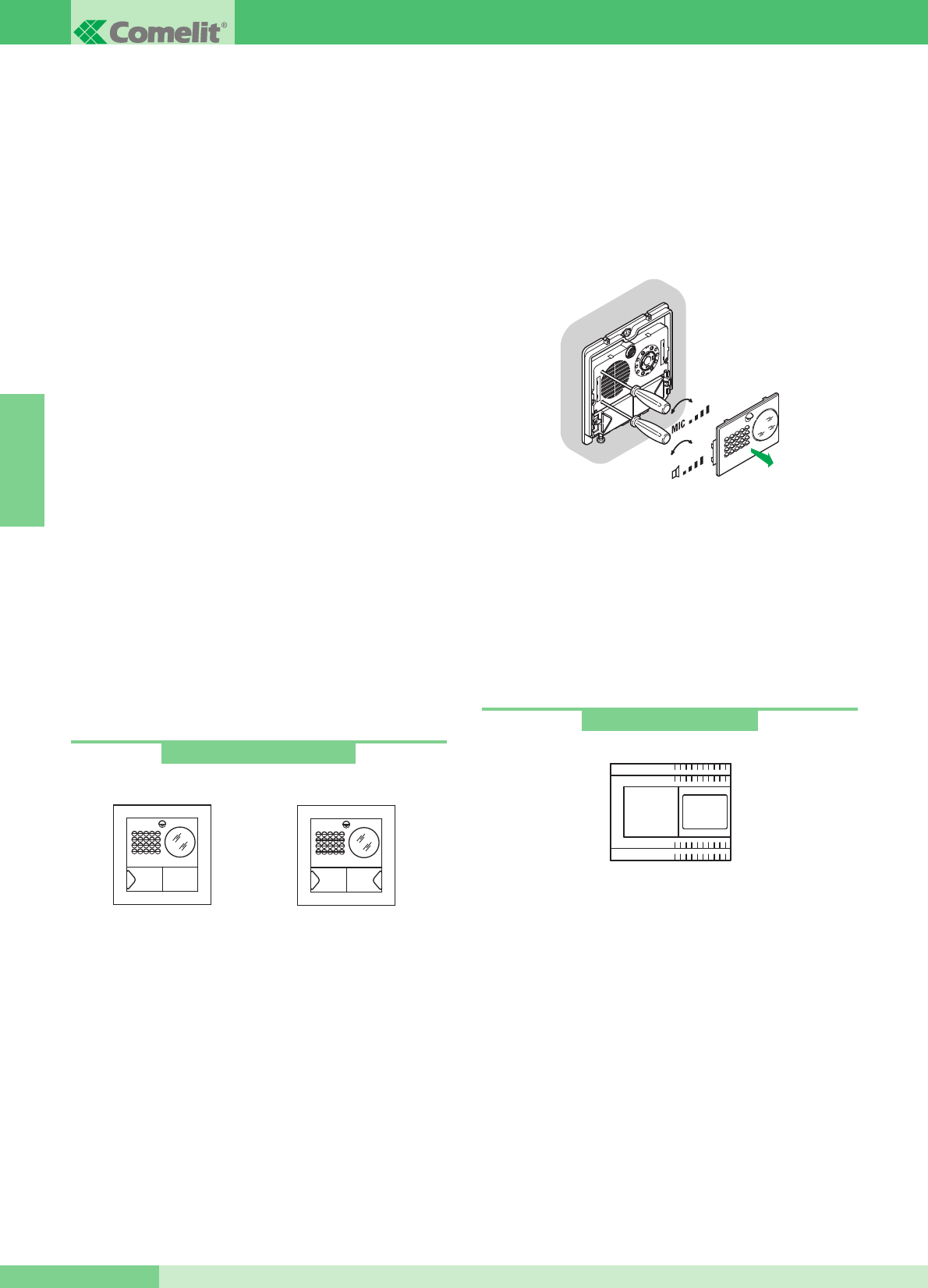
GROUP S.P.A.
GÉNÉRALITÉS
Les Kit Visiophoniques pour un appartement Art. 8493, 8493B,
8493G et deux appartements Art. 8494, 8494B, 8494G peuvent être
utilisés dans des bâtiments privacys ou tertiaires dans lesquels un
contrôle efficace de lʼaccès est demandé face à de simples
opérations dʼinstallation.
En effet, 2 conducteurs suffisent entre la plaque de rue et le/s
moniteur/s interne/s pour activer le système (appel, phonie, vidéo,
auto-allumage) plus deux fils pour alimenter à 12V CA la plaque de
rue et lʼélectro-serrure. En outre, une vaste gamme dʼaccessoires est
disponible pour résoudre facilement chaque exigence dʼinstallation ;
en effet, outre des accessoires intéressants de type standard, il est
possible dʼagrandir lʼinstallation en ajoutant des visiophones et/ou
des combinés et/ou des plaques de rue.
Il est ainsi possible dʼatteindre un nombre maximum de deux
plaques de rue avec trois postes intérieurs entre combinés et
visiophones pour la configuration à un appartement et deux plaques
de rue avec six postes internes entre combinés et visiophones (trois
par bouton dʼappel) pour la configuration à deux appartements.
Au moyen de programmations opportunes (comme dʼaprès le
tableau page 54), il est possible dʼeffectuer des communications
intercommunicantes pour un appartement (cʼest-à-dire entre utilisa-
teurs avec le même code utilisateur) et communications intercommu-
nicantes pour deux appartements (cʼest-à-dire entre utilisateurs
nʼayant pas le même code utilisateur) en utilisant tant les
Visiophones que les Combinés. Plusieurs kits peuvent être reliés à un
port principal Simplebus et/ou à un standard Art. 1998A.
POSTES EXTÉRIEURS
Caractéristiques techniques
Connexion au moniteur avec 2 fils pour audio, vidéo, ouvre-porte et
appel plus 2 fils pour alimentation par Art. 1205/B.
Caméra orientable à haute sensibilité avec capteur CCD 1/3”.
Éclairage à Leds blanches.
Réglage volume micro et haut-parleur. Bouton dʼappel en
aluminium avec étiquette sʼextrayant par le devant. Cadre porte-
modules en aluminium moulé sous pression.
Dimensions boîtier à encastrer : 127x127x45 mm.
Le bouton de lʼarticle 4875KC est réglé en usine pour effectuer
lʼappel à lʼadresse 1 alors que pour lʼarticle 4876KC les boutons
sont programmés pour effectuer des appels aux adresses 1
(bouton de gauche) et 2 (bouton de droite).
Dimensions poste externe : 125x125 mm.
Description bornier
LL connexion moniteur (vidéo, appel, phonie, ouvre-porte)
SE-SE connexion électro-serrure
~ ~ alimentation poste externe
PR borne de programmation
-borne négative à utiliser en phase de programmation
Sborne de programmation
RTE entrée ouvre-porte local temporisé OCC., V+ (non utilisées)
Réglage son
Le module de la plaque de rue comprend deux réglages :
volume plaque de rue, indiqué par le symbole du haut-parleur et
réglage du volume du poste intérieur indiqué par le système du
micro.
Réglage orientation caméra
Sʼil est nécessaire de modifier le réglage de la caméra, procéder
comme indiqué page 43.
112
Art. 4875KC - 4876KC
Art. 4875KC Art. 4876KC
+-
+-
Caractéristiques techniques
Le transformateur prévoit 2 sorties : une pour alimenter le poste
externe et lʼélectro-serrure et une pour alimenter le moniteur.
Dimensions : 105x85x85 mm (6 modules DIN).
Fusible de protection 500 mA retardé.
Description bornier
230 V CA entrée tension de réseau
~~ sortie CA pour poste externe et électro-serrure
+ - sortie 20 V CC dʼalimentation du moniteur
Art. 1205/B
FRANÇAIS
GROUP S.P.A.
MT KIT 13 42
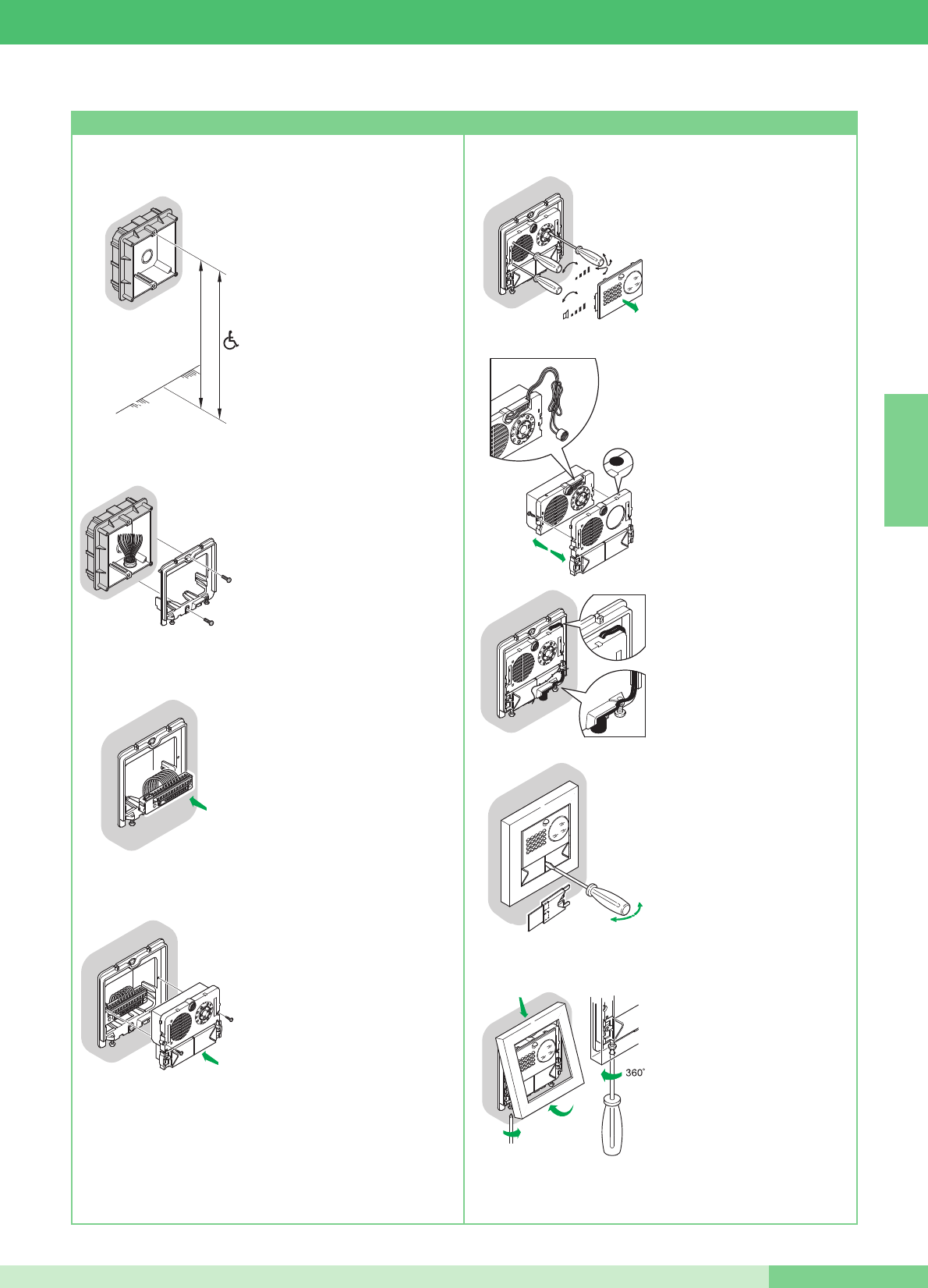
• Murer le boîtier à 160÷165 cm
du sol fini, dans une zone aisée
pour voir le visiteur.
Si possible, ne pas lʼorienter
vers le soleil ou vers des
sources de lumière directe
(lampes, surfaces
réfléchissantes etc.)
• Fixer le châssis sur le boîtier à
encastrer en utilisant les 2 vis
fournies.
• Insérer le bornier et effectuer la
connexion des conducteurs
comme dʼaprès le
schéma.
• Insérer le module à
enclenchement sur la borne et le
fixer avec les 2 vis fournies.
• Enlever la façade en acier inox
pour effectuer les réglages des
volumes et lʼorientation de la
caméra.
NOTE Desserrer légèrement
les quatre vis pour débloquer
lʼorientation de la caméra.
• Position alternative du micro.
• Pour enlever lʼétiquette porte-
noms, insérer dans la fente
centrale la pointe dʼun tournevis
et lʼextraire.
• Une fois les réglages terminés,
fixer le cadre en agissant sur
les 2 vis inférieures.
NOTE Pour enlever le cadre,
dévisser les 2 vis inférieures en
effectuant une rotation de 360°
maximum.
Instructions dʼinstallation Art. 4875KC, 4876KC
FRANÇAIS
MT KIT 13
43 MT KIT 13
160 - 165 cm
135 - 140 cm
OPEN
1
2
3
CLOSE
MIC
4
5
2
3
1
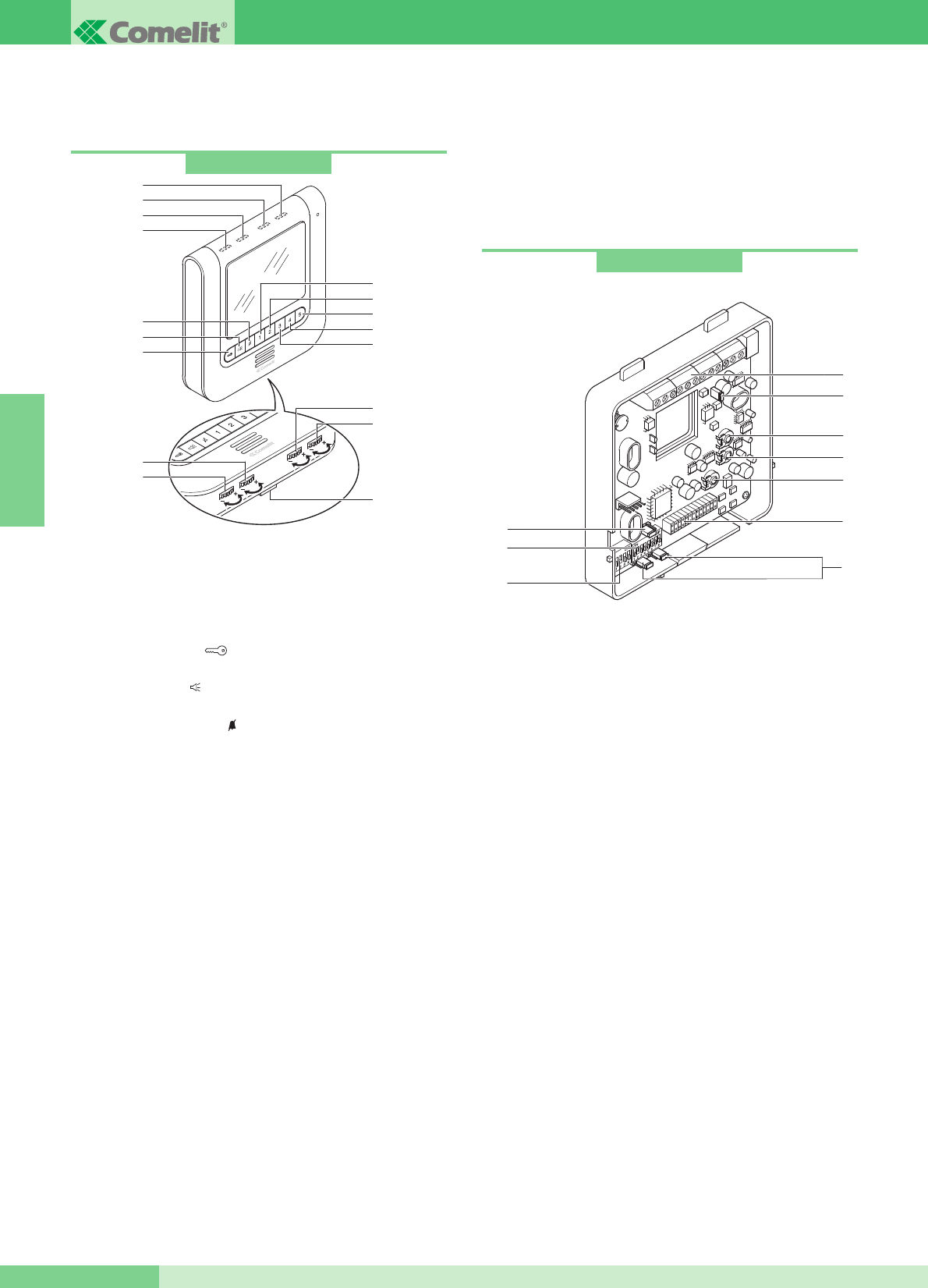
Art. 5914KC
POSTES INTÉRIEURS
Caractéristiques techniques moniteur couleurs Art. 5900
Moniteur mural de la série Maestro de dimensions 185x185x38 mm
du mur, avec écran couleurs de 5,6ʼʼ. Le moniteur peut également
être placé sur une table au moyen de son support spécial Art.
5912.
1Bouton ouvre-porte .
2Bouton pour brancher et débrancher la fonction phonique
après un appel ( ). Après lʼactivation (led bleue allumée), la
conversation est en mode automatique Parler/Écouter.
3Bouton service Privacy . Le service Privacy exclut lʼappel de
la plaque de rue ou du standard de conciergerie ; lʼactivation de
la fonction Privacy est indiquée par lʼallumage de la Led rouge.
4Bouton 1 par défaut pour fonction Appel à standard. (A)
5Bouton 2 par défaut pour fonction Auto-allumage. (A)
6Bouton 3 par défaut pour fonction Actionneur. (A)
7 Bouton 4 par défaut pour fonction PARLER/ÉCOUTER
manuelle : avec moniteur pour en phonie, appuyer sur le
bouton pour parler et le relâcher poue écouter. (A)
8
Bouton 5 programmé en usine pour activation fonction Docteur. (A) (B)
9Led jaune de signalisation porte ouverte ou signalisations
diverses (voir variante MK/NC, pag. 77).
10 Led bleue de signalisation phonique (lʼallumage indique que la
phonie est activée).
11 Led verte de signalisation ; durant une communication elle
signale lʼétat de la conversation :
- éteinte : sur ce moniteur on entend la phonie provenant de la
plaque de rue ou dʼun autre appareil intercommunicant ;
- allumée : la phonie provenant de ce moniteur sʼentend dans
la plaque de rue ou dans un autre appareil intercommunicant.
12 Led rouge de signalisation poste intérieur occupé services
Privacy ou Docteur actifs.
13 Réglage intensité de la couleur.
14 Réglage luminosité.
15 Réglage volume de la sonnerie.
16 Réglage volume phonie.
17 Crochet de fixation.
Bride de fixation du moniteur
La bride de fixation Art. 5914KC permet dʼinstaller le moniteur sur
le mur ou avec la base de table Art. 5912 (pour plus dʼinformations
voir page 45).
Caractéristiques techniques
1Connecteur Bride-Moniteur.
2Bornier pour le raccordement de lʼinstallation :
CFP CFP Entréé de lʼappel depuis lʼétage (voirvariante C page 76).
+ - Bornes de connexion avec Art. 1205/B ou 1212/B.
L L Bornes de connexion ligne Bus.
P5 C5 Contacts pour Bouton 5 utisé pour divers usages (voir
variante MK/PC page 77).
Pour utiliser les bornes P5 C5 comme contact libre, déplacer
CV3 et CV4 en position C.NO.
+S -S Bornes pour dispositif répétition dʼappel (voir variante
SB2/AAK page 75).
+LED -LED Bornes entrée Leds pour usages divers (voir
variante MK/NC page 77).
3JP1Jumper pour programmer la bride comme Principale (P) ou
Secondaire (S) (voir page 53).
4S1DIP switches pour la programmation du code utilisateur.
5S2DIP switches pour divers réglages.
6 CV3 CV4 Jumper pour libérer le bouton 5 (contact C.NO. 24V-
100mA max).
7 CV5 Jumper de débranchement video.
8 TM1 Volume micro.
9 TM2 Volume haut-parleur.
10 TM3 Sensibilité du micro pour la commutation des canaux de
phonie (réglée en position idéale par le producteur).
Art. 5900
1
2
3
6
7
8
5
4
9
11
10
12
13
14
16
15
17
(A) Bouton de série disponible pour différentes fonctions comme
indiqué page 54
(B) Bouton à libérer
Possibilité dʼutiliser pour le même appartement jusquʼà un
maximum de 3 moniteurs.
GROUP S.P.A.
FRANÇAIS
GROUP S.P.A.
MT KIT 13 44
6
3
4
5
9
10
8
7
2
1
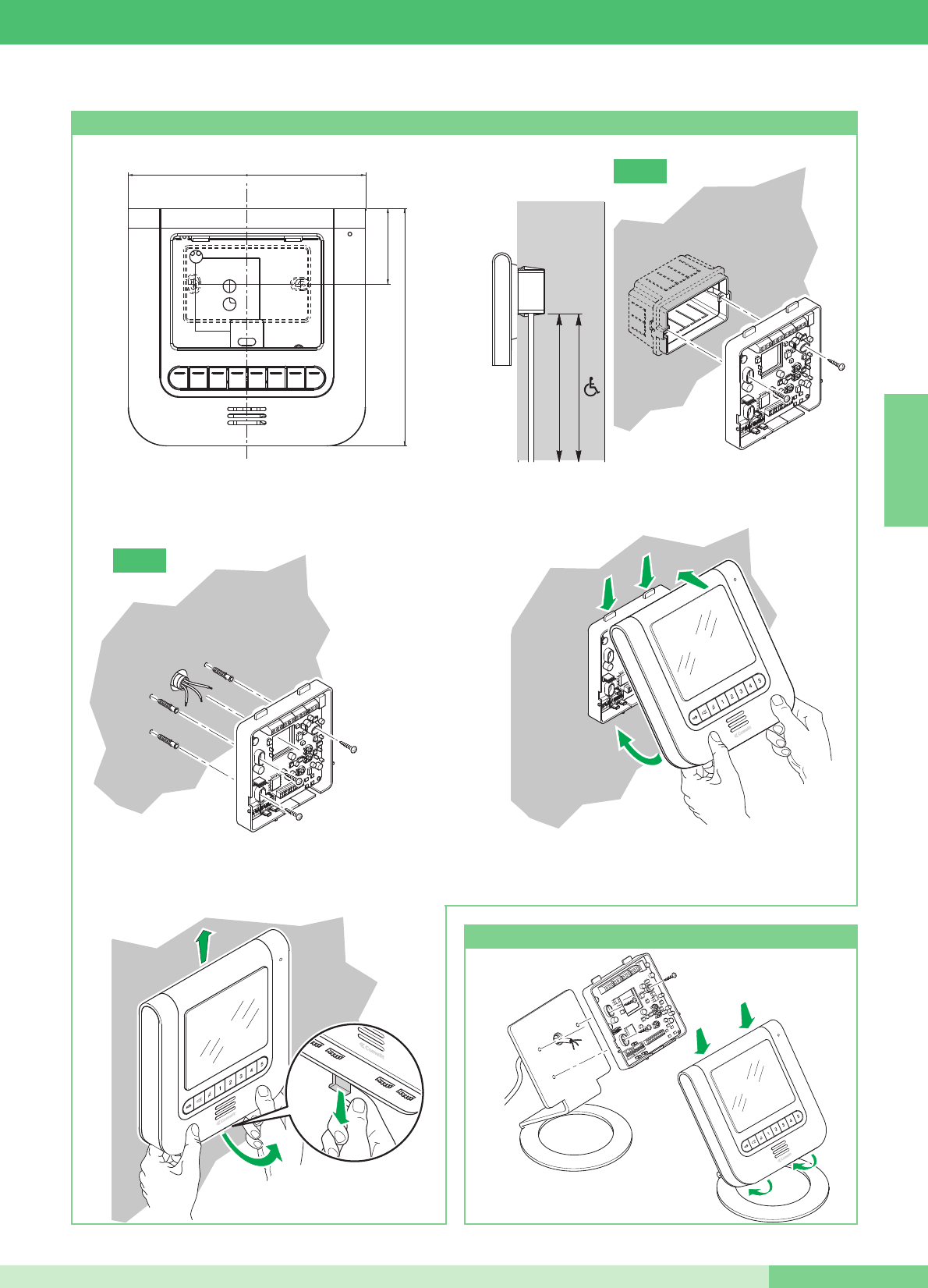
2
21
3
CLICK!
115 - 120 cm
140 - 145 cm
Installation moniteur Art. 5900 mural
2
1
1
2
Art. 5912
Installation moniteur Art. 5900 sur la base de table Art. 5912
==
18,5 cm
5,9 cm
18,5 cm
3
2
1
FRANÇAIS
MT KIT 13
45 MT KIT 13
B
A
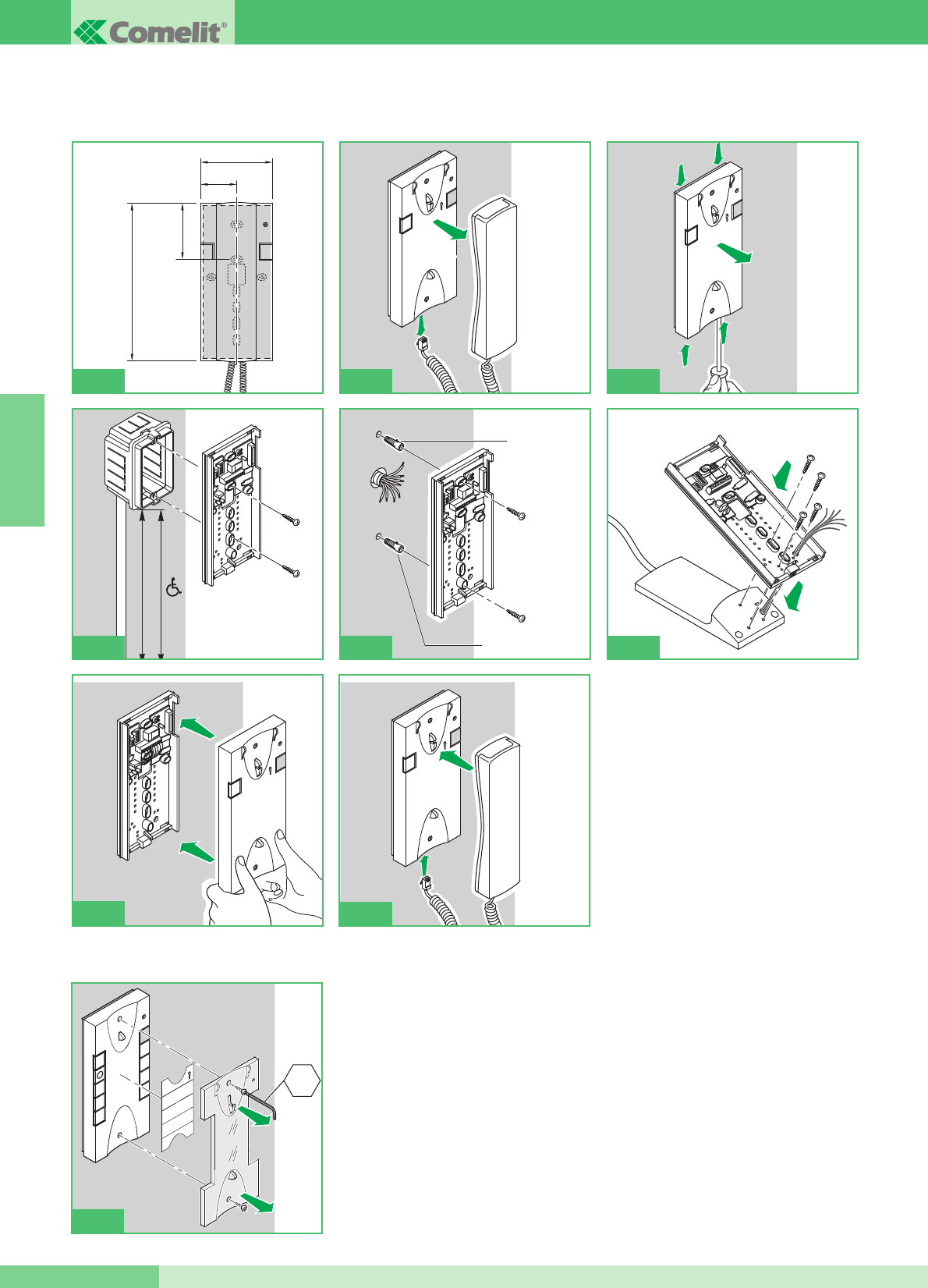
Instructions pour combiné parlophonique Style Art. 2608, 2628 et 2610
Façade interchangeable disponible pour les Art. 2628 et Art. 2610
1
2
115 - 120 cm
140 - 145 cm
4A
Ø 5mm max
Ø 5mm max
4B
95mm
47,5mm
75,5mm
215mm
1
1
1
1
1
2
3
1
4
2
2
56
2
4
6
1
3
5
7
9
2
8
CH2
7
1
2
4C
GROUP S.P.A.
FRANÇAIS
GROUP S.P.A.
MT KIT 13 46
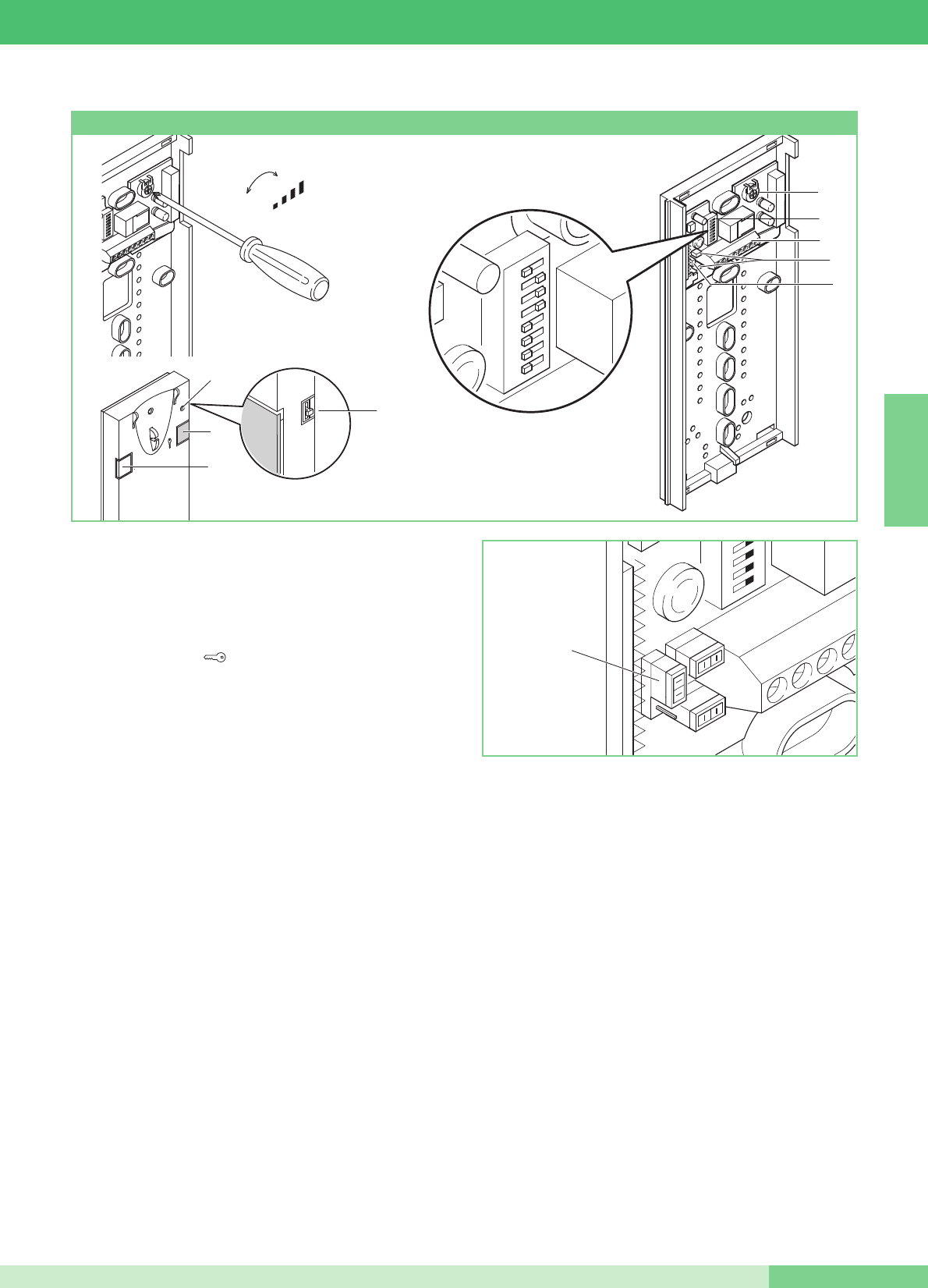
+
-
MIC
12345678
c
A
3
9
8
5
7
6
JP1
4
1
2
Combiné Basic avec 2 boutons de série.
Non utilisable pour la fonction intercommunicante.
Le combiné doit être monté en utilisant lʼArt. 1214/2C comme
lʼinterphone le schéma de connexion MK/DC page 72.
1. Bouton ouvre-porte .
2. Bouton P1 appel standard / actionneur générique / bouton pour
usages divers présent sur le bornier (P1 C1).
3. Sélecteur sonnerie/service Privacy à 3 positions :
Position haute : sonnerie volume maximum.
position centrale : sonnerie volume moyen.
Position basse : activation de la fonction Privacy
(Le Service Privacy exclut lʼappel de la plaque de rue ou du
standard de conciergerie ; lʼactivation de la fonction Privacy est
indiquée par lʼapparition dʼun indicateur rouge en haut à droite).
4. Voyant de la fonction Privacy.
5. Bornes pour le raccordement de lʼinstallation :
L L connexion à la ligne bus.
CFP CFP entrée de lʼappel depuis lʼétage.
P1 C1 bornes bouton P1 C. NO. 24V 100mA dédié aux services
divers (enlever CV1 et CV2).
S+ S- bornes pour le dispositif de répétition de lʼappel.
6. JP1 cavalier pour sélectionner la fonction Appel standard
(position C) / Actionneur générique (position A) du bouton P1
(voir figure ci-contre).
7. CV1 CV2 cavalier à retirer pour avoir un contact libre C. NO. sur
le bouton P1.
8. DIP Microswitches pour la programmation du code usager (voir
tableau page 53).
9. Potentiomètre de réglage du volume du microphone.
Nettoyer avec un chiffon humidifié avec de lʼeau. Éviter dʼutiliser de
lʼalcool ou dʼautres produits agressifs.
Combiné parlophonique Style Art. 2608
FRANÇAIS
MT KIT 13
47 MT KIT 13
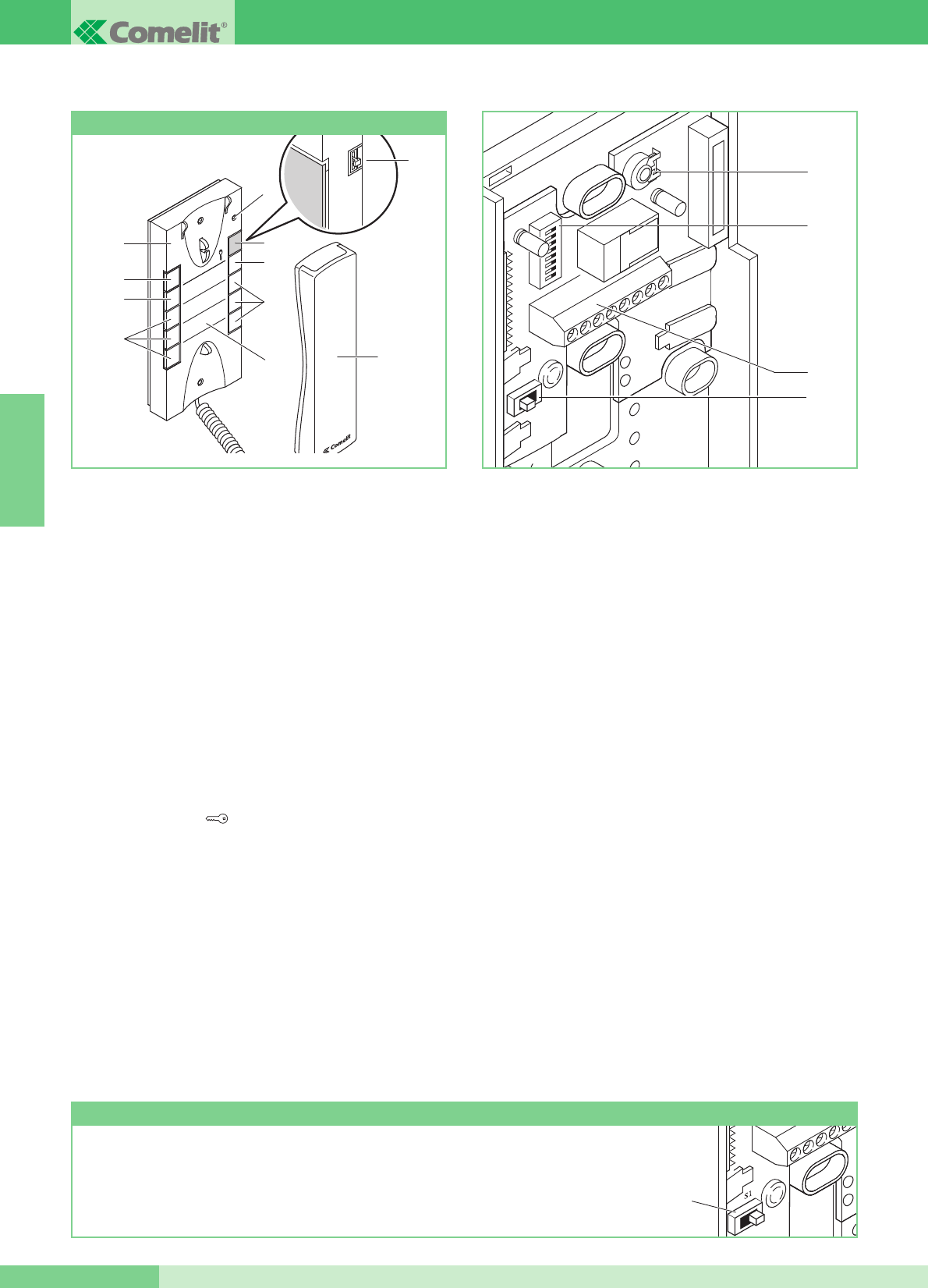
Combiné Elegance avec fonctions et boutons supplémentaires.
Non utilisable pour la fonction intercommunicante.
Le combiné doit être monté en utilisant lʼArt. 1214/2C comme
lʼinterphone le schéma de connexion MK/DC page 72.
Important : pour le paramétrage correct de lʼarticle en phase
dʼinstallation dans un système MAESTRO KIT, se référer à la remarque
ci-dessous.
1. Sélecteur sonnerie/service Privacy à 3 positions :
Position haute : sonnerie volume maximum.
position centrale : sonnerie volume moyen.
Position basse : activation de la fonction Privacy
(Le Service Privacy exclut lʼappel de la plaque de rue ou du
standard de conciergerie ; lʼactivation de la fonction Privacy est
indiquée par lʼapparition dʼun indicateur rouge en haut à droite).
2. Voyant de la fonction Privacy.
3. Bouton 1 disponible de série pour la fonction Actionneur
générique.
4. Bouton ouvre-porte .
5. Bouton 2 disponible de série pour la fonction dʼappel au standard
de conciergerie.
6. Bouton 3 pour diverses utilisations présent dans le bornier (P3
C3).
7. Boutons C. NO. ou Led (MAXIMUM 3) en option pour fonctions
supplémentaires. (A)
8. Façade interchangeable ; voir fig. 7, page 46.
9. Étiquette des boutons de mémoire sur laquelle il est possible
dʼindiquer les fonctions du combiné parlophonique (à insérer sous
la façade interchangeable), comme indiqué à la figure 7 page 46.
10. Combiné de lʼappareil (saisir le interphone pour commencer la
communication).
(A) Bouton disponible avec carte en option Art. 1626.
Voyant de signal disponible avec la carte en option Art. 1627.
11. Bornes pour le raccordement de lʼinstallation :
L L connexion à la ligne bus.
CFP CFP entrée de lʼappel depuis lʼétage.
P3 C3 bornes bouton P3 C. NO. 24V 100mA dédié aux
services divers.
S+ S- bornes pour le dispositif de répétition de lʼappel.
12. SW3 Cavalier pour la sélection entre modalité Simplebus 1 et
Simplebus 2.
13. DIP switch U2 pour la programmation du code usager (voir
tableau page 53).
14. Potentiomètre de réglage du volume du microphone.
Nettoyer avec un chiffon humidifié avec de lʼeau. Éviter dʼutiliser de
lʼalcool ou dʼautres produits agressifs.
ATTENTION !
POUR UTILISER LE COMBINÉ PARLOPHONIQUE ART. 2628 DANS DES INSTALLATIONS
MAESTRO KIT, IL EST NÉCESSAIRE DE DÉPLACER LE SÉLECTEUR SW3 EN POSITION S1.
1
32
54
76
98
8
3
6
7
9
7
5
4
2
1
10
Combiné parlophonique Style Art. 2628
GROUP S.P.A.
FRANÇAIS
GROUP S.P.A.
MT KIT 13 48
14
13
11
12
SW3
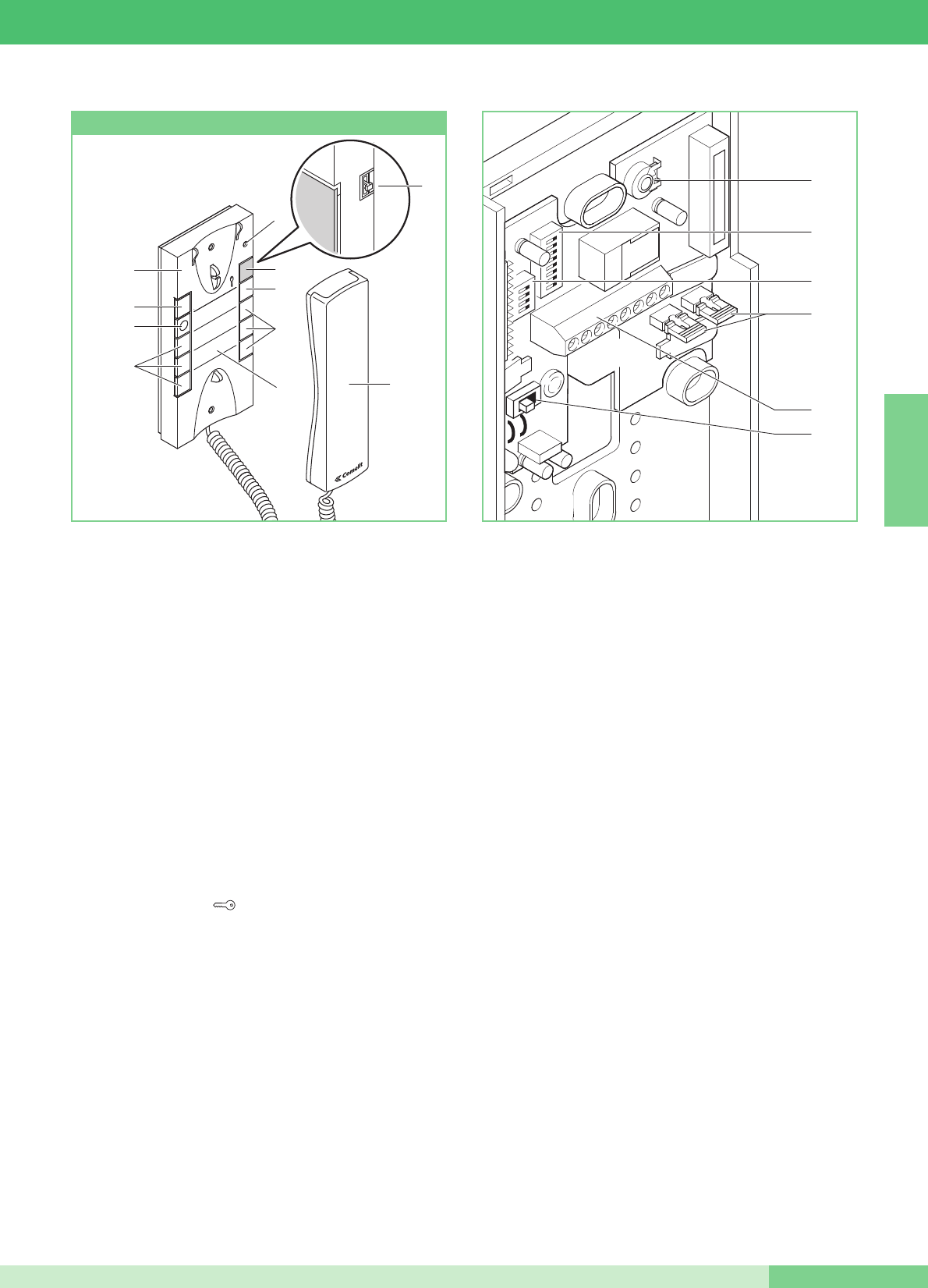
1
32
54
76
98
Combiné parlophonique Elegance avec fonctions et boutons
supplémentaires et service intercommunicant.
LʼArt. 2610 a la possibilité (par paramétrage spécial) de gérer des
communications intercommunicantes et dʼautres fonctions
supplémentaires (voir tableau récapitulatif page 54).
Le combiné parlophonique doit être monté en utilisant lʼArt.
1214/2C comme lʼindique le schéma de connexion MK/DC page
72.
1. Sélecteur sonnerie/service Privacy à 3 positions :
Position haute : sonnerie volume maximum.
position centrale : sonnerie volume moyen.
Position basse : activation de la fonction Privacy
(Le Service Privacy exclut lʼappel de la plaque de rue ou du
standard de conciergerie ; lʼactivation de la fonction Privacy
est indiquée par lʼapparition dʼun indicateur rouge en haut à
droite).
2. Voyant de la fonction Privacy.
3. Led de signalisation (disponible de série).
4. Bouton ouvre-porte .
5. Bouton 1 disponible de série (programmable avec
différentes fonctions, voir tableau page 57. Programmé en
usine pour la fonction Actionneur générique).
6. Bouton 2 disponible de série (libre ou programmable avec
différentes fonctions, voir tableau page 57).
Programmé en usine pour fonction appel à standard.
7. Boutons C. NO. ou Led (MAXIMUM 3) en option pour
fonctions supplémentaires. (A)
8. Façade interchangeable Fig. 7 page 46.
9. Étiquette mémo-boutons sur laquelle on peut indiquer la
fonction des boutons du combiné parlophonique (à
appliquer sous la façade interchangeable) Fig. 7 page 46.
10. Combiné de lʼappareil (saisir le interphone pour commencer
la communication).
(A) Bouton disponible avec carte en option Art. 1626.
Voyant de signal disponible avec carte en option
Art. 1627.
11. Bornes pour le raccordement de lʼinstallation :
L L connexion à la ligne bus.
CFP CFP entrée de lʼappel depuis lʼétage.
P2 C2 bornes bouton P2 C. NO. 24V 100mA dédié aux
services divers (enlever CV2 et CV3).
S+ S- bornes pour le dispositif de répétition de lʼappel.
12. SW3 Cavalier pour la sélection entre modalité Simplebus 1 et
Simplebus 2.
13. CV3 CV2 Cavalier à retirer pour disposer du bouton P2 C. N.O.
14. DIP switch U2 pour la programmation du code usager (voir
tableau page 53).
15. DIP switches U4 pour la programmation des boutons P1 et P2
(voir tableau page 57).
16. Potentiomètre de réglage du volume du microphone.
Nettoyer avec un chiffon humidifié avec de lʼeau. Éviter dʼutiliser de
lʼalcool ou dʼautres produits agressifs.
8
3
6
7
9
7
5
4
2
1
10
Combiné parlophonique Style Art. 2610
FRANÇAIS
MT KIT 13
49 MT KIT 13
16
14
15
13
11
12
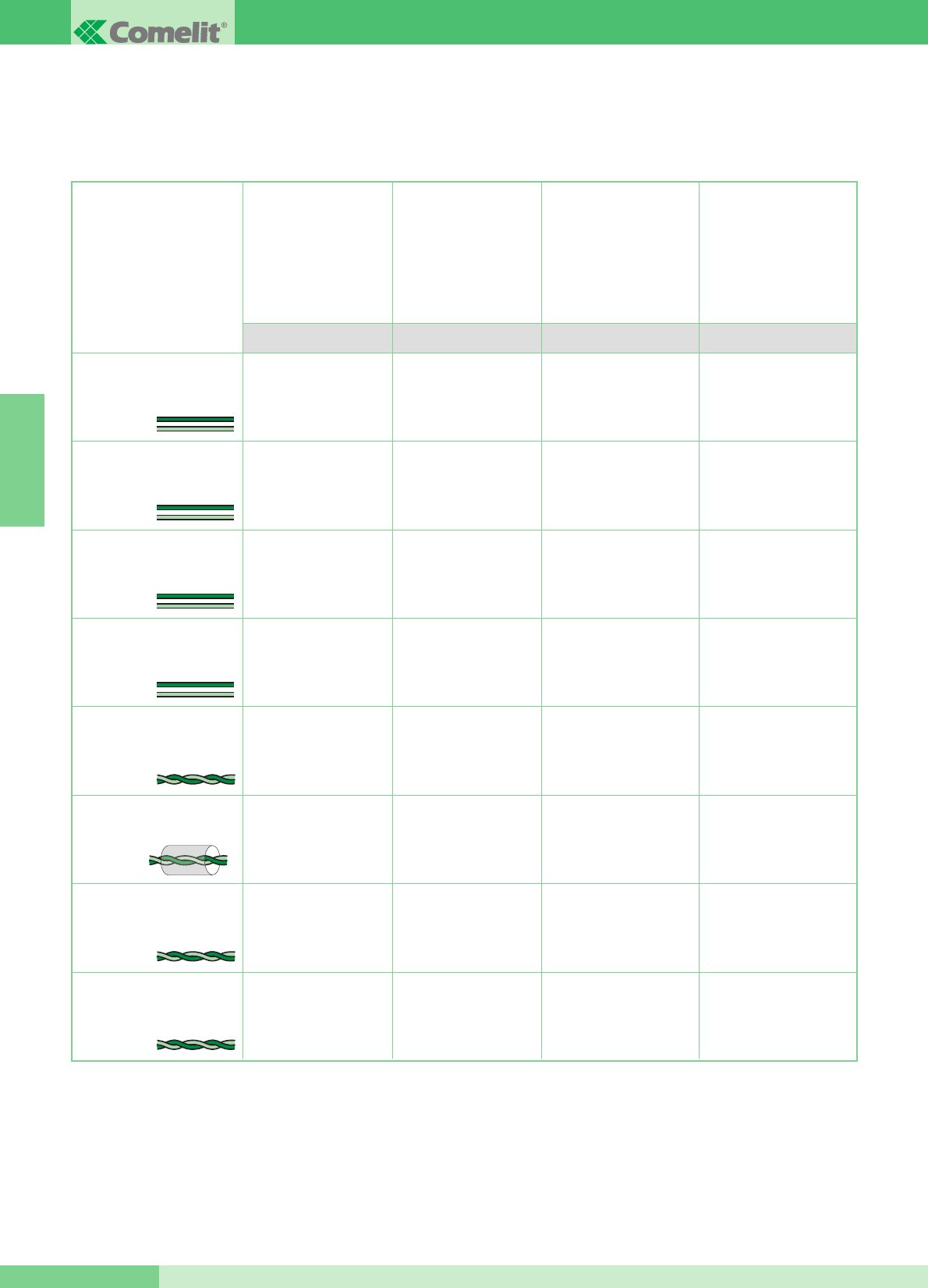
Distance maximum entre
poste externe
4875KC ou
4876KC et le 4833C ou
1214/2 le plus éloigné.
Distance maximum entre
4833C et le 1214KC
le plus éloigné
Distance maximum entre
le moniteur et le 1214KC
Cette section du manuel comprend toutes les indications concernant la phase dʼinstallation du système MAESTRO KIT.
La distance maximum totale entre le poste externe et le moniteur le plus éloigné est de 400 m.
INDICATIONS GÉNÉRALES DʼINSTALLATION ET FONCTIONNEMENT
Section ou type de câble Distance maximum entre
alimentateur 1205/B ou
1395 et poste externe
4875KC et 4876KC
Distance maximum entre
alimentateur 1205/B ou
1212/B et moniteur
alimenté
A/G B/E C/F D
Câble bifilaire (sect. 0,5 mm2
Ø 0,8 mm AWG 20)**
Câble bifilaire (sect. 1 mm2
Ø 1,2 mm AWG 17)**
Câble bifilaire (sect. 1,5 mm2
Ø 1,4 mm AWG 15)**
Câble bifilaire (sect. 2,5 mm2
Ø 1,8 mm AWG 13)**
Boucle téléphonique twistée
(sect. 0,28 mm2 Ø 0,6 mm
AWG 23)*
Câble tressé et blindé (sect.
1 mm2 Ø 1,2 mm
AWG 17)*
UTP5 Cat 5 (sect. 0,2 mm2
Ø 0,5 mm AWG 24)*
Câble Comelit Art. 4576
et Art. 4578 (sect. 0,5 mm2
Ø 0,8 mm AWG 20)*
* Lorsque lʼon utilise un câble multipaires torsadées, on doit utiliser uniquement une paire torsadée disponible.
Sʼil est nécessaire de diminuer les chutes résistives, utiliser la paire torsadée comme un fil simple.
** Dans le cas dʼun câble multifils, il ne faut utiliser que deux des fils disponibles et ne jamais mettre plusieurs fils en parallèle.
20 m
(65 feet)
40 m
(130 feet)
60 m
(195 feet)
100 m
(325 feet)
25 m
(85 feet)
50 m
(165 feet)
100 m
(325 feet)
150 m
(495 feet)
150 m
(495 feet)
150 m
(495 feet)
150 m
(495 feet)
150 m
(495 feet)
100 m
(325 feet)
150 m
(495 feet)
150 m
(495 feet)
40 m
(130 feet)
40 m
(130 feet)
40 m
(130 feet)
40 m
(130 feet)
20 m
(65 feet)
40 m
(130 feet)
50 m
(165 feet)
GROUP S.P.A.
FRANÇAIS
GROUP S.P.A.
MT KIT 13 50
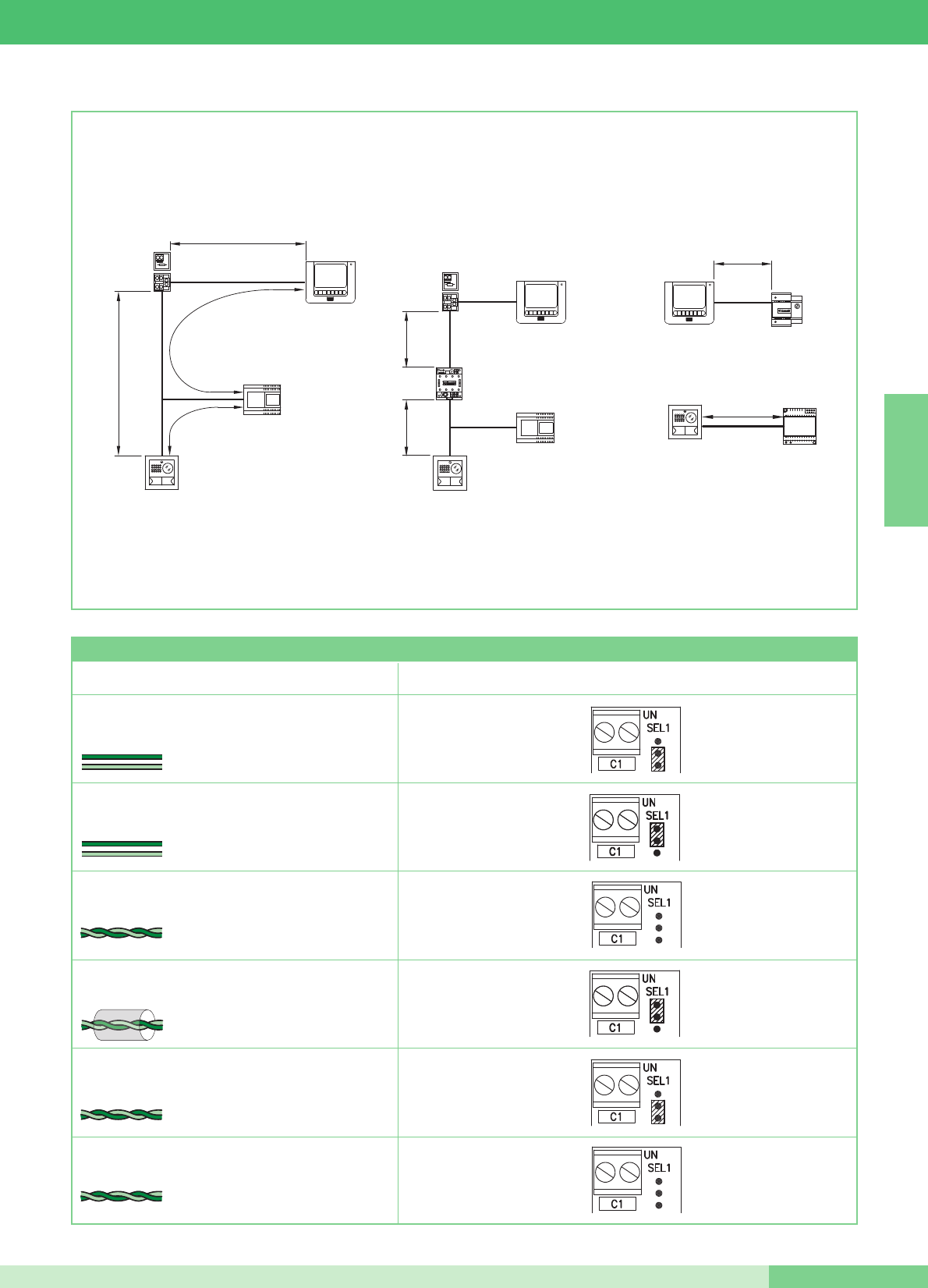
4875KC
4876KC
1205/B
1214KC
1216
C
A
B
D
1214KC
1216
F
F
4833C
1205/B
4875KC
4876KC
1212/B
E
1395
4875KC
4876KC
G
Type de câble Programmation Art. 1216
Câble bifilaire (sect. 1,5 mm2 Ø 1,4 mm AWG 15)
Câble bifilaire (sect. 1 mm2 Ø 1,2 mm AWG 17)
Boucle téléphonique twistée
(sect. 0,28 mm2 ( Ø 0,6 mm AWG 23)
Câble UTP5 cat. 5
(sect. 0,2 mm2 Ø 0,5 mm AWG 24)
2
1
Câble Comelit Art. 4576 et Art. 4578 (sect. 0,5 mm2
Ø 0,8 mm AWG 20)
Câble bifilaire
(sect. 0,5 mm2 Ø 0,8 mm AWG 20)
2
Câble tressé et blindé
(sect. 1 mm2 Ø 1,2 mm AWG 17)
1
Tableau programmations de lʼArt. 1216 en fonction du type de câble de connexion utilisé
FRANÇAIS
MT KIT 13
51 MT KIT 13
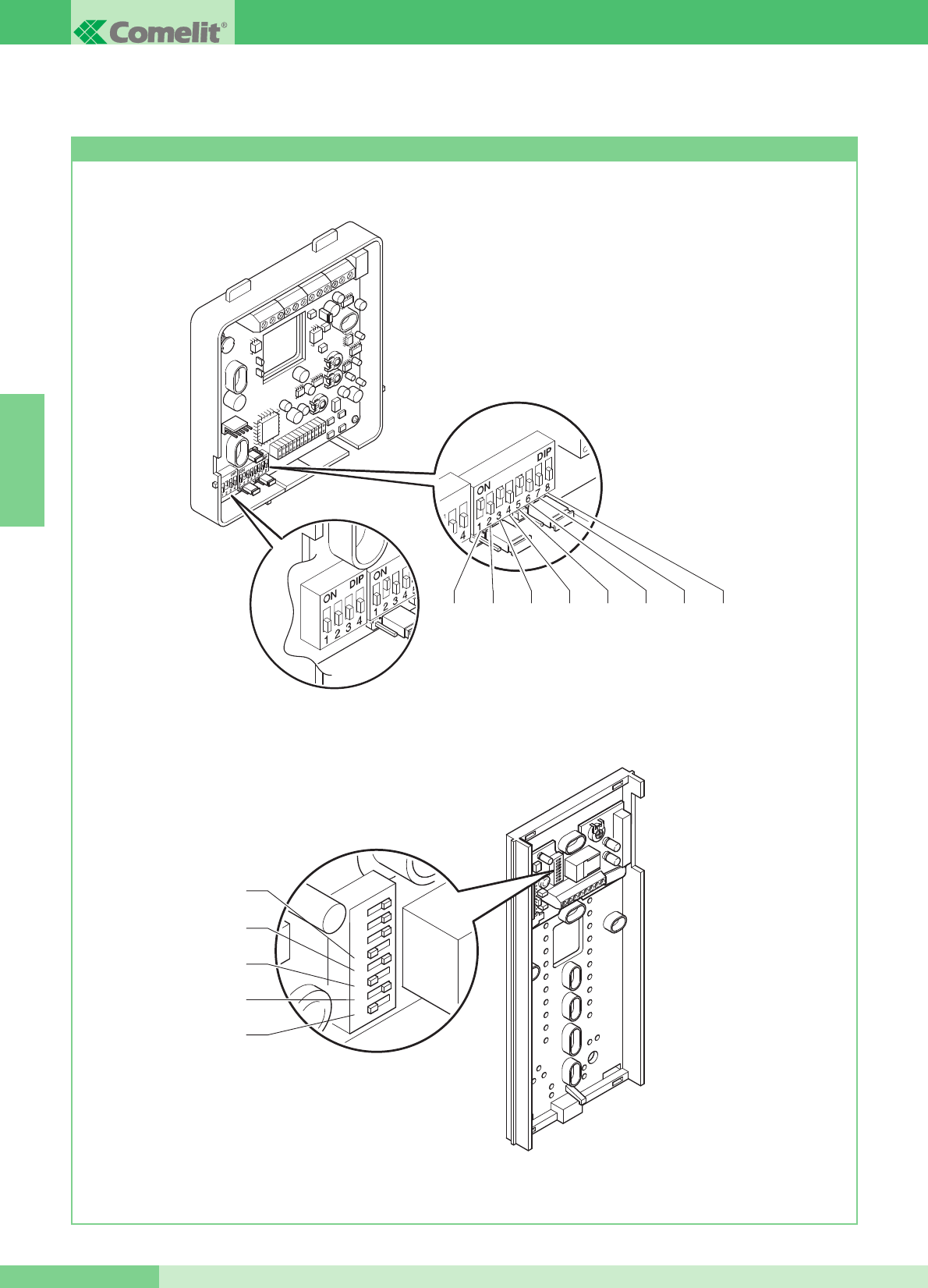
Programmations bride Art. 5914KC et combiné parlophoniques Style Art. 2608, 2628 et 2610
PROGRAMMATIONS ET DESCRIPTION FONCTIONNEMENT SYSTÈME MAESTRO KIT
S1-5
S1-4
S1-3
S1-2
S1-1
12345678
La figure suivante montre la position des DIP switches de la bride 5914KC et des DIP switches des interphones Style Art. 2608, 2628
et 2610.
GROUP S.P.A.
FRANÇAIS
GROUP S.P.A.
MT KIT 13 52
S1
S1-1 S1-2 S1-3 S1-4 S1-5 S1-6 S1-7 S1-8
S2 P
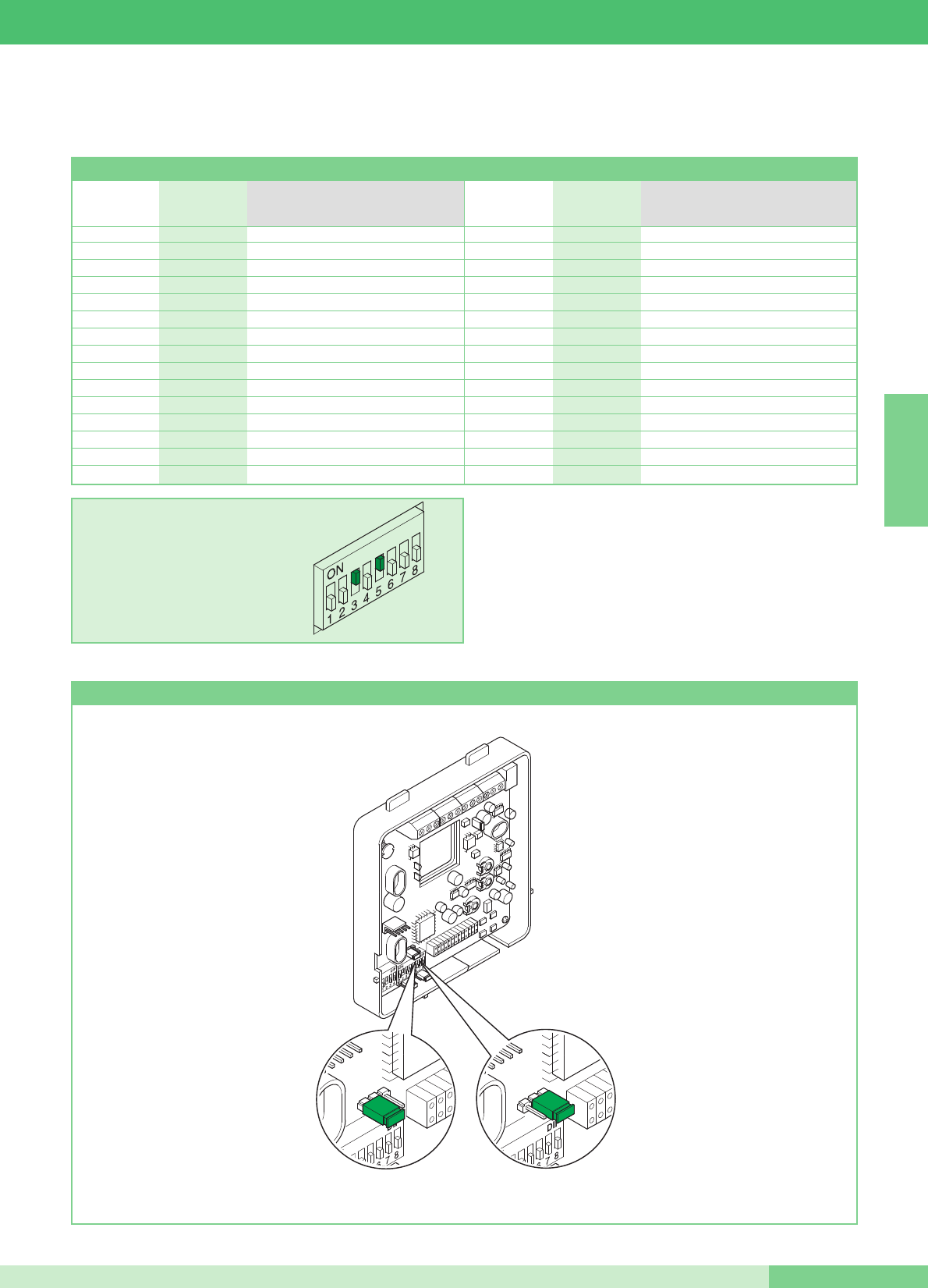
Programmation bride Art. 5914KC principale ou secondaire
Les valeurs de S1-1, S1-2, S1-3, S1-4 et S1-5 définissent lʼadresse dʼappel.
Pour le codage des brides et des combinés, se référer au tableau suivant.
ATTENTION : SUR COMBINÉS PARLOPHONIQUE 2608, 2628 ET
2610 POSITIONNER SUR OFF I DIP 6, 7, 8
Lʼappel intercommunicant deux appartements (entre les combinés
parlophoniques et/ou les visiophones) nʼest possible que si les deux
usagers sont réglés sur des codes dʼappel contigus (marqués par la
même lettre AA…CC..YY dans le tableau de programmation des DIP
switches illustré ci-dessus).
Tableau de programmation des DIP switches pour code usager sur brides et combinés
EXEMPLE introduction code 20.
H16 5
I17 1,5
I18 2,5
J 19 1,2,5
J20 3,5
K 21 1,3,5
K 22 2,3,5
L 23 1,2,3,5
L24 4,5
M 25 1,4,5
M 26 2,4,5
N 27 1,2,4,5
N 28 3,4,5
O 29 1,3,4,5
O 30 2,3,4,5
A1 1
A2 2
B3 1,2
B4 3
C5 1,3
C6 2,3
D 7 1,2,3
D8 4
E9 1,4
E10 2,4
F 11 1,2,4
F12 3,4
G 13 1,3,4
G 14 2,3,4
H 15 1,2,3,4
Code usager DIP switches sur ON Code usager DIP switches sur ON
Référence pour
intercommunicant
deux appartements
Référence pour
intercommunicant
deux appartements
FRANÇAIS
MT KIT 13
53 MT KIT 13
JP1
PS
JP1
PS
Secondaire
Principale
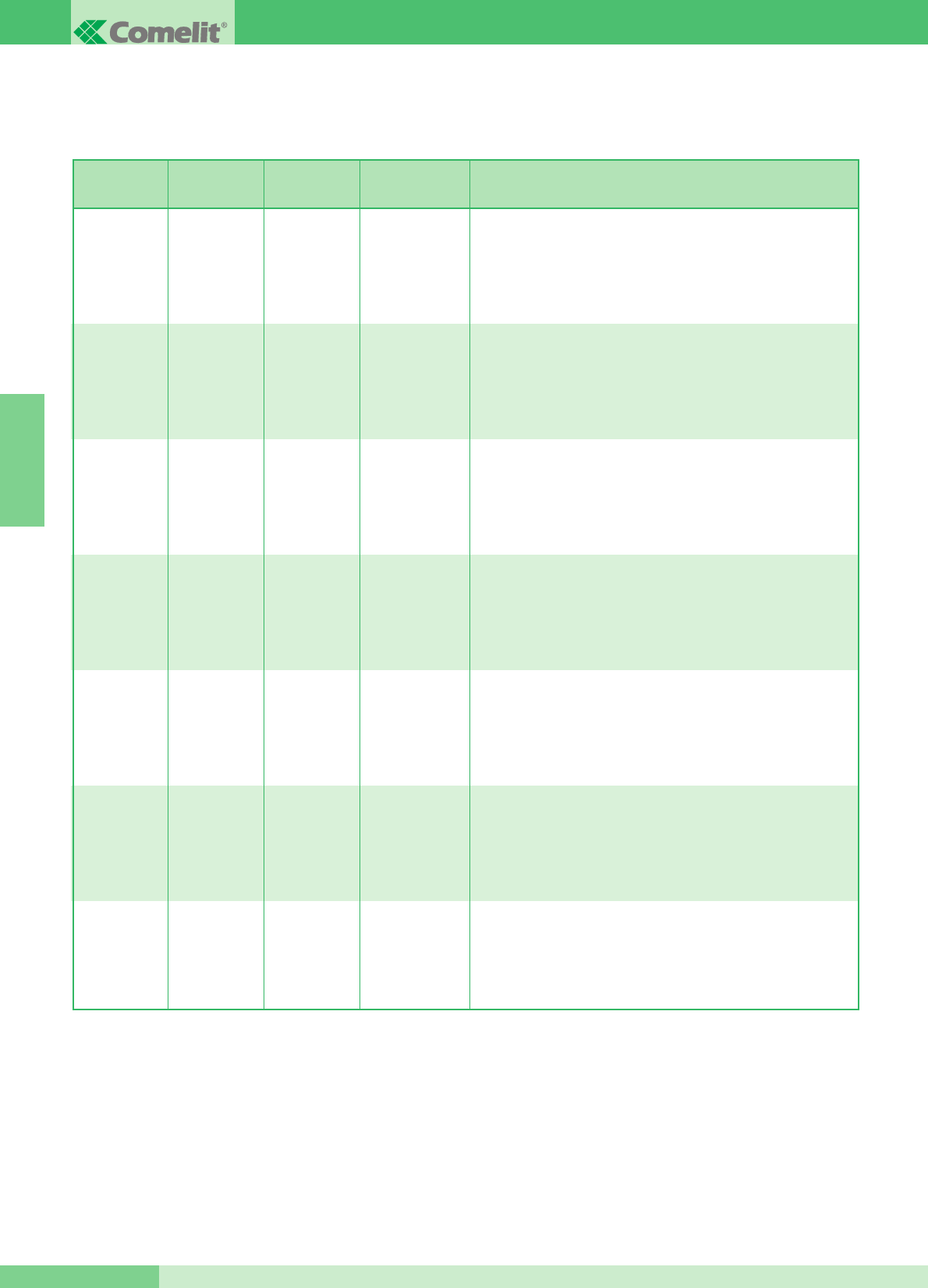
Les valeurs de S1-6, S1-7 et S1-8 du microswitch S1 de la bride Art. 5914KC, définissent la modalité opérationnelle dans laquelle opérera le
Système Maestro KIT, comme indiqué dans le tableau.
(1) Lʼappel intercommunicant deux appartements (entre les combiné parlophoniques et/ou les visiophones) nʼest possible que si les deux
usagers sont réglés sur des codes dʼappel contigus (marqués par la même lettre AA…CC..YY dans le tableau de programmation des
DIP switches illustré page 53).
OFF
(0)
OFF
(0)
OFF
(0)
S1-6 S1-7 S1-8 Fonctions touches
Bouton 1
Bouton 2
Bouton 3
Bouton 4
Bouton 5
Appel au standard
Auto-allumage
Commande actionneur
Press-to-talk/Docteur
Appel intercommunicant un appartement
ON
(1)
OFF
(0)
OFF
(0)
Bouton 1
Bouton 2
Bouton 3
Bouton 4
Bouton 5
Appel intercommunicant un appartement
Auto-allumage
Commande actionneur
Press-to-talk/Docteur
Appel au standard
OFF
(0)
ON
(1)
OFF
(0)
Bouton 1
Bouton 2
Bouton 3
Bouton 4
Bouton 5
Appel intercommunicant deux appartements (1)
Auto-allumage
Commande actionneur
Press-to-talk/Docteur
Appel au standard
ON
(1)
ON
(1)
OFF
(0)
Bouton 1
Bouton 2
Bouton 3
Bouton 4
Bouton 5
Appel au standard
Auto-allumage
Commande actionneur
Press-to-talk/Docteur
Appel intercommunicant deux appartements (1)
OFF
(0)
OFF
(0)
ON
(1)
Bouton 1
Bouton 2
Bouton 3
Bouton 4
Bouton 5
Appel intercommunicant un appartement
Auto-allumage
Appel intercommunicant deux appartements (1)
Press-to-talk/Docteur
Commande actionneur
ON
(1)
OFF
(0)
ON
(1)
Bouton 1
Bouton 2
Bouton 3
Bouton 4
Bouton 5
Appel intercommunicant un appartement
Appel intercommunicant deux appartements (1)
Commande actionneur
Press-to-talk/Docteur
Auto-allumage
OFF
(0)
ON
(1)
ON
(1)
Bouton 1
Bouton 2
Bouton 3
Bouton 4
Bouton 5
Appel au standard
Auto-allumage
Commande actionneur
Appel intercommunicant un appartement
Appel intercommunicant deux appartements (1)
GROUP S.P.A.
FRANÇAIS
GROUP S.P.A.
MT KIT 13 54

DIP SWITCHES S1-1, S1-2, S1-3, S1-4 ET S1-5
Les valeurs des DIP switches S1-1, S1-2, S1-3, S1-4 et S1-5
définissent lʼadresse dʼappel de la bride en objet, par rapport à la
plaque de rue dʼappel.
Pour utiliser la fonction dʼappel intercommunicant deux
appartements (combinés parlophoniques et/ou visiophones), les
usagers doivent être réglés sur des adresses dʼappel contiguës,
indiquées dans le tableau illustré page 53 avec la même lettre
(AA…CC….YY).
Fonctionnement
• Lorsque le visiteur appuie sur le bouton dʼappel, les leds
blanches sʼallument pour éclairer la personne, la sonnerie
interne dʼappel sʼenclenche (si la fonction privacy nʼest pas
validée) et lʼimage sʼaffiche au moniteur principal ou aux
moniteurs principaux, pendant environ 60”.
Au contraire, sʼil entre en communication, la durée maximum de
la conversation pourra être de 90ʼʼ.
La plaque de rue émet une tonalité indiquant que lʼappel a eu
lieu ; lorsque, dans les installations à 2 entrées ou plus, au
moment de lʼappel, la plaque de rue émet une tonalité dʼoccupé
au lieu de la sonnerie, cela signifie quʼune autre conversation est
en cours vers une autre plaque de rue.
En cas de court-circuit persistant sur la ligne bus, la plaque de
rue émet un signal sonore intermittent dʼavertissement.
• La conversation au poste intérieur a lieu en soulevant le
interphone.
• La commande de luminosité et la commande de réglage du
volume de la sonnerie se situent sur le côté gauche du moniteur.
• La touche portant le symbole de la clé sur le moniteur agit sur la
serrure électrique en lʼactivant pendant 2 secondes environ.
• Lʼauto-allumage du moniteur principal sʼeffectue en appuyant sur
le Bouton 2 lorsque la fonction est validée (voir la description
page 57).
Dans les installations équipées de 2 poste externes, il est
possible de visualiser alternativement lʼimage depuis une plaque
de rue ou depuis lʼautre (fonction “basculer”) en appuyant
plusieurs fois sur le bouton 2.
Il nʼest pas possible dʼauto-allumer le moniteur durant une autre
conversation.
• Pour les fonctions dʼintercommunication du système MAESTRO,
se référer à la page 54.
• Pour la programmation dʼadresses usagers différentes de celles
programmées dʼorigine (1 et 2), voir page 53.
• La somme du nombre de postes intérieurs ayant le même code
usager et du nombre de dispositifs de répétition dʼappel
branchés à ces postes intérieurs ne peut pas être supérieure à
4. Connecter un seul dispositif de répétition dʼappel pour chaque
poste intérieur. La distance MAX de la connexion entre le poste
intérieur et le dispositif de répétition dʼappel est de 20 m ; pour la
connexion, utiliser un câble blindé et ne pas faire passer les
câbles à proximité de charges inductives lourdes ou de câbles
dʼalimentation (230V / 400V).
En cas de connexion de charges inductives, il est conseillé
dʼinstaller une capacité de 470nF en parallèle aux contacts C-
NO de lʼArt. 1122/A.
Moniteurs supplémentaires principaux ou secondaires
La programmation de JP1 définit si la bride en objet sera gérée
comme principale ou comme secondaire. La plaque de rue peut
gérer jusquʼà un maximum de 3 visiophones ou combinés par
bouton dʼappel. Lorsque lʼon effectue un appel depuis la plaque de
rue, le moniteur que le système allumera sera celui du visiophone
principal.
Les autres moniteurs secondaires de la même unité familiale
resteront éteints. En répondant à lʼappel de la plaque de rue depuis
un visiophone secondaire, lʼimage est automatiquement visualisée
sur le moniteur.
À ce stade, le moniteur du visiophone principal sʼéteint et lʼimage
sʼaffiche au moniteur du visiophone sur lequel on a appuyé sur le
Bouton 2 - Demande vidéo.
Pour visualiser lʼimage sans devoir activer la phonie avec la plaque
de rue, appuyer sur le Bouton 2.
Dans la configuration classique de MAESTRO, on peut donc avoir
au maximum 2 visiophones secondaires et 1 visiophone principal
par bouton dʼappel, tous alimentés par le même Art. 1205/B
(Variante MK/CC page 71).
On a la possibilité de gérer jusquʼà 3 visiophones principaux au
sein de la même unité familiale (cʼest-à-dire programmés sur le
même code usager). Dans cette configuration particulière, les
visiophones principaux supplémentaires devront être alimentés
chacun par lʼArt. 1212/B (Variante MK/HC et MK/IC pages 70, 71).
Avec lʼappel de la plaque de rue, lʼimage sera visualisée sur
chaque visiophone principal relié au système.
Nous rappelons que, même en utilisant lʼArt. 1212/B, le nombre
maximum de visiophones pouvant être reliés pour la même unité
familiale est de 3. Une alimentation dédiée nʼest nécessaire pour
aucun combiné en option.
S1-6, S1-7, S1-8
Programmation de la modalité de fonctionnement MAESTRO KIT
Le tableau illustré page 54 indique les fonctions de chaque bouton
du Moniteur, en fonction du réglage des DIP switches S1-6, S1-7,
S1-8.
Description fonctions boutons
Ouvre-porte ➔La pression du bouton ouvre-porte active la
serrure gâche à la plaque de rue.
Actionneur ➔La pression du bouton programmé dans la modalité
Actionneur permet dʼactiver lʼArt. 1256 qui peut être utilisé par
exemple pour activer lʼouverture de portails, portes basculantes ou
pour lʼactivation du module caméras cycliques Art. 1259C.
Bouton Libre ➔ Lʼindication Bouton libre indique la possibilité
dʼutiliser le bouton comme contact C.NO. en bornier, au moyen de
programmations opportunes comme illustré dans la variante
MK/PC page 77.
FRANÇAIS
MT KIT 13
55 MT KIT 13
Auto-allumage/Demande vidéo ➔La pression du bouton 2
programmé dans cette modalité permet de visualiser sur lʼécran du
moniteur lʼimage transmise depuis la plaque de rue, même si
aucun appel nʼa été effectué.
Pour utiliser et valider le service, voir page 57. Dans les
installations équipées de deux postes externes, il est possible de
visualiser alternativement lʼimage depuis une poste externe ou
depuis lʼautre (fonction “basculer”) en appuyant plusieurs fois sur le
bouton.
Sur les Moniteurs secondaires, le bouton 2 a la fonction de
demande vidéo (pour plus de détails, voir à la page 57).
Appel au standard ➔Appuyer sur le bouton réglé sur cette
modalité pour envoyer un appel au standard de conciergerie de
lʼinstallation.
Appel intercommunicant un appartement ➔Appuyer sur le bouton
réglé sur cette modalité pour envoyer un appel aux autres
appareils (Visiophones et/ou Combinés parlophonique)
programmés sur la même adresse dʼappel.
En saisissant le interphone, le destinataire de lʼappel engage la
communication avec lʼappelant.
La communication prend fin lorsque le combiné est raccroché.
Quel que soit le cas de figure, un appel provenant dʼune plaque de
rue est toujours prioritaire sur une communication
intercommunicante. Dans ce cas, les utilisateurs déjà en
communication entendent dans le interphone un signal sonore
similaire à un signal dʼappel si ce dernier leur est destiné, ou un
triple signal sonore dans le cas contraire.
Pour prendre lʼappel provenant de la plaque de rue, il suffit de
saisir le interphone dʼune unité disponible ou de raccrocher, puis
de saisir le interphone dʼune unité occupée par une communication
intercommunicante.
Lʼactivation de la communication avec laplaque de rue interrompt la
conversation intercommunicante en cours.
Un appel intercommunicant nʼest pas prioritaire sur une
conversation/un appel avec la plaque de rue.
Dans ce cas, lors dʼune tentative dʼappel intercommunicant, le
voyant clignote pendant quelques secondes pour indiquer que le
système est occupé.
Appel intercommunicant deux appartements ➔Appuyer sur le
bouton réglé sur cette modalité pour envoyer un appel aux
appareils (Visiophones et/ou Combiné parlophonique) programmés
sur lʼadresse dʼappel à deux usagers par rapport à la propre
adresse, comme indiqué dans le tableau illustré page 53.
En saisissant le interphone, le destinataire de lʼappel engage la
communication avec lʼappelant. La communication prend fin
lorsque le interphone est raccroché.
Quel que soit le cas de figure, un appel provenant dʼune plaque de
rue est toujours prioritaire sur une communication
intercommunicante.
Dans ce cas, les utilisateurs déjà en communication entendent
dans le interphone un signal sonore similaire à un signal dʼappel si
ce dernier leur est destiné, ou un triple signal sonore dans le cas
contraire.
Pour prendre lʼappel provenant de la plaque de rue, il suffit de
saisir le interphone dʼune unité disponible ou de raccrocher, puis
de saisir le interphone dʼune unité occupée par une communication
intercommunicante.
Lʼactivation de la communication avec la plaque de rue interrompt
la conversation intercommunicante en cours.
Un appel intercommunicant nʼest pas prioritaire sur une
conversation/un appel avec la plaque de rue.
Dans ce cas, lors dʼune tentative dʼappel intercommunicant, le
voyant clignote pendant quelques secondes pour indiquer que le
système est occupé.
Gestion fonction Docteur ➔La fonction Docteur permet
lʼactionnement automatique de lʼouvre-porte sur un appel à
lʼadresse du visiophone et/ou combiné lorsque la fonction a été
activée, venant de la plaque de rue.
Lorsque la fonction est active, la led de signalisation reste allumée.
Pour valider ou invalider la fonction Docteur, appuyer pendant 2
secondes sur le bouton programmé pour cette fonction.
Gestion fonction Privacy ➔La fonction Privacy permet dʼexclure
lʼappel de la plaque de rue ou du standard.
NOTE La fonction Docteur et la fonction Privacy NE peuvent être
validées simultanément.
Opérations pour sélectionner la sonnerie Moniteur
Lʼusager peut sélectionner la sonnerie du Moniteur dans une liste
de sonneries disponibles, en suivant la procédure ci-dessous :
1Maintenir le bouton appuyé jusquʼà ce quʼune tonalité de
confirmation soit audible (cette opération nʼest possible que
lorsque le système est en condition de repos ; dans le cas
contraire, la led de signalisation clignote pour avertir
lʼutilisateur).
2Appuyer et relâcher le Bouton :
1 fois (émission dʼune tonalité de confirmation) pour modifier la
sonnerie dʼappel de la plaque de rue.
2 fois (émission de 2 tonalités de confirmation) pour modifier la
sonnerie dʼappel depuis standard.
3 fois (émission de 3 tonalités de confirmation) pour modifier la
sonnerie de lʼappel palier.
Appuyer de nouveau sur le bouton pour répéter la
séquence décrite ci-dessus.
Après avoir appuyé sur le bouton pour la dernière fois,
attendre le signal de confirmation avant de passer à lʼétape
suivante.
3Appuyer et relâcher le bouton pour écouter les diverses
sonneries disponibles lʼune après lʼautre. Pour répéter une
sonnerie, maintenir le bouton enfoncé.
4Appuyer sur le bouton pour confirmer le choix de la dernière
sonnerie écoutée et pour quitter (à tout moment) la modalité de
variation sonnerie moniteur. Une tonalité de confirmation vous
avertira que vous avez quitté le modalité de programmation de
la sonnerie Moniteur.
GROUP S.P.A.
FRANÇAIS
GROUP S.P.A.
MT KIT 13 56
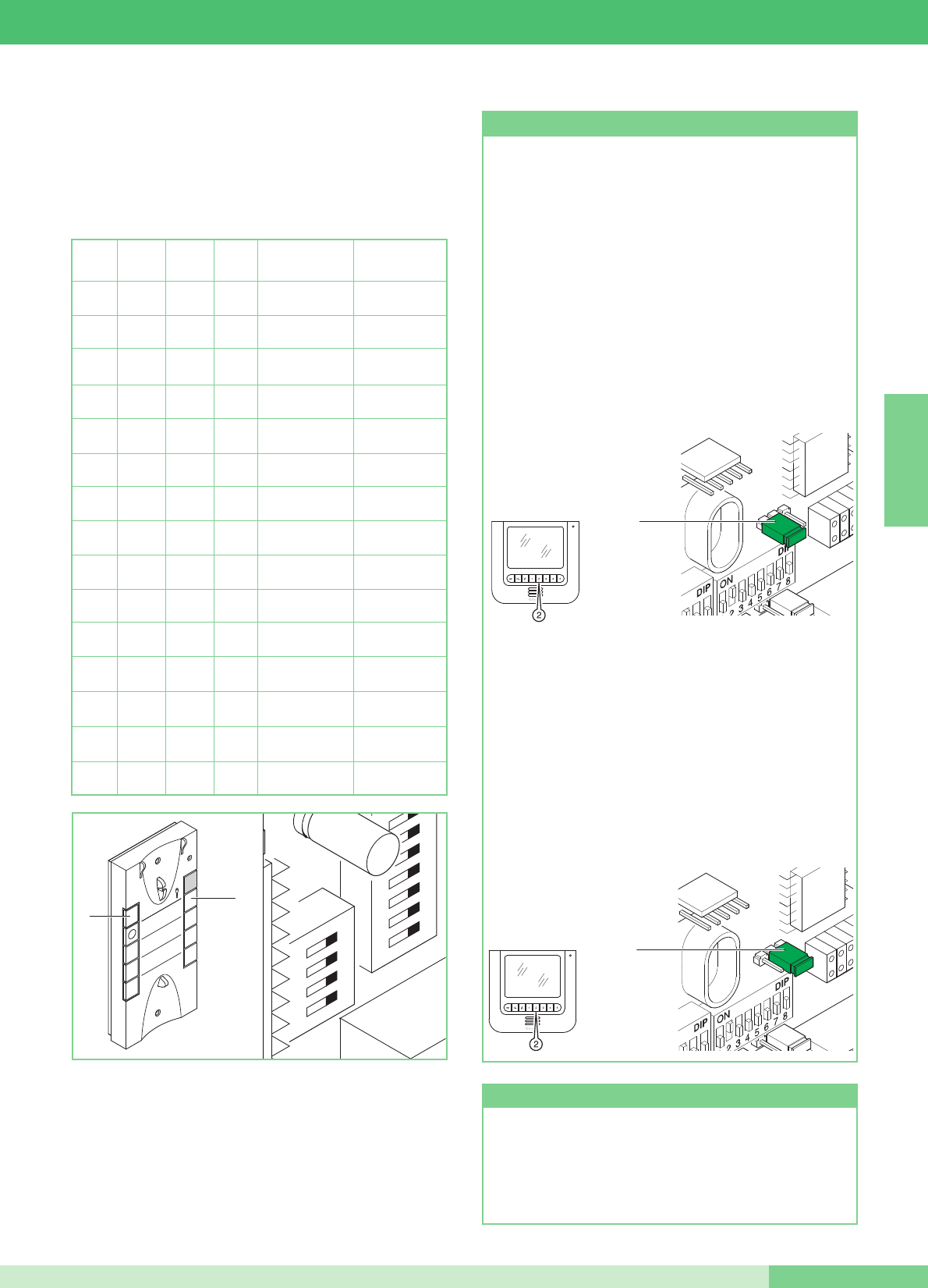
Programmation combiné (option) Art. 2610
Si vous décidez dʼaugmenter le système MAESTRO KIT en
ajoutant un combiné en option Art. 2610, veuillez trouver ci-
dessous le tableau nécessaire pour définir les fonctions que le
combiné devra réaliser.
DIP 1 DIP 2 DIP3 DIP 4 Fonction touche 1 Fonction touche 2
0 0 0 0
Actionneur
générique
Appel
au standard
1
0 0 0
Appel
au standard
Inter. un
appartement
0
1
0 0
Appel
au standard
Inter. deux
appartements
1 1
0 0
Actionneur
générique
Inter. un
appartement
0 0
1
0
Actionneur
générique
Inter. deux
appartements
1
0
1
0
Docteur Appel
au standard
0
1 1
0
Docteur Actionneur
générique
1 1 1
0
Docteur Inter. un
appartement
0 0 0
1Docteur Inter. deux
appartements
1
0 0
1Inter. un
appartement
Inter. deux
appartements
0
1
0
1Appel au standard Auto-allumage
1 1
0
1Actionneur
générique Auto-allumage
0 0
1 1 Docteur Auto-allumage
1
0
1 1 Inter. un
appartement Auto-allumage
0
1 1 1 Inter. deux
appartements Auto-allumage
2
ON
U4
4
3
1
1
32
54
76
98
P1
P2
Fonction Auto-allumage (conseillée uniquement pour les
installations avec 1 ou 2 entrées). Pour allumer le moniteur,
appuyer sur le bouton 2 et le relâcher immédiatement (si les
programmations faites à lʼusine ont été maintenues). Lʼauto-
allumage est possible uniquement lorsque le système est en
veille. Lʼauto-allumage peut être invalidé.
Pour invalider la fonction, il est nécessaire dʼappuyer sur le
bouton de lʼauto-allumage du moniteur sans le relâcher
pendant un temps supérieur à 6 sec. La programmation est
confirmée par lʼémission dʼune simple tonalité de validation.
Pour valider la fonction, appuyer sur le même bouton pendant
un temps supérieur à 4 sec. Cette programmation est
confirmée par lʼémission dʼune double tonalité de validation.
Fonction auto-allumage et demande vidéo
Demande Vidéo sur moniteur avec brides Art. 5914KC
programmées comme secondaire (voir JP1 sur la figure en
position S).
La fonction de Demande vidéo ne requiert aucune validation ;
elle permet de brancher un moniteur après un appel pour
lʼusager venant de la plaque de rue.
Utilisation de la fonction de Demande vidéo : pour allumer le
moniteur, appuyer et relâcher tout de suite le bouton 2 (faire
attention à la modalité MAESTRO KIT programmée avec les
DIP switches de programmation).
FRANÇAIS
MT KIT 13
57 MT KIT 13
JP1
PS
JP1
JP1
PS
JP1
Pour activer ou désactiver les fonctions Privacy ou Docteur,
maintenir le bouton approprié jusquʼà ce que la led rouge ne
sʼallume ou sʼéteigne.
Service Privacy et Docteur
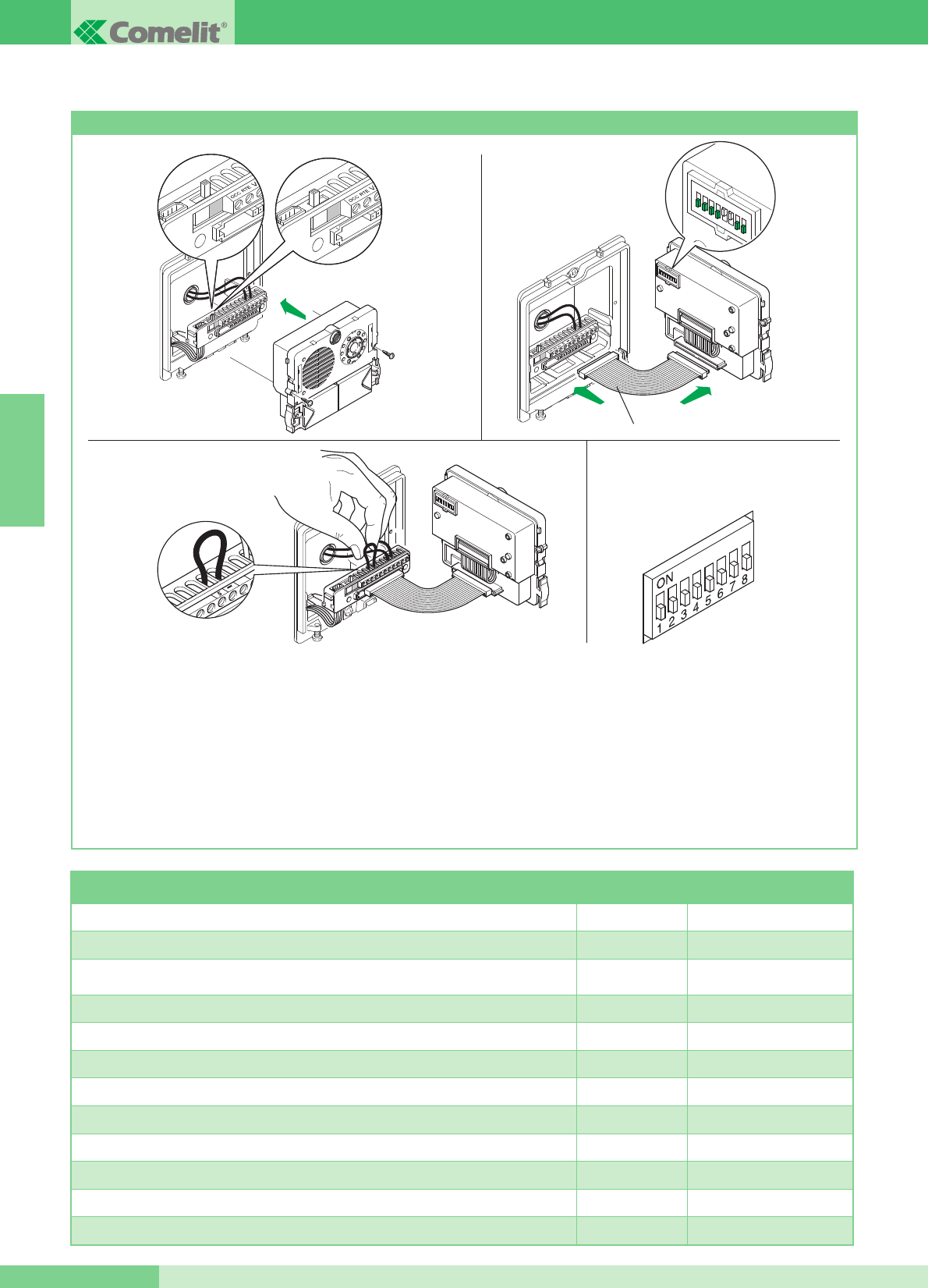
Programmations spéciales Art. 4660KC
Sur lʼArt. 4660KC, il est possible dʼeffectuer une série de
programmations spéciales en fonction des différentes exigences
du système.
1. Sur le bornier des articles 4660KC, déplacer le commutateur en
position de programmation (carré rouge) (Figure 1A) .
2. Définir sur les DIP switches de lʼarticle (Figure 2) le code relatif
à la fonction que lʼon désire programmer. Utiliser le tableau ci-
dessous pour référence.
3. Sur le bornier des articles 4660KC, connecter la borne S
avec - (Figure 3).
4. Attendre lʼémission de la tonalité de confirmation de la
programmation et enlever le cavalier entre la borne S et -.
5. À la fin de la procédure, sʼassurer dʼavoir bien remis le
commutateur en position de repos (carré blanc) (Figure 2A),
dʼavoir enlever le cavalier entre S et - et replacer tous les DIP
switches sur OFF (0) de la manière illustrée à la Figure 4.
Pour effectuer une autre programmation spéciale, répéter les
opérations décrites du point 1 au point 5.
12345678
ON DIP
Art. 3309
Fig. 1A Fig. 2A
Fig. 1
Fig. 3
Fig. 2
Fig. 4
DIP switches sur ON Numéro de référence
configuration
Temps dʼattente reset 10 secondes (réglage dʼusine) 1,2,5,6,7,8 243
Temps dʼattente reset 1 seconde 3,5,6,7,8 244
Désactivation tonalité confirmation gâche et programmation temps gâche 2 secondes
(réglages dʼusine) 1,3,5,6,7,8 245
Activation tonalité de confirmation gâche 2,3,5,6,7,8 246
Temps gâche 8 secondes 1,2,3,5,6,7,8 247
Envoi appel simple (réglage dʼusine) 4,5,6,7,8 248
Envoi appel répété 3 fois 1,4,5,6,7,8 249
Commande ouvre-porte normalement ouvert (NO) (réglage dʼusine) 2,4,5,6,7,8 250
Commande Ouvre-porte normalement fermé (NF) 1,2,4,5,6,7,8 251
Ouvre-porte actif également en absence dʼappel (réglage dʼusine) 3,4,5,6,7,8 252
Ouvre-porte validé seulement pour lʼusager appelé 1,3,4,5,6,7,8 253
Restauration de tous les réglages dʼusine 2,3,4,5,6,7,8 254
GROUP S.P.A.
FRANÇAIS
GROUP S.P.A.
MT KIT 13 58
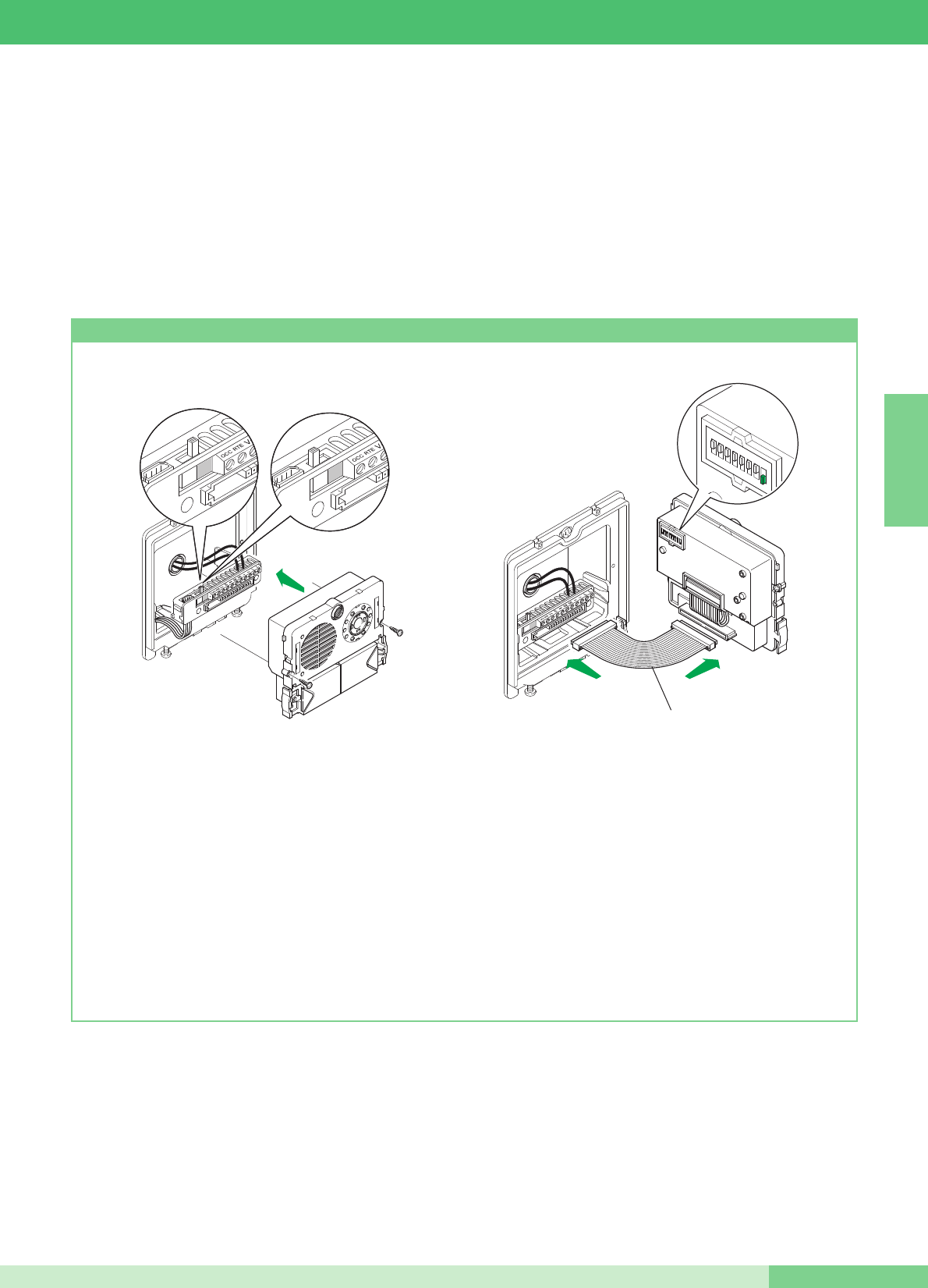
MODULARITÉ DU SYSTÈME MAESTRO KIT
comme décrit dans la procédure suivante et les brides 5914KC
avec le code correspondant (pour la référence, voir le tableau
page 53).
Pour plus de détails sur lʼintégration des MAESTRO KIT dans des
installations Simplebus et pour la programmation de la porte
principale (Art. 4660C), se référer au catalogue Simplebus Color
(Catalogue n° 102), au manuel technique MT/SBC/01 et à la feuille
technique FT/SBC/04 ou FT/SBC/01.
Les schémas MK/EN/100C et MK/EN/101C pages 78, 80 montrent
une configuration possible dʼinstallation qui offre la possibilité de
gérer jusquʼà un maximum de 30 MAESTRO KIT de la part dʼun
Art. 4660C situé, par exemple, à lʼentrée dʼun complexe résidentiel.
Ces schémas dʼinstallation permettent dʼappeler lʼun des
MAESTRO KIT de lʼentrée principale équipée dʼArt. 4660C.
Dans cette configuration, il est nécessaire de programmer les
boutons de lʼArt. 4660C embarqué sur lʼArt. 4875KC ou 4876KC
Programmation Art. 4660KC
1. Sur le bornier du module Art. 4660KC, relier lʼalimentation sur
~ ~, déplacer lʼinterrupteur en position de programmation
(rouge) (voir figure 1A).
Brancher le bornier au module Art. 4660KC assemblé de la
manière précédemment indiquée.
NOTE : pour connecter le bornier au module Art. 4660KC,
lors de la programmation on pourra utiliser le petit câble Art.
3309 disponible comme accessoire en option (figure 2).
2. Programmer le DIP switch placé au dos du module audio-
vidéo avec le même code attribué à le combiné ou au
moniteur selon la correspondance décrite dans le tableau de
programmation page 53.
3. Appuyer sur le bouton que lʼon désire associer à lʼappel de le
combiné ou moniteur. La réalisation de la programmation est
signalée par une tonalité de confirmation.
4. À la fin de la programmation, remettre le commutateur en
position de stand-by (blanc) (Figure 2A).
12345678
ON DIP
Art. 3309
Fig. 1A Fig. 2A
Fig. 1 Fig. 2
FRANÇAIS
MT KIT 13
59 MT KIT 13
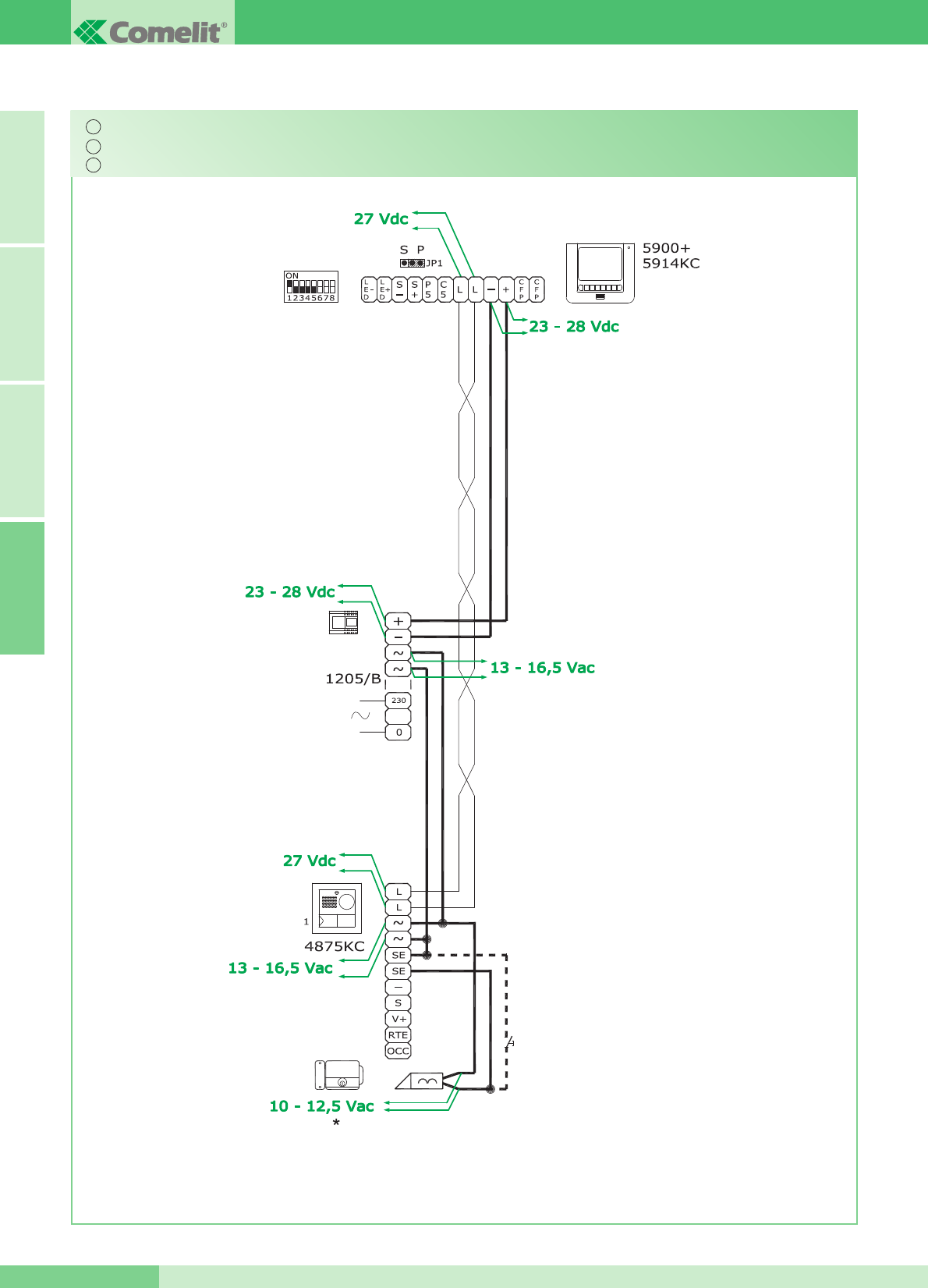
Messa in funzione/verifica tensioni di impianto a riposo
Switching on/voltage check with system in standby
Mise en service / vérification des tensions dʼinstallation au repos
IT
EN
FR
Durante lʼattivazione
When switching on
Durant l'activation
A FRANÇAIS ENGLISH ITALIANO
GROUP S.P.A.
MT KIT 13 60
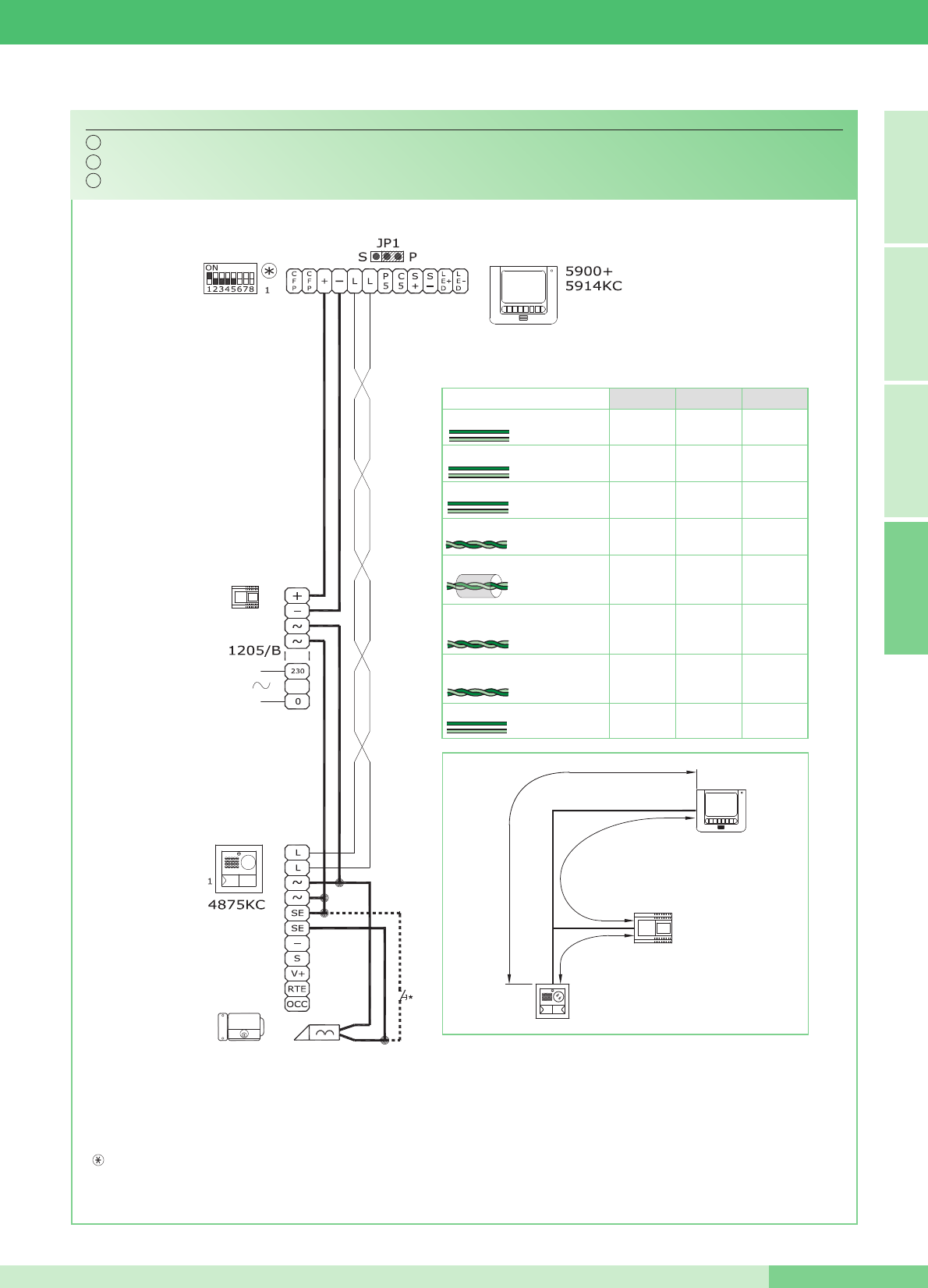
N.B. Le impostazioni di S1-6, S1-7 e S1-8 sono in funzione della configurazione desiderata (vedi tabella a pag. 14).
NOTE: The S1-6, S1-7 and S1-8 settings depend on the configuration required (see table on page 34).
NOTE: Les programmations de S1-6, S1-7 et S1-8 sont en fonction de la configuration désirée (voir tableau page 54).
Schema base per kit monofamiliari Art. 8493.
Basic wiring diagram for single-residence kits Art. 8493.
Schéma base pour kit un appartement Art. 8493.
MK/01C
4875KC
4876KC
1205/B
A
B
C
150 m
(495 feet)
150 m
(495 feet)
100 m
(325 feet)
150 m
(495 feet)
A (max) B (max) C (max)
0,5 mm2(Ø 0,8 mm - Ø 8/10 AWG 20)
1 mm2(Ø 1,2 mm - Ø 12/10 AWG 17)
1,5 mm2(Ø 1,4 mm - Ø 14/10 AWG 15)
20 m
(65 feet)
25 m
(85 feet)
0,28 mm2(Ø 0,6 mm - Ø 6/10 AWG 23)
1 mm2(Ø 1,2 mm - Ø 12/10 AWG 17)
40 m
(130 feet)
60 m
(195 feet)
50 m
(165 feet)
100 m
(325 feet)
UTP5 Cat 5
0,2 mm2(Ø 0,5 mm - Ø 5/10 AWG 24) 150 m
(495 feet)
150 m
(495 feet)
150 m
(495 feet)
Comelit Art. 4576 / Art. 4578
0,5 mm2 (Ø 0,8 mm - Ø 8/10 AWG 20)
Per maggiori informazioni sulle distanze vedi pagina 10 e 11.
For further information about distances refer to pages 30 and 31.
Pour plus de détails sur les distances faire référence au pages 50 et 51.
*
Pulsante comando apriporta locale
*
Door request exit button button
*
Bouton commande ouvre-porte local
IT
EN
FR
FRANÇAIS ENGLISH ITALIANOA
MT KIT 13
61 MT KIT 13
2,50 mm2(Ø 1,8 mm - Ø 18/10 AWG 13) 100 m
(325 feet)
150 m
(495 feet)
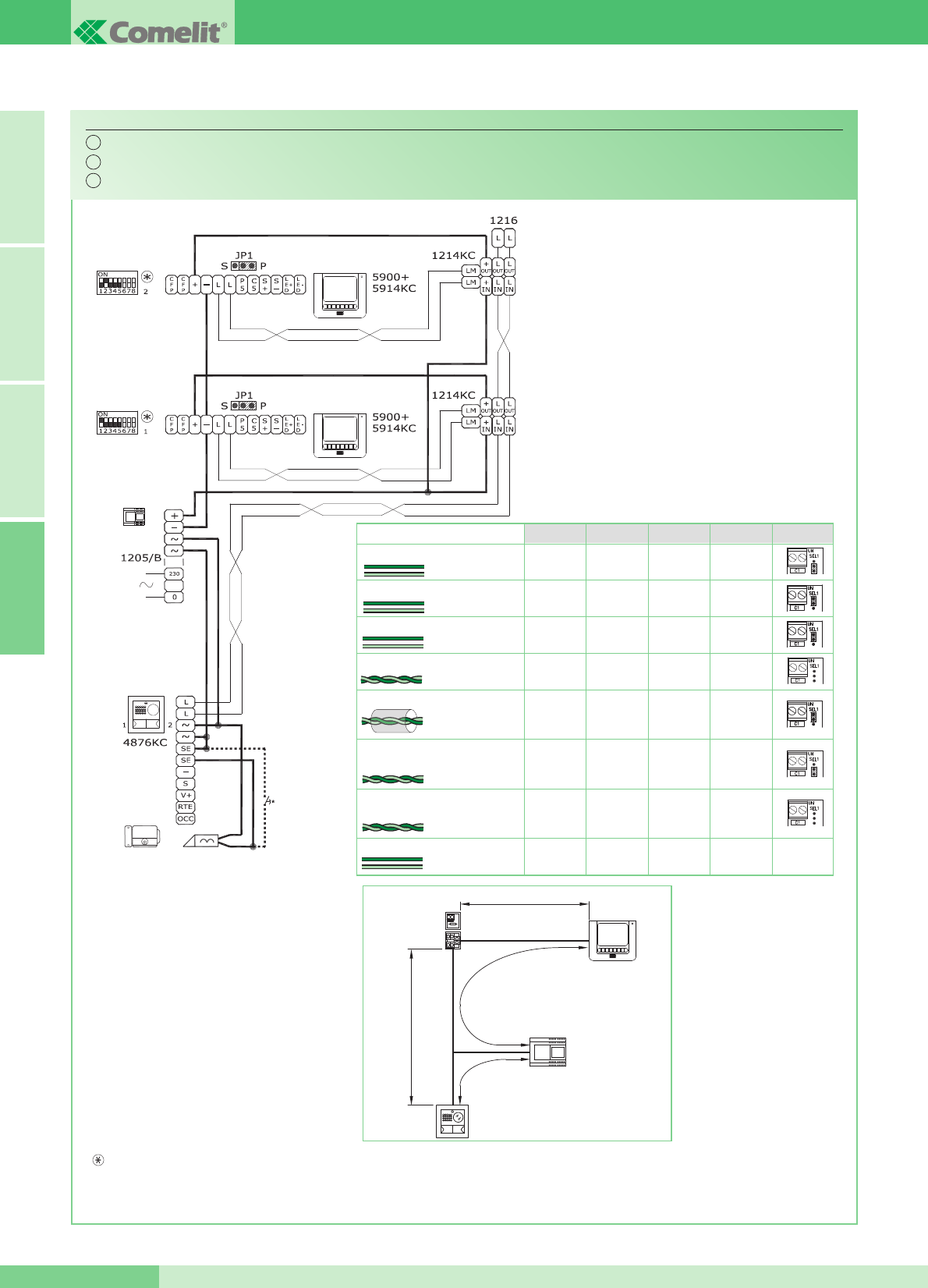
N.B. Le impostazioni di S1-6, S1-7 e S1-8 sono in funzione della configurazione desiderata (vedi tabella a pag. 14).
NOTE: The S1-6, S1-7 and S1-8 settings depend on the configuration required (see table on page 34).
NOTE: Les programmations de S1-6, S1-7 et S1-8 sont en fonction de la configuration désirée (voir tableau page 54).
Schema base per kit bifamiliari Art. 8494 con collegamento in derivazione.
Basic wiring diagram for two-residence kits Art. 8494 with branched connection.
Schéma base pour kit deux appartements Art. 8494 avec connexion en dérivation.
MK/02BC
Per maggiori informazioni
sulle distanze vedi pagina
10 e 11.
For further information about
distances refer to pages 30
and 31.
Pour plus de détails sur les
distances faire référence au
pages 50 et 51.
*
Pulsante comando apriporta locale
*
Door request exit button button
*
Bouton commande ouvre-porte local
IT
EN
FR
4875KC
4876KC
1205/B
1214KC
1216
C
A
B
D
A FRANÇAIS ENGLISH ITALIANO
GROUP S.P.A.
MT KIT 13 62
Art. 1216
2
2
1
1
1
40 m
(130 feet)
40 m
(130 feet)
20 m
(65 feet)
40 m
(130 feet)
D (max)
40 m
(130 feet)
50 m
(165 feet)
40 m
(130 feet)
150 m
(495 feet)
150 m
(495 feet)
100 m
(325 feet)
150 m
(495 feet)
A (max) B (max) C (max)
0,5 mm2(Ø 0,8 mm - Ø 8/10 AWG 20)
1 mm2(Ø 1,2 mm - Ø 12/10 AWG 17)
1,5 mm2(Ø 1,4 mm - Ø 14/10 AWG 15)
20 m
(65 feet)
25 m
(85 feet)
0,28 mm2(Ø 0,6 mm - Ø 6/10 AWG 23)
1 mm2(Ø 1,2 mm - Ø 12/10 AWG 17)
40 m
(130 feet)
60 m
(195 feet)
50 m
(165 feet)
100 m
(325 feet)
UTP5 Cat 5
0,2 mm2(Ø 0,5 mm - Ø 5/10 AWG 24) 150 m
(495 feet)
150 m
(495 feet)
150 m
(495 feet)
Comelit Art. 4576 / Art. 4578
0,5 mm2 (Ø 0,8 mm - Ø 8/10 AWG 20)
2,50 mm2(Ø 1,8 mm - Ø 18/10 AWG 13) 100 m
(325 feet)
150 m
(495 feet)
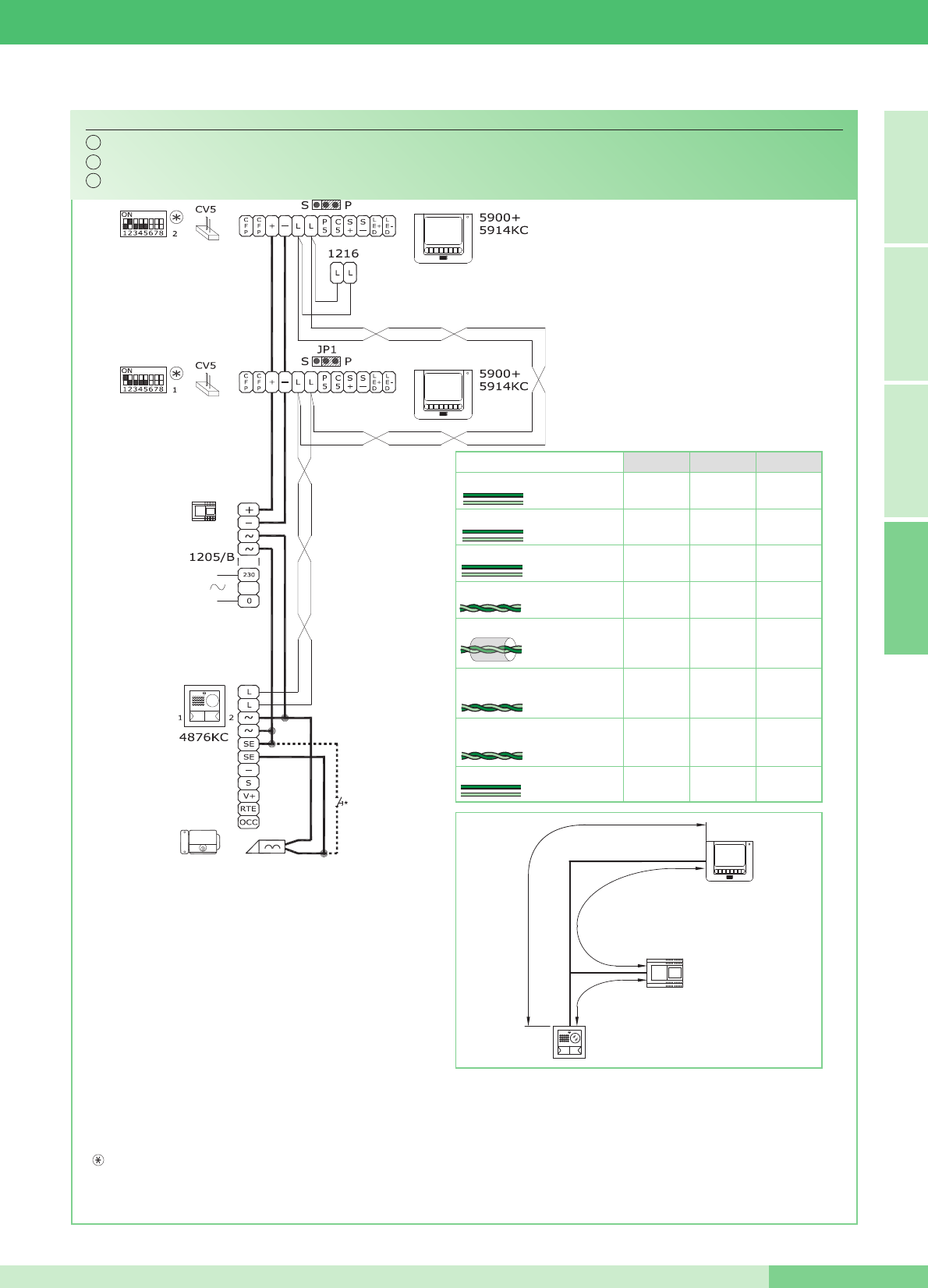
Schema base per kit bifamiliari Art. 8494 con collegamento in cascata.
Basic wiring diagram for two-residence kits Art. 8494 with connection in cascade.
Schéma base pour kit deux appartements Art. 8494 avec connexion en cascade.
MK/02AC
*
Pulsante comando apriporta locale
*
Door request exit button button
*
Bouton commande ouvre-porte local
Per maggiori informazioni sulle distanze vedi pagina 10 e 11.
For further information about distances refer to pages 30 and 31.
Pour plus de détails sur les distances faire référence au pages 50 et 51.
IT
EN
FR
N.B. Le impostazioni di S1-6, S1-7 e S1-8 sono in funzione della configurazione desiderata (vedi tabella a pag. 14).
NOTE: The S1-6, S1-7 and S1-8 settings depend on the configuration required (see table on page 34).
NOTE: Les programmations de S1-6, S1-7 et S1-8 sont en fonction de la configuration désirée (voir tableau page 54).
4875KC
4876KC
1205/B
A
B
C
FRANÇAIS ENGLISH ITALIANOA
MT KIT 13
63 MT KIT 13
150 m
(495 feet)
150 m
(495 feet)
100 m
(325 feet)
150 m
(495 feet)
A (max) B (max) C (max)
0,5 mm2(Ø 0,8 mm - Ø 8/10 AWG 20)
1 mm2(Ø 1,2 mm - Ø 12/10 AWG 17)
1,5 mm2(Ø 1,4 mm - Ø 14/10 AWG 15)
20 m
(65 feet)
25 m
(85 feet)
0,28 mm2(Ø 0,6 mm - Ø 6/10 AWG 23)
1 mm2(Ø 1,2 mm - Ø 12/10 AWG 17)
40 m
(130 feet)
60 m
(195 feet)
50 m
(165 feet)
100 m
(325 feet)
UTP5 Cat 5
0,2 mm2(Ø 0,5 mm - Ø 5/10 AWG 24) 150 m
(495 feet)
150 m
(495 feet)
150 m
(495 feet)
Comelit Art. 4576 / Art. 4578
0,5 mm2 (Ø 0,8 mm - Ø 8/10 AWG 20)
2,50 mm2(Ø 1,8 mm - Ø 18/10 AWG 13) 100 m
(325 feet)
150 m
(495 feet)
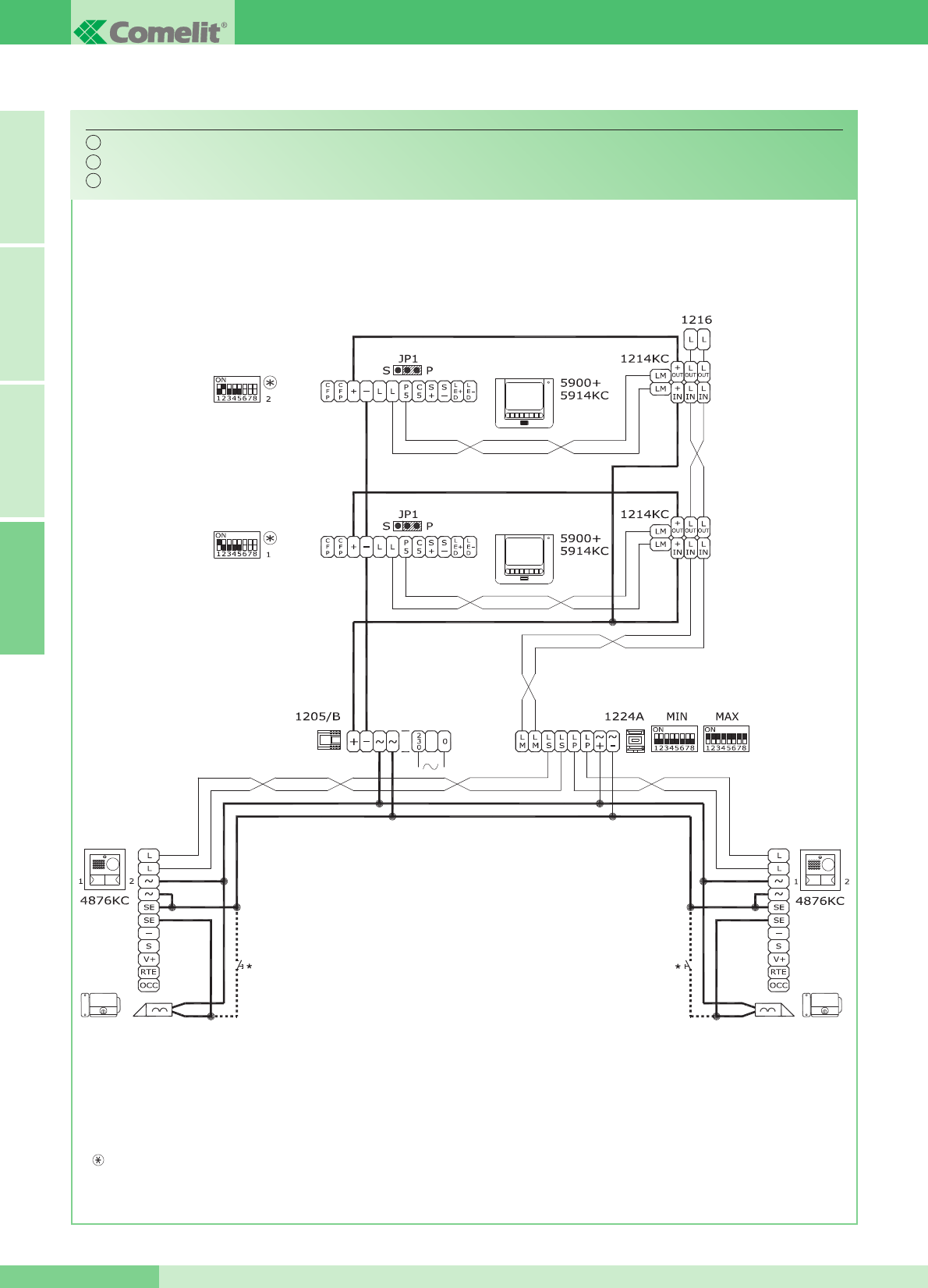
Schema per kit bifamiliari Art. 8494 ampliati con un secondo
Art.
4876KC. Collegamento in derivazione.
Wiring diagram for two-
residence
kit Art. 8494 expanded with a second Art. 4876KC. Branched connection.
Schéma pour kit deux appartements Art.
8494
avec un second Art.
4876KC
. Connexion en dérivation.
MK/03BC
*
Pulsante comando apriporta locale
*
Door request exit button button
*
Bouton commande ouvre-porte local
IT
EN
FR
N.B. Le impostazioni di S1-6, S1-7 e S1-8 sono in funzione della configurazione desiderata (vedi tabella a pag. 14).
NOTE: The S1-6, S1-7 and S1-8 settings depend on the configuration required (see table on page 34).
NOTE: Les programmations de S1-6, S1-7 et S1-8 sont en fonction de la configuration désirée (voir tableau page 54).
A FRANÇAIS ENGLISH ITALIANO
GROUP S.P.A.
MT KIT 13 64
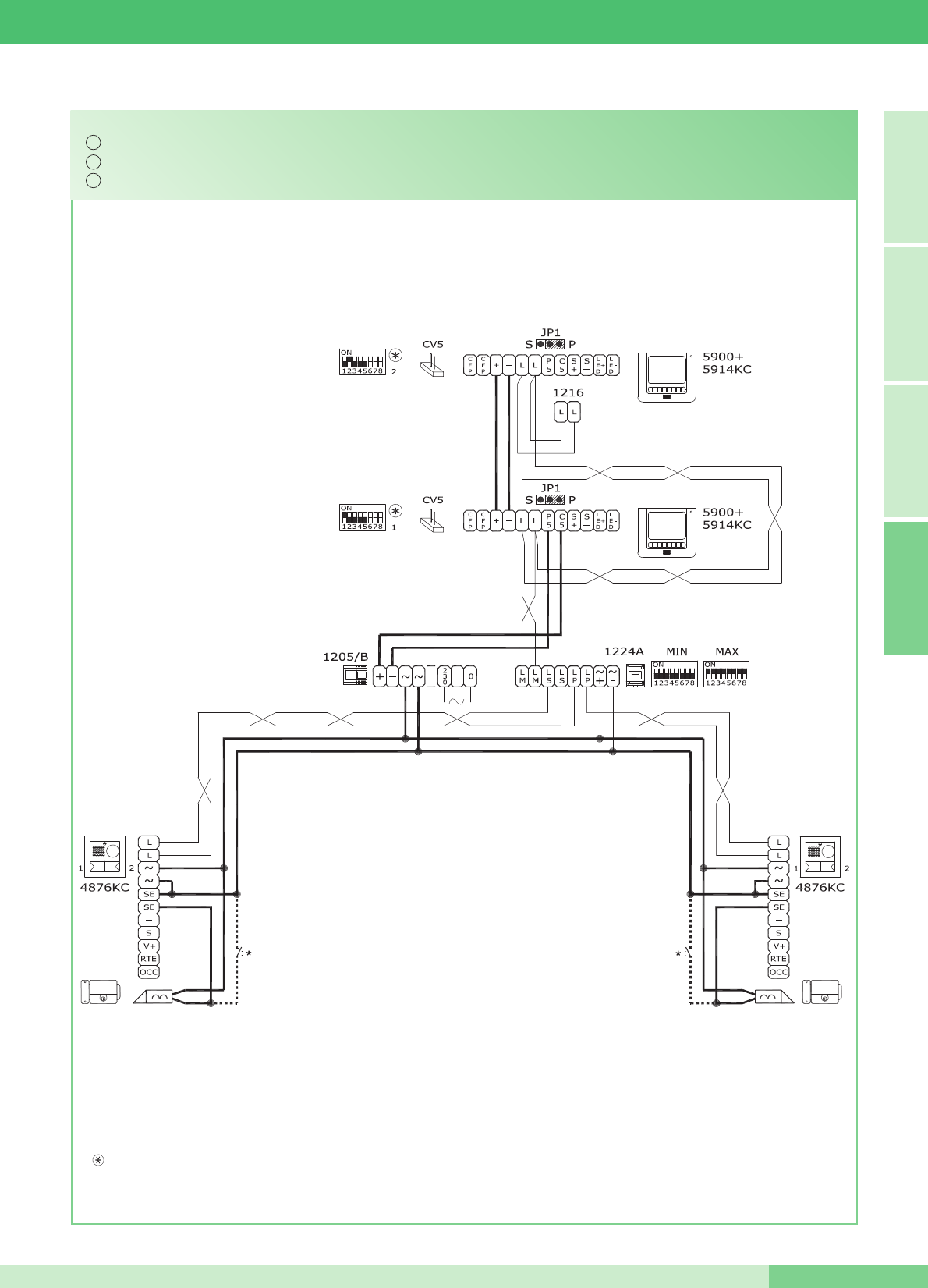
Schema per kit bifamiliari Art. 8494 ampliati con un secondo Art. 4876KC. Collegamento in cascata.
Basic wiring diagram for two-
residence
kit Art. 8494 expanded with a second Art. 4876KC. Cascade connection.
Schéma pour kit deux appartements Art. 8494 avec un second Art. 4876KC. Connexion en cascade.
MK/03AC
*
Pulsante comando apriporta locale
*
Door request exit button button
*
Bouton commande ouvre-porte local
IT
EN
FR
N.B. Le impostazioni di S1-6, S1-7 e S1-8 sono in funzione della configurazione desiderata (vedi tabella a pag. 14).
NOTE: The S1-6, S1-7 and S1-8 settings depend on the configuration required (see table on page 34).
NOTE: Les programmations de S1-6, S1-7 et S1-8 sont en fonction de la configuration désirée (voir tableau page 54).
FRANÇAIS ENGLISH ITALIANOA
MT KIT 13
65 MT KIT 13
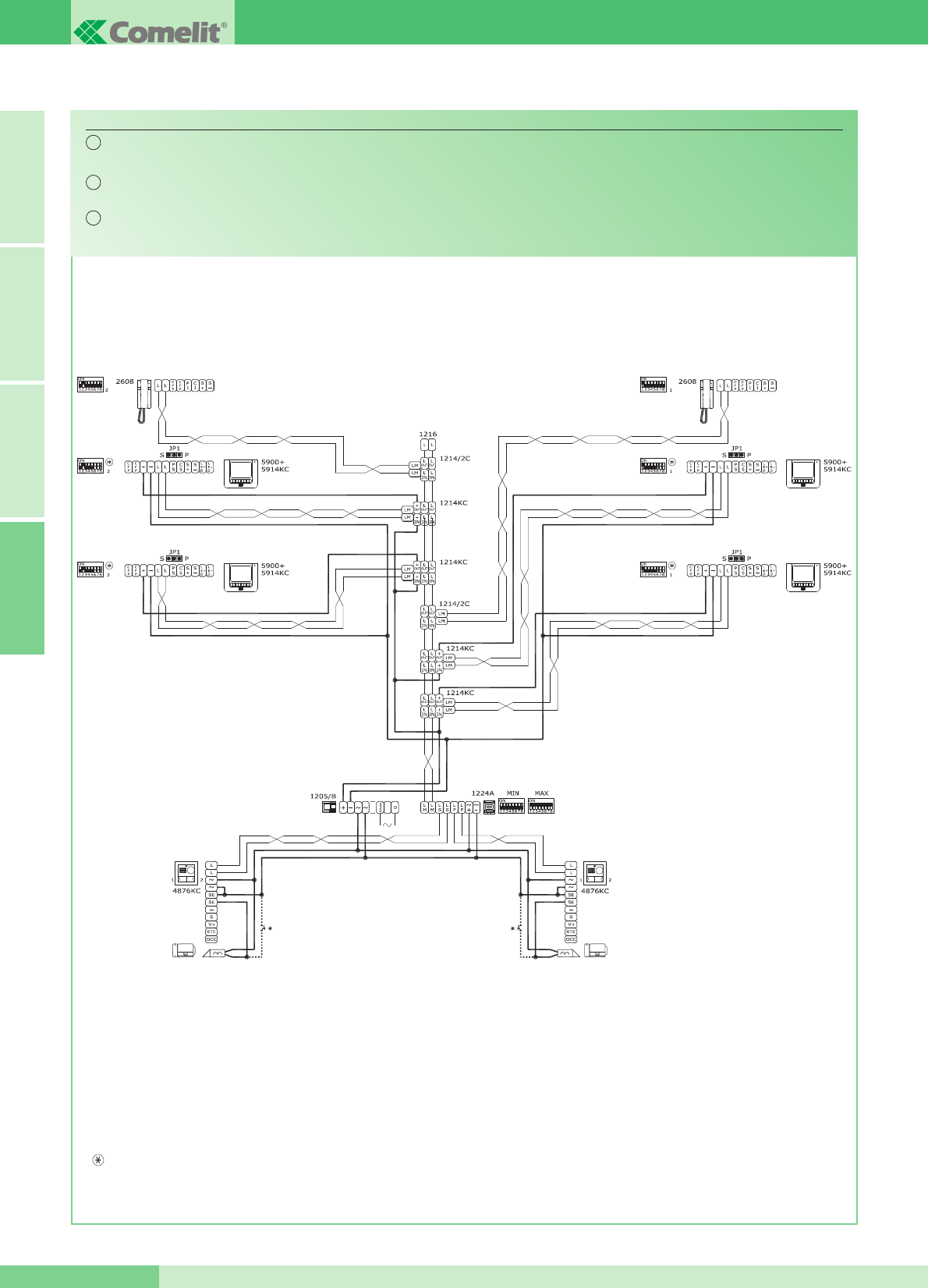
Schema per kit bifamiliari ampliati con un secondo Art. 4876KC, unʼulteriore monitor secondario e un citofono per ciascuna unità
familiare. Collegamento in derivazione.
Wiring diagram for two-residence kit expanded with a second Art. 4876KC, an additional secondary monitor and a door-entry phone for
each residence unit. Branched connection.
Schéma pour kit deux appartements complétés avec un second Art. 4876KC, un autre moniteur secondaire et un combiné
parlophonique pour chaque appartement.Connexion en derivation.
MK/04BC
*
Pulsante comando apriporta locale
*
Door request exit button button
*
Bouton commande ouvre-porte local
IT
EN
FR
N.B. Le impostazioni di S1-6, S1-7 e S1-8 sono in funzione della configurazione desiderata (vedi tabella a pag. 14).
NOTE: The S1-6, S1-7 and S1-8 settings depend on the configuration required (see table on page 34).
NOTE: Les programmations de S1-6, S1-7 et S1-8 sont en fonction de la configuration désirée (voir tableau page 54).
A FRANÇAIS ENGLISH ITALIANO
GROUP S.P.A.
MT KIT 13 66
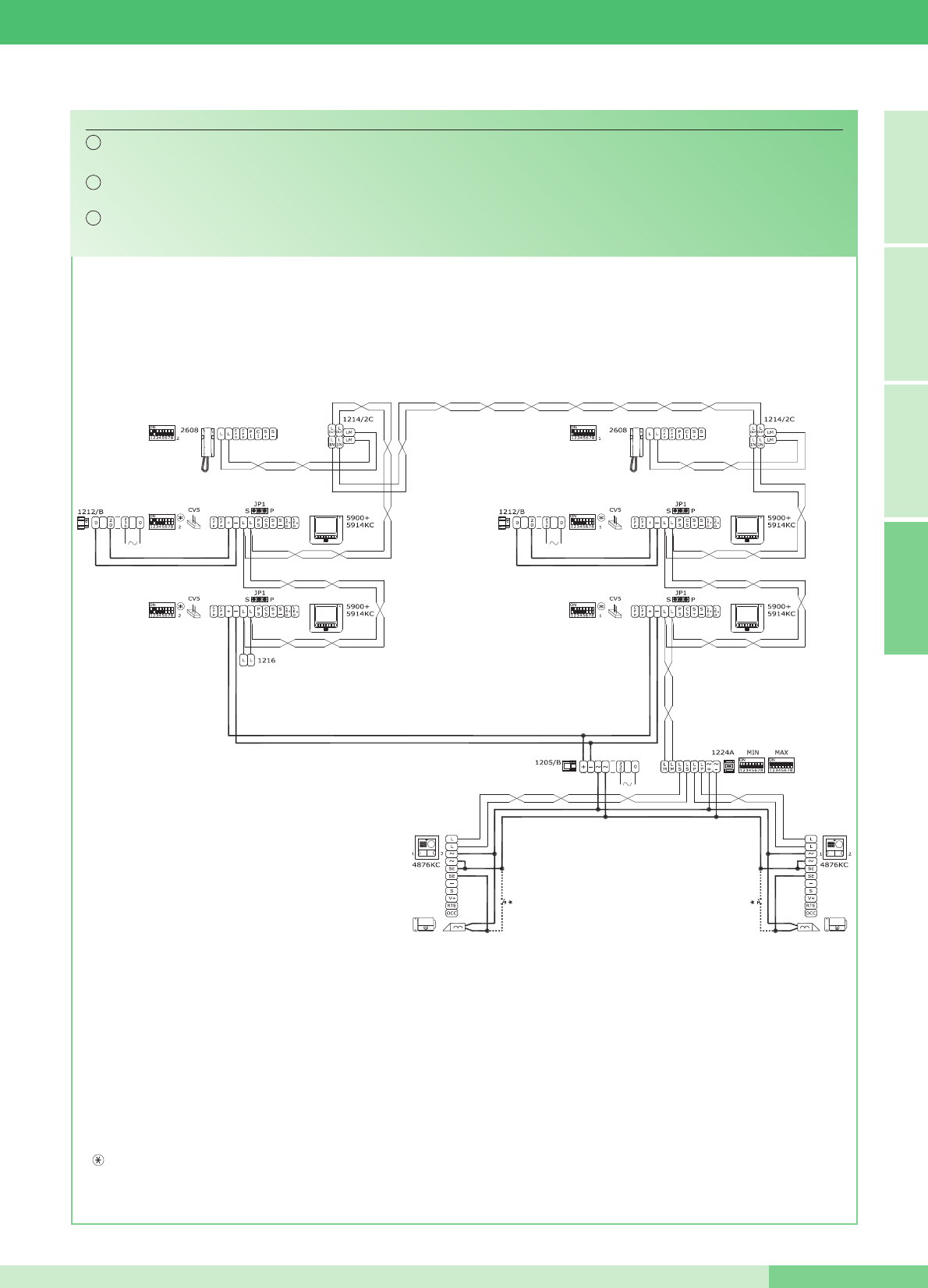
*
Pulsante comando apriporta locale
*
Door request exit button button
*
Bouton commande ouvre-porte local
Schema per kit bifamiliari ampliati con un secondo Art. 4876KC, unʼulteriore monitor principale e un citofono per ciascuna unità
familiare. Collegamento in cascata.
Wiring diagram for two-residence kit expanded with a second Art. 4876KC, an additional main monitor and a door-entry phone for
each family unit. Cascade connection.
Schéma pour kit deux appartements complétés avec un second Art. 4876KC, un autre moniteur principal et un combiné
parlophonique pour chaque appartement. Connexion en cascade.
MK/04AC
IT
EN
FR
N.B. Le impostazioni di S1-6, S1-7 e S1-8 sono in funzione della configurazione desiderata (vedi tabella a pag. 14).
NOTE: The S1-6, S1-7 and S1-8 settings depend on the configuration required (see table on page 34).
NOTE: Les programmations de S1-6, S1-7 et S1-8 sont en fonction de la configuration désirée (voir tableau page 54).
FRANÇAIS ENGLISH ITALIANOA
MT KIT 13
67 MT KIT 13
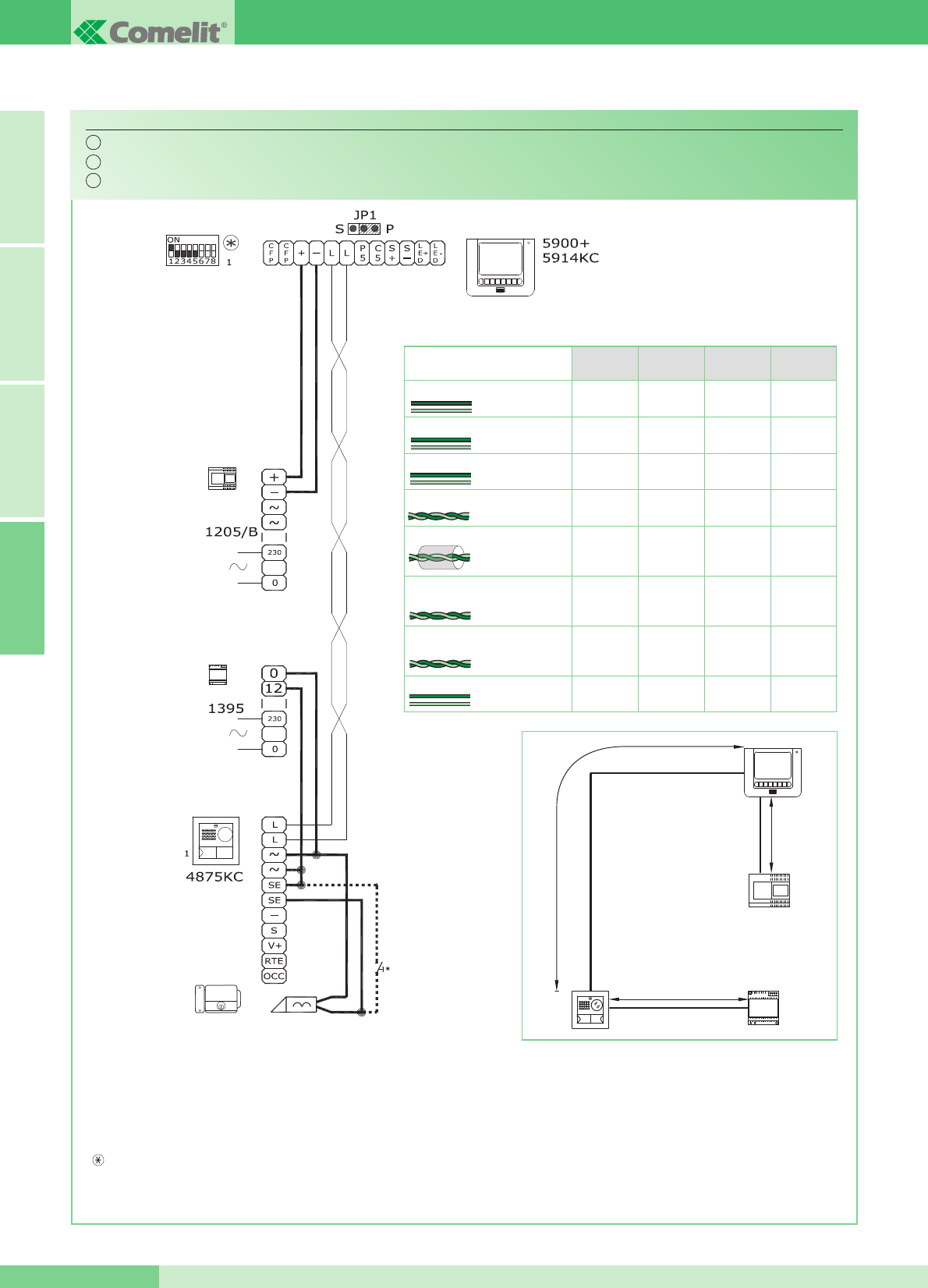
Schema per kit monofamiliare con alimentatore aggiuntivo Art. 1395.
Wiring diagram for single-residence kit with additional power supply Art. 1395.
Schéma pour kit un appartement avec alimentateur complémentaire Art. 1395.
MK/01/AC
Per maggiori informazioni sulle distanze vedi pagina 10 e 11.
For further information about distances refer to pages 30 and 31.
Pour plus de détails sur les distances faire référence au pages 50 et 51.
*
Pulsante comando apriporta locale
*
Door request exit button button
*
Bouton commande ouvre-porte local
A
C
1395
4875KC
4876KC
1205/B
B
IT
EN
FR
N.B. Le impostazioni di S1-6, S1-7 e S1-8 sono in funzione della configurazione desiderata (vedi tabella a pag. 14).
NOTE: The S1-6, S1-7 and S1-8 settings depend on the configuration required (see table on page 34).
NOTE: Les programmations de S1-6, S1-7 et S1-8 sont en fonction de la configuration désirée (voir tableau page 54).
A FRANÇAIS ENGLISH ITALIANO
GROUP S.P.A.
MT KIT 13 68
150 m
(495 feet)
150 m
(495 feet)
100 m
(325 feet)
150 m
(495 feet)
A (max) B (max) C (max)
0,5 mm2(Ø 0,8 mm - Ø 8/10 AWG 20)
1 mm2(Ø 1,2 mm - Ø 12/10 AWG 17)
1,5 mm2(Ø 1,4 mm - Ø 14/10 AWG 15)
20 m
(65 feet)
25 m
(85 feet)
0,28 mm2(Ø 0,6 mm - Ø 6/10 AWG 23)
1 mm2(Ø 1,2 mm - Ø 12/10 AWG 17)
40 m
(130 feet)
60 m
(195 feet)
50 m
(165 feet)
100 m
(325 feet)
UTP5 Cat 5
0,2 mm2(Ø 0,5 mm - Ø 5/10 AWG 24) 150 m
(495 feet)
150 m
(495 feet)
150 m
(495 feet)
300 m
(990 feet)
300 m
(990 feet)
200 m
(650 feet)
300 m
(990 feet)
C (max)
con Art. 4833C
300 m
(990 feet)
300 m
(990 feet)
300 m
(990 feet)
Comelit Art. 4576 / Art. 4578
0,5 mm2 (Ø 0,8 mm - Ø 8/10 AWG 20)
2,50 mm2(Ø 1,8 mm - Ø 18/10 AWG 13) 100 m
(325 feet)
150 m
(495 feet)
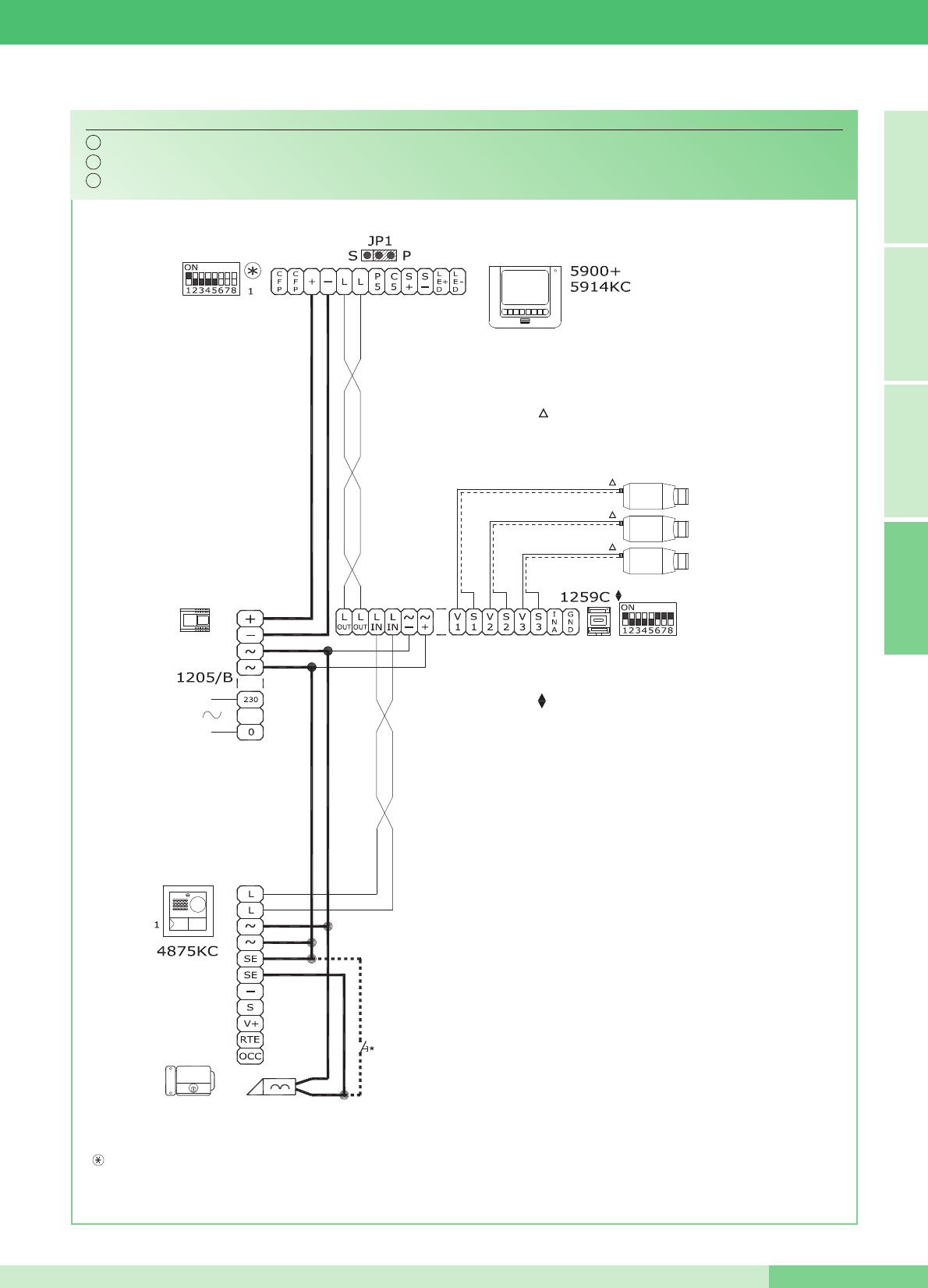
*
Pulsante comando apriporta locale
*
Door request exit button button
*
Bouton commande ouvre-porte local
Da alimentare separatamente
To be powered separately
À alimenter séparément
Per settaggio e funzionamento Art. 1259C vedi FT/SBC/05.
For setting and operation Art. 1259C see FT/SBC/05.
Pour programmation et fonctionnement Art. 1259C voir FT/SBC/05.
Utilizzo modulo telecamera scorporata Art. 1259C.
Use of remote camera module Art. 1259C.
Emploi module caméra déportée Art. 1259C.
MK/05C
IT
EN
FR
N.B. Le impostazioni di S1-6, S1-7 e S1-8 sono in funzione della configurazione desiderata (vedi tabella a pag. 14).
NOTE: The S1-6, S1-7 and S1-8 settings depend on the configuration required (see table on page 34).
NOTE: Les programmations de S1-6, S1-7 et S1-8 sont en fonction de la configuration désirée (voir tableau page 54).
FRANÇAIS ENGLISH ITALIANOA
MT KIT 13
69 MT KIT 13
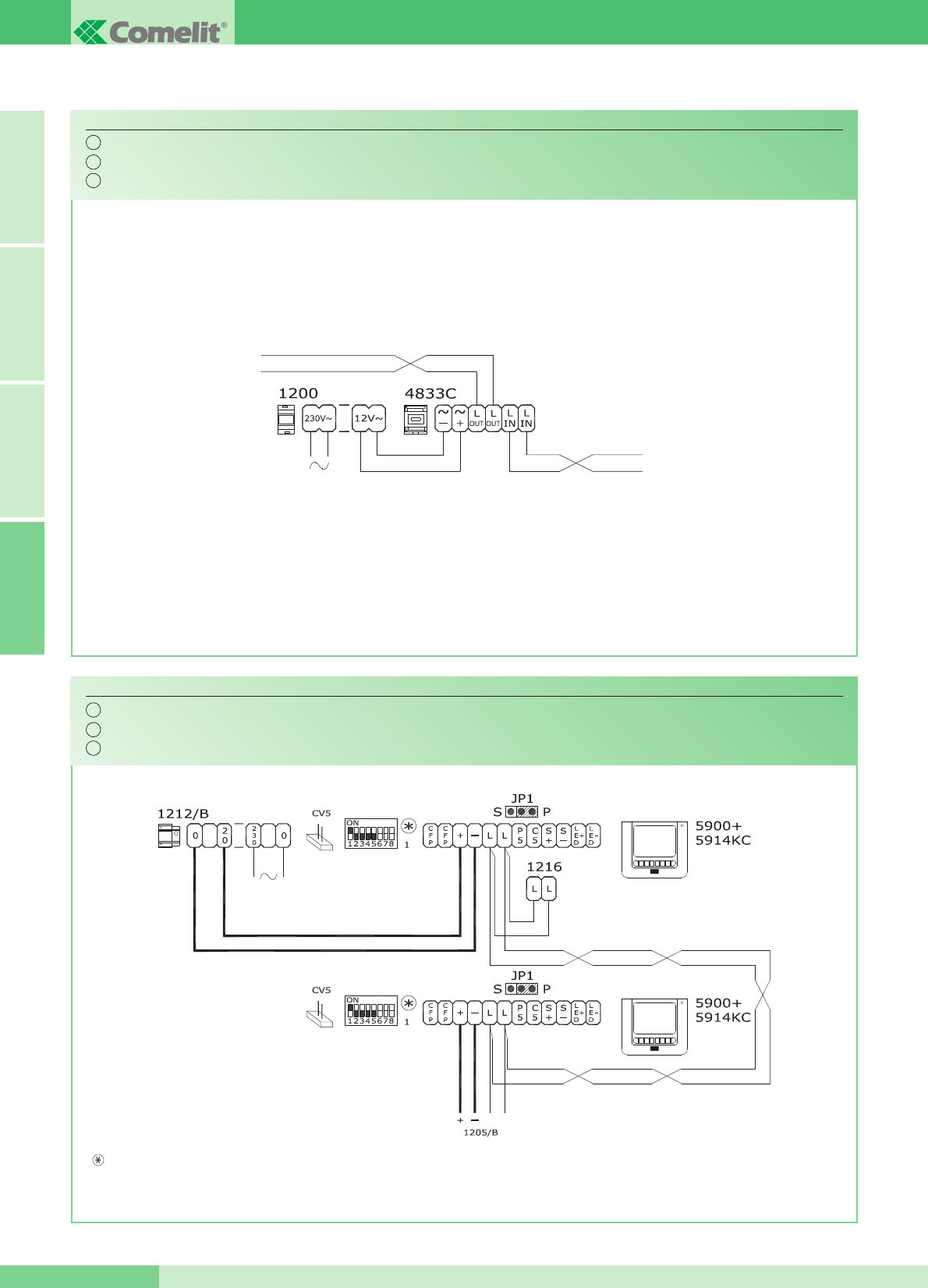
Aggiunta di un monitor principale in parallelo, collegamento in cascata.
Addition of a main in parallel monitor connection in cascade.
Adjonction dʼun moniteur principal en parallèle. Connexion en cascade.
MK/HC
LINEA MONTANTE
RISER LINE
LIGNE MONTANT
DAL POSTO ESTERNO
FROM EXTERNAL UNIT
DEPUIS LA PLAQUE DE RUE
Collegamento amplificatore video Art. 4833C.
Connection of video amplifier Art. 4833C.
Connexion amplificateur vidéo Art. 4833C.
SB2/AAR
IT
EN
FR
IT
EN
FR
N.B. Le impostazioni di S1-6, S1-7 e S1-8 sono in funzione della configurazione desiderata (vedi tabella a pag. 14).
NOTE: The S1-6, S1-7 and S1-8 settings depend on the configuration required (see table on page 34).
NOTE: Les programmations de S1-6, S1-7 et S1-8 sont en fonction de la configuration désirée (voir tableau page 54).
A FRANÇAIS ENGLISH ITALIANO
GROUP S.P.A.
MT KIT 13 70
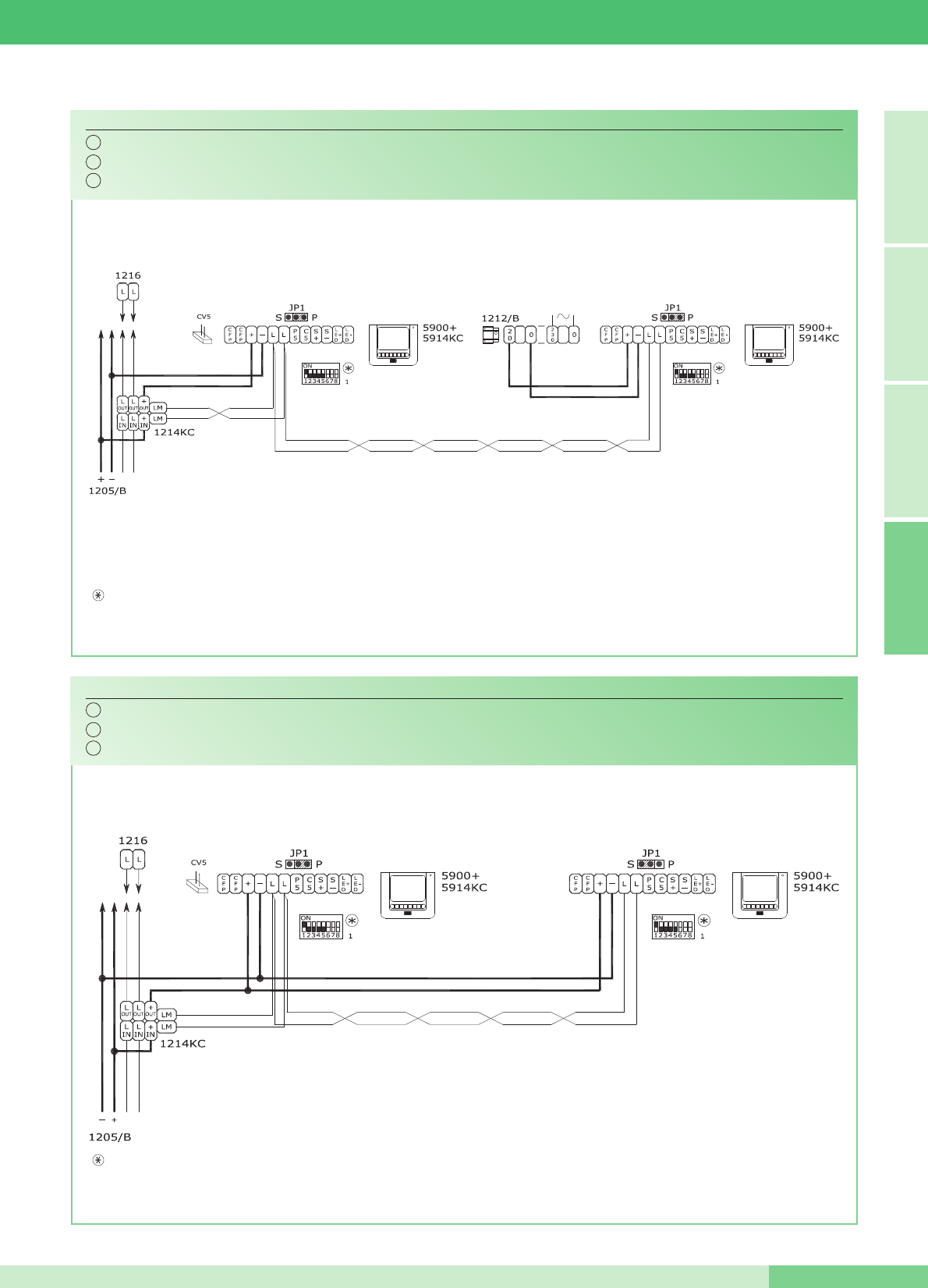
Aggiunta di un monitor principale in parallelo, collegamento in derivazione.
Addition of a main monitor in parallel, branched connection.
Adjonction dʼun deuxième moniteur en parallèle. Connexion en dérivation.
MK/IC
MONITOR PRINCIPALE
MAIN MONITOR
MONITEUR PRINCIPAL
MONITOR PRINCIPALE
MAIN MONITOR
MONITEUR PRINCIPAL
Collegamento in cascata di un monitor principale e di un monitor secondario con lo stesso codice utente.
Connection in cascade of a main monitor and a secondary monitor with the same user code.
Connexion en cascade dʼun moniteur principal et dʼun moniteur secondaire avec le même code usager.
MK/CC
MONITOR PRINCIPALE
MAIN MONITOR
MONITEUR PRINCIPAL
MONITOR SECONDARIO
SECONDARY MONITOR
MONITEUR SECONDAIRE
IT
EN
FR
IT
EN
FR
N.B. Le impostazioni di S1-6, S1-7 e S1-8 sono in funzione della configurazione desiderata (vedi tabella a pag. 14).
NOTE: The S1-6, S1-7 and S1-8 settings depend on the configuration required (see table on page 34).
NOTE: Les programmations de S1-6, S1-7 et S1-8 sont en fonction de la configuration désirée (voir tableau page 54).
N.B. Le impostazioni di S1-6, S1-7 e S1-8 sono in funzione della configurazione desiderata (vedi tabella a pag. 14).
NOTE: The S1-6, S1-7 and S1-8 settings depend on the configuration required (see table on page 34).
NOTE: Les programmations de S1-6, S1-7 et S1-8 sont en fonction de la configuration désirée (voir tableau page 54).
FRANÇAIS ENGLISH ITALIANOA
MT KIT 13
71 MT KIT 13
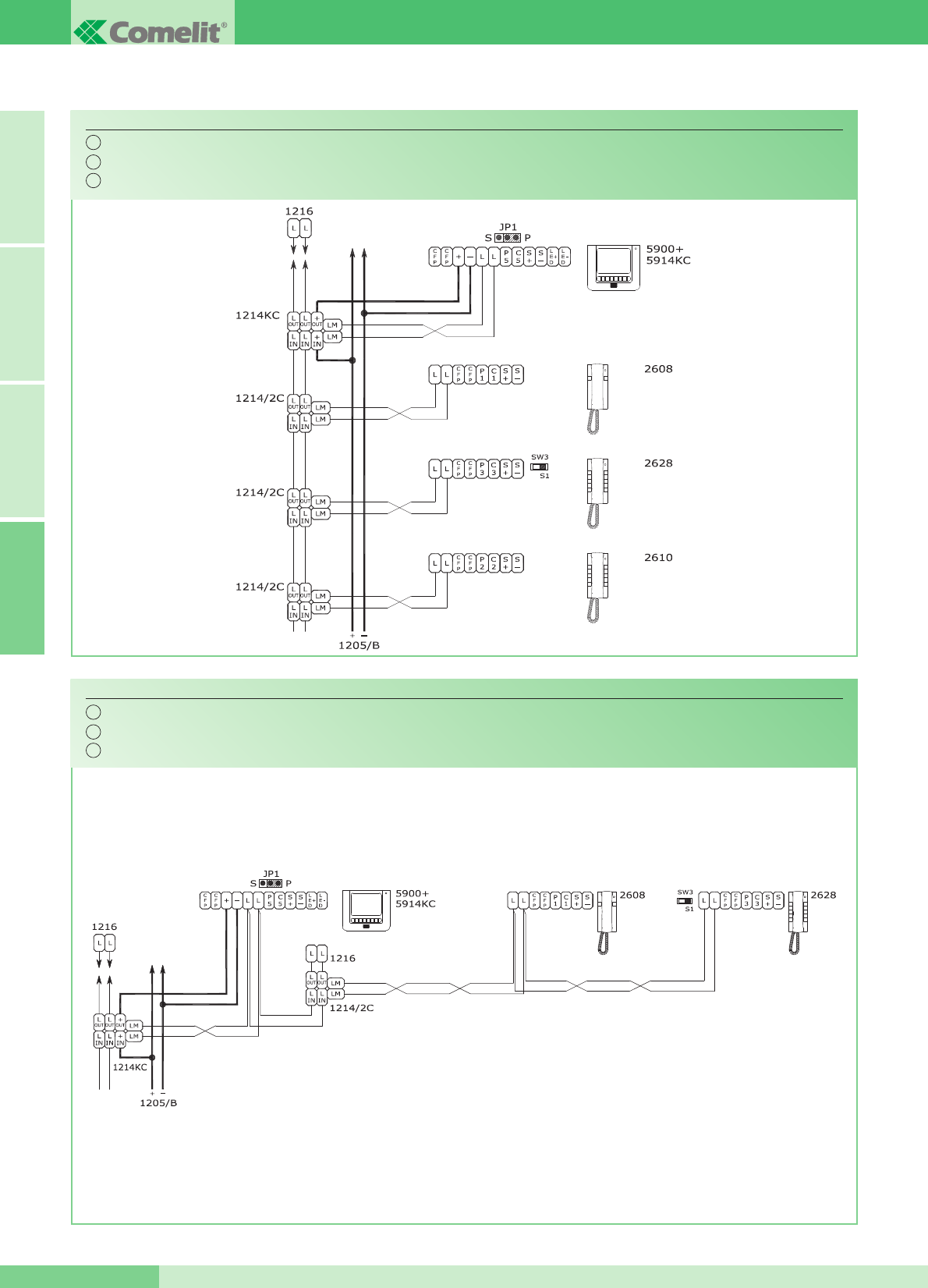
Aggiunta di un citofono in parallelo in derivazione dal montante.
Addition an door-entry phone in parallel. Branched connection from riser.
Adjonction dʼun combiné parlophonique en parallèle en dérivation du montant.
MK/DC
Collegamento citofoni aggiuntivi in derivazione dal monitor.
Connection of additional door-entry phones, branched connection from monitor.
Connexion combinés parlophoniques supplémentaires en dérivation du moniteur.
MK/AAB
IT
EN
FR
IT
EN
FR
A FRANÇAIS ENGLISH ITALIANO
GROUP S.P.A.
MT KIT 13 72
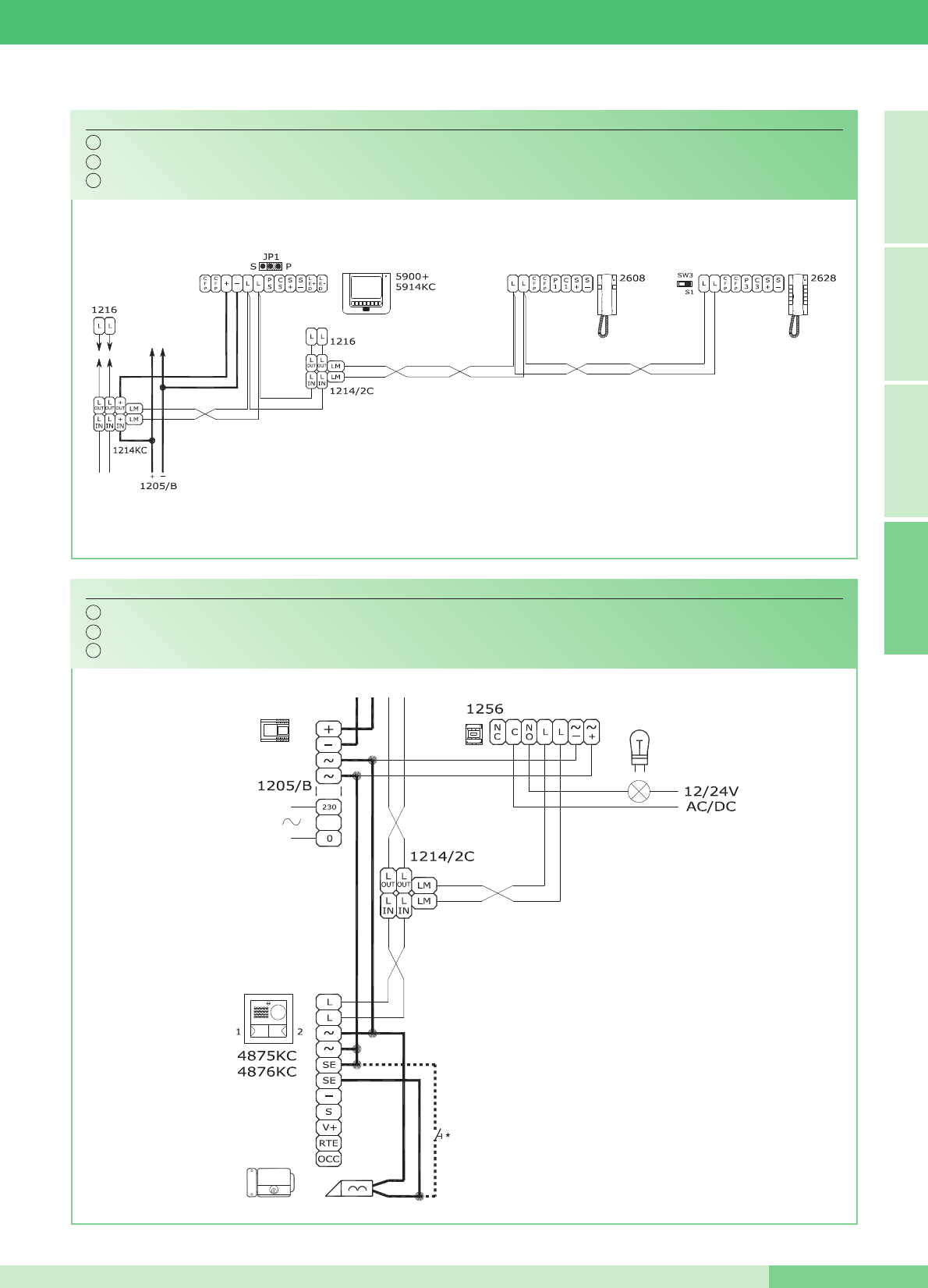
Collegamento citofoni aggiuntivi in cascata dal monitor.
Connection of additional door-entry phones, connection in cascade from monitor.
Connexion combinés parlophoniques supplémentaires en cascade du moniteur.
MK/AAA
*
Pulsante comando apriporta locale
*
Door request exit button button
*
Bouton commande ouvre-porte local
Aggiunta pilotaggio luce esterna tramite Art. 1256.
Addition of external light control using Art. 1256.
Adjonction pilotage éclairage extérieur par Art. 1256.
BK/EC
Per settaggio funzioni A,C,D,E dell'Art. 1256, vedi FT/SB2/02.
For setting of functions A,C,D,E of Art. 1256, see FT/SB2/02.
Pour programmation des fonctions A,C,D,E de l'Art. 1256,
voir FT/SB2/02.
IT
EN
FR
IT
EN
FR
FRANÇAIS ENGLISH ITALIANOA
MT KIT 13
73 MT KIT 13
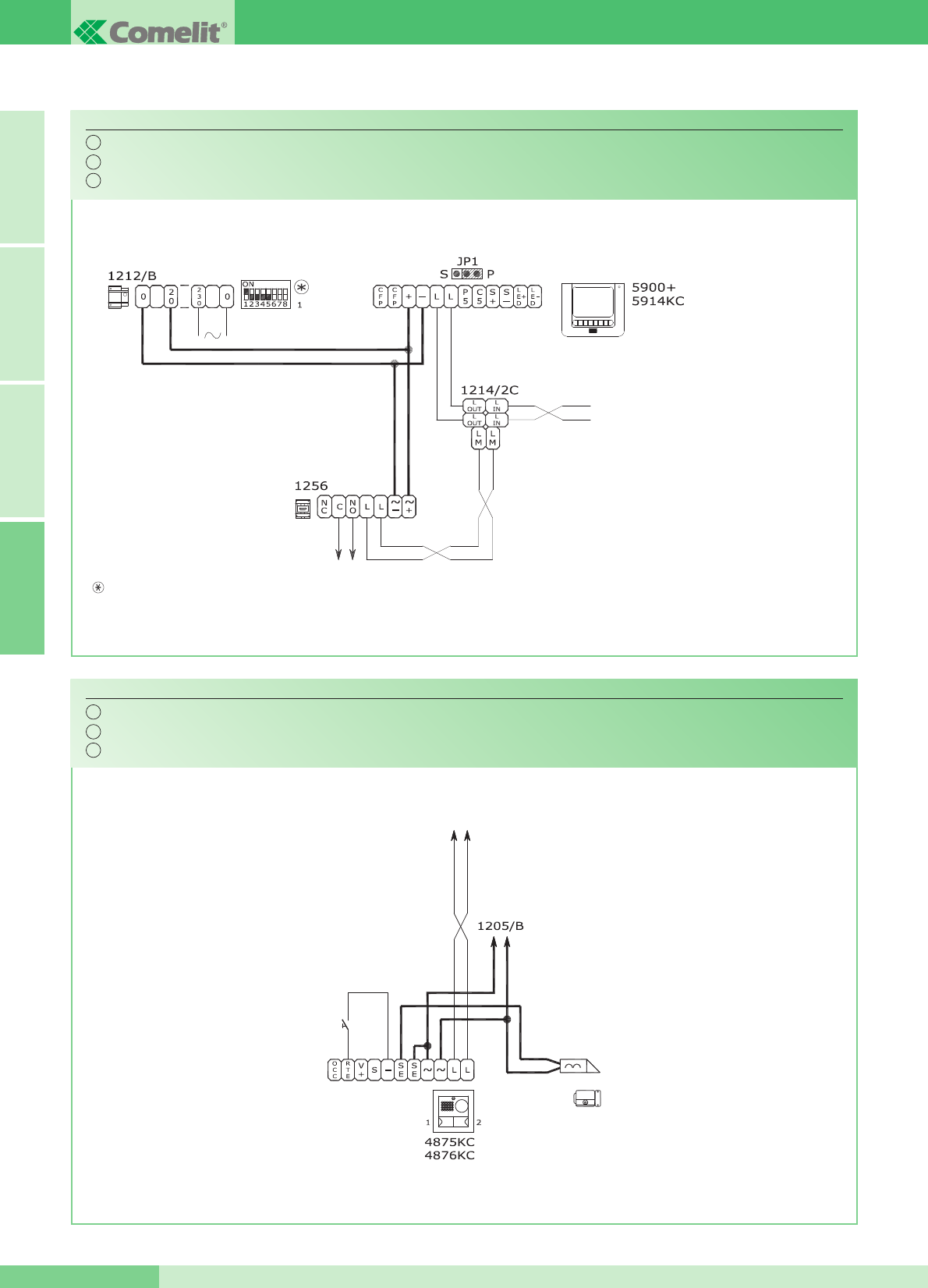
Aggiunta attuatore Art. 1256.
Addition of actuator Art. 1256.
Adjonction actionneur Art. 1256.
MK/AC
Variante collegamento apriporta locale temporizzato.
Timed local door-release connection variant.
Variante pour connecter le bouton de commande de gâche local temporisé.
BK/OC
Per settaggio funzioni A,C,D,E dell'Art. 1256, vedi FT/SB2/02.
For setting of functions A,C,D,E of Art. 1256, see FT/SB2/02.
Pour programmation des fonctions A,C,D,E de l'Art. 1256, voir FT/SB2/02.
IT
EN
FR
IT
EN
FR
N.B. Le impostazioni di S1-6, S1-7 e S1-8 sono in funzione della configurazione desiderata (vedi tabella a pag. 14).
NOTE: The S1-6, S1-7 and S1-8 settings depend on the configuration required (see table on page 34).
NOTE: Les programmations de S1-6, S1-7 et S1-8 sont en fonction de la configuration désirée (voir tableau page 54).
A FRANÇAIS ENGLISH ITALIANO
GROUP S.P.A.
MT KIT 13 74
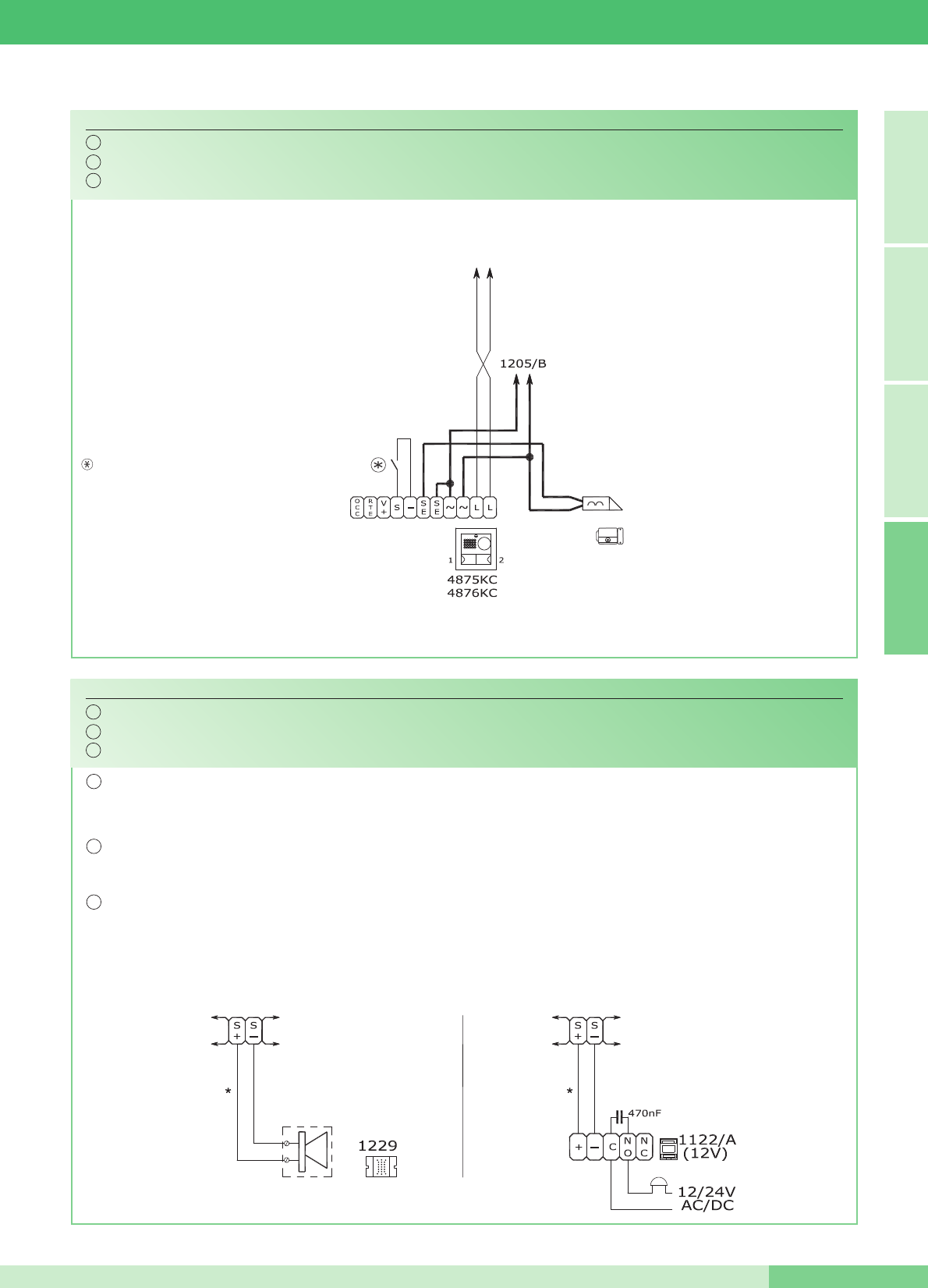
Contatto N.C. per segnalazione PORTA
APERTA (il led dei posti interni lampeggia).
N.C. contact for DOOR OPEN signalling
(the LED for the internal units flashes).
Contact N.F. pour signalisation PORTE
OUVERTE (la led des postes internes
clignote).
Variante utilizzo segnalazione PORTA APERTA.
DOOR OPEN signalling use variant.
Variante utilisation signalisation PORTE OUVERTE.
BK/OAC
Connessione di dispositivi di ripetizione di chiamata (Art. 1229 o Art. 1122/A).
Connection of call repetition devices (Art. 1229 or Art. 1122/A).
Connexion de dispositifs de répétition d'appel (Art. 1229 ou Art. 1122/A).
SB2/AAK
*
20m MAX
IT
EN
FR
IT
EN
FR
FRANÇAIS ENGLISH ITALIANOA
MT KIT 13
75 MT KIT 13
IT La somma totale del numero di posti interni con stesso codice utente e del numero di dispositivi di ripetizione chiamata collegati ai suddetti posti interni non può superare
il numero di 4. Connettere un solo dispositivo di ripetizione chiamata per ogni posto interno. Utilizzare cavo schermato per il collegamento e non far passare i cavi in pros-
simità di carichi induttivi pesanti o cavi di alimentazione (230V / 400V). In caso di connessione di carichi induttivi si consiglia l’inserimento di una capacità di 470nF in
parallelo ai contatti C-NO dell’Art. 1122/A.
EN The total number of internal units with the same user code summed with the number of call repetition devices connected to these internal units cannot exceed 4. Connect
only one call repetition device for each internal unit. Use shielded cable for the connection and do not run the cables near heavy inductive loads or power supply cables
(230V / 400V). In the case of connection of inductive loads, insertion of a capacity of 470nF in parallel with the C-NO contacts of Art. 1122/A is raccomended.
FR La somme du nombre de postesintérieurs ayant le même code utilisateur et du nombre de dispositifs de répétition d’appel branchés à ces postes intérieurs ne peutpas
être supérieure à 4. Connecter un seul dispositif de répétition d’appel pour chaque poste intérieur. Pour la connexion, utiliser un câble blindé et ne pasfaire passer les
câbles à proximité de charges inductives lourdes ou de câbles d’alimentation (230V / 400V). En cas de connexion de charges inductives, il est conseillé d’installer une
capacité de 470nF en parallèle aux contacts C-NO de l’Art. 1122/A.
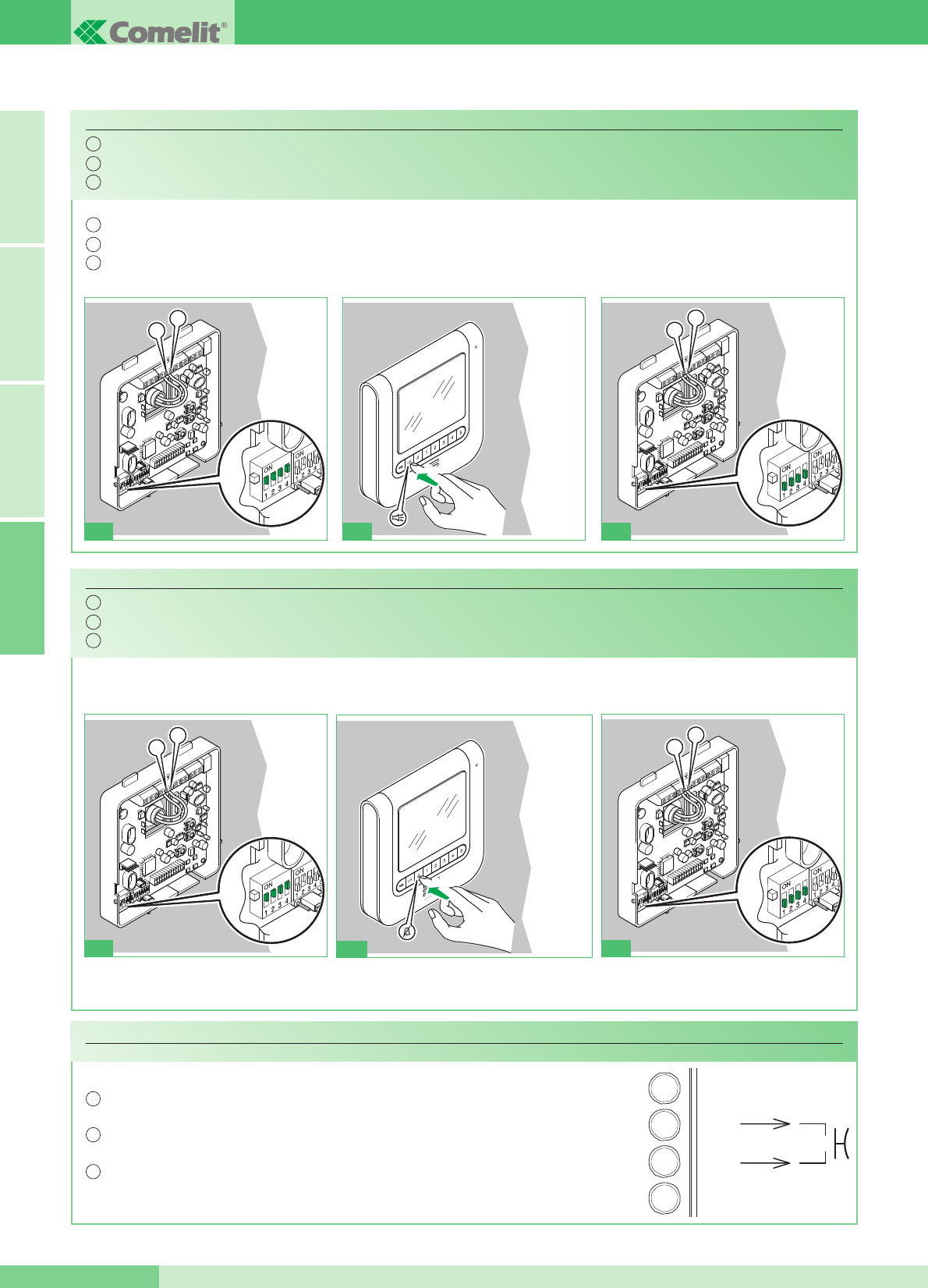
L
L
S2 P
1
Abilitazione (ON) / disabilitazione (OFF) risposta automatica.
Enabling (ON) / disabling (OFF) automatic response.
Validation (ON) / invalidation (OFF) réponse automatique.
VARIANTE A - VARIANT A
IT
EN
FR
A FRANÇAIS ENGLISH ITALIANO
GROUP S.P.A.
MT KIT 13 76
Funzione Risposta automatica: con questa funzione impostata il monitor entra in fonica automaticamente a fronte di una chiamata ricevuta.
Automatic Response function: when this function is activated, the monitor automatically switches on the audio when a call is received.
Fonction Réponse automatique : lorsque cette fonction est activée, le moniteur passe automatiquement en audio lors dʼun appel entrant.
IT
EN
FR
3 sec
L
L
S2 P
23
ON: BEEP -BEEP
OFF: BEEP
3 sec
2
ON: BEEP -BEEP
OFF: BEEP
L
CFP
CFP
P1
20m MAX
In caso di più citofoni o staffe monitor con lo stesso codice utente collegare il pulsante CFP su uno solo; tutti i dispositivi
suoneranno contemporaneamente.
IT
In case of several door-entry phones or brackets with the same user code, connect the CFP button only on one; all
devices will ring together.
EN
Si le même code utilisateur est attribué à plusieurs combinés parlophoniques ou brides moniteur, reliez le bouton CFP à
l'un d'entre eux uniquement; tous les appareils sonneront simultanément.
FR
VARIANTE C - VARIANT C
Abilitazione (ON) / disabilitazione (OFF) suoneria durante la funzione Dottore.
Enabling (ON) / disabling (OFF) the ringtone during the Doctor function.
Validation (ON) / invalidation (OFF) sonnerie durant la fonction Docteur.
VARIANTE B - VARIANT B
IT
EN
FR
L
L
S2 P
1
L
L
S2 P
3
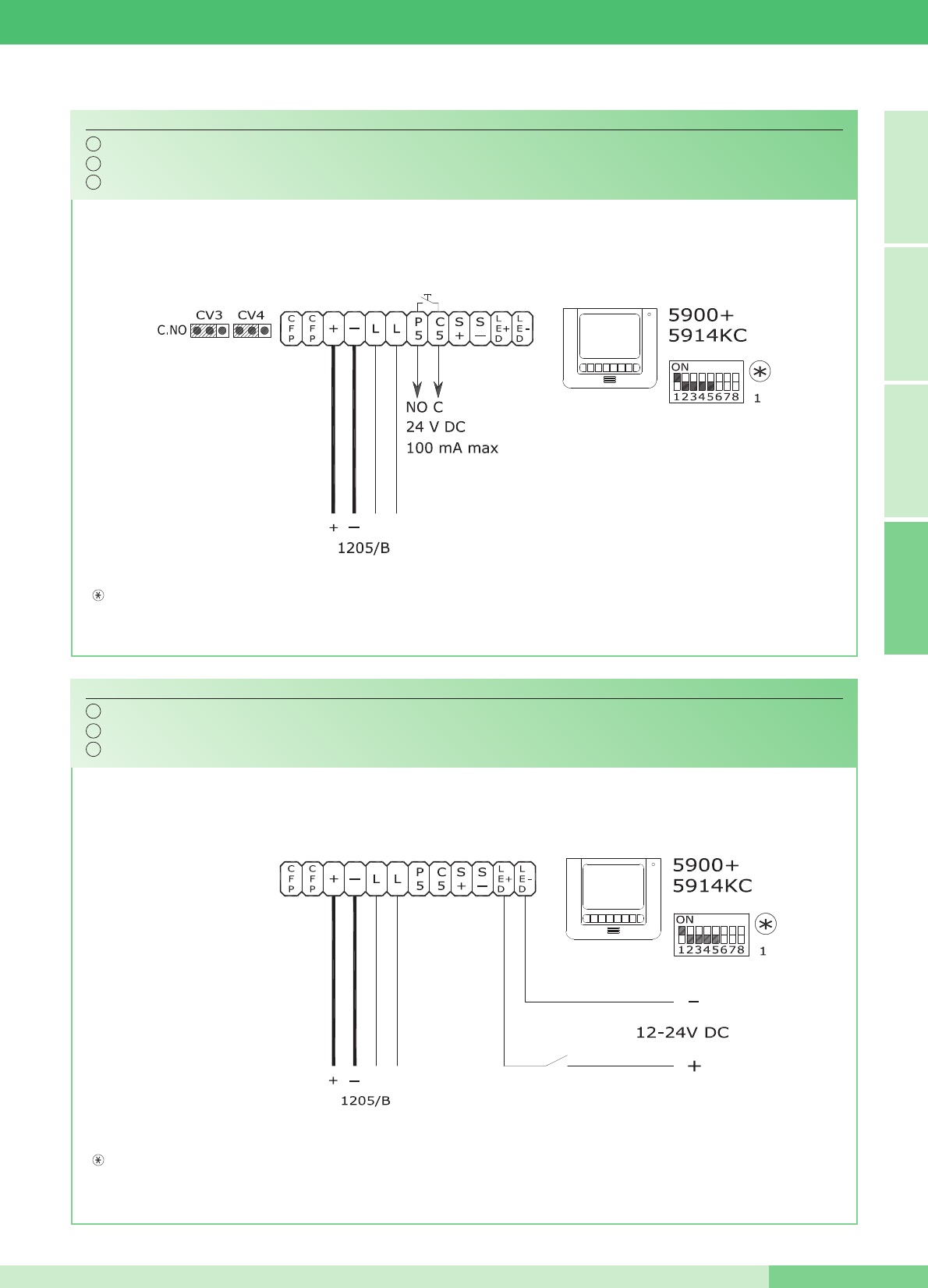
Utilizzo per usi vari del Pulsante 5.
Using Pushbutton 5 for various purposes.
Utilisation pour usages divers du bouton 5.
MK/PC
Variante per utilizzo Morsetti +LED -LED.
Variant for use of terminals +LED -LED.
Variante pour utilisation bornes +LED -LED.
MK/NC
Per utilizzare i morsetti P5 e C5 come contatto libero, spostare CV3 e CV4 in posizione C.NO.
To use the terminals P5 C5 as free contacts, move CV3 and CV4 to the C.NO position.
Pour utiliser les bornes P5 C5 comme contact libre, déplacer CV3 et CV4 en position C.NO.
In presenza di segnale su questo morsetto il LED giallo lampeggia.
The yellow LED flashes if a signal is detected on this terminal.
En présence de signal sur cette borne, la led jaune clignote.
IT
EN
FR
IT
EN
FR
N.B. Le impostazioni di S1-6, S1-7 e S1-8 sono in funzione della configurazione desiderata (vedi tabella a pag. 14).
NOTE: The S1-6, S1-7 and S1-8 settings depend on the configuration required (see table on page 34).
NOTE: Les programmations de S1-6, S1-7 et S1-8 sont en fonction de la configuration désirée (voir tableau page 54).
N.B. Le impostazioni di S1-6, S1-7 e S1-8 sono in funzione della configurazione desiderata (vedi tabella a pag. 14).
NOTE: The S1-6, S1-7 and S1-8 settings depend on the configuration required (see table on page 34).
NOTE: Les programmations de S1-6, S1-7 et S1-8 sont en fonction de la configuration désirée (voir tableau page 54).
FRANÇAIS ENGLISH ITALIANOA
MT KIT 13
77 MT KIT 13
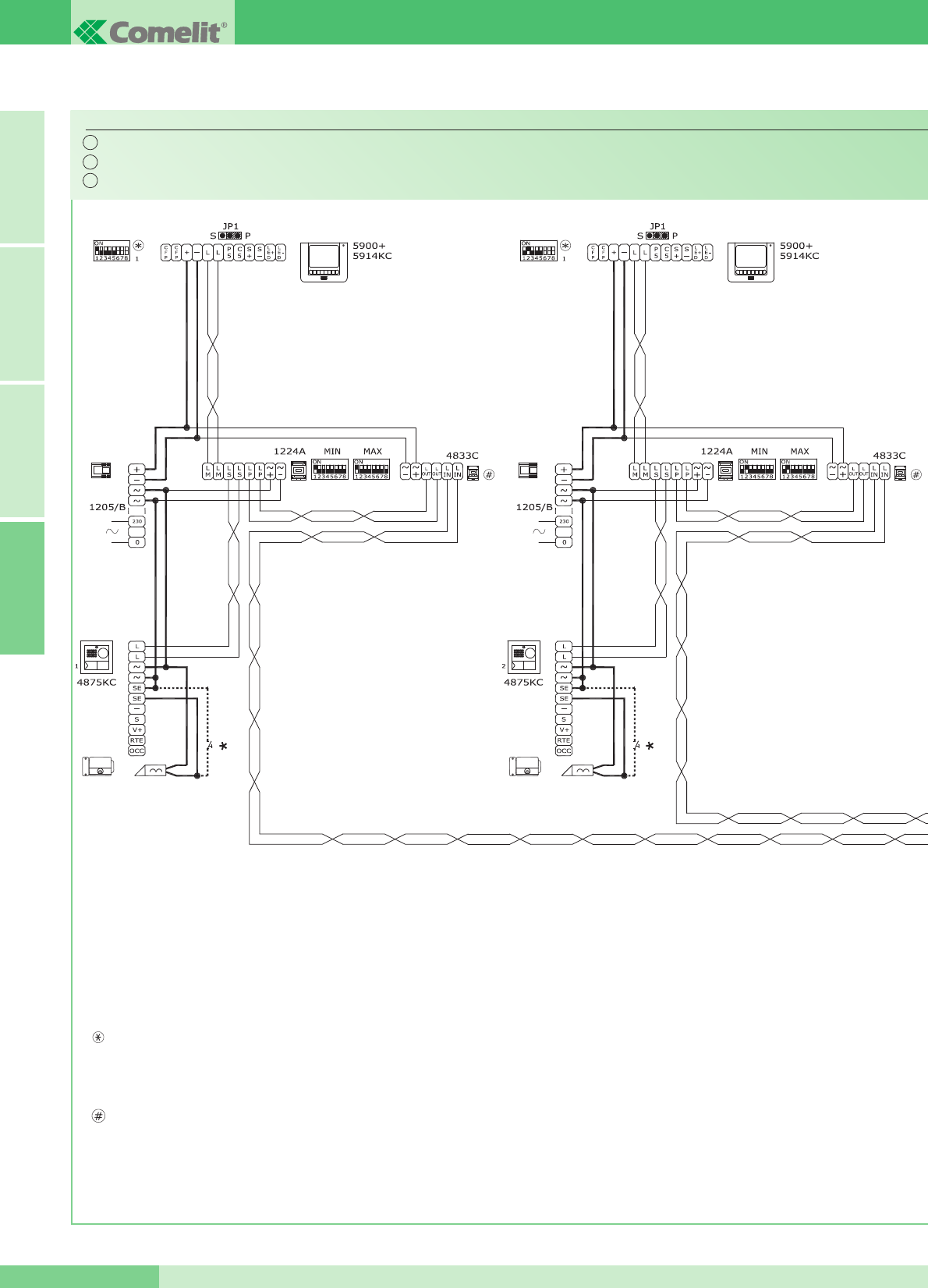
Schema per connessione a porta principale di 3 MAESTRO KIT tramite Art. 4834/9.
Wiring diagram for connection of 3 MAESTRO KITS to a main entrance panel using Art. 4834/9.
Schéma pour connexion à porte principale de 3 MAESTRO KIT par l'Art. 4834/9.
MK/EN/100C
Per maggiori informazioni sulle distanze di utilizzo dell'Art. 4833C e Art. 4834/9 e per maggiori informazioni
sulle impostazioni necessarie in merito all'Art. 1224A fare riferimento al manuale tecnico MT/SBC/01.
For further information about the usage distances of Art. 4833C and Art. 4834/9, and for further information
about the settings needed regarding Art. 1224A, refer to the MT/SBC/01 technical manual.
Pour plus de détails sur les distances dʼutilisation de l'Art. 4833C et de l'Art. 4834/9, ainsi que pour plus
de détails sur les réglages nécessaires par rapport à l'Art. 1224A, faire référence au manuel technique MT/SBC/01.
Soluzione utilizzabile al massimo per 9 MAESTRO Kit.
Solution which can be used for a maximum of 9 MAESTRO Kits.
Solution utilisable au maximum pour 9 MAESTRO KIT.
IT
EN
FR
N.B. Le impostazioni di S1-6, S1-7 e S1-8 sono in funzione della configurazione desiderata (vedi tabella a pag 14).
NOTE: The S1-6, S1-7 and S1-8 settings depend on the configuration required (see table on page 34).
NOTE: Les programmations de S1-6, S1-7 et S1-8 sont en fonction de la configuration désirée (voir tableau page 54).
A FRANÇAIS ENGLISH ITALIANO
GROUP S.P.A.
MT KIT 13 78
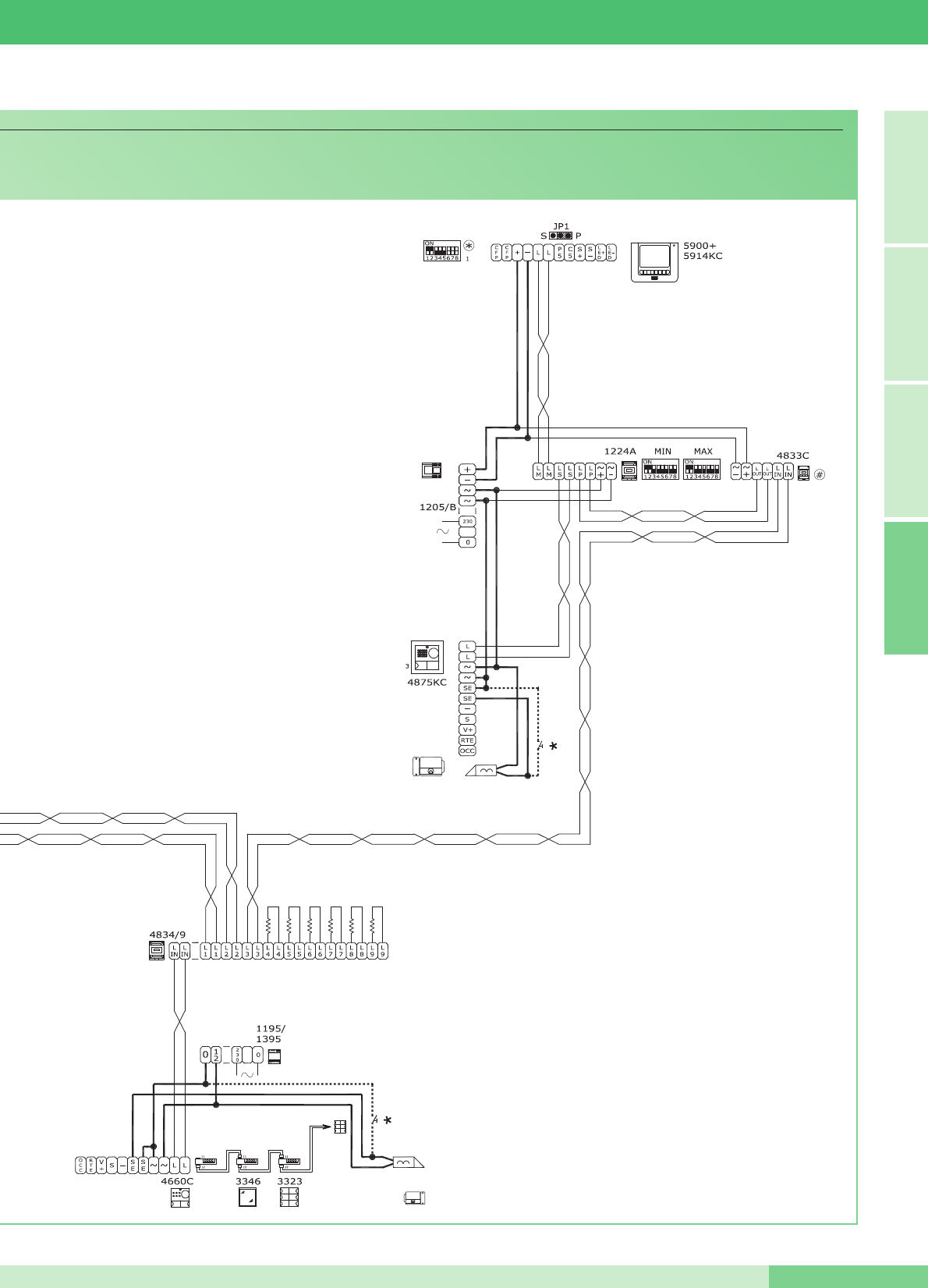
*
Pulsante comando apriporta locale
*
Door request exit button button
*
Bouton commande ouvre-porte local
FRANÇAIS ENGLISH ITALIANOA
MT KIT 13
79 MT KIT 13
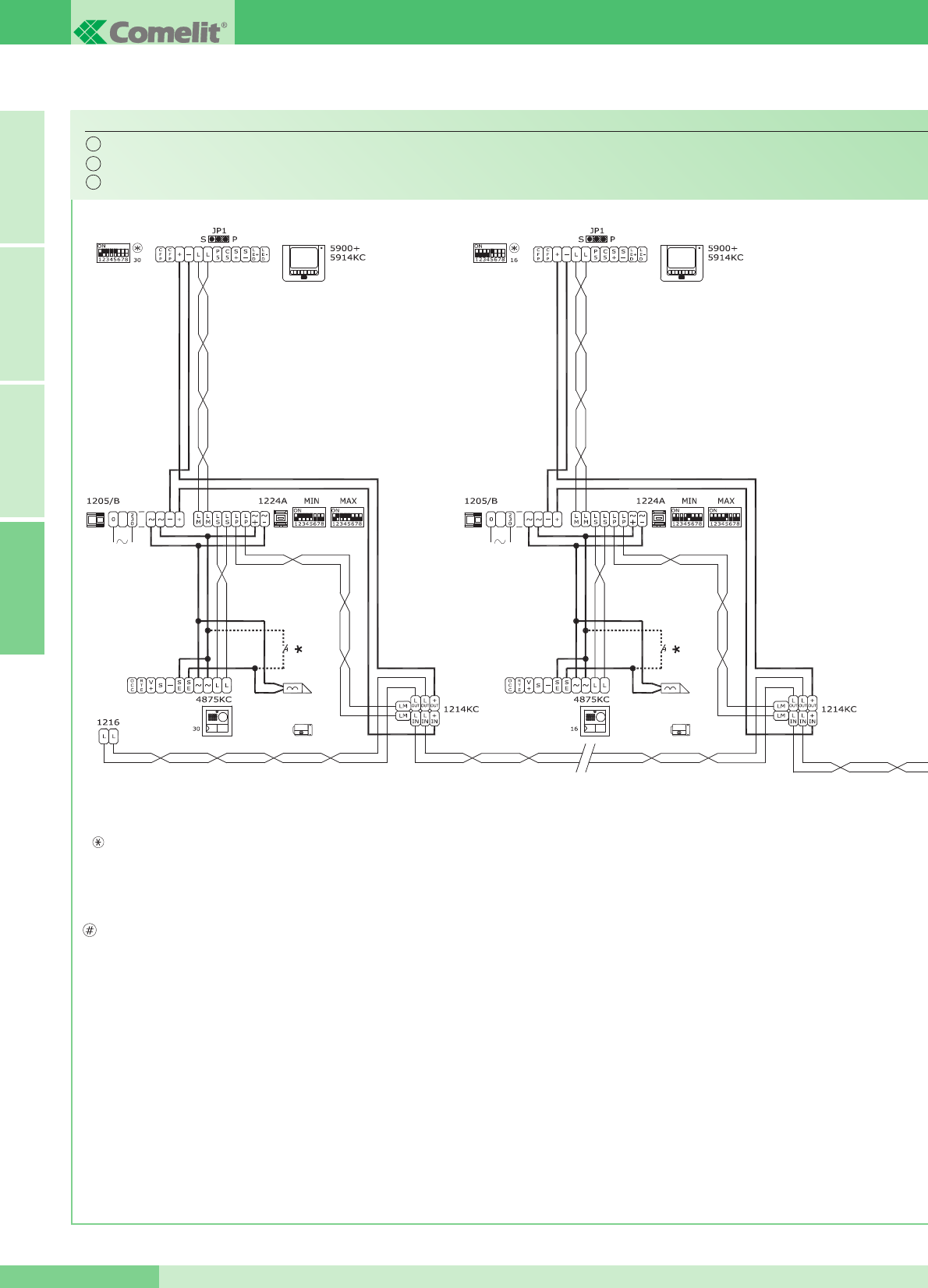
Schema di connessione a porta principale con centralino Art. 1998A (opzionale) di 30 MAESTRO KIT (massimo). Derivazione Maestro Kit da 1214KC.
Wiring diagram for connection of 30 MAESTRO KITS (max.) to main entrance panel with switchboard Art. 1998A. Maestro Kit branched from 1214KC.
Schéma de connexion à la plaque de rue principale avec standard Art. 1998A (en option) de 30 MAESTRO KIT (maximum). Dérivation Maestro Kit de 1214KC.
MK/EN/101C
L'Art. 1236 va utilizzato in impianti cablati in questa
configurazione con più di 16 kit (Art. 8493 e Art. 8494)
derivati. L'Art. 1236 va posto in prossimità dell'uscita
Lout-Lout del morsetto Art. 1214KC relativo al kit posto
a metà impianto.
Esempio:
- in impianti con 18 derivati posizionare l'Art. 1236
dopo il nono morsetto Art. 1214KC.
- in impianti con 23 derivati posizionare l'Art. 1236
dopo il dodicesimo morsetto Art. 1214KC.
- in impianti con 30 derivati posizionare l'Art. 1236
dopo il quindicesimo morsetto Art. 1214KC.
Per maggiori informazioni sull'utilizzo dell'Art. 1236
consultare la documentazione tecnica allegata al prodotto.
Per maggiori informazioni sulla distanza massima tra
Art. 1214KC e il monitor più lontano vedi la tabella
riportata a pagina 10. Per maggiori informazioni in
merito alle impostazioni necessarie per l'Art. 1224A
fare riferimento al manuale tecnico MT/SBC/01.
Art. 1236 must be used in systems cabled in this
configuration with more than 16 kits (Art. 8493 and Art.
8494) branched off. Art. 1236 must be placed near the
Lout-Lout output of terminal Art. 1214KC relative to the
kit placed half-way through the system.
Example:
- in systems with 18 branches, position Art. 1236 after
the ninth terminal Art. 1214KC.
- in systems with 23 branches, position Art. 1236 after
the twelfth terminal Art. 1214KC.
- in systems with 30 branches, position Art. 1236 after
the fifteenth terminal Art. 1214KC.
For further information on the use of Art. 1236, consult
the technical documentation enclosed with the product.
For further information on the maximum distance
between Art. 1214KC and the monitor furthest away,
see the table on page 30. For further information
regarding the settings required for Art. 1224A, refer to
the MT/SBC/01 technical manual.
L'Art. 1236 sʼutilise dans des installations câblées
ayant cette configuration avec plus de 16 kits (Art.
8493 et Art. 8494) dérivés. Placer l'Art. 1236 à
proximité de la sortie Lout-Lout de la borne Art.
1214KC relative au kit placé au milieu de lʼinstallation.
Par exemple :
- dans des installations avec 18 dérivés, placer l'Art.
1236 après la neuvième borne Art. 1214KC.
- dans des installations avec 23 dérivés, placer l'Art.
1236 après la douzième borne Art. 1214KC.
- dans des installations avec 30 dérivés, placer l'Art.
1236 après la quinzième borne Art. 1214KC.
Pour plus de détails sur lʼutilisation de l'Art. 1236, voir
la documentation technique annexée au produit.
Pour plus de détails sur la distance maximum entre
lʼArt. 1214KC et le moniteur le plus éloigné, voir le
tableau illustré à la page 50. Pour plus de détails sur
les réglages nécessaires pour l'Art. 1224A, faire
référence au manuel technique MT/SBC/01.
IT
EN
FR
N.B. Le impostazioni di S1-6, S1-7 e S1-8 sono in funzione della configurazione desiderata (vedi tabella a pag 14).
NOTE: The S1-6, S1-7 and S1-8 settings depend on the configuration required (see table on page 34).
NOTE: Les programmations de S1-6, S1-7 et S1-8 sont en fonction de la configuration désirée (voir tableau page 54).
A FRANÇAIS ENGLISH ITALIANO
GROUP S.P.A.
MT KIT 13 80
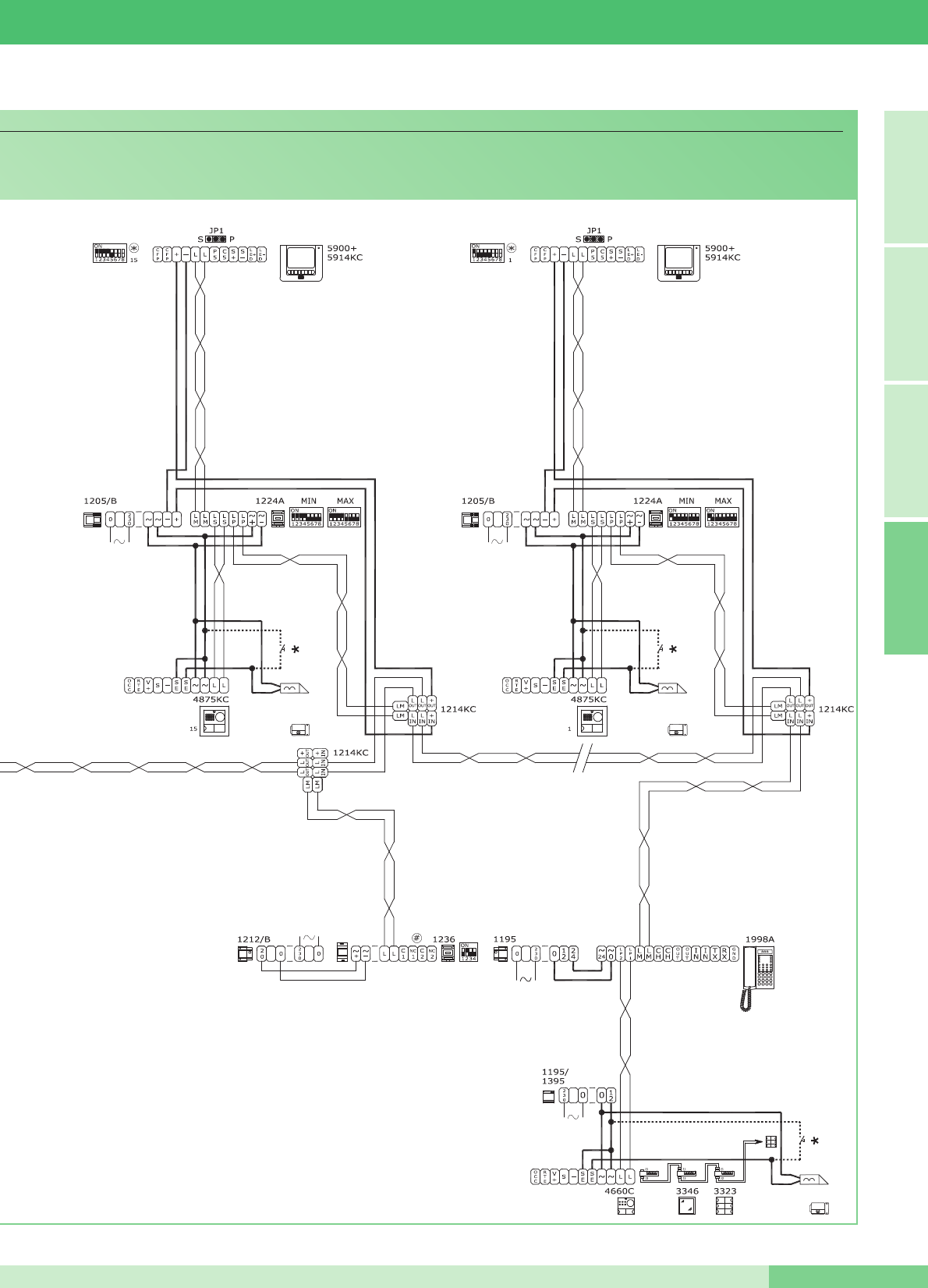
*
Pulsante comando apriporta locale
*
Door request exit button button
*
Bouton commande ouvre-porte local
FRANÇAIS ENGLISH ITALIANOA
MT KIT 13
81 MT KIT 13

Assistenza tecnica Italia 0346/750090 Technical service abroad (+39) 0346750092
Commerciale Italia 0346/750091 Export department (+39) 0346750093
Comelit Hellas
9 Epiru str.
16452 Argyroupolis - Athens Greece
Tel. +30 210 9968605-6 -
Fax : +30 210 9945560
www.comelit.gr
telergo@otenet.gr
Comelit (Shanghai) Electronics Co.,Ltd
5 Floor No. 4 Building No.30 Hongcao Road
Hi-Tech Park Caohejing, Shanghai, China
Tel. +86-21-64519192/9737/3527
Fax. +86-21-64517710
www.comelit.com.cn
comelit@comelit.com.cn
Comelit Group Belgium
Z.3 Doornveld 170
1731 Zellik ( Asse)
Tel. +32 (0) 24115099 -
Fax +32 (0) 24115097
www.comelit.be - info@comelit.be
Comelit Piemonte
Str. Del Pascolo 6/E - 10156 Torino
Tel. e Fax +39 011 2979330
www.comelit.eu
infopiemonte@comelit.it
Comelit Group
Singapore Representative Office
54 Genting Lane, Ruby Land Complex
Blk 2, #06-01 - Singapore 349562
Tel. +65-6748 8563 - Fax +65-6748 8584
office@comelit.sg
[ F ]
Comelit Group Germany GmbH
Brusseler Allee 23- 41812 Erkelenz
Tel. +49 (0) 243190151-23
+49 (0) 243190151-24
Fax +49 (0) 24319015125
www.comelit.de - info@comelit.de
Comelit Sud S.r.l.
Via Corso Claudio, 18
84083 Castel San Giorgio (Sa)
Tel. +39 081 516 2021
Fax +39 081 953 5951
www.comelit.eu- info@comelitsud.it
Comelit Group U.A.E.
Middle East Office
P.O. Box 54433 - Dubai U.A.E.
Tel. +971 4 299 7533 - Fax +971 4 299 7534
www.comelit.ae
info@comelit.ae
Comelit Espana S.L.
Josef Estivill 67/69 - 08027 Barcelona
Tel. +34 932 430 376 - Fax +34 934 084 683
www.comelit.es
info@comelit.es
Comelit Ireland
Suite 3 Herbert Hall
16 Herbert Street - Dublin 2
Tel. +353 (0) 1 619 0204
Fax. +353 (0) 1 619 0298
www.comelit.ie
info@comelit.ie
Comelit Group UK Ltd
Unit 4 Mallow Park - Watchmead Welwyn
Garden City Herts - AL7 1GX
Tel: +44 (0)1707377203
Fax: +44 (0)1707377204
www.comelitgroup.co.uk
info@comelitgroup.co.uk
Comelit Immotec
15, Rue Jean Zay - 69800 SAINT PRIEST
Tél. +33 (0) 4 72 28 06 56 - Fax +33 (0) 4 72 28 83 29
www.comelit.fr - comelit.NH@wanadoo.fr
Comelit Nederland BV
Aventurijn 220-3316 LB Dordrecht
Tel. +31 (0) 786511201 - Fax +31 (0) 786170955
www.comelit.nl - info@comelit.nl
Comelit Usa (Formerly Cyrex)
250 W. Duarte Rd. Suite B
Monrovia, CA 91016
Tel. +1 626 930 0388 - Fax +1 626 930 0488
www.comelitusa.com
sales@comelitusa.com
[ B ]
[ UK ]
[ NL ]
[ RC ] [ UAE ]
[ SG ]
[ E ]
[ I ] [ I ] [ IRL ]
[ USA ]
[ D ]
[ GR ]
MT/KIT/13 - 1aedizione 07/2009 - cod. 2G40000201
8 0 2 3 9 0 3 2 0 7 3 0 9
