OHMS User Guide
User Manual:
Open the PDF directly: View PDF  .
.
Page Count: 16
- 1 Introduction
- 2 Glossary
- 3 Use of Plugins in OHMS
- 4 Architecture
- 4.1 OHMS:
- 4.2 OHMS-aggregator
- 4.3 OHMS OOB Agent (aka: HMS-core)
- 1) Provides Hardware Abstraction
- 2) Defines Models to be shared with South Bound partner developed plugins.
- 3) Defines Networking Models for Switches.
- 4) Manages Partner OOB Plugins.
- 5) Interfaces with HMS Aggregator over HTTP via REST.
- 6) Monitors Hardware Sensor states.
- 7) Discovers Rack Inventory.
- 8) Performs power operations on Servers/Switches
- 5 Functional Description (Workflows)
- 6 Build and Start OHMS
- 6.1 Building OHMS
- 1) On Windows, install the following software components viz. git bash, Spring Tool Suite (STS), JAVA 7, apache-maven and set up the environment variables as required by each of these components.
- 2) Open git bash terminal and run the command: git clone <repository-url>
- 3) Change the current directory to the newly created “MyOhms”.
- 4) Check if the bash shell is showing the current branch as “master”.
- 5) Run the command: git checkout development
- 6) Now to compile the codebase, run the command: mvn clean compile
- 7) One can also directly go ahead and build the codebase by running the command: mvn clean install
- 1)
- 8) Once it has been done successfully, open STS and import the project as an existing maven project.
- 6.2 Running OHMS (From Developer’s point of view)
- 1)
- 1)
- 1)
- 1) Update hms.properties
- 2) Update the hms_ib_inventory.json file (present at the location, set in step 1), with the proper host and switch details that one is going to use. (If the file is not there, then one needs to create the file at that location. A sample file can be fo...
- 1) Now go back to STS, do a refresh on the project and run the file HmsApp.java (present in hms-core/src/main/java) as a java application.
- 3)
- 4) Finally, run hms-aggregator as Run on server.
- 5) If both of them ran successfully then open any browser or REST client (such as postman) and invoke the URL: http://127.0.0.1:8080/hms-aggregator/api/1.0/hms/host
- It should display all the servers present in the hms_ib_inventory.json file.
- 6.1 Building OHMS
- 7 OOB agent REST Endpoints
- 8 Aggregator REST Endpoints

OHMS
1 Introduction
Open Hardware Management Services (OHMS) is a stateless software agent responsible for
managing individual hardware elements spread across single or multiple physical racks. The
hardware elements which OHMS manages are servers, switches, and in the future disaggregated
rack architectures.
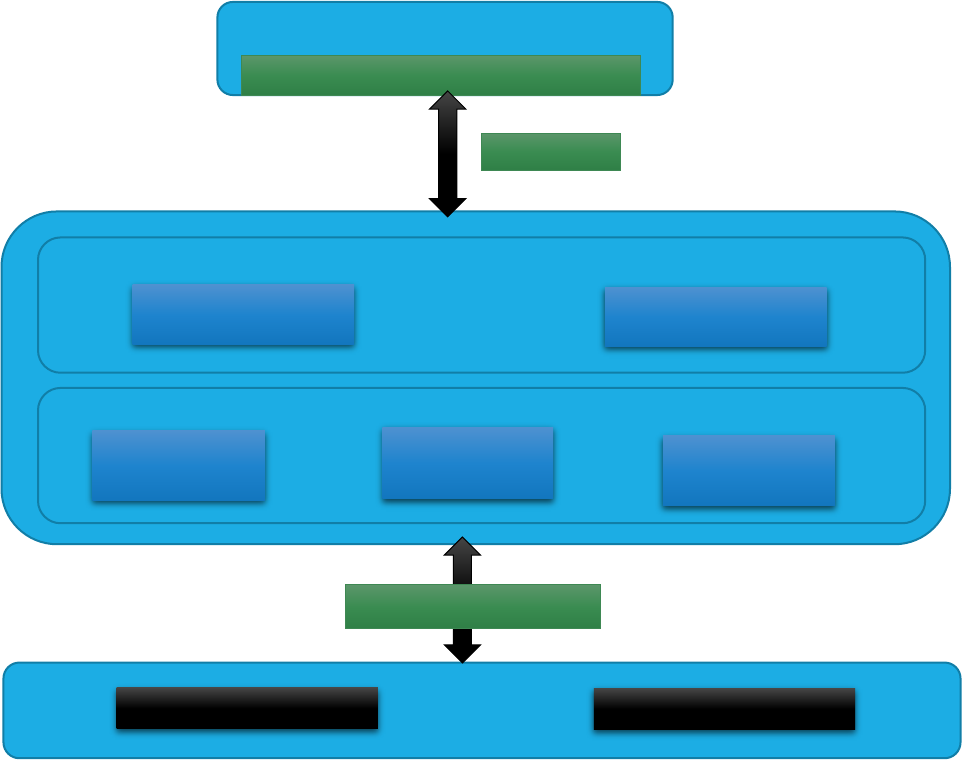
OHMS can manage OEM servers and switches by publishing a set of interfaces for OEMs to
integrate with it. The integration point is the hardware-management API layer (shown in Figure 1
below) using a vendor specific plugin implementation for this layer. At the same time, the plugins can
interface to the hardware using the interface supported by the underlying hardware device.
The entire source code has been written in Java 1.7 and would therefore need a corresponding java-
virtual-machine to run the binaries.
2 Glossary
This document uses the following terms/acronyms:
Term
Definition
API
Application Programming Interface
CIM
Common Information Model
ESXi
Hypervisor developed by VMware
FRU
Field Replaceable Unit
HTTP
Hyper Text Transfer Protocol
HW
Hardware
IB
In Band
IPMI
Intelligent Platform Management Interface
JVM
Java Virtual Machine
NB
Northbound
OEM
Original Equipment Manufacturer
OHMS
Open Hardware Management Services
OOB
Out Of Band
RST
Representational State Transfer
RSD
Rack Scale Design
SB
Southbound
STS
Spring Tool Suite
VM
Virtual Machine
3 Use of Plugins in OHMS
Plugins are software modules that allow for the expansion and customization of the base OHMS
software. For the OHMS, users may develop plugins to customize OHMS usage to support servers
and switches of their choice. On the northbound side, plugins would comply to the OHMS API and on
the southbound side, interface with the specific custom server or switch in question.
The OHMS code available as open source has a sample server plugin as well as a sample switch
plugin. Quanta server and Cumulus switch plugins are the example plugins for a server and a switch
that are provided as a part of OHMS in the Git repository.
4 Architecture
4.1 OHMS:
OHMS Consumer/Client
OHMS Interface
REST/JSON
H/W Management API (Southbound)
Server Plugin
Switch Plugin
Redfish Plugin
Generic OHMS Service APIs (Northbound)
Server Object
Switch Object
Plugin Specific Interface
Physical Server
Physical Switch
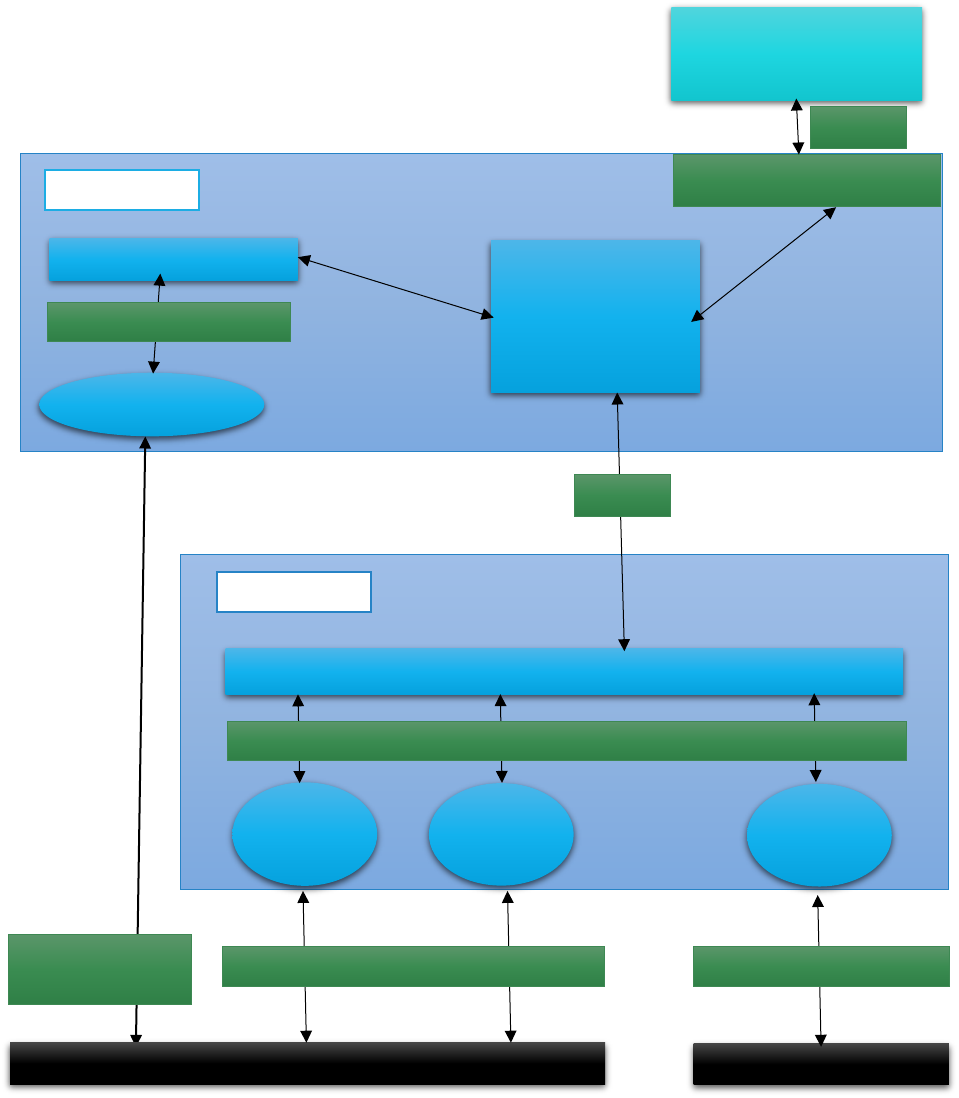
OHMS provides a set of generic service APIs for consumption by a client (It can be even a REST client
such as Postman). These APIs act on the underlying physical objects, which are encapsulated in a set
of software objects viz. server, switch and storage. OHMS internally maintains a hardware
management layer to service the API requests. The hardware management layer in turn depends
upon vendor/hardware specific plugins to interface to the actual hardware. The two types of plugins
used to interface to the actual hardware are in-band (IB) and out-of-band (OOB) plugin used by IB
agent and OOB agent respectively.
Another way to look at OHMS would be that internally, OHMS consists of two modules, hms-
aggregator and hms-core. Hms-aggregator encompasses the IB agent. hms-core is referred to as
OOB agent.
Client of OHMS
(E.g. Postman Client)
OHMS-North
OHMS Service
OHMS In-band Agent
OHMS-IB/OOB
Aggregator
IB ESXi Plugin
Current OHMS HM-API
In-Band
interface to ESXi
OHMS-South
OHMS OOB Agent
IPMI
Plugin
Redfish
Plugin
Switch
Plugin
Current OHMS HM-API
Servers
NB API
SB API
Switches
Plugin Specific Interface
Plugin Specific Interface
4.2 OHMS-aggregator
Key responsibilities of OHMS aggregator are:
1) Reads the inventory file, hms_ib_inventory.json
2) Orchestrates request to OOB or IB Agent
This is one of the key advantages, since the aggregator smoothens out the IB/OOB access
and thus the client need not care about the access.
3) Monitors Rack hardware inventory.
4) Caches Rack inventory.
5) Manages/Loads Inband Plugin.
4.3 OHMS OOB Agent (aka: HMS-core)
Key responsibilities of OHMS OOB agent are:
1) Provides Hardware Abstraction
2) Defines Models to be shared with South Bound partner developed plugins.
3) Defines Networking Models for Switches.
4) Manages Partner OOB Plugins.
5) Interfaces with HMS Aggregator over HTTP via REST.
6) Monitors Hardware Sensor states.
7) Discovers Rack Inventory.
8) Performs power operations on Servers/Switches
5 Functional Description (Workflows)
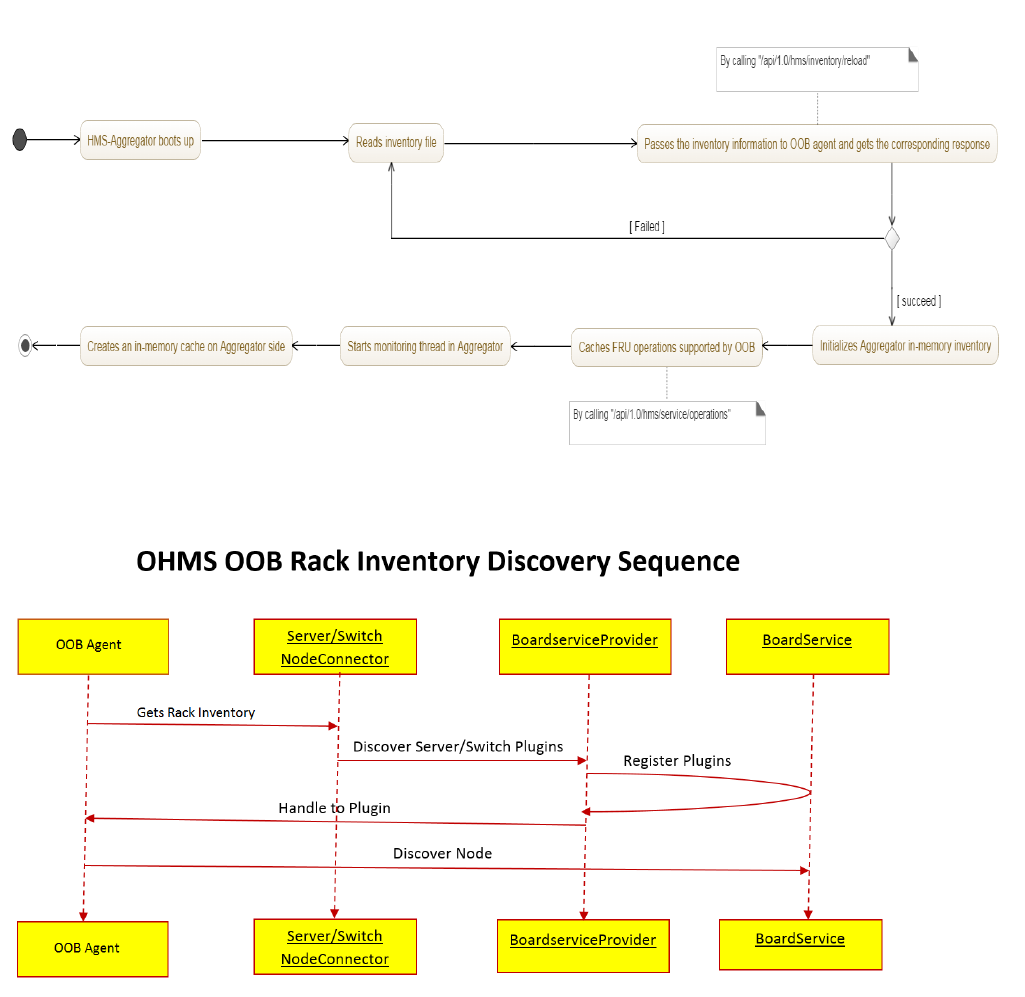
5.1 HMS-Aggregator Rack inventory Discovery
5.2 OHMS OOB Rack Inventory Discovery
ServerNodeConnector: A class which holds all the server nodes in a map with serverId as key.
SwitchNodeConnector: A class which holds all the switch nodes in a map with switchId as key.
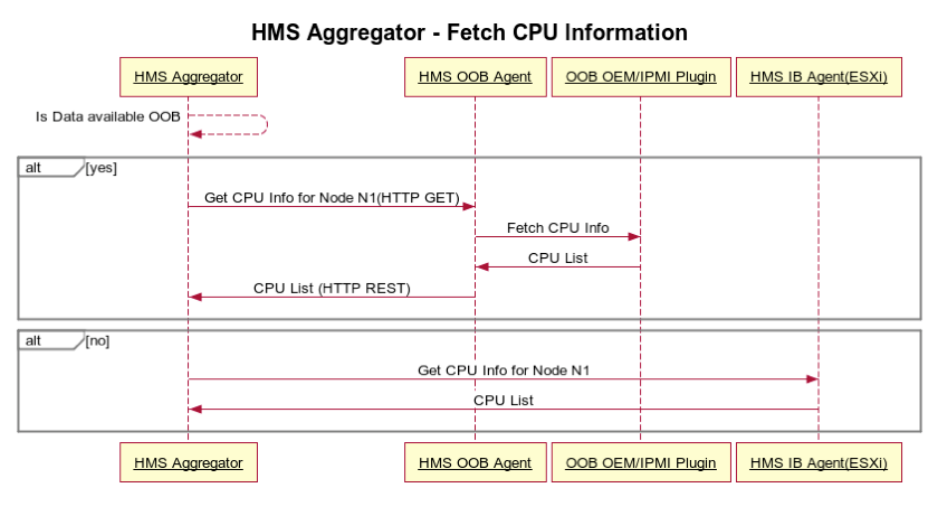
BoardServiceProvider: A class which holds unique instance of a plugin for each server provided in
the inventory file. It holds it in a map with corresponding serverId as key.
Boardservice: It is an instance of a plugin. With the help of these instances, OHMS talks to
corresponding H/W. BoardServiceProvider caches these instances for each server.
On OHMS boot up, Rack discovery sequence is initiated:
1. HMS-Aggregator gets the rack inventory provided through hms_ib_inventory.json file. Here
“rack” indicates scope for the HMS aggregator, IB and OOB agents and not necessarily a
single physical rack. It can be a single host or hosts spread across multiple racks.
2. Provide the inventory to OOB agent through REST end-point.
3. OOB agent initiate discovery for servers and switches with the help of Server/Switch
NodeConnector. This involves following:
3.1 A plugin for a server is registered by BoardServiceProvider after matching
manufacturer and model values present in the inventory information as well as in
plugins (provided in the form of binaries/jar files).
3.2 Then BoardServiceProvider provides an instance of the plugin to discover a node
(Server/Switch).
3.3 Discover the node using the plugin instance.
3.4 Update OHMS models with node discovery status.
5.3 Fetch FRU information
Sequence to fetch CPU (an FRU) information from hms-aggregator:
1) HMS aggregator checks if Data is available OOB or IB
2) If CPU data is available OOB, get from OOB agent.
3) If CPU data is available IB, get from IB agent.
4) If CPU data is available for both OOB and IB, get from OOB agent.
5.4 HMS Aggregator Orchestrator
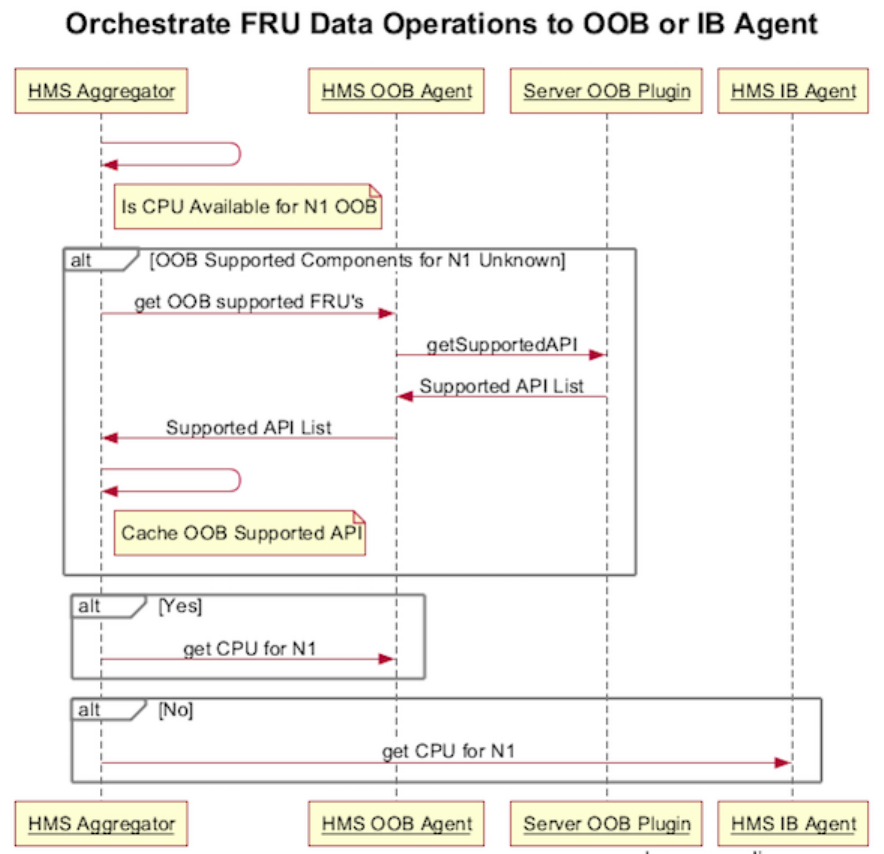
Orchestrator sequence for fetching FRU data from OOB agent or IB agent:
1) Check in cache if FRU is supported by OOB
2) If cache is not having any data, start sequence to cache this information.
3) HTTP request to OOB agent to get OOB supported FRUs
4) OOB fetches the FRUs that are supported by the plugin that has been implemented.
5) Orchestrator caches the same information for future use.
6) If FRU is supported by OOB, FRU information is retrieved from OOB agent over HTTP
7) If FRU is not supported by OOB, the same is fetched from IB agent.
In case the OOB and IB agents support FRU information then the OOB agent would be used.
5.5 OHMS hardware monitoring
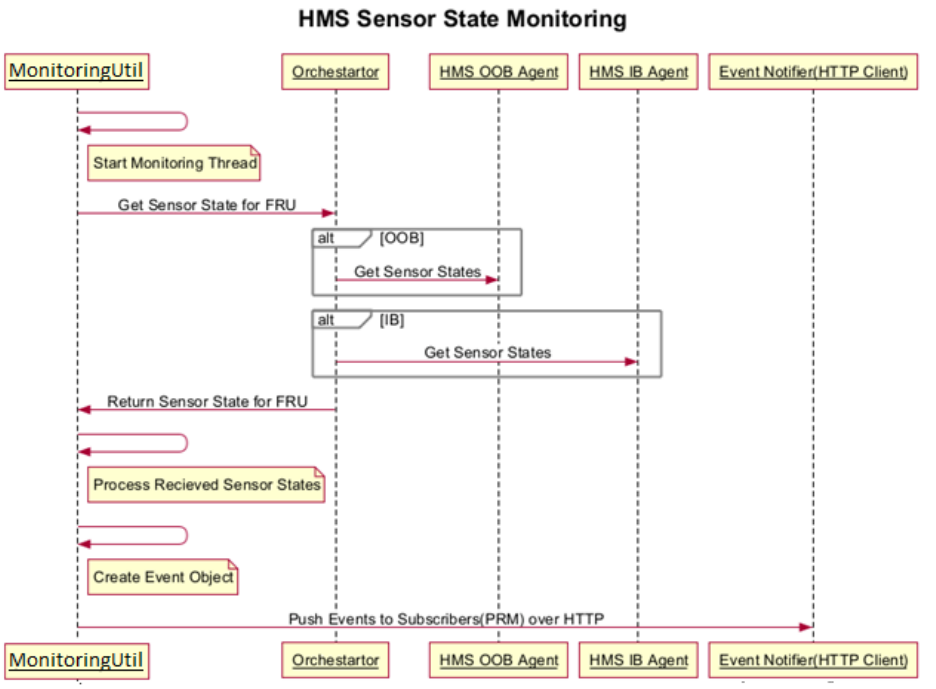
MonitoringUtil: A class (present in hms-aggregator module) responsible for monitoring the
inventory.
Orchestrator: HMS- aggregator plays the role of an orchestrator as evident from section 5.3 above.
1) HMS Aggregator Initiates Monitoring Sequence
2) Every 10 minutes a node and its FRU sensor are monitored (10 minutes is default and
configurable)
3) On receiving request to get sensor state, Orchestrator validates if FRU sensor are available
OOB or IB
4) If OOB Sensor states, then these get fetched from HMS OOB Agent over HTTPS else In Band
Agent is used to fetch sensor data.
5) Received sensor states are processed (compares threshold, sensor state change since last
fetch and classify into critical, error, warning etc.)
6) Corresponding Event Objects are created that are understood by upper layer (in this case
client) and then pushed over HTTP.

6 Build and Start OHMS
6.1 Building OHMS
1) On Windows, install the following software components viz. git bash, Spring Tool
Suite (STS), JAVA 7, apache-maven and set up the environment variables as required
by each of these components.
2) Open git bash terminal and run the command: git clone <repository-url>
For E.g. git clone ssh://git@github.com/vmware/ohms.git MyOhms
This will download the whole repository in a directory named MyOhms.
3) Change the current directory to the newly created “MyOhms”.
4) Check if the bash shell is showing the current branch as “master”.
5) Run the command: git checkout development
This will change the current branch to development.
6) Now to compile the codebase, run the command: mvn clean compile
(Assuming maven has been set up by adding proper environment variables)
7) One can also directly go ahead and build the codebase by running the command: mvn clean
install
8) Once it has been done successfully, open STS and import the project as an existing
maven project.
6.2 Running OHMS (From Developer’s point of view)
1) Update hms.properties
This is slightly tricky since the codebase tries to find this file at two locations.
Case I: When hms.properties file is present in {user.home}/VMware/vRack/hms-config
directory. Open it and change the value of hms.ib.inventory.location to any pathname you
want. Also, change hms.switch.port to 8448 and hms.switch.default.scheme to http
Case II: When hms.properties file isn’t present in the above mentioned location. Then go to
modules/hms-aggregator/src/main/resources/. Open hms.properties present there and
change the value of hms.ib.inventory.location to any pathname you want. This pathname
will be used by hms-aggregator to look for the inventory file. Also, as done in case I, we need
to change hms.switch.port to 8448 and hms.switch.default.scheme to http. Now, go to git
bash shell and traverse to modules/hms-aggregator and run the command: mvn clean install

2) Update the hms_ib_inventory.json file (present at the location, set in step 1), with the
proper host and switch details that one is going to use. (If the file is not there, then
one needs to create the file at that location. A sample file can be found in the root
directory of the codebase).
It basically involves changing managementIp, managementUserName,
managementUserPassword, ibIpAddress, osUserName, osPassword, boardVendor and
boardProductName for hosts and similar properties for switches.
3) Now go back to STS, do a refresh on the project and run the file HmsApp.java
(present in hms-core/src/main/java) as a java application.
4) Finally, run hms-aggregator as Run on server.
5) If both of them ran successfully then open any browser or REST client (such as
postman) and invoke the URL: http://127.0.0.1:8080/hms-aggregator/api/1.0/hms/host
It should display all the servers present in the hms_ib_inventory.json file.
Similarly, invoking http://127.0.0.1:8448/api/1.0/hms/host/ will display all the servers
present in OOB agent memory.
Congrats, you have OHMS codebase up and running!
NOTE: If there isn’t any vendor plugin included in the project, then one can use quanta-
dummy-plugin, provided the host is able to service IPMI requests. To use this specific plugin,
one has to change boardVendor from “vendor” to “Quanta” and boardProductName to
“Dummy” in the inventory file.
In addition to this, for windows, one needs to download and extract the ipmiutil package in
{user.home}/VMware/vRack/Win-ipmiutil directory.
For linux, one can install ipmiutil package in their system.
7 OOB agent REST Endpoints
These are termed SB (Southbound) APIs. The aggregator talks to OOB agent and gets the OOB data
by invoking these APIs.
7.1 GET requests
http://{OOB_Agent_ip}:8448/api/1.0/hms/nodes/
http://{ OOB_Agent_ip}:8448/api/1.0/hms/about
http://{ OOB_Agent_ip}:8448/api/1.0/hms/host/{host_id}/
http://{ OOB_Agent_ip}:8448/api/1.0/hms/host/{host_id}/powerstatus
http://{ OOB_Agent_ip}:8448/api/1.0/hms/host/{host_id}/supportedAPI

http://{ OOB_Agent_ip}:8448/api/1.0/hms/host/{host_id}/bootoptions/
http://{ OOB_Agent_ip}:8448/api/1.0/hms/host/{host_id}/bmcusers/
http://{ OOB_Agent_ip}:8448/api/1.0/hms/host/{host_id}/cpuinfo/
http://{ OOB_Agent_ip}:8448/api/1.0/hms/host/{host_id}/memoryinfo
http://{ OOB_Agent_ip}:8448/api/1.0/hms/host/{host_id}/storageinfo
http://{ OOB_Agent_ip}:8448/api/1.0/hms/host/{host_id}/nicinfo/
http://{ OOB_Agent_ip}:8448/api/1.0/hms/event/host/{host_id}/CPU/
http://{ OOB_Agent_ip}:8448/api/1.0/hms/event/host/{host_id}/MEMORY/
http://{ OOB_Agent_ip}:8448/api/1.0/hms/event/host/{host_id}/STORAGE/
http://{ OOB_Agent_ip}:8448/api/1.0/hms/event/host/{host_id}/SYSTEM/
http://{ OOB_Agent_ip}:8448/api/1.0/hms/event/host/{host_id}/NIC
http://{ OOB_Agent_ip}:8448/api/1.0/hms/event/host/HMS/
http://{ OOB_Agent_ip}:8448/api/1.0/hms/switches
http://{ OOB_Agent_ip}:8448/api/1.0/hms/switches/{switch_id}
http://{ OOB_Agent_ip}:8448/api/1.0/hms/switches/{switch_id}/ports
http://{ OOB_Agent_ip}:8448/api/1.0/hms/switches/{switch_id}/portsbulk
http://{ OOB_Agent_ip}:8448/api/1.0/hms/switches/{switch_id}/ports/{port_id}
http://{ OOB_Agent_ip}:8448/api/1.0/hms/switches/{switch_id}/lacpgroups
http://{ OOB_Agent_ip}:8448/api/1.0/hms/switches/{switch_id}/vlans
http://{ OOB_Agent_ip}:8448/api/1.0/hms/switches/{switch_id}/vlansbulk
http://{ OOB_Agent_ip}:8448/api/1.0/hms/switches/{switch_id}/vlans/{vlan_name}
http://{ OOB_Agent_ip}:8448/api/1.0/hms/switches/{switch_id}/vxlans
http://{ OOB_Agent_ip}:8448/api/1.0/hms/switches/{switch_id}/vlans/{vlan_name}/vxlans
http://{ OOB_Agent_ip}:8448/api/1.0/hms/event/switches/{switch_id}/SWITCH
http://{ OOB_Agent_ip}:8448/api/1.0/hms/event/switches/{switch_id}/SWITCH_PORT
http://{OOB_Agent_ip}:8448/api/1.0/hms/switches/{switchId}/snmp
http://{OOB_Agent_ip}:8448/api/1.0/hms/hmslogs

http://{OOB_Agent_ip}:8448/api/1.0/hms/newhosts
7.2 PUT requests
http://{ OOB_Agent_ip}:8448/api/1.0/hms/host/{host_id}?action=power_up
http://{ OOB_Agent_ip}:8448/api/1.0/hms/host/{host_id}?action=power_down
http://{ OOB_Agent_ip}:8448/api/1.0/hms/host/{host_id}?action=power_cycle
http://{ OOB_Agent_ip}:8448/api/1.0/hms/host/{host_id}?action=hard_reset
http://{ OOB_Agent_ip}:8448/api/1.0/hms/host/{host_id}?action=cold_reset
http://{OOB_Agent_ip}:8448/api/1.0/hms/host/{host_id}/setpassword
http://{ OOB_Agent_ip}:8448/api/1.0/hms/host/{host_id}/chassisidentify/
E.g. application/json
{“identify”: true, “interval”: 15}
http://{ OOB_Agent_ip}:8448/api/1.0/hms/host/{host_id}/bootoptions/
E.g. application/json
{
“bootFlagsValid”: true,
“bootOptionsValidity”: “Persistent”,
“biosBootType”: “Legacy”,
“bootDeviceType”: “External”,
“bootDeviceSelector”: “PXE”,
“bootDeviceInstanceNumber”: 2
}
http://{ OOB_Agent_ip}:8448/api/1.0/hms/host/{host_id}/selinfo/
E.g. application/json
{“direction” : “RecentEntries”, “recordCount” : 5, “selTask” : “SelDetails”}
http://{ OOB_Agent_ip}:8448/api/1.0/hms/switches/{switch_id}
http://{ OOB_Agent_ip}:8448/api/1.0/hms/switches/{switch_id}/lacpgroups
http://{ OOB_Agent_ip}:8448/api/1.0/hms/switches/{switch_id}/vlans

http://{ OOB_Agent_ip}:8448/api/1.0/hms/switches/{switch_id}/vlans/{vlan_name}
http://{ OOB_Agent_ip}:8448/api/1.0/hms/switches/{switch_id}/vlans/{vlan_name}/vxla
ns
http://{ OOB_Agent_ip}:8448/api/1.0/hms/switches/{switch_id}/ports/{port_id}
http://{ OOB_Agent_ip}:8448/api/1.0/hms/switches/{switch_id}/reboot
http://{OOB_Agent_ip}:8448/api/1.0/hms/refreshinventory
http://{OOB_Agent_ip}:8448/api/1.0/hms/switches/{switch_id}/setpassword
http://{OOB_Agent_ip}:8448/api/1.0/hms/switches/{switchId}/snmp
http://{OOB_Agent_ip}:8448/api/1.0/hms/switches/{switch_id}/ports/{port_id}/{isEnabled}
http://{OOB_Agent_ip}:8448/api/1.0/hms/switches/{switch_id}/configuration/{config_name}
http://{OOB_Agent_ip}:8448/api/1.0/hms/switches/{switch_id}/time
7.3 POST requests
http://{OOB_Agent_ip}:8448/api/1.0/hms/certificate/create
http://{OOB_Agent_ip}:8448/api/1.0/hms/certificate/upload
http://{OOB_Agent_ip}:8448/api/1.0/hms/handshake/{aggregator_ip}/{source}
http://{OOB_Agent_ip}:8448/api/1.0/hms/sshkeys/create
http://{OOB_Agent_ip}:8448/api/1.0/hms/upgrade/proxy/restart/{upgradeId}
7.4 DELETE requests
http://{OOB_Agent_ip}:8448/api/1.0/hms/hmslogs
http://{OOB_Agent_ip}:8448/api/1.0/hms/host/{hostId}
http://{OOB_Agent_ip}:8448/api/1.0/hms/switches/{switch_id}/vlans/{vlanName}/{portOrBond
Name}
http://{OOB_Agent_ip}:8448/api/1.0/hms/switches/{switch_id}/lacpgroups/{lacpGroupName}/{
portName}
Here OOB_Agent_ip can be replaced by the IP of the machine on which OOB agent is running.
8 Aggregator REST Endpoints
These are termed as NB APIs. Any client of OHMS can call these APIs and get the H/W related data,
both IB and OOB.

8.1 GET requests
http://{Aggregator_ip}:8080/hms-aggregator/api/1.0/hms/about/
http://{ Aggregator_ip}:8080/hms-aggregator/api/1.0/hms/nodes/
http://{ Aggregator_ip}:8080/hms-aggregator/api/1.0/hms/host/{host_id}
http://{ Aggregator_ip}:8080/hms-aggregator/api/1.0/hms/host/{host_id}/powerstatus/
http://{ Aggregator_ip}:8080/hms-aggregator/api/1.0/hms/host/{host_id}/cpuinfo/
http://{ Aggregator_ip}:8080/hms-aggregator/api/1.0/hms/host/{host_id}/memoryinfo
http://{ Aggregator_ip}:8080/hms-aggregator/api/1.0/hms/host/{host_id}/storageinfo
http://{ Aggregator_ip}:8080/hms-aggregator/api/1.0/hms/host/{host_id}/nicinfo
http://{ Aggregator_ip}:8080/hms-aggregator/api/1.0/hms/host/{host_id}/selftest
http://{ Aggregator_ip}:8080/hms-aggregator/api/1.0/hms/{host_id}/bmcusers
http://{ Aggregator_ip}:8080/hms-aggregator/api/1.0/hms/{host_id}/bootoptions
http://{Aggregator_ip}:8080/hms-aggregator/api/1.0/hms/host/{hostId}/portname
http://{Aggregator_ip}:8080/hms-aggregator/api/1.0/hms/newhosts
http://{ Aggregator_ip}:8080/hms-aggregator/api/1.0/hms/event/host//{host_id}/CPU
http://{ Aggregator_ip}:8080/hms-
aggregator/api/1.0/hms/event/host//{host_id}/MEMORY
http://{ Aggregator_ip}:8080/hms-
aggregator/api/1.0/hms/event/host//{host_id}/STORAGE
http://{ Aggregator_ip}:8080/hms-
aggregator/api/1.0/hms/event/host//{host_id}/SYSTEM
http://{ Aggregator_ip}:8080/hms-aggregator/api/1.0/hms/event/host//{host_id}/NIC
http://{ Aggregator_ip}:8080/hms-aggregator/api/1.0/hms/event/host/HMS/
http://{ Aggregator_ip}:8080/hms-aggregator/api/1.0/hms/switches
http://{ Aggregator_ip}:8080/hms-aggregator/api/1.0/hms/switches/{switch_id}
http://{Aggregator_ip}:8080/hms-
aggregator/api/1.0/hms/napi/switches/{switch_id}/snmp
http://{ Aggregator_ip}:8080/hms-aggregator/api/1.0/hms/switches/{switch_id}/ports

http://{ Aggregator_ip}:8080/hms-
aggregator/api/1.0/hms/switches/{switch_id}/portsbulk
http://{ Aggregator_ip}:8080/hms-
aggregator/api/1.0/hms/switches/{switch_id}/ports/{port_id}
http://{ Aggregator_ip}:8080/hms-
aggregator/api/1.0/hms/switches/{switch_id}/lacpgroups
http://{ Aggregator_ip}:8080/hms-aggregator/api/1.0/hms/switches/{switch_id}/vlans
http://{ Aggregator_ip}:8080/hms-
aggregator/api/1.0/hms/switches/{switch_id}/vlansbulk
http://{ Aggregator_ip}:8080/hms-
aggregator/api/1.0/hms/switches/{switch_id}/vlans/{vlan_name}
http://{ Aggregator_ip}:8080/hms-aggregator/api/1.0/hms/switches/{switch_id}/vxlans
http://{ Aggregator_ip}:8080/hms-
aggregator/api/1.0/hms/switches/{switch_id}/vlans/{vlan_name}/vxlans
http://{ Aggregator_ip}:8080/hms-
aggregator/api/1.0/hms/event/switches/{switch_id}/SWITCH
http://{ Aggregator_ip}:8080/hms-
aggregator/api/1.0/hms/event/switches/{switch_id}/SWITCH_PORT
8.2 PUT requests
http://{ Aggregator_ip}:8080/hms-
aggregator/api/1.0/hms/host/{host_id}/bootoptions/
http://{ Aggregator_ip}:8080/hms-
aggregator/api/1.0/hms/host/{host_id}/chassisidentify
http://{ Aggregator_ip}:8080/hms-aggregator/api/1.0/hms/host/{host_id}/selinfo
Request Body: { “direction” : “RecentEntries”, “recordCount” : 5, “selTask” : “SelDetails”}
http://{ Aggregator_ip}:8080/hms-
aggregator/api/1.0/hms/host/{host_id}?action=power_down
http://{ Aggregator_ip}:8080/hms-aggregator/api/1.0/hms/host/{host_id}?action=power_up
http://{ Aggregator_ip}:8080/hms-aggregator/api/1.0/hms/host/{host_id}?action=power_cycle
http://{ Aggregator_ip}:8080/hms-aggregator/api/1.0/hms/host/{host_id}?action=hard-reset
http://{ Aggregator_ip}:8080/hms-aggregator/api/1.0/hms/host/{host_id}?action=cold_reset

http://{Aggregator_ip}:8080/hms-aggregator/api/1.0/hms/host/{hostId}/bmcpassword
http://{Aggregator_ip}:8080/hms-aggregator/api/1.0/hms/host/inventory
http://{ Inband_Agent_ip}:8080/hms-aggregator/api/1.0/hms/switches/{switch_id}
http://{Aggregator_ip}:8080/hms-
aggregator/api/1.0/hms/napi/switches/{switch_id}/snmp
http://{Aggregator_ip}:8080/hms-
aggregator/api/1.0/hms/napi/switches/{switch_id}/ports/{port_id}/{isEnabled}
http://{Aggregator_ip}:8080/hms-
aggregator/api/1.0/hms/napi/switches/{switch_id}/time
http://{Aggregator_ip}:8080/hms-aggregator/api/1.0/hms/debug/switch/{switch_id}
8.3 POST requests
http://{Aggregator_ip}:8080/hms-aggregator/api/1.0/hms/handshake/{aggregator_ip}
http://{Aggregator_ip}:8080/hms-aggregator/api/1.0/hms/certificate/create
http://{Aggregator_ip}:8080/hms-aggregator/api/1.0/hms/sshkeys/create
8.4 DELETE requests
http://{Aggregator_ip}:8080/hms-aggregator/api/1.0/hms/host/{hostId}
http://{Aggregator_ip}:8080/hms-aggregator/api/1.0/hms/napi/switches/{switch_id}/snmp
http://{Aggregator_ip}:8080/hms-
aggregator/api/1.0/hms/napi/switches/{switch_id}/vlans/{vlan_id}/{port_or_bond_id}
http://{Aggregator_ip}:8080/hms-
aggregator/api/1.0/hms/napi/switches/{switch_id}/lags/{lag_id}/{port_id}
Here Aggregator_ip can be replaced with the IP of the machine on which hms-aggregator is
running.
NOTE: For finding the corresponding request mapping in the codebase, one can explore the
packages, viz. services and controller in hms-core and hms-aggregator respectively.
