TIP Selection Engine User Guide Feb 2015
User Manual:
Open the PDF directly: View PDF  .
.
Page Count: 31

TIPTestSelectionEngine
UserGuide
17February2015

Notices
Followingarepoliciespertainingtoproprietaryrights,trademarks,translations,anddetailsabout
theavailabilityofadditionalinformationonline.
ProprietaryRights
TheinformationcontainedinthisdocumentisproprietaryandconfidentialtoMasterCardInternational
Incorporated,oneormoreofitsaffiliatedentities(collectively“MasterCard”),orboth.
Thismaterialmaynotbeduplicated,published,ordisclosed,inwholeorinpart,withouttheprior
writtenpermissionofMasterCard.
Trademarks
TrademarknoticesandsymbolsusedinthisdocumentreflecttheregistrationstatusofMasterCard
trademarksintheUnitedStates.PleaseconsultwiththeCustomerOperationsServicesteamorthe
MasterCardLawDepartmentfortheregistrationstatusofparticularproduct,program,orservicenames
outsidetheUnitedStates.
Allthird-partyproductandservicenamesaretrademarksorregisteredtrademarksoftheirrespective
owners.
Disclaimer
MasterCardmakesnorepresentationsorwarrantiesofanykind,expressorimplied,withrespectto
thecontentsofthisdocument.Withoutlimitation,MasterCardspecificallydisclaimsallrepresentations
andwarrantieswithrespecttothisdocumentandanyintellectualpropertyrightssubsistingthereinor
anypartthereof,includingbutnotlimitedtoanyandallimpliedwarrantiesoftitle,non-infringement,
orsuitabilityforanypurpose(whetherornotMasterCardhasbeenadvised,hasreasontoknow,oris
otherwiseinfactawareofanyinformation)orachievementofanyparticularresult.Withoutlimitation,
MasterCardspecificallydisclaimsallrepresentationsandwarrantiesthatanypracticeorimplementationof
thisdocumentwillnotinfringeanythirdpartypatents,copyrights,tradesecretsorotherrights.
Translation
AtranslationofanyMasterCardmanual,bulletin,release,orotherMasterCarddocumentintoalanguage
otherthanEnglishisintendedsolelyasaconveniencetoMasterCardcustomers.MasterCardprovidesany
translateddocumenttoitscustomers“ASIS”andmakesnorepresentationsorwarrantiesofanykind
withrespecttothetranslateddocument,including,butnotlimitedto,itsaccuracyorreliability.Inno
eventshallMasterCardbeliableforanydamagesresultingfromrelianceonanytranslateddocument.
TheEnglishversionofanyMasterCarddocumentwilltakeprecedenceoveranytranslatedversionin
anylegalproceeding.
InformationAvailableOnline
MasterCardprovidesdetailsaboutthestandardsusedforthisdocument—includingtimesexpressed,
languageuse,andcontactinformation—onthePublicationsSupportpageavailableonMasterCard
Connect™.GotoPublicationsSupportforcentralizedinformation.
©2015MasterCard.Proprietary.Allrightsreserved.
TSE17February2015•TIPT estSelectionEngineUserGuide

TableofContents
Chapter1IntroductiontoTIPTestSelectionEngine..........................1-i
Overview.................................................................................................................................1-1
WhatistheTIPTestSelectionEngine.....................................................................................1-1
SystemRequirements...............................................................................................................1-2
InstallationandUpgradeofTSEandTIPTestSet...................................................................1-2
InstallingTSE.....................................................................................................................1-2
InstallingTIPTestSet........................................................................................................1-3
UpgradingTSE...................................................................................................................1-3
UpgradingTIPTestSet......................................................................................................1-3
GettingStartedwiththeM-TIPTestSession............................................................................1-4
TSEFileExtensions..................................................................................................................1-4
Support....................................................................................................................................1-4
RelatedInformation.................................................................................................................1-5
Chapter2RunningM-TIPwithTSE.....................................................2-i
CreatingaNewM-TIPTestSession.........................................................................................2-1
DefiningAcquirerEnvironmentandTerminalConfiguration..................................................2-3
GeneratingaTestPlan.............................................................................................................2-5
RunningaTestPlan.................................................................................................................2-7
SendingTestResultstoM-TIPServiceProvider.....................................................................2-10
ReviewingServiceProviderValidationReport.......................................................................2-11
Chapter3AdditionalTSEFeatures......................................................3-i
FilteringTestList......................................................................................................................3-1
ApplyingaFilter................................................................................................................3-1
RemovingaFilter...............................................................................................................3-2
SelectingTestCases.................................................................................................................3-2
ChangingMarkers....................................................................................................................3-2
AboutClearingTestResults.....................................................................................................3-3
ClearingPassCriteria.........................................................................................................3-3
ClearingReviewComments...............................................................................................3-4
CreatingaCopy.......................................................................................................................3-4
Reports.....................................................................................................................................3-6
©2015MasterCard.Proprietary.Allrightsreserved.
TIPTestSelectionEngineUserGuide•17February2015i


Chapter1IntroductiontoTIPT estSelectionEngine
ThissectionprovidesanintroductiontotheTIPTestSelectionEngine(TSE),whatitis,how
toinstallit,andwhenitisused.
Overview.......................................................................................................................................1-1
WhatistheTIPTestSelectionEngine...........................................................................................1-1
SystemRequirements.....................................................................................................................1-2
InstallationandUpgradeofTSEandTIPTestSet.........................................................................1-2
InstallingTSE...........................................................................................................................1-2
InstallingTIPTestSet..............................................................................................................1-3
UpgradingTSE.........................................................................................................................1-3
UpgradingTIPTestSet............................................................................................................1-3
GettingStartedwiththeM-TIPTestSession..................................................................................1-4
TSEFileExtensions........................................................................................................................1-4
Support..........................................................................................................................................1-4
RelatedInformation.......................................................................................................................1-5
©2015MasterCard.Proprietary.Allrightsreserved.
TIPTestSelectionEngineUserGuide•17February20151-i

IntroductiontoTIPTestSelectionEngine
Overview
Overview
ThisguideisintendedtohelpacquirersusingtheTIPTestSelectionEngine
(TSE)whenrunningaMasterCardTerminalIntegrationProcess(M-TIP)test
session.ThisguidecomplementstheM-TIPProcessGuidebydescribingTSE
keyfunctionsandhowtoaccessthem.
MasterCardprovidesthisdocumentforacquirersandtheirauthorizedagents.
Specifically,acquirerstaffperformingM-TIPshouldfindthisdocumentuseful.
WhatistheTIPT estSelectionEngine
M-TIPisatestprocessthatassesseswhetheragivenAcquirerDeployment1will
notdamageMasterCardoperationsorbrandreputation.M-TIPfocuseson
conformanceagainstimportantrequirementsthatdirectlyaffectacceptance.
TheTIPTestSelectionEngine(TSE)isakeytoolsupportingM-TIP.Itallows
acquirerstogeneratetheM-TIPtestplanapplicabletoaparticularAcquirer
Deployment.
Oncethetestplanhasbeencreated,M-TIPtestingconsistsinrunningtestcases
fromthetestplan,usinganM-TIPqualifiedtesttool.M-TIPqualifiedtesttools
areprovidedaseitherasetofphysicalcardsoracardemulationtool.M-TIP
qualifiedtesttoolsarelistedinM/ChipQualifiedTestTools.
M-TIPrequiresthatthetestcasesresults—madeofcard/terminalinteractions
logsandacquirerhostnetworkmessageslogs—bevalidatedbyanindependent,
accreditedTIPserviceprovider.TSEsupportsthattaskby:
•Allowingtheacquirertorecordapassorfailstatusforeachtestcaserun,
togetherwithanyusefulobservationsorcomments
•Attachinglogfilescorrespondingtoeachtestcase
•CreatingadatapackagecontainingallinformationneededbytheTIP
serviceproviderforvalidation.Thatdatapackagecanconvenientlybe
sentbyemail
•DisplayingandprocessingthefeedbackfromtheTIPserviceproviderin
casesometestcasesareunsuccessful.
Severalvendorsofferenhancedtesttoolsthatautomatelargepartsofthetesting
processbyparsinglogfilesanddeterminingwhethertestcasespassorfail.
SuchtoolsmayinteractwithTSE.Acquirermaycontacttheirtoolvendorfor
moreinformationabouthowtheirtoolintegrateswithTSE.
1.RefertotheM-TIPProcessGuideforadetaileddefinitionof‘AcquirerDeployment’.
©2015MasterCard.Proprietary.Allrightsreserved.
TIPTestSelectionEngineUserGuide•17February20151-1
IntroductiontoTIPTestSelectionEngine
SystemRequirements
SystemRequirements
TSEisaMasterCarddevelopedapplicationsoftware,packagedasanexecutable
fileandavailablefromMasterCardConnect.TSErequiresacomputerrunninga
Windows®operatingsystem(XPornewer),withthesystemprivilegesrequired
todownloadandrunexecutable(.exe)files.
InstallationandUpgradeofTSEandTIPTestSet
M-TIPmustalwaysbeperformedwiththelatestversionavailableofTSE
softwareandTIPTestSet.BeforeinitiatinganewM-TIPtestsession,itis
bestpracticetocheckifnewversionsareavailableonMasterCardConnect.
ThefollowingsectionsdetailthestepsnecessarytoinstallandupgradeTSE
andTIPTestSet.
InstallingTSE
UsethefollowingproceduretoinstalltheTIPTestSelectionEngine(TSE).
Procedure
1.DownloadtheTSEsoftwarepackagefromMasterCardConnect>
Publications>ChipInformationCenterandsaveitonalocaldrive.
2.UnzipthecompressedfileintoaTSEfolderonthelocaldrive.
3.Runthesetup.exefiletolaunchthesetupscriptthatwillcreateaTSE
shortcutintheWindowsStartmenuandonthedesktop.
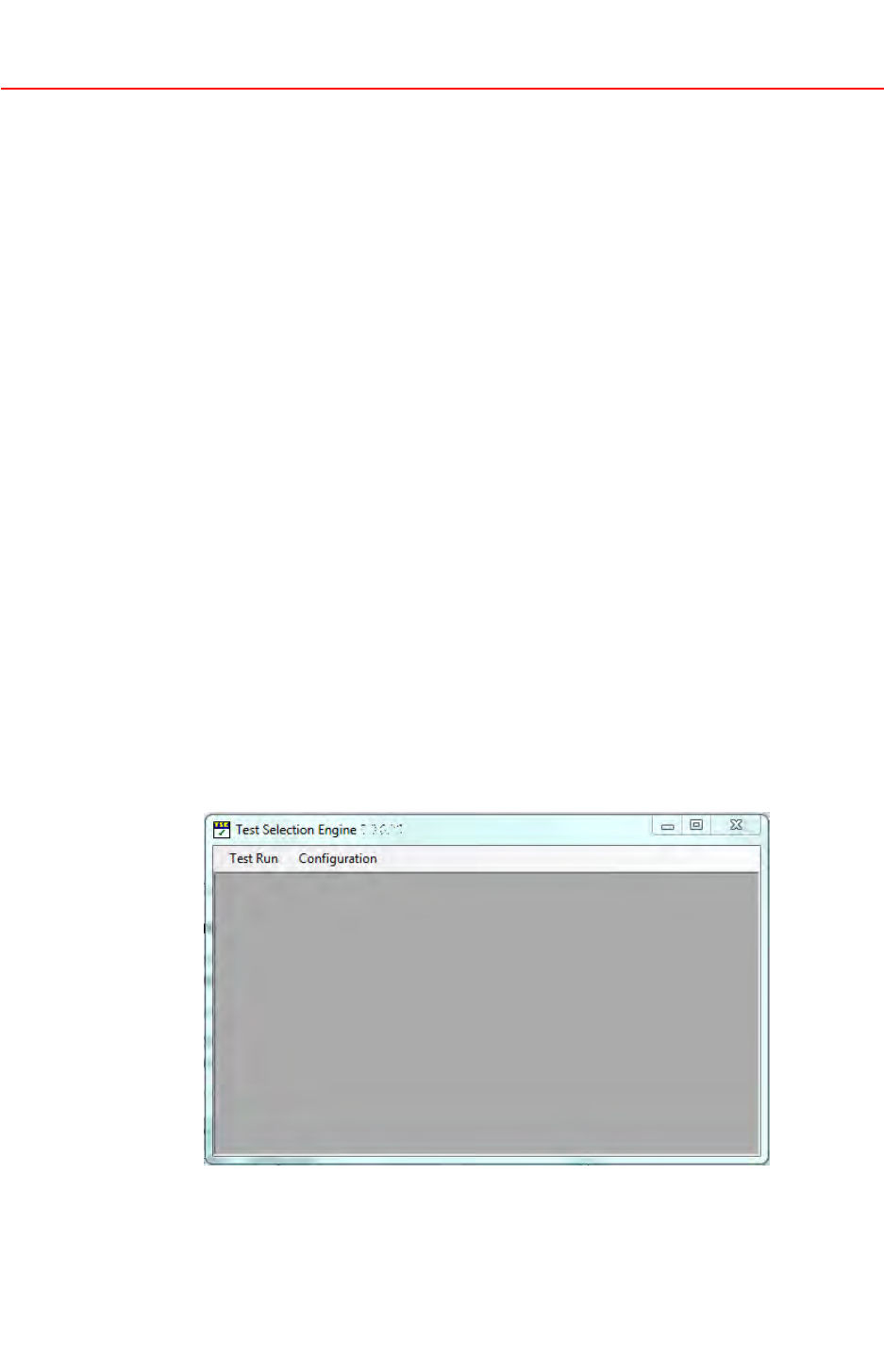
Oncethesetupiscompleted,theTSEwindowisdisplayed.
4.TolaunchTSE,selecttheTSEshortcutonthedesktoporWindowsStart
menuordouble-clickthetse.applicationfile.
©2015MasterCard.Proprietary.Allrightsreserved.
1-217February2015•TIPTestSelectionEngineUserGuide

IntroductiontoTIPTestSelectionEngine
InstallationandUpgradeofTSEandTIPT estSet
5.TodefinetheTSEworkingdirectory,inwhichallfilescreatedbyTSEwill
bestored,selectConguration>SetWorkingDirectory.Browseforand
selectthepreferredfolderlocationfromtheBrowseforFolderdialogbox.
InstallingTIPTestSet
PriortorunninganyM-TIPsession,youmustinstallthelatestTIPTestSet.The
TIPTestSetcontainsallinformationrelatedtotestplangeneration.Therefore
itisoftheutmostimportancethatthemostrecentTIPTestSetisused.Use
thefollowingproceduretoinstallthelatesttestset.
NOTE
M-TIPmustalwaysbeperformedwiththelatestversionavailableofTSE
softwareandTIPTestSet.BeforeinitiatinganewM-TIPtestsession,itisbest
practicetocheckifnewversionsareavailableonMasterCardConnect.
Procedure
1.DownloadthelatestTIPTestSetpackagefromMasterCardConnect>
Publications>ChipInformationCenter.
2.LoadthelatestversionoftheTIPTestSetintotheTSE,usingConguration>
UpdateConguration.Selectthe.tsecfilecontainingtheTIPTestSet.
UpgradingTSE
UsethefollowingproceduretoupgradetheTIPTestSelectionEnginesoftware.
Procedure
1.DownloadthelatestTSEsoftwarepackagefromMasterCardConnect>
Publications>ChipInformationCenterandsaveitonalocaldrive.
2.UnzipthecompressedTSEsoftwarepackageintothesameTSEfolderthat
containsthepreviousTSEversion.
3.Runtse.applicationtostartTSE.Thenewsoftwareversionwillbedetected
andapopupwindowwillasktocompletetheinstallationbeforelaunching
thenewTSEsoftware.
NOTE
Oncethesetupiscompleted,theTSEwindowisdisplayed.TheTSEversion
canbecheckedinthetopbaroftheTSEwindow.
UpgradingTIPTestSet
ToinstallanewTIPTestSetversion,proceedasdescribedintheInstallingTIP
TestSetsection.
PreviousTIPTestSetsremainavailableinTSEafterthenewTestSethasbeen
installed.ThemostrecentTIPTestSetisselectedbydefaultwhencreating
anewM-TIPsession.
©2015MasterCard.Proprietary.Allrightsreserved.
TIPTestSelectionEngineUserGuide•17February20151-3

IntroductiontoTIPTestSelectionEngine
GettingStartedwiththeM-TIPT estSession
GettingStartedwiththeM-TIPTestSession
OnceTSEhasbeensuccessfullyinstalledandaTIPTestSethasbeenloadedas
detailedintheInstallationandUpgradeTSEandTIPTestSetsection,running
anM-TIPtestsessionconsistsofthefollowingsteps.
StepProcess
1.CreateanewM-TIPtestsession.
2.Defineacquirerenvironmentandterminalconfiguration.
3.Generatetestplan.
4.Executetestplan.
5.SendtestresultstoM-TIPserviceprovider.
6.ReviewserviceproviderValidationReport.
EachoftheabovestepsaredetailedinChapter2,RunningM-TIPwithTSE.
TSEFileExtensions
ThefollowingproprietaryfileextensionsareusedinTSE.
•tsec—compressedfilecontainingtheTestSet
•tse—compressedfilecontainingtheM-TIPsessionacquirerenvironment,
terminalconfiguration,testresults,andtheTestSet
•tsez—compressedfilecontainingthe.tsefileandanyfileattachments(like
logfiles)providedbytheacquirer
•tser—XMLValidationReportproducedbytheM-TIPserviceprovider
ThesefileextensionsareoutlinedindetailinChapter2,RunningM-TIPwith
TSE.
Support
AcquirersshouldcontacttheirM-TIPserviceproviderforanyquestionsthey
mayhaveaboutM-TIP.Thelistofserviceprovidersandtheircontactdetailscan
befoundintheM/ChipAccreditedThirdPartiesandServiceProvidersmanual.
MasterCardofferssupportandadvicethroughthechipservicesmanagement
team,chipservicesmanagement@mastercard.com.
©2015MasterCard.Proprietary.Allrightsreserved.
1-417February2015•TIPTestSelectionEngineUserGuide

IntroductiontoTIPTestSelectionEngine
RelatedInformation
RelatedInformation
Thefollowingdocumentsandresourcesprovideinformationrelatedtothe
subjectsdiscussedinthisdocument:
•M-TIPProcessGuide
•M/ChipAccreditedThirdPartiesandServiceProviders
•M/ChipQualifiedTestTools
©2015MasterCard.Proprietary.Allrightsreserved.
TIPTestSelectionEngineUserGuide•17February20151-5

Chapter2RunningM-TIPwithTSE
ThissectiondescribesthevariousfunctionsandworkowoftheTIPTestSelectionEngine
(TSE).
CreatingaNewM-TIPTestSession...............................................................................................2-1
DefiningAcquirerEnvironmentandTerminalConfiguration........................................................2-3
GeneratingaTestPlan...................................................................................................................2-5
RunningaTestPlan.......................................................................................................................2-7
SendingTestResultstoM-TIPServiceProvider...........................................................................2-10
ReviewingServiceProviderValidationReport.............................................................................2-11
©2015MasterCard.Proprietary.Allrightsreserved.
TIPTestSelectionEngineUserGuide•17February20152-i
RunningM-TIPwithTSE
CreatingaNewM-TIPT estSession
CreatingaNewM-TIPTestSession
UsethefollowingproceduretostartanewM-TIPTestSession.
Procedure
1.TolaunchTSE,selecttheTSEshortcutonthedesktoporWindowsStart
Menuordouble-clicktse.application.TheTIPTestSelectionEngine
windowisdisplayed.
2.StartanewM-TIPsession,usingT estRun>New.
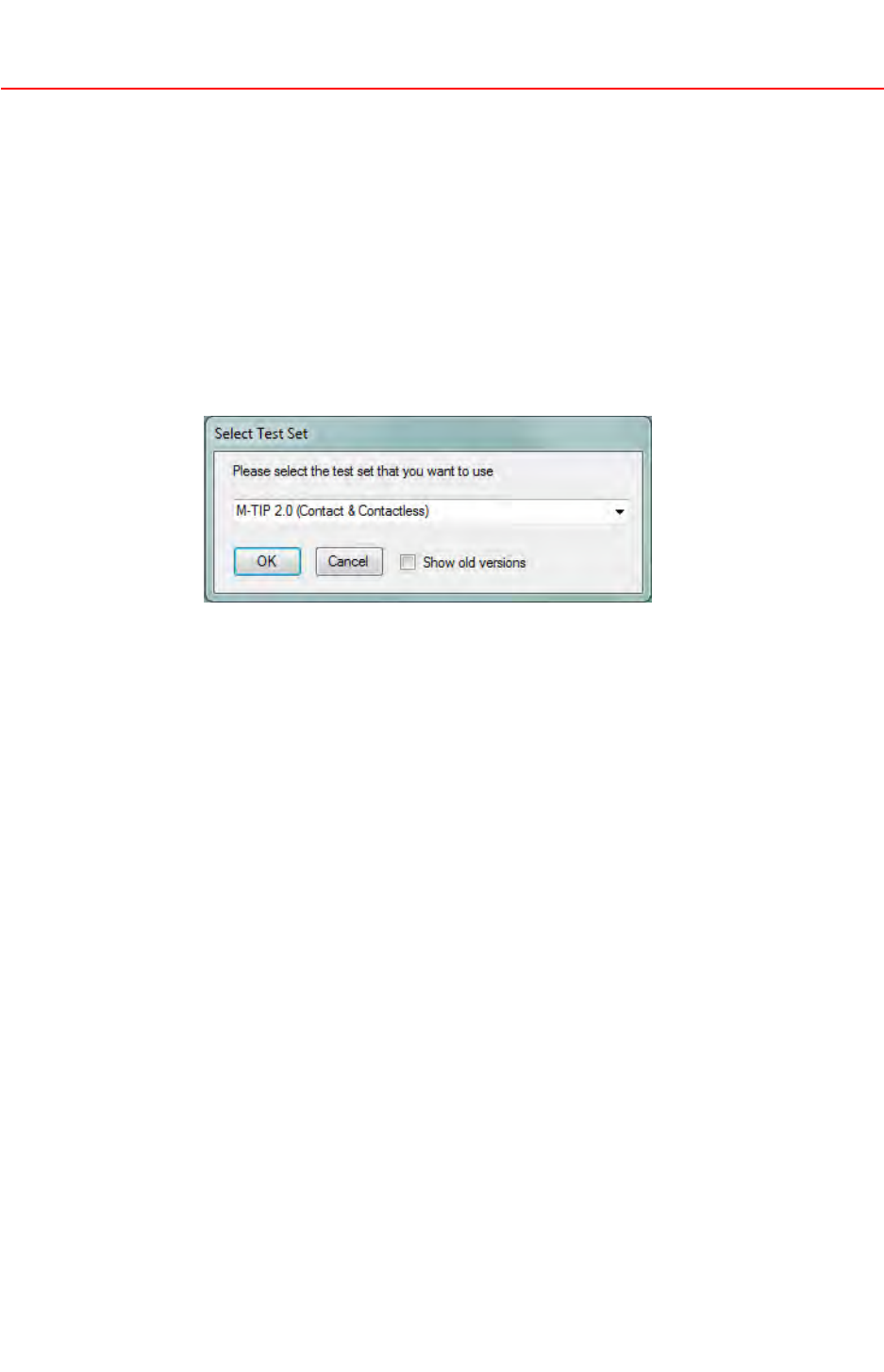
3.WithintheSelectTestSetwindow,selectaTestSet(touseforthisM-TIP
session)fromthedropdownlistandclickOK.
NOTE
Bydefaultthemostrecenttestsetislisted.T oviewoldertestsetversions,
clicktheShowOldVersionscheckbox.
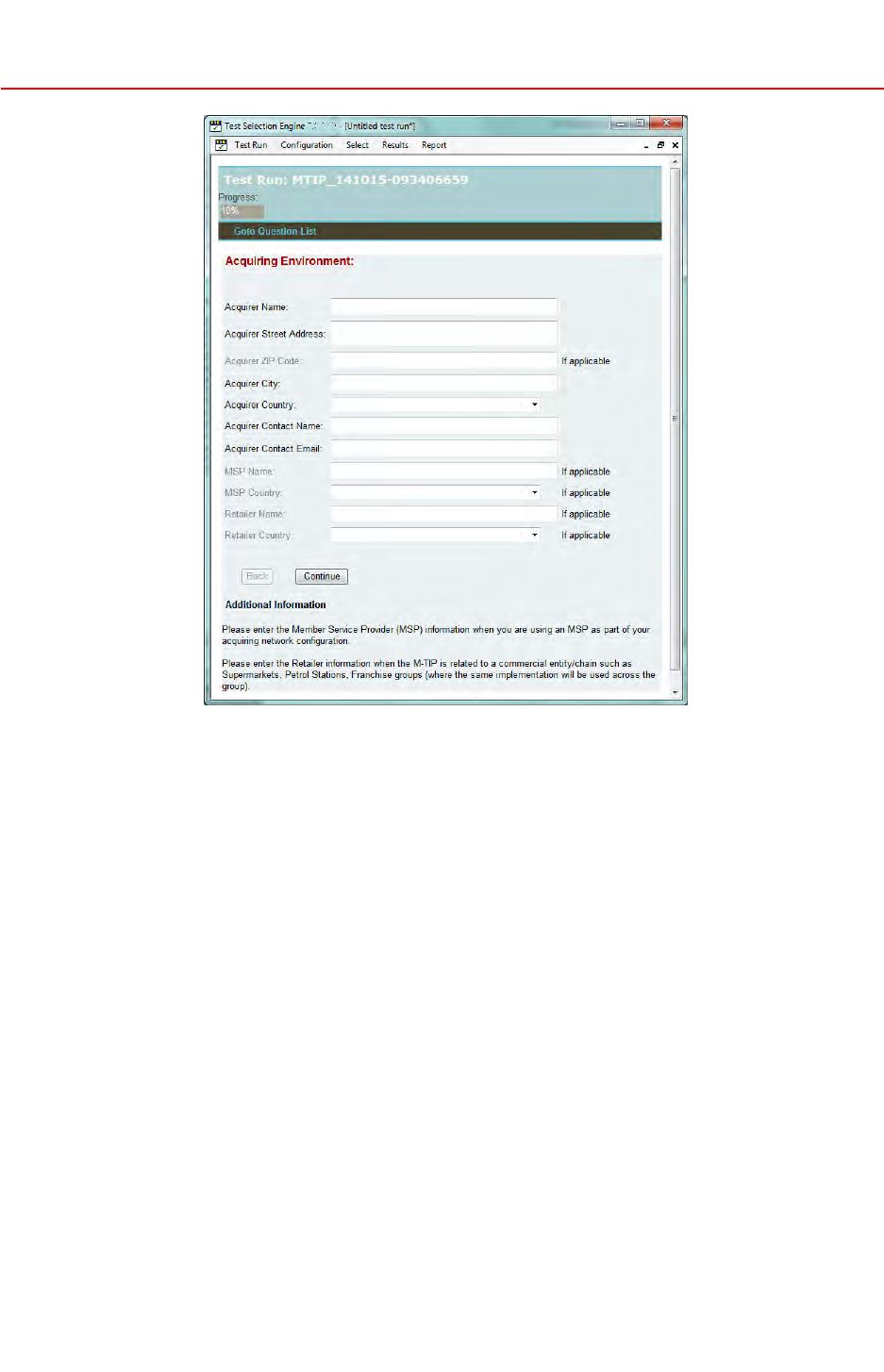
4.TheQuestionsFormisdisplayedwiththefirstsetofquestionsthatmust
beansweredtoprovidedetailsabouttheacquirerenvironmentandthe
terminalconfiguration.
©2015MasterCard.Proprietary.Allrightsreserved.
TIPTestSelectionEngineUserGuide•17February20152-1
RunningM-TIPwithTSE
CreatingaNewM-TIPT estSession
TheapplicationcreatesanM-TIPTrackingNumber,withthestructure
“MTIP_YYMMDD-hhmissmmm”.Thattestrunnumberisdisplayedonthe
topbanner.
Example:MTIP_141015-093406659
•Where141015isthedate:15October2014
•And093406659isthetime:09:34:06659milliseconds
Aprogressbarisdisplayedinthetopbanner,showingtheprogressin
acquirerenvironmentandterminaldetailscollection.
NowthatanM-TIPsessionhasbeeninitiated,newmenuitemsare
displayedinthetoolbar.Thesemenuitemsallowselectingtestcases,
editingtestresultsandproducingvarioustestreports.
5.SavethetestruninTSEbyselectingTestRun>Save.Thiswillcreatea
compressedfilenamedwiththeTIPTrackingNumberanda.tseextension.
Bydefaultthe.tsefilewillbesavedintheacquirer-definedworking
directory,whichisdefinedusingConguration>SetWorkingDirectory.
©2015MasterCard.Proprietary.Allrightsreserved.
2-217February2015•TIPTestSelectionEngineUserGuide
RunningM-TIPwithTSE
DeningAcquirerEnvironmentandT erminalConguration
DeningAcquirerEnvironmentandTerminalConguration
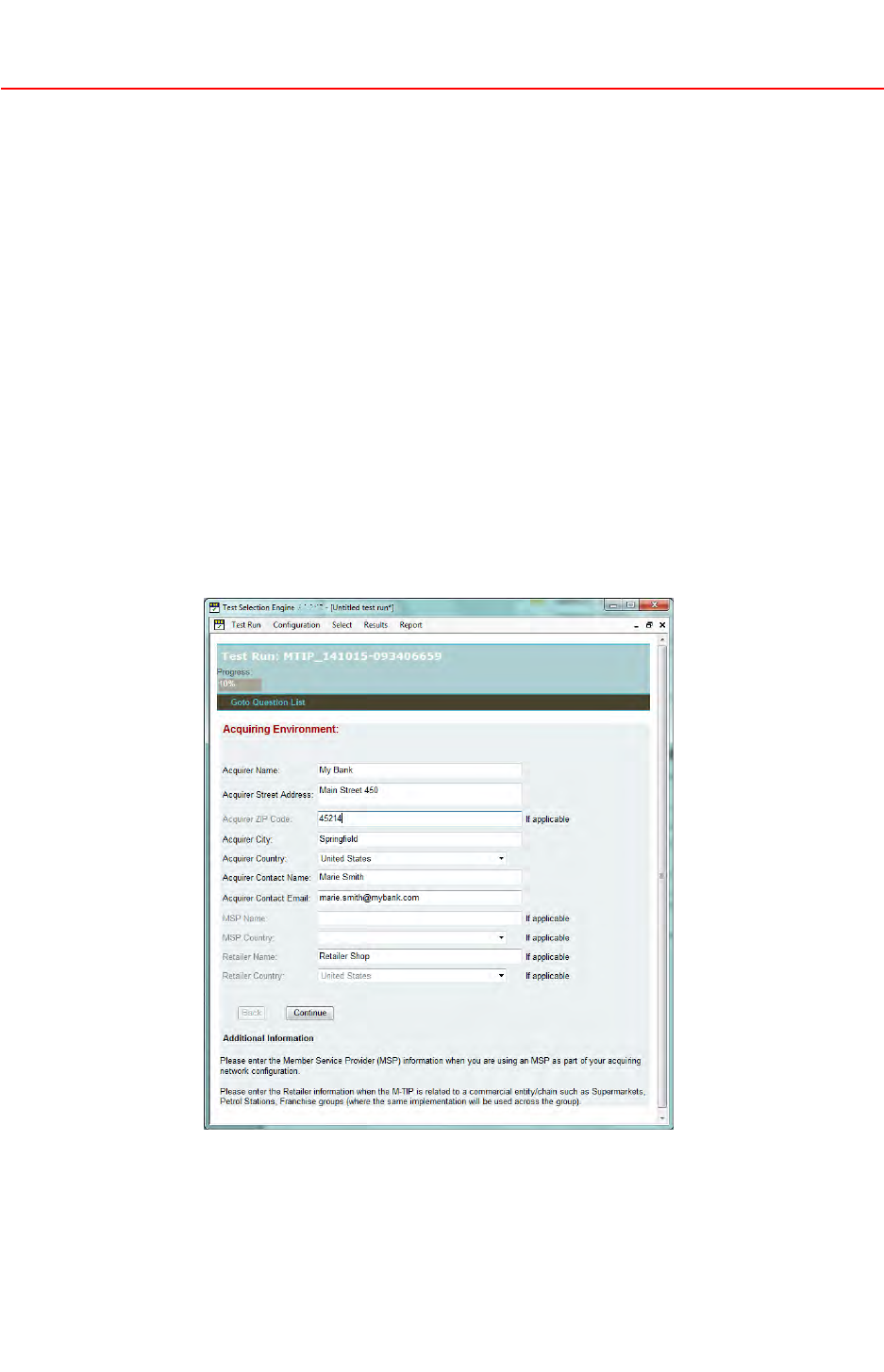
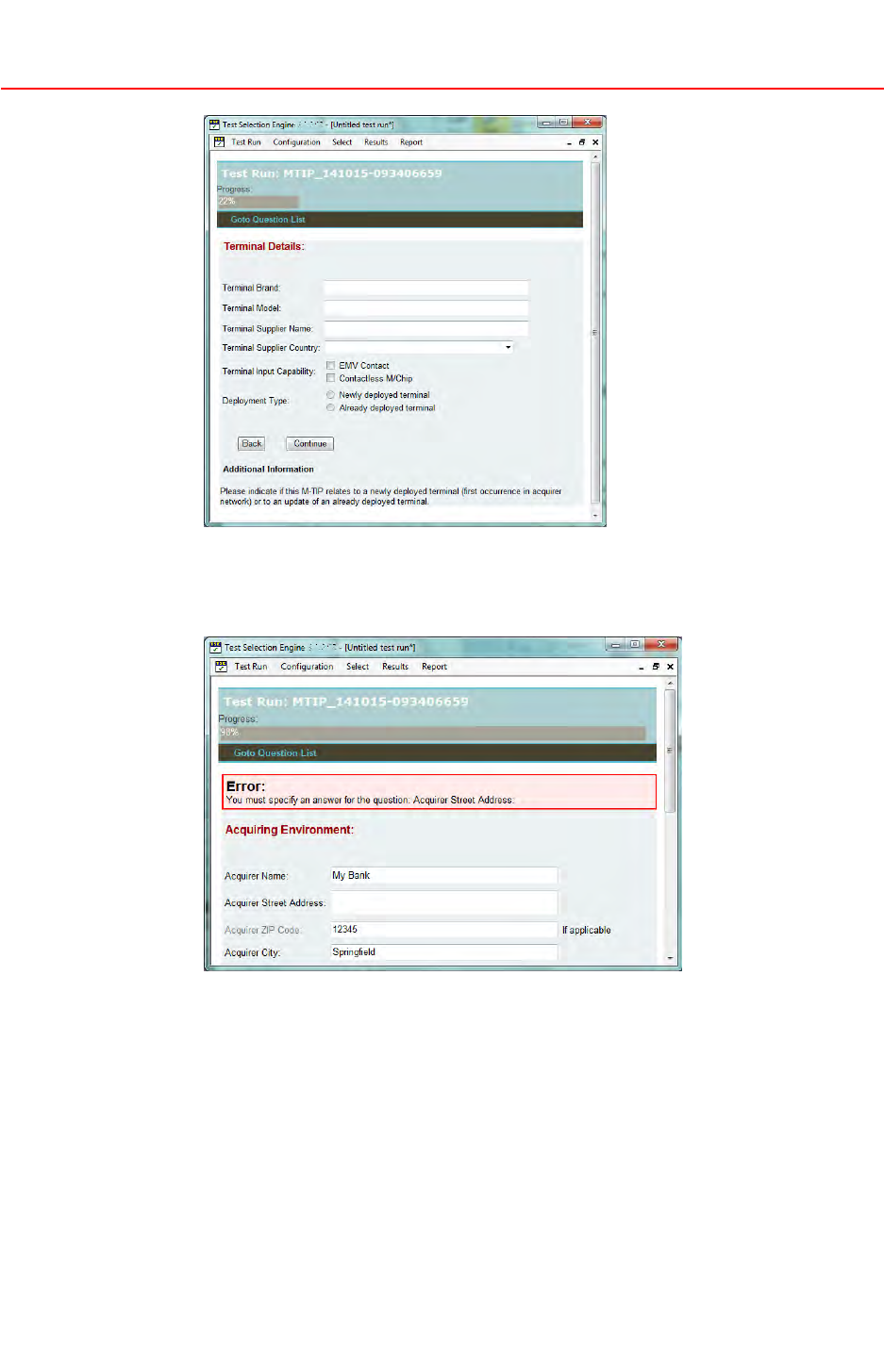
TheQuestionsFormisdisplayedwiththefirstsetofquestionsthatmustbe
answered.Thequestionsdisplayedinblacktypefacearemandatory,whilethe
questionsingreytypefaceareoptional.
Thequestionsareintendedto:
•Provideadministrativeinformationabouttheacquiringenvironment
•Collecttheterminalmodelandterminalapprovals
•DefinetheterminalinterfacetotestforthisM-TIP:ContactorContactless
orboth
•Collecttheterminalconfigurationdetails.
Acontextualhelpcanbedisplayednexttoaquestionoratthebottomof
theform.
Procedure
1.Answerallmandatoryquestions,thenclickContinue.
2.Enterinformationintheavailablefieldsuntilallpresentedfieldshave
beenanswered.
©2015MasterCard.Proprietary.Allrightsreserved.
TIPTestSelectionEngineUserGuide•17February20152-3
RunningM-TIPwithTSE
DeningAcquirerEnvironmentandT erminalConguration
AnswersprovidedarevalidatedbyTSE.Anyerrorencounteredisreported
onaredbackgroundatthetopoftheQuestionsForm.
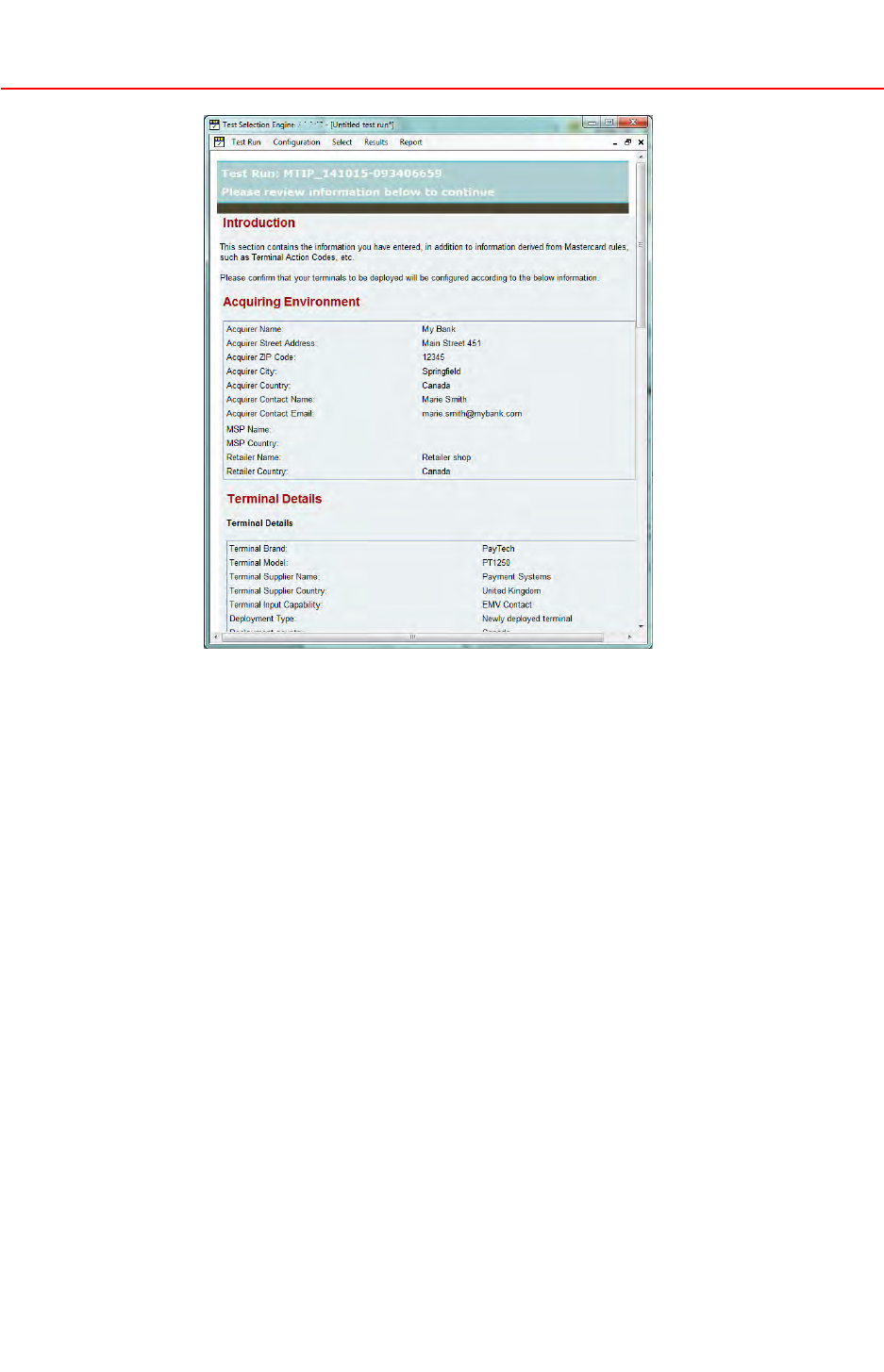
3.AnswerallquestionsuntiltheReviewInformationpageisdisplayed.It
summarizesthedetailsoftheterminalconfigurationforwhichatestplan
willbegenerated.
©2015MasterCard.Proprietary.Allrightsreserved.
2-417February2015•TIPTestSelectionEngineUserGuide
RunningM-TIPwithTSE
GeneratingaTestPlan
NOTE
Someofthedetailsdisplayedmayresultfromanswersthatwerenot
explicitlyenteredintheprevioussteps.Inordertooptimizetheuser
experienceandminimizethenumberofquestionstobeasked,TSE
predenesasmuchdetailsaspossible,basedontheM/ChipRequirements.
Forexample,whendeningthecongurationforacontactATM,youwill
neverbeaskedaquestionabouttheCVMssupportedbyyourATM.Thatis
becauseacontactATMmustonlysupportOnlinePIN.Thatinformationwill
beshownontheReviewInformationpage.Carefullyreviewtheinformation
andensurethattheactualterminalcongurationisfullyinlinewithall
thedetailsmentioned.
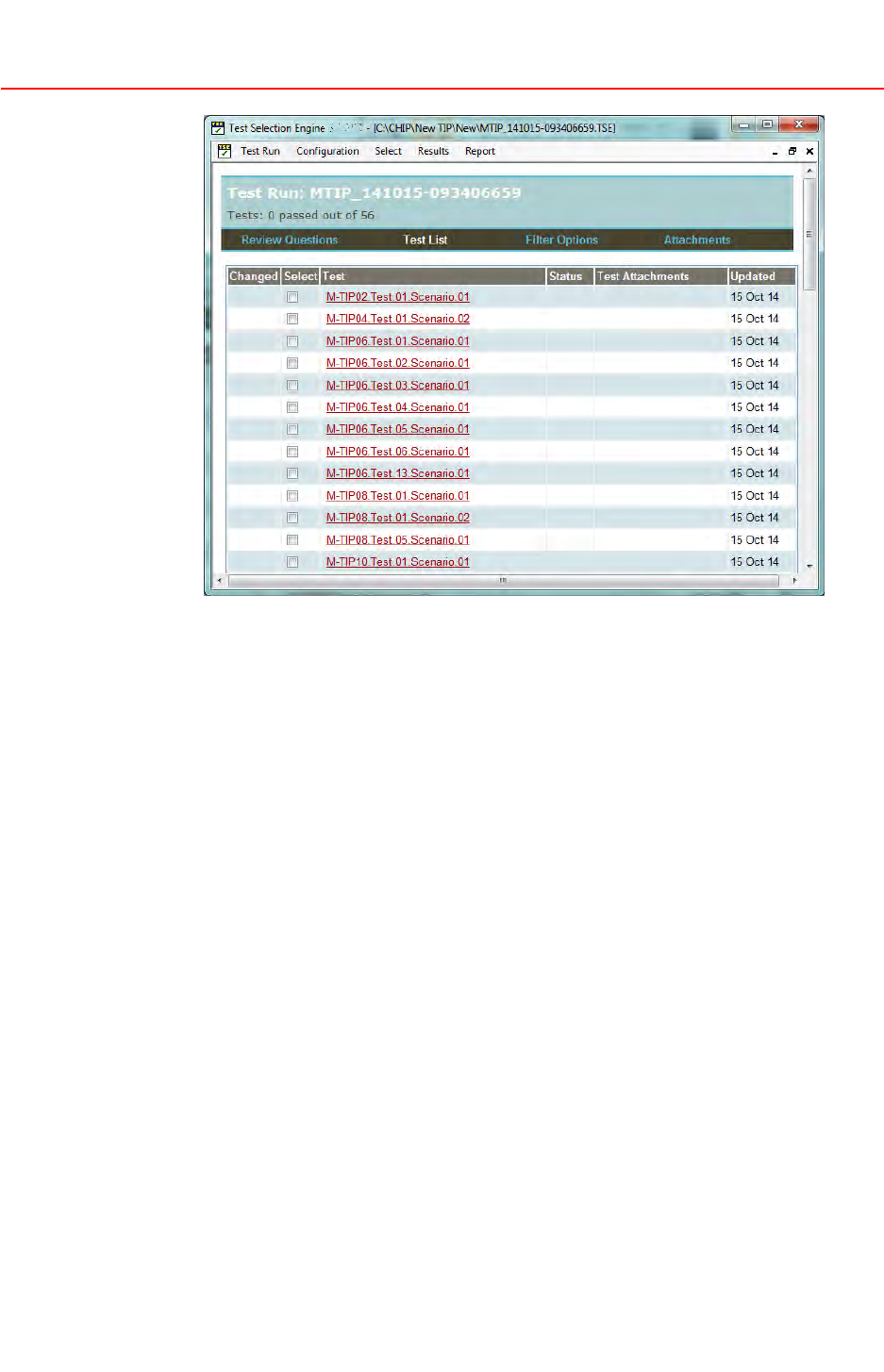
4.Oncethereviewoftheanswersiscompleted,clickContinuetogenerate
theTestPlan.TheTestPlanisautomaticallydisplayedintheTestListview.
5.SavethisM-TIPsessioninTSEbyselectingT estRun>SaveAs.
GeneratingaTestPlan
UsethefollowingproceduretogenerateaTestPlan.
Procedure
1.OpentheTestPlanintheTestListview.
©2015MasterCard.Proprietary.Allrightsreserved.
TIPTestSelectionEngineUserGuide•17February20152-5
RunningM-TIPwithTSE
GeneratingaTestPlan
ThetopbannerdisplaysthetotalnumberofteststhatarepartoftheTest
Planandthenumberofteststhathavebeenexecutedwitha‘Pass’status.
Thenavigationbarnowcontains4elements:
•ReviewQuestions—Toreviewandeditthelistofquestions/answers
describingtheacquirerenvironmentandterminalconfigurationunder
test
•TestList—TorevieworeditthetestsintheTestPlan
•FilterOptions—Torevieworeditthefilteringoptionsthatcanbeused
tofiltertheTestListview.SeeChapter3,AdditionalTSEFeaturesfor
moreinformationonfilteringoptions
•Attachments—ToaddorremoveafiletotheM-TIPtestsession.
Forexample,terminalLetterofApproval,Waiver,logfilesrelatedto
multipletestcases
NOTE
Updatinganswerstoquestionsmayimpacttheterminalcongurationhence
theT estPlan.TSEdynamicallyadaptstheTestPlantochangesinanswers.
ThismustnotbedoneiftheserviceproviderhasalreadyvalidatedtheT est
Results.
©2015MasterCard.Proprietary.Allrightsreserved.
2-617February2015•TIPTestSelectionEngineUserGuide
RunningM-TIPwithTSE
RunningaTestPlan
2.ReviewtheinformationcontainedintheT estListviewforeachtestcase:
•Changed—Flagindicatingwhetherthetestcasehasbeenupdatedsince
thelastsave
•Select—Checkboxpermittingselectionofoneormoretestcases.This
featurecan,forexample,beusedtoexportonlytestresultsforthe
selectedtestcases,ortoclearresultsoftheselectedtestcases
•Test—Nameandnumberofthetestcase
•Status—Currentstatusofthetestcase(Passed,Failed,InProgress)
•TestAttachments—Nameofthefilesattachedtospecifictestcase.
Thisistypicallythelogfileofthetestexecution,orawaiverrelated
tothetestcase
•Updated—Modificationdateofthetestcase
3.SelectT estRun>SaveAstosavethisM-TIPsession.
RunningaTestPlan
UsethefollowingproceduretoperformatestintheTSE.
Procedure
1.OpentheTestPlanintheTestListview.
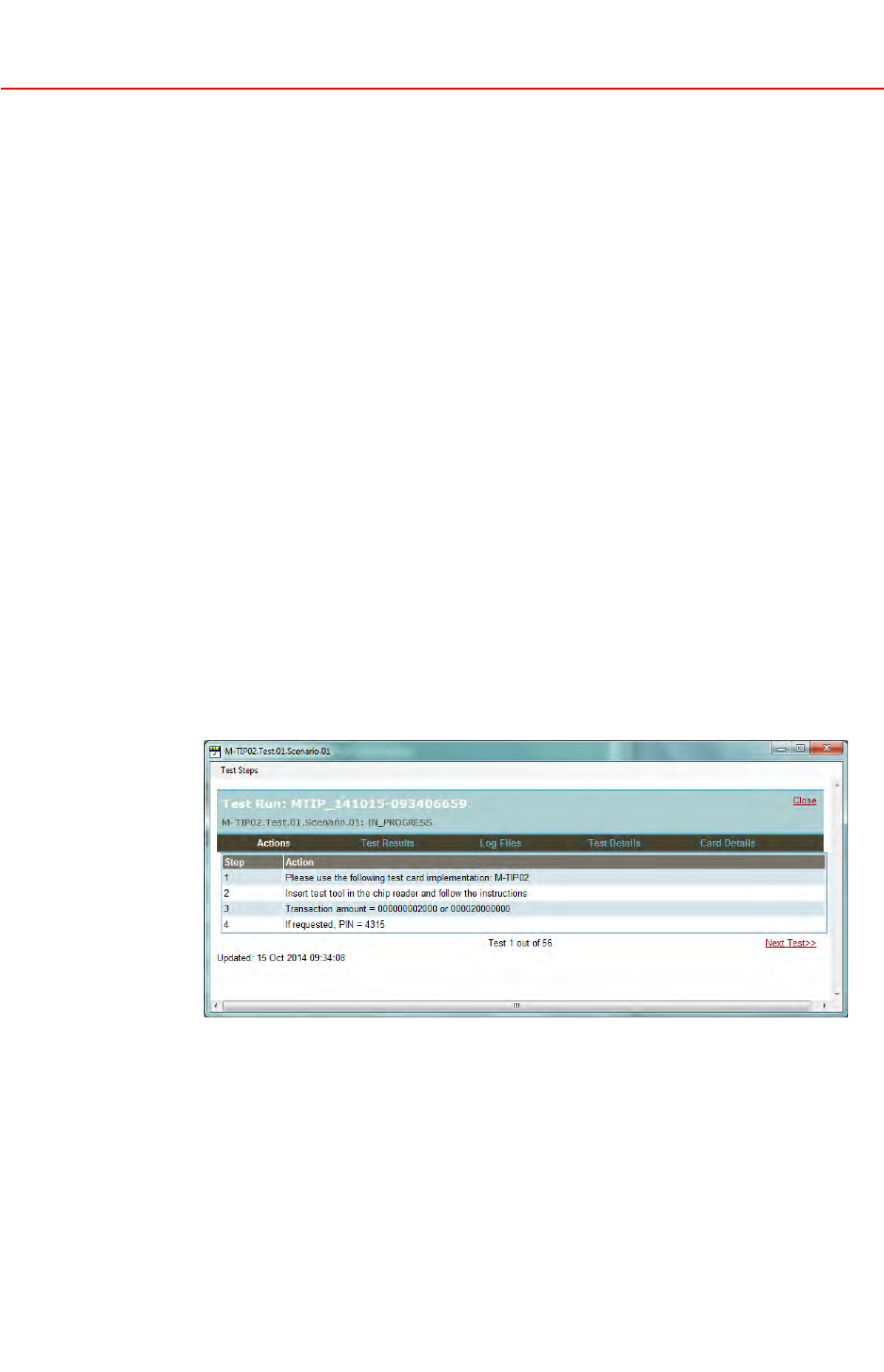
2.ClickatestName.TheTestCasewindowdisplays.
Thecurrenttestcasenameandstatusaredisplayedonthetopbanner.
ClickClosetosaveandclosetheTestCasewindow.
LocatedatthebottomofthewindowarenavigationlinkstogototheNext
TestorPreviousT est(whenapplicable).
©2015MasterCard.Proprietary.Allrightsreserved.
TIPTestSelectionEngineUserGuide•17February20152-7
RunningM-TIPwithTSE
RunningaTestPlan
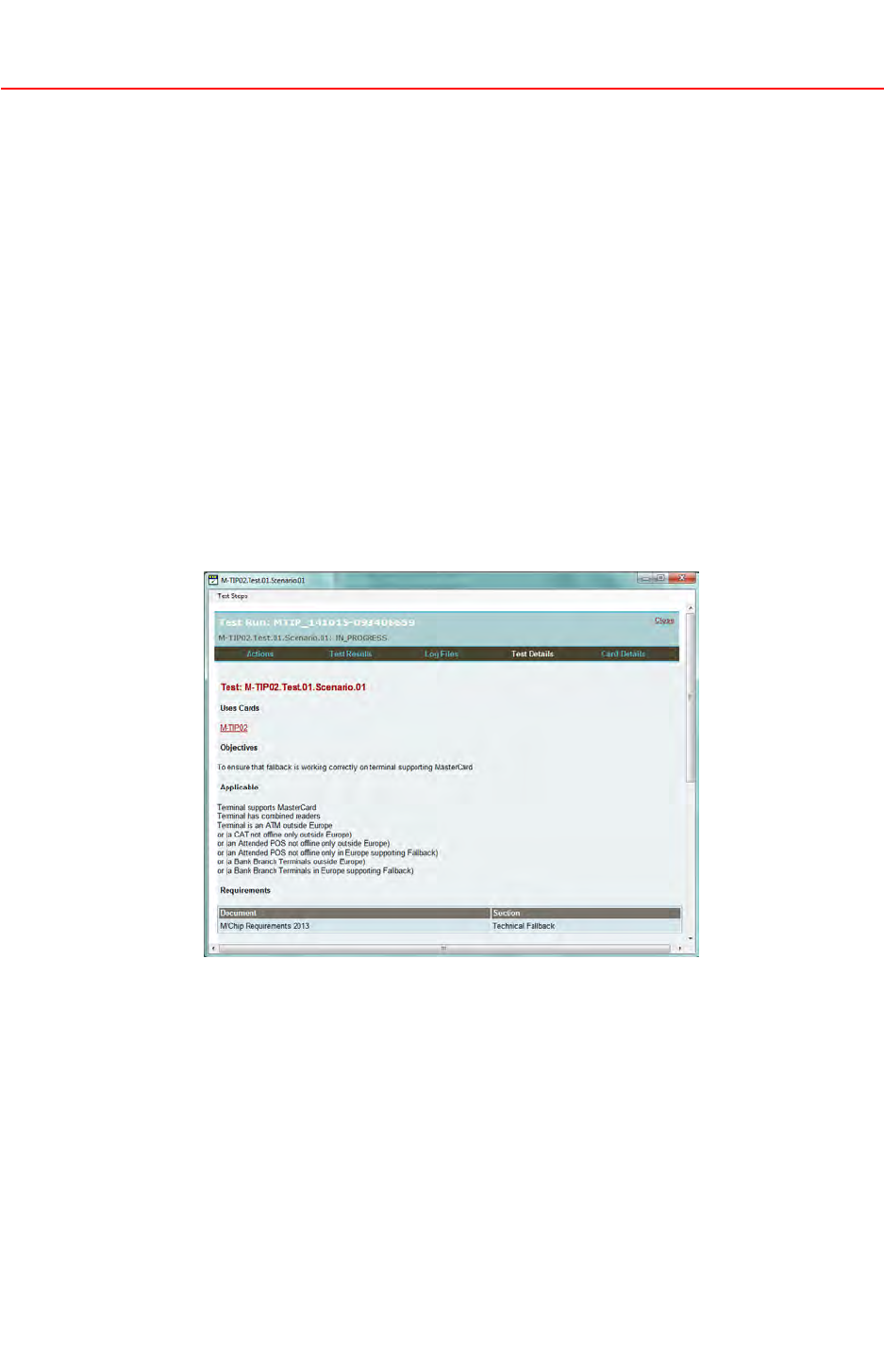
3.ReviewtheinformationprovidedintheT estCasewindowbyclickingthe
correspondingtab.
•Actions—listofactionstoexecuteforthetestcase
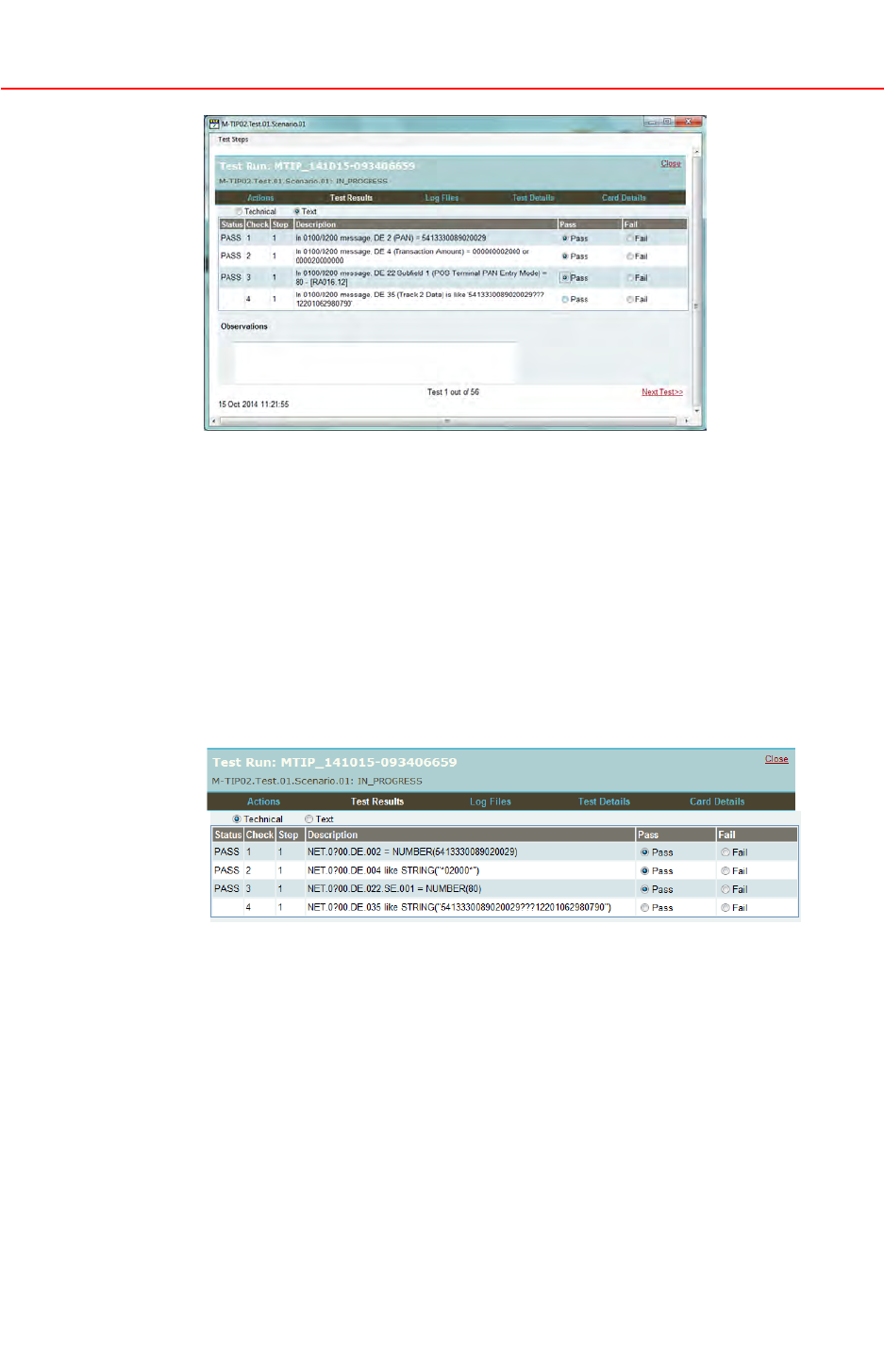
•TestResults—listofallpasscriteria,inwhichresultsofthetestrun
arerecorded,foreachpasscriteria
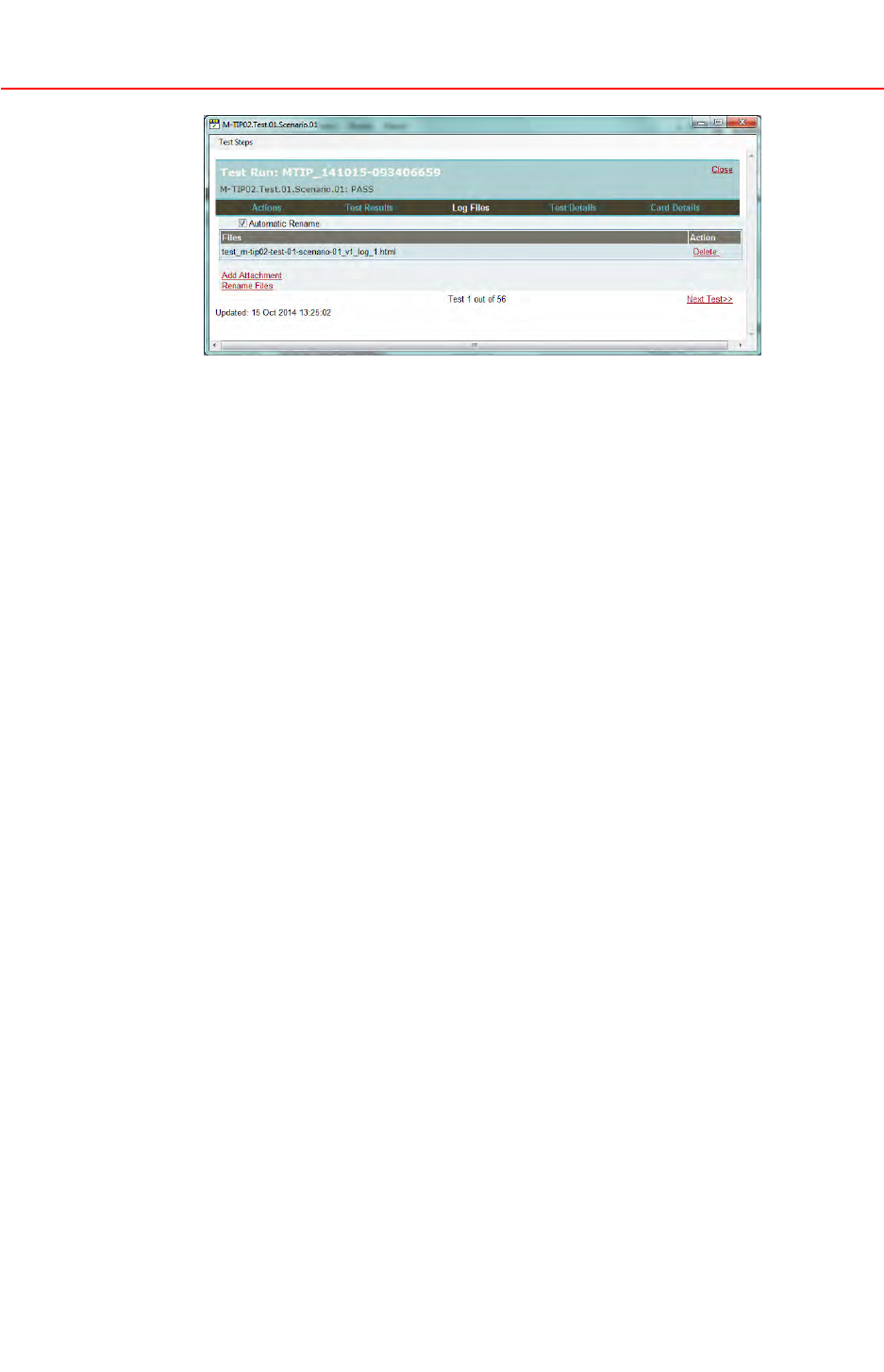
•LogFiles—listoflogfilesattachedtoatestcase
•TestDetails—descriptionofthetestcaseobjectivesandapplicability
•CardDetails—detaileddescriptionofthecardtouseinthetestcase
NOTE
ThedescriptionsofthetestcasesarenowentirelyintegratedinTSE
andreplacethepreviouslypublishedM-TIPT estCaseUserGuides.An
exhaustivelistofallexistingtestcasesisavailablethroughReport>View
TestReference.
4.Aftercheckingtheactionsrequired,opentheT estDetailstoreviewthetest
caseobjectivesandapplicabilitycriteria.
5.CheckthecarddetailsintheCardDetailswindowtoensurethecorrect
M-TIPtestcardisusedforthetest.
6.StartthetestwiththeappropriateM-TIPtestcardandregisterthestatusof
eachpasscriteriaintheT estResultswindow.
©2015MasterCard.Proprietary.Allrightsreserved.
2-817February2015•TIPTestSelectionEngineUserGuide
RunningM-TIPwithTSE
RunningaTestPlan
7.Selecttheappropriatestatusaspertheresultofthetransactionorperthe
informationfoundinthelogfile.
NOTE
TheTestResultswindowcontainsalistofpasscriteriathatismadeofseveral
Checks,eachcheckmaybecomposedofoneormoreSteps.Eachcheck
stephasitsownstatus:PassorFail.
8.ClickTechnicaltodisplaythepasscriteriainatechnicalsyntax.Passcriteria
isdisplayedbydefaultinTextformat.Thetechnicalsyntaxisdesigned
forM-TIPtesttoolsthatofferanautomaticpasscriteriavalidationwhile
parsingthelogfile.Acquirersshouldcheckifthisoptionissupported
withthetoolvendor.
9.ProvideanyadditionalrequiredinformationintheObservationstextarea
locatedbelowthepasscriteriatable.
10.AttachthecorrespondinglogfilestothetestcaseundertheLogFilestab.
ClickAddAttachment.
TheAutomaticRenameoptionallowsTSEtoautomaticallyrenamethelog
filewiththetestnameandversion.Thefilemayalsoberenamedusingthe
RenameFilesoptionafterit’sattached.
©2015MasterCard.Proprietary.Allrightsreserved.
TIPTestSelectionEngineUserGuide•17February20152-9
RunningM-TIPwithTSE
SendingTestResultstoM-TIPServiceProvider
NOTE
ThetestlogcanbeattachedtoaspecictestcaseortotheM-TIPsession
(using“Attachments”inthemainM-TIPsessionwindow.)
11.ProvidereferenceanddetailsofawaiverintheObservationstextareaof
thetestcaseintheT estResultswindowifatestcasecannotbesuccessfully
completedoraspecificfunctionalityisnotsupported.Attachthefiletothe
testcaseortheM-TIPsessionasawhole.
12.ClickNextT esttoproceedtothenexttestcaseonceatestcaseiscomplete.
13.SelectTestRun>SaveAstosavetheM-TIPsessionandupdatethe.tsefile.
SendingT estResultstoM-TIPServiceProvider
OncealltestcasesfromtheTestListhavebeenexecuted,andallrequiredlog
fileshavebeenattachedtotheM-TIPsession,usethefollowingprocedureto
preparethepackagefortheM-TIPserviceprovider.
Procedure
1.SelectT estRun>CreatePackagetoexportallthetestresultsina
compressedfilenamedwiththeTIPTrackingNumber,atimestampofthe
packagegenerationtime,anda.tsezextension.
Forexample,MTIP_141015–093406659_141018–133003.tsezwhere:
•MTIP_141015-093406659istheTIPTrackingNumber
•141018-133003isthedateandtimeatwhichthepackagewasgenerated
(18October2014at13:30:03)
•.tsezisthecompressedfileextension
2.Sendthe.tsezfiletotheserviceprovider.
The.tsezpackagecontains:
•The.tsecompressedfilecontainingallthedetailsoftheM-TIPsession:
theTestSet,acquirerenvironmentandterminalconfiguration,andthe
TestPlanresults
•Thelogfilesandattachments
©2015MasterCard.Proprietary.Allrightsreserved.
2-1017February2015•TIPTestSelectionEngineUserGuide
RunningM-TIPwithTSE
ReviewingServiceProviderValidationReport
ReviewingServiceProviderValidationReport
TheM-TIPserviceprovidersendsfeedbackofthevalidationinanXML
ValidationReportthatcanbeloadedintheTSE.Thefilehasa.tserextension.
Procedure
1.StartTSEandopenthe.tsefileoftheM-TIPtestsessionusingTestRun>
Open.
2.OpenthecorrespondingValidationReport.tserfileforthisprojectusing
TestRun>Open.
NOTE
TheValidationReport(.tserle)canbedirectlyopenedinTSE.TSEwill
automaticallyretrievethecorresponding.tsele(ifitisavailableinthe
conguredTSEworkingdirectory).
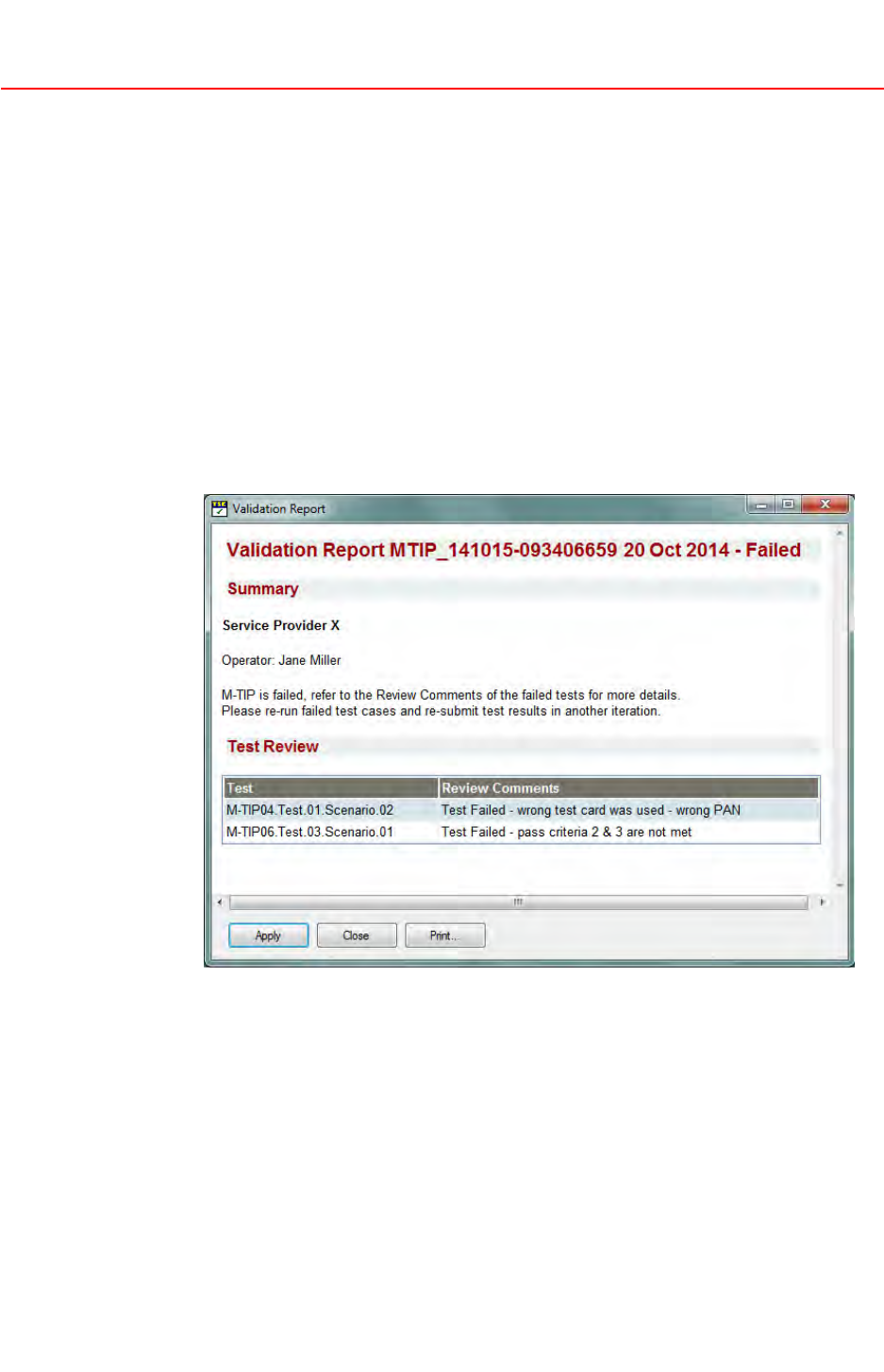
TheValidationReportwindowcontains:
•Title—M-TIPTrackingNumber,thedateofthereportandthevalidation
status:PassedorFailed
•Summary—serviceproviderfreecommentssection
•TestReview—optionalsectionlistingthetestsforwhichtheservice
providerhasmadeReviewComments
•QuestionReview—optionalsectionlistingthequestionsthattheservice
providerhasselectedthatmayneedtobereviewed
©2015MasterCard.Proprietary.Allrightsreserved.
TIPTestSelectionEngineUserGuide•17February20152-11
RunningM-TIPwithTSE
ReviewingServiceProviderValidationReport
TheTestReviewtableonlydisplaysteststhatcontainReviewComments.
TestsforwhichpasscriteriastatushavebeenupdatedwithoutReview
Commentsarenotdisplayed(thestatusupdatewillonlybevisibleinthe
TestListwhentheValidationReportisappliedtothecurrentM-TIPproject).
3.ClickPrinttoprintthereportifapapercopyisrequired.
4.ClickApplytoapplythechangesmadebytheserviceprovidertotheTSE
M-TIPtestsession.
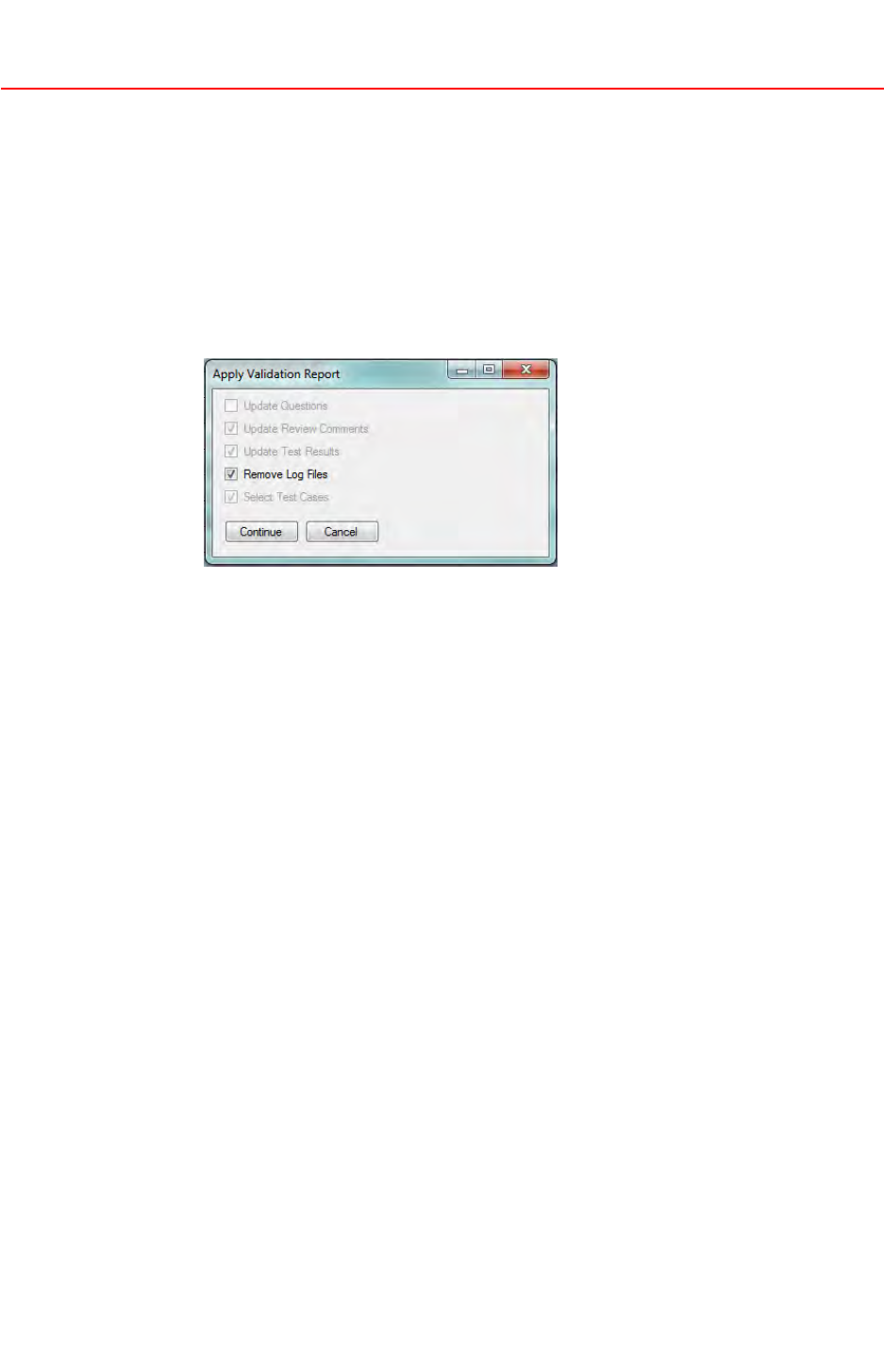
TheApplyValidationReportwindowdisplays.
5.ClickRemoveLogFilestoremovetheexistinglogfilesfortheteststhat
havebeenupdatedbytheserviceprovider.
6.ClickContinuetoupdatethe.tseproject.Ifthe.tseprojectisnotcurrently
openinTSE,TSEwillretrieveit,openit,andupdateit.
Theupdateconsistsofthefollowingwhenapplicable:
•Answerstoquestionsareupdated
•ReviewCommentsfromtheserviceproviderareimported
•Passcriteriastatusareupdated
•Updatedtestcasesareselected
•Logfilesforupdatedtestcasesareremoved,ifthecorrespondingoption
isselected
•ValidationReport.tserfileisaddedtotheM-TIPsessionasaglobal
attachment
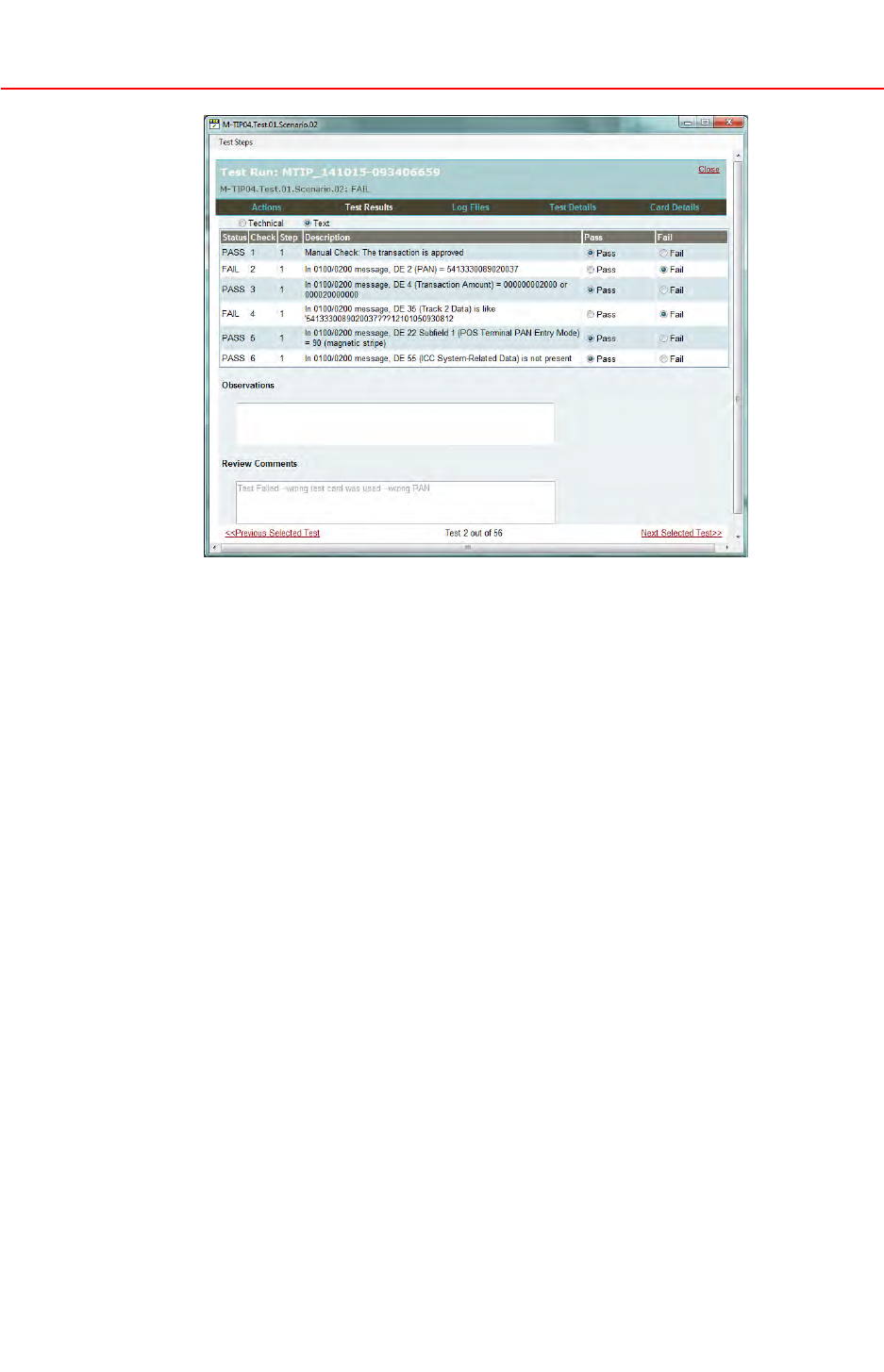
7.BrowsethelistoffailedtestsintheT estList.Theupdatedtestswillbe
markedasChangedintheTestList.
8.ReviewtheserviceprovidercommentsintheReviewCommentstextarea
intheTestResultstaboftheTestCasewindow.
©2015MasterCard.Proprietary.Allrightsreserved.
2-1217February2015•TIPTestSelectionEngineUserGuide
RunningM-TIPwithTSE
ReviewingServiceProviderValidationReport
9.Re-runanytestmarkedFailedintheTestListandattachthecorresponding
logstothenewtestrun.
10.Onceallrequiredtestsareexecuted,preparethelistoftestcasesthatmust
beincludedinthe.tsezpackage.Thetestcasesthathavebeenre-runare
identifiedfromthemodificationdatelistedintheUpdatedcolumnofthe
TestList,orfromthemodificationflagdisplayedintheChangedcolumn
oftheTestList.
11.ClickSelect>SelectChangedTeststoselectthetestcasesthatareflagged
intheChangedcolumnintheTestList.
12.ClickTestRun>CreateSelectedT estPackagetogeneratethepackage.
Inthiscase,theentireprojectisexportedbutonlythelogfilesattached
totheselectedtestsareexported.
13.The.tsezfilemustbesenttotheM-TIPserviceprovider.
©2015MasterCard.Proprietary.Allrightsreserved.
TIPTestSelectionEngineUserGuide•17February20152-13

Chapter3AdditionalTSEFeatures
ThissectiondescribestheadditionalfunctionalitythatexistsintheTIPTestSelectionEngine
(TSE).
FilteringTestList............................................................................................................................3-1
ApplyingaFilter......................................................................................................................3-1
RemovingaFilter.....................................................................................................................3-2
SelectingTestCases.......................................................................................................................3-2
ChangingMarkers..........................................................................................................................3-2
AboutClearingTestResults...........................................................................................................3-3
ClearingPassCriteria...............................................................................................................3-3
ClearingReviewComments.....................................................................................................3-4
CreatingaCopy.............................................................................................................................3-4
Reports...........................................................................................................................................3-6
OnlineHelp...................................................................................................................................3-6
©2015MasterCard.Proprietary.Allrightsreserved.
TIPTestSelectionEngineUserGuide•17February20153-i
AdditionalTSEFeatures
FilteringT estList
FilteringT estList
TheFilterOptionsinTSEallowyoutodefinefiltersthatcanbeappliedtothe
TestListviewbasedonthetestcasestatus.
ApplyingaFilter
Usethefollowingproceduretodefinefilters.
Procedure
1.OpenanM-TIPsessioninTSEthathasaTestPlangenerated.
2.ClickFilterOptions.
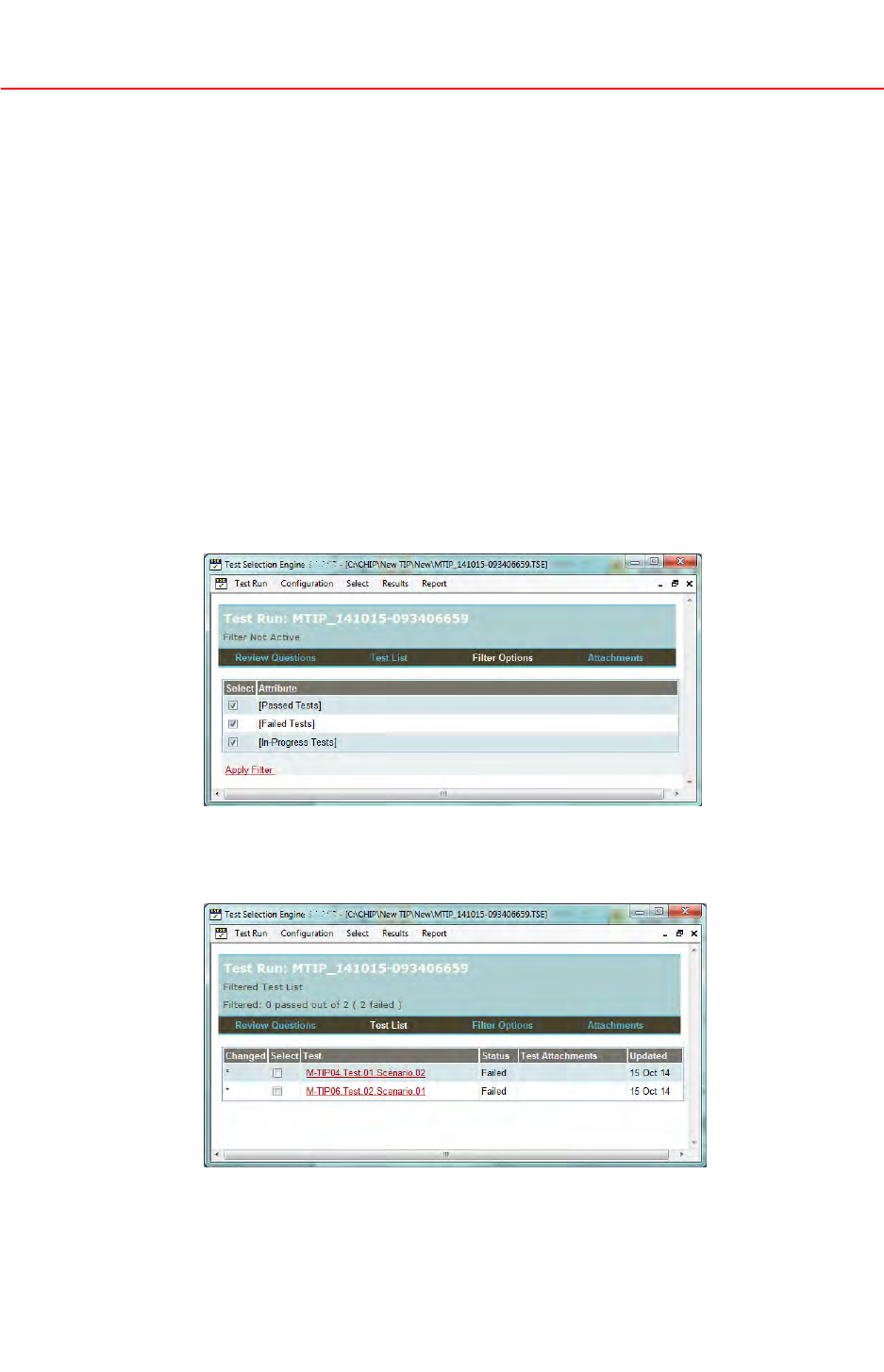
TheFilterOptionstablecontains:
•Select—Flagindicatingwhethertheattributeisactiveinthefilter
•Attribute—Nameofthefilterattribute
3.Definewhichattributewillbepartofthefilter.Bydefault,allattributes
areselected.Oncetheselectionsaremade,clickApplyFiltertodisplay
thefilteredTestList.
©2015MasterCard.Proprietary.Allrightsreserved.
TIPTestSelectionEngineUserGuide•17February20153-1

AdditionalTSEFeatures
SelectingT estCases
RemovingaFilter
Usethefollowingproceduretoremoveafilter.
Procedure
1.OpenanM-TIPsessioninTSE.
2.ClickFilterOptions.
3.ClickRemoveFiltertorefreshtheTestListwithoutanyfilteringapplied.
ThefilterisstilldefinedintheFilterOptionswindowforfutureuse.
SelectingTestCases
TSEoffersdifferentwaystoselecttestcasesfromtheT estList.
Testselectionallowsactiononlyonasubsetoftests,forexamplewhen:
•Packagingtestresults
•Clearingtestresults
•Generatingareport
WhentestsareselectedintheTestList,themenuitemsforthethreeactions
abovedynamicallyadapttoonlyapplytoselectedtests.
Testcasescanbeselectedin3differentways:
•Selecttestcasesmanually,byclickingtherelevantcheckboxesinthe
SelectcolumnintheTestList
•ClickSelect>SelectAllTeststoselectalltestcasesatonce
•ClickSelect>SelectChangedTeststoselectthetestcasesthatareflagged
intheChangedcolumnintheTestList.
NOTE
Toclearanyselectionmade,deselecttheSelectcheckboxesintheTestList
vieworclickSelect>ClearSelection.
ChangingMarkers
Changemarkers(representedbyanasterisk‘*’)mayappearintheReview
QuestionsandTestListviews.Theyindicatebydefaultthattheanswertoa
questionoratestresulthasbeenupdatedsincethelasttimetheM-TIPsession
wassavedinthe.tsefile.
TSEofferstheoptiontosetchangemarkersrelativetoauser-specifieddate.
Usethefollowingproceduretomodifythechangemarkdate.
©2015MasterCard.Proprietary.Allrightsreserved.
3-217February2015•TIPTestSelectionEngineUserGuide
AdditionalTSEFeatures
AboutClearingTestResults
Procedure
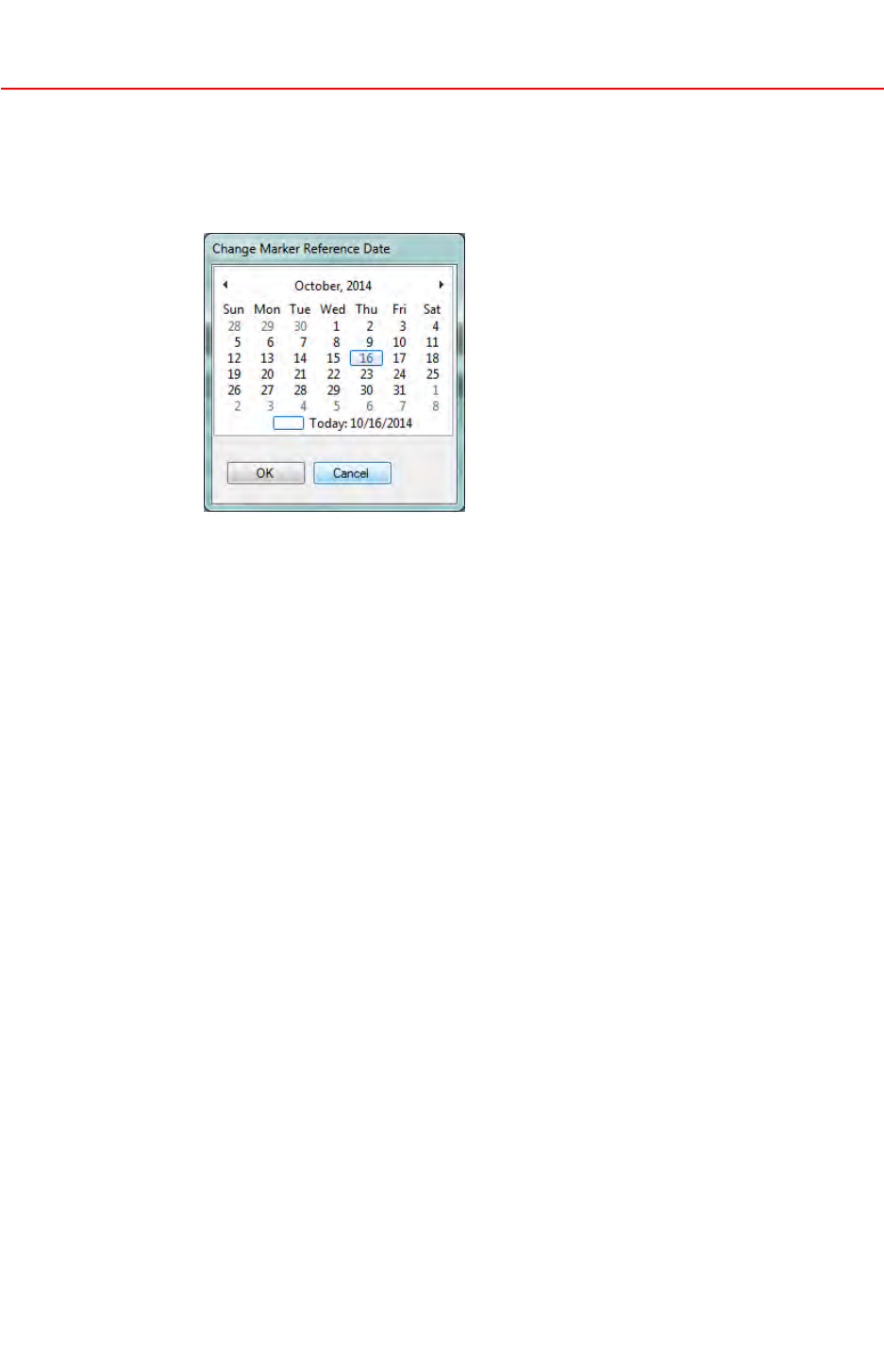
1.ClickSelect>SelectMarkerReferenceDate.
Acalendarwindowdisplays.
2.ClickadateandthenclickOK.Allanswerstoquestionsandalltestresults
thathaveamodificationdatemorerecentthanthenewlyselecteddateare
flaggedaschanged.
NOTE
Toclearthechangemarks,clickSelect>ClearChangeMarkers.Allchange
agswillberemovedfromtheReviewQuestionsandTestListviews.
AboutClearingTestResults
TSEcancleartheresultsofmultipletestscasesatatime.Thisfeatureresets
thestatusofthepasscriteria,andtheobservations.Thisfeatureismostuseful
whentheM-TIPsessioniscreatedbycopyinganotherreferenceM-TIP ,or
whenseveraltestcasesarere-executedduetoserviceproviderfeedback.
ClearingPassCriteria
Usethefollowingproceduretoclearpasscriteria.
Procedure
1.ClickanapplicableoptionintheResultsmenu.Theoptionsavailablewill
varydependingonthestateoftheTestList.
•ClearAllTestResults—whennotestisselectedintheTestListand
nofilterisappliedontheTestList
•ClearSelectedTestResults—whentestsareselectedintheTestListand
nofilterisappliedontheTestList
•ClearFilteredT estResults—whenafilterisappliedontheTestList
©2015MasterCard.Proprietary.Allrightsreserved.
TIPTestSelectionEngineUserGuide•17February20153-3

AdditionalTSEFeatures
CreatingaCopy
2.ChangethesetupoftheTestListbychangingthetestselectionorfiltering
optionsifthedesiredoptionisnotavailableforselection.
ClearingReviewComments
UsethefollowingproceduretocleartheserviceproviderReviewComments
foralltestsintheTestList.
Procedure
1.ClickResults>ClearReviewComments.
CreatingaCopy
TSEallowsyoutocreateanewM-TIPtestsessionfromanexistingTSEM-TIP
testsession.
Thisfeaturemaybeusedintwocases:
•AcquirersneedingtoquicklyinitiateanewM-TIPsessionforanewterminal
orterminalconfigurationandwhoarekeenavoidinghavingtoredefinethe
sameacquiringenvironment
•AcquirersneedingtorunaFastTrackM-TIPbasedonapreviousTSEM-TIP
testsession.ThatoriginalM-TIPisreferredtoastheReferenceM-TIP
Usethefollowingproceduretocreateacopy.
Procedure
1.InstallthelatestversionsoftheTSEandTestSetasdescribedinthe
InstallationandUpgradeofTSEandTIPTestSetsection.
2.InTSE,opentheReferenceM-TIP.tsefileorthe.tsezpackage,usingTest
Run>Open.
3.ClickSelect>CreateCopytostartanewM-TIPsession.
Thiswill:
•CreateanewM-TIPsession,withanewTIPTrackingNumber
•KeeparecordoftheTIPTrackingNumberoftheReferenceM-TIP
•CopytheanswerstoallquestionsfromtheReferenceM-TIPintothe
newM-TIPsession
•Copythetestresults,thelogfilesreferenceandtheattachments
reference
©2015MasterCard.Proprietary.Allrightsreserved.
3-417February2015•TIPTestSelectionEngineUserGuide
AdditionalTSEFeatures
CreatingaCopy
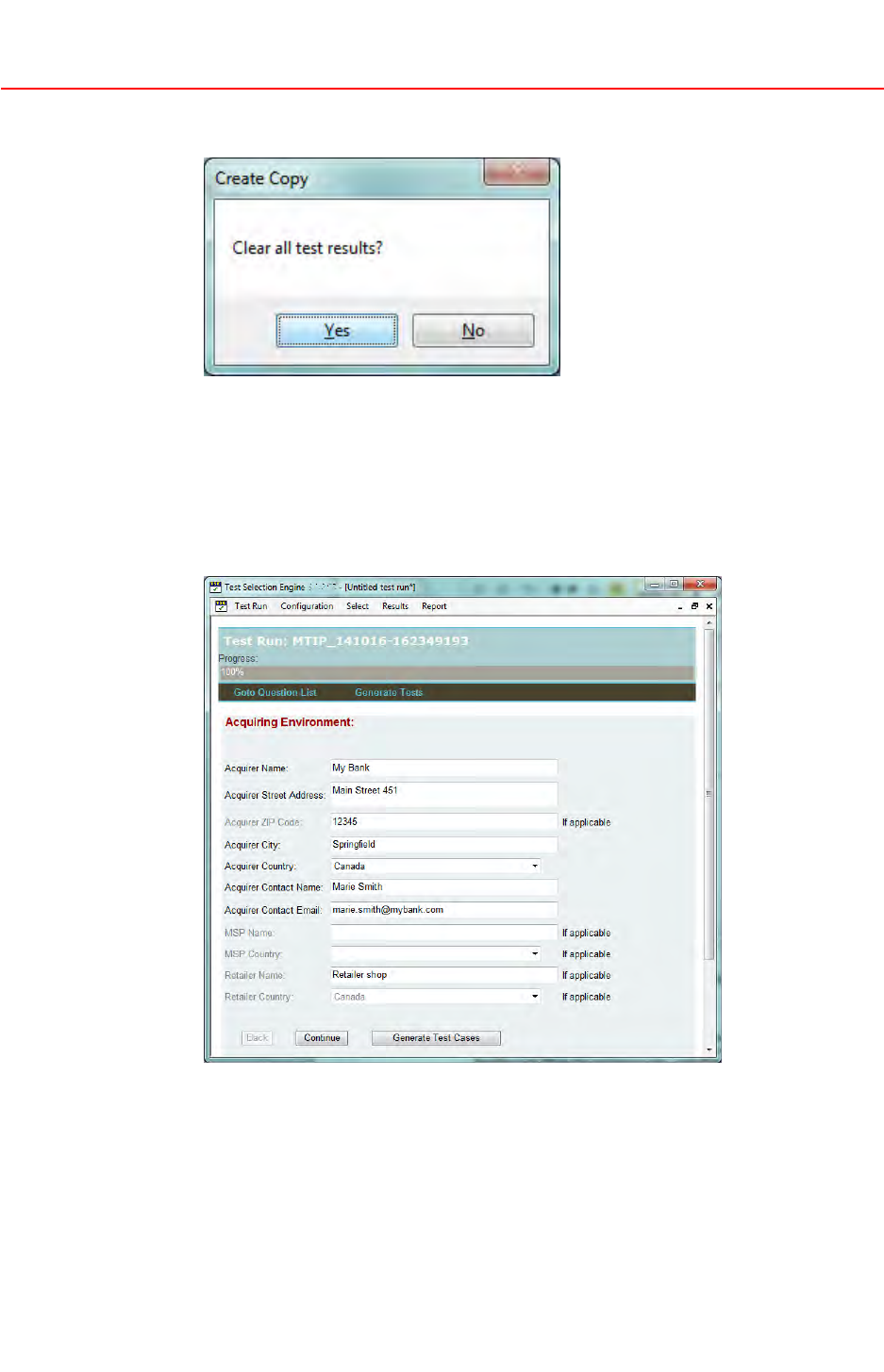
4.ClickoneofthefollowingintheCreateCopydialogbox:
•Yestocleartestresults.Thiswillremoveallpasscriteriastatus,andall
referencetotestlogfilesbutwillkeeptheattachmentslinkedtothe
M-TIPsession.
•NotokeepthetestresultsoftheReferenceM-TIP.
5.Oncethecopyiscompleted,editthequestionsintheQuestionFormas
required.
NOTE
Thetestplanwillbeautomaticallyadaptedbasedonmodiedanswers.
Basedonthenumberofchanges,theM-TIPsessionmaynolongerbe
consideredasaFastTrackM-TIPbytheserviceprovider,andalltestspartof
thetestplanmayneedtoberun.
6.BrowsetheTestListtocheckwhichtestsmustberun.
©2015MasterCard.Proprietary.Allrightsreserved.
TIPTestSelectionEngineUserGuide•17February20153-5

AdditionalTSEFeatures
Reports
Testresultsareclearedfortheteststhatmustberunduetochangeof
terminalconfigurationorduetoamorerecentTestSet.
Iftheterminalconfigurationhasnotchanged,onlythenewtests,ortests
thathavehadamajorchangessinceReferenceM-TIPwascompleted,must
beexecuted.
Iftheterminalconfigurationhaschanged,andthesechangesareoutofthe
acceptablescopeasdefinedinthe‘FastTrackM-TIPTestList’oftheTSE
OnlineHelp,theacquirermustrunalltests.
7.Whenallrequiredtestsaresuccessfullyrun,generatetheexportpackageas
foraregularM-TIPsession.
Reports
FromtheReportoption,TSEoffersdifferenttypesofreportasindicatedbelow.
•Create(Selected)TestReport—Atestreportabouttheon-goingM-TIP
sessioncontaining:
–TheTIPTrackingNumber
–TheversionoftheTestSet
–Asummaryofquestionanswers
–Asummaryofteststatus
–AdetailedreportabouttestcasesthatarepartoftheTestList
WhensometestcasesareselectedintheTestList,thereportcoversonly
theselectedtests.
•TestInformation—Atestreportcontainingasummaryoftheterminal
configurationfortheongoingM-TIPsession
•TestReference—Atestreportcontainingadetaileddescriptionofall
testcasesthatarepartoftheTestSetloadedinTSE.Itcontainsalltests
fromtheTestSet,eventheonesnotapplicabletotheparticularterminal
configurationfortheongoingM-TIPsession
NOTE
ClickPrinttoprintthereportorSavetosaveanelectronicversionofit.
OnlineHelp
AshortonlinehelpisavailablewhenanM-TIPtestsessionisopenbyusing
Report>Help.
TheOnlineHelpalsocontainstheFastTrackM-TIPTestListdescribingthe
testcasesthatmustberuninFastTrackM-TIPandtheexistingFastTrack
M-TIPusecases.
©2015MasterCard.Proprietary.Allrightsreserved.
3-617February2015•TIPTestSelectionEngineUserGuide
