Terra Go Edge Windows Installation Guide
User Manual:
Open the PDF directly: View PDF  .
.
Page Count: 25

! !
Edge® Windows Installation Guide
V 3.8
!

!
!
Table of Contents
!"!#$%&'(')*+(,&*-.("""""""""""""""""""""""""""""""""""""""""""""""""""""""""""""""""""""""""""""""""""""""""""""""""""""""""""""""""""""""""""""""""(/!
0"!12+'3443'*%2(""""""""""""""""""""""""""""""""""""""""""""""""""""""""""""""""""""""""""""""""""""""""""""""""""""""""""""""""""""""""""""""""""""""""""(/!
0"!"!12+'3445)*.4-(6*738-("""""""""""""""""""""""""""""""""""""""""""""""""""""""""""""""""""""""""""""""""""""""""""""""""""""""""""""""""""""(/!
0"0"!9*:.2+.(#;8..<.2'("""""""""""""""""""""""""""""""""""""""""""""""""""""""""""""""""""""""""""""""""""""""""""""""""""""""""""""""""""""""(/!
0"/"!5*4.2'(12+'3443'*%2("""""""""""""""""""""""""""""""""""""""""""""""""""""""""""""""""""""""""""""""""""""""""""""""""""""""""""""""""""""""""(=!
/"!>?;83-*2;(@8%<(A8.B*%&+(C.8+*%2+("""""""""""""""""""""""""""""""""""""""""""""""""""""""""""""""""""""""""""""""""""""""""""""""""""""""(D!
E"!,.''*2;(5'38'.-(""""""""""""""""""""""""""""""""""""""""""""""""""""""""""""""""""""""""""""""""""""""""""""""""""""""""""""""""""""""""""""""""""""(F!
G"!9*:.2+*2;(""""""""""""""""""""""""""""""""""""""""""""""""""""""""""""""""""""""""""""""""""""""""""""""""""""""""""""""""""""""""""""""""""""""""""""(!/!
G"!"!H24*2.(#:'*B3'*%2("""""""""""""""""""""""""""""""""""""""""""""""""""""""""""""""""""""""""""""""""""""""""""""""""""""""""""""""""""""""(!/!
G"0"!H@@4*2.(#:'*B3'*%2("""""""""""""""""""""""""""""""""""""""""""""""""""""""""""""""""""""""""""""""""""""""""""""""""""""""""""""""""""""""(!E!
="!I8%&$4.+)%%'*2;(+'.?+("""""""""""""""""""""""""""""""""""""""""""""""""""""""""""""""""""""""""""""""""""""""""""""""""""""""""""""""""""""""(!G!
D"!J.?3*8(""""""""""""""""""""""""""""""""""""""""""""""""""""""""""""""""""""""""""""""""""""""""""""""""""""""""""""""""""""""""""""""""""""""""""""""""(!=!
F"!>2*2+'3443'*%2(""""""""""""""""""""""""""""""""""""""""""""""""""""""""""""""""""""""""""""""""""""""""""""""""""""""""""""""""""""""""""""""""""""(!F!
F"!"!>2*2+'344(I.883,%(K-;.(')8%&;)(#--LJ.<%B.(A32.4(""""""""""""""""""""""""""""""""""""""""""""""""""""""""""""""""""(0!!
F"0"!>2*2+'344(A%+';8.5M9(N3'3$3+.(5.8B.8(""""""""""""""""""""""""""""""""""""""""""""""""""""""""""""""""""""""""""""""""""""""""(00!
F"/"!>2*2+'344(A%+',15(""""""""""""""""""""""""""""""""""""""""""""""""""""""""""""""""""""""""""""""""""""""""""""""""""""""""""""""""""""""""(0E!
!
! !
!
!
1. About this Guide
This!document!provides!instructions!on!how!to!install,!upgrade,!configure,!and!uninstall!the!Edge!web!
application!on!the!Windows!platform.!
2. Installation
2.1. InstallShield Wizard
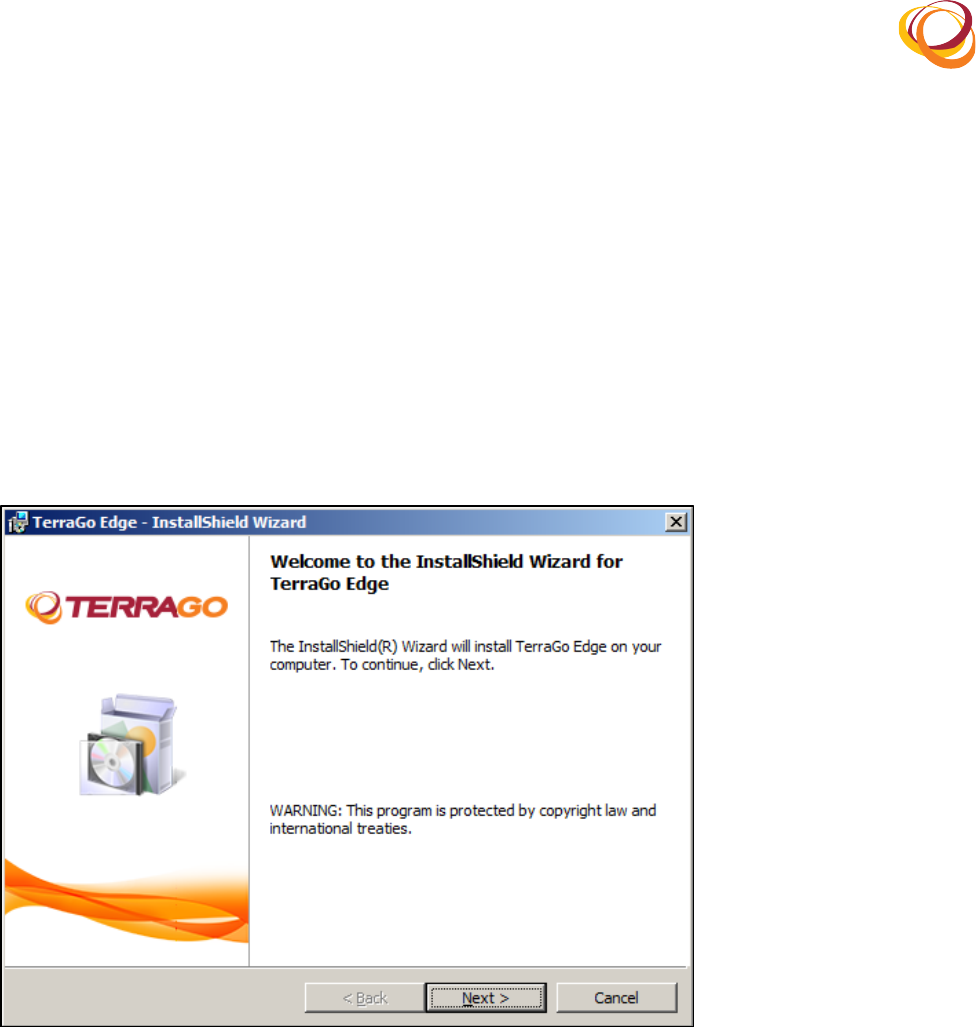
Locate!and!double!click!the!.exe!executable!file.!1.
Once!the!files!are!extracted,!the!installation!wizard!starts!as!shown!below:!2.
Click!the!O.P'!button!to!proceed!with!the!installation!process.!3.
Q*;&8.(!R(12+'3443'*%2(6*738-(
2.2. License Agreement
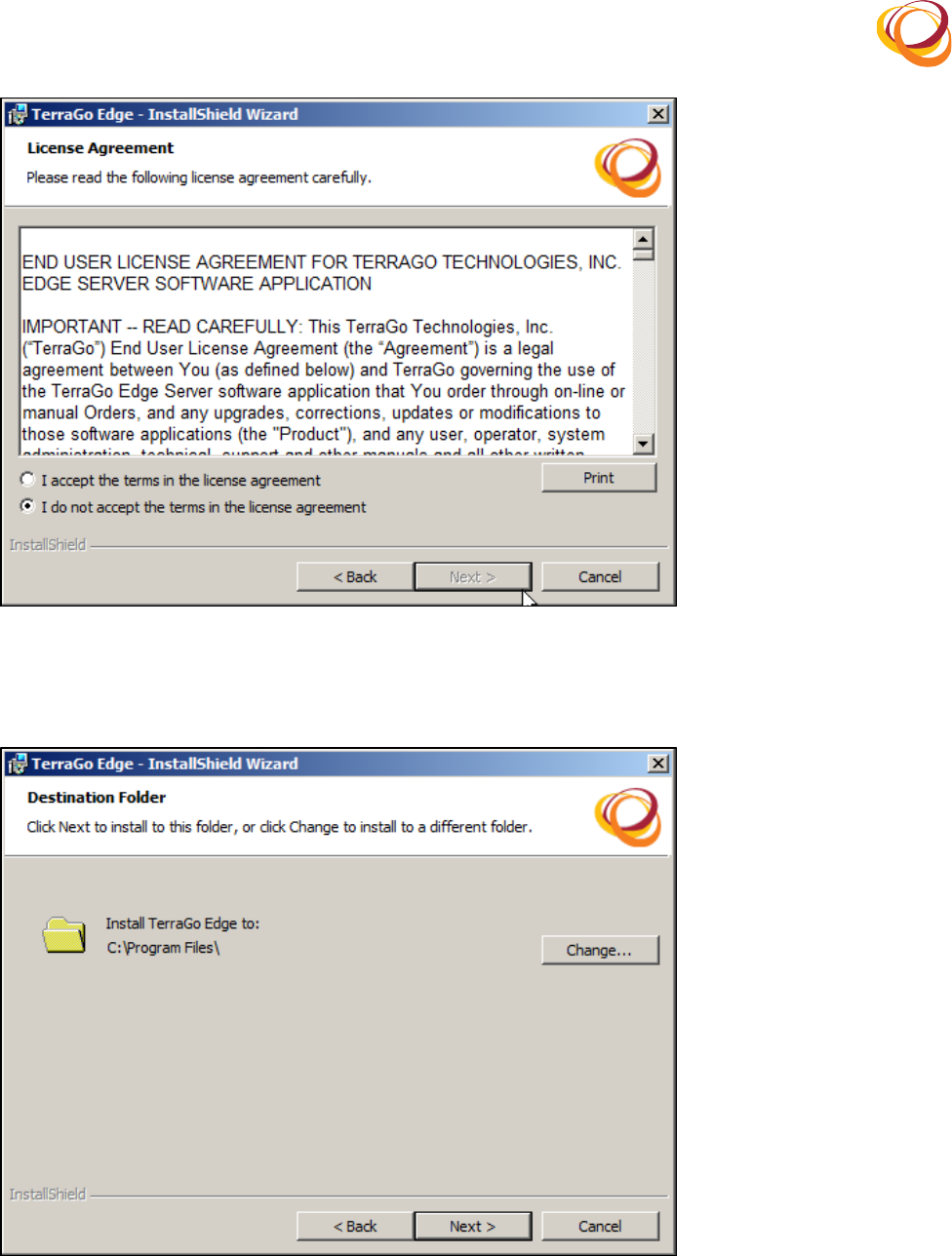
By! default,! the! ‘1( -%( 2%'( 3::.?'( ').( '.8<+( *2( ').( 4*:.2+.( 3;8..<.2'S!option! is! selected.! After!1.
reading!the!License!Agreement,!click!the!‘1(3::.?'(').('.8<+(*2(').(4*:.2+.(3;8..<.2'S!option.!
Once!you!select!this!option,!the!O.P'!button!is!enabled.!2.
Click!the!O.P'!button!to!proceed.!3.
!
!
!
!
Q*;&8.(0R(9*:.2+.(#;8..<.2'(
By!default,!the!application!is!installed!in!the!following!path:!C:\Program!Files.!4.
Click!the!T)32;.!button!if!you!want!to!change!the!installation!path.!5.
Q*;&8.(/R(N.+'*23'*%2(Q%4-.8(
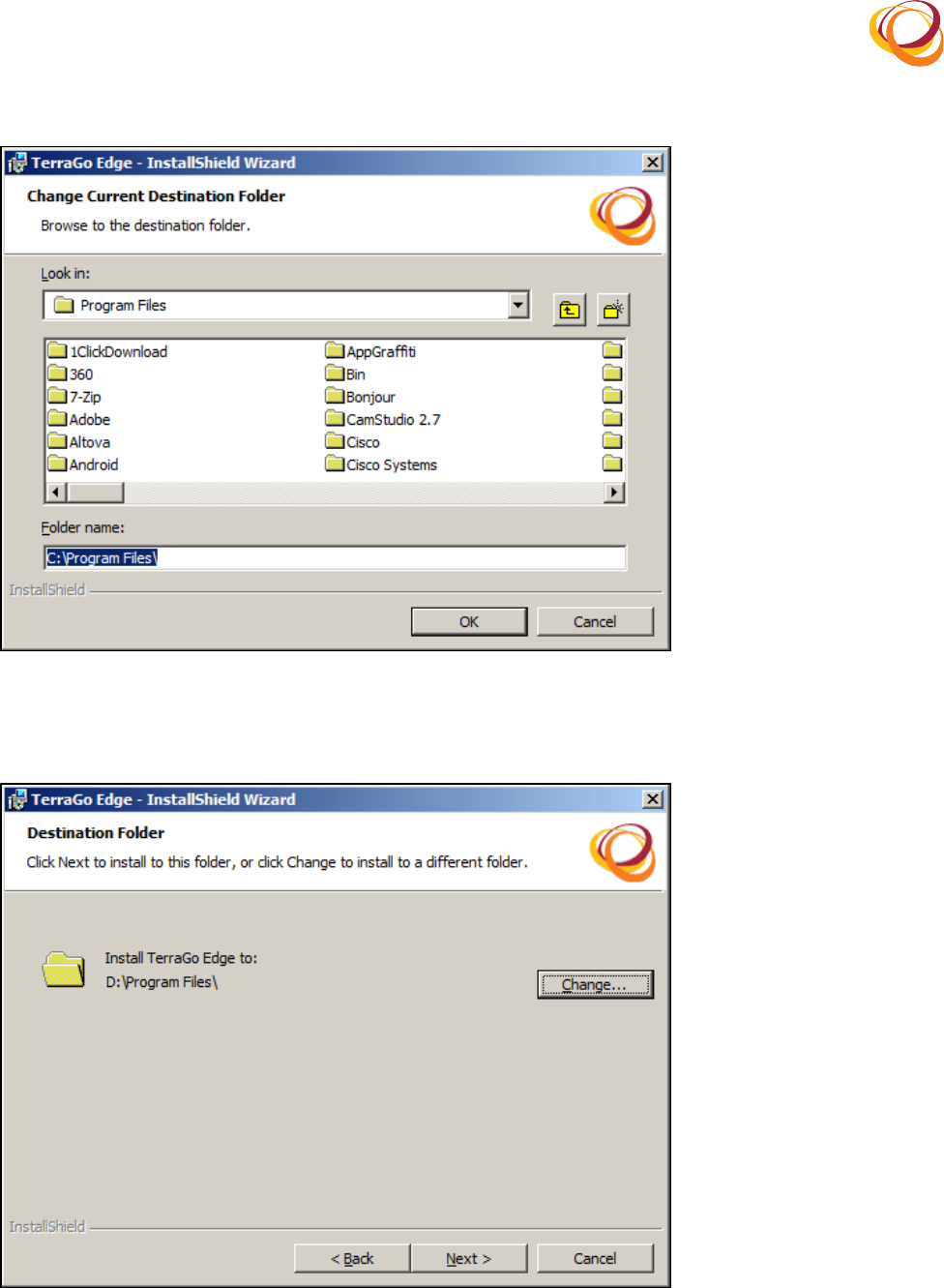
Select!the!destination!folder!in!which!you!want!to!install!the!application.!6.
Click!the!HU!button!to!select!the!destination!folder.!7.
!
!
!
!
Q*;&8.(ER(5.4.:'(N.+'*23'*%2(Q%4-.8(
The!path!that!you!selected!is!now!displayed.!8.
Click!the!O.P'!button!to!proceed.!9.
Q*;&8.(GR(N.+'*23'*%2(Q%4-.8(
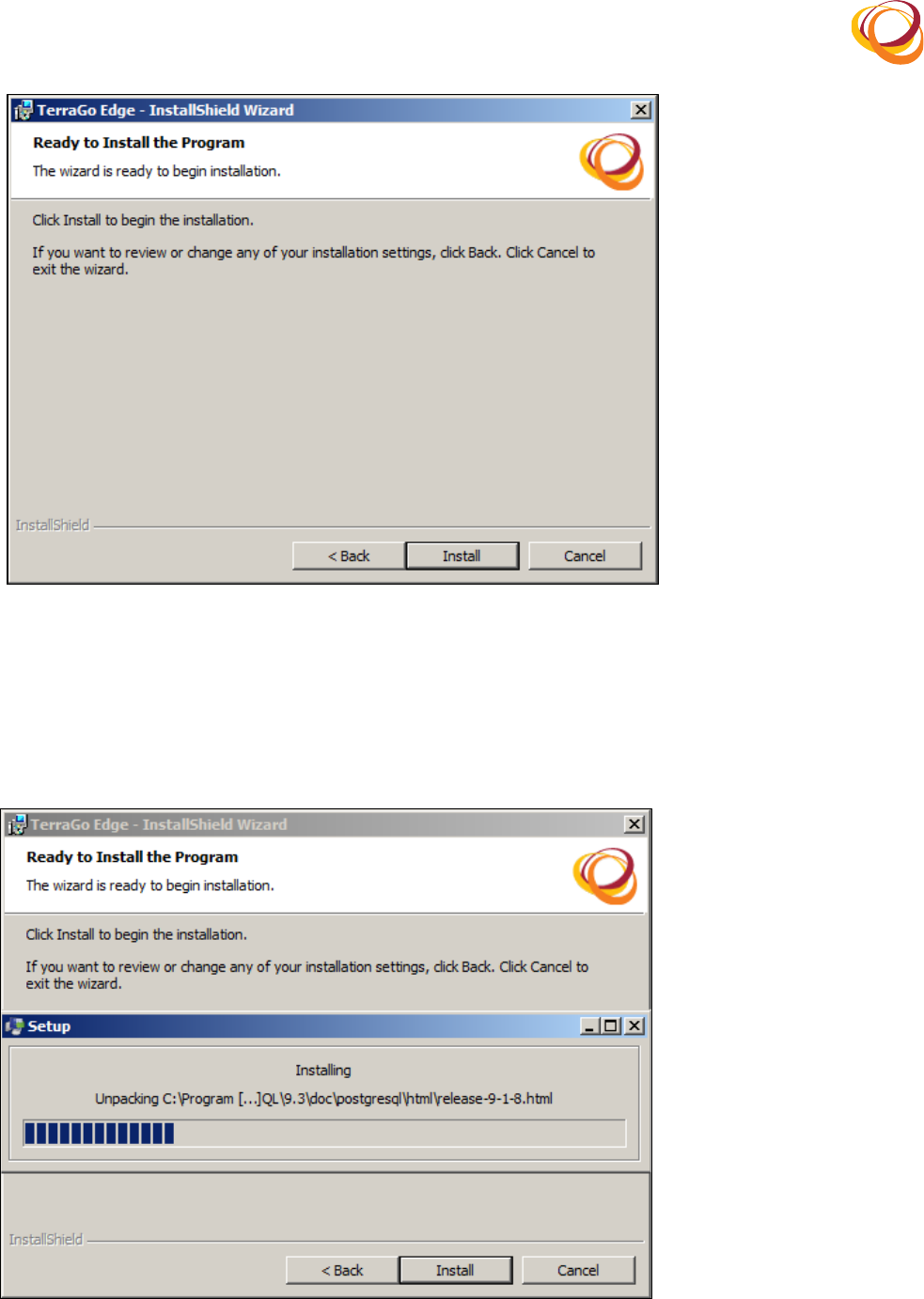
The!confirmation!screen!for!installing!the!application!opens.!Click!the!12+'344!button!to!proceed.!10.
Click!the!V3:W!button!if!you!want!to!change!the!installation!settings.!11.
!
!
Q*;&8.(=R(T%2@*8<(12+'3443'*%2(
2.3. Silent Installation
The!installation!process!of!the!Edge!application!requires!PostgreSQL!database!server!and!PostGIS!to!12.
be!installed!in!your!computer.!If!you!do!not!have!the!PostgreSQL!and!PostGIS!in!your!computer,!this!
installation!process!will!automatically!install!the!PostgreSQL!and!PostGIS.!
Q*;&8.(DR(A%+';8.5M9(12+'3443'*%2(
!
!
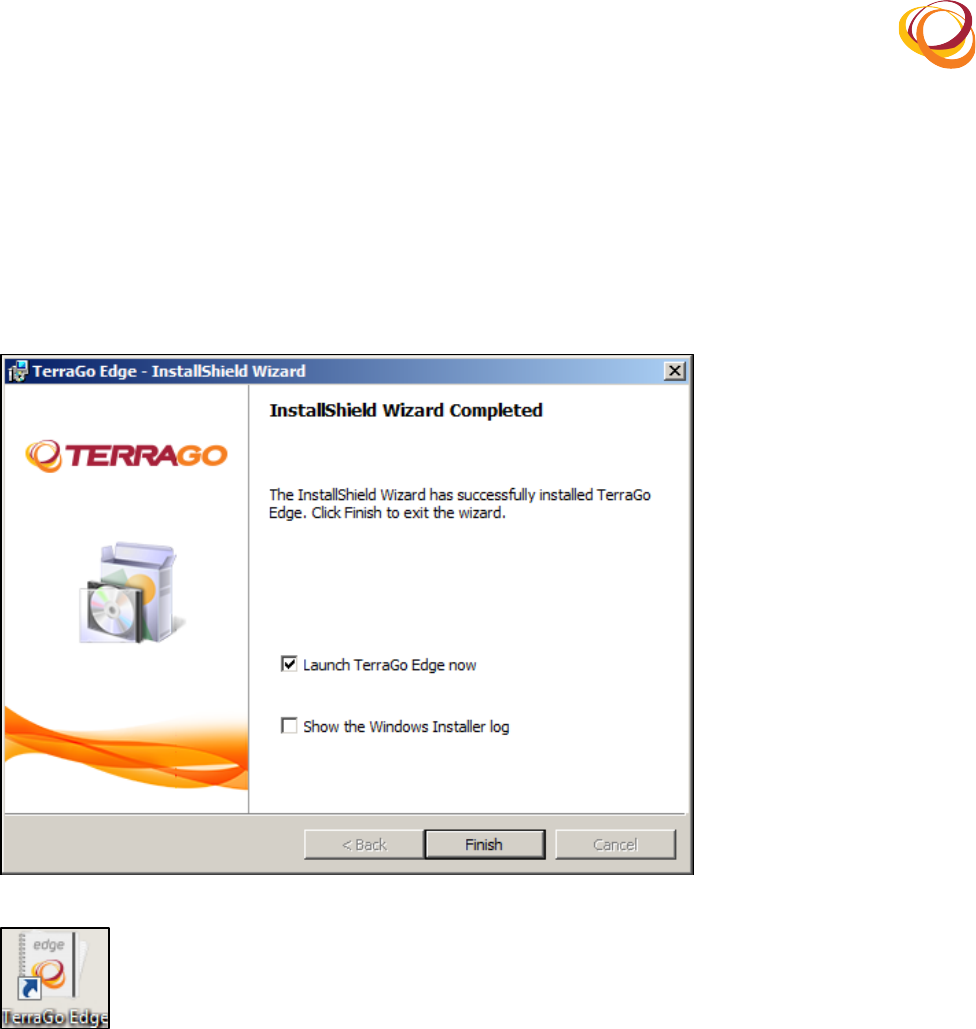
Once! the! installation! is! complete,!the!InstallShield! Wizard! Completed! window! opens! as! shown!13.
below.!Click!the!Q*2*+)!button!to!complete!the!installation.!
The!93&2:)( I.883;%( K-;.(2%X!checkbox!is! enabled! by! default.! If! you! click! the! Q*2*+)!button,!the!14.
edge!application!opens!in!your!default!browser.!
If!you!disable!the!93&2:)(I.883;%(K-;.(2%X!checkbox,!then!click!the!Edge!application!icon!on!your!15.
desktop!to!open!the!application.!
Q*;&8.(FR(12+'3443'*%2(T%<?4.'.(
Q*;&8.(YR(I.883,%(K-;.(#??4*:3'*%2(1:%2(
3. Upgrading from Previous Versions
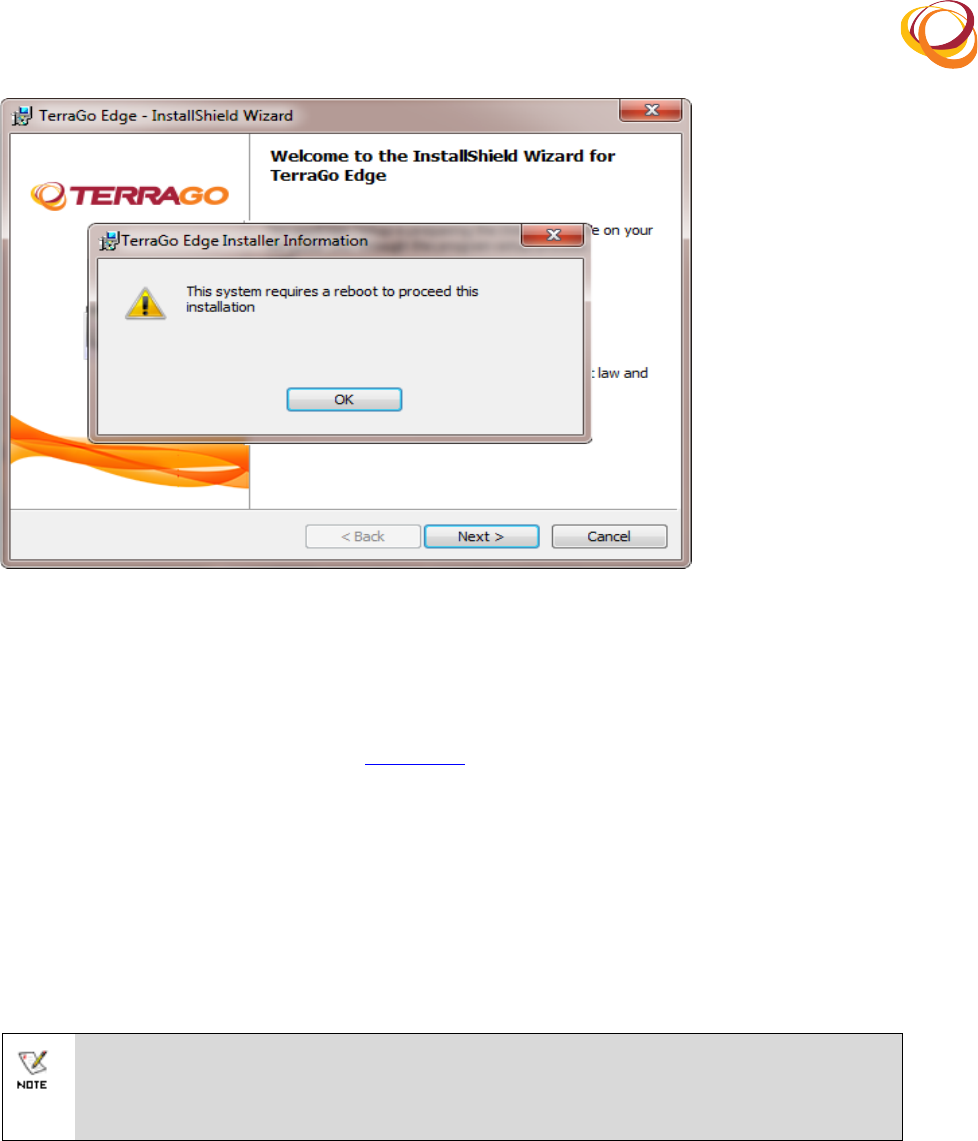
Double!click!the!.exe!executable!file.!The!12+'3445)*.4-(X*738-!opens!as!shown!below:!1.
!
!
Q*;&8.(!ZR(>?;83-.(
A!message!appears!prompting!you!to!restart!your!computer!to!continue!with!the!installation.!2.
Click!HU(to!continue.!Restart!your!computer.!3.
Now,!double!click!the!.exe!executable!file!again.!The!12+'3445)*.4-(X*738-!opens.!4.
Follow!the!installation!steps!given!in!the!Installation!section.!Your!upgrade!is!now!complete.!5.
4. Getting Started
Double!click!the!Edge!application!icon!in!the!desktop.!1.
The!Edge!application!is!launched!with!the!following!server!url:!2.
)''?+RLL[AT(O3<.\RFZFZL.-;.5.8B.8L](where!‘AT(O3<.S!is!the!name!of!your!computer!and!^FZFZS!
is!the!default!port!number.!
!
The!iOS!devices!(ipad/iPhone)!will!access!the!Edge!application!through!this!server!URL:!
)''?+RLL[AT(O3<.\RFZFZL.-;.5.8B.8L!
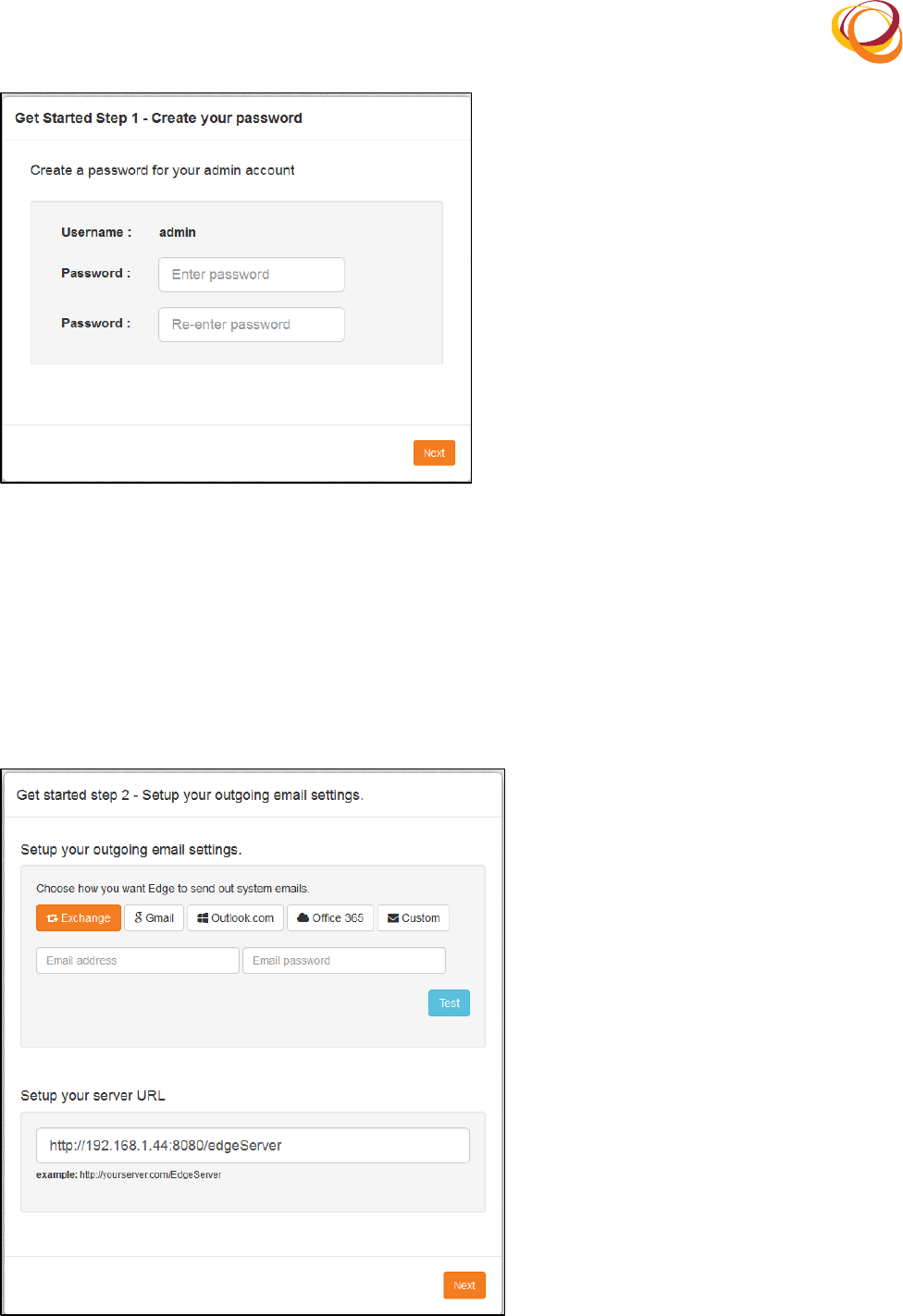
Once! the! application! opens,! the! first! screen! enables! you! to! set! the! password! for! the! Edge!3.
application!with!the!default!username!‘3-<*2S.!
Click!the!O.P'!button!to!proceed.!4.
!
!
Q*;&8.(!!R(5.'(_%&8(?3++X%8-(
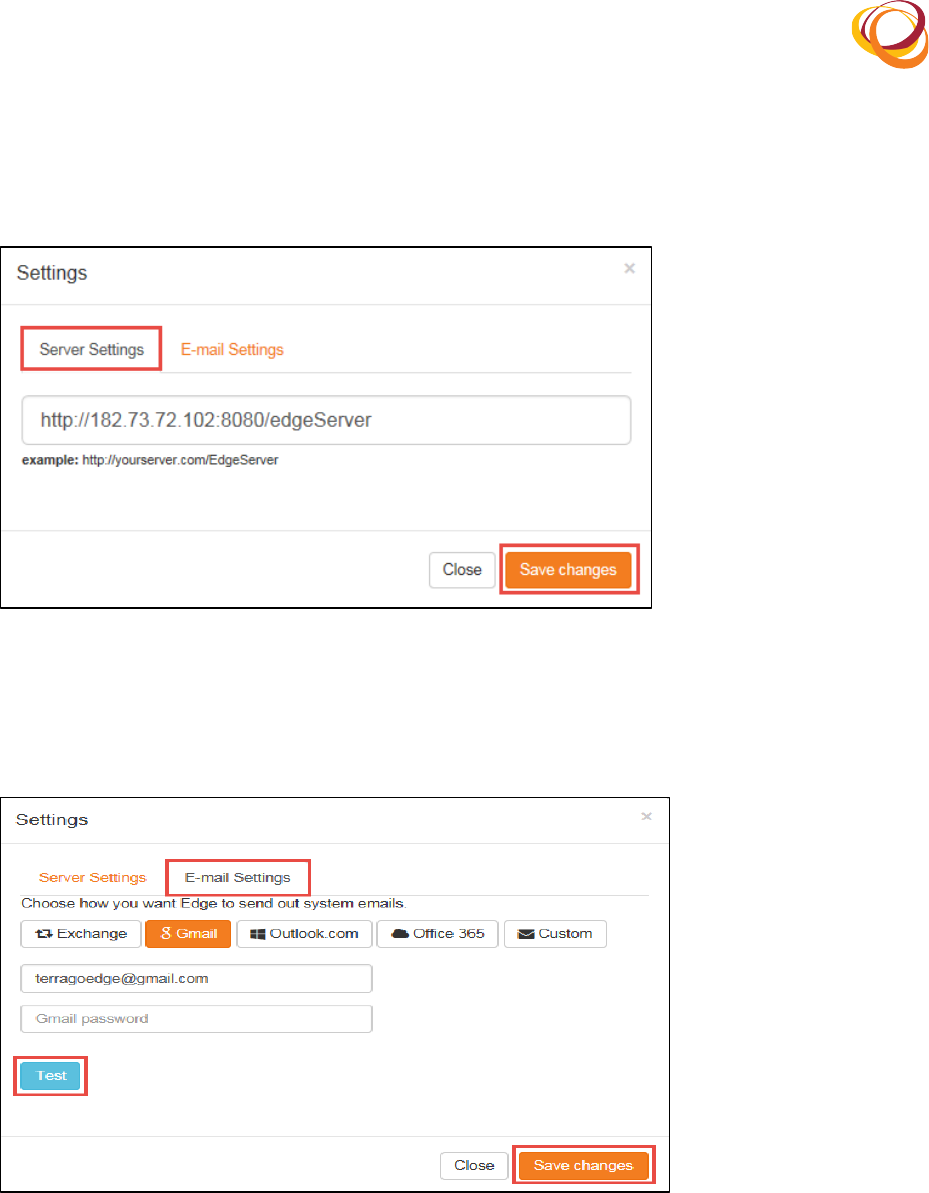
On!this!screen,!you!can!configure!the!email!and!server!settings.!!5.
Enter!your!K<3*4(1N!and!A3++X%8-,!and!click!the!I.+'!button.!Once!your!credentials!are!approved,!6.
the!O.P'!button!is!enabled.!
You!can!now!view!the!server!connectivity!details:! )''?+RLL[AT(O3<.\RFZFZL.-;.5.8B.8L.!You! can!7.
edit!it!in!the!5.'&?(_%&8(+.8B.8(>J9!field.!
Click(the(O.P'!button.!8.
Q*;&8.(!0R(K<3*4(32-(5.8B.8(5.''*2;+(
!
!
You!can!view!and!edit!the!email!and!server!settings!by!clicking!the!5.''*2;+!icon!on!the!menu!bar.(9.
• 5.B.8(5.''*2;+:!You!can!view!and!edit!the!server!connectivity!details!on!the!5.8B.8(5.''*2;+!tab!
and!click!the!53B.(T)32;.+!button.!
Q*;&8.(!/R(5.8B.8(+.''*2;+(
• K<3*4(5.''*2;+R(You!can!configure!the!email!settings!on!the!Email!settings!tab.!Enter!the!K<3*4(
1N( and! A3++X%8-.! Click! the! I.+'!button!for! approval! of! your! credentials.!Click! the! 53B.(
T)32;.+!button.!
Q*;&8.(!ER(K<3*4(5.''*2;+(
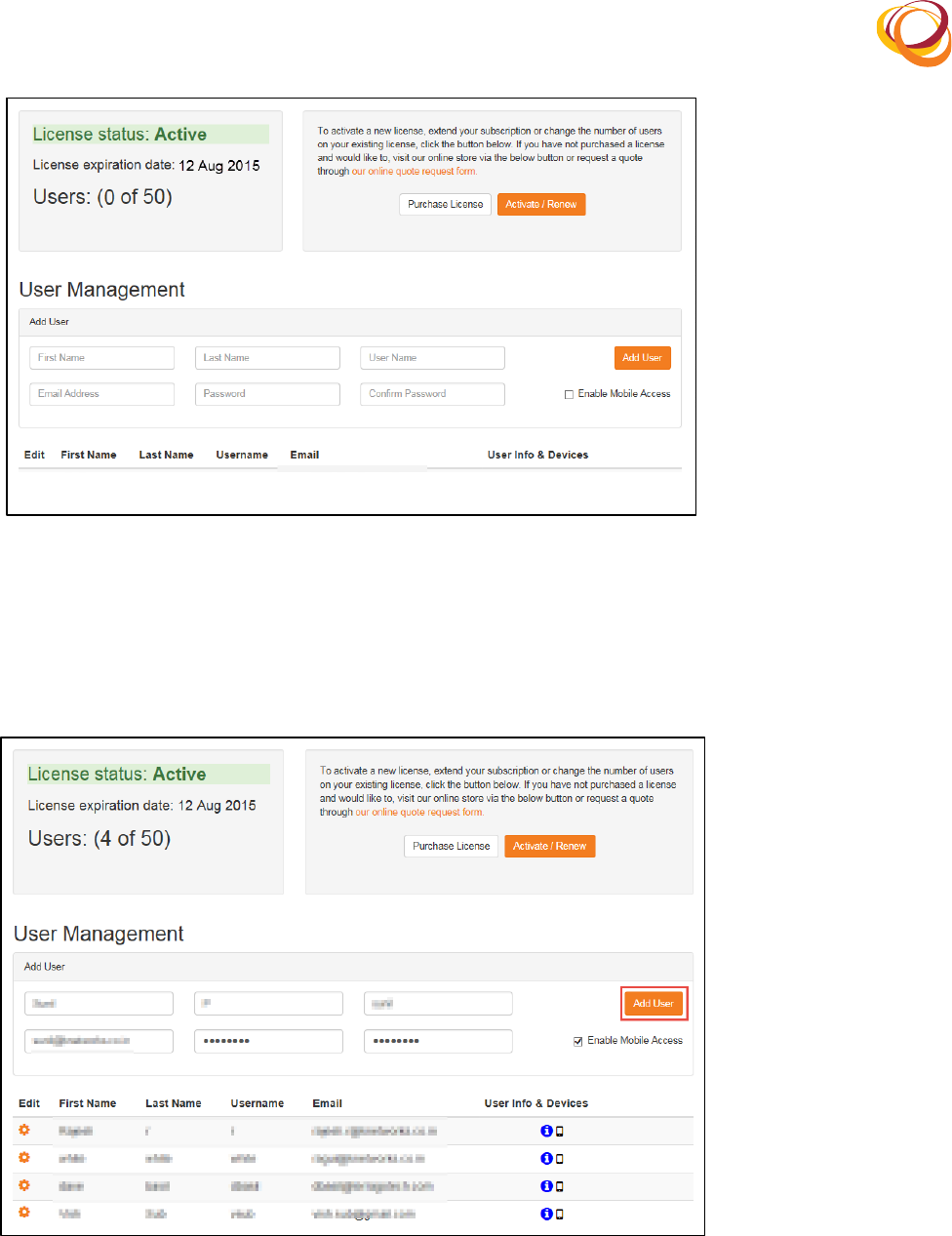
The!License!status!screen!opens.!You!have!21!days!of!trial!period!to!use!the!application.!10.
!
!
Q*;&8.(!GR(9*:.2+.(5'3'&+(
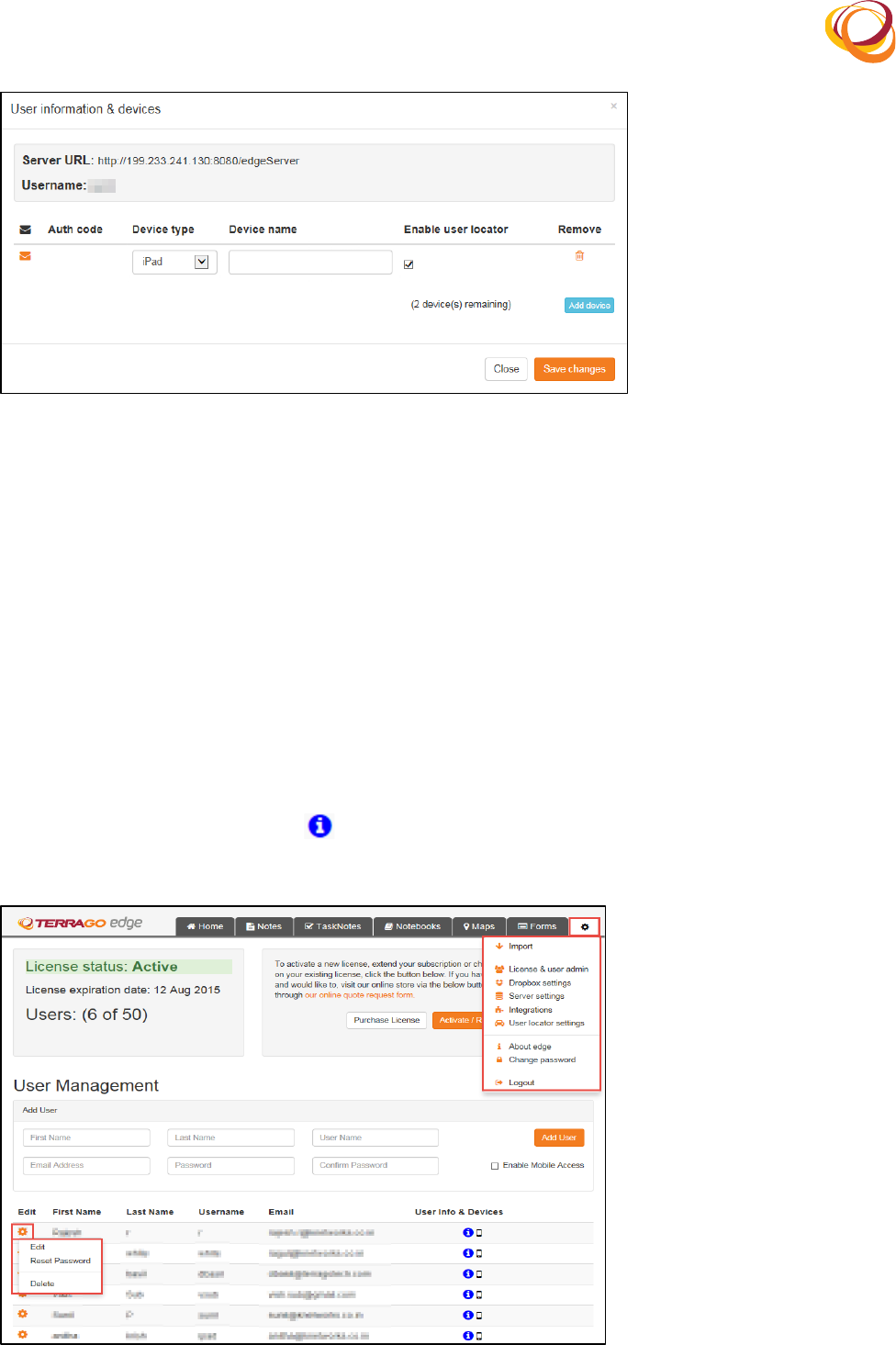
To! add! a! user,! enter! the! following! details:! Q*8+'( O3<.,(93+'( O3<.,! >+.8( O3<.,! K<3*4( #--8.++,!11.
A3++X%8-,!and!T%2@*8<(A3++X%8-.!
Select!the!K23$4.(`%$*4.(#::.++!checkbox!if!you!want!to!provide!mobile!acccess!to!the!user.!12.
Click!the!#--(>+.8!button.!13.
Q*;&8.(!=R(#--(O.X(>+.8!
An!email!is!sent!to!the!user!with!the!password!and!server!URL!to!access!the!application.!14.
Once!you!add!the!user,!the!>+.8(*2@%8<3'*%2(a(-.B*:.+(window!opens!as!shown!below:!15.
!
!
!
Q*;&8.(!DR(#--(-.B*:.('%(&+.8(
To!add!the!devices!that!will!be!used!by!the!user,!click!the!#--(-.B*:.!button.!16.
Select!the!N.B*:.('_?.!and!enter!the!N.B*:.(23<..!17.
Select!the!K23$4.(&+.8(4%:3'%8!checkbox!if!you!want!to!track!the!location!of!the!user.!18.
O%'.:!This!checkbox!is!enabled!by!default,!if!the!user!locator!settings!are!enabled.!
Click!the!53B.(T)32;.+!button.!A!licensing!mail!is!sent!to!the!registered!mail!ID!with!instructions!for!19.
opening!the!Edge!application!in!the!iOS!devices!(iPhone,!iPad).!
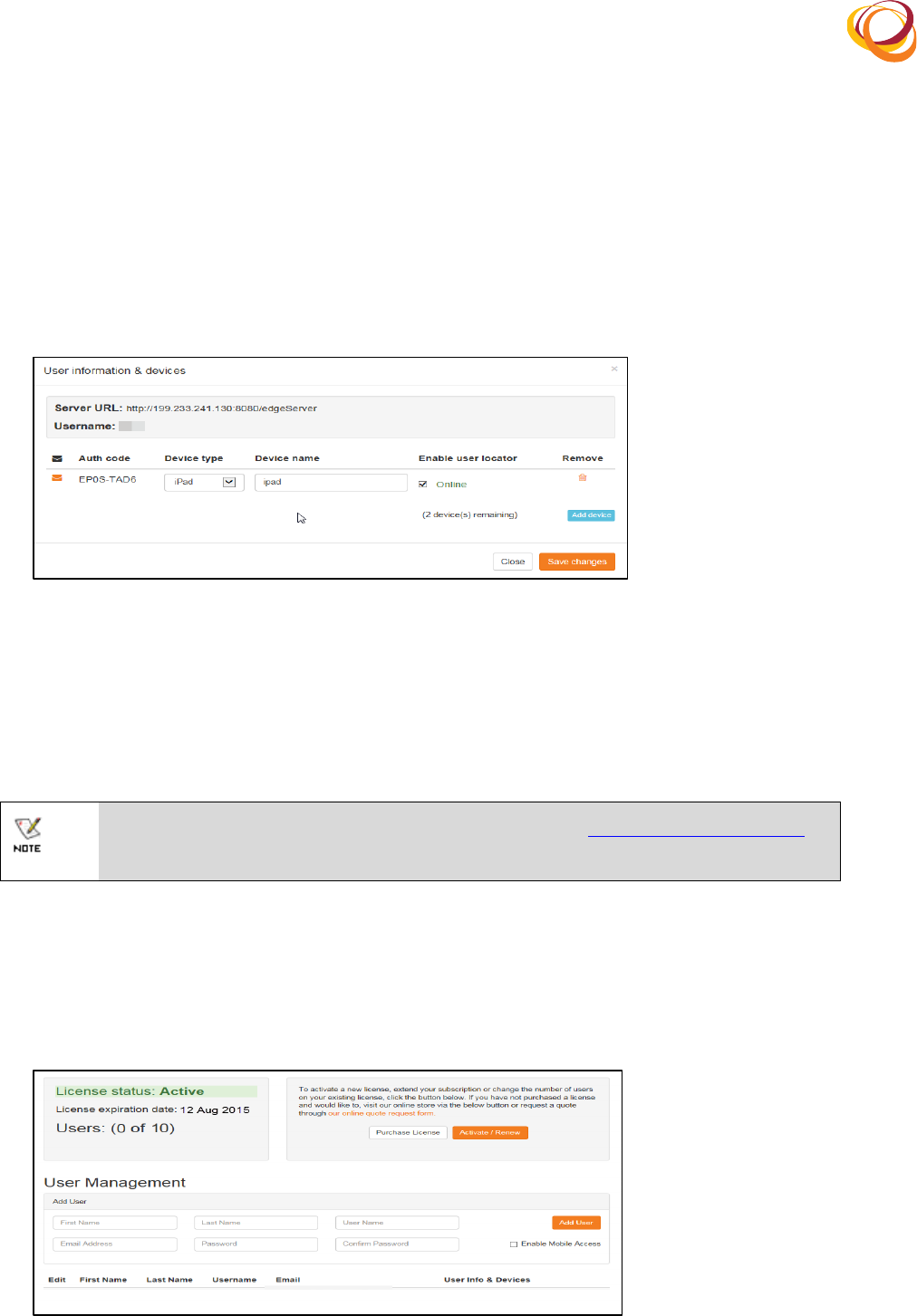
On!the!tab!bar,!click!the!Settings!icon!and!select!the!9*:.2+.(32-(&+.8(3-<*2!option!to!modify!the!20.
user!and!device!settings!as!shown!below:!
To!edit!the!user!details,!click!the!Settings!icon!corresponding!to!the!user!whose!details!you!want!to!21.
modify.!
To!add!devices!to!the!user,!click!the icon!corresponding!to!the!user!to! whom!you!want!to!add!22.
devices.!
Q*;&8.(!FR(`%-*@_(>+.8(32-(N.B*:.(5.''*2;+(
!
!
The! >+.8( *2@%8<3'*%2( a( -.B*:.+(window! opens! displaying! the! 5.8B.8( >J9,! >+.823<.,!23.
#&')%8*73'*%2(:%-.,(N.B*:.('_?.,(and(N.B*:.(23<.!as!shown!below:!
The(bO&<$.8(%@c(-.B*:.+(8.<3*2*2;!indicates!the! number!of!devices! that!you!can!still!add!to!the!24.
particular!user.!
Click!the!#--(-.B*:.!button!to!add!a!device!to!the!user.!25.
The! #&')%8*73'*%2( :%-.]( 5.8B.8(>J9,! and(>+.823<.!will! enable! the! user! to! access! the! mobile!26.
devices!offline.!
!
Q*;&8.(!YR(#--(-.B*:.(
5. Licensing
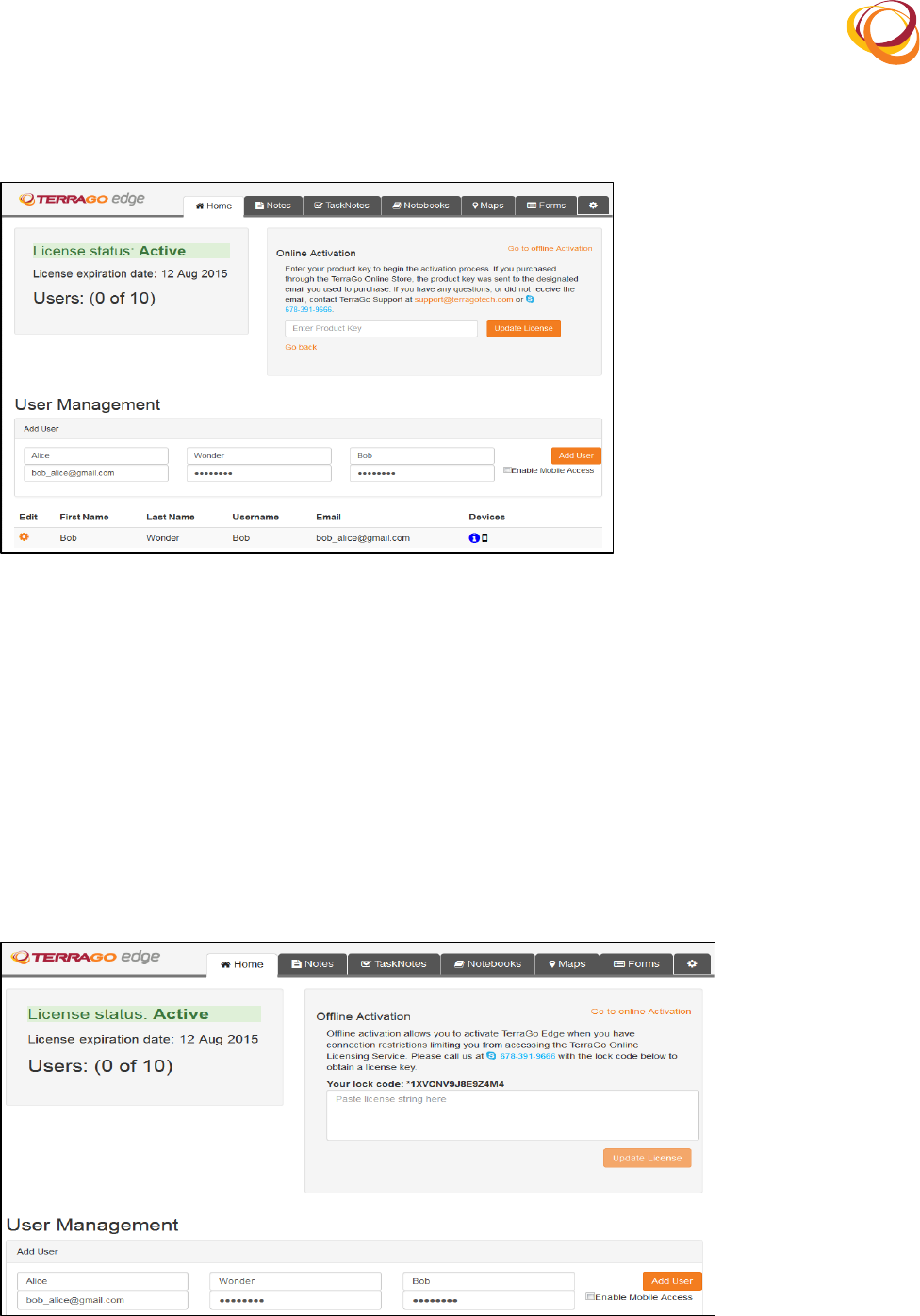
You!must!purchase!and!update!the!license!within!the!trial!period!for!uninterrupted!usage!of!the!Edge!
application.!To!update!your!license!and!enter!your!product!key,!click!the!Settings!icon!on!the!tab!bar!
and!select!the!9*:.2+.(32-(&+.8(3-<*2!option.!You!can!do!online!or!offline!activation.!
!
For!any!licensing!issues,!please!contact!TerraGo!Support!at!support@terragotech.com!or!
call!=DFd/Y!dY===!
5.1. Online Activation
Click!the!A&8:)3+.(9*:.2+.!button!to!purchase!the!product!through!the!TerraGo!Online!Store.!1.
After! successful! purchase! of! the! product,! the! product! key! will! be! sent! to! the! email! ID! that! you!2.
registered!during!the!purchase.!
Q*;&8.(0ZR(9*:.2+.(5'3'&+(
!
!
Click!the!#:'*B3'.LJ.2.X!button!and!enter!the!product!key!that!you!received.!3.
Now!click!the!>?-3'.(9*:.2+.!button.!The!license!is!now!activated.!4.
Q*;&8.(0!R(H24*2.(#:'*B3'*%2(
5.2. Offline Activation
You! can! activate! TerraGo!Edge! by! calling! TerraGo! Support! when! you! have! connection! restrictions!
limiting! you!from! accessing! the! TerraGo! Online!Licensing!Service.! Please!call!us!at!=DFd/Y!dY===!with!
the!lock!code!to!obtain!a!license!key.!
Click!the!,%('%(H@@4*2.(#:'*B3'*%2!link.!1.
Call!TerraGo!Support!at!=DFd/Y!dY===!with!the!lock!code!to!obtain!a!license!key.!2.
Enter! the! licence! key! that! you! received! and! click! the! >?-3'.( 9*:.2+.!button.! The! license! is! now!3.
activated.!
Q*;&8.(00R(H@@4*2.(#:'*B3'*%2(
!
!
6. Troubleshooting steps
If!the!application!is!not!launched!in!the!browser!even!on!double!clicking!the!Edge!shortcut!icon!on!1.
the!desktop,!navigate!to!the!path!where!the!Edge!application!is!installed!in!the!user’s!computer.!
For!example,!if!the!application!is!installed!in!the!path!‘C:\Program!Files!(x86)\!TerragoEdgeServer’!,!2.
then:!
In!the!windows!explorer,!navigate!to!C:\Program!Files!(x86)\TerragoEdgeServer\:%2@"!3.
Click!the(5.8B.8"P<4!file.!4.
In! the! 5.8B.8"P<4!file,! change! the! port! numbers!(four-digit! number! starting! with! FZPP)! to! the!5.
unused!port!numbers!in!your!system.!
Identify!the!unused!ports!in!your!computer:!6.
• Press!the! 6*2-%X+!and! J!buttons! to! open! the! J&2!dialog! box.! Type! :<-!to! open! the!
command!prompt.!
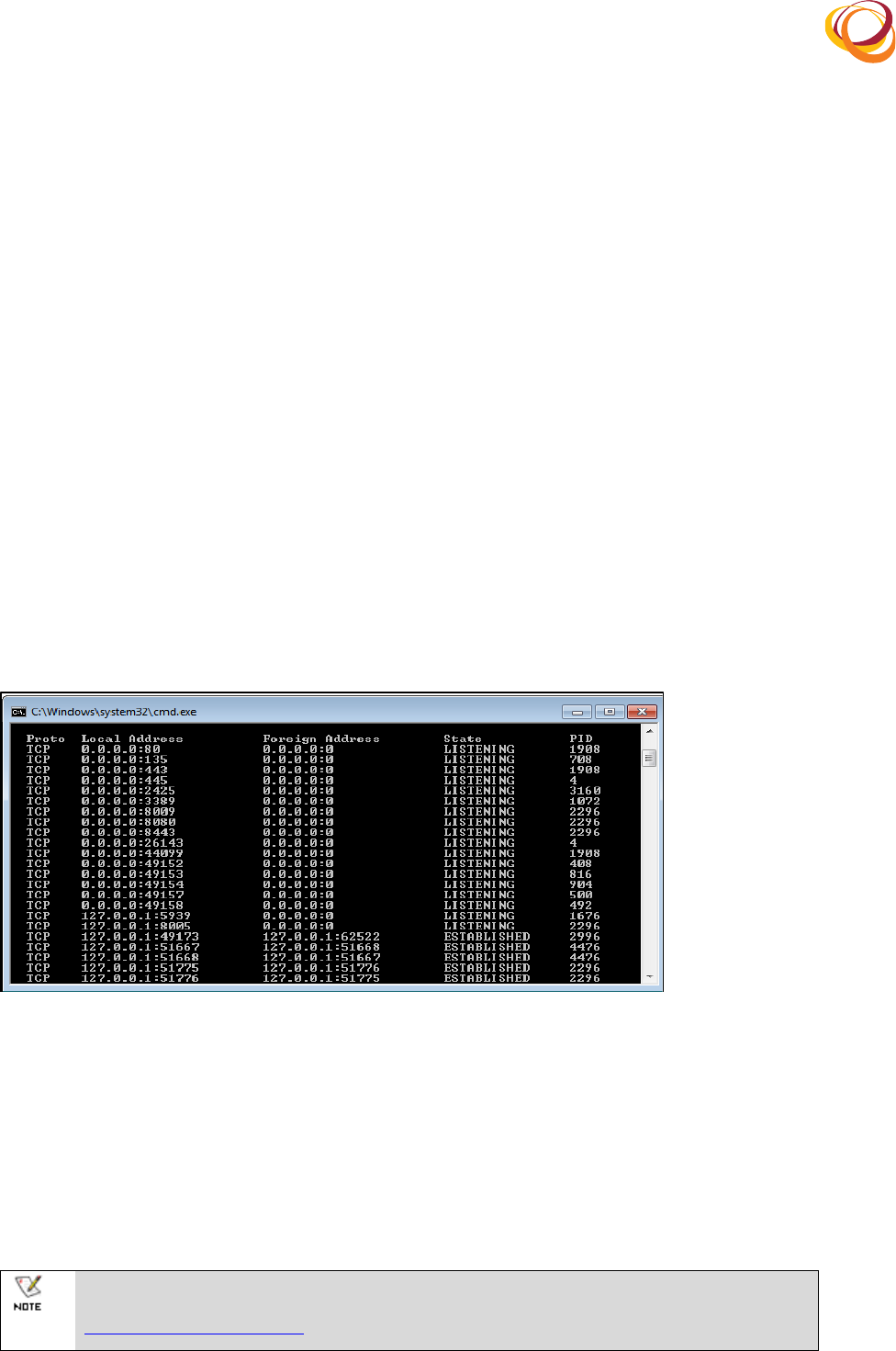
• Type!2.'+'3'(d32%!in!the!command!prompt.!From!the!list!of!port!numbers!displayed,!select!any!
of!the!three!distinctive!unused!port!numbers!which!is!not!under!the!9*+'.2*2;!state.!
Update!these!unlistened!port!numbers!in!the!5.8B.8"P<4!file.!7.
Q*;&8.(0/R(A%8'(O&<$.8+(
Restart!the!apache!tomcat.!8.
• Press!the!6*2-%X+!and!J!buttons!to!open!the!J&2!dialog!box.!Type!+.8B*:.+"<+:!to!open!the!
services!dialog!box.!
• Find!#?3:).(I%<:3'(I.8I%<:3'!in!the!services!dialog!box.!
• Restart!the!service.!
Now,!relaunch!the!Edge!application.!9.
!
If!you!still!cannot!launch!the!Edge!application,!please!contact!TerraGo!Support!at!
support@terragotech.com!or!call!=DFd/Y!dY===!
!
!
7. Repair
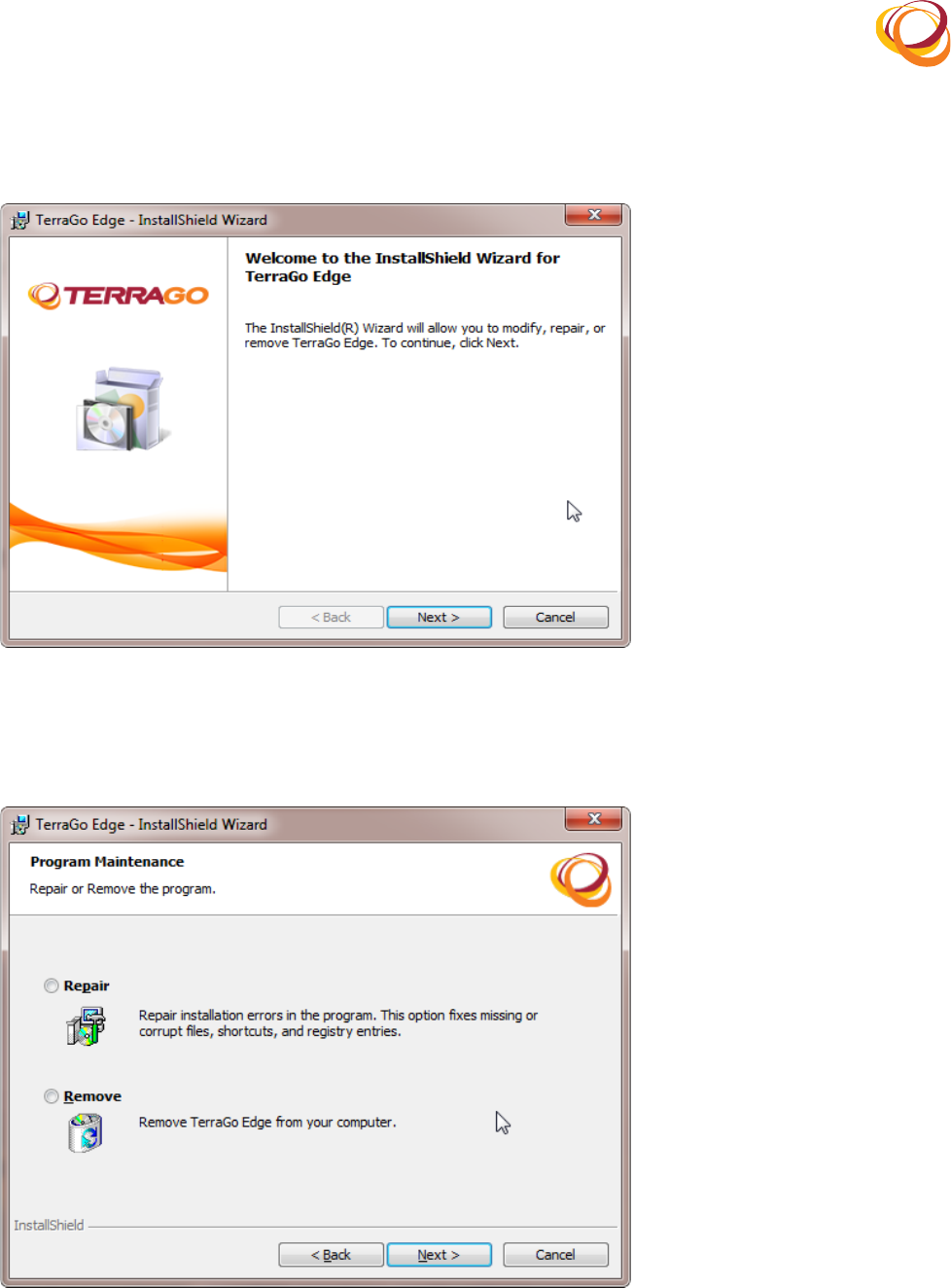
Double!click!the!.exe!executable!file.!The!InstallShield!wizard!opens.!1.
!
Q*;&8.(0ER(12+'3445)*.4-(6*738-(
Select!the!J.?3*8!option!to!repair!any!installation!errors!in!the!application!already!installed!in!the!2.
computer.!
Click!the!O.P'(button!to!proceed.(3.
Q*;&8.(0GR(J.?3*8(#??4*:3'*%2(
Click!the!12+'344!button!to!confirm!repairing!the!application.!4.
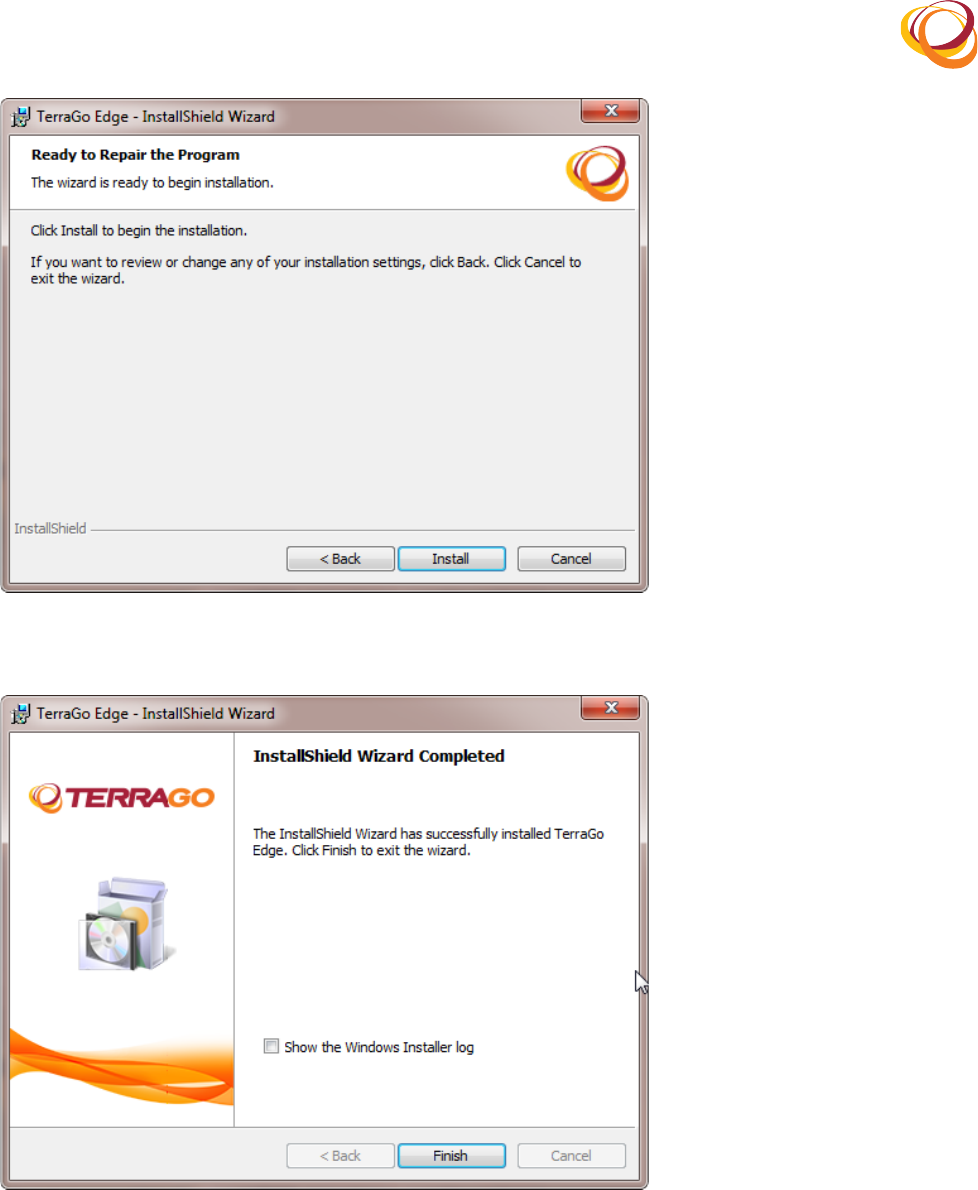
!
!
Q*;&8.(0=R(J.?3*8(T%2@*8<3'*%2(
Enable!the!5)%X(').(6*2-%X+(12+'344.8(4%;!checkbox!to!view!the!log!file.!5.
Q*;&8.(0DR(J.?3*8(T%<?4.'.-(
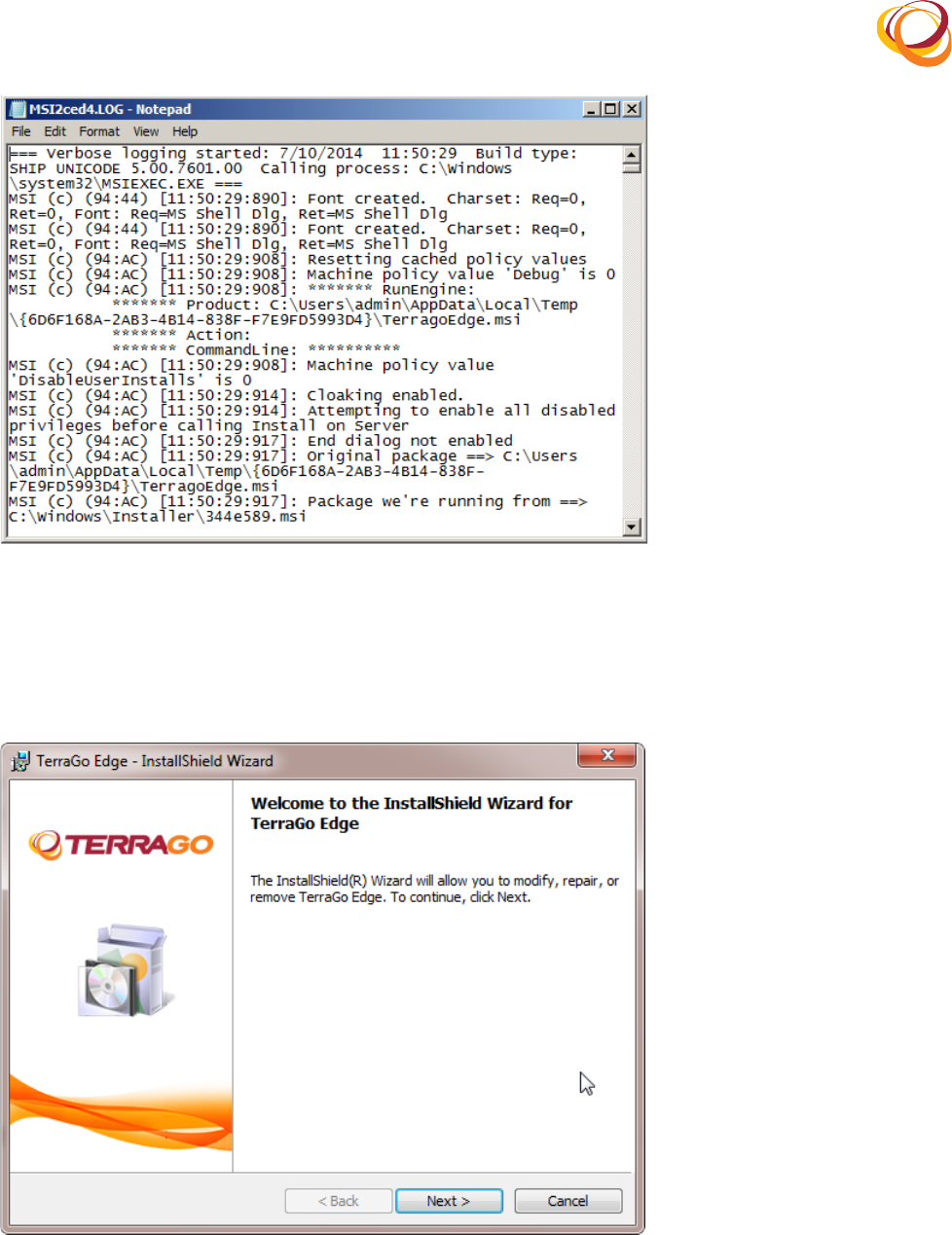
Click!the!Q*2*+)!button!to!exit!the!InstallShield!Wizard.!6.
The!log!file!opens!as!shown!below:!7.
!
!
Q*;&8.(0FR(9%;(Q*4.(
8. Uninstallation
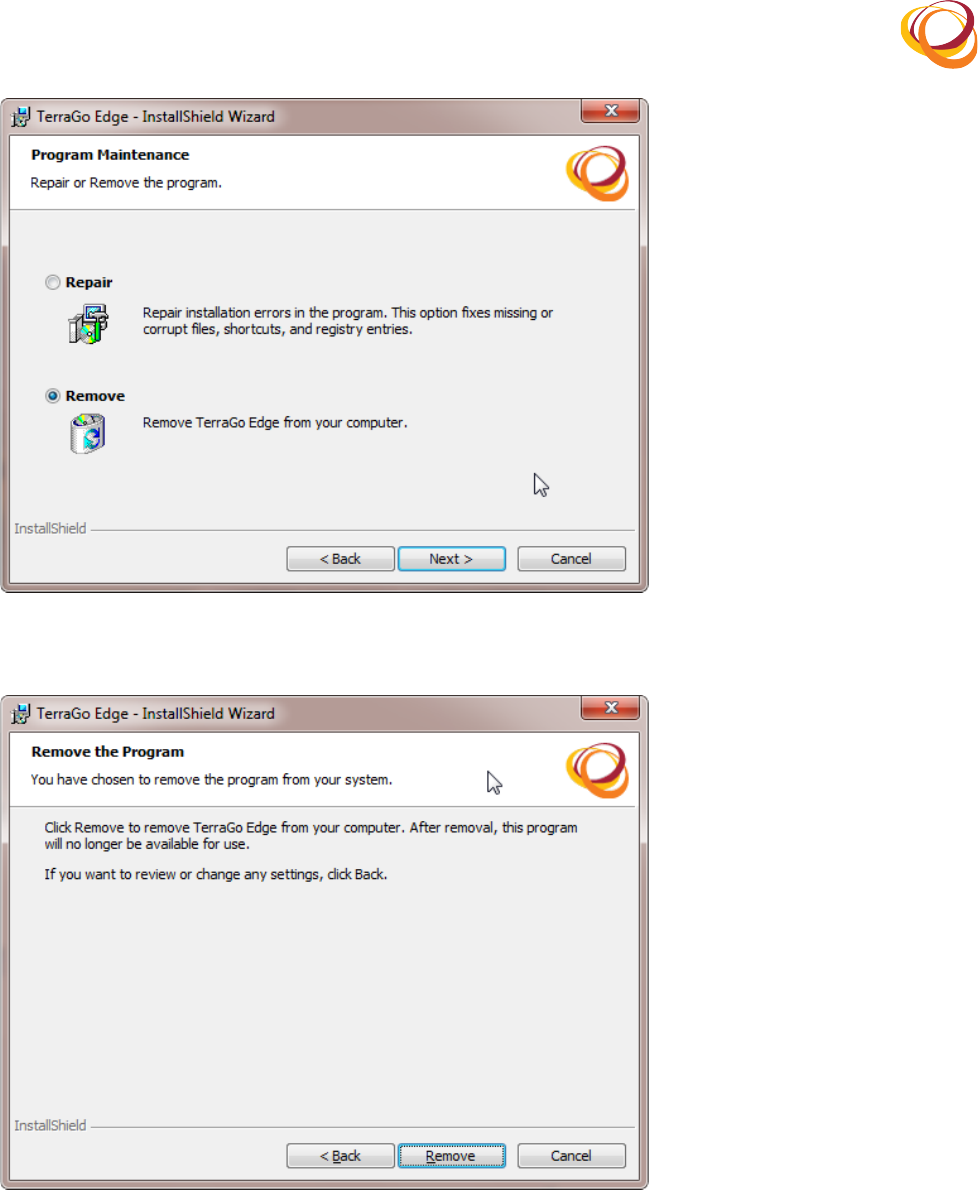
Double!click!the!.exe!executable!file.!The!12+'3445)*.4-(X*738-!opens.!1.
Click!O.P'!to!continue.!2.
Q*;&8.(0YR(12+'3445)*.4-(6*738-(
Select!the!J.<%B.!option!to!remove!the!application!from!the!computer.!3.
Click!the!O.P'(button!to!proceed.!4.
!
!
Q*;&8.(/ZR(>2*2+'344(#??4*:3'*%2(
In!the!confirmation!screen,!click!the!J.<%B.!button!to!confirm!the!uninstallation!process.!5.
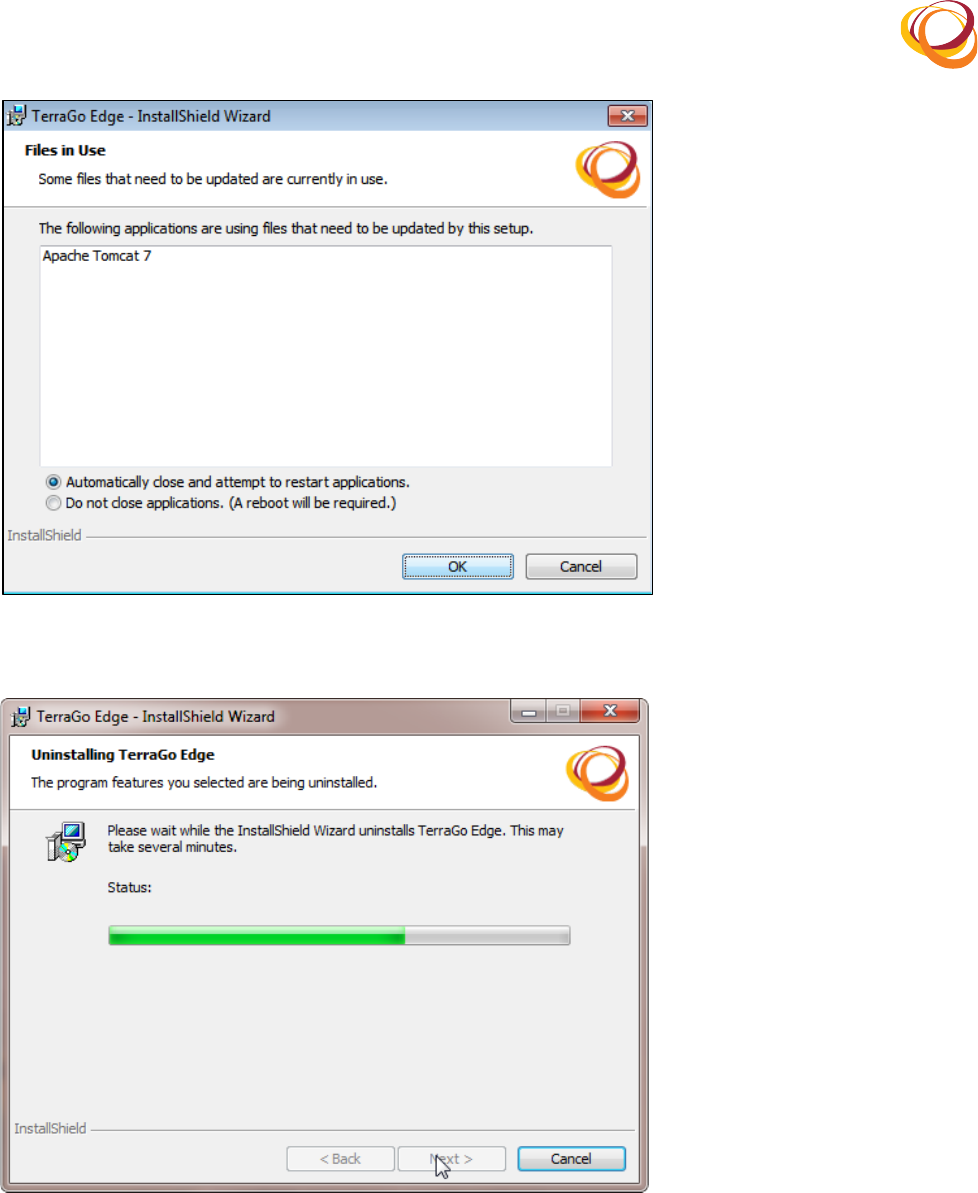
Q*;&8.(/!R(T%2@*8<(>2*2+'3443'*%2(
If!the!Apache!Tomcat!TerTomcat!is!not!stopped,!the!following!screen!is!displayed.(6.
Select!the!#&'%<3'*:344_(T4%+.(32-(3''.<?'('%(8.+'38'(3??4*:3'*%2!option.(7.
Click!the!HU!button.(8.
!
!
Q*;&8.(/0R(#?3:).(I%<:3'(K88%8(
The!uninstallation!progress!is!displayed!as!shown!below:!9.
Q*;&8.(//R(>2*2+'3443'*%2(A8%;8.++(
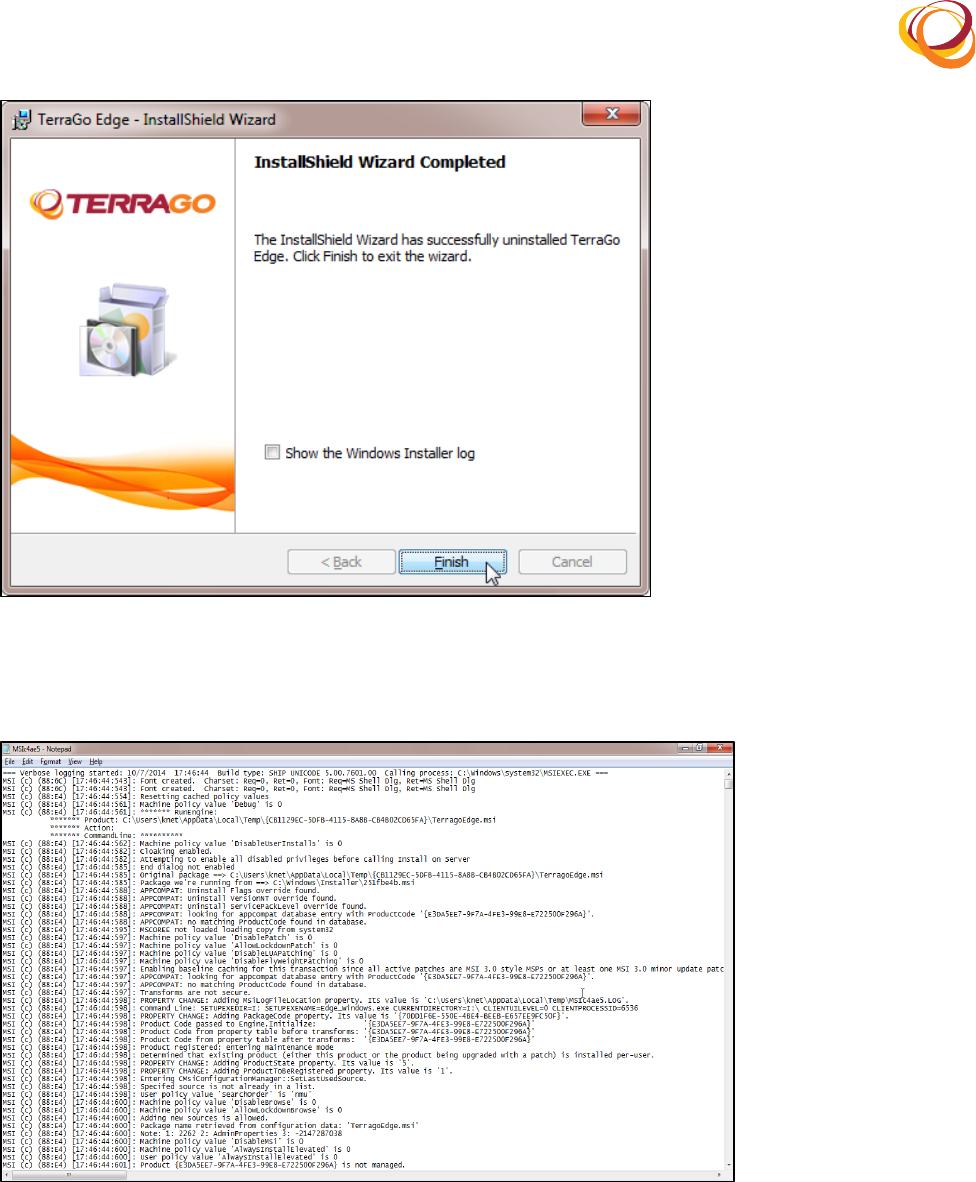
Once! the! installation! is! complete,! the! InstallShield! Wizard! Completed! window! opens! as! shown!10.
below.!
Enable!the!5)%X(').(6*2-%X+(12+'344.8(4%;!checkbox!to!view!the!log!file.!11.
!
!
Q*;&8.(/ER(>2*2+'3443'*%2(T%<?4.'.-(
Click!the!Q*2*+)!button!to!complete!the!uninstallation.!12.
The!log!file!opens!as!shown!below:!13.
Q*;&8.(/GR(9%;(Q*4.(
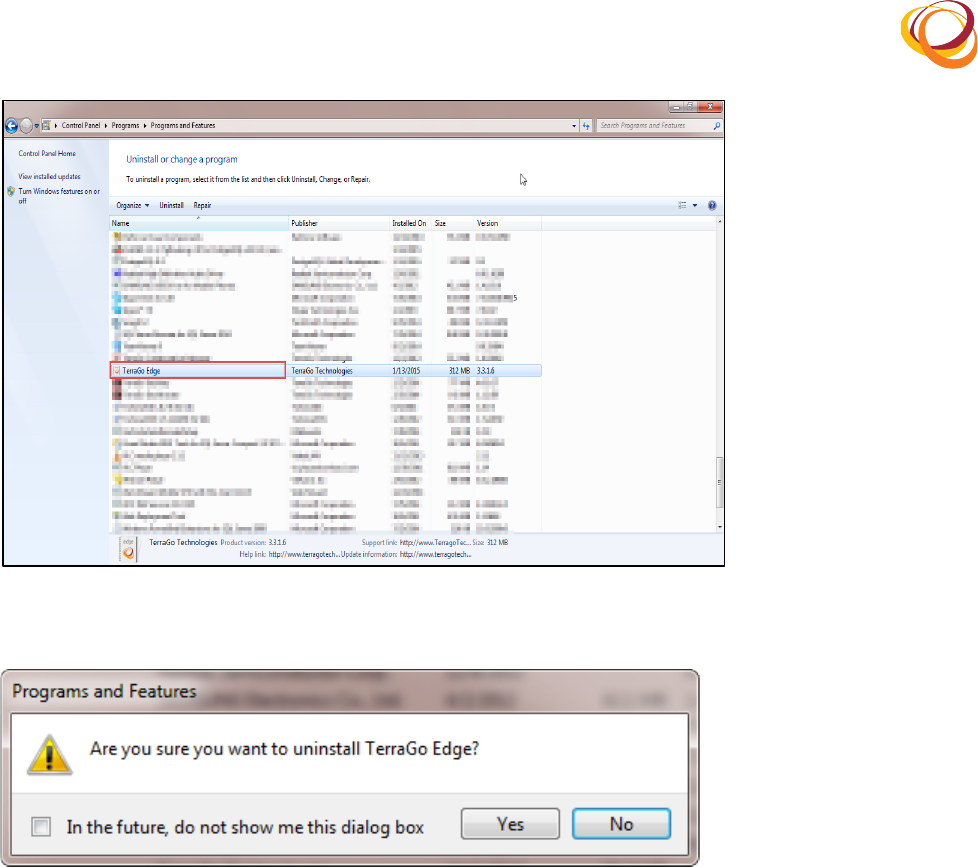
8.1. Uninstall TerraGo Edge through Add/Remove Panel
You!can!also!uninstall!the!Edge!application!through!the!Add/Remove!panel.!
Click!5'38'!>!T%2'8%4(A32.4!>!A8%;83<+!>!A8%;83<+(32-(Q.3'&8.+.!1.
Select!TerraGoEdge.!2.
Select!the!>2*2+'344!option!to!remove!the!application!from!the!computer.!3.
!
!
Q*;&8.(/=R(A8%;83<(a(Q.3'&8.+(d(>2*2+'344(
A!confirmation!window!opens.!Click!e.+!to!confirm!the!uninstallation.!4.
Q*;&8.(/DR(>2*2+'3443'*%2(T%2@*8<3'*%2(
Now,!the!TerragoEdge!application!is!uninstalled!successfully.!5.
8.2. Uninstall PostgreSQL Database Server
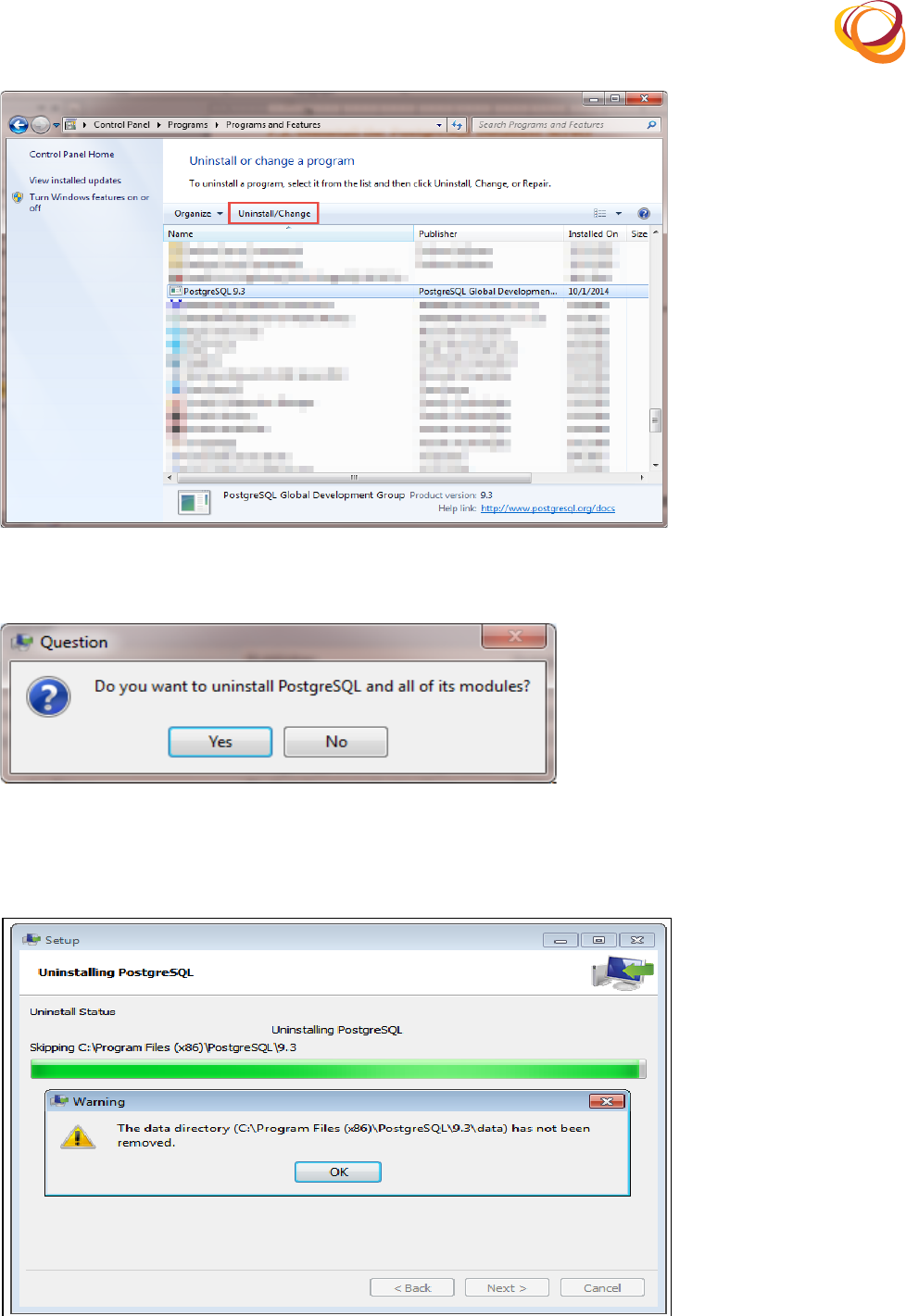
Click!5'38'!>!T%2'8%4(A32.4!>!A8%;83<+!>!A8%;83<+(32-(Q.3'&8.+.!1.
Select!PostGreSQL!9.3.!2.
Select!the!>2*2+'344!option!to!remove!PostGreSQL!9.3!from!the!computer.!3.
!
!
Q*;&8.(/FR(A%+',8.5M9(d(>2*2+'344(
A!confirmation!window!opens.!Click!e.+!to!confirm!the!uninstallation.!4.
Q*;&8.(/YR(A%+',8.5M9(>2*2+'3443'*%2(T%2@*8<3'*%2(
The!uninstallation!progress!is!displayed!as!shown!below!with!the!alert!message!indicating!that!the!5.
Data!directory!is!not!removed.!Click!the!HU!button!to!proceed.!
Q*;&8.(EZR(>2*2+'3443'*%2(A8%;8.++(
!
!
Now!the!PostgreSQL!database!server!is!uninstalled!successfully.!6.
To!delete!the!N3'3!directory!manually,!navigate!to!the!path!where!the!application!is!installed.!7.
• Navigate!to!C:\Program!Files!(x86)\!
• Search!and!select!A%+';8.5M9!
• Right!click!on!the!A%+';8.5M9!folder!
• Select!the!N.4.'.!option!
8.3. Uninstall PostGIS
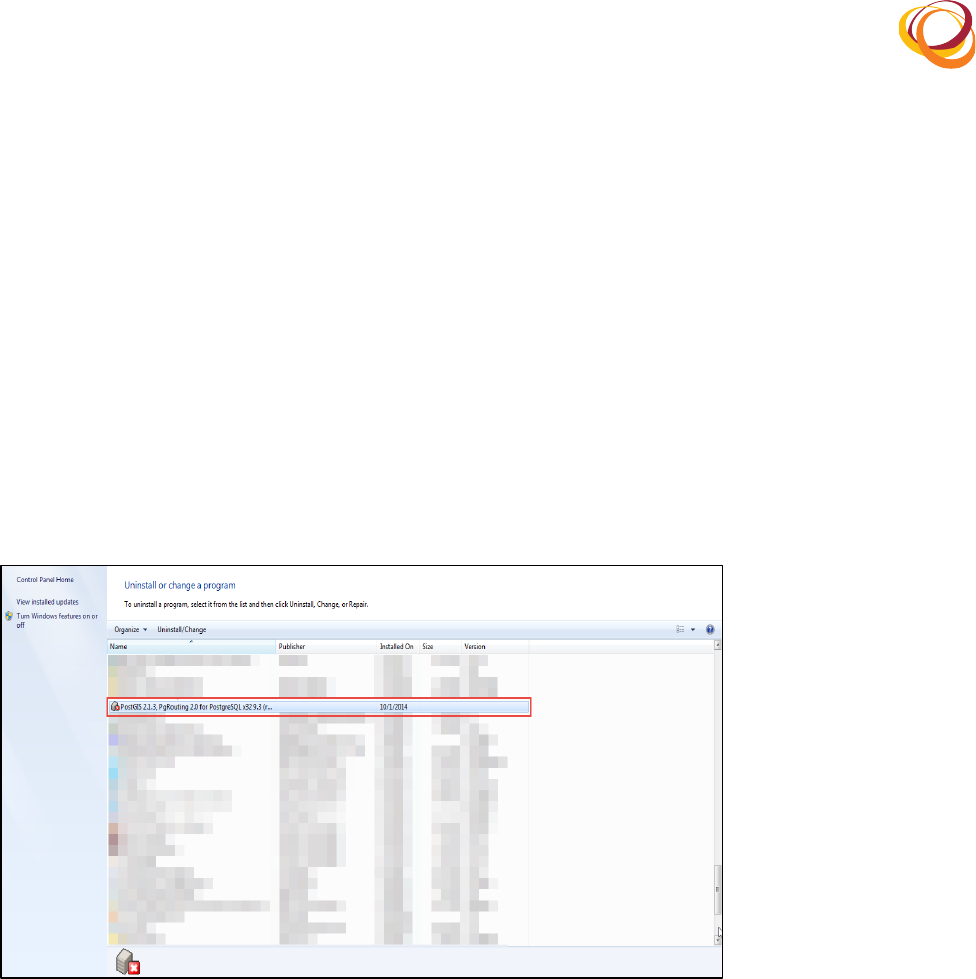
Click!5'38'!>!T%2'8%4(A32.4!>!A8%;83<+!>!A8%;83<+(32-(Q.3'&8.+.!1.
Select!PostGIS!2.1.3.!2.
Select!the!>2*2+'344!option!to!remove!PostGIS!2.1.3!from!the!computer.!3.
Q*;&8.(E!R(A%+',8.5M9(d(>2*2+'344(
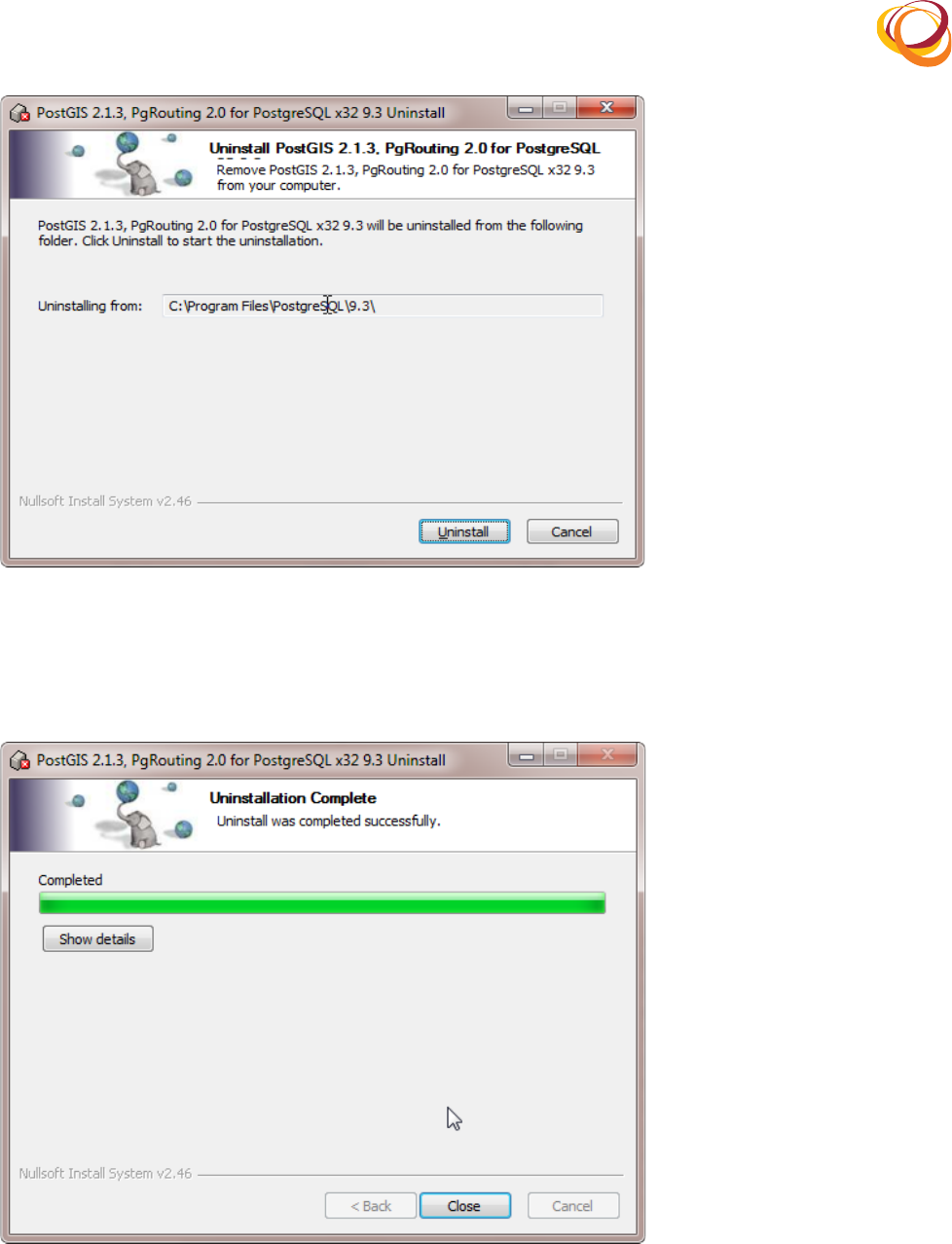
In!the!uninstallation!wizard!that!opens,!click!>2*2+'344.!4.
!
!
Q*;&8.(E0R(A%+',8.5M9(>2*2+'3443'*%2(T%2@*8<3'*%2(
Once! the! uninstallation! is! complete,! the! Uninstallation! Complete! message! is! displayed! as! shown!5.
below.!
Click!T4%+..!PostGIS!is!now!uninstalled!successfully.!6.
Q*;&8.(E/R(>2*2+'3443'*%2(A8%;8.++(
