Programming Vista 128 4 Wire Smoke Reset
User Manual: Vista-128 4-Wire Smoke Reset AlarmHow.net Library
Open the PDF directly: View PDF  .
.
Page Count: 1
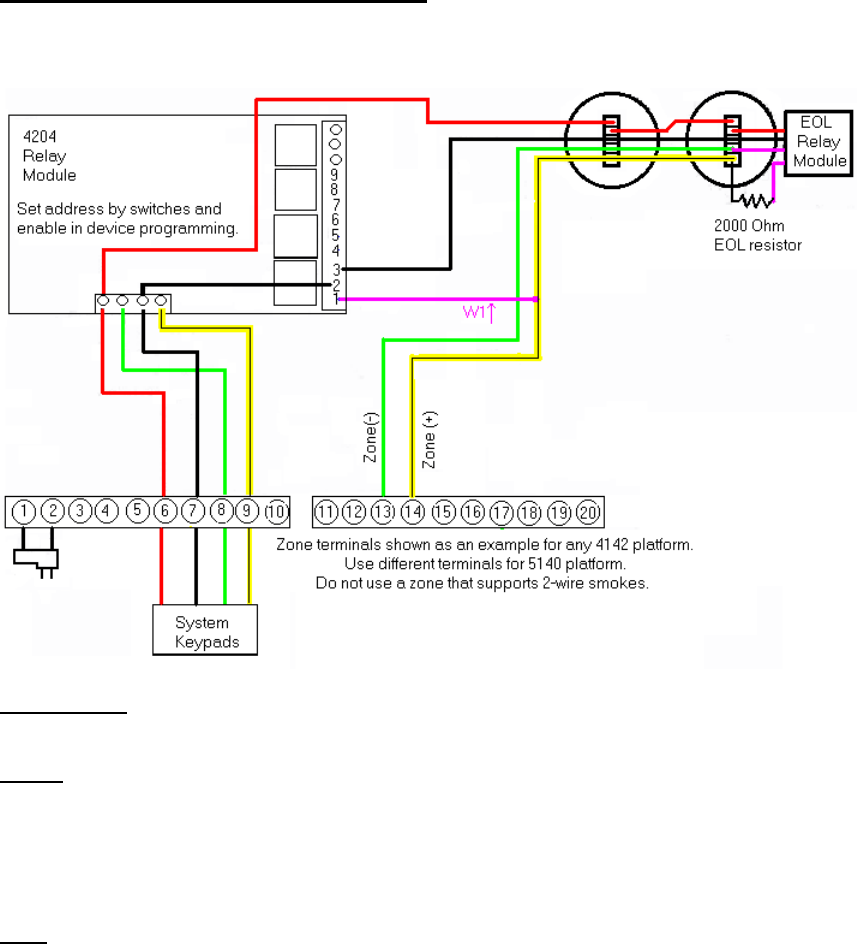
Smoke Reset for 4-wire smokes
On Vista 40/50/100/128/250/32
Works on any “Richey” panel
Programming: program zone 3 (or any zone that cannot be used for 2-wire smokes)) as normal for FIRE.
Program relay#1 for smoke reset: close/stay closed. Start ZT54, stop ZT57. Set 1*75 = 008 seconds.
Action: When the appropriate zone sees a short (alarm), the panel will go into alarm on that zone. The first
“off” sequence will silence the panel. The second “off” sequence will cause the panel to activate relay #3
for a smoke reset.
During this reset, “W1” holds a short on the zone to prevent a trouble condition when the end of line relay
looses power. For this to work, W1 MUST be tied to the (+) side of the zone and the reset must interrupt
the (-) power.
Note: If using more than 1 zone with 4-wire smokes, DO NOT use W1. Another document is available
using the 4209u zone expander for multiple zones.
