BLAST® Command Line Applications User Manual Blast
User Manual:
Open the PDF directly: View PDF  .
.
Page Count: 58
- Contributors
- Introduction
- User Manual
- Cookbook
- Query a BLAST database with a GI, but exclude that GI from the results
- Create a masked BLAST database
- Search with database masking enabled
- Display BLAST search results with custom output format
- Use blastdb_aliastool to manage the BLAST databases
- Reformat BLAST reports with blast_formatter
- Extracting data from BLAST databases with blastdbcmd
- Use Windowmasker to filter the query sequence(s) in a BLAST search
- Building a BLAST database with local sequences
- Limiting a Search with a List of Identifiers
- Multiple databases vs. spaces in filenames and paths
- Specifying a sequence as the multiple sequence alignment master in psiblast
- Ignoring the consensus sequence in the multiple sequence alignment in psiblast
- Performing a DELTA-BLAST search
- Appendices

BLAST® Command Line
Applications User Manual
Last Updated: 2016 Nov 4
National Center for Biotechnology Information (US)
Bethesda (MD)
National Center for Biotechnology Information (US), Bethesda (MD)
BLAST is a Registered Trademark of the National Library of Medicine
NLM Citation: BLAST® Command Line Applications User Manual [Internet]. Bethesda (MD): National
Center for Biotechnology Information (US); 2008-.
is manual documents the BLAST (Basic Local Alignment Search
Tool) command line applications developed at the National Center
for Biotechnology Information (NCBI).
iii
Table of Contents
Contributors ......................................................................................................................................................... 1
Introduction.......................................................................................................................................................... 3
Installation.............................................................................................................................................................. 4
Dependencies........................................................................................................................................................ 5
Quick start ............................................................................................................................................................. 5
User Manual ........................................................................................................................................................ 7
Functionality offered by BLAST+ applications ............................................................................................... 7
BLAST+ features.................................................................................................................................................... 7
Configuring BLAST............................................................................................................................................... 12
Input formats to BLAST........................................................................................................................................ 14
Cookbook.............................................................................................................................................................. 17
Query a BLAST database with a GI, but exclude that GI from the results .............................................. 17
Create a masked BLAST database ................................................................................................................... 17
Search with database masking enabled......................................................................................................... 22
Display BLAST search results with custom output format ............................................................................ 23
Use blastdb_aliastool to manage the BLAST databases.............................................................................. 25
Reformat BLAST reports with blast_formatter ................................................................................................ 26
Extracting data from BLAST databases with blastdbcmd............................................................................ 27
Use Windowmasker to filter the query sequence(s) in a BLAST search................................................... 29
Building a BLAST database with local sequences......................................................................................... 30
Limiting a Search with a List of Identifiers ...................................................................................................... 31
Multiple databases vs. spaces in filenames and paths ................................................................................ 32
Specifying a sequence as the multiple sequence alignment master in psiblast...................................... 32
Ignoring the consensus sequence in the multiple sequence alignment in psiblast................................. 33
Performing a DELTA-BLAST search................................................................................................................... 33
Appendices ........................................................................................................................................................... 35
Conversion from C toolkit applications ........................................................................................................... 35
iv BLAST® Command Line Applications User Manual
Exit codes............................................................................................................................................................... 36
Options for the command-line applications................................................................................................... 36
BLASTN reward/penalty values ....................................................................................................................... 50
BLAST Substitution Matrices............................................................................................................................... 51
References.............................................................................................................................................................. 52
Contents v
vi BLAST® Command Line Applications User Manual
Contributors
Christiam Camacho: camacho@ncbi.nlm.nih.gov
omas Madden: madden@ncbi.nlm.nih.gov
Tao Tao: tao@ncbi.nlm.nih.gov
Richa Agarwala: richa@ncbi.nlm.nih.gov
Aleksandr Morgulis: morgulis@ncbi.nlm.nih.gov
1
2BLAST® Command Line Applications User Manual
Introduction
Created: June 23, 2008; Updated: May 26, 2016.
Sequence similarity searching is one of the more important bioinformatics activities and
oen provides the rst evidence for the function of a newly sequenced gene or piece of
sequence. Basic Local Alignment Search Tool (BLAST) is probably the most popular
similarity search tool. e National Center for Biotechnology Information (NCBI) rst
introduced BLAST in 1989. e NCBI has continued to maintain and update BLAST
since the rst version. In 2009, the NCBI introduced a new version of the stand-alone
BLAST applications (BLAST+). e BLAST+ applications have a number of
improvements that allow faster searches as well as more exibility in output formats and
in the search input. ese improvements include: splitting of longer queries so as to
reduce the memory usage and to take advantage of modern CPU architectures; use of a
database index to dramatically speed up the search; the ability to save a “search strategy”
that can be used later to start a new search; and greater exibility in the formatting of
tabular results.
e functionality of the BLAST+ applications is organized by search type. As an example,
there is a “blastp” application that compares proteins queries to protein databases. e
“blastx” application translates a nucleotide query in six frames and searches it against a
protein database. is organization is dierent from that of the applications rst released
in 1997 (e.g., blastall) that supported all types of searches with one application, but it
resembles that of the NCBI BLAST web site. An advantage of this design is that each
application has only the options relevant to the searches it performs. Additionally, each
application can compare a query to a set of FASTA sequences in a le, bypassing the need
to create a BLAST databases for small and infrequently searched sets. Finally, a “remote”
option permits each application to send o a search to the NCBI servers.
is manual has several sections. It provides brief installation instructions, a QuickStart, a
section describing BLAST+ features in more depth, a “Cook Book” section on how to
perform a number of tasks, as well as three appendices. e rst appendix discusses tools
to help with the transition from the older applications (e.g., blastall) to the BLAST+
applications. e second appendix documents exit codes from the BLAST+ applications.
e third appendix is a table of BLAST options, the type of input required, and the default
values for each application. e fourth appendix lists the scoring parameters that the
blastn application supports.
An introduction to BLAST is outside the scope of this manual, more information on this
subject can be found on http://blast.ncbi.nlm.nih.gov/Blast.cgi?
CMD=Web&PAGE_TYPE=BlastDocs.
Please feel free to contact us with any questions, feedback, or bug reports at blast-
help@ncbi.nlm.nih.gov.
3
Installation
Installation instructions are available for Windows and LINUX/UNIX. is section
provides instructions for a few cases not covered by those entries.
e BLAST+ applications are distributed both as an executable and as source code. For
the executable formats we provide installers as well as tarballs; the source code is only
provided as a tarball. ese are freely available at p://p.ncbi.nlm.nih.gov/blast/
executables/blast+/. Please be sure to use the most recent available version; this will be
indicated in the le name (for instance, in the sections below, version 2.2.18 is listed, but
this should be replaced accordingly).
MacOSX
For users without administrator privileges: follow the procedure described in http://
www.ncbi.nlm.nih.gov/books/NBK52640/
For users with administrator privileges and machines MacOSX version 10.5 or higher:
Download the ncbi-blast-2.2.18+.dmg installer and double click on it. Double click the
newly mounted ncbi-blast-2.2.18+ volume, double click on ncbi-blast-2.2.18+.pkg and
follow the instructions in the installer. By default the BLAST+ applications are installed
in /usr/local/ncbi/blast, overwriting its previous contents (an uninstaller is provided and it
is recommended when upgrading a BLAST+ installation).
RedHat Linux
Download the appropriate *.rpm le for your platform and either install or upgrade the
ncbi-blast+ package as appropriate using the commands:
Install:
rpm -ivh ncbi-blast-2.2.18-1.x86_64.rpm
Upgrade:
rpm -Uvh ncbi-blast-2.2.18-1.x86_64.rpm
Note: one must have root privileges to run these commands. If you do not have root
privileges, please use the procedure described in http://www.ncbi.nlm.nih.gov/books/
NBK52640/
Source tarball
Use this approach to build the BLAST+ applications yourself. Download the tarball,
expand it, change directories to the newly created directory, and type the following
commands:
cd c++
./configure
cd ReleaseMT/build
make all_r
4BLAST® Command Line Applications User Manual

e compiled executables will be found in c++/ReleaseMT/bin. Please note that this
sequence of commands will build the applications with optimizations, with support for
multi-threading and it may require the installation of dependencies (see following
section). If a dierent conguration is desired, please use the congure.orig script located
in the same directory.
Building sources in Windows
Extract the appropriate tarball (e.g.: ncbi-blast-VERSION+-x64-win64-tar.gz) and open
the appropriate MSVC solution or project le (e.g.: c++\compilers\msvc1000_prj\static
\build\ncbi_cpp.sln), build the -CONFIGURE- project, click on “Reload” when prompted
by the development environment, and then build the -BUILD-ALL- project. e compiled
executables will be found in the directory corresponding to the build conguration
selected (e.g.: c++\compilers\msvc1000_prj\static\bin\debugdll).
Note regarding building the source code
e BLAST source tarballs are a subset of the NCBI C++ toolkit. Information on using
and compiling the NCBI C++ toolkit is available at http://www.ncbi.nlm.nih.gov/
toolkit/doc/book. Please send questions about compiling the NCBI C++ toolkit to
toolbox@ncbi.nlm.nih.gov
Dependencies
Starting with BLAST+ 2.5.0, the usage of the –remote option requires the GNUTLS
development libraries (http://www.gnutls.org/) to make a secure connection to NCBI. e
pre-compiled Linux and MacOS binaries link these statically and the Windows binaries
include the required DLLs.
If you are compiling the sources, please be sure your system has the appropriate
dependencies installed before building the BLAST+ applications.
Quick start
A BLAST search against a database requires at least a –query and –db option. e
command:
blastn –db nt –query nt.fsa –out results.out
will run a search of nt.fsa (a nucleotide sequence in FASTA format) against the nt
database, printing results to the le results.out. If “-out results.out” had been le o, the
results would have been printed to stdout (i.e., the screen). e blastn application searches
a nucleotide query against a nucleotide database.
To send the search to our servers and databases, add the –remote option:
blastn –db nt –query nt.fsa –out results.out -remote
Introduction 5

See more about this option in the section below, BLAST+ remote service.
e BLAST+ applications print documentation when invoked with the –h or –help
option. e –h option provides abbreviated help, and the –help ag provides more
extensive documentation. For example, use –help to get a list of output options for the –
outfmt option.
Create a custom database from a multi-FASTA le of sequences with this minimal
command:
makeblastdb –in mydb.fsa –dbtype nucl –parse_seqids
See the section below, Building a BLAST database with local sequences, for more details.
e BLAST databases are required to run BLAST locally and to support automatic
resolution of sequence identiers. Documentation about these identiers can be found at
http://www.ncbi.nlm.nih.gov/toolkit/doc/book/ch_demo/#ch_demo.T5. e databases
may be retrieved automatically with the update_blastdb.pl PERL script, which is included
as part of this distribution. is script will download multiple tar les for each BLAST
database volume if necessary, without having to designate each volume. For example:
./update_blastdb.pl htgs
will download all the relevant HTGs tar les (htgs.00.tar.gz, …, htgs.N.tar.gz)
e script can also compare your local copy of the database tar le(s) and only download
tar les if the date stamp has changed reecting a newer version of the database. is will
allow the script run on a schedule and only download tar les when needed.
Documentation for the update_blastdb.pl script can be obtained by running the script
without any arguments (perl is required).
RPS-BLAST ready databases are available at p://p.ncbi.nih.gov/pub/mmdb/cdd/
e BLAST taxonomy database is required in order to print the scientic name, common
name, blast name, or super kingdom as part of the BLAST report or in a report with
blastdbcmd. e BLAST database contains only the taxid (an integer) for each entry, and
the taxonomy database allow BLAST to retrieve the scientic name etc. from a taxid. e
BLAST taxonomy database consists of a pair of les (taxdb.bti and taxdb.btd) that are
available as a compressed archive from the NCBI BLAST FTP site (p://
p.ncbi.nlm.nih.gov/blast/db/taxdb.tar.gz). e update_blastdb.pl script can be used to
download and update this archive; it is recommended that the uncompressed contents of
the archive be installed in the same directory where the BLAST databases reside.
Assuming proper le permissions and that the BLASTDB environment variable contains
the path to the installation directory of the BLAST databases, the following commands
accomplish that:
# Download the taxdb archive
perl update_blastdb.pl taxdb
# Install it in the BLASTDB directory
gunzip -cd taxdb.tar.gz | (cd $BLASTDB; tar xvf - )
6BLAST® Command Line Applications User Manual

User Manual
Created: June 23, 2008; Updated: November 4, 2016.
Functionality offered by BLAST+ applications
e functionality oered by the BLAST+ applications has been organized by program
type, as to more closely resemble Web BLAST.
As an example, to run a search of a nucleotide query (translated “on the y” by BLAST)
against a protein database one would use the blastx application. e blastx application will
also work in “Blast2Sequences” mode (i.e.: accept FASTA sequences instead of a BLAST
database as targets) and can also send BLAST searches over the network to the public
NCBI server if desired.
e BLAST+ package oers three categories of applications: 1.) search tools, 2.) BLAST
database tools, and 3.) sequence ltering tools. e blastn, blastp, blastx, tblastx, tblastn,
psiblast, rpsblast, and rpstblastn are considered search applications, as they execute a
BLAST search, whereas makeblastdb, blastdb_aliastool, makeproledb, and blastdbcmd
are considered BLAST database applications, as they either create or examine BLAST
databases.
ere is also a new set of sequence ltering applications described in the section Sequence
ltering applications and an application to build database indices that greatly speed up
megablast in some cases (see section titled Megablast indexed searches).
BLAST+ features
Tasks
e blastn and blastp applications have a –task option. is option sets the parameters
(e.g., word-size or gap values) to typical values for a specic type of search. For example,
the “megablast” task is optimized for intraspecies comparison as it uses a large word-size,
whereas “blastn” is better suited for interspecies comparisons with a shorter word-size.
ese tasks resemble the “Program Selection” section of the BLAST web pages and do not
preclude the user from setting other options to override those specied by the task. See
Appendix "Options for the command-line application" for documentation on parameter
values for dierent tasks. e following tasks are currently available:
Program Task Name Description
blastp blastp Traditional BLASTP to compare a protein query to a protein database
blastp-short BLASTP optimized for queries shorter than 30 residues
blastn blastn Traditional BLASTN requiring an exact match of 11
blastn-short BLASTN program optimized for sequences shorter than 50 bases
Table continues on next page...
7

Table continued from previous page.
megablast Traditional megablast used to nd very similar (e.g., intraspecies or closely
related species) sequences
dc-megablast Discontiguous megablast used to nd more distant (e.g., interspecies) sequences
Megablast indexed searches
Indexing provides an alternative way to search for initial matches in nucleotide-nucleotide
searches (blastn and megablast) by pre-indexing the N-mer locations in a special data
structure, called a database index.
Using an index can improve search times signicantly under certain conditions. It is most
benecial when the queries are much shorter than the database and works best for queries
under 1 Mbases long. e advantage comes from the fact that the whole database does not
have to be scanned during the search.
Indices can capture masking information, thereby enabling search against databases
masked for repeats, low complexity, etc.
ere are, however, limitations to using indexed search in blast:
• Index les are about four times larger than the blast databases. If an index does not
t into computer operating memory, then the advantage of using it is eliminated.
• Word size must be set to 16 or more in order to use an indexed search.
• Discontiguous search is not supported.
Reference: Morgulis A, Coulouris G, Raytselis Y, Madden TL, Agarwala R, Schäer AA.
Database Indexing for Production MegaBLAST Searches. Bioinformatics 2008, 24(16):
1757-64. PMID:18567917
BLAST search strategies
BLAST search strategies are les that encode the inputs necessary to perform a BLAST
search. e purpose of these les is to be able to seamlessly reproduce a BLAST search in
various environments (Web BLAST, command line applications, etc).
Exporting search strategies on the Web BLAST
Click on "download" next to the RID/saved strategy in the "Recent Results" or "Saved
Strategies" tabs.
Exporting search strategies with BLAST+ applications
Add the -export_search_strategy along with a le name to the command line options.
Importing search strategies on Web BLAST
Go to the "Saved Strategies" tab, click on "Browse" to select your search strategy le, then
click on "View" to load it into the submission page.
8BLAST® Command Line Applications User Manual
Importing search strategies with BLAST+ applications
Add the -import_search_strategy along with a le name containing the search strategy
le. Note that if provided, the –query, -db, -use_index, and –index_name command line
options will override the specications of the search strategy le provided (no other
command line options will override the contents of the search strategy le).
Negative GI lists
Search applications support negative GI lists. is feature provides a means to exclude GIs
from a BLAST database search. e expect values in the BLAST results are based upon the
sequences actually searched and not on the underlying database. For an example, see the
cookbook.
Masking in BLAST databases
It is now possible to create BLAST databases that contain ltered sequences (also known
as masking information or masks). is ltering information can be used for so or hard
masking of the subject sequences. For instructions on creating masked BLAST databases,
please see the cookbook.
Custom output formats for BLAST searches
e BLAST+ search command line applications support custom output formats for the
tabular and comma-separated value output formats. For more details see “outfmt” in
Appendix “Options for the command-line application” as well as the cookbook.
Custom output formats to extract BLAST database data
blastdbcmd supports custom output formats to extract data from BLAST databases via the
-outfmt command line option. For more details see the blastdbcmd options in Appendix
“Options for the command-line application” as well as the cookbook.
Improved software installation packages
e BLAST+ applications are available via Windows and MacOSX installers as well as
RPMs (source and binary) and unix tarballs. For more details about these, refer to the
installation section.
Sequence filtering applications
e BLAST+ applications include a new set of sequence ltering applications, namely
segmasker, dustmasker, and windowmasker. Segmasker is an application that identies
and masks low complexity regions of protein sequences. e dustmasker application
provides a similar functionality for nucleotide sequences. Windowmasker uses a genome
to identify sequences represented too oen to be of interest to most users. See p://
p.ncbi.nlm.nih.gov/pub/agarwala/dustmasker/README.dustmasker and p://
User Manual 9
p.ncbi.nlm.nih.gov/pub/agarwala/windowmasker/README.windowmasker for more
information.
Best-Hits filtering algorithm
e Best-Hit ltering algorithm is designed for use in applications that are searching for
only the best matches for each query region reporting matches. Its -best_hit_overhang
parameter, H, controls when an HSP is considered short enough to be ltered due to
presence of another HSP. For each HSP A that is ltered, there exists another HSP B such
that the query region of HSP A extends each end of the query region of HSP B by at most
H times the length of the query region for B.
Additional requirements that must also be met in order to lter A on account of B are:
i. evalue(A) >= evalue(B)
ii. score(A)/length(A) < (1.0 – score_edge) * score(B)/length(B)
We consider 0.1 to 0.25 to be an acceptable range for the -best_hit_overhang parameter
and 0.05 to 0.25 to be an acceptable range for the -best_hit_score_edge parameter.
Increasing the value of the overhang parameter eliminates a higher number of matches,
but increases the running time; increasing the score_edge parameter removes smaller
number of hits.
Automatic resolution of sequence identifiers
e BLAST+ search applications support automatic resolution of query and subject
sequence identiers specied as GIs or accessions (see the cookbook section for an
example). is feature enables the user to specify one or more sequence identiers (GIs
and/or accessions, one per line) in a le as the input to the -query and -subject command
line options.
Upon encountering this type of input, by default the BLAST+ search applications will try
to resolve these sequence identiers in locally available BLAST databases rst, then in the
BLAST databases at NCBI, and nally in Genbank (the latter two data sources require a
properly congured internet connection). ese data sources can be congured via the
DATA_LOADERS conguration option and the BLAST databases to search can be
congured via the BLASTDB_PROT_DATA_LOADER and
BLASTDB_NUCL_DATA_LOADER conguration options (see the section on
Conguring BLAST).
BLAST-WindowMasker integration in BLAST+ search applications
e BLAST+ search applications support integration with the windowmasker les via the
-window_masker_taxid and the WINDOW_MASKER_PATH conguration parameter
(see Conguring BLAST) or via the -window_masker_db command line option.
10 BLAST® Command Line Applications User Manual
In the rst case, the WINDOW_MASKER_PATH conguration parameter should refer to
a directory which contains subdirectories named aer NCBI taxonomy IDs (e.g.: 9606 for
human, 10090 for mouse), where the windowmasker unit counts data les should be
placed with the following naming convention: wmasker.obinary (for les generated with
the obinary format) and/or wmasker.oascii (for les generated with the oascii format). For
an example on how to create these les, please see the Cookbook. Once these
windowmasker les and the conguration le are in place, this feature can be invoked by
providing the taxonomy ID to the -window_masker_taxid command line option.
Alternatively, this feature can also be invoked by providing the path to the windowmasker
unit counts data le via the -window_masker_db.
Please see the Cookbook for a usage example of this feature.
DELTA-BLAST: A tool for sensitive protein sequence search
DELTA-BLAST uses RPS-BLAST to search for conserved domains matching to a query,
constructs a PSSM from the sequences associated with the matching domains, and
searches a sequence database. Its sensitivity is comparable to PSI-BLAST and does not
require several iterations of searches against a large sequence database. See the cookbook
for more information.
Concatenation of queries
BLAST works more eciently if it scans the database once for multiple queries. is
feature is known as concatenation. It speeds up MegaBLAST searches the most as they
spend little time on tasks that consume CPU and most of the time streaming through the
database. BLASTN and discontiguous MegaBLAST searches also run faster with
concatenation, though the eect is less pronounced. BLAST+ applies concatenation on all
types of searches (e.g., also BLASTP, etc.), and it can be very benecial if the input is a
large number of queries in FASTA format. BLAST+ concatenates queries by grouping
them together until a specic number of letters (or “chunk size”) is reached.
Unfortunately, a constant chunk size for each database scan causes certain problems. For
some searches the chunk size is too large, too many letters are searched at once, and the
process consumes too much memory. Tests have shown that the number of successful
ungapped extensions performed in the preliminary stage is a good predictor of overall
memory use during a search. e BLASTN application (starting with the 2.2.28 release)
takes advantage of this insight to provide an “adaptive chunk size”. e application starts
with a low initial chunk size of 10,000 bases and records how many successful ungapped
extensions were performed during search. It adjusts the chunk size on the next database
scan with a target of performing two million extensions during the search.
Query concatenation also means that BLAST will produce no output until the rst set of
concatenated queries have been processed. Some users nd this disconcerting, but it is not
a problem.
User Manual 11

BLAST+ remote service
e BLAST+ applications can also send a search to the servers at the NCBI. In this case,
the BLAST+ application is acting as a client and there is no need to install a database or
provide more than minimal computing power. e BLAST+ remote service uses the same
servers used by the NCBI BLAST website. e BLAST server can return a Request ID
(RID) as part of the results, and that RID can be used to reformat the results with the
blast_formatter or on the NCBI website. In general, the servers keep the results for an RID
for 36 hours. e BLAST+ applications will use the remote service if the –remote ag is
added to the command line. e BLAST+ remote service uses a shared resource (the
computers at the NCBI), so only one BLAST+ application should run remote searches at a
time. An example in the cookbook section demonstrates a remote search.
Configuring BLAST
e BLAST+ search applications can be congured by means of a conguration le or
environment variables.
Configuring BLAST via configuration file
is can be accomplished with a conguration le named .ncbirc (on Unix-like platforms)
or ncbi.ini (on Windows). is is a plain text le that contains sections and key-value
pairs to specify conguration parameters. Lines starting with a semi-colon are considered
comments. e application will search for the le in the following order and locations:
1. Current working directory (*)
2. User's HOME directory (*)
3. Directory specied by the NCBI environment variable
4. e standard system directory (“/etc” on Unix-like systems, and given by the
environment variable SYSTEMROOT on Windows)
(*) Unless the NCBI_DONT_USE_LOCAL_CONFIG environment variable is dened.
e search for this le will stop at the rst location where it is found and the
congurations settings from that le will be applied. If the conguration le is not found
or if the NCBI_DONT_USE_NCBIRC environment variable is dened, the default values
will apply. e following are the possible conguration parameters that impact the BLAST
+ applications:
Conguration Parameter Species Default value
BLASTDB Path to BLAST databases. Current working
directory
DATA_LOADERS Data loaders to use for automatic sequence
identier resolution. is is a comma
separated list of the following keywords:
blastdb,genbank
Table continues on next page...
12 BLAST® Command Line Applications User Manual

Table continued from previous page.
blastdb, genbank, and none. e none
keyword disables this feature and takes
precedence over any other keywords specied.
BLASTDB_PROT_DATA_LOADER Locally available BLAST database name to
search when resolving protein sequences
using BLAST databases. Ignored if
DATA_LOADERS does not include the
blastdb keyword.
nr
BLASTDB_NUCL_DATA_LOADER Locally available BLAST database name to
search when resolving nucleotide sequences
using BLAST databases. Ignored if
DATA_LOADERS does not include the
blastdb keyword.
nt
GENE_INFO_PATH Path to gene information les (NCBI only). Current working
directory
WINDOW_MASKER_PATH Path to windowmasker directory hierarchy. Current working
directory
e following is an example with comments describing the available parameters for
conguration:
; Start the section for BLAST configuration
[BLAST]
; Specifies the path where BLAST databases are installed
BLASTDB=/home/guest/blast/db
; Specifies the data sources to use for automatic resolution
; for sequence identifiers
DATA_LOADERS=blastdb
; Specifies the BLAST database to use resolve protein sequences
BLASTDB_PROT_DATA_LOADER=custom_protein_database
; Specifies the BLAST database to use resolve protein sequences
BLASTDB_NUCL_DATA_LOADER=/home/some_user/my_nucleotide_db
; Windowmasker settings
[WINDOW_MASKER]
WINDOW_MASKER_PATH=/home/guest/blast/db/windowmasker
; end of file
Configuring BLAST via environment variables
Please note that the environment variables take precedence over any settings from the
NCBI conguration le.
Environment Variable Species
NCBI Path to NCBI conguration le.
NCBI_DONT_USE_NCBIRC If dened, no NCBI conguration le will be used.
Table continues on next page...
User Manual 13

Table continued from previous page.
NCBI_DONT_USE_LOCAL_CONFIG If dened, no NCBI conguration le on the local directory or
the user’s HOME directory will be used
BLASTDB Path to BLAST databases.
BLASTMAT Path to scoring matrix les.
BATCH_SIZE See “Controlling concatenation of queries” and “Memory usage”
sections below.
NCBI_CONFIG__BLAST__X Assuming X is any of the conguration parameters from the
previous section, it serves the same purpose.
Controlling concatenation of queries
As described above, BLAST+ works more eciently if it scans the database once for
multiple queries. is feature is knows as concatenation. Unfortunately, for some searches
the concatenation values are not optimal, too many queries are searched at once, and the
process can consume too much memory. For applications besides BLASTN (which uses
an adaptive approach), it is possible to control these values by setting the BATCH_SIZE
environment variable. Setting the value too low will degrade performance dramatically, so
this environment variable should be used with caution.
Memory usage
e BLAST search programs can exhaust all memory on a machine if the input is too
large or if there are too many hits to the BLAST database. If this is the case, please see
your operating system documentation to limit the memory used by a program (e.g.:
ulimit on Unix-like platforms). Setting the BATCH_SIZE environment variable as
described above may help.
Input formats to BLAST
Multiple sequence alignment
e -in_msa psiblast option provides a way to jump start psiblast from a master-slave
multiple sequence alignment computed outside psiblast. e multiple sequence alignment
must contain the query sequence as one of its sequences, but it need not be the rst
sequence. e multiple sequence alignment must be specied in a format that is derived
from Clustal, but without some headers and trailers (see example below).
e rules are also described by the following words. Suppose the multiple sequence
alignment has N sequences. It may be presented in one or more blocks, where each block
presents a range of columns from the multiple sequence alignment. E.g., the rst block
might have columns 1-60, the second block might have columns 61-95, the third block
might have columns 96-128. Each block should have N rows, one row per sequence. e
sequences should be in the same order in every block. Blocks are separated by one or
more black lines. Within a block there are no blank lines, and each line consists of one
14 BLAST® Command Line Applications User Manual
sequence identier followed by some whitespace followed by characters (and gaps) for
that sequence in the multiple sequence alignment. In each column, all letters must be in
upper case, or all letters must be in lower case.
# Example multiple sequence alignment file
align1
------
26SPS9_Hs IHAAEEKDWKTAYSYFYEAFEGYdsidspkaitslkymllckimlntpedvqalvsgkla
F57B9_Ce LHAADEKDFKTAFSYFYEAFEGYdsvdekvsaltalkymllckvmldlpdevnsllsakl
YDL097c_Sc ILHCEDKDYKTAFSYFFESFESYhnltthnsyekacqvlkymllskimlnliddvkniln
YMJ5_Ce LYSAEERDYKTSFSYFYEAFEGFasigdkinatsalkymilckimlneteqlagllaake
FUS6_ARATH KNYIRTRDYCTTTKHIIHMCMNAilvsiemgqfthvtsyvnkaeqnpetlepmvnaklrc
COS41.8_Ci SLDYKLKTYLTIARLYLEDEDPVqaemyinrasllqnetadeqlqihykvcyarvldyrr
644879 KCYSRARDYCTSAKHVINMCLNVikvsvylqnwshvlsyvskaestpeiaeqrgerdsqt
YPR108w_Sc IHCLAVRNFKEAAKLLVDSLATFtsieltsyesiatyasvtglftlertdlkskvidspe
eif-3p110_Hs SKAMKMGDWKTCHSFIINEKMNGkvw----------------------------------
T23D8.4_Ce SKAMLNGDWKKCQDYIVNDKMNQkvw----------------------------------
YD95_Sp IYLMSIRNFSGAADLLLDCMSTFsstellpyydvvryavisgaisldrvdvktkivdspe
KIAA0107_Hs LYCVAIRDFKQAAELFLDTVSTFtsyelmdyktfvtytvyvsmialerpdlrekvikgae
F49C12.8_Hs LYRMSVRDFAGAADLFLEAVPTFgsyelmtyenlilytvitttfaldrpdlrtkvircne
Int-6_Mm KFQYECGNYSGAAEYLYFFRVLVpatdrnalsslwgklaseilmqnwdaamedltrlket
26SPS9_Hs lryagrqtealkcvaqasknrsladfekaltdy---------------------------
F57B9_Ce alkyngsdldamkaiaaaaqkrslkdfqvafgsf--------------------------
YDL097c_Sc akytketyqsrgidamkavaeaynnrslldfntalkqy----------------------
YMJ5_Ce ivayqkspriiairsmadafrkrslkdfvkalaeh-------------------------
FUS6_ARATH asglahlelkkyklaarkfldvnpelgnsyneviapqdiatygglcalasfdrselkqkv
COS41.8_Ci kfleaaqrynelsyksaiheteqtkalekalncailapagqqrsrmlatlfkdercqllp
644879 qailtklkcaaglaelaarkykqaakclllasfdhcdfpellspsnvaiygglcalatfd
YPR108w_Sc llslisttaalqsissltislyasdyasyfpyllety-----------------------
eif-3p110_Hs ------------------------------------------------------------
T23D8.4_Ce ------------------------------------------------------------
YD95_Sp vlavlpqnesmssleacinslylcdysgffrtladve-----------------------
KIAA0107_Hs ilevlhslpavrqylfslyecrysvffqslavv---------------------------
F49C12.8_Hs vqeqltggglngtlipvreylesyydchydrffiqlaale--------------------
Int-6_Mm idnnsvssplqslqqrtwlihwslfvffnhpkgrdniidlflyqpqylnaiqtmcphilr
26SPS9_Hs ------------------------------------------------------------
F57B9_Ce ------------------------------------------------------------
YDL097c_Sc ------------------------------------------------------------
YMJ5_Ce ------------------------------------------------------------
FUS6_ARATH idninfrnflelvpdvrelindfyssryascleylasl----------------------
COS41.8_Ci sfgilekmfldriiksdemeefar------------------------------------
644879 rqelqrnvissssfklflelepqvrdiifkfyeskyasclkmldem--------------
YPR108w_Sc ------------------------------------------------------------
eif-3p110_Hs ------------------------------------------------------------
T23D8.4_Ce ------------------------------------------------------------
YD95_Sp ------------------------------------------------------------
KIAA0107_Hs ------------------------------------------------------------
F49C12.8_Hs ------------------------------------------------------------
Int-6_Mm ylttavitnkdvrkrrqvlkdlvkviqqesytykdpitefveclyvnfdfdgaqkklrec
User Manual 15
26SPS9_Hs RAELRDDPIISTHLAKLYDNLLEQNLIRVIEPFSRVQIEHISSLIKLSKADVERKLSQMI
F57B9_Ce PQELQMDPVVRKHFHSLSERMLEKDLCRIIEPYSFVQIEHVAQQIGIDRSKVEKKLSQMI
YDL097c_Sc EKELMGDELTRSHFNALYDTLLESNLCKIIEPFECVEISHISKIIGLDTQQVEGKLSQMI
YMJ5_Ce KIELVEDKVVAVHSQNLERNMLEKEISRVIEPYSEIELSYIARVIGMTVPPVERAIARMI
FUS6_ARATH KSNLLLDIHLHDHVDTLYDQIRKKALIQYTLPFVSVDLSRMADAFKTSVSGLEKELEALI
COS41.8_Ci QLMPHQKAITADGSNILHRAVTEHNLLSASKLYNNIRFTELGALLEIPHQMAEKVASQMI
644879 KDNLLLDMYLAPHVRTLYTQIRNRALIQYFSPYVSADMHRMAAAFNTTVAALEDELTQLI
YPR108w_Sc ANVLIPCKYLNRHADFFVREMRRKVYAQLLESYKTLSLKSMASAFGVSVAFLDNDLGKFI
eif-3p110_Hs DLFPEADKVRTMLVRKIQEESLRTYLFTYSSVYDSISMETLSDMFELDLPTVHSIISKMI
T23D8.4_Ce NLFHNAETVKGMVVRRIQEESLRTYLLTYSTVYATVSLKKLADLFELSKKDVHSIISKMI
YD95_Sp VNHLKCDQFLVAHYRYYVREMRRRAYAQLLESYRALSIDSMAASFGVSVDYIDRDLASFI
KIAA0107_Hs EQEMKKDWLFAPHYRYYVREMRIHAYSQLLESYRSLTLGYMAEAFGVGVEFIDQELSRFI
F49C12.8_Hs SERFKFDRYLSPHFNYYSRGMRHRAYEQFLTPYKTVRIDMMAKDFGVSRAFIDRELHRLI
Int-6_Mm ESVLVNDFFLVACLEDFIENARLFIFETFCRIHQCISINMLADKLNMTPEEAERWIVNLI
26SPS9_Hs LDKKFHGILDQGEGVLIIFDEPP
F57B9_Ce LDQKLSGSLDQGEGMLIVFEIAV
YDL097c_Sc LDKIFYGVLDQGNGWLYVYETPN
YMJ5_Ce LDKKLMGSIDQHGDTVVVYPKAD
FUS6_ARATH TDNQIQARIDSHNKILYARHADQ
COS41.8_Ci CESRMKGHIDQIDGIVFFERRET
644879 LEGLISARVDSHSKILYARDVDQ
YPR108w_Sc PNKQLNCVIDRVNGIVETNRPDN
eif-3p110_Hs INEELMASLDQPTQTVVMHRTEP
T23D8.4_Ce IQEELSATLDEPTDCLIMHRVEP
YD95_Sp PDNKLNCVIDRVNGVVFTNRPDE
KIAA0107_Hs AAGRLHCKIDKVNEIVETNRPDS
F49C12.8_Hs ATGQLQCRIDAVNGVIEVNHRDS
Int-6_Mm RNARLDAKIDSKLGHVVMGNNAV
16 BLAST® Command Line Applications User Manual
Cookbook
Created: June 23, 2008; Updated: May 26, 2016.
Query a BLAST database with a GI, but exclude that GI from
the results
Extract a GI from the ecoli database:
$ blastdbcmd -entry all -db ecoli -dbtype nucl -outfmt %g | head -1 | \
tee exclude_me
1786181
Run the restricted database search, which shows there are no self-hits:
$ blastn -db ecoli -negative_gilist exclude_me -show_gis -num_alignments 0 \
-query exclude_me | grep `cat exclude_me`
Query= gi|1786181|gb|AE000111.1|AE000111
$
Create a masked BLAST database
Creating a masked BLAST database is a two step process:
a. Generate the masking data using a sequence ltering utility like windowmasker or
dustmasker
b. Generate the actual BLAST database using makeblastdb
For both steps, the input le can be a text le containing sequences in FASTA format, or
an existing BLAST database created using makeblastdb. We will provide examples for
both scenarios.
Collect mask information files
For nucleotide sequence data in FASTA les or BLAST database format, we can generate
the mask information les using windowmasker or dustmasker. Windowmasker masks
the over-represented sequence data and it can also mask the low complexity sequence data
using the built-in dust algorithm (through the -dust option). To mask low-complexity
sequences only, we will need to use dustmasker.
For protein sequence data in FASTA les or BLAST database format, we need to use
segmasker to generate the mask information le.
e following examples assume that BLAST databases, listed in “Obtaining sample data
for this cookbook entry”, are available in the current working directory. Note that you
should use the sequence id parsing consistently. In all our examples, we enable this
function by including the “-parse_seqids” in the command line arguments.
Create masking information using dustmasker
We can generate the masking information with dustmasker using a single command line:
17
$ dustmasker -in hs_chr -infmt blastdb -parse_seqids \
-outfmt maskinfo_asn1_bin -out hs_chr_dust.asnb
Here we specify the input is a BLAST database named hs_chr (-in hs_chr -infmt blastdb),
enable the sequence id parsing (-parse_seqids), request the mask data in binary asn.1
format (-outfmt maskinfo_asn1_bin), and name the output le as hs_chr_dust.asnb (-out
hs_chr_dust.asnb).
If the input format is the original FASTA le, hs_chr.fa, we need to change input to -in
and -infmt options as follows:
$ dustmasker -in hs_chr.fa -infmt fasta -parse_seqids \
-outfmt maskinfo_asn1_bin -out hs_chr_dust.asnb
Create masking information using windowmasker
To generate the masking information using windowmasker from the BLAST database
hs_chr, we rst need to generate a counts le:
$ windowmasker -in hs_chr -infmt blastdb -mk_counts \
-parse_seqids -out hs_chr_mask.counts –sformat obinary
Here we specify the input BLAST database (-in hs_chr -infmt blastdb), request it to
generate the counts (-mk_counts) with sequence id parsing (-parse_seqids), and save the
output to a le named hs_chr_mask.counts (-out hs_chr_mask.counts).
To use the FASTA le hs_chr.fa to generate the counts, we need to change the input le
name and format:
$ windowmasker -in hs_chr.fa -infmt fasta -mk_counts \
-parse_seqids -out hs_chr_mask.counts –sformat obinary
With the counts le we can then proceed to create the le containing the masking
information as follows:
$ windowmasker -in hs_chr -infmt blastdb -ustat hs_chr_mask.counts \
-outfmt maskinfo_asn1_bin -parse_seqids -out hs_chr_mask.asnb
Here we need to use the same input (-in hs_chr -infmt blastdb) and the output of step 1 (-
ustat hs_chr_mask.counts). We set the mask le format to binary asn.1 (-outfmt
maskinfo_asn1_bin), enable the sequence ids parsing (-parse_seqids), and save the
masking data to hs_chr_mask.asnb (-out hs_chr_mask.asnb).
To use the FASTA le hs_chr.fa, we change the input le name and le type:
$ windowmasker -in hs_chr.fa -infmt fasta -ustat hs_chr.counts \
-outfmt maskinfo_asn1_bin -parse_seqids -out hs_chr_mask.asnb
Create masking information using segmasker
We can generate the masking information with segmasker using a single command line:
18 BLAST® Command Line Applications User Manual
$ segmasker -in refseq_protein -infmt blastdb -parse_seqids \
-outfmt maskinfo_asn1_bin -out refseq_seg.asnb
Here we specify the refseq_protein BLAST database (-in refseq_protein -infmt blastdb),
enable sequence ids parsing (-parse_seqids), request the mask data in binary asn.1 format
(-outfmt maskinfo_asn1_bin), and name the out le as refseq_seg.asnb (-out
refseq_seg.asnb).
If the input format is the FASTA le, we need to change the command line to specify the
input format:
$ segmasker -in refseq_protein.fa -infmt fasta -parse_seqids \
-outfmt maskinfo_asn1_bin -out refseq_seg.asnb
Extract masking information from FASTA sequences with lowercase masking
We can also extract the masking information from a FASTA sequence le with lowercase
masking (generated by various means) using convert2blastmask utility. An example
command line follows:
$ convert2blastmask -in hs_chr.mfa -parse_seqids -masking_algorithm repeat \
-masking_options "repeatmasker, default" -outfmt maskinfo_asn1_bin \
-out hs_chr_mfa.asnb
Here the input is hs_chr.mfa (-in hs_chr.mfa), enable parsing of sequence ids, specify the
masking algorithm name (-masking_algorithm repeat) and its parameter (-
masking_options “repeatmasker, default”), and ask for asn.1 output (-outfmt
maskinfo_asn1_bin) to be saved in specied le (-out hs_chr_mfa.asnb).
Create BLAST database with the masking information
Using the masking information data les generated in the previous 4 steps, we can create
BLAST database with masking information incorporated.
Note: we should use “-parse_seqids” in a consistent manner – either use it in both steps or
not use it at all.
Create BLAST database with masking information using an existing BLAST
database or FASTA sequence file as input
For example, we can use the following command line to apply the masking information,
created above, to the existing BLAST database generated in Obtaining sample data for this
cookbook entry:
$ makeblastdb -in hs_chr –input_type blastdb -dbtype nucl -parse_seqids \
-mask_data hs_chr_mask.asnb -out hs_chr -title \
"Human Chromosome, Ref B37.1"
Here, we use the existing BLAST database as input le (-in hs_chr), specify its type (-
dbtype nucl), enable parsing of sequence ids (-parse_seqids), provide the masking data (-
Cookbook 19
mask_data hs_chr_mask.asnb), and name the output database with the same base name (-
out hs_chr) overwriting the existing one.
To use the original FASTA sequence le (hs_chr.fa) as the input, we need to use “-in
hs_chr.fa” to instruct makeblastdb to use that FASTA le instead.
We can check the “re-created” database to nd out if the masking information was added
properly, using blastdbcmd with the following command line:
$ blastdbcmd -db hs_chr -info
is command prints out a summary of the target database:
Database: human chromosomes, Ref B37.1
24 sequences; 3,095,677,412 total bases
Date: Aug 13, 2009 3:02 PM Longest sequence: 249,250,621 bases
Available filtering algorithms applied to database sequences:
Algorithm ID Algorithm name Algorithm options
30 windowmasker
Volumes:
/export/home/tao/blast_test/hs_chr
Extra lines under the “Available ltering algorithms …” describe the masking algorithms
available. e “Algorithm ID” eld, 30 in our case, is what we need to use if we want to
invoke database so masking during an actual search through the “-db_so_mask”
parameter.
We can apply additional masking data to an existing BLAST database with one type of
masking information already added. For example, we can apply the dust masking
generated above to the database generated earlier by using this command line:
$ makeblastdb -in hs_chr –input_type blastdb -dbtype nucl -parse_seqids \
-mask_data hs_chr_dust.asnb -out hs_chr -title "Human Chromosome, Ref B37.1"
Here, we use the existing database as input le (-in hs_chr), specify its input and molecule
type (-input_type blastdb -dbtype nucl), enable parsing of sequence ids (-parse_seqids),
provide the dust masking data (-mask_data hs_chr_dust.asnb), naming the database with
the same based name (-out hs_chr) overwriting the existing one.
Checking the “re-generated” database with blastdbcmd:
$ blastdbcmd -db hs_chr -info
we can see that both sets of masking information are available:
Database: Human Chromosome, Ref B37.1
24 sequences; 3,095,677,412 total bases
Date: Aug 25, 2009 4:43 PM Longest sequence: 249,250,621 bases
20 BLAST® Command Line Applications User Manual
Available filtering algorithms applied to database sequences:
Algorithm ID Algorithm name Algorithm options
11 dust window=64; level=20; linker=1
30 windowmasker
Volumes:
/net/gizmo4/export/home/tao/blast_test/hs_chr
A more straightforward approach to apply multiple sets of masking information in a
single makeblastdb run by providing multiple set of masking data les in a comma
delimited list:
$ makeblastdb -in hs_chr –input_type blastdb -dbtype nucl -parse_seqids \
-mask_data hs_chr_dust.asnb, hs_chr_mask.asnb -out hs_chr
Create a protein BLAST database with masking information
We can use the masking data le generated in “Create masking information using
segmasker” to create a protein BLAST database:
$ makeblastdb -in refseq_protein –input_type blastdb -dbtype prot -parse_seqids \
-mask_data refseq_seg.asnb -out refseq_protein -title \
"RefSeq Protein Database"
Using blastdbcmd, we can check the database thus generated:
$ blastdbcmd -db refseq_protein -info
is produces the following summary, which includes the masking information:
Database: RefSeq Protein Database
7,044,477 sequences; 2,469,203,411 total residues
Date: Sep 1, 2009 10:50 AM Longest sequence: 36,805 residues
Available filtering algorithms applied to database sequences:
Algorithm ID Algorithm name Algorithm options
21 seg window=12; locut=2.2; hicut=2.5
Volumes:
/export/home/tao/blast_test/refseq_protein2.00
/export/home/tao/blast_test/refseq_protein2.01
/export/home/tao/blast_test/refseq_protein2.02
Create a nucleotide BLAST database using the masking information extracted
from lower case masked FASTA file
We use the following command line:
$ makeblastdb -in hs_chr.mfa -dbtype nucl -parse_seqids \
-mask_data hs_chr_mfa.asnb -out hs_chr_mfa -title "Human chromosomes (mfa)"
Cookbook 21
Here we use the lowercase masked FASTA sequence le as input (-in hs_chr.mfa), its le
type (-input_type fasta), specify the database as nucleotide (-dbtype nucl), enable parsing
of sequence ids (-parse_seqids), provide the masking data (-mask_data hs_chr_mfa.asnb),
and name the resulting database as hs_chr_mfa (-out hs_chr_mfa).
Checking the database thus generated using blastdbcmd, we have:
Database: Human chromosomes (mfa)
24 sequences; 3,095,677,412 total bases
Date: Aug 26, 2009 11:41 AM Longest sequence: 249,250,621 bases
Available filtering algorithms applied to database sequences:
Algorithm ID Algorithm name Algorithm options
40 repeat repeatmasker lowercase
Volumes:
/export/home/tao/hs_chr_mfa
e algorithm name and algorithm options are the values we provided in “Extract
masking information from FASTA sequences with lowercase masking”.
Obtaining Sample data for this cookbook entry
For input nucleotide sequences, we use the BLAST database generated from a FASTA
input le hs_chr.fa, containing complete human chromosomes from BUILD38, generated
by inating and combining the hs_ref_*.fa.gz les located at:
ftp.ncbi.nlm.nih.gov/genomes/H_sapiens/Assembled_chromosomes/seq/
We use this command line to create the BLAST database from the input nucleotide
sequences:
$ makeblastdb -in hs_chr.fa -dbtype nucl -parse_seqids \
-out hs_chr -title "Human chromosomes, Ref B38"
For input nucleotide sequences with lowercase masking, we use the FASTA le
hs_chr.mfa, containing the complete human chromosomes from BUILD37.1, generated
by inating and combining the hs_ref_*.mfa.gz les located in the same p directory.
For input protein sequences, we use the preformatted refseq_protein database from the
NCBI blast/db/ p directory:
ftp.ncbi.nlm.nih.gov/blast/db/refseq_protein.00.tar.gz
ftp.ncbi.nlm.nih.gov/blast/db/refseq_protein.01.tar.gz
ftp.ncbi.nlm.nih.gov/blast/db/refseq_protein.02.tar.gz
Search with database masking enabled
Database masking has two modes. e rst is known as "so-masking", and BLAST uses
the database mask only during the (initial) word-nding phase of BLAST. e second is
22 BLAST® Command Line Applications User Manual
known as "hard-masking", and BLAST uses the database mask during all phases of the
search. Here, we look at both types of masking.
To enable database masking during a BLAST search, we use the –info parameter of
blastdbcmd to discover the masking Algorithm ID. For the database generated in the
previous cookbook entry, we can use the following command line to activate the
windowmasker so masking:
$ blastn -query HTT_gene -task megablast -db hs_chr -db_soft_mask 30 \
-outfmt 7 -out HTT_megablast_softmask.out -num_threads 4
Here, we search a nucleotide query, HTT_gene* (-query HTT_gene), with the megablast
algorithm (-task megablast) against the database hs_chr (-db hs_chr). We use so
masking (-db_so_mask 30), set the result format to tabular output (-outfmt 7), and save
the result to a le named HTT_megablast_somask.tab (-out
HTT_megablast_somask.tab). We also activated the multi-threaded feature of blastn to
speed up the search by using 4 CPUs$ (-num_threads 4).
For the database generated in the previous cookbook entry, we can use the following
command line to activate the windowmasker hard masking:
$ blastn -query HTT_gene -task megablast -db hs_chr -db_hard_mask 30 \
-outfmt 7 -out HTT_megablast_hardmask.out -num_threads 4
e options are similar to the ones for so masking, except that we use –db_hard_mask
rather than –db_so_mask. Additionally, we changed the name of the output le.
Hard masking is much more aggressive than so masking. In interspersed or simple
repeats, so masking normally provides the best results. Hard masking may be warranted
to remove vector or other contamination from the BLAST results.
*is is a genomic fragment containing the HTT gene from human, including 5 kb up-
and down-stream of the transcribed region. It is represented by NG_009378.
$ e number to use under in your run will depend on the number of CPUs your system
has.
In a test run under a 64-bits Linux machine, the search with so masking took about 1.5
seconds real time, and the search with hard masking took about 2.5 seconds real time. e
search without database masking took about 31 minutes.
Display BLAST search results with custom output format
e –outfmt option permits formatting arbitrary elds from the BLAST tabular format.
Use the –help option on the command-line application (e.g., blastn) to see the supported
elds. e max_target_seqs option should be used with any tabular output to control the
number of matches reported.
Cookbook 23
Example of custom output format
e following example shows how to display the results of a BLAST search using a custom
output format. e tabular output format with comments is used, but only the query
accession, subject accession, evalue, query start, query stop, subject start, and subject stop
are requested. For brevity, only the rst 10 lines of output are shown:
$ echo 1786181 | ./blastn -db ecoli -outfmt "7 qacc sacc evalue
qstart qend sstart send"
# BLASTN 2.2.18+
# Query: gi|1786181|gb|AE000111.1|AE000111
# Database: ecoli
# Fields: query acc., subject acc., evalue, q. start, q. end, s.
start, s. end
# 85 hits found
AE000111 AE000111 0.0 1 10596 1 10596
AE000111 AE000174 8e-30 5565 5671 6928 6821
AE000111 AE000394 1e-27 5587 5671 135 219
AE000111 AE000425 6e-26 5587 5671 8552 8468
AE000111 AE000171 3e-24 5587 5671 2214 2130
$
Trace-back operations (BTOP)
e “Blast trace-back operations” (BTOP) string describes the alignment produced by
BLAST. is string is similar to the CIGAR string produced in SAM format, but there are
important dierences. BTOP is a more exible format that lists not only the aligned
region but also matches and mismatches. BTOP operations consist of 1.) a number with a
count of matching letters, 2.) two letters showing a mismatch (e.g., “AG” means A was
replaced by G), or 3.) a dash (“-“) and a letter showing a gap. e box below shows a
blastn run rst with BTOP output and then the same run with the BLAST report showing
the alignments.
$ blastn -query test_q.fa -subject test_s.fa -dust no -outfmt "6
qseqid sseqid btop" -parse_deflines
query1 q_multi 7AG39
query1 q_multi 7A-39
query1 q_multi 6-G-A41
$ blastn -query test_q.fa -subject test_s.fa -dust no -parse_deflines
BLASTN 2.2.24+
Query= query1
Length=47
Subject=
Length=142
Score = 82.4 bits (44), Expect = 9e-22
Identities = 46/47 (97%), Gaps = 0/47 (0%)
Strand=Plus/Plus
24 BLAST® Command Line Applications User Manual
Query 1 ACGTCCGAGACGCGAGCAGCGAGCAGCAGAGCGACGAGCAGCGACGA 47
||||||| |||||||||||||||||||||||||||||||||||||||
Sbjct 47 ACGTCCGGGACGCGAGCAGCGAGCAGCAGAGCGACGAGCAGCGACGA 93
Score = 80.5 bits (43), Expect = 3e-21
Identities = 46/47 (97%), Gaps = 1/47 (2%)
Strand=Plus/Plus
Query 1 ACGTCCGAGACGCGAGCAGCGAGCAGCAGAGCGACGAGCAGCGACGA 47
||||||| |||||||||||||||||||||||||||||||||||||||
Sbjct 1 ACGTCCG-GACGCGAGCAGCGAGCAGCAGAGCGACGAGCAGCGACGA 46
Score = 78.7 bits (42), Expect = 1e-20
Identities = 47/49 (95%), Gaps = 2/49 (4%)
Strand=Plus/Plus
Query 1 ACGTCC--GAGACGCGAGCAGCGAGCAGCAGAGCGACGAGCAGCGACGA 47
|||||| |||||||||||||||||||||||||||||||||||||||||
Sbjct 94 ACGTCCGAGAGACGCGAGCAGCGAGCAGCAGAGCGACGAGCAGCGACGA 142
Use blastdb_aliastool to manage the BLAST databases
Oen we need to search multiple databases together or wish to search a specic subset of
sequences within an existing database. At the BLAST search level, we can provide multiple
database names to the “-db” parameter, or to provide a GI le specifying the desired
subset to the “-gilist” parameter. However for these types of searches, a more convenient
way to conduct them is by creating virtual BLAST databases for these. Note: When
combining BLAST databases, all the databases must be of the same molecule type. e
following examples assume that the two databases as well as the GI le are in the current
working directory.
Aggregate existing BLAST databases
To combine the two nematode nucleotide databases, named “nematode_mrna” and
“nematode_genomic", we use the following command line:
$ blastdb_aliastool -dblist "nematode_mrna nematode_genomic" -dbtype nucl \
-out nematode_all -title "Nematode RefSeq mRNA + Genomic"
Create a subset of a BLAST database
e nematode_mrna database contains RefSeq mRNAs for several species of round
worms. e best subset is from C. elegance. In most cases, we want to search this subset
instead of the complete collection. Since the database entries are from NCBI nucleotide
databases and the database is formatted with ”-parse_seqids”, we can use the “-gilist
c_elegance_mrna.gi” parameter/value pair to limit the search to the subset of interest,
alternatively, we can create a subset of the nematode_mrna database as follows:
Cookbook 25
$ blastdb_aliastool -db nematode_mrna -gilist c_elegance_mrna.gi -dbtype \
nucl -out c_elegance_mrna -title "C. elegans refseq mRNA entries"
Note: one can also specify multiple databases using the -db parameter of blastdb_aliastool.
Reformat BLAST reports with blast_formatter
It may be helpful to view the same BLAST results in dierent formats. A user may rst
parse the tabular format looking for matches meeting a certain criteria, then go back and
examine the relevant alignments in the full BLAST report. He may also rst look at pair-
wise alignments, then decide to use a query-anchored view. Viewing a BLAST report in
dierent formats has been possible on the NCBI BLAST web site since 2000, but has not
been possible with stand-alone BLAST runs. e blast_formatter allows this, if the
original search produced blast archive format using the –outfmt 11 switch. e query
sequence, the BLAST options, the masking information, the name of the database, and the
alignment are written out as ASN.1 (a structured format similar to XML). e –
max_target_seqs option should be used to control the number of matches recorded in the
alignment. e blast_formatter reads this information and formats a report. e BLAST
database used for the original search must be available, or the sequences need to be
fetched from the NCBI, assuming the database contains sequences in the public dataset.
e box below illustrates the procedure. A blastn run rst produces the BLAST archive
format, and the blast_fomatter then reads the le and produces tabular output.
Blast_formatter will format stand-alone searches performed with an earlier version of a
database if both the search and formatting databases are prepared so that fetching by
sequence ID is possible. To enable fetching by sequence ID use the –parse_seqids ag
when running makeblastdb, or (if available) download preformatted BLAST databases
from p://p.ncbi.nlm.nih.gov/blast/db/ using update_blastdb.pl (provided as part of the
BLAST+ package). Currently the blast archive format and blast_formatter do not work
with database free searches (i.e., -subject rather than –db was used for the original
search).
$ echo 1786181 | blastn -db ecoli -outfmt 11 -out out.1786181.asn
$ blast_formatter -archive out.1786181.asn -outfmt "7 qacc sacc evalue
qstart qend sstart send"
# BLASTN 2.2.24+
# Query: gi|1786181|gb|AE000111.1|AE000111 Escherichia coli K-12 MG1655
section 1 of 400
# Database: ecoli
# Fields: query acc., subject acc., evalue, q. start, q. end,
s. start, s. end
# 85 hits found
AE000111 AE000111 0.0 1 10596 1 10596
AE000111 AE000174 8e-30 5565 5671 6928 6821
AE000111 AE000394 1e-27 5587 5671 135 219
AE000111 AE000425 6e-26 5587 5671 8552 8468
AE000111 AE000171 3e-24 5587 5671 2214 2130
AE000111 AE000171 1e-23 5587 5670 10559 10642
26 BLAST® Command Line Applications User Manual
AE000111 AE000376 1e-22 5587 5675 129 42
AE000111 AE000268 1e-22 5587 5671 6174 6090
AE000111 AE000112 1e-22 10539 10596 1 58
AE000111 AE000447 5e-22 5587 5670 681 598
AE000111 AE000344 6e-21 5587 5671 4112 4196
AE000111 AE000490 2e-20 5584 5671 4921 4835
AE000111 AE000280 2e-20 5587 5670 12930 12847
Extracting data from BLAST databases with blastdbcmd
Extract lowercase masked FASTA from a BLAST database with masking
information
If a BLAST database contains masking information, this can be extracted using the
blastdbcmd options –db_mask and –mask_sequence as follows:
$ blastdbcmd -info -db mask-data-db
Database: Mask data test
10 sequences; 12,609 total residues
Date: Feb 17, 2009 5:10 PM Longest sequence: 1,694 residues
Available filtering algorithms applied to database sequences:
Algorithm ID Algorithm name Algorithm options
20 seg default options used
40 repeat -species Desmodus_rotundus
Volumes:
mask-data-db
$ blastdbcmd -db mask-data-db -mask_sequence_with 20 -entry 71022837
>gi|71022837|ref|XP_761648.1| hypothetical protein UM05501.1 [Ustilago maydis 521]
MPPSARHSAHPSHHPHAGGRDLHHAAGGPPPQGGPGMPPGPGNGPMHHPHSSYAQSMPPPPGLPPHAMNGINGPPPSTHG
GPPPRMVMADGPGGAGGPPPPPPPHIPRSSSAQSRIMEAaggpagpppagppastspavQklslANEaawvsIGsaaetm
EdydralsayeaalrhnpysvpalsaiagvhrtldnfekavdyfqrvlnivpengdTWGSMGHCYLMMDDLQRAYTAYQQ
ALYHLPNPKEPKLWYGIGILYDRYGSLEHAEEAFASVVRMDPNYEKANEIYFRLGIIYKQQNKFPASLECFRYILDNPPR
PLTEIDIWFQIGHVYEQQKEFNAAKEAYERVLAENPNHAKVLQQLGWLYHLSNAGFNNQERAIQFLTKSLESDPNDAQSW
YLLGRAYMAGQNYNKAYEAYQQAVYRDGKNPTFWCSIGVLYYQINQYRDALDAYSRAIRLNPYISEVWFDLGSLYEACNN
QISDAIHAYERAADLDPDNPQIQQRLQLLRNAEAKGGELPEAPVPQDVHPTAYANNNGMAPGPPTQIGGGPGPSYPPPLV
GPQLAGNGGGRGDLSDRDLPGPGHLGSSHSPPPFRGPPGTDDRGARGPPHGALAPMVGGPGGPEPLGRGGFSHSRGPSPG
PPRMDPYGRRLGSPPRRSPPPPLRSDVHDGHGAPPHVHGQGHGQGHGQGHGQGHGQGHGQSHGHSHGGEFRGPPPLAAAG
PGGPPPPLDHYGRPMGGPMSEREREMEWEREREREREREQAARGYPASGRITPKNEPGYARSQHGGSNAPSPAFGRPPVY
GRDEGRDYYNNSHPGSGPGGPRGGYERGPGAPHAPAPGMRHDERGPPPAPFEHERGPPPPHQAGDLRYDSYSDGRDGPFR
GPPPGLGRPTPDWERTRAGEYGPPSLHDGAEGRNAGGSASKSRRGPKAKDELEAAPAPPSPVPSSAGKKGKTTSSRAGSP
WSAKGGVAAPGKNGKASTPFGTGVGAPVAAAGVGGGVGSKKGAAISLRPQEDQPDSRPGSPQSRRDASPASSDGSNEPLA
ARAPSSRMVDEDYDEGAADALMGLAGAASASSASVATAAPAPVSPVATSDRASSAEKRAESSLGKRPYAEEERAVDEPED
SYKRAKSGSAAEIEADATSGGRLNGVSVSAKPEATAAEGTEQPKETRTETPPLAVAQATSPEAINGKAESESAVQPMDVD
GREPSKAPSESATAMKDSPSTANPVVAAKASEPSPTAAPPATSMATSEAQPAKADSCEKNNNDEDEREEEEGQIHEDPID
APAKRADEDGAK
$
Cookbook 27
Extract all human sequences from the nr database
Although one cannot select GIs by taxonomy from a database, a combination of unix
command line tools will accomplish this:
$ blastdbcmd -db nr -entry all -outfmt "%g %T" | \
awk ' { if ($2 == 9606) { print $1 } } ' | \
blastdbcmd -db nr -entry_batch - -out human_sequences.txt
e rst blastdbcmd invocation produces 2 entries per sequence (GI and taxonomy ID),
the awk command selects from the output of that command those sequences which have a
taxonomy ID of 9606 (human) and prints its GIs, and nally the second blastdbcmd
invocation uses those GIs to print the sequence data for the human sequences in the nr
database.
Custom data extraction and formatting from a BLAST database
e following examples show how to extract selected information from a BLAST database
and how to format it:
Extract the accession, sequence length,
and masked locations for GI 71022837:
$ blastdbcmd -entry 71022837 -db Test/mask-data-db -outfmt "%a %l %m"
XP_761648.1 1292 119-139;140-144;147-152;154-160;161-216;
Extract different sequence ranges from the BLAST databases
e command below will extract two dierent sequences: bases 40-80 in human
chromosome Y (GI 13626247) with the masked regions in lowercase characters (notice
argument 30, the masking algorithm ID which is available in this BLAST database) and
bases 1-10 in the minus strand of human chromosome 20 (GI 14772189).
$ printf "%s %s %s %s\n%s %s %s\n" 13626247 40-80 plus 30 14772189 1-10
minus \
| blastdbcmd -db GPIPE/9606/current/all_contig -entry_batch -
>gi|13626247|ref|NT_025975.2|:40-80 Homo sapiens chromosome Y genomic
contig, GRCh37.p10 Primary Assembly
tgcattccattctattctcttctACTGCATACAatttcact
>gi|14772189|ref|NT_025215.4|:c10-1 Homo sapiens chromosome 20 genomic
contig, GRCh37.p10 Primary Assembly
GCTCTAGATC
$
Display the locations where BLAST will search for BLAST databases
is is accomplished by using the -show_blastdb_search_path option in blastdbcmd:
$ blastdbcmd -show_blastdb_search_path
:/net/nabl000/vol/blast/db/blast1:/net/nabl000/vol/blast/db/blast2:
$
28 BLAST® Command Line Applications User Manual
Display the available BLAST databases at a given directory
is is accomplished by using the -list option in blastdbcmd:
$ blastdbcmd -list repeat -recursive
repeat/repeat_3055 Nucleotide
repeat/repeat_31032 Nucleotide
repeat/repeat_35128 Nucleotide
repeat/repeat_3702 Nucleotide
repeat/repeat_40674 Nucleotide
repeat/repeat_4530 Nucleotide
repeat/repeat_4751 Nucleotide
repeat/repeat_6238 Nucleotide
repeat/repeat_6239 Nucleotide
repeat/repeat_7165 Nucleotide
repeat/repeat_7227 Nucleotide
repeat/repeat_7719 Nucleotide
repeat/repeat_7955 Nucleotide
repeat/repeat_9606 Nucleotide
repeat/repeat_9989 Nucleotide
$
e rst column of the default output is the le name of the BLAST database (usually
provided as the –db argument to other BLAST+ applications), the second column
represents the molecule type of the BLAST database. is output is congurable via the
list_outfmt command line option.
Use Windowmasker to filter the query sequence(s) in a BLAST
search
e blastn executable can lter a query sequence using the windowmasker data les. is
option can be used to mask interspersed repeats that may lead to spurious matches. e
windowmasker data les should be created as discussed in step 1 of “Create masking
information using windowmasker” or downloaded from the NCBI FTP site. Follow the
instructions in Conguring BLAST to make sure BLAST will be able to nd the
windowmasker les in the examples below.
1. Run BLAST search using Windowmasker for sequence filtering based
upon taxid
(9606 is the taxid for human).
$ blastn -query input -db database -window_masker_taxid 9606 -out
results.txt
2. Run BLAST search using Windowmasker for sequence filtering based
upon the windowmasker file name.
$ blastn –query input –db database –window_masker_db 9606/
wmasker.obinary
Cookbook 29
Building a BLAST database with local sequences
e makeblastdb application produces BLAST databases from FASTA les. In the simplest
case the FASTA denition lines are not parsed by makeblastdb and may be completely
unstructured. e text in the denition line will be stored in the BLAST database and
displayed in the BLAST report, but it will not be possible to fetch individual sequences
using blastdbcmd or to limit the search with the –seqidlist option. Use the –parse_seqids
ag when invoking makeblastdb to enable retrieval of sequences based upon sequence
identiers. In this case, each sequence must have a unique identier, and that identier
must have a specic format. e identier should begin right aer the “>” sign on the
denition line, contain no spaces, and follow the formats described in http://
www.ncbi.nlm.nih.gov/toolkit/doc/book/ch_demo/#ch_demo.T5 User supplied
sequences should make use of the local or general identiers described in the above table.
A FASTA le with general IDs would look like:
$ cat mydb.fsa
>gnl|MYDB|1 this is sequence 1
GAATTCCCGCTACAGGGGGGGCCTGAGGCACTGCAGAAAGTGGGCCTGAGCCTCGAGGATGACGGTGCTGCAGGAACCCG
TCCAGGCTGCTATATGGCAAGCACTAAACCACTATGCTTACCGAGATGCGGTTTTCCTCGCAGAACGCCTTTATGCAGAA
GTACACTCAGAAGAAGCCTTGTTTTTACTGGCAACCTGTTATTACCGCTCAGGAAAGGCATATAAAGCATATAGACTCTT
GAAAGGACACAGTTGTACTACACCGCAATGCAAATACCTGCTTGCAAAATGTTGTGTTGATCTCAGCAAGCTTGCAGAAG
GGGAACAAATCTTATCTGGTGGAGTGTTTAATAAGCAGAAAAGCCATGATGATATTGTTACTGAGTTTGGTGATTCAGCT
TGCTTTACTCTTTCATTGTTGGGACATGTATATTGCAAGACAGATCGGCTTGCCAAAGGATCAGAATGTTACCAAAAGAG
CCTTAGTTTAAATCCTTTCCTCTGGTCTCCCTTTGAATCATTATGTGAAATAGGTGAAAAGCCAGATCCTGACCAAACAT
TTAAATTCACATCTTTACAGAACTTTAGCAACTGTCTGCCCAACTCTTGCACAACACAAGTACCTAATCATAGTTTATCT
CACAGACAGCCTGAGACAGTTCTTACGGAAACACCCCAGGACACAATTGAATTAAACAGATTGAATTTAGAATCTTCCAA
>gnl|MYDB|2 this is sequence 2
GAATTCCCGCTACAGGGGGGGCCTGAGGCACTGCAGAAAGTGGGCCTGAGCCTCGAGGATGACGGTGCTGCAGGAACCCG
TCCAGGCTGCTATATGGCAAGCACTAAACCACTATGCTTACCGAGATGCGGTTTTCCTCGCAGAACGCCTTTATGCAGAA
GTACACTCAGAAGAAGCCTTGTTTTTACTGGCAACCTGTTATTACCGCTCAGGAAAGGCATATAAAGCATATAGACTCTT
GAAAGGACACAGTTGTACTACACCGCAATGCAAATACCTGCTTGCAAAATGTTGTGTTGATCTCAGCAAGCTTGCAGAAG
GGGAACAAATCTTATCTGGTGGAGTGTTTAATAAGCAGAAAAGCCATGATGATATTGTTACTGAGTTTGGTGATTCAGCT
TGCTTTACTCTTTCATTGTTGGGACATGTATATTGCAAGACAGATCGGCTTGCCAAAGGATCAGAATGTTACCAAAAGAG
CCTTAGTTTAAATCCTTTCCTCTGGTCTCCCTTTGAATCATTATGTGAAATAGGTGAAAAGCCAGATCCTGACCAAACAT
TTAAATTCACATCTTTACAGAACTTTAGCAACTGTCTGCCCAACTCTTGCACAACACAAGTACCTAATCATAGTTTATCT
CACAGACAGCCTGAGACAGTTCTTACGGAAACACCCCAGGACACAATTGAATTAAACAGATTGAATTTAGAATCTTCCAA
>gnl|MYDB|3 this is sequence 3
GAATTCCCGCTACAGGGGGGGCCTGAGGCACTGCAGAAAGTGGGCCTGAGCCTCGAGGATGACGGTGCTGCAGGAACCCG
TCCAGGCTGCTATATGGCAAGCACTAAACCACTATGCTTACCGAGATGCGGTTTTCCTCGCAGAACGCCTTTATGCAGAA
GTACACTCAGAAGAAGCCTTGTTTTTACTGGCAACCTGTTATTACCGCTCAGGAAAGGCATATAAAGCATATAGACTCTT
GAAAGGACACAGTTGTACTACACCGCAATGCAAATACCTGCTTGCAAAATGTTGTGTTGATCTCAGCAAGCTTGCAGAAG
GGGAACAAATCTTATCTGGTGGAGTGTTTAATAAGCAGAAAAGCCATGATGATATTGTTACTGAGTTTGGTGATTCAGCT
TGCTTTACTCTTTCATTGTTGGGACATGTATATTGCAAGACAGATCGGCTTGCCAAAGGATCAGAATGTTACCAAAAGAG
CCTTAGTTTAAATCCTTTCCTCTGGTCTCCCTTTGAATCATTATGTGAAATAGGTGAAAAGCCAGATCCTGACCAAACAT
TTAAATTCACATCTTTACAGAACTTTAGCAACTGTCTGCCCAACTCTTGCACAACACAAGTACCTAATCATAGTTTATCT$
Makeblastdb can be invoked for this le as below.
$ makeblastdb -in mydb.fsa -parse_seqids -dbtype nucl
30 BLAST® Command Line Applications User Manual
Building a new DB, current time: 01/28/2011 13:39:37
New DB name: mydb.fsa
New DB title: mydb.fsa
Sequence type: Nucleotide
Keep Linkouts: T
Keep MBits: T
Maximum file size: 1073741824B
Adding sequences from FASTA; added 3 sequences in 0.00206995 seconds.
$
e FASTA le has three entries. All entries are part of the “MYDB” database, with the
entries numbers 1, 2, and 3. Makeblastdb will store this information properly and produce
an index, so that the sequences can be retrieved by these identiers. Makeblastdb stores
the title portion of the denition line (e.g., “this is sequence 1”), but will not parse it. If the
rst token aer the “>” does not contain a bar (“|”) it will be parsed as a local ID. Use the
full identier string (e.g., “gnl|MYDB|2”) to retrieve sequences with a general ID
e NCBI makes databases that are searchable on the NCBI web site (such as nr,
refseq_rna, and swissprot) available on its FTP site. It is better to download the
preformatted databases rather than starting with FASTA. e databases on the FTP site
contain taxonomic information for each sequence, include the identier indices for
lookups, and can be up to four times smaller than the FASTA. e original FASTA can be
generated from the BLAST database using blastdbcmd.
Limiting a Search with a List of Identifiers
BLAST can now limit a database search by a list of text identiers, which should be
specied one per line in a text le. ese identiers, referencing the sequences to include
in BLAST search, should not contain any whitespace and must be resolvable through the
BLAST database ID lookup. In some cases this means that the entire bar-delimited format
(specied in http://www.ncbi.nlm.nih.gov/toolkit/doc/book/ch_demo/#ch_demo.T5)
must be used. In other cases it is enough to simply specify an accession. For the “general”
example from “Building a BLAST database with local sequences” a valid ID would be “gnl|
MYDB|2”. On the other hand, if the identier is “gi|15674171|ref|NP_268346.1”, one of
the following string is sucient:
“gi|15674171|ref|NP_268346.1”, “15674171”, “ref|NP_268346”, “NP_268346”,
“NP_268346.1”, etc.
When the search is limited by a list of IDs the statistics of the BLAST database are re-
calculated to reect the actual number of sequences and residuals/base included in search.
BLAST has been able to limit a search by a list of GI’s for a number of years. It is
important to note that the performance of a binary list of GI’s will always be superior to a
list of text IDs. e binary list of GI’s can be formatted to require minimal conversion at
run time. If all the sequences in the database have been assigned a GI, a binary list of GI’s
should be used rather than a list of accessions.
Cookbook 31
Multiple databases vs. spaces in filenames and paths
BLAST has been able to search multiple databases since 1997. e databases can be listed
aer the “-db” argument or in an alias le (see cookbook entries on blastdb_aliastool),
separated by spaces. Many operating systems now allow spaces in lenames and directory
paths, so some care is required. Basically, one should always have two sets of quotes for
any path containing a space. Blastdbcmd is used as an example below, but the same rules
apply to makeblastdb as well as the search programs like blastn or blastp.
To access a BLAST database containing spaces under Microso Windows it is necessary
to use two sets of double-quotes, escaping the innermost quotes with a backslash. For
example, Users\joeuser\My Documents\Downloads would be accessed by:
blastdbcmd -db "\"Users\joeuser\My Documents\Downloads\mydb\"" -info
e rst backslash escapes the beginning inner quote, and the backslash following “mydb”
escapes the ending inner quote.
A second database can be added to this command by including it within the outer pair of
quotes:
blastdbcmd -db "\"Users\joeuser\My Documents\Downloads\mydb\" myotherdb" -info
If the second database had contained a space, it would have been necessary to surround it
by quotes escaped by a backslash.
Under UNIX systems (including LINUX and Mac OS X) it is preferable to use a single
quote (‘) in place of the escaped double quote:
blastdbcmd -db ‘ "path with spaces/mydb" ’ -info
Multiple databases can also be listed within the single quotes, similar to the procedure
described for Microso Windows.
Specifying a sequence as the multiple sequence alignment
master in psiblast
e -in_msa psiblast option, unlike blastpgp, does not support the specication of a
master sequence via the -query option, so if one wants to specify a sequence (other than
the rst one) in the multiple sequence alignment le to be the master sequence, this has to
be specied via the -msa_master_idx option. For instance, in the example below, the third
sequence in the multiple sequence alignment would be used as the master sequence:
psiblast -in_msa align1 -db pataa -msa_master_idx 3
32 BLAST® Command Line Applications User Manual
Ignoring the consensus sequence in the multiple sequence
alignment in psiblast
Oen a consensus sequence is added to a multiple sequence alignment to be used as the
master sequence in a PSI-BLAST search. e consensus sequence provides a good option
to display the query-subject alignment in the output and to dene which MSA columns
are to be converted to PSSM. At the same time adding the consensus sequence changes
the statistical properties of the original alignment. To avoid this, the -ignore_msa_master
option can be used:
psiblast -in_msa align1 -db pataa -ignore_msa_master
In this case the master sequence is displayed in the output but ignored when the PSSM
scores are calculated.
Performing a DELTA-BLAST search
DELTA-BLAST searches a protein sequence database using a PSSM constructed from
conserved domains matching a query. It rst searches the NCBI CDD database to
construct the PSSM.
Download the cdd_delta database
Obtain this database from p://p.ncbi.nlm.nih.gov/blast/db using the update_blastdb.pl
tool (provided as part of the BLAST+ package). Note that the cdd_delta database must be
downloaded and installed to the standard BLAST database directory (see Conguring
BLAST) or in the current working directory.
Execute the deltablast search
$ deltablast –query query.fsa –db pataa
Indexed megaBLAST search
e indexed megaBLAST search requires both BLAST databases as well as an index of the
words found in the database. e index of words may be produced with makembindex.
e example below demonstrates how to produce the index as well as perform an indexed
megaBLAST search. is example assumes that the nt.00 BLAST database has been placed
in the current directory (before makembindex is run) and that QUERY is a le containing
a nucleotide query. Results will appear in OUTPUT. See tables C2 and C11 for
information on command-line options.
$ makembindex -input nt.00 -iformat blastdb -old_style_index false
$ blastn -db ./nt.00 -query QUERY -use_index true –out OUTPUT
e BLAST databases may contain ltering (or masking) information for the database
sequences. Makembindex can access this information and exclude the masked regions of
Cookbook 33
the database from the index. is is demonstrated below. e rst command shows how
to discover the masking “Algorithm ID” from the BLAST database using blastdbcmd. In
this case, the ID is 30. e second command demonstrates how to build an index that
excludes the masked regions. Once the index has been built, it can be used as shown
above. In the example below, the ref_contig BLAST database had been placed in the
directory before makembindex was run.
$ blastdbcmd -db ref_contig -info
Database: ref_contig
364 sequences; 2,938,626,560 total bases
Date: Oct 7, 2011 10:34 AM Longest sequence: 115,591,997 bases
Available filtering algorithms applied to database sequences:
Algorithm ID Algorithm name Algorithm options
30 windowmasker default options used
$ makembindex -input ref_contig -iformat blastdb -old_style_index false -db_mask 30
creating /export/home/madden/INDEX_TEMP/ref_contig.00.idx...done
creating /export/home/madden/INDEX_TEMP/ref_contig.01.idx...done
creating /export/home/madden/INDEX_TEMP/ref_contig.02.idx...removed (empty)
BLAST+ remote service
e BLAST+ applications can perform a search on the NCBI servers if invoked with the
“–remote” ag. All other command-line options are the same as for a stand-alone search.
e box below shows an example BLAST+ remote search using the blastn application.
First, blastn searches the query against the nt database and produces a standard BLAST
report. e query le (nt.u00001) contains the sequence for accession u00001 as FASTA.
Second, the UNIX grep utility is used to nd the RID for the search. Note that the RID
can simply be found near the top of the BLAST report. ird, the RID is then used with
blast_formatter to print out the results as a tabular report. Finally, the results are
formatted as XML. e RID is only printed as an example and is no longer valid.
$ blastn –db nt –query nt.u00001 –out test.out -remote
$ grep RID test.out
RID: X3R7GAUS014
$blast_formatter –rid X3R7GAUS014 –out test.tab –outfmt 7
$blast_formatter –rid X3R7GAUS014 –out test.xml –outfmt 5
34 BLAST® Command Line Applications User Manual
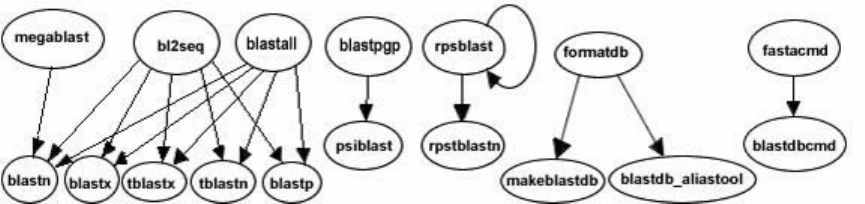
Appendices
Created: June 23, 2008; Updated: May 18, 2016.
Conversion from C toolkit applications
e functionality oered by the BLAST+ applications has been organized by program
type. e following graph depicts a correspondence between the NCBI C Toolkit BLAST
command line applications and the BLAST+ applications:
e easiest way to get started using the BLAST+ command line applications is by means
of the legacy_blast.pl PERL script which is bundled along with the BLAST+ applications.
To utilize this script, simply prex it to the invocation of the C toolkit BLAST command
line application and append the --path option pointing to the installation directory of the
BLAST+ applications. For example, instead of using
blastall -i query -d nr -o blast.out
use
legacy_blast.pl blastall -i query -d nr -o blast.out
--path /opt/blast/bin
e purpose of the legacy_blast.pl PERL script is to help users make the transition from
the C Toolkit BLAST command line applications to the BLAST+ applications. is script
produces its own documentation by invoking it without any arguments.
e legacy_blast.pl script supports two modes of operation, one in which the C Toolkit
BLAST command line invocation is converted and executed on behalf of the user and
another which solely displays the BLAST+ application equivalent to what was provided,
without executing the command.
e rst mode of operation is achieved by specifying the C Toolkit BLAST command line
application invocation and optionally providing the --path argument aer the command
line to convert if the installation path for the BLAST+ applications diers from the default
(available by invoking the script without arguments). See example in the rst section of
the Quick start.
35

e second mode of operation is achieved by specifying the C Toolkit BLAST command
line application invocation and appending the --print_only command line option as
follows:
$ ./legacy_blast.pl megablast -i query.fsa -d nt -o mb.out --print_only
/opt/ncbi/blast/bin/blastn -query query.fsa -db "nt" -out mb.out
$
Exit codes
All BLAST+ applications have consistent exit codes to signify the exit status of the
application. e possible exit codes along with their meaning are detailed in the table
below:
Exit Code Meaning
0 Success
1 Error in query sequence(s) or BLAST options
2 Error in BLAST database
3 Error in BLAST engine
4 Out of memory
5 Network error connecting to NCBI to fetch sequence data
6 Error creating output les
255 Unknown error
In the case of BLAST+ database applications, the possible exit codes are 0 (indicating
success) and 1 (indicating failure).
Options for the command-line applications.
is appendix consists of several tables that list option names, types, default values, and a
short description of the option. ese tables were rst published as an appendix to an
article in BMC Bioinformatics (BLAST+: architecture and applications). ey have been
updated for this manual.
Table C1: Options common to all BLAST+ search applications. An option of type “ag” takes no argument,
but if present is true. Some options are valid only for a local search (“remote” option not used), others are
valid only for a remote search (“remote” option used).
option type default
value
description and notes
db string none BLAST database name.
query string stdin Query le name.
query_loc string none Location on the query sequence (Format: start-stop)
Table C1 continues on next page...
36 BLAST® Command Line Applications User Manual

Table C1 continued from previous page.
option type default
value
description and notes
out string stdout Output le name
evalue real 10.0 Expect value (E) for saving hits
subject string none File with subject sequence(s) to search.
subject_loc string none Location on the subject sequence (Format: start-stop).
show_gis ag N/A Show NCBI GIs in report.
num_descriptions integer 500 Show one-line descriptions for this number of database
sequences.
num_alignments integer 250 Show alignments for this number of database sequences.
max_target_seqs Integer 500 Number of aligned sequences to keep. Use with report
formats that do not have separate denition line and
alignment sections such as tabular (all outfmt > 4). Not
compatible with num_descriptions or num_alignments.
max_hsps integer none Maximum number of HSPs (alignments) to keep for any
single query-subject pair. e HSPs shown will be the best as
judged by expect value. is number should be an integer that
is one or greater. If this option is not set, BLAST shows all
HSPs meeting the expect value criteria. Setting it to one will
show only the best HSP for every query-subject pair
html ag N/A Produce HTML output
gilist string none Restrict search of database to GI’s listed in this le. Local
searches only.
negative_gilist string none Restrict search of database to everything except the GI’s listed
in this le. Local searches only.
entrez_query string none Restrict search with the given Entrez query. Remote searches
only.
culling_limit integer none Delete a hit that is enveloped by at least this many higher-
scoring hits.
best_hit_overhang real none Best Hit algorithm overhang value (recommended value: 0.1)
best_hit_score_edge real none Best Hit algorithm score edge value (recommended value: 0.1)
dbsize integer none Eective size of the database
searchsp integer none Eective length of the search space
import_search_strategy string none Search strategy le to read.
export_search_strategy string none Record search strategy to this le.
parse_deines ag N/A Parse query and subject bar delimited sequence identiers
(e.g., gi|129295).
num_threads integer 1 Number of threads (CPUs) to use in blast search.
Table C1 continues on next page...
Appendices 37

Table C1 continued from previous page.
option type default
value
description and notes
remote ag N/A Execute search on NCBI servers?
outfmt string 0 alignment view options:
0 = pairwise,
1 = query-anchored showing identities,
2 = query-anchored no identities,
3 = at query-anchored, show identities,
4 = at query-anchored, no identities,
5 = XML Blast output,
6 = tabular,
7 = tabular with comment lines,
8 = Text ASN.1,
9 = Binary ASN.1
10 = Comma-separated values
11 = BLAST archive format (ASN.1)
Options 6, 7, and 10 can be additionally congured to
produce a custom format specied by space delimited format
speciers.
e supported format speciers are:
qseqid means Query Seq-id
qgi means Query GI
qacc means Query accesion
sseqid means Subject Seq-id
sallseqid means All subject Seq-id(s), separated by a ';'
sgi means Subject GI
sallgi means All subject GIs
sacc means Subject accession
sallacc means All subject accessions
qstart means Start of alignment in query
qend means End of alignment in query
sstart means Start of alignment in subject
send means End of alignment in subject
qseq means Aligned part of query sequence
sseq means Aligned part of subject sequence
evalue means Expect value
bitscore means Bit score
score means Raw score
length means Alignment length
pident means Percentage of identical matches
nident means Number of identical matches
mismatch means Number of mismatches
positive means Number of positive-scoring matches
gapopen means Number of gap openings
gaps means Total number of gap
ppos means Percentage of positive-scoring matches
frames means Query and subject frames separated by a '/'
qframe means Query frame
Table C1 continues on next page...
38 BLAST® Command Line Applications User Manual

Table C1 continued from previous page.
option type default
value
description and notes
sframe means Subject frame
btop means Blast traceback operations (BTOP)
staxids means unique Subject Taxonomy ID(s), separated by a
';'(in numerical order)
sscinames means unique Subject Scientic Name(s),
separated by a ';'
scomnames means unique Subject Common Name(s),
separated by a ';'
sblastnames means unique Subject Blast Name(s), separated
by a ';' (in alphabetical order)
sskingdoms means unique Subject Super Kingdom(s),
separated by a ';' (in alphabetical order)
stitle means Subject Title
salltitles means All Subject Title(s), separated by a '<>'
sstrand means Subject Strand
qcovs means Query Coverage Per Subject (for all HSPs)
qcovhsp means Query Coverage Per HSP
qcovus is a measure of Query Coverage that counts a position
in a subject sequence for this measure only once. e second
time the position is aligned to the query is not counted
towards this measure.
When not provided, the default value is:
'qseqid sseqid pident length mismatch gapopen qstart qend
sstart send evalue bitscore', which is equivalent to the
keyword 'std'
Table C2: blastn application options. e blastn application searches a nucleotide query against nucleotide
subject sequences or a nucleotide database. An option of type “ag” takes no arguments, but if present the
argument is true. Four dierent tasks are supported: 1.) “megablast”, for very similar sequences (e.g,
sequencing errors), 2.) “dc-megablast”, typically used for inter-species comparisons, 3.) “blastn”, the
traditional program used for inter-species comparisons, 4.) “blastn-short”, optimized for sequences less than
30 nucleotides.
option task(s) type default
value
description and notes
word_size megablast integer 28 Length of initial exact match.
word_size dc-megablast integer 11 Number of matching nucleotides in initial
match. dc-megablast allows non-
consecutive letters to match.
word_size blastn integer 11 Length of initial exact match.
word_size blastn-short integer 7 Length of initial exact match.
gapopen megablast integer 0 Cost to open a gap. See appendix “BLASTN
reward/penalty values”.
Table C2 continues on next page...
Appendices 39

Table C2 continued from previous page.
option task(s) type default
value
description and notes
gapextend megablast integer none Cost to extend a gap. is default is a
function of reward/penalty value. See
appendix “BLASTN reward/penalty values”.
gapopen blastn,
blastn-short,
dc-megablast
integer 5 Cost to open a gap. See appendix “BLASTN
reward/penalty values”.
gapextend blastn,
blastn-short,
dc-megablast
integer 2 Cost to extend a gap. See appendix
“BLASTN reward/penalty values”.
reward megablast integer 1 Reward for a nucleotide match.
penalty megablast integer -2 Penalty for a nucleotide mismatch.
reward blastn, dc-
megablast
integer 2 Reward for a nucleotide match.
penalty blastn, dc-
megablast
integer -3 Penalty for a nucleotide mismatch.
reward blastn-short integer 1 Reward for a nucleotide match.
penalty blastn-short integer -3 Penalty for a nucleotide mismatch.
strand all string both Query strand(s) to search against database/
subject. Choice of both, minus, or plus.
dust all string 20 64 1 Filter query sequence with dust.
ltering_db all string none Mask query using the sequences in this
database.
window_masker_taxid all integer none Enable WindowMasker ltering using a
Taxonomic ID.
window_masker_db all string none Enable WindowMasker ltering using this
le.
so_masking all boolean true Apply ltering locations as so masks (i.e.,
only for nding initial matches).
lcase_masking all ag N/A Use lower case ltering in query and subject
sequence(s).
db_so_mask all integer none Filtering algorithm ID to apply to the
BLAST database as so mask (i.e., only for
nding initial matches).
db_hard_mask all integer none Filtering algorithm ID to apply to the
BLAST database as hard mask (i.e.,
sequence is masked for all phases of search).
perc_identity all integer 0 Percent identity cuto.
Table C2 continues on next page...
40 BLAST® Command Line Applications User Manual

Table C2 continued from previous page.
option task(s) type default
value
description and notes
template_type dc-megablast string coding Discontiguous MegaBLAST template type.
Allowed values are coding, optimal and
coding_and_optimal.
template_length dc-megablast integer 18 Discontiguous MegaBLAST template
length.
use_index megablast boolean false Use MegaBLAST database index. Indices
may be created with the makembindex
application.
index_name megablast string none MegaBLAST database index name.
xdrop_ungap all real 20 Heuristic value (in bits) for ungapped
extensions.
xdrop_gap all real 30 Heuristic value (in bits) for preliminary
gapped extensions.
xdrop_gap_nal all real 100 Heuristic value (in bits) for nal gapped
alignment.
no_greedy megablast ag N/A Use non-greedy dynamic programming
extension.
min_raw_gapped_score all integer none Minimum raw gapped score to keep an
alignment in the preliminary gapped and
trace-back stages. Normally set based upon
expect value.
ungapped all ag N/A Perform ungapped alignment.
window_size dc-megablast integer 40 Multiple hits window size, use 0 to specify
1-hit algorithm
Table C3: blastp application options. e blastp application searches a protein sequence against protein
subject sequences or a protein database. An option of type “ag” takes no arguments, but if present the
argument is true. Two dierent tasks are supported: 1.) “blastp”, for standard protein-protein comparisons,
2.) “blastp-short”, optimized for query sequences shorter than 30 residues. is table reects the 2.2.27
BLAST+ release.
option task type default value description and notes
word_size blastp integer 3 Word size of initial match. Valid word sizes are
2-7.
word_size blastp-
short
integer 2 Word size of initial match.
gapopen blastp integer 11 Cost to open a gap.
gapextend blastp integer 1 Cost to extend a gap.
gapopen blastp-
short
integer 9 Cost to open a gap.
Table C3 continues on next page...
Appendices 41

Table C3 continued from previous page.
option task type default value description and notes
gapextend blastp-
short
integer 1 Cost to extend a gap.
matrix blastp string BLOSUM62 Scoring matrix name.
matrix blastp-
short
string PAM30 Scoring matrix name.
threshold blastp integer 11 Minimum score to add a word to the BLAST
lookup table.
threshold blastp-
short
integer 16 Minimum score to add a word to the BLAST
lookup table.
comp_based_stats blastp string 2 Use composition-based statistics:
D or d: default (equivalent to 2)
0 or F or f: no composition-based statistics
1: Composition-based statistics as in NAR
29:2994-3005, 2001
2 or T or t : Composition-based score adjustment
as in Bioinformatics
21:902-911, 2005, conditioned on sequence
properties
3: Composition-based score adjustment as in
Bioinformatics 21:902-911, 2005, unconditionally
comp_based_stats blastp-
short
string 0 Use composition-based statistics :
D or d: default (equivalent to 2)
0 or F or f: no composition-based statistics
1: Composition-based statistics as in NAR
29:2994-3005, 2001
2 or T or t : Composition-based score adjustment
as in Bioinformatics
21:902-911, 2005, conditioned on sequence
properties
3: Composition-based score adjustment as in
Bioinformatics 21:902-911, 2005, unconditionally
seg all string no Filter query sequence with SEG (Format: 'yes',
'window locut hicut', or 'no' to disable).
so_masking blastp boolean false Apply ltering locations as so masks (i.e., only for
nding initial matches).
lcase_masking all ag N/A Use lower case ltering in query and subject
sequence(s).
db_so_mask all integer none Filtering algorithm ID to apply to the BLAST
database as so mask (i.e., only for nding initial
matches).
Table C3 continues on next page...
42 BLAST® Command Line Applications User Manual

Table C3 continued from previous page.
option task type default value description and notes
db_hard_mask all integer none Filtering algorithm ID to apply to the BLAST
database as hard mask (i.e., sequence is masked for
all phases of search).
xdrop_gap_nal all real 25 Heuristic value (in bits) for nal gapped
alignment/
window_size blastp integer 40 Multiple hits window size, use 0 to specify 1-hit
algorithm.
window_size blastp-
short
integer 15 Multiple hits window size, use 0 to specify 1-hit
algorithm.
use_sw_tback all ag N/A Compute locally optimal Smith-Waterman
alignments?
Table C4: blastx application options. e blastx application translates a nucleotide query and searches it
against protein subject sequences or a protein database.
option type default value description and notes
word_size integer 3 Word size for initial match. Valid word sizes are 2-7.
gapopen integer 11 Cost to open a gap.
gapextend integer 1 Cost to extend a gap.
matrix string BLOSUM62 Scoring matrix name.
threshold integer 12 Minimum score to add a word to the BLAST lookup table.
seg string 12 2.2 2.5 Filter query sequence with SEG (Format: 'yes', 'window locut
hicut', or 'no' to disable).
so_masking boolean false Apply ltering locations as so masks (i.e., only for nding
initial matches).
lcase_masking ag N/A Use lower case ltering in query and subject sequence(s).
db_so_mask integer none Filtering algorithm ID to apply to the BLAST database as
so mask (i.e., only for nding initial matches).
db_hard_mask integer none Filtering algorithm ID to apply to the BLAST database as
hard mask (i.e., sequence is masked for all phases of search).
xdrop_gap_nal real 25 Heuristic value (in bits) for nal gapped alignment.
window_size integer 40 Multiple hits window size, use 0 to specify 1-hit algorithm.
strand string both Query strand(s) to search against database/subject. Choice
of both, minus, or plus.
query_genetic_code integer 1 Genetic code to translate query, see p://p.ncbi.nih.gov/
entrez/misc/data/gc.prt
max_intron_length integer 0 Length of the largest intron allowed in a translated
nucleotide sequence when linking multiple distinct
alignments (a negative value disables linking).
Table C4 continues on next page...
Appendices 43

Table C4 continued from previous page.
option type default value description and notes
comp_based_stats integer 2 Use composition-based statistics for blastx:
D or d: default (equivalent to 2)
0 or F or f: no composition-based statistics
1: Composition-based statistics as in NAR 29:2994-3005,
2001
2 or T or t : Composition-based score adjustment as in
Bioinformatics
21:902-911, 2005, conditioned on sequence properties
3: Composition-based score adjustment as in Bioinformatics
21:902-911, 2005, unconditionally
Default = `2'
Table C5: tblastn application options. e tblastn application searches a protein query against nucleotide
subject sequences or a nucleotide database translated at search time.
option type default value description and notes
word_size integer 3 Word size for initial match. Valid word sizes are 2-7.
gapopen integer 11 Cost to open a gap.
gapextend integer 1 Cost to extend a gap.
matrix string BLOSUM62 Scoring matrix name.
threshold integer 13 Minimum score to add a word to the BLAST lookup table.
seg string 12 2.2 2.5 Filter query sequence with SEG (Format: 'yes', 'window locut
hicut', or 'no' to disable).
so_masking boolean false Apply ltering locations as so masks (i.e., only for nding
initial matches).
lcase_masking ag N/A Use lower case ltering in query and subject sequence(s).
db_so_mask integer none Filtering algorithm ID to apply to the BLAST database as so
mask (i.e., only for nding initial matches).
db_hard_mask integer none Filtering algorithm ID to apply to the BLAST database as
hard mask (i.e., sequence is masked for all phases of search).
xdrop_gap_nal real 25 Heuristic value (in bits) for nal gapped alignment.
window_size integer 40 Multiple hits window size, use 0 to specify 1-hit algorithm.
db_gen_code integer 1 Genetic code to translate subject sequences, see p://
p.ncbi.nih.gov/entrez/misc/data/gc.prt
max_intron_length integer 0 Length of the largest intron allowed in a translated nucleotide
sequence when linking multiple distinct alignments (a
negative value disables linking).
comp_based_stats string 2 Use composition-based statistics for tblastn:
D or d: default (equivalent to 2)
0 or F or f: no composition-based statistics
1: Composition-based statistics as in NAR 29:2994-3005,
Table C5 continues on next page...
44 BLAST® Command Line Applications User Manual

Table C5 continued from previous page.
option type default value description and notes
2001
2 or T or t : Composition-based score adjustment as in
Bioinformatics
21:902-911, 2005, conditioned on sequence properties
3: Composition-based score adjustment as in Bioinformatics
21:902-911, 2005, unconditionally
Default = `2'
Table C6: tblastx application options. e tblastx application searches a translated nucleotide query against
translated nucleotide subject sequences or a translated nucleotide database. An option of type “ag” takes
no arguments, but if present the argument is true. is table reects the 2.2.27 BLAST+ release. Only
ungapped searches are supported for tblastx.
option type default value description and notes
word_size integer 3 Word size for initial match.
matrix string BLOSUM62 Scoring matrix name.
threshold integer 13 Minimum word score to add the word to the BLAST lookup
table.
seg string 12 2.2 2.5 Filter query sequence with SEG (Format: 'yes', 'window locut
hicut', or 'no' to disable).
so_masking boolean false Apply ltering locations as so masks (i.e., only for nding
initial matches).
lcase_masking ag N/A Use lower case ltering in query and subject sequence(s).
db_so_mask integer none Filtering algorithm ID to apply to the BLAST database as
so mask (i.e., only for nding initial matches).
db_hard_mask integer none Filtering algorithm ID to apply to the BLAST database as
hard mask (i.e., sequence is masked for all phases of search).
strand string both Query strand(s) to search against database subject
sequences. Choice of both, minus, or plus.
query_genetic_code integer 1 Genetic code to translate query, see p://p.ncbi.nih.gov/
entrez/misc/data/gc.prt
db_gen_code integer 1 Genetic code to translate subject sequences, see p://
p.ncbi.nih.gov/entrez/misc/data/gc.prt
max_intron_length integer 0 Length of the largest intron allowed in a translated
nucleotide sequence when linking multiple distinct
alignments (a negative value disables linking)
Table C7: rpsblast application options. e rpsblast application searches a protein query against the
conserved domain database (CDD), which is a set of protein proles. Many of the common options such as
Appendices 45

matrix or word threshold are set when the CDD is built and cannot be changed by the rpsblast application.
A search ready CDD can be downloaded from p://p.ncbi.nih.gov/pub/mmdb/cdd/
Option Type Default value Description and notes
window_size integer 40 Multiple hits window size, use 0 to specify 1-hit algorithm.
xdrop_ungap real 15 Heuristic value (in bits) for ungapped extensions
xdrop_gap real 25 Heuristic value (in bits) for preliminary gapped extensions.
xdrop_gap_nal real 40 Heuristic value (in bits) for nal gapped alignment.
seg string 12 2.2 2.5 Filter query sequence with SEG (Format: 'yes', 'window locut
hicut', or 'no' to disable).
so_masking boolean false Apply ltering locations as so masks (i.e., only for nding
initial matches).
Table C8: Makeblastdb application options. is application builds a BLAST database. An option of type
“ag” takes no arguments, but if present the argument is true.
option type default
value
Description and notes
in string stdin Input le/database name
input_type string fasta Input le type, it may be any of the following:
fasta: for FASTA le(s)
blastdb: for BLAST database(s)
asn1_txt: for Seq-entries in text ASN.1 format
asn1_bin: for Seq-entries in binary ASN.1 format
dbtype string prot Molecule type of input, values can be nucl or prot.
title string none Title for BLAST database. If not set, the input le name will be used.
parse_seqids ag N/A Parse bar delimited sequence identiers (e.g., gi|129295) in FASTA
input.
hash_index ag N/A Create index of sequence hash values.
mask_data string none Comma-separated list of input les containing masking data as
produced by NCBI masking applications (e.g. dustmasker, segmasker,
windowmasker).
out string input le
name
Name of BLAST database to be created. Input le name is used if none
provided. is eld is required if input consists of multiple les.
max_le_size string 1GB Maximum le size to use for BLAST database.
taxid integer none Taxonomy ID to assign to all sequences.
taxid_map string none File with two columns mapping sequence ID to the taxonomy ID. e
rst column is the sequence ID represented as one of:
1. fasta with accessions (e.g., emb|X17276.1|)
2. fasta with GI (e.g., gi|4)
3. GI as a bare number (e.g., 4)
Table C8 continues on next page...
46 BLAST® Command Line Applications User Manual

Table C8 continued from previous page.
option type default
value
Description and notes
4. A local ID. e local ID must be prexed with "lcl" (e.g., lcl|
4).
e second column should be the NCBI taxonomy ID (e.g., 9606 for
human).
logle string none Program log le (default is stderr).
Table C9: Makeproledb application options. is application builds an RPS-BLAST database. An option of
type “ag” takes no arguments, but if present the argument is true. COBALT (a multiple sequence alignment
program) and DELTA-BLAST both use RPS-BLAST searches as part of their processing, but use specialized
versions of the database. is application can build databases for COBALT, DELTA-BLAST, and a standard
RPS-BLAST search. e “dbtype” option (see entry in table) determines which avor of the database is built.
option type default value Description and notes
in string stdin Input le that contains a list of scoremat les (delimited by
space, tab, or newline)
binary ag N/A e scoremat les are binary ASN.1
title string none Title for RPS-BLAST database. If not set, the input le name
will be used.
threshold real 9.82 reshold for RPSBLAST lookup table.
out string input le name Name of BLAST database to be created. Input le name is used
if none provided.
max_le_size string 1GB Maximum le size to use for BLAST database.
dbtype string rps Species use for RPSBLAST db. One of rps, cobalt, or delta.
index ag N/A Creates index les.
gapopen integer none Cost to open a gap. Used only if scoremat les do not contain
PSSM scores, otherwise ignored.
gapextend integer none Cost to extend a gap by one residue. Used only if scoremat les
do not contain PSSM scores, otherwise ignored.
scale real 100 PSSM scale factor.
matrix string BLOSUM62 Matrix to use in constructing PSSM. One of BLOSUM45,
BLOSUM50, BLOSUM62, BLOSUM80, BLOSUM90, PAM250,
PAM30 or PAM70. Used only if scoremat les do not contain
PSSM scores, otherwise ignored.
obsr_threshold real 6 Exclude domains with maximum number of independent
observations below this value (for use in DELTA-BLAST
searches).
exclude_invalid real true Exclude domains that do not pass validation test (for use in
DELTA-BLAST searches).
logle string none Program log le (default is stderr).
Appendices 47

Table C10: Blastdbcmd application options. is application reads a BLAST database and produces reports.
option type default
value
description and notes
db string nr BLAST database name.
dbtype string guess Molecule type stored in BLAST database, one of nucl, prot, or
guess.
entry string none Comma-delimited search string(s) of sequence identiers: e.g.:
555, AC147927, 'gnl|dbname|tag', or 'all' to select all sequences
in the database
entry_batch string none Input le for batch processing. e format requires one entry
per line; each line should begin with the sequence ID followed
by any of the following optional speciers (in any order): range
(format: ‘from-to’, inclusive in 1-osets), strand (‘plus’ or
‘minus’), or masking algorithm ID (integer value representing
the available masking algorithm). Omitting the ending range
(e.g.: ‘10-‘) is supported, but there should not be any spaces
around the ‘-‘.
pig integer none PIG (protein identity group) to retrieve.
info ag N/A Print BLAST database information.
range string none Range of sequence to extract (Format: start-stop).
strand string plus Strand of nucleotide sequence to extract. Choice of plus or
minus.
mask_sequence_with string none Produce lower-case masked FASTA using the algorithm IDs
specied.
out string stdout Output le name.
outfmt string %f Output format, where the available format speciers are:
%f means sequence in FASTA format
%s means sequence data (without deine)
%a means accession
%g means gi
%o means ordinal id (OID)
%t means sequence title
%l means sequence length
%T means taxid
%L means common taxonomic name
%S means scientic name
%P means PIG
%mX means sequence masking data, where X is an optional
comma-separated list of integers to specify the algorithm ID(s)
to display (or all masks if absent or invalid specication).
Masking data will be displayed as a series of 'N-M' values
separated by ';' or the word 'none' if none are available. For
every format except '%f ', each line of output will correspond to
a sequence.
Table C10 continues on next page...
48 BLAST® Command Line Applications User Manual

Table C10 continued from previous page.
option type default
value
description and notes
target_only ag N/A Denition line should contain target GI only.
get_dups ag N/A Retrieve duplicate accessions.
line_length integer 80 Line length for output.
ctrl_a ag N/A Use Ctrl-A as the non-redundant denition line separator.
Table C11: Makembindex application options. e indexed databases created by makembindex are used by
production MegaBLAST soware and by a new srsearch utility designed to quickly search for nearly exact
matches (up to one mismatch) of short queries against a genomic database. When a FASTA formatted le is
used as the input, then masking by lower case letters is incorporated in the index. Makembindex can
currently build two types of indices, called “old style” and “new style” indexing. e NCBI oers full support
for the new style and has deprecated the old style. A MegaBLAST search with a new style index requires that
both the index and the corresponding BLAST database be present. e index structure is described in
PMID:18567917. Please cite this paper in any publication that uses makembindex.
option type default
value
Description and notes
input string stdin Input le name or BLAST database name, depending on the value of
the iformat parameter. For FASTA formatted input, this parameter is
optional and defaults to the program's standard input stream.
output string none e resulting index name. e index itself can consist of multiple
les, called volumes, called <index_name>.00.idx, <index_name>.
01.idx,...
is option should not be used with new style indices.
iformat string fasta e input format selector. Possible values are 'fasta' and 'blastdb'.
old_style_index boolean false e old_style_index is no longer supported. If set to 'false' the new
style index is created. New style indices require a BLAST database as
input (use -iformat blastdb), which can be downloaded from the
NCBI FTP site or created with makeblastdb. e option -output is
ignored for a new style index. New style indices are always created at
the same location as the corresponding BLAST database.
db_mask integer None Exclude masked regions of BLAST db from the index. Use
makeblastdb to discover the algorithm ID to be used as input for this
argument.
legacy boolean true is is a compatibility feature to support current production
MegaBLAST. If true, then -stride, -nmer, and -ws_hint are ignored.
e legacy format must be used for BLAST.
nmer integer 12 N-mer size to use. Ignored if –legacy is specied
ws_hint integer 28 is is an optimization hint for makembindex that indicates an
expected minimum match size in searches that use the index. If n is
the value of -nmer parameter and s is the value of –stride parameter,
then the value of -ws_hint must be at least n + s - 1.
stride integer 5 makembindex will index every stride-th N-mer of the database.
Table C11 continues on next page...
Appendices 49

Table C11 continued from previous page.
option type default
value
Description and notes
volsize integer 1536 Target index volume size in megabytes.
BLASTN reward/penalty values
BLASTN uses a simple approach to score alignments, with identically matching bases
assigned a reward and mismatching bases assigned a penalty. It is important to choose
reward/penalty values appropriate to the sequences being aligned with the (absolute)
reward/penalty ratio increasing for more divergent sequences. A ratio of 0.33 (1/-3) is
appropriate for sequences that are about 99% conserved; a ratio of 0.5 (1/-2) is best for
sequences that are 95% conserved; a ratio of about one (1/-1) is best for sequences that are
75% conserved [2].
For each reward/penalty pair, a number of dierent gap costs are supported. A gap cost
includes a value to open the gap and a value to extend the gap by a base. Following the
convention of the command-line applications, these costs are listed as positive numbers
here. MegaBLAST uses a specialized algorithm to calculate the default gap costs for a
reward/penalty pair that is described in PMID:10890397. Briey, the default megaBLAST
cost to open a gap is zero and the cost to extend a gap two letters is given by the absolute
value of two mismatches minus one match. For example, given a reward of 1 and penalty
of -5, the cost to extend a gap by one letter is 5.5. e default gap costs for other tasks
supported by the blastn application is 5 to open a gap and 2 to extend one base.
Table D1 presents the supported reward/penalty values and gap costs.
Table D1: Supported reward/penalty values and gap costs for the blastn application. e le-most column
presents the supported reward/penalty values. e middle column presents pairs of numbers for the cost to
open and extend a gap for each reward/penalty value. Blastn also supports gap costs more stringent than
those listed (e.g., for reward/penalty of 1/-3 gap costs of 5/2 or 500/2 are supported). e reward/penalty
values are ordered from most to least stringent, with the more stringent values better suited for alignments
with high sequence identity. e default megaBLAST gap costs are shown in the right-most column.
Accurate statistics for these default megaBLAST gap costs can only be calculated for the most stringent
reward/penalty values, but the values listed in the middle column can always be used.
reward/penalty gap costs (open/extend) default MegaBLAST gap costs (open/extend)
1/-5 3/3 0/5.5
1/-4 1/2, 0/2, 2/1, 1/1 0/4.5
2/-7 2/4, 0/4, 4/2, 2/2 0/8
1/-3 2/2, 1/2, 0/2, 2/1, 1/1 0/3.5
2/-5 2/4, 0/4, 4/2, 2/2 0/6
1/-2 2/2, 1/2, 0/2, 3/1, 2/1, 1/1 0/2.5
2/-3 4/4, 2/4, 0/4, 3/3, 6/2, 5/2, 4/2, 2/2 0/4
Table D1 continues on next page...
50 BLAST® Command Line Applications User Manual

Table D1 continued from previous page.
reward/penalty gap costs (open/extend) default MegaBLAST gap costs (open/extend)
3/-4 6/3, 5/3, 4/3, 6/2, 5/2, 4/2 N/A
4/-5 6/5, 5/5, 4/5, 3/5 N/A
1/-1 3/2, 2/2, 1/2, 0/2, 4/1, 3/1, 2/1 N/A
3/-2 5/5 N/A
5/-4 10/6, 8/6 N/A
BLAST Substitution Matrices
BLAST uses a substitution matrix for any program that aligns residues. e program may
align residues because both the query and database consist of proteins (e.g. BLASTP) or
the program may align DNA translated to protein with protein (e.g. BLASTX). A key
element in evaluating the quality of a pairwise sequence alignment is the "substitution
matrix", which assigns a score for aligning any possible pair of residues. e theory of
amino acid substitution matrices is described in [1], and applied to DNA sequence
comparison in [2]. In general, dierent substitution matrices are tailored to detecting
similarities among sequences that are diverged by diering degrees [1-3]. A single matrix
may nevertheless be reasonably ecient over a relatively broad range of evolutionary
change [1-3]. Experimentation has shown that the BLOSUM-62 matrix [4] is among the
best for detecting most weak protein similarities. For particularly long and weak
alignments, the BLOSUM-45 matrix may prove superior. A detailed statistical theory for
gapped alignments has not been developed, and the best gap costs to use with a given
substitution matrix are determined empirically. Short alignments need to be relatively
strong (i.e. have a higher percentage of matching residues) to rise above background
noise. Such short but strong alignments are more easily detected using a matrix with a
higher "relative entropy" [1] than that of BLOSUM-62. In particular, short query
sequences can only produce short alignments, and therefore database searches with short
queries should use an appropriately tailored matrix. e BLOSUM series does not include
any matrices with relative entropies suitable for the shortest queries, so the older PAM
matrices [5,6] may be used instead. For proteins, a provisional table of recommended
substitution matrices and gap costs for various query lengths is:
Query Length Substitution Matrix Gap Costs
<35 PAM-30 (9, 1)
35-50 PAM-70 (10, 1)
50-85 BLOSUM-80 (10, 1)
>85 BLOSUM-62 (11, 1)
Gap Costs
Appendices 51
e raw score of an alignment is the sum of the scores for aligning pairs of residues and
the scores for gaps. Gapped BLAST and PSI-BLAST use "ane gap costs" which charge
the score -a for the existence of a gap, and the score -b for each residue in the gap. us a
gap of k residues receives a total score of -(a+bk); specically, a gap of length 1 receives
the score -(a+b).
Lambda Ratio
To convert a raw score S into a normalized score S' expressed in bits, one uses the formula
S' = (lambda*S - ln K)/(ln 2), where lambda and K are parameters dependent upon the
scoring system (substitution matrix and gap costs) employed [7-9]. For determining S',
the more important of these parameters is lambda. e "lambda ratio" quoted here is the
ratio of the lambda for the given scoring system to that for one using the same
substitution scores, but with innite gap costs [8]. is ratio indicates what proportion of
information in an ungapped alignment must be sacriced in the hope of improving its
score through extension using gaps. We have found empirically that the most eective gap
costs tend to be those with lambda ratios in the range 0.8 to 0.9.
References
1. Altschul S.F. Amino acid substitution matrices from an information theoretic
perspective. J. Mol. Biol. 1991;219:555–565. PubMed PMID: 2051488.
2. States D.J., Gish W., Altschul S.F. Improved sensitivity of nucleic acid database
searches using application-specic scoring matrices. Methods. 1991;3:66–70.
3. Altschul S.F. A protein alignment scoring system sensitive at all evolutionary
distances. J. Mol. Evol. 1993;36:290–300. PubMed PMID: 8483166.
4. Heniko S., Heniko J.G. Amino acid substitution matrices from protein blocks. Proc.
Natl. Acad. Sci. USA. 1992;89:10915–10919. PubMed PMID: 1438297.
5. Dayho, M.O., Schwartz, R.M. & Orcutt, B.C. (1978) "A model of evolutionary change
in proteins." In "Atlas of Protein Sequence and Structure, vol. 5, suppl. 3," M.O.
Dayho (ed.), pp. 345-352, Natl. Biomed. Res. Found., Washington, DC.
6. Schwartz, R.M. & Dayho, M.O. (1978) "Matrices for detecting distant relationships."
In "Atlas of Protein Sequence and Structure, vol. 5, suppl. 3," M.O. Dayho (ed.), pp.
353-358, Natl. Biomed. Res. Found., Washington, DC.
7. Karlin S., Altschul S.F. Methods for assessing the statistical signicance of molecular
sequence features by using general scoring schemes. Proc. Natl. Acad. Sci. USA.
1990;87:2264–2268. PubMed PMID: 2315319.
8. Altschul S.F., Gish W. Local alignment statistics. Meth. Enzymol. 1996;266:460–480.
PubMed PMID: 8743700.
9. Altschul S.F., Madden T.L., Schäer A.A., Zhang J., Zhang Z., Miller W., Lipman D.J.
Gapped BLAST and PSI-BLAST: a new generation of protein database search
programs. Nucleic Acids Res. 1997;25:3389–3402. PubMed PMID: 9254694.
52 BLAST® Command Line Applications User Manual
