Chapter 3 Ch3
User Manual: Chapter 3 IronHorse DC Motors Manual - AutomationDirect
Open the PDF directly: View PDF  .
.
Page Count: 6
Page 3–1IronHorse General Purpose DC Motors User Manual – 2nd Ed. Rev. A – 11/20/2017
Maintenance and
Troubleshooting 3
3
3
Chapter
Chapter
Chapter
Table of Contents
Routine Maintenance � � � � � � � � � � � � � � � � � � � � � � � � � � 3–2
BeaRing Size infoRMation � � � � � � � � � � � � � � � � � � � � � � � � 3–2
Replacing BRuSheS � � � � � � � � � � � � � � � � � � � � � � � � � � � 3–3
tRouBleShooting � � � � � � � � � � � � � � � � � � � � � � � � � � � � 3–4
Page 3–2 IronHorse General Purpose DC Motors User Manual – 2nd Ed. Rev. A – 11/20/2017
Chapter 3: Maintenance and Troubleshooting
Routine Maintenance
A routine maintenance schedule should be developed for every IronHorse motor installation
based on the individual application. Motors installed in a harsh running environment should be
serviced more frequently than those installed in a clean, climate controlled area. The following
list should be used as a basis for creating the routine maintenance schedule.
1) Clean the motor housing using a brush, soft cloth or compressed air. Remove any dirt and
dust from the fan and fan cover vents.
2) Frequently monitor the bearing temperature on the motor. It should not exceed 60°C
(140°F).
3) Have the insulation checked periodically by an authorized motor specialist.
4) Replace the motor brushes after every 2500 hours of operation.
Bearing Size Information
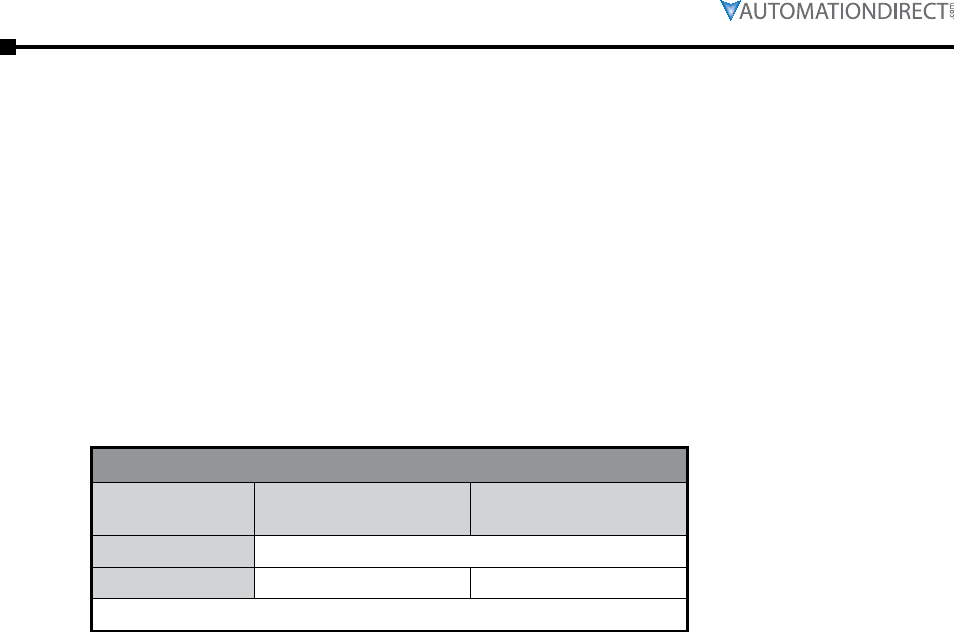
Bearing Chart
Frame Size Drive End Bearing SKF
Type
Opposite Drive End
Bearing SKF Type
Small-Frame not user serviceable
56C 6203 6203
All IronHorse 56C-frame motors use premium sealed SKF brand bearings.
Chapter 3: Maintenance and Troubleshooting
Page 3–3IronHorse General Purpose DC Motors User Manual – 2nd Edition – 11/20/2017
Replacing Brushes
Warning: To prevent serious personal injury and damage to your
equipment, always disconnect input power before replacing brushes.
A spare set of brushes ship in each 56C-frame PMDC motor box, and the brushes should be
replaced after every 2500 hours of operation. Small-frame PMDC motor brushes should be
replaced as needed. If you visually inspect the brushes, the minimum acceptable length is 6mm.
See “Chapter 4: Accessories” for replacement brush ordering information. Make sure you install
the correct replacement brushes; check the part numbers carefully. Ensure that the replacement
brushes are the same width as the brushes being removed from the motor. DO NOT install
smaller brushes in a larger motor. There is no break-in period with new brushes.
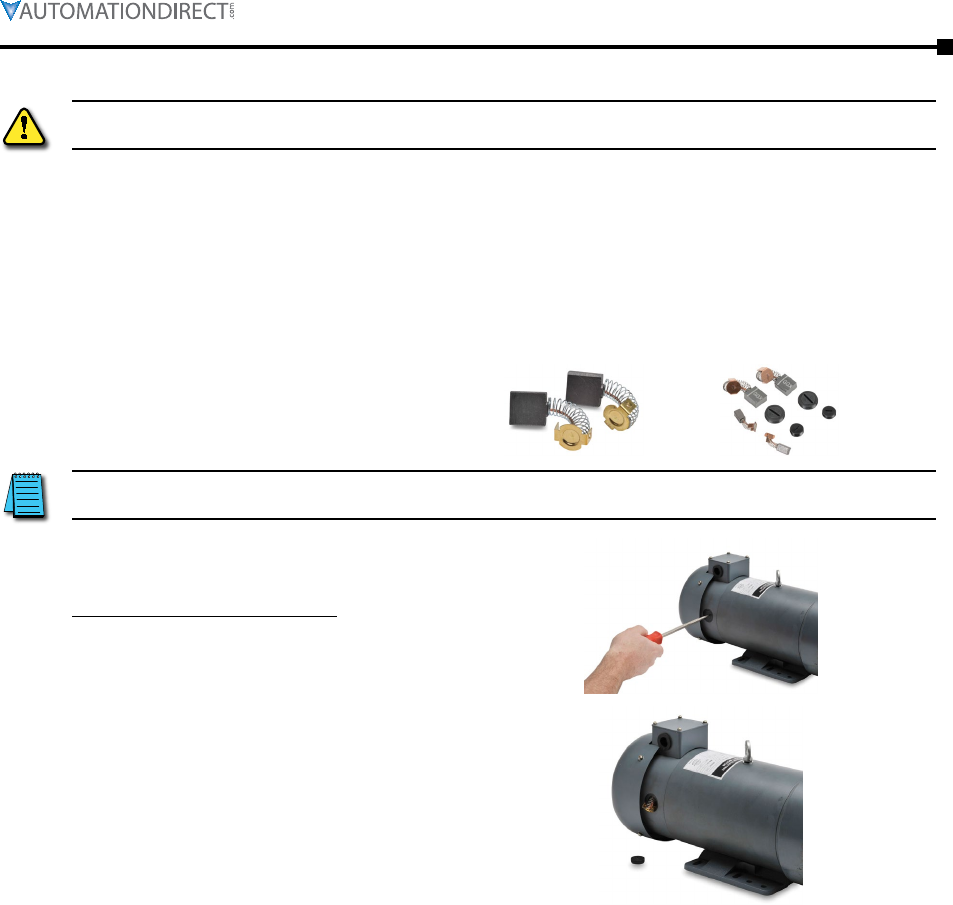
Replacement brush and spring assembly sets:
NOTE: The brushes are spring-loaded. Be careful when removing the
brush cover.
Motor has two brushes; one on each side
of the motor.
Always replace the brushes in pairs.
1) Remove the brush cover using a
athead screwdriver as shown. Turn
the brush cover counterclockwise to
remove.
2) Carefully remove the old brush and
spring assembly and install the
replacement.
3) Reinstall the brush cover, turning
clockwise.
4) Replace the other motor brush and
spring following the same steps.
Page 3–4 IronHorse General Purpose DC Motors User Manual – 2nd Ed. Rev. A – 11/20/2017
Chapter 3: Maintenance and Troubleshooting
Troubleshooting
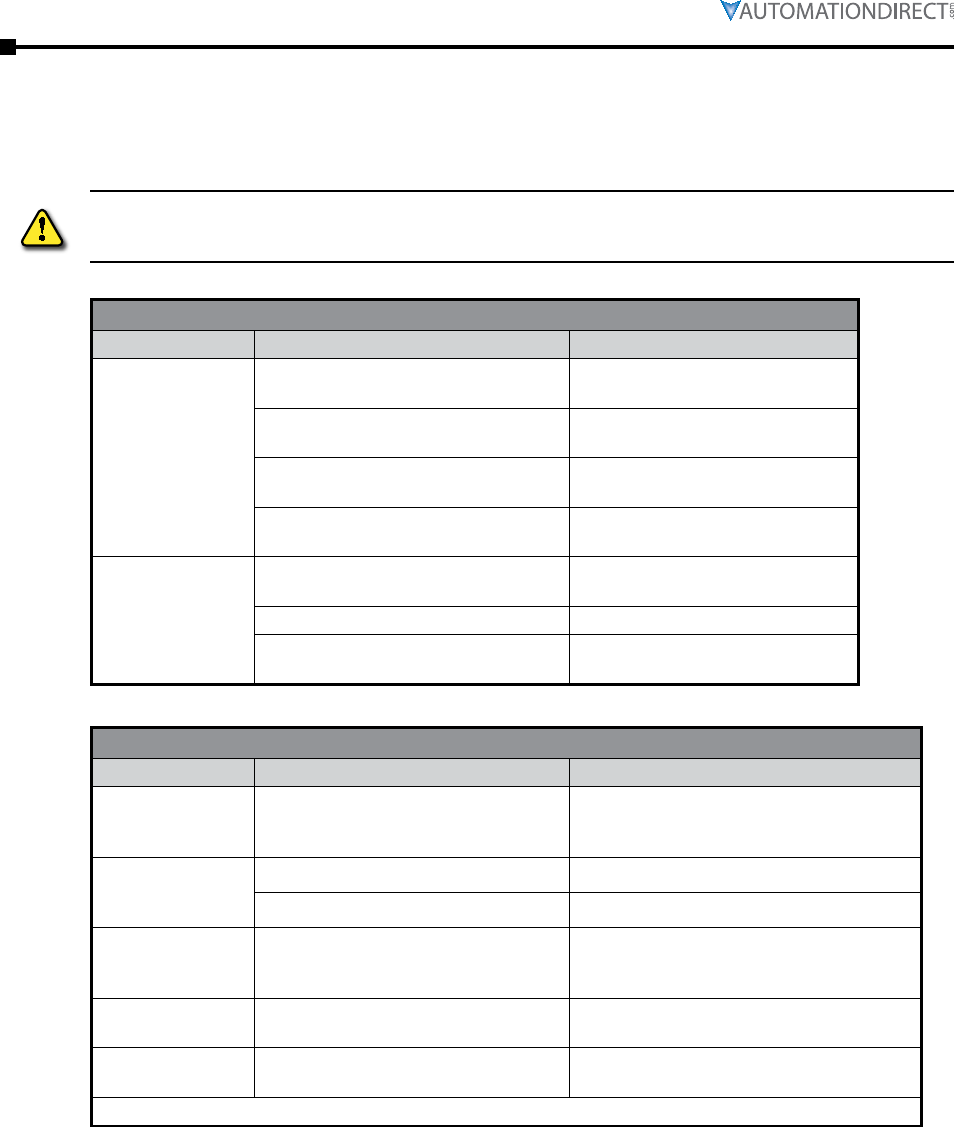
To prevent serious damage, faults observed when a motor first goes into service or during
subsequent operation should be investigated and repaired immediately. These troubleshooting
tables cover most common PMDC motor problems.
Warning: To prevent serious personal injury and damage to your
equipment, always disconnect input power before inspecting or repairing
your motor.
Mechanical Problems – Noise While Running
Problem Possible Causes Solutions
Motor vibrates or
runs noisily when
coupled up, but
runs okay when
uncoupled.
Defective transmission components, or
problem with the machine being driven.
Inspect transmission and drive
components. Check alignment.
Foundation has become unlevel. Realign machine set. Check and
repair foundation level.
Problem with gear drive. Align drive, check driving and driven
gear pitch circles.
Incorrectly balanced drive or driven
machine components.
Re-balance drive and/or driven
components.
Motor runs rough
when uncoupled.
Bearing damage. See Bearing Problems
troubleshooting table.
Mounting bolts are loose. Re-tighten and lock mounting bolts.
Fitted drive components (coupling or
pulleys) affecting rotor balance.
Balance rotor with coupling or pulley
fitted.
Mechanical Problems – Roller Bearing Problems
Problem Possible Causes Solutions
Scratching, rubbing,
or rumbling noise
from bearing.
Bearing is defective. Replace bearing. *
Whistling noise
from bearing.
Bearing has run dry. Replace bearing. *
Faulty cage. Replace bearing. *
Excessive bearing
wear. Bearing overloaded.
Check alignment, belt tension, gear pressure,
coupling thrust. Reduce bearing load. If
needed, reduce additional axial load.
Scoring when motor
is inoperative.
Bearing is being subjected to vibration
from outside source.
Isolate motor from source of vibration or
keep motor turning over.
Scoring when motor
running. Current leakage. Remove motor from service. Repair or
replace motor.
* Bearings in the small-frame PMDC motors are not user replaceable; replace motor instead of bearings.
Chapter 3: Maintenance and Troubleshooting
Page 3–5IronHorse General Purpose DC Motors User Manual – 2nd Edition – 11/20/2017
Troubleshooting (continued)
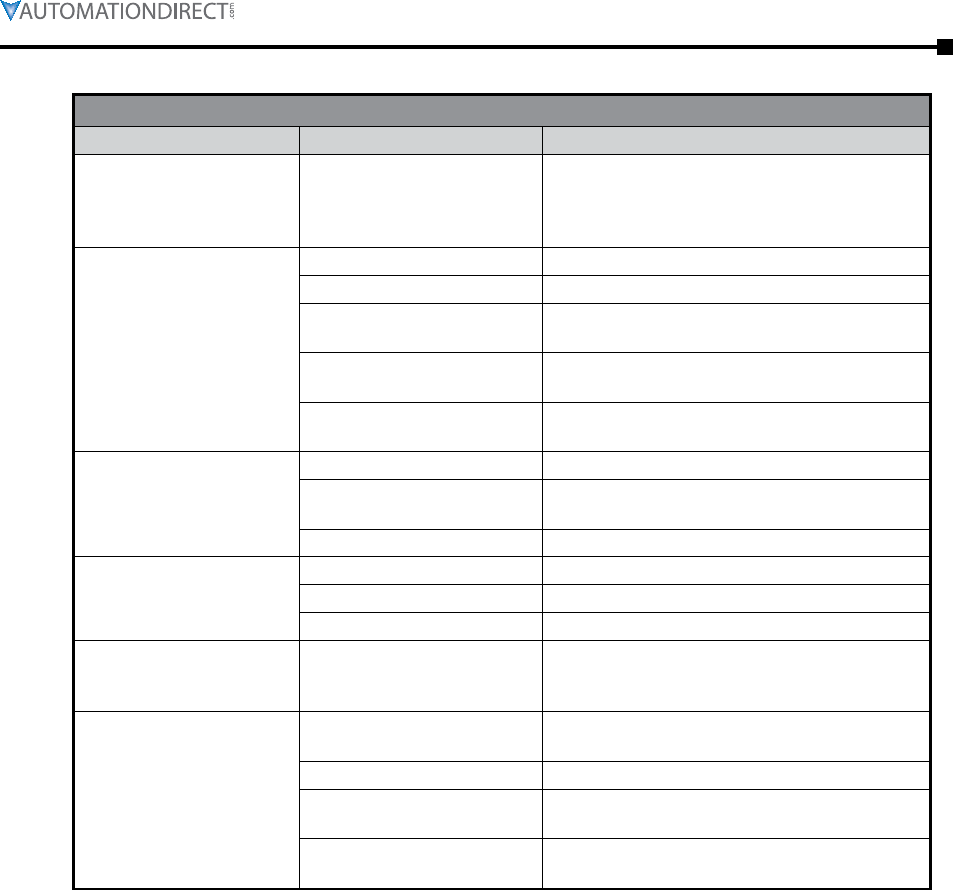
Electrical Problems
Problem Possible Causes Solutions
Motor shaft rotates in wrong
direction (should rotate
clockwise when facing
shaft).
Positive (+) and negative
(-) input power leads are
reversed.
Switch the input power connections.
Motor fails to start off-load.
Break in the armature supply. Check and repair connection.
Fuse is blown. Replace fuse.
Controller damaged or
incorrectly connected. Check starter for break in circuit and repair break.
Armature coils burned out or
short-circuiting.
Correct short circuit. This may require bringing the
motor to a repair shop.
Brushes not bearing down
correctly.
Check brush position and bearing pressure.
Replace worn brushes.
Jerky starting.
Break in starter circuit. Repair break.
Armature short-circuit. Correct short circuit. This may require bringing the
motor to a repair shop.
Commutator short-circuit. Check commutator and repair short-circuit.
Motor will not run under
load.
Short circuit in the supply. Locate short circuit and repair.
Overloading. Check current input and remedy overload.
Voltage drop. Increase supply line cross section.
Motor overspeeding and
hunting while under load. Controller.
Decrease IR compensation.
Check speed potentiometer wiring and signal, and
repair if needed.
Motor overheating.
Overloading. Check voltage and current levels, and correct
overload condition.
Insufficient airflow. Improve cooling conditions.
Cooling air temperature too
high. If TEFC model, inspect the fan for damage.
Armature winding short-circuit. Check windings and soldered connections. Repair
coils or windings.

Page 3–6 IronHorse General Purpose DC Motors User Manual – 2nd Ed. Rev. A – 11/20/2017
Chapter 3: Maintenance and Troubleshooting
BLANK
PAGE
