Lock8060 Op
User Manual:
Open the PDF directly: View PDF  .
.
Page Count: 12
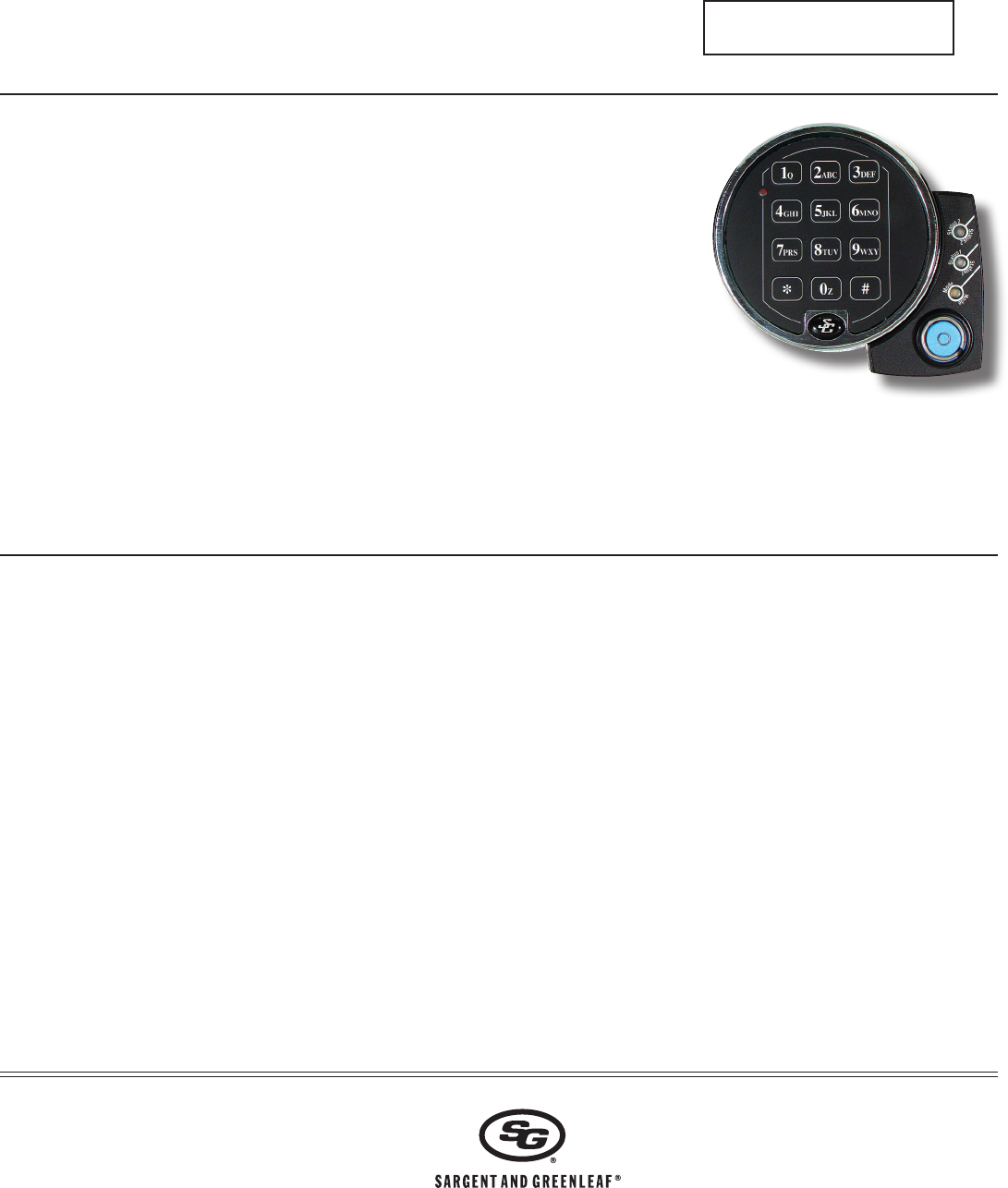
Programming and Operating Instructions
Models 6126 and 6127 Audit Lock
Sargent & Greenleaf, Inc.
PO Box 930, Nicholasville, Kentucky 40340-0930 USA
Phone (859) 885-9411 Phone (800) 826-7652
FAX (859) 887-2057 FAX (800) 634-4843
Sargent & Greenleaf S.A.
9, chemin du Croset
1024 Ecublens, Switzerland
Phone +41-21 694 34 00
FAX +41-21 694 34 09
Copyright© 2012, Sargent & Greenleaf, Inc. Document 630-711 (Revised 3/5/2013)
General Notes
• TheS&GAuditLockisbuiltusingsophisticatedelectroniccircuitry.Theselocksare
suitableforindooruseonly.
• Thekeypadshouldonlybecleanedwithasoft,drycloth.Avoidsolventsorliquids.
• Neverattempttolubricatethelockorkeypadcomponents.Serviceshouldonlybe
performedbyaqualifiedtechnician.
• Anytimethekeypadisremovedfromitsmountingbase,eitherdisconnectthe
lockcableorsupportthekeypadsothatitdoesnothangbythecable.Thiscould
adverselyaffectthecableconnectororthekeypadreceptacle.
• Eachtimeabuttonispressedandthelockacceptstheinput,itemitsa“beep.”
• AllthelettersoftheEnglishalphabetaredisplayedonthekeypad.Thisallowsyou
todevisenumeric,alphanumeric,orword-basedcodes.Usewhateverapproachworksbestforyou.
• Allcodesendwith#.Thissignalsthelockthatyouhavefinishedenteringalldigitsofthecode.
• Thelockrespondswithdifferentbeepsequencestoindicatedifferentconditions.Thebeepsareindicatedintheexamples
bythesymbole.Forexample,fivebeepsareindicatedbye e e e e . Alwayswaitforeachsetofbeepstoendbeforeentering
anothernumberorletteroryouwillinterruptthelock’sinstructions.
1.0 GENERALINFORMATION ...................................02
1.1 AboutYourLockingSystem .................................02
1.2 Factory Default Settings ......................................02
2.O OPERATINGTHELOCK ......................................03
2.1O OperatingMode,PINPositions,andUserCodes ...03
2.1.1 OperatingMode ..................................................03
2.1.2 SettingtheOperatingMode .................................03
2.2 PINPositionsandAccessResponsibilities .............04
2.3 BeepPatterns ..................................................... 05
2.3.1 BeepPatternTable .............................................05
2.4 OpeningtheLock ................................................ 05
2.5 KeypadInputErrorsandClearingtheLock ...........06
2.6 PenaltyTime ......................................................06
2.7 BoltExtensionIndicator ......................................06
2.8 KeypadTamperIndicator(anoptionalfeature) ......06
2.9 LowBatteryIndicator ..........................................06
2.10 Changing Batteries .............................................. 06
2.11 iButtonTouchKey ...............................................06
3.0 PROGRAMMINGTHELOCK................................07
3.1 Command22:ChangingaPINCode ....................07
3.2 Command28:AuditDownload ............................07
3.3 Command43:IdentifyingtheTypeofLock ...........08
3.4 Command67:ManagementResetCode ..............08
3.5 Command 73: Set Date.......................................08
3.6 Command74:AddorDeleteUserPositions ..........08
AddaNewUserPosition .............................08
DeleteaUser .............................................09
3.7 Command74:SettingUptheTimeDelay .............09
TimeDelayFeature .....................................09
Set time delay duration ...............................09
Changingtheopeningwindowduration ......... 10
3.8 Command77:PINPositionVerification .................10
3.9 Command78:SetTime ......................................10
4.0 Command38:SettingtheDuressAlarmFeature ...11
EnabletheDuressAlarmFeature .................11
DisablingtheDuressAlarmFeature ..............11
AppendixASpecifications ....................................11
Warranty ............................................................11
PinCodePositionVerificationWorksheet ...........................12
TABLE OF CONTENTS
•FürAnweisungenaufDeutschbesuchenSiebittediefolgendeWebsite:
•Paraobtenerinstruccionesenespañol,visitelasiguientepáginaweb:
•Pourobtenirlesinstructionsenfrançais, veuillez consulter le site ci-dessous:
•Peristruzioniinlinguaitaliana,visitareilsitowebseguente:
•如果要获取中文版的说明,请访问以下网址:
www.sargentandgreenleaf.com/
OPinstr.php
page 2
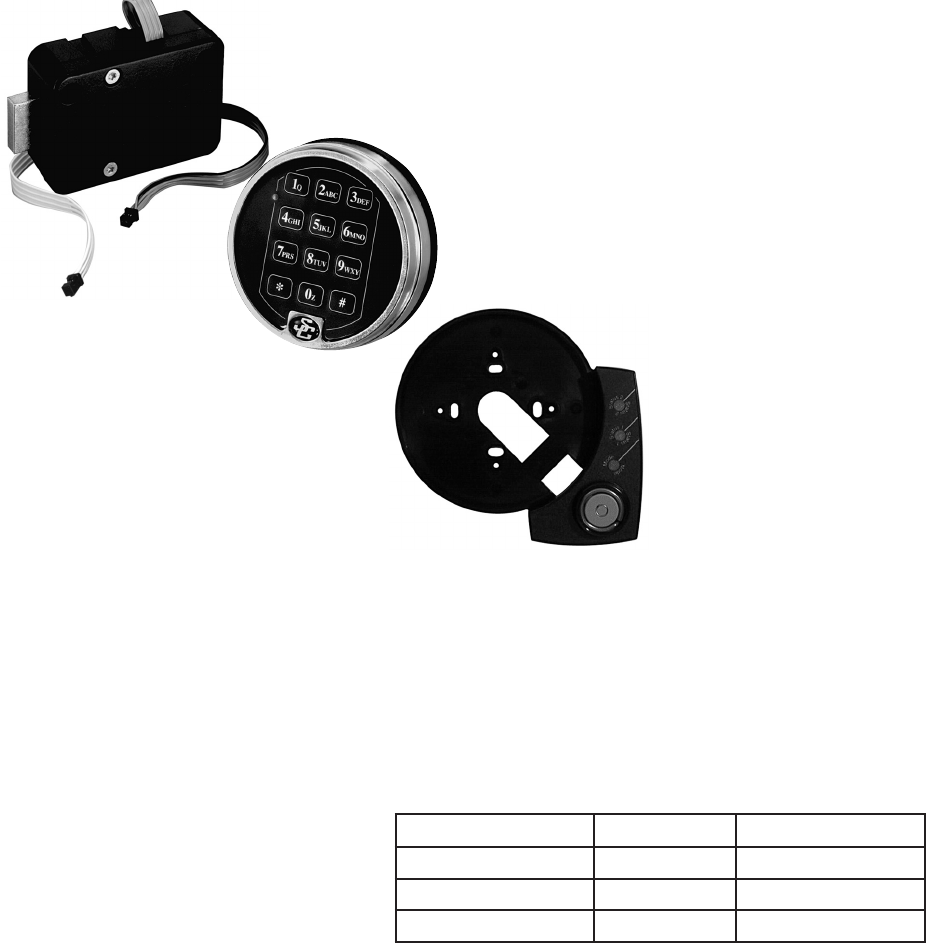
S&G Audit Lock motorized lock body—housedwithinthesafe.
Keypad Extension Base — Installed
underthekeypad.Theextensionbase
providesagreenLEDtoindicate“Status
1”andaredLEDtoindicate“Status2”
andayellowLEDtoindicate“Mode”of
lockoperation.Theextensionbasealso
providesaportforcommunicationwith
TouchKeys.
Keypad—onfrontofsafedoor.Thisisa12-keyalphanumeric
keypadusedtoenterPINcodesandprogrammingcommands.
Keypadstylesmayvary,dependingontheapplication.
1.0 — General Information
1.1 — About Your Locking System
TheS&GAuditLockElectronicLockhasthefollowinghardwarecomponents:
Eachtimeyoupressanumber,letter,orothercharacteronthekeypad,itbeepsandthekeypad’sredLEDflashes.Ifthereis
nobeeporLEDflash,checkthebatteriesandtryagain(Seesection2.10—ChangingtheBatteries).
The#keyactsasanenterfunctionandmustbeusedaftereachcodeentry.
The✻keyisusedwithProgrammingCommandCodes.Itmayalsobeusedtoclearthekeypadifthereisaninputerror,by
entering the ✻keytwice.
1.2 — Factory Default Settings
TheS&GAuditLockisshippedfromSargent&Greenleafwithfactorydefaultsettings:
•MultipleUserMode-enabled
•TimeDelay-zero(0)minutes
•Duress-disabled
•Positions00,02,and10havedefault
PINCodessetatthefactory:
PIN Description PIN Position Default PIN Code
ProgrammerCode 00 123456
ManagerCode 02 020202
UserCode 10 101010
TheProgrammerCode(PC)canonlysetuptheoperatingparametersofthelockanddownloadtheaudittraildata.
TheProgrammerCodecannotopenthesafe.
Thislockhasthecapacityforupto30PINCodepositions;1Programmer,3Managersand6Supervisorswhomanagethe
lockprograms,andupto20Userswhoopenandclosethelock.
IfthelockstillhastheoriginalS&Gfactorydefaultsettings,youcanopenthelockbyenteringaPINpositionandPINCode,
whichmakesupan8-digitUsercode,followedbythe#key.
Toopenthelock,usethefactorysettingforPINposition10,withPINCode101010.Enter:10101010#.Lockopens.If
thelockdoesnotopenandbeeppatternswereheardafterpressingthe#key,referencesection2.3.1“BeepPatterns”to
identifycondition.WerecommendthatUserschangetheirPINCodesimmediatelyafterthePINpositionsareassigned(see
Section 3.1).

page 3
2.0 — Operating the Lock
2.1 — Operating Mode, PIN Positions, and User Codes
2.1.1 — Operating Mode
TheS&GAuditLockhasanaccesshierarchyofManagers(PINpositions01,02,and03),Supervisors(PINpositions04,
05,06,07,08and09),andUsers(PINpositions10through29).Seethetableonpage4foraccessprivileges.
ThelockcanbeconfiguredtooperateinthreedifferentUseraccessmodes.
•MultipleUsermode—anyvalidcode(Supervisor,Manager,orUser)canopenthelock.
•Manager/Employeemode—theManagersorSupervisorsenable/disabletheaccessprivilegeofUserCodesholders.
WheninthismodetheManagerandSupervisorCodesdonotopenthelock.
•DualControlmode—twoindependentcodesareneededtoopenthelock.Manager,SupervisorandUserCodescanbe
usedtoopenthelockinthismode.
2.1.2 — Setting the Operating Mode
Enable the Manager/Employee Mode
ThelockmaybeenabledforManager/Employeemodebyperformingthefollowingsteps:
Step1. Enter: 32✻
Step2. Enter: 2-digitProgrammerorManagerPINposition(00-03)
6-digitPINCodeforthePINpositionentered#e e e e e
Step3. Enter: 2(FunctionNumber)
# e e e
Step4. Enter: 2(FunctionNumber)
# e e e
ThelocknowrequiresinputofaManagercodetoenabletheUsercodes.
Enable the Dual Control Mode
ThelockmaybesetforDualControlmodeoperationbyperformingthefollowingsteps:
Step1. Enter: 32✻
Step2. Enter: 2-digitProgrammerorManagerPINposition(00-03)
6-digitPINCodeforthePINpositionjustentered#e e e e e
Step3. Enter: 3(FunctionNumber)
# e e e
Step4. Enter: 3(FunctionNumber)
# e e e
ThelockisnowsetinDualControlmoderequiringtwo valid opening codes to gain access.
Enable Multiple User Mode
ThelockmaybeenabledforMultipleUsermodebyperformingthefollowingsteps:
Step1. Enter: 32✻
Step2. Enter: 2-digitProgrammerorManagerPINposition(00-03)
6-digitPINCodeforthePINpositionjustentered#e e e e e
Step3. Enter: 4(FunctionNumber)
# e e e
Step4. Enter: 4(FunctionNumber)
# e e e
ThelockissettoMultipleUsermode,andcanbeopenedusinganyvalidopeningcode.
page 4
2.2 — PIN Positions and Access Responsibilities
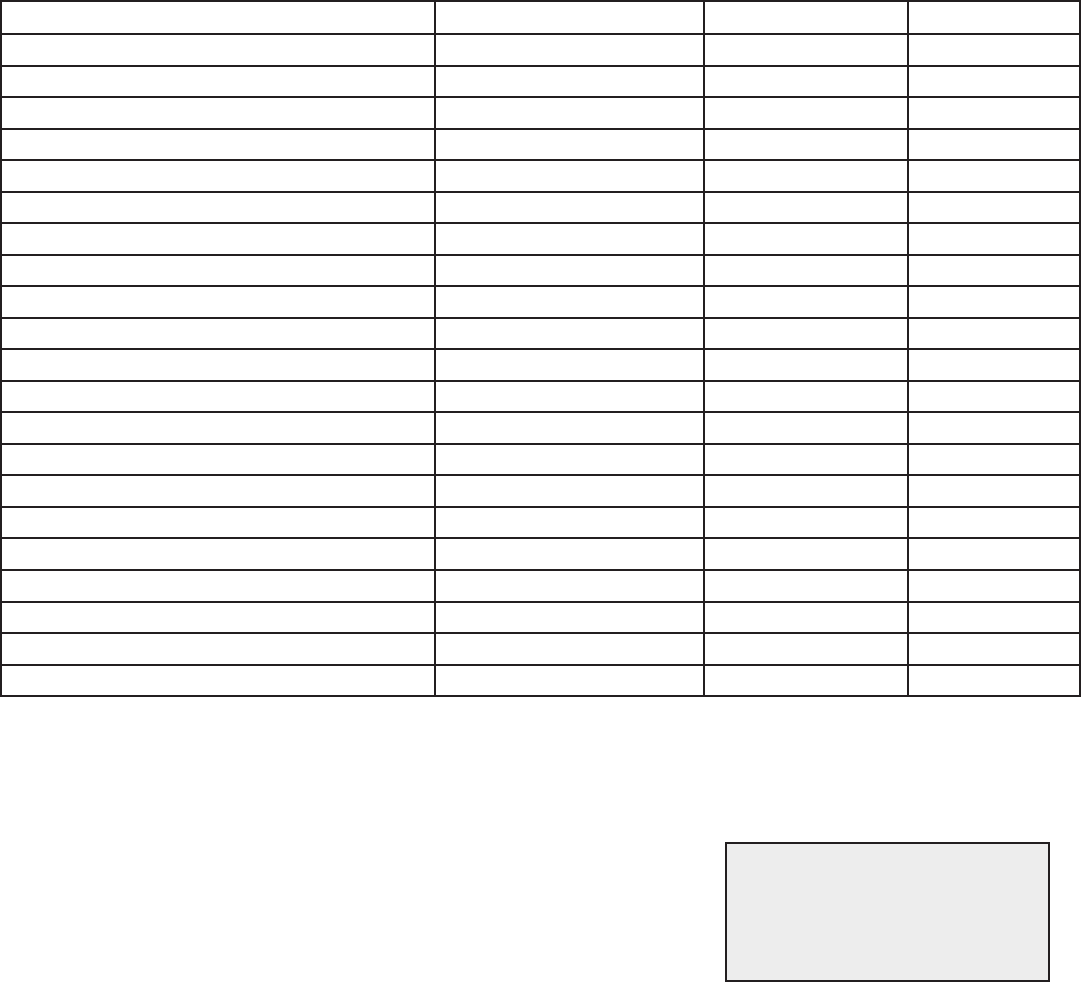
ThissectiondefineseachPINpositionandtherespectiveUserfunctionsassummarizedinthefollowingtable.
PINposition00(Programmerposition)canonlyconfigurethelockanddownloadtheaudittrail,butcannotopenanylocks.
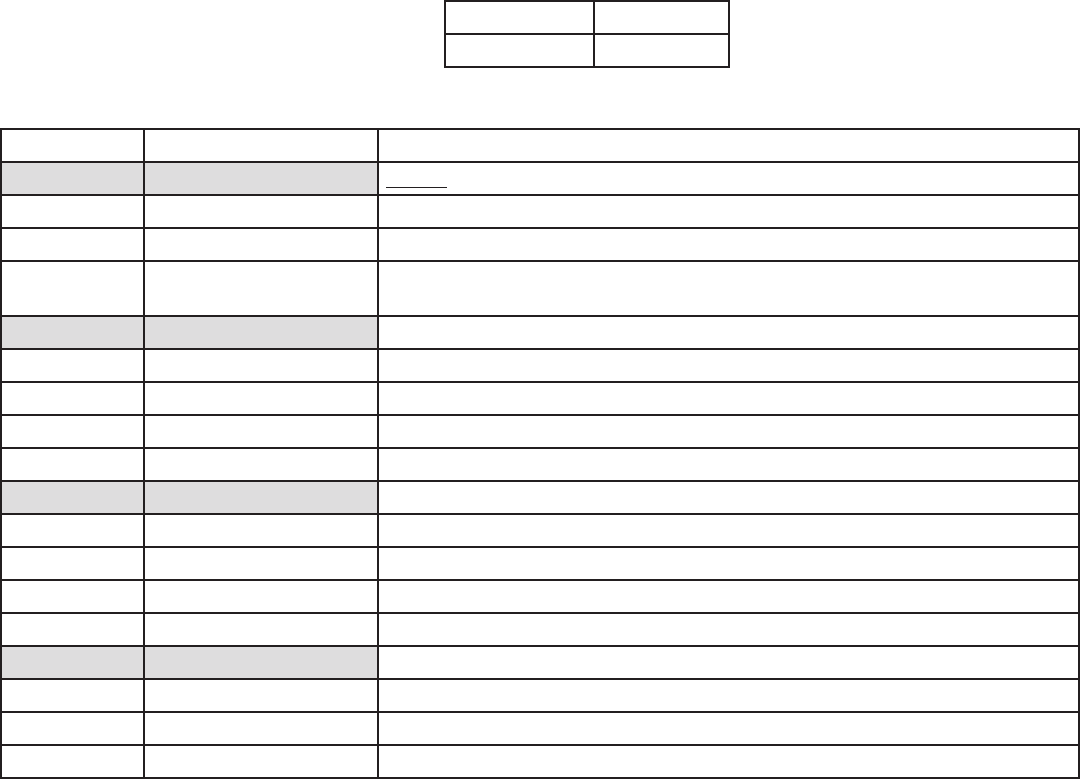
EachUserisassigneda2-digitPIN(PersonalIdentificationNumber)positionanda6-digitPINCode.ThePINposition
identifiesthetypeofUser(Programmer,User,etc.)ThePINCodeallowstheUsertoaccessthelock.Togetherthesetwo
codesformthe8-digitUserCode.EachUsercanchangehisownPINCodebutnothisPINposition.
UserswillalwaysenterboththeirPINpositionandtheirPINCode,followedbythe#key.
PIN POSITION PIN CODE
02 020202 #
Example
PIN POSITION POSITION DESCRIPTION ACTIVITY
00 Programmer Code Cannotopenthelock.
CanchangeitsownPINcode,butcannotaddordeleteotherPINcodes.
Cansendduressalarm(whenprogrammed).
Canbeusedtoprogramlockfunctions(auditdownloads,timedelay,settime,
duress, and date).
01-03 Manager Codes Canopenthelock.
CanaddanddeleteUsers.
Canstartthetimedelay(whenprogrammed).
Cansendduressalarm(whenprogrammed).
CanchangeitsownPINcode.
04-09 Supervisor Codes Canopenthelock.
CandeleteUsers.
Canstartthetimedelay(whenprogrammed).
Cansendduressalarm(whenprogrammed).
CanchangeitsownPINcode.
10-29 User Codes Canopenthelock.
Canstartthetimedelay(whenprogrammed).
Cansendduressalarm(whenprogrammed).
CanchangeitsownPINcode.
page 5
2.3 — Beep Patterns
ThefollowingtableliststhebeeppatternsthatwillbeheardwhenusingtheS&GAuditLock.
(KEBistheabbreviationforKeypadExtensionBase).
2.3.1 — Beep Patterns(beep1isthesoundemittedwhenanysinglebuttonispressed;beep2ispitchedlower).
Action / Condition Tone & Keypad LED KEB LED (if present) Duration
normal - - -
eachkeystroke 1beep1-1 cycle
lowbattery 2beep1red 5 cycles
batterydepleted 20beep1red 1 cycle
tamper indication 3beep1+3beep2+3beep1red 2 cycles
start of time delay 3quickbeep1red 1 cycle
timedelaycountdown 1beep1red every 10 seconds
timedelayexpired 10quickbeep1green 1 cycle
openingwindowcountdown 2beep1green every 6 seconds
boltextension 1beep2+1beep1red 1 cycle
code input during penalty time 2brap red 1 cycle
codeinputwhilelockisdisabled 2beep2red 1 cycle
lockID* 4/5beep1+2beep2green 1 cycle
enablelock(inmanager/employeemode) 4beep1green 1 cycle
disablelock(inmanager/employeemode) 2beep2red 1 cycle
access to program modes 5beep1green 1 cycle
program argument confirmation 3beep1green 1 cycle
program complete 3beep1green 1 cycle
Mode77—PINinuse 1beep2red 1 cycle
Mode77—PINnotinuse 1brap red 1 cycle
incorrect input or access denied 1brap red 1 cycle
*4beepsindicateastandardS&GAuditLock
5beepsindicateapush/pullS&GAuditLock
2.4 — Opening the Lock
TimeDelay—Thelockmaybeprogrammedwithatimedelayfrom1to99minutesanda1to10minuteopeningwindow.
Ifyourlockdoesnotusethetimedelay:
Enter: Your2-digitPINposition
Your6-digitPINCodefollowedby#
Turnthesafehandletotheunlockedpositionwithin6seconds.
If your lock uses the time delay
Enter: Your2-digitPINposition
Your6-digitPINCodefollowedby#e e e(lockwillbeepthreetimesrapidly)
Thepre-settimedelayperiodstartsafteryouenteryourcode.Duringthetimedelayperiod,thelockbeepsonceevery10
seconds.Attheendofthetimedelay,thelockbeepsrapidly10timestosignalthestartoftheopeningwindow.
Duringtheopeningwindow,thelockbeepstwiceevery6seconds.Youmustnow:
Enter: Your2-digitPINagain
Your6-digitUserCodefollowedby#again
Turnthesafehandletotheunlockedpositionwithin6seconds.
CAUTION: During normal entry, don’t
wait more than 10 seconds between
entries or the lock will clear and you
will have to start over.
page 6
2.5.— Keypad Input Errors and Clearing the Lock
IfyoumakeamistakewhileenteringaUserCode,press✻twiceatanytimetoclearthelockandstartover.Ifyouheara
singlelongbeepafterenteringthe#keyyouhavemadeanerror.Press✻keytwicetoclearandtryagain,oryoucanwait10
secondsandthelockwillclearitself.
2.6 — Penalty Time
Ifyouenter5incorrectcodesinarow,thelockgoesintoa10-minutepenaltytimeandcannotbeopened.Onceinpenalty
time,additionalinputdoesnotaffectthelock,andyoumustwait10minutesbeforeanyvalidcodeentrywillbeaccepted.
2.7 — Bolt Extension Indicator
Whenthelockboltextendstothelockedposition,youwillhearonedouble-beep
(lowthenhighpitch).
2.8 — Keypad Tamper Indicator (optional)
Thelockrecordseachtimethekeypadhousingisunseatedorremovedfromthebase.Ifthehousingisdisturbed,thekeypad
tamperindicatorbeepstheSOSwarning(3short/highpitchbeeps;3short/lowpitchbeeps;3short/highpitchbeeps)the
nexttimeyouenteravalidaccesscode.
Thelockwillnotopenatthispoint.TheSOSsignalisrepeatedtwice.Whenitstops,enteravalidcodewithinoneminuteto
resetthekeypadtamperindicatorandopenthelock.
Thekeypadwillnotworkwhendisconnectedfromthebase.IfthelockisinManager/Employeemode,itmayhavetobe
re-enabledbyaManagerorSupervisorcode.
2.9 — Low Battery Indicator
IfyouenteracorrectUserCodeandhear5double-beepswhenthelockopens,thebatteriesarelow.Changethebatteries.
Ifthebatteriesaresolowthelockcan’tworkproperly,thelockbeeps20timeswhenaUsercodeisentered.Thelockwill
notopen.Changethebatteriesrightawayandre-enteraUsercodetoopenthelock.
The9Vbatteriesarelocatedbehindthekeypad.
2.10 — Changing the Batteries
(These instructions are for the standard 2-battery keypad. Your lock may use a different keypad.)
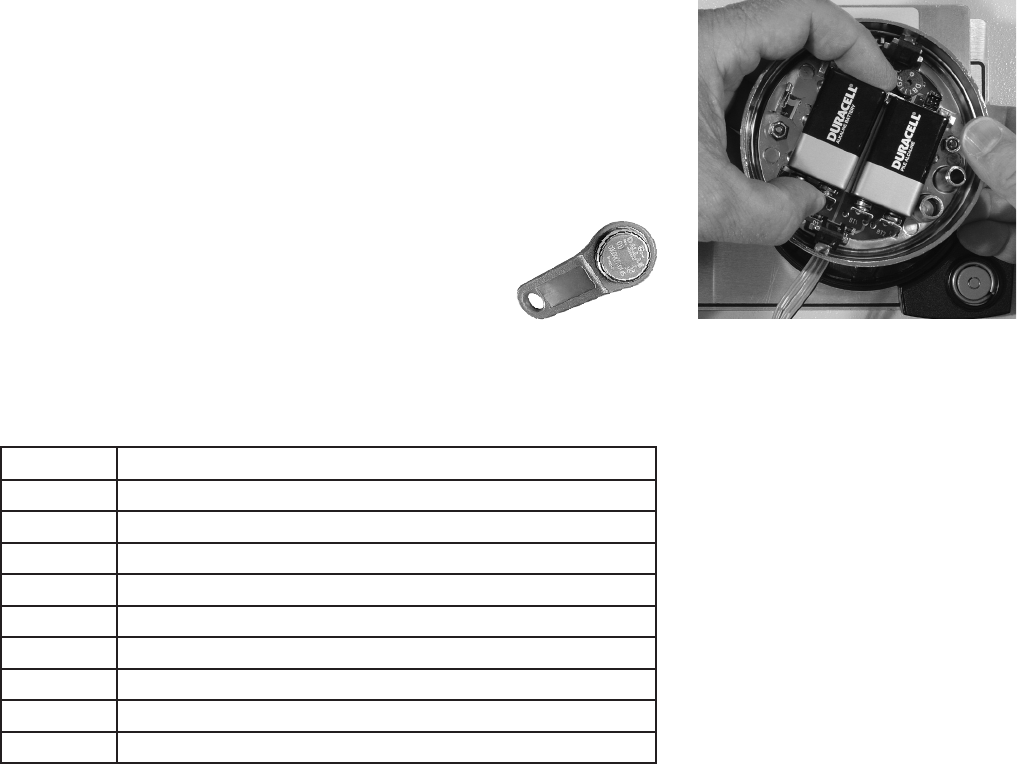
Thelockwillnotloseanycodesorprogramsettingsduringbatterychanges.Yourlock
usestwo9-voltalkalinebatteries.WerecommendDuracell®alkalinebatteries.
Tochangethebatteries,carefullyremovethekeypadhousingbyliftingthebottom
edge(closesttotheS&Glogo)andeasingitoffthebase.Detachtheoldbatteries
fromtheterminals.Insertthenewbatteries,supportingthetopofeachbatteryholder
withyourotherhandtopreventbendingorbreakingtheholder.
2.11 — iButton Touch Key
Thetouchkeyallowsyoutotransfertheaudittrailfromthe
locktoyourcomputer.Theaudittrailisatimeanddate
stampedrecordofalllockactivity.
Formoreinstructionsondownloadingtheaudittrailsee
Section 3.2 on page 7 of this manual.
3.0 — Programming the Lock
Thefollowingprogramcommandsallowyoutoperformavarietyoflockfunctions.
Command Description / Function
2 2 ✻ChangePINcode.
2 8 ✻Downloadaudittrail.
3 2 ✻Set mode of operation.
3 8 ✻Enableordisableduress(optionalduressmodulerequired).
4 3 ✻Identifythetypeoflock.
7 3 ✻Set the date.
7 4 ✻AddordeleteUserPINcodesandsettimedelay.
7 7 ✻VerifyaPINposition.
7 8 ✻Set the time of day.
page 7
3.1 — Command 22: Changing a PIN Code
UseCommand22tochangeyourownPINCode.Alwaysleavethesafedooropenwhilechangingcodes.Whenchanginga
UserCode,youwillenterboththe2-digitPINpositionandthe6-digitPINCode.ThePINpositiondoesnotchange.APIN
Codecancontainanynumbers/lettersexcept#or✻
TochangeaPINCode,performthefollowingsteps:
Step1. Enter: 22✻
Step2. Enter: 2-digitPINposition
Current6-digitPINCodefollowedby#e e e e e
Step3. Enter: 2-digitPINposition
New6-digitPINCodefollowedby#e e e
Step4. Enter: 2-digitPINpositionagain
New6-digitPINCodefollowedby#againe e e
Try the new PIN Code at least three times to confirm operation before closing the safe door.
3.2 — Command 28: Audit Download
TheS&GAuditLockAuditTrailcanstoreasmanyas400timeanddateevents.Someexamplesofeventsare:
•AddingordeletingaUsercode.
•Changingacode.
•Openingorclosingthelock.
•Programmingcommands,suchassettingthedate.
TheaudittrailcanbedownloadedtoaTouchMemorykeyanduploadedtoacomputerusingtheSargentandGreenleaf
AuditLockAuditTrailSoftware.Completeinstructionsareprovidedwiththesoftware.
TodownloadtheAuditTrail,performthefollowingsteps:
Step1. Enter: 28✻
Step2. Enter: 2-digitProgrammerPINposition(00)and6-digitPINCodfollowedby#
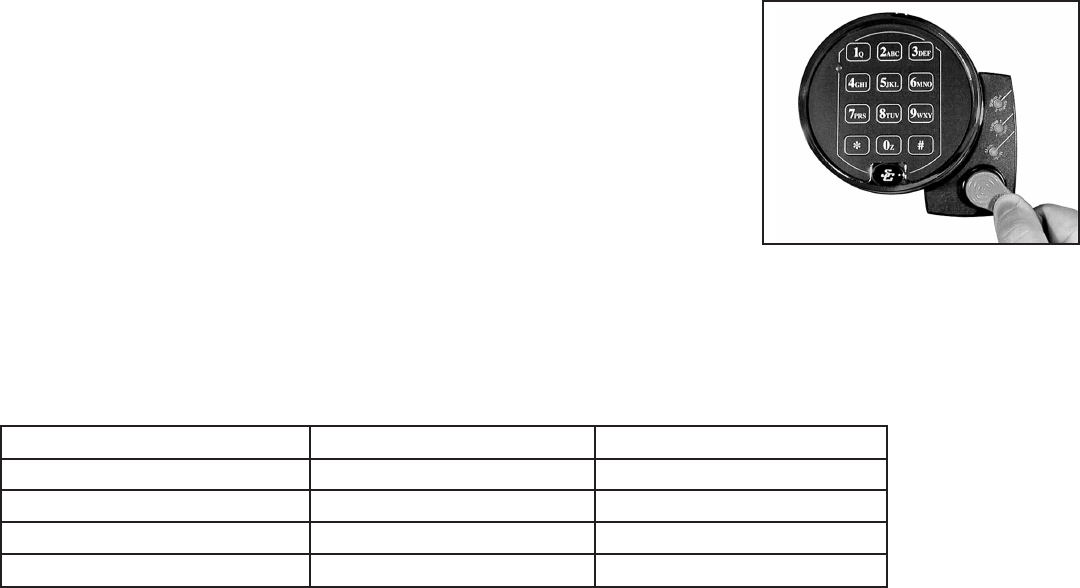
Step3.PressthesilverfaceoftheTouchMemoryKeyintothecorresponding
port(therounddepression)onthekeypadextension.Thetouchkey
willsnapintoplaceandwillberetained.
TheyellowLEDwillremainonwhiletheaudittrailisdownloadingtotheTouchMemory
Key.Thistakesabout20seconds.Thelockbeeps5timesrapidlywhenthedownload
is complete.
Ifyouhearanerrorbeep(onelongcontinuousbeep),theaudittrailwasnotdown-
loadedproperly.Youmuststartthedownloadover,beginningwithStep1.Afteryou’ve
successfullydownloadedtheaudittrail,itisstoredintheTouchKey.Followthe
instructionsprovidedwiththeSargentandGreenleafauditsoftwaretouploadthedata
to your computer.
3.3 — Command 43: Identifying the Type of Lock
Attimes,aservicetechnicianmayneedtoknowwhattypeoflockismountedonthesafedoor.
Toidentifythelock,performthefollowing2steps:
Step1. Enter: 43✻
Step 2. Listenforthethreesetsofbeeps.Usethetablebelowtodeterminethetypeoflock.
Beep Set Number of Beeps Number of Beeps
1stset(highpitchedbeeps) 4 5
2ndset(lowerpitchedbeeps) 2 2
3rdset(highpitchedbeeps 4 2
Type of Lock Standard Audit Lock (6126) Push/Pull Audit Lock (6127)

page 8
3.5 — Command 73: Set Date
Youmustsetthedateinordertousetheaudittrailfunction.ThedateshouldbeenteredinDDMMYYformat,whereDD=
day,MM=month,andYY=year.TheDateshouldbesetwhenthelockisfirstsetupandpreparedforuse.Tosetthedate,
performthefollowingsteps:
Step1. Enter: 73✻
Step2. Enter: 2-digitProgrammerPINposition(00)and6-digitPINCodefollowedby#e e e e e
Step3. Enter: 2-digitManagerorSupervisorPINposition(01-09)and6-digitPINCodefollowedby#e e e e e
Step4. Enter: DateinDDMMYYformatfollowedby#e e e
Step5. Enter: ConfirmdatebyenteringitagaininDDMMYYformatfollowedby#e e e
Example
TosetthedateasJuly4,2012(usingthefactorydefaultCodes):
Step1. Enter: 73✻
Step2. Enter: 00followedby123456#e e e e e
Step3. Enter: 02followedby020202#e e e e e
Step4. Enter: 040712#e e e
Step 5. Enter: 040712#e e e
3.6 — Command 74: Add or Delete Code Positions
Add a New User Position
ToaddordeleteUserpositions,performthefollowingsteps:
Step1. Enter: 74✻
Step2. Enter: 2-digitManagerPINposition(01,02,or03)andthe6-digitPINCodefollowedby#e e e e e
Step3. Enter: New2-digitPINpositionandthe6-digitPINCodefollowedby#e e e
Step4. Enter: NewPINpositionand6-digitPINCodefollowedby#againtoconfirme e e
AfterbeingassignedaPINpositionandcode,werecommendeachUserchangehisorherPINCodeusingCommand22.
Example
AddPINposition14(usingthefactorydefaultcodes).NotethatforthenewUseryoucanassignanyPINCodeaslongasit
does not contain ✻or#asoneofthedigits.
Step1. Enter: 74✻
Step2. Enter: 02and020202#e e e e e
Step3. Enter: 14and141414#e e e
Step4. Enter: 14and141414#e e e
3.4 — Command 67: Management Reset Code
TheManagementResetCodeisan8-digitcodethatallowsyoutosetorresettheManagerCodestoredinPINposition01.
YourlockmayormaynothaveaManagementResetCode,dependingonhowitwasordered.SomelockshaveaManage-
mentResetCodethatisfactorysetandcannotbechanged.OthervariationsofthelockhaveaManagementResetCode
thatisfactoryset,butcanbechangedbytheuserbeforetheProgrammerCodeischangedforthefirsttime.Ifyourlock
doesnotallowyoutocompleteanyoftheproceduresinthissection,itdoesnothaveaManagementResetCode,orithasa
ManagementResetCodethatisnotchangeable.
3.4.1 — Use the Existing Management Reset Code to Set a New 01 Manager Code
Step1. Enter: 67✻
Step2. Enter: 8-digitManagementResetCode#e e e e e
Step3. Enter: 01followedbyanew6-digitManagerCode#e e e
Step4. Enter: 01followedagainbythenew6-digitManagerCode#e e e
3.4.2 — Changing the Existing Management Reset Code to a Code of Your Own Choosing
Step1. Enter: 67✻
Step2. Enter: 00123456#e e e e e
Step3. Enter: new8-digitManagementResetCode#e e e
Step4. Enter: new8-digitManagementResetCodeagain#e e e

page 9
Delete a User
TodeleteaUseryouonlyneedtoknowhis2-digitPINpositionandperformthefollowingsteps.
Step1. Enter: 74✻
Step2. Enter: 2-digitManagerorSupervisorPINpositionand6-digitPINCodefollowedby#e e e e e
Step3. Enter: 2-digitPINpositiontobedeletedfollowedby#e e e
Step4.Enter: 2-digitPINpositionfollowedby#againtoconfirme e e
Example
DeletetheUserforPINposition14.
Step1. Enter: 74✻
Step2. Enter: 02and020202#e e e e e
Step3. Enter: 14#e e e
Step4. Enter: 14#e e e
3.7 — Command 74: Setting Up the Time Delay
Time Delay Feature
TheS&GAuditLockcanbeprogrammedwithatimedelay.Timedelayappliesonlytothoseuserswhocanopenthelock.
Thetimedelaycanbesetfrom0to99minutes.TheredLEDonthekeypadflashesandasinglebeepsoundsevery10sec-
ondsasareminderthatthelockisinthetimedelayperiod.Whenthetimedelayexpires,thelockemits10rapidbeepsto
indicatethatitcannowbeopened.DuringthisopeningwindowthelockbeepsandtheLEDflashestwiceevery6seconds.
Theopeningwindowfactorydefaultissetfor2minutes,andtheopeningwindowcanbesetfrom1to10minutes.
Toopenthelock,aUsermustenterhisorherUserCodetostartthetimedelayperiod,waitthelengthofthetimedelaype-
riodandthenenteravalidUserCodeduringtheopeningwindow.Ifthelockisnotopenedduringtheopenwindowperiod,it
automaticallyresetsandtheprocessmustberepeated.TheS&GAuditLockcomesfromthefactorywithnotimedelayset.
NOTES:
1.Ifthetimedelayhasalreadybeenset,changestotheopeningwindowand
timedelaydurationcanonlybemadeduringtheopeningwindow.
2.UseCommand74*tosetboththetimedelayandtheopeningwindow.
Entertherespectivefunctionnumber00or01,forthedesiredsetting.
IMPORTANT: Do not set the time delay until you have finished all other programming functions
oryouwillhavetowaitthroughthetimedelaybeforemakinganyotherprogrammingchanges.
Set time delay duration
Ifthetimedelayhasalreadybeenset,enteraUserCodetostartthetimedelay.Whenthetimedelayexpires(thelockemits
10rapidbeeps)andtheopeningwindowhasbegun,immediatelyproceedtochangethetimedelayasfollows:
Step1. Enter: 74✻
Step2. Enter: 2-digitProgrammerPINposition(00)andthe6-digitPINCodefollowedby#e e e e e
Step3. Enter: 00(FunctionNumber)followedby#e e e
Step4. Enter: Timedelayminutes(0-99)followedby#e e e
Step5. Enter: Timedelayminutes(0-99)followedby#againe e e
Example
Tosetthetimedelayto10minutes:
Step1. Enter: 74✻
Step2. Enter: 00(PC2digitposition)and123456#(PC6digitCode)e e e e e
Step3. Enter: 00#(FunctionNumber)e e e
Step4. Enter: 10#(NumberofMinutesTimeDelay)e e e
Step5. Enter: 10#(NumberofMinutesTimeDelay)e e e
Toeliminatethetimedelayperiod,simplyenterzero(0)forthetimedelayminutes.
page 10
Changing the opening window duration
Ifthetimedelayhasalreadybeenset,enteraUserCodetostartthetimedelay.Whenthetimedelayexpires(thelockemits
10rapidbeeps)andtheopeningwindowhasbegun,immediatelyproceedtosettheopeningwindowminutesbyperforming
thefollowingsteps:
Step1. Enter: 74✻
Step2. Enter: 2-digitProgrammerPINposition(00)andthe6-digitPINCodefollowedby#e e e e e
Step3. Enter: 01(FunctionNumber)followedby#e e e
Step4. Enter: Openingwindowminutes(1-10)followedby#e e e
Step5. Enter: Openingwindowminutesagain(1-10)followedby#e e e
Example
Tosettheopeningwindowto5minutes:
Step1. Enter: 74✻
Step2. Enter: 00(PC2digitpinposition)and123456#(PC6digitpinCode)e e e e e
Step3. Enter: 01#(FunctionNumber)e e e
Step4. Enter: 5#(NumberofMinutesForOpeningWindow)e e e
Step5. Enter: 5#(NumberofMinutesForOpeningWindow)e e e
Iftimedelayhasnotbeenpreviouslyset,thesettingoftimedelaymaybeginimmediatelyuponinputofthecorrect
codesequence.
3.8 — Command 77: PIN Position Verification
UsethiscodetoverifythataUserhasbeenassignedtoaPINposition.Forexample,itwilltellyouwhetherPIN07hasa
PINCodeinthisposition.InordertomanagethePINUserCodes,theattachedPINCodePositionVerificationWorksheetis
recommended (see page 12).
Step1. Enter: 77✻
Step2. Enter: PINpositiontobeverifiedand#
OnelongbeepmeansnoCodeissetforthatposition.OneshortbeepmeansaCodeisset.
3.9 — Command 78: Set Time
Youmustsetthetimeinordertousetheaudittrailfunction.ThetimeshouldbesetinHHmmformatbasedona24-hour
clock,whereHH=hoursandmm=minutes.Thetimeshouldbesetwhenthelockisfirstsetup.Thetimeistoalwaysbe
setinthelocalstandardtime.Localstandardtimemustbeseteventhoughdaylightsavingstimemaybeineffect.Toset
timeperformthefollowingsteps:
Step1. Enter: 78✻
Step2. Enter: 2-digitProgrammerPINposition(00)and6-digitPINCodefollowedby#e e e e e
Step3. Enter: 2-digitManagerorSupervisorPINposition(01-09PINpositionsonly)and6-digitPINCode
followedby#e e e e e
Step4. Enter: TimeinHHmmformatfollowedby#e e e
Step5. Enter: TimeinHHmmformatfollowedby#againtoconfirme e e
Example
Tosetthetimeas3:15p.m.,becoming15:15(usingthefactorydefaultCodes):
Step1. Enter: 78✻
Step2. Enter: 00and123456#e e e e e
Step3. Enter: 02and020202#e e e e e
Step4. Enter: 1515#e e e
Step5. Enter: 1515#e e e

page 11
4.0 — Command 38: Setting the Duress Alarm Feature
Themodel6128/6129lockhasanoptionalduress,orsilentalarm,option.Theoptionalduressmodulemustbeconnected
tothelockandyouralarmsystemforthisfeaturetowork.
Using the Duress Alarm Feature
Tosendaduressalarmtothealarmcenter,enteraUserCodethatisonenumberhigherorloweronthelastnumberofa
User’snormalPINCodeandpressthe#key.
Forexample,ifthenormalUserCodeis123456forPINposition02,theUsercanactivatetheduressalarmbyentering
02123455or02123457,followedby#.IftheUserCodeendsin0,use1or9toactivatetheduressalarm.Thelockwill
operatenormallywhenaDuresscodeisentered.
AllUserCodescansendtheduresssignalatanytime.Itcanalsobesentduringprogrammingsequences.
Enable the Duress Alarm Feature
Afterthelockisinstalledwiththemodule,theduressfeaturemustbeenabledbyperformingthefollowingsteps:
Step1. Enter: 38✻
Step2. Enter: 2-digitProgrammerorManagerPINposition(00-03)and6-digitPINCodefollowedby#e e e e e
Step 3. Enter: 1(FunctionNumber)followedby#e e e
Step4. Enter: 1(FunctionNumber)followedby#e e e
Thelockcannowsendaduresssignalthroughtheinterfacemodule.
Disabling the Duress Alarm Feature
Theduressfeaturecanbedisabledwithoutdisconnectingtheduressmodule,byperformingthefollowingsteps:
Step1. Enter: 38✻
Step2. Enter: 2-digitProgrammerorManagerPINposition(00-03)and6-digitPINCodefollowedby#e e e e e
Step3. Enter: 0(FunctionNumber)followedby#e e e
Step4. Enter: 0(FunctionNumber)followedby#e e e
Appendix A. Specifications
Below are the specifications for the S&G Audit Lock electronic safe locks and 61KP
keypads.
Lock dimensions
• Width: 2.4 inches (62 mm)
• Height: 1.1 inches (30 mm)
• Length: 3.32 inches (84 mm)
Keypad dimensions
• 4 inches diameter (101 mm)
• Height: 1.44 inches (36 mm)
Weight
• 1 pound (450 g)
• Housing/base: 0.7 pound (320 g)
• Module: 1 pound (450 g
Shipping weight
• 2.75 pounds (1250 g)
Finish
• Case: Black paint
• Cover: Black paint
• Keypad: Satin chrome plated (standard)
Power
• Two (2) 9-volt alkaline batteries in keypad (Duracell recommended)
Battery life
• Approximately 5000 openings
(based on use of Duracell alkaline batteries)
Note: Use of time delay will decrease battery life.
Low battery detection
• Beep/LED flash feedback from keypad (5 double beeps/flashes)
Operating temperature
• 32° to 120° F (0° to 50° C)
Keep batteries fresh when operating
at lower temperatures
WARRANTY
S&GAuditLockElectronicSafeLock
LimitedWarranty
Sellerwarrantsthatfortwo(2)yearsfromthedateofshipmentfromSeller’spointofmanufacture,thegoodswillbefreefromdefectsinmaterialand
workmanship,providedthegoodsarenormallyandproperlyusedaccordingtotheSeller’swritteninstructions.
THISWARRANTYISEXPRESSLYMADEINLIEUOFANYANDALLOTHERWARRANTIES,EXPRESSORIMPLIED.S&GDOESNOTWARRANTTHATTHE
GOODSAREMERCHANTABLEORFITFORANYPARTICULARPURPOSEEXCEPTASEXPRESSLYPROVIDEDHEREIN.
Seller’sentireliabilityandBuyer’sexclusiveremedyintheeventthatthegoodsdonotconformtotheforegoingwarrantyshallbeSeller’srepairor
replacementofthegoods(includingpaymentoffreightcoststoandfrompointofmanufacture).Thiswarrantydoesnotapplytobatteriesordamagefrom
batteryleakage.
SELLERSHALLHAVENOLIABILITYFORANYCONSEQUENTIAL,INCIDENTAL,INDIRECTORSPECIALDAMAGES.SELLERDOESNOTWARRANTITS
LOCKPRODUCTSTOBEIMPERVIOUSTOFORCIBLEORSURREPTITIOUSENTRY,ANDSELLERSHALLHAVENOLIABILITYFORDAMAGETOOR
LOSSOFPROPERTYSOUGHTTOBEPROTECTEDBYANYSUCHLOCK.
S&G Confidential
TheinformationcontainedinthisdocumentisproprietarytoSargent&Greenleaf,Inc.Publicationorduplicationofthiscopyrighteddocumentisstrictlyprohibited.

page 12
Position Description Code Set?
Yes or No
00 Programmer
01 Manager
02 Manager
03 Manager
04 Supervisor
05 Supervisor
06 Supervisor
07 Supervisor
08 Supervisor
09 Supervisor
10 User
11 User
12 User
13 User
14 User
15 User
16 User
17 User
18 User
19 User
20 User
21 User
22 User
23 User
24 User
25 User
26 User
27 User
28 User
29 User
PIN CODE POSITION VERIFICATION WORKSHEET
