Manual
User Manual:
Open the PDF directly: View PDF  .
.
Page Count: 13

!" # $% & ' ' ' '
1
A Manual of Brāhmī Keyboard Layout
for Mac OS X
Prachya Boonkwan
National Electronics and Computer Technology Center (NECTEC), Thailand
kaamanita@gmail.com, prachya.boonkwan@nectec.or.th

!" # $% & ' ' ' '
2
What is Brahmi Script?
Brahmi script is the oldest attested writing system of Ancient
India, apart from the undeciphered Indus script. Brahmi is an
abugida, i.e. each consonant has an individual inherent sound, such
as ! /ka/. It makes use of diacritic marks to modify a consonant with
a vowel, such as !% /ki/, !( /ku/, and !) /ke/. Some hypotheses state
that Brahmi is derived from Aramaic and Greek alphabets as a result
of language contact through commerce with Middle Eastern
merchants and Indo-Greek communities in Bactria. Brahmi is the
ancestor of many scripts used in today’s South, Central, and
Southeast Asia, such as Devanagari, Thai, Burmese, and Khmer.
Introduction
This manual and keyboard layout are designed to help you make use
of the Brahmi keyboard layout (v1.0). This keyboard layout is
developed to facilitate typing of Brahmi texts including vowel
diacritics (saras), conjunct consonants (saṃyoga), and Brahmi
numbers. It works with Mac OS X 10.10 onwards and is made
available for downloads from Prachya Boonkwan’s Github
(https://github.com/kaamanita/brahmi). The keyboard layout
was designed by Prachya Boonkwan as a hobby using Ukelele
Keyboard Layout Designer (available on App Store) and is
distributed under the MIT License. The keyboard icon represents
the consonant * /s/, which is short for Sanskrit.
Note that the keyboard layout is based on Unicode character
encoding. It cannot be installed on older operating systems that do
not support Unicode and will not work with non-Unicode
applications that rely on 8-bit character set. This manual is typeset
using the Unicode-enabled font Google Noto Sans Brahmi.
Instruction for Installation
Brahmi Keyboard Layout is packaged in a disk image file with the
DMG extension. Follow the instruction below to install the keyboard
layout.
1. Double click the file to open the disk image. A window for the
disk image will show up.
2. Double click the Keyboard Installer app.
3. Go back to the window of the disk image. Drag the file
Brahmi.keylayout to the app window.
4. Select a method of installation: (1) install for the current user,
or (2) install for all users. Click on the corresponding icon to
install the keyboard layout.
5. When finished, the keyboard installer app will close down
automatically.
6. Unmount the disk image.
!" # $% & ' ' ' '
3
7. Add this keyboard layout to the system. Go to System
Preferences > Keyboard.
8. In the Input Sources pane, push the + button. Under the
Others language, click Brahmi and push the Add button.
9. Log out and relog in to refresh the memory.
Using the Keyboard Layout
There are four states of pressing a keystroke in this keyboard layout.
Normal state: The Brahmi keyboard layout attempts to match each
keystroke to the Sanskrit romanization system as much as
possible. In most cases, consonants and vowels can be typed in
quite straightforwardly. For example, K is mapped to the
consonant ! /k/, and S to the consonant * /s/. Consonants and
vowels are combined automatically, e.g. typing ! [K] and ◌𑀺
[I]
will result in !% /ki/. There are certain cases where consonants
and vowels cannot be mapped to their positions due to the
linguistic dissimilarity between English and Sanskrit. For
example, the consonant + /ṅ/ is mapped to the position of
apostrophe ['], while the independent vowel , /ʔa/ to the position
of [Q]. A conjunct consonant can be typed in using the virāma
sign (◌𑁆
) at the position of [F]. For example, * /s/ + virāma + &
/t/ + virāma + - /r/ results in a conjunct consonant *. & . - /str/.
Finally, note that the independent forms of vowels are distributed
throughout the keyboard layout.
Shift state: The shift key is pressed for four specific purposes. First,
it makes a consonant aspirated. For example, pressing Shift + /
/g/ yields 0 /gh/. Second, it lengthens a vowel. For example,
pressing Shift + ◌𑀺
/i/ produces ◌𑀻
/ī/. Third, it upgrades the class
of a long vowel. For example, pressing Shift + ◌𑁂 /e/ will result in
◌𑁃 /ai/, while pressing Shift + ◌𑁂 𑀸
/o/ will result in ◌𑁃 𑀸
/au/. Fourth
and last, it converts a consonant into a diacritic sign. For
example, Shift + 1 /h/ yields a visarga ◌𑀂 /ḥ/, and Shift + # /m/
yields an anusvāra ◌𑀁 /ṃ/.
Alternate state: The alternate key is pressed for four specific
purposes. First, it gives the independent form of a vowel. For
example, pressing Alt + ◌𑁂 𑀸
/o/ yields 2 /ʔo/. Second, it produces
an alternative form of a consonant. For example, pressing Alt + 3
/l/ will give us the alternative form 4 /l/. Third, it produces the
non-digit numeral system of Ancient India. For example,
pressing Alt + minus [-] yields 5 (one hundred). Fourth and last,
it converts a consonant into a diacritic sign. For example, Shift +
# /m/ yields a candrabindu ◌𑀀 /ṁ/.
!" # $% & ' ' ' '
4
Shift and alternate state: This key combination is pressed for two
purposes. First, it yields the independent form of an upper class
long vowel. For example, pressing Shift + Alt + ◌𑁂 /e/ will result in
6 /ʔai/.
!" # $% & ' ' ' '
5
Keyboard Mapping
Consonants
Most consonants are mapped to their equivalent Sanskrit romanization on the keyboard layout. However, eight consonants are displaced due to
linguistic dissimilarity between Sanskrit and English, as highlighted by the red bold face. As shown in the table below, consonant aspiration is
regularly marked by pressing the shift key. Conjunct consonants can be achieved using the sub-conjoiner (virāma) on the keystroke [F]. For
example, one can easily achieve the conjunct $. 7 /nd/ by keying [N] + virāma [F] + [D].
Plosive
Nasal
Approximant
Fricative
Guttural
! /k/
8 /kh/
/ /g/
0 /gh/
+
/ṅ/
1 /h/
[K]
Shift+[K]
[G]
Shift+[G]
[']
[H]
Palatal
9 /c/
: /ch/
; /j/
< /jh/
=
/ñ/
> /y/
?
/ś/
[C]
Shift+[C]
[J]
Shift+[J]
Shift+[Y]
[Y]
[W]
Retroflex
@
/ṭ/
A
/ṭh/
B
/ḍ/
C
/ḍh/
D /ṇ/
- /r/
E /ɭ/
F
/ṣ/
[Z]
Shift+[Z]
[X]
Shift+[X]
Shift+[N]
[R]
Shift+[L]
Shift+[W]
Dental
& /t/
G /th/
7 /d/
H /dh/
$ /n/
3 /l/
* /s/
[T]
Shift+[T]
[D]
Shift+[D]
[N]
[L]
[S]
Labial
I /p/
J /ph/
K /b/
L /bh/
# /m/
M /v/
[P]
Shift+[P]
[B]
Shift+[B]
[M]
[V]
!" # $% & ' ' ' '
6
Vowels
Almost all vowels are placed on the keyboard layout
with respect to their equivalent Sanskrit
romanization. However, the vocalic r and l are
positioned at the keys [ [ ] and [ ] ], respectively.
As seen, vowel lengthening is marked by
pressing the shift key. The independent form of a
vowel can be achieved by pressing the Alt key. The
consonant allophones can also be achieved by
pressing the Shift and Alt keys.
One final remark to make here is that the short
vowel /a/ does not have any glyphs. This is because
each consonant has an inherent /a/ sound;
therefore, one can simply type [K] to achieve the
sound /ka/. Typing [K] and Shift+[A] will produce
!" /kā/. For the purpose of shortcut, the user can
also opt for [K] and [A] to produce !" /kā/.
Dependent form
Independent form
Guttural
/a/
◌𑀸
/ā/
, /ʔa/
N /ʔā/
Shift+[A]
Alt+[A]
Shift+Alt+[A]
Palatal
◌𑀺
/i/
◌𑀻
/ī/
O /ʔi/
P /ʔī/
[I]
Shift+[I]
Alt+[I]
Shift+Alt+[I]
Labial
◌𑀼
/u/
◌𑀽
/ū/
Q /ʔu/
R /ʔū/
[U]
Shift+[U]
Alt+[U]
Shift+Alt+[U]
Retroflex
◌𑀾
/ṛ/
◌𑀿
/ṝ/
S
/ṛ/
T
/ṝ/
[ [ ]
Shift+[ [ ]
Alt+[ [ ]
Shift+Alt+[ [ ]
Dental
◌𑁀
/ḷ/
◌𑁁
/ḹ/
U
/ḷ/
V
/ḹ/
[ ] ]
Shift+[ ] ]
Alt+[ ] ]
Shift+Alt+[ ] ]
Palato-guttural
◌𑁂 /e/
◌𑁃 /ai/
W /ʔe/
6 /ʔai/
[E]
Shift+[E]
Alt+[E]
Shift+Alt+[E]
Labio-palatal
◌𑁂 𑀸
/o/
◌𑁃 𑀸
/au/
2 /ʔo/
X /ʔau/
[O]
Shift+[O]
Alt+[O]
Shift+Alt+[O]
Consonant allophones
◌𑀁 /aṃ/
◌𑀀 /aṁ/
◌𑀂 /aḥ/
Shift+[M]
Alt+[M]
Shift+[H]
!" # $% & ' ' ' '
7
Numbers
There are two numeral systems in Brahmi script: the digit one and
the older non-digit one.
The digit system is based on the decimal numbers, similar to
the current Hindu-Arabic numbers.
Y'
Z'
['
\'
]'
^'
_'
`'
a'
b'
[0]
[1]
[2]
[3]
[4]
[5]
[6]
[7]
[8]
[9]
Note that the number zero is represented by a single middle dot.
These Brahmi digits can be achieved by pressing their equivalent
keystrokes in English.
The non-digit system, on the other hand, is not based on the
decimal numbers because each numeral value is represented by a
distinct glyph. These non-digit number glyphs can be achieved by
pressing Alt + number.
c'
d'
e'
f'
g'
Alt+[1]
Alt+[2]
Alt+[3]
Alt+[4]
Alt+[5]
h'
i'
j'
k'
'
Alt+[6]
Alt+[7]
Alt+[8]
Alt+[9]
The values from 10 to 90 can be achieved by pressing a combination
of Shift + Alt + (first digit).
l 10
m 20
n 30
o 40
Shift+Alt+[1]
Shift+Alt+[2]
Shift+Alt+[3]
Shift+Alt+[4]
p 50
q 60
r 70
s 80
Shift+Alt+[5]
Shift+Alt+[6]
Shift+Alt+[7]
Shift+Alt+[8]
t 90
5 100
u 1,000
Shift+Alt+[9]
Alt+[ - ]
Alt+[ = ]
The non-digit system is preserved in the keyboard layout only for the
purpose of ancient text transcription. Its use is rather discouraged
because it under-represents the decimal system.
Punctuation Marks
There are seven punctuation marks in Brahmi script. Each of them is
graded according to the levels of segmentation.
v
'
[ . ]
End of clause (single ḍanda)
w'
Shift+[ . ]
End of verse (double ḍanda)
x
'
[ ; ]
Comma
y
'
Shift+[ ; ]
Colon
z'
[ / ]
Dash
{
'
Shift+[ / ]
End of section
|
'
[ ` ]
End of chapter
!" # $% & ' ' ' '
8
Orthographical System
Combination of Consonants and Vowels
When a consonant is combined with a dependent vowel, the vowel
becomes a diacritic mark attached to the consonant. The shape of the
vowel diacritic mark depends on the shape of the consonant and the
attachment position of the vowel (top or bottom).
Consonant shapes: In Brahmi script, we characterize the
shape of a consonant by its top and bottom parts. Each part is either
straight, round, flat, or angled. For example, the following characters
have distinct shapes of the top part.
! /k/
G /th/
= /ñ/
/ /g/
straight
round
flat
angled
On the other hand, the following characters have different shapes of
the bottom part.
8 /kh/
I /p/
K /b/
& /t/
straight
round
flat
angled
There is only one exception for the character L /bh/, presumably
derived from the capital Pi (Π) in Ancient Greek. In this case, we
consider the top part as flat, and the bottom part as straight. This is
because the vowels will be attached to the right-hand-side pillar.
Vowel attachment: We characterize any vowel diacritic mark
by its attachment position: top-left, top-right, bottom-right, top, and
outside. The following chart classifies each vowel diacritic into five
attachment positions as follows.
top-left
top-right
bottom-right
top
outside
◌𑁂 /e/
◌𑀸
/ā/
◌𑀼
/u/
◌𑁂 𑀸
/o/
◌𑀾
/ṛ/
◌𑁃 /ai/
◌𑀺
/i/
◌𑀽
/ū/
◌𑁃 𑀸
/au/
◌𑀿
/ṝ/
◌𑀻
/ī/
◌𑁀
/ḷ/
◌𑁁
/ḹ/
◌𑀁 /aṃ/
◌𑀀 /aṁ/
◌𑀂 /aḥ/
The vowels in the first four categories are attached to a consonant,
while those in the last category (outside) are written separately.
When attached to a consonant, a vowel may change its orientation
with respect to the following rotation rules to comply with the shape
of the consonant.
Rotation rules: Once we identify the shape of a consonant and
the attachment position of a vowel diacritic mark, we can now
determine the shape of the latter by the following rotation rules.
!" # $% & ' ' ' '
9
Rule 1: If the shape of the attached part is straight or angled, the
vowel can be directly attached to that part.
! /k/ + ◌𑁂 /e/ = !) /ke/
/ /g/ + ◌𑁂 /e/ = /) /ge/
! /k/ + ◌𑀸
/ā/ = !" /kā/
/ /g/ + ◌𑀸
/ā/ = /" /gā/
! /k/ + ◌𑀼
/u/ = !( /ku/
/ /g/ + ◌𑀼
/u/ = /( /gu/
! /k/ + ◌𑁂 𑀸
/o/ = !} /ko/
/ /g/ + ◌𑁂 𑀸
/o/ = /} '/go/
! /k/ + ◌𑀁 /aṃ/ = !~ /kaṃ/
/ /g/ + ◌𑀁 /aṃ/ = /~ /gaṃ/
Rule 2: In the case where the shape of the attached part is round,
consider rules 2.1 and 2.2.
Rule 2.1: If the attachment position is top-left, top-right, top, or
outside, we sometimes move the vowel slightly towards the center
to avoid overlapping.
G /th/ + ◌𑁂 /e/ = G
) /the/
8 /kh/ + ◌𑁂 /e/ = 8
) /khe/
G /th/ + ◌𑀸
/ā/ = G
" /thā/
8 /kh/ + ◌𑀸
/ā/ = 8" /khā/
G /th/ + ◌𑁂 𑀸
/o/ = • /tho/
8 /kh/ + ◌𑁂 𑀸
/o/ = 8
} /kho/
G /th/ + ◌𑀁 /aṃ/ = G~ /thaṃ/
I /p/ + ◌𑀁 /aṃ/ = I~ /paṃ/
Rule 2.2: If the position is bottom-right, we rotate the vowel before
attaching.
G /th/ + ◌𑀼
/u/ = € /thu/
I /p/ + ◌𑀼
/u/ = • /pu/
Rule 3: In the case where the shape of the attached part is flat,
consider rules 3.1 and 3.2.
Rule 3.1: If the position is top-left, top-right, or top, we sometimes
move the vowel slightly towards the center to avoid overlapping.
= /ñ/ + ◌𑁂 /e/ = =
)'/ñe/
𑀗 /ṅ/ + ◌𑁂 /e/ = +
)'/ṅe/
= /ñ/ + ◌𑀸
/ā/ = =
"'/ñā/
𑀗 /ṅ/ + ◌𑀸
/ā/ = +
"'/ṅā/
= /ñ/ + ◌𑁂 𑀸
/o/ = ‚'/ño/
𑀗 /ṅ/ + ◌𑁂 𑀸
/o/ = +
}'/ṅo/
= /ñ/ + ◌𑀁 /aṃ/ = =~ '/ñaṃ/
𑀗 /ṅ/ + ◌𑀁 /aṃ/ = +~ '/ṅaṃ/
Rule 3.2: If the position is bottom-right, we rotate the vowel before
attaching.
$ /n/ + ◌𑀼
/u/ = ƒ /nu/
K /b/ + ◌𑀼
/u/ = „ /bu/
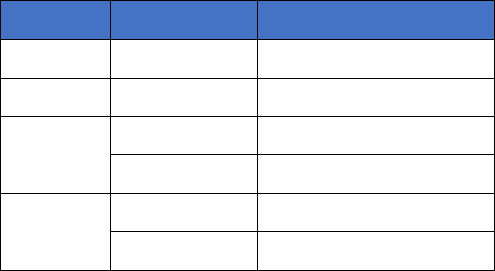
The rotation rules aforementioned can be summarized as follows.
Shape
Part
Action
straight
any
Attach
angled
any
Attach
round
top
Move towards center
bottom
Rotate
flat
top
Move towards center
bottom
Rotate

!" # $% & ' ' ' '
10
Remarks on Vowel Attachment
Remark 1: As aforementioned, the character L /bh/ is an
exceptional case for vowel attachment. Since the vowels will be
attached to the right-hand-side pillar, we obtain the following
attachment scheme.
top-left
top-right
bottom-right
top
outside
L
)
L
"
L(
L
}
L~
/bhe/'
/bhā/'
/bhu/'
/bho/'
/bhaṃ/'
Remark 2: The candrabindu ◌𑀀 /aṁ/ becomes very similar to the
anusvara ◌𑀁 /aṃ/ when combined with a consonant, e.g. !… /kaṁ/
vs. !~ /kaṃ/. The candrabindu is articulated as a nasalized sound
/an/ in Modern Hindi while the anusvara still preserves the
original pronunciation /aṃ/. In the case of the character L /bh/,
the candrabindu is moved towards the center L
… /bhaṁ/ while the
anusvara is placed above the character L~ /bhaṃ/.
Conjunct Consonants
Two consonants can be combined to form a conjunct consonant using
the virāma sign (◌𑁆
), which cancels the inherent /a/ sound. For
example, * /sa/ + virāma + & /ta/ + virāma + - /ra/ = *. & . - /stra/;
therefore ?" *. &. - " is articulated as /śāstrā/. The earliest manifestation
of Brahmi script (the Edicts of King Aśoka, circa 500 BC) shows that
conjunct consonants were written consecutively. But this practice
evolved to stacking up a conjunct consonant for orthographical
compactness in the following Gupta Dynasty era (circa 200 BC). The
font Google Noto Sans Brahmi supports the Aśoka’s version, while
Microsoft’s font Segoe UI Historic supports the Gupta version.
Word Boundaries and Sentence Boundaries
The earliest attestation of Brahmi script (the Edicts of King Aśoka)
portrays an extensive use of space as the word delimiter. Generally,
phrase and sentence boundaries are implicitly marked with (1)
enclitic conjunction 9 /ca/ ‘and’, (2) direct-speech particle O&% /iti/
‘thus’, and (3) subordinate conjunction &% /ti/ ‘because’. In proses and
poetry, the single ḍanda (v) was used for clause delimiters, while the
double ḍanda (w), as verse delimiters. For example, famous Sanskrit
poem Ambā (Mother) is rendered as follows.
' ,#. K
" *&&~ 3" 3 > &% v'
' ,#. K
" *&&~ I" 3 > & % v'
' ,#. K
" *&&~ M) 7 > &% v'
' ,#. K
" *&&~ &} F > & % w''
' ' ,#. K
" $% &. >~ *. - " I > & % v'
' ' ,#. K
" $% &. >~ L
};>&% v'
' ' ,#. K
" /† &~ ?. - " M > & % v'
' ' ,#. K
" #" # ! * -. M *. M #. w'

!" # $% & ' ' ' '
11
Example Texts in Brahmi Script
Karla Caves (160 BC)
More information at Wikipedia
' H) ƒ!" !@
" >M$*'
Dhenukākaṭā Yavanasa
'>*MH$" $~ '
Yasava dhanānaṃ
' GL
} 7" $~ '
thabho dānaṃ
Translation: “(This) pillar (is) the gift of the Yavana Yasavadhana
from Denukakata.” — Epigraphia Indica Vol.18 p.328 Inscription
No.10
Sohgaura copper plate inscription (300 BC)
More information at Wikipedia
'*" M & % >" $ ~ #1" #" &. &" $~ *" * $ ) #" $ M" *† &% ! '
Sāvatiyānaṃ Mahāmattānaṃ sāsane Mānavāsītika
'B*% 3% #" &) Q*. */" #) M W&) 7( M) !} @. A
"/" 3" $% '
ḍasilimate Ussagāme va ete duve koṭṭhāgālāni
'&% $" > M" $% #~ ‡ 3 . 3} 9 :~ # " 7" # L
"3!" $% M'
tina-yavāni maṃthulloca-chaṃmā-dāma-bhālakāniva
'3~ !>% >&% '"&% >" >% !" > $} /" 1% & M. M" > '
laṃ kayiyati atiyāyikāya no gahi(ta)vvāya
Translation: “At the junction called Manawasi, these two
storehouses are prepared, for the sheltering of loads of commodities,
of Tiyavani, Mathura and Chanchu.” — Translated by Sircar Fleet
(1942) Selected Inscriptions Vol 1 OCR p.85.
Aśoka Pillar in Lumbini (circa 300 BC)
More information at Wikipedia
'7) M" $~ I% >) $ 'I% > 7 *% $ '3" ;% $M† *&% M*" L
%*% &) $'
Devānaṃpiyena Piyadasina lājina vīsati-vasābhisitena'
' ,&$N/" 9'#1† >% &) '1% 7 „ H ) ˆ & '*!. >‰$% &% '
atana āgāca mahīyite hida Budhe jāte Sakyamuni ti'
' *% 3" M% /HL
%9" !" 1" I% &'*% 3" GL
)9'Q*I" I% &) '
silā vigaḍabhī cā kālāpita silā-thabhe ca usapāpite'
'1% 7L/M~ ˆ&&% 'Š~#% $% /" #) 'QK3% !) !@
)'
hida Bhagavaṃ jāte ti Luṃmini-gāme ubalike kaṭe'

!" # $% & ' ' ' '
12
' ,AL
"/% >) 9'
aṭha-bhāgiye ca'
Translation: “When King Devandmpriya Priyadarsin had been
anointed twenty years, he came himself and worshipped (this spot)
because the Buddha Shakyamuni was born here. (He) both caused to
be made a stone bearing a horse (?) and caused a stone pillar to be
set up, (in order to show) that the Blessed One was born here. (He)
made the village of Lummini free of taxes, and paying (only) an
eighth share (of the produce).” — Translated in Hultzsch, E. (1925).
Inscriptions of Asoka pp. 164-165.

!" # $% & ' ' ' '
13
License Message
The MIT License
Copyright 2019 Prachya Boonkwan
Permission is hereby granted, free of charge, to any person obtaining a copy of this software and associated documentation files
(the "Software"), to deal in the Software without restriction, including without limitation the rights to use, copy, modify, merge,
publish, distribute, sublicense, and/or sell copies of the Software, and to permit persons to whom the Software is furnished to do so,
subject to the following conditions:
The above copyright notice and this permission notice shall be included in all copies or substantial portions of the Software.
THE SOFTWARE IS PROVIDED "AS IS", WITHOUT WARRANTY OF ANY KIND, EXPRESS OR IMPLIED, INCLUDING BUT NOT
LIMITED TO THE WARRANTIES OF MERCHANTABILITY, FITNESS FOR A PARTICULAR PURPOSE AND NONINFRINGEMENT.
IN NO EVENT SHALL THE AUTHORS OR COPYRIGHT HOLDERS BE LIABLE FOR ANY CLAIM, DAMAGES OR OTHER
LIABILITY, WHETHER IN AN ACTION OF CONTRACT, TORT OR OTHERWISE, ARISING FROM, OUT OF OR IN CONNECTION
WITH THE SOFTWARE OR THE USE OR OTHER DEALINGS IN THE SOFTWARE.
