Flight Simulator With Torpedo Attack Manual (GB) Flightsimulator Text
User Manual:
Open the PDF directly: View PDF  .
.
Page Count: 10
Flight Simulator
with
Torpedo Attack
for
MSX computers
Program Number: MSX-FSE
Introduction
This program puts you at the controls of amodified Nakajima Tenzan, a
World War II torpedo bomber aircraft. The object of the Torpedo Attack
game is to take off from your island airbase, torpedo or bomb enemy
targets, destroy as many enemy aircraft as possible, and land safely back
at the airbase. During the course of the game you will learn the basics of
flying an aircraft and experience the thrill of flight.
Before starting the game, you should read the “Flight Instrumentation”
section of this manual to familiarize yourself with the aircraft instru-
ments and controls, and take the plane for atest flight as described in
“Flying the Aircraft”. After flying the combat missions, you may want
to read the “Flight Physics” section of the manual to learn more about
how areal aircraft flies.
5
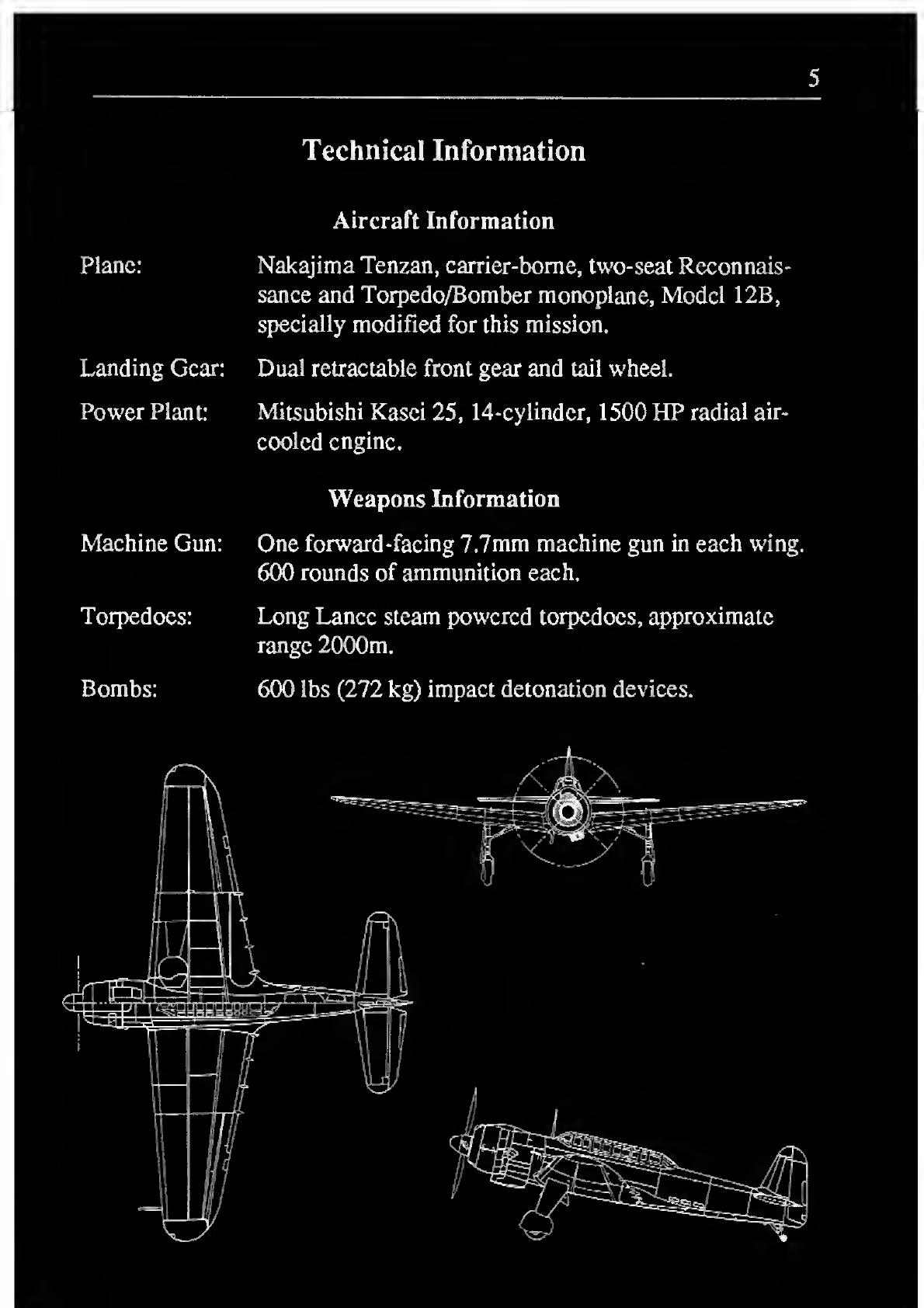
Technical Information
Plane:
Aircraft Information
Nakajima Tenzan, carrier-borne, two-seat Reconnais-
sance and Torpedo/Bomber monoplane, Model 12B,
specially modified for this mission.
Landing Gear: Dual retractable front gear and tail wheel.
Power Plant: Mitsubishi Kasei 25, 14-cylinder, 1500 HP radial air-
cooled engine.
Machine Gun:
Weapons Information
One forward-facing 7.7mm machine gun in each w'ing.
600 rounds of ammunition each.
Torpedoes: Long Lance steam powered torpedoes, approximate
range 2000m.
Bombs: 600 lbs (272 kg) impact detonation devices.
6
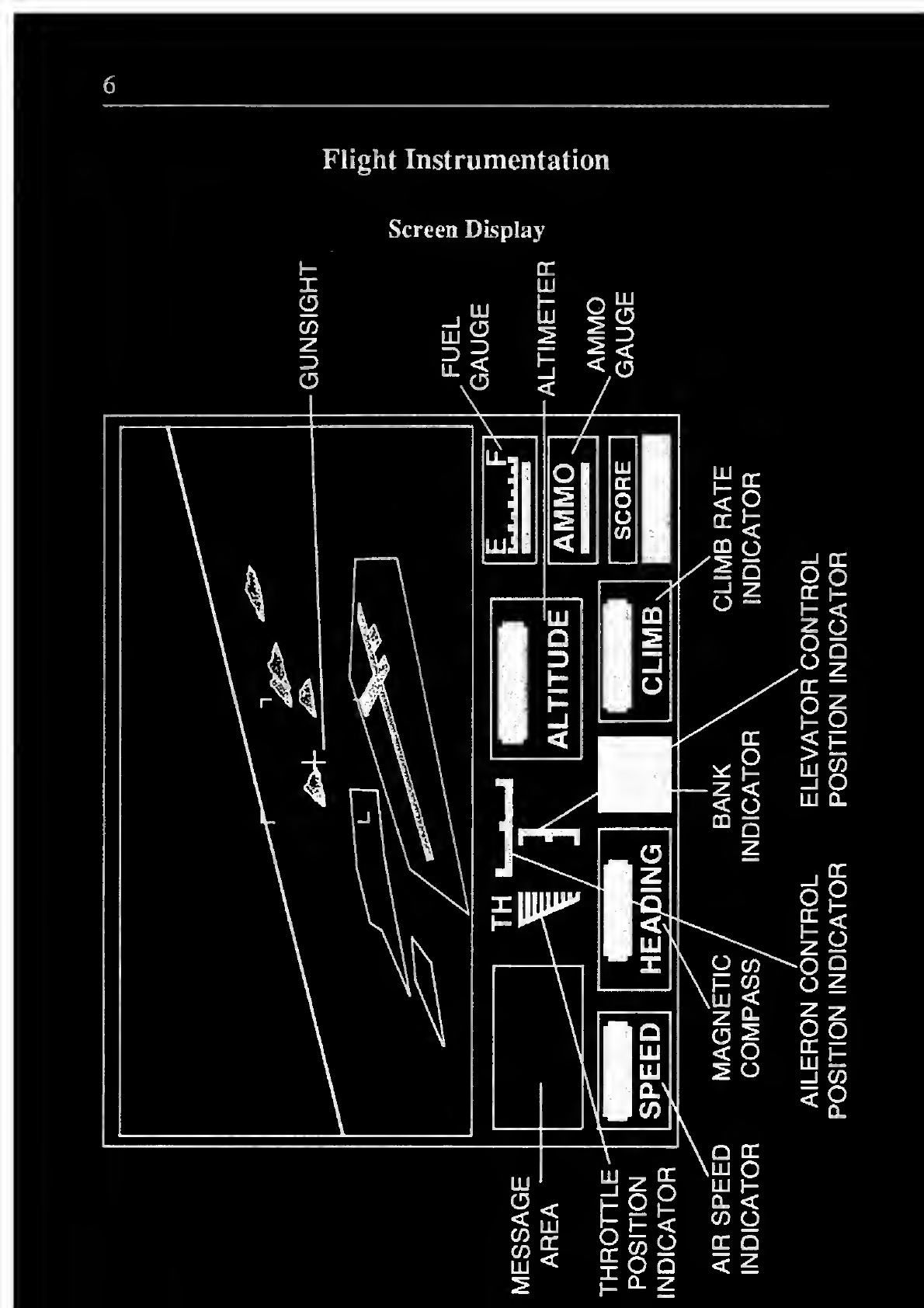
Flight Instrumentation
Screen Display
h- cr
AILERON
CONTROL
ELEVATOR
CONTROL
POSITION
INDICATOR
POSITION
INDICATOR
7
Instruments
Your plane has more instrumentation than the original Tenzan did.
Additional instruments and indicators are provided to ease the process of
learning to fly. These instruments will now be described.
Altimeter
Altitude in feet above sea level is measured. Your altimeter is only
accurate to about 10 feet, so be careful when landing. Most runways are
about 10 to 15 feet above sea level.
Climb Rate Indicator
This gauge tells you how fast you are climbing or descending. A
positive number indicates that you are climbing, anegative number
indicates that you are dropping. When you land, your drop rate must be
very low or you may damage the airplane and possibly injure yourself.
Airspeed Indicator
This gauge displays your plane’s current airspeed. Because of winds,
this may not be your true ground speed. Airspeed is displayed in miles
per hour.
Magnetic Compass
This gauge displays your current heading in degrees clockwise from
magnetic north. During high-rate turns this indicator may lag slightly
behind the plane’s true heading, but it will catch up quickly when you
stop turning.
Bank Indicator
This indicator lets you know which way your wings are tilted relative to
the horizon. This can be useful when the plane is at asteep bank angle,
to help you determine the fastest way to right the plane.
Fuel Gauge
This gauge displays the amount of fuel remaining in your tanks.
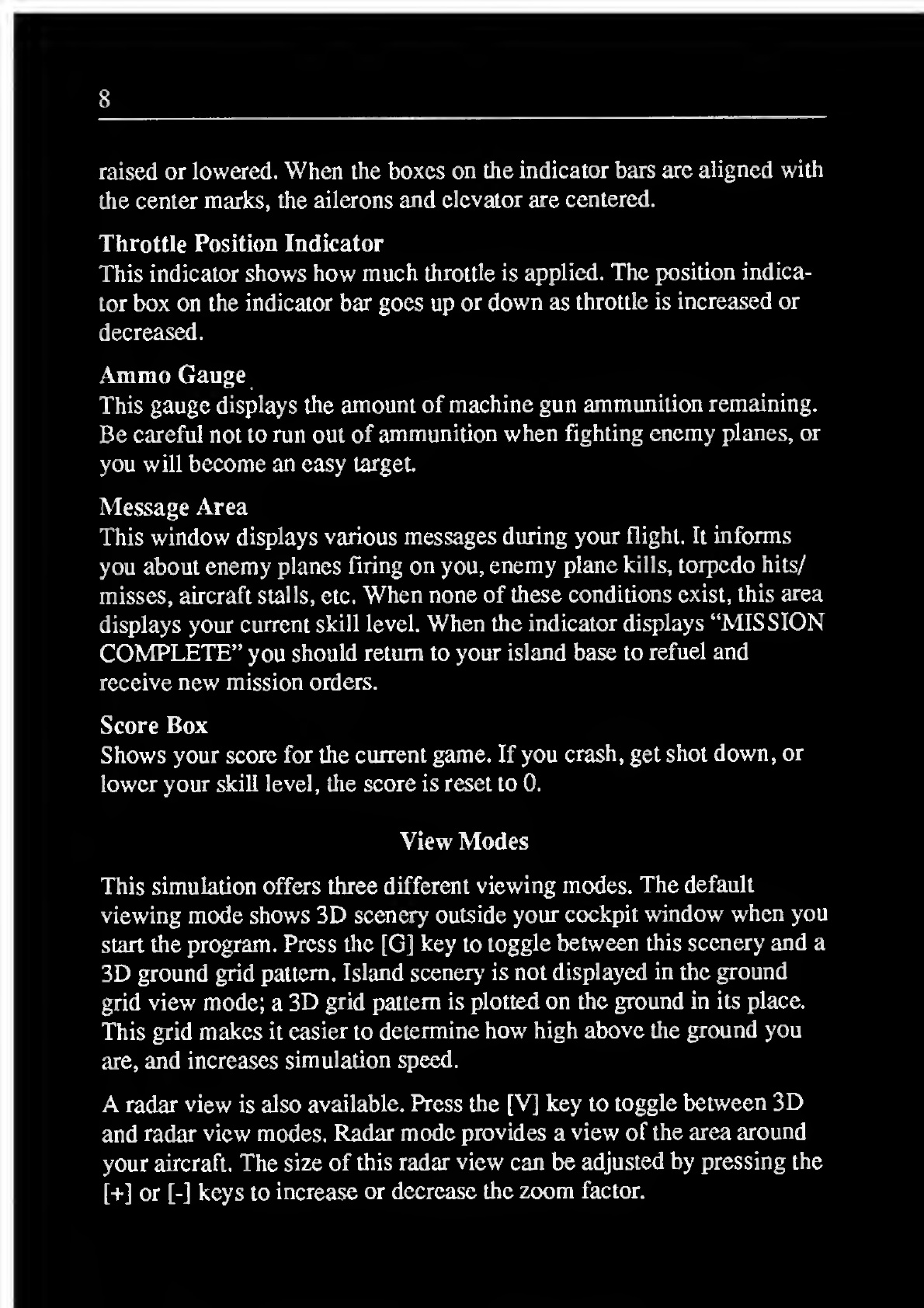
Aileron and Elevator Control Position Indicators
These indicators show the positions of the aircraft’s ailerons and
elevator. An aileron position indicator box to the left or right of the
center mark shows that left or right aileron is applied. An elevator
position indicator box above or below center shows that the elevator is
8
raised or lowered. When the boxes on the indicator bars are aligned with
the center marks, the ailerons and elevator are centered.
Throttle Position Indicator
This indicator shows how much throttle is applied. The position indica-
tor box on the indicator bar goes up or down as throttle is increased or
decreased.
Ammo Gauge
This gauge displays the amount of machine gun ammunition remaining.
Be careful not to run out of ammunition when fighting enemy planes, or
you wall become an easy target.
Message Area
This window displays various messages during your flight. It informs
you about enemy planes firing on you, enemy plane kills, torpedo hits/
misses, aircraft stalls, etc. When none of these conditions exist, this area
displays your current skill level. When the indicator displays “MISSION
COMPLETE” you should return to your island base to refuel and
receive new mission orders.
Score Box
Shows your score for the current game. If you crash, get shot down, or
lower your skill level, the score is reset to 0.
View Modes
This simulation offers three different viewing modes. The default
viewdng mode show's 3D scenery outside your cockpit window when you
start the program. Press the [G] key to toggle between this scenery and a
3D ground grid pattern. Island scenery is not displayed in the ground
grid view mode; a3D grid pattern is plotted on the ground in its place.
This grid makes it easier to determine how' high above the ground you
are, and increases simulation speed.
Aradar view is also available. Press the [V] key to toggle between 3D
and radar view modes. Radar mode provides aview of the area around
your aircraft. The size of this radar view can be adjusted by pressing the
[+] or [-] keys to increase or decrease the zoom factor.
9
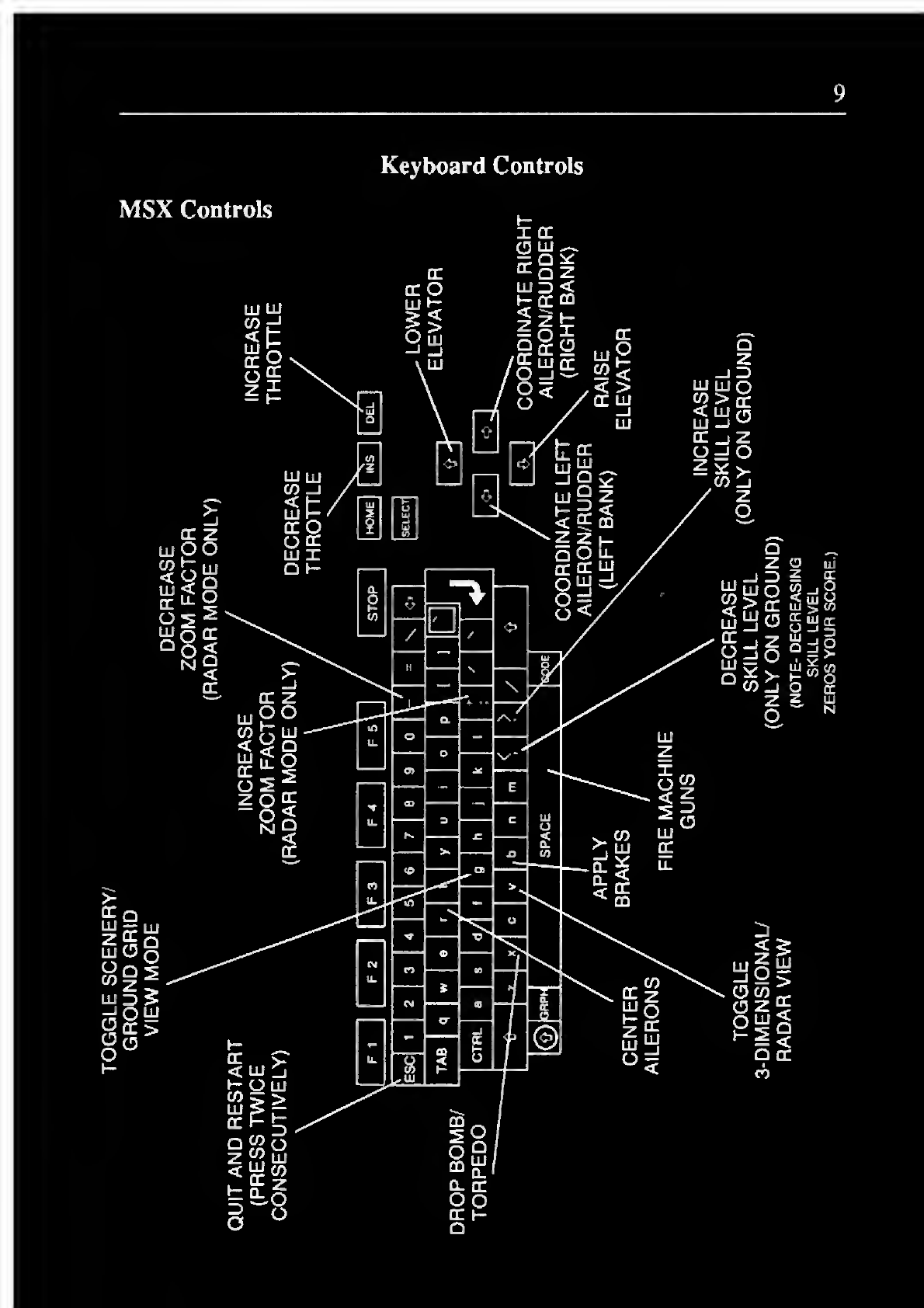
Keyboard Controls
MSX Controls
cr
h-
xa:
(3 lu
sS
10
Flying the Aircraft
Takeoff and Test Flight
After loading the Flight Simulator/Torpedo Attack program and exiling
the demo mode, you start out on the runway of an island airport where
your plane is fueled and ready for takeoff. First, increase throttle to full
by pressing and holding the [DEL] key. The plane will begin to acceler-
ate down the runway. Wait for your airspeed indicator to climb to 130
miles per hour, then press the [down arrow] key twice. This will raise
the elevator and cause the plane to begin lifting off the ground. You will
notice the runway drop away as you lift off, and the climb rate indicator
will begin to increase. As soon as it registers 1000 ft/min, press the [up
arrow] key twice to center the elevator, decrease your angle of attack,
and lower your climb rate. Note that this does not occur immediately, as
it takes awhile for the plane to stabilize. You should be in stable flight
with alevel horizon visible.
Now let’s try amedium speed turn. First, press the [right arrow] key
twice to begin banking the plane to the right. When the horizon is at
about a45-dcgree angle, press the [R] key to center the ailerons. The
heading indicator will change as the plane turns. To increase the turn
rate, press the [down arrow] key twice. If you were in level flight this
would increase your angle of attack, but since the plane is banked the
angle of attack will increase only slightly and the turn rate will increase.
To level out of the turn, press the [up arrow] key twice and the [left
arrow] key once and wait for the horizon to return to near level. Press
the [R] key just before the horizon becomes level. This will center the
ailerons and stop the plane from banking any further.
Landing
The hardest aspect of flying an airplane is landing safely. The proper
landing procedure is to fly the plane afoot or two above the runway and
slow down until the plane stalls and stops flying. As the plane slows
down, the nose will want to drop and the plane will try to fly itself into
the ground. You must compensate with up elevator to keep the plane at
the one- or two-foot level until it stalls. If you fly the plane onto the
ground above stall speed, it may bounce or even crash.
11
As you apply more up elevator, the plane will take a higher and higher
nose-up attitude. This is good. When you finally touch down, your
elevator should be nearly all the way up. The scenery outside will level
off when you touch the ground.
The process of putting yourself into alevel flight path slightly above
and aligned with the runway takes some practice. Steep glides are
preferred as you come in for alanding. An engine failure while in a
steep glide will have little effect on where you land, whereas an engine
failure on along shallow power glide at treetop level will drop you into
the field half a mile from the airport. You should align yourself with the
runway and glide toward it in asleep glide at approach speed (about 130
mph indicated airspeed). You must then break the glide and transition
into straight and level, power-off flight afew feet above the runway.
This transition is known as the flare.
You will use the ailcrons/rudder to align yourself with the runway as
you come in for alanding, but make sure that the aircraft is straight and
the ailerons/rudder are centered when you touch down. If they are not,
ground steering will whip you off the runway because your wheels
aren’t aligned to make the plane go straight. An abrupt turning of the
plane on the ground is known as aground-loop,and could severely
damage areal aircraft
Once on the ground, you can use brakes to bleed off extra speed and
come to astop. You will then be ready for your next flight.
Before taking off again, make sure to do apre-takeoff check. You will
usually find that you have to center the elevator which is nearly all the
way up from the last landing. Taking off with full up elevator and full
throttle can be disastrous.
12
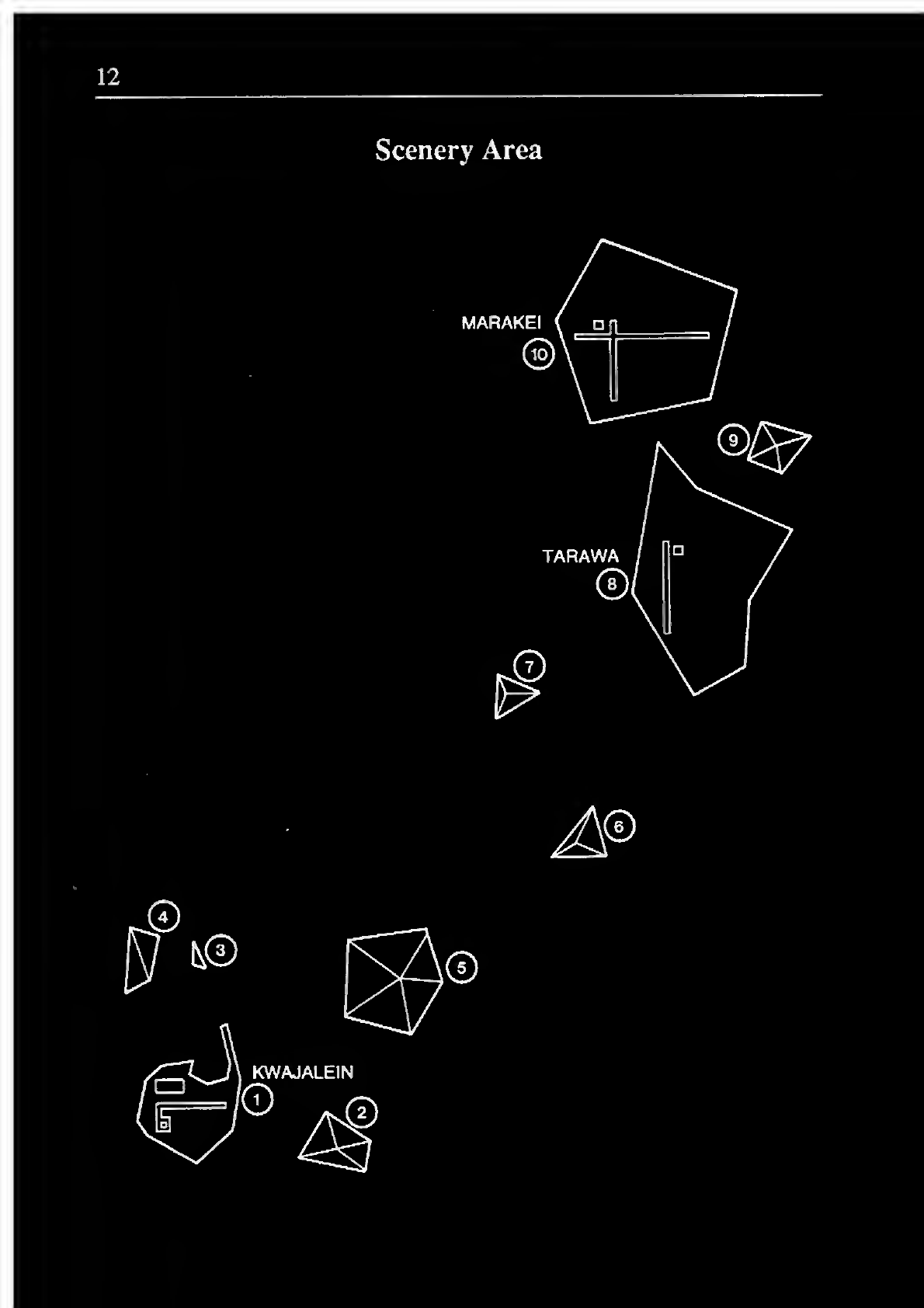
Scenery Area
13
Missions
Mission Briefing
Congratulations on completing your flight training. Your first tour of
duty will be on Marakei island. You are to travel there immediately and
report to the commanding officer.
You have been assigned to fly front-line air support in preparation for an
invasion of the enemy base on Kwajalein by your forces. You will fly 10
sorties into enemy territory. If you are successful in these 10 sorties, you
will be awarded the Silver Star medal and will be returned home to
instruct the next generation of pilots. The enemy is not aware of the long
range of our planes, and will not be expecting asingle fighter, so the
first mission or two should be relatively uneventful. As the enemy learns
about our skills and tactics, expect them to send large forces against you
in desperation.
Mission #0
As acombat training mission, you are assigned to bomb the enemy base
at Kwajalein. Intelligence reports that the enemy currently has only a
few planes at the base, most of which are inoperable. You are assigned
to destroy as many planes as possible and to bomb the island base. Use
your machine guns (fired by pressing the [SPACE BAR]) to destroy the
enemy planes. The planes must be close enough to see clearly, and lined
up in the center of your out-the-window view. Destroying an enemy
plane scores 5points. To bomb the base, you must fly your plane over
the square target indicator on the enemy base radar image and drop a
bomb. For this training mission you have an almost unlimited number of
bombs. You can tell from your score whether or not you hit the island
base. Hitting the base scores 10 points. NOTE -after you accomplish
your mission goals, the “SKILL LEVEL 1” display will change to
“MISSION COMPLETE”. You should then return to your home base to
prepare for your next mission. If during the course of the mission you
run low on fuel or ammunition, you may return to any of your bases to
replenish fuel and/or ammunition. To refuel/resupply, simply land at the
air base and come to acomplete stop. Your plane will be serviced on the
runway.
