Nokia 6280 RM 78 Service Manual Level 1&2. Www.s Manuals.com. 1,2 V5.0
User Manual: Phone Nokia 6280 RM-78 - Service manuals and Schematics, Disassembly / Assembly. Free.
Open the PDF directly: View PDF  .
.
Page Count: 29
- INTRODUCTION
- GENERAL REPAIR INFORMATION
- PATHFINDER FOR WORKSHOP STAFF
- EXPLODED VIEW AND COMPONENT DISPOSAL
- SPARE PARTS OVERVIEW
- SPARE PARTS LIST
- SERVICE TOOLS
- SW-UPDATE
- DISASSEMBLY INSTRUCTION (UPPER PART)
- DISASSEMBLY INSTRUCTION (LOWER PART)
- MAIN DOMESHEET EXCHANGE INSTRUCTIONS
- LEGEND FOR QUICK TROUBLE SHOOTER
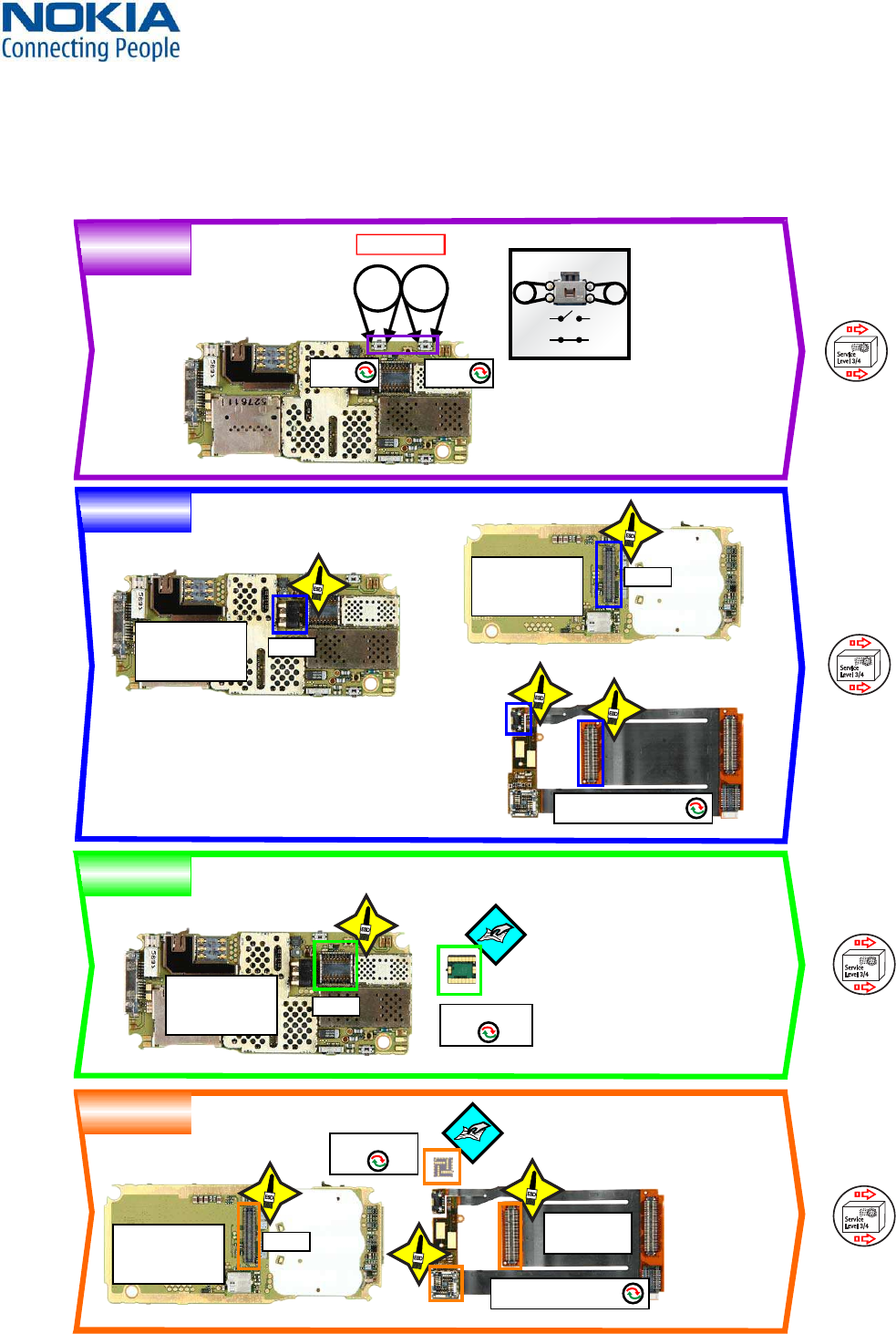
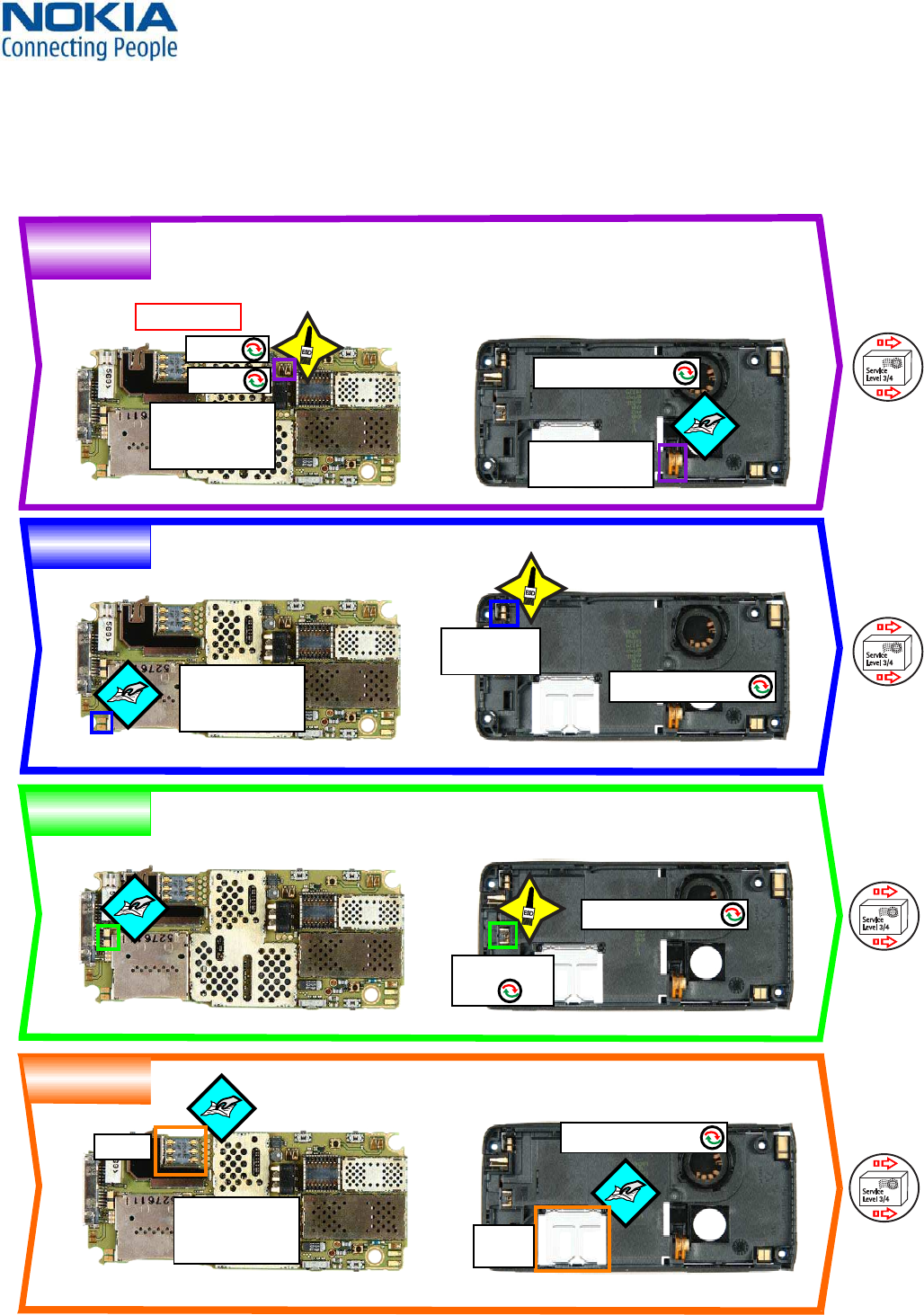
- QUICK TROUBLE SHOOTER PART 1
- QUICK TROUBLE SHOOTER PART 2
- QUICK TROUBLE SHOOTER PART 3
- QUICK TROUBLE SHOOTER PART 4
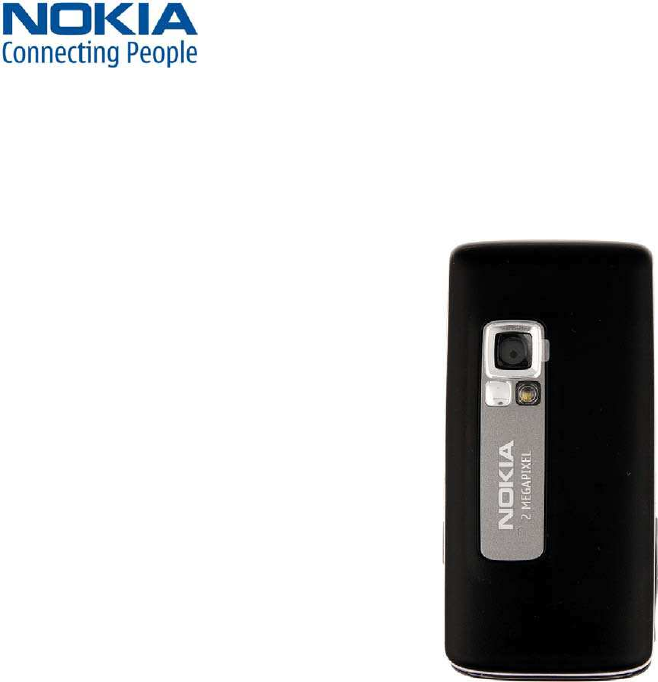
- CAMERA GONOGO TEST
- BLUETOOTH & INFRARED TEST
- GONOGO TEST
- BATTERY TEST
- FORWARDING OF REPAIRS
- ESD PROTECTION REQUIREMENTS
WW Competence Transfer
CMO Operations & Logistics
MMultimedia Creation & Support CONFIDENTIAL 19.01.2006
1
Service Manual 6280 Copyright © 2005-2006 NOKIA Corporation. All rights reserved.
Approved 5.0
MGR
Page (27)
RM-78
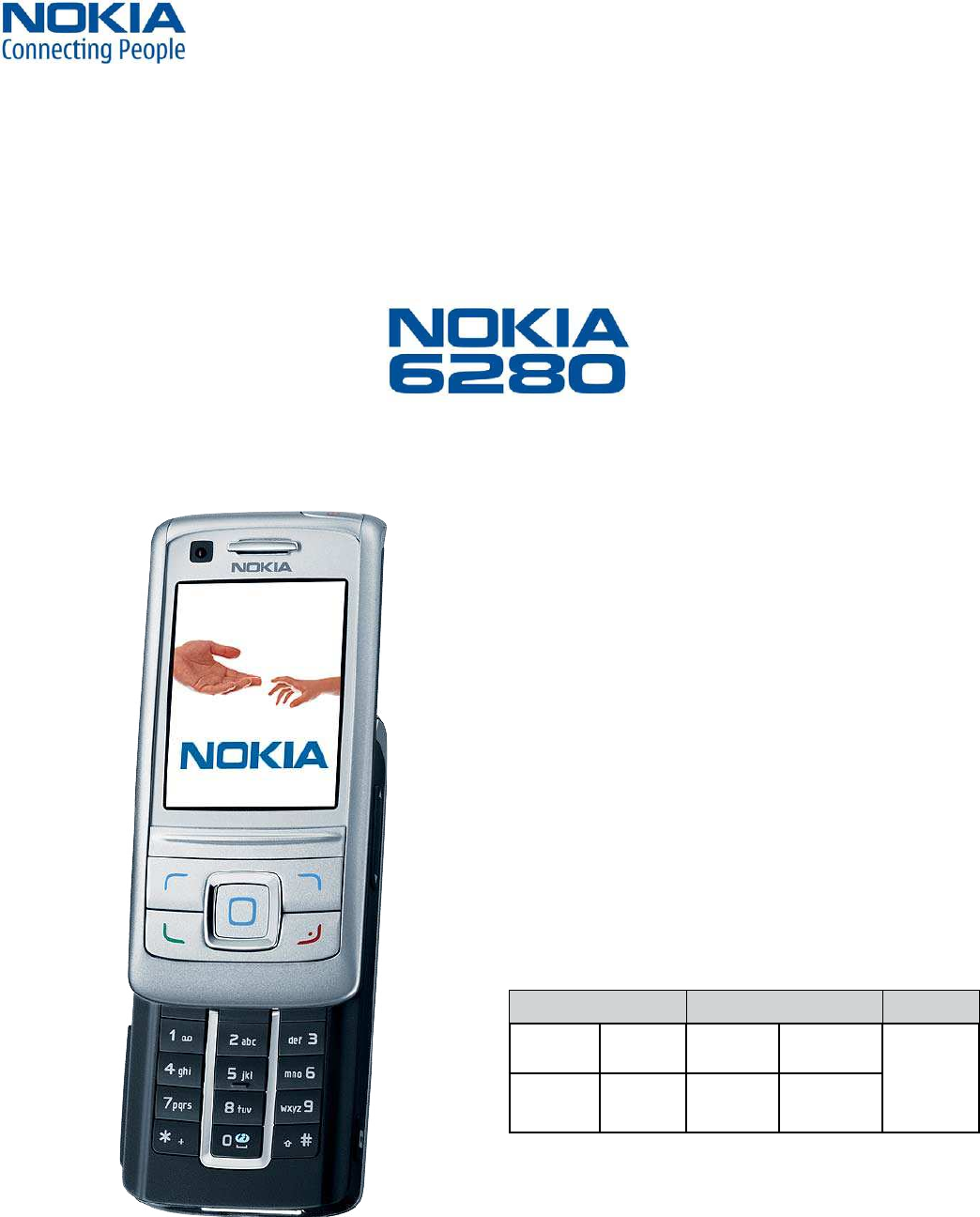
Transceiver characteristics:
Dual Band: EGSM and WCDMA
- GSM: Tri-band phone for GSM 900/1800/1900MHz
- WCDMA: 2100MHz
Camera:
- Backside camera 2 Megapixel with 8x digital zoom
- Frontside VGA camera
Display: Active matrix color display with 262.144 colors,
resolution 320 x 240 pixel
Bluetooth
IRDA
Visual radio
Vibra Alert: Small round Vibra motor
Connector: Easy Flash connector
SERVICE MANUAL
Level 1&2
Environmental characteristics:
• Lead-free soldered
Transceiver with BP-6m 970mAh Li-Ion battery pack
Talk time Standby Note
EGSM WCDMA EGSM WCDMA Depends
on network
parameters
up to 3h up to 2.5h up to 250h up to 200h
WW Competence Transfer
CMO Operations & Logistics
MMultimedia Creation & Support CONFIDENTIAL 19.01.2006
2
Service Manual 6280 Copyright © 2005-2006 NOKIA Corporation. All rights reserved.
Approved 5.0
MGR
Page (27)
CHANGE HISTORY
Status Version No. Date Comments
Draft 0.1 21.09.2005 Initial draft
Approved 1.0 12.10.2005 Approval
Approved 2.0 08.11.2005 File quality update
Approved 3.0 16.11.2005 Disassembly lower part picture 14 changed
Approved 4.0 03.01.2006 MAIN DOMESHEET instructions added
Approved 5.0 19.01.2006 Picture 9 in the upper part changed / Tools Chapter CA-53 added
Page
TABLE OF CONTENTS
INTRODUCTION 3
GENERAL REPAIR INFORMATION 4
PATHFINDER FOR WORKSHOP STAFF 5
EXPLODED VIEW AND COMPONENT DISPOSAL 6
SPARE PARTS OVERVIEW 7
SPARE PARTS LIST 8
SERVICE TOOLS 9
SW-UPDATE 11
DISASSEMBLY INSTRUCTION (UPPER PART) 12
DISASSEMBLY INSTRUCTION (LOWER PART) 15
MAIN DOMESHEET EXCHANGE INSTRUCTIONS 18
LEGEND FOR QUICK TROUBLE SHOOTER 19
QUICK TROUBLE SHOOTER PART 1 20
QUICK TROUBLE SHOOTER PART 2 21
QUICK TROUBLE SHOOTER PART 3 22
QUICK TROUBLE SHOOTER PART 4 23
CAMERA GONOGO TEST 24
BLUETOOTH & INFRARED TEST 25
GONOGO TEST 26
BATTERY TEST 26
FORWARDING OF REPAIRS 27
ESD PROTECTION REQUIREMENTS 28
1.
2.
3.
4.
5.
6.
7.
8.
9.
10.
11.
12.
13.
14.
15.
16.
17.
18.
19.
20.
21.
22.
WW Competence Transfer
CMO Operations & Logistics
MMultimedia Creation & Support CONFIDENTIAL 19.01.2006
3
Service Manual 6280 Copyright © 2005-2006 NOKIA Corporation. All rights reserved.
Approved 5.0
MGR
Page (27)
The purpose of this document is to help NOKIA service levels 1 and 2 workshop technicians to carry out service to NOKIA
products. This Service Manual is to be used only by authorized NOKIA service suppliers, and the content of it is confidential.
Please note that NOKIA provides also other guidance documents (e.g. Service Bulletins) for service suppliers, follow these
regularly and comply with the given instructions.
While every endeavor has been made to ensure the accuracy of this document, some errors may exist.
If you find any errors or if you have further suggestions, please notify NOKIA using the address below:
mailto:cc-ts-rc.documentation@nokia.com
Please keep in mind also that this documentation is continuously being updated and modified, so watch always out for
the newest version.
Warnings and Cautions
Please refer to the phone’s user guide for instructions relating to operation, care and maintenance including important
safety information. Note also the following:
Warnings:
CARE MUST BE TAKEN ON INSTALLATION IN VEHICLES FITTED WITH ELECTRONIC ENGINE MANAGEMENT SYSTEMS AND
ANTI–SKID BRAKING SYSTEMS. UNDER CERTAIN FAULT CONDITIONS, EMITTED RF ENERGY CAN AFFECT THEIR OPERATION. IF
NECESSARY, CONSULT THE VEHICLE DEALER/MANUFACTURER TO DETERMINE
THE IMMUNITY OF VEHICLE ELECTRONIC SYSTEMS TO RF ENERGY.THE HANDPORTABLE TELEPHONE MUST NOT BE OPERATED
IN AREAS LIKELY TO CONTAIN POTENTIALLY EXPLOSIVE ATMOSPHERES EG PETROL STATIONS (SERVICE STATIONS), BLASTING
AREAS ETC.
OPERATION OF ANY RADIO TRANSMITTING EQUIPMENT, INCLUDING CELLULAR TELEPHONES, MAY INTERFERE WITH THE
FUNCTIONALITY OF INADEQUATELY PROTECTED MEDICAL DEVICES. CONSULT A PHYSICIAN OR THE MANUFACTURER OF THE
MEDICAL DEVICE IF YOU HAVE ANY QUESTIONS. OTHER ELECTRONIC EQUIPMENT MAY ALSO BE SUBJECT TO INTERFERENCE.
Cautions:
1. Servicing and alignment must be undertaken by qualified personnel only.
2. Ensure all work is carried out at an anti–static workstation and that an anti–static wrist strap is worn.
3. Use only approved components as specified in the parts list.
4. Ensure all components, modules screws and insulators are correctly re–fitted after servicing and alignment.
5. Ensure all cables and wires are repositioned correctly.
1.
2.
3.
Electrostatic discharge can easily damage the sensitive components of electronic products.
Therefore every Service Supplier has to take care of all precautions, which are mentioned in the
service level related “Service Partner Requirements”, available on NOKIA Online. Also see ESD
Protection Requirements in this Service Manual.
INTRODUCTION1.

WW Competence Transfer
CMO Operations & Logistics
MMultimedia Creation & Support CONFIDENTIAL 19.01.2006
4
Service Manual 6280 Copyright © 2005-2006 NOKIA Corporation. All rights reserved.
Approved 5.0
MGR
Page (27)
In this section the technician will get some general hints how to carry out repairs:
To familiarize oneself with NOKIA product read the tutorials or user guide on www.nokia.com -->Support--> Phones,
by selecting the Phone Model.
Before starting the repair you must take care of ESD precautions like being in your ESD Protected Area and connecting
your wristband.
Use gloves to avoid corrosion and fingerprints.
Protect windows and displays with a film to avoid dust and scratches.
When cleaning the LCD Module any lint-free cloth can be used (e.g. Micro-Fibre cloth).
When cleaning the pads you have to use a soft cloth/ESD brush and Isopropanol. It is not allowed to use a glass fiber
pencil because it scratches the surface and will lead later on to corrosion.
Mechanical parts (except shielding lids and bent parts), which didn’t repair the failure, can be reused, if they are not
soldered.
When removing the shielding lids make sure to replace them with new ones, otherwise the high-frequency leakage
can have an influence on the device.
Always use original NOKIA spare parts.
Check the soldering joints of the parts, which are concerned regarding the indicated error (e.g. soldered connectors or
switches) and resolder them if necessary (Level 2 only).
Remove redundant soldering flux after repair.
Meet the torque requirements when assembling the unit (see also the document “torques for transceiver assembly”
on NOKIA Partner Web Site/NOKIA Online).
Always use your own equipment for testing where you are sure that it works. E.g. if the customer complains about
charger function, please test the phone with your own charger to be sure if phone or charger causes the malfunction.
A SIM card is needed for all GoNoGo tests.
When doing the fault log entries, always note the Item code, which caused the malfunction. Also, fill in the appropri-
ate part code from the assembly, if needed.
Please be aware that some malfunctions could be software related and solved by an update.
There are several documents available on NOL, which have to be followed:
First, take care for the latest content pages of Service Bulletins, which are always available for each folder on NOKIA
Online. This is also important to recognize, if existing documents have become invalid.
The service level indicator at the bottom of each document tells the appropriate destination.
Downloads > Support Library >
1. Instructions
2. General Service Bulletins
3. Product related documents
4. Spare Part Service Bulletins
5. Service Tools Service Bulletins
6. Common Software Service Bulletins
etc,…
Use General SB-217 as a reference or overview.
Please also check NOKIA Online (NOL) for latest news and files on a regular basis.
•
•
•
•
•
•
•
•
•
•
•
•
•
•
•
•
•
•
•
•
•
GENERAL REPAIR INFORMATION2.
WW Competence Transfer
CMO Operations & Logistics
MMultimedia Creation & Support CONFIDENTIAL 19.01.2006
5
Service Manual 6280 Copyright © 2005-2006 NOKIA Corporation. All rights reserved.
Approved 5.0
MGR
Page (27)
In addition to the information in this Service Manual, there are several instructions and information, which have to be fol-
lowed. Main documentation database is NOKIA Online with the purpose of serving different multimedia content, like video
clips or interactive tutorials.
It is mandatory to watch for newest technical and organizational information on a daily basis to be updated as required
(see “Latest files in Support Library”). Every new information has to be processed and implemented as soon as possible.
When logged into NOL you can also find needed information in different folder like:
Support Library
Phones
Service Manuals
Service Bulletins
Software
Repair Information
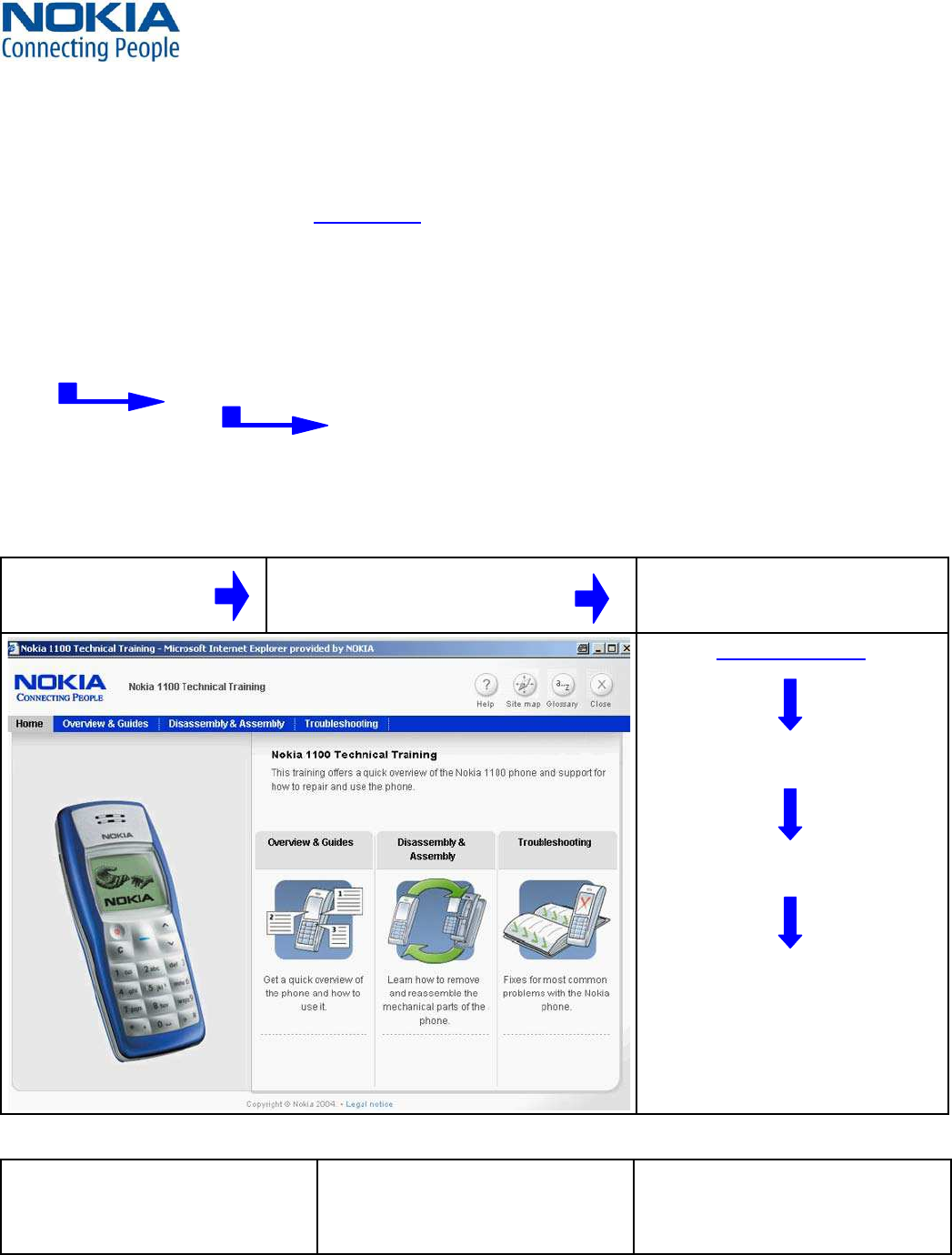
Level 1&2 e-learning (former NOKIA CarePoint) on NOKIA Online
Former NOKIA CarePoint
content, such as
Online Troubleshooting
Product information
Videos – Disassembly/Assembly
•
•
•
can be found on
NOKIA Online
NOKIA Online
Care Services
Training
Phone Models
Level 1&2 e-learning courses offer a quick overview of the NOKIA phone and support for how to repair and use the phone:
Overview & Guides
Basic information about the phone,
features and technologies
Disassembly & Assembly
Instructions how to disassemble and
assemble the phone
Troubleshooting
Step-by-step instructions on how to
locate and repair the most common
problems with the phone
To reduce the server traffic it is recommended to download newest version of huge files like videos, Phoenix packages or
Service Manuals only once and distribute it internally for further use.
PATHFINDER FOR WORKSHOP STAFF3.
WW Competence Transfer
CMO Operations & Logistics
MMultimedia Creation & Support CONFIDENTIAL 19.01.2006
6
Service Manual 6280 Copyright © 2005-2006 NOKIA Corporation. All rights reserved.
Approved 5.0
MGR
Page (27)
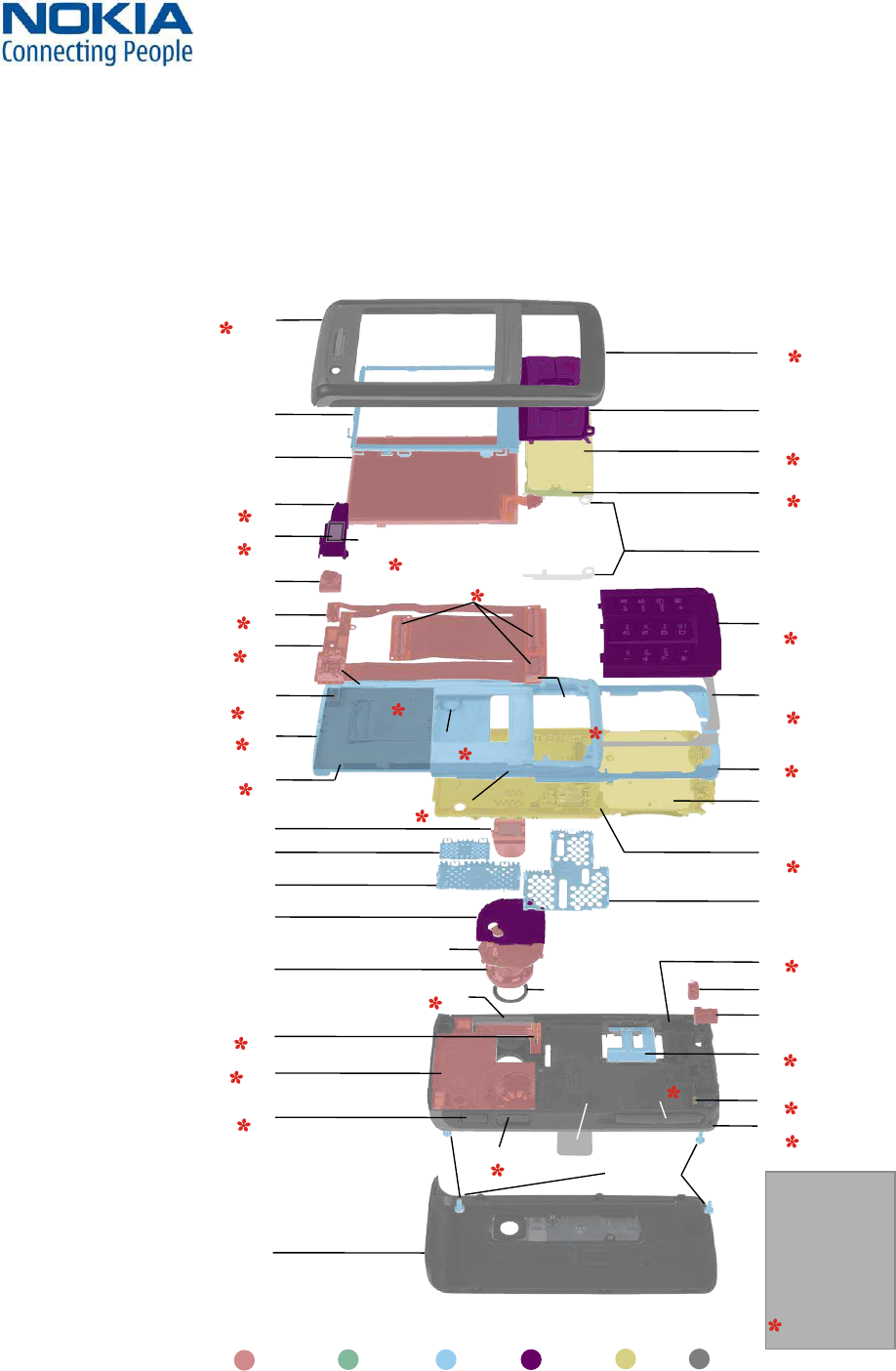
Recommendation for the ecologically friendly disposal of components. Colorized components show the different catego-
ries. See corresponding ITEM/CIRCUIT REF in the Spare Parts Service Bulletins on NOL.
EXPLODED VIEW AND COMPONENT DISPOSAL4.
ELECTRO SILICON METAL PLASTIC PWB COVER
POWER KEY (A1)
I002
A-COVER (A1)
I001
LCD MODULE
I007
VGA CAMERA
(ONLY 6280 RM-78)
I008
DISPLAY METAL SHIELD
I004
SMIA CAMERA
I209
B-COVER
I227
UI KEYMAT
I003
4XSCREWS T6+
M1.6X4.0
I226
POWER SWITCH (A4)
I105
UI PWB
ADHESIVE (A5)
I106
POWER KEY
ADHESIVE (A5)
I107
C-COVER FIXED
LOWER PART (A5)
I111
C-COVER UPPER PART (A5)
I108
ENGINE
MODULE (A7)
I204
RF SHIELDING LID (A7)
I206
WCDMA SHIELDING LID (A7)
I208
BB SHIELDING
LID (A7)
I207
MAIN
DOMESHEET (A7)
I203
TYPE LABEL (A7)
(LEVEL 3/4 only)
I205
BACKPLATE
STICKER (A5)
I112
MAIN FLEX (A4)
I104
KEYMAT (A6)
I201
IHF LABEL (A8)
I220
IHF GASKET (A8)
I223
IHF SPEAKER (A8)
I222
DC-JACK (A8)
I215
MICROPHONE (A8)
I216
POC KEY (A8)
I210
VOLUME KEY (A8)
I211
A1= A-COVER ASSY
A2= UI PWB ASSY
A3= CAMERA GUIDE ASSY
A4= MAIN FLEX ASSY
A5= C-COVER ASSY
A6= KEYMAT ASSY
A7= LIGHT SWAP ENGINE
MODULE ASSY
A8= D-COVER ASSY
= only available as
assembly
CAMERA KEY (A8)
I212
SD LID (A8)
I213
SIM LID (A8)
I219
LED FLASH LIGHT (A8)
(ONLY 6280 RM-78)
I218
D-COVER (A8)
I217
BT ANTENNA (A8)
I225
ANTENNA (A8)
I224
IRDA
WINDOW (A8)
I214
IHF LID INCL. POGO PINS (A8)
I221
MAIN KEYMAT
ADHESIVE (A6)
I202
3X CONNECTORS (A4)
I103
DOMESHEET (A2)
I005
UI PWB (A2)
I006
CAMERA GUIDE (A3)
I009
EARPIECE (A3)
I011
EARPIECE
ADHESIVE (A3)
I010
SPRING DETECTION
MAGNET (A4)
I102
SLIDE
MECHANICS (A5)
I110
SPRING (A5)
I109
CAMERA
SOCKET (A4)
(ONLY 6280 RM-78)
I101
WW Competence Transfer
CMO Operations & Logistics
MMultimedia Creation & Support CONFIDENTIAL 19.01.2006
7
Service Manual 6280 Copyright © 2005-2006 NOKIA Corporation. All rights reserved.
Approved 5.0
MGR
Page (27)
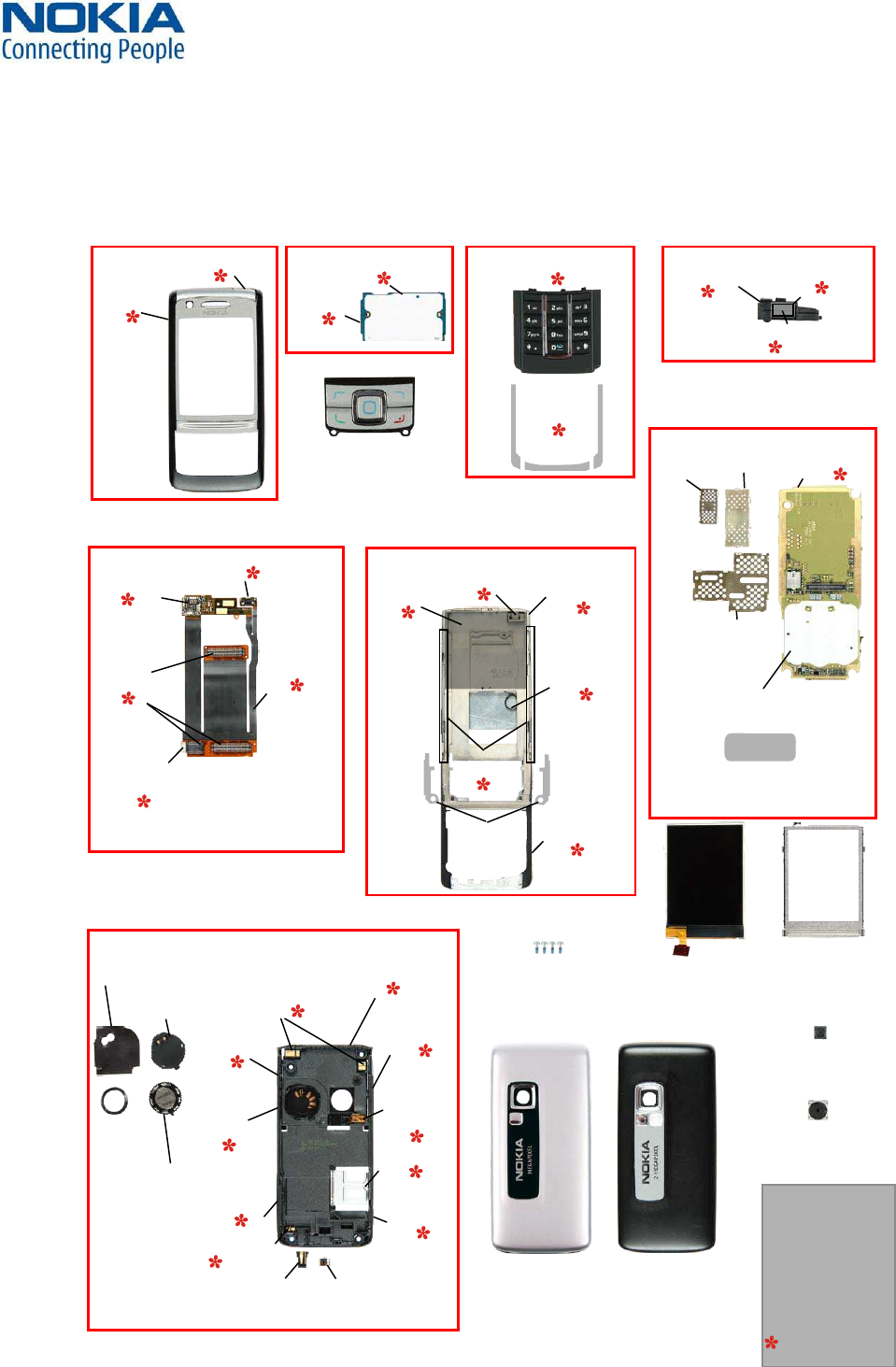
SPARE PARTS OVERVIEW5.
A1 = A-COVER ASSY
A4 = MAIN FLEX ASSY
A7 = LIGHT SWAP ENGINE
MODULE ASSY
A6 = KEYMAT ASSY
A5 = C-COVER ASSY
A8 = D-COVER ASSY
A2 = UI PWB ASSY A3 = CAMERA GUIDE ASSY
POWER KEY (A1)
I002
A-COVER (A1)
I001
LCD MODULE
I007
VGA CAMERA
(ONLY 6280 RM-78)
I008
DISPLAY METAL SHIELD
I004
SMIA CAMERA
I209
B-COVER
(6280 RM-78)
I227
B-COVER
(6282 RM-79)
I227
A1= A-COVER ASSY
A2= UI PWB ASSY
A3= CAMERA GUIDE ASSY
A4= MAIN FLEX ASSY
A5= C-COVER ASSY
A6= KEYMAT ASSY
A7= LIGHT SWAP ENGINE
MODULE ASSY
A8= D-COVER ASSY
= only available as
assembly
UI KEYMAT
I003
4XSCREWS T6+
M1.6X4.0
I226
CAMERA
SOCKET (A4)
(ONLY 6280 RM-78)
I101
POWER SWITCH (A4)
I105
UI PWB
ADHESIVE (A5)
I106
POWER KEY
ADHESIVE (A5)
I107
SPRING (A5)
I109
C-COVER FIXED
LOWER PART (A5)
I111
C-COVER UPPER
PART (A5)
I108
ENGINE
MODULE (A7)
I204
RF SHIELDING
LID (A7)
I206
WCDMA
SHIELDING
LID (A7)
I208
BB SHIELDING
LID (A7)
I207
MAIN
DOMESHEET (A7)
I203
TYPE LABEL (A7)
(LEVEL 3/4 only)
I205
BACKPLATE
STICKER (A5)
I112
SLIDE
MECHANICS (A5)
I110
MAIN FLEX (A4)
I104
SPRING DETECTION
MAGNET (A4)
I102
KEYMAT (A6)
I201
IHF LABEL (A8)
I220
IHF
GASKET (A8)
I223 IHF
SPEAKER (A8)
I222
DC-JACK (A8)
I215
MICROPHONE (A8)
I216
POC KEY (A8)
I210
VOLUME
KEY (A8)
I211
CAMERA
KEY (A8)
I212
SD LID (A8)
I213
SIM LID (A8)
I219
LED FLASH
LIGHT (A8)
(ONLY 6280
RM-78)
I218
D-COVER (A8)
I217
BT ANTENNA (A8)
I225
ANTENNA (A8)
I224
IRDA
WINDOW (A8)
I214
IHF LID INCL.
POGO PINS (A8)
I221
MAIN KEYMAT
ADHESIVE (A6)
I202
3X
CONNECTORS (A4)
I103
DOMESHEET (A2)
I005
UI PWB (A2)
I006
CAMERA GUIDE (A3)
I009
EARPIECE (A3)
I011
EARPIECE
ADHESIVE (A3)
I010
WW Competence Transfer
CMO Operations & Logistics
MMultimedia Creation & Support CONFIDENTIAL 19.01.2006
8
Service Manual 6280 Copyright © 2005-2006 NOKIA Corporation. All rights reserved.
Approved 5.0
MGR
Page (27)
Please exchange this page (placeholder) with latest corresponding Service Bulletins
(spare parts, SWAP units and service tools) from NOL!
This will ensure, that you are using up-to-date order codes only.
Therefore Service Bulletins have to be checked from NOL on daily basis.
SPARE PARTS LIST6.
WW Competence Transfer
CMO Operations & Logistics
MMultimedia Creation & Support CONFIDENTIAL 19.01.2006
9
Service Manual 6280 Copyright © 2005-2006 NOKIA Corporation. All rights reserved.
Approved 5.0
MGR
Page (27)
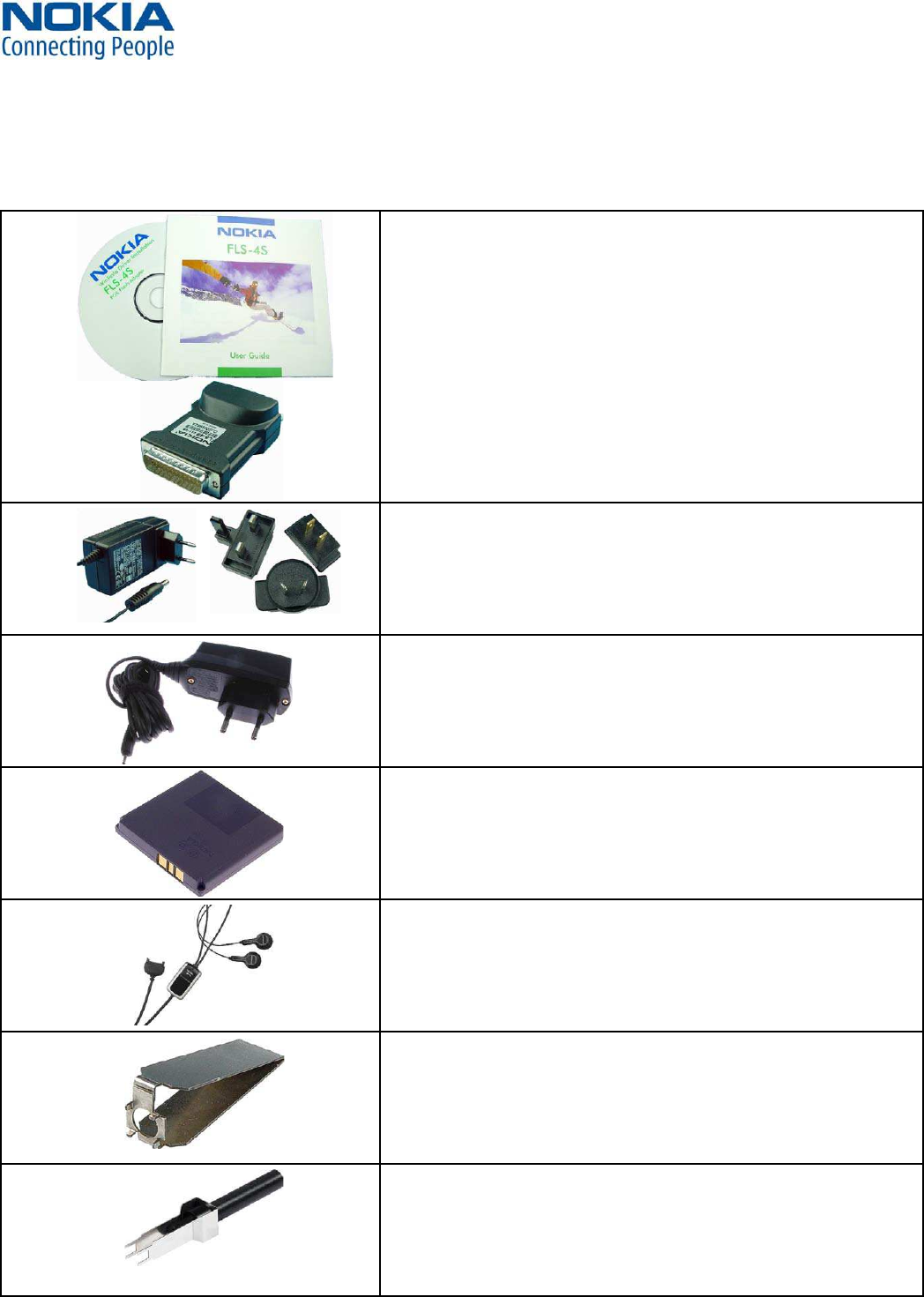
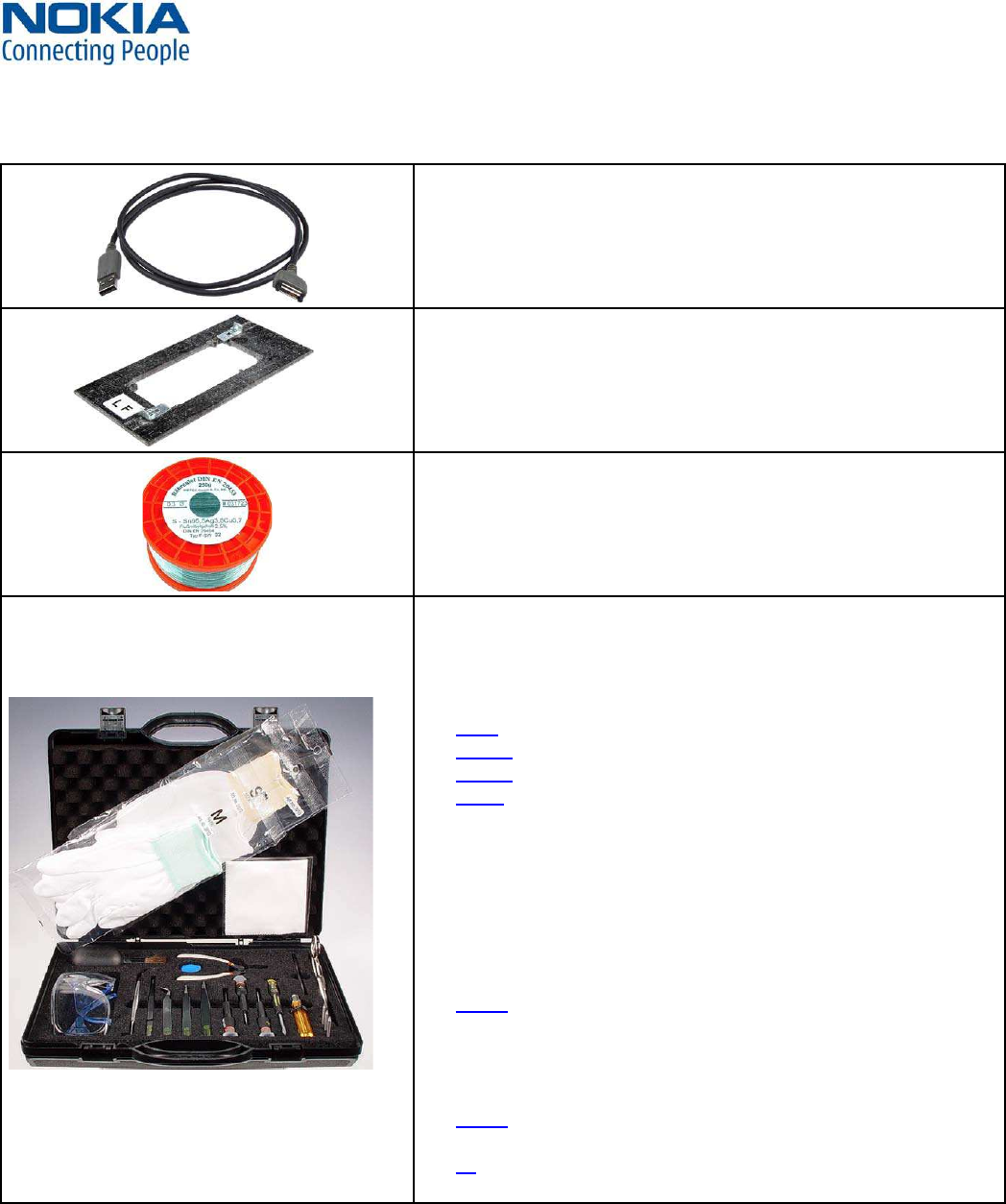
FLS-4S incl. ACF-8, Driver and User Guide
Dongle and flash device incorporated into one package, developed
specifically for POS use.
ACF-8
Universal Power Supply is used to power FLS-4S.
Travel Charger AC-4
Small and lightweight charger with smaller charging plug to charge
your phone battery fast.
Internal Battery BP-6M
Inserted under the back cover, this Li-Ion 970 mAh battery provides
power in a lightweight package.
Headset HS-23
Small and lightweight stereo headset with handsfree functionality,
volume control, Push to talk support, and comfortable earpieces for
listening to the FM radio or MP3 player in compatible phones.
SS-51
Camera removal tool for VGA camera (Frontside)
SS-45
Camera removal tool for 2 Megapixel camera (Backside)
SERVICE TOOLS7.
WW Competence Transfer
CMO Operations & Logistics
MMultimedia Creation & Support CONFIDENTIAL 19.01.2006
10
Service Manual 6280 Copyright © 2005-2006 NOKIA Corporation. All rights reserved.
Approved 5.0
MGR
Page (27)
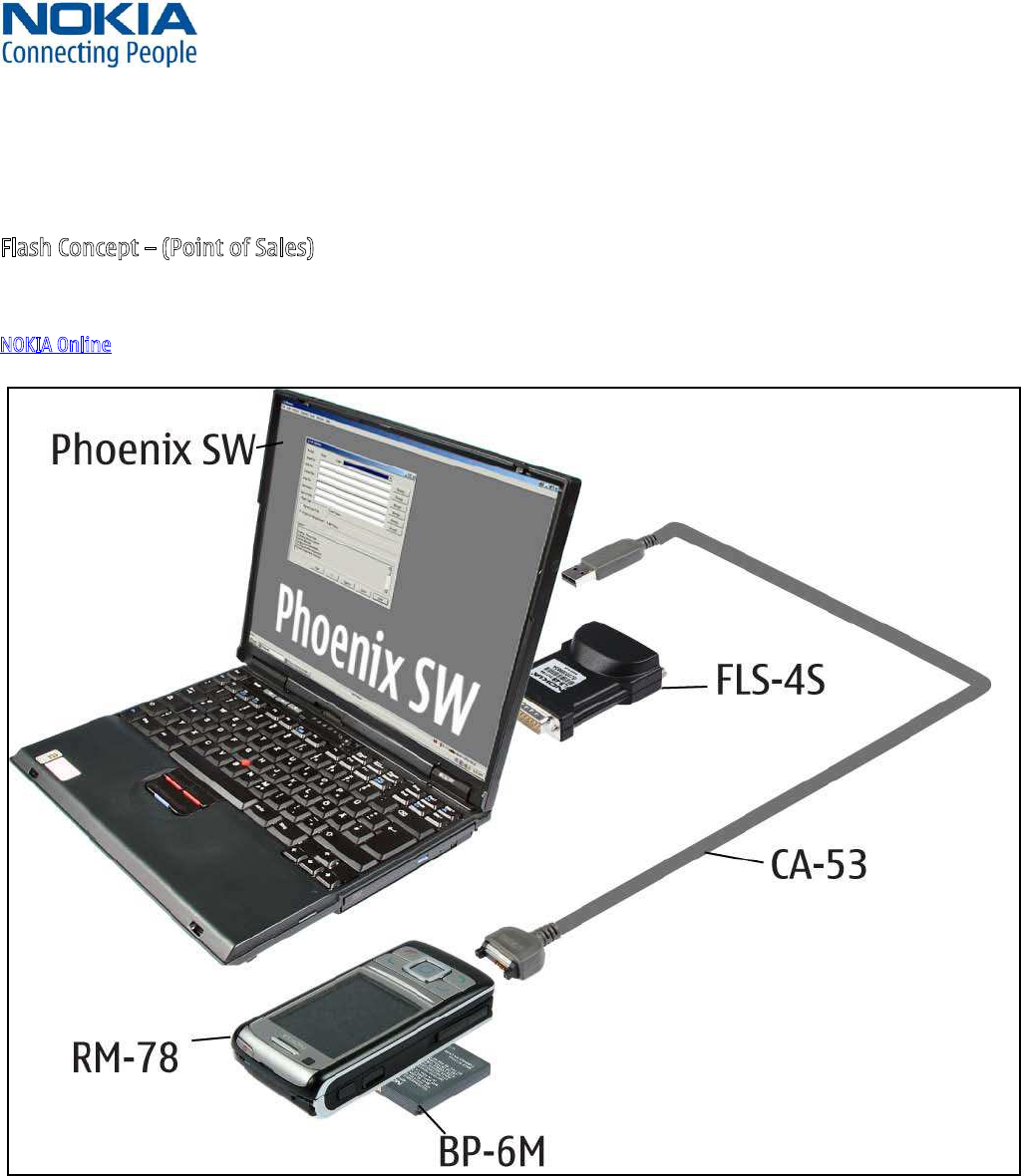
CA-53
Service Cable to connect the PC with the Pop-Port™ connector.
RJ-88
Soldering Jig
Lead-free Solder Wire
Mandatory for lead-free products (Level 2 only).
0772040 NMP Standard Toolkit
NOKIA opening tool SRT-6 NOKIA No. 0770431
Tonichi torque driver NOKIA No. 6901525
Hoya micro Fibre cloth MX304
Dastex gloves S, M, XL
Artilux goggles AH166
Wera bit T5 867/4TX 5x50
Wera 867/4 6IP; 50mm (Torx 6 PLUS®)
Wera bit T6 867/4TX 6x50
Wera 867/1 5IP; 25mm (Torx 5 PLUS®)
Wera bit T6 PLUS® 867/4TX 6IP
Facom side cutter 416E
Facom T5 driver SP.14032
Facom T6 driver SP.14033
Facom slot screwdriver AEF. 2x35.E
Wetec tweezers 7abb SA-ESD
Wetec tweezers 22 SA-ESD
Wetec tweezers 13 SA-SMD ESD
Wetec tweezers PSF SA-ESD
Wetec ESD brush E1211
Kaiser Fototechnik airbrush 6315
Wetec dental tool DEM83266/0
RS Components Scissors 323-5732
•
•
•
•
•
•
•
•
•
•
•
•
•
•
•
•
•
•
•
•
•
•
WW Competence Transfer
CMO Operations & Logistics
MMultimedia Creation & Support CONFIDENTIAL 19.01.2006
11
Service Manual 6280 Copyright © 2005-2006 NOKIA Corporation. All rights reserved.
Approved 5.0
MGR
Page (27)
SW-UPDATE8.
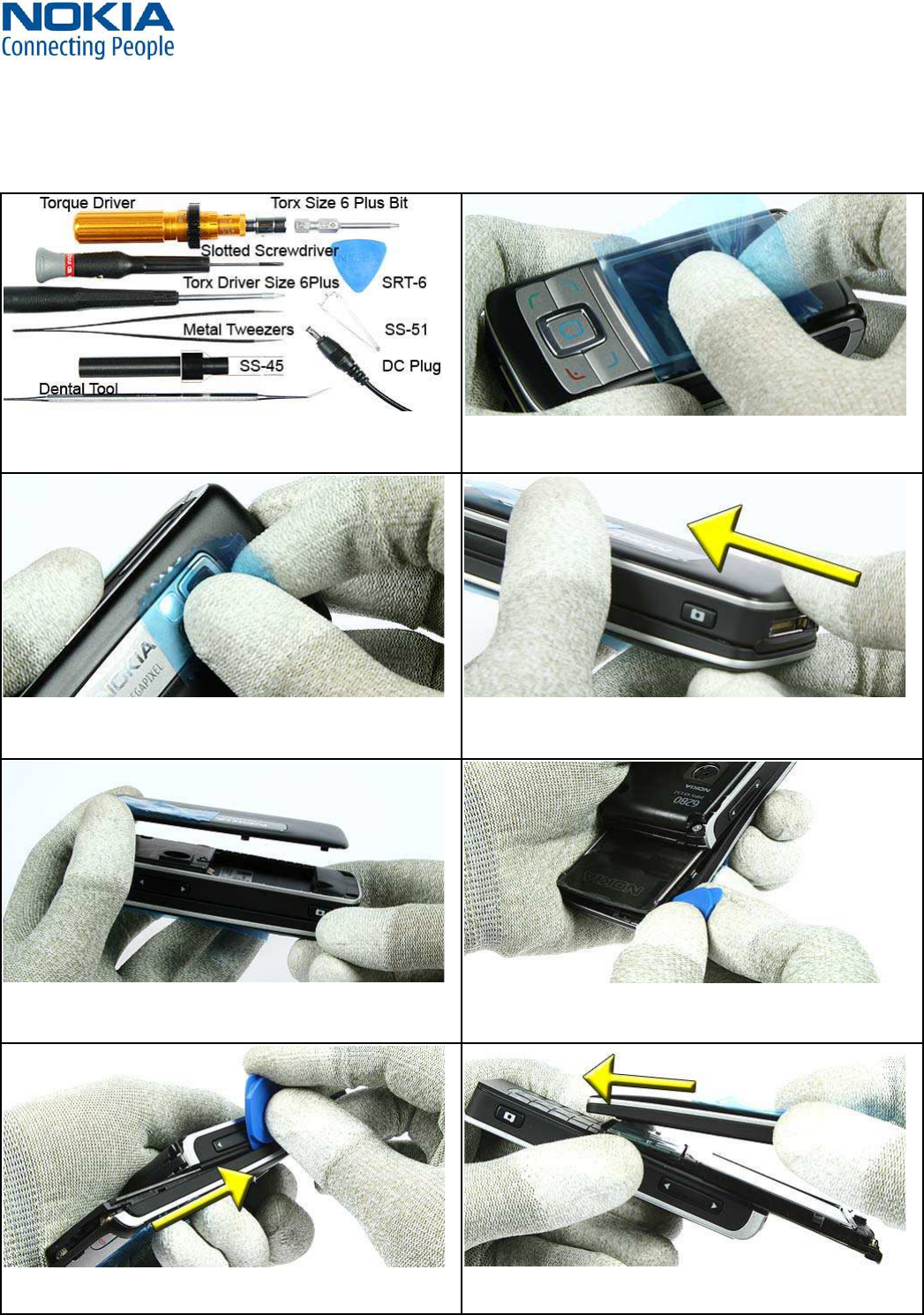
Flash Concept – (Point of Sales)
To use FLS-4S Flash Dongle you have to follow the user guide inside the sales package. Please check always for the latest
version of flash software, which is available on
NOKIA Online.
WW Competence Transfer
CMO Operations & Logistics
MMultimedia Creation & Support CONFIDENTIAL 19.01.2006
12
Service Manual 6280 Copyright © 2005-2006 NOKIA Corporation. All rights reserved.
Approved 5.0
MGR
Page (27)
DISASSEMBLY INSTRUCTION (UPPER PART)9.
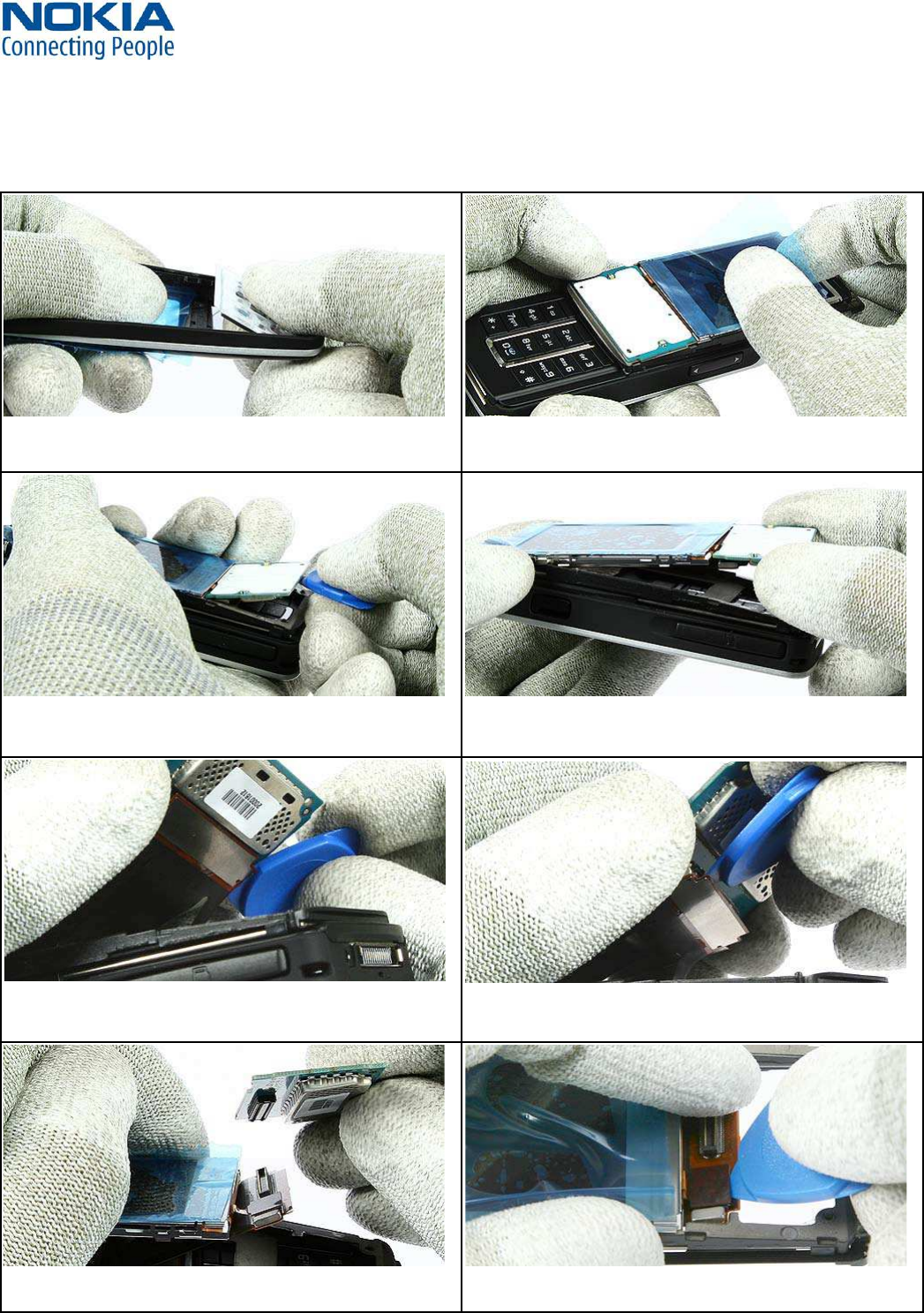
1.) You need the following tools. 2.) Protect the window with a plastic film.
4.) Release the B-Cover.
6.) Shift out the unit. Release the clips of the top side first.
3.) Protect the camera window with a plastic film.
5.) Remove the Battery Cover. Ensure that no battery is
inserted before continue.
7.) Slide along on both sides of the A-Cover to release all
clips.
8.) Lift up the A-Cover.
WW Competence Transfer
CMO Operations & Logistics
MMultimedia Creation & Support CONFIDENTIAL 19.01.2006
13
Service Manual 6280 Copyright © 2005-2006 NOKIA Corporation. All rights reserved.
Approved 5.0
MGR
Page (27)
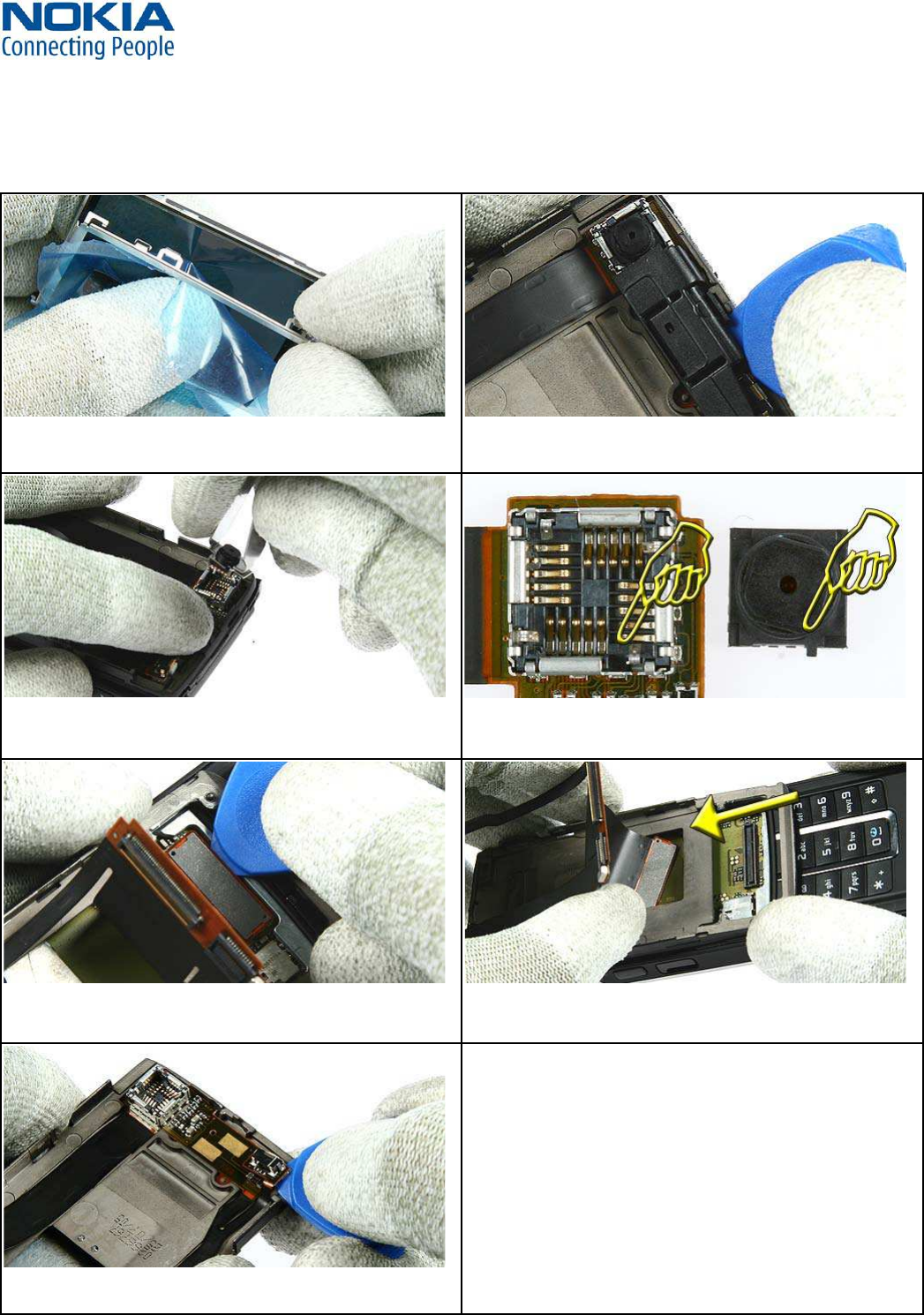
9.) Protect the inner side window with a plastic film. Re-
move the Keymat as shown.
10.) Protect the LCD with a plastic film.
11.) Shift together the unit. Lift up the glued UI PWB Assy
carefully with the SRT-6.
12.) Lift the UI PWB together with the LCD Module.
13.) Carefully release the flex connector at one side first. 14.) Now release the other side of the flex connector.
15.) Take away the UI PWB Assy. 16.) Release the connector of the LCD Module carefully
while fixing the flex foil. Remove the LCD Module now.
WW Competence Transfer
CMO Operations & Logistics
MMultimedia Creation & Support CONFIDENTIAL 19.01.2006
14
Service Manual 6280 Copyright © 2005-2006 NOKIA Corporation. All rights reserved.
Approved 5.0
MGR
Page (27)
19.) Release the VGA Camera with the SS-51. Hold the
Main Flex near the Camera Socket while removing the
20.) For Assembly: Mind the correct positioning of the VGA
Camera.
21.) Shift the unit into mid position. Release the connector
of the Main Flex Assy.
22.) Slot the flex connector through the C-Cover Assy care-
fully.
23.) Lift the glued Power Switch carefully.
18.) Release the Camera Guide Assy with the SRT-6.
17.) Separate the LCD Module from the Display Metal
Shield.
WW Competence Transfer
CMO Operations & Logistics
MMultimedia Creation & Support CONFIDENTIAL 19.01.2006
15
Service Manual 6280 Copyright © 2005-2006 NOKIA Corporation. All rights reserved.
Approved 5.0
MGR
Page (27)
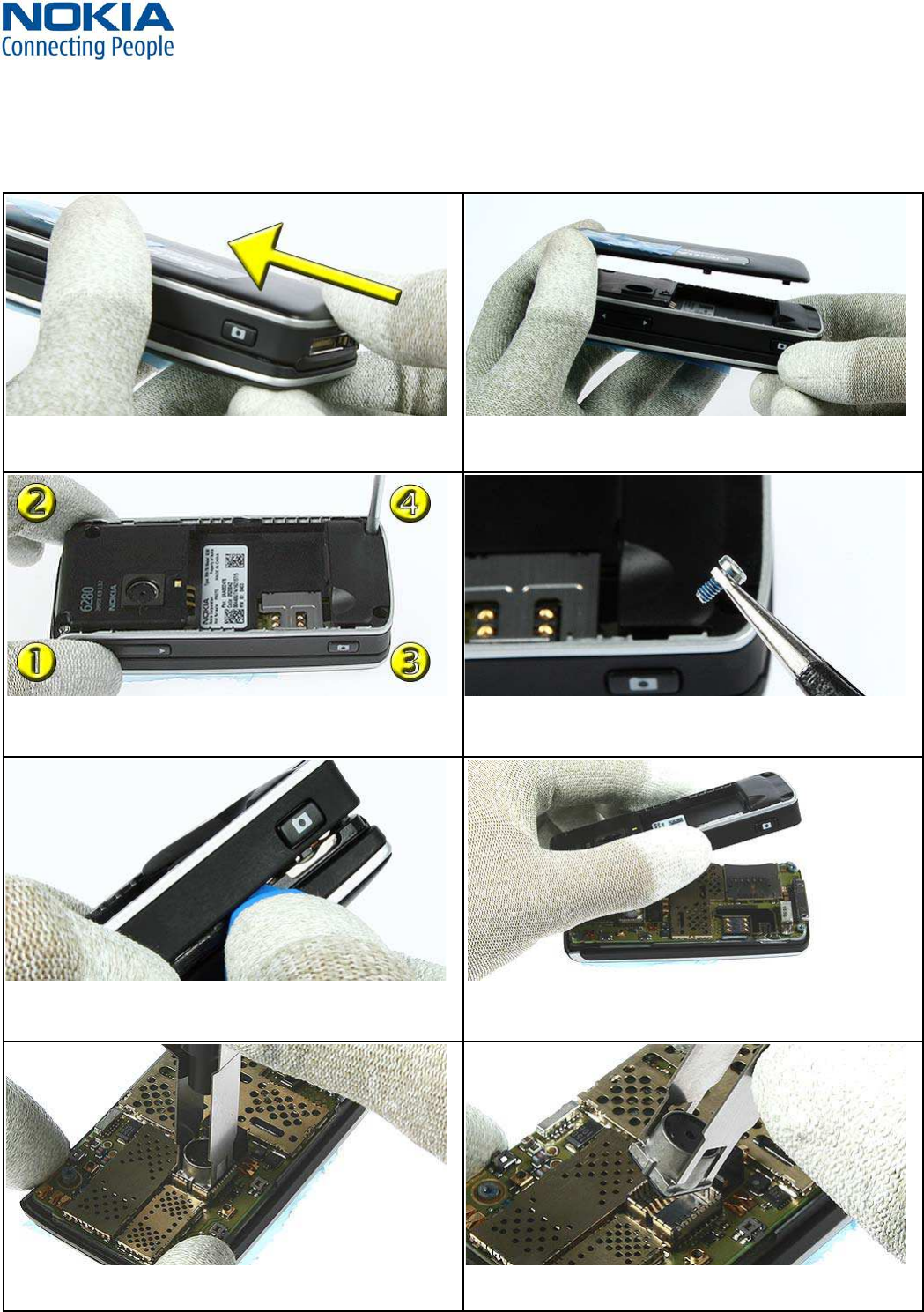
1.) Open the B-Cover by pressing it from the bottom side. 2.) Ensure that no battery is inserted.
3.) Unscrew all Torx size 6 plus screws in the shown order.
For Assembly use the reverse order and a torque of 25 Ncm.
4.) Once removed, the screws can’t be used again. Always
use new screws for assembly.
5.) Release the clips of the D-Cover. 6.) Remove the D-Cover.
7.) Remove the SMIA Camera with the SS-45. 8) Mind the correct position while assembling.
DISASSEMBLY INSTRUCTION (LOWER PART)10.
WW Competence Transfer
CMO Operations & Logistics
MMultimedia Creation & Support CONFIDENTIAL 19.01.2006
16
Service Manual 6280 Copyright © 2005-2006 NOKIA Corporation. All rights reserved.
Approved 5.0
MGR
Page (27)
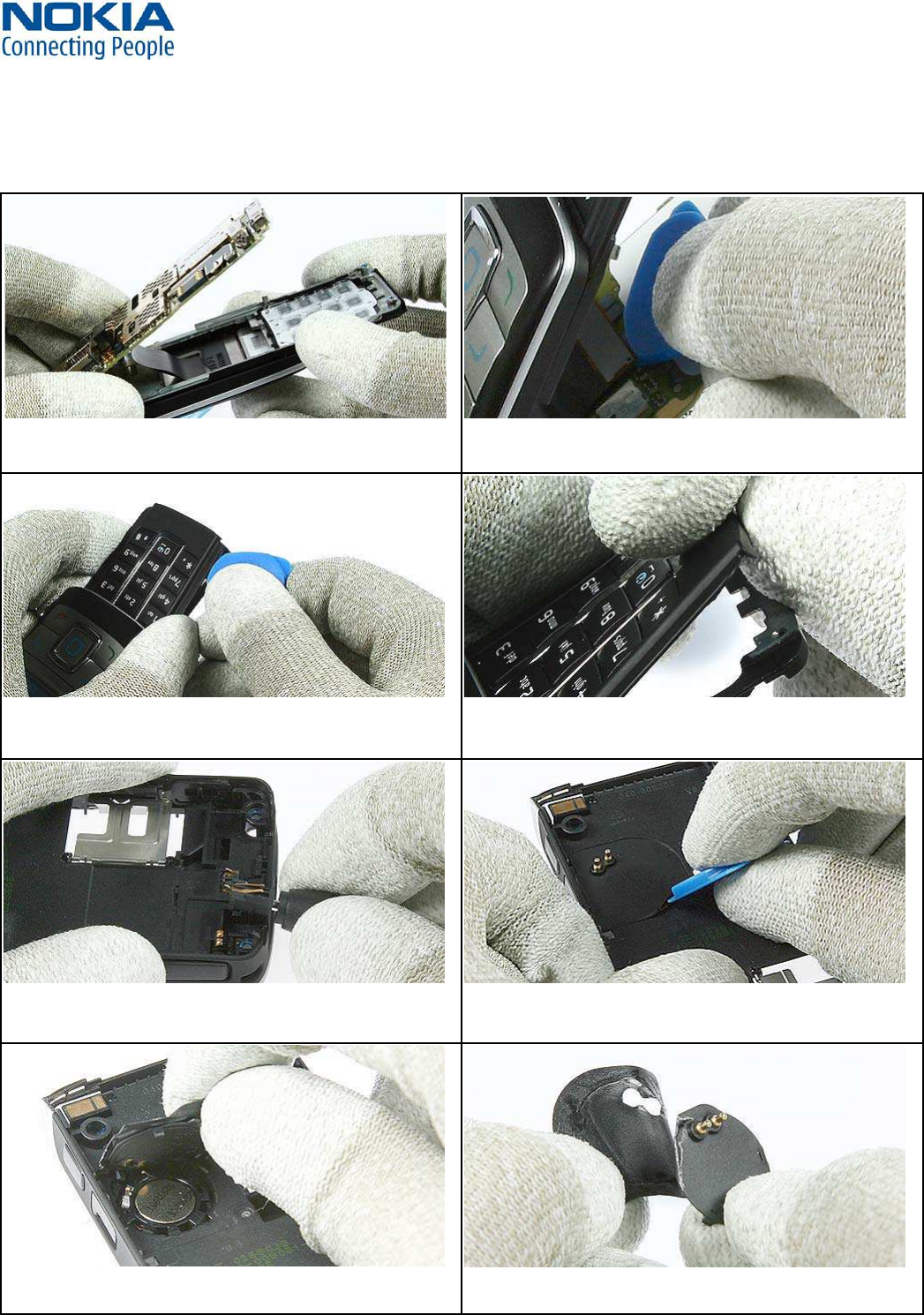
9.) Lift up the Engine Module, but bear in mind that the
flex connector is still connected.
10.) Open the flex connector carefully.
11.) Lever out the glued Keymat Assy. 12.) Ensure that no residue of the adhesive remains.
Always use new adhesive when reassemble.
13.) Remove the DC Jack with the DC Plug. 14.) Release the IHF Label with the SRT-6.
15.) Remove the IHF Lid. 16.) Peel up the IHF Label completely. Always use a new
one when reassembly. Ensure that no residues remain.
WW Competence Transfer
CMO Operations & Logistics
MMultimedia Creation & Support CONFIDENTIAL 19.01.2006
17
Service Manual 6280 Copyright © 2005-2006 NOKIA Corporation. All rights reserved.
Approved 5.0
MGR
Page (27)
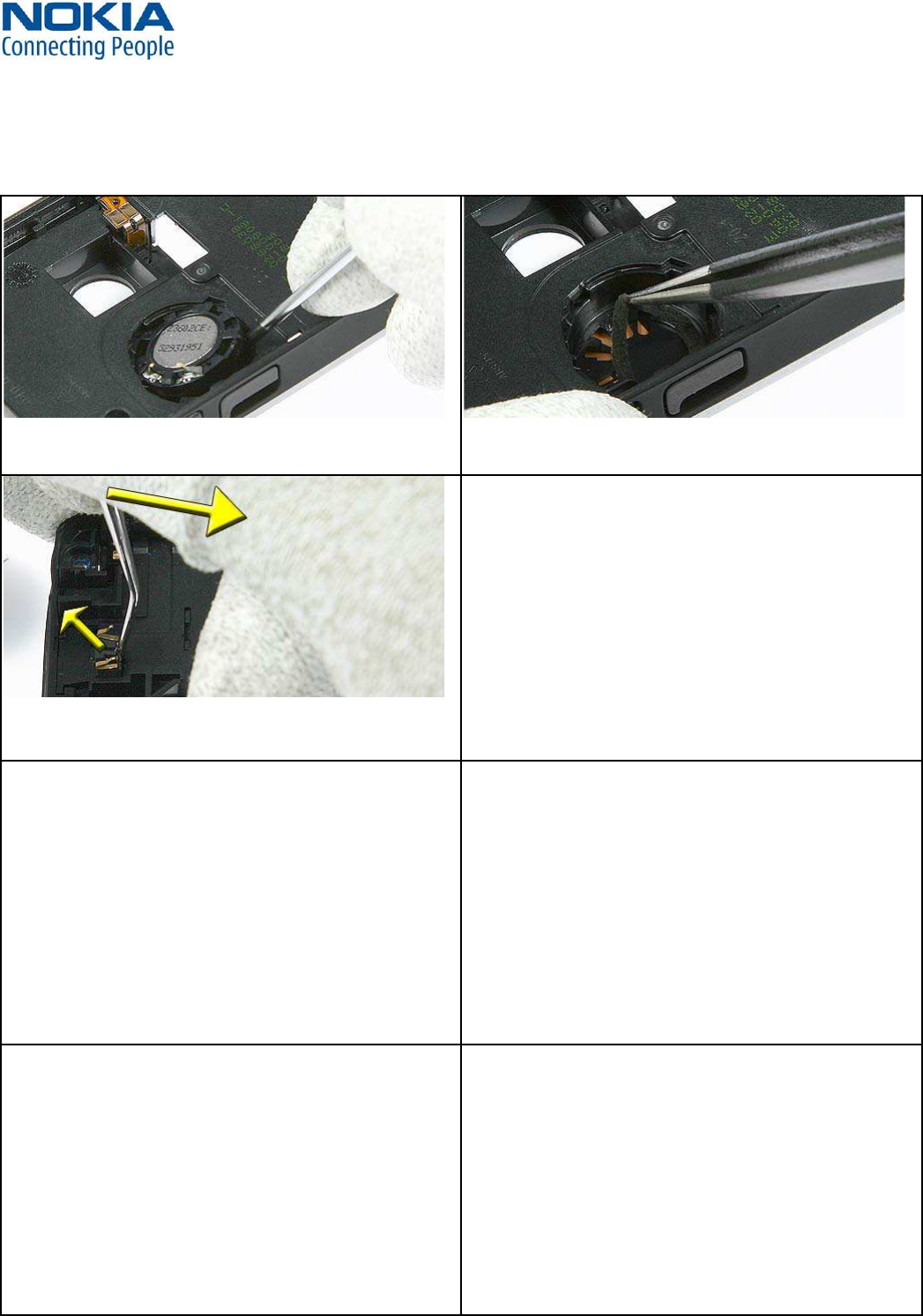
17.) Lever out the IHF Speaker. 18.) Always remove the residues of the IHF Gasket. Use a
new one when reassemble.
19.) Place the dental tool in the gap between Microphone
and Cover. Ease out the Microphone as shown. Once re-
moved, it can’t be reused again.
WW Competence Transfer
CMO Operations & Logistics
MMultimedia Creation & Support CONFIDENTIAL 19.01.2006
18
Service Manual 6280 Copyright © 2005-2006 NOKIA Corporation. All rights reserved.
Approved 5.0
MGR
Page (27)
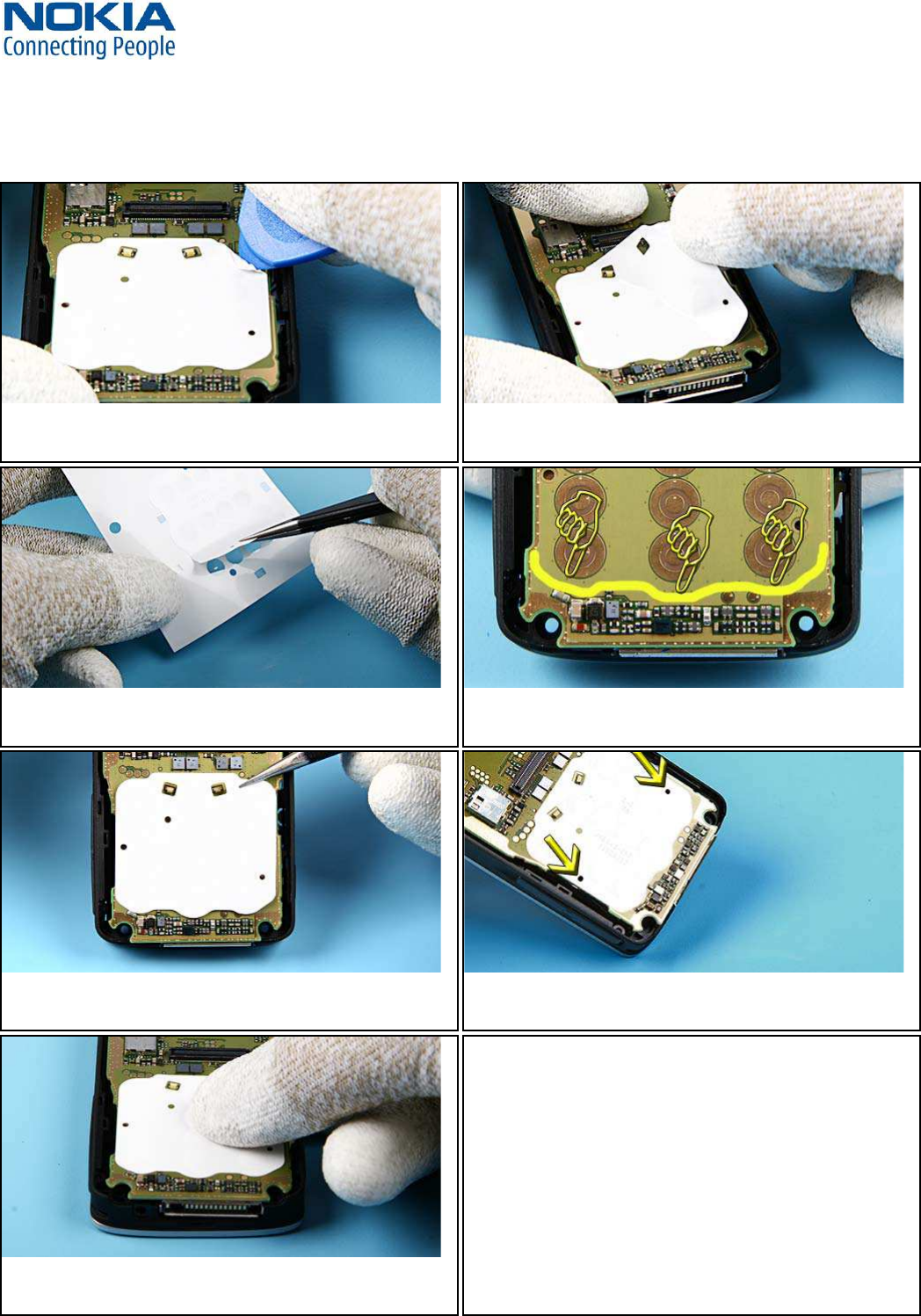
MAIN DOMESHEET EXCHANGE INSTRUCTIONS11.
1. Carefully remove the MAIN DOMESHEET with SRT-6. Be
careful not to damage surrounding components.
2. Remove the MAIN DOMESHEET slowly.
4. There are outline markings which show the exact
placement of the DOMESHEET.
5. Place the new MAIN DOMESHEET onto the ENGINE MODULE. 6. The holes of the dome sheet must also match exactly to
those in the module.
WW Competence Transfer
CMO Operations & Logistics
MMultimedia Creation & Support CONFIDENTIAL 19.01.2006
19
Service Manual 6280 Copyright © 2005-2006 NOKIA Corporation. All rights reserved.
Approved 5.0
MGR
Page (27)
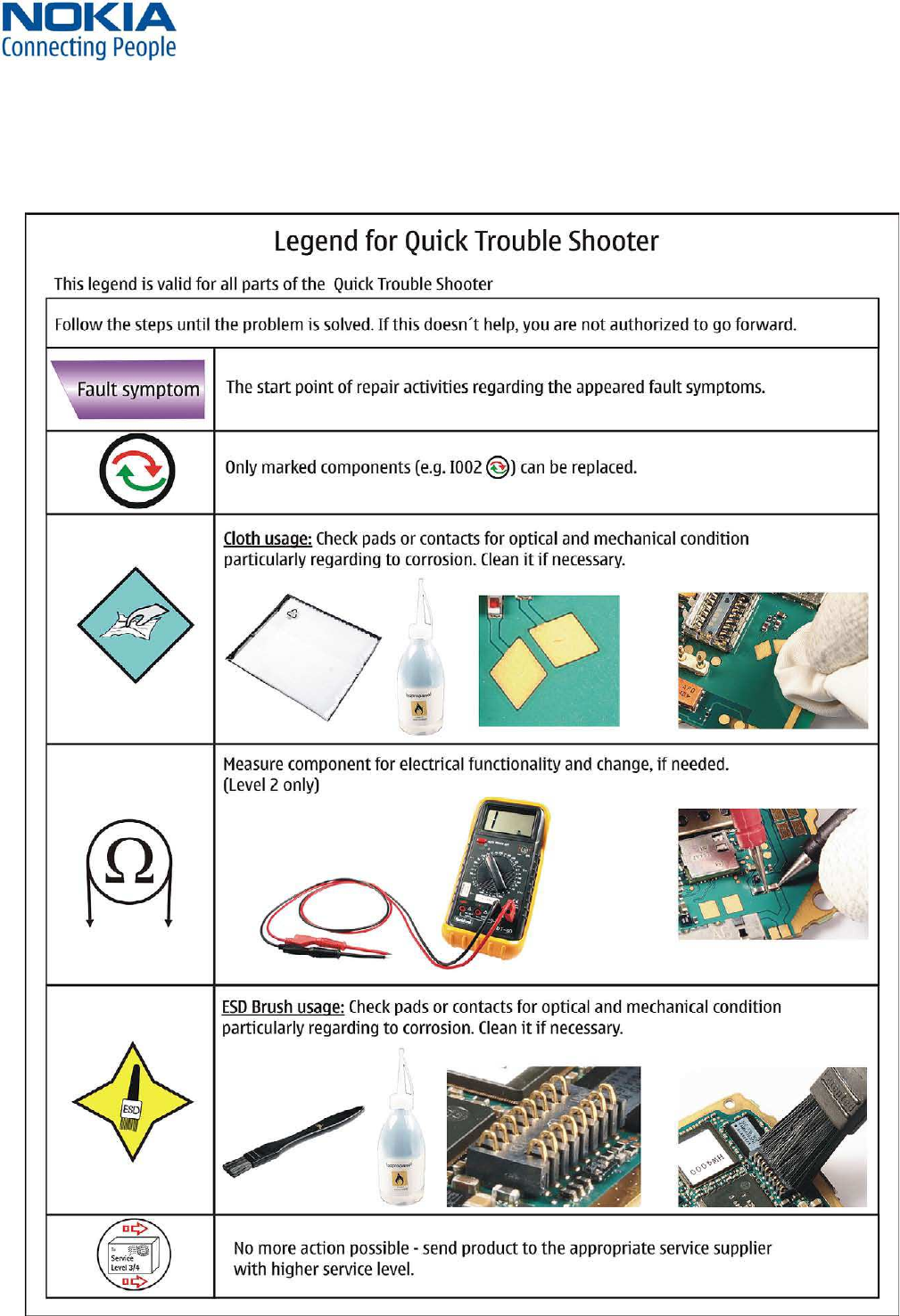
LEGEND FOR QUICK TROUBLE SHOOTER12.
WW Competence Transfer
CMO Operations & Logistics
MMultimedia Creation & Support CONFIDENTIAL 19.01.2006
20
Service Manual 6280 Copyright © 2005-2006 NOKIA Corporation. All rights reserved.
Approved 5.0
MGR
Page (27)
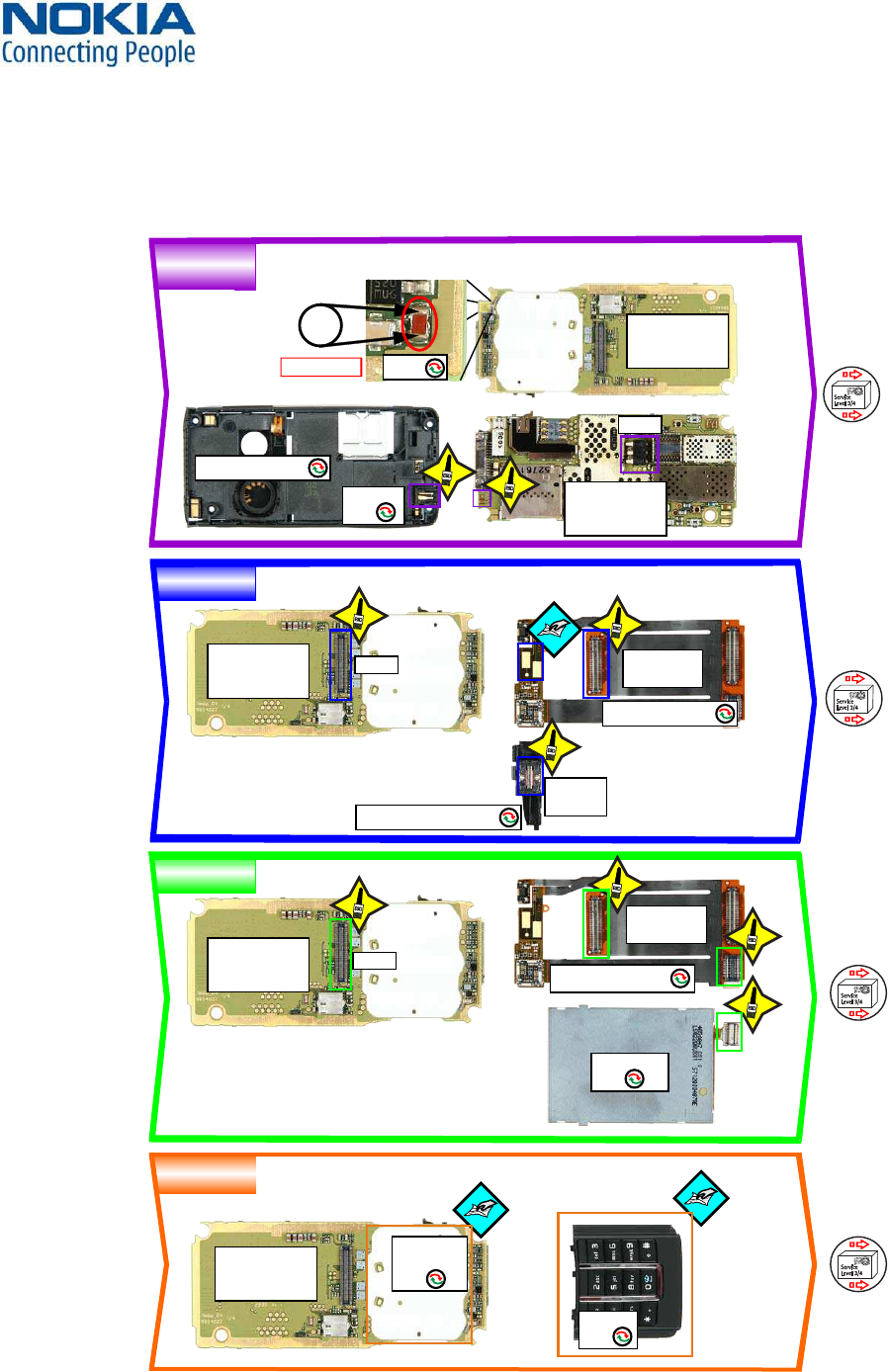
QUICK TROUBLE SHOOTER PART 113.
CHARGING
EARPIECE
DISPLAY
KEYMAT
Service
Level 3/4
To
Service
Level 3/4
To
Service
Level 3/4
To
Service
Level 3/4
To
Ω
LEVEL 2 ONLY
ENGINE MODULE
(not supplied)
I204
ENGINE MODULE
(not supplied)
I204
ENGINE MODULE
(not supplied)
I204
ENGINE MODULE
(not supplied)
I204
ENGINE MODULE
(not supplied)
I204
A8=D-COVER ASSY
A3=CAMERA GUIDE ASSY
A8=D-COVER ASSY
DC-JACK
I215
LCD MODULE
I007
KEYMAT
I201
MAIN
DOMESHEET
I203
EARPIECE
I011
CONNECTORS
I103
CONNECTORS
I103
F2000
X2070
X3301
X3301
A4=MAIN FLEX ASSY
≈0Ω
WW Competence Transfer
CMO Operations & Logistics
MMultimedia Creation & Support CONFIDENTIAL 19.01.2006
21
Service Manual 6280 Copyright © 2005-2006 NOKIA Corporation. All rights reserved.
Approved 5.0
MGR
Page (27)
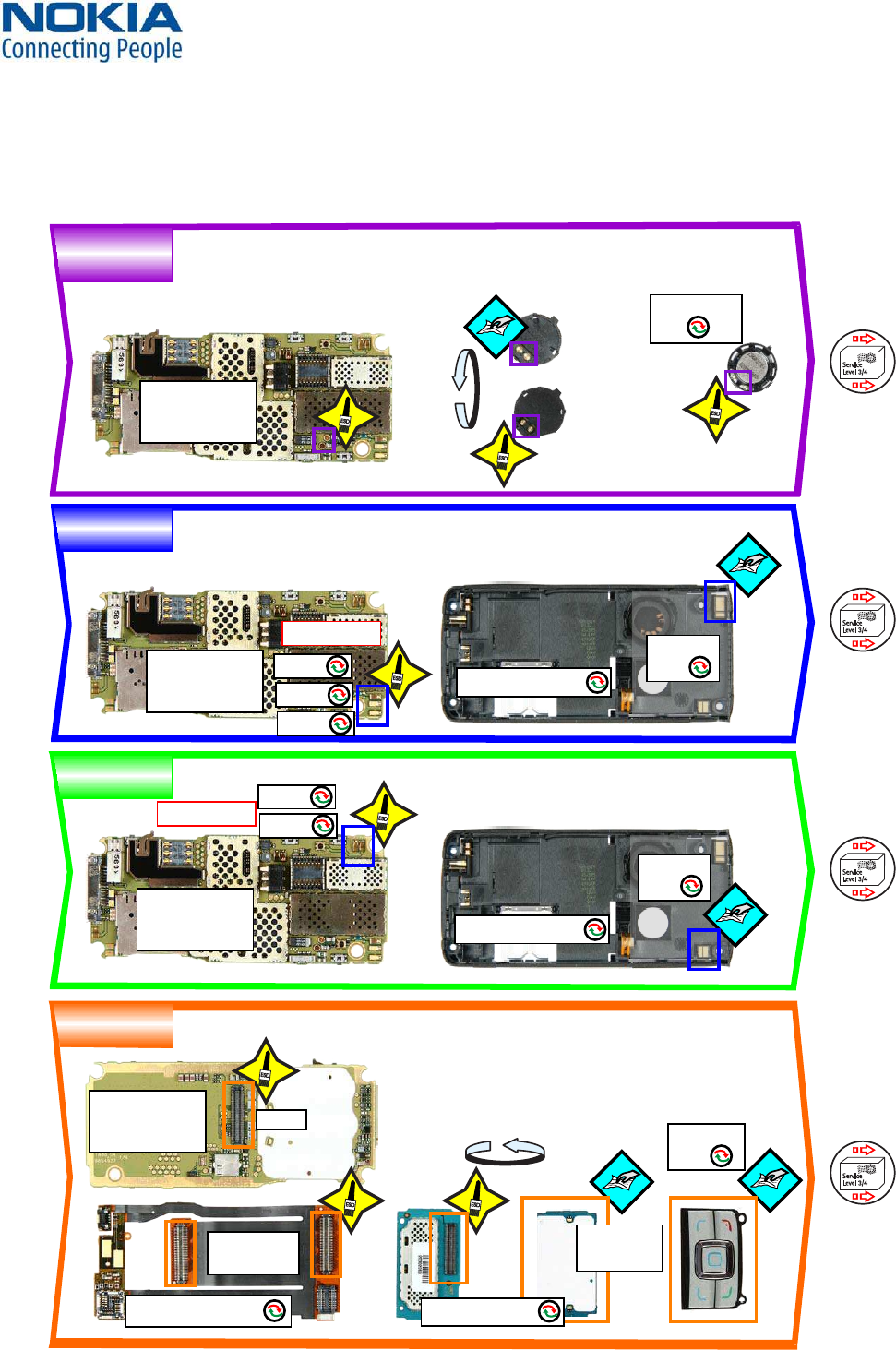
QUICK TROUBLE SHOOTER PART 214.
Service
Level 3/4
To
Service
Level 3/4
To
Service
Level 3/4
To
Service
Level 3/4
To
IHF SPEAKER
SERVICE
GSM
SERVICE
WCDMA
UI KEYMAT
180°
180°
ENGINE MODULE
(not supplied)
I204
ENGINE MODULE
(not supplied)
I204
ENGINE MODULE
(not supplied)
I204
ENGINE MODULE
(not supplied)
I204
IHF SPEAKER
I222
A8=D-COVER ASSY
A8=D-COVER ASSY
A4=MAIN FLEX ASSY
X3301
CONNECTORS
I103
X8004
X8005
X8001
LEVEL 2 ONLY
LEVEL 2 ONLY
X8002
X8006
A2=UI PWB ASSY
ANTENNA
I224
ANTENNA
I224
UI KEYMAT
I003
DOMESHEET
I005
WW Competence Transfer
CMO Operations & Logistics
MMultimedia Creation & Support CONFIDENTIAL 19.01.2006
22
Service Manual 6280 Copyright © 2005-2006 NOKIA Corporation. All rights reserved.
Approved 5.0
MGR
Page (27)
QUICK TROUBLE SHOOTER PART 315.
POWER
SMIA
CAMERA
VGA
CAMERA
VOLUME
Service
Level 3/4
To
Service
Level 3/4
To
Service
Level 3/4
To
Service
Level 3/4
To
≈∞ Ω
≈0Ω
MEASURE OPEN AND PRESSED STATE
ON BOTH SIDES OF THE SWITCH
How to measure 4-pol switch
(built-in)
open
pressed
Ω
Ω
Ω
LEVEL 2 ONLY
Ω
ENGINE MODULE
(not supplied)
I204
ENGINE MODULE
(not supplied)
I204
ENGINE MODULE
(not supplied)
I204
ENGINE MODULE
(not supplied)
I204
A4=MAIN FLEX ASSY
S2595 S2591
X3301
X3301
CONNECTORS
I103
SMIA CAMERA
I209
VGA CAMERA
I008
A4=MAIN FLEX ASSY
X2070
X1000
WW Competence Transfer
CMO Operations & Logistics
MMultimedia Creation & Support CONFIDENTIAL 19.01.2006
23
Service Manual 6280 Copyright © 2005-2006 NOKIA Corporation. All rights reserved.
Approved 5.0
MGR
Page (27)
QUICK TROUBLE SHOOTER PART 416.
LED FLASH
BLUETOOTH
MICROPHONE
SIM
Service
Level 3/4
To
Service
Level 3/4
To
Service
Level 3/4
To
Service
Level 3/4
To
ENGINE MODULE
(not supplied)
I204 LED FLASH LIGHT
I218
BT ANTENNA
I225
ENGINE MODULE
(not supplied)
I204
ENGINE MODULE
(not supplied)
I204
MICROPHONE
I216
A8=D-COVER ASSY
A8=D-COVER ASSY
A8=D-COVER ASSY
A8=D-COVER ASSY
X2530
X2531
X2700
SIM LID
I219
LEVEL 2 ONLY
WW Competence Transfer
CMO Operations & Logistics
MMultimedia Creation & Support CONFIDENTIAL 19.01.2006
24
Service Manual 6280 Copyright © 2005-2006 NOKIA Corporation. All rights reserved.
Approved 5.0
MGR
Page (27)
CAMERA GONOGO TEST17.
Before starting the GoNoGo
test, check that camera
window is clean. If not,
clean the window with
cloth.
• Press the red receiver button to reach the Home Menu
• Select Menu
• Select Media
• Select Camera
• Press Capture to take a photo
This Image will be saved to Gallery into the Photos folder automatically.
Test was successful, if the Image appears on your Display. The camera is ok.
• Select Options
• Select Delete
• Select Yes
• Press the red receiver button to reach the Home Menu
If the test is failed see Quick Trouble Shooter.
SMIA CAMERA TEST
WW Competence Transfer
CMO Operations & Logistics
MMultimedia Creation & Support CONFIDENTIAL 19.01.2006
25
Service Manual 6280 Copyright © 2005-2006 NOKIA Corporation. All rights reserved.
Approved 5.0
MGR
Page (27)
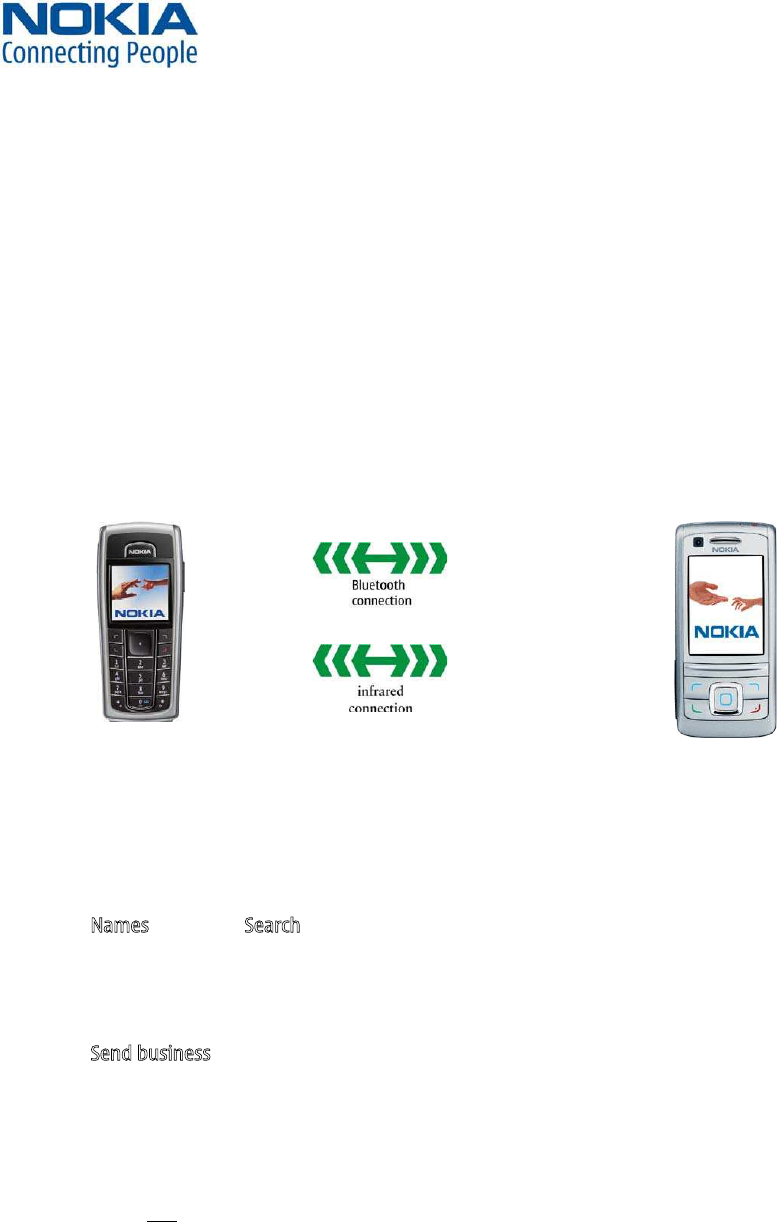
BLUETOOTH & INFRARED TEST18.
Bluetooth test
You need another Bluetooth device (e.g. 6230) to do a GoNoGo test.
Make sure that Bluetooth is activated in the reference unit. The distance of the devices should be not more than 5m from
each other.
Infrared test
You need another infrared device (e.g. 6230) to do a GoNoGo test. The infrared windows of the devices must be directed to
each other and should have a distance of approximate 15 cm. Make sure that infrared is activated in receiver device.
Warning: Do not point the IR (infrared) beam at anyone’s eye or allow it to interfere with other IR devices. This device is a
Class 1 Laser product.
Reference unit, Bluetooth /infrared activated Test unit
Settings on the test unit:
• Press the red End key to reach the Home Menu
• Select Names and select Search for an entry
If phone and SIM memory is empty, create one new entry.
• Select an entry and select Details
• Select Options
• Select Send business card
A) - for infrared test: Select Via infrared
If sending of business card fails, make sure again that infrared windows are directed to each other and infrared is
activated in reference device. Then try again sending.
Test was successful, if you get this message on receiver device.
You will not
B) - for Bluetooth test: Select Via Bluetooth
If needed (for e.g. after a sw-update), enter a name for this device
• select Options
• select Accept
Search window appears, if all Bluetooth devices in range will be displayed, the test is successful!
• Press red End key to reach the Home Menu
Note: If the Bluetooth is activated, switch it off!
WW Competence Transfer
CMO Operations & Logistics
MMultimedia Creation & Support CONFIDENTIAL 19.01.2006
26
Service Manual 6280 Copyright © 2005-2006 NOKIA Corporation. All rights reserved.
Approved 5.0
MGR
Page (27)
GONOGO TEST19.
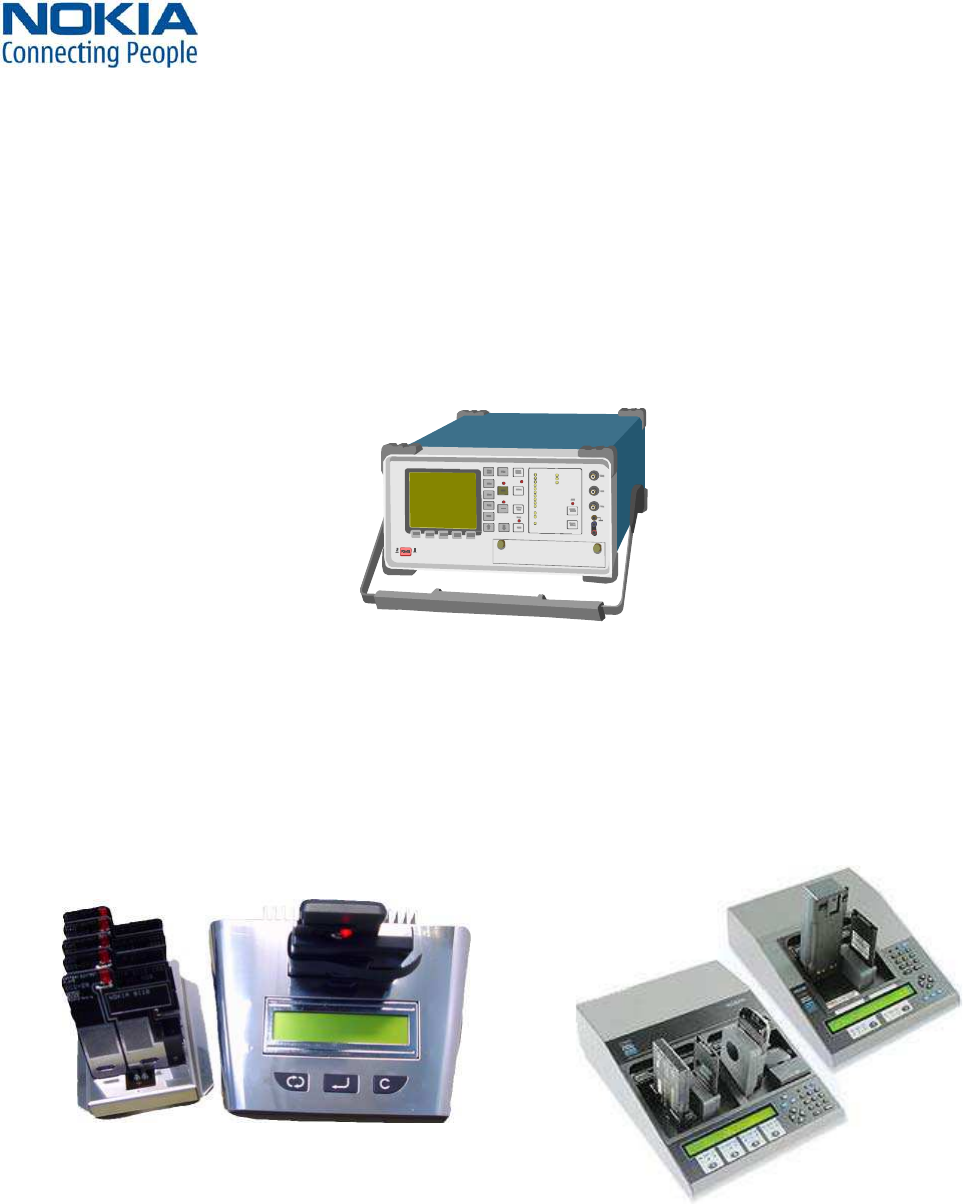
After the optical check, a GoNoGo test has to be carried out if the unit has been unscrewed to guarantee the functionality
of the phone.
right setup according to the tester type and product type.
Please refer to “Recommended Service Equipment” on NOKIA Online.
Mobile Phone Tester
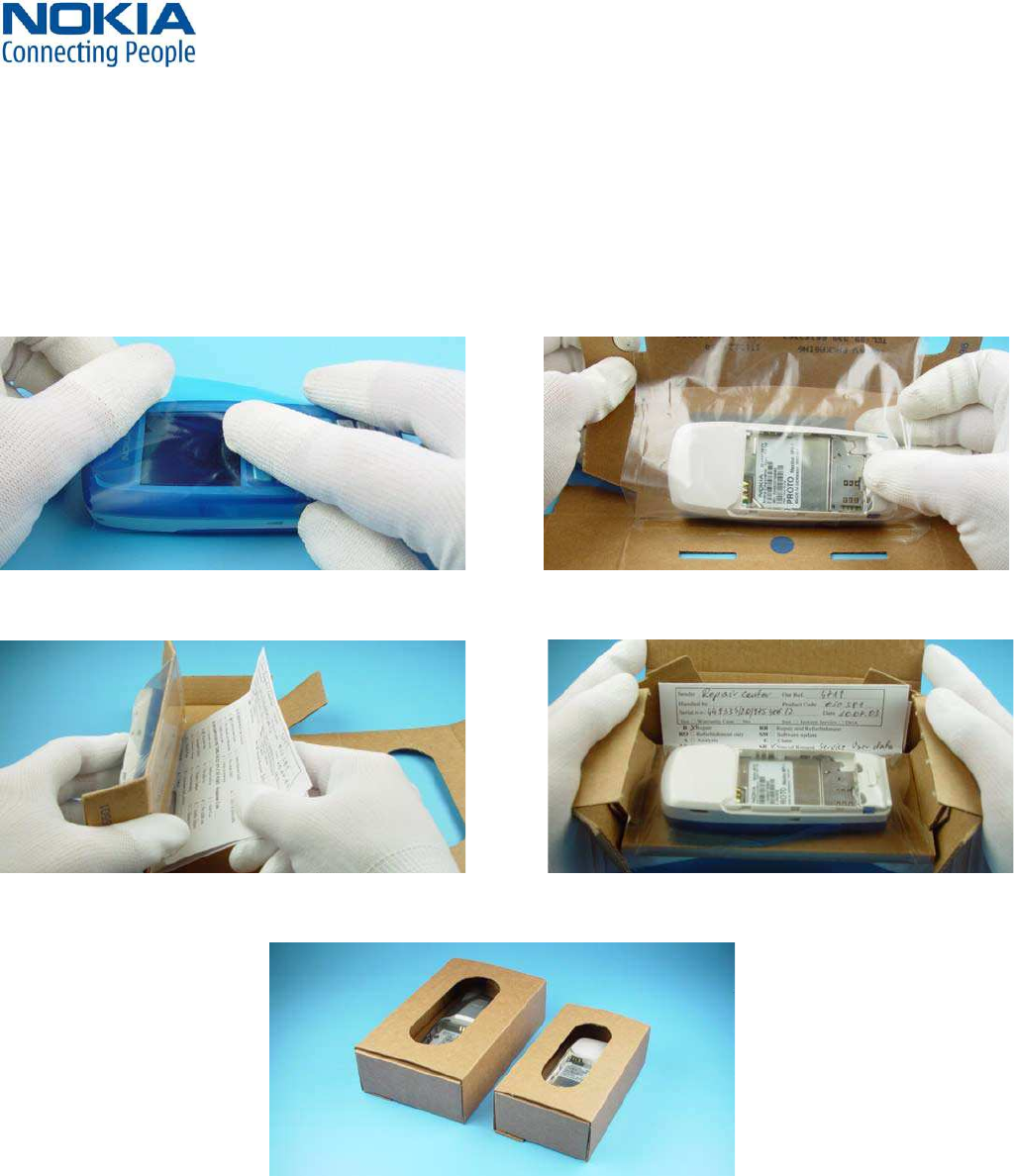
A battery tester lets you test the capacity of NOKIA batteries.
Please refer to the actual information on NOKIA Online.
http://www.astratec.co.uk/ http://www.cadex.com/
BATTERY TEST20.
WW Competence Transfer
CMO Operations & Logistics
MMultimedia Creation & Support CONFIDENTIAL 19.01.2006
27
Service Manual 6280 Copyright © 2005-2006 NOKIA Corporation. All rights reserved.
Approved 5.0
MGR
Page (27)
FORWARDING OF REPAIRS21.
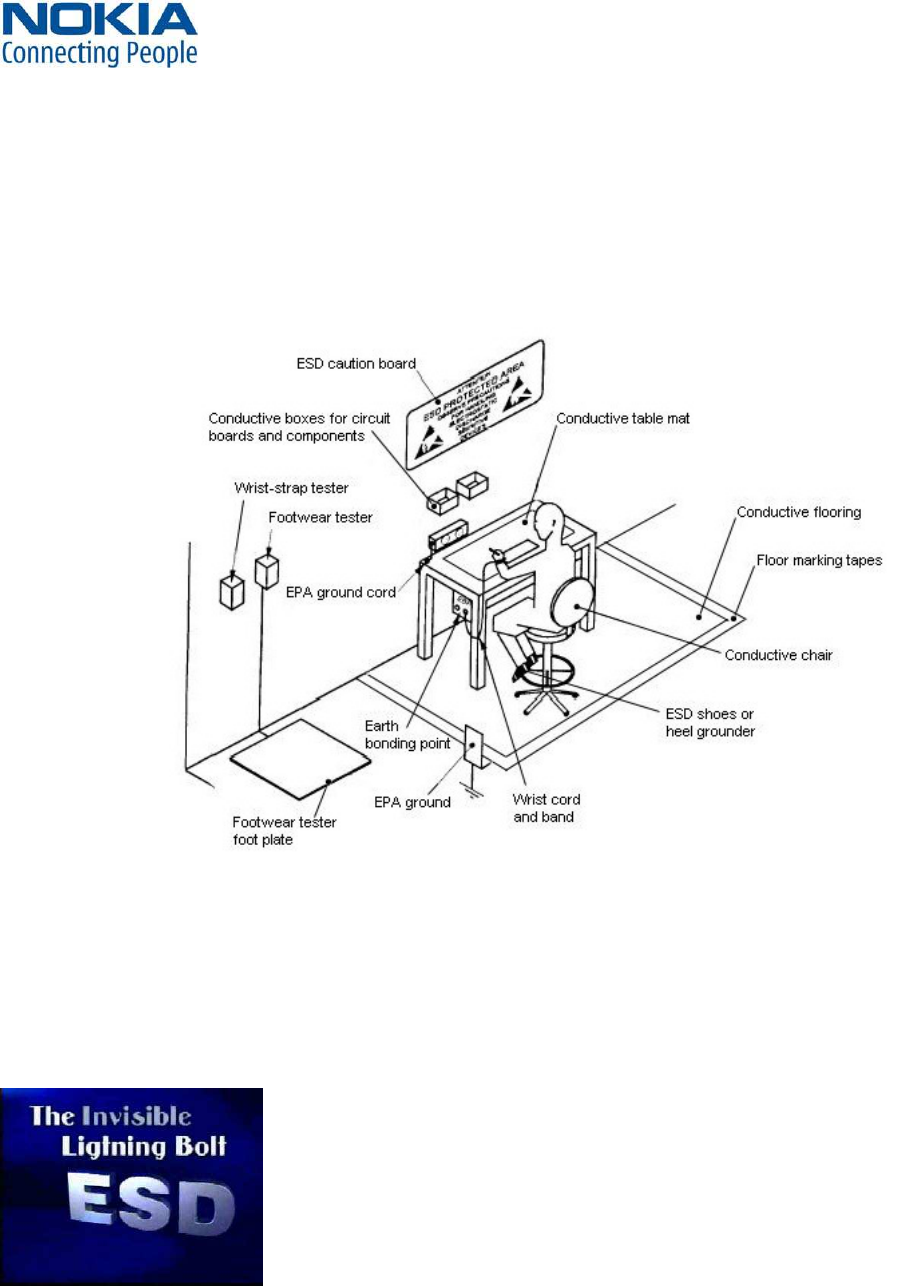
When it is necessary to forward of repairs to appropriate service supplier with higher service level we recommend using
the offered swap phone cartons as described in Spare Parts SB-004.
into the swap carton.
Fold the swap carton as shown in Spare Parts SB-004.
There are two different sizes of swap cartons for common mobile phones.
WW Competence Transfer
CMO Operations & Logistics
MMultimedia Creation & Support CONFIDENTIAL 19.01.2006
28
Service Manual 6280 Copyright © 2005-2006 NOKIA Corporation. All rights reserved.
Approved 5.0
MGR
Page (27)
ESD PROTECTION REQUIREMENTS22.
Please refer to the NOKIA Online document Service Supplier Requirements in folder General instructions.
USE Conductive bags and boxes
USE ESD compatible service tools
USE Conductive wastebaskets
USE ESD gloves when handling PWBs/PCBs
USE Cleaning material without changing el. Characteristics
USE Grounded service equipment, i.e. soldering station
USE ESD clothes such as coat or frock
NO Smoking
NO Drinking
NO Eating
NO Dust
NO Useless Items
NO Normal pressured air for cleaning modules/
displays
The video covers general issues concerning Electro-Static Discharge (ESD)