UEFI_Driver_HII_Win_Lab_Guide Uefi Driver Hii Win Lab Guide
User Manual:
Open the PDF directly: View PDF  .
.
Page Count: 96
- UEFI_Driver_HII_Win_Lab_Guide
- UEFI Driver Wizard – Adding HII Labs
- Lab 1. Adding Strings and Forms to Setup HII for User Configuration
- a. Setup for Lab adding HII
- b. Edit Driver for adding HII
- Lab 2. Updating HII to Save Data Settings
- Lab 3. Updating your driver to initialize data from the VFR data to the HII Database
- Lab 4. Updating the Menu: Reset Button
- Lab 5. Updating the Menu: Pop-up Box
- Lab 6. Updating the Menu: Creating a String to Name a Saved Configuration
- Lab 7. Updating the Menu: Numeric Entry
- Lab 8. Updating your Driver for Interactive Call Backs
- Lab 9. Add code to your driver when Call Back events occur for Interactive Items
- Lab 10. Adding an Additional Form Page
- Lab 11. Adding Communication from Driver to Console through HII
- Lab Setup
- Microsoft Windows 10 – Visual Studio command prompt
- Reference
- Microsoft Windows and Visual Studio Matrix
- Glossary of UEFI Terms and Acronyms
- Helpful Links

TABLEOFCONTENTS
UEFI_Driver_HII_Win_Lab_Guide
UEFIDriverWizard–AddingHIILabs
Lab1.AddingStringsandFormstoSetupHIIforUserConfiguration
a.SetupforLabaddingHII
b.EditDriverforaddingHII
Lab2.UpdatingHIItoSaveDataSettings
Lab3.UpdatingyourdrivertoinitializedatafromtheVFRdatatotheHIIDatabase
Lab4.UpdatingtheMenu:ResetButton
Lab5.UpdatingtheMenu:Pop-upBox
Lab6.UpdatingtheMenu:CreatingaStringtoNameaSavedConfiguration
Lab7.UpdatingtheMenu:NumericEntry
Lab8.UpdatingyourDriverforInteractiveCallBacks
Lab9.AddcodetoyourdriverwhenCallBackeventsoccurforInteractiveItems
Lab10.AddinganAdditionalFormPage
Lab11.AddingCommunicationfromDrivertoConsolethroughHII
LabSetup
MicrosoftWindows10–VisualStudiocommandprompt
Reference
MicrosoftWindowsandVisualStudioMatrix
GlossaryofUEFITermsandAcronyms
HelpfulLinks
UEFIDriverHIIWinLabGuide[DRAFT]
1DRAFTFORREVIEW[11/08/201808:04:02]

UEFIDRIVERHIIWINLABGUIDE
UEFIandEDKIIBaseTraining
LabandReferenceGuide
AssumesWindows10
DRAFTFORREVIEW
11/08/201808:04:02
Revision01.0
Contributedby
LaurieJarlstrom,IntelCorporation
Acknowledgements
Redistributionanduseinsource(originaldocumentform)and'compiled'forms(convertedto
PDF,epub,HTMLandotherformats)withorwithoutmodification,arepermittedprovided
thatthefollowingconditionsaremet:
1. Redistributionsofsourcecode(originaldocumentform)mustretaintheabovecopyright
notice,thislistofconditionsandthefollowingdisclaimerasthefirstlinesofthisfile
unmodified.
2. Redistributionsincompiledform(transformedtootherDTDs,convertedtoPDF,epub,
HTMLandotherformats)mustreproducetheabovecopyrightnotice,thislistof
conditionsandthefollowingdisclaimerinthedocumentationand/orothermaterials
providedwiththedistribution.
THISDOCUMENTATIONISPROVIDEDBYTIANOCOREPROJECT"ASIS"ANDANY
EXPRESSORIMPLIEDWARRANTIES,INCLUDING,BUTNOTLIMITEDTO,THE
IMPLIEDWARRANTIESOFMERCHANTABILITYANDFITNESSFORAPARTICULAR
PURPOSEAREDISCLAIMED.INNOEVENTSHALLTIANOCOREPROJECTBELIABLE
FORANYDIRECT,INDIRECT,INCIDENTAL,SPECIAL,EXEMPLARY,OR
CONSEQUENTIALDAMAGES(INCLUDING,BUTNOTLIMITEDTO,PROCUREMENTOF
UEFI_Driver_HII_Win_Lab_Guide
UEFIDriverHIIWinLabGuide[DRAFT]
2DRAFTFORREVIEW[11/08/201808:04:02]

SUBSTITUTEGOODSORSERVICES;LOSSOFUSE,DATA,ORPROFITS;OR
BUSINESSINTERRUPTION)HOWEVERCAUSEDANDONANYTHEORYOFLIABILITY,
WHETHERINCONTRACT,STRICTLIABILITY,ORTORT(INCLUDINGNEGLIGENCEOR
OTHERWISE)ARISINGINANYWAYOUTOFTHEUSEOFTHISDOCUMENTATION,
EVENIFADVISEDOFTHEPOSSIBILITYOFSUCHDAMAGE.
Copyright(c)2018,IntelCorporation.Allrightsreserved.
RevisionHistory
Revision RevisionHistory Date
01.0 Initialrelease. July2018
UEFI_Driver_HII_Win_Lab_Guide
UEFIDriverHIIWinLabGuide[DRAFT]
3DRAFTFORREVIEW[11/08/201808:04:02]

UEFIDRIVERWIZARD–ADDINGHII
UEFIDriverWizard–AddingHIILabs
UEFIDriverHIIWinLabGuide[DRAFT]
4DRAFTFORREVIEW[11/08/201808:04:02]

Lab1.AddingStringsandFormstoSetupHII
forUserConfiguration
Inthislab,you’lllearnhowtouseHIItoaddstringsandformstoafirmwaresetupmenufor
userconfiguration.Onceyou’vecompletethislab,yourendresultwillmatchFigure1.
Figure1MyWizardDrivermenuwithstringsandforms
Lab1.AddingStringsandFormstoSetupHIIforUserConfiguration
UEFIDriverHIIWinLabGuide[DRAFT]
5DRAFTFORREVIEW[11/08/201808:04:02]
Lab1a.SetupforLabaddingHII
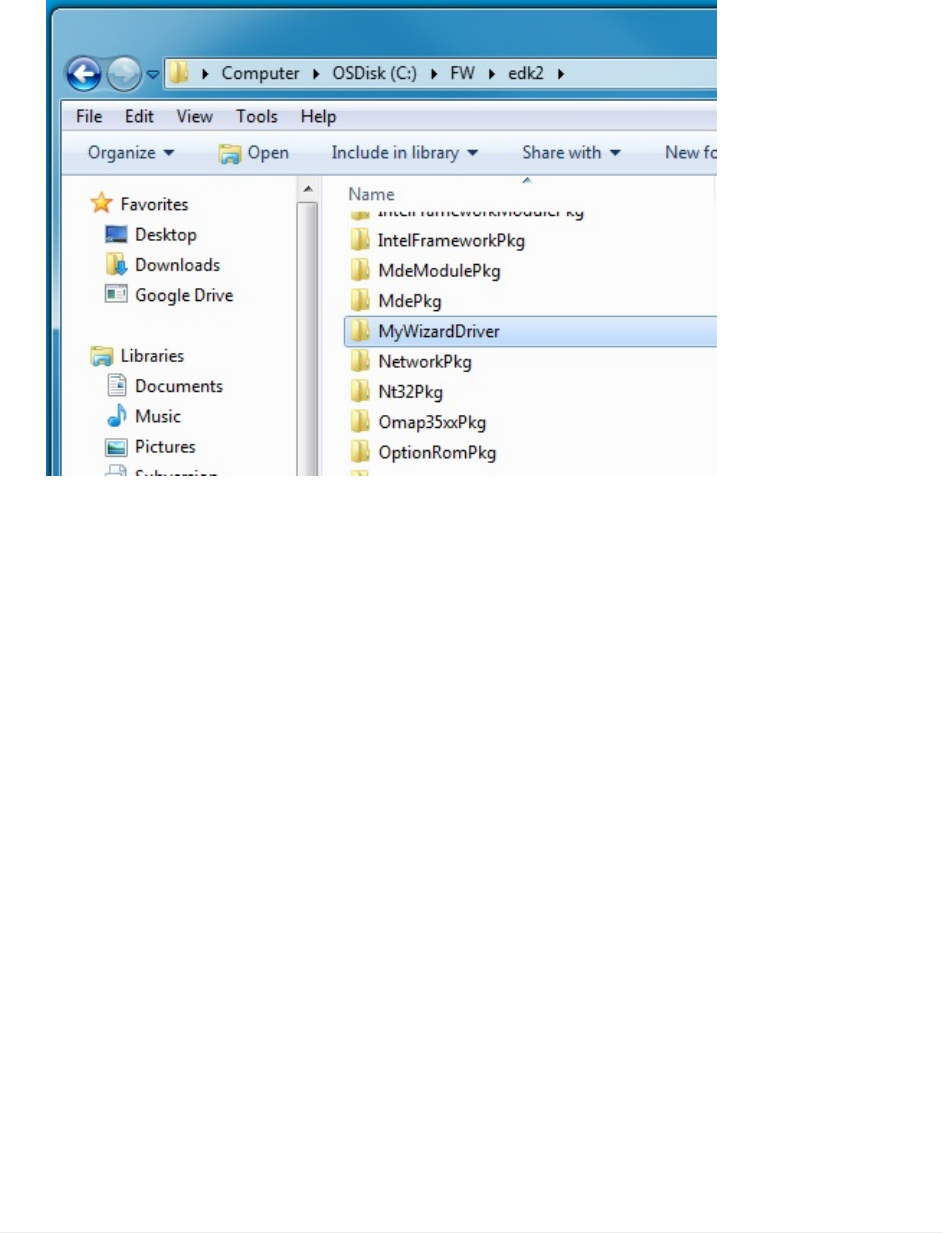
1. CompleteLabSetuptoconfigureforbuildingwithVisualStudio.
2. StartwithLAB6.onDriverportingLabsolutionandcreateafoldercalled
MyWizardDriverintheC:\fw\edk2workspace
3. Now,locateandopen:C:\FW\LabSampleCode\MyWizardDriver
a.SetupforLabaddingHII
UEFIDriverHIIWinLabGuide[DRAFT]
6DRAFTFORREVIEW[11/08/201808:04:02]
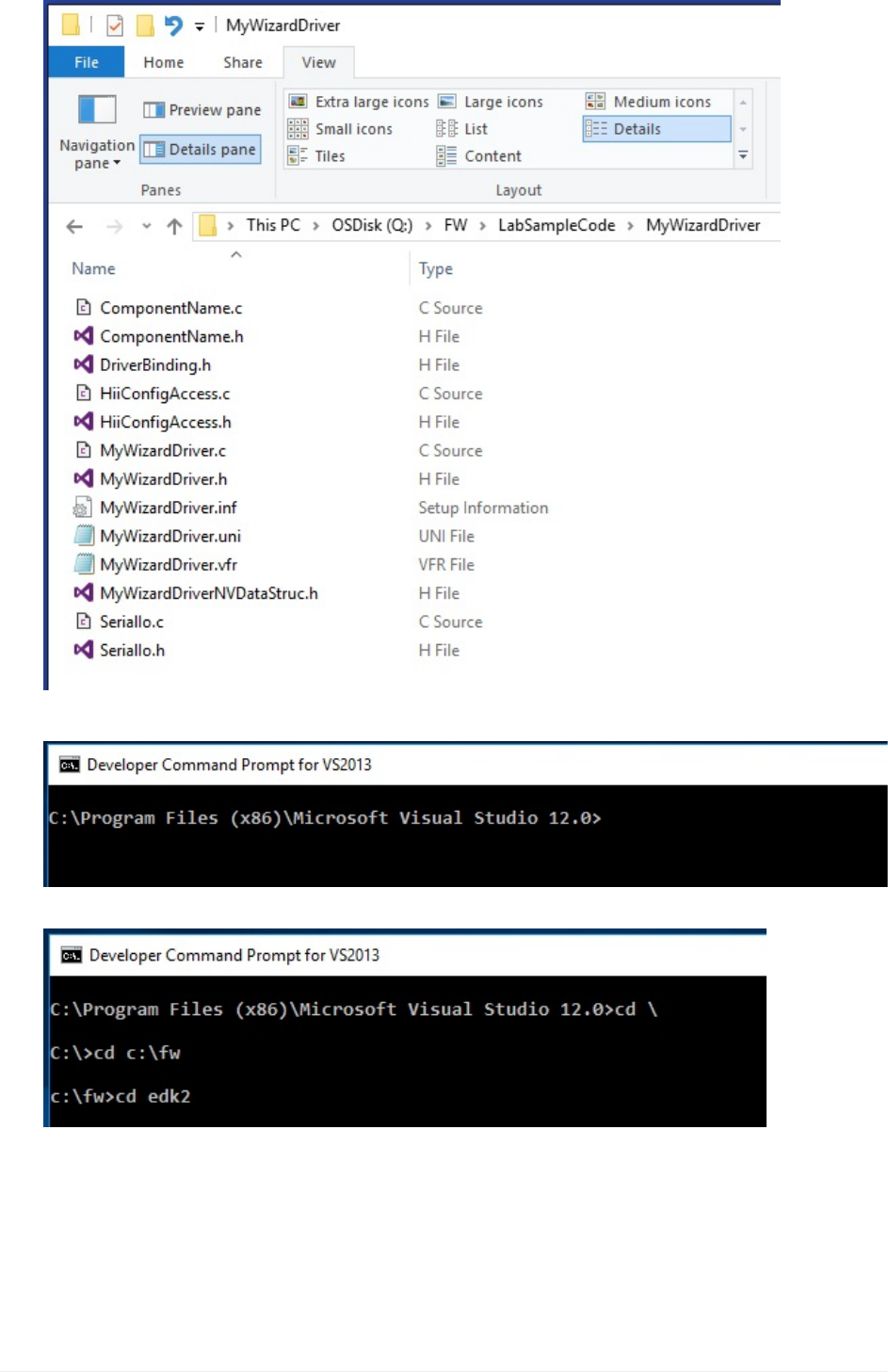
4. CopythefollowingFilestoC:\FW\edk2\MyWizardDriver
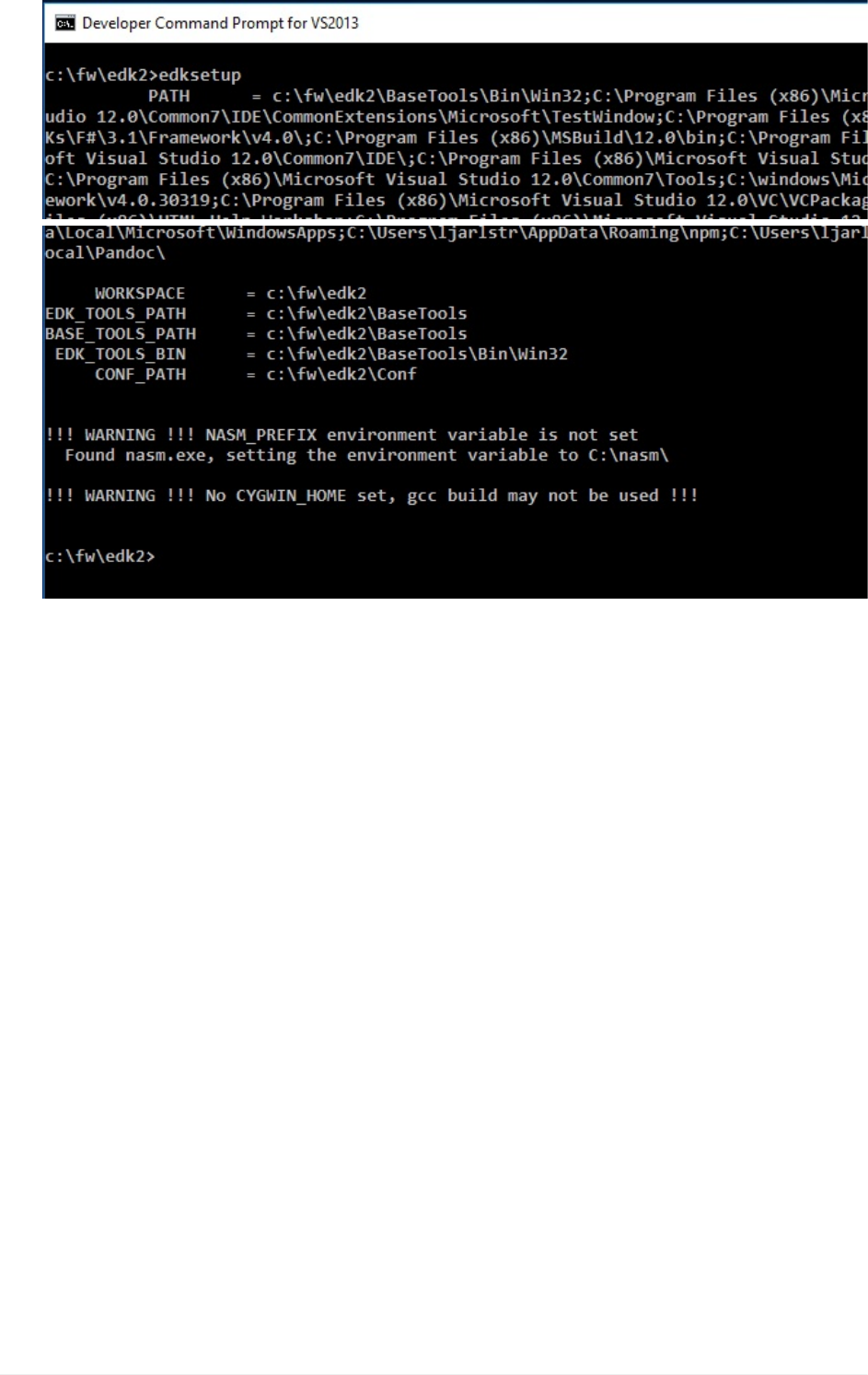
5. OpenVisualStudioCommandPrompt
6. TypeCDC:\fw\edk2
7. TypeEdksetup(ThisisonlyneededifstartingoutwithanewVisualStudioCommand
PromptWindow)
a.SetupforLabaddingHII
UEFIDriverHIIWinLabGuide[DRAFT]
7DRAFTFORREVIEW[11/08/201808:04:02]
a.SetupforLabaddingHII
UEFIDriverHIIWinLabGuide[DRAFT]
8DRAFTFORREVIEW[11/08/201808:04:02]
Lab1b.EditDriverforaddingHII
1. OpenC:\fw\edk2\MyWizardDriver
2. Openthefollowingfilesforupdating:
MyWizardDriverNVDataStruc.h
MyWizardDriver.vfr
MyWizardDriver.uni
MyWizardDriver.h
MyWizardDriver.c
MyWizardDriver.inf
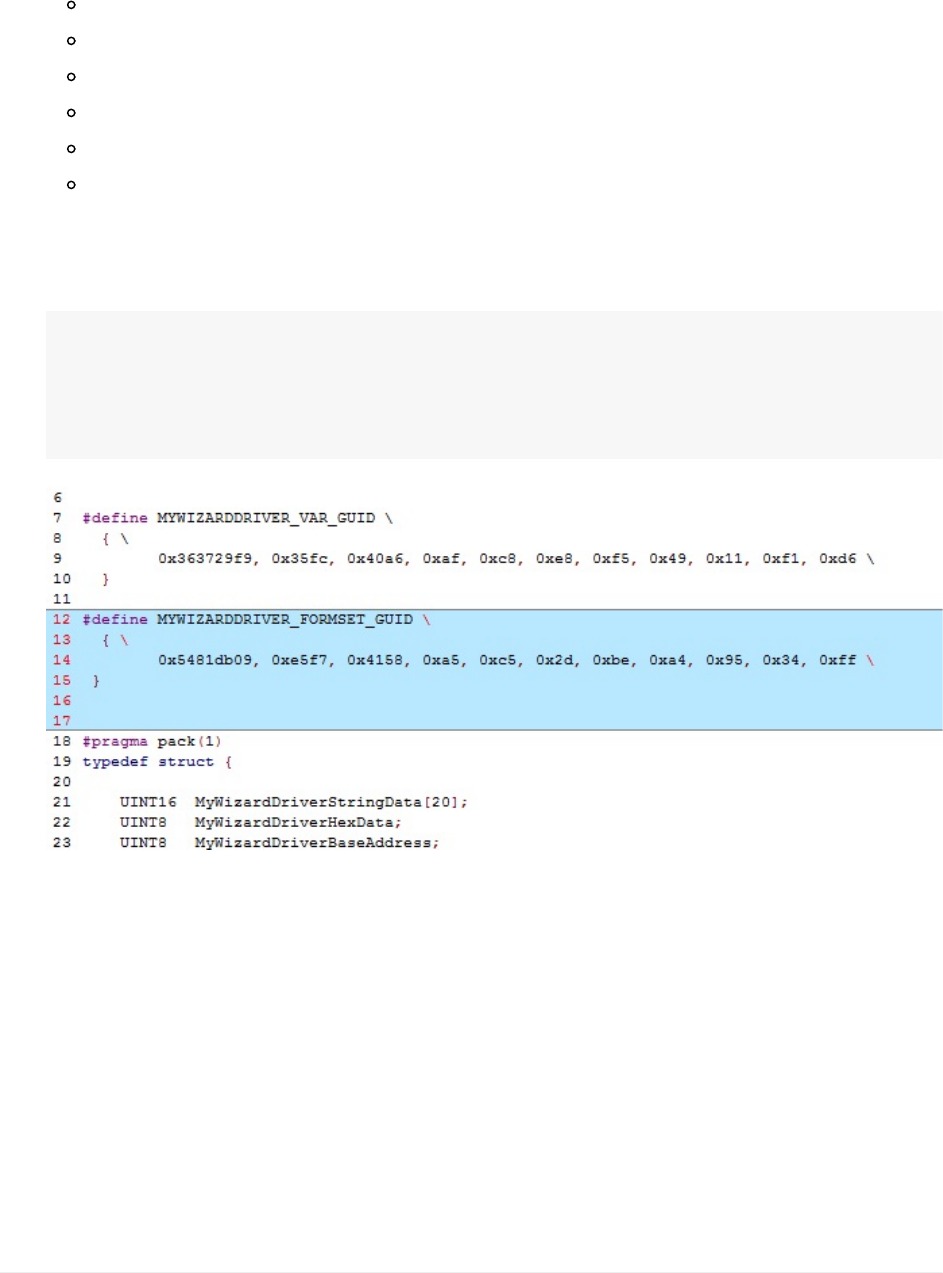
3. UpdatetheMyWizardDriverNVDataStruc.hfilebycopyingandpastingthefollowing
GUIDasshownbelow:ThisGUIDisusedtocommunicatetotheHIIDatabaseand
BrowserEngine
#defineMYWIZARDDRIVER_FORMSET_GUID\
{\
0x5481db09,0xe5f7,0x4158,0xa5,0xc5,0x2d,0xbe,0xa4,0x95,0x34,0xff\
}
4. SaveMyWizardDriverNVDataStruc.h
5. UpdatetheMyWizardDriver.vfrfile.Deleteitscontentsandreplaceitwiththe
followingbycopyingandpasting:You’readdingareferencetotheGUIDandtothe
NVRAMstoragewheretheconfigurationwillbesaved.Infact,you’rereplacingmostof
theoriginal.vfr.
b.EditDriverforaddingHII
UEFIDriverHIIWinLabGuide[DRAFT]
9DRAFTFORREVIEW[11/08/201808:04:02]

#include"MyWizardDriverNVDataStruc.h"
formset
guid=MYWIZARDDRIVER_FORMSET_GUID,
title=STRING_TOKEN(STR_SAMPLE_FORM_SET_TITLE),
help=STRING_TOKEN(STR_SAMPLE_FORM_SET_HELP),
classguid=EFI_HII_PLATFORM_SETUP_FORMSET_GUID,
//
//DefineaBufferStorage(EFI_IFR_VARSTORE)
//
varstoreMYWIZARDDRIVER_CONFIGURATION,//Thisisthedatastructuretype
//varid=CONFIGURATION_VARSTORE_ID,//OptionalVarStoreID
name=MWD_IfrNVData,//Definereferencednameinvfr
guid=MYWIZARDDRIVER_FORMSET_GUID;//GUIDofthisbufferstorage
6. ContinueaddingtheremainingcodetoMyWizardDriver.vfr.ThisisaEnable/Disable
questionforthesetupmenuintheformofaCheckbox.
formformid=1,title=STRING_TOKEN(STR_SAMPLE_FORM1_TITLE);
subtitletext=STRING_TOKEN(STR_SUBTITLE_TEXT);
subtitletext=STRING_TOKEN(STR_SUBTITLE_TEXT2);
//
//Defineacheckboxtoenable/disablethedevice
//
checkboxvarid=MWD_IfrNVData.MyWizardDriverChooseToEnable,
prompt=STRING_TOKEN(STR_CHECK_BOX_PROMPT),
help=STRING_TOKEN(STR_CHECK_BOX_HELP),
//
//CHECKBOX_DEFAULTindicatethischeckboxismarked
//withEFI_IFR_CHECKBOX_DEFAULT
//
flags=CHECKBOX_DEFAULT,
key=0,
default=1,
endcheckbox;
endform;
endformset;
7).SaveMyWizardDriver.vfr
8).UpdateMyWizardDriver.unifile.You’lladdnewstringstosupporttheforms.Deletethe
file’scontentandreplaceitwiththefollowingbycopyingandpasting:
b.EditDriverforaddingHII
UEFIDriverHIIWinLabGuide[DRAFT]
10DRAFTFORREVIEW[11/08/201808:04:02]
#langdefen"English"
#stringSTR_SAMPLE_FORM_SET_TITLE#languageen"MyWizardDriverSampleForms
et"
#stringSTR_SAMPLE_FORM_SET_HELP#languageen"HelpforSampleFormset"
#stringSTR_SAMPLE_FORM1_TITLE#languageen"MyWizardDriver"
#stringSTR_SUBTITLE_TEXT#languageen"MyWizardDriverConfiguration"
#stringSTR_SUBTITLE_TEXT2#languageen"DeviceXYZConfiguration"
#stringSTR_CHECK_BOX_PROMPT#languageen"EnableMyXYZDevice"
#stringSTR_CHECK_BOX_HELP#languageen"Thisisthehelpmessageforth
eenableMyXYZdevice.Checkthisboxtoenablethisdevice."
9).SaveMyWizardDriver.uni
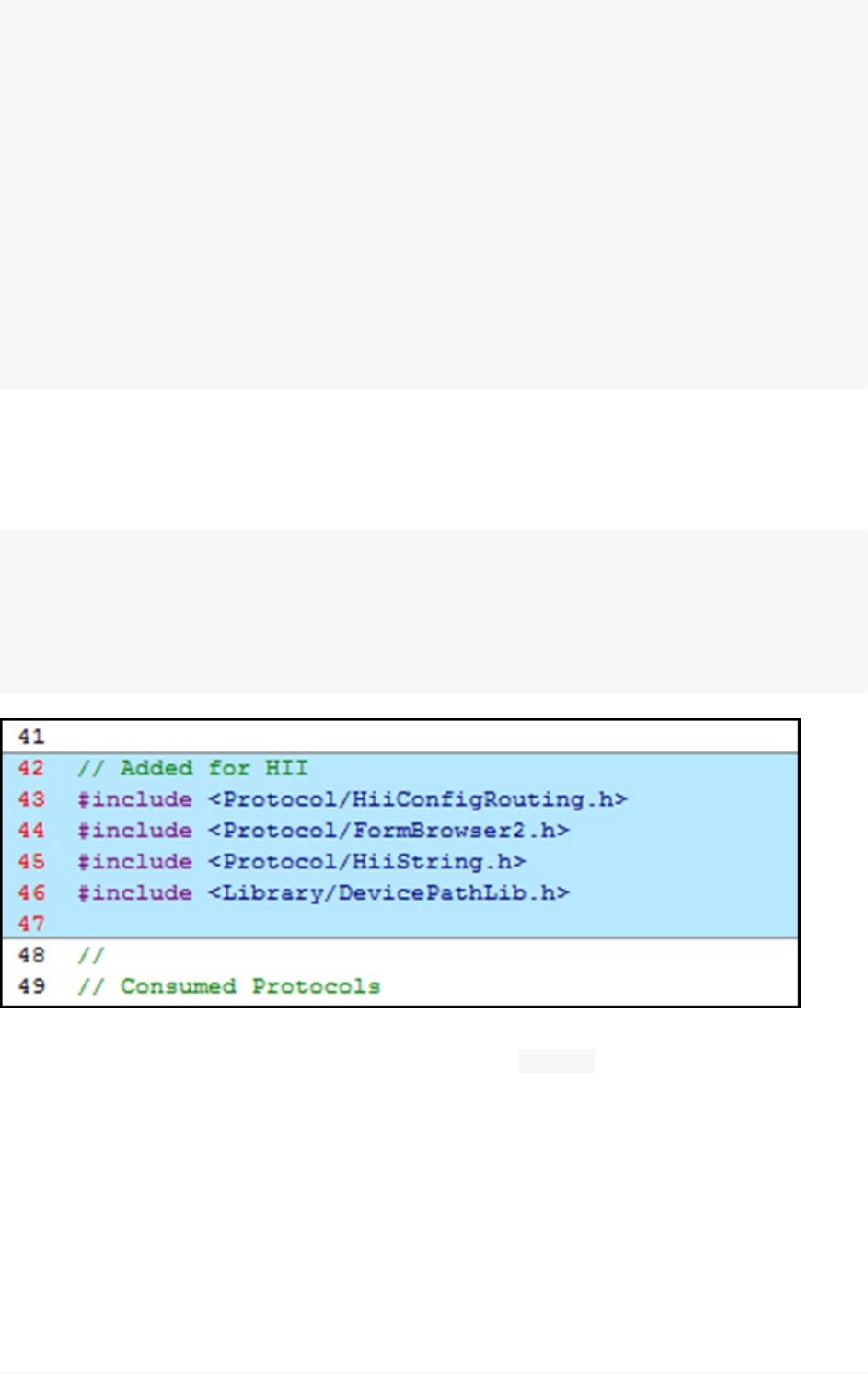
10).UpdatetheMyWizardDriver.hfile.AddthefollowingHIIlibrariesstartingat
approximatelyline41(asshownbelow)bycopyingandpasting:
//AddedforHII
#include<Protocol/HiiConfigRouting.h>
#include<Protocol/FormBrowser2.h>
#include<Protocol/HiiString.h>
#include<Library/DevicePathLib.h>
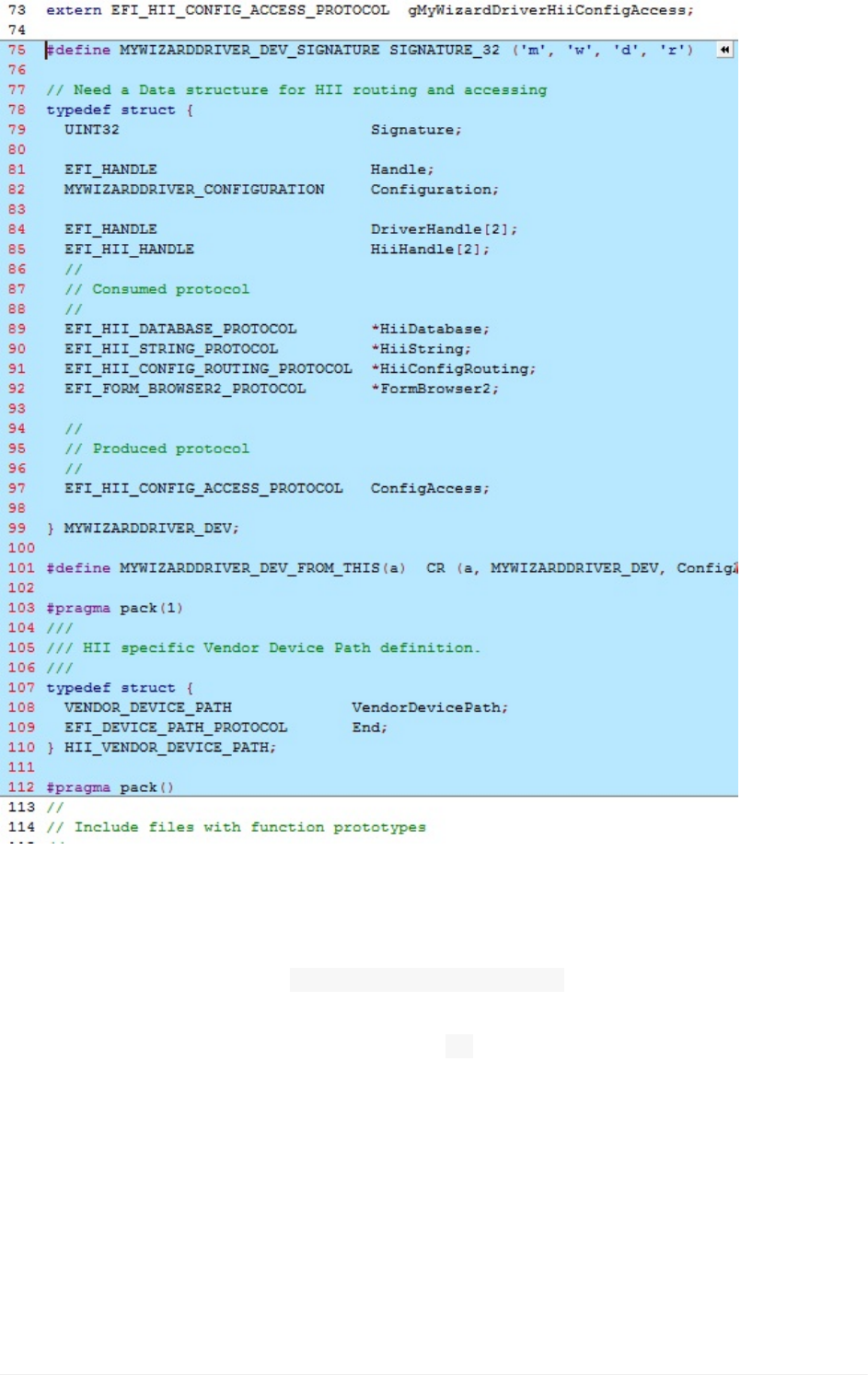
11).ToaddadatastructureforHIIroutingandaccess,addthefollowingcodeat
approximatelyline75bycopyingandpastingafterthe“ extern”statements:
b.EditDriverforaddingHII
UEFIDriverHIIWinLabGuide[DRAFT]
11DRAFTFORREVIEW[11/08/201808:04:02]

#defineMYWIZARDDRIVER_DEV_SIGNATURESIGNATURE_32('m','w','d','r')
//NeedaDatastructureforHIIroutingandaccessing
typedefstruct{
UINT32Signature;
EFI_HANDLEHandle;
MYWIZARDDRIVER_CONFIGURATIONConfiguration;
EFI_HANDLEDriverHandle[2];
EFI_HII_HANDLEHiiHandle[2];
//
//Consumedprotocol
//
EFI_HII_DATABASE_PROTOCOL*HiiDatabase;
EFI_HII_STRING_PROTOCOL*HiiString;
EFI_HII_CONFIG_ROUTING_PROTOCOL*HiiConfigRouting;
EFI_FORM_BROWSER2_PROTOCOL*FormBrowser2;
//
//Producedprotocol
//
EFI_HII_CONFIG_ACCESS_PROTOCOLConfigAccess;
}MYWIZARDDRIVER_DEV;
#defineMYWIZARDDRIVER_DEV_FROM_THIS(a)CR(a,MYWIZARDDRIVER_DEV,ConfigAccess,MY
WIZARDDRIVER_DEV_SIGNATURE)
#pragmapack(1)
///
///HIIspecificVendorDevicePathdefinition.
///
typedefstruct{
VENDOR_DEVICE_PATHVendorDevicePath;
EFI_DEVICE_PATH_PROTOCOLEnd;
}HII_VENDOR_DEVICE_PATH;
#pragmapack()
b.EditDriverforaddingHII
UEFIDriverHIIWinLabGuide[DRAFT]
12DRAFTFORREVIEW[11/08/201808:04:02]
12).SaveMyWizardDriver.h
13).UpdateMyWizardDriver.cfile.
AddlocaldefinitionsfortheformGUID,variablename,anddevicepathforHIIat
approximatelyline13afterthe #include"MyWizardDriver.h"bycopingandpastingthe
followingcode.
Inthisstep,youdeclarealocal(tothemodule“ m”)variablefortheGUIDwedeclared;the
NVRAMvariablename;driverhandles;ourconfigurationdata;andthedevicepathsupport.
b.EditDriverforaddingHII
UEFIDriverHIIWinLabGuide[DRAFT]
13DRAFTFORREVIEW[11/08/201808:04:02]

//Begincode
//HIIsupport
EFI_GUIDmMyWizardDriverFormSetGuid=MYWIZARDDRIVER_FORMSET_GUID;
CHAR16mIfrVariableName[]=L"MWD_IfrNVData";
EFI_HANDLEmDriverHandle[2]={NULL,NULL};
MYWIZARDDRIVER_DEV*PrivateData=NULL;
//HIIsupportforDevicePath
HII_VENDOR_DEVICE_PATHmHiiVendorDevicePath={
{
{
HARDWARE_DEVICE_PATH,
HW_VENDOR_DP,
{
(UINT8)(sizeof(VENDOR_DEVICE_PATH)),
(UINT8)((sizeof(VENDOR_DEVICE_PATH))>>8)
}
},
MYWIZARDDRIVER_FORMSET_GUID
},
{
END_DEVICE_PATH_TYPE,
END_ENTIRE_DEVICE_PATH_SUBTYPE,
{
(UINT8)(END_DEVICE_PATH_LENGTH),
(UINT8)((END_DEVICE_PATH_LENGTH)>>8)
}
}
};
//endcode
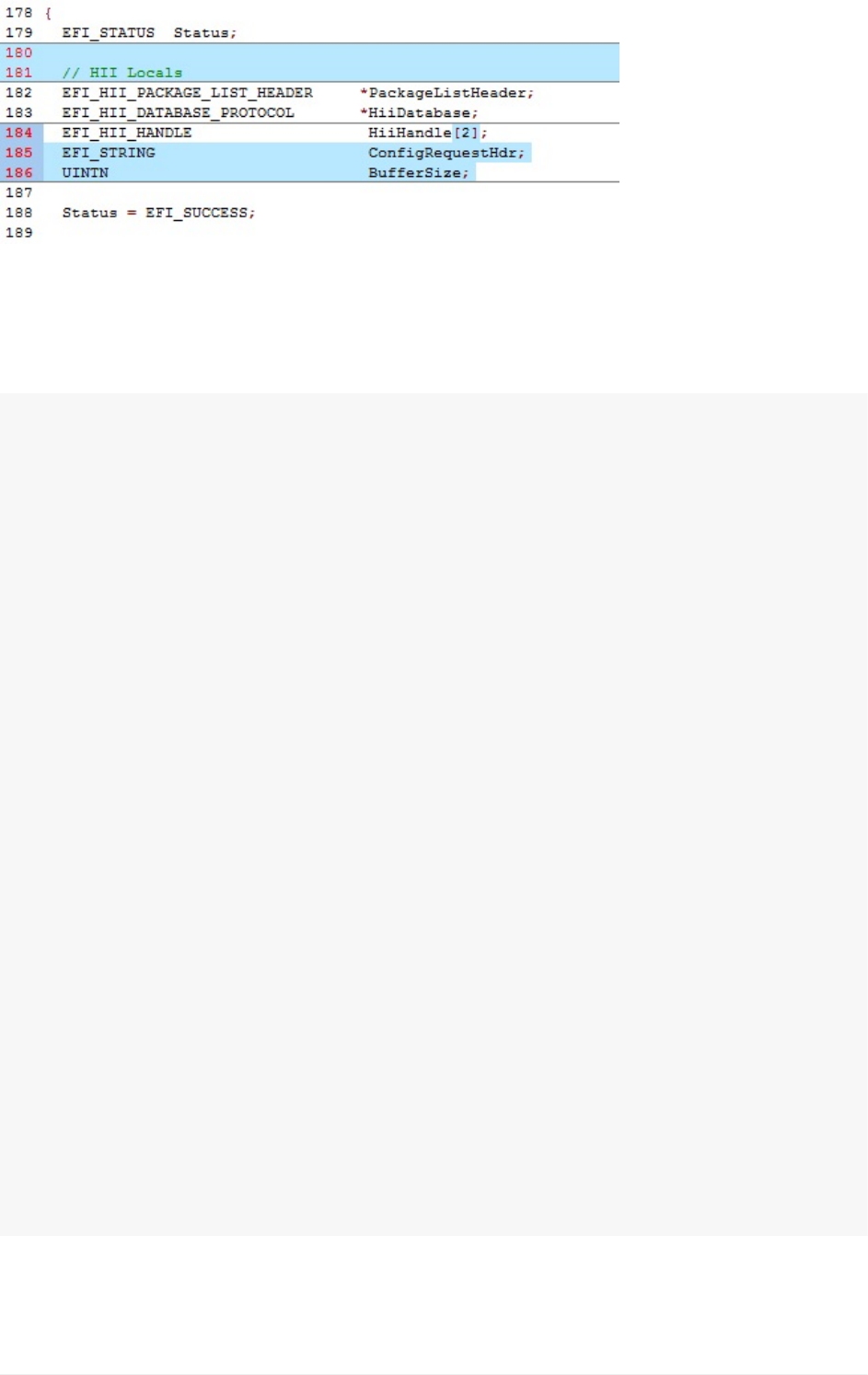
14).LocateEFI_STATUSwithinthefunction MyWizardDriverDriverEntryPointinthe
MyWizardDriver.cfile(approx.Line184)andaddHIIlocaldefinitionsbycopyingandpasting
(asshownbelow):
//HIILocals
EFI_HII_PACKAGE_LIST_HEADER*PackageListHeader;
EFI_HII_DATABASE_PROTOCOL*HiiDatabase;
EFI_HII_HANDLEHiiHandle[2];
EFI_STRINGConfigRequestHdr;
UINTNBufferSize;
b.EditDriverforaddingHII
UEFIDriverHIIWinLabGuide[DRAFT]
14DRAFTFORREVIEW[11/08/201808:04:02]
15).LocatetheASSERT_EFI_ERROR(Status);statementandtheline://RetrieveHII
PackageListHeaderonImageHandle(approximatelyline202).Now,addthefollowing
codetoinstalltheconfigurationaccessprotocol(produced)bycopyingandpasting(as
shownbelow)beforetheline://RetrieveHIIPackageListHeaderonImageHandle
//NowdoHIIStuff
//Initializethelocalvariables.
ConfigRequestHdr=NULL;
//Initializedriverprivatedata
PrivateData=AllocateZeroPool(sizeof(MYWIZARDDRIVER_DEV));
if(PrivateData==NULL){
returnEFI_OUT_OF_RESOURCES;
}
PrivateData->Signature=MYWIZARDDRIVER_DEV_SIGNATURE;
PrivateData->ConfigAccess.ExtractConfig=MyWizardDriverHiiConfigAccessExtractConfig
;
PrivateData->ConfigAccess.RouteConfig=MyWizardDriverHiiConfigAccessRouteConfig;
PrivateData->ConfigAccess.Callback=MyWizardDriverHiiConfigAccessCallback;
//
//PublishsampleFromsetandconfigaccess
//
Status=gBS->InstallMultipleProtocolInterfaces(
&mDriverHandle[0],
&gEfiDevicePathProtocolGuid,
&mHiiVendorDevicePath,
&gEfiHiiConfigAccessProtocolGuid,
&PrivateData->ConfigAccess,
NULL
);
ASSERT_EFI_ERROR(Status);
PrivateData->DriverHandle[0]=mDriverHandle[0];
//endcode
b.EditDriverforaddingHII
UEFIDriverHIIWinLabGuide[DRAFT]
15DRAFTFORREVIEW[11/08/201808:04:02]
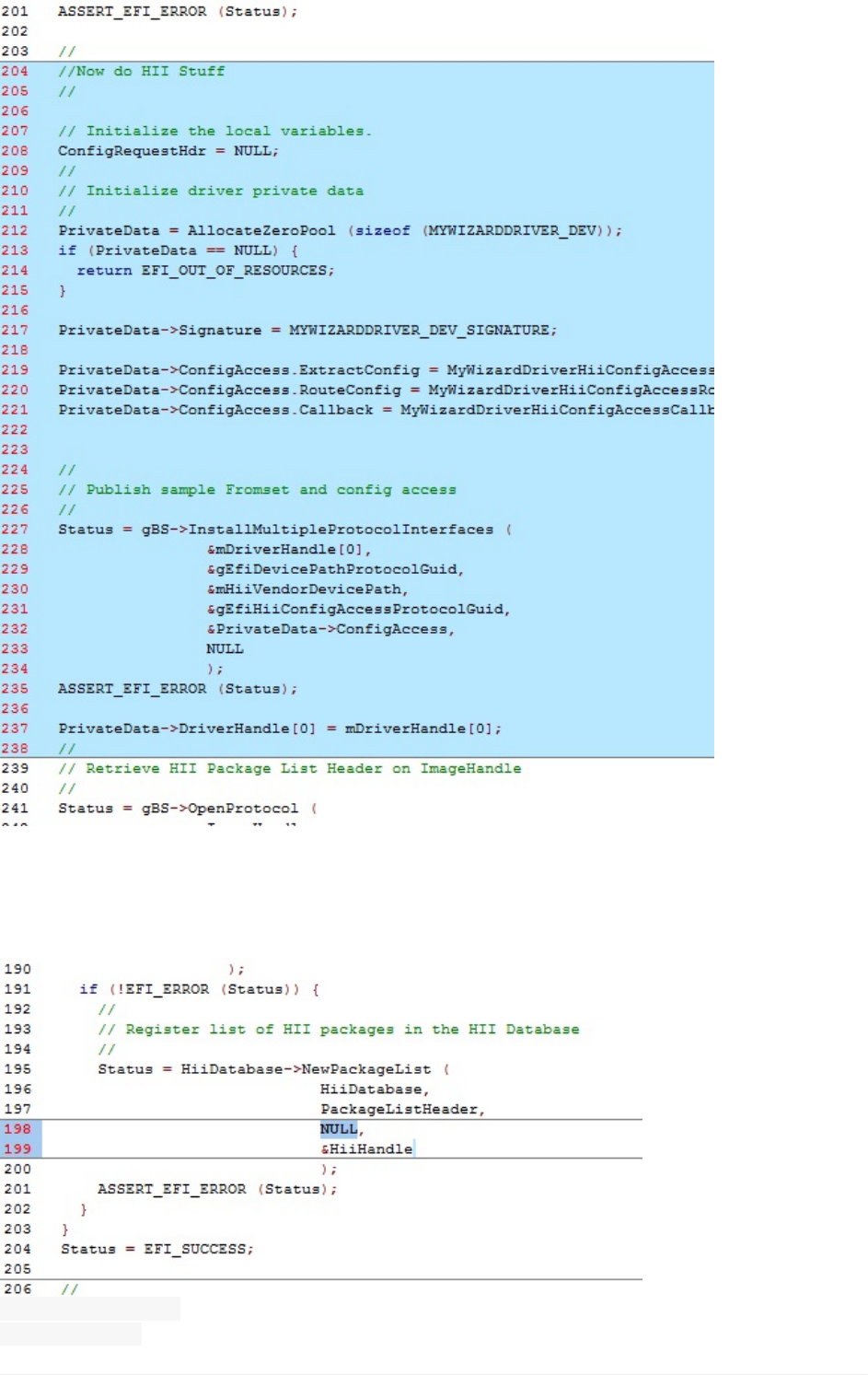
16).Next,addcodetoregisteralistofHIIpackagesintheHIIDatabasewiththeHIIdevice
path.Thisrequiresyoutoreplaceexistingcode(seebelow)bycopyingandpastingthenew
codeatapprox.line265.
OldCode
mDriverHandle[0],
&HiiHandle[0]
b.EditDriverforaddingHII
UEFIDriverHIIWinLabGuide[DRAFT]
16DRAFTFORREVIEW[11/08/201808:04:02]
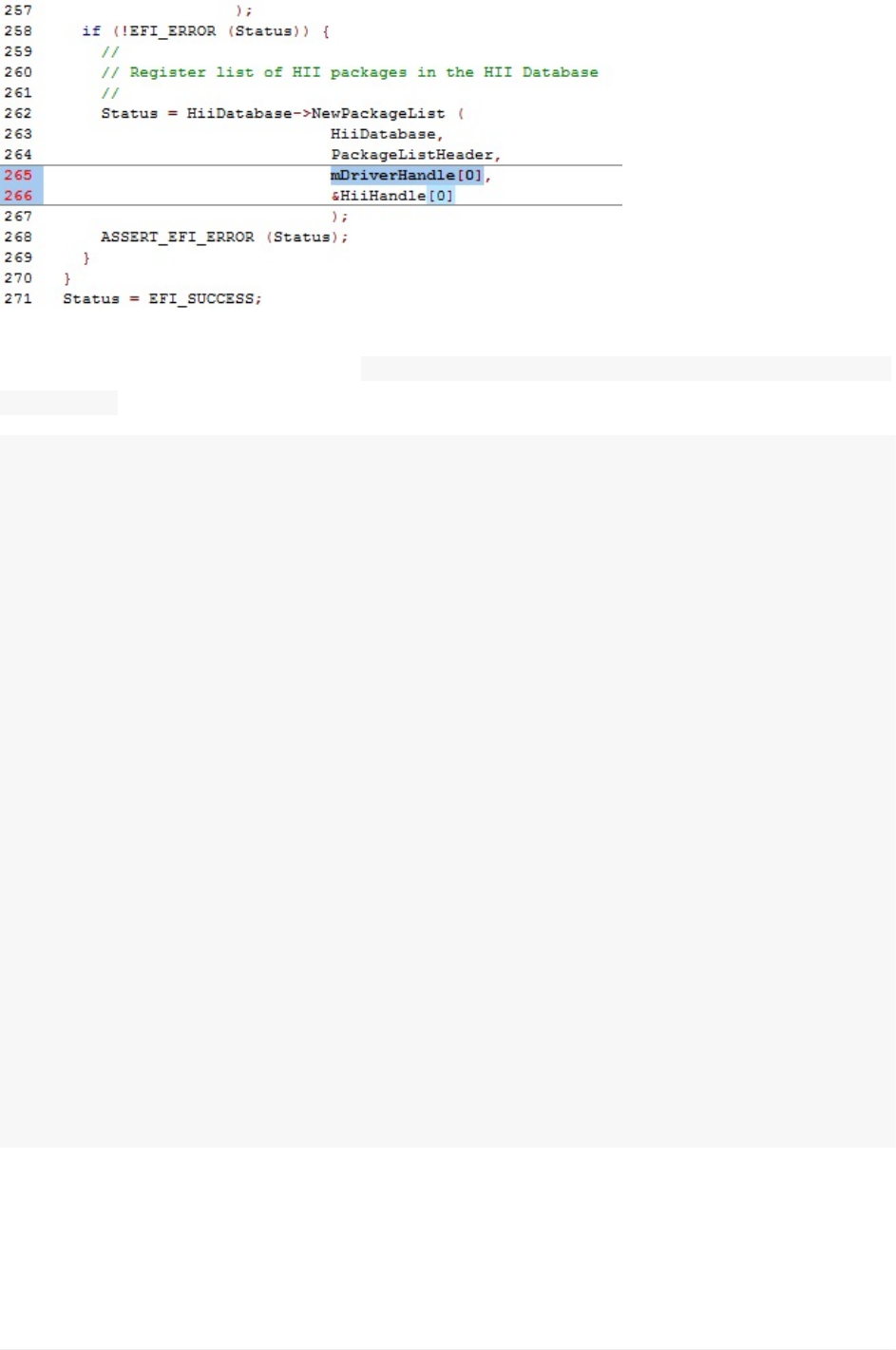
NewCode
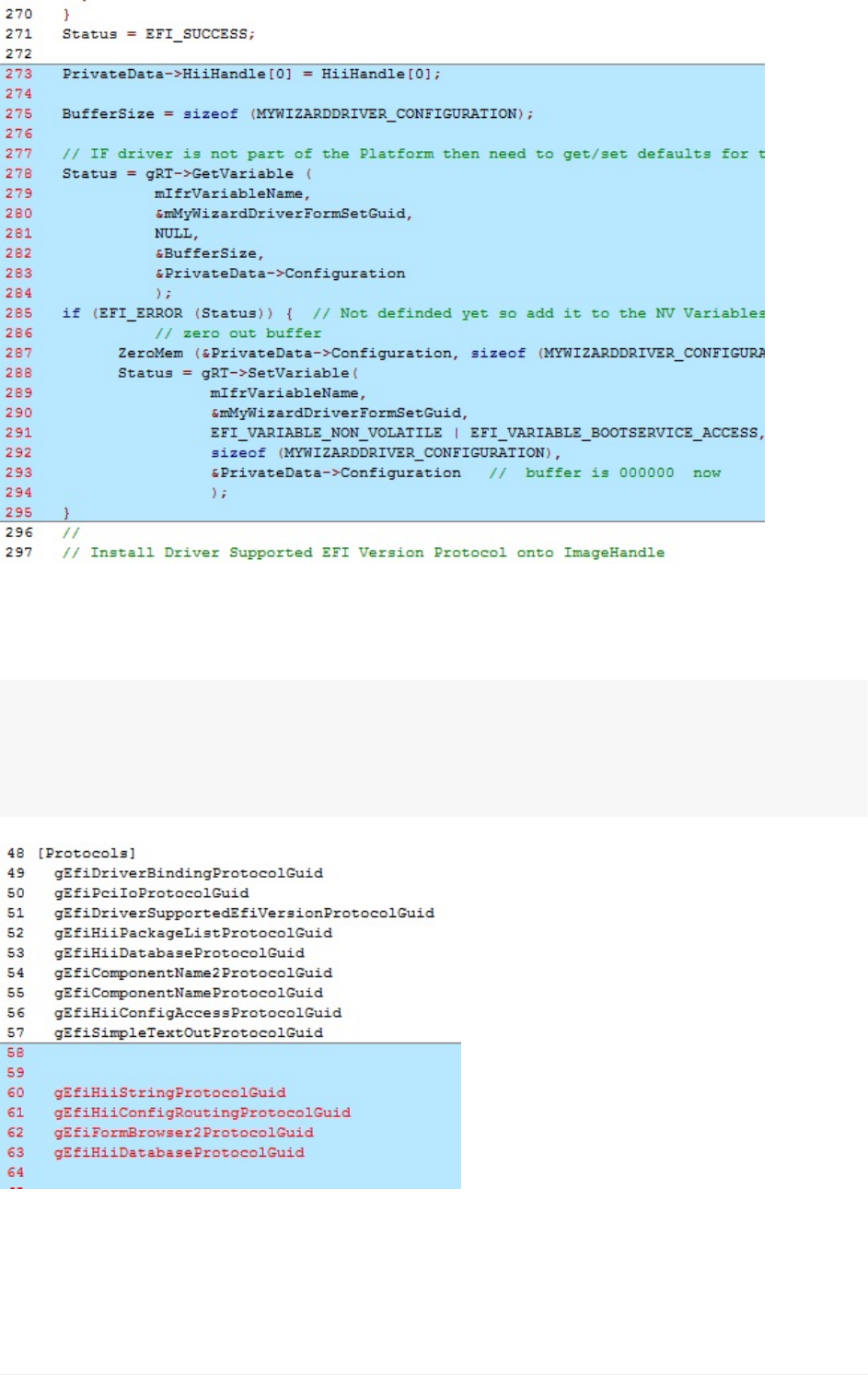
17).Next,you’lladdcodetoinitializetheMyWizardDriverNVRAMvariablebycopyingand
pastingthefollowingcodebeforethe //InstallDriverSupportedEFIVersionProtocolonto
ImageHandlecomment(asshownbelowatapproximatelyline273):
//Begincode
PrivateData->HiiHandle[0]=HiiHandle[0];
BufferSize=sizeof(MYWIZARDDRIVER_CONFIGURATION);
//IFdriverisnotpartofthePlatformthenneedtoget/setdefaultsfortheNVRAM
configurationthatthedriverwilluse.
Status=gRT->GetVariable(
mIfrVariableName,
&mMyWizardDriverFormSetGuid,
NULL,
&BufferSize,
&PrivateData->Configuration
);
if(EFI_ERROR(Status)){//NotdefindedyetsoaddittotheNVVariables.
//zerooutbuffer
ZeroMem(&PrivateData->Configuration,sizeof(MYWIZARDDRIVER_CONFIGURATION));
Status=gRT->SetVariable(
mIfrVariableName,
&mMyWizardDriverFormSetGuid,
EFI_VARIABLE_NON_VOLATILE|EFI_VARIABLE_BOOTSERVICE_ACCESS,
sizeof(MYWIZARDDRIVER_CONFIGURATION),
&PrivateData->Configuration//bufferis000000now
);
}
//endcode
b.EditDriverforaddingHII
UEFIDriverHIIWinLabGuide[DRAFT]
17DRAFTFORREVIEW[11/08/201808:04:02]
18).SaveMyWizardDriver.c
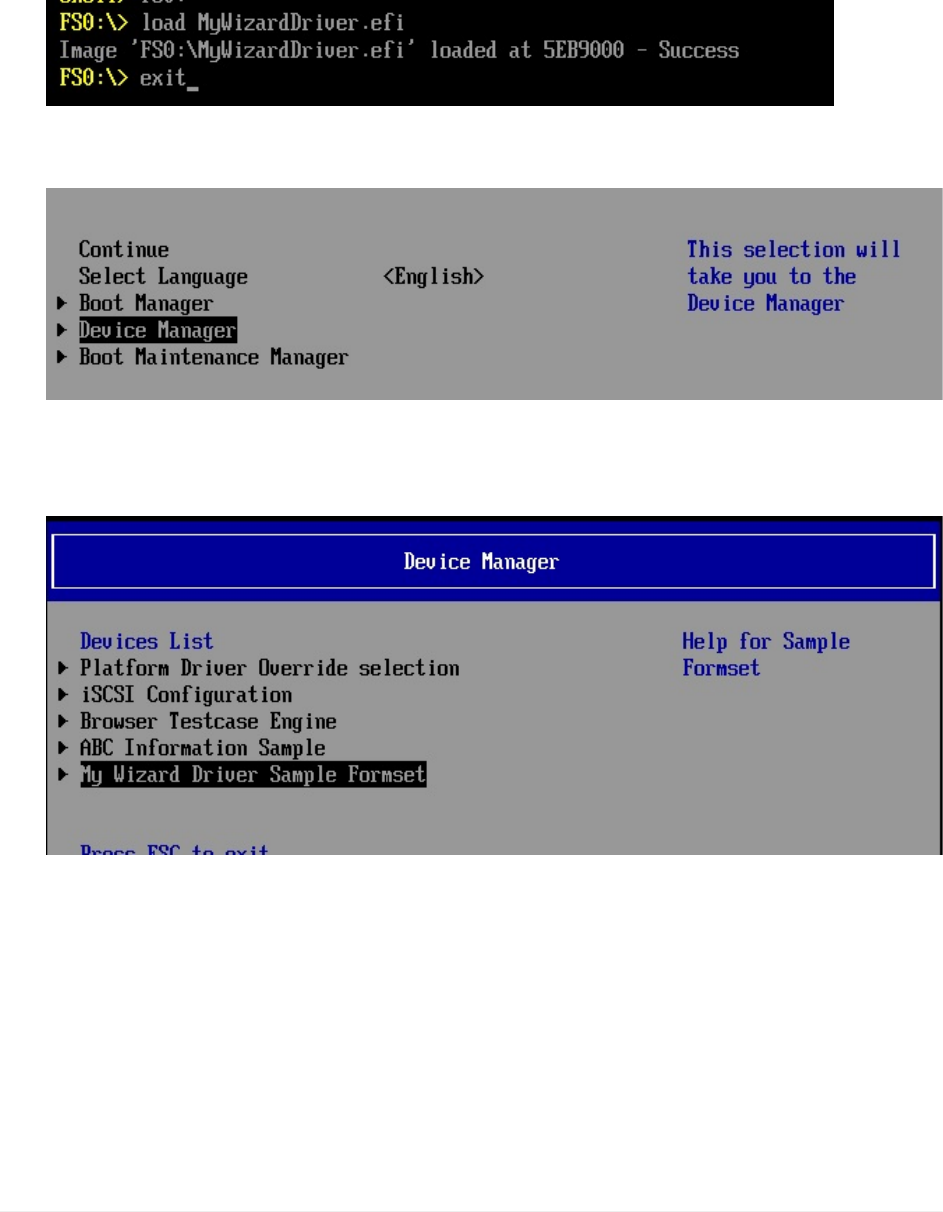
19).Nowontothefinalfile,MyWizardDriver.inf.Addthefollowingprotocolsinthe[protocols]
sectionthatarebeingusedbycopyingandpasting(asshownbelow):
gEfiHiiStringProtocolGuid##CONSUMES
gEfiHiiConfigRoutingProtocolGuid##CONSUMES
gEfiFormBrowser2ProtocolGuid##CONSUMES
gEfiHiiDatabaseProtocolGuid##CONSUMES
20).SavetheMyWizardDriver.inffile.Allthefilesshouldbesavedatthispoint.
21).AddMyWizardDriver.inftotheNt32Pkg.dsc(SeeLab2buildingMyWizardDriverfrom
theDriverPortingLab)
b.EditDriverforaddingHII
UEFIDriverHIIWinLabGuide[DRAFT]
18DRAFTFORREVIEW[11/08/201808:04:02]
BuildandtestMyWizardDriver
1. Re-OpentheVisualStudioCommandPrompt
2. Typebuild
3. Typebuildrun
4. AttheUEFIShellprompt,typefs0:
5. TypeLoadMyWizardDriver.efi
6. Press“Enter”Thiswillloadyourdriverintomemory
7. Typeexit
8. Nowatthesetupfrontpagemenu,select“DeviceManager”
9. Press“Enter”toenter“DeviceManager”
10. InsidetheDeviceManagermenupressthedownto“MyWizardDriverSample
Formset”**Press"Enter"
Press"Enter"
b.EditDriverforaddingHII
UEFIDriverHIIWinLabGuide[DRAFT]
19DRAFTFORREVIEW[11/08/201808:04:02]
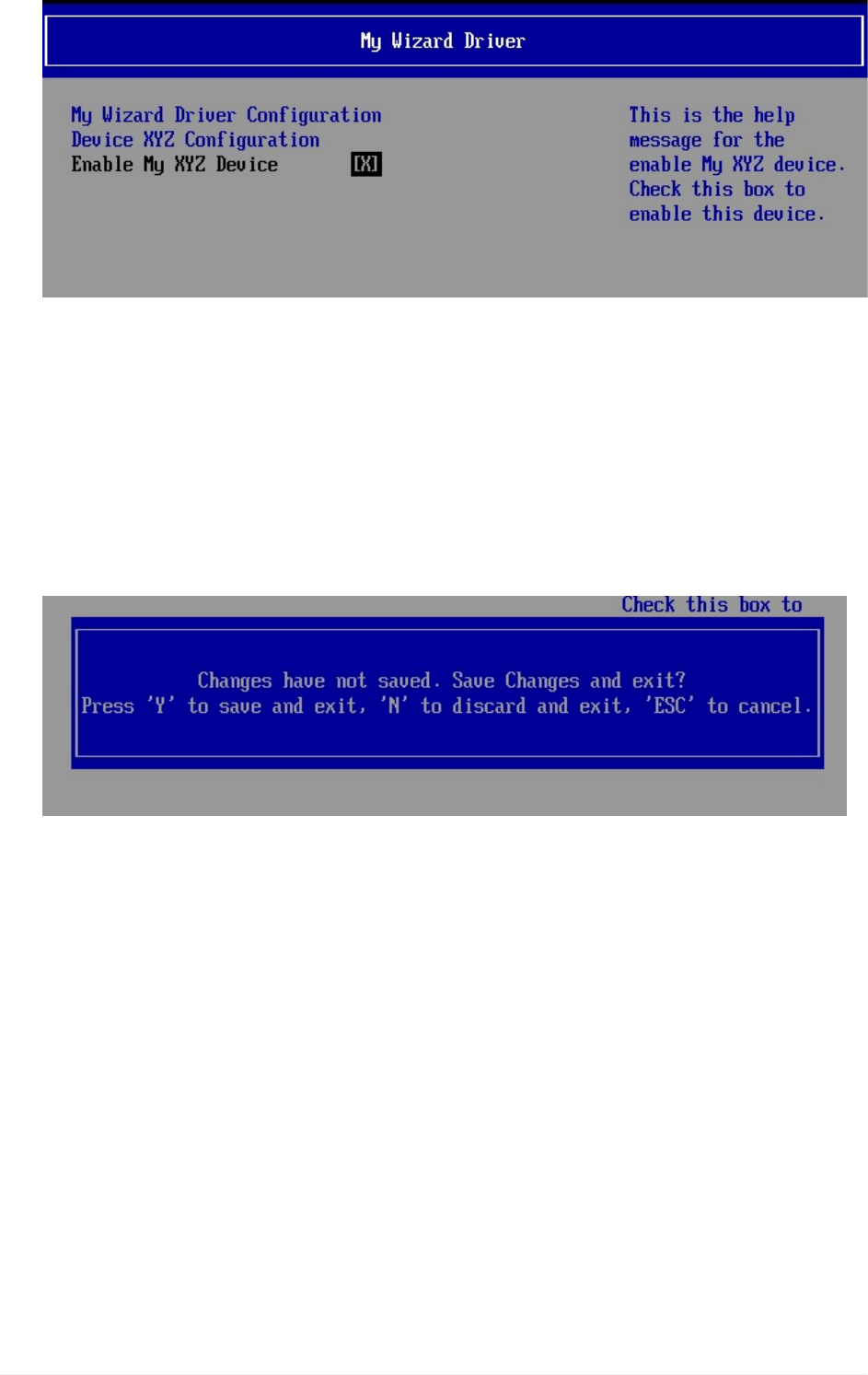
Note:Noticethatyourformisnowdisplayedwithachoicetoenableyourdevice.Also
noticethetitlesandhelpstringsthatareinthe.UNIfileyouedited.
AtthispointsincetheHIIconfigurationroutingfunctionsarenotfunctionalthevalues
(Enable/Disable)willnotbesavedtoNVRAM.ThenextlabwillupdatetheHIIExtract,
Route,andcallbackfunctionsfortheHIIconfigurationroutingprotocolyourdriverwill
produce.
11. PressthespacebartoEnableandDisablethe“EnableMyXYZDevice”
12. PressF10toattempttosave
b.EditDriverforaddingHII
UEFIDriverHIIWinLabGuide[DRAFT]
20DRAFTFORREVIEW[11/08/201808:04:02]
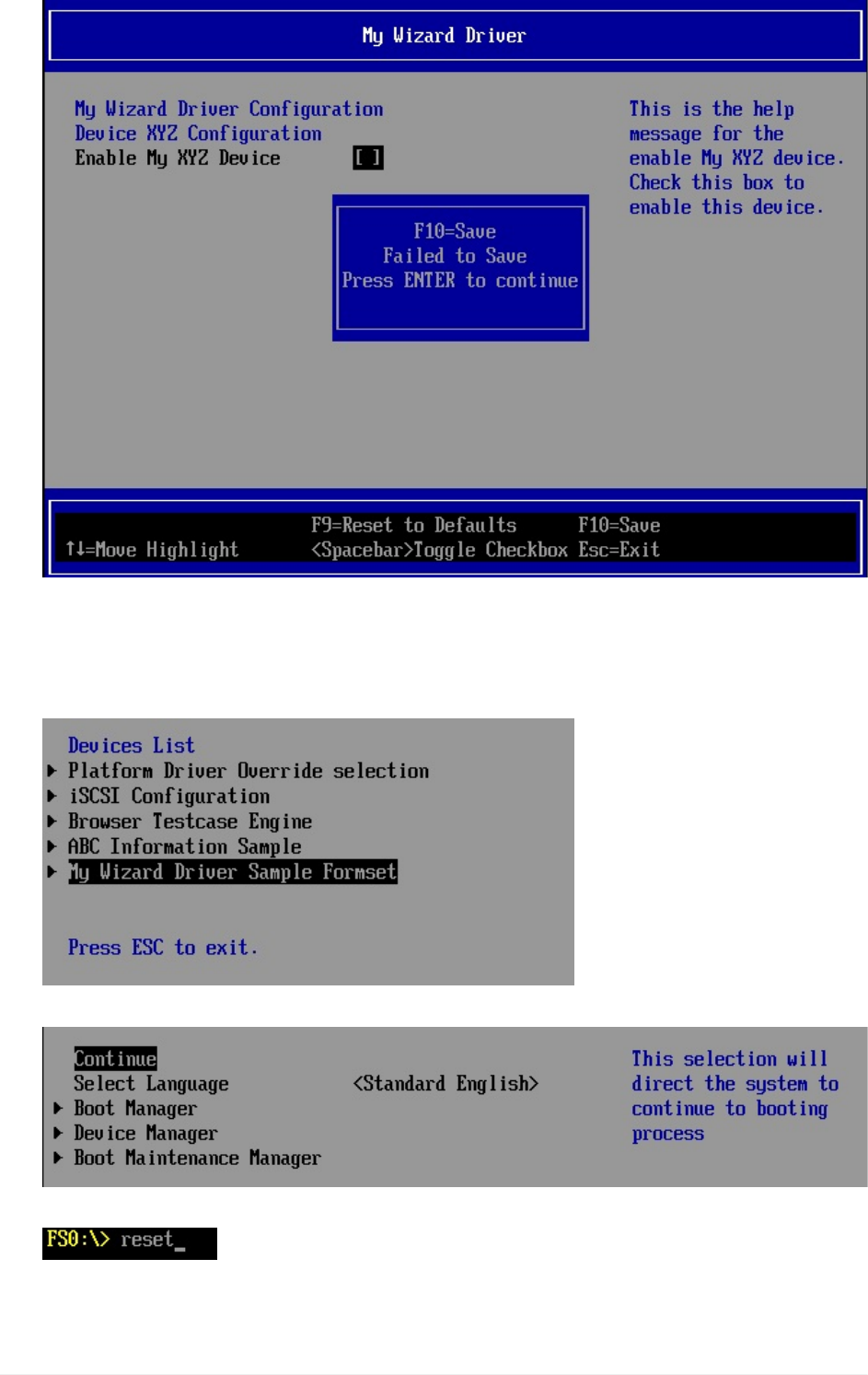
Note:You’renotabletosavethedatachangesatthispoint.
13. Press“Enter”**
14. Press“Escape”,andthen“Y”toexit*
15. ToExitthe“DeviceManager”Page:Press“Escape”
16. PressUpArrowto“Continue”**
17. AttheShellprompttypeReset
18. Press“Enter”toreturntotheVisualStudioCommandPrompt
b.EditDriverforaddingHII
UEFIDriverHIIWinLabGuide[DRAFT]
21DRAFTFORREVIEW[11/08/201808:04:02]

You’vecompletedthefirstlabandaddedstringsandformstosetupHIIforuser
configuration.However,thedataisnotsavedtoNVRAM.Inthenextlab,you’lllearnhow
toupdateHIItosavedatatoNVRAM.
ForanybuildissuescopythesolutionfilesfromC:\Fw\LabSolutions\LessonE.1A
endofLab1
b.EditDriverforaddingHII
UEFIDriverHIIWinLabGuide[DRAFT]
22DRAFTFORREVIEW[11/08/201808:04:02]
Lab2.UpdatingHIItoSaveDataSettings
Inthislab,you’lllearnhowtomodifyandupdateyourdriver’sHIIcodetosavetheusers
settingsintoNVRAM.TheUEFIDriverWizardcreatedtheprotocolsforyourdrivertoupdate
andinterfacewiththeHIIbrowserengineanddatabase.TheHIIconfigurationaccess
ProtocolfunctionsforMyWizardDriverareinthefile
C:\fw\edk2\MyWizardDriver\HiiConfigAccess.c.Thisnextlabwillinstalltheseprotocolsand
updatethemtosavetheuserdatafromtheHIImenusintoNVRAM.
1. Updatethe MyWizardDriver.cfile
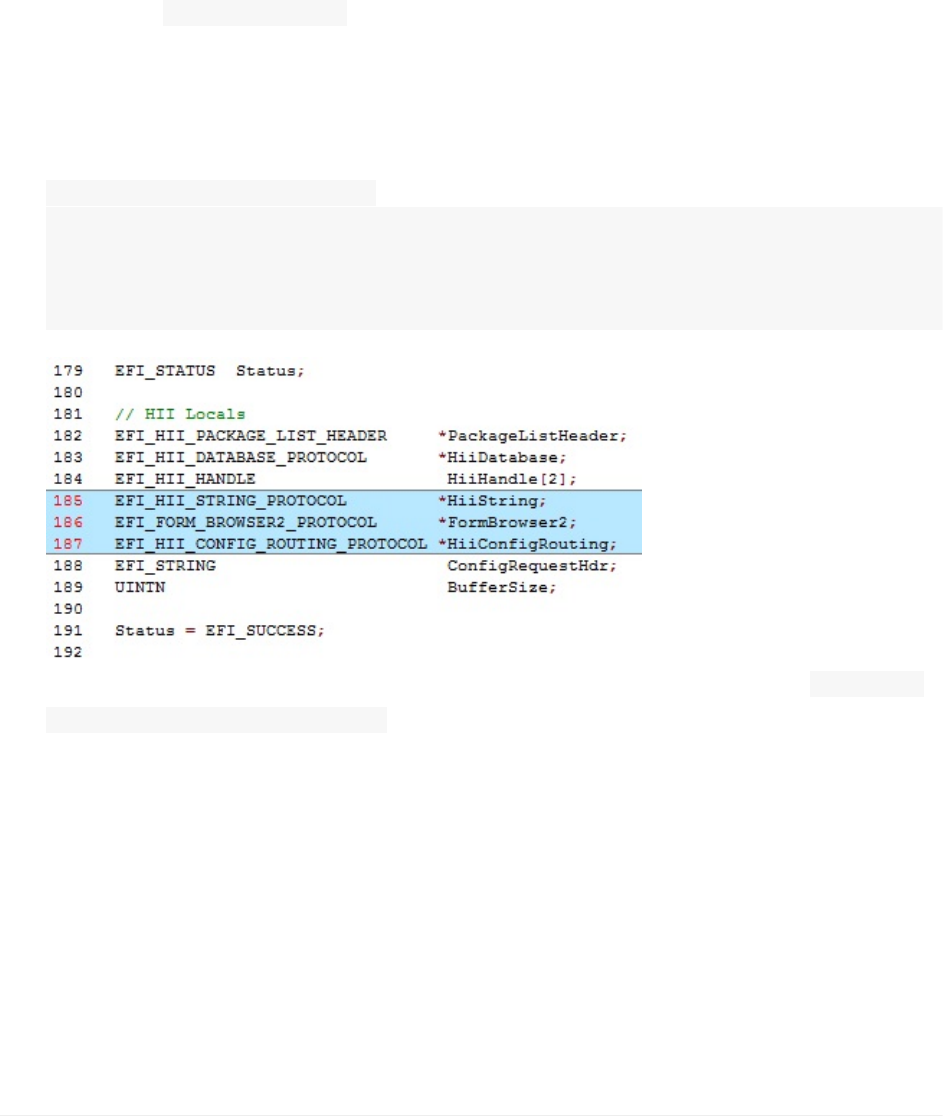
Yourdriverwillneedtokeeptrackoftheconsumedprotocolsinit’sowndatastructure
soitwillneedtodeclarelocalpointerstotheseandthenstoretheminitsownprivate
contextdatastructure.
2. Addthefollowinglocalvariabledeclarationsinthefunction
MyWizardDriverDriverEntryPointEntryPoint(asshownbelowApprox.line185):
EFI_HII_STRING_PROTOCOL*HiiString;
EFI_FORM_BROWSER2_PROTOCOL*FormBrowser2;
EFI_HII_CONFIG_ROUTING_PROTOCOL*HiiConfigRouting;
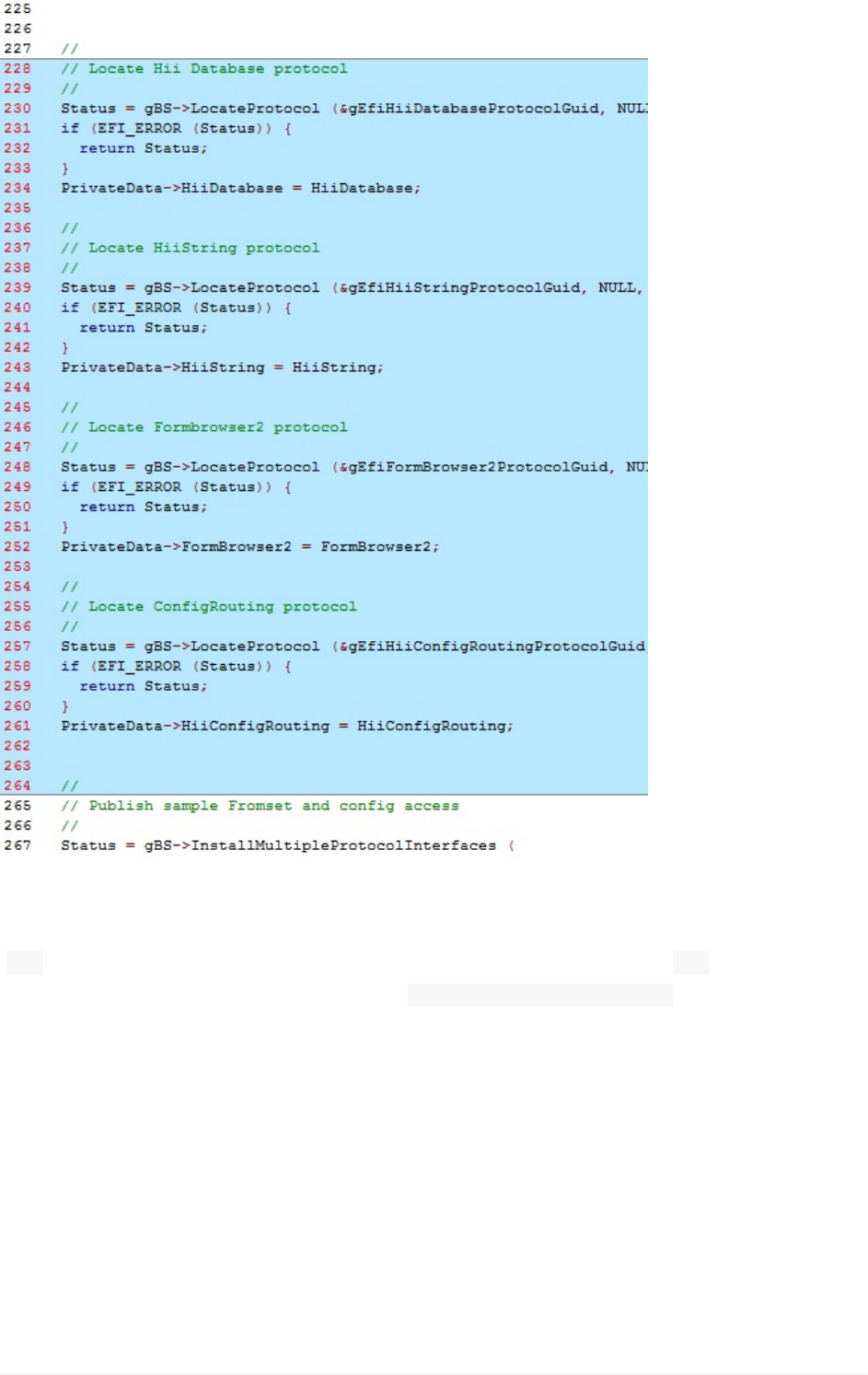
3. Addthefollowingcodetolocateandstoreconsumedprotocolsbeforethe //Publish
sampleFromsetandconfigaccesscomment(asshownbelowApprox.line227):
ThereasonistoLocatetheHiiDatabase,HiiString,HiiFormbrowserandconfig
routingprotocolsandstoretheirpointersintothePrivatecontextdatastructureforyour
drivertoaccess.
Lab2.UpdatingHIItoSaveDataSettings
UEFIDriverHIIWinLabGuide[DRAFT]
23DRAFTFORREVIEW[11/08/201808:04:02]

//Begincode
//
//LocateHiiDatabaseprotocol
//
Status=gBS->LocateProtocol(&gEfiHiiDatabaseProtocolGuid,NULL,(VOID**)&HiiData
base);
if(EFI_ERROR(Status)){
returnStatus;
}
PrivateData->HiiDatabase=HiiDatabase;
//
//LocateHiiStringprotocol
//
Status=gBS->LocateProtocol(&gEfiHiiStringProtocolGuid,NULL,(VOID**)&HiiString
);
if(EFI_ERROR(Status)){
returnStatus;
}
PrivateData->HiiString=HiiString;
//
//LocateFormbrowser2protocol
//
Status=gBS->LocateProtocol(&gEfiFormBrowser2ProtocolGuid,NULL,(VOID**)&FormBr
owser2);
if(EFI_ERROR(Status)){
returnStatus;
}
PrivateData->FormBrowser2=FormBrowser2;
//
//LocateConfigRoutingprotocol
//
Status=gBS->LocateProtocol(&gEfiHiiConfigRoutingProtocolGuid,NULL,(VOID**)&Hi
iConfigRouting);
if(EFI_ERROR(Status)){
returnStatus;
}
PrivateData->HiiConfigRouting=HiiConfigRouting;
//Endcode
Lab2.UpdatingHIItoSaveDataSettings
UEFIDriverHIIWinLabGuide[DRAFT]
24DRAFTFORREVIEW[11/08/201808:04:02]
4).SincetheHiiDatabaseProtocolwaslocatedearlierinthecodewiththepreviouscode
insertionandisnolongernecessary,commentouttheoldOpenProtocolcodewiththe
“//”(approx.lines289-298,asshownbelow)andaddthecomment"//"Doneabove
Makesurenottocommentoutthesecond“ if(!EFI_ERROR(Status)){”
Lab2.UpdatingHIItoSaveDataSettings
UEFIDriverHIIWinLabGuide[DRAFT]
25DRAFTFORREVIEW[11/08/201808:04:02]
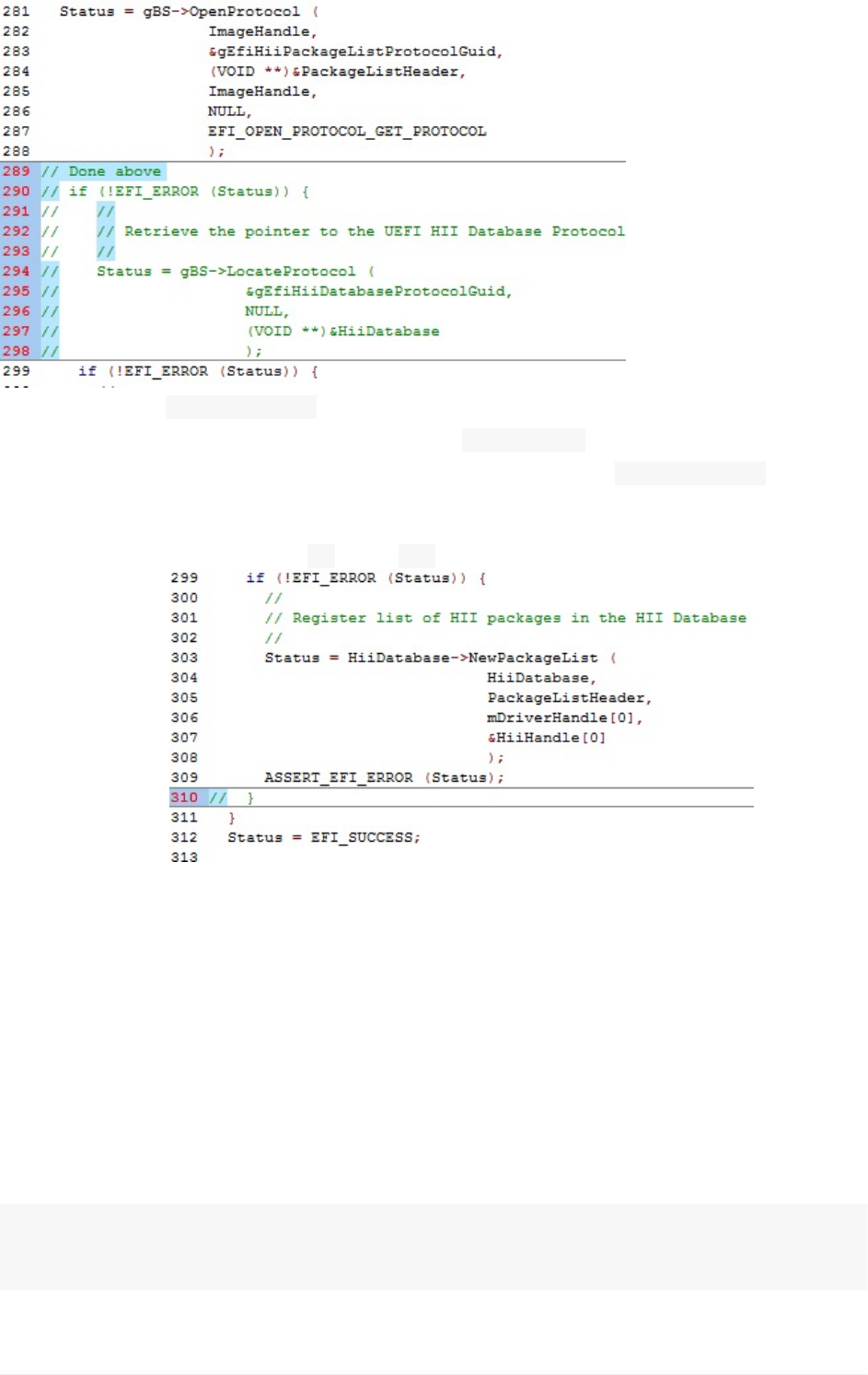
Note:Theearlier LocateProtocolcodealreadyfoundthepointertotheHiiDatabase
protocolandstoredittothelocalpointervariable HiiDatabase.
Whenweaddedthedriver-consumedprotocols,wesearchedvia LocateProtocolfortheHii
Databasepointerfunction.Sincewediditabovewe’renowcommentingoutthiscode.
5).Commentoutthematching“ }”with“ //”totheifstatement(asshownbelowat
approx.line310):
6).SaveMyWizardDriver.c
7).OpenC:\fw\edk2\MyWizardDriver\HiiConfigAccess.c.
TheDriverWizardonlymadedummyfunctionsfortheextract,routeandcallbackfunctions.
InordertosavetheDatapassedintotheformsfromtheHiiBrowserengine,youwillneedto
portthesefunctionstobefunctional.
8).AddthefollowingexternstatementsfortheformGUIDandtheNVRamvariable(as
shownbelow)theseareglobaltothedrivermoduleonlyhencethebeginninglowercase“m”
isthestandardforaglobalforamodule:
externEFI_GUIDmMyWizardDriverFormSetGuid;
externCHAR16mIfrVariableName[];
Lab2.UpdatingHIItoSaveDataSettings
UEFIDriverHIIWinLabGuide[DRAFT]
26DRAFTFORREVIEW[11/08/201808:04:02]
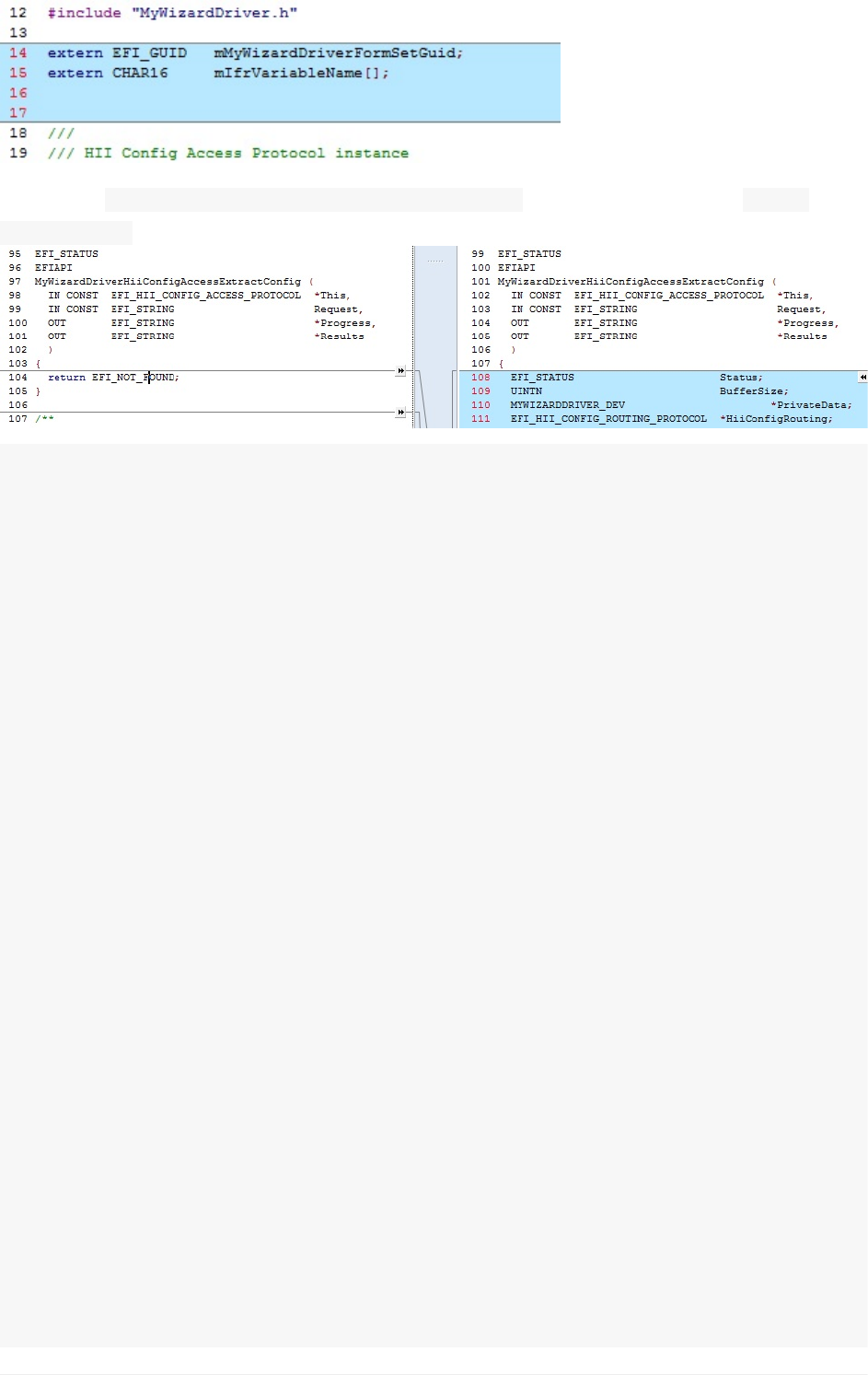
9).LocateMyWizardDriverHiiConfigAccessExtractConfigandreplaceline108,“ return
EFI_NOT_FOUND”,withthefollowingcodespreadoverNextpages:
//Begincode
EFI_STATUSStatus;
UINTNBufferSize;
MYWIZARDDRIVER_DEV*PrivateData;
EFI_HII_CONFIG_ROUTING_PROTOCOL*HiiConfigRouting;
EFI_STRINGConfigRequest;
EFI_STRINGConfigRequestHdr;
UINTNSize;
BOOLEANAllocatedRequest;
if(Progress==NULL||Results==NULL){
returnEFI_INVALID_PARAMETER;
}
//
//Initializethelocalvariables.
//
ConfigRequestHdr=NULL;
ConfigRequest=NULL;
Size=0;
*Progress=Request;
AllocatedRequest=FALSE;
PrivateData=MYWIZARDDRIVER_DEV_FROM_THIS(This);
HiiConfigRouting=PrivateData->HiiConfigRouting;
//
//GetBufferStoragedatafromEFIvariable.
//Trytogetthecurrentsettingfromvariable.
//
BufferSize=sizeof(MYWIZARDDRIVER_CONFIGURATION);
Status=gRT->GetVariable(
mIfrVariableName,
&mMyWizardDriverFormSetGuid,
NULL,
&BufferSize,
&PrivateData->Configuration
);
if(EFI_ERROR(Status)){
Lab2.UpdatingHIItoSaveDataSettings
UEFIDriverHIIWinLabGuide[DRAFT]
27DRAFTFORREVIEW[11/08/201808:04:02]
returnEFI_NOT_FOUND;
}
if(Request==NULL){
DEBUG((DEBUG_INFO,"\n::InsideofExtractConfigandRequest==Null"));
}else{
ConfigRequest=Request;
}
//
//Convertbufferdatato<ConfigResp>byhelperfunctionBlockToConfig()
//
Status=HiiConfigRouting->BlockToConfig(
HiiConfigRouting,
ConfigRequest,
(UINT8*)&PrivateData->Configuration,
BufferSize,
Results,
Progress
);
//
//Freetheallocatedconfigrequeststring.
//
if(AllocatedRequest){
FreePool(ConfigRequest);
}
//
//SetProgressstringtotheoriginalrequeststring.
//
if(Request==NULL){
*Progress=NULL;
}elseif(StrStr(Request,L"OFFSET")==NULL){
*Progress=Request+StrLen(Request);
}
returnStatus;
//Endcode
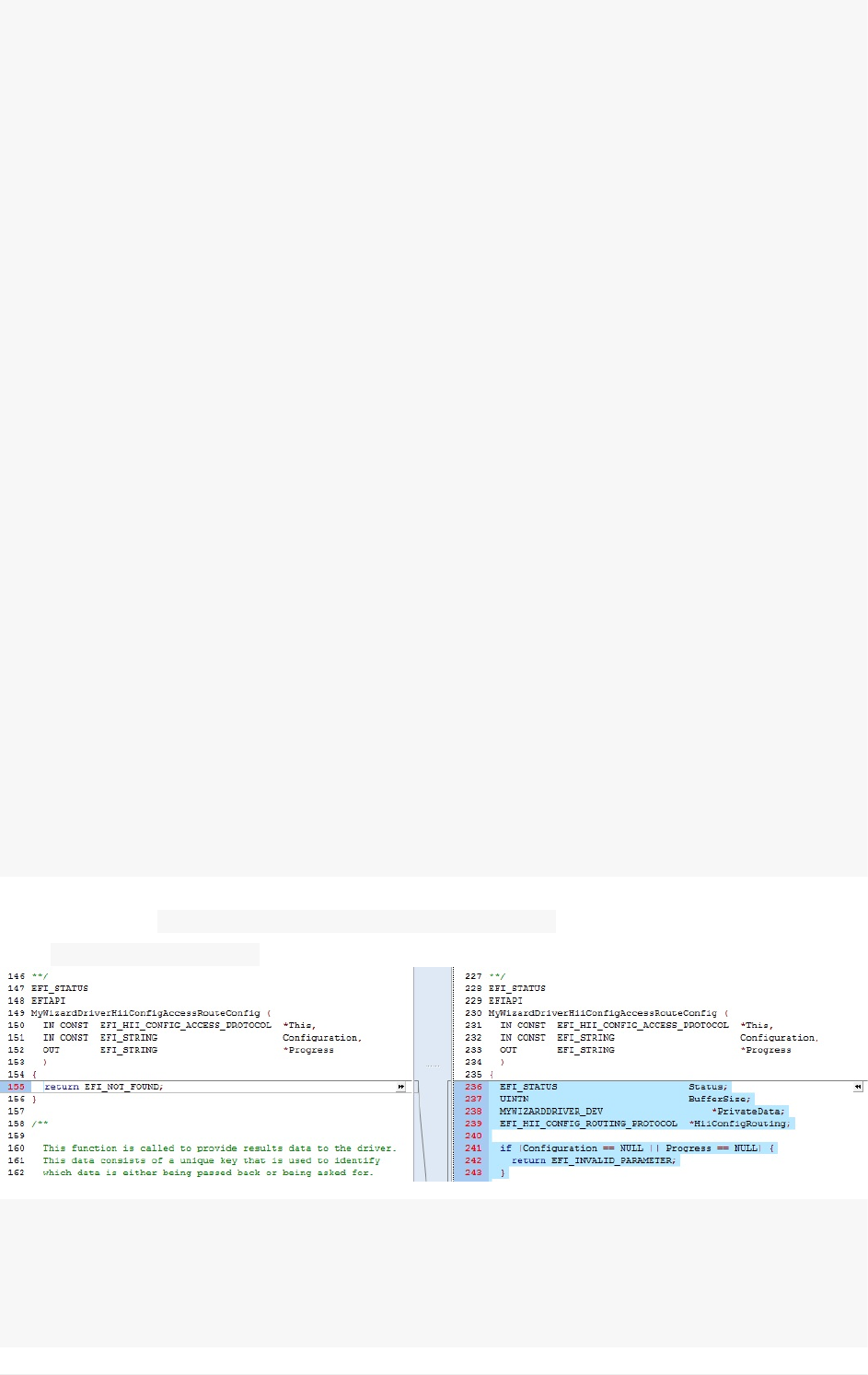
10).NowlocateMyWizardDriverHiiConfigAccessRouteConfigandreplacelineatapprox.228,
with“ returnEFI_NOT_FOUND”,withthefollowingcode:
//Begincode
EFI_STATUSStatus;
UINTNBufferSize;
MYWIZARDDRIVER_DEV*PrivateData;
EFI_HII_CONFIG_ROUTING_PROTOCOL*HiiConfigRouting;
Lab2.UpdatingHIItoSaveDataSettings
UEFIDriverHIIWinLabGuide[DRAFT]
28DRAFTFORREVIEW[11/08/201808:04:02]

if(Configuration==NULL||Progress==NULL){
returnEFI_INVALID_PARAMETER;
}
PrivateData=MYWIZARDDRIVER_DEV_FROM_THIS(This);
HiiConfigRouting=PrivateData->HiiConfigRouting;
*Progress=Configuration;
//
//GetBufferStoragedatafromEFIvariable
//
BufferSize=sizeof(MYWIZARDDRIVER_CONFIGURATION);
Status=gRT->GetVariable(
mIfrVariableName,
&mMyWizardDriverFormSetGuid,
NULL,
&BufferSize,
&PrivateData->Configuration
);
if(EFI_ERROR(Status)){
returnStatus;
}
//
//Convert<ConfigResp>tobufferdatabyhelperfunctionConfigToBlock()
//
BufferSize=sizeof(MYWIZARDDRIVER_CONFIGURATION);
Status=HiiConfigRouting->ConfigToBlock(
HiiConfigRouting,
Configuration,
(UINT8*)&PrivateData->Configuration,
&BufferSize,
Progress
);
if(EFI_ERROR(Status)){
returnStatus;
}
//
//StoreBufferStoragebacktoEFIvariable
//
Status=gRT->SetVariable(
mIfrVariableName,
&mMyWizardDriverFormSetGuid,
EFI_VARIABLE_NON_VOLATILE|EFI_VARIABLE_BOOTSERVICE_ACCESS,
sizeof(MYWIZARDDRIVER_CONFIGURATION),
&PrivateData->Configuration
);
DEBUG((DEBUG_INFO,"\n::ROUTECONFIGSavingtheconfigurationtoNVRAM\n"
));
returnStatus;
Lab2.UpdatingHIItoSaveDataSettings
UEFIDriverHIIWinLabGuide[DRAFT]
29DRAFTFORREVIEW[11/08/201808:04:02]
//returnEFI_NOT_FOUND;
//endcode
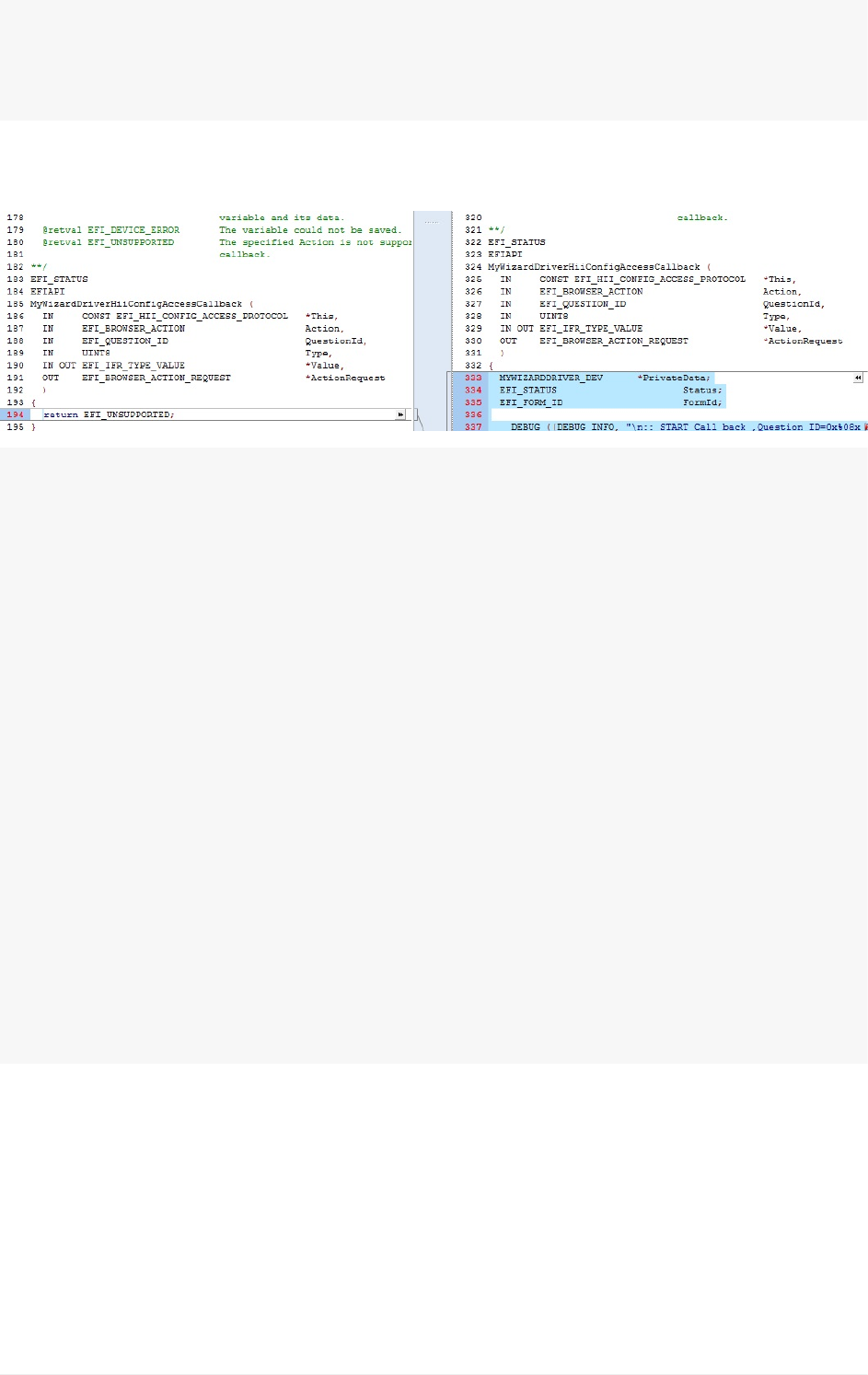
11).Lastly,locateMyWizardDriverHiiConfigAccessCallbackandreplaceatapprox.**line
326,“returnEFI_UNSUPPORTED**;”,withthefollowingcode:
//Begincode
MYWIZARDDRIVER_DEV*PrivateData;
EFI_STATUSStatus;
EFI_FORM_IDFormId;
DEBUG((DEBUG_INFO,"\n::STARTCallback,QuestionID=0x%08xType=0x%04xAction=0
x%04x",QuestionId,Type,Action));
if(((Value==NULL)&&(Action!=EFI_BROWSER_ACTION_FORM_OPEN)&&(Action!=EFI_B
ROWSER_ACTION_FORM_CLOSE))||
(ActionRequest==NULL)){
returnEFI_INVALID_PARAMETER;
}
FormId=0;
Status=EFI_SUCCESS;
PrivateData=MYWIZARDDRIVER_DEV_FROM_THIS(This);
returnStatus;
//endcode
12).SaveHiiConfigAccess.c
BuildandtestMyWizardDriver
1. OpentheVisualStudioCommandPrompt
2. Typebuild
3. Typebuildrun
Lab2.UpdatingHIItoSaveDataSettings
UEFIDriverHIIWinLabGuide[DRAFT]
30DRAFTFORREVIEW[11/08/201808:04:02]
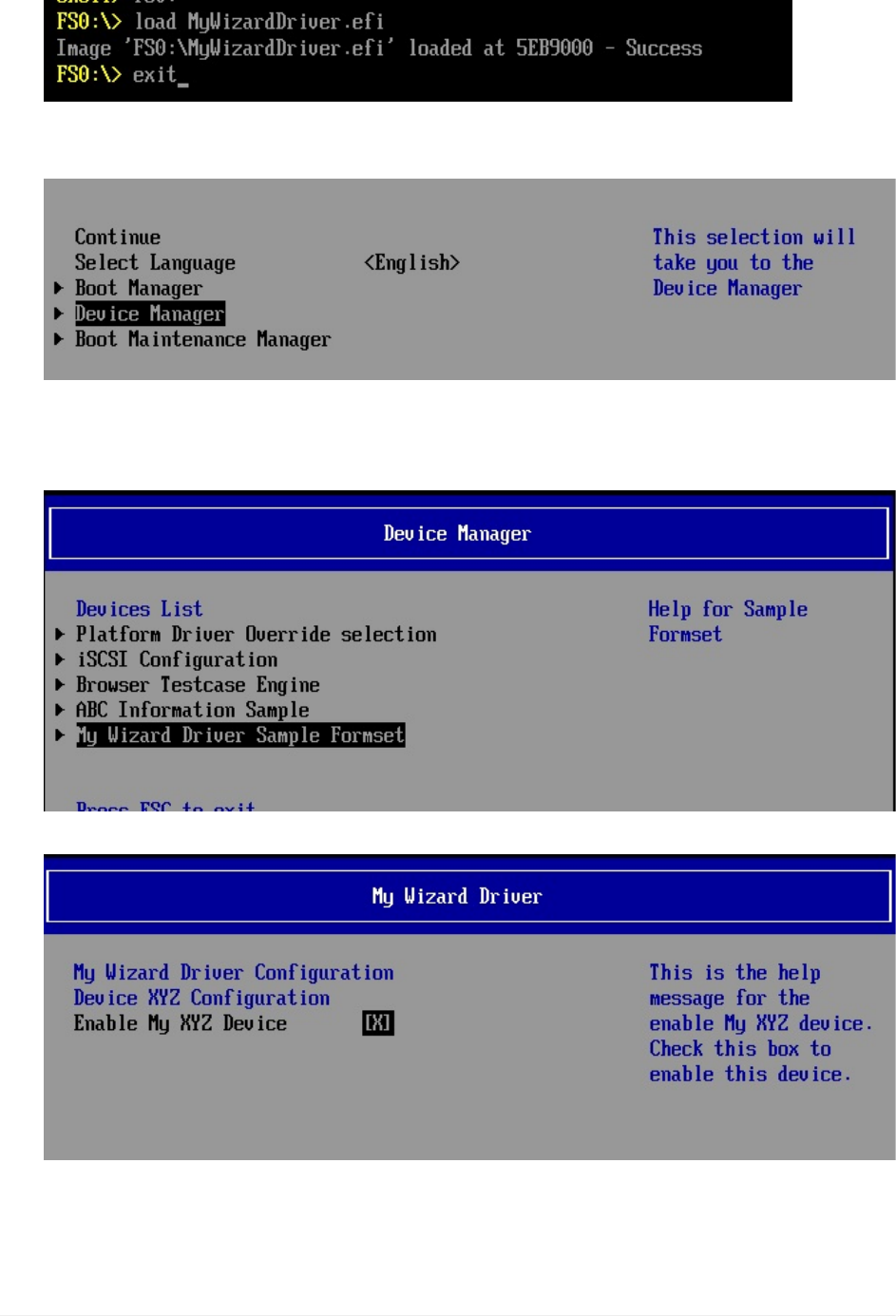
4. AttheUEFIShellprompt,typefs0:
5. TypeLoadMyWizardDriver.efi
6. Press“Enter”
7. Typeexit
8. Nowatthesetupfrontpagemenu,select“DeviceManager”
9. Press“Enter”toenter“DeviceManager”
10. InsidetheDeviceManagermenupressthedownto“MyWizardDriverSample
Formset”**Press"Enter"
Press"Enter"
Note:Onceyouhit“Enter”,noticethatyourformisnowdisplayedwithachoiceto
enableyourDevice.Alsonoticethetitlesandhelpstringsthatareinthe.UNIfileyou
edited.
Lab2.UpdatingHIItoSaveDataSettings
UEFIDriverHIIWinLabGuide[DRAFT]
31DRAFTFORREVIEW[11/08/201808:04:02]
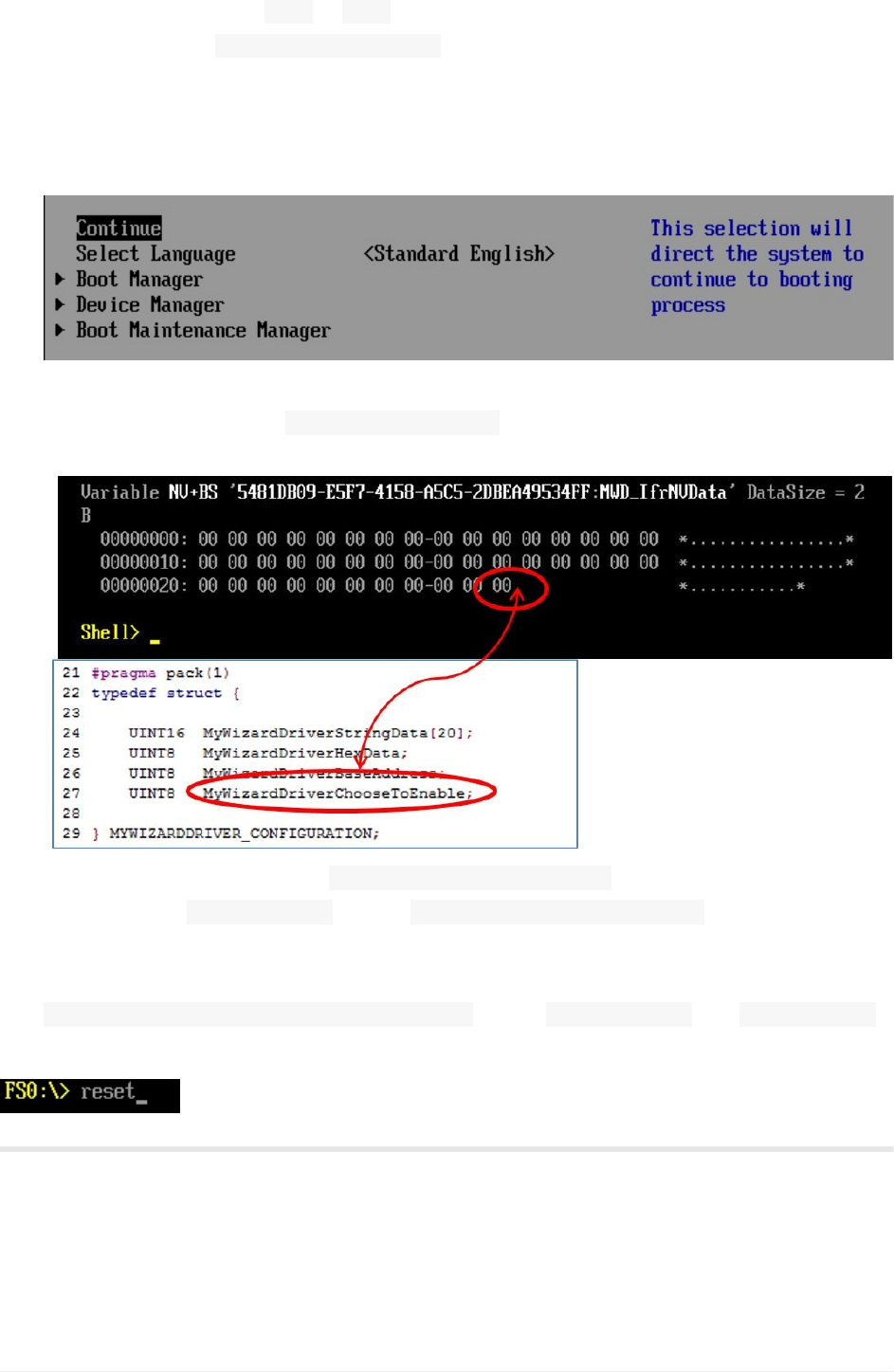
11. TestbyPressthespacebartoEnableandDisablethe“EnableMyXYZDevice”to
changeitsvaluefrom:[X]to []
Note:Noticethe“ Configurationchanged”messageatthemenubottom.
12. Press“F10”
13. Press“Escape”toexit
14. Press“Escape”toexitthe“DeviceManager”Page
15. PressUpArrowto“Continue”
16. Press“Enter”
17. AttheShellPrompttype Shell>dmpstore-all
NoticethatenableisselectedandsavedinNVRamasthevalueof0x00:
Becauseourdatastructurein MyWizardDriverNVDataStruc.hisstoredinNVRAMwiththe
variablename MWD_IfrNVDataoftype MYWIZARDDRIVER_CONFIGURATION,wecanseethe
changesfromourmenuaccessingthroughourHIIforms.
Noticethattheenable/disablebyteisthelastbyteindatastructure
MWD_IfrNVData.MyWizardDriverChooseToEnablewhere 00==disableand 01==enable.
18. TypeResettoreturntotheVisualStudioCommandPrompt
ForanybuildissuescopythesolutionfilesfromC:\Fw\LabSolutions\LessonE.2
NOTE:DelDirectoryC:\fw\edk2\Build\NT32IA32\DEBUG_VS2010x86\IA32\MyWizardDriver
beforetheBuildcommandtobuildtheMyWizardDriverClean
Lab2.UpdatingHIItoSaveDataSettings
UEFIDriverHIIWinLabGuide[DRAFT]
32DRAFTFORREVIEW[11/08/201808:04:02]

EndofLab2
Lab2.UpdatingHIItoSaveDataSettings
UEFIDriverHIIWinLabGuide[DRAFT]
33DRAFTFORREVIEW[11/08/201808:04:02]
Lab3.Updatingyourdrivertoinitializedata
fromtheVFRdatatotheHIIDatabase
Inthislab,you’lllearnhowtoupdateyourdrivertoinitializethedataaccordingtothe
defaultssetinthe.VFRfile.Thuswhentheuserentersyourdriver’smenuforthefirsttime,
thevalueswilldisplaythedefaultsaccordingtothe.VFRfilesettings.Youwillalsolearnthe
richsetofHIIfunctioncallsthatarepartofthe MdeModulePkginthe HiiLibbyreviewing
the“MdeModulePkgDocument.chm”.
Lab3a.AddHIILibraryCallstoYourDriver
Forthislabyouwillupdatethefollowingfiles:MyWizardDriver.inf,MyWizardDriver.h,and
MyWizardDriver.c
1. UpdatetheMyWizardDriver.inffile
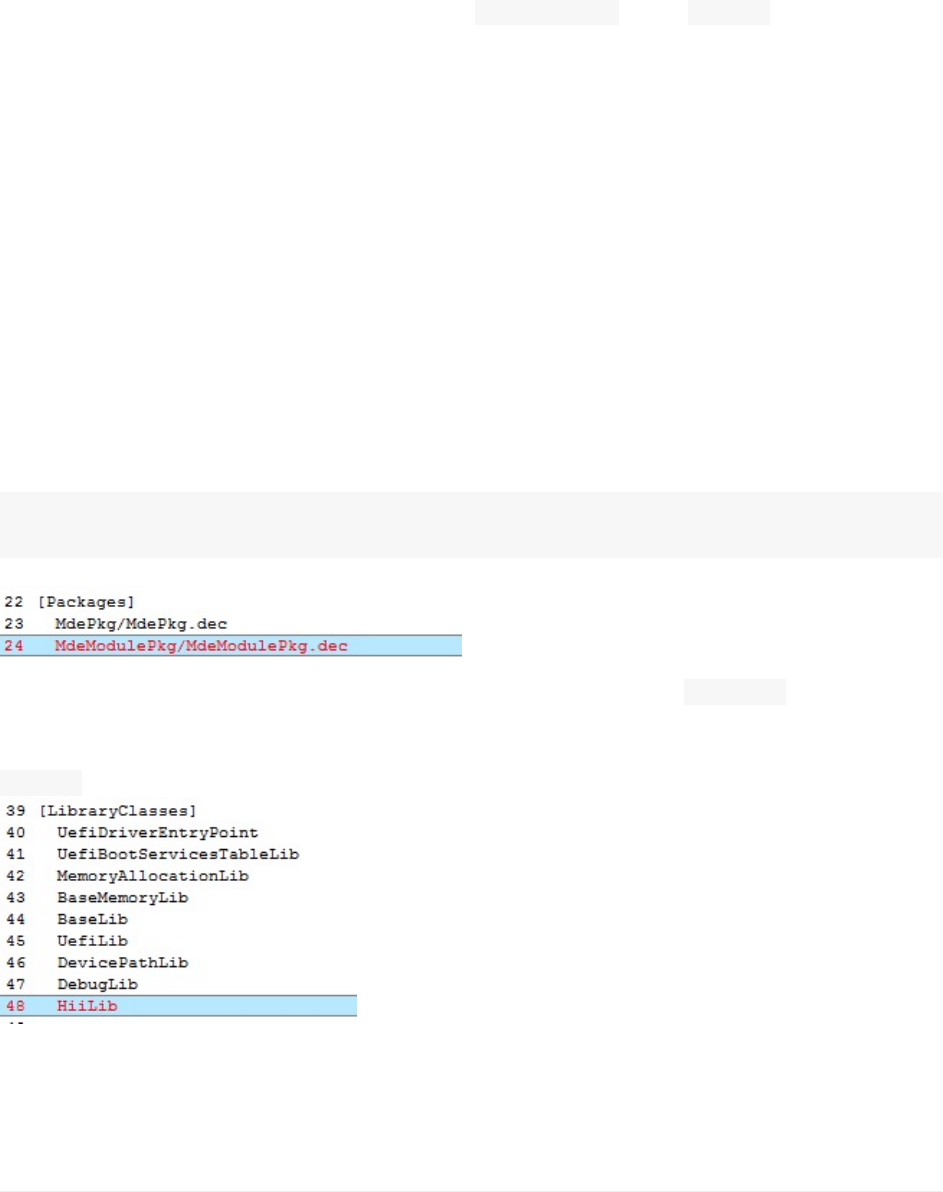
2. Addthefollowingpackage(asshownbelow):
TheHIILibraryintheMdeModulePkghasmanyfunctionstohelpwithCommunication
to/fromtheHiiDatabaseandHiiforms.OnefunctioncallHiiSetToDefaultswillcompare
thedefaultsettingsfromthe.VFRfileandupdatethedriver’sconfigurationbuffer
accordingtothesettingsinthe.VFRfile.
MdeModulePkg/MdeModulePkg.dec
Note:ForotherfunctionsfromtheHIILibrary,
openthe.chmfile“MdeModulePkgDocument.chm”andsearchfor HiiLib.h.
3).Addthefollowinglibraryclass(asshownbelow):
HiiLib
4).SaveMyWizardDriver.inf
5).UpdatetheMyWizardDriver.hfile
Lab3.UpdatingyourdrivertoinitializedatafromtheVFRdatatotheHIIDatabase
UEFIDriverHIIWinLabGuide[DRAFT]
34DRAFTFORREVIEW[11/08/201808:04:02]
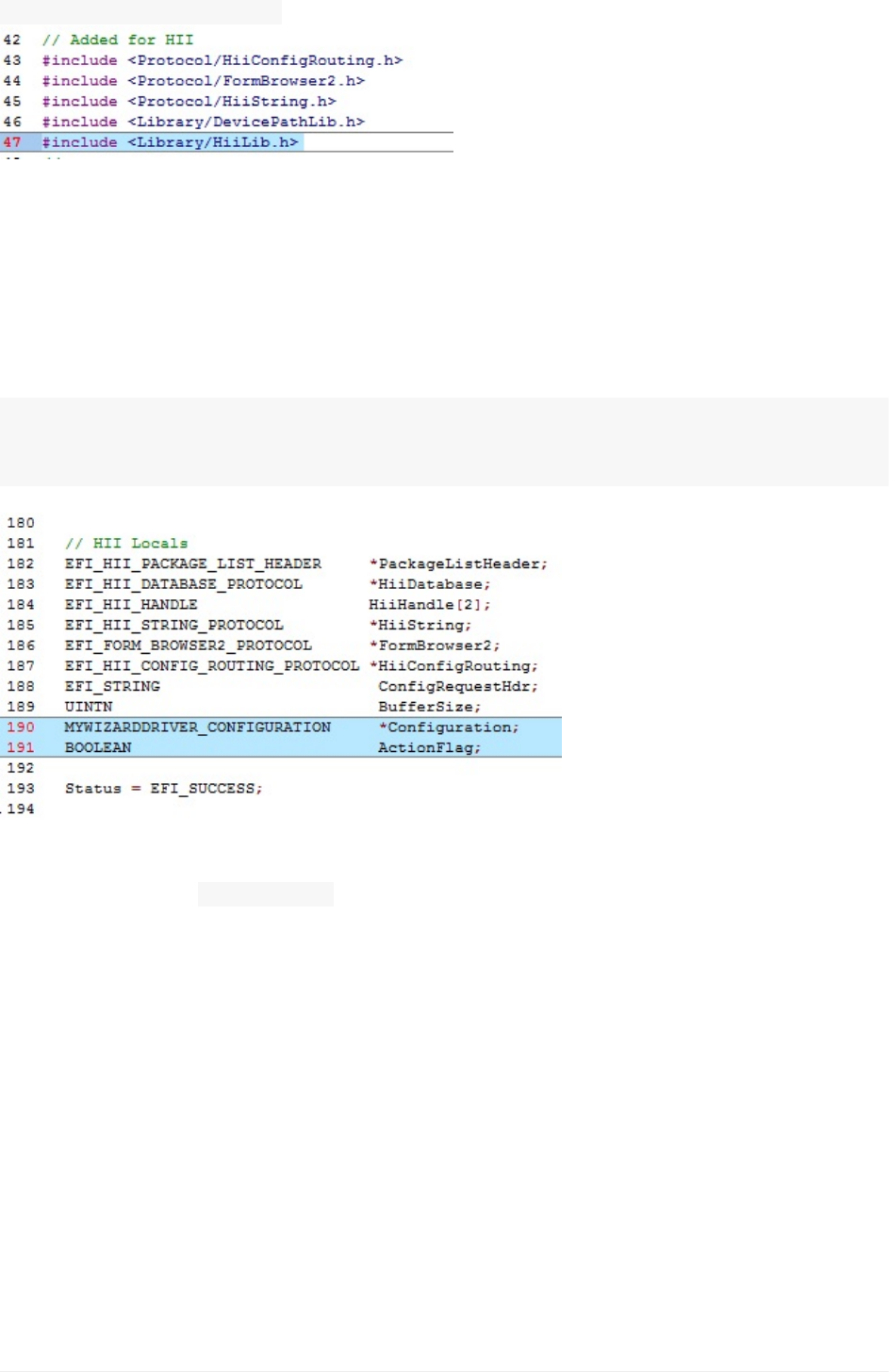
6).Addthefollowingcode(asshownbelow):
#include<Library/HiiLib.h>
7).SaveMyWizardDriver.h
8).UpdatetheMyWizardDriver.cfile
9).AddLocals:firstadd2localsforyourdriversconfigurationbufferandabooleanflag
fromtheHiiLibrarycalls
AddthefollowingatApprox.Line190.
MYWIZARDDRIVER_CONFIGURATION*Configuration;
BOOLEANActionFlag;
10).AddthefollowingtotheMyWizardDriverDriverEntryPointentrypointfuntiontoline319,
approximatelyafter“ BufferSize=”asshownbelow
Lab3.UpdatingyourdrivertoinitializedatafromtheVFRdatatotheHIIDatabase
UEFIDriverHIIWinLabGuide[DRAFT]
35DRAFTFORREVIEW[11/08/201808:04:02]
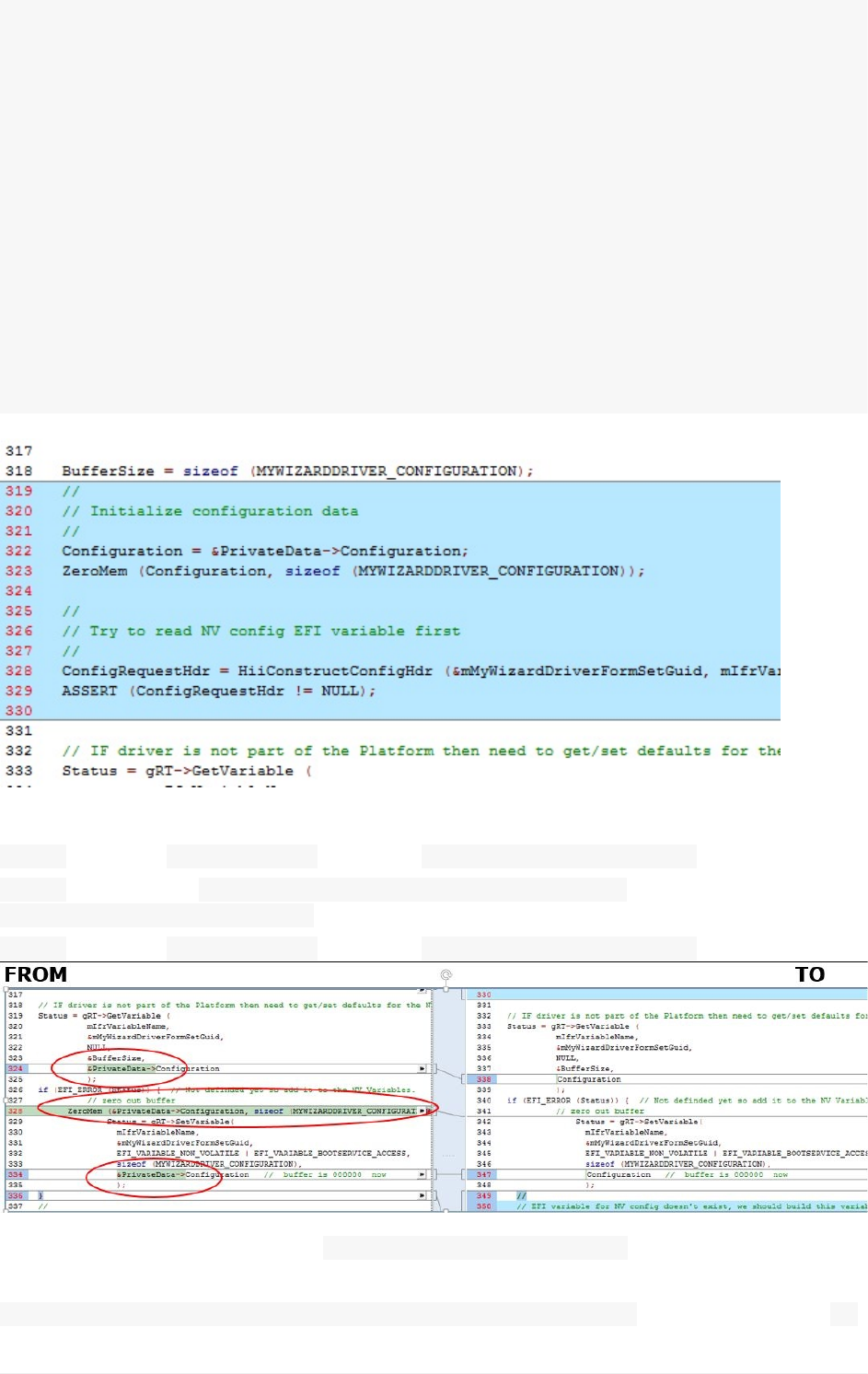
//Begincode
//
//Initializeconfigurationdata
//
Configuration=&PrivateData->Configuration;
ZeroMem(Configuration,sizeof(MYWIZARDDRIVER_CONFIGURATION));
//
//TrytoreadNVconfigEFIvariablefirst
//
ConfigRequestHdr=HiiConstructConfigHdr(&mMyWizardDriverFormSetGuid,mIfrVariableN
ame,mDriverHandle[0]);
ASSERT(ConfigRequestHdr!=NULL);
//Endcode
11).Modifythefollowinglines:
@~338:remove:“ &PrivateData->”fromthe“ &PrivateData->Configuration”
@~342:removeline: ZeroMem(&PrivateData->Configuration,sizeof
(MYWIZARDDRIVER_CONFIGURATION));
@~347:remove:“ &PrivateData->”fromthe“ &PrivateData->Configuration”
12).Addthefollowingcodetothe MyWizardDriverDriverEntryPointentrypointcodeat
approximatelyline349before
//InstallDriverSupportedEFIVersionProtocolontoImageHandleYou’redeletingthe“ }"
Lab3.UpdatingyourdrivertoinitializedatafromtheVFRdatatotheHIIDatabase
UEFIDriverHIIWinLabGuide[DRAFT]
36DRAFTFORREVIEW[11/08/201808:04:02]
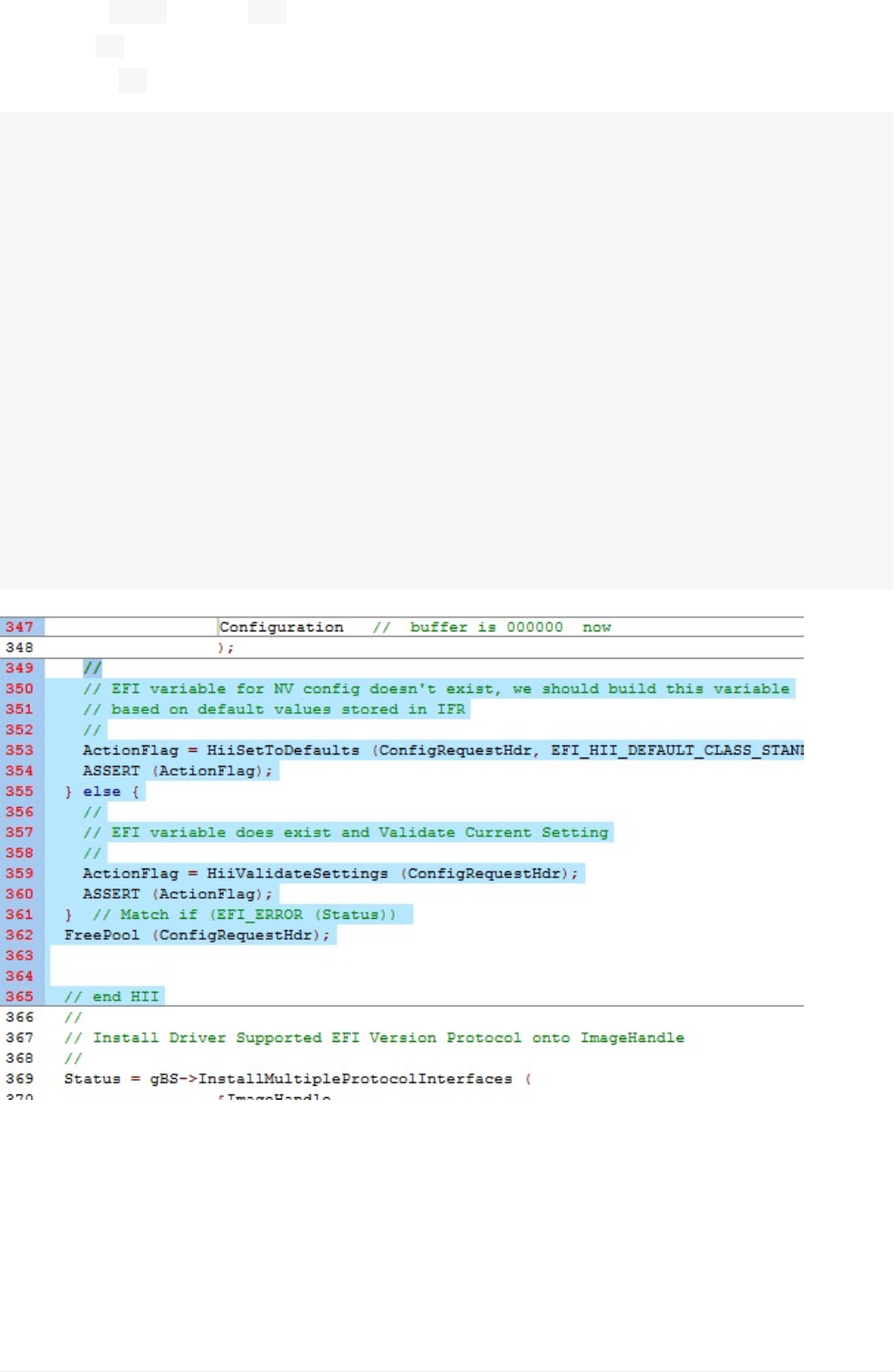
andreplacingitwiththefollowingcode(asshownbelow).Withthisreplacementweare
addingan“ else”tothe“ if”statement:
Notethe“ }”online361isstillmatchingtheinitialifstatement.Makesureyoudonothave
aduplicate“ }”
//Begincode
//
//EFIvariableforNVconfigdoesn'texist,weshouldbuildthisvariable
//basedondefaultvaluesstoredinIFR
//
ActionFlag=HiiSetToDefaults(ConfigRequestHdr,EFI_HII_DEFAULT_CLASS_STANDARD);
ASSERT(ActionFlag);
}else{
//
//EFIvariabledoesexistandValidateCurrentSetting
//
ActionFlag=HiiValidateSettings(ConfigRequestHdr);
ASSERT(ActionFlag);
}//Matchif(EFI_ERROR(Status))
FreePool(ConfigRequestHdr);
//endHII
//Endcode
13).SavetheMyWizardDriver.cfile
BuildandtestMyWizardDriver
1. OpentheVisualStudioCommandPrompt
2. Typebuild
Lab3.UpdatingyourdrivertoinitializedatafromtheVFRdatatotheHIIDatabase
UEFIDriverHIIWinLabGuide[DRAFT]
37DRAFTFORREVIEW[11/08/201808:04:02]
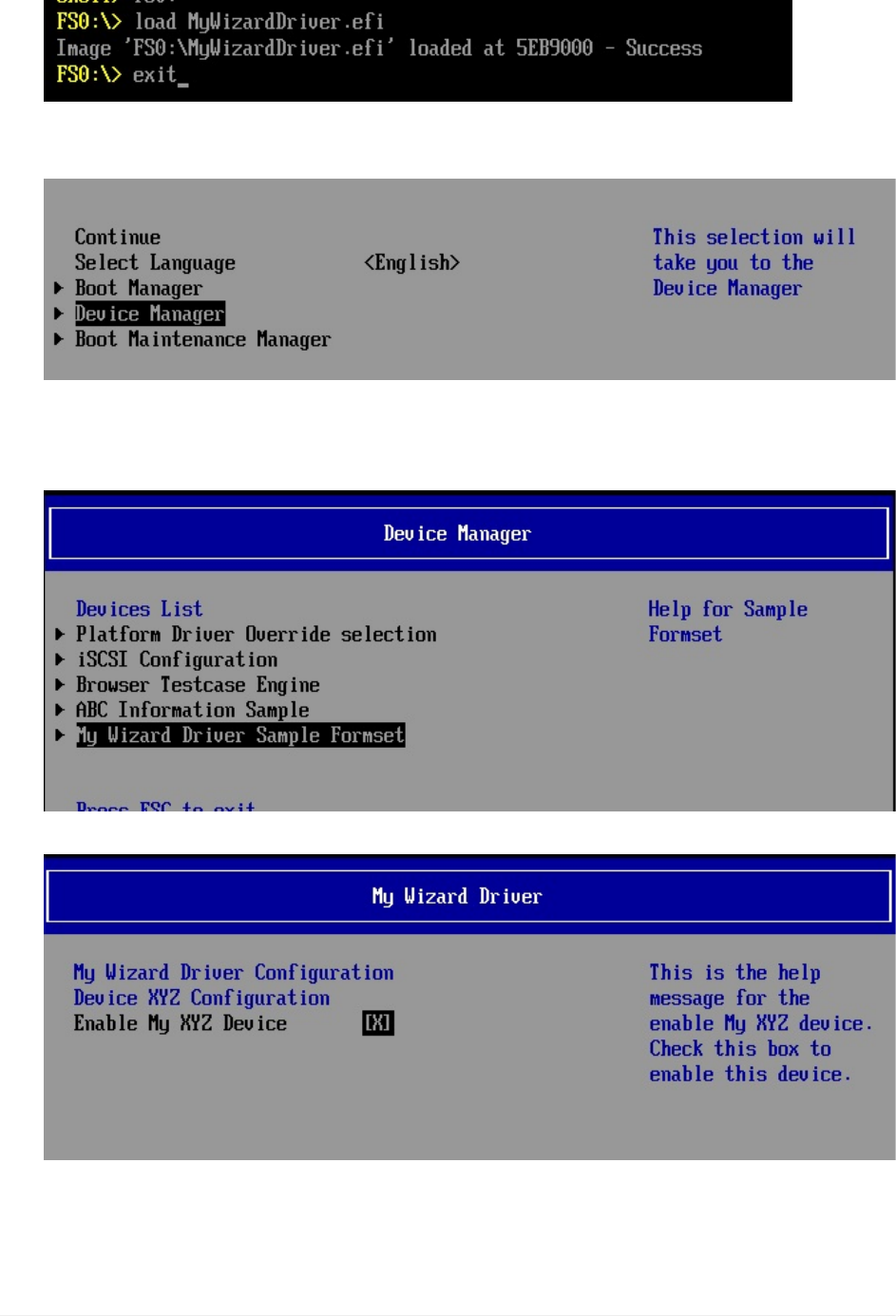
3. Typebuildrun
4. AttheUEFIShellprompt,typefs0:
5. TypeLoadMyWizardDriver.efiandthenPress“Enter”
6. Typeexit
7. Nowatthesetupfrontpagemenu,select“DeviceManager”
8. Press“Enter”toenter“DeviceManager”
9. InsidetheDeviceManagermenupressthedownto“MyWizardDriverSample
Formset”
10. Press“Enter”
11. Press“Escape”toexit
12. Press“Escape”toExitthe“DeviceManager”Page
13. PressUpArrowto“Continue”andthenPress“Enter”
Lab3.UpdatingyourdrivertoinitializedatafromtheVFRdatatotheHIIDatabase
UEFIDriverHIIWinLabGuide[DRAFT]
38DRAFTFORREVIEW[11/08/201808:04:02]

14. Type" Reset"toreturntotheVisualStudioCommandPrompt
ForanybuildissuescopythesolutionfilesfromC:\Fw\LabSolutions\LessonE.3NOTE:Del
DirectoryC:\fw\edk2\Build\NT32IA32\DEBUG_VS2010x86\IA32\MyWizardDriverbeforethe
BuildcommandtobuildtheMyWizardDriverClean
Lab3b.AddyourDrivertotheplatform
Asofnow,yourdriverneedstobesoftloadedeachtimefromtheshellprompt.Inthislab,
you’llupdatetheplatform.FDFfiletoforceyourdrivertoloadaspartoftheplatformUEFI
driver.
1. Opentoupdate:C:\fw\edk2\Nt32PkgNt32Pkg.Fdf
2. Addthefollowingcode(asshownbelowbefore“ !if$(BUILD_NEW_SHELL)==TRUE”):
INFMyWizardDriver/MyWizardDriver.inf
3. SaveNt32pkg.fdf
BuildandtestMyWizardDriver
1. OpentheVisualStudioCommandPrompt
2. Typebuild
3. Typebuildrun
4. AttheUEFIShellprompt,type" Exit"
5. Nowatthesetupfrontpagemenu,select“DeviceManager”
Lab3.UpdatingyourdrivertoinitializedatafromtheVFRdatatotheHIIDatabase
UEFIDriverHIIWinLabGuide[DRAFT]
39DRAFTFORREVIEW[11/08/201808:04:02]
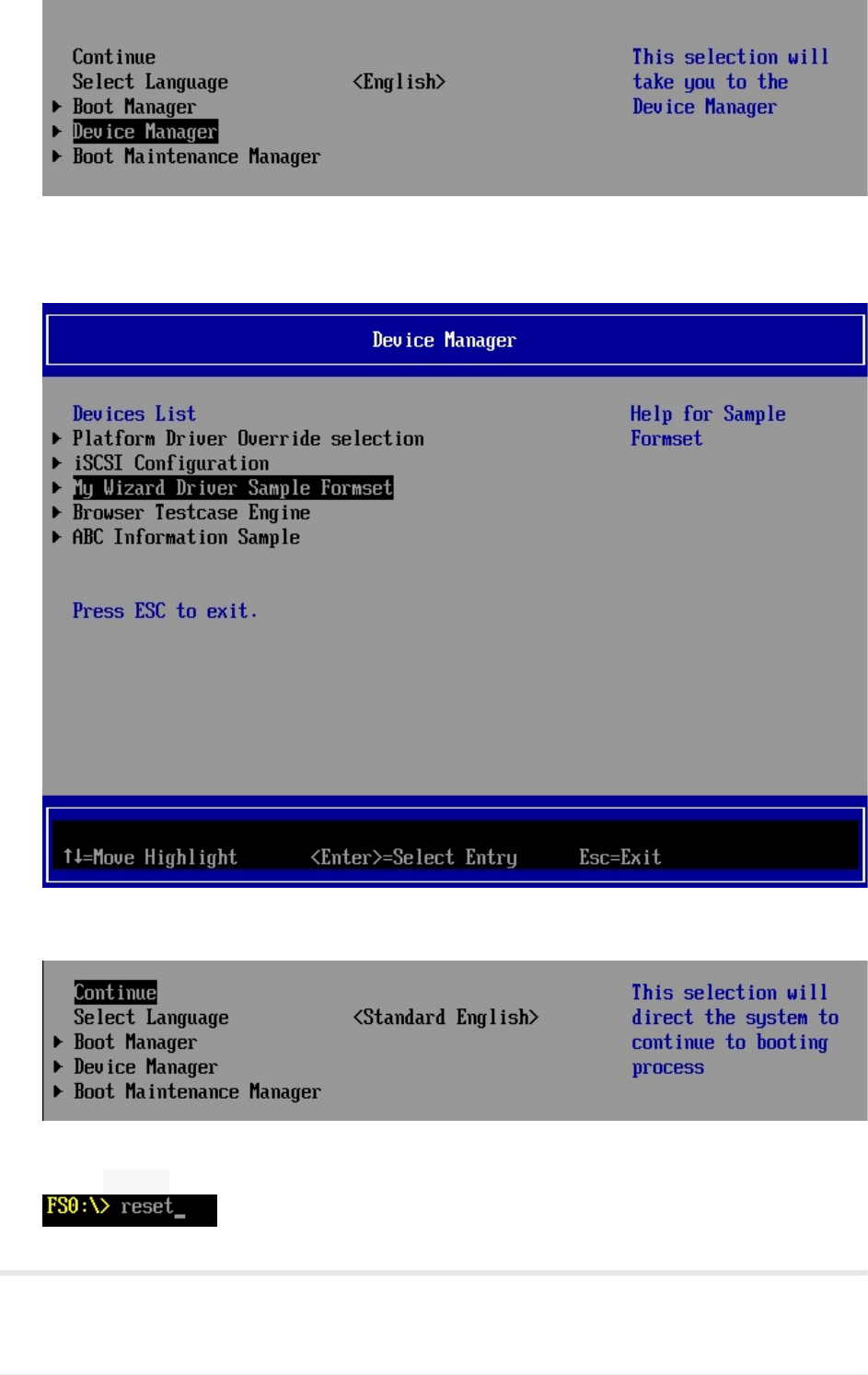
6. Press“Enter”toenter“DeviceManager”
7. InsidetheDeviceManagermenuNoticethattheMyWizardDriverSampleFormsetis
addedwithouthavingtoissuethe“Load”commandfromtheshellprompt.
8. Press“Escape”toexitthe“DeviceManager”Page
9. PressUpArrowto“Continue”
10. Press“Enter”
11. Type" Reset"toreturntotheVisualStudioCommandPrompt
ForanybuildissuescopythesolutionfilesfromC:\Fw\LabSolutions\LessonE.3
Lab3.UpdatingyourdrivertoinitializedatafromtheVFRdatatotheHIIDatabase
UEFIDriverHIIWinLabGuide[DRAFT]
40DRAFTFORREVIEW[11/08/201808:04:02]

NOTE:DelDirectoryC:\fw\edk2\Build\NT32IA32\DEBUG_VS2010x86\IA32\MyWizardDriver
beforetheBuildcommandtobuildtheMyWizardDriverClean
EndofLab3
Lab3.UpdatingyourdrivertoinitializedatafromtheVFRdatatotheHIIDatabase
UEFIDriverHIIWinLabGuide[DRAFT]
41DRAFTFORREVIEW[11/08/201808:04:02]
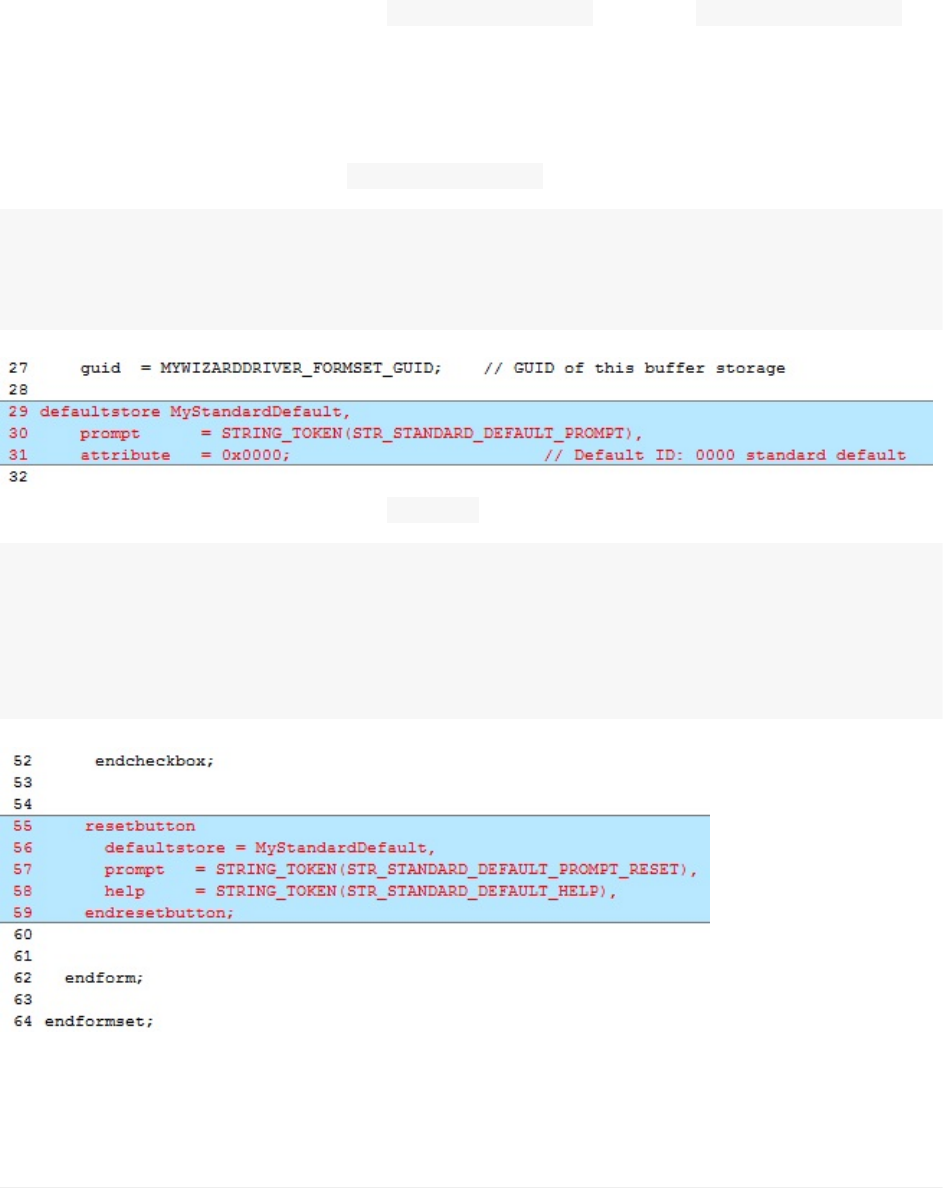
Lab4.UpdatingtheMenu:ResetButton
Inthislab,you’lllearnhowtoaddaresetbuttontoyourdriver’sformmenu.It’stimetoadd
moreconfigurationfieldstoyourmenu,enablinguserstomodifymorefieldsnowthatyou’ve
builtadriverthat1)savesdatafromformsintoNVRAM2)updatesdatafromthe.VFR
formsand3)buildsintotheplatformdrivers.
Thenextsetoflabswillupdate.VFR, MyWizardDriver.vfr,andUNI MyWizardDriver.uni
stringfilestoincrementallyaddaresetbutton(Lab4),pop-upbox(Lab5),stringname(Lab
6),andnumerichexvalue(Lab7)toyourdriver’sformmenu:
1).UpdatetheMyWizardDriver.vfrfile2).Addthefollowingcode(asshownbelowafterthe
“GUID”definitionApprx.Line29): MyStandardDefault,
prompt=STRING_TOKEN(STR_STANDARD_DEFAULT_PROMPT),
attribute=0x0000;//DefaultID:0000standarddefault
3).Addthefolowingcodebeforethe“ endform”(asshownbelowApprox.Line55):
resetbutton
defaultstore=MyStandardDefault,
prompt=STRING_TOKEN(STR_STANDARD_DEFAULT_PROMPT_RESET),
help=STRING_TOKEN(STR_STANDARD_DEFAULT_HELP),
endresetbutton;
4).SaveMyWizardDriver.vfr
5).UpdatetheMyWizardDriver.unifile
Lab4.UpdatingtheMenu:ResetButton
UEFIDriverHIIWinLabGuide[DRAFT]
42DRAFTFORREVIEW[11/08/201808:04:02]
6).Addthefollowingstringsattheendofthefiletosupportthe“ STR_“referencedaddedin
the.vfrfile:
#stringSTR_STANDARD_DEFAULT_PROMPT#languageen"StandardDefault"
#stringSTR_STANDARD_DEFAULT_PROMPT_RESET#languageen"ResettoStandardDefault"
#stringSTR_STANDARD_DEFAULT_HELP#languageen"ThiswillresetalltheQuestions
totheirstandarddefaultvalue"
7).SaveMyWizardDriver.uni
BuildandtestMyWizardDriver
1. OpentheVisualStudioCommandPrompt
2. Typebuild
3. Typebuildrun
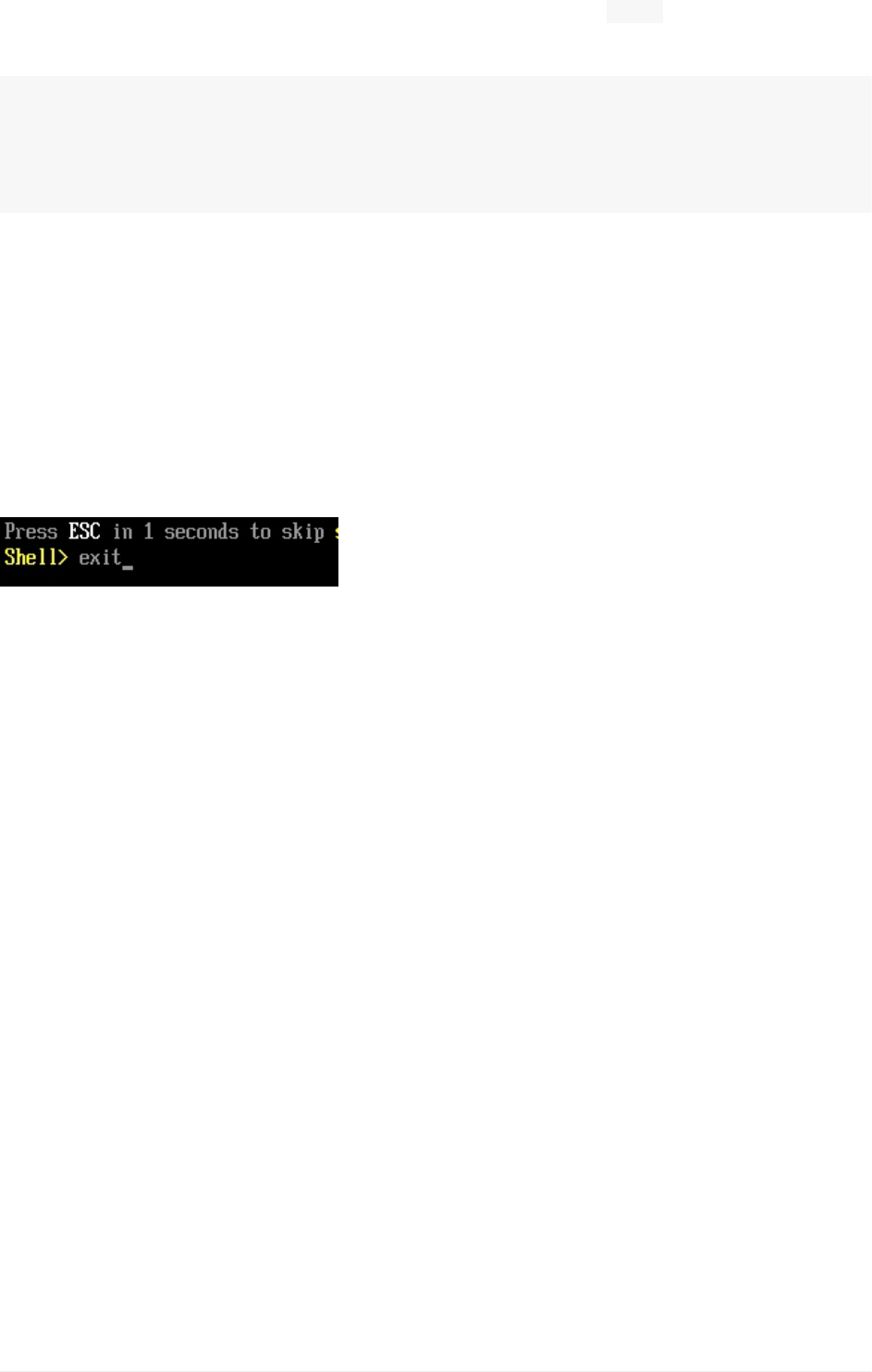
4. AttheUEFIShellprompt,typeexit
1. Nowatthesetupfrontpagemenu,select“DeviceManager”
2. Press“Enter”toenter“DeviceManager”
3. InsidetheDeviceManagermenupressthedownarrowto“MyWizardDriverSample
Formset”Press"Enter"
4. AccesstheMyWizardDrivermenuandnoticetheitem“ResettoStandardDefault”
Lab4.UpdatingtheMenu:ResetButton
UEFIDriverHIIWinLabGuide[DRAFT]
43DRAFTFORREVIEW[11/08/201808:04:02]
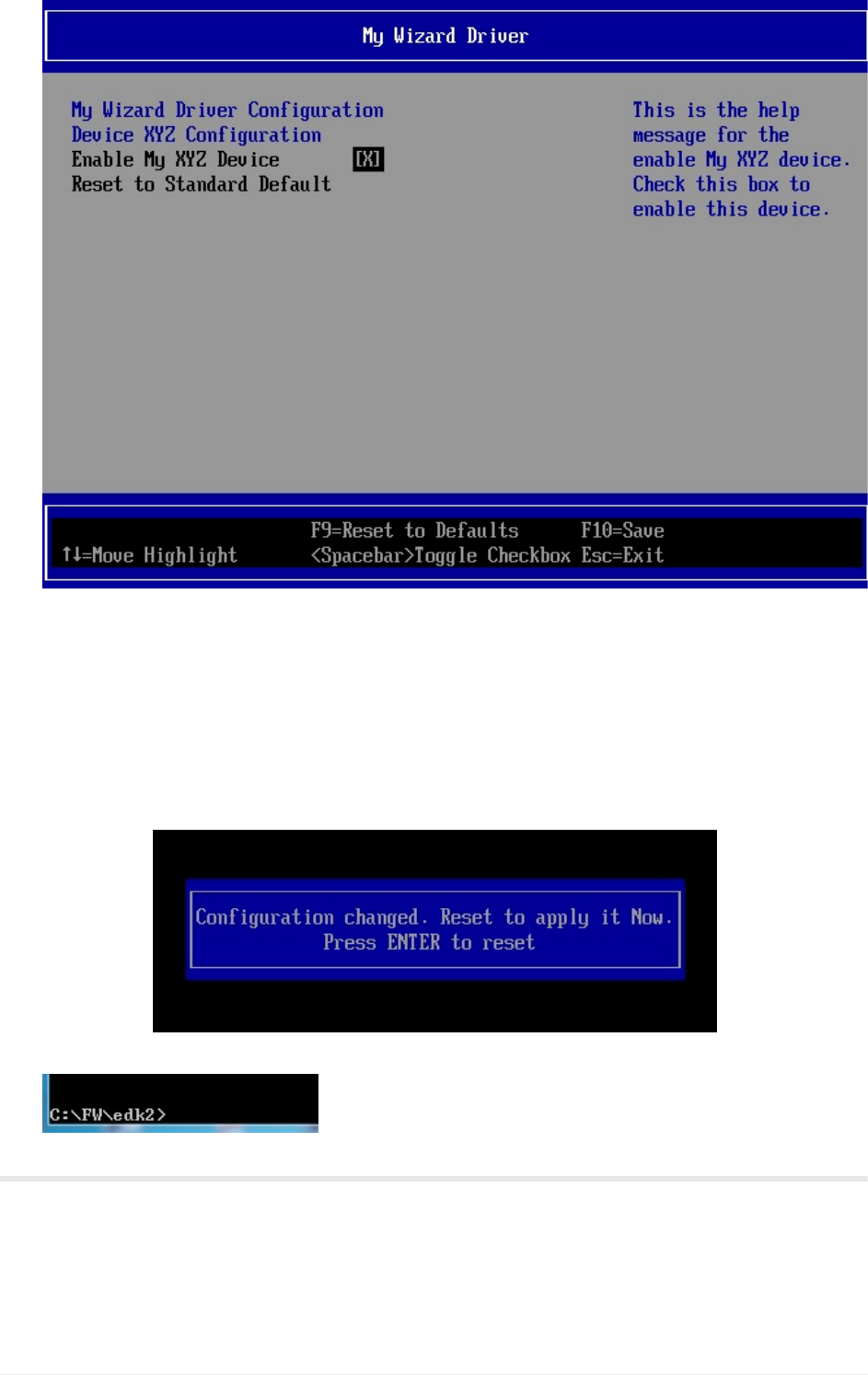
5. PressDownArrowto“ResettoStandardDefault”
6. Press“Enter"toselect
7. Noticethe“Configurationchanged”messageatthebottomofthemenu
8. ToExitPress“Escape”then“Y”
9. ToExitthe“DeviceManager”Page:Press“Escape”
10. PressUpArrowto“Continue”
Observe:Noticethatsincethischangerequiresareset,theNt32willexitout
completely.
11. Press“Enter”toreturntotheVisualStudioCommandPrompt
ForanybuildissuescopythesolutionfilesfromC:\Fw\LabSolutions\LessonE.4
NOTE:DelDirectoryC:\fw\edk2\Build\NT32IA32\DEBUG_VS2010x86\IA32\MyWizardDriver
beforetheBuildcommandtobuildtheMyWizardDriverClean.
Lab4.UpdatingtheMenu:ResetButton
UEFIDriverHIIWinLabGuide[DRAFT]
44DRAFTFORREVIEW[11/08/201808:04:02]

EndofLab4
Lab4.UpdatingtheMenu:ResetButton
UEFIDriverHIIWinLabGuide[DRAFT]
45DRAFTFORREVIEW[11/08/201808:04:02]
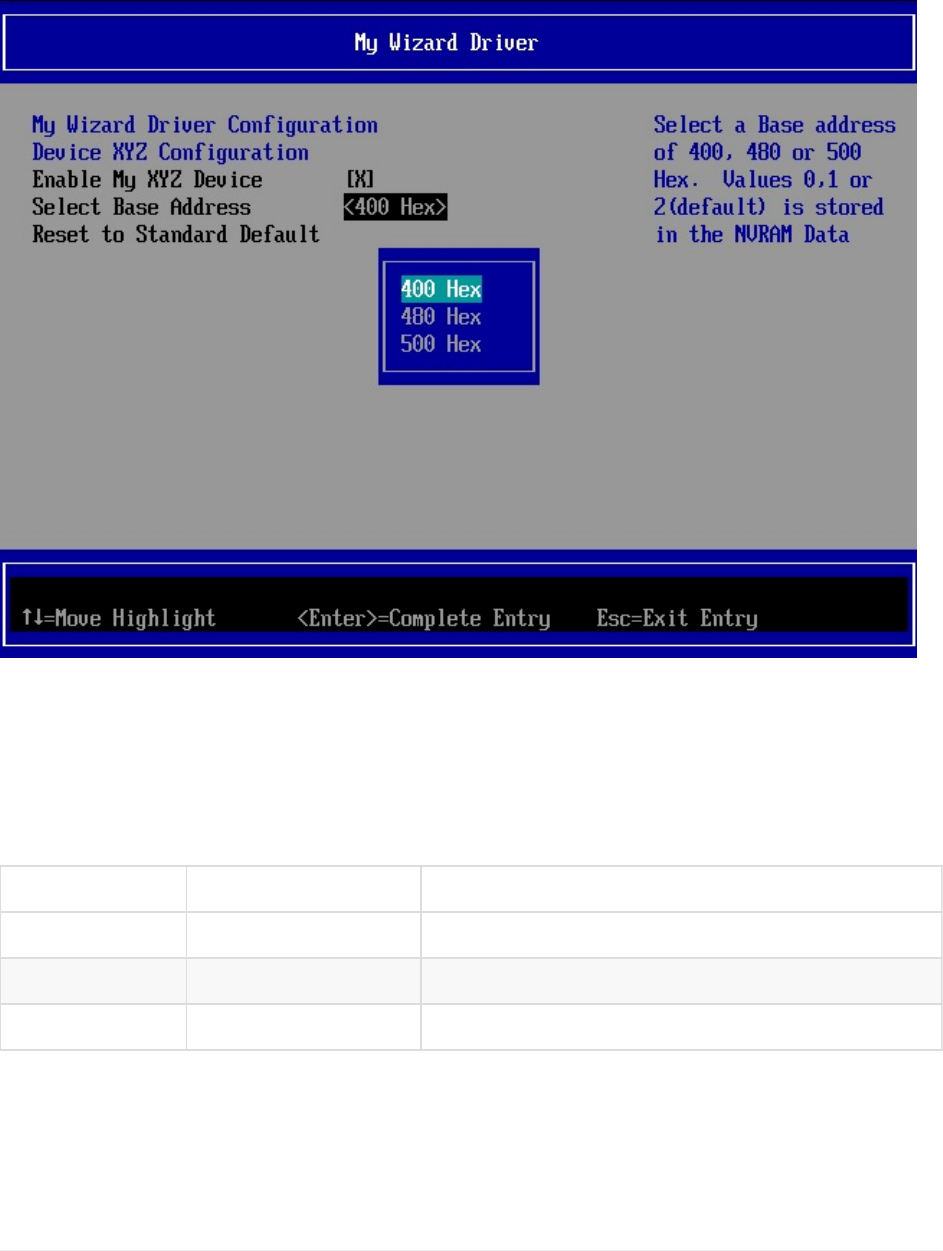
Lab5.UpdatingtheMenu:Pop-upBox
Inthislab,you’lllearnhowtoaddapop-upboxtoyourdriver’sformmenubyusingthe
“oneof”VFRterm.WewillalsoonlyupdatetheMyWizardDriver.vfrandMyWizardDriver.uni
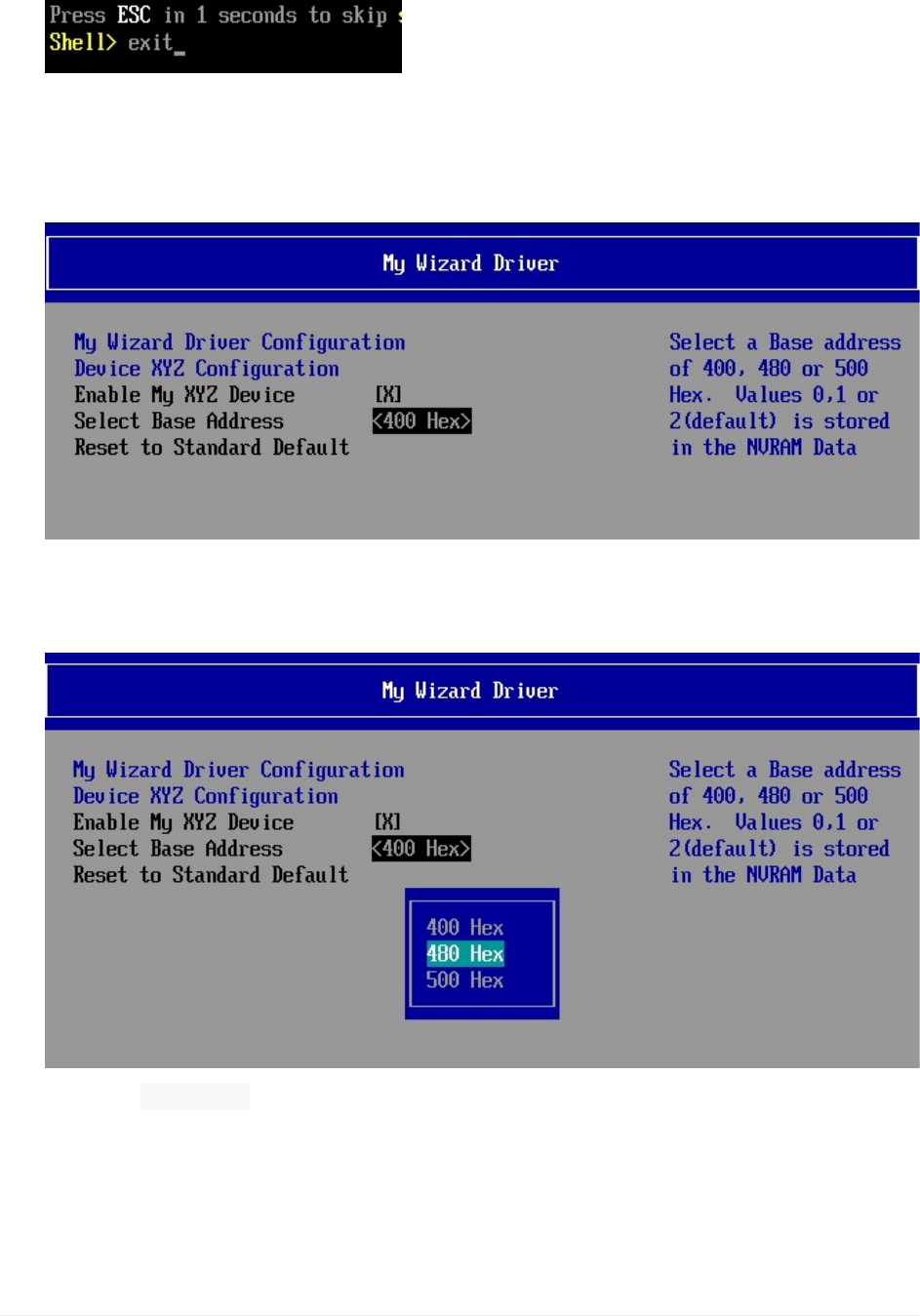
files.
Figure5MyWizardDriverwithapop-upbox
BackgroundInformationTheVFRterm“oneof”willdeclareapop-upmenu.Theuserthen
selectsonefieldthatwilldictatethevaluestoredintheNVRAMvariable.LookingatFigure5
above,therearethreevalues:
Value Display Stringtoken
0 500Hex STR_ONE_OF_TEXT3
1 480Hex STR_ONE_OF_TEXT2
2 400Hex STR_ONE_OF_TEXT1
Forthislabyouwilladdcodetogiveyourdrivermenuapop-upmenuitembydefininga
“oneof”item.Also,ifthedeviceis“disabled”,thenusetheVFRterm“grayoutif”statement
sothatthepop-upmenuisnotaccessibleandcannotbechanged.Thebrowserenginewill
Lab5.UpdatingtheMenu:Pop-upBox
UEFIDriverHIIWinLabGuide[DRAFT]
46DRAFTFORREVIEW[11/08/201808:04:02]

usetheconfigurationvariable MWD_IfrNVData.MyWizardDriverChooseToEnablewithavalueof
0x0todetermineifthedeviceisenabledordisabled
1. UpdatetheMyWizardDriver.vfrfile
2. Addthefollowingcodebeforethe“ resetbutton”statement(approximatelyline53)
//Begincode
//
//Defineoneof(EFI_IFR_ONE_OF)
//
grayoutifideqvalMWD_IfrNVData.MyWizardDriverChooseToEnable==0x0;
oneofname=MyOneOf2,//Definereferencenamefor
Question
varid=MWD_IfrNVData.MyWizardDriverBaseAddress,
//Use"DataStructure.Member"toreferenceBufferStorage
prompt=STRING_TOKEN(STR_ONE_OF_PROMPT),
help=STRING_TOKEN(STR_ONE_OF_HELP),
//
//Defineanoption(EFI_IFR_ONE_OF_OPTION)
//
optiontext=STRING_TOKEN(STR_ONE_OF_TEXT3),value=0x0,flags=0;
optiontext=STRING_TOKEN(STR_ONE_OF_TEXT2),value=0x1,flags=0;
//
//DEFAULTindicatethisoptionwillbemarkedwith
//EFI_IFR_OPTION_DEFAULT
//
optiontext=STRING_TOKEN(STR_ONE_OF_TEXT1),value=0x2,
flags=DEFAULT;
endoneof;
endif;
//endcode
Lab5.UpdatingtheMenu:Pop-upBox
UEFIDriverHIIWinLabGuide[DRAFT]
47DRAFTFORREVIEW[11/08/201808:04:02]
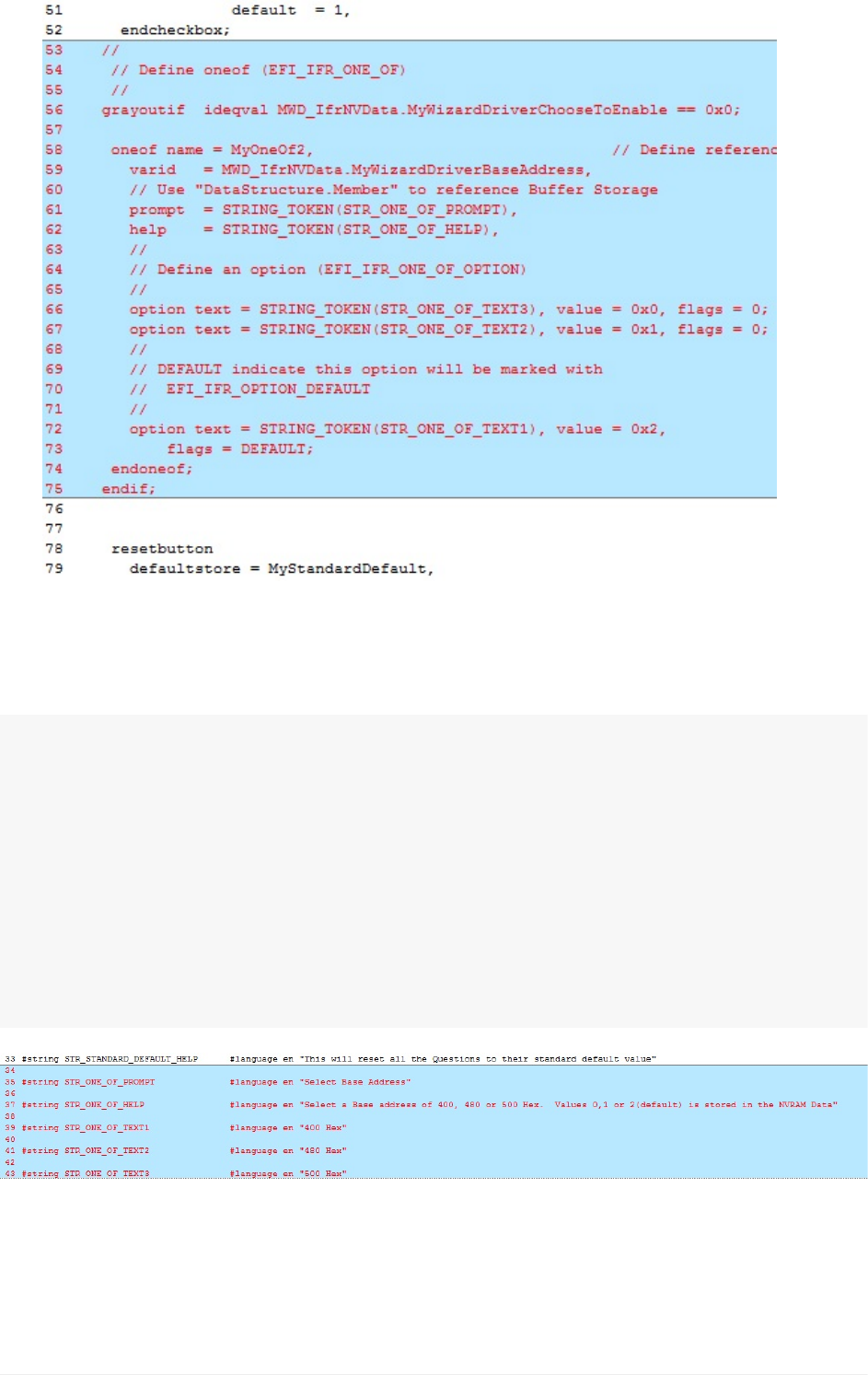
3. SavetheMyWizardDriver.vfrfile
4. UpdatetheMyWizardDriver.unifile
5. Addthefollowingcodetotheendofthefile(asshownbelow):
//begincode
#stringSTR_ONE_OF_PROMPT#languageen"SelectBaseAddress"
#stringSTR_ONE_OF_HELP#languageen"SelectaBaseaddressof400,480
or500Hex.Values0,1or2(default)isstoredintheNVRAMData"
#stringSTR_ONE_OF_TEXT1#languageen"400Hex"
#stringSTR_ONE_OF_TEXT2#languageen"480Hex"
#stringSTR_ONE_OF_TEXT3#languageen"500Hex"
//endcode
6).SaveMyWizardDriver.uni
BuildandtestMyWizardDriver
Lab5.UpdatingtheMenu:Pop-upBox
UEFIDriverHIIWinLabGuide[DRAFT]
48DRAFTFORREVIEW[11/08/201808:04:02]
1. OpentheVisualStudioCommandPrompt
2. Typebuild
3. Typebuildrun
4. AttheUEFIShellprompt,typeexit
5. Nowatthesetupfrontpagemenu,select“DeviceManager”
6. InsidetheDeviceManagermenupressthedownarrowto“MyWizardDriverSample
Formset”Press"Enter"
7. DownArrowto“SelectBaseAddress”
NoticethePopupmenu
8. Select“480Hex”thenpress"Enter"
Observe:the“Configurationchanged”messageatthebottom
9. Testthe“ grayoutif”byselecting“EnableMyXYZDevice”thenpressthe“Space”bar
totoggleoffor“Disabled”.
Noticethe“SelectBaseAddress”isnowgrayedoutandnotSelectable.
Lab5.UpdatingtheMenu:Pop-upBox
UEFIDriverHIIWinLabGuide[DRAFT]
49DRAFTFORREVIEW[11/08/201808:04:02]
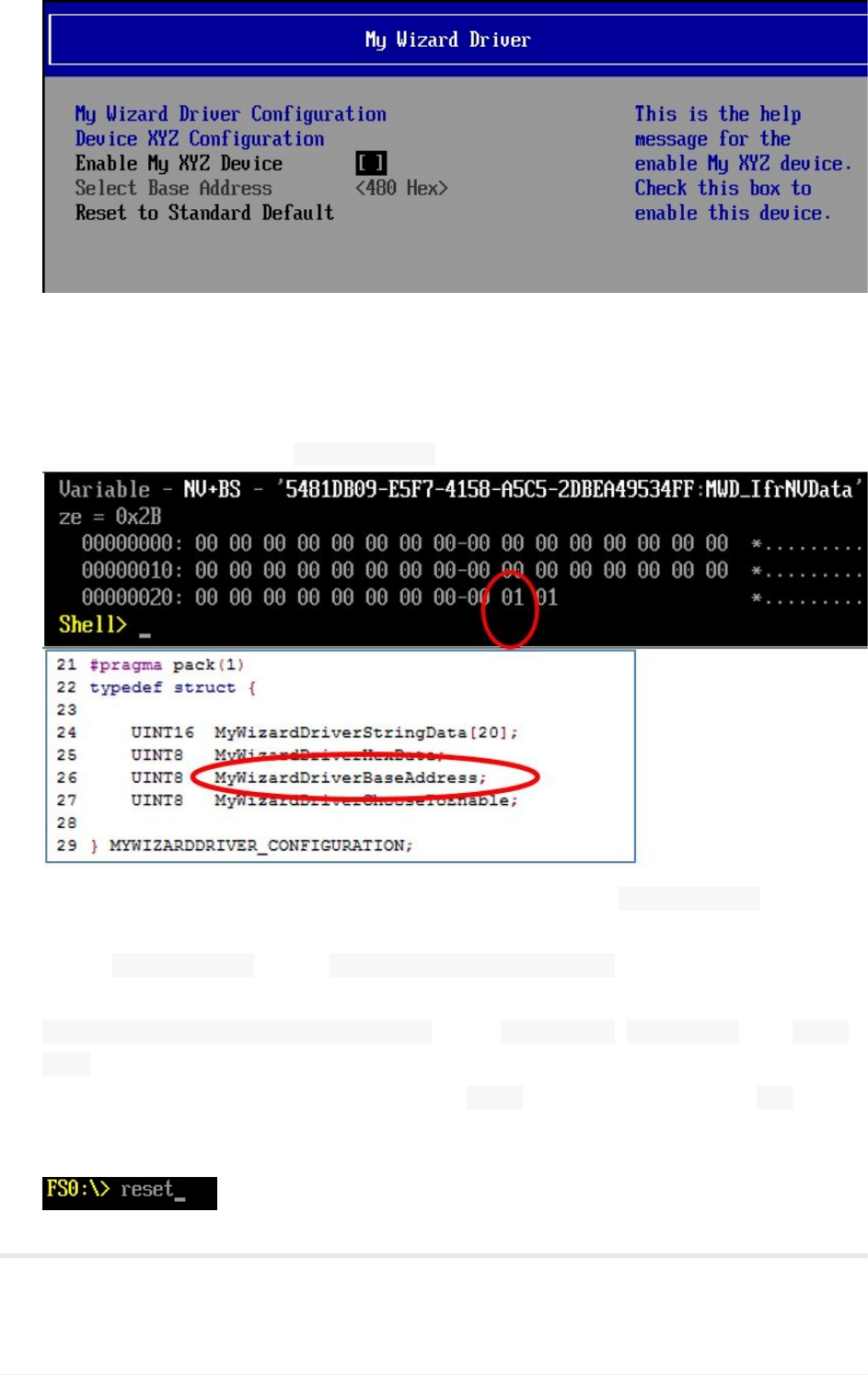
10. Press“Space”againtoEnable
11. ToExitPress“Escape”then“Y”or“F10”then“Escape”
12. ToExitthe“DeviceManager”Page:Press“Escape”
13. PressUpArrowto“Continue”
14. AttheShellPrompttype:" dmpstore-all"
15. ObservefileMyWizardDriverNVDataStruc.handtheNVRAM MWD_IfrNVDatavariable.
ByupdatingMyWizardDriverNVDataStruc.h,ourdatastructurestoredinNVRAMis
named MWD_IfrNVDataoftype MYWIZARDDRIVER_CONFIGURATION.
Noticethatthebaseaddressbyteisthenexttothelastbyteinthedatastructure
MWD_IfrNVData.MyWizardDriverBaseAddresswhere 02==400H, 01==480H,and 00==
500H
NoticetheNVRAMVariablewiththevalueof 480Hwillhaveatruevalueof 01.
16. Type“reset”**attheShellprompt
17. Press“Enter”toreturntotheVisualStudioCommandPrompt
ForanybuildissuescopythesolutionfilesfromC:\Fw\LabSolutions\LessonE.5
Lab5.UpdatingtheMenu:Pop-upBox
UEFIDriverHIIWinLabGuide[DRAFT]
50DRAFTFORREVIEW[11/08/201808:04:02]

NOTE:DelDirectoryC:\fw\edk2\Build\NT32IA32\DEBUG_VS2010x86\IA32\MyWizardDriver
beforetheBuildcommandtobuildtheMyWizardDriverClean.
EndofLab5
Lab5.UpdatingtheMenu:Pop-upBox
UEFIDriverHIIWinLabGuide[DRAFT]
51DRAFTFORREVIEW[11/08/201808:04:02]
Lab6.UpdatingtheMenu:CreatingaStringto
NameaSavedConfiguration
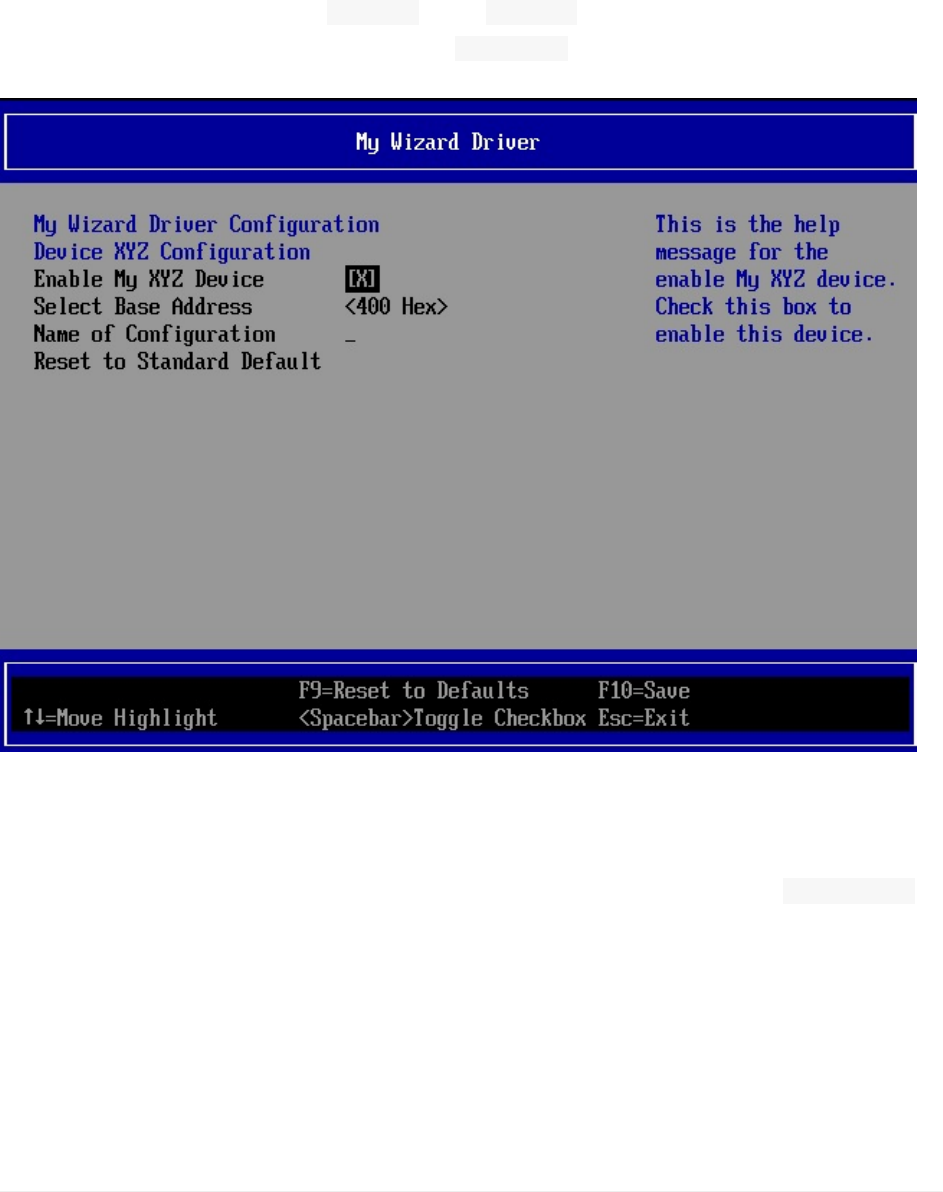
Inthislab,you’llcreateastringtonameasavedconfigurationthatwillbestoredintothe
NVRAMvariablespace.ThislabusestheVFRterm“string”toprompttheusertoentera
stringvalue.TheVFRcandeterminetheminimumandmaximumnumberofcharactersof
thestringlengthwiththeterms“ minsize”and“ maxsize”.Sincethereisalsoan
enable/disableswitch,theVFRcanusethe“ grayoutif”termagaintoallowordisallow
changestothisfield.
Figure6:Menuwithastringitem
1. UpdatetheMyWizardDriver.vfrfile
2. Addthefollowingcodetothelocationatapprox.line77andbeforethe“ resetbutton”
item(asshownbelow):
Lab6.UpdatingtheMenu:CreatingaStringtoNameaSavedConfiguration
UEFIDriverHIIWinLabGuide[DRAFT]
52DRAFTFORREVIEW[11/08/201808:04:02]
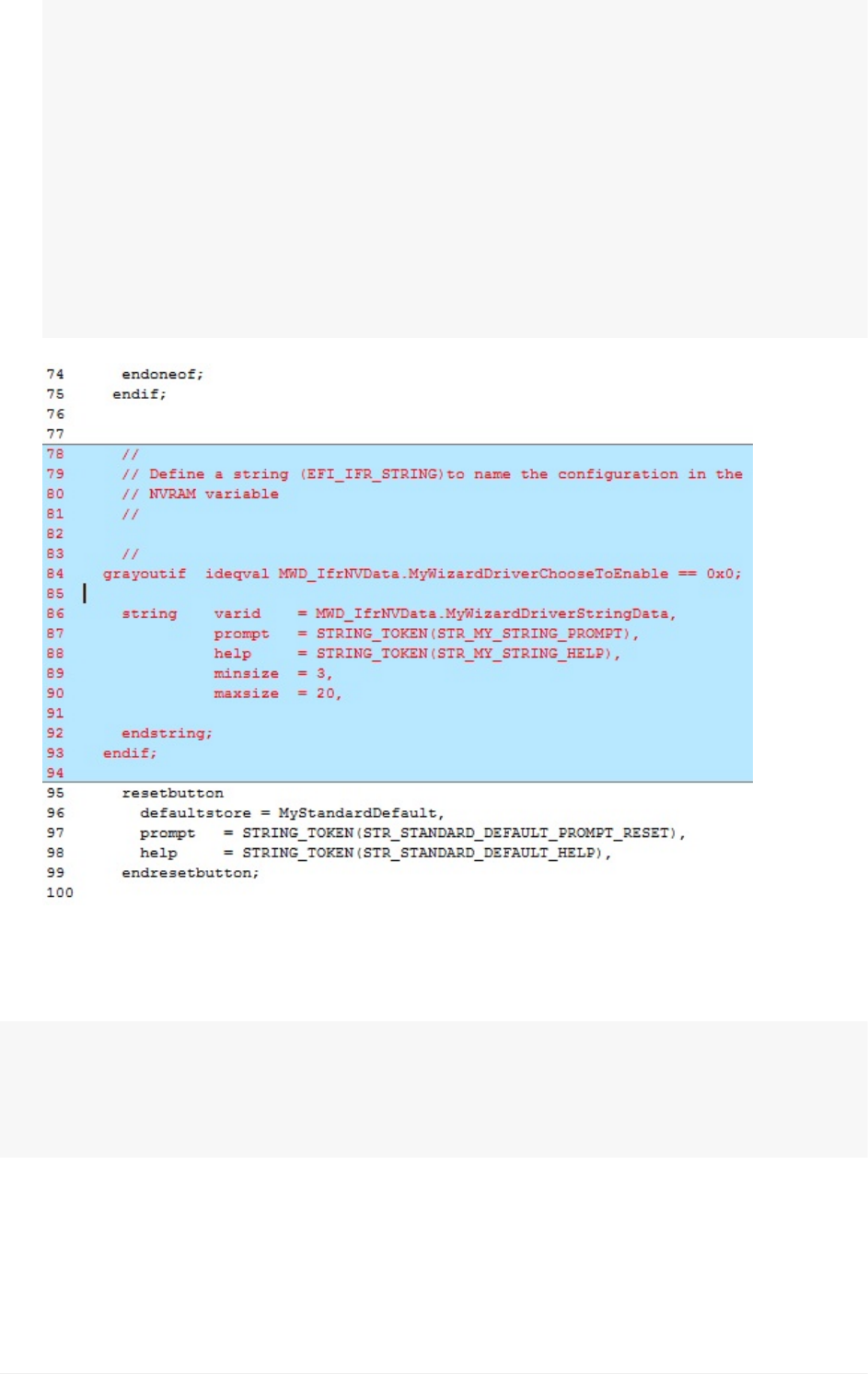
//
//Defineastring(EFI_IFR_STRING)tonametheconfigurationinthe
//NVRAMvariable
//
grayoutifideqvalMWD_IfrNVData.MyWizardDriverChooseToEnable==0x0;
stringvarid=MWD_IfrNVData.MyWizardDriverStringData,
prompt=STRING_TOKEN(STR_MY_STRING_PROMPT),
help=STRING_TOKEN(STR_MY_STRING_HELP),
minsize=3,
maxsize=20,
endstring;
endif;
3. SaveMyWizardDriver.vfr
4. UpdateMyWizardDriver.uni
5. Addthefollowingcodetothebottomofthefile:
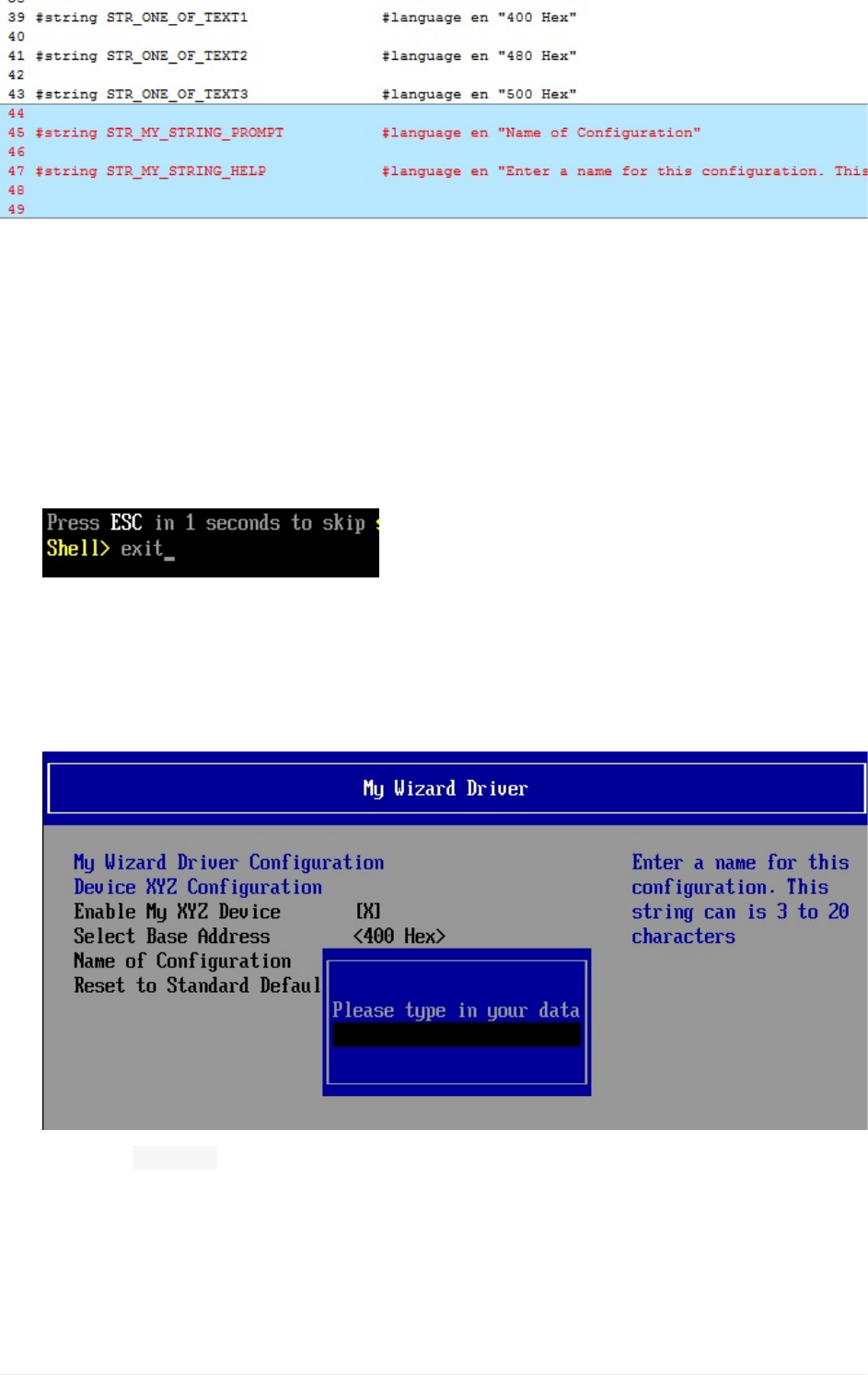
#stringSTR_MY_STRING_PROMPT#languageen"NameofConfiguration"
#stringSTR_MY_STRING_HELP#languageen"Enteranameforthisconfigurati
on.Thisstringcanis3to20characters"
Lab6.UpdatingtheMenu:CreatingaStringtoNameaSavedConfiguration
UEFIDriverHIIWinLabGuide[DRAFT]
53DRAFTFORREVIEW[11/08/201808:04:02]
6).SaveMyWizardDriver.uni
BuildandtestMyWizardDriver
1. OpentheVisualStudioCommandPrompt
2. Typebuild
3. Typebuildrun
4. AttheUEFIShellprompt,typeexit
5. Nowatthesetupfrontpagemenu,select“DeviceManager”
6. InsidetheDeviceManagermenupressthedownarrowto“MyWizardDriverSample
Formset”Press"Enter"
7. Select“NameofConfiguration”thenPress“Enter”
Noticethestringtextpopupmenugetsdisplayed.
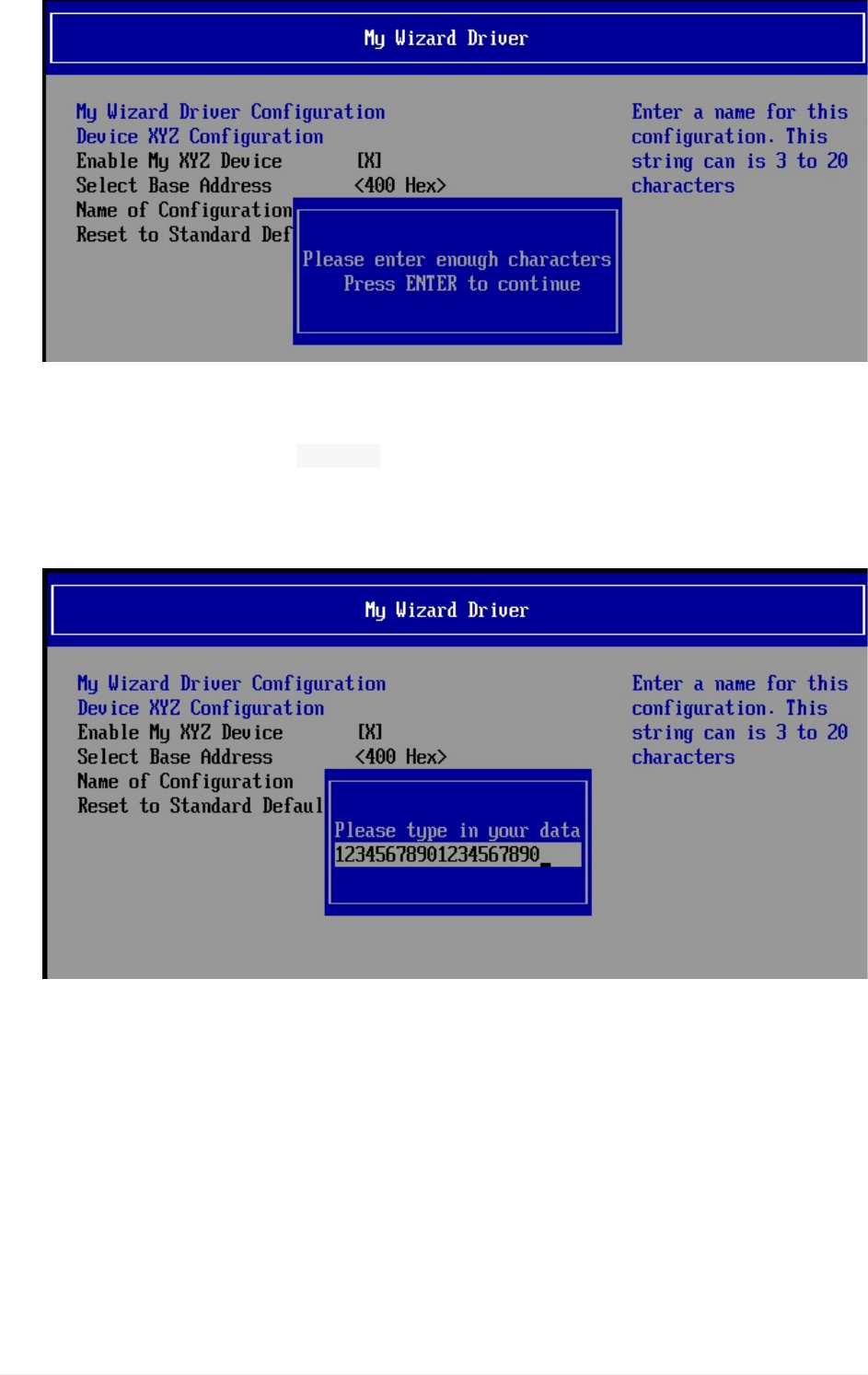
8. Testthe“ minsize”byonlytypingyourchoiceofatwocharacterstring.ThenPress
“Enter”
Noticetheanerrormessagevalidatingthatyouneedtoenteratleastthreeormore
characters.
Lab6.UpdatingtheMenu:CreatingaStringtoNameaSavedConfiguration
UEFIDriverHIIWinLabGuide[DRAFT]
54DRAFTFORREVIEW[11/08/201808:04:02]
9. Press“Enter”toclearthemessage
10. Press“Enter”againtore-enterpopupmenu
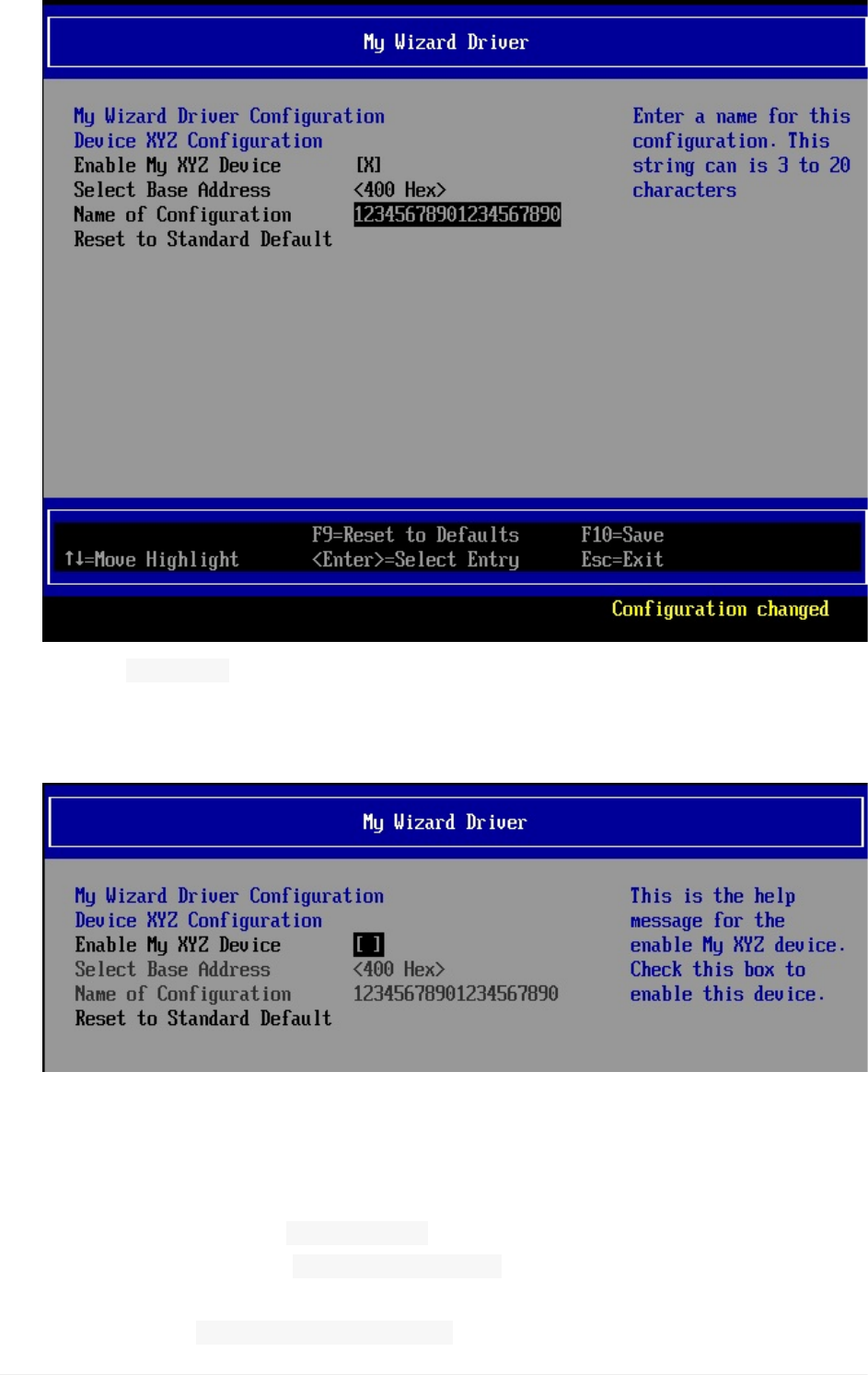
11. Testbytypingmorethan“ maxsize”of20characters**ThenPress“Enter”.
Notice**thattheBrowseronlyallowsthemaximumnumberof20characterstobe
enteredwithaforcedstop.Thereisnoerrormessagebutnomorecharactersare
allowedtobetypedintothepopupmenu.
12. Press“Enter”
Noticethatthe“Configurationchanged”messageisdisplayed
Lab6.UpdatingtheMenu:CreatingaStringtoNameaSavedConfiguration
UEFIDriverHIIWinLabGuide[DRAFT]
55DRAFTFORREVIEW[11/08/201808:04:02]
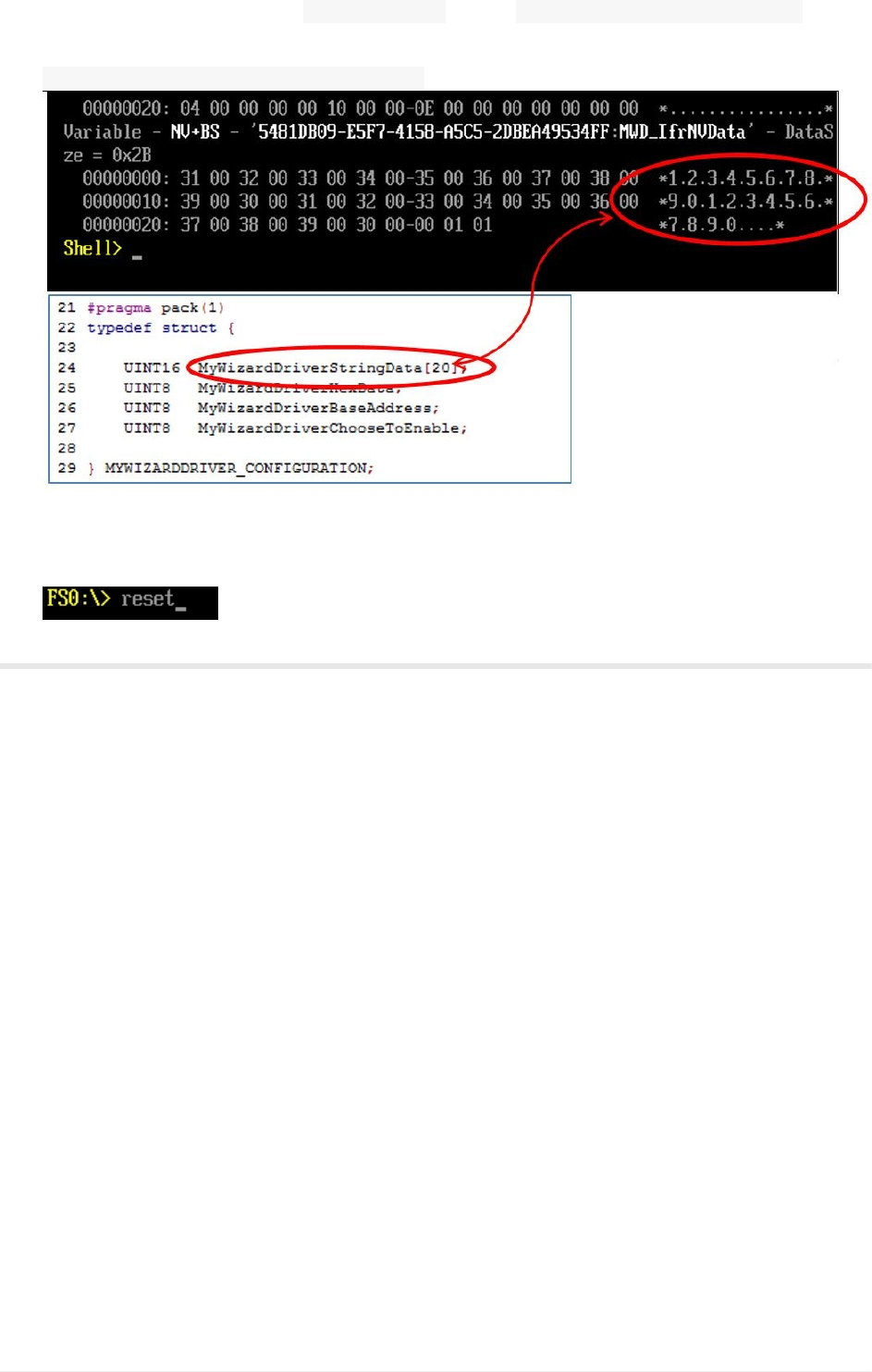
13. Testthe grayoutifbyselecting“EnableMyXYZDevice”
14. Pressthe“Spacebar”totoggleoff/disable.ThenPressthe“Spacebar”againtoEnable.
Noticethatthe“SelectBaseAddress”and“NameofConfigruation”fieldsarenow
grayedoutandnotselectable
15. Press“F10”tosave.
16. Press“Escape”toexit
17. Press“Escape”toexitthe“DeviceManager”
18. Select“Continue”andthenPress“Enter”
19. AttheShellPrompt,typedmpstore-all
Noticetheunicodestring“ 12345678901234567890”(orthe20charactervalueyoutyped)
isnowstoredbecauseyouenteredthosecharactersintheHIIformmenu.Thisis
becausethefile WizardDriverNVDataStruc.hhasthedatastructurestoredinNVRAM
Lab6.UpdatingtheMenu:CreatingaStringtoNameaSavedConfiguration
UEFIDriverHIIWinLabGuide[DRAFT]
56DRAFTFORREVIEW[11/08/201808:04:02]
withtheGUIDdefinename MWD_IfrNVDataoftype MYWIZARDDRIVER_CONFIGURATION.
Noticethatstringdataisthefirst20bytesinthedatastructure
MWD_IfrNVData.MyWizardDriverStringData.
20. Type“reset”andthen“Enter"attheShellprompttoreturntotheVisualStudio
CommandPrompt
ForanybuildissuescopythesolutionfilesfromC:\Fw\LabSolutions\LessonE.6
NOTE:DelDirectoryC:\fw\edk2\Build\NT32IA32\DEBUG_VS2010x86\IA32\MyWizardDriver
beforetheBuildcommandtobuildtheMyWizardDriverClean.
EndofLab6
Lab6.UpdatingtheMenu:CreatingaStringtoNameaSavedConfiguration
UEFIDriverHIIWinLabGuide[DRAFT]
57DRAFTFORREVIEW[11/08/201808:04:02]
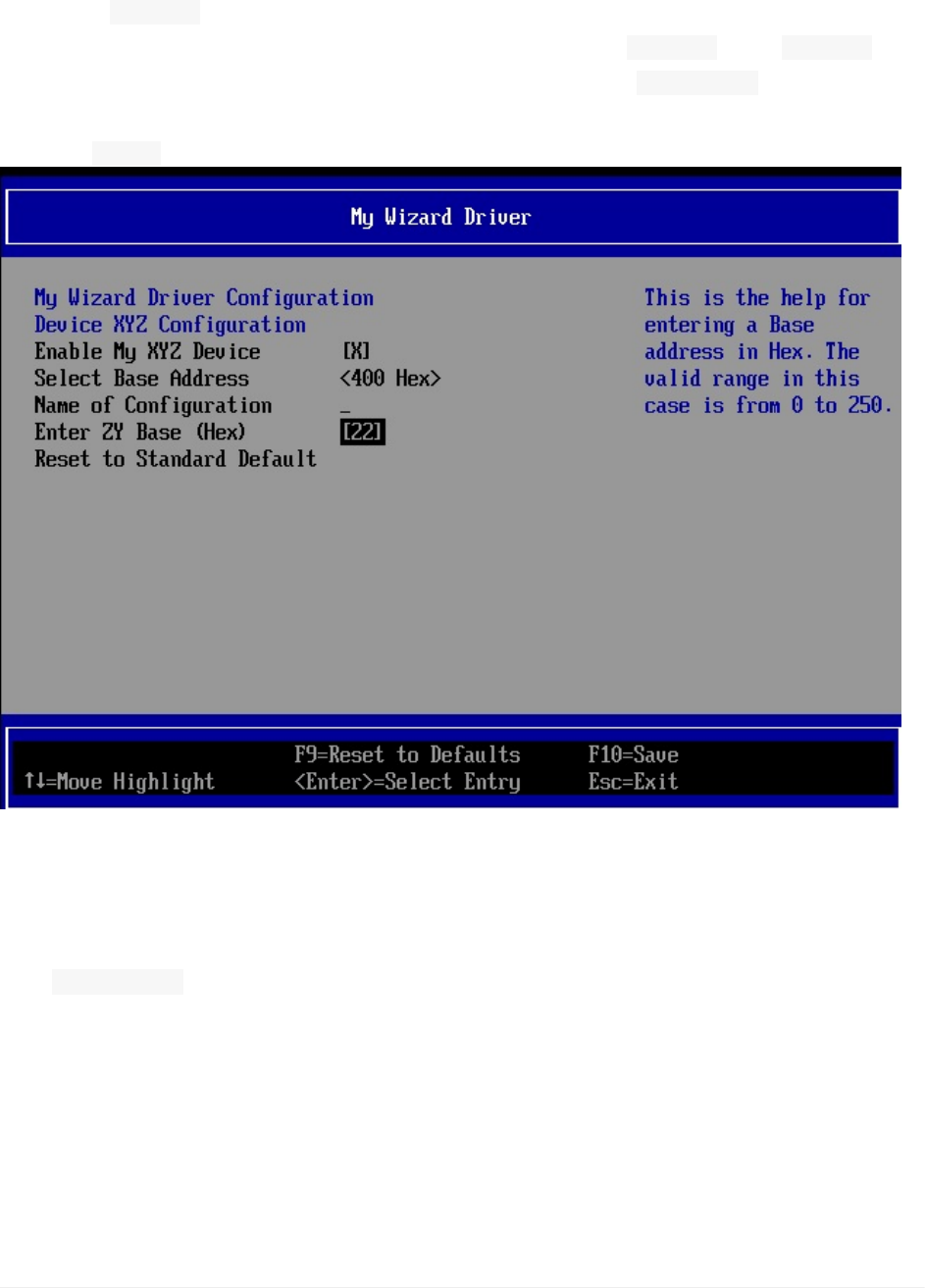
Lab7.UpdatingtheMenu:NumericEntry
Inthislab,you’lllearnhowtoaddanumericentrytoyourdrivermenu.Thislabusesthe
VFRterm“ numeric”thatpromptstheusertoenterafree-formnumericvalue.TheVFR
determinestheminimumandmaximumvalueswiththeterms“ minimum”and“ maximum”.
Sincethereisalsoanenable/disableswitch,theVFRusesthe“ suppressif”termtodisplay
orhidethisfieldwhendisabled.Alsothisfielddisplaysasdecimal(default)orhexadecimal
withthe“ flags”switch.
Figure7:MenuwithNumericitementry
1. UpdatetheMyWizardDriver.vfrfile
2. Addthefollowingcodeinthelocationshownbelowatapprox.Line90andbeforethe
“resetbutton”item:
Lab7.UpdatingtheMenu:NumericEntry
UEFIDriverHIIWinLabGuide[DRAFT]
58DRAFTFORREVIEW[11/08/201808:04:02]
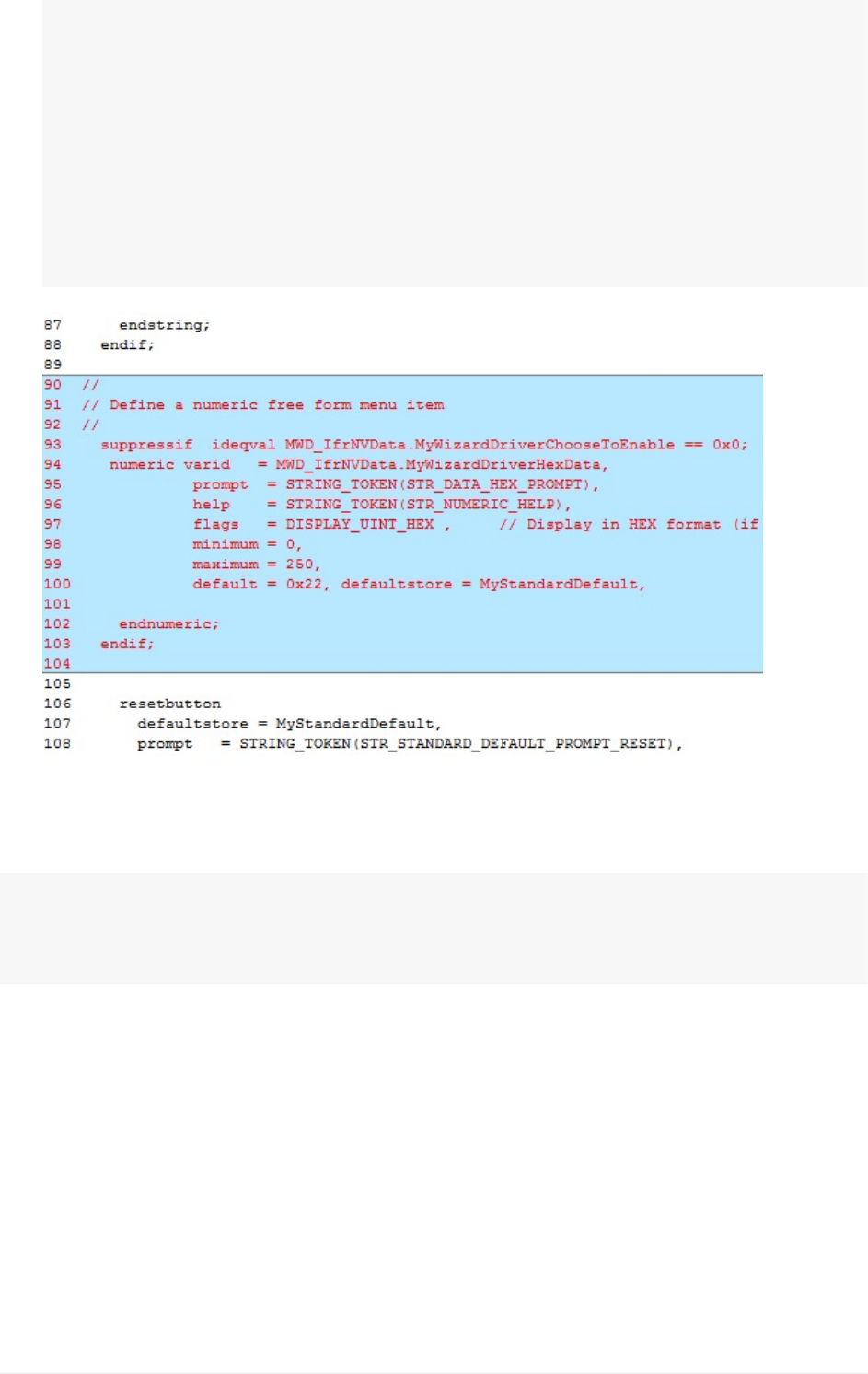
//
//Defineanumericfreeformmenuitem
//
suppressifideqvalMWD_IfrNVData.MyWizardDriverChooseToEnable==0x0;
numericvarid=MWD_IfrNVData.MyWizardDriverHexData,
prompt=STRING_TOKEN(STR_DATA_HEX_PROMPT),
help=STRING_TOKEN(STR_NUMERIC_HELP),
flags=DISPLAY_UINT_HEX,//DisplayinHEXformat(ifnotspecifie
d,defaultisindecimalformat)
minimum=0,
3. SaveMyWizardDriver.vfr
4. UpdatetheMyWizardDriver.unifile
5. Addthefollowingcodetothebottomofthefile:
#stringSTR_DATA_HEX_PROMPT#languageen"EnterZYBase(Hex)"
#stringSTR_NUMERIC_HELP#languageen"ThisisthehelpforenteringaB
aseaddressinHex.Thevalidrangeinthiscaseisfrom0to250."
6).SaveMyWizardDriver.uni
BuildandtestMyWizardDriver
1. OpentheVisualStudioCommandPrompt
2. Typebuild
3. Typebuildrun
4. AttheUEFIShellprompt,typeexit
Lab7.UpdatingtheMenu:NumericEntry
UEFIDriverHIIWinLabGuide[DRAFT]
59DRAFTFORREVIEW[11/08/201808:04:02]
5. Nowatthesetupfrontpagemenu,select“DeviceManager”
6. InsidetheDeviceManagermenupressthedownarrowto“MyWizardDriverSample
Formset”Press"Enter"
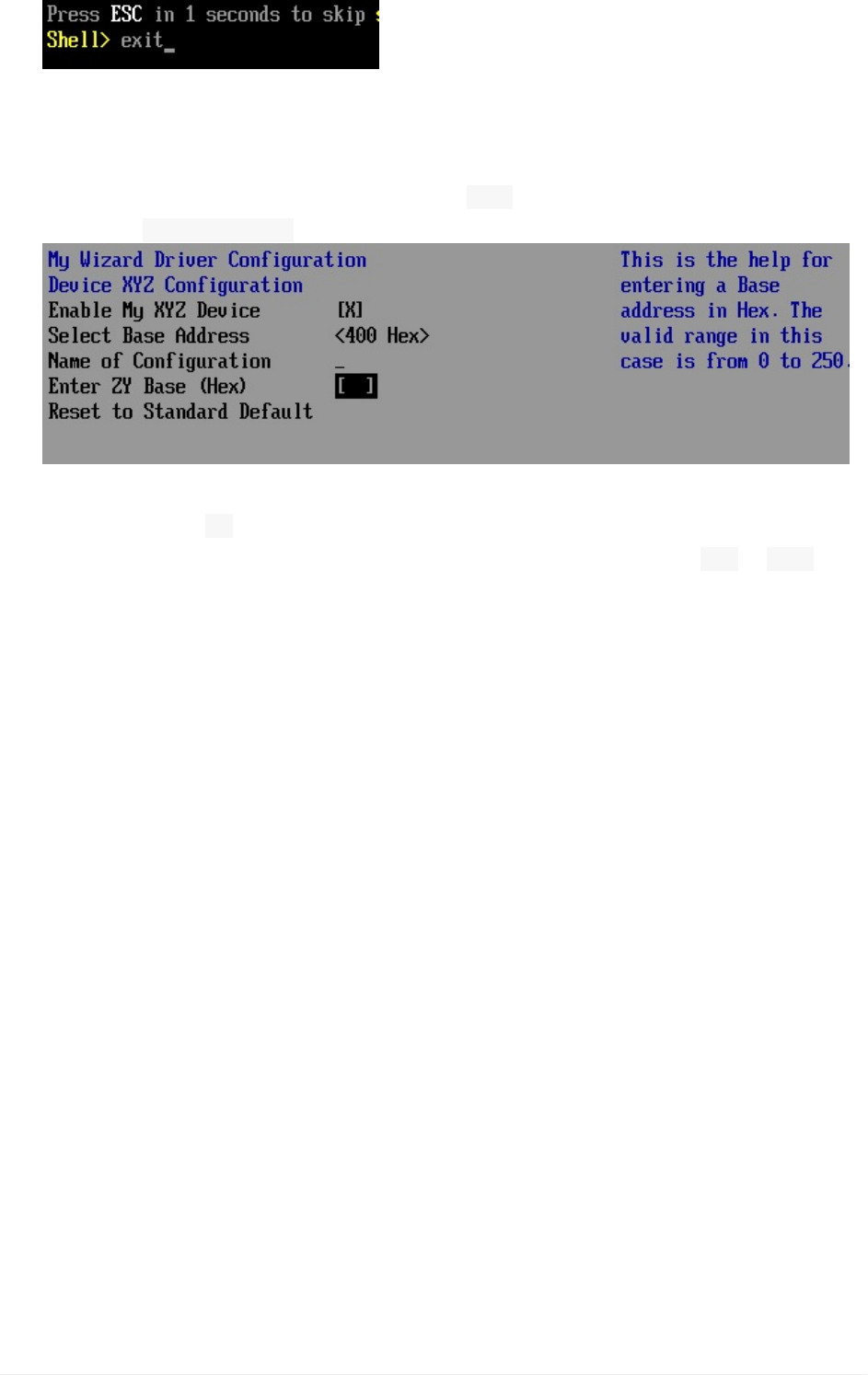
Noticethevaluefor“EnterZYBase(Hex)”is 022.Hexisthedefaultbecauseofthe
VFRfield“ default=0x22”
7. Select“EnterZYBase(Hex)”andthenPress“Enter”
8. Testbytypinga“ M”character
NoticethatonlyNumericcharactersareallowedandalsoonlyvalues 00to 0FAHex.
Whenvaluesoutsidetherangeornon-numericcharactersareenteredthered“!!”sting
isdisplayedatthebottomofthemenu.
Thestring“!!”ispartoftheBrowserengine:
Lab7.UpdatingtheMenu:NumericEntry
UEFIDriverHIIWinLabGuide[DRAFT]
60DRAFTFORREVIEW[11/08/201808:04:02]
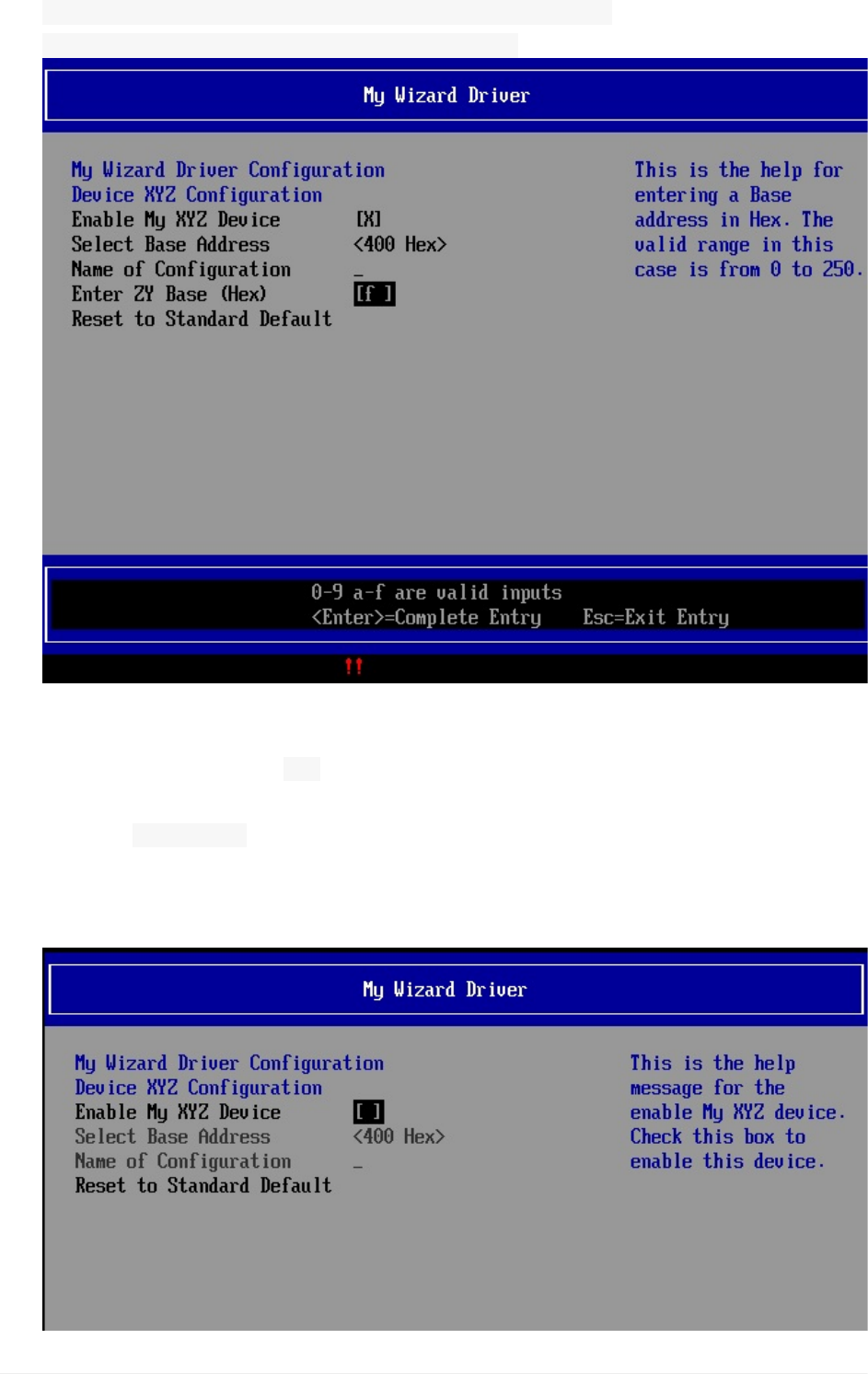
MdeModulePkg\Universal\SetupBrowserDxe\SetupBrowserStr.uni
#stringINPUT_ERROR_MESSAGE#languageen-US"!!"
9. Press“Enter”again
10. Testbytypingavalueof‘ 99’HexandthenPress“Enter”
Noticethatthe“Configurationchanged”messageisdisplayed.
11. Testthe“ surpressif”bypressingthe“spacebar”to“EnableMyXYZDevice”then
pressthe“Space”bartotoggleoffor“Disabled”.
Noticethe“SelectBaseAddress”and“NameofConfiguration”fieldsarenowgrayed
outandnotselectableandthe“EnterZYBase(Hex)”doesnotappearatall.
Lab7.UpdatingtheMenu:NumericEntry
UEFIDriverHIIWinLabGuide[DRAFT]
61DRAFTFORREVIEW[11/08/201808:04:02]
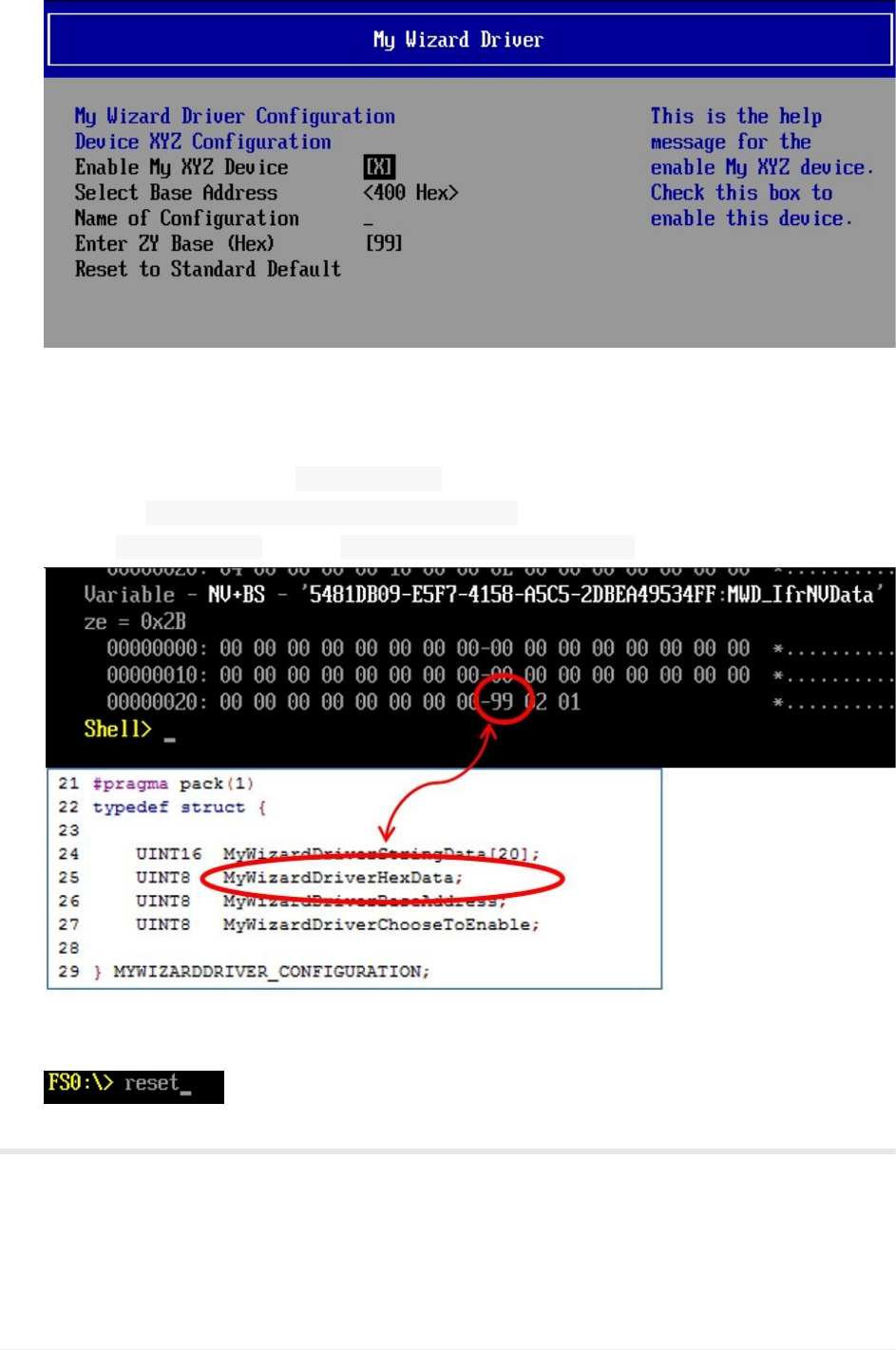
12. Press“Spacebar”againto“EnableMyXYZDevice”andthe“EnterZYBase(Hex)”is
displayedagain
13. Press“F10”tosave,then“Escape”toexit
14. Press“Escape”toexitthe“DeviceManager”
15. Select“Continue”andthenPress"Enter”
16. AttheShellPrompt,typedmpstore–all
Noticeby modifyingMyWizardDriverNVDataStruc.hourdatastructurestoredinNVRAMis
named MWD_IfrNVDataoftype MYWIZARDDRIVER_CONFIGURATION.
17Type“reset”attheShellpromptandthenPress“Enter”toreturntotheVisual
StudioCommandPrompt
ForanybuildissuescopythesolutionfilesfromC:\Fw\LabSolutions\LessonE.7
NOTE:DelDirectoryC:\fw\edk2\Build\NT32IA32\DEBUG_VS2010x86\IA32\MyWizardDriver
beforetheBuildcommandtobuildtheMyWizardDriverClean.
Lab7.UpdatingtheMenu:NumericEntry
UEFIDriverHIIWinLabGuide[DRAFT]
62DRAFTFORREVIEW[11/08/201808:04:02]

EndofLab7
Lab7.UpdatingtheMenu:NumericEntry
UEFIDriverHIIWinLabGuide[DRAFT]
63DRAFTFORREVIEW[11/08/201808:04:02]

Lab8.UpdatingyourDriverforInteractiveCall
Backs
Inthislab,you’llupdateyourdriverforinteractivecallbacks.Callbacksareawayto
communicatechangestheuserismakingin“realtime”whereyourdriverneedstointervene
asthechangesaremadeandbeforetheuserexitsthecurrentmenubeingdisplayed.These
wouldbeexceptioncasesthatthedrivercouldinterruptthenormalbrowserengineprocess.
Toaddcallbacks,thefile HiiConfigAccess.cofyourdriverwillbeupdatedinthefunction
MyWizardDriverHiiConfigAccessCallback.ThisfunctioniscalledwheneveranyVFRitems
haveaflagfor INTERACTIVEset.Sofar,thepreviouslabsdidnothaveanycallbackitems.
Wecanseethisbecausetherewasa“Debug”callmadeinthe
MyWizardDriverHiiConfigAccessCallbackfunctionthatnevergetscalled:
HiiConfigAccess.c(line331)
DEBUG((DEBUG_INFO,"\n::STARTCallback,QuestionID=0x%08xType=0x%04xAction=0x%04
x",QuestionId,Type,Action));
Lab8a.AddtheCasestatementstotheCallbackroutine
1. UpdatetheHiiConfigAccess.cfile
2. Addthefollowingcodebefore returnstatus;toincludea“ case”statementinthecall
backroutineforthe“action”passed.|Addthefollowingcodeatapprox.line343before:
returnstatus;
Lab8.UpdatingyourDriverforInteractiveCallBacks
UEFIDriverHIIWinLabGuide[DRAFT]
64DRAFTFORREVIEW[11/08/201808:04:02]

//BeginCode
switch(Action){//StartswitchandpassedparamAction
caseEFI_BROWSER_ACTION_FORM_OPEN://3
{
}
break;
caseEFI_BROWSER_ACTION_FORM_CLOSE://4
{
}
break;
caseEFI_BROWSER_ACTION_RETRIEVE://2
{
}
break;
//EndCode
Lab8.UpdatingyourDriverforInteractiveCallBacks
UEFIDriverHIIWinLabGuide[DRAFT]
65DRAFTFORREVIEW[11/08/201808:04:02]
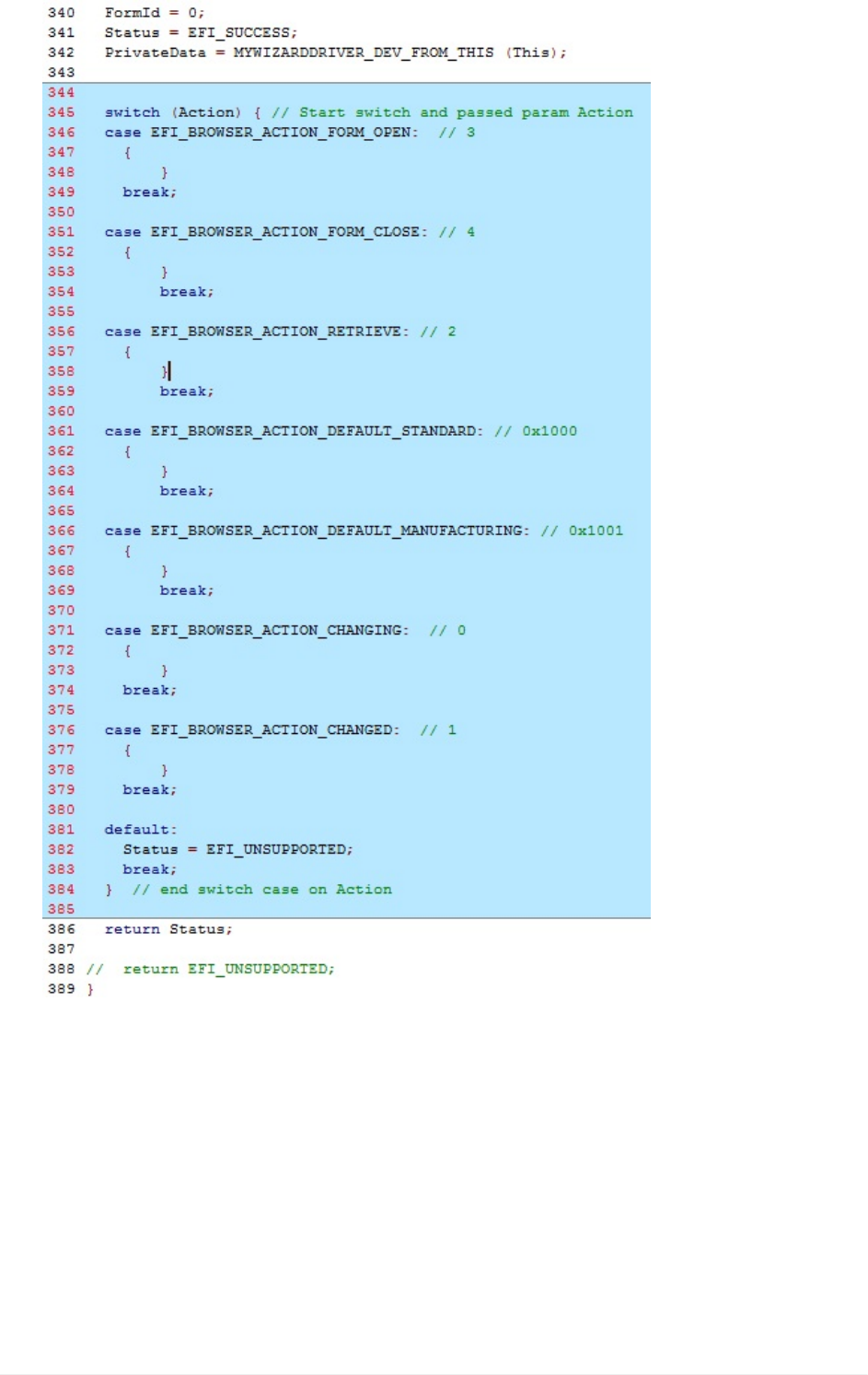
3. SaveHiiConfigAccess.c
BuildandtestMyWizardDriver
1. OpentheVisualStudioCommandPrompt
2. Typebuild
3. Typebuildrun
4. AttheUEFIShellprompt,typeexit
5. Nowatthesetupfrontpagemenu,select“DeviceManager”
6. InsidetheDeviceManagermenupressthedownarrowto“MyWizardDriverSample
Lab8.UpdatingyourDriverforInteractiveCallBacks
UEFIDriverHIIWinLabGuide[DRAFT]
66DRAFTFORREVIEW[11/08/201808:04:02]
Formset”Press"Enter"
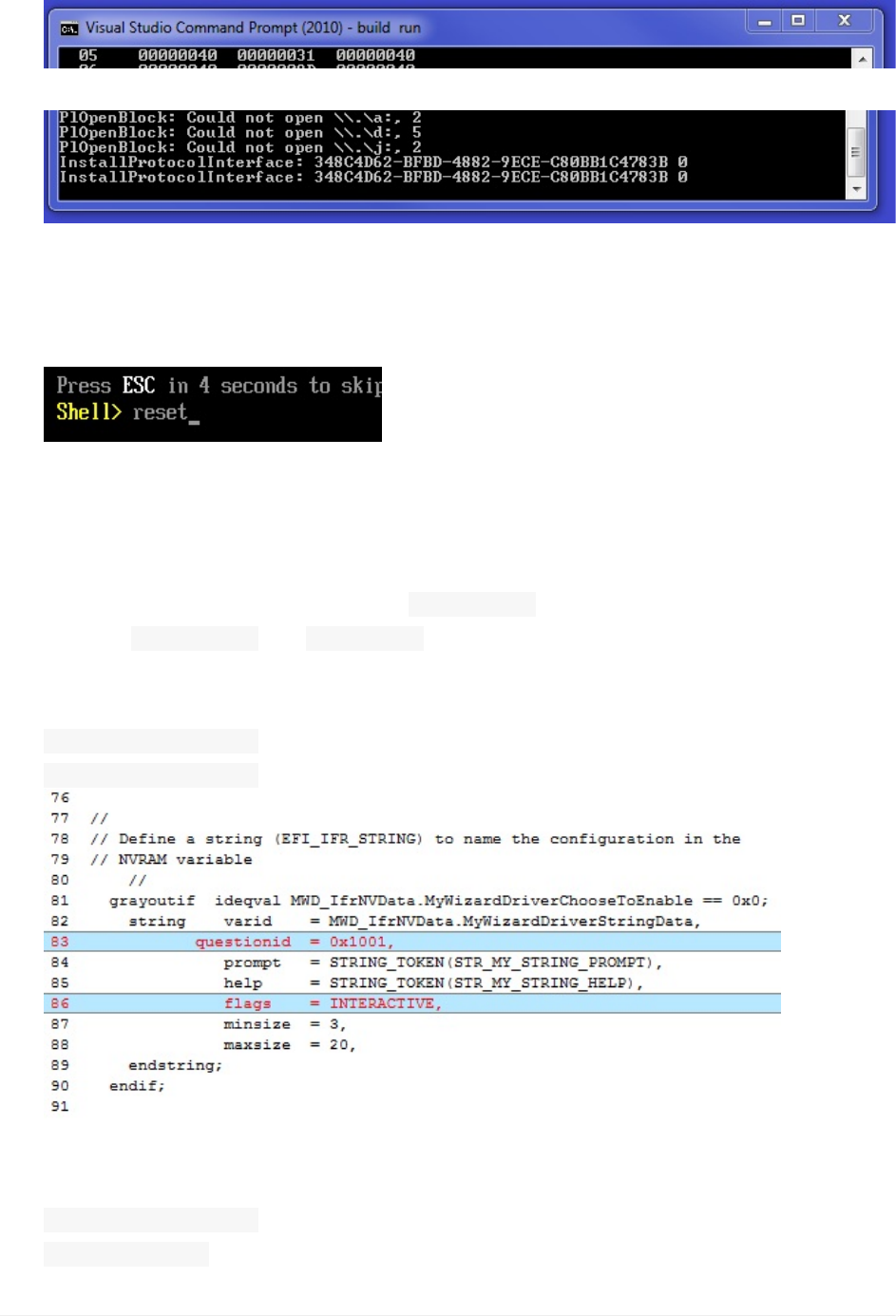
7. NoticethedebugmessagesintheVisualStudioCommandPrompt–buildrunWindow
(NoDebugmessagesforCallback)
...
8. Press“Escape”andanother"Escape"toexitthe“DeviceManager”
9. Select“Continue”andthenPress"Enter”
10. Type“reset”attheShellpromptandthenPress“Enter”toreturntotheVisualStudio
CommandPrompt
Lab8b.UpdatetheMenuforInteractiveitems
1. UpdatetheMyWizardDriver.vfrfile
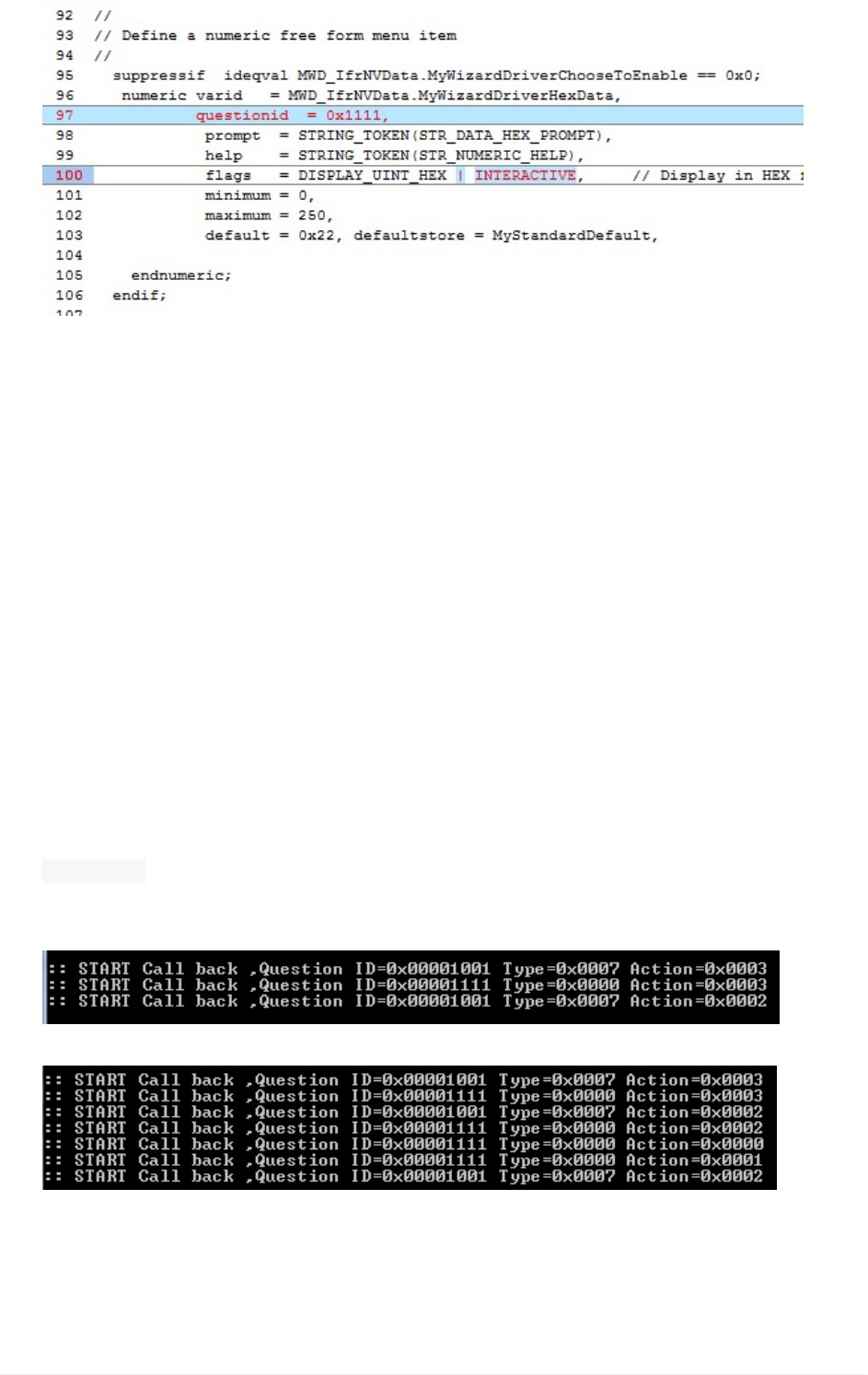
2. Now,you’lladdtheflagcharacteristic INTERACTIVEtothestringitem’sflagsbyusing
keyword INTERACTIVEand questionid.Addthefollowingcodeinthelocationshown
below:
Approx.line83andline86
questionid=0x1001,
flags=INTERACTIVE,
3. Includethenumericitembyaddingthefollowingcodeinthelocationshownbelow,
Approx.line97andline100
questionid=0x1111,
|INTERACTIVE,
Lab8.UpdatingyourDriverforInteractiveCallBacks
UEFIDriverHIIWinLabGuide[DRAFT]
67DRAFTFORREVIEW[11/08/201808:04:02]
4. SaveMyWizardDriver.vfr
BuildandtestMyWizardDriver
1. OpentheVisualStudioCommandPrompt
2. Typebuild
3. Typebuildrun
4. AttheUEFIShellprompt,typeexit
5. Nowatthesetupfrontpagemenu,select“DeviceManager”
6. InsidetheDeviceManagermenupressthedownarrowto“MyWizardDriverSample
Formset”Press"Enter"
7. TakeamomentandreviewtheVisualStudiobuildruncommandpromptwindow
8. Intheemulationwindow,clickon“NameofConfiguration”and“EnterZYBase(Hex)”
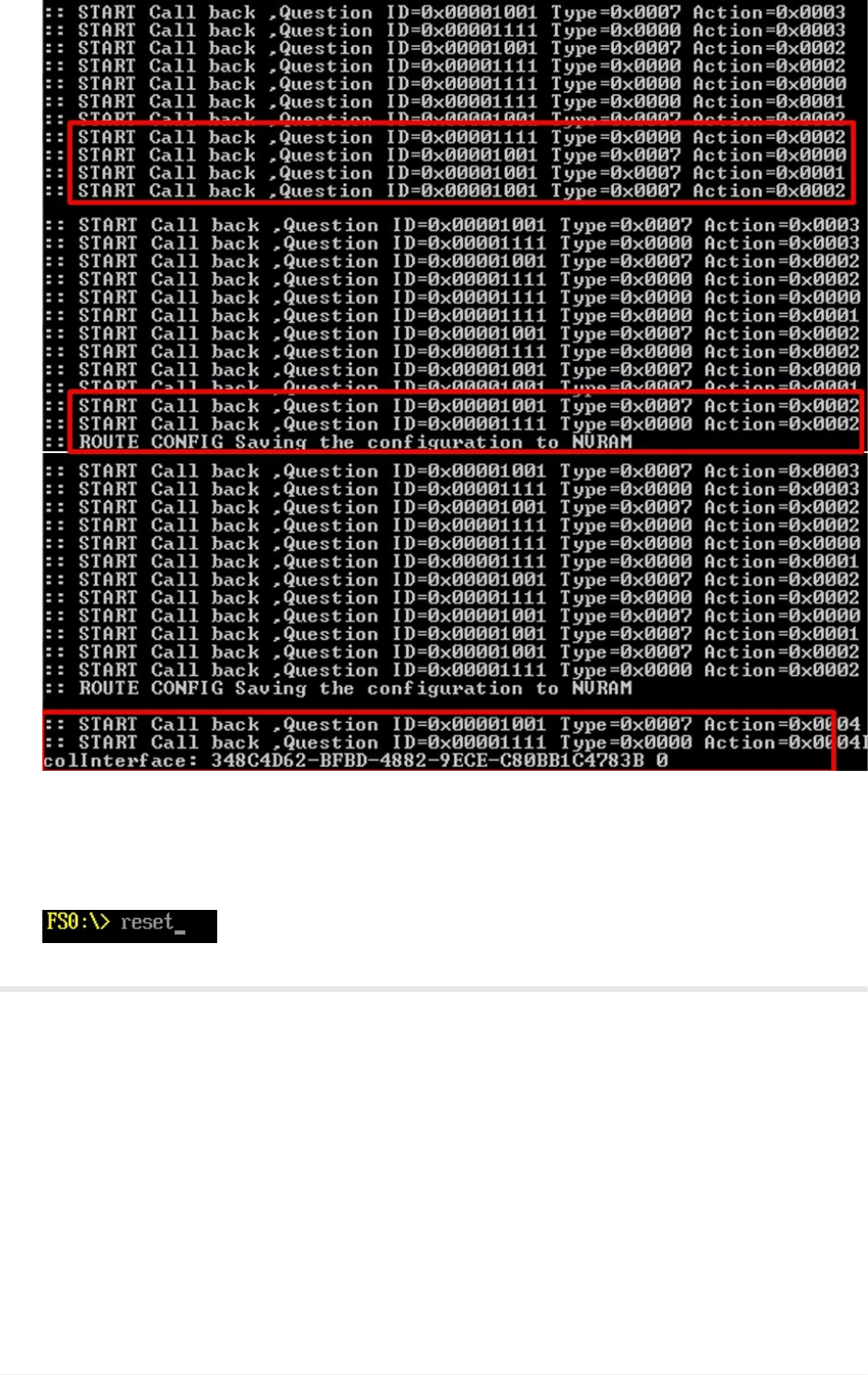
9. NoticethefollowingintheVisualStudioCommandPromptwindow:
Everytimethebrowserdoesanythingwiththeinteractivelabeledfieldsthereisacall
madetoyourdriver’scallbackfunction.Wecandeterminewhichitembythe
quetionidandwhatactionbytheActionpassedtoyourcallbackfunction.Yourcall
backfunctioncanthenaddcodetospecialcasewhenthesetransitionsoccur.
EnteringForm
ChangingaValueforQuestionID0x1111
ChangingaValueforQuestionID0x1001
Lab8.UpdatingyourDriverforInteractiveCallBacks
UEFIDriverHIIWinLabGuide[DRAFT]
68DRAFTFORREVIEW[11/08/201808:04:02]
10. Press“Escape”andanother"Escape"toexitthe“DeviceManager”
11. Select“Continue”andthenPress"Enter”
12. Type“reset”attheShellpromptandthenPress“Enter”toreturntotheVisualStudio
CommandPrompt
ForanybuildissuescopythesolutionfilesfromC:\Fw\LabSolutions\LessonE.8
NOTE:DelDirectoryC:\fw\edk2\Build\NT32IA32\DEBUG_VS2010x86\IA32\MyWizardDriver
beforetheBuildcommandtobuildtheMyWizardDriverClean.
EndofLab8
Lab8.UpdatingyourDriverforInteractiveCallBacks
UEFIDriverHIIWinLabGuide[DRAFT]
69DRAFTFORREVIEW[11/08/201808:04:02]
Lab9.AddcodetoyourdriverwhenCallBack
eventsoccurforInteractiveItems
Inthislab,you’llupdateyourdrivertoprintdebugstatementswhentheHIIbrowserengine
callsbackintoyourcallbackfunction.Everytimethebrowserdoesanythingwiththe
interactivelabeledfieldsthereisacallmadetoyourdriver’scallbackfunction.Wecan
determinetheitembythe quetionidandwhatactionbasedontheactionpassedtoyour
callbackfunction.Yourcallbackfunctioncanthenaddcodetospecialcasewhenthese
transitionsoccur.
ForthislabwewillsimplyaddDebugprintstatements.However,theuseofaddingcall
backstoadriver’sHIIfunctionsaddsthecapabilityofprovidingmoremanageabilityand
flexibilityfortheinteractionsbetweentheuser,thebrowserengine,andyourdrivercode.In
arealdriverfirmwaresituation,itmaybedesiredtoimplementmorecomplexfeaturesand
functionalitybaseduponanitemchanging.
1. UpdatetheHiiConfigAccess.cfile
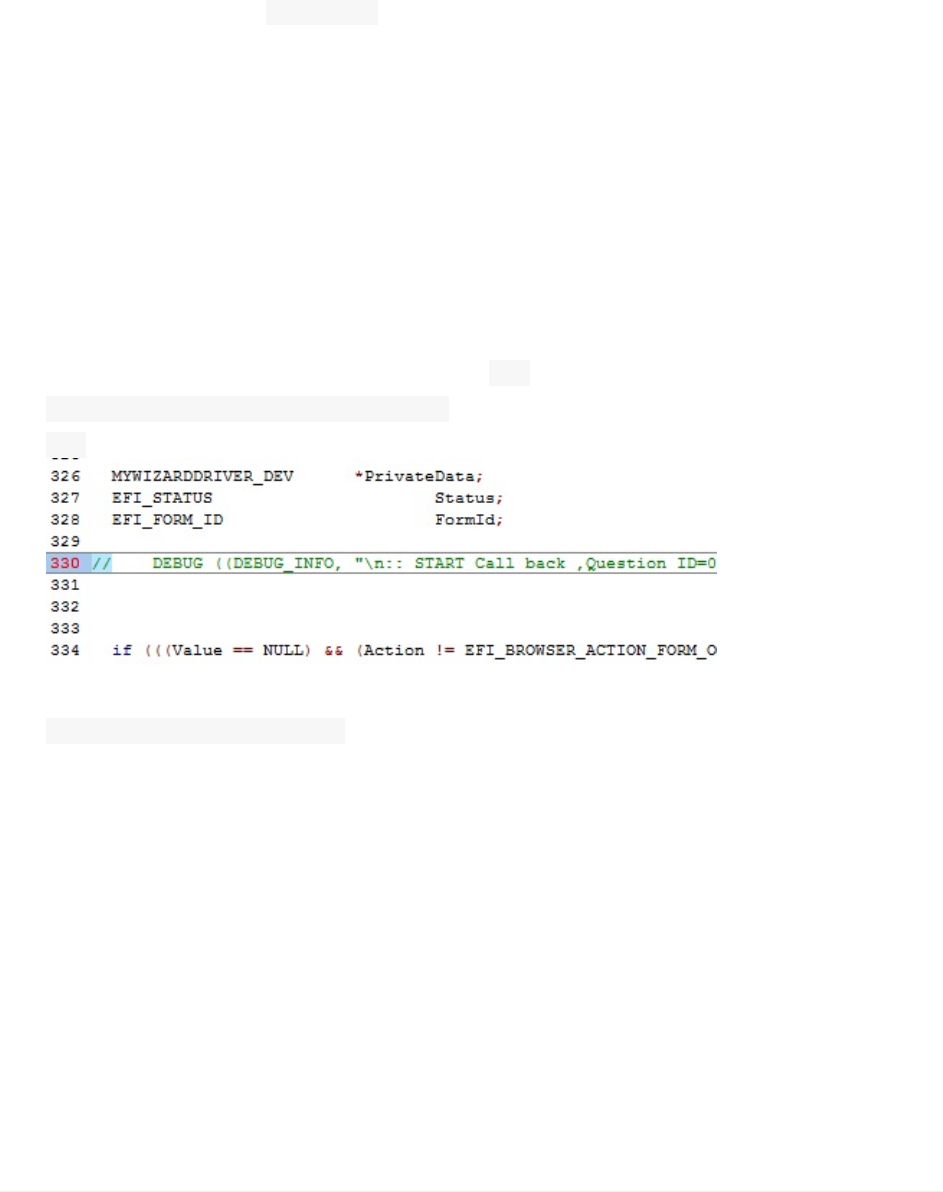
2. CommentouttheDEBUGstatementwith“ //”inthe
MyWizardDriverHiiConfigAccessCallbackcallbackfunctionapprox.line330:
//
3. AddaswitchcasestatementofthequestionID’stothe“Action”switchcaseof
EFI_BROWSER_ACTION_CHANGINGinthecallbackfunctionbyaddinganestedswitchcase
code(asshownbelowatapprox.line372)
Lab9.AddcodetoyourdriverwhenCallBackeventsoccurforInteractiveItems
UEFIDriverHIIWinLabGuide[DRAFT]
70DRAFTFORREVIEW[11/08/201808:04:02]
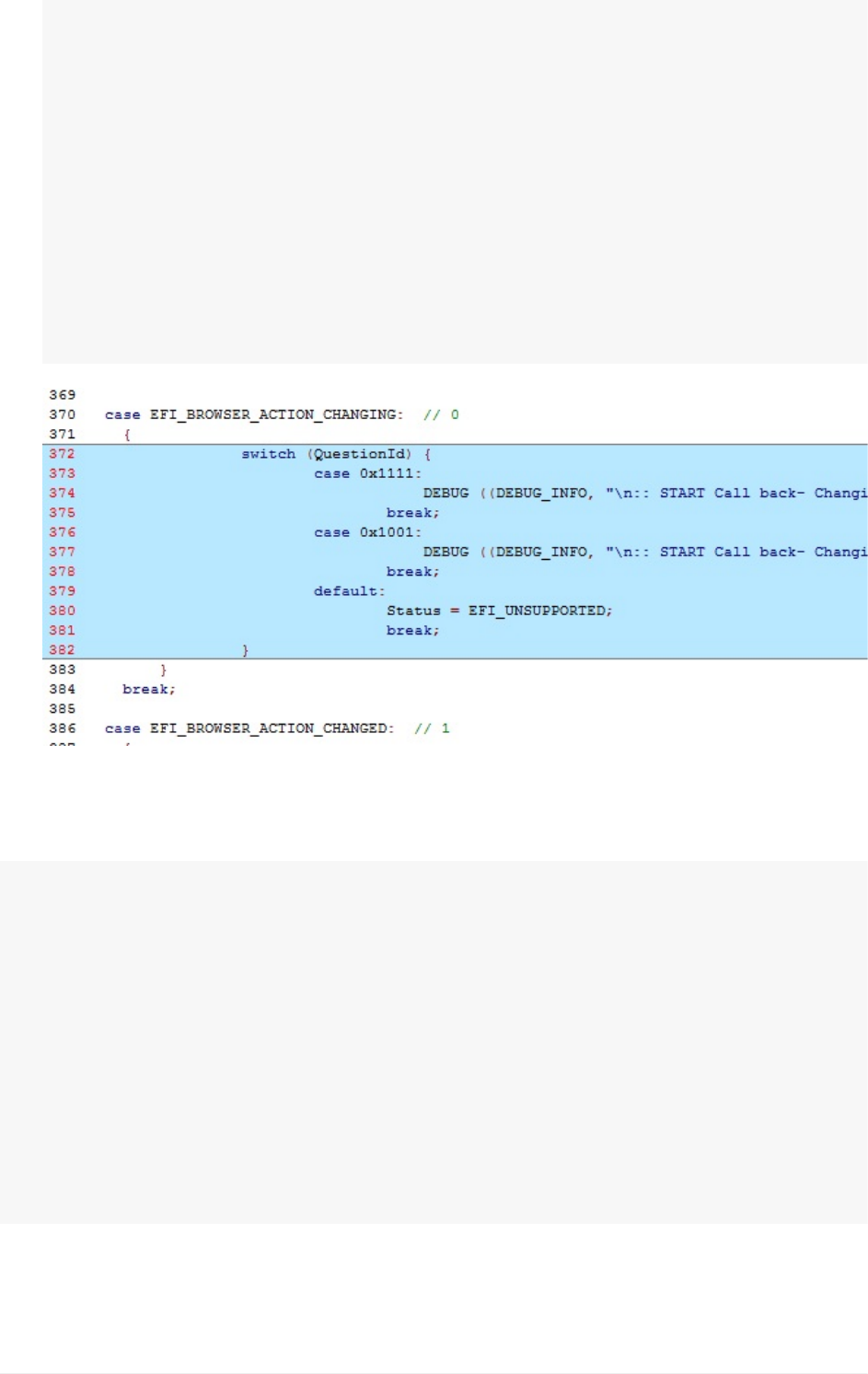
switch(QuestionId){
case0x1111:
DEBUG((DEBUG_INFO,"\n::STARTCallback-Changing,QuestionID
=0x%08xType=0x%04xAction=0x%04x",QuestionId,Type,Action));
break;
case0x1001:
DEBUG((DEBUG_INFO,"\n::STARTCallback-Changing,QuestionID
=0x%08xType=0x%04xAction=0x%04x",QuestionId,Type,Action));
break;
default:
Status=EFI_UNSUPPORTED;
break;
}
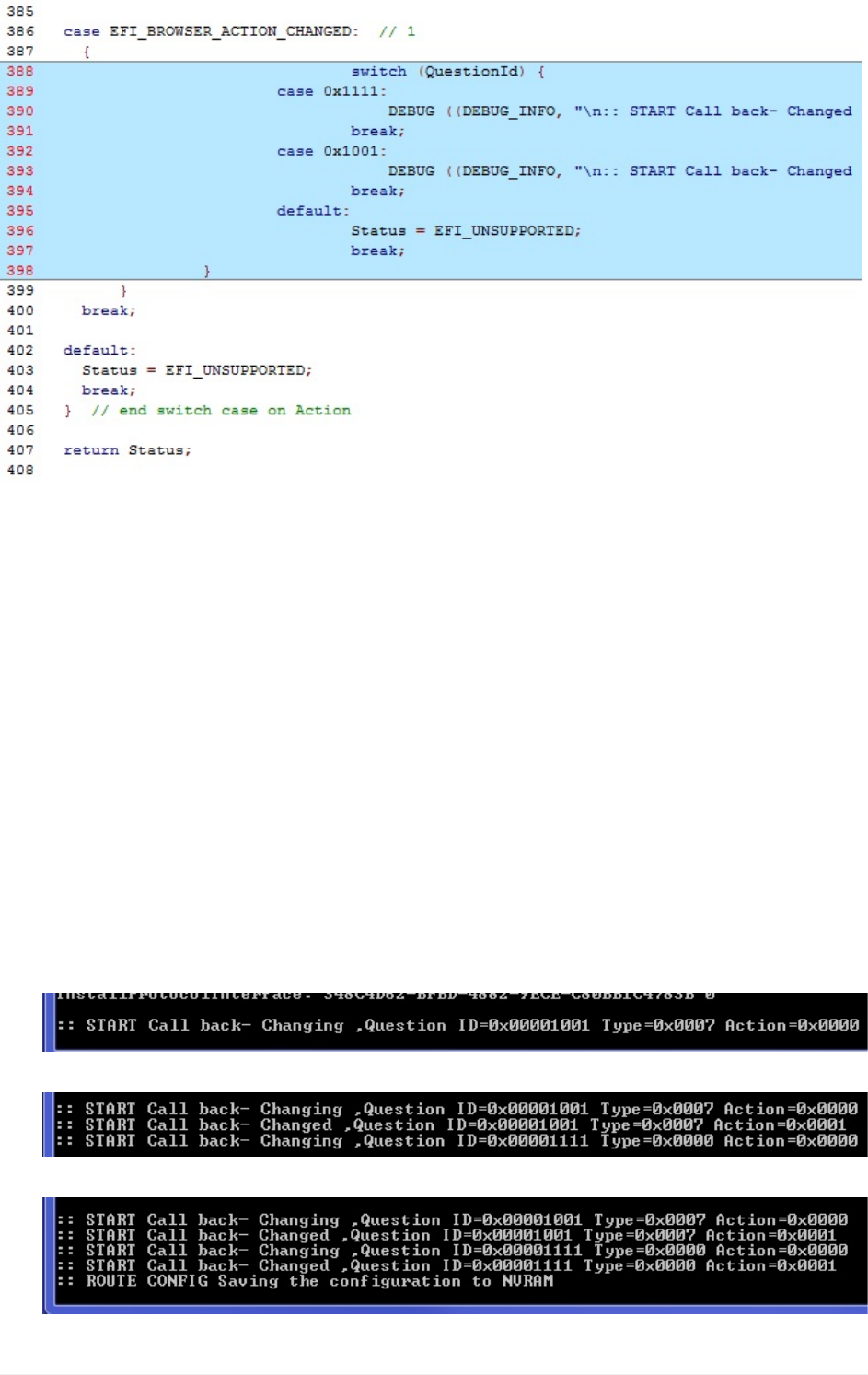
4. AddanothernestedswitchcasestatementofthequestionID’stothe“Action”switch
caseofEFI_BROWSER_ACTION_CHANGEDinthecallbackfunction(asshowbelow
atapprox.line388):
switch(QuestionId){
case0x1111:
DEBUG((DEBUG_INFO,"\n::STARTCallback-Changed,QuestionID=0
x%08xType=0x%04xAction=0x%04x",QuestionId,Type,Action));
break;
case0x1001:
DEBUG((DEBUG_INFO,"\n::STARTCallback-Changed,QuestionID=0
x%08xType=0x%04xAction=0x%04x",QuestionId,Type,Action));
break;
default:
Status=EFI_UNSUPPORTED;
break;
}
Lab9.AddcodetoyourdriverwhenCallBackeventsoccurforInteractiveItems
UEFIDriverHIIWinLabGuide[DRAFT]
71DRAFTFORREVIEW[11/08/201808:04:02]
1. SaveMyWizardDriver.c
BuildandtestMyWizardDriver
1. OpentheVisualStudioCommandPrompt
2. Typebuild
3. Typebuildrun
4. AttheUEFIShellprompt,typeexit
5. Nowatthesetupfrontpagemenu,select“DeviceManager”
6. InsidetheDeviceManagermenupressthedownarrowto“MyWizardDriverSample
Formset”Press"Enter"
7. ObservetheVisualStudioCommandPrompt–buildrunWindow
Test:changingthe“NameofConfiguration”andthe“EnterZYBase(Hex)”fieldswhile
observingtheVisualStudioCommandPrompt–buildrunWindow
8. SwitchbacktoVisualStudioandnoticethechangesthatyoumade.
Notice:whenchangingthe“NameofConfiguration”field
Notice:whenchangingthe“EnterZYBase(Hex)”field
Lab9.AddcodetoyourdriverwhenCallBackeventsoccurforInteractiveItems
UEFIDriverHIIWinLabGuide[DRAFT]
72DRAFTFORREVIEW[11/08/201808:04:02]

Notice:whenPressing“F10”
9. Press“Escape”andanother"Escape"toexitthe“DeviceManager”
10. Select“Continue”andthenPress"Enter”
11. Type“reset”attheShellpromptandthenPress“Enter”toreturntotheVisualStudio
CommandPrompt
ForanybuildissuescopythesolutionfilesfromC:\Fw\LabSolutions\LessonE.9
NOTE:DelDirectoryC:\fw\edk2\Build\NT32IA32\DEBUG_VS2010x86\IA32\MyWizardDriver
beforetheBuildcommandtobuildtheMyWizardDriverClean.
EndofLab9
Lab9.AddcodetoyourdriverwhenCallBackeventsoccurforInteractiveItems
UEFIDriverHIIWinLabGuide[DRAFT]
73DRAFTFORREVIEW[11/08/201808:04:02]
Lab10.AddinganAdditionalFormPage
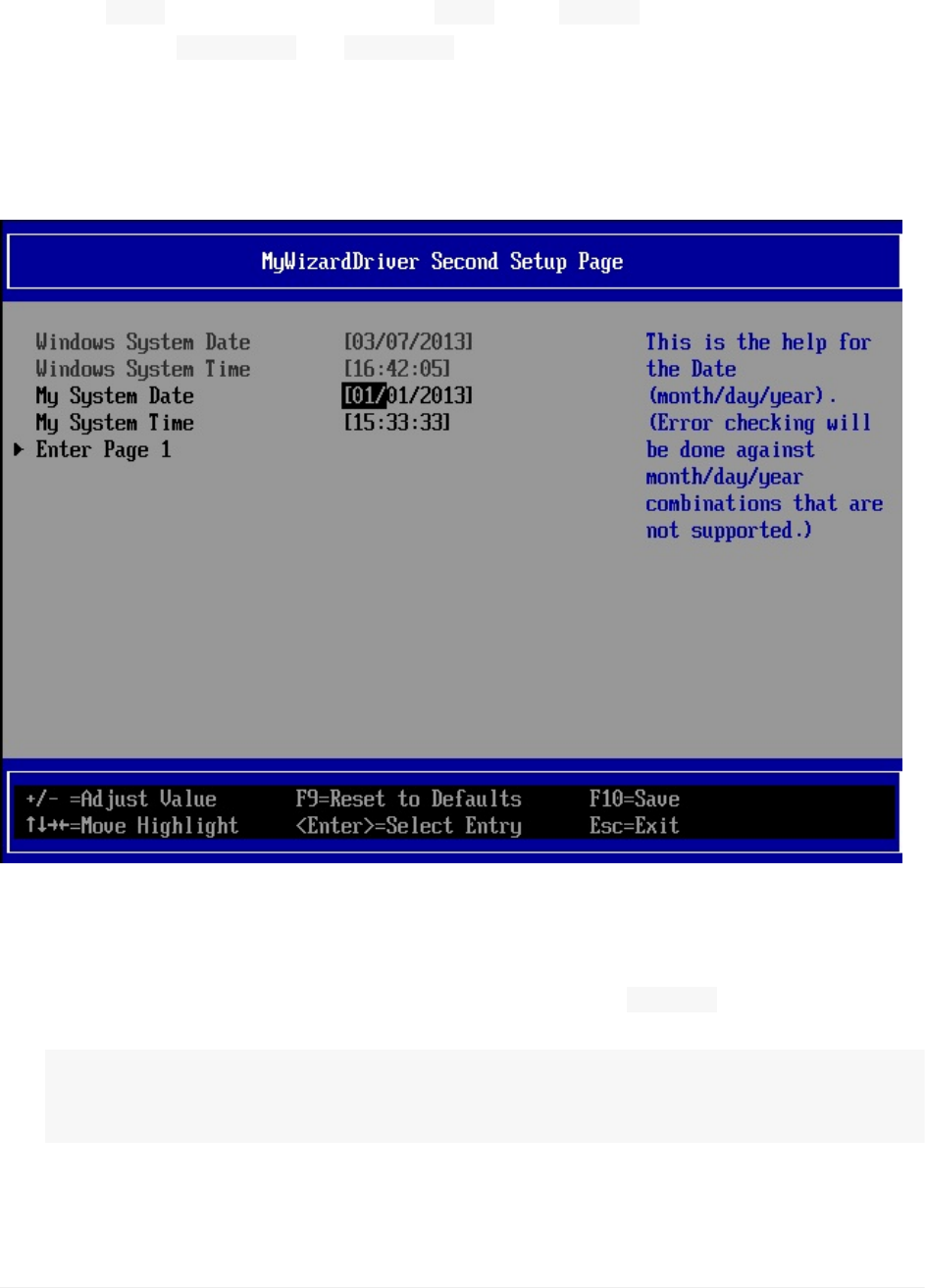
Inthislab,you’lllearnhowtoaddanotherformpagetoyourMyWizardDrivermenuby
usingthe“ goto”VFRtermalongwiththe“ form”and“ formid”VFRstatements.
Additionally,use“ surpressif”or“ grayoutif”toconditionallyallowtheusertoenteryour
additionalforms.
Inaddition,thislabwillshowhowthe“time”and“date”VFRtermsareusedwithintheVFR
languagetospecialcasehowthebrowserenginechecksthetimeinsteadofyourdriver
manuallychecking(e.g.leapyear).
Figure10:Secondsetuppage
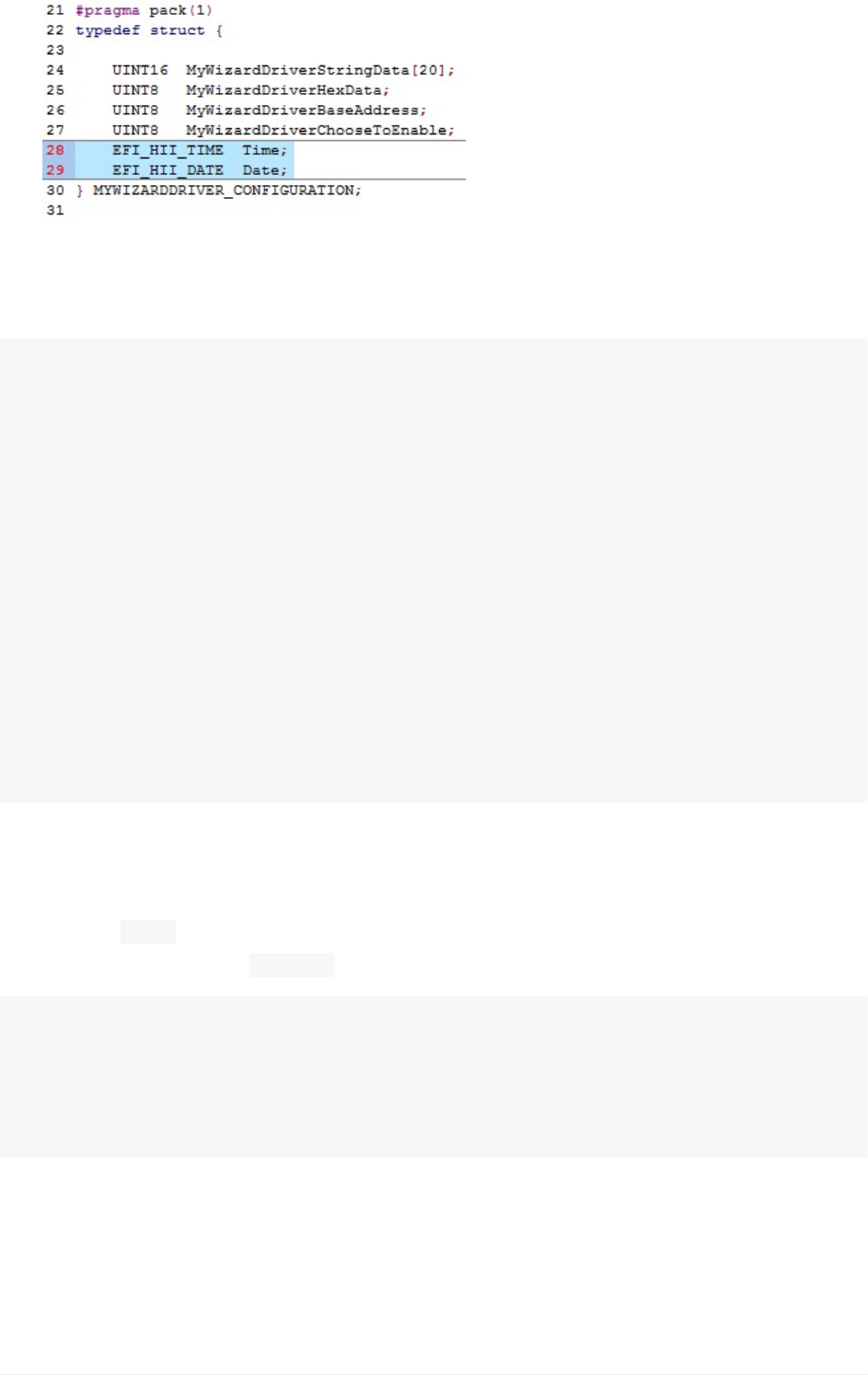
1. UpdatetheMyWizardDriverNVDataStruc.hfile
2. Addthefollowingdateandtimefieldstotheconfiguration typedef(totothelocation
shownbelow):
EFI_HII_TIMETime;
EFI_HII_DATEDate;
Lab10.AddinganAdditionalFormPage
UEFIDriverHIIWinLabGuide[DRAFT]
74DRAFTFORREVIEW[11/08/201808:04:02]
3. SaveMyWizardDriverNVDataStruc.h
4. UpdatetheMyWizardDriver.unifile
5. Addthefollowingcodetotheendofthefiletoupdatethesecondpage’sstring:
#stringSTR_FORM2_TITLE#languageen"MyWizardDriverSecondSetupPage"
#stringSTR_DATE_PROMPT#languageen"SystemDate"
#stringSTR_DATE_HELP#languageen"ThisisthehelpfortheDate(mo
nth/day/year).(Errorcheckingwillbedoneagainstmonth/day/yearcombinationsthata
renotsupported.)"
#stringSTR_TIME_PROMPT#languageen"SystemTime"
#stringSTR_TIME_HELP#languageen"ThisisthehelpfortheTime(ho
ur/minute/second)."
#stringSTR_ERROR_POPUP#languageen"Youtypedinthewrongvalue!"
#stringSTR_GOTO_FORM1#languageen"EnterPage1"
#stringSTR_GOTO_FORM2#languageen"EnterPage2"
#stringSTR_GOTO_HELP#languageen"Thisismygotohelp"
#stringSTR_MY_DATE_PROMPT#languageen"MySystemDate"
#stringSTR_MY_TIME_PROMPT#languageen"MySystemTime"
6).SaveMyWizardDriver.uni
7).UpdatetheMyWizardDriver.vfrfile
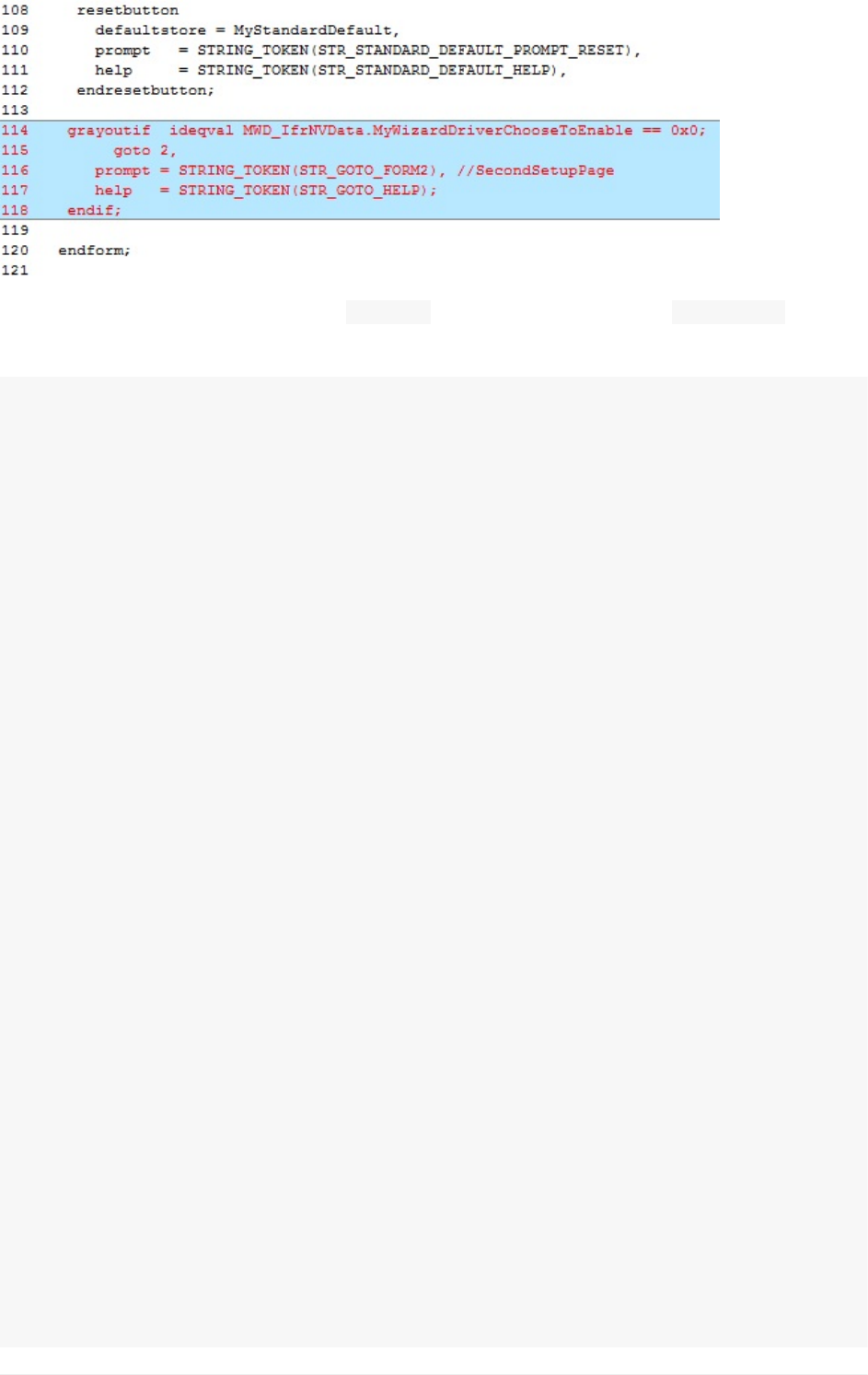
8).Addthe“ goto”VFRitemtoallowbrowsertoenderanotherformbyaddingthe
followingcodebeforethe" endform”atapprox.line114
grayoutifideqvalMWD_IfrNVData.MyWizardDriverChooseToEnable==0x0;
goto2,
prompt=STRING_TOKEN(STR_GOTO_FORM2),//SecondSetupPage
help=STRING_TOKEN(STR_GOTO_HELP);
endif;
Lab10.AddinganAdditionalFormPage
UEFIDriverHIIWinLabGuide[DRAFT]
75DRAFTFORREVIEW[11/08/201808:04:02]
9).Addthefollowingcodebetween“ endform”atapprox.line120and“ endformset”(the
codecontinuesforfewpagesinthislabguide):
//Begincode
formformid=2,//SecondSetupPage,
title=STRING_TOKEN(STR_FORM2_TITLE);
grayoutifTRUE;//DATEisthedateoftheWindowsHostsocannotchangeit.;
dateyearvarid=Date.Year,//NotethatitisamemberofNULL,
//sotheRTCwillbethesystemresourcetoretrieveandsavefrom
prompt=STRING_TOKEN(STR_DATE_PROMPT),
help=STRING_TOKEN(STR_DATE_HELP),
minimum=1998,
maximum=2099,
step=1,
default=2010,
monthvarid=Date.Month,//NotethatitisamemberofNULL,
//sotheRTCwillbethesystemresourcetoretrieveandsavefrom
prompt=STRING_TOKEN(STR_DATE_PROMPT),
help=STRING_TOKEN(STR_DATE_HELP),
minimum=1,
maximum=12,
step=1,
default=1,
dayvarid=Date.Day,//NotethatitisamemberofNULL,
//sotheRTCwillbethesystemresourcetoretrieveandsavefrom
prompt=STRING_TOKEN(STR_DATE_PROMPT),
help=STRING_TOKEN(STR_DATE_HELP),
minimum=1,
maximum=31,
step=0x1,
default=1,
enddate;
endif;//grayoutifTRUEDATE
grayoutifTRUE;//TIME–WINDOWSTIME
timehourvarid=Time.Hour,//NotethatitisamemberofNULL,
Lab10.AddinganAdditionalFormPage
UEFIDriverHIIWinLabGuide[DRAFT]
76DRAFTFORREVIEW[11/08/201808:04:02]

//sotheRTCwillbethesystemresourcetoretrieveandsavefrom
prompt=STRING_TOKEN(STR_TIME_PROMPT),
help=STRING_TOKEN(STR_TIME_HELP),
minimum=0,
maximum=23,
step=1,
default=0,
minutevarid=Time.Minute,//NotethatitisamemberofNULL,
//sotheRTCwillbethesystemresourcetoretrieveandsavefrom
prompt=STRING_TOKEN(STR_TIME_PROMPT),
help=STRING_TOKEN(STR_TIME_HELP),
minimum=0,
maximum=59,
step=1,
default=0,
secondvarid=Time.Second,//NotethatitisamemberofNULL,
//sotheRTCwillbethesystemresourcetoretrieveandsavefrom
prompt=STRING_TOKEN(STR_TIME_PROMPT),
help=STRING_TOKEN(STR_TIME_HELP),
minimum=0,
maximum=59,
step=1,
default=0,
endtime;
endif;//grayoutifTRUETIME
date//MyWizardDriverDate
varid=MWD_IfrNVData.Date,
prompt=STRING_TOKEN(STR_MY_DATE_PROMPT),
help=STRING_TOKEN(STR_DATE_HELP),
flags=STORAGE_NORMAL,
default=2013/01/01,
enddate;
time//MyWizardDriverTime
name=MyTimeMWD,
varid=MWD_IfrNVData.Time,
prompt=STRING_TOKEN(STR_MY_TIME_PROMPT),
help=STRING_TOKEN(STR_TIME_HELP),
flags=STORAGE_NORMAL,
default=15:33:33,
endtime;
goto1,
prompt=STRING_TOKEN(STR_GOTO_FORM1),//MainSetupPage
//thistoohasnoend-opandbasicallyit'sajumptoaformONLY
help=STRING_TOKEN(STR_GOTO_HELP);
endform;
Lab10.AddinganAdditionalFormPage
UEFIDriverHIIWinLabGuide[DRAFT]
77DRAFTFORREVIEW[11/08/201808:04:02]
//Endcode
10).SaveMyWizardDriver.vfr
BuildandtestMyWizardDriver
1. OpentheVisualStudioCommandPrompt
2. Typebuild
3. Typebuildrun
4. AttheUEFIShellprompt,typeexit
5. Nowatthesetupfrontpagemenu,select“DeviceManager”
6. InsidetheDeviceManagermenupressthedownarrowto“MyWizardDriverSample
Formset”Press"Enter"
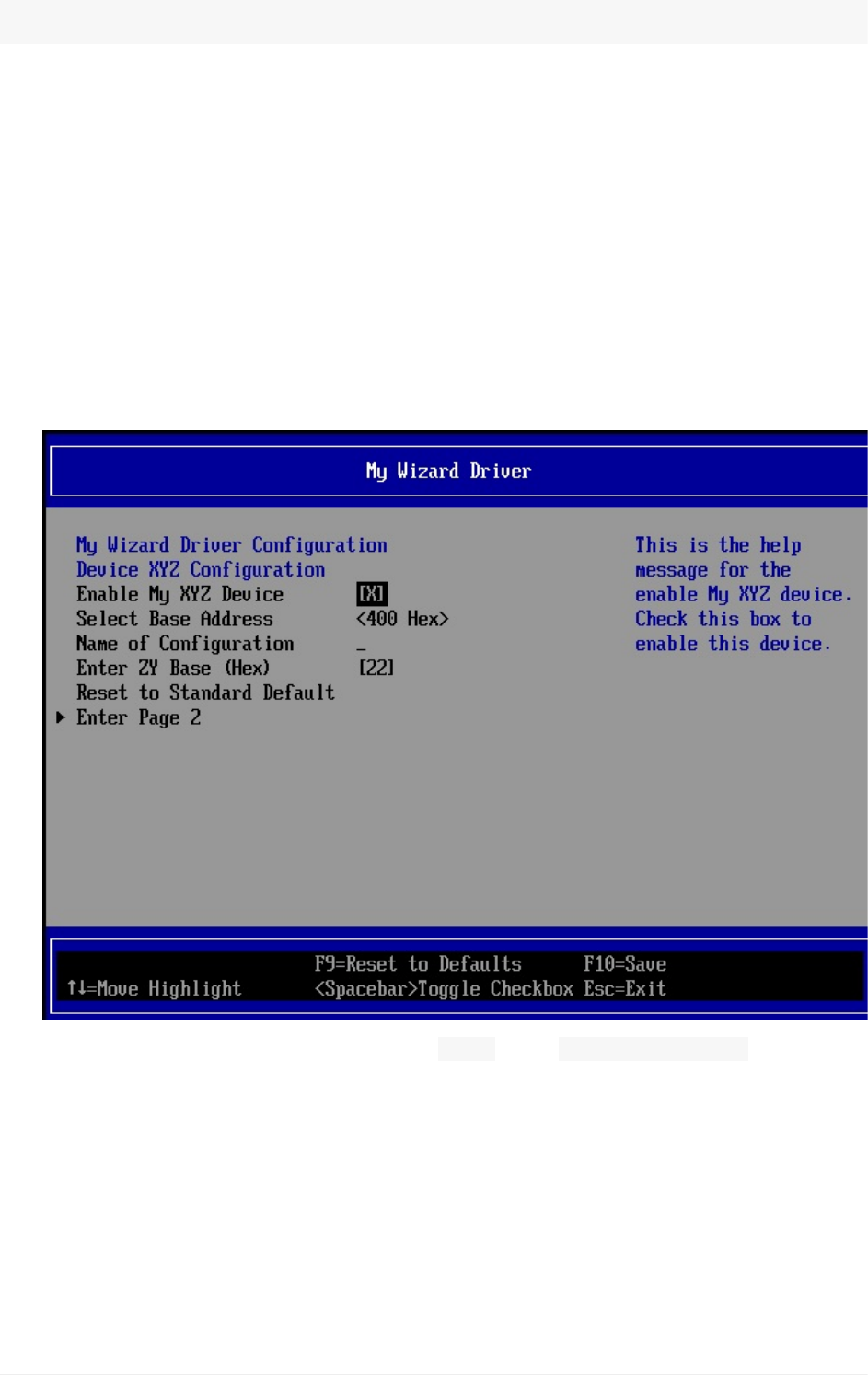
Noticethe“EnterPage2”option.Without gotointhe MyWizardDriver.vfrfile,you
wouldn’tbeabletoaccesspagetwo.
7. Select“EnterPage2”andthenPress“Enter”
NoticehowtheSystemDateandTimecannotbemodifiedtoanyotherdate/timeandis
grayedout:
Lab10.AddinganAdditionalFormPage
UEFIDriverHIIWinLabGuide[DRAFT]
78DRAFTFORREVIEW[11/08/201808:04:02]
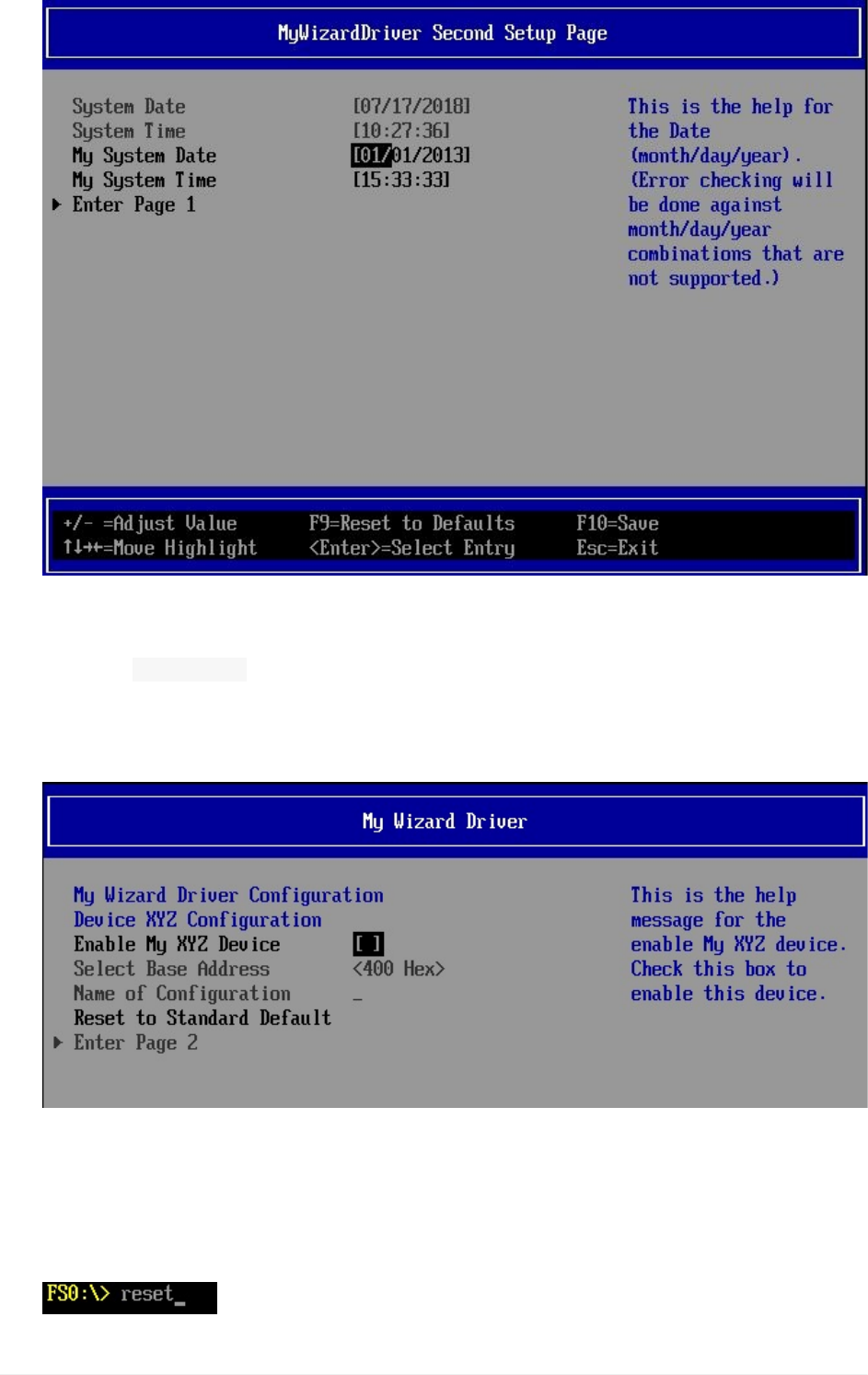
8. Testbytryingtoenterthedate02/30/2013,thentryavalidleapyeardate:02/29/2012.
9. Press“DownArrow”toreturntoPage1
10. Testthe“ grayoutif”bygoingto“EnableMyXYZDevice”
11. Pressthe“Spacebar”totoggleoff/disable
Noticethe“SelectBaseAddress”,“NameofConfiguration”andthe“EnterPage2”
fieldsarenowgrayedoutandnotselectable
12. Press“Spacebar”againtoEnable
13. Press“F10”then“Escape”tosaveandexit
14. Press“Escape”toexit“DeviceManager”
15. Select“Continue”andthenPress"Enter”
16. Type“reset”
Lab10.AddinganAdditionalFormPage
UEFIDriverHIIWinLabGuide[DRAFT]
79DRAFTFORREVIEW[11/08/201808:04:02]

attheShellpromptandthenPress“Enter”toreturntotheVisualStudioCommand
Prompt
ForanybuildissuescopythesolutionfilesfromC:\Fw\LabSolutions\LessonE.10
NOTE:DelDirectoryC:\fw\edk2\Build\NT32IA32\DEBUG_VS2010x86\IA32\MyWizardDriver
beforetheBuildcommandtobuildtheMyWizardDriverClean.
EndofLab10
Lab10.AddinganAdditionalFormPage
UEFIDriverHIIWinLabGuide[DRAFT]
80DRAFTFORREVIEW[11/08/201808:04:02]
Lab11.AddingCommunicationfromDriverto
ConsolethroughHII
Inthislab,you’lladdcommunicationfromthedrivertotheconsolethroughHII.More
specifically,you’lladdcodetoretrieveastringfromtheHIIdatabaseandprintthestringto
theconsole.Then,you’lladdthestringinFrench,changethelanguage,andtesttoensure
thecorrectlanguageisdisplayed.Thereasonthedrivershouldavoiddirectstringtexttothe
consolewithouttheHIIsupportisbecausethereisnolocalizationfortextstringinsidethe
driver’ssourcecode.ByusingtheHIIdatabasethestringsaretokenizedmakinglocalization
easier.
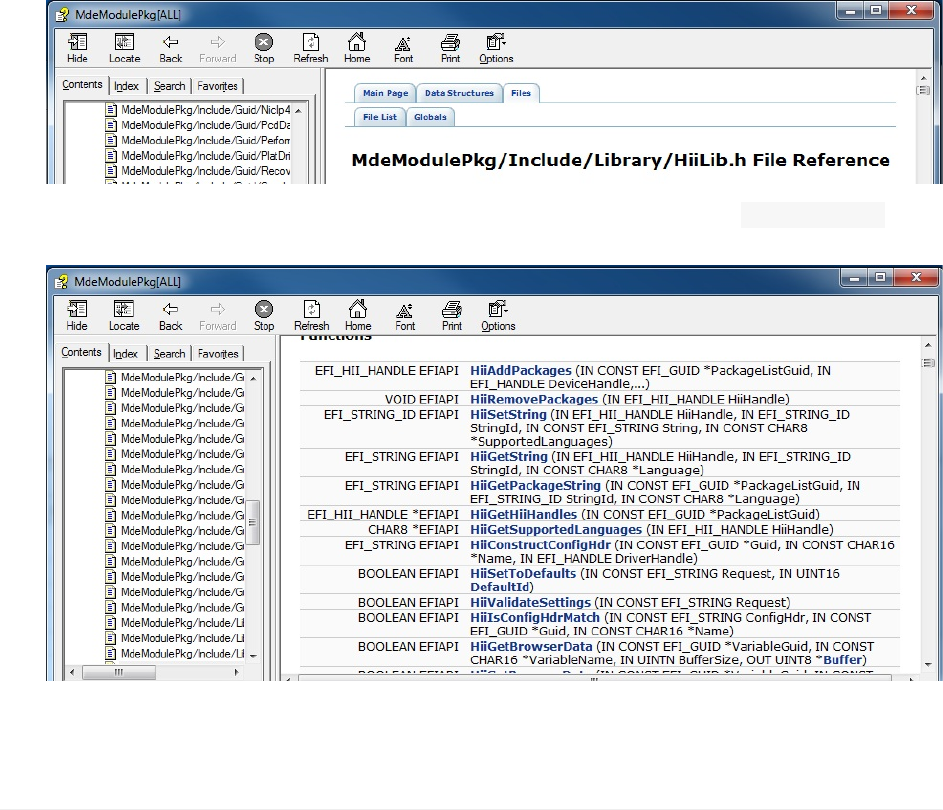
ExaminetheMdeModulePkg.ChmforHII
1. Usethe.ChmreaderandopentheMdeModulePkg.Chm.ForHIIdatabaselibrary
functionsareintheMdeModulePkg.Chmfile.SearchonHiiLib.hfunctions
2. SelecttheIndextab
3. Type:HiiLib.h
Note:NoticethelistofHiifunctioncallsavailable.TogetStringsthe HiiGetString
functioncanbeused.
AddchangestoyourDriver
Lab11.AddingCommunicationfromDrivertoConsolethroughHII
UEFIDriverHIIWinLabGuide[DRAFT]
81DRAFTFORREVIEW[11/08/201808:04:02]
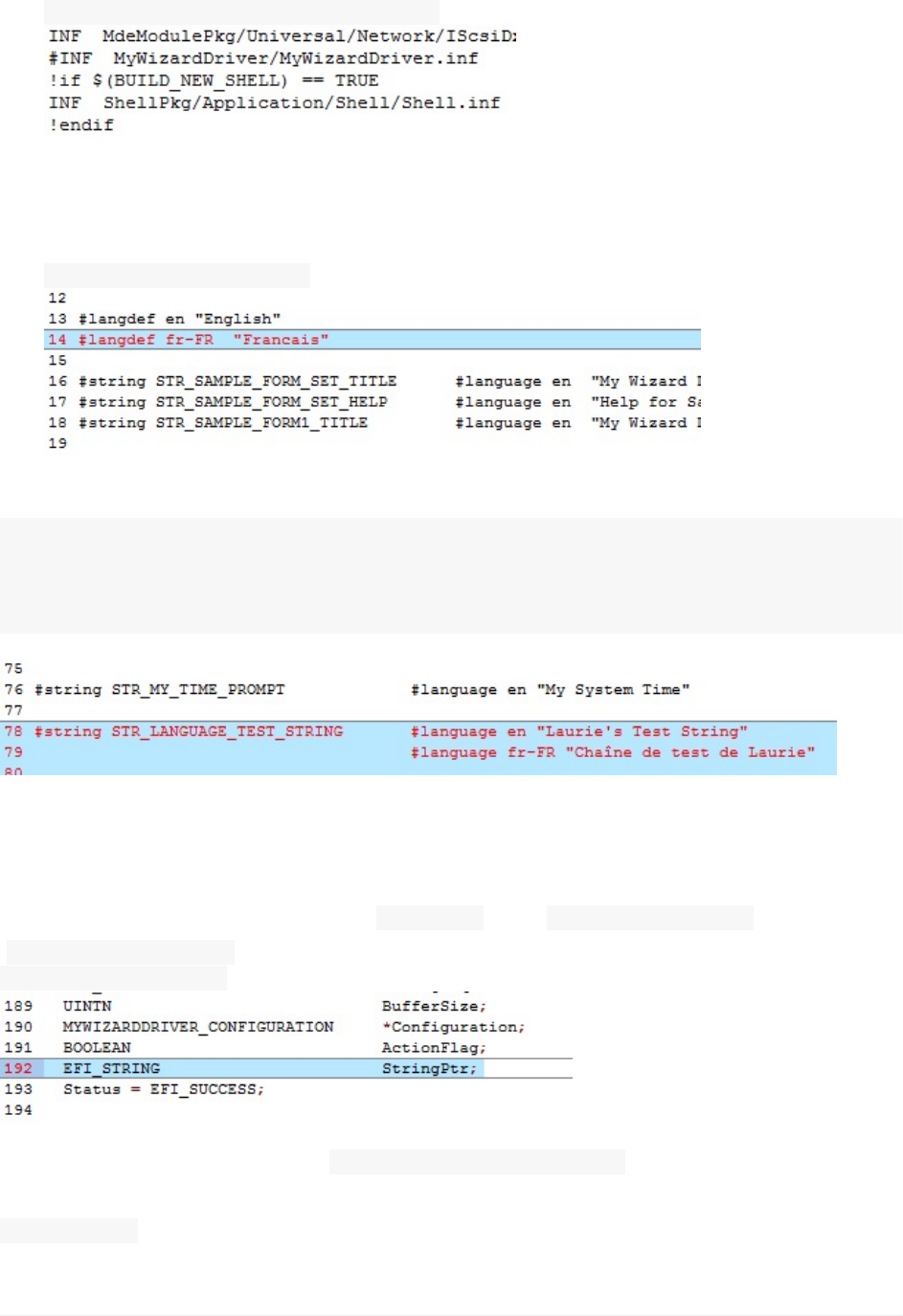
1. UpdatetheC:\Fw\edk2\Nt32pkg\Nt32pkg.fdffile
2. Makeyourdriverstandaloneagain.Remove(orcommentout)theincludestatementin
theNt32pkg.fdffile:
#INFMyWizardDriver/MyWizardDriver.inf
3. SaveNt32pkg.fdf
4. UpdatetheMyWizardDriver.unifile
5. Addthefollowingcodetothetopofthefileatapprox.line14asshown:
#langdeffr-FR"Francais"
6. Addthefollowingcodetotheendofthefile:
#stringSTR_LANGUAGE_TEST_STRING#languageen"Laurie'sTestString"
#languagefr-FR"ChaînedetestdeLaurie"
7).SaveMyWizardDriver.uni
8).UpdatetheMyWizardDriver.cfile
9).Addthefollowinglocalvariablefor StringPtrafter“ BOOLEANActionFlag;”andbefore
“Status=EFI_SUCCESS;”(asshownbelow):
EFI_STRINGStringPtr;
10).Addthefollowingcodeafter“ FreePool(ConfigRequestHdr);”(asshownbelow)toedit
thedriver’sentrypointwithadebugandprintstatementbymakingacalltothe
HiiGetStringforthetokentoprint(atapproxline364):
Lab11.AddingCommunicationfromDrivertoConsolethroughHII
UEFIDriverHIIWinLabGuide[DRAFT]
82DRAFTFORREVIEW[11/08/201808:04:02]
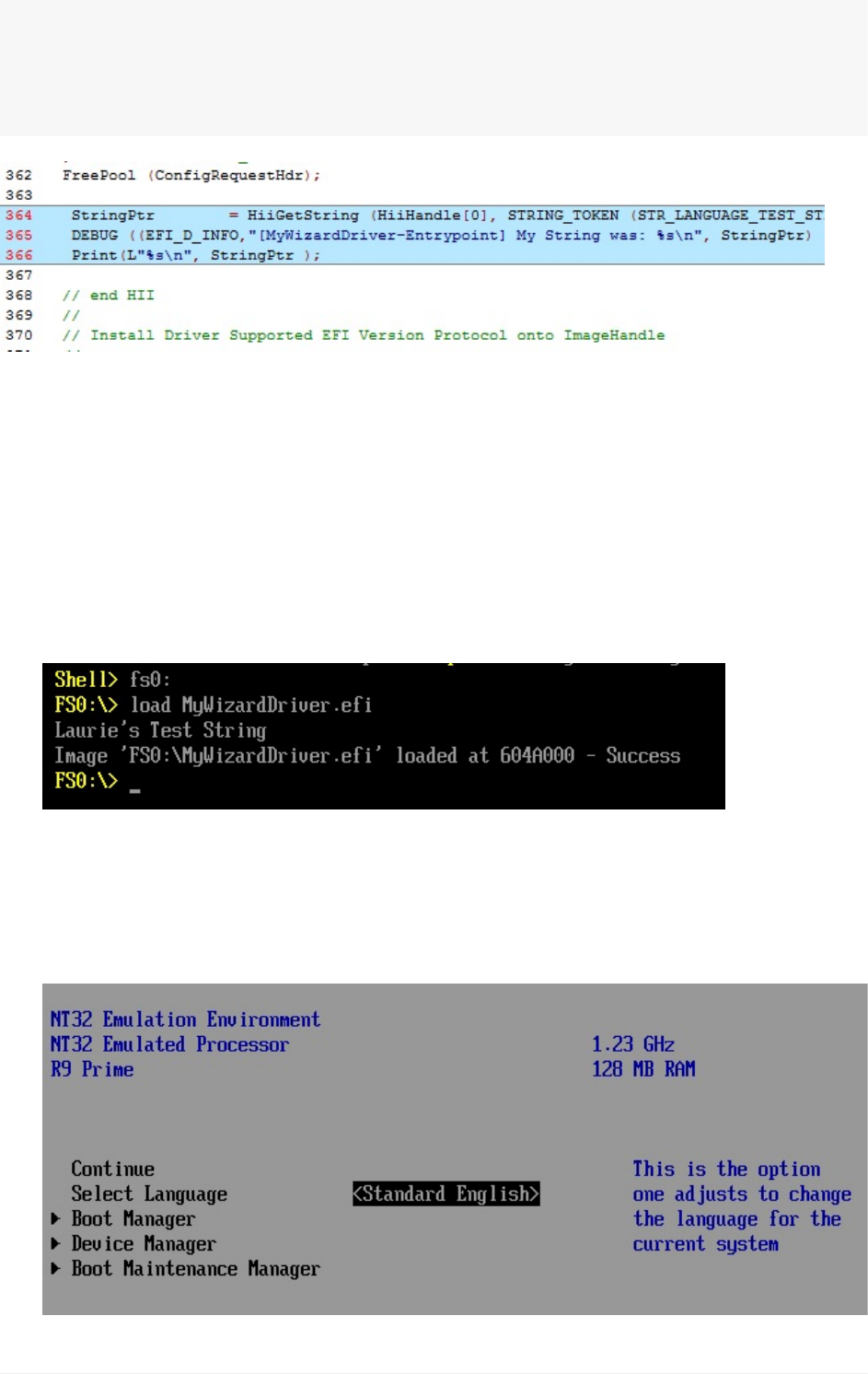
StringPtr=HiiGetString(HiiHandle[0],STRING_TOKEN(STR_LANGUAGE_TEST_STRING)
,NULL);
DEBUG((EFI_D_INFO,"[MyWizardDriver-Entrypoint]MyStringwas:%s\n",StringPtr));
Print(L"%s\n",StringPtr);
11).SavetheMyWizardDriver.c
BuildandtestDriver
1. OpentheVisualStudioCommandPrompt
2. Typebuild
3. Typebuildrun
4. AttheUEFIShellprompt,typefs0:
5. TypeLoadMyWizardDriver.efiandthenPress“Enter”
Noticethatthestring’sEnglishversionisdisplayed:
6. TypeResetandthenPress“Enter”
7. Type"buildrun"andthenPress“Enter”
8. Type"exit"attheshellprompt
9. SelectLanguageandthenPress“Enter”
Lab11.AddingCommunicationfromDrivertoConsolethroughHII
UEFIDriverHIIWinLabGuide[DRAFT]
83DRAFTFORREVIEW[11/08/201808:04:02]
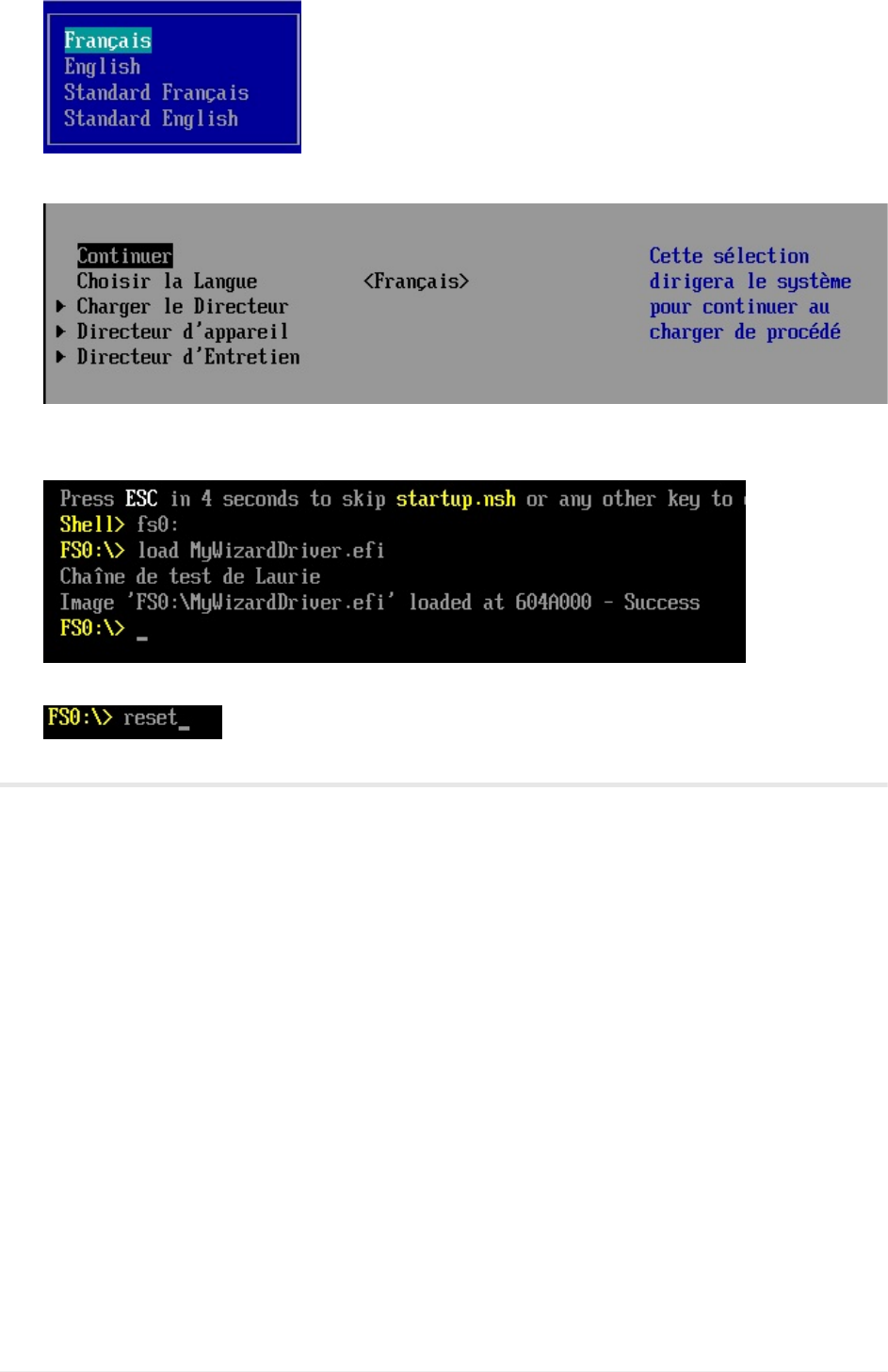
10. Select“Français”andthenPress“Enter”
11. Select“Continuer”andthenPress“Enter”
12. AttheShellPrompt,typeFs0:
13. TypeloadMyWizardDriver.efi
14. Type“reset”andthenPress“Enter”toreturntotheVisualStudioCommandPrompt
ForanybuildissuescopythesolutionfilesfromC:\Fw\LabSolutions\LessonE.11
NOTE:DelDirectoryC:\fw\edk2\Build\NT32IA32\DEBUG_VS2010x86\IA32\MyWizardDriver
beforetheBuildcommandtobuildtheMyWizardDriverClean.
MakesureyouupdateNt32Pkg.fdf.
EndLab11
Lab11.AddingCommunicationfromDrivertoConsolethroughHII
UEFIDriverHIIWinLabGuide[DRAFT]
84DRAFTFORREVIEW[11/08/201808:04:02]
LABSETUPWINDOWS
1. DownloadtheUEFITrainingMaterials.zip(acceptanysecuritynotifications)
2. Click“Open”andUnzipthefiletoC:whichwilltakeafewminutes
Note:Itishighlyimportantthatyouunzipthefilecorrectlytothislocationbecauseall
thefilelocationsinthistrainingguidefollowthatformat.
C:\Fw\Presentations-separatezipfile
C:\Fw\Edk2–Opensourcetianocore.orgEDKII
C:\Fw\DriverWizard–Install.MSI
C:\Fw\LabSampleCode-SolutionsforLabs
C:\Fw\Documentation-.chmfilesandexamples
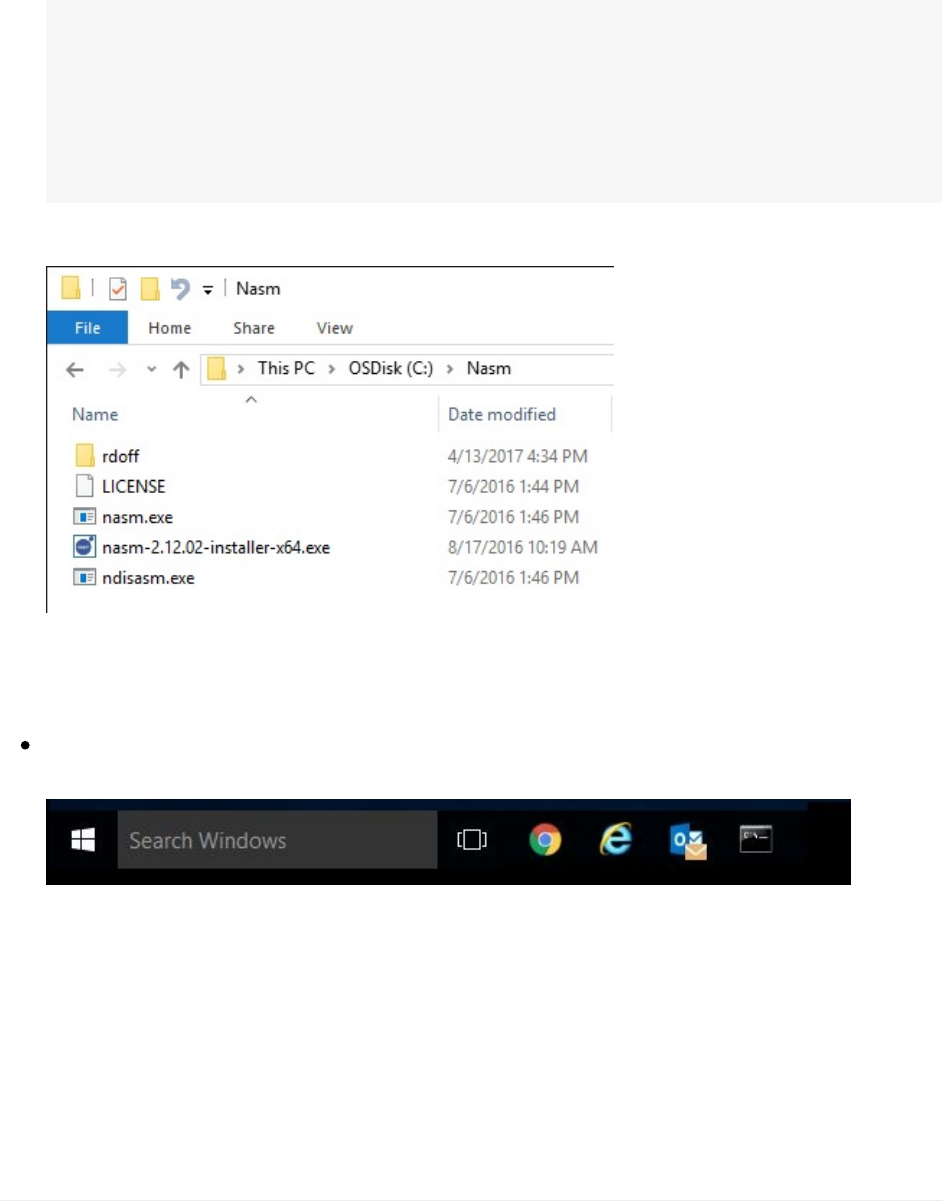
C:\Fw\Nasm–ForAssemblycompiler
3. CopytheC:\fw\NASMdirectorytoC:
PinVisualStudioCommandPromptforWindows
PinaVisualStudioCommandPromptforWindows10
Itwilllooksimilartothis“VisualStudioCommandPrompt(201n)”intheTaskbar
Note:thisisthepromptthatwillbeusedtobuildtheEDKIILabs
PreparingfortheBUILDCommand
Note:You’llneedtorepeatthisstepeachtimeyouexittheVisualStudioCommandPrompt
window.Itisrecommendedthatyoukeepyourcommandpromptopenduringthetraining
Labs.
LabSetup
UEFIDriverHIIWinLabGuide[DRAFT]
85DRAFTFORREVIEW[11/08/201808:04:02]
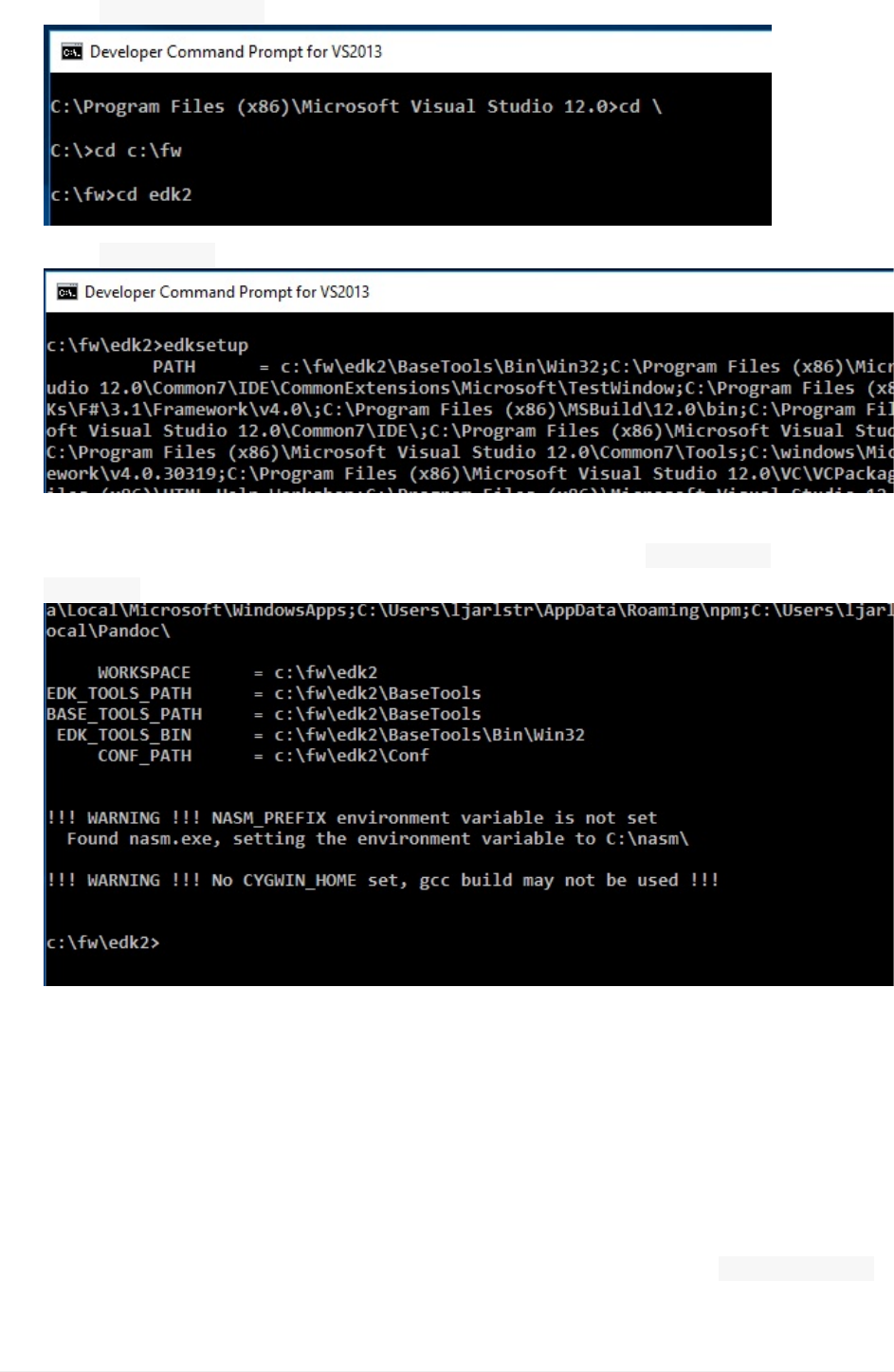
1. OpenVisualStudioCommandPrompt
2. Type$CDc:\fw\edk2andthenPress“Enter”
3. Type$EdksetupandthenPress“Enter”
Note:Ifyousee“!!!WARNING!!!...”,don’tbealarmed.The"NoCYGWIN..."canbe
ignoredatthistime,BUTmakesure"NASM"isfoundandthe NASM_PREFIXissetto
C:\nasm\
ConfiguringBuildTools
Note:YouonlyneedtoeditTarget.txtand/orTools_Def.txtonceafterthefirstedksetup
commandafterdownloadingtheTrainingmaterials.zipfile.
1. OpenNotepadorothertexteditorthatsupportsUNICODE
2. OpenC:/fw/edk2/Conf/Target.txt
3. UsetheMicrosoftWindowsandVisualStudioMatrixandthenupdate TOOL_CHAIN_TAG
tomatchyourversionofVisualStudio
LabSetup
UEFIDriverHIIWinLabGuide[DRAFT]
86DRAFTFORREVIEW[11/08/201808:04:02]
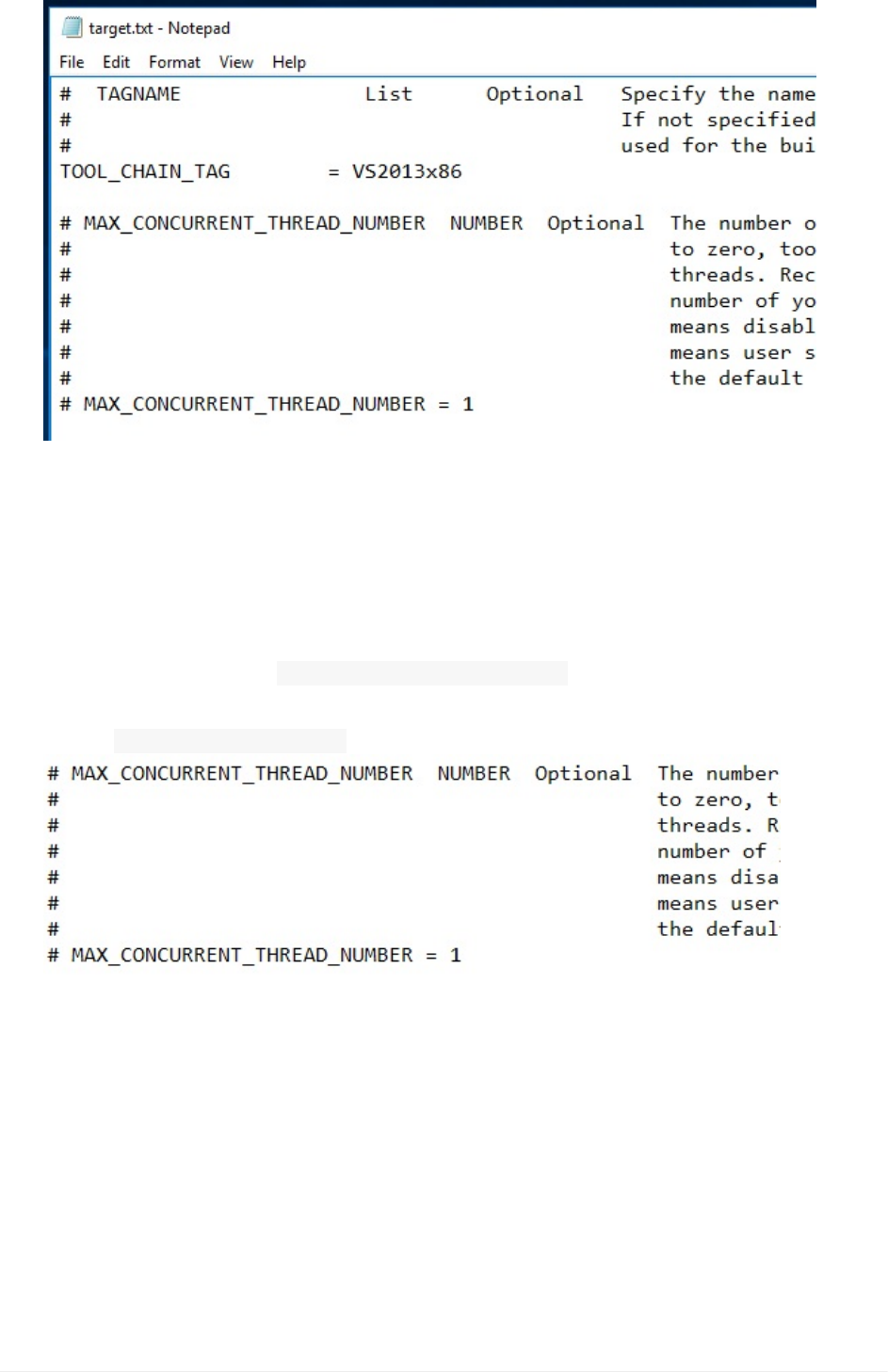
4. ModifyTOOL_CHAIN_TAGtomatchyourversionofVisualStudio.
Example:
forWindows1064bitOSandVisualStudio2013modifythefollowinginTarget.txt
From:
TOOL_CHAIN_TAG=MYTOOLS
to:
TOOL_CHAIN_TAG=VS2013x86
OPTIONAL:Updatethe MAX_CONCURRENT_THREAD_NUMBERBythenumberofprocessorson
yourlaptop+1.Example:mosthaveIntel®DualCorewithHyperthreadingwhich
means 2procs+2HT+1=5.
5. SaveandclosethetextfileC:/fw/edk2/conf/target.txt
EndofLabSetupforWindows
LabSetup
UEFIDriverHIIWinLabGuide[DRAFT]
87DRAFTFORREVIEW[11/08/201808:04:02]

MICROSOFTWINDOWS10–VISUAL
STUDIOCOMMANDPROMPT
ThefollowingstepscanbeusedtoPintheMicrosoftWindows10–VisualStudiocommand
prompt(201n)totheTaskbaratthebottom(default)
1. OpenMicrosoftVisualStudio2013commandprompt
(NOTE:VS2013isusedinthefollowingexamplesbutVS2010,VS2015andVS2017
willbesimilar)
2. UsingtheStartmenuinWindows10,Left-clickonthe“WindowsKey”LowerLeft
3. Scrolldownfromthescrollbarontherightuntil“VisualStudio2013”(oryourversion
ofVS201n)
MicrosoftWindows10–VisualStudiocommandprompt
UEFIDriverHIIWinLabGuide[DRAFT]
88DRAFTFORREVIEW[11/08/201808:04:02]
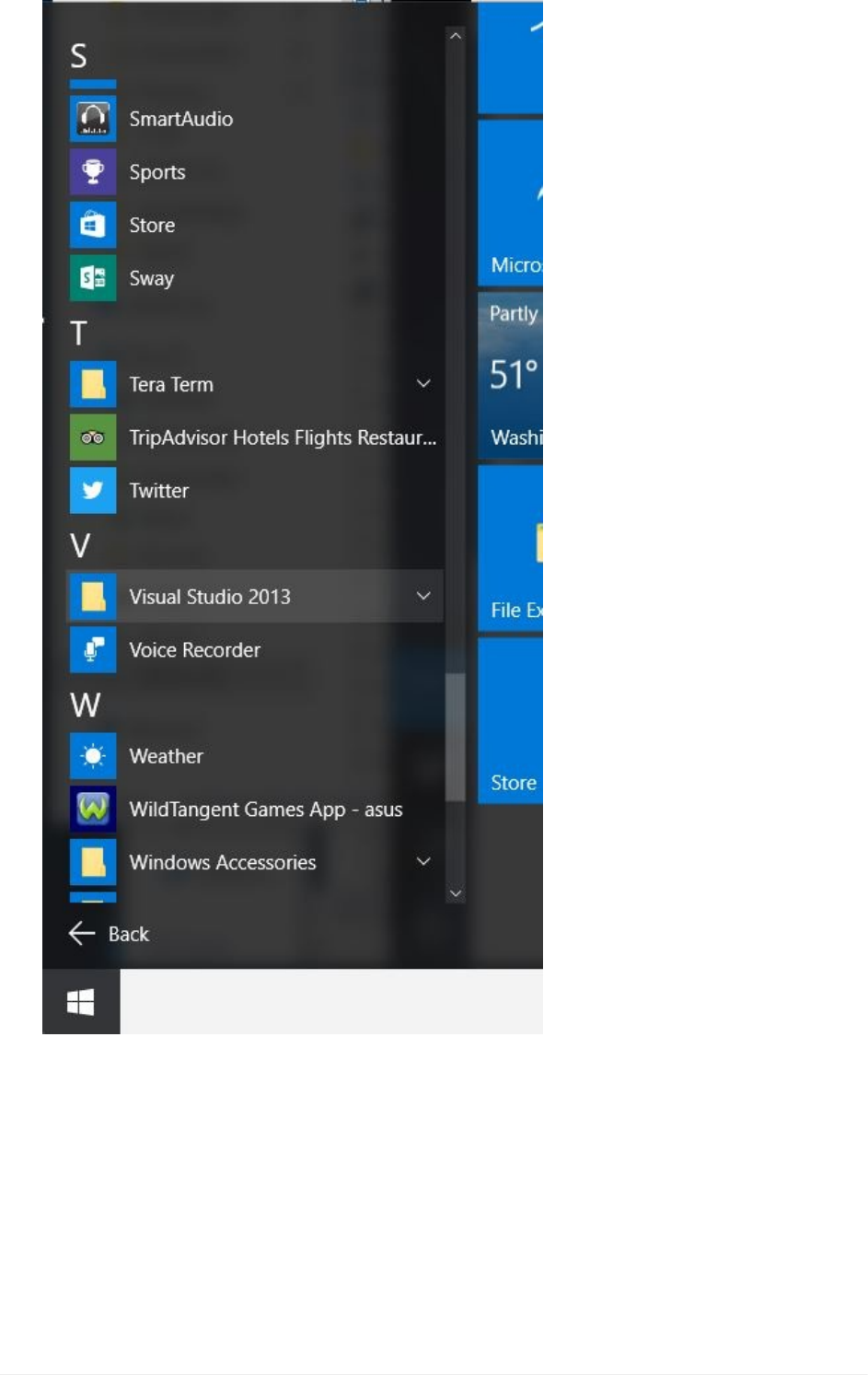
MicrosoftWindows10–VisualStudiocommandprompt
UEFIDriverHIIWinLabGuide[DRAFT]
89DRAFTFORREVIEW[11/08/201808:04:02]
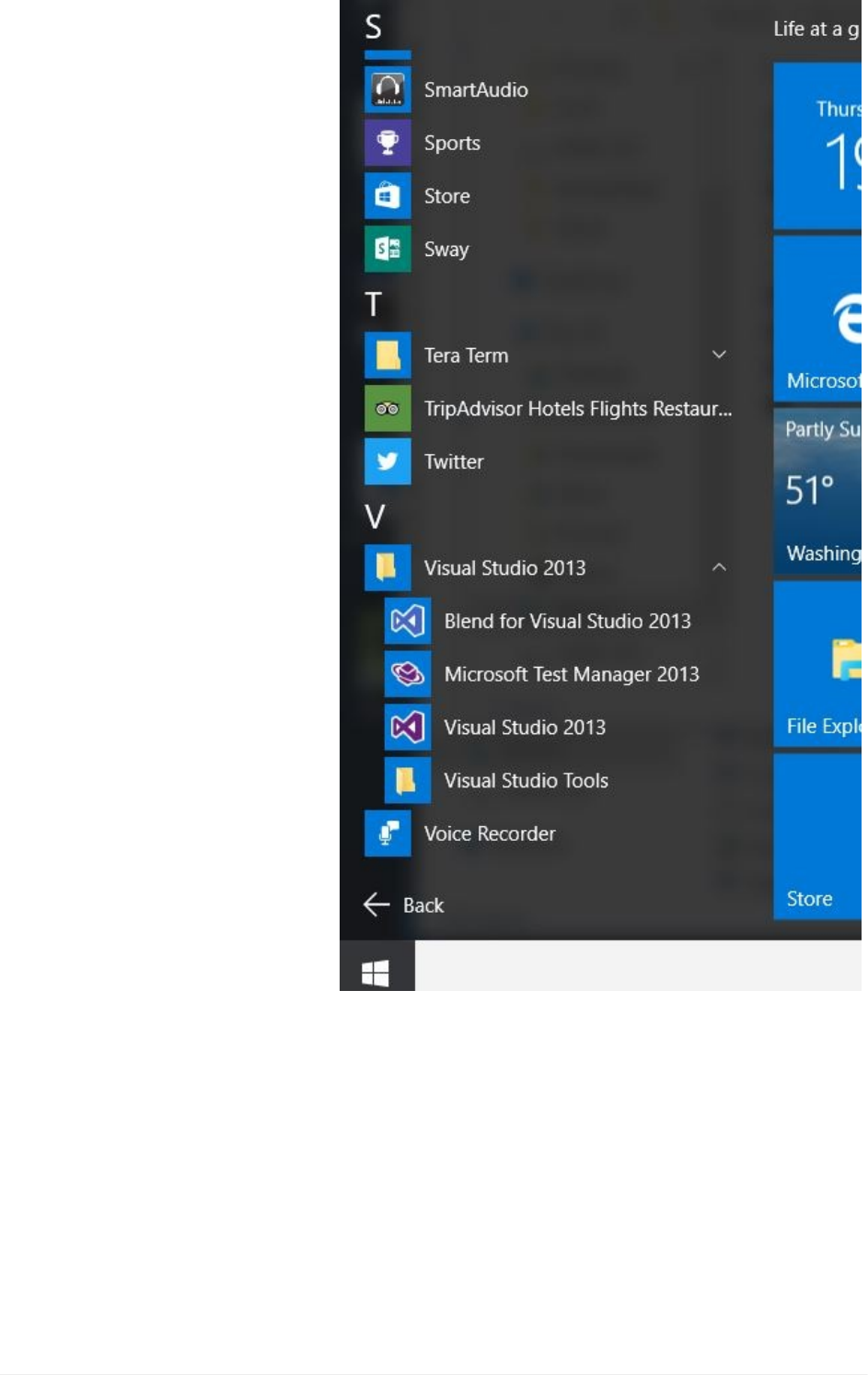
4. LeftClick“VisualStudio201n”
5. LeftClick“VisualStudioTools”
MicrosoftWindows10–VisualStudiocommandprompt
UEFIDriverHIIWinLabGuide[DRAFT]
90DRAFTFORREVIEW[11/08/201808:04:02]
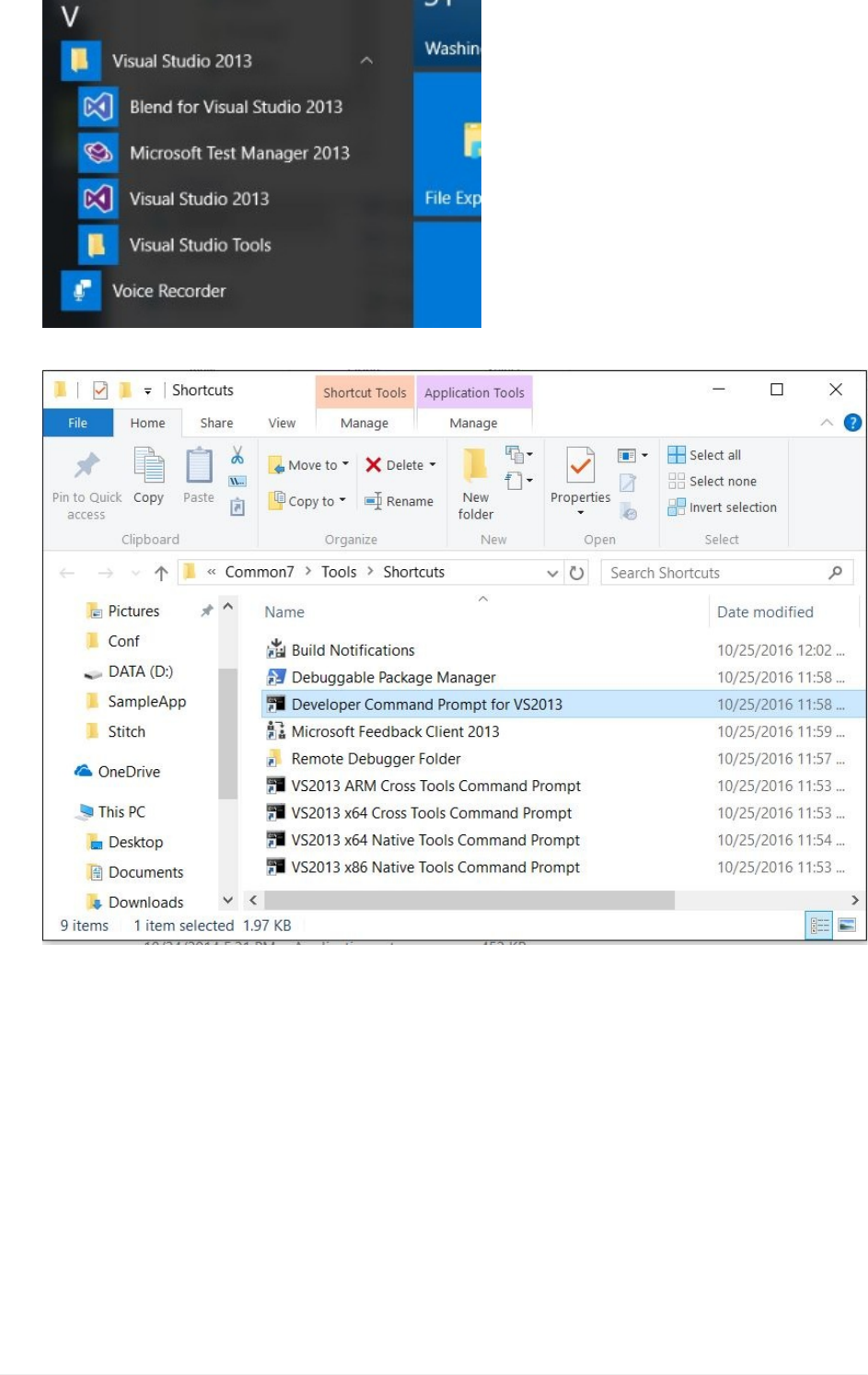
Anotherwindowwillopen
6. RightClickon“DeveloperCommandPromptforVS201n”NOTE:Makesureyouare
selectingthecorrectCommandpromptforVisualStudio.ForVS2013itis:“Developer
CommandPromptforVS2013”
MicrosoftWindows10–VisualStudiocommandprompt
UEFIDriverHIIWinLabGuide[DRAFT]
91DRAFTFORREVIEW[11/08/201808:04:02]
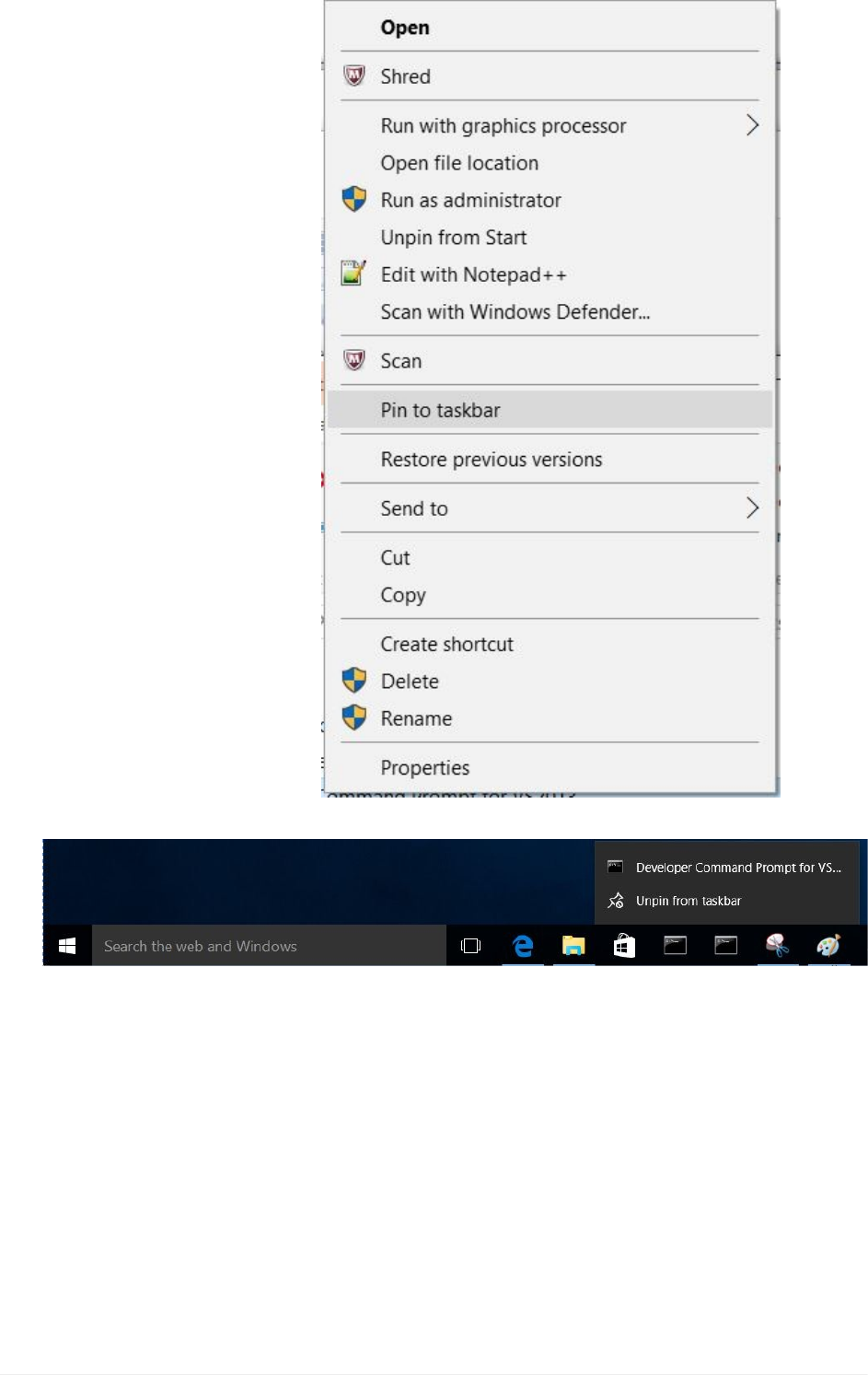
7. LeftClickon“Pintotaskbar”
8. "VisualStudioCommandPrompt"willnowbeinthetaskbar.
endofPinVisualStudioCommandPrompttotheTaskbar
MicrosoftWindows10–VisualStudiocommandprompt
UEFIDriverHIIWinLabGuide[DRAFT]
92DRAFTFORREVIEW[11/08/201808:04:02]

REFERENCE
Reference
UEFIDriverHIIWinLabGuide[DRAFT]
93DRAFTFORREVIEW[11/08/201808:04:02]

MICROSOFTWINDOWSANDVISUAL
STUDIOMATRIX
FilesC:/fw/edk2/conf/target.txtandtools_def.txt(ReturntoConfiguringBuildTools)
Visual
Studio Version Win7,Win8&Win10x64OS
VS2005 8.0 target.txtTOOL_CHAIN_TAG=VS2005x86Requires
WinDDKLink16**
VS2008 9.0 target.txtTOOL_CHAIN_TAG=VS2008x86
VS2010 10.0 target.txtTOOL_CHAIN_TAG=VS2010x86
VS2012 11.0 target.txtTOOL_CHAIN_TAG=VS2012x86
VS2013 12.0 target.txtTOOL_CHAIN_TAG=VS2013x86
VS2015 14.0 target.txtTOOL_CHAIN_TAG=VS2015x86
VS2017 15.0 target.txtTOOL_CHAIN_TAG=VS2017x86
MicrosoftWindowsandVisualStudioMatrix
UEFIDriverHIIWinLabGuide[DRAFT]
94DRAFTFORREVIEW[11/08/201808:04:02]


HelpfulLinks
UEFIForum http://www.uefi.org
UEFIOpenSource http://www.tianocore.org
EFIDeveloperKit
(EDKII) http://tianocore.github.io/edk2.html
EDKIIDocuments http://www.tianocore.org/docs/
UEFIShell
Documents https://github.com/tianocore/tianocore.github.io/wiki/ShellPkg
HelpfulLinks
UEFIDriverHIIWinLabGuide[DRAFT]
96DRAFTFORREVIEW[11/08/201808:04:02]
