Dongboshi tech H2C Electric- Mountain Board User Manual

Shenzhen Dongboshi tech co., Ltd Electric- Mountain Board

User Manual

Content1、Warning......................................................................P12、Product Description....................................................P23、Using Steps................................................................P24、Remote Control...........................................................P35、Brake..........................................................................P46、Battery and Charging Method.................................P4/57、Riding........................................................................P68、FAQ...........................................................................P79、Warranty....................................................................P810、Maintenance..............................................................P9
1.Safety Driving TipsSafety warnings and precautions described in the manual are veryimportant, please read it carefully and ride safely.●Skateboarding is a dangerous sport. When ride it, may fall due to loss of balance,thus leading to injury. Please ride it carefully.●Please be sure to wear protective equipment, such as helmets, knee pads, elbow pads.Please wear suitable clothes to drive, do not ride it barefoot or ride on beach; Tie upyour shoe and don't let the laces contact the wheel or the drive system, which maycause danger.●The user should be over 14 years old and weigh no more than 120 kg. If you feelunwell, please stop ride it. Children under 14 years of age should be accompaniedby a parent driving the product.●Please drive carefully, because in the driving process, inadvertent encounter withobstacles may cause sharp slide or losing control. Please pay attention to avoidpedestrians and other travel tools(such as: skateboards, scooters, bicycles, etc.).●Please ride the skateboard in the suitable environment out door, Outdoorenvironment suitable for taxiing. Please accelerate the skateboard with remote aftersteady yourself on the board, do not arbitrarily accelerate the skateboard in othercondition.●Please don't try the tricks on the board, like jumping, sudden brake etc.●This product is only for solo driving.●Please do not use electric skateboard on the steps or on the water's edge.●Do not touch the motor, wheels and other moving parts with your fingers or otherparts of the body.●Do not use your mobile phone or headset when driving board.●Do not slide the skateboard on other vehicles or drag and drop other objects with theskateboard.●Do not make products wading, electronic drive parts will be damaged in water.●Please drive the skateboard only in the flat, open road, do not drive in the potholes,sand, gravel, muddy and uneven ground. Do not drive on slippery ground, such assnow, ice, wet ground to prevent slipping.●Do not use skateboards at night or in poor vision condition.●Do not use this product in areas where it is not suitable for driving.●Do not use skateboards in snow and rain.
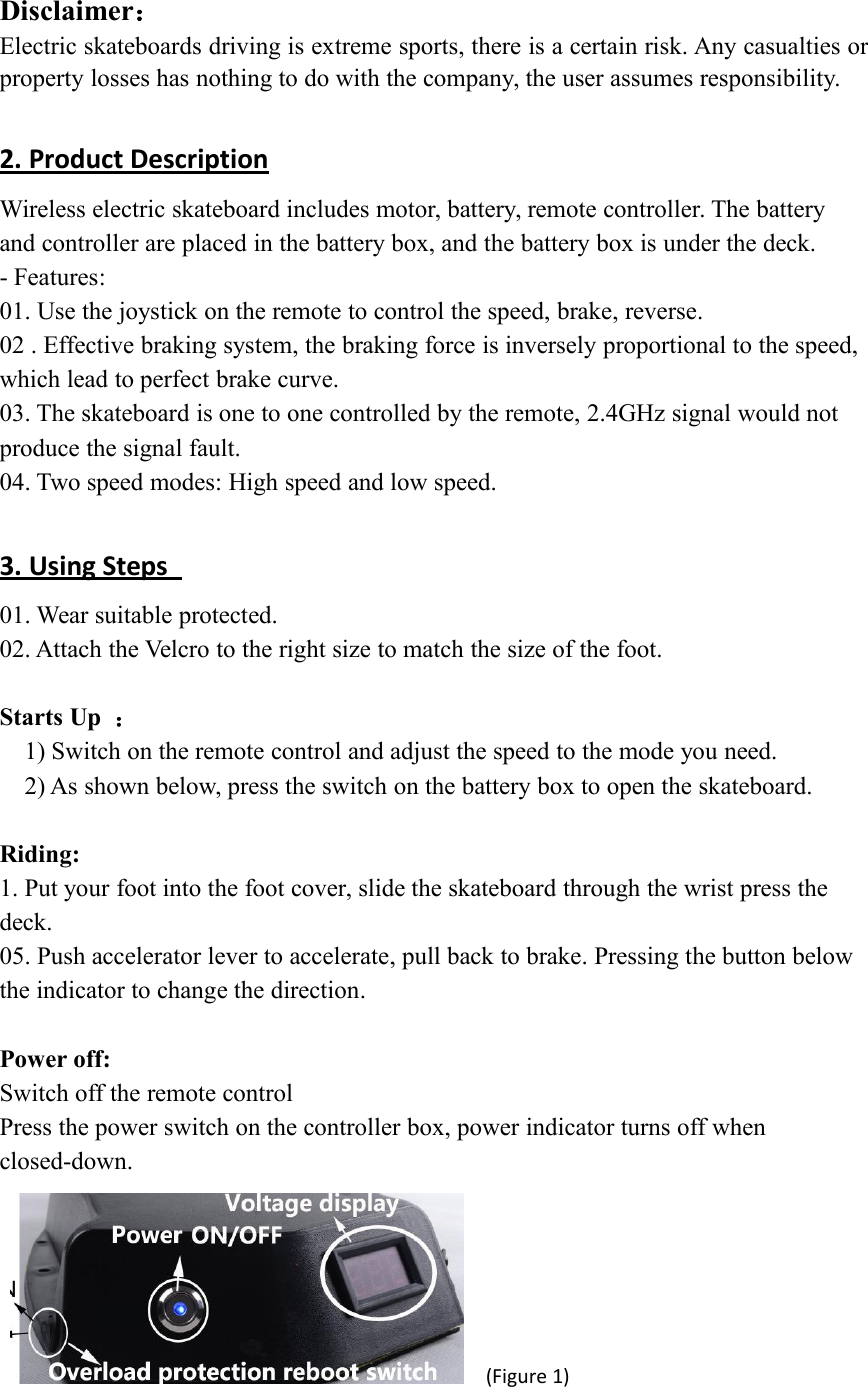
Disclaimer:Electric skateboards driving is extreme sports, there is a certain risk. Any casualties orproperty losses has nothing to do with the company, the user assumes responsibility.2. Product DescriptionWireless electric skateboard includes motor, battery, remote controller. The batteryand controller are placed in the battery box, and the battery box is under the deck.- Features:01. Use the joystick on the remote to control the speed, brake, reverse.02 . Effective braking system, the braking force is inversely proportional to the speed,which lead to perfect brake curve.03. The skateboard is one to one controlled by the remote, 2.4GHz signal would notproduce the signal fault.04. Two speed modes: High speed and low speed.3. Using Steps01. Wear suitable protected.02. Attach the Velcro to the right size to match the size of the foot.Starts Up :1) Switch on the remote control and adjust the speed to the mode you need.2) As shown below, press the switch on the battery box to open the skateboard.Riding:1. Put your foot into the foot cover, slide the skateboard through the wrist press thedeck.05. Push accelerator lever to accelerate, pull back to brake. Pressing the button belowthe indicator to change the direction.Power off:Switch off the remote controlPress the power switch on the controller box, power indicator turns off whenclosed-down.(Figure 1)
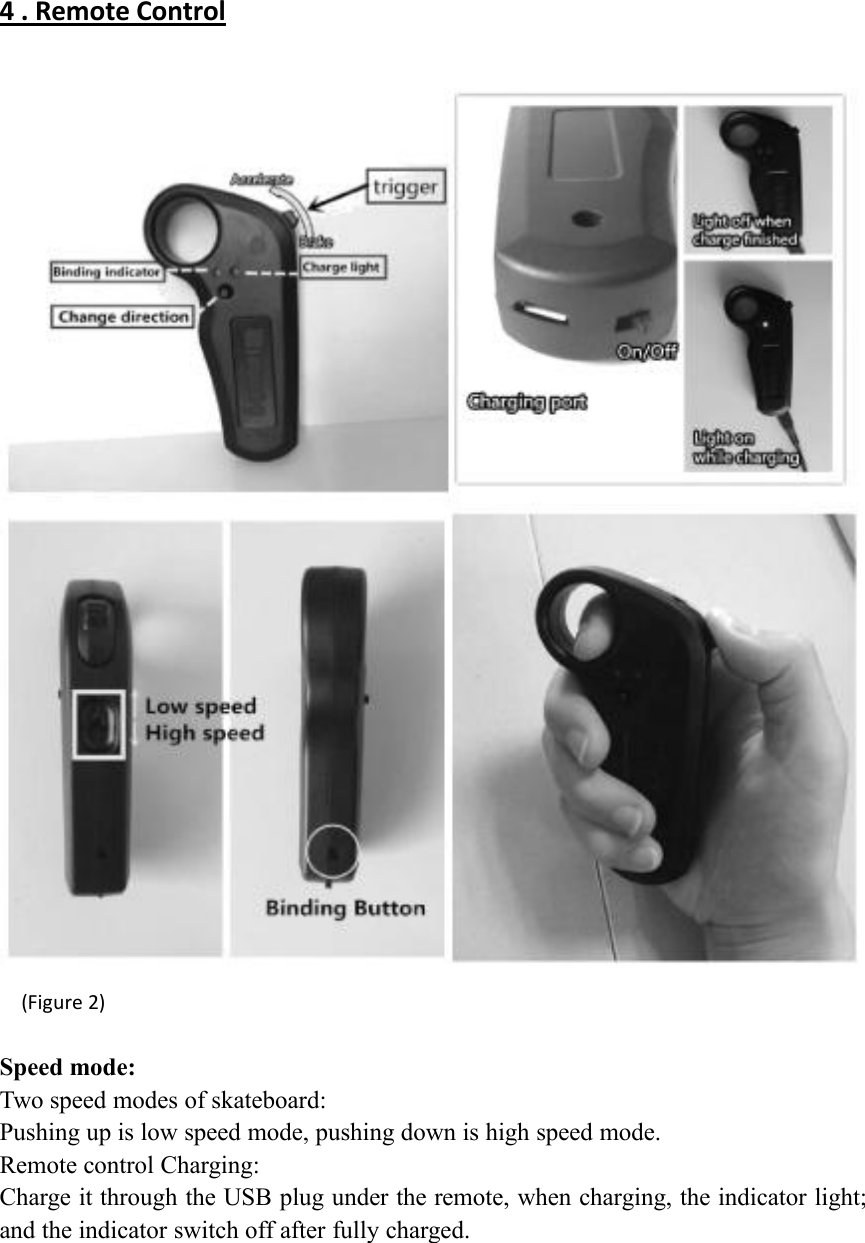
4 . Remote Control(Figure 2)Speed mode:Two speed modes of skateboard:Pushing up is low speed mode, pushing down is high speed mode.Remote control Charging:Charge it through the USB plug under the remote, when charging, the indicator light;and the indicator switch off after fully charged.
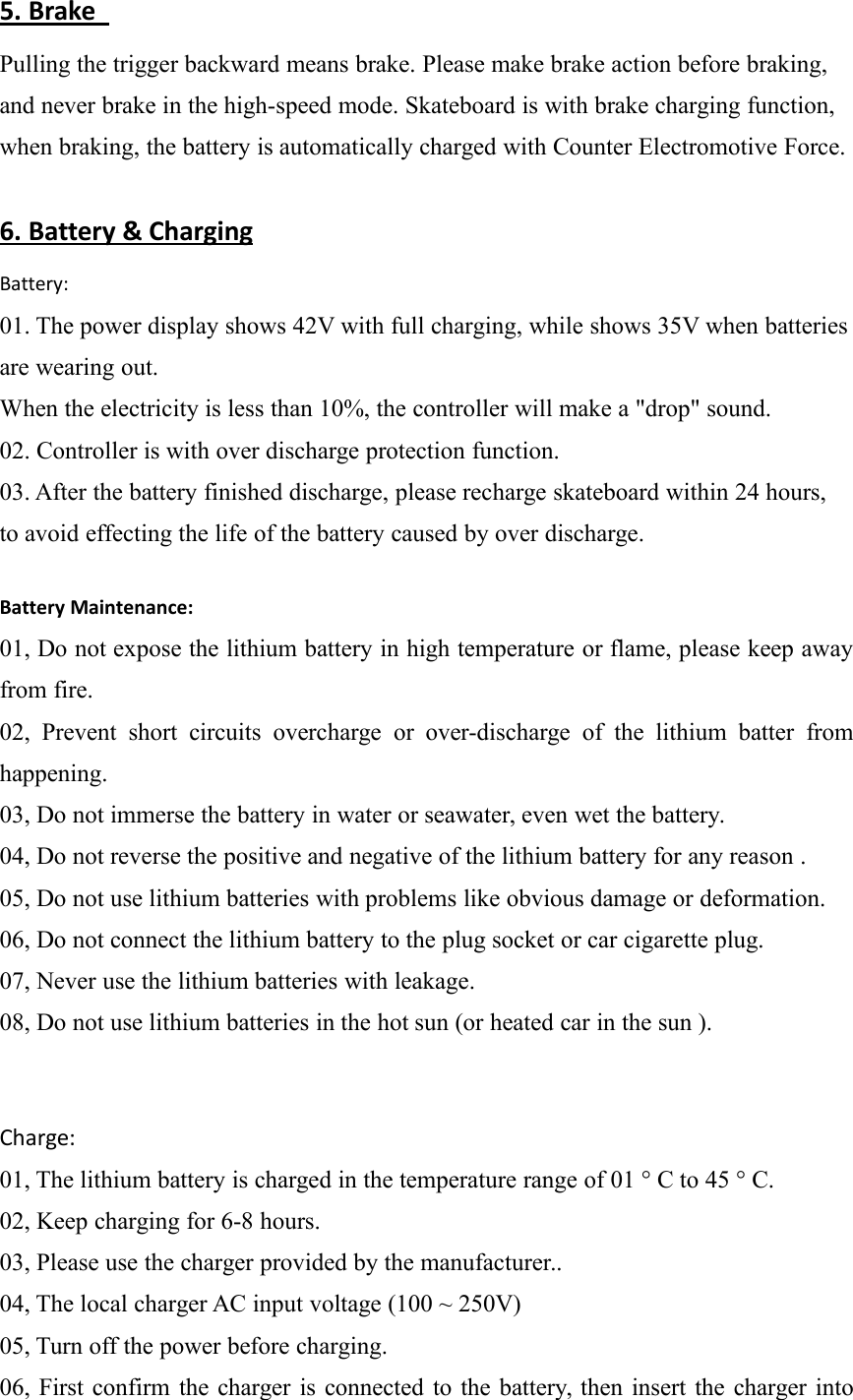
5. BrakePulling the trigger backward means brake. Please make brake action before braking,and never brake in the high-speed mode. Skateboard is with brake charging function,when braking, the battery is automatically charged with Counter Electromotive Force.6. Battery & ChargingBattery:01. The power display shows 42V with full charging, while shows 35V when batteriesare wearing out.When the electricity is less than 10%, the controller will make a "drop" sound.02. Controller is with over discharge protection function.03. After the battery finished discharge, please recharge skateboard within 24 hours,to avoid effecting the life of the battery caused by over discharge.Battery Maintenance:01, Do not expose the lithium battery in high temperature or flame, please keep awayfrom fire.02, Prevent short circuits overcharge or over-discharge of the lithium batter fromhappening.03, Do not immerse the battery in water or seawater, even wet the battery.04, Do not reverse the positive and negative of the lithium battery for any reason .05, Do not use lithium batteries with problems like obvious damage or deformation.06, Do not connect the lithium battery to the plug socket or car cigarette plug.07, Never use the lithium batteries with leakage.08, Do not use lithium batteries in the hot sun (or heated car in the sun ).Charge:01, The lithium battery is charged in the temperature range of 01 ° C to 45 ° C.02, Keep charging for 6-8 hours.03, Please use the charger provided by the manufacturer..04, The local charger AC input voltage (100 ~ 250V)05, Turn off the power before charging.06, First confirm the charger is connected to the battery, then insert the charger into
the power supply. Otherwise the charging hole may be short-circuited.07, Do not put chargers and skateboards in a damp place, Keep away from water.08, Note: When charging keep away from the sofa, bed, carpet.09, Do not put any weight or object on the skateboard when charging.10, Prohibit unauthorized removal of the product, otherwise it will be out of thewarranty.11, When charging, the indicator light is red, when the battery is full, the light turnsgreen, please pull off the plug in 2 hours.12, Charging skateboard as far as possible in the case of someone here.Battery storage:01, Storage battery and charger at a temperature of - 20 ~ 35 C, low humidity and noncorrosive gas environment.02, Long period storage:In the case of long period storage (over three months), lithium battery storagetemperature range is - 10 ~ 20 ° C with low humidity, non-corrosive gas conditions.
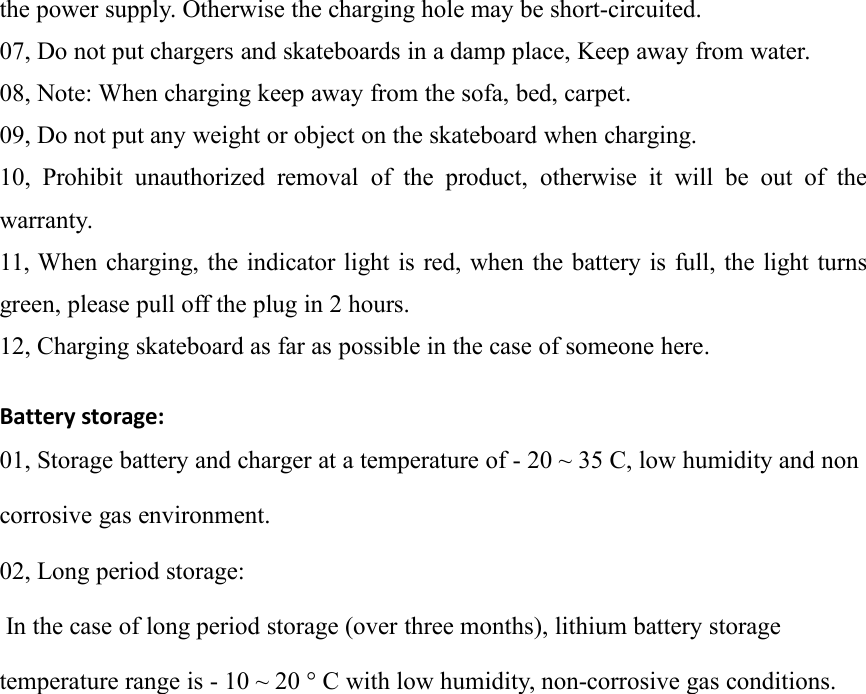
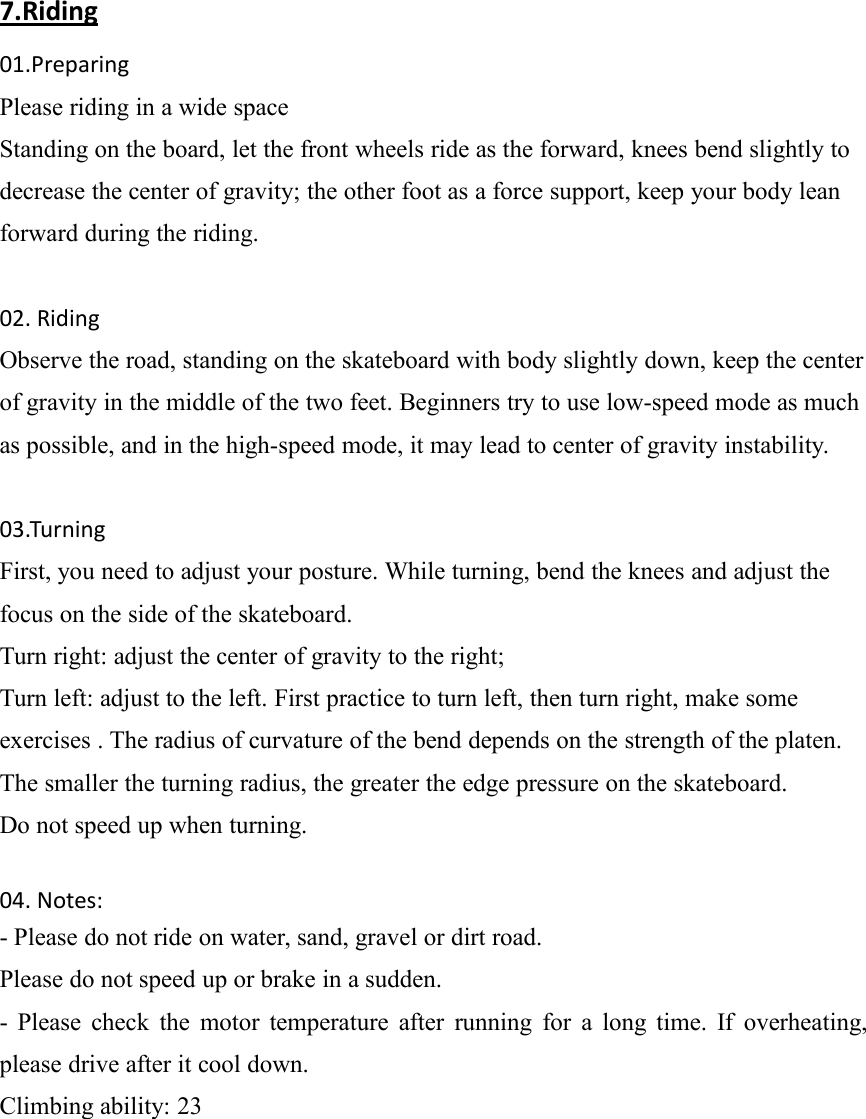
7.Riding01.PreparingPlease riding in a wide spaceStanding on the board, let the front wheels ride as the forward, knees bend slightly todecrease the center of gravity; the other foot as a force support, keep your body leanforward during the riding.02. RidingObserve the road, standing on the skateboard with body slightly down, keep the centerof gravity in the middle of the two feet. Beginners try to use low-speed mode as muchas possible, and in the high-speed mode, it may lead to center of gravity instability.03.TurningFirst, you need to adjust your posture. While turning, bend the knees and adjust thefocus on the side of the skateboard.Turn right: adjust the center of gravity to the right;Turn left: adjust to the left. First practice to turn left, then turn right, make someexercises . The radius of curvature of the bend depends on the strength of the platen.The smaller the turning radius, the greater the edge pressure on the skateboard.Do not speed up when turning.04. Notes:- Please do not ride on water, sand, gravel or dirt road.Please do not speed up or brake in a sudden.- Please check the motor temperature after running for a long time. If overheating,please drive after it cool down.Climbing ability: 23
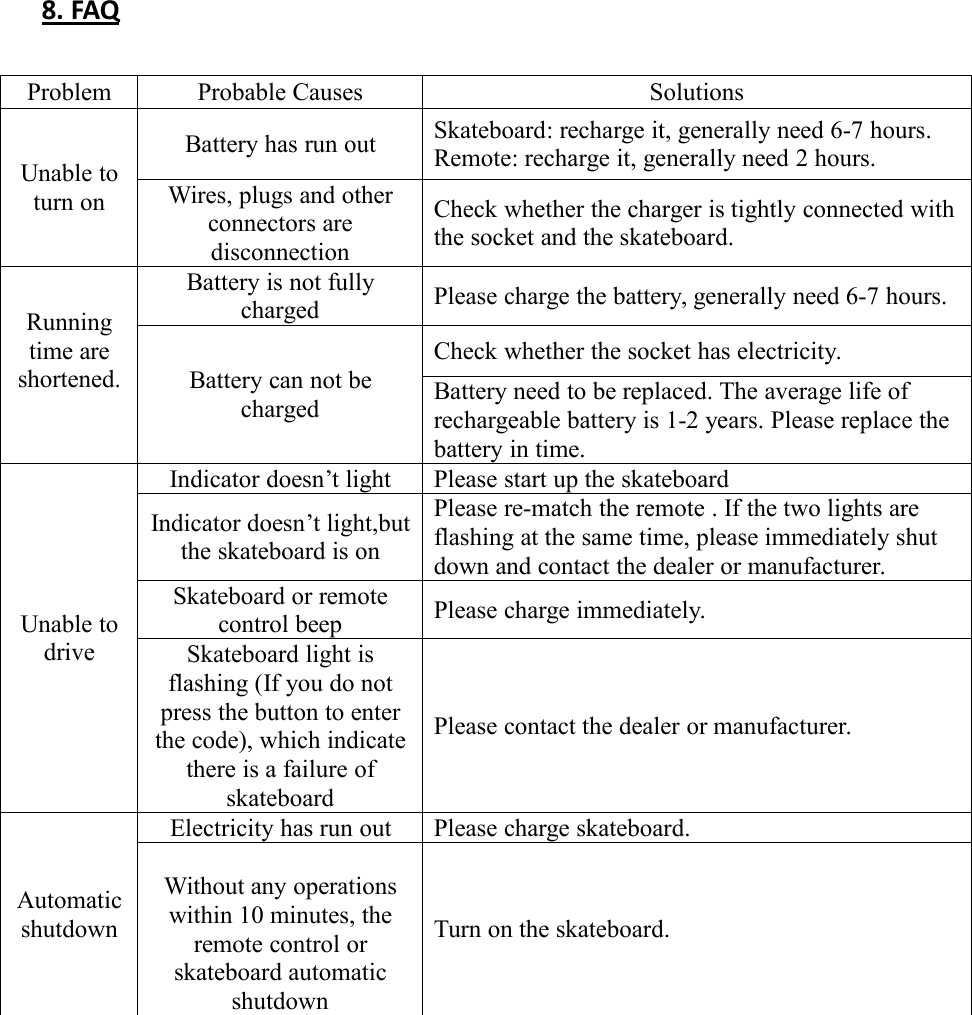
8. FAQProblemProbable CausesSolutionsUnable toturn onBattery has run outSkateboard: recharge it, generally need 6-7 hours.Remote: recharge it, generally need 2 hours.Wires, plugs and otherconnectors aredisconnectionCheck whether the charger is tightly connected withthe socket and the skateboard.Runningtime areshortened.Battery is not fullychargedPlease charge the battery, generally need 6-7 hours.Battery can not bechargedCheck whether the socket has electricity.Battery need to be replaced. The average life ofrechargeable battery is 1-2 years. Please replace thebattery in time.Unable todriveIndicator doesn’t lightPlease start up the skateboardIndicator doesn’t light,butthe skateboard is onPlease re-match the remote . If the two lights areflashing at the same time, please immediately shutdown and contact the dealer or manufacturer.Skateboard or remotecontrol beepPlease charge immediately.Skateboard light isflashing (If you do notpress the button to enterthe code), which indicatethere is a failure ofskateboardPlease contact the dealer or manufacturer.AutomaticshutdownElectricity has run outPlease charge skateboard.Without any operationswithin 10 minutes, theremote control orskateboard automaticshutdownTurn on the skateboard.
9.WarrantyFrom the date of purchase, you can enjoy a year warranty service.Within the warranty period, for reasons below, a charge will be made:1. Tires and belts are consumables, so they are not included in the warranty.2. Human caused breakdown for wrongly operation without complying with theinstruction manual.3. Breakdown caused by wrongly maintain, keep without complying with theinstruction manual.4. Damage caused by self disassembling, repairing and refitting.5. During operation, damaged caused by the foreign matters entering the motor.6. After the modification, original product specifications be changed, reloading withother brands of parts.7. Damage, breakdown caused by natural disasters (Fire, earthquake, lightning, waterdisaster etc.)8. Damage caused by wading.Spare PartsPlease correctly use the parts supplied by the manufacturer. Using inferior parts willshorten the service life of skateboard.
FCC Caution: This device complies with part 15 of the FCC Rules. Operation is subject to the following two conditions: (1) This device may not cause harmful interference, and (2) this device must accept any interference received, including interference that may cause undesired operation. Any Changes or modifications not expressly approved by the party responsible for compliance could void the user's authority to operate the equipment. Note: This equipment has been tested and found to comply with the limits for a Class B digital device, pursuant to part 15 of the FCC Rules. These limits are designed to provide reasonable protection against harmful interference in a residential installation. This equipment generates uses and can radiate radio frequency energy and, if not installed and used in accordance with the instructions, may cause harmful interference to radio communications. However, there is no guarantee that interference will not occur in a particular installation. If this equipment does cause harmful interference to radio or television reception, which can be determined by turning the equipment off and on, the user is encouraged to try to correct the interference by one or more of the following measures: -Reorient or relocate the receiving antenna.-Increase the separation between the equipment and receiver.-Connect the equipment into an outlet on a circuit different from that to which thereceiver is connected.-Consult the dealer or an experienced radio/TV technician for help.

Navigation menu