Dongguan Jin wen hua digital technology HX-P270 Daze speaker User Manual
Dongguan Jin wen hua digital technology Co., LTD. Daze speaker
User Manual
AOK UI INTRUCTION for HX-P270
TABLE OF CONTENT
Changehistory…………………………………………………………………………………………………………………………………………………………………………………2
1. Productsetting…………………………………………………………………………………………………………………………………………………………………………………2
2. Systemfeedback………………………………………………………………………………………………………………………………………………………………………………4
3. Productstates………………………………………………………….………………………………………………………………………………………………………………………6
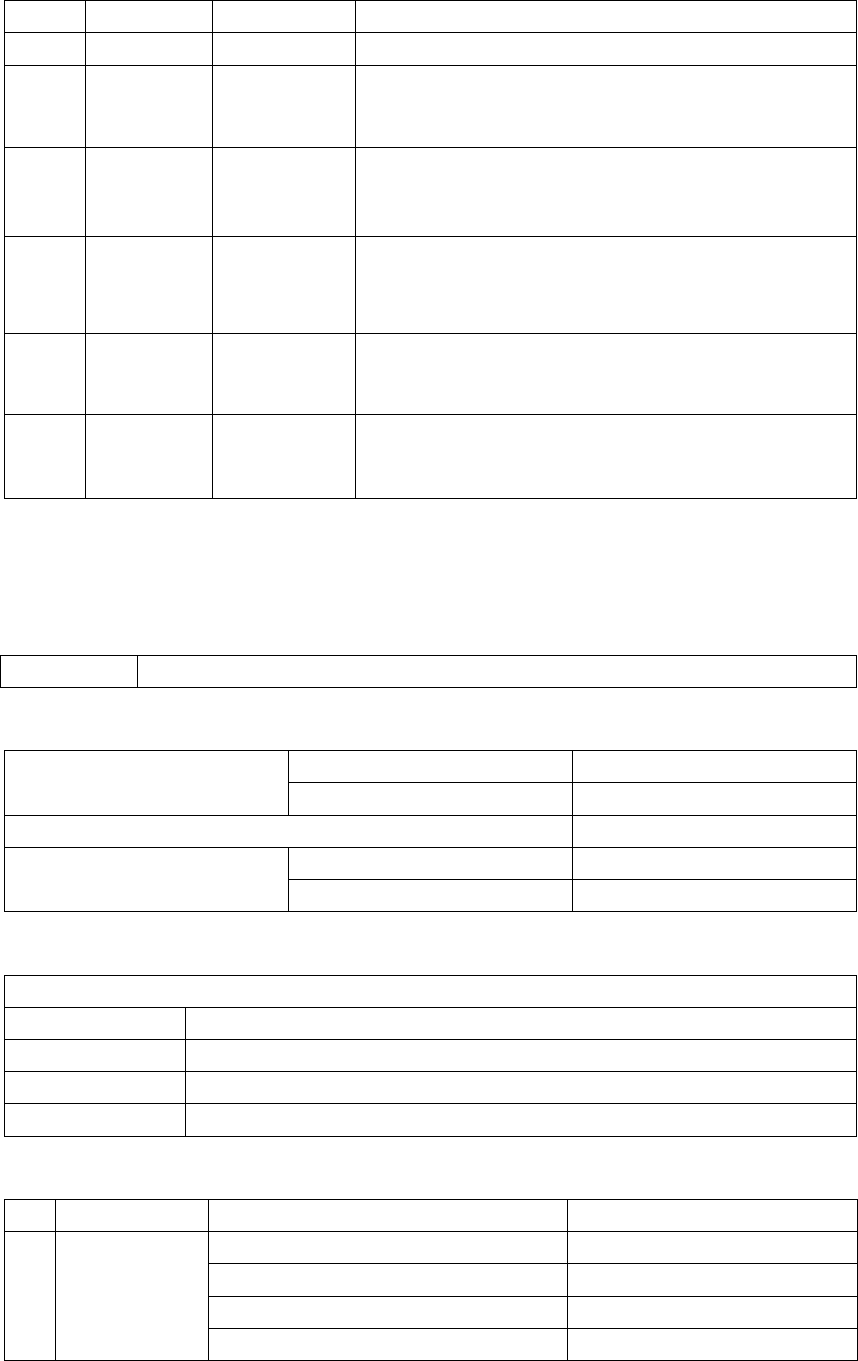
Change History
Issue Date Handle by Comments
00 July-30-2015 Mir xie First release
1. Productsetting:buttons,LEDs,Audiosources
2.1 Buttons and switches and Touch, the systems have below buttons:
Button Power switch button, MFB, Vol+, Vol-, LED display functional button
2.2 Connection of Power and audio system, the system has the following connection:
Audio port
In Aux-in
Out -
Data port -
Power port
In DC jack
Out USB out for charging
2.3 Button press Type and Duration. The following table describes how the buttons react and describes timing constraints
Button pressing time
Press type Duration(Seconds)
Short press X<0.5
Long press 2<x<3
Press & hold -
2.4 Feature List
#CategoryFeatureValue
1 OutoftheBox/After
FactoryReset
Totalvolumelevel 16steps
Defaultvolumelevel 10steps(equalto60%volume)
Defaultaudiosource BT,
Durationforvolumetochangefrommintomax <16seconds

Rememberpreviousaudiosource NO
RememberpreviousconnectedBTdevices Yes,IfAuxisnotconnected,alwaysreconnect
withlastdevicewhichconnectedduringpower
up
Rememberpreviousvolumelevel Yes(onlyifvolume<60%,usepreviousvolume,
elseuse60%)
2 Powermode SupportsBatteryMode? Yes
Charginghour Within2hours
Playbackhour 4.2hoursat70%volumewithoutLEDlighting
2.5hoursat70%volumewithLEDlighting
AC Mode No
Externalchargingsourcing Yes(USB,Powerbank,etc.)
3 Batterymode Batterymanagement i.Healthy:X>10%
ii.Low:0<X≤10%
‐Lowbatteryindicationavailable(RedLED
flashingwarning)
‐whenX>95%chargingRedLEDoff
iii.Critical:X=0%
‐DUToff.
4 Connection Audioinput Auxin,BTaudio
Audiooutput No
Physicalbuttonforaudioswitch Nospecialbuttonavailable
Autoaudioswitchfeature Aux‐inaudiosourceprioritytoBTaudio.
5 ERP(Energy related
product)compliance
AutoStandby No
AutoStandbyDuration No
PowerconsumptiontomeetERP <0.3W
Autoshutoffwithoutpaired NO
6 Reset FactoryReset Not
HardwareReset Yes
7 Bluetoothconnectivity Bluetoothnaming HX‐P270
Wirelessrange 10m
Supportedaudiocodec SBC
Supportedprofiles A2DP,AVRCPsoon
#ofsupporteddeviceinpairinglist 1paireddevicerecorded
SupportsDualdevices NO
Volumesync No
BT Pairing duration Within1minutes
BT Reconnect duration Power up = 2sec
Link lost = 10sec
BT reconnect method (single device or all devices)
Power up = attempt reconnect to same device.
Link lost = attempt reconnect to same device
twice, each time for 10 seconds
8 PC compatibility Windows version No information
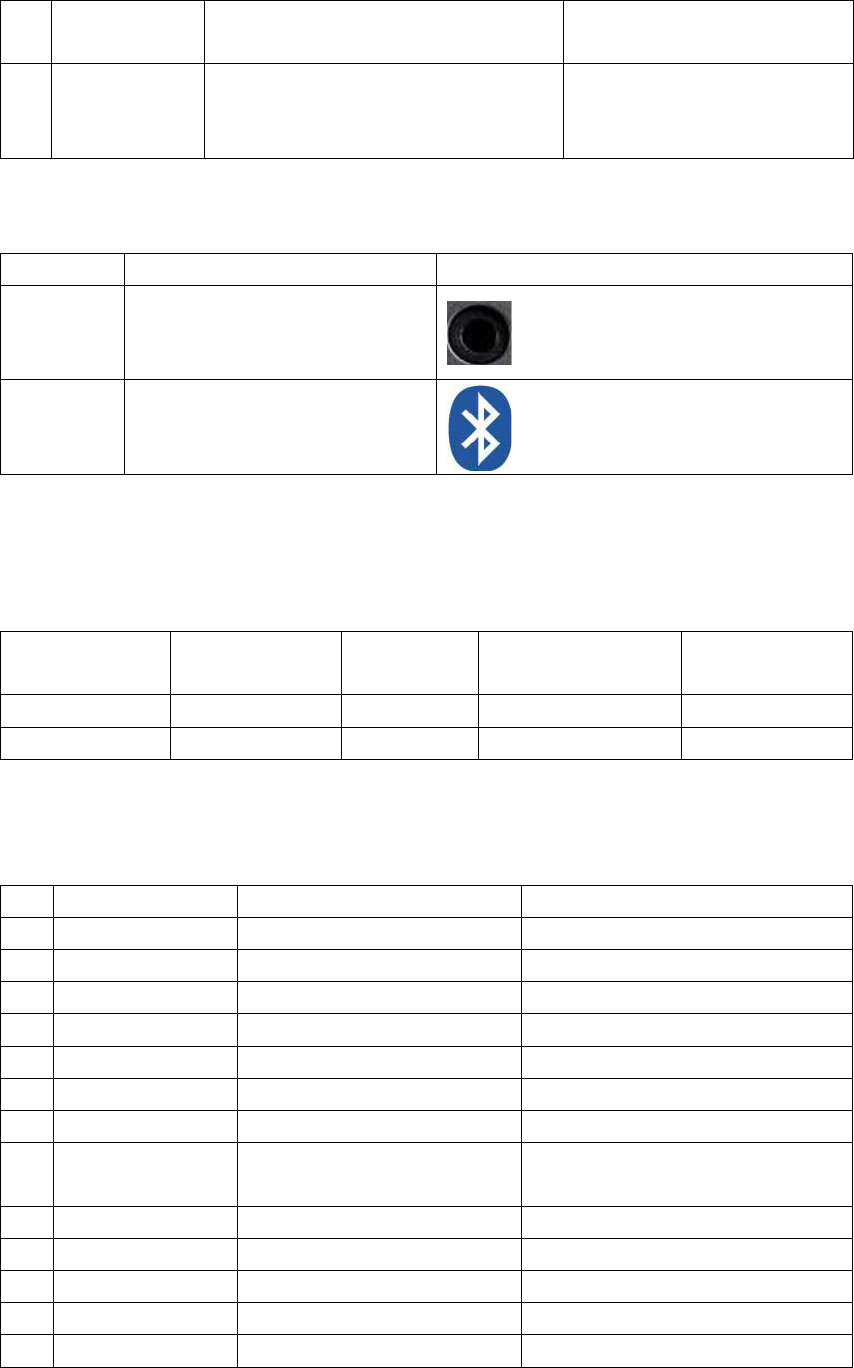
Mac version
MacBook (Pro, Air) with OS X 10.8.2 or later
9 Phone device
compatibility
Phone model with OS version
iPod touch (2-5 Gen), iPod Nano (7 Gen),
iPhone (6,5, 4s, 4, 3Gs, 3G), iPad (1, 2, 3, 4,
mini 1, 2),
2.5Audiosource,AvailableaudiosourceInput:
# Audio input Image
1 Line(3.5mm)In
2 Bluetooth
2.6 Available Audio Source Output: No audio output
Sequence & Priority
The audio source switch command shall allow DUT to switch sources using the following priority and sequence:
Priority Audio input Sequence Default Manual/Automatic
switch
1 Line(3.5mm)In Lineinis1st ForSpeakerisdefault. NA
2 Bluetooth BTis2ndSpeaker,isdefault NA
2. SYSTEM FEEDBACK
3.1 The system has the following indicators, list of Audio Indications. (Prompt tone)
# Indicator Description File Name
1 Power on Switch on Provide by HMDX
2 Power down using or Switch off No
3 Auto power off No Bluetooth connection and Audio input No
4 Low battery warning The batter low 3.5 Volts No
5 BT Pairing started Blue LED flashing No
6 BT pairing successfully Blue LED stable Provided by HMDX
7 BT pairing timeout Blue LED flashing No
8 BT disconnect manually After pressing PP button and then enter into
paring status
Provided by HMDX
9 BT disconnect – link lost Entering into paring status No
10 BT reconnect successful As pairing successful Provided by HMDX
11 BT reconnect timeout Entering into paring status No
12 Max volume reached Reminder Provided by HMDX
13 Min volume reached no No
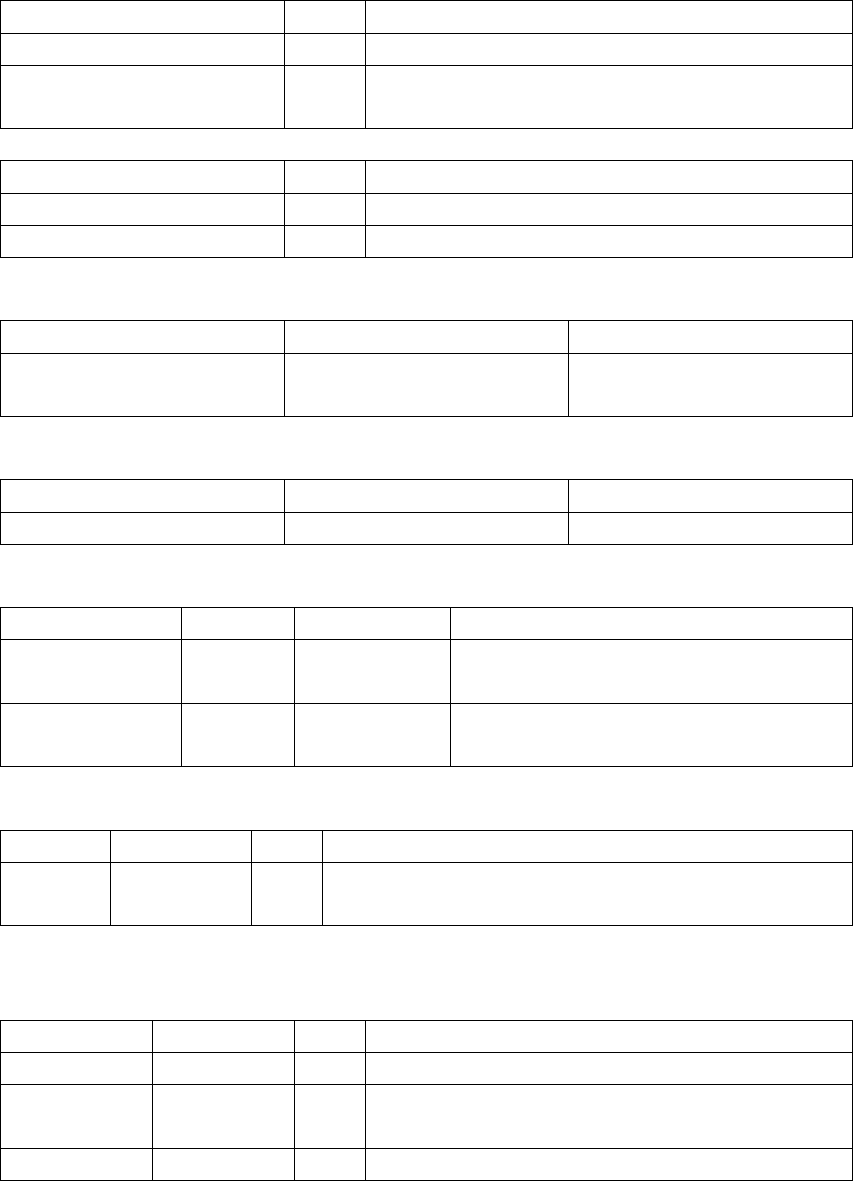
3.2 List of Physical Visual Indications
Product off, USB connected
Indicator color Description
Product LED null off
Charging LED ● Solid as long as charging. Off when charging complete
Power off and USB not connected
Indicator color Description
Product LED null off
Charging LED null off
Powering up
Indicator color Description
Product LED
●
On
Powering down
Indicator color Description
Product LED null off
Product on
Event indicator color Description
Aux audio source Product LED ● Aux as active audio source
BT audio source Product LED ● 1. At Re-connect or Pairing mode, Product LED flashing
2. After paired, product LED lighting stable
Charging mode
EventIndicatorcolorDescription
ChargingChargingLED ● Solidaslongascharging.Offwhenchargingcomplete.
Battery mode
Event indicator color Description
Battery healthy Charging LED null Charging LED off, not required
Battery low Product LED ● Flashing 1 sec on, 1 sec off until USB cable is inserted or battery died.
Battery critical All LEDs null Off, device is off.
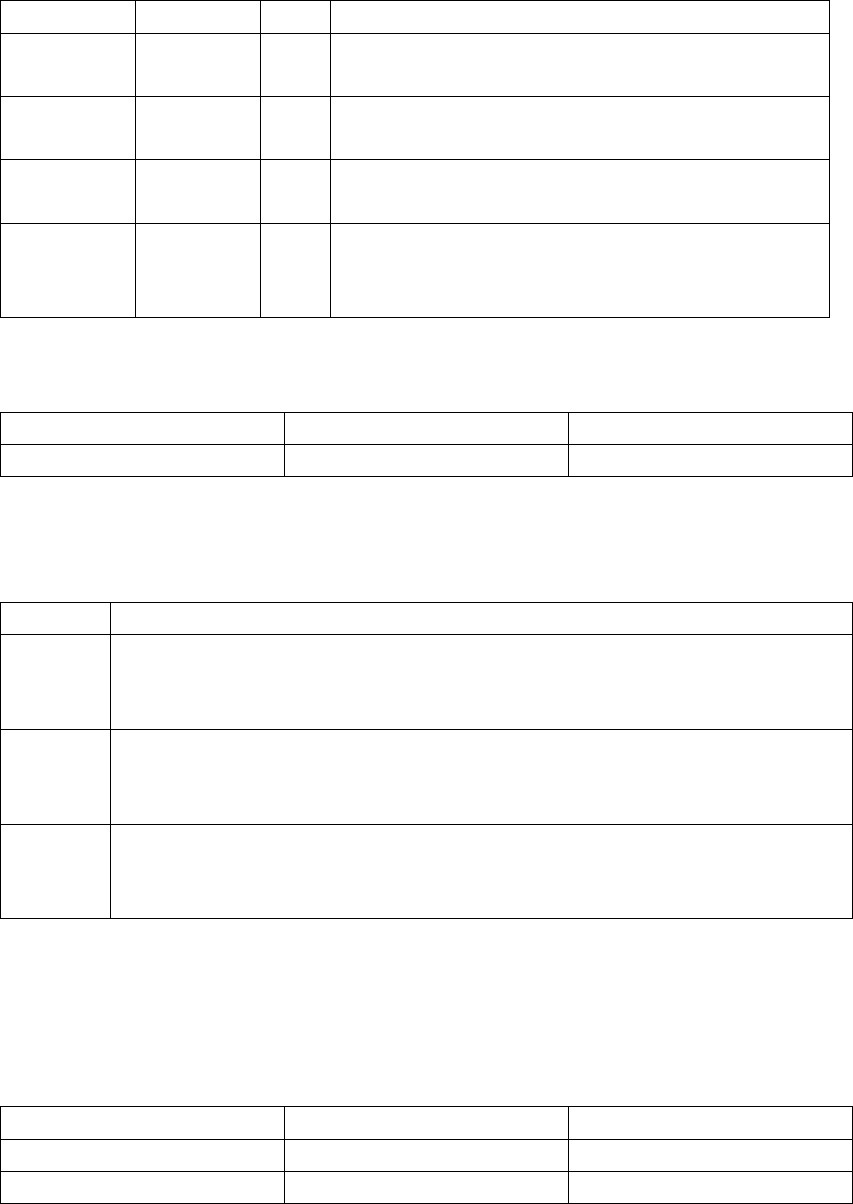
BT activity (The Flashing LED 0.2 seconds on and 0.2 seconds off)
Event indicator color Description
BTnotactiveProductLED ● Auxasactiveaudiosource.
BTpairingProductLED ● Speaker:BlueLEDSlowflashing(0.2secon,0.2secoff)for2minoruntil paired
successfully.
BTconnectedProductLED ● Speaker:BlueLEDstableon
BTdisconnectingProductLED ● PressingVol+andVolsimultaneouslyfor5seconds,disconnectcurrentBTdevice,
enterintopairingmode
Speaker:BlueLEDflashing0.2secon,0.2secoffuntilpairedsuccessfully.
Factory Reset
indicator color Description
Product LED null Unknown
3. Product status
State Description
Off Details: When device is Off without USB connected or Power button switch off (MCU off, Amp off, charging off, BT off,)
To Enter: Removed USB cable and battery off
To Exit: Insert USB cable charging
On Details: Device is on (MCU on, Amp on, charging on, BT on – connectable)
To Enter: Power on
To Exit: Power off
BT on Details: Device is on (MCU on, Amp on, charging on, BT on – discoverable, connected, connecting)
To Enter: BT activity in progress
To Exit: Power off
Key Assignment
Power switch
States vs Press type On position Off position
On Power on /
Off / Power off
Play/Pause
States vs Press type SP (<0.5) LP >2~3s)
Off Try me No response
On Play or pause No response
On-aux inserted Play or pause No response.
BT on power up reconnect No response, Continue BT re-connecting No response
BT on pairing No response. Continue BT Pairing No response.
BT on connected Play/pause No response
Brightness control
States vs Press type SP (<0.5) LP >2~3s)
Off No response No response
On Change Brightness in turn No response.
On-aux inserted Change Brightness in turn No response
BT on power up reconnect Change Brightness in turn No response
BT on pairing Change Brightness in turn No response
BT on connected Change Brightness in turn No response
<Vol+> or <Vol->
States vs Press type SP (<0.5) LP >2~3s)
Off No response No response
On Change volume by 1 step. No response
On-aux inserted Change volume by 1 step Change volume continuously.
BT on power up re-connect Change volume by 1 step. No response
BT on pairing Change volume by 1 step. No response
BT on connected Change volume by 1 step. next or previous
Vol+ and Vol- pressing at the same time No response Disconnect current BT, enter into
pairing mode.
4. UI
Refer to “SPC-0028 - HMDX Controls Logic Specification - Bluetooth Loudspeakers(D)” for the UI flow chart
5. FCC Statement
This equipment has been tested and found to comply with the limits for a Class B
digital device, pursuant to part 15 of the FCC rules. These limits are designed to
provide reasonable protection against harmful interference in a residential installation.
This equipment generates, uses and can radiate radio frequency energy and, if not
installed and used in accordance with the instructions, may cause harmful interference
to radio communications. However, there is no guarantee that interference will not
occur in a particular installation. If this equipment does cause harmful interference to
radio or television reception, which can be determined by turning the equipment off
and on, the user is encouraged to try to correct the interference by one or more of the
following measures:
-Reorient or relocate the receiving antenna.
-Increase the separation between the equipment and receiver.
-Connect the equipment into an outlet on a circuit different from that to which the
receiver is connected.
-Consult the dealer or an experienced radio/TV technician for help.
To assure continued compliance, any changes or modifications not expressly
approved by the party.
Responsible for compliance could void the user’s authority to operate this
equipment. (Example- use only shielded interface cables when connecting to
computer or peripheral devices).
This equipment complies with Part 15 of the FCC Rules. Operation is subject to
the following two conditions:
(1) This device may not cause harmful interference, and
(2) This device must accept any interference received, including interference that
may cause undesired operation.
RF warning statement:
The device has been evaluated to meet general RF exposure requirement. The
device can be used in portable exposure condition without restriction.
IC Statement
- English: "
This device complies with Industry Canada licenceexempt
RSS standard(s). Operation is subject
to the following two conditions: (1) this device may not cause interferenc
e, and (2) this device
must accept any interference, including interference that may cause und
esired operation of the device."
- French:"
Le présent appareil est conforme aux CNR d'Industrie Canada applicable
s aux appareils radio
exempts de licence. L'exploitation est autorisée aux deux conditions suiv
antes : (1) l'appareil ne
doit pas produire de brouillage, et (2) l'utilisateur de l'appareil doit accept
er tout brouillage
radioélectrique subi, même si le brouillage est susceptible d'en comprom
ettre le fonctionnement."