EC Electronics 8300A EC BT-8300 Bluetooth CCD Scanner User Manual
EC Electronics, Limited EC BT-8300 Bluetooth CCD Scanner
User Manual
Wireless Barcode Scanner
(For 1D & 2D)
USER MANUAL

V2.0
User Manual For 1D&2D Wireless Scanner
Introduction:
This Wireless barcode scanner base in Bluetooth 2.0.
Erognomically Designed,Flow linear appearance,Equipped
with rechargeable base,3V battery,The batteries no memory
function,It can be repeated charge,If the battery have not be
used for a long time,power consumption will not be
consumed,fully guarantee the stability of data.
This wireless barcode scanner base in USB 3.0,It can transmit
data in hight-speed。
This wireless barcode scanner have flash-rom,It can save data
when the scanner not connect base station or terminal。
It can transmit 150m
Hight-performance 1D or 2D scan engine,It can read barcode
speedy。

Used ITT switch,it can be used 1000 million time。
Buit-in alarm by beep。
It can connect with Apple ,android and PC。
User Manual For 1D&2D Wireless Scanner
Performance and parameters:
Performance
Scan speed: 500pcs/s
resolution: 4mil
light source: White LED
Aiming light source: Red LED
Scan view field: 360
Flashrom: 8M
Transmission distance: 100m
Bluetooth : Bluetooth 2.0
Working model: one-to-many or many-to-one

battery: 1100mA
interface: USB
read elevation angle:+65 ,-65
read bevel angle:+60,-60
read error rate: 1/5000000
physics preference
User Manual For 1D&2D Wireless Scanner
Size: Scanner:180X70X80(mm) ;Base:125x125x50(mm)
weight: scanner: 180g; base:150g
cable length: 1.5m
electrical parameters
CMOS: 640x480
Input voltage: DC 5V,1000mA
power: max 430mA

environmental parameter
work temperature: -40~+70
storage temperature: -40 ~+70
illumination: read in sun or lamp
shork strength: 1.5m free-fall in floor
safety approval
electrcal: UL,UL60950-1,2
IP : IP54
environmental: ROHS,CE,FCC
User Manual For 1D&2D Wireless Scanner
User manual and attention:
Befor use barcode scanner,please read this manual carefully
This barcode scanner is wireless scanner,include scanner and
base station,it be setted default by factory。
This manual barcode is setting barcode ,not test barcode,please

don’t scan the barcode to test
If you want to set other function ,please contact factory or
agents。
Please handle with care。
If you want to get detailed manual ,pleas contact factory or
agents。
User Manual For 1D&2D Wireless Scanner
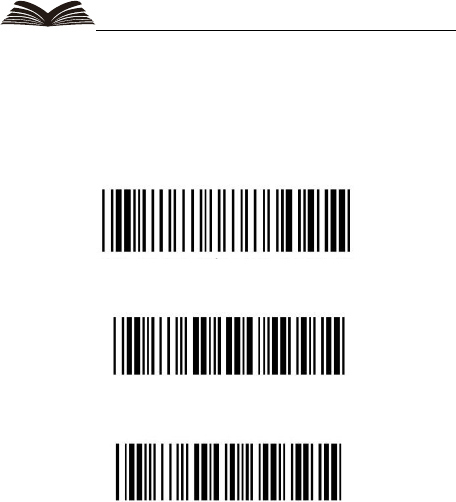
Reset to default:
If this barcode scanner can not transmit data to base or terminal,
you can scan below barcode(For 2D scanner)

Reset (Set default)
(enable transmite data)
(transmite rate 9600)
User Manual For 1D&2D Wireless Scanner
Reset to default:
If this barcode scanner can not transmit data to base or terminal,
you can scan below barcode(For 1D scanner)
Reset (Set default)
(enable transmite data)
(transmite rate 9600)

User Manual For 1D&2D Wireless Scanner
Instruction for Bluetooth pair mode
Scanners pair with receiver base(both of our company)
1. Scan “Enter settings”
2. Scan”open a SPP channel”
3. Scan “disconnect previous connection
4. Scan”receiver MAC address code”
5. Scan “finished SPP Bluetooth setting”
Many-to-one mode” scan the barcodes aboved orderly
Scanners pair with any bluetooth
Receiver(PC)
1) HID mode
1. Scan”Enter Settings”
2. Scan”open a Hid channel”
3. Scan”disconnect previous connection”
4. Scan “setting Bluetooth module as visible”

5. Scan” finished hid setting
Search for Bluetooth pairing in the computer end,if the last
connections is hid mode ,automatic reconnect with previous
adapter after a restart
User Manual For 1D&2D Wireless Scanner
2) Spp mode:
1. scan”enter setting”
2. scan”open spp channel”
3. scan”disconnect previous connection”
4. scan”setting Bluetooth modules as visible”
3) disconnect and reconnect function
the module supports disconnect and reconnect function. Applies to the
following conditions:
power off,out of fange lead to the disconnect and the adapter
unplugged:
1. power off: after a restart ,the module will automatically reconnect

a paired adapter and keep the last connection working
status:hid,spp
2. out of range leads to disconnect: re come within a reasonable
distance,the module automatically reconnect the adapter.
3. The adapter unplugged:module automatically ,searches
adapter,when you plug the adapter,it will automatically reconnect
successfully .need an adapter plugged into the same computer.
User Manual For 1D&2D Wireless Scanner
4. The default password is:0000
5. Mobile end paired same as pc terminal only need scan”open
randomcodes configuration automatically “ and “open random
codes quick.paired’.
Enter setting

Disconnect previous connect
User Manual For 1D&2D Wireless Scanner
Open a HID channel
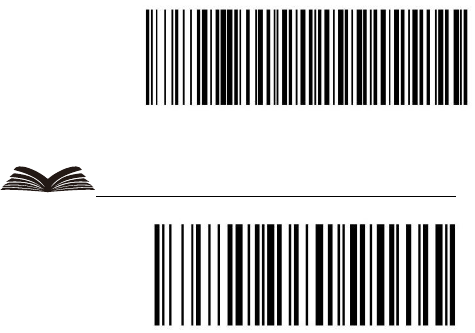
Open a SPP channel
User Manual For 1D&2D Wireless Scanner
Setting Bluetooth module as visible

Auto reconnection
User Manual For 1D&2D Wireless Scanner
Finished HID Bluetooth settings

Finished spp Bluetooth settings

User Manual For 1D&2D Wireless Scanner
Open random codes
confirmation automatically
Open random code
Quick paired

User Manual For 1D&2D Wireless Scanner
Bluetooth receiver languages setting
USA
UK

User Manual For 1D&2D Wireless Scanner
Bluetooth receiver languages setting
France

Italy
User Manual For 1D&2D Wireless Scanner
Belgium

Germany
User Manual For 1D&2D Wireless Scanner
spain

Turkey-f
WIRELESS BARCODE SCANNER
USER MANUAL
(VER 2.0)
This device complies with Part 15 of the FCC Rules. Operation is subject
to the following two
conditions: (1) this device may not cause harmful interference, and (2)
this device must accept any
interference received, including interference that may cause undesired
operation.
Changes or modifications not expressly approved by the party
responsible for compliance could
void the user's authority to operate the equipment.
NOTE: This equipment has been tested and found to comply with the
limits for a Class B digital
device, pursuant to Part 15 of the FCC Rules. These limits are designed to
provide reasonable
protection against harmful interference in a residential installation. This
equipment generates, uses
instructions, may cause harmful interference to radio communications.
However, there is no
guarantee that interference will not occur in a particular installation. If
this equipment does cause
harmful interference to radio or television reception, which can be
determined by turning the
equipment off and on, the user is encouraged to try to correct the
interference by one or more of
the following measures:
-- Reorient or relocate the receiving antenna.
-- Increase the separation between the equipment and receiver.
-- Connect the equipment into an outlet on a circuit different from that
to which the receiver is
connected.
-- Consult the dealer or an experienced radio/TV technician for help.