ELPRO Technologies ELP905K Spread Spectrum Radio Modem User Manual Ammended re professional installation
ELPRO Technologies Pty Ltd Spread Spectrum Radio Modem Ammended re professional installation
Contents
- 1. User manual
- 2. Professional installation details
- 3. Yagi antenna with CC20 900 cable
- 4. RF exposure information
- 5. Ammended user manual re professional installation
Ammended user manual re professional installation

ELPRO Technologies Pty Ltd, 9/12 Billabong Street, Stafford Q 4053, Australia.
Tel: +61 7 33524533 Fax: +61 7 33524577 Email: sales@elpro.com.au
Web: www.elpro.com.au
User Manual
905U- K Radio Telemetry Module

905U-K Radio Telemetry Module User Manual
ELPRO Technologies Pty Ltd 2001 Page 2
Thank you for your selection of the 905U-K module for your telemetry
needs. We trust it will give you many years of valuable service.
ATTENTION!
Incorrect termination of supply wires may
cause internal damage and will void warranty.
To ensure your 905U-K enjoys a long life,
double check ALL your connections with
the user’s manual
before turning the power on.
CAUTION!
For continued against risk of fire, replace the module fuse F1 only with the same type and rating
This device should not be operated within 8 inches (20cm) of people in accordance with CFR 47 Section
1.1307
DO NOT:
• operate the transmitter when someone is within 20 cm of the antenna
• operate the transmitter unless all RF connectors are secure and any open connectors are properly terminated.
• operate the equipment near electrical blasting caps or in an explosive atmosphere
All equipment must be properly grounded for safe operations. All equipment should be serviced only by a
qualified technician.

905U-K.MAN Rev. 1.1 January 2002
ELPRO Technologies Pty Ltd Page 3
FCC Notice: 905U-K Wireless IO Module
This user’s manual is for the ELPRO 905U-K wireless module. This device complies with Part
15.247 of the FCC Rules.
Operation is subject to the following two conditions:
1) This device may not cause harmful interference and
2) This device must accept any interference received, including interference that may
cause undesired operation.
This device must be operated as supplied by ELPRO Technologies. Any changes or
modifications made to the device without the written consent of ELPRO Technologies may
void the user’s authority to operate the device.
This device MUST be installed by Professional Radio and Antenna personnel. Standard
antenna cables, and antennas must be used, these are available from vendors specified by
ELPRO Technologies. Please contact ELPRO Technologies for end user antenna and
connector recommendations.
Safety Notice:
Exposure to RF energy is an important safety consideration. The FCC has adopted a safety
standard for human exposure to radio frequency electromagnetic energy emitted by FCC
regulated equipment as a result of its actions in Docket 93-62 and OET Bulletin 65 Edition
97-01.

905U-K Radio Telemetry Module User Manual
ELPRO Technologies Pty Ltd 2001 Page 4
Important Notice
ELPRO products are designed to be used in industrial environments, by experienced
industrial engineering personnel with adequate knowledge of safety design considerations.
ELPRO radio products are used on unprotected license-free radio bands with radio noise and
interference. The products are designed to operate in the presence of noise and interference,
however in an extreme case, radio noise and interference could cause product operation
delays or operation failure. Like all industrial electronic products, ELPRO products can fail
in a variety of modes due to misuse, age, or malfunction. We recommend that users and
designers design systems using design techniques intended to prevent personal injury or
damage during product operation, and provide failure tolerant systems to prevent personal
injury or damage in the event of product failure. Designers must warn users of the equipment
or systems if adequate protection against failure has not been included in the system design.
Designers must include this Important Notice in operating procedures and system manuals.
These products should not be used in non-industrial applications, or life-support systems,
without consulting ELPRO Technologies first.
1. For 905U modules, a radio licence is not required in many countries, provided the
module is installed using the antenna and equipment configuration complying with the
country’s regulations.. Check with your local distributor for further information on
regulations.
2. For 905U modules, operation is authorised by the radio frequency regulatory authority
in your country on a non-protection basis. Although all care is taken in the design of
these units, there is no responsibility taken for sources of external interference. The
905U intelligent communications protocol aims to correct communication errors due to
interference and to retransmit the required output conditions regularly. However some
delay in the operation of outputs may occur during periods of interference. Systems
should be designed to be tolerant of these delays.
3. To avoid the risk of electrocution, the antenna, antenna cable, serial cables and all
terminals of the 905U/105S module should be electrically protected. To provide
maximum surge and lightning protection, the module should be connected to a suitable
earth and the antenna, antenna cable, serial cables and the module should be installed
as recommended in the Installation Guide.
4. To avoid accidents during maintenance or adjustment of remotely controlled
equipment, all equipment should be first disconnected from the 905U/105S module
during these adjustments. Equipment should carry clear markings to indicate remote
or automatic operation. E.g. "This equipment is remotely controlled and may start
without warning. Isolate at the switchboard before attempting adjustments."
5. The 905U/105S module is not suitable for use in explosive environments without
additional protection.

905U-K.MAN Rev. 1.1 January 2002
ELPRO Technologies Pty Ltd Page 5
Limited Warranty, Disclaimer and Limitation of
Remedies
ELPRO products are warranted to be free from manufacturing defects for a period of 2 years
from the effective date of purchase. The effective date of purchase is decided solely by
ELPRO Technologies.
This warranty does not extend to:
- failures caused by the operation of the equipment outside the particular product's
specification, or
- use of the module not in accordance with this User Manual, or
- abuse, misuse, neglect or damage by external causes, or
- repairs, alterations, or modifications undertaken other than by an authorised Service
Agent.
ELPRO’s liability under this warranty is limited to the replacement or repair of the product.
This warranty is in lieu of and exclusive of all other warranties. This warranty does not
indemnify the purchaser of products for any consequential claim for damages or loss of
operations or profits and ELPRO is not liable for any consequential damages or loss of
operations or profits resulting from the use of these products. ELPRO is not liable for
damages, losses, costs, injury or harm incurred as a consequence of any representations,
warranties or conditions made by ELPRO or its representatives or by any other party, except
as expressed solely in this document.

905U-K Radio Telemetry Module User Manual
ELPRO Technologies Pty Ltd 2001 Page 6
905U-K Radio Telemetry Module
USER MANUAL
LIMITED WARRANTY, DISCLAIMER AND LIMITATION OF REMEDIES-------------5
1 OVERVIEW------------------------------------------------------------------------------------------8
1.1 AVAILABLE MODELS.......................................................................................8
1.2 INPUT SIGNALS..............................................................................................8
1.3 POWER SUPPLY............................................................................................9
1.4 RADIO TRANSMITTER .....................................................................................9
1.5 CONFIGURATION ...........................................................................................9
2 OPERATION --------------------------------------------------------------------------------------10
2.1 NORMAL OPERATION ................................................................................... 10
2.2 WHAT INFORMATION IS TRANSMITTED OVER THE RADIO? .................................. 10
2.3 HOW OFTEN IS THE INPUT INFORMATION SENT BY RADIO?.................................. 10
2.3.1 Digital Inputs ....................................................................................... 11
2.3.2 Pulse Inputs ........................................................................................ 11
2.3.3 Analogue Inputs................................................................................... 12
2.3.4 Setpoint Status.................................................................................... 13
2.3.5 Low Battery Voltage Alarm................................................................... 13
2.3.6 Communications Failure...................................................................... 14
2.4 HOW TO DESIGN A REMOTE MONITORING SYSTEM........................................... 14
2.4.1 Achieving reliable radio transmission ................................................... 14
2.4.2 How far will the radio transmit? ............................................................ 15
2.5 CALCULATING POWER CONSUMPTION............................................................ 15
3 HARDWARE INSTALLATION ---------------------------------------------------------------18
3.1 HOW TO MOUNT THE 905U-K ........................................................................ 19
3.2 ANTENNA INSTALLATION ............................................................................... 19
3.3 CONNECTION PLUG...................................................................................... 23
3.4 POWER SUPPLY INSTALLATION...................................................................... 24

905U-K.MAN Rev. 1.1 January 2002
ELPRO Technologies Pty Ltd Page 7
3.4.1 External Power.................................................................................... 24
3.5 INPUT SIGNAL CONNECTIONS ........................................................................ 24
3.5.1 Digital/Pulse Inputs.............................................................................. 24
3.5.2 Shaft Encoder Connections.................................................................. 26
3.5.3 RS232 serial port................................................................................. 26
4 CONFIGURATION-------------------------------------------------------------------------------28
4.1 I/O MAPPING .............................................................................................. 29
4.2 UPDATE TRANSMISSION TIMES...................................................................... 29
4.3 DIGITAL INPUTS........................................................................................... 30
4.4 ANALOGUE INPUT......................................................................................... 30
4.5 ANALOG SETPOINTS .................................................................................... 31
4.6 PULSE INPUTS............................................................................................. 31
4.7 NUMBER OF TRANSMISSIONS ........................................................................ 33
4.8 PROGRAMMING CONFIGURATIONS TO MODULES.............................................. 33
4.9 LOADING CONFIGURATION FROM A MODULE.................................................... 34
4.10 PRINT OPTIONS .......................................................................................... 34
5 TROUBLESHOOTING--------------------------------------------------------------------------35
6 SPECIFICATIONS-------------------------------------------------------------------------------36

905U-K Radio Telemetry Module User Manual
ELPRO Technologies Pty Ltd 2001 Page 8
1 OVERVIEW
The 905U-K radio telemetry module is an economical solution for the remote monitoring of
process signals. The 905U-K can connect to digital, pulse or analogue signals from process
transducers, and transmit these signal values by radio.
Although the 905U-K is intended to be simple in its application, it also provides many
sophisticated features. This manual should be read carefully to ensure that the modules are
configured and installed to give reliable performance. The 905U-K uses the 905U module as a
receiver, or repeater. If you have not used 905U modules before, please read the 905U User
Manual prior to reading this manual.
The 905U-K module is a monitoring only unit - that is, it will only accept input signals and
does not provide output signals. The 905U-K has an internal radio transmitter; it does not
have a receiver to receive messages from another module.
The 905U-K transmits the value of an input signal whenever the signal changes, and also after
a pre-configured time. Each transmission message includes error-checking to confirm the
validity of the message. At each transmission, the 905U-K may be configured to repeat the
transmission several times to ensure that the transmission is received correctly. This is
important if the radio path is marginal (that is, the radio signal is not strong) or if there is a lot
of radio traffic on the radio channel which may corrupt the 905U-K message. The 905U-K
transmits the input message to a 905U module, which sets an output signal to be the same
value as the 905U-K input, or the 905U passes the input message to another device (PC or
PLC) via its serial port.
For more information on the 905U module, please refer to the 905U User Manual.
1.1 Available Models
The 905U-K has a heavy duty painted aluminium enclosure, weather-proof to NEMA 4.
Signal and power connections to the unit are made via a weatherproof connector at the
bottom of the module. Antenna connection is made using a SMA coaxial connector at the top
of the module.
1.2 Input Signals
The 905U-K model provides two digital/pulse inputs and one analogue input for connecting to
process transducers.
Digital Signals
Examples: motor fault, tank overflow, intruder alarm
Pulse signals - use the same input as the digital input
Examples: electricity metering, fluid flow, raingauge
Analogue continuously variable signals (0-20mA, 4-20mA, 0-10mA, 0 – 5V)
Examples: measured tank level, measured process temperature
Two internal signals may also be transmitted to outputs in the network:
• Setpoint Status (digital signal set or reset depending upon the value of the analogue signal
compared to a high and a low setpoint value configured in the 905U-K)

905U-K.MAN Rev. 1.1 January 2002
ELPRO Technologies Pty Ltd Page 9
• Battery Low Voltage (digital signal set when internal battery voltage is low).
1.3 Power Supply
The power consumption of the 905U-K is very small as it conserves power by reverting to
“sleep” mode between transmissions.
The 905U-K can be powered from an external 12V DC supply, or a 5.4 – 30V battery supply.
The battery supply can be an external battery pack. The 905U-K units provide an internal
alarm on low battery voltage - this alarm may be transmitted by radio for warning purposes.
The low battery alarm indicates that there is approximately 2% of battery capacity left.
1.4 Radio Transmitter
The 905U-K has an internal radio transmitter that operates on unlicensed spread spectrum
radio channels in the 902 - 928MHz UHF band.
It is suitable for use in utility industries such as electricity, water and gas, as well as a cost
effective solution for short range applications in factories and industrial plants.
The transmitter is preset in the factory to suit the unlicensed frequency requirements in each
country. The maximum transmitter power is 1W. In countries where there are no unlicensed
radio channels, a radio licence may be required each time the product is used. Please contact
one of our worldwide distributors for further information.
To extend radio range, 905U modules can be used as repeaters. Up to five repeaters can be
configured for each input-to-output link. The configuration is done at the 905U-K module
where the input signal is - no additional configuration is required at the 905U modules. The
transmitted radio message will include the address of repeater modules - modules with these
addresses will re-transmit the messages.
1.5 Configuration
Each module must be configured before it can be used. Configuration is performed using a
PC (or a laptop computer) connected to the module via the internal RS232 port on the 905U-
K. 905U-K configuration software is required and is provided with each order.
Configuring a module requires the entering of “input mappings” and setting operating
parameters for each input. An “input mapping” links an input signal to an output channel at a
remote module (or a “destination address”). An input mapping is entered for each input signal
(external and internal) which is used.

905U-K Radio Telemetry Module User Manual
ELPRO Technologies Pty Ltd 2001 Page 10
2 OPERATION
2.1 Normal Operation
Once configured using the 905U-K configuration software, the 905U-K module will normally
be in “sleep” mode to conserve power. During sleep mode, the microprocessor controller
powers down, and the analogue loop supply is turned off. The microprocessor will
automatically “wake up” and revert to full operation if a digital/pulse input changes (on to off,
or off to on), or every 0.5 seconds to check if a timed update transmission is due to be sent.
Normal operation of the 905U-K is indicated by a brief flicker of the OK LED light on the
front panel approximately every 10 seconds.
2.2 What information is transmitted over the radio?
The 905U-K modules transmit the value of the input signal in a data frame. The data frame
includes a system address, and the "address" of the transmitting (source) 905U-K module and
the receiving (destination) 905U module, so that each transmitted message is acted on only by
the correct receiving unit. The system address is a common address used by all modules in
the same system. This allows multiple systems to operate within the same radio range without
"cross-talk" between systems.
The user configures these addresses as part of the module configuration. Each transmitted
message also includes error checking to ensure that no corruption of the data frame has
occurred due to noise or interference. If repeater modules are being used, then the addresses
of these intermediate modules are also included in the data frame.
The user can configure the 905U-K to transmit each message from one to five times to ensure
that at least one of the messages is received correctly. Each repeat transmission will occur at
random intervals between one and four seconds.
2.3 How often is the input information sent by radio?
• Change messages. The 905U-K transmits the value of an input signal whenever the signal
changes.
• Update messages. The input value is also transmitted if the signal has not changed within
a pre-configured update time (configurable 10 seconds to 5 days).
• Paralysis. When a 905U-K transmits a message for a particular input, the 905U-K will not
transmit another message for this input within a configured time period. This time is
called the paralysis time, and may be used to prevent a lot of messages being transmitted if
an input changes frequently. The paralysis time may be set from zero to 127.5 seconds for
each input. For example, assume the paralysis time on an input is 30 seconds. If the
input changes, then the 905U-K will transmit a message, however it will not transmit
another message for this input during the next 30 seconds, regardless of changes to the
input signal. Note that paralysis time does not stop re-transmissions of each message - if
the 905U-K is configured to transmit each message three times, then paralysis will not
stop this.
Depending on the type of input signal (digital, pulse or analogue), the 905U-K must determine
what type of signal change is required to send a transmission:

905U-K.MAN Rev. 1.1 January 2002
ELPRO Technologies Pty Ltd Page 11
2.3.1 Digital Inputs
A digital input can be an external digital input or an internal status input (setpoint status or
low battery alarm).
The 905U-K will transmit the value of the digital input whenever it changes from off to on or
from on to off. A paralysis time may be configured to prevent another transmission within
this time. The 905U-K will also transmit an update message if a message has not been
transmitted for that input within an “update time”.
There are two update times for each digital input - one for when the input is on, and one for
when the input is off. Each update time may be configured between 10 seconds and 5 days.
For example, a digital input may be configured to update every 1 day when the input is off,
but update every 10 minutes when the input is on. If an update time of zero (or less than 10
seconds) is selected, then no update messages will be sent.
Overview:
• Input value transmitted on input change
• Update message if the input value has not been transmitted within the configured update
time for that input (10 seconds - 5 days)
• Separate update times for on and off status for digital inputs
• After each transmission, further transmission for that input is disabled for the paralysis time
(0 – 127.5 sec).
2.3.2 Pulse Inputs
Each pulse input is counted and the total count value is transmitted as a 16-bit value. A
“sensitivity” value is configured for each pulse input (0 - 32 000). Whenever the pulse count
has increased by this value since the last transmission, the 905U-K will transmit the new
pulse count. In addition, an update transmission of the pulse count will be transmitted if the
pulse count has not been transmitted for the update time. If an update time of zero is
selected, then no update messages will be sent.
When the 905U receives the input count message, it will compare the input count to its own
output count (the count of output pulses), and will then output pulses until the two counts are
the same.
The maximum pulse input is 1000Hz (3 msec minimum on-time and off-time). There is no
minimum pulse rate. For pulse rates higher than 1Hz, the power consumption will increase
slightly. For pulse rates higher than 10 Hz, the “Fast Pulsed Inputs” option should be selected.
This increases power consumption of the module further.
If the pulse input message is sent to a host device, it is important to note that the count value
transmitted is an absolute value. The only time that it resets is when the 16-bit accumulator
"rolls over" (exceeds 65 535).
Overview:
• Pulse inputs are counted.
• Pulse count is transmitted when the count has increased by the sensitivity amount since
the last transmission.

905U-K Radio Telemetry Module User Manual
ELPRO Technologies Pty Ltd 2001 Page 12
• Update message if the input value has not been transmitted within the update time (10
seconds - 5 days).
• After each transmission, another transmission for that input is disabled for the paralysis
time (0 – 127.5 sec).
For the 905U-K-2, the two pulse inputs may be configured to control one count value, for use
with quadrature and incremental shaft encoders. A shaft encoder is a transducer that
measures level or displacement, and has two pulse signals to indicate change of level and
direction of change.
Both pulse inputs are read at the same time.
If using an incremental encoder, the count is the value of Pulse Input 1. This pulse input
value should be used to send the true pulse count from a incremental encoder.
If using a quadrature encoder, the count is the value of Pulse Input 2. This pulse input value
should be used to send the true pulse count from a quadrature encoder.
2.3.3 Analogue Inputs
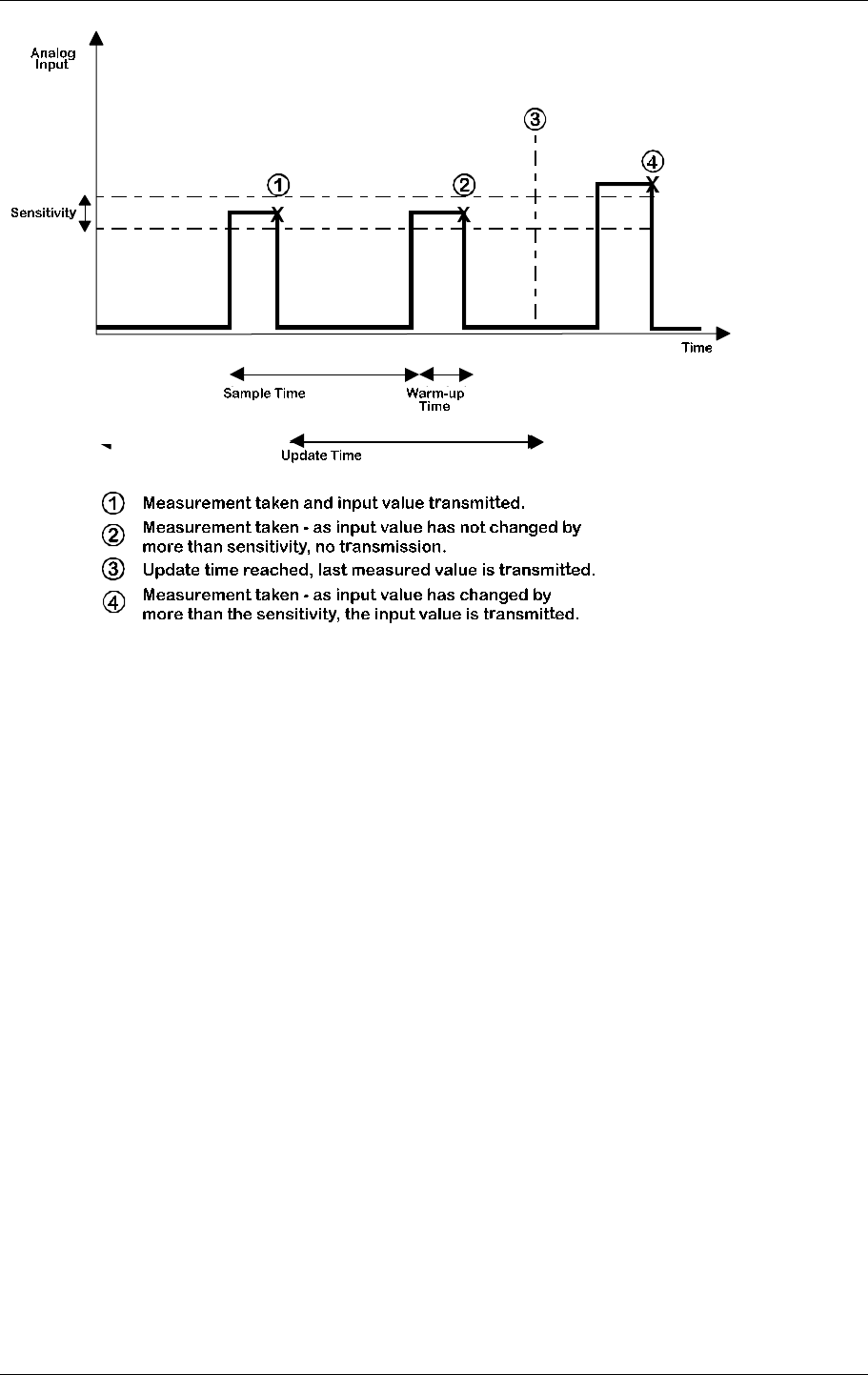
The analogue input uses a “sample time” and “warm-up time” configured by the user. The
sample time (1 minute to 20 days) “wakes” the 905U-K from sleep mode and turns on the
analogue loop supply. The “warm-up time” (0.5 – 127.5 seconds) allows the transducer to
reach rated accuracy before the 905U-K makes a measurement of the analogue signal.
For example, if the sample time is 30 minutes and the warm-up time is 10 seconds, then every
30 minutes, the 905U-K will turn on its analogue loop supply and after a further 10 seconds,
take a measurement of the analogue signal. After the measurement is taken, the 905U-K
reverts to sleep mode. If the sample time is set to zero, then the analogue loop supply will be
on continuously and measurement will be taken based on the warm-up time. If the warm-up
time is 1 second, then a measurement is taken every 1 second.
The same process occurs if an externally powered analogue signal is connected.
The measurements have a resolution of 12 bit, and an overall accuracy of better than 0.1%.
When the 905U-K takes a measurement, it will transmit the analogue value if the value has
changed by more than the pre-configured sensitivity since the last transmission. The
sensitivity can be configured from 0.25% to 100% (0.05mA to 20mA) with a default value of
3% (0.6mA). If the change in the signal since the last transmitted value is less than the
sensitivity, then the 905U-K will not transmit the analogue value.
In addition, an update transmission of the analogue value will be transmitted if the analogue
value has not been transmitted for the update time (10 seconds - 5 days). If an update time of
zero is selected, then no update messages will be sent.
If the update time expires since the last transmission, then the last measured value will be
transmitted - that is, a new measurement will not be taken. Normally the update time will be
much longer than the sample time. If the update time is less than the sample time, then update
messages may transmit the same value as the previous transmission, as a new measurement
has not yet been taken.
905U-K.MAN Rev. 1.1 January 2002
ELPRO Technologies Pty Ltd Page 13
Overview:
• Measurements of the analogue signal are determined by the sample time and warm-up time
• Analogue value is transmitted if the measured value has increased by the configured
sensitivity amount since the last transmission
• Analogue value is transmitted if the input value has not been transmitted within the update
time (10 seconds - 5 days)
2.3.4 Setpoint Status
The setpoint status is an internal status value, calculated by comparing the analogue input to
two configurable setpoint values. The setpoint status turns ON when the analogue input
moves below the low setpoint value, and turns OFF when it moves above the high setpoint
value. The high setpoint percentage must always be greater than, or equal to, the low set
point.
The internal setpoint status will be determined every time an analogue measurement is taken.
The setpoint status is treated as a digital signal and its value is transmitted according to the
rules for a digital input.
2.3.5 Low Battery Voltage Alarm
The Low Battery Voltage Alarm is a configurable set point determined by the type of battery
used to power the 905U-K. If the voltage of battery supply falls below the set point voltage,
the internal battery voltage alarm will turn on.
The Low Battery Voltage Alarm is treated as a digital signal and its value is transmitted
according to the rules for a digital input.

905U-K Radio Telemetry Module User Manual
ELPRO Technologies Pty Ltd 2001 Page 14
If the battery is not replaced at the point of Low Voltage Alarm, at a point of 95% of the set
point value, the unit will be permenently put into ‘sleep’ mode to prevent damage from over
discharge to lead acid batteries.
2.3.6 Communications Failure
The 905U-K cannot provide an indication that its transmitted messages have not been
received successfully.
This indication is however available at the receiving 905U by using the 905U Output Reset
on Comms Fail function. To use this function, map an input that is not being used on the
905U-K to a spare output on the 905U. The unused input can be an internal input such as the
Low Battery status or Setpoint status, or even the analogue input as this can also be mapped
to a digital output. Configure the 905U-K so that the digital output at the 905U is normally on
- you can configure an input to output mapping to be inverted or direct.
If you configure a reset time to the 905U output, then this output will turn off if it has not
received an update message from the 905U-K within that time. The 905U output is
effectively a "Communications OK" output - on when communications are OK, and off
during communications failure. Note that the maximum output reset time at the 905U is 32
minutes, so the update time for the 905U-K input must be less than this. It is generally a good
idea to set the update time to less than half of the reset time. Then, the 905U must fail to
receive two consecutive update messages - it is possible to miss one update message because
of random noise, but two consecutive failures means that there is a system failure. For
example, if you wish to have a failure alarm within 10 minutes of a system failure, set the
output reset time at the 905U to 10 minutes and the update time at the 905U-K to 4.5 minutes.
2.4 How to Design a Remote Monitoring System
2.4.1 Achieving reliable radio transmission
A system can theoretically have an unlimited number of 905U-K modules, but in practice, the
number is limited by the amount of radio traffic on one frequency in the system. When a
radio channel becomes unreliable because of radio traffic, then a second radio channel must
be used to increase the size of the system. This limit is not a function of the number of
modules, but the number of radio messages.
A system comprises 905U-K and 905U modules - each can transmit input signals. The 905U
can "hear" other radio messages, and will hold off transmitting a message until the radio
channel is clear. The 905U-K module cannot, and there is a possibility that an individual
transmission will clash with another transmission, and both transmissions will be corrupted.
This possibility increases as the density of transmissions increases. Configuring the re-
transmit feature (transmission of each message several times) will increase the chance of each
message being received successfully, but will increase the overall density of radio traffic.
For large systems, a compromise is required between the number of re-transmissions, and the
update times for each input. High priority inputs should have shorter update times than lower
priority inputs.
The peak transmission density should be calculated for large systems. These values are
calculated by determining the number of transmissions from inputs changing value and the
number of update transmissions per hour.
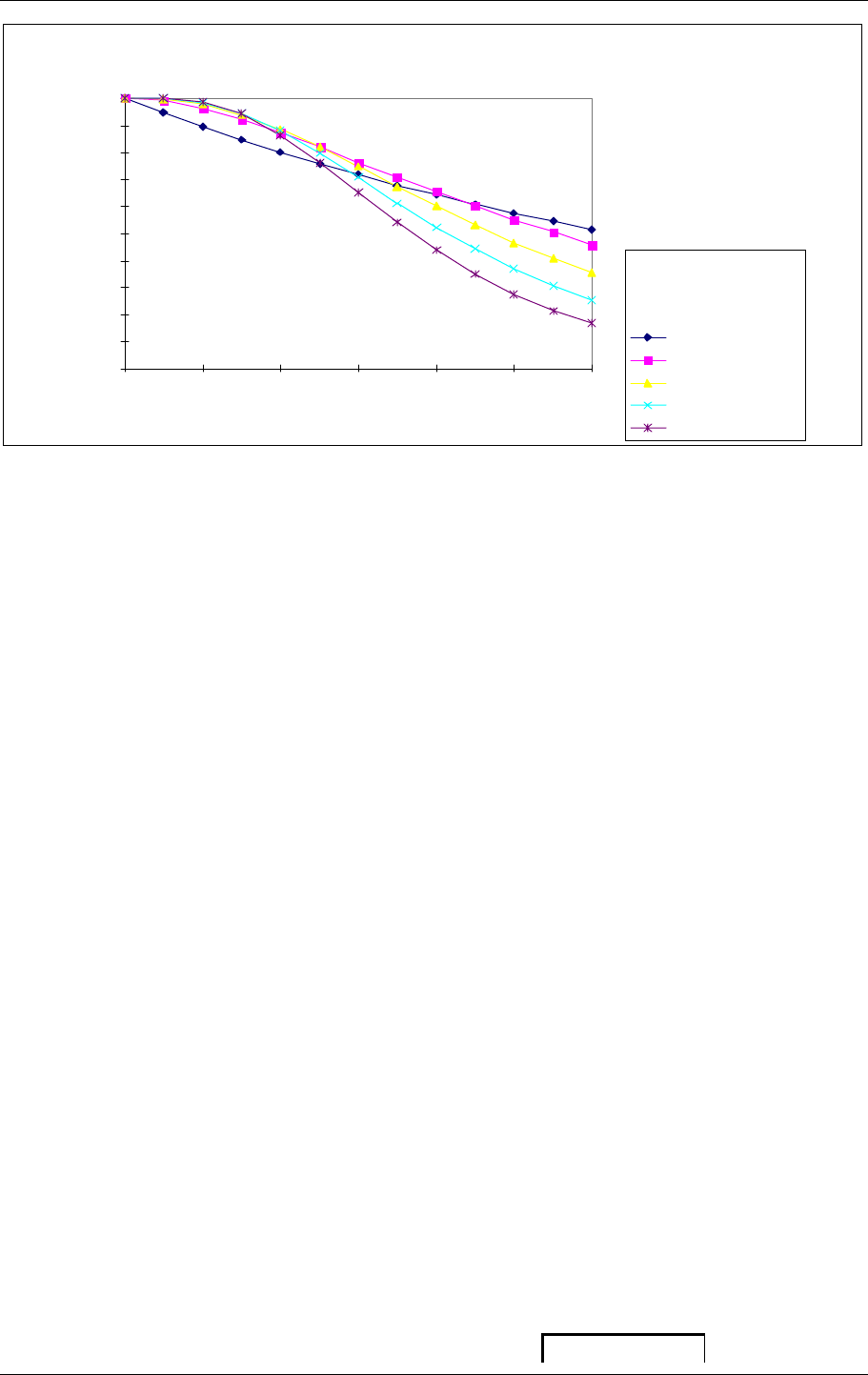
The probability of success for an individual message depends on the transmission density and
the number of re-transmissions for each message. This is shown in the following graph:
905U-K.MAN Rev. 1.1 January 2002
ELPRO Technologies Pty Ltd Page 15
Probability of successful transmission
0%
10 %
20%
30%
40%
50%
60%
70%
80%
90%
100%
0 1000 2000 3000
Messages Per Hour
1
2
3
4
5
Transmissions
per message
This assumes that the radio path is reliable and that there is no other radio users on this radio
channel. If intermediate repeaters are used, then each repeated message should be counted
as another message.
We suggest that you use two transmissions per message - with a higher number for a small
number of high priority inputs.
In addition to the above comments, you need to consider the affect of re-transmissions on
other messages being transmitted from the same 905U-K module. Once a 905U-K starts
transmitting a message, all transmissions for this message must be complete before another
transmission can start. The time between retransmissions of the same message is a random
time between 0.5 and 4 seconds. For example, if a module is configured to transmit each
message 5 times, then each message will take up to 16 seconds. Another message cannot be
transmitted until the previous message has finished. In the above example, the maximum
number of messages which can be transmitted reliably is approx 4 per minute. If more
messages are required, then a lower number of re-transmissions should be selected.
2.4.2 How far will the radio transmit?
The 905U-K will operate reliably over large distances. The distance that may be reliably
achieved will vary with each application and is dependent on the following factors:
• Type and location of antennas (the higher an antenna is, the further it will transmit)
• Amount of radio interference from other transmitters or radio “noise”
• Obstructions such as buildings, hills or trees in the radio path
• Maximum radio transmitter power allowed in the country
The transmitter power level of each 905U-K is set in the factory to the maximum power
allowed in the country of sale. The maximum output power of the 905U-K is 1 Watt,
2.5 Calculating Power Consumption
The following information may be used for calculating power consumption.
mA

905U-K Radio Telemetry Module User Manual
ELPRO Technologies Pty Ltd 2001 Page 16
Quiescent
0.10
Each radio
1.0 W Radio
350
transmission
Analogue input
Externally powered transducer
10
measurement
Loop Powered Transducer - 12 mA average
22
(per measurement)
Loop Powered Transducer - 20 mA average
30
Pulsed Input
0 - 10 Hz (Slow Pulsed Inputs)
0.0025 x f
10 - 1000 Hz (Fast Pulsed Inputs)
0.2
w-time = warm up time in seconds f = pulse frequency in Hz
The overall power requirements may be calculated by using the above figures.
Total power per day = Quiescent
+ Pulse input (if used)
+ Analogue input per measurement x number of measurements per day
+ Radio transmission x number of radio transmissions per day
There is no additional power required for digital inputs.
Where an external battery supply is used, these figures can be used to determine the expected
battery life.
Example:-
An application has one digital input, one pulse input and one analogue input. It is powered by internal battery
supply and the analogue input uses the 905U-K loop supply. Each radio message is configured to transmit two
times.
The total power consumed = power for transmissions + power for analogue loop supply + pulse input + quiescent
Power for radio transmissions:-
The configuration parameters, and estimated activity data, for each input are:
Digital input Update time, off state 1 day
Update time, on state 15 minutes
Input is expected to be on twice per year for 4 hours
No. of change messages per year = 2 (twice per year) * 2 (on to off and off to on)
=4
No. of off update messages per year = 364 (approximately)
No. of on update messages per year = 2 (twice per year) * 16 (4 hours @ 15 min update)
=32
Total messages for digital input = 4 + 364 + 32 = 400
Pulse input Update time 1 day Sensitivity 50
Average pulse rate is 1 pulse per hour, with peak rate of 20 per hour, for 10 hours, three times per year.
No. of change messages (normal rate) = 0 (time for 50 pulses is more than the update time)
No. of change messages (peak rate) = 3 (three per year) * 200 (20 per hr for 10 hrs) / 50

905U-K.MAN Rev. 1.1 January 2002
ELPRO Technologies Pty Ltd Page 17
=12
No. of update messages per year = 363 (approx)
Total messages for pulse input = 12 + 363 = 375
Analogue input Sample time 1 hour Warm-up time 5 secs
Sensitivity 3% Update time 1 day
Average changes of >3% is twice per day
No. of change messages per year = 2 (twice per day) * 365
= 730
No. of update messages per year = 0 (always be a change message each 1 day)
Total messages for analogue input = 730
Total input messages per year = 400 + 375 + 730 = 1505
Power consumed in transmissions = 350 * 1505 * 2 (2 per message)
= 1,053,500 µA-hour per year
Power for analogue loop supply (assume average loop current is 12mA)
No. of analogue measurements per year = 365 days * 24 hours * 1(sample time)
= 8,760
Power for analogue loop supply = 17 (from above table) * 5 (warm-up time) * 8,760
= 744 600 µA-hour per year
Power for pulse input
Average pulse rate is 1 pulse per hour (0.0003Hz), so power required = 60 x 0.0003 per day
=7
µA-hour per year
Quiescent power
Power for quiescent current = 3600 per day * 365
= 1 314 000 µA-hour per year
Total power consumption per year = 1053500 + 744 600 + 7 + 1 314 000
= 3,112,107 µA-hour

905U-K Radio Telemetry Module User Manual
ELPRO Technologies Pty Ltd 2001 Page 18
3 HARDWARE INSTALLATION
WARNING! All connections to the 905U-K must be SELV only. 110/220/240V mains
power must NOT be connected to any input terminal of the 905U-K module!
The 905U-K module is housed in a weatherproof enclosure with external power and input
signals connected via a weatherproof connector at the bottom of the module.
Wires of up to 0.75 sqmm may be connected by soldering to the female connector supplied
with the unit. The antenna/coaxial cable connector is a SMA at the top of the module. Care
should be taken to ensure that this connection remains weatherproof, as the ingress of water
will decrease radio performance. If necessary, wrap the connection with weatherproofing
tape.
Before installing a new system, it is preferable to bench test the complete system as
configuration problems are easier to recognise when the system units are close together.
Following installation, poor communications can be caused by:
• Incorrectly installed antennas
• Radio interference on the same channel
• Obstructions in the radio path
• Radio path too long
If the radio path is a problem, higher performance antennas or a higher mounting point for the
antenna may help. Alternately, use a 905U module as a repeater.
The foldout sheet 905U-K Installation Guide is included with the product, with more detailed
information in the following sections:
905U-K.MAN Rev. 1.1 January 2002
ELPRO Technologies Pty Ltd Page 19
3.1 How to mount the 905U-K
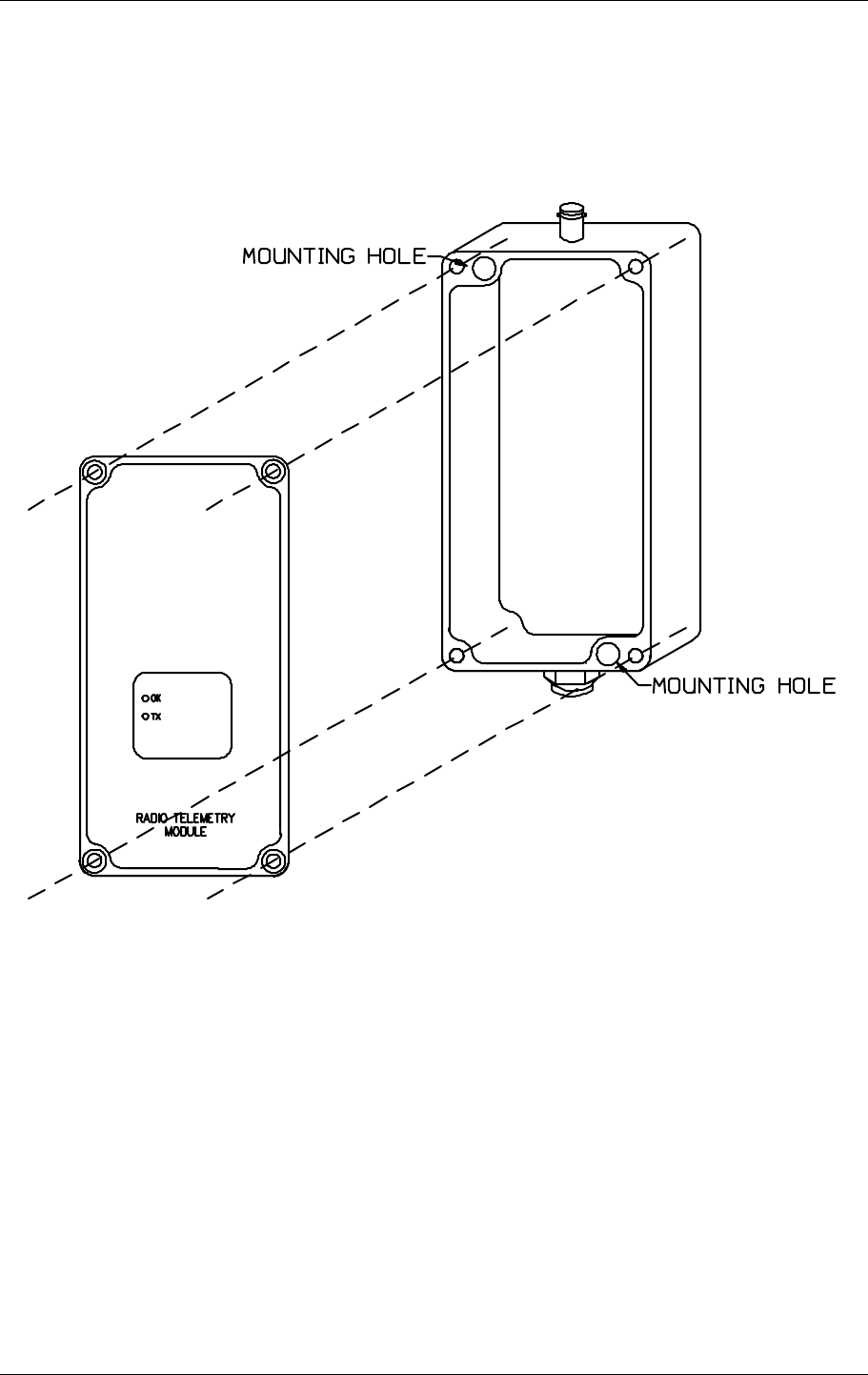
The 905U-K module is housed in an IP66 weatherproof aluminium enclosure. To mount the
905U-K, remove the four screws in the top plate, and carefully remove the cover. The two
mounting holes should now be visible.
It is important to effectively earth the unit to help prevent radio noise and static electricity
damage. The preferred method is to earth the module using the mounting screws to connect
to an earthed surface. If this is not possible, use an earth lug in the mounting screw
connection and secure the other end of the wire to a good earth.
3.2 Antenna Installation
The 905U-K module will operate reliably over large distances. The distance that may be
reliably achieved will vary with each application - depending on the type and location of
antennas, the degree of radio interference, and obstructions (such as hills or trees) to the radio
path. Where it is not possible to achieve reliable communications, a 905U module may be
used to receive the message and re-transmit it. This module is referred to as a repeater. This
module may also have input/output (I/O) signals connected to it and form part of the I/O
network.
905U-K

905U-K Radio Telemetry Module User Manual
ELPRO Technologies Pty Ltd 2001 Page 20
An antenna must be connected to each 905U-K module using the SMA connector that
protrudes though the top of the enclosure.
To achieve the maximum transmission distance, the antennas should be raised above
intermediate obstructions so the radio path is true “line of sight”. Because of the curvature of
the earth, each antenna will need to be elevated at least 5 metres above ground for paths
greater than 5 km (3 miles). The modules will operate reliably with some obstruction of the
radio path, however the reliable radio range is decreased. Obstructions that are close to either
antenna will have more of a blocking effect than obstructions in the middle of the radio path.
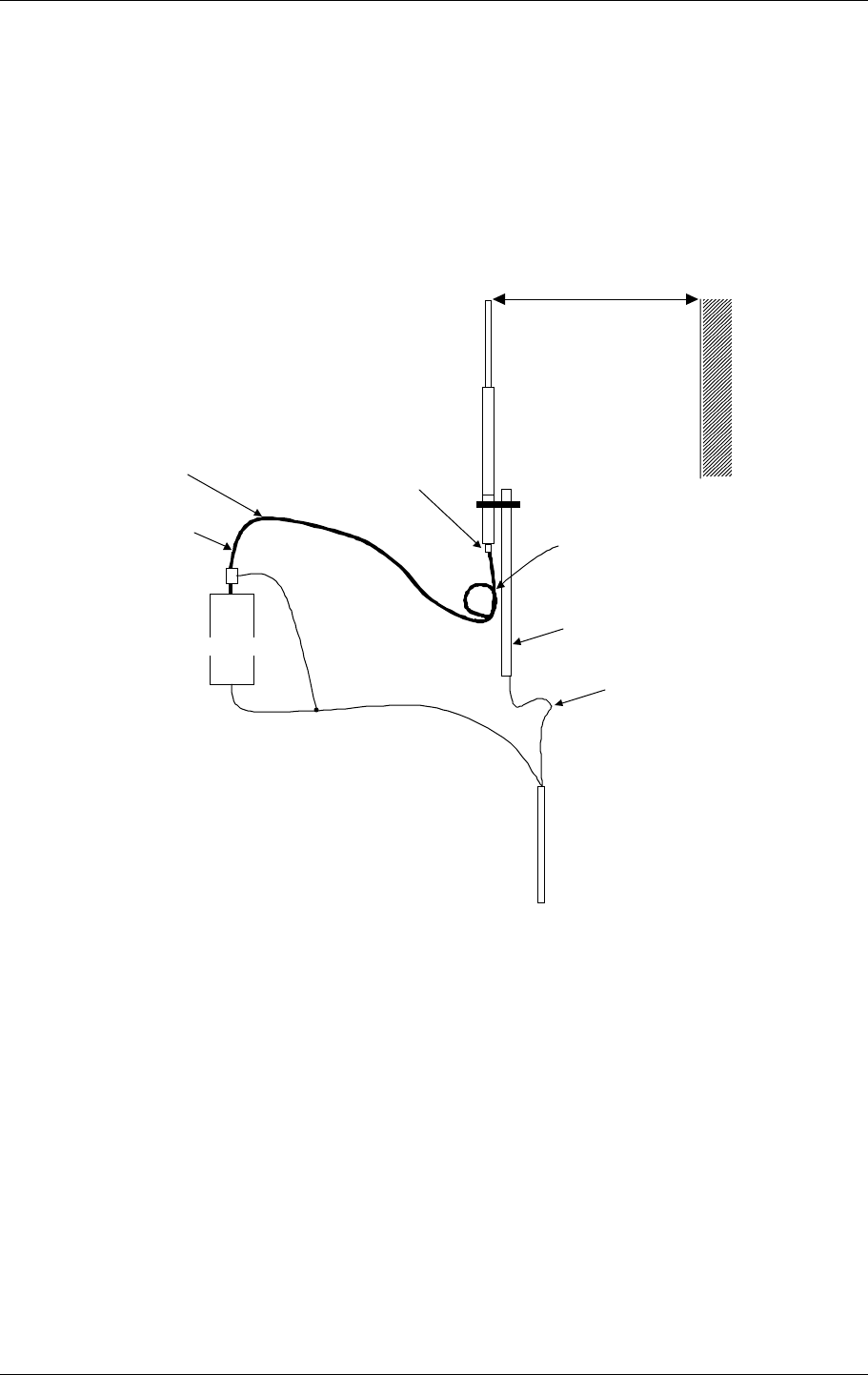
Small whip antennas may be connected directly to the 905U-K module. Other antennas may
be connected to the module via 50 ohm coaxial cable (eg RG58 or RG213) terminated with a
male BNC connector. Connections between the antenna and coaxial cable should be carefully
taped to prevent ingress of moisture.
Moisture ingress in the coaxial cable is a common cause for problems with radio systems, as it
greatly increases the radio losses. We recommend that the connection be taped, firstly with a
layer of PVC Tape, then with a vulcanising tape such as “3M 23 tape”, and finally with
another layer of PVC UV Stabilised insulating tape. The first layer of tape allows the joint to
be easily inspected when trouble shooting as the vulcanising seal can be easily removed.
The higher the antenna is mounted, the greater the transmission range will be, however as the
length of coaxial cable increases so do cable losses. There are several types of antennas
suitable for use on unlicensed frequency channels. It is important that the antenna is chosen
carefully to avoid contravening the maximum power limit on the unlicensed channel - if in
doubt refer to an authorised service provider.
Connections between the antenna and coaxial cable should be carefully taped to prevent
ingress of moisture. Moisture in the coaxial cable is a common cause for problems with radio
systems, as it greatly increases the radio losses. We recommend that the connection be taped
with a vulcanising tape such as “3M 23 tape”, with a secondary layer of PVC insulating tape.
Where antennas are mounted on elevated masts, the masts should be effectively earthed to
avoid lightning surges. Surge suppression devices are recommended if lightning surge
problems are likely in the installation area. If the antenna is not already shielded from
lightning strike by an adjacent earthed structure, a lightning rod may be installed above the
antenna to provide shielding.
The available antennas to be used with the 905U-K units are:
CFD890EL 0 dBi Dipole antenna with 15’ of low loss RG-58 and SMA connector
SG900EL 5dBi Colinear omni-directional antenna with N-type connector (use
CC10/900 or CC10/900)
SG900-6 8dBi Colinear omni-directional antenna with N-type connector (use
CC10/900 or CC10/900)
YU6/900 10dBi Yagi directional antenna with N-type connector (use CC20/900
only)
The available accessory cables for use with the 905U-K units are:
CC10/900 33’ low loss RG-58 cable, 3dB loss
CC20/900 66’ low loss RG-58 cable, 6dB loss
905U-K.MAN Rev. 1.1 January 2002
ELPRO Technologies Pty Ltd Page 21
Dipole and Colinear antennas.
A unity gain dipole is the normal antenna for use on unlicensed channels. As it does not
provide any gain, then the power transmitted from the antenna will be the same as the power
out of the module. Dipole antennas are only available with a 15 feet of coaxial cable and
SMA connector for mounting away from the 905U-K module. Dipole antennas should be
mounted vertically, at least 1 metre away from a wall or mast.
For longer, more marginal radio paths higher gain colinear antennas can be used. These must
be used with either CC10/900 or CC20/900 cable.
4mm
2
1m
DIPOLE AERIAL
MAST
EARTH CONDUCTOR
SHOULD BE 16mm2
EARTH STAKE
IF GROUND CONDITIONS ARE POOR,
INSTALL MORE THAN ON STAKE
MAX. COAXIAL CABLE LENGTHS
CC10/900 – 33 feet
CC20/900 – 66 feet
INSTALL AERIAL ABOVE LOCAL
OBSTRUCTIONS
GND
ANT
905U.K
SURGE DIVERTER
COAXIAL CABLE SEAL CONNECTORS
WITH “3M 23” TAPE
STRESS REDUCTION LOOP
The 905U-K normally produces 1.0 Watt of radio power when an external DC power supply
is used. FCC regulations allow this power may be boosted to a maximum 4.0W by using a
higher gain antennas. These higher gain antennas may also be used to compensate for coaxial
cable loss. The losses are 3dB for every 10m of RG58 cellfoil. If 10m of RG58 cable is used
on a marginal radio path, then a higher gain antenna may be used to cancel the losses in the
cable and boost the transmitted power back to the maximum level.
.
YAGI antenna.
YAGI antennas must only be used with a cable loss of 5dB or greater so the overall system
gain is less than 6dB. So they should only be used with a CC20/900 cable.
YAGI antennas are directional. That is, they have positive gain to the front of the antenna,
but negative gain in other directions. Hence YAGI antennas are normally installed with the
central beam vertical and must be pointed in the direction of transmission to benefit from the

905U-K Radio Telemetry Module User Manual
ELPRO Technologies Pty Ltd 2001 Page 22
gain of the antenna. Also note that YAGI antennas normally have a drain hole on the folded
element - the drain hole should be located on the bottom of the installed antenna.
The YAGI antennas may be installed with the elements in a vertical plane (vertically
polarised) or in a horizontal plane (horizontally polarised). For a two station installation, with
both modules using YAGI antennas, horizontal polarisation is recommended. If there are
more than two 905U-K modules transmitting to a common 905U module, or there is dipole or
colinear used in the system, then the YAGI antennas should have vertical polarisation.
905U-K.MAN Rev. 1.1 January 2002
ELPRO Technologies Pty Ltd Page 23
3.3 Connection Plug
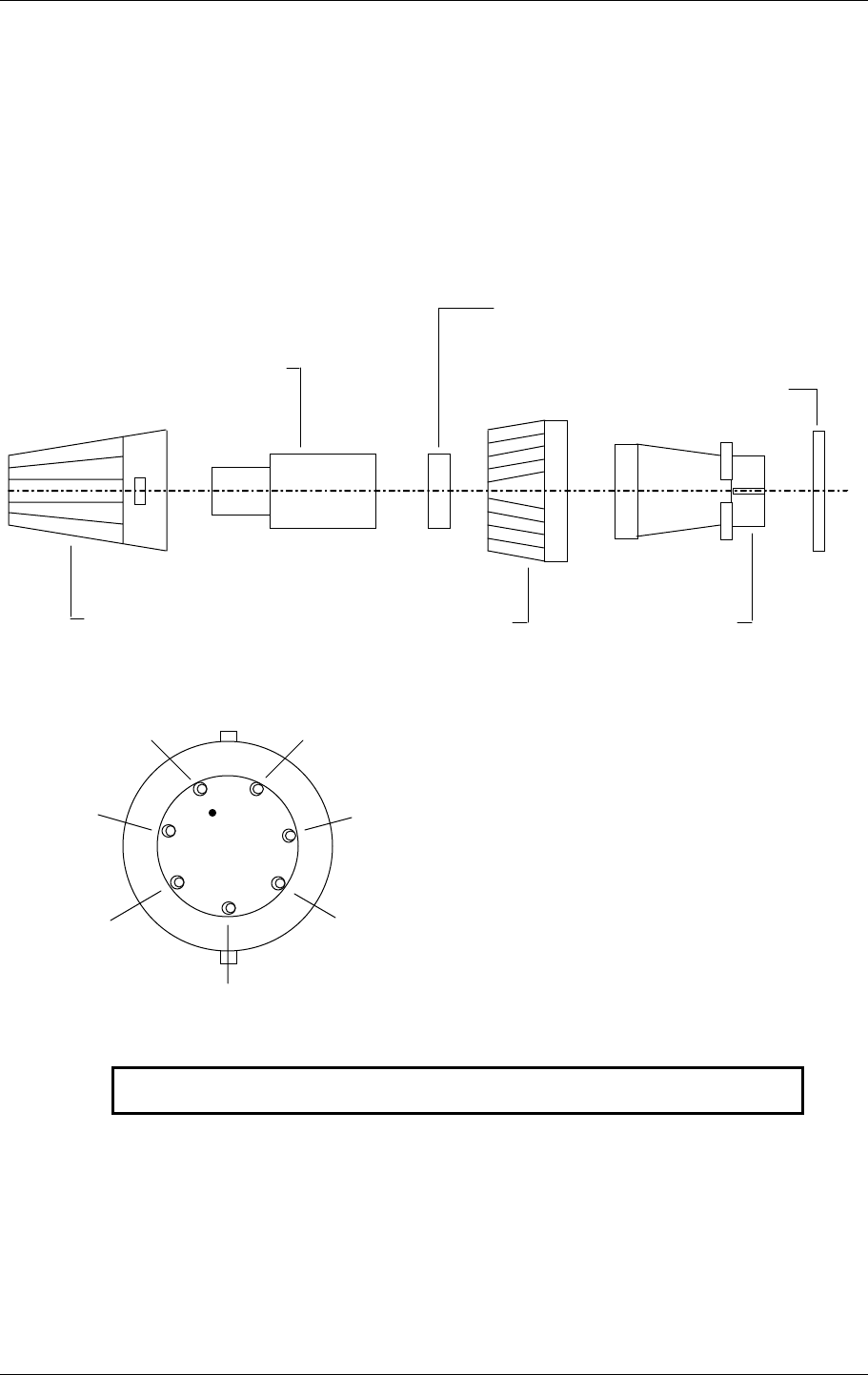
External power and input signals are connected using a weatherproof plug, provided with the
module. For the 905U-K a 7 pin plug is used. The plug needs to be assembled as per the
following diagram.
STRAIN RELIEF
CABLE CLAMP
(ONE MOUNDING SPLIT
& USED AS 2 HALVES
O-RING
COVER LOCKING RING LINE SOCKET
NOTE: VIEW FROM SOLDER CONNECTION SIDE OF PLUG
DN1
DN2
ANALOGUE
LOOP SUPPLY
GND
EXTERNAL SUPPLY
ANALOGUE IN +
ANALOGUE IN -
905U-K
905U-K Radio Telemetry Module User Manual
ELPRO Technologies Pty Ltd 2001 Page 24
3.4 Power Supply Installation
3.4.1 External Power
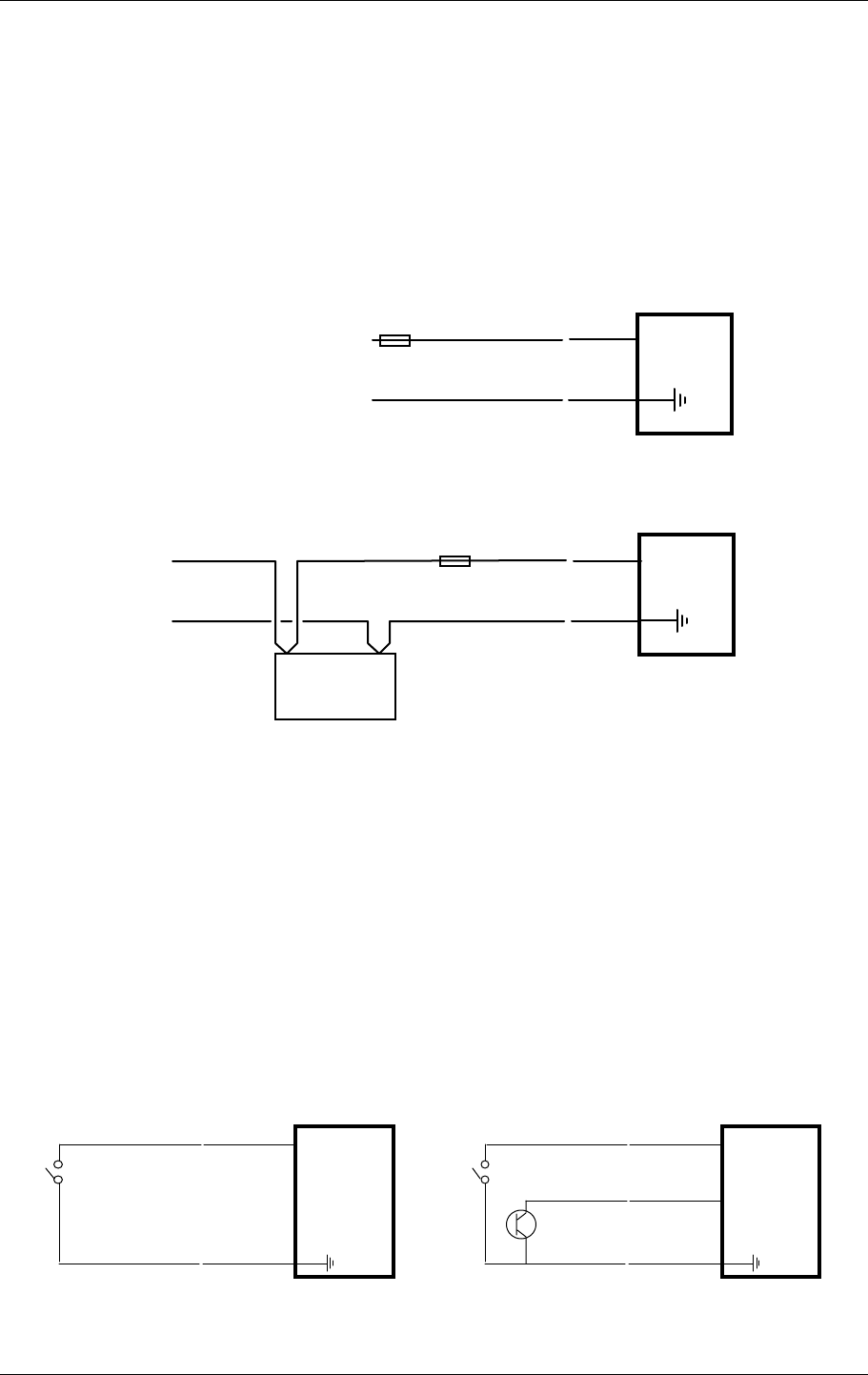
The 905U-K module will accept an external supply of 5.4 - 30.0 volts DC. An external supply
with a battery and battery charger is suitable. Negatively grounded or floating supplies are
acceptable, however positively grounded supplies must not be connected. The 905U-K
connects the negative supply (COMMON) to “ground”. Connect the external supply as per
the following diagram.
⊂
⊂+
-
5.4 - 30 VDC 905U-K
EXT
SUPPLY
GND
1 A
⊂
⊂
+-
BATTERY
CHARGER
905U-K
EXT
SUPPLY
GND
1 A
12V
BATTERY
Configuration of the module will not be lost when batteries are removed, so no special
procedure is required when changing batteries of the same type.
3.5 Input Signal Connections
3.5.1 Digital/Pulse Inputs
Digital and pulse inputs share the same input channel. Each input is connected between the
DIN connector and COMMON. Inputs can be voltage-free contacts, NPN transistor
switches, or a voltage signal (ON < 1 volt DC, OFF > 2 volts DC).
⊂
GND
905U-K
DIN1
⊂
⊂
GND
905U-K
DIN1
⊂
⊂DIN2
Inputs can be voltage free contact or open-collector transistor
NPN

905U-K.MAN Rev. 1.1 January 2002
ELPRO Technologies Pty Ltd Page 25
Inputs do not have any surge protection. If the sensor or switch is mounted a long way from
the 905U-K module, external isolation such as a relay may be required for surge protection.
905U-K Radio Telemetry Module User Manual
ELPRO Technologies Pty Ltd 2001 Page 26
3.5.2 Shaft Encoder Connections
⊂
⊂
⊂
COUNT
DIRECTION
GND
DIN2
DIN1
905U-K
⊂
⊂
⊂
PHASE 1
PHASE 2
GND
DIN2
DIN1
905U-K
INCREMENTAL SHAFT ENCODER QUADRATURE SHAFT ENCODER
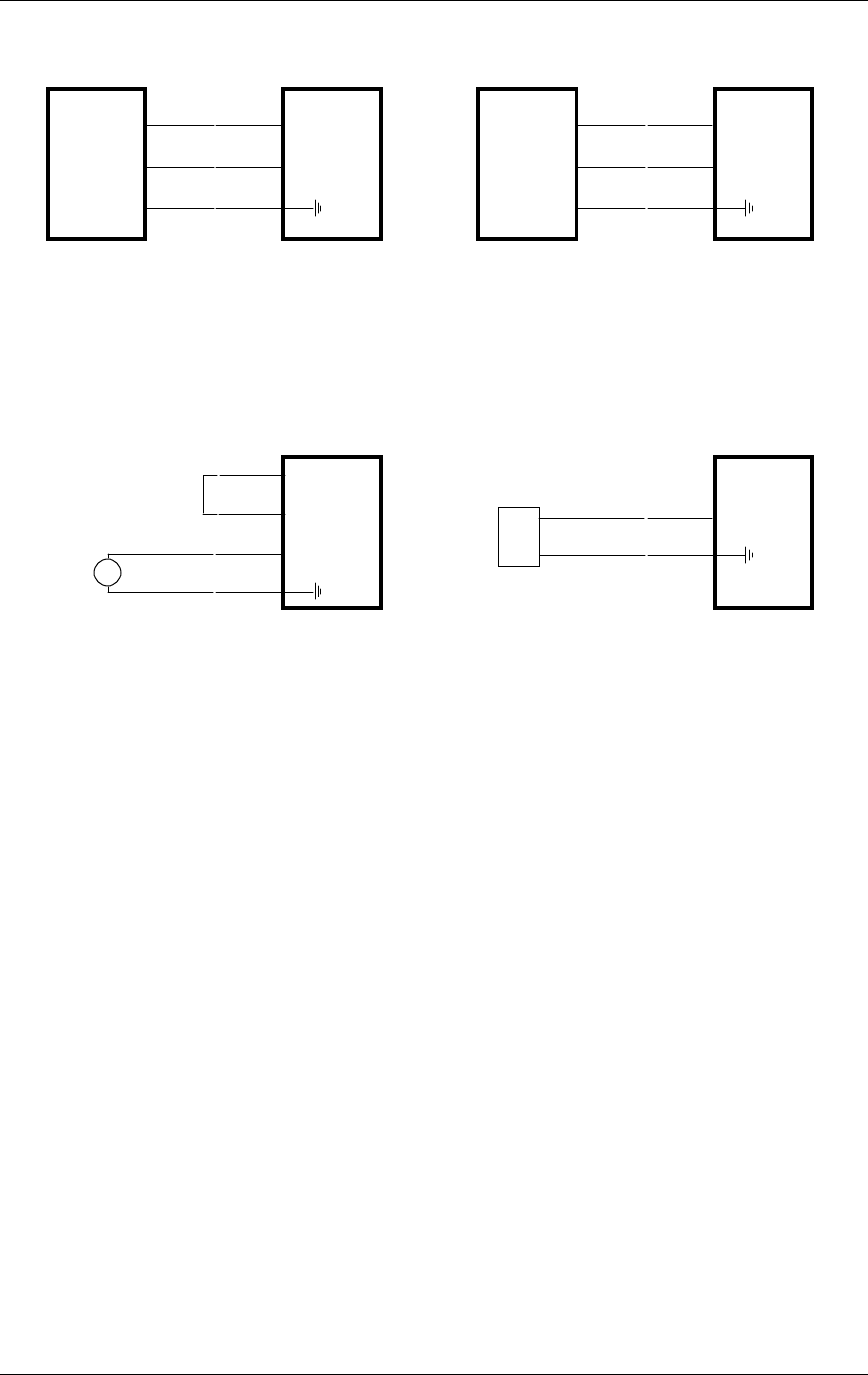
Analogue input The analogue input has a positive and a negative terminal, and may be placed
at any point in the current loop, as long as neither input rises more than 24V above
COMMON or ground. A 24 VDC 30mA supply is provided for powering analogue loops. The
analogue loop may be powered from the internal supply or may be externally powered.
⊂
⊂
GND
AI- 905U-K
⊂
⊂
+
-
AI+
905U-K
⊂
LOOP POWERED TRANSDUCER EXT POWERED TRANSDUCER
⊂
⊂
⊂
+
-
AI+
AI-
ANALOG
SUPPLY
Shielded cable is recommended for analogue input loops to minimise induced noise and radio
frequency interference (RFI). The shield of the cable must be connected to earth at one end
of the cable only. Each input has a loop resistance of 150Ω and zener diode protection
against overvoltage and reverse voltage. Additional surge protection is recommended in high
electrical noise environments, or if the analogue signal cable runs for a long distance
underground before connecting to the 905U-K module.
3.5.3 RS232 serial port
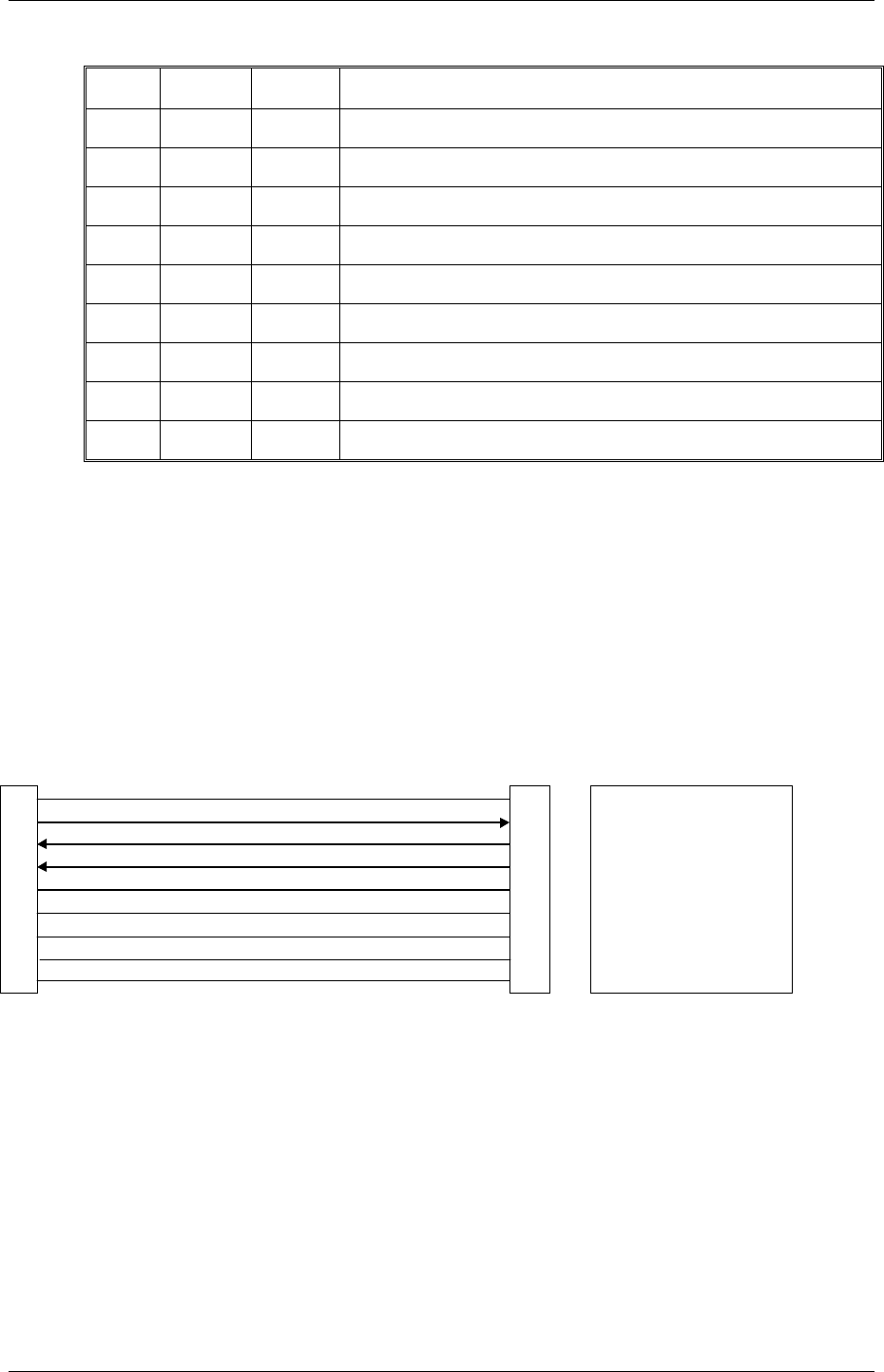
An RS232 port is provided for connection of a PC for configuration and diagnostics. To
access the serial port DB9 connector, remove the front cover from the module by unscrewing
the four screws in the front panel. The serial port is a 9 pin DB9 male and provides for
connection to a terminal or to a PC for configuration, field testing and for factory testing.
Communication is via standard RS-232 signals. The 905U-K is configured as DCE equipment
with the pinout detailed below.
905U-K.MAN Rev. 1.1 January 2002
ELPRO Technologies Pty Ltd Page 27
Pin Name Dirn Function
1 - - Not Used.
2 RD Out Receive Data - Serial Data Output (High = 0, Low = 1)
3 TD In Transmit Data - Serial Data Input (High = 0, Low = 1)
4 DTR In Data Terminal Ready - used by 905U-K as a "wake-up" signal
5 SG - Signal Ground
6 - - Not Used.
7 - - Not Used.
8 - - Not Used.
9 - - Not Used.
The DTR signal must be connected to the 905U-K to enable communications and “wake
up” the microprocessor. This means that the DTR wire must be connected - the PC does not
need to control DTR. When communications is established, the green LED will light
continuously.
The serial port communicates at a baud rate of 9600 baud, 8 bits, no parity, one stop bit.
An example cable drawing for connection to a personal computer is detailed below:
E505 DB9 (M) Connector Computer DB9 (F) Connector
1 1 Not Used - optional
2 2 Receive Data
3 3 Transmit Data
44DTR
5 5 Signal Ground
6 6 Not Used - optional
7 7 Not Used - optional
8 8 Not Used - optional
9 9 Not Used - optional
905U-K Radio Telemetry Module User Manual
ELPRO Technologies Pty Ltd 2001 Page 28
4 CONFIGURATION
The 905U-K module is configured by creating a configuration file on a PC and downloading
to the 905U-K via the RS232 serial port. You will require the configuration software, and a
serial cable - refer to the previous section.
The configuration software is supplied as "free-ware" on the Product Catalog CD supplied
with each order. The configuration software for the 905U-K is the same as the software for
the 905U. Please read section 4.3 of the 905U User Manual before proceeding further.
Setup the project name and system address as per the 905U manual. Enter the “units” as per
the manual. Select “905U-K” as the unit type for 905U-K modules.
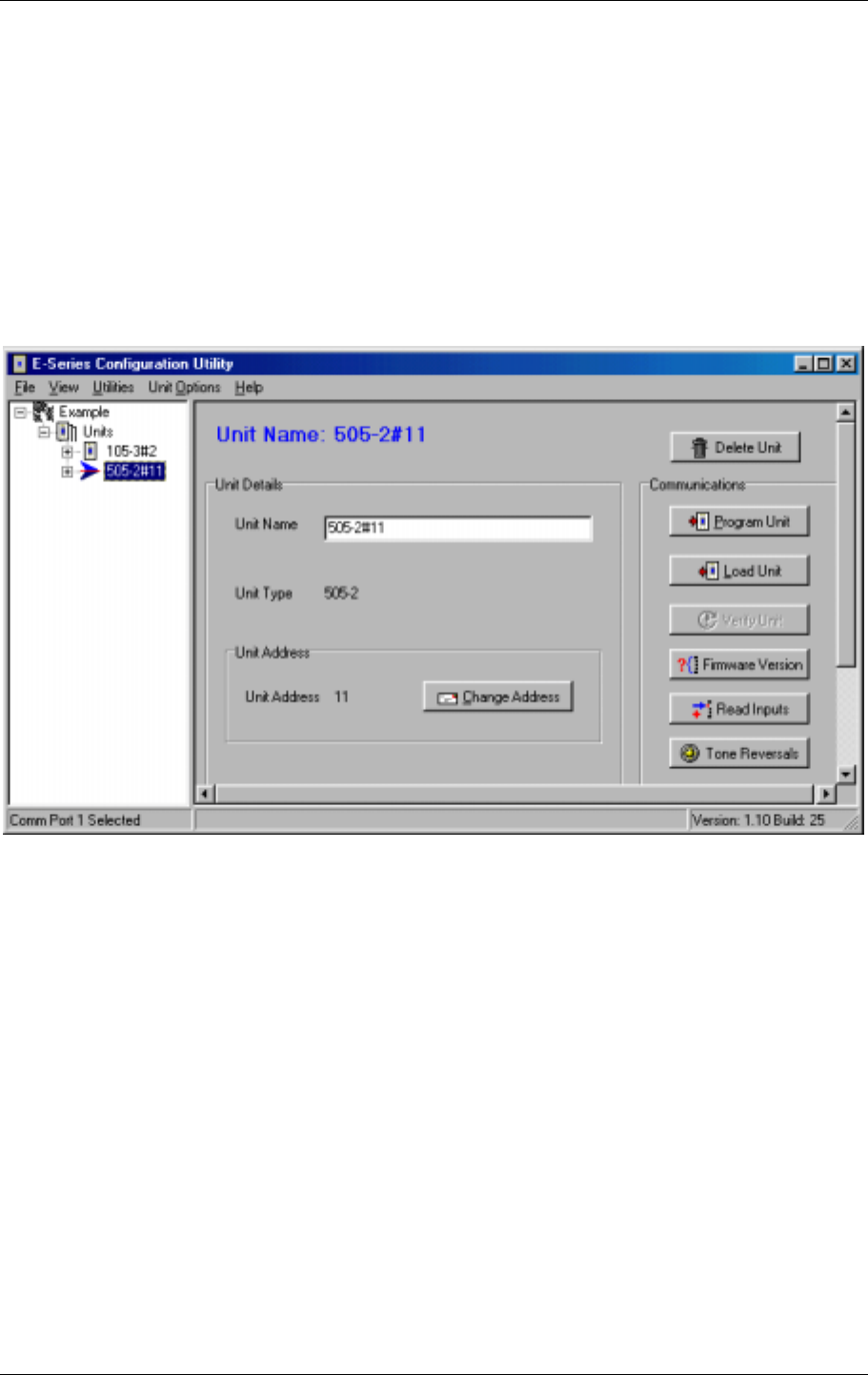
Each 905U-K has a unit address and a secondary address. Up to eight 905U-K modules can
use the same system address. If you enter the same unit address for more than one 905U-K,
the configuration software will automatically increase the secondary address. The default
description of a 905U-K module is 505-2#10_1 where 10 is the unit address and 1 is the
secondary address. If a unit address of 10 is chosen for another 905U-K module, it will have
a default description of 505-2#10_2. For small systems, select a unique unit address for each
905U-K module.
905U-K.MAN Rev. 1.1 January 2002
ELPRO Technologies Pty Ltd Page 29
4.1 I/O Mapping
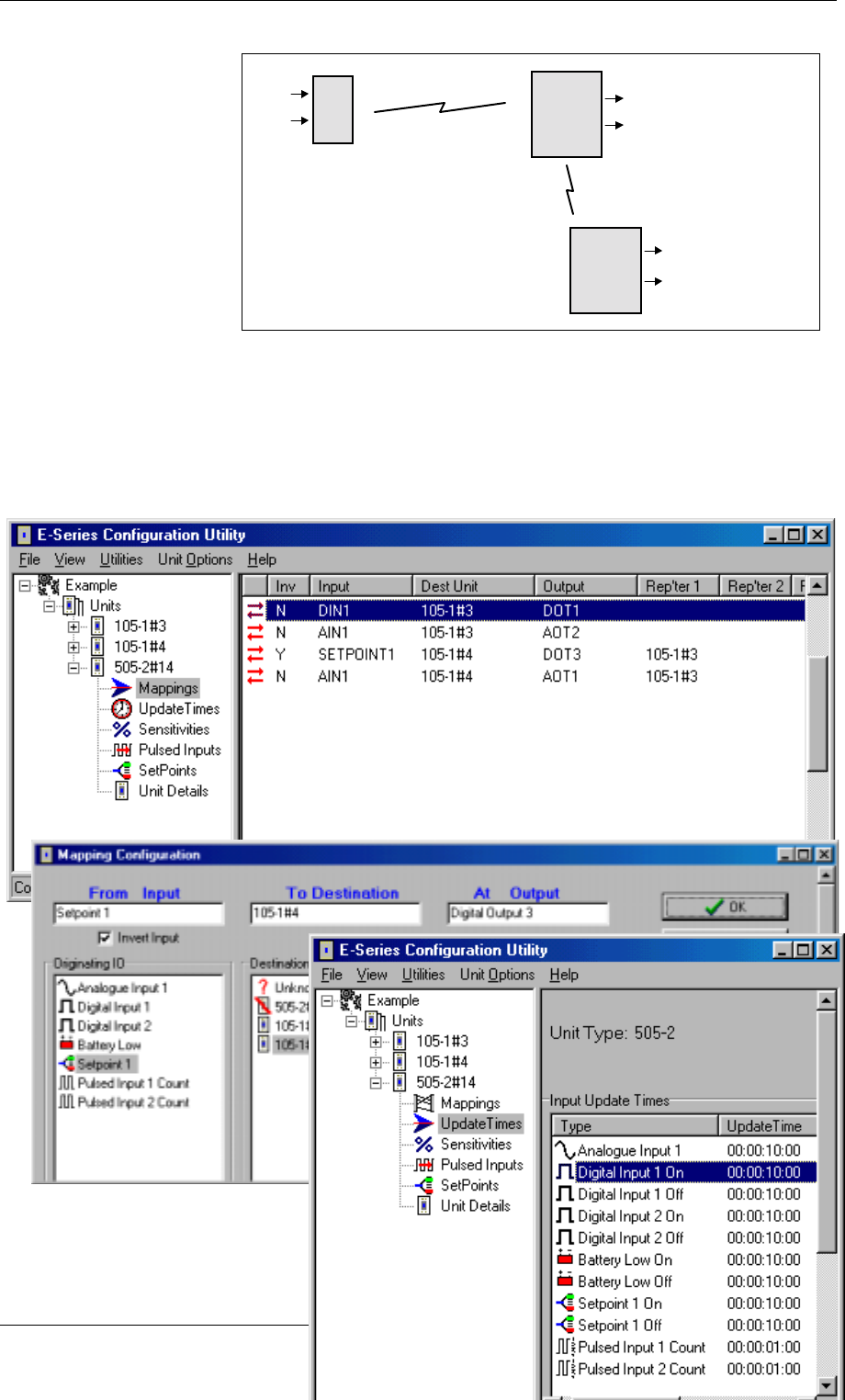
Enter I/O mappings as
per the 905U manual.
In the following
example, a digital input
at a 905U-K is mapped
to DO1 of 905U#13.
The analogue inout of
the 905U-K is mapped to
AO2 of the same module.
The setpoint status of the 905U-K is mapped (inverted) to DO3 of 905U#14, using 905U#13
as a repeater. The 905U-K AI is also mapped to AO1 of this module. That is, the AI is
mapped twice.
The mapping configuration for the 905U-K would be :
4.2 Update Transmission
Times
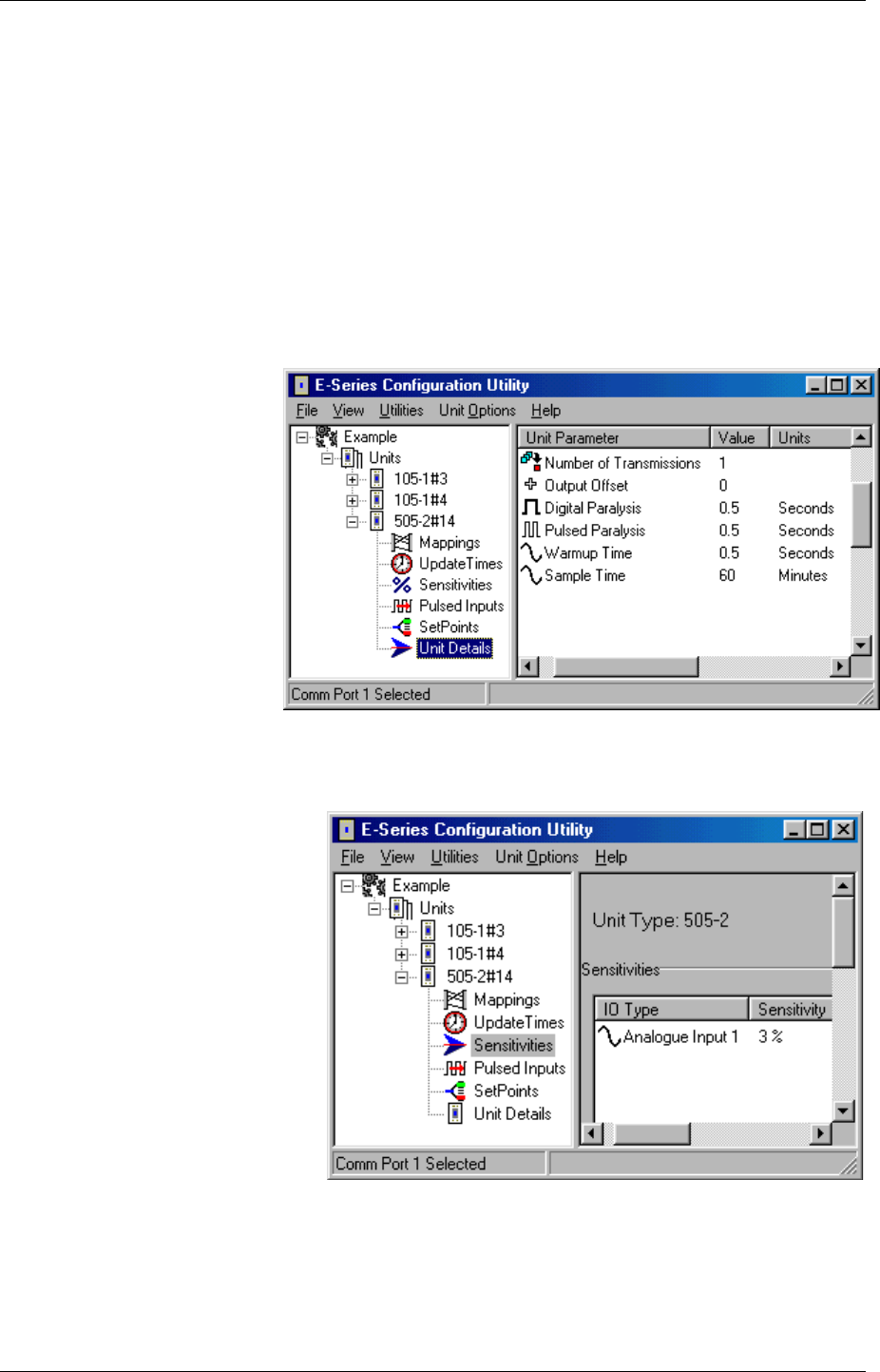
Each input signal has an update
time. If a change has not
905K 905U
905U
#14
#3
#4
DIN1
A
IN
DO1 (DIN1 from #14)
AO2 (AIN from #14)
AO1 (AIN from #14)
DO3 (SP inv from #14)
905U-K Radio Telemetry Module User Manual
ELPRO Technologies Pty Ltd 2001 Page 30
occurred for this input within this time, then a transmission is set for this input after the update
time has expired. Each input signal has its own timer - when a transmission occurs for this
input (either a change transmission or an update transmission) the timer is reset to zero. If the
timer reaches the Update Time value, then a update transmission occurs.
Digital inputs (both external inputs and internal) have a separate update time for their "off"
state and "on" state. This allows the input to be reported differently depending on its state. If
the digital input is an alarm, then a user may wish the input to be updated more frequently
when in the alarm state than when not in the alarm state. The analogue input and pulsed
inputs only have one update time value.
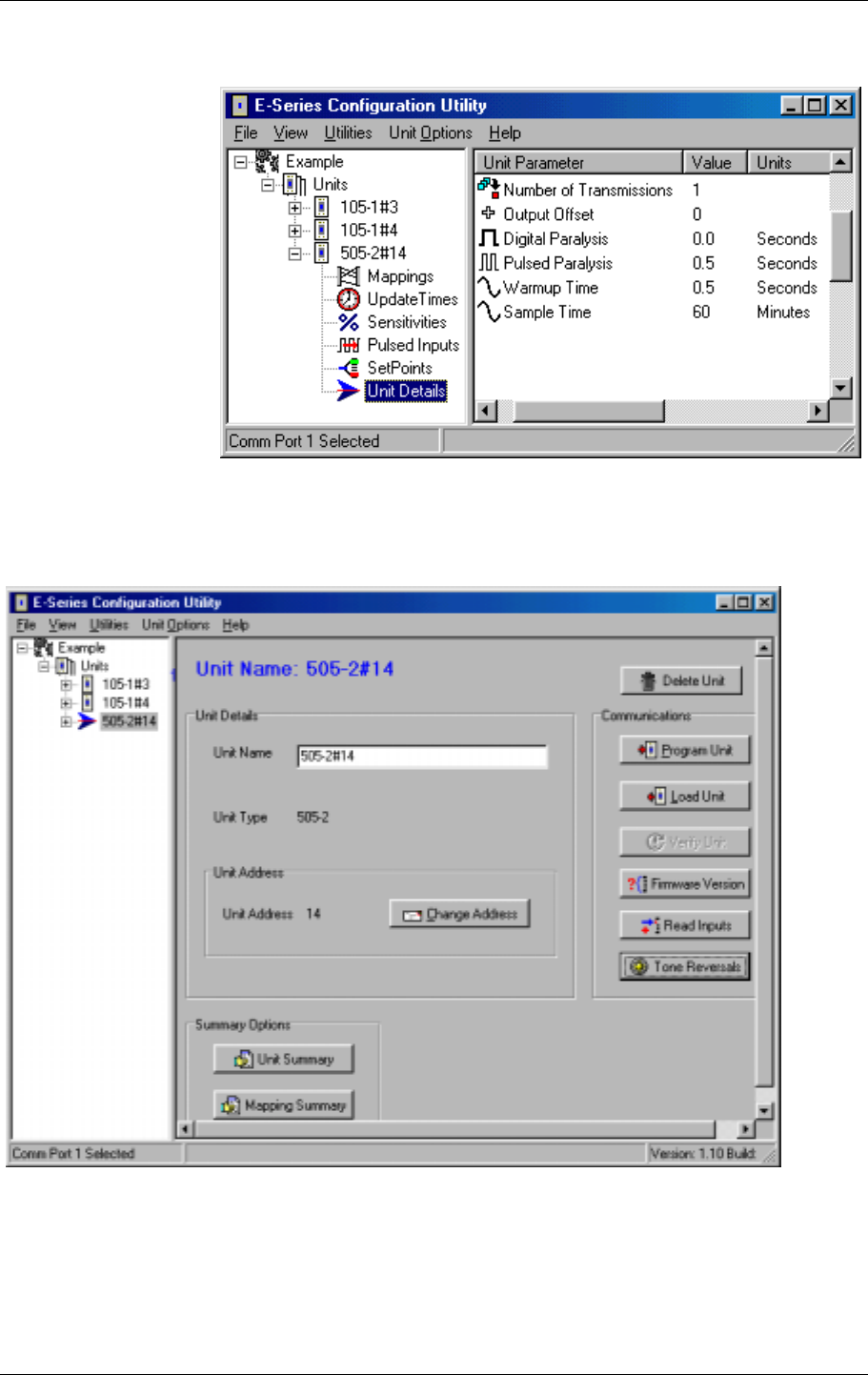
Valid values are 10 seconds to 120 hours. If less than 10 seconds is entered, the value will
default to 10 seconds. If zero is entered, then there will be no update transmissions for this
input.
4.3 Digital Inputs
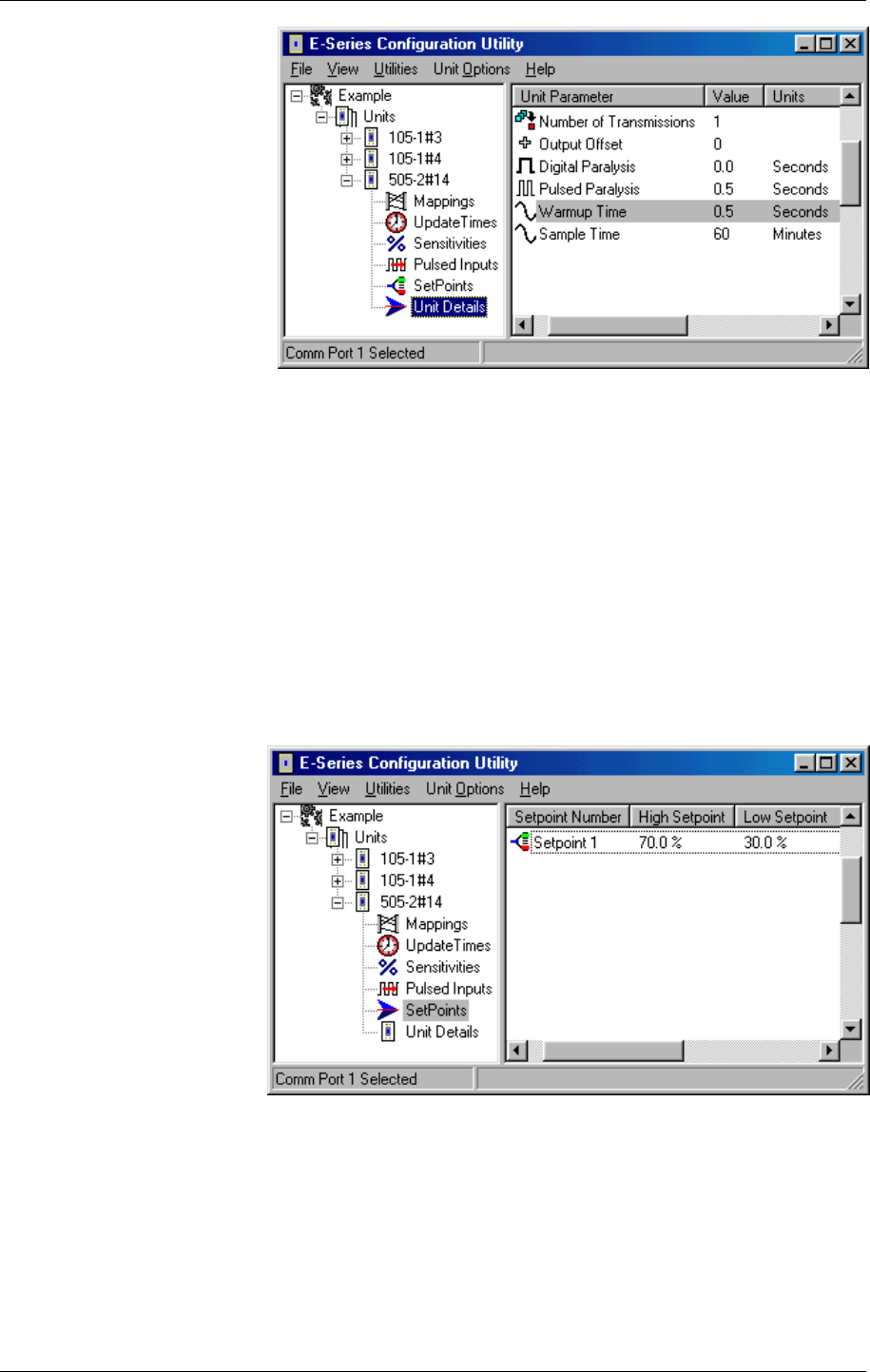
Apart from update times,
the only configurable
parameter for digital inputs
is the paralysis time. This
parameter can be changed
by selecting the Unit details
option.
If a value of zero is entered,
then there is no paralysis
time.
4.4 Analogue Input
There are three parameters which
may be adjusted for the analogue
input.
The change sensitivity is the
amount of change since the last
transmission which will trigger
another transmission for this
input. For example, if the last
transmitted value of the input
was 55.0%, and the sensitivity is
1.2%, then another transmission
will occur if the measured input
value is less than 53.8% or more
than 56.2%. If change messages
are not required, then a
sensitivity of 100% should be selected.
Each 1% corresponds to 0.2mA of signal. The sensitivity should be set to be greater than the
natural "signal noise" of the analogue input. For example, if there is a signal oscillation of 1%
on the input, then a sensitivity of less than 1% will result in continuous change transmissions
which could overload the radio channel.
905U-K.MAN Rev. 1.1 January 2002
ELPRO Technologies Pty Ltd Page 31
The sample time is the time
period for each analogue
input measurement.
Between measurements, the
905U-K will operate in
"sleep" mode. When the
sample time has expired,
the 905U-K will turn on the
analogue loop power
supply. After a further
time, called the warmup
time, the 905U-K will
make a measurement of the
input. The warmup time allows the transducer to stabilise and become accurate after the loop
supply is turned on.
The sample time may be entered in minutes, between 1 and 30 000 minutes. If a zero value is
entered, then the loop power supply will be always on. The warmup time may be entered in
seconds between 1 and 127 seconds. If a zero value is entered, then an analogue
measurement will be made as soon as the loop supply is turned on. If both the sample time
and warmup time are set to zero, then an analogue measurement will be taken on every 905U-
K cycle (every 0.5 sec).
4.5 Analog Setpoints
A high setpoint value and a low setpoint value may be entered. The internal setpoint status is
determined by these values in comparison to the analogue input value. If the analogue input
is less than the low
setpoint, then the setpoint
status is "on". If the
analogue input is more
than the high setpoint,
then the setpoint status is
"off". When the input is
between the low and high
setpoints, then the setpoint
status remains unchanged.
The setpoint values may
be set between 0 and
100% corresponding to
0mA and 20mA. The low
setpoint may be set to the same value as the high setpoint, however the low setpoint should
not be set to a higher value than the high setpoint.
4.6 Pulse Inputs
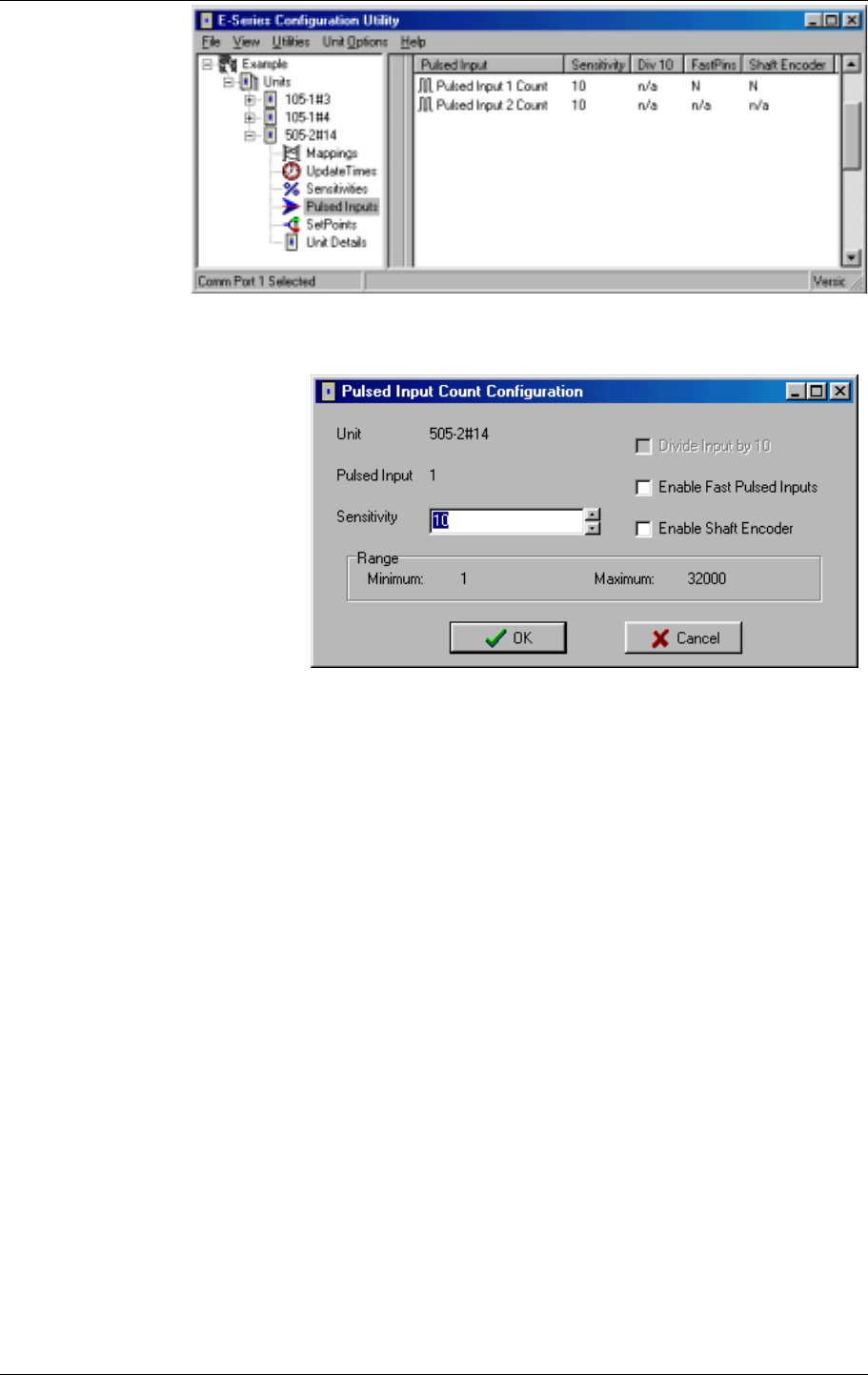
There are several configurable parameters for pulse inputs. The debounce value can be
adjusted from the Unit Details selection, as per Digital Inputs.
If either pulse input has an input rate of more than 10Hz, then the Fast Pulse Input option
should be selected from the Pulsed Inputs selection.
905U-K Radio Telemetry Module User Manual
ELPRO Technologies Pty Ltd 2001 Page 32
If the pulse inputs
are connected to a
shaft encoder
(incremental or
quadrature types),
then the Shaft
Encoder Inputs
option should be
selected.
The pulse inputs
also have a
Sensitivity value. The pulse input sensitivity is the number of pulse increments since the last
transmission to trigger another transmission. For example, if the pulse count at the last
transmission for a pulse input
was 1000, and the sensitivity
value is 10, then another
transmission will occur when
the pulse count reaches 1010
(provided there has not been an
update transmission during this
period). The sensitivity values
can be between 1 and 32000.
905U-K.MAN Rev. 1.1 January 2002
ELPRO Technologies Pty Ltd Page 33
4.7 Number of Transmissions
This parameter
allows you to select
the number of
transmissions for
each message. For
example, if 3 is
selected, then each
message will be
transmitted three
times. The time
between each
transmission will be a
random time between
0.5 and 4 seconds.
The valid choices for
this option are 1 - 5.
4.8 Programming Configurations to Modules
To programme a module :
• Connect the cable from the PC’s serial port to the 905U-K serial port (see 3.5.4 for cable
connections)
• From the Utilities menu, select “Serial Port Setup”
• Select the appropriate serial port (COM1 - COM4)

905U-K Radio Telemetry Module User Manual
ELPRO Technologies Pty Ltd 2001 Page 34
• Select the unit to be configured from the left-hand menu
• Click on the “Program Unit” button.
You will be asked to confirm if the module already has a different system or unit address.
Each module will need to be programmed individually.
4.9 Loading Configuration from a Module
Care should be taken when loading a configuration from a module. It is easy to lose the
system address and unit address. We suggest that you first view the system address and unit
address - you can do this via the “Unit Options” menu. Note these addresses before loading
the configuration.
When you upload the configuration, the program will check if you want to load the addresses
from the module. If you do not, then the system address and unit address will change.
4.10 Print Options
You can obtain a print-out of each module configuration. On each unit display, there are
“Unit Summary” and “Mapping Summary” windows. Each of these will display a printable
information page about that module. The Unit Summary page will display the user options
configured, and the Mapping Summary will display the mappings entered for that unit.
The printer may be selected from the Printer Setup option in the File menu.

905U-K.MAN Rev. 1.1 January 2002
ELPRO Technologies Pty Ltd Page 35
5 TROUBLESHOOTING
System Problems
Most problems relate to incorrect configuration, or radio path problems. Before installing the
905U-K module, "bench-test" its operation with the receiving 905U module alongside. If the
905U-K does not work properly in this test, it will not work properly installed. If problems
are found, check the configuration.
If the bench-test is successful, however problems are experienced after installation, check
the radio path (refer to the 105 User Manual for radio path testing).
The 905U-K provides the following diagnostic features which will help to identify problems.
LED Indicators.
Normally the green OK LED on the front panel will flash briefly every 10 seconds. When the
OK LED extinguishes a sleepmode state is indicated conserving the 905U-K's battery power.
If the OK LED does not flash, a flat battery condition or an internal failure may exist. If the
905U-K module is located outside, then it will be difficult to see when the LED indicators are
on. Remove the front lid of the 905U-K to see the LED's better.
The yellow TX LED will flash whenever a radio transmission occurs.
Table of indicator conditions
INDICATOR CONDITION MEANING
OK LED ON Flashes briefly Normal Operation
OK LED OFF Continuously Battery Voltage low
CPU failure
OK LED ON Continuously Analogue loop on
Configuration cable connected
TX LED ON Flashes briefly Radio transmitting
Diagnostic Features
The configuration software provides some diagnostic features to help identify problems. To
use these features, connect the 905U-K to a PC using a RS232 cable and run the
configuration software. The OK LED will light continuously once the module is in
configuration mode.
905U-K Radio Telemetry Module User Manual
ELPRO Technologies Pty Ltd 2001 Page 36
Note : The OK LED will generally not light continuously unless the cable is in place and the
configuration software is running.
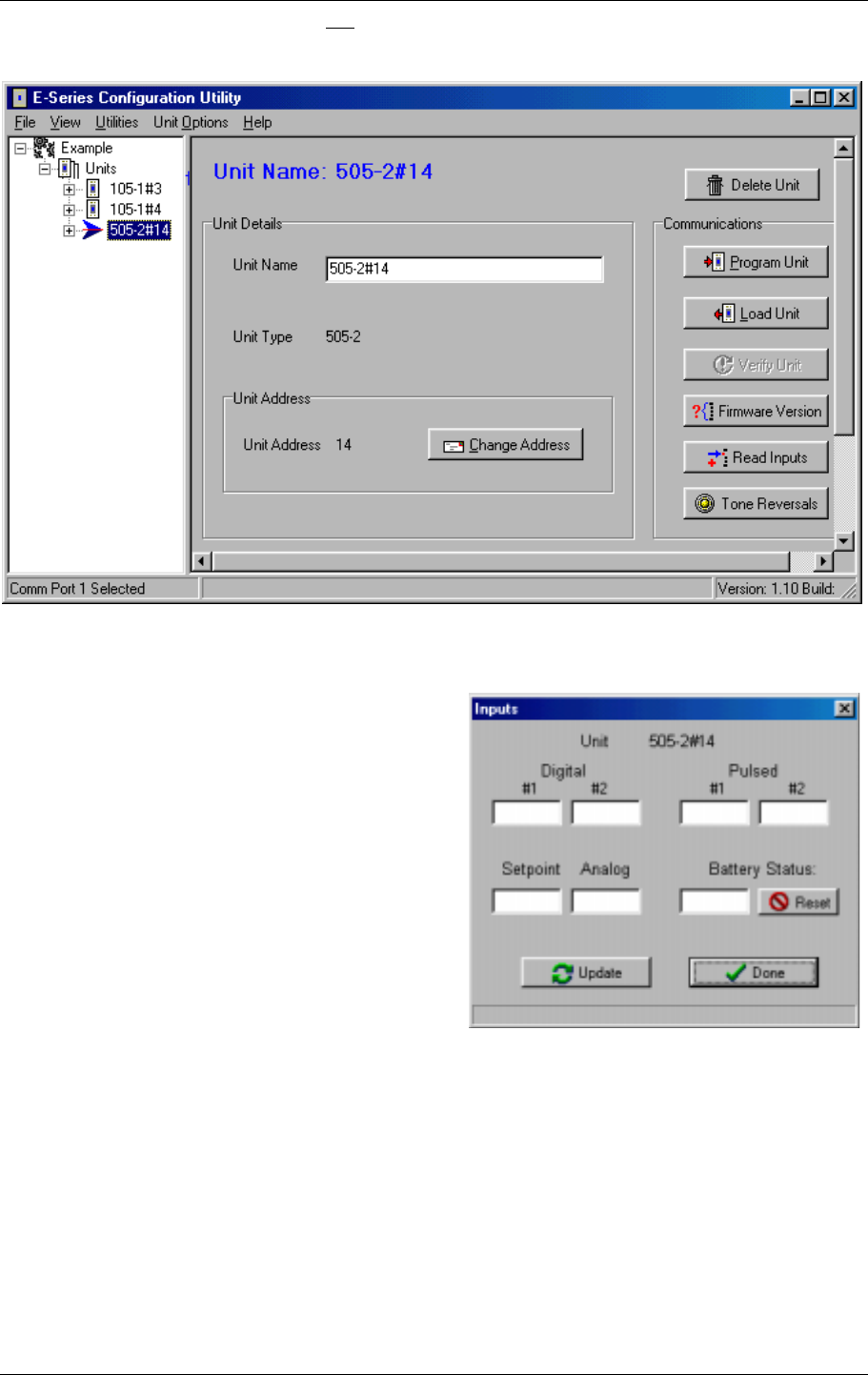
Read Inputs
This option provides a display of the measured
input signals in the 905U-K, both internal and
external. Digital inputs (internal and external)
are displayed as "ON" or "OFF", the pulse input
accumulated count values are displayed and the
analogue input value is displayed in mA. The
analogue input value is only updated when the
configured analogue sample occurs.
The displayed values will only update when you
select “Update”.
Tone Reversals
This feature turns the radio transmitter on
continuously for radio path testing. A series of 1 and 0 data bits is transmitted. This feature is
not recommended for 905U-K-B versions as it will significantly reduce the life of the
batteries.
To do radio path testing, refer to the 105 User Manual.
Firmware Version
The feature will display the firmware (software) version of the 905U-K module.
6 SPECIFICATIONS

905U-K.MAN Rev. 1.1 January 2002
ELPRO Technologies Pty Ltd Page 37
General
EMC approval FCC Part 15
Radio standards USA FCC Part 15.247
Canada RSS-210
902 – 928 MHz, 1 Watt
Housing 160 x 64 x 36mm
IP66
Industrial-grade painted
aluminium
I/O & Power Connection Weatherproof bayonet
connector
Female P/N:
Conxall 6282-7SG-522
Suitable for 0.75 mm2 conductors
Matching female part supplied
with unit
LED indication Transmit, Operation OK,
Configuration mode,
Reading analogue
Operating Temperature -40 to +55 degrees C
Power Supply
External Battery supply 5.4 - 30 V DC Overvoltage, reverse power
protected
Current Drain <100 µA
10mA + analogue loop
current
“Sleep” mode
Operating mode
Analogue loop supply Included 24V DC Nominal, 30mA
Low Battery voltage status Monitored Can be transmitted to remote
modules
Radio Transmitter
Frequency 902 - 928 Mhz 250 kHz channel spacing
Transmit power 1 Watt
Frequency Stability +/- 10 kHz
Expected line-of-sight range
(subject to local conditions)
20 Miles +@ 4W EIRP
15 km @ 1W EIRP
USA/Canada
Australia / New Zealand
Range may be extended by using
up to 5 intermediate 905U

905U-K Radio Telemetry Module User Manual
ELPRO Technologies Pty Ltd 2001 Page 38
modules as repeaters,
Antenna Connector SMA coaxial
Serial Ports
RS232 Port DB9 female DCE 9600 baud, no parity, 8 data bits,
1 stop bit
Data transmission
- digital inputs On change-of-state +
after update period
elapsed
Update time configurable 10 secs
- 5 days. Separate, faster update
time may be configured when
input is ON
Data transmission
- pulse inputs Transmitted as pulse
count Transmitted when count change
exceeds configured amount, or
on time elapsed since last
transmission (configurable 10
secs - 5 days)
Data transmission
- Up/down pulse input 2 pulse inputs may be
configured to a single
count
Suitable for quadrature or
incremental shaft encoders.
Data transmission
- analogue input On change-of-state +
after update period
elapsed
Sample time configurable 10 secs
- 5 days. Change of state
sensitivity configurable 0.05 to
20mA. Update time configurable
10 secs - 5 days.
Protocol Addressed data frame
with 16 bit CRC,
synchronous DFSK
Each transmission may be
configured to be sent 1 - 5 times
Inputs
Digital Inputs 2 inputs Suitable for voltage free contacts
or NPN transistor, input
debounce 0.5 second
Pulse Inputs 2 inputs Share digital inputs. Max rate
1000Hz, min. pulse width 3ms.
Analogue Input One 0 - 20 mA
(suitable for 4 - 20 mA,
0 - 10mA & 0 – 5 Volts)
“floating” differential input,
common mode voltage 24V. 24V
DC for powering external loops
provided, 30 mA max.
Resolution 12 bit, Accuracy <
0.1%. Transducer warm-up time
configurable 1 - 255 seconds.
Analogue Input Setpoint Configurable high & low setpoint
may be transmitted to remote
units, allowing set/reset of remote
digital outputs

905U-K.MAN Rev. 1.1 January 2002
ELPRO Technologies Pty Ltd Page 39
System Parameters
Network Configurations Max. number of 905U-K
inputs is >20,000 if
905U-C modules are used
as receivers.
905U-K is compatible with 905U
radio telemetry units which may
be used as repeaters, provision of
outputs, or as network master
unit to connect to PLC or PC
User Configuration Windows Configuration Software
Diagnostics
On board diagnostics Automatic check on
startup Microprocessor operation OK
Diagnostics included in
configuration software Input status, test transmission
signal