ENUSTECH BHF2000S WIRELESS BLUETOOTH CARKIT User Manual BHF 2000 Manual 101229

ENUSTECH WIRELESS BLUETOOTH CARKIT BHF 2000 Manual 101229

Users Manual

                            BTNetworks Co., LTD 2005 08.24    Ver 3.0  Bluet oot h Hands-free BHF2000S   Model Name: BHF2000SUser Manual ver 1.0  Sample User Guide and not for Commercial
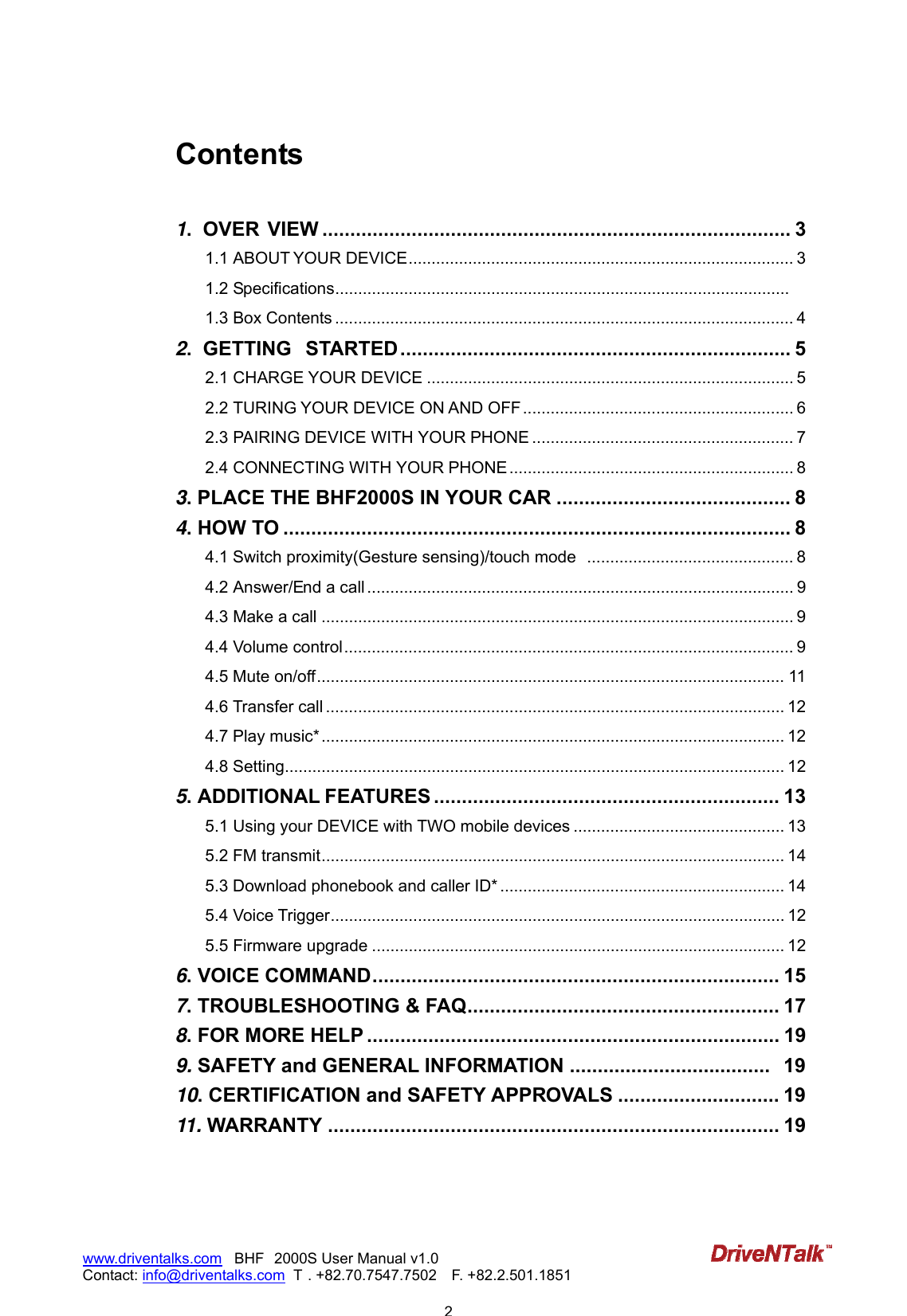
                           2www.driventalks.com   BHF 2000S User Manual v1.0 Contact: info@driventalks.com  T . +82.70.7547.7502   F. +82.2.501.1851   Contents  1.  OVER VIEW .................................................................................... 3 1.1 ABOUT YOUR DEVICE.................................................................................... 3 1.2 Specifications................................................................................................... 1.3 Box Contents .................................................................................................... 4 2.  GETTING  STARTED ...................................................................... 5 2.1 CHARGE YOUR DEVICE ................................................................................ 5 2.2 TURING YOUR DEVICE ON AND OFF ........................................................... 6 2.3 PAIRING DEVICE WITH YOUR PHONE ......................................................... 7 2.4 CONNECTING WITH YOUR PHONE .............................................................. 8 3. PLACE THE BHF2000S IN YOUR CAR .......................................... 8 4. HOW TO ........................................................................................... 8 4.1 Switch proximity(Gesture sensing)/touch mode  ............................................. 8 4.2 Answer/End a call ............................................................................................. 9 4.3 Make a call ....................................................................................................... 9 4.4 Volume control.................................................................................................. 9 4.5 Mute on/off...................................................................................................... 11 4.6 Transfer call .................................................................................................... 12 4.7 Play music*..................................................................................................... 12 4.8 Setting............................................................................................................. 12 5. ADDITIONAL FEATURES .............................................................. 13 5.1 Using your DEVICE with TWO mobile devices .............................................. 13 5.2 FM transmit..................................................................................................... 14 5.3 Download phonebook and caller ID* .............................................................. 14 5.4 Voice Trigger................................................................................................... 12 5.5 Firmware upgrade .......................................................................................... 12 6. VOICE COMMAND......................................................................... 15 7. TROUBLESHOOTING & FAQ........................................................ 17 8. FOR MORE HELP .......................................................................... 19 9. SAFETY and GENERAL INFORMATION .................................... 19 10. CERTIFICATION and SAFETY APPROVALS ............................. 19 11. WARRANTY ................................................................................. 19
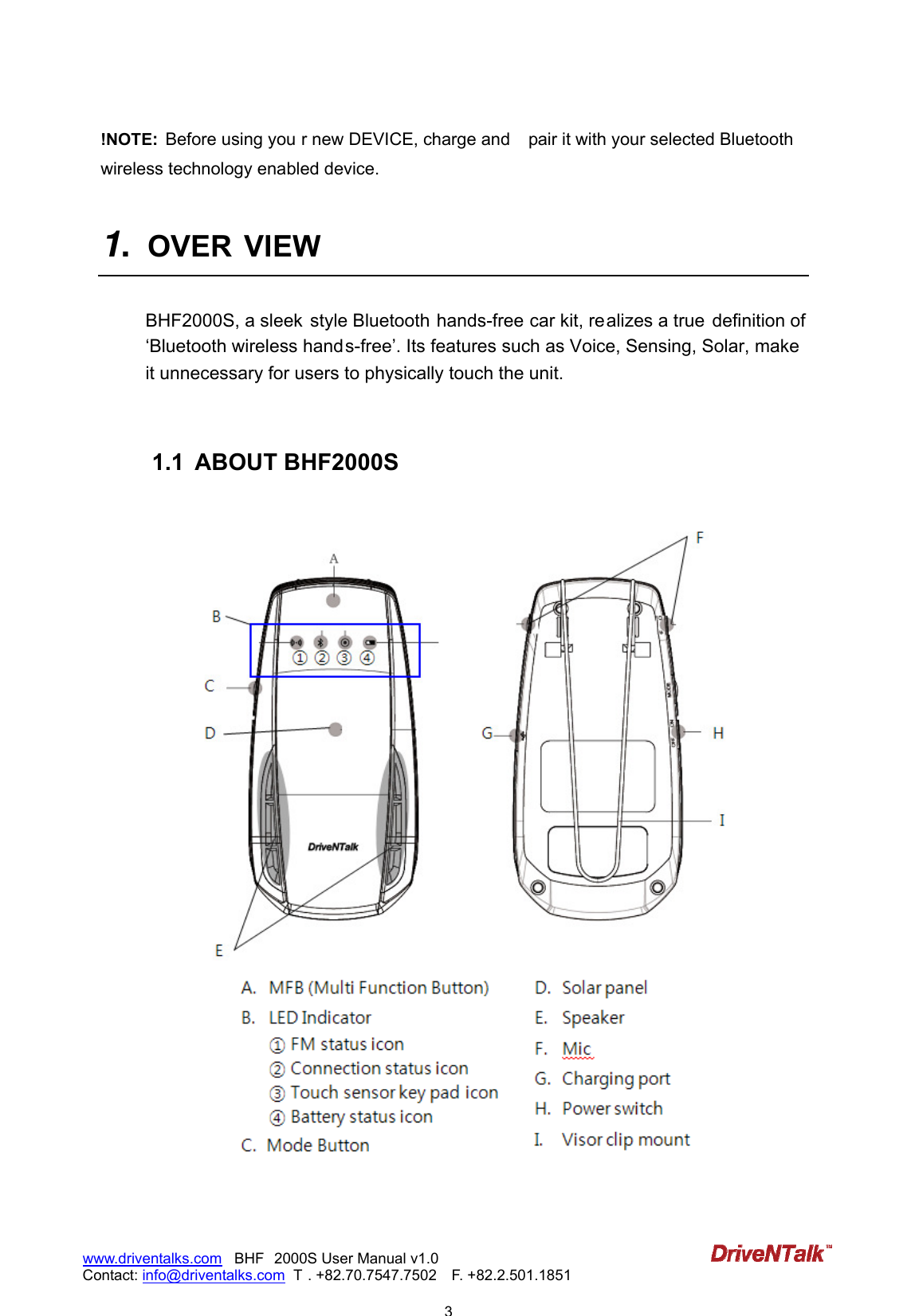
                           3www.driventalks.com   BHF 2000S User Manual v1.0 Contact: info@driventalks.com  T . +82.70.7547.7502   F. +82.2.501.1851   !NOTE:  Before using you r new DEVICE, charge and  pair it with your selected Bluetooth wireless technology enabled device.    1.  OVER VIEW  BHF2000S, a sleek  style Bluetooth hands-free car kit, realizes a true  definition of ‘Bluetooth wireless hands-free’. Its features such as Voice, Sensing, Solar, make  it unnecessary for users to physically touch the unit.      1.1  ABOUT BHF2000S
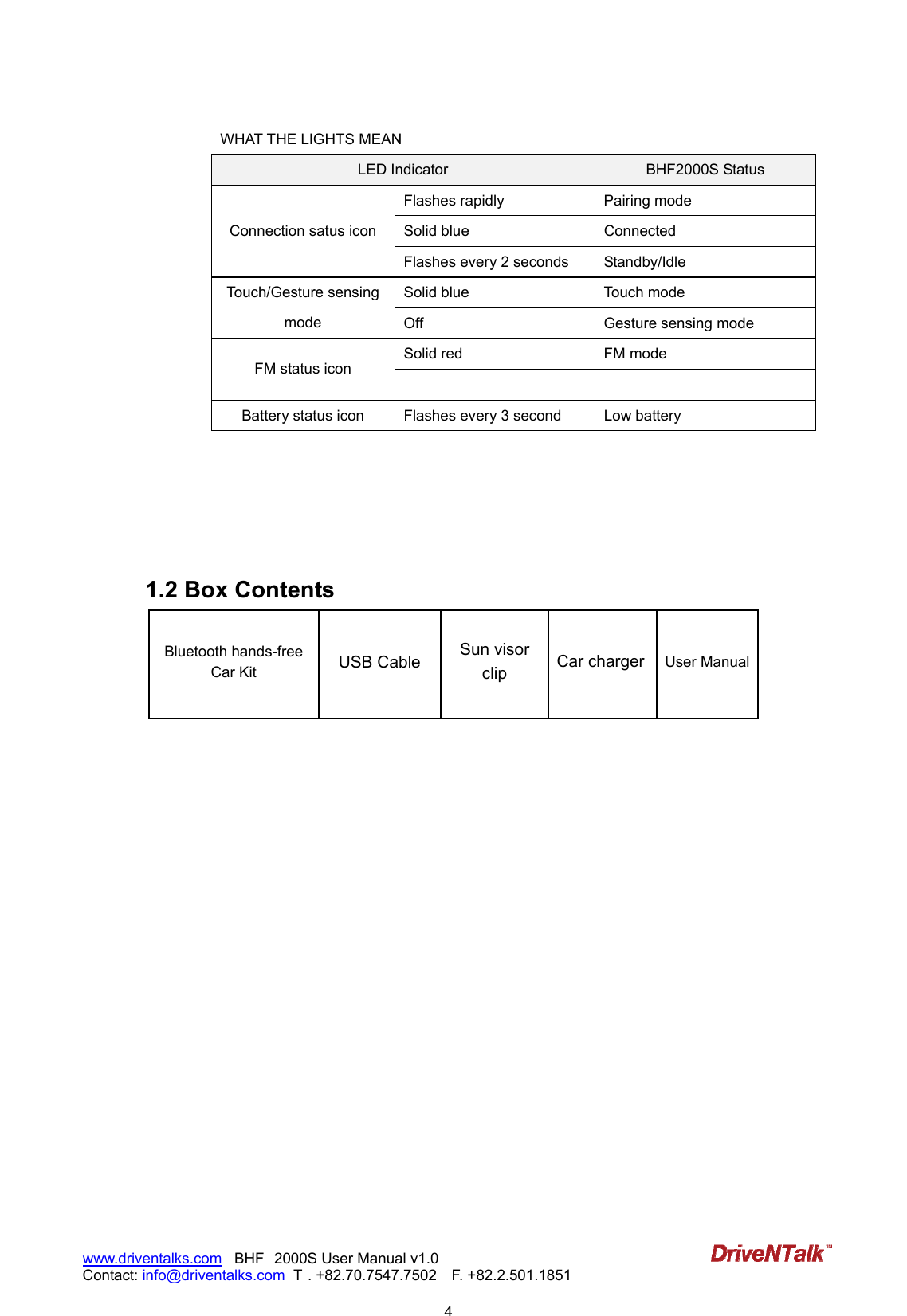
                           4www.driventalks.com   BHF 2000S User Manual v1.0 Contact: info@driventalks.com  T . +82.70.7547.7502   F. +82.2.501.1851   WHAT THE LIGHTS MEAN LED Indicator  BHF2000S Status Flashes rapidly  Pairing mode Solid blue  Connected Connection satus icon Flashes every 2 seconds  Standby/Idle Solid blue  Touch mode Touch/Gesture sensing mode  Off  Gesture sensing mode Solid red  FM mode FM status icon   Battery status icon  Flashes every 3 second  Low battery      1.2 Box Contents         Bluetooth hands-free Car Kit  USB Cable  Sun visor clip  Car charger User Manual
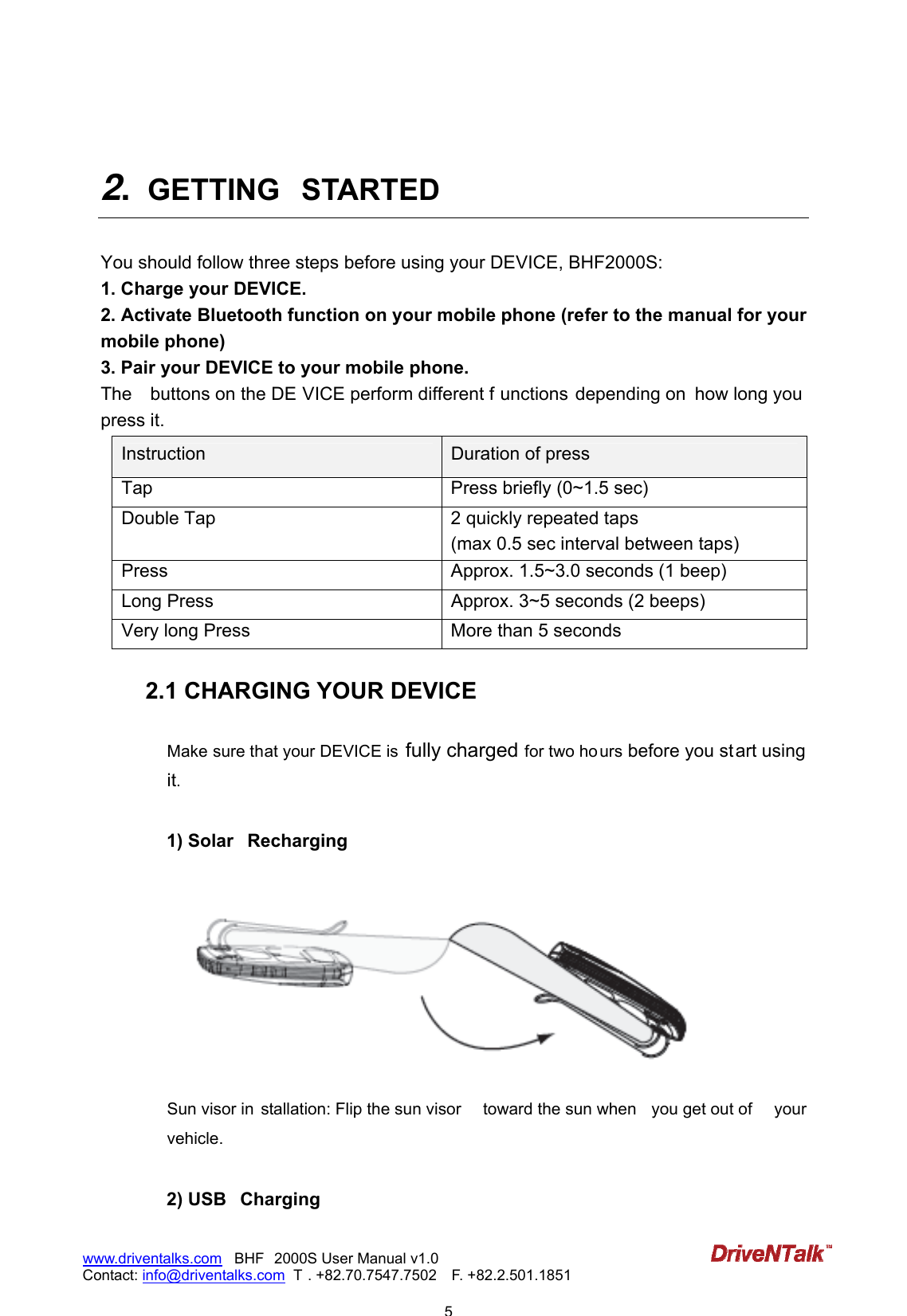
                           5www.driventalks.com   BHF 2000S User Manual v1.0 Contact: info@driventalks.com  T . +82.70.7547.7502   F. +82.2.501.1851    2.  GETTING  STARTED    You should follow three steps before using your DEVICE, BHF2000S: 1. Charge your DEVICE. 2. Activate Bluetooth function on your mobile phone (refer to the manual for your mobile phone) 3. Pair your DEVICE to your mobile phone. The    buttons on the DE VICE perform different f unctions depending on  how long you  press it. Instruction  Duration of press Tap  Press briefly (0~1.5 sec) Double Tap  2 quickly repeated taps (max 0.5 sec interval between taps) Press  Approx. 1.5~3.0 seconds (1 beep) Long Press  Approx. 3~5 seconds (2 beeps) Very long Press  More than 5 seconds  2.1 CHARGING YOUR DEVICE  Make sure that your DEVICE is  fully charged for two ho urs before you start using it.   1) Solar  Recharging   Sun visor in stallation: Flip the sun visor  toward the sun when  you get out of  your vehicle.  2) USB  Charging
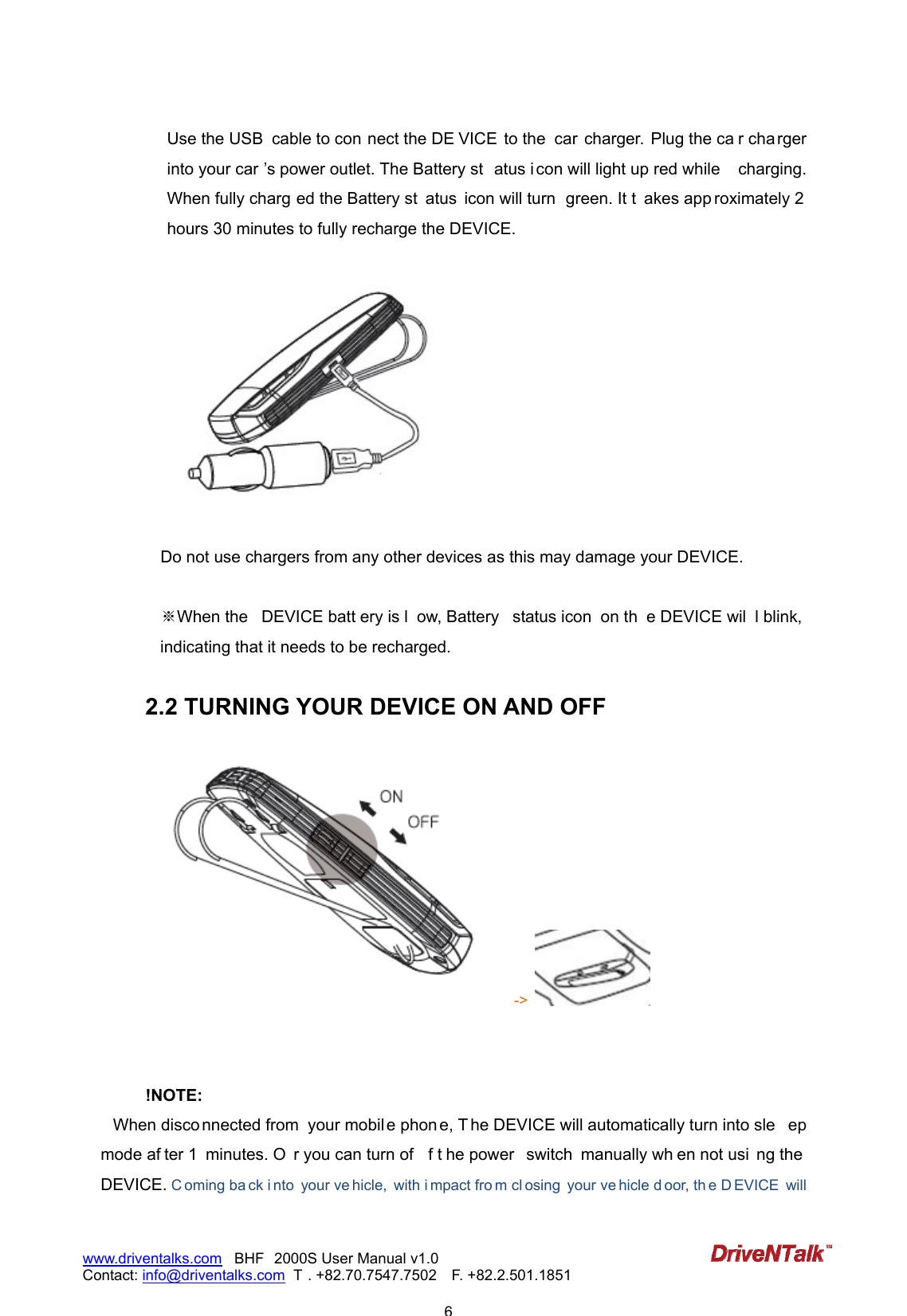
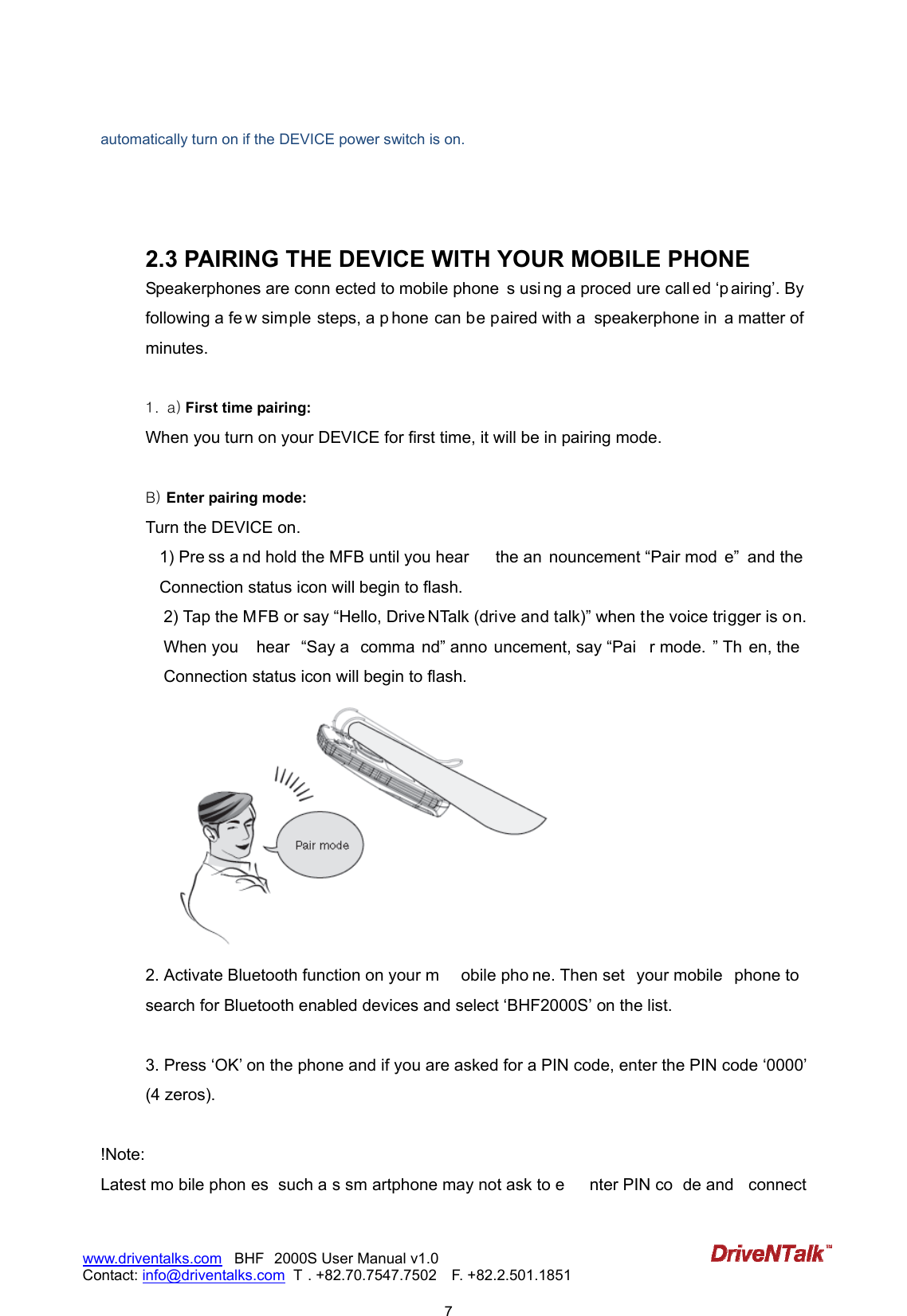
                           6www.driventalks.com   BHF 2000S User Manual v1.0 Contact: info@driventalks.com  T . +82.70.7547.7502   F. +82.2.501.1851   Use the USB  cable to con nect the DE VICE to the  car charger.  Plug the ca r cha rger into your car ’s power outlet. The Battery st atus i con will light up red while  charging. When fully charg ed the Battery st atus  icon will turn  green. It t akes app roximately 2 hours 30 minutes to fully recharge the DEVICE.      Do not use chargers from any other devices as this may damage your DEVICE.    ※When the   DEVICE batt ery is l ow, Battery  status icon  on th e DEVICE wil l blink, indicating that it needs to be recharged.   2.2 TURNING YOUR DEVICE ON AND OFF ->      !NOTE:  When disco nnected from  your mobil e phon e, T he DEVICE will automatically turn into sle ep mode af ter 1  minutes. O r you can turn of f t he power  switch  manually wh en not usi ng the  DEVICE. C oming ba ck i nto  your ve hicle,  with i mpact fro m cl osing  your ve hicle d oor, th e D EVICE  will
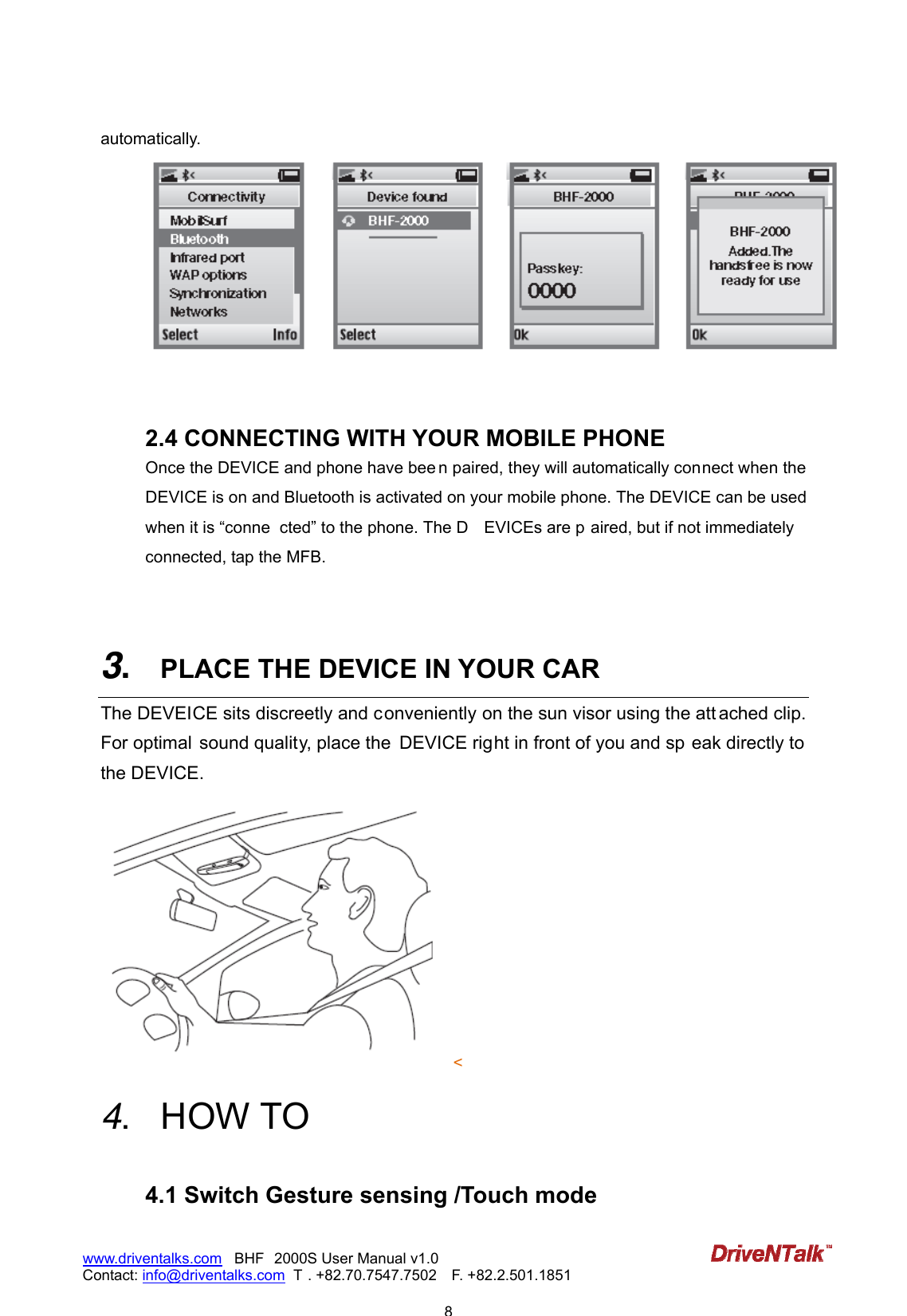
                           7www.driventalks.com   BHF 2000S User Manual v1.0 Contact: info@driventalks.com  T . +82.70.7547.7502   F. +82.2.501.1851   automatically turn on if the DEVICE power switch is on.    2.3 PAIRING THE DEVICE WITH YOUR MOBILE PHONE Speakerphones are conn ected to mobile phone s usi ng a proced ure call ed ‘p airing’. By following a fe w simple steps, a p hone can be paired with a  speakerphone in  a matter of minutes.  1. a) First time pairing: When you turn on your DEVICE for first time, it will be in pairing mode.    B) Enter pairing mode:   Turn the DEVICE on.   1) Pre ss a nd hold the MFB until you hear  the an nouncement “Pair mod e”  and the Connection status icon will begin to flash. 2) Tap the MFB or say “Hello, Drive NTalk (drive and talk)” when the voice trigger is on. When you  hear  “Say a  comma nd” anno uncement, say “Pai r mode. ” Th en, the  Connection status icon will begin to flash.  2. Activate Bluetooth function on your m obile pho ne. Then set  your mobile  phone to  search for Bluetooth enabled devices and select ‘BHF2000S’ on the list.  3. Press ‘OK’ on the phone and if you are asked for a PIN code, enter the PIN code ‘0000’ (4 zeros).  !Note: Latest mo bile phon es  such a s sm artphone may not ask to e nter PIN co de and  connect
                           8www.driventalks.com   BHF 2000S User Manual v1.0 Contact: info@driventalks.com  T . +82.70.7547.7502   F. +82.2.501.1851   automatically.    2.4 CONNECTING WITH YOUR MOBILE PHONE Once the DEVICE and phone have bee n paired, they will automatically connect when the DEVICE is on and Bluetooth is activated on your mobile phone. The DEVICE can be used when it is “conne cted” to the phone. The D EVICEs are p aired, but if not immediately connected, tap the MFB.     3.  PLACE THE DEVICE IN YOUR CAR The DEVEICE sits discreetly and conveniently on the sun visor using the att ached clip. For optimal  sound quality, place the  DEVICE right in front of you and sp eak directly to the DEVICE. <   4.  HOW TO   4.1 Switch Gesture sensing /Touch mode
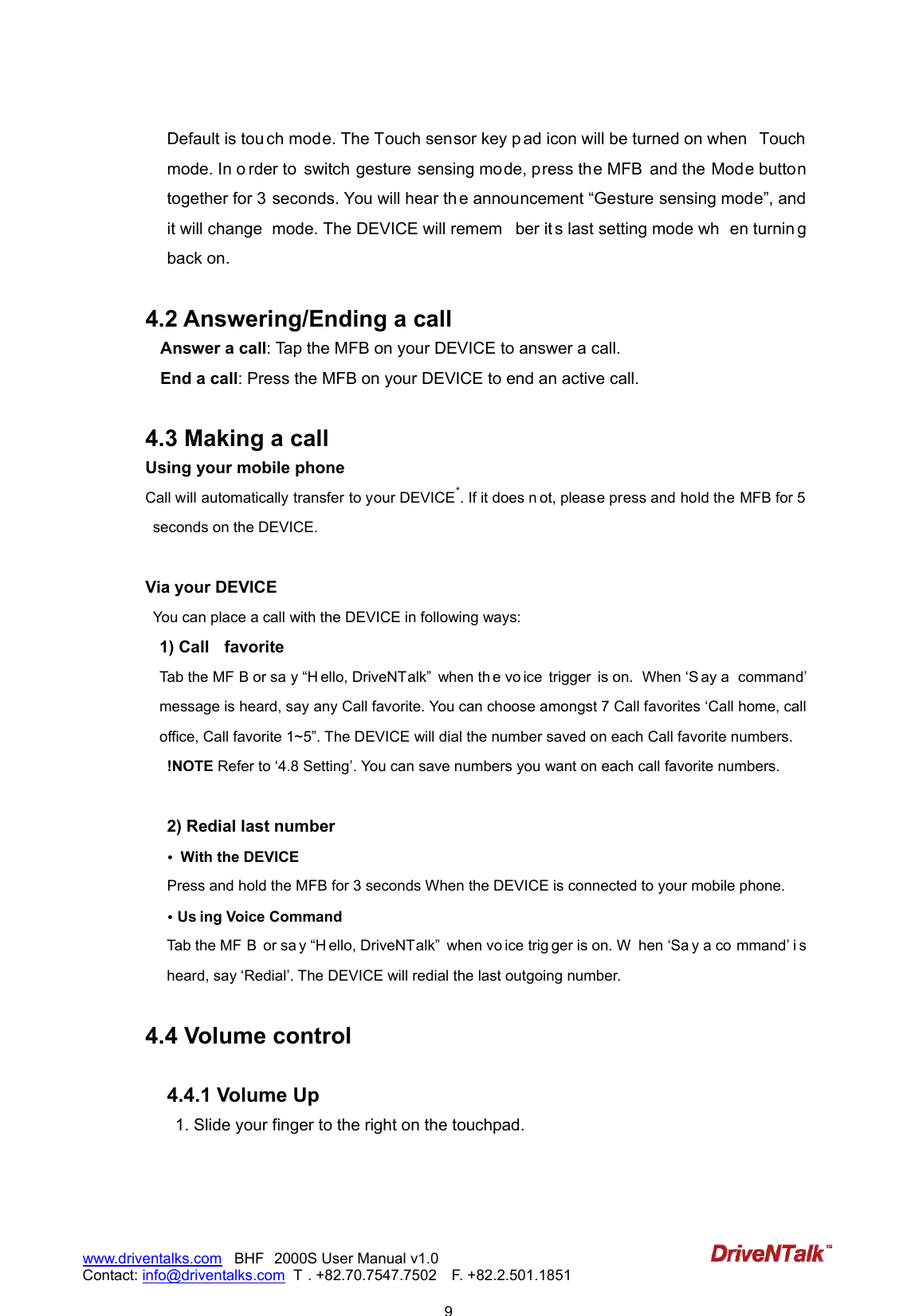
                           9www.driventalks.com   BHF 2000S User Manual v1.0 Contact: info@driventalks.com  T . +82.70.7547.7502   F. +82.2.501.1851   Default is tou ch mode. The Touch sensor key p ad icon will be turned on when  Touch mode. In o rder to  switch gesture sensing mode, press the MFB  and the Mode button together for 3 seconds. You will hear th e announcement “Gesture sensing mode”, and it will change  mode. The DEVICE will remem ber it s last setting mode wh en turnin g back on.  4.2 Answering/Ending a call Answer a call: Tap the MFB on your DEVICE to answer a call.   End a call: Press the MFB on your DEVICE to end an active call.    4.3 Making a call   Using your mobile phone Call will automatically transfer to your DEVICE*. If it does n ot, please press and hold the MFB for 5 seconds on the DEVICE.    Via your DEVICE   You can place a call with the DEVICE in following ways: 1) Call  favorite Tab the MF B or sa y “H ello, DriveNTalk”  when th e vo ice  trigger  is on.  When ‘S ay a  command’ message is heard, say any Call favorite. You can choose amongst 7 Call favorites ‘Call home, call office, Call favorite 1~5”. The DEVICE will dial the number saved on each Call favorite numbers. !NOTE Refer to ‘4.8 Setting’. You can save numbers you want on each call favorite numbers.  2) Redial last number •  With the DEVICE Press and hold the MFB for 3 seconds When the DEVICE is connected to your mobile phone.   • Us ing Voice Command Tab the MF B  or sa y “H ello, DriveNTalk”  when vo ice trig ger is on. W hen ‘Sa y a co mmand’ i s heard, say ‘Redial’. The DEVICE will redial the last outgoing number.  4.4 Volume control    4.4.1 Volume Up 1. Slide your finger to the right on the touchpad.
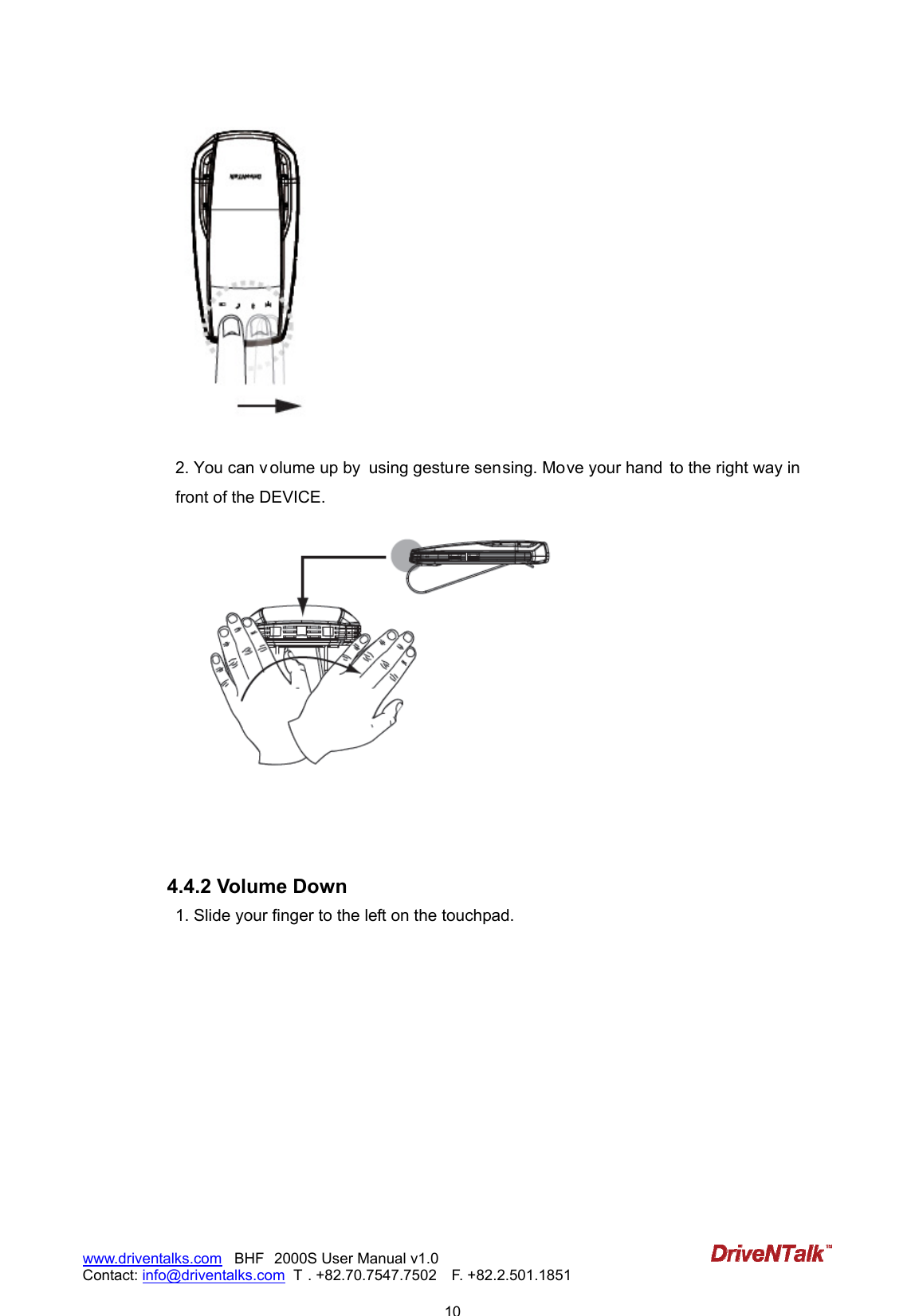
                           10www.driventalks.com   BHF 2000S User Manual v1.0 Contact: info@driventalks.com  T . +82.70.7547.7502   F. +82.2.501.1851     2. You can v olume up by  using gesture sensing. Move your hand  to the right way in  front of the DEVICE.     4.4.2 Volume Down 1. Slide your finger to the left on the touchpad.
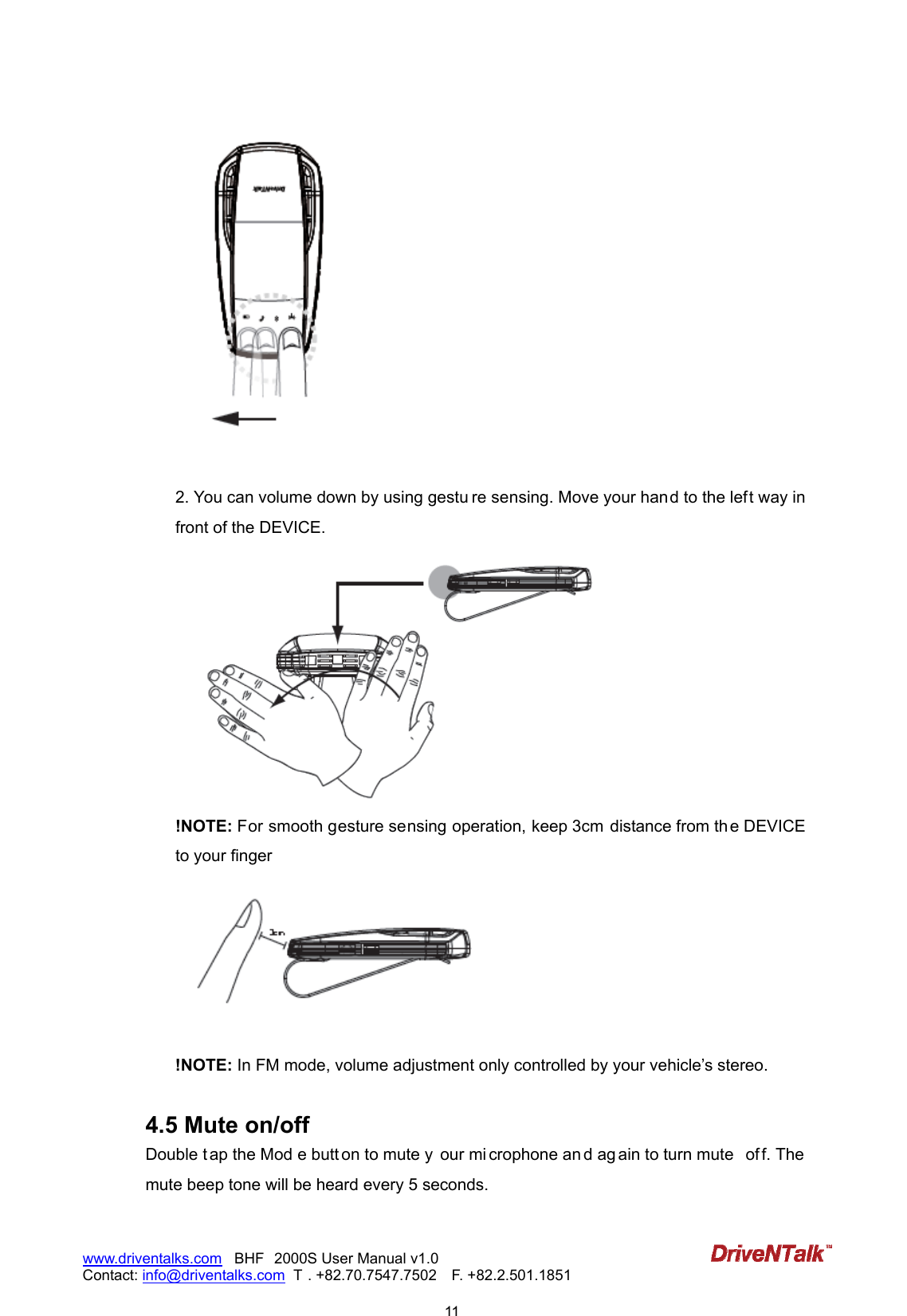
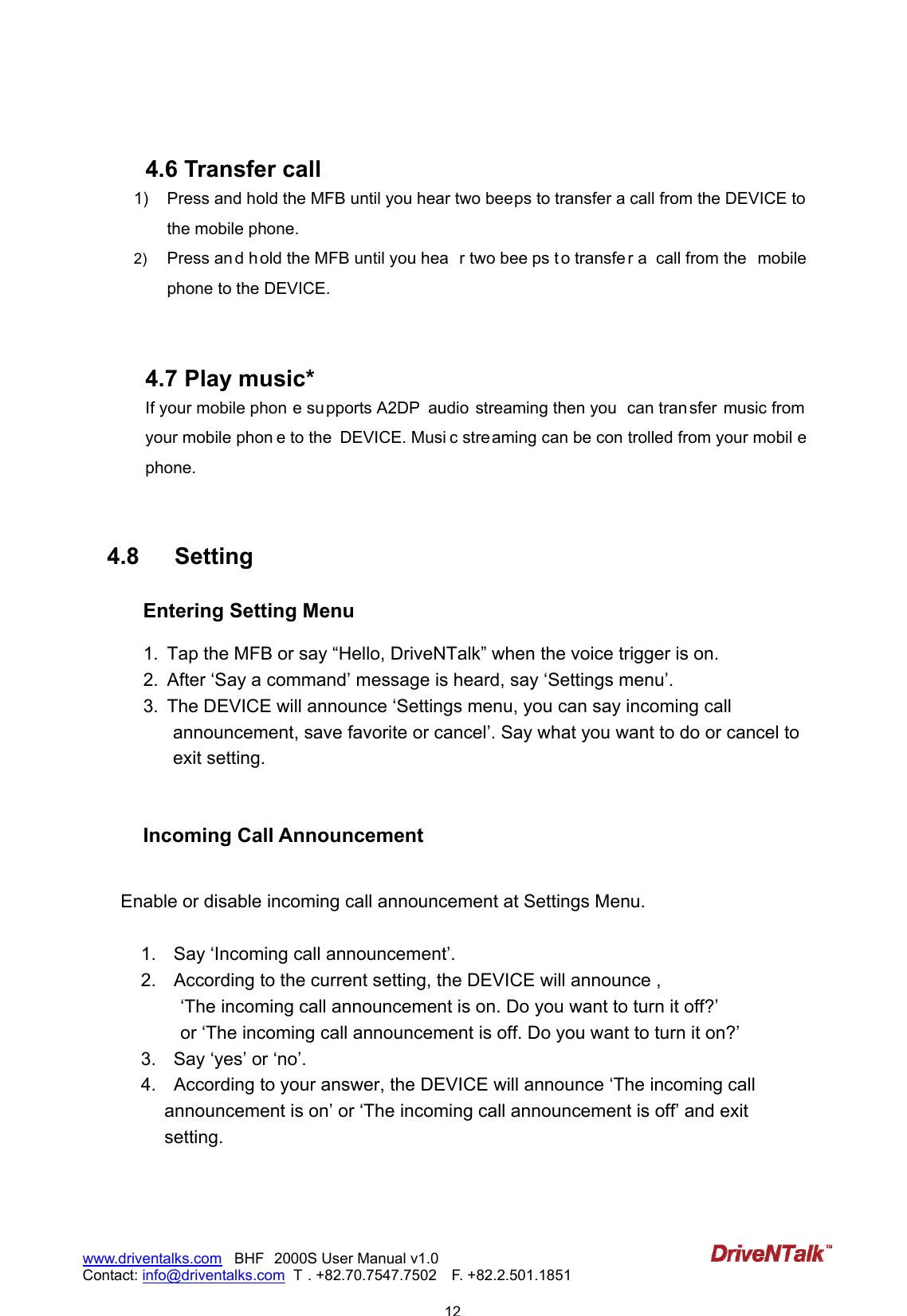
                           11www.driventalks.com   BHF 2000S User Manual v1.0 Contact: info@driventalks.com  T . +82.70.7547.7502   F. +82.2.501.1851     2. You can volume down by using gestu re sensing. Move your hand to the left way in front of the DEVICE.  !NOTE: For smooth gesture sensing operation, keep 3cm  distance from th e DEVICE to your finger   !NOTE: In FM mode, volume adjustment only controlled by your vehicle’s stereo.  4.5 Mute on/off Double t ap the Mod e butt on to mute y our mi crophone an d ag ain to turn mute  of f. The mute beep tone will be heard every 5 seconds.
                           12www.driventalks.com   BHF 2000S User Manual v1.0 Contact: info@driventalks.com  T . +82.70.7547.7502   F. +82.2.501.1851    4.6 Transfer call 1)  Press and hold the MFB until you hear two beeps to transfer a call from the DEVICE to the mobile phone.   2)  Press an d h old the MFB until you hea r two bee ps t o transfe r a  call from the  mobile phone to the DEVICE.    4.7 Play music*   If your mobile phon e supports A2DP  audio  streaming then you  can tran sfer  music from your mobile phon e to the  DEVICE. Musi c streaming can be con trolled from your mobil e phone.    4.8  Setting Entering Setting Menu  1.  Tap the MFB or say “Hello, DriveNTalk” when the voice trigger is on. 2.  After ‘Say a command’ message is heard, say ‘Settings menu’. 3.  The DEVICE will announce ‘Settings menu, you can say incoming call announcement, save favorite or cancel’. Say what you want to do or cancel to exit setting.   Incoming Call Announcement  Enable or disable incoming call announcement at Settings Menu.  1.    Say ‘Incoming call announcement’. 2.    According to the current setting, the DEVICE will announce , ‘The incoming call announcement is on. Do you want to turn it off?’ or ‘The incoming call announcement is off. Do you want to turn it on?’ 3.    Say ‘yes’ or ‘no’. 4.    According to your answer, the DEVICE will announce ‘The incoming call announcement is on’ or ‘The incoming call announcement is off’ and exit setting.
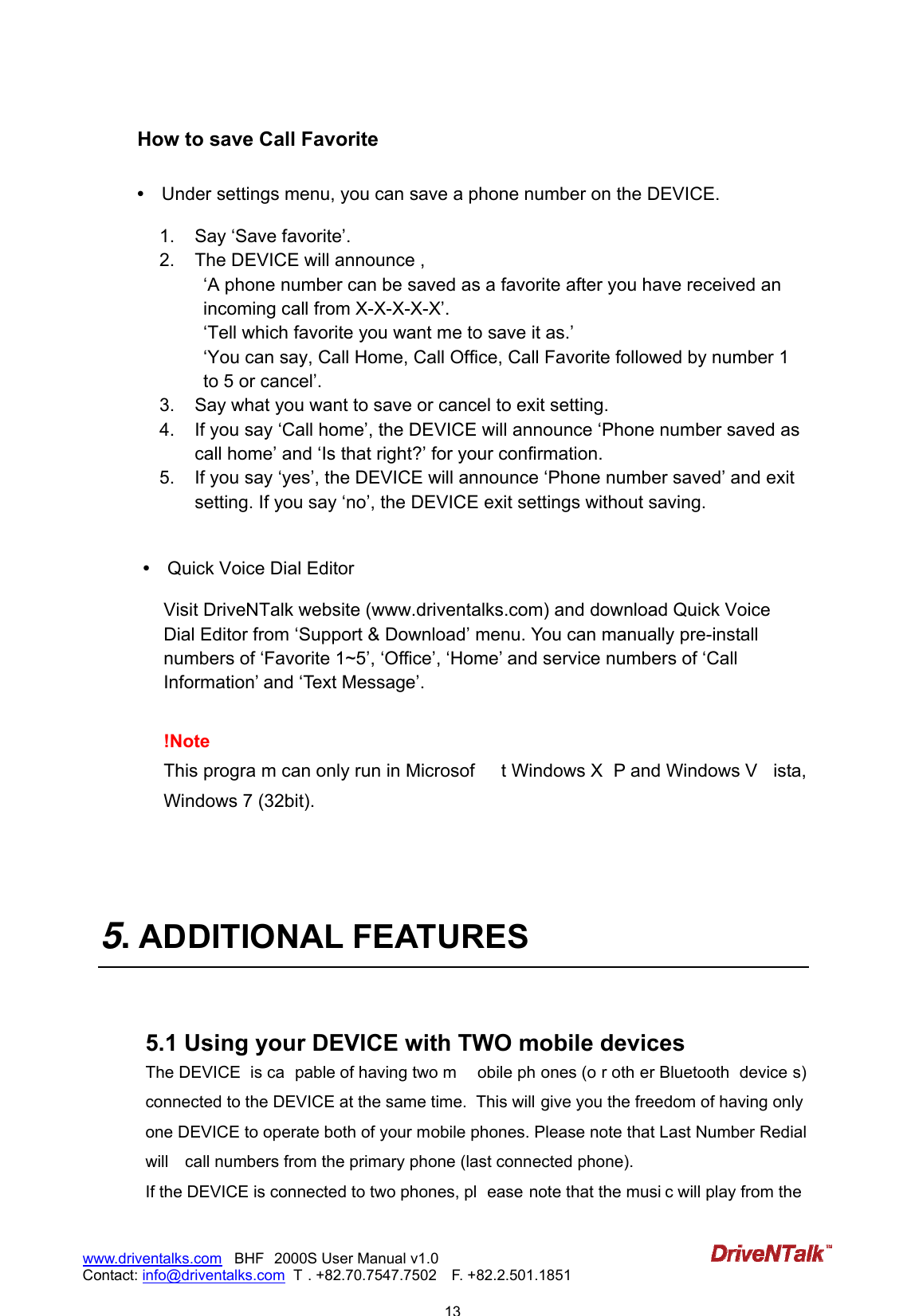
                           13www.driventalks.com   BHF 2000S User Manual v1.0 Contact: info@driventalks.com  T . +82.70.7547.7502   F. +82.2.501.1851   How to save Call Favorite  •   Under settings menu, you can save a phone number on the DEVICE.     1.  Say ‘Save favorite’. 2.  The DEVICE will announce , ‘A phone number can be saved as a favorite after you have received an incoming call from X-X-X-X-X’. ‘Tell which favorite you want me to save it as.’ ‘You can say, Call Home, Call Office, Call Favorite followed by number 1 to 5 or cancel’. 3.  Say what you want to save or cancel to exit setting.   4.  If you say ‘Call home’, the DEVICE will announce ‘Phone number saved as call home’ and ‘Is that right?’ for your confirmation. 5.  If you say ‘yes’, the DEVICE will announce ‘Phone number saved’ and exit setting. If you say ‘no’, the DEVICE exit settings without saving.   •   Quick Voice Dial Editor  Visit DriveNTalk website (www.driventalks.com) and download Quick Voice Dial Editor from ‘Support & Download’ menu. You can manually pre-install numbers of ‘Favorite 1~5’, ‘Office’, ‘Home’ and service numbers of ‘Call Information’ and ‘Text Message’.  !Note This progra m can only run in Microsof t Windows X P and Windows V ista, Windows 7 (32bit).     5. ADDITIONAL FEATURES   5.1 Using your DEVICE with TWO mobile devices The DEVICE  is ca pable of having two m obile ph ones (o r oth er Bluetooth  device s) connected to the DEVICE at the same time.  This will give you the freedom of having only one DEVICE to operate both of your mobile phones. Please note that Last Number Redial will    call numbers from the primary phone (last connected phone). If the DEVICE is connected to two phones, pl ease note that the musi c will play from the
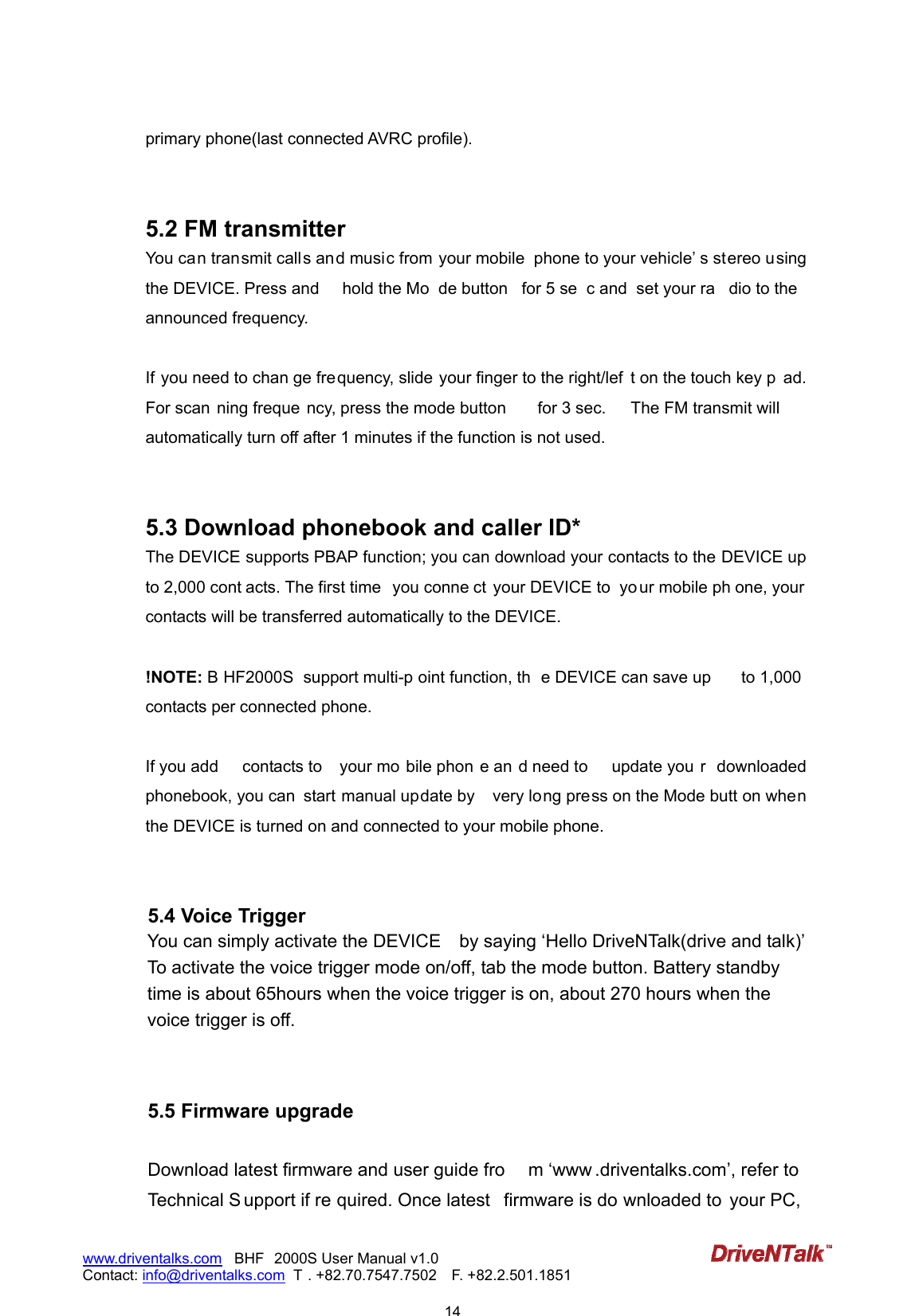
                           14www.driventalks.com   BHF 2000S User Manual v1.0 Contact: info@driventalks.com  T . +82.70.7547.7502   F. +82.2.501.1851   primary phone(last connected AVRC profile).     5.2 FM transmitter   You can transmit calls and music from your mobile  phone to your vehicle’ s stereo using the DEVICE. Press and  hold the Mo de button  for 5 se c and  set your ra dio to the announced frequency.  If you need to chan ge frequency, slide your finger to the right/lef t on the touch key p ad. For scan ning freque ncy, press the mode button  for 3 sec.  The FM transmit will automatically turn off after 1 minutes if the function is not used.   5.3 Download phonebook and caller ID*   The DEVICE supports PBAP function; you can download your contacts to the DEVICE up to 2,000 cont acts. The first time  you conne ct your DEVICE to  yo ur mobile ph one, your contacts will be transferred automatically to the DEVICE.  !NOTE: B HF2000S  support multi-p oint function, th e DEVICE can save up  to 1,000 contacts per connected phone.  If you add  contacts to  your mo bile phon e an d need to  update you r  downloaded phonebook, you can  start manual update by    very long press on the Mode butt on when the DEVICE is turned on and connected to your mobile phone.   5.4 Voice Trigger You can simply activate the DEVICE    by saying ‘Hello DriveNTalk(drive and talk)’ To activate the voice trigger mode on/off, tab the mode button. Battery standby time is about 65hours when the voice trigger is on, about 270 hours when the voice trigger is off.   5.5 Firmware upgrade  Download latest firmware and user guide fro m ‘www .driventalks.com’, refer to Technical S upport if re quired. Once latest  firmware is do wnloaded to  your PC,
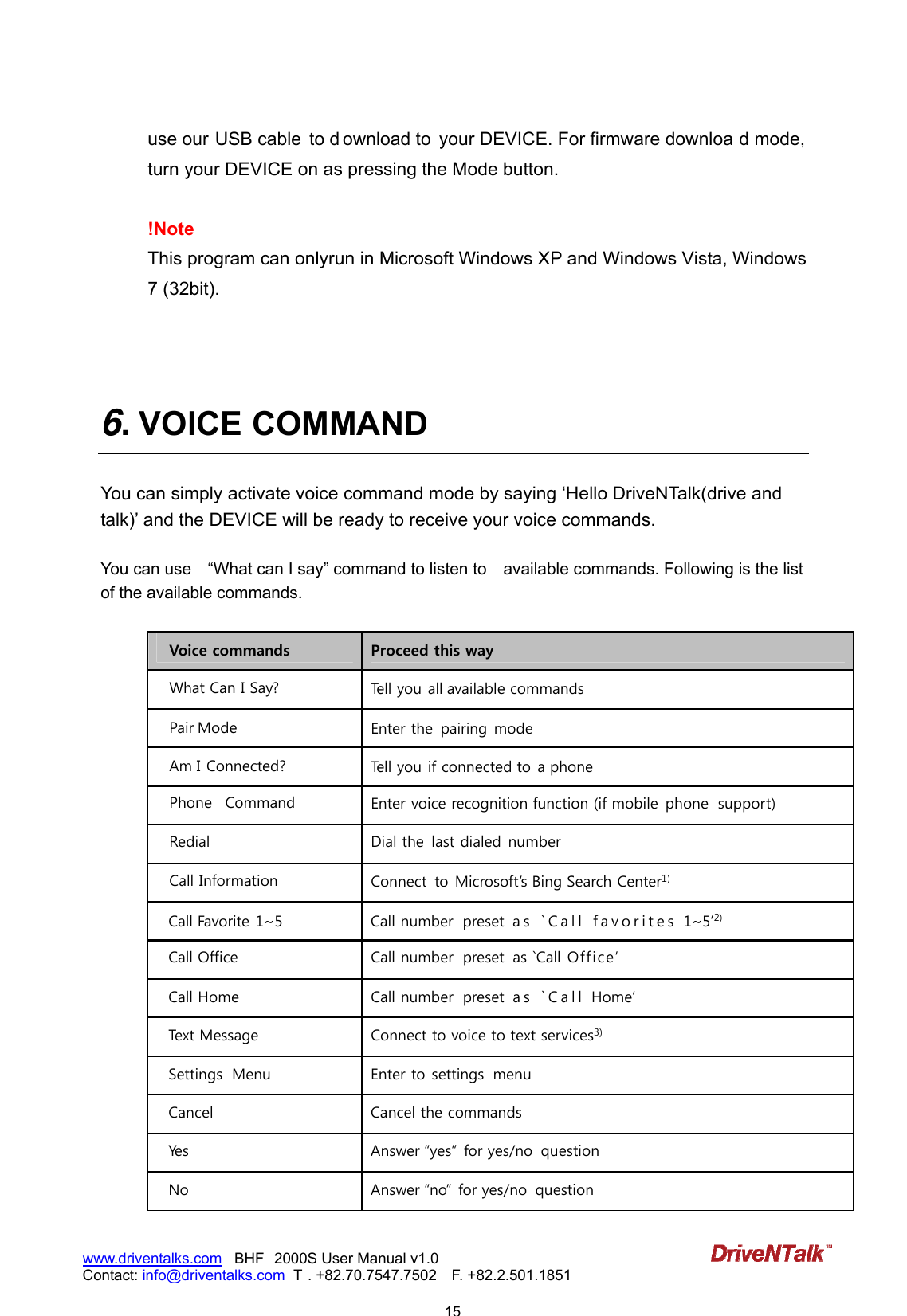
                           15www.driventalks.com   BHF 2000S User Manual v1.0 Contact: info@driventalks.com  T . +82.70.7547.7502   F. +82.2.501.1851   use our USB cable  to d ownload to  your DEVICE. For firmware downloa d mode, turn your DEVICE on as pressing the Mode button.   !Note This program can onlyrun in Microsoft Windows XP and Windows Vista, Windows 7 (32bit).    6. VOICE COMMAND  You can simply activate voice command mode by saying ‘Hello DriveNTalk(drive and talk)’ and the DEVICE will be ready to receive your voice commands.  You can use    “What can I say” command to listen to    available commands. Following is the list of the available commands.  Voice commands  Proceed this way What Can I Say?  Tell you all available commands Pair Mode  Enter the  pairing mode Am I Connected?  Tell you if connected to a phone Phone   Command  Enter voice recognition function (if mobile phone  support) Redial  Dial the  last dialed number Call Information  Connect  to Microsoft’s Bing Search Center1) Call Favorite 1~5  Call number  preset  a s   ` C a l l   f a v o r i t e s  1~5’2) Call Office  Call number  preset  as `Call Off ice’ Call Home  Call number  preset  a s   ` C a l l  Home’ Text Message  Connect to voice to text services3) Settings  Menu  Enter to settings  menu Cancel  Cancel the commands Yes  Answer yes for yes/no  question No  Answer no for yes/no  question
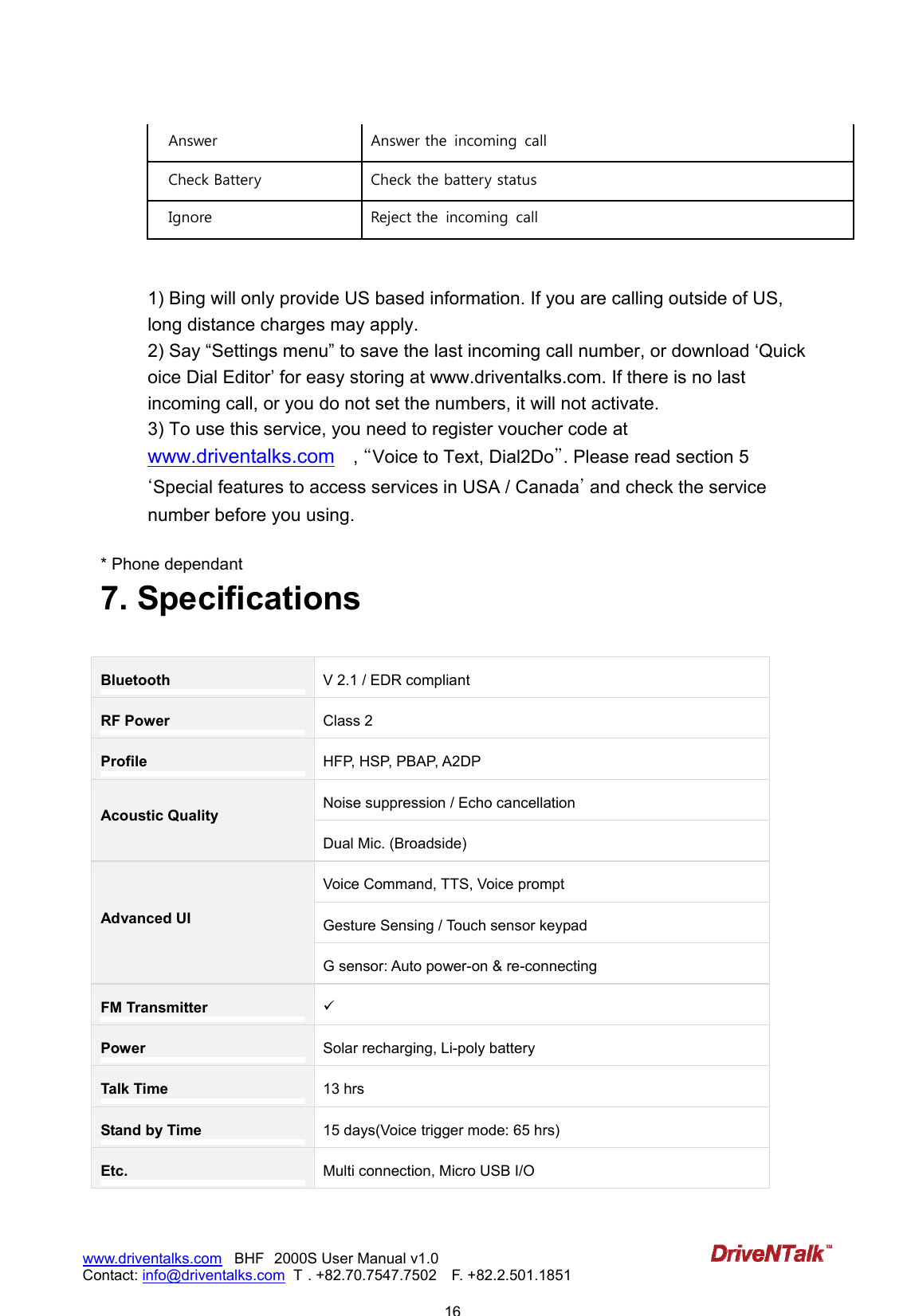
                           16www.driventalks.com   BHF 2000S User Manual v1.0 Contact: info@driventalks.com  T . +82.70.7547.7502   F. +82.2.501.1851   Answer  Answer the  incoming  call Check Battery  Check the battery status   Ignore  Reject the  incoming  call   1) Bing will only provide US based information. If you are calling outside of US, long distance charges may apply. 2) Say “Settings menu” to save the last incoming call number, or download ‘Quick oice Dial Editor’ for easy storing at www.driventalks.com. If there is no last incoming call, or you do not set the numbers, it will not activate. 3) To use this service, you need to register voucher code at www.driventalks.com  , ˈVoice to Text, Dial2Doˉ. Please read section 5 ˄Special features to access services in USA / Canada˅ and check the service number before you using.  * Phone dependant 7. Specifications  Bluetooth V 2.1 / EDR compliant RF Power Class 2 Profile HFP, HSP, PBAP, A2DP   Noise suppression / Echo cancellation Acoustic Quality Dual Mic. (Broadside) Voice Command, TTS, Voice prompt Gesture Sensing / Touch sensor keypad Advanced UI G sensor: Auto power-on & re-connecting FM Transmitter  Power Solar recharging, Li-poly battery Talk Time 13 hrs Stand by Time 15 days(Voice trigger mode: 65 hrs) Etc. Multi connection, Micro USB I/O
                           17www.driventalks.com   BHF 2000S User Manual v1.0 Contact: info@driventalks.com  T . +82.70.7547.7502   F. +82.2.501.1851    8. TROUBLESHOOTING & FAQ   ► I s m y phone com pa t ible ?  I f your m obile phone has a Bluet oot h feature, it is com pat ible wit h DriveNTalk hands- free. Refer t o t he user ’s guide of your m obile phone.  ► I  am  h a ving pa iring pr oblem s. To pair your m obile phone correct ly, please refer to our user guide at  Support  & Download.  I f you st ill have problem  connect ing your m obile phone, please erase DEVI CE t hat  appears on t he Bluet oot h search and t ry once again or contact  our info for support .    ► W ha t is t h e pin num ber for  a Bluet oot h  connect ion ?    The pin num ber is 0000 ( 4 zeros) .  ► My phone has been  paired, sh ould I  pair it e ve r y t im e  I  use ?   Once it  has been paired, BHF2000S will aut om at ically connect  t o your m obile phone. You can have paired links with up to 8 phones.  ► I  ha ve m or e t ha n 2  m obile phone s. Ca n I  conne ct  bot h phone s t o BH F2 0 0 0 S at  t he sam e  t im e ?  BHF2000S support s m ult i point funct ion. Up to two phones can be connect ed. I t  also support s paired links with up to 8 phones.  ► How  can I  know  m y phone  is conne ct ed?   -  When your m obile phone is connect ed t o a Bluetoot h device, the Bluet ooth sym bol on your m obile phone will change a bit  to indicate t hat  t his is t he case. According to the m anufact urers, som e phones show a headset or a car sym bol. -  You can also use t he Voice com m and of BHF2000S. Tab t he MFB or say Hello, DriveNTalk and ask Am  I  connected?, t hen it  w ill answer Yo u r  ph o n e is connect ed or No phone found.  ► How  t o t ra nsfe r t he ca ll from  speaker t o m y phon e?
                           18www.driventalks.com   BHF 2000S User Manual v1.0 Contact: info@driventalks.com  T . +82.70.7547.7502   F. +82.2.501.1851   During a call, press t he CALL but t on and will t ransfer t o the phone, but  do not  do t his while you are driving.  ► I f t here  is a se cond ca ll w h ile I  am  on t h e phone, how  can I  ha ndle  it ?  1)  1st  call on hold, 2nd call answer Press t he MFB t o accept  the second incom ing call, then the 1st  call will be aut om at ically put on hold. I f you want  t o switch back t he call, press t he CALL butt on again. 2)  1st  call end, 2nd call answ er Tap t he MFB, then you can answ er the second call. 1st  call will be t erm inat ed. 3)  2nd call rej ect Press and hold the MFB, then you can rej ect  the 2nd call and keep t he 1st  call.  ► I  w ant  t o save  m y ca ll favorit e  num ber s t hrough t he ‘Set t ings m e nu’ Voice com m and. H ow ever, it seem s not  w orking.      You can only save t he call favorit e num bers by your voice when t here is a last  incom ing call num ber. For easier storing, visit  our w ebsit e download Quick Voice Dial Edit or.  ► How  can I  updat e  m y BH F2 0 0 0 S?  Download our lat est firm ware from  Support  & Download m enu to your PC;  use our USB cable t o connect  BHF2000S. To go to  firmware  download mode, turn  you r DEVICE on as pressing the Mode button.  ► ► I  cannot  h ear a nyt hing from  m y DEVI CE. I ncrease the volum e in t he DEVI CE. Ensure t hat  the DEVI CE is paired to a device that is playing. Make sure your mobile phone is connected to the DEVICE by tapping the MFB but t on.
                           19www.driventalks.com   BHF 2000S User Manual v1.0 Contact: info@driventalks.com  T . +82.70.7547.7502   F. +82.2.501.1851   8. FOR MORE HELP  8.1 Customer  care If you are having trouble getting the BHF2000S to work, please visit our website www.driventalks.com for help and support. Please contact us before returning the BHF2000S to a store and we will help you through any difficulty you may have.   www.driventalks.com   info@driventalks.com        8.2  Special features to access services in USA / Canada 1. Call  information  You can say ‘Call information’ to search for local and business listings with Bing™ 411. Find news, directions, restaurant locations, weather forecasts, movie show times, and more.   For more information, visit to the following web-site, http://www.discoverbing.com/mobile/411/ ! Note   Bing is a free US based information service. Long distance charges may apply when using this service outside a US calling area.   2.  Text message (Voice to Text Service)  You can say ‘Text message’ to use voice to text service. Send SMS, e-mail and more by using your voice. DriveNTalk provides a 90 days free voucher card of the voice to text service to its users which voucher codes need to be registered before using this service. All rights and responsibilities of the services are belonging with Dial2Do service provider. For more information, please go to www.driventalks.com and search Voice to Text, Dial2Do.  ! Note   Before you use this service, please check if a proper service number is stored in your BHF2000S according to where you are. You can set the 'Text message' number through Quick Voice Dial Editor program. Please visit at www.driventalks.com to download the program.
                           20www.driventalks.com   BHF 2000S User Manual v1.0 Contact: info@driventalks.com  T . +82.70.7547.7502   F. +82.2.501.1851     [Dial2Do Service No.] * USA           65 03600959   * Canada            Ont ario: 4168002218              Quebec:  5149073174             Albert a: 7806281814             C algary, Alberta: 4037751217             V ancouver, British Columbia: 6044841955  9. Safety and General Information This safety and general information should be followed to safely use your BHF2000S. -  DriveNTalk is not respon sible for any consequ ences arising from  insub ordinations of this safety information.  。Use only p rovided  chargers spe cifically desig ned for your  DEVICE. Incom patible  chargers can cause serious injuries or damage to your DEVICE.  。Keep your  DEVICE away from small  children and pets. Small p arts may cau se chocking or  serious injury if swallowed.  。Never place your DEVICE on or in  heating dev ices, Such as microw ave ovens, stoves,  or radiators. Battery may explode when overheated.  。Do not allo w your DEVICE to get w et. Liquid and moisture can cau se serious dam age to  electric devices.  。Do not separate, repair nor remodel the DEVICE arbitrarily. If repair is needed, please contact us or your dealer.  。Do not use  any chemica l solvents or deterg ent. The use of che micals on the  DEVICE ma y cause damage to the DEVICE. Turn the DEVICE off and use a soft dry cloth to clean the phone.  。Danger of explosion if  battery is inco rrectly re placed. Repl ace only wit h the same  or equivalent type.
                           21www.driventalks.com   BHF 2000S User Manual v1.0 Contact: info@driventalks.com  T . +82.70.7547.7502   F. +82.2.501.1851   Declaration of Exemption - Manufacturer, Dealers, Retailers ar e not respo nsible for  an y l oss caus ed b y  operation that does no t follow instructions in this manual. - The explanations and specifications in this guide are for current version of BHF2000S. A later version of this guide might be available in electronic format at DriveNTalk’s website at www.driventalks.com. - We reserve the right of improvin g and cha nging the product reliability, features an d appearance design without notice in advance.   10.   Certification and Safety approvals  FCC Information to User This equipment has bee n tested an d found to compl y with the lim its for a Class B di gital device, pursuant to Part 15 of the F CC Rules. These limits are desig ned to  provide reas onable protecti on agai nst harmful interference in  a residential installation. This equipment generates, uses  and can radiate radio frequency energy and, if not inst alled and used i n accordance with the instructio ns, may cause ha rmful interference to radi o comm unications. H owever, there  is no g uarantee that interfere nce  will not  occ ur in a  particular installation. If this equipment does cause harmful interference to radio or television reception, which can be determined by turning the equipment off and on, the user is encouraged to try to correct the interference by one of the following measures: • Reorient or relocate the receiving antenna. • Increase the separation between the equipment and receiver. • Connect the equipment into an outlet on a circuit different from that to which the receiver is con-nected. • Consult the dealer or an experienced radio/TV technician for help.  Caution Modifications  not express ly  approved b y t he p arty r esponsible for co mpliance co uld void the us er’s authority to operate the equipment.  FCC Compliance Information :  This device complies with Part 15 of the FCC Rules. Operation is subject to the  following t wo conditions: (1) T his dev ice ma y n ot cause harmful interfe rence, an d (2) this  device must accept any interference received, including interference that may cause undesired operation
                           22www.driventalks.com   BHF 2000S User Manual v1.0 Contact: info@driventalks.com  T . +82.70.7547.7502   F. +82.2.501.1851    11.  W arranty Limited One (1) Year Warranty DriveNTalk (“DNT”) warrant s this p roduct to b e free from defect s in  materials a nd workmanship (subject to the terms set forth below) for a period of one (1) year from the date of purchase (“Warranty Period”).  During the  Warranty Period, DNT   will repair or replace (at DNT’ s sole discretion)  this product or any defective parts (“Warranty Service”).    If repair or replacement is not commercially practicable or cannot be timely made, DNT may choose to refund to you the purchase price paid for the affected product. Repair or replacement under the terms of this  Warranty does not give right to any extension or a new beginning of the period of warranty.  Claims under the Warranty To obt ain W arranty Service, please cont act the DNT’ s dealer from which  you purchased t his product.   You will need to return the product to the dealer in either it s original packaging or packaging affording an equal degree of protection.    The following information must b e presente d to obt ain W arranty Service: (a) the product, (b)  proof of pu rchase, which clear ly in dicates  the  name and address of  t he dealer, the date of purchase and the product type, and (c) reason for return.  As part of DNT’s efforts to reduce environmental waste you understand that the product may consist of recondit ioned equip ment that cont ains use d component s, some of  which have been rewo rked. The u sed compo nents all  live up to DN T’s h igh qu ality standards and comply with DNT’s product performance and reliability specifications. You understand that replaced parts or components will become the property of DNT.   Limitation of Warranty This Warranty is only valid for the  original purchaser and  will automatically terminate prior to expiration, if this product is  sold or othe rwise transferred to another p arty. The warranty provided by DNT in this statement applies only to products purchased for use,
                           23www.driventalks.com   BHF 2000S User Manual v1.0 Contact: info@driventalks.com  T . +82.70.7547.7502   F. +82.2.501.1851   and not for resale. It does not apply t o open box purchases, which are sold “as is” and without any warranty.    Specifically e xempt from  warranty are  limit ed-life  consumable compon ents subje ct to normal wear and tear, such as  cables, mount, clip, tapes, cushions, modular plugs, decorative finishes, batteries, and other accessories.  This Warranty is invalid if the factory-a pplied  serial  number, date  code label, or pro duct label has been altered or removed from the product.  This Warranty does not cover defects or damages that result from: (a) improper storage, misuse or abuse, accident or neglect, such as physical damage (cracks, scratches, etc.) to the  surface of the product resulting fro m misuse; (b ) contact with water, extreme humidity, sand, dirt o r the like or  extreme heat; (c) use of the  produ ct  or acce ssories for  commercial  purposes or subjecting the product or  accessories to abnormal usage or  conditions; or  (d) other acts which are not the fault of DNT.  Furthermore, this Warranty does not cover da mage due to improper operation, maintenance or installation, or attempted  rep air by anyone  other than DNT  or a DNT’ s deale r whi ch is authorized to do DNT  warranty wo rk. Any unautho rized repairs will void this W arranty. Neither does this  Warranty cover defects or damages that  result from th e use of n on-DNT branded or certified products, accessories, or other peripheral equipment, nor does this Warranty apply to products which have not been charged for six (6) months.    DNT does not offer any warranty for such performance. REPAIRS OR REPLACEME NTS  AS PROVIDED UNDE R T HIS W ARRANTY  ARE  THE EXCLUS IVE REMEDY OF THE BUYER. DNT SHALL NOT BE LIABLE FOR ANY INCIDENTAL OR CONSEQUENTIAL DAMAGES FOR BREACH OF ANY EXPRESS OR IMPLIED WARRANTY ON THIS PRODUCT.    EXCEPT TO THE EXTENT PROHIBITED BY LAW, THIS WARRANTY IS EXCLUSIVE  AND IN LIEU  OF ALL OT HER EXPRESS AND IMPLIED W ARRANTIES WHATSOEVER, INCLUDING BUT NOT LIMITED TO THE WARRANTY OF MERCHANTABILITY AND FITNESS FOR A PRACTICAL PURPOSE.  ! NOTE This W arranty gives  you sp ecific leg al rig hts. Y ou ma y  have oth er rig hts  which var y from location  to  location. Some jurisdictions do not allow the exclusion or limitation of incidental or consequential damages
                           24www.driventalks.com   BHF 2000S User Manual v1.0 Contact: info@driventalks.com  T . +82.70.7547.7502   F. +82.2.501.1851   or implied warranties, so th e above exclusions may not  apply to  you. This Warranty does not af fect your legal statutory rights under your applicable national or local laws.   © 2011 Enustech Inc. The driventalk logo and driventalk are registered trademarks of Enustech Inc. All rights reserved.

Navigation menu