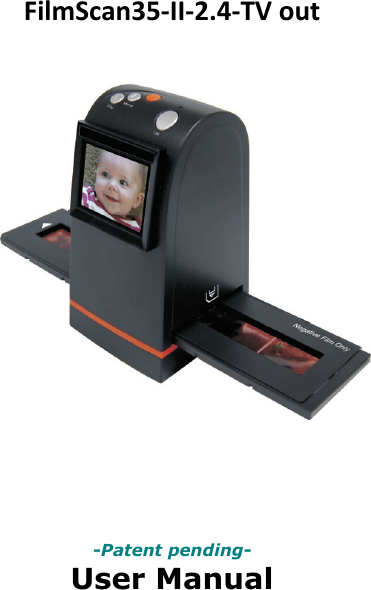
EU3C SCND502A1232 FilmScan35 II-Professional-2.4-TV out User Manual

EU3C COMPANY LIMITED FilmScan35 II-Professional-2.4-TV out

User Manual

FilmScan35‐II‐2.4‐TVout              -Patent pending- User Manual
                              Version 1.02 July 2009 
IndexI.UnpackFilmScan35‐II‐2.4‐TVout.....................................2II.Installfilmintothefilmholder.........................................3III.QuickStart.....................................................................7IV.OperationGuide............................................................12V.Specification..................................................................32‐1‐
I.UnpackFilmScan35‐II‐2.4‐TVoutFilmScan35‐II‐2.4‐TV‐outNegative/SlideFilmHolderUserManualUSBpowercoreUSB/VideocableRollFilmHolderCleanbrushNote Westronglysuggestusingaclean,dry,non‐alcoholcottonswabtocleantheglasssurfaceperiodicallytoproduceaclearimageduringoperation. CleandustfromFilmScannerbacklight,tousethecleanbrushtowipethedust. Dustordirtfromthenegative,slidefilmsandcovertraysmayaffectthescannedimagequality,pleasemakesurethematerialsarecleanedbeforeinsertingintothescanner. Pleasefindrecommend,processionalpurgerfromphotostoretocleanthedustonfilmsifanytoavoiddamagingtheonlyonecopyofoldfilms.‐2‐
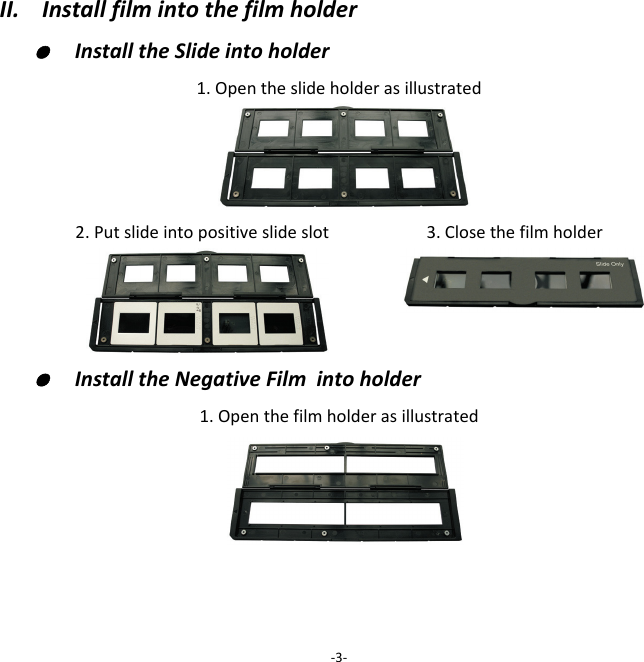
II.Installfilmintothefilmholder●  InstalltheSlideintoholder1.Opentheslideholderasillustrated2.Putslideintopositiveslideslot 3.Closethefilmholder●  InstalltheNegativeFilmintoholder1.Openthefilmholderasillustrated‐3‐
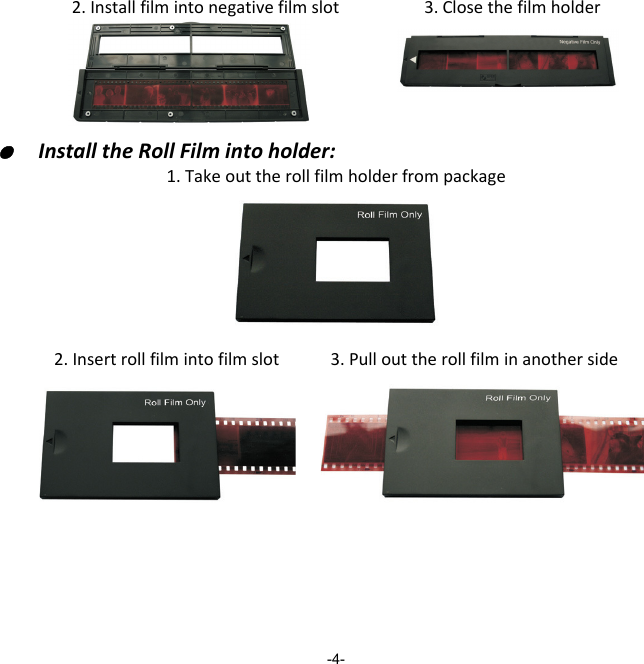
2.Installfilmintonegativefilmslot3.Closethefilmholder  ●  InstalltheRollFilmintoholder:1.Takeouttherollfilmholderfrompackage2.Insertrollfilmintofilmslot3.Pullouttherollfilminanotherside-4-
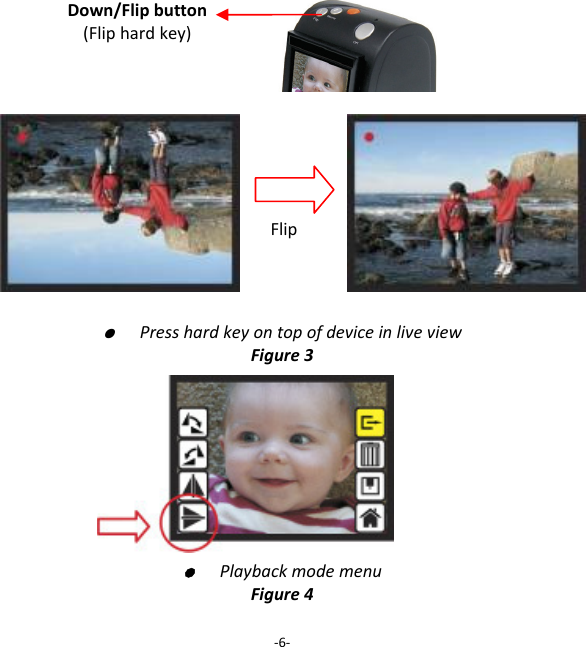
Note Toavoidmirrorimage,followtheserialnumbers(fromlefttoright)ontopoffilmwheninstallnegativefilmintoholder Iftheimageisupsidedown[seefig.2],theimagecanbecorrectedbyFlipfunctioninhardkeyofdevicebeforecapture,orenterplaybackeditmenuaftercapture[seefig.3.4].‐5‐Figure1Figure2
●  PresshardkeyontopofdeviceinliveviewFigure3  ●  PlaybackmodemenuFigure4‐6‐Down/Flipbutton(Fliphardkey)Flip
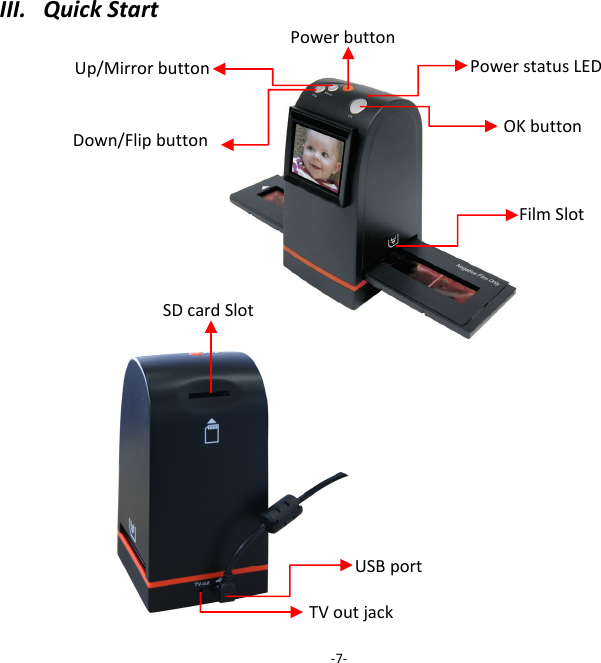
III.QuickStart‐7‐Up/MirrorbuttonFilmSlotOKbuttonSDcardSlotDown/Flipbutton PowerbuttonUSBportTVoutjackPowerstatusLED
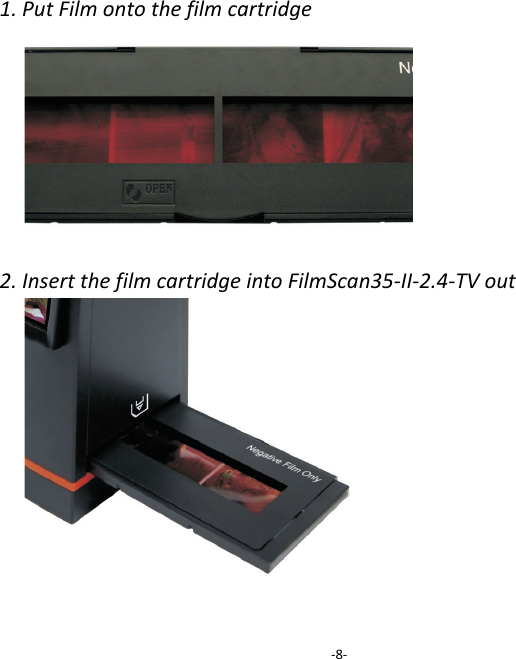
1.PutFilmontothefilmcartridge2.InsertthefilmcartridgeintoFilmScan35‐II‐2.4‐TVout‐8‐
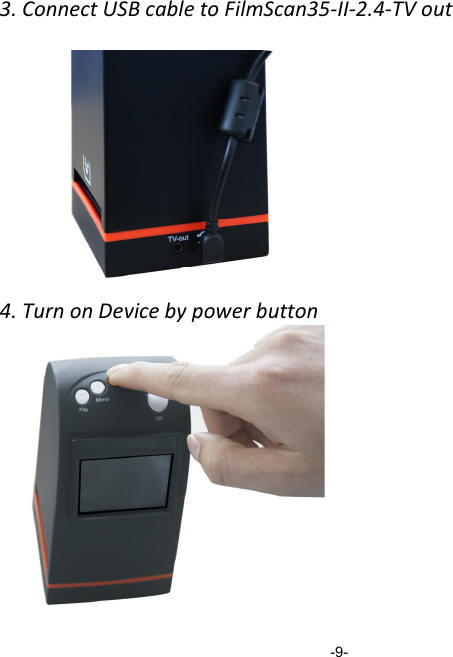
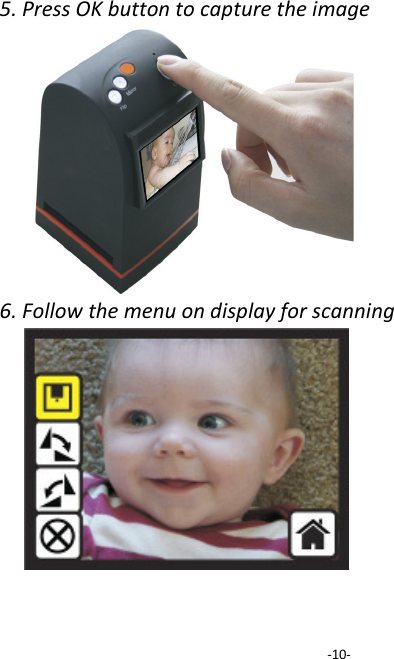
3.ConnectUSBcabletoFilmScan35‐II‐2.4‐TVout4.TurnonDevicebypowerbutton                   -9-
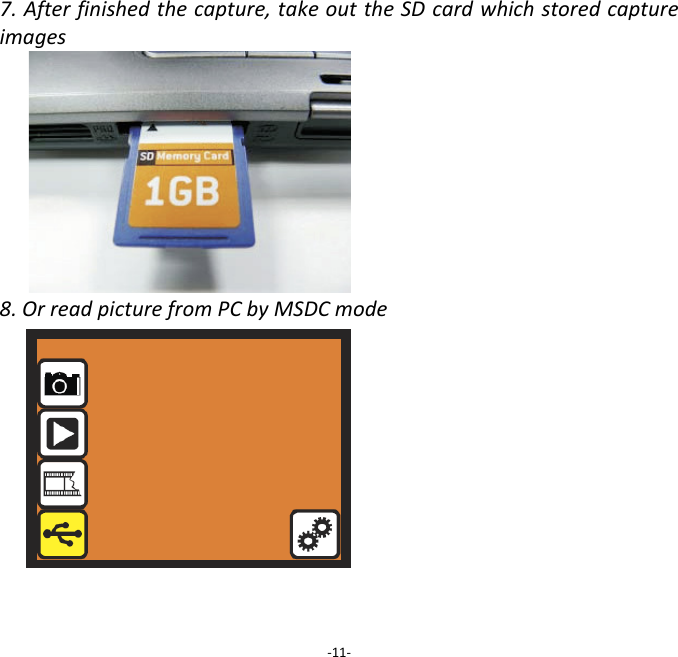
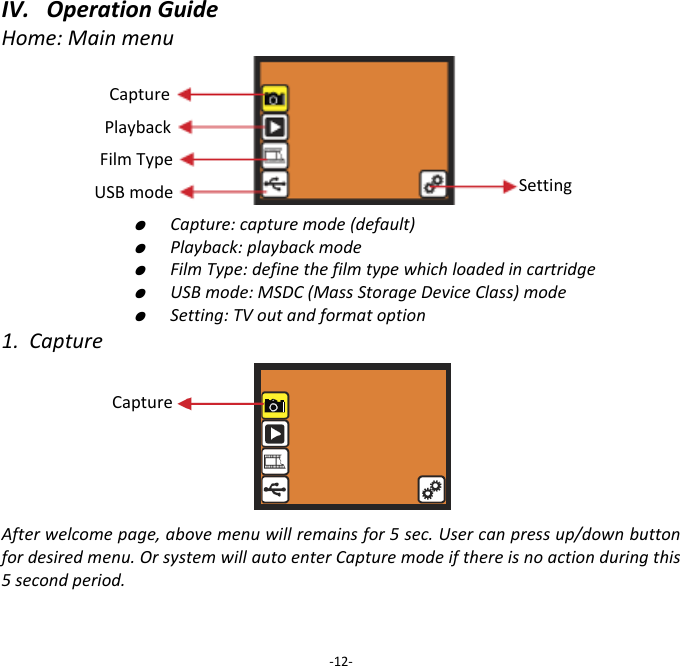
5.PressOKbuttontocapturetheimage6.Followthemenuondisplayforscanning‐10‐
7.Afterfinishedthecapture,takeouttheSDcardwhichstoredcaptureimages8.OrreadpicturefromPCbyMSDCmode‐11‐
IV.OperationGuideHome:Mainmenu   ●  Capture:capturemode(default)  ●  Playback:playbackmode  ●  FilmType:definethefilmtypewhichloadedincartridge  ●  USBmode:MSDC(MassStorageDeviceClass)mode  ●  Setting:TVoutandformatoption1.CaptureAfterwelcomepage,abovemenuwillremainsfor5sec.Usercanpressup/downbuttonfordesiredmenu.OrsystemwillautoenterCapturemodeifthereisnoactionduringthis5secondperiod.‐12‐Capture Playback FilmType USBmode SettingCapture
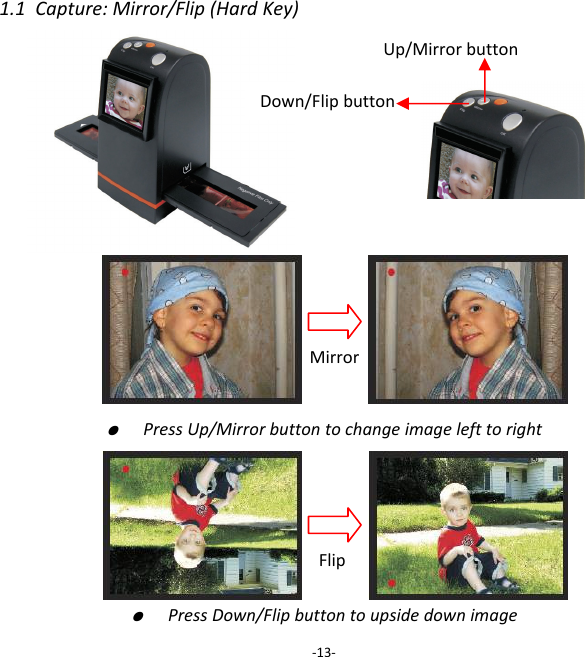
1.1Capture:Mirror/Flip(HardKey)●  PressUp/Mirrorbuttontochangeimagelefttoright          ●  PressDown/Flipbuttontoupsidedownimage‐13‐Up/MirrorbuttonDown/FlipbuttonMirrorFlip
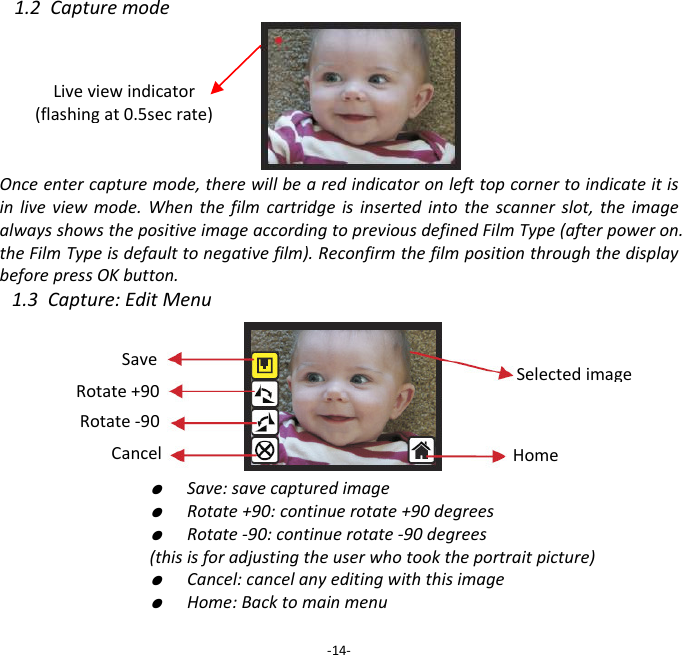
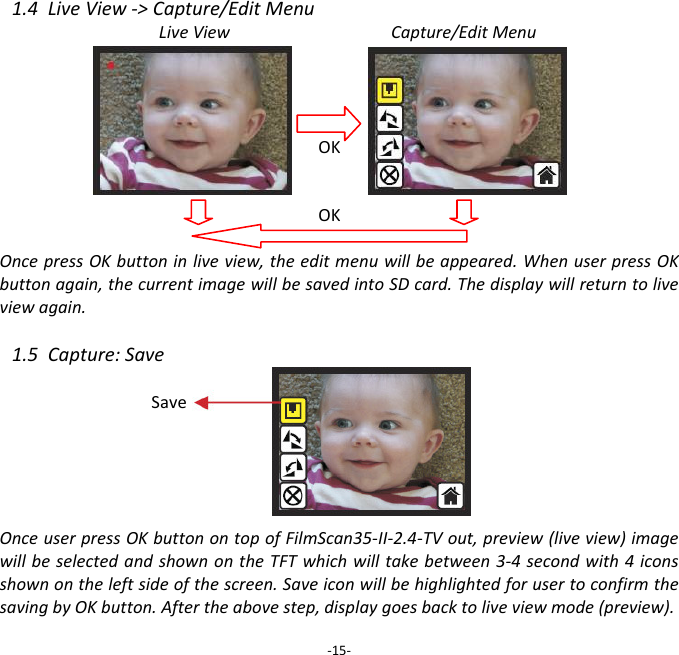
1.2CapturemodeOnceentercapturemode,therewillbearedindicatoronlefttopcornertoindicateitisinliveviewmode.Whenthefilmcartridgeisinsertedintothescannerslot,theimagealwaysshowsthepositiveimageaccordingtopreviousdefinedFilmType(afterpoweron.theFilmTypeisdefaulttonegativefilm).ReconfirmthefilmpositionthroughthedisplaybeforepressOKbutton.1.3Capture:EditMenu  ●  Save:savecapturedimage  ●  Rotate+90:continuerotate+90degrees  ●  Rotate‐90:continuerotate‐90degrees(thisisforadjustingtheuserwhotooktheportraitpicture)  ●  Cancel:cancelanyeditingwiththisimage  ●  Home:Backtomainmenu‐14‐Liveviewindicator(flashingat0.5secrate)SaveRotate+90Cancel Rotate‐90HomeSelectedimage
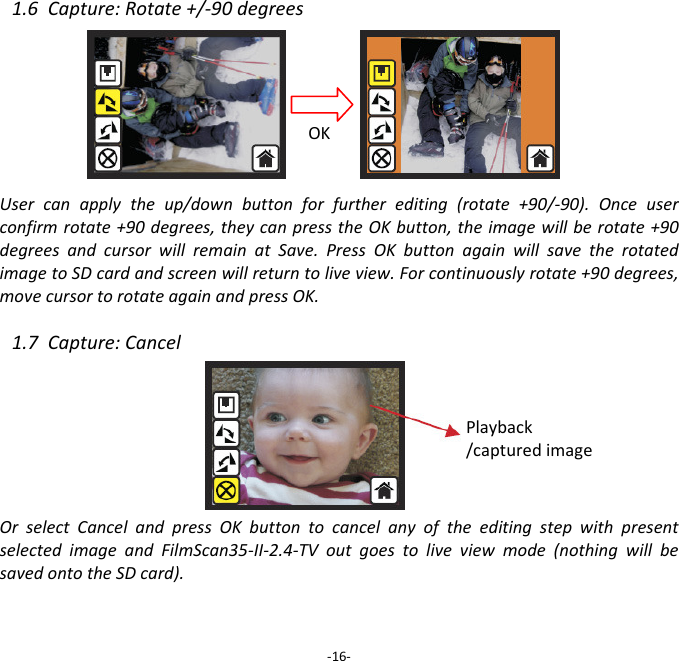
1.4LiveView‐>Capture/EditMenuLiveViewCapture/EditMenuOKOKOncepressOKbuttoninliveview,theeditmenuwillbeappeared.WhenuserpressOKbuttonagain,thecurrentimagewillbesavedintoSDcard.Thedisplaywillreturntoliveviewagain.1.5Capture:SaveOnceuserpressOKbuttonontopofFilmScan35‐II‐2.4‐TVout,preview(liveview)imagewillbeselectedandshownontheTFTwhichwilltakebetween3‐4secondwith4iconsshownontheleftsideofthescreen.SaveiconwillbehighlightedforusertoconfirmthesavingbyOKbutton.Aftertheabovestep,displaygoesbacktoliveviewmode(preview).‐15‐Save
1.6Capture:Rotate+/‐90degreesUsercanapplytheup/downbuttonforfurtherediting(rotate+90/‐90).Onceuserconfirmrotate+90degrees,theycanpresstheOKbutton,theimagewillberotate+90degreesandcursorwillremainatSave.PressOKbuttonagainwillsavetherotatedimagetoSDcardandscreenwillreturntoliveview.Forcontinuouslyrotate+90degrees,movecursortorotateagainandpressOK.1.7Capture:CancelOrselectCancelandpressOKbuttontocancelanyoftheeditingstepwithpresentselectedimageandFilmScan35‐II‐2.4‐TVoutgoestoliveviewmode(nothingwillbesavedontotheSDcard).‐16‐OKPlayback/capturedimage
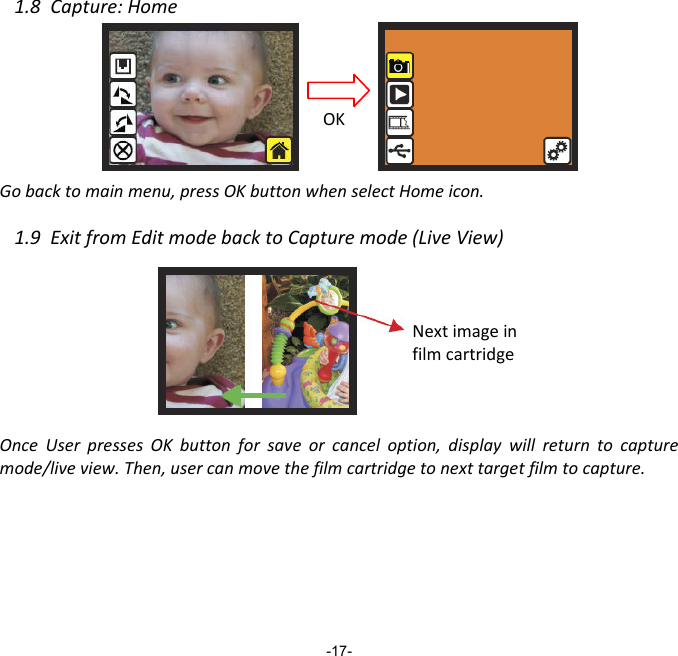
1.8Capture:HomeGobacktomainmenu,pressOKbuttonwhenselectHomeicon.1.9ExitfromEditmodebacktoCapturemode(LiveView)OnceUserpressesOKbuttonforsaveorcanceloption,displaywillreturntocapturemode/liveview.Then,usercanmovethefilmcartridgetonexttargetfilmtocapture.       -17- NextimageinfilmcartridgeOK
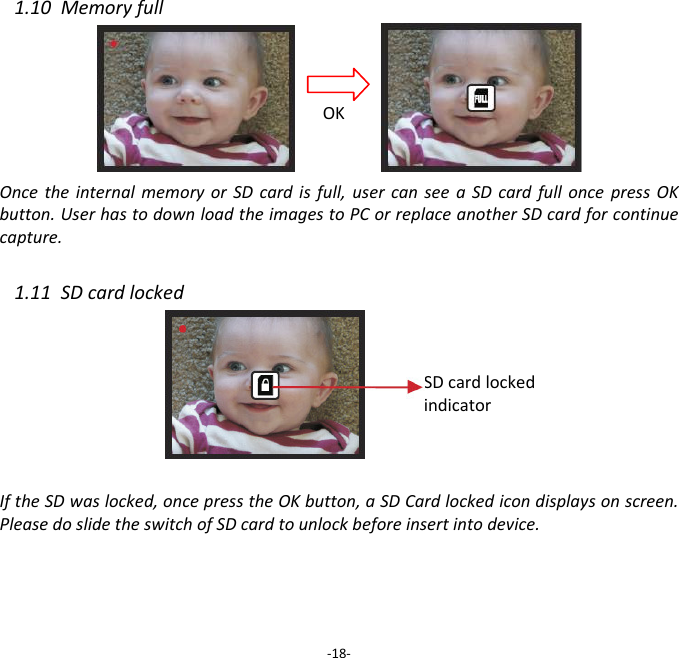
1.10MemoryfullOncetheinternalmemoryorSDcardisfull,usercanseeaSDcardfulloncepressOKbutton.UserhastodownloadtheimagestoPCorreplaceanotherSDcardforcontinuecapture. 1.11SDcardlocked IftheSDwaslocked,oncepresstheOKbutton,aSDCardlockedicondisplaysonscreen.PleasedoslidetheswitchofSDcardtounlockbeforeinsertintodevice.‐18‐OKSDcardlockedindicator
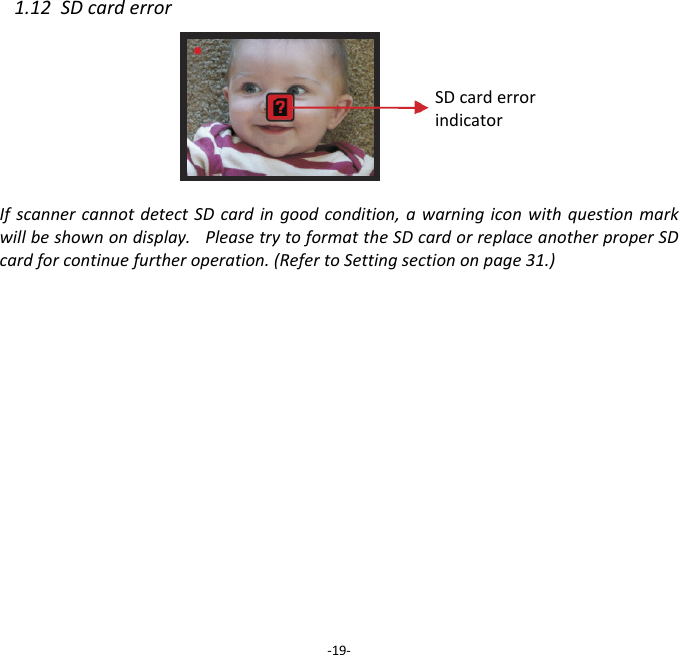
1.12SDcarderrorIfscannercannotdetectSDcardingoodcondition,awarningiconwithquestionmarkwillbeshownondisplay.PleasetrytoformattheSDcardorreplaceanotherproperSDcardforcontinuefurtheroperation.(RefertoSettingsectiononpage31.)            FULL ‐19‐SDcarderrorindicator
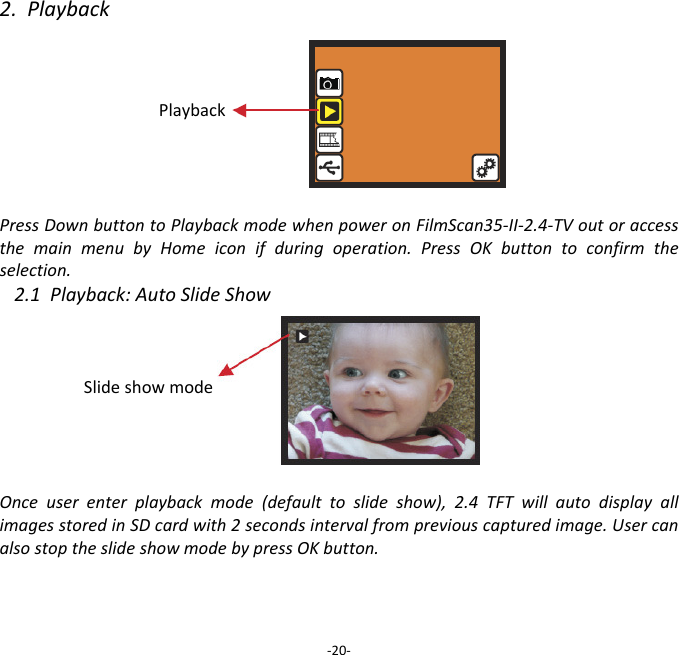
2.PlaybackPlaybackPressDownbuttontoPlaybackmodewhenpoweronFilmScan35‐II‐2.4‐TVoutoraccessthemainmenubyHomeiconifduringoperation.PressOKbuttontoconfirmtheselection.2.1Playback:AutoSlideShowSlideshowmodeOnceuserenterplaybackmode(defaulttoslideshow),2.4TFTwillautodisplayallimagesstoredinSDcardwith2secondsintervalfrompreviouscapturedimage.UsercanalsostoptheslideshowmodebypressOKbutton.  ‐20‐
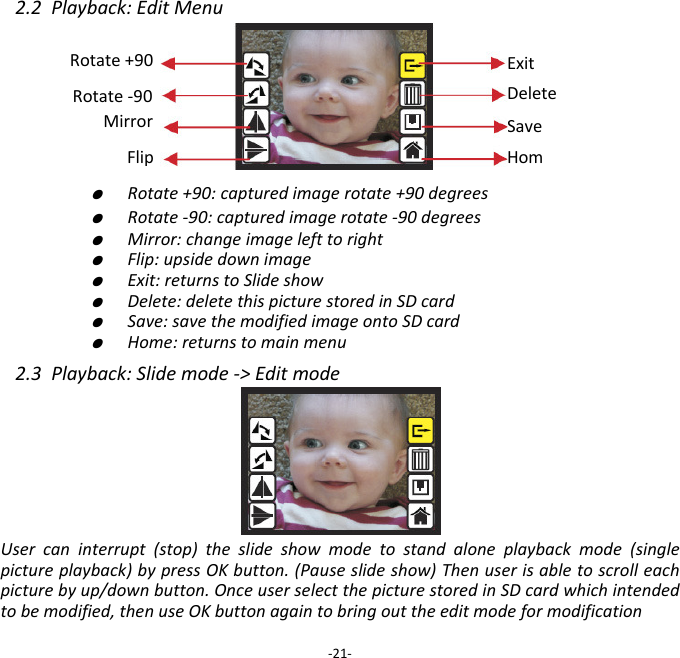
2.2Playback:EditMenu   ●  Rotate+90:capturedimagerotate+90degrees   ●  Rotate‐90:capturedimagerotate‐90degrees   ●  Mirror:changeimagelefttoright   ●  Flip:upsidedownimage   ●  Exit:returnstoSlideshow   ●  Delete:deletethispicturestoredinSDcard   ●  Save:savethemodifiedimageontoSDcard   ●  Home:returnstomainmenu2.3Playback:Slidemode‐>EditmodeUsercaninterrupt(stop)theslideshowmodetostandaloneplaybackmode(singlepictureplayback)bypressOKbutton.(Pauseslideshow)Thenuserisabletoscrolleachpicturebyup/downbutton.OnceuserselectthepicturestoredinSDcardwhichintendedtobemodified,thenuseOKbuttonagaintobringouttheeditmodeformodification‐21‐SaveHomRotate+90 ExitDeleteRotate‐90 Mirror Flip
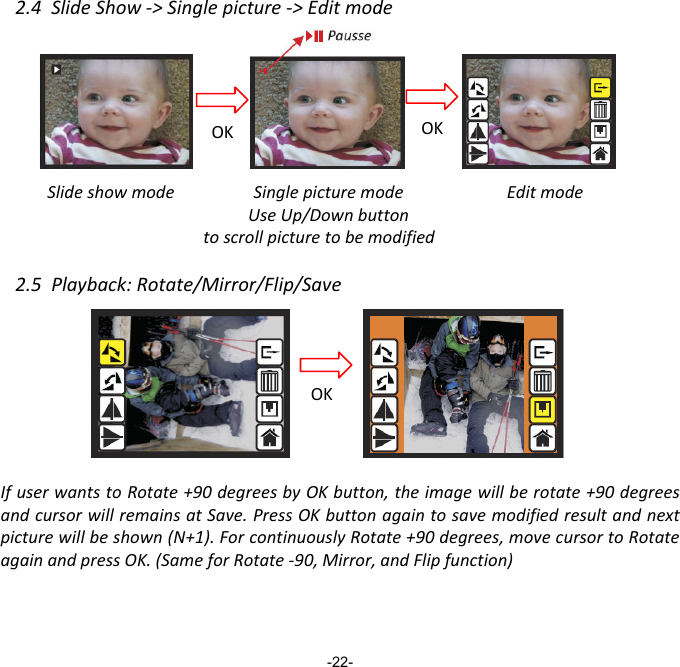
2.4SlideShow‐>Singlepicture‐>EditmodeSlideshowmodeEditmode2.5Playback:Rotate/Mirror/Flip/SaveIfuserwantstoRotate+90degreesbyOKbutton,theimagewillberotate+90degreesandcursorwillremainsatSave.PressOKbuttonagaintosavemodifiedresultandnextpicturewillbeshown(N+1).ForcontinuouslyRotate+90degrees,movecursortoRotateagainandpressOK.(SameforRotate‐90,Mirror,andFlipfunction)-22- PausseOK OK SinglepicturemodeUseUp/Downbuttontoscrollpicturetobemodified OK
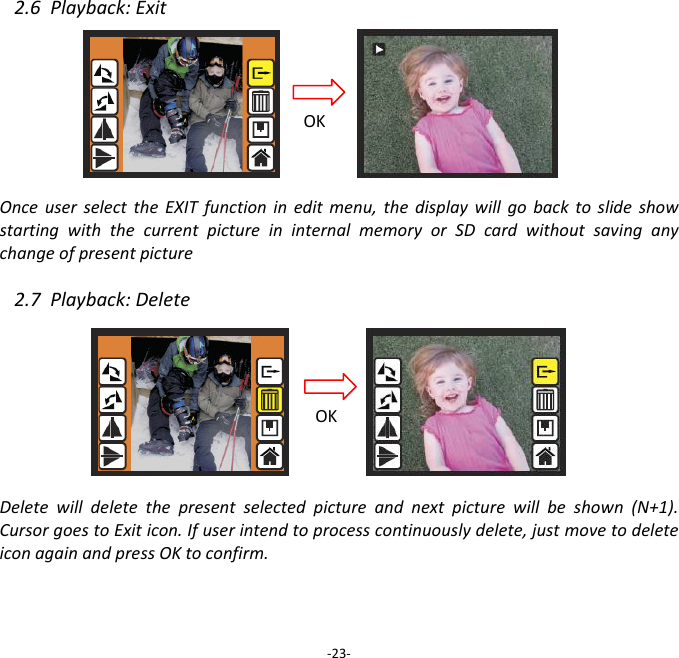
2.6Playback:ExitOnceuserselecttheEXITfunctionineditmenu,thedisplaywillgobacktoslideshowstartingwiththecurrentpictureininternalmemoryorSDcardwithoutsavinganychangeofpresentpicture 2.7Playback:DeleteDeletewilldeletethepresentselectedpictureandnextpicturewillbeshown(N+1).CursorgoestoExiticon.Ifuserintendtoprocesscontinuouslydelete,justmovetodeleteiconagainandpressOKtoconfirm.‐23‐OKOK
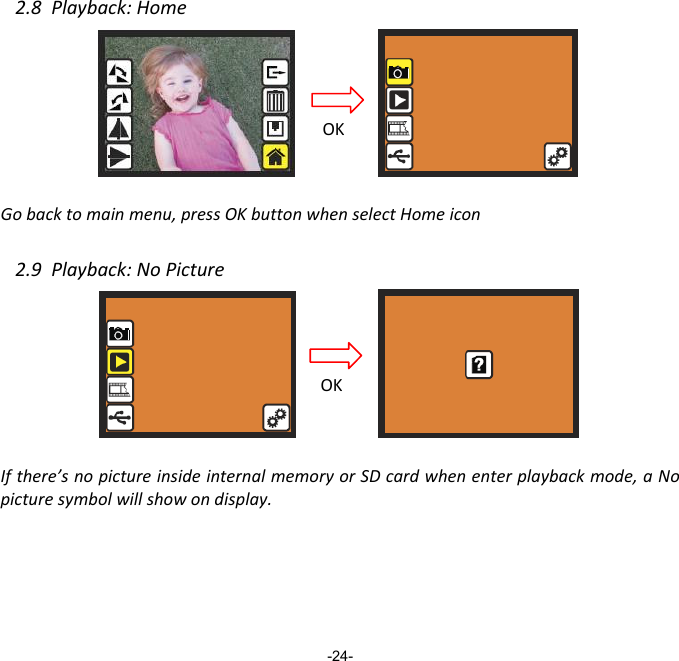
2.8Playback:HomeGobacktomainmenu,pressOKbuttonwhenselectHomeicon2.9Playback:NoPictureIfthere’snopictureinsideinternalmemoryorSDcardwhenenterplaybackmode,aNopicturesymbolwillshowondisplay.-24- OKOK
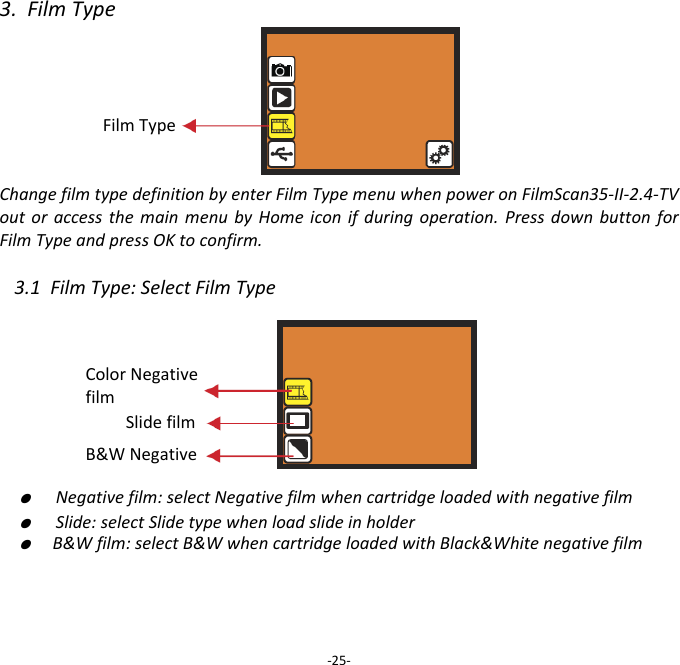
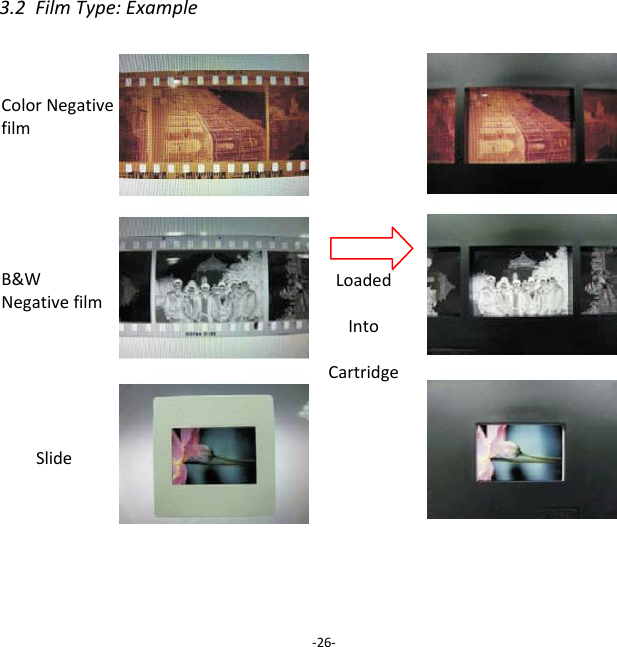
3.FilmTypeFilmTypeChangefilmtypedefinitionbyenterFilmTypemenuwhenpoweronFilmScan35‐II‐2.4‐TVoutoraccessthemainmenubyHomeiconifduringoperation.PressdownbuttonforFilmTypeandpressOKtoconfirm.3.1FilmType:SelectFilmType ●  Negativefilm:selectNegativefilmwhencartridgeloadedwithnegativefilm●  Slide:selectSlidetypewhenloadslideinholder●  B&Wfilm:selectB&WwhencartridgeloadedwithBlack&Whitenegativefilm ‐25‐Slidefilm B&WNegative ColorNegativefilm
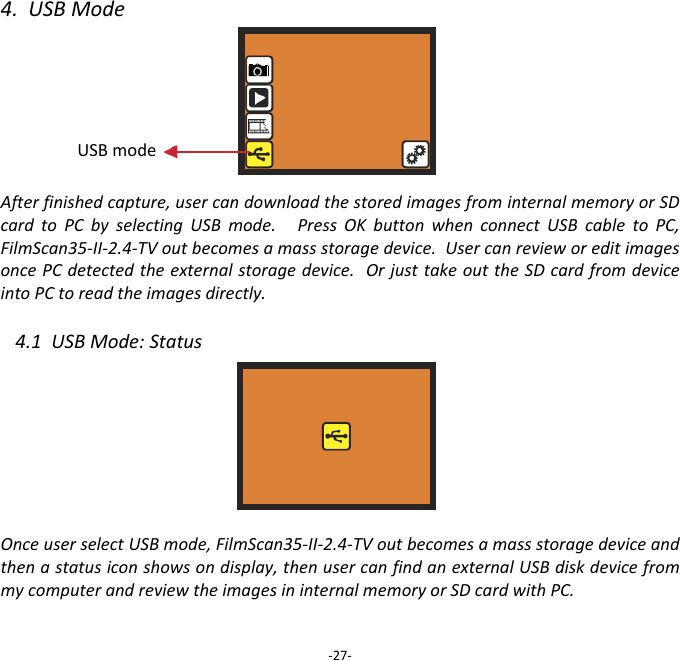
3.2FilmType:Example‐26‐ColorNegativefilm B&WNegativefilm Slide LoadedIntoCartridge
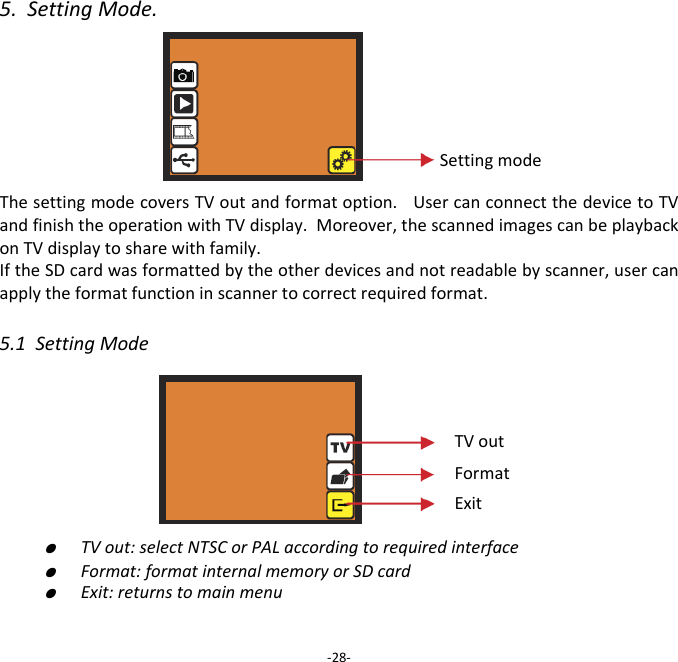
4.USBModeAfterfinishedcapture,usercandownloadthestoredimagesfrominternalmemoryorSDcardtoPCbyselectingUSBmode.PressOKbuttonwhenconnectUSBcabletoPC,FilmScan35‐II‐2.4‐TVoutbecomesamassstoragedevice.UsercanrevieworeditimagesoncePCdetectedtheexternalstoragedevice.OrjusttakeouttheSDcardfromdeviceintoPCtoreadtheimagesdirectly. 4.1USBMode:StatusOnceuserselectUSBmode,FilmScan35‐II‐2.4‐TVoutbecomesamassstoragedeviceandthenastatusiconshowsondisplay,thenusercanfindanexternalUSBdiskdevicefrommycomputerandreviewtheimagesininternalmemoryorSDcardwithPC. ‐27‐USBmode
5.SettingMode.ThesettingmodecoversTVoutandformatoption.UsercanconnectthedevicetoTVandfinishtheoperationwithTVdisplay.Moreover,thescannedimagescanbeplaybackonTVdisplaytosharewithfamily. IftheSDcardwasformattedbytheotherdevicesandnotreadablebyscanner,usercanapplytheformatfunctioninscannertocorrectrequiredformat. 5.1SettingMode ●  TVout:selectNTSCorPALaccordingtorequiredinterface ●  Format:formatinternalmemoryorSDcard ●  Exit:returnstomainmenu‐28‐SettingmodeTVoutFormatExit
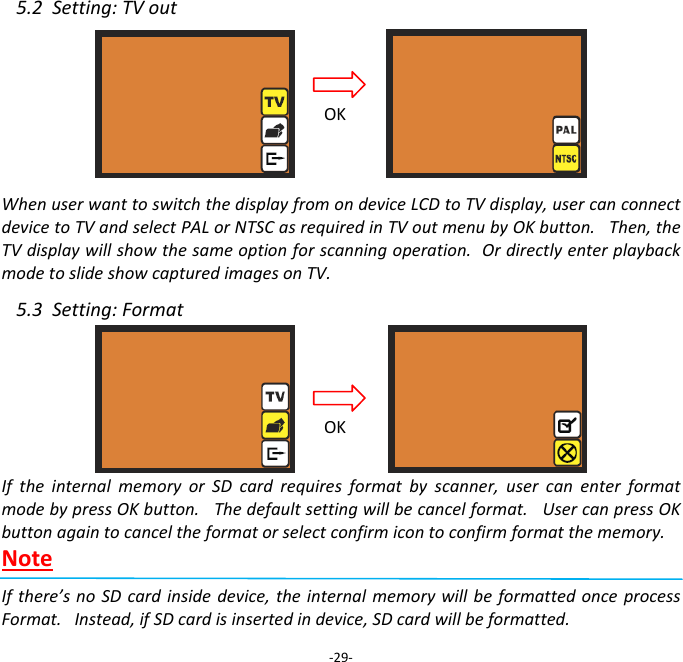
5.2Setting:TVout WhenuserwanttoswitchthedisplayfromondeviceLCDtoTVdisplay,usercanconnectdevicetoTVandselectPALorNTSCasrequiredinTVoutmenubyOKbutton.Then,theTVdisplaywillshowthesameoptionforscanningoperation.OrdirectlyenterplaybackmodetoslideshowcapturedimagesonTV. 5.3Setting:FormatIftheinternalmemoryorSDcardrequiresformatbyscanner,usercanenterformatmodebypressOKbutton.Thedefaultsettingwillbecancelformat.UsercanpressOKbuttonagaintocanceltheformatorselectconfirmicontoconfirmformatthememory. NoteIfthere’snoSDcardinsidedevice,theinternalmemorywillbeformattedonceprocessFormat.Instead,ifSDcardisinsertedindevice,SDcardwillbeformatted.‐29‐OKOK
V.   Specificaon    Image Sensor:  5 mega CMOS sensor Lens:  F no.=2.0, 4 Glass elements, LCD:  2.4’’ Color TFT LCD Internal memory:  24MB NAND Flash (for saving images) Focus Range:  Fixed focus Exposure Control:  Automac Color Balance:  Automac Scan Quality:  1,800 dpi Data Conversion:  10 bits per color channel Scan Method:  Single pass Light Source:  Back light (3 white LEDs) Interface:  USB 2.0, TV-out (video 3.5mm jack) USB Configuraon:  Mass Storage Device Class/MSDC Power:  5V adapter, or USB power Dimensions:  82x86x152mm Weight:  0.41kg External memory:  SD/MMC compable        Good bye page                         - 30 -
‐31‐ NOTETHEMANUFACTURERISNOTRESPONSIBLEFORANYRADIOORTVINTERFERENCECAUSEDBYUNAUTHORIZEDMODIFICATIONSTOTHISEQUIPMENT.SUCHMODIFICATIONSCOULDVOIDTHEUSERAUTHORITYTOOPERATETHEEQUIPMENT.ThisequipmenthasbeentestedandfoundtocomplywiththelimitsforaClassBdigitaldevice,pursuanttopart15oftheFCCRules.Theselimitsaredesignedtoprovidereasonableprotectionagainstharmfulinterferenceinaresidentialinstallation.Thisequipmentgenerates,usesandcanradiateradiofrequencyenergyand,ifnotinstalledandusedinaccordancewiththeinstructions,maycauseharmfulinterferencetoradiocommunications.However,thereisnoguaranteethatinterferencewillnotoccurinaparticularinstallation.Ifthisequipmentdoescauseharmfulinterferencetoradioortelevisionreception,whichcanbedeterminedbyturningtheequipmentoffandon,theuserisencouragedtotrytocorrecttheinterferencebyoneormoreofthefollowingmeasures:‐Reorientorrelocatethereceivingantenna.‐Increasetheseparationbetweentheequipmentandreceiver.‐Connecttheequipmentintoanoutletonacircuitdifferentfromthattowhichthereceiverisconnected.‐Consultthedealeroranexperiencedradio/TVtechnicianforhelp.‐Modificationsnotexpresslyapprovedbythemanufacturercouldvoidtheuser'sauthoritytooperatetheequipmentunderFCCrules.

Navigation menu