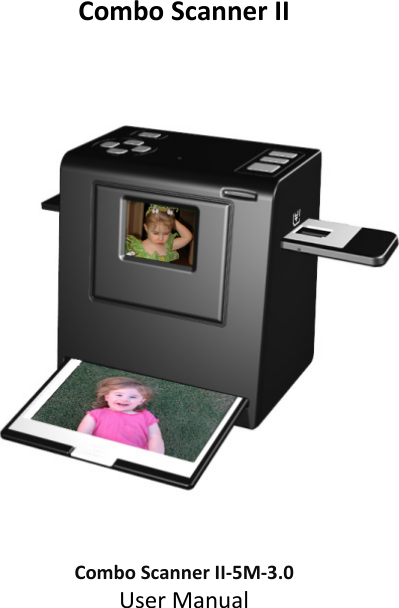
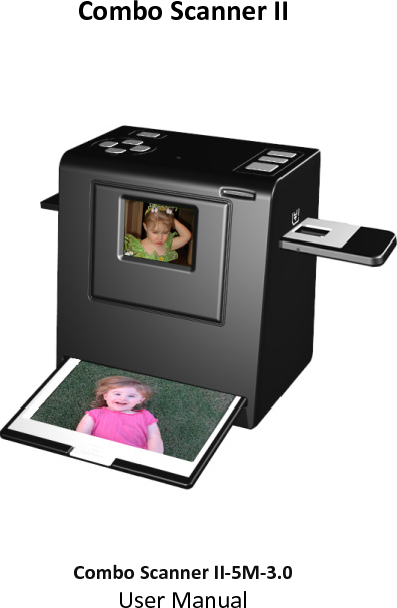
EU3C SCND503H1231 CS-II-5M-3.0 User Manual

EU3C COMPANY LIMITED CS-II-5M-3.0 Users Manual

Users Manual

ComboScannerII               ComboScannerII‐5M‐3.0UserManual
                              Version 1.02 January 2011 
IndexI.UnpackComboScannerII…………………................................2II.Installfilmintothefilmholder…………..……………………........3III.QuickStart.........................................................................6IV.OperationGuide..............................................................14V.Specification....................................................................33‐1‐
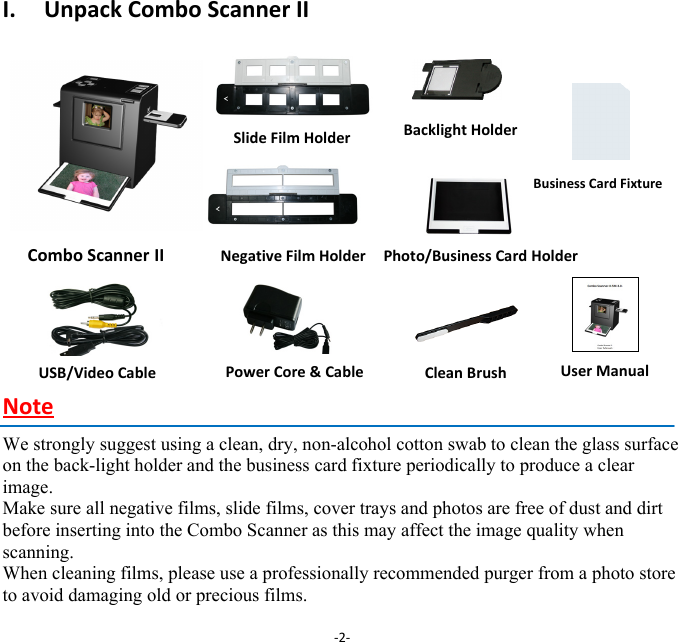
I.UnpackComboScannerIIComboScanner II        NegativeFilmHolder Photo/BusinessCardHolder   NoteWe strongly suggest using a clean, dry, non-alcohol cotton swab to clean the glass surface on the back-light holder and the business card fixture periodically to produce a clear image. Make sure all negative films, slide films, cover trays and photos are free of dust and dirt before inserting into the Combo Scanner as this may affect the image quality when scanning. When cleaning films, please use a professionally recommended purger from a photo store to avoid damaging old or precious films.‐2‐USB/VideoCablePowerCore&Cable UserManualSlideFilmHolderBacklightHolderCleanBrushBusinessCardFixture
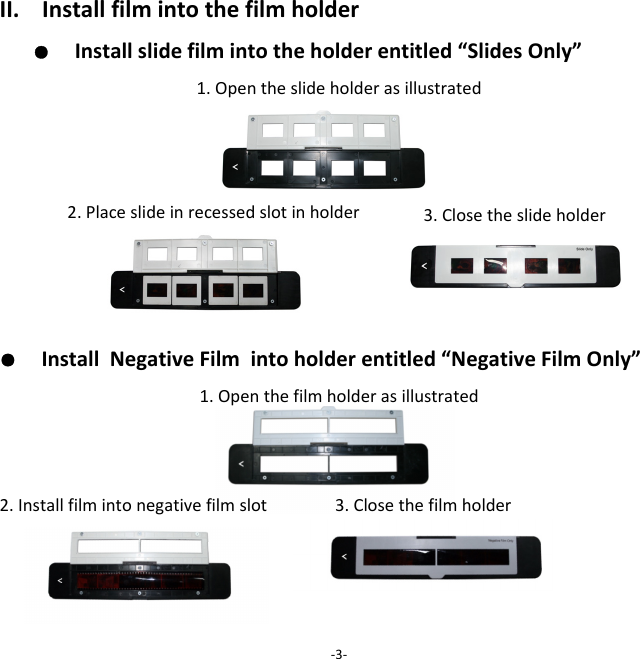
II.Installfilmintothefilmholder●  Installslidefilmintotheholderentitled“SlidesOnly”1.Opentheslideholderasillustrated ●  InstallNegativeFilmintoholderentitled“NegativeFilmOnly”1.Openthefilmholderasillustrated2.Installfilmintonegativefilmslot3.Closethefilmholder ‐3‐2.Placeslideinrecessedslotinholder  3.Closetheslide holder
Note Toavoidmirrorimage,followtheserialnumbers(fromlefttoright)ontopoffilmwheninstallnegativefilmintoholder Iftheimageisupsidedown[Figure2.2],theimagecanbecorrectedbypressingDown/Flipbuttonbeforecapturing[Figure2.3].Alternative,entertheplaybackmodeandpressModebuttontoselectFlipfunction[Figure2.4]‐4‐Figure2.1Figure2.2
●  Presshardkeyontopofdeviceinliveview[Figure2.3]  ●  PressPlaybackbuttonMode/SettingtoselectFlipfunction(RefertoP.25)[Figure2.4]         ‐5‐Down/Flipbutton(Fliphardkey)FlipPlaybackbutton
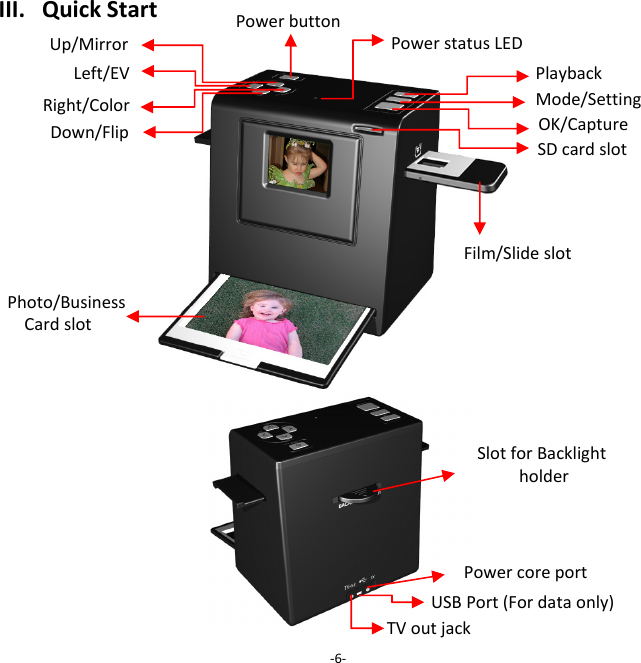
Photo/BusinessCardslotIII.QuickStart‐6‐Up/MirrorOK/CaptureDown/Flip PowerbuttonPowerstatusLEDFilm/SlideslotSlotforBacklightholderUSBPort(Fordataonly)TVoutjack PowercoreportPlaybackMode/SettingLeft/EV Right/Color SDcardslot
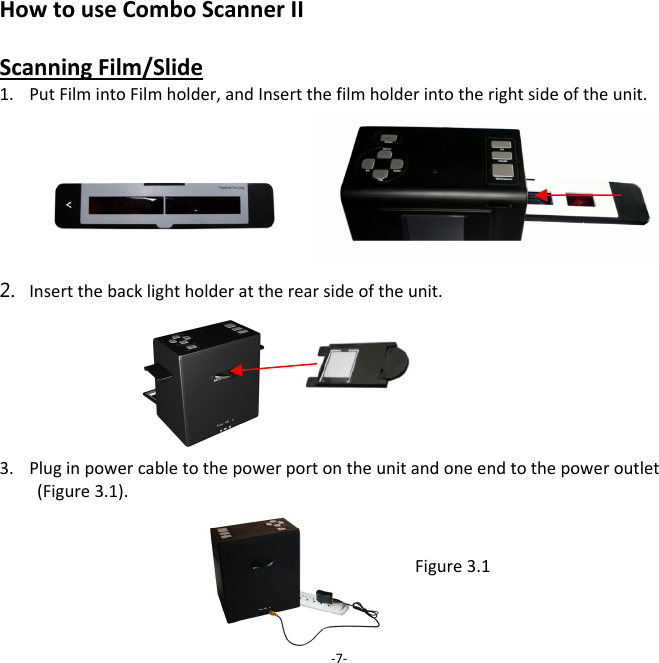
HowtouseComboScannerIIScanningFilm/Slide1. PutFilmintoFilmholder,andInsertthefilmholderintotherightsideoftheunit.  2. Insertthebacklightholderattherearsideoftheunit.   3. Pluginpowercabletothepowerportontheunitandoneendtothepoweroutlet(Figure3.1).‐7‐Figure3.1
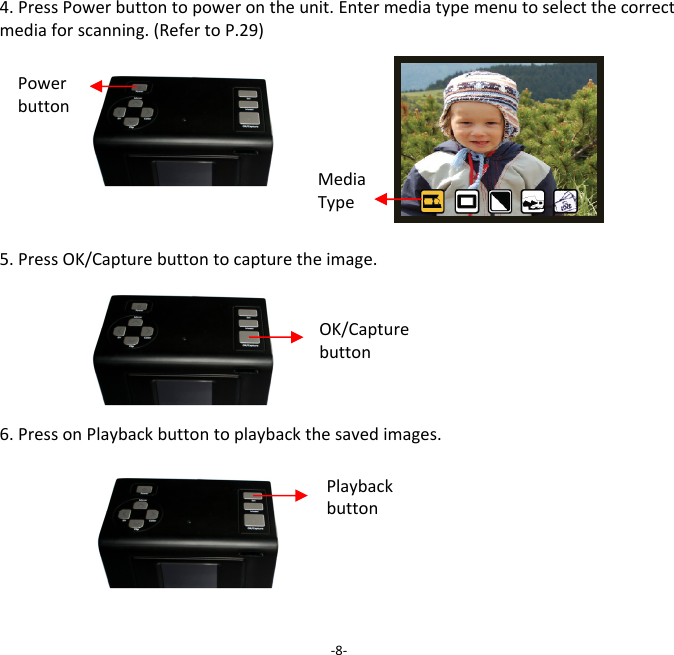
4.PressPowerbuttontopowerontheunit.Entermediatypemenutoselectthecorrectmediaforscanning.(RefertoP.29)5.PressOK/Capturebuttontocapturetheimage.6.PressonPlaybackbuttontoplaybackthesavedimages.‐8‐Powerbutton OK/Capturebutton Playbackbutton MediaType
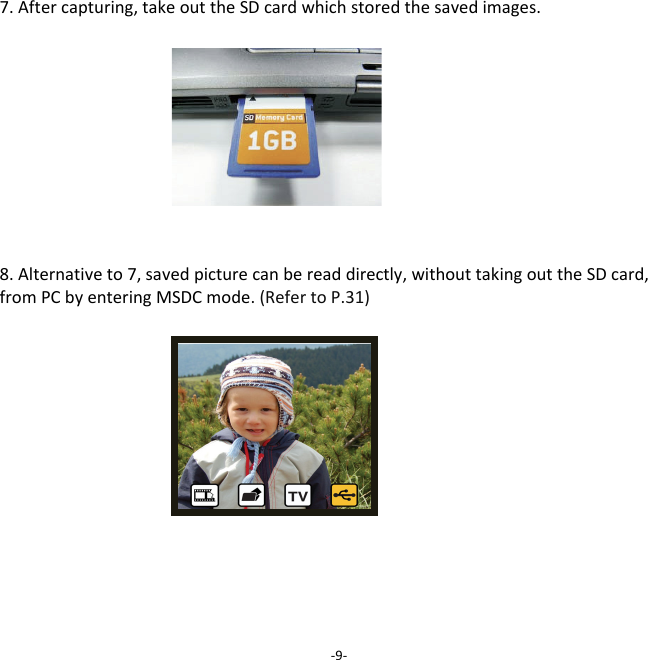
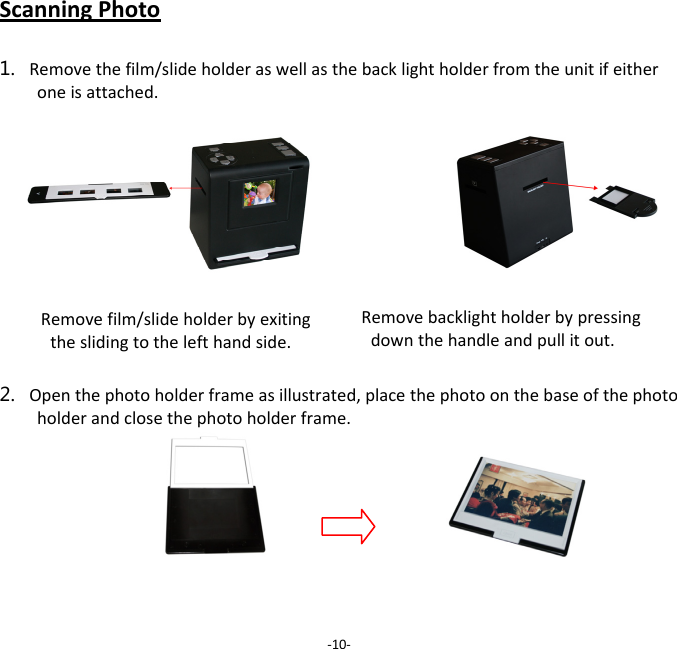
7.Aftercapturing,takeouttheSDcardwhichstoredthesavedimages.8.Alternativeto7,savedpicturecanbereaddirectly,withouttakingouttheSDcard,fromPCbyenteringMSDCmode.(RefertoP.31)‐9‐
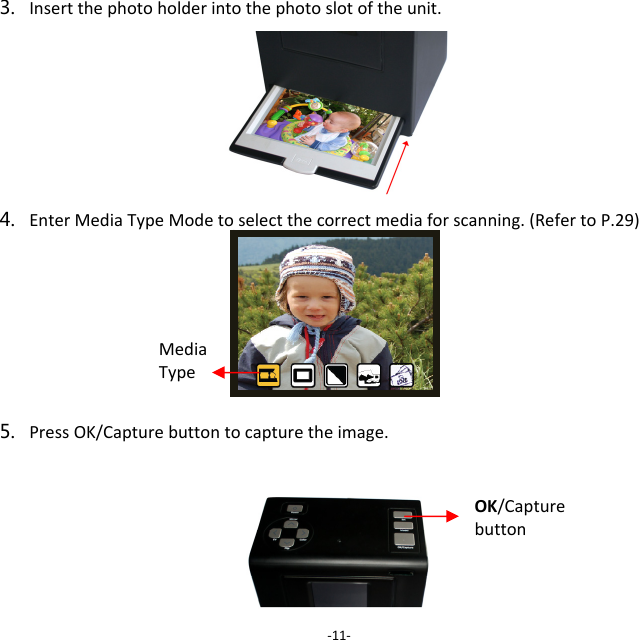
ScanningPhoto1. Removethefilm/slideholderaswellasthebacklightholderfromtheunitifeitheroneisattached.2. Openthephotoholderframeasillustrated,placethephotoonthebaseofthephotoholderandclosethephotoholderframe.‐10‐Removefilm/slideholderbyexitingtheslidingtothelefthandside.Removebacklightholderbypressingdownthehandleandpullitout.
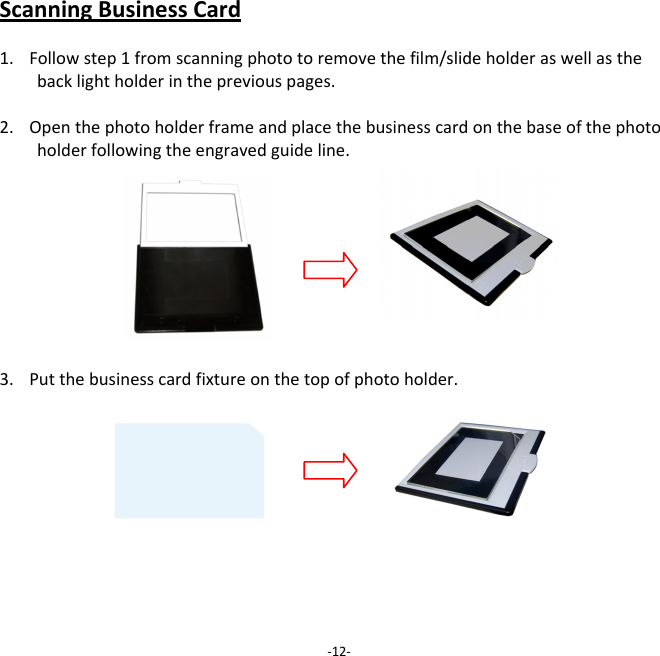
3. Insertthephotoholderintothephotoslotoftheunit.4. EnterMediaTypeModetoselectthecorrectmediaforscanning.(RefertoP.29)5. PressOK/Capturebuttontocapturetheimage.‐11‐OK/Capturebutton MediaType
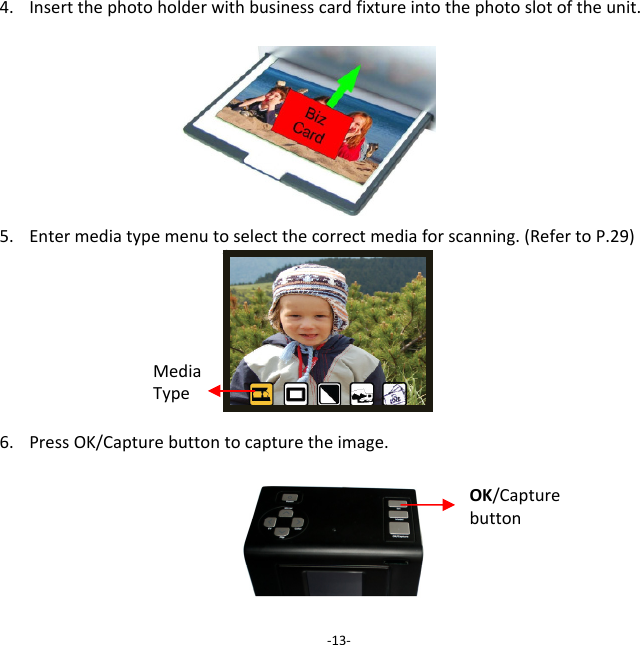
ScanningBusinessCard1. Followstep1fromscanningphototoremovethefilm/slideholderaswellasthebacklightholderinthepreviouspages.2. Openthephotoholderframeandplacethebusinesscardonthebaseofthephotoholderfollowingtheengravedguideline.3. Putthebusinesscardfixtureonthetopofphotoholder.‐12‐
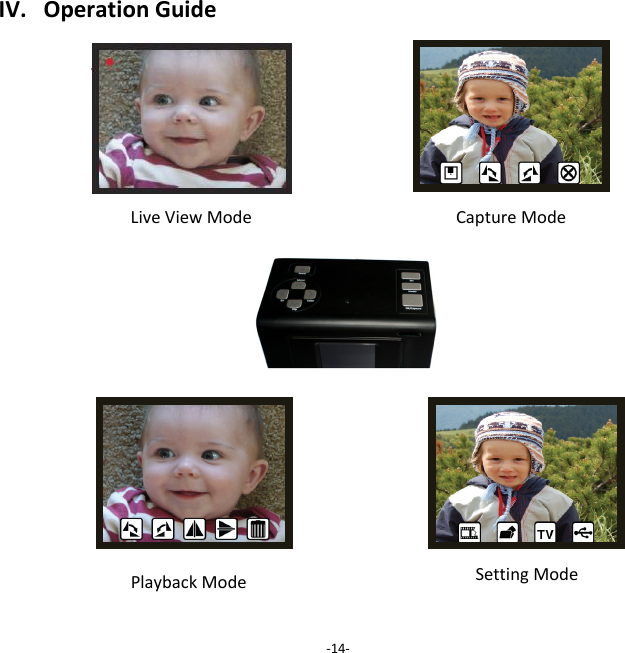
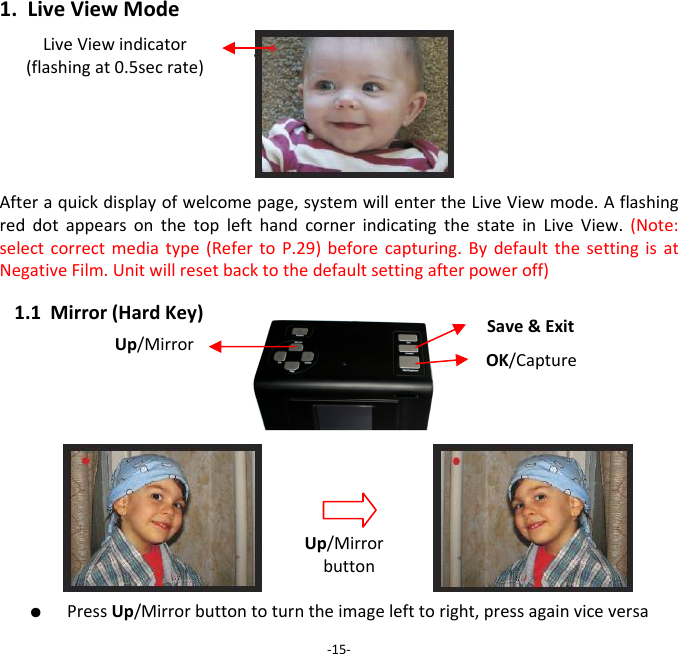
4. Insertthephotoholderwithbusinesscardfixtureintothephotoslotoftheunit.5. Entermediatypemenutoselectthecorrectmediaforscanning.(RefertoP.29)6. PressOK/Capturebuttontocapturetheimage.‐13‐OK/Capturebutton MediaType
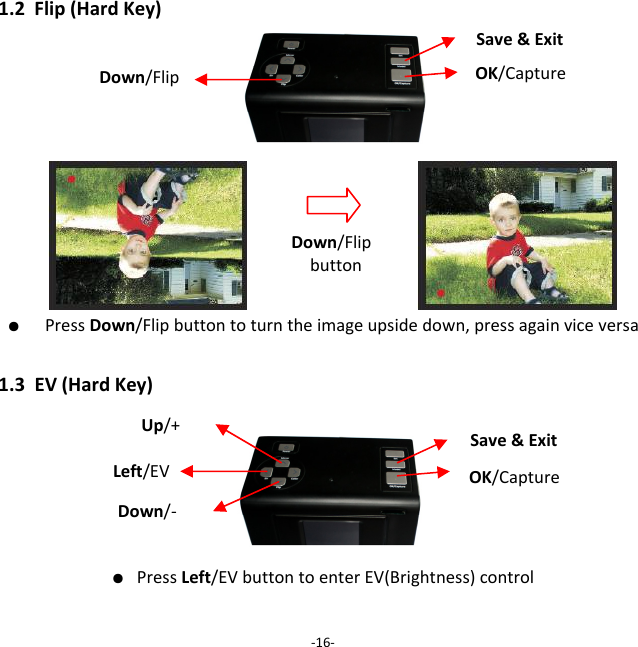
IV.OperationGuide     ‐14‐Capture ModeSetting ModePlaybackModeLiveViewMode
1.LiveViewModeAfteraquickdisplayofwelcomepage,systemwillentertheLiveViewmode.AflashingreddotappearsonthetoplefthandcornerindicatingthestateinLiveView.(Note:selectcorrectmediatype(RefertoP.29)beforecapturing.BydefaultthesettingisatNegativeFilm.Unitwillresetbacktothedefaultsettingafterpoweroff)1.1Mirror(HardKey)●  PressUp/Mirrorbuttontoturntheimagelefttoright,pressagainviceversa‐15‐Up/Mirror Up/MirrorbuttonOK/CaptureLiveViewindicator(flashingat0.5secrate)Save&Exit
1.2Flip(HardKey)                  ●  PressDown/Flipbuttontoturntheimageupsidedown,pressagainviceversa1.3EV(HardKey)● PressLeft/EVbuttontoenterEV(Brightness)control‐16‐Down/FlipbuttonDown/Flip OK/CaptureSave&ExitLeft/EV OK/CaptureSave&ExitUp/+ Down/‐
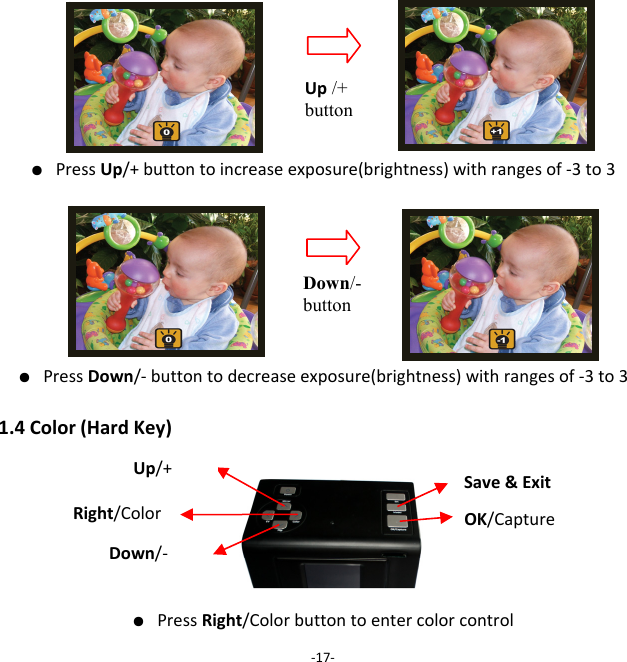
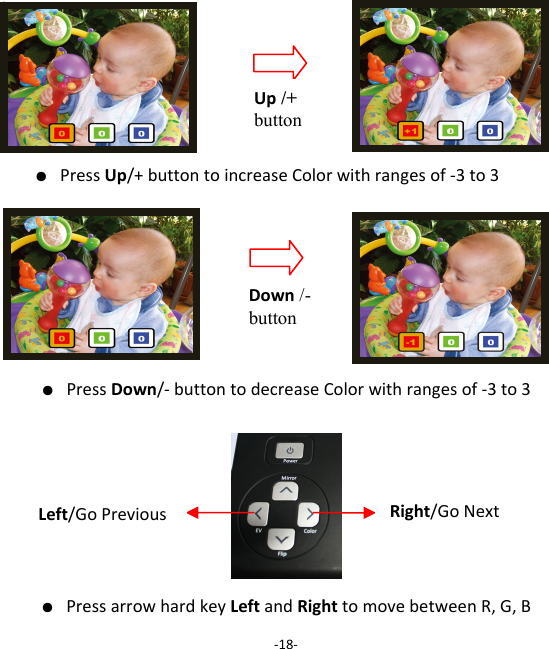
● PressUp/+buttontoincreaseexposure(brightness)withrangesof‐3to3● PressDown/‐buttontodecreaseexposure(brightness)withrangesof‐3to31.4Color(HardKey)● PressRight/Colorbuttontoentercolorcontrol‐17‐Up /+ buttonDown/- button Right/Color OK/CaptureSave&ExitUp/+ Down/‐
● PressUp/+buttontoincreaseColorwithrangesof‐3to3        ● PressDown/‐buttontodecreaseColorwithrangesof‐3to3    ● PressarrowhardkeyLeftandRighttomovebetweenR,G,B‐18‐Up /+ button Down /- button Left/GoPrevious Right/GoNext
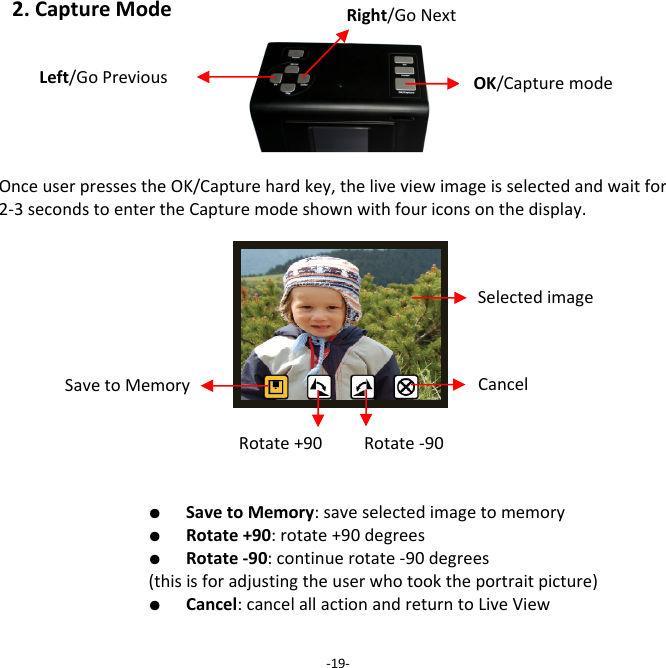
2.CaptureModeOnceuserpressestheOK/Capturehardkey,theliveviewimageisselectedandwaitfor2‐3secondstoentertheCapturemodeshownwithfouriconsonthedisplay.  ●  SavetoMemory:saveselectedimagetomemory  ●  Rotate+90:rotate+90degrees  ●  Rotate‐90:continuerotate‐90degrees(thisisforadjustingtheuserwhotooktheportraitpicture)  ●  Cancel:cancelallactionandreturntoLiveView  ‐19‐OK/CapturemodeSavetoMemoryRotate+90CancelRotate‐90SelectedimageLeft/GoPreviousRight/GoNext
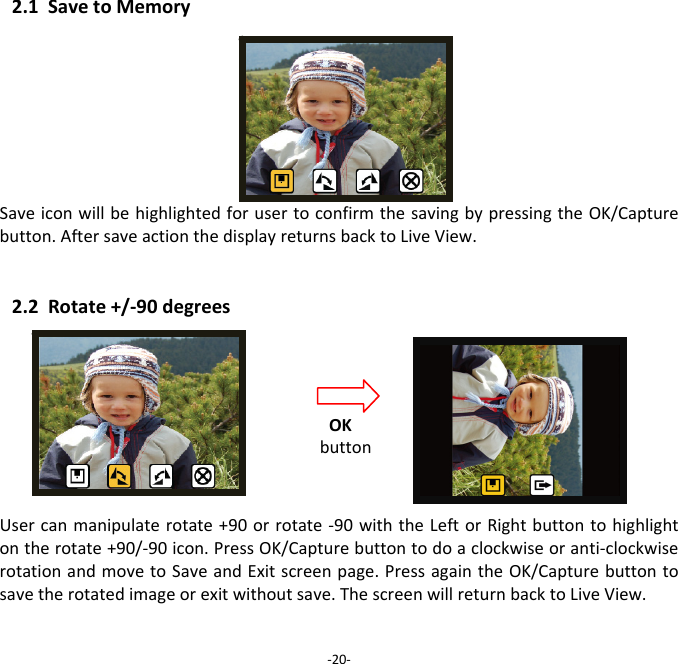
2.1SavetoMemorySaveiconwillbehighlightedforusertoconfirmthesavingbypressingtheOK/Capturebutton.AftersaveactionthedisplayreturnsbacktoLiveView.2.2Rotate+/‐90degreesUsercanmanipulaterotate+90orrotate‐90withtheLeftorRightbuttontohighlightontherotate+90/‐90icon.PressOK/Capturebuttontodoaclockwiseoranti‐clockwiserotationandmovetoSaveandExitscreenpage.PressagaintheOK/Capturebuttontosavetherotatedimageorexitwithoutsave.ThescreenwillreturnbacktoLiveView.‐20‐OKbutton
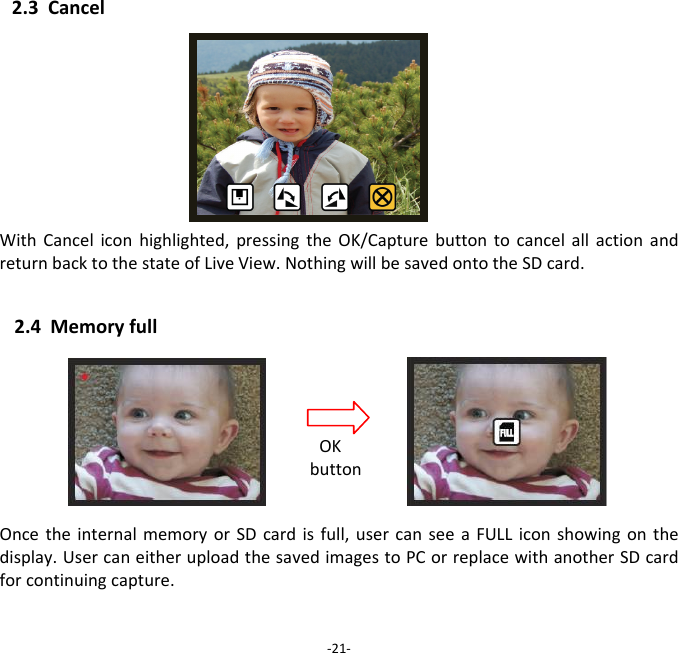
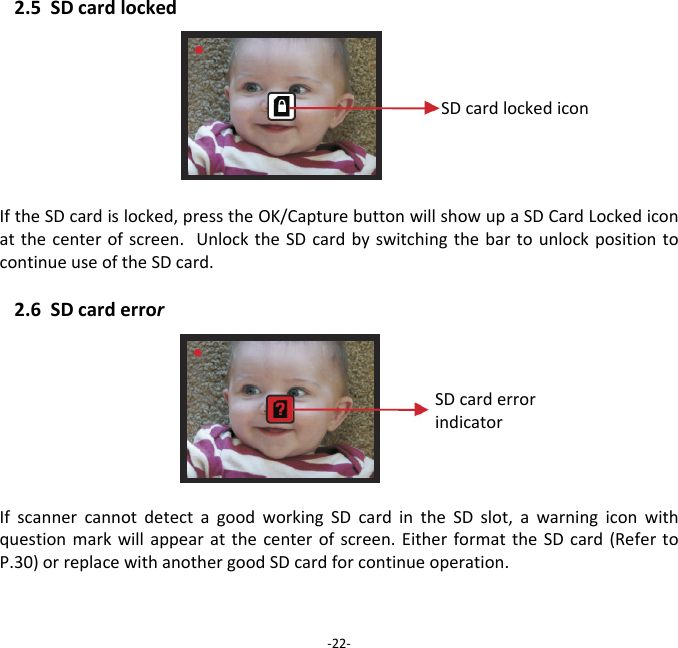
2.3CancelWithCanceliconhighlighted,pressingtheOK/CapturebuttontocancelallactionandreturnbacktothestateofLiveView.NothingwillbesavedontotheSDcard. 2.4MemoryfullOncetheinternalmemoryorSDcardisfull,usercanseeaFULLiconshowingonthedisplay.UsercaneitheruploadthesavedimagestoPCorreplacewithanotherSDcardforcontinuingcapture. ‐21‐OKbutton
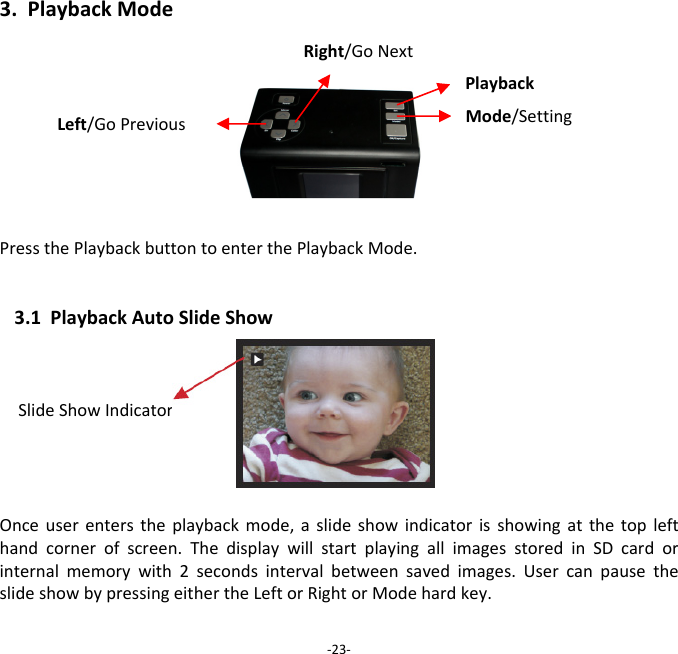
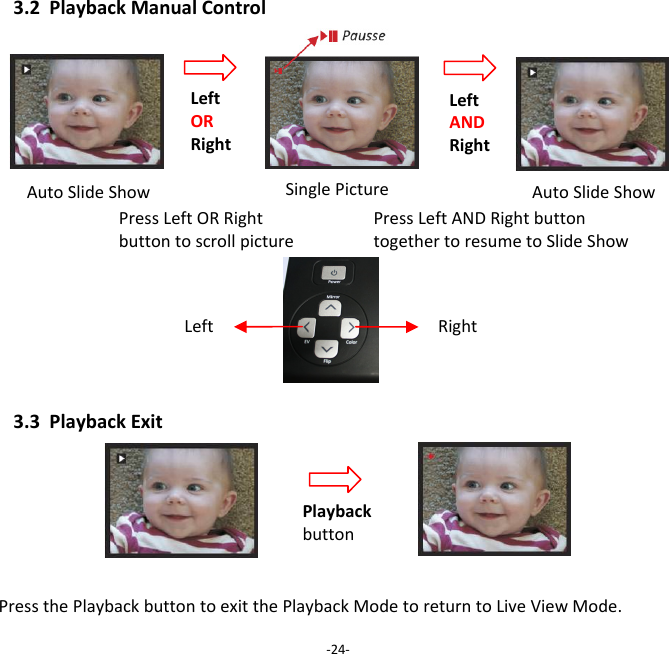
2.5SDcardlocked IftheSDcardislocked,presstheOK/CapturebuttonwillshowupaSDCardLockediconatthecenterofscreen.UnlocktheSDcardbyswitchingthebartounlockpositiontocontinueuseoftheSDcard.2.6SDcarderrorIfscannercannotdetectagoodworkingSDcardintheSDslot,awarningiconwithquestionmarkwillappearatthecenterofscreen.EitherformattheSDcard(RefertoP.30)orreplacewithanothergoodSDcardforcontinueoperation.  ‐22‐SDcardlockediconSDcarderrorindicator
3.PlaybackModePressthePlaybackbuttontoenterthePlaybackMode.3.1PlaybackAutoSlideShowSlideShowIndicatorOnceuserenterstheplaybackmode,aslideshowindicatorisshowingatthetoplefthandcornerofscreen.ThedisplaywillstartplayingallimagesstoredinSDcardorinternalmemorywith2secondsintervalbetweensavedimages.UsercanpausetheslideshowbypressingeithertheLeftorRightorModehardkey.‐23‐PlaybackMode/SettingLeft/GoPreviousRight/GoNext
3.2PlaybackManualControlAutoSlideShowAutoSlideShow3.3PlaybackExitPressthePlaybackbuttontoexitthePlaybackModetoreturntoLiveViewMode.‐24‐PausseLeftORRight LeftANDRight SinglePicturePressLeftORRightbuttontoscrollpicturePressLeftANDRightbuttontogethertoresumetoSlideShow Left Right Playbackbutton
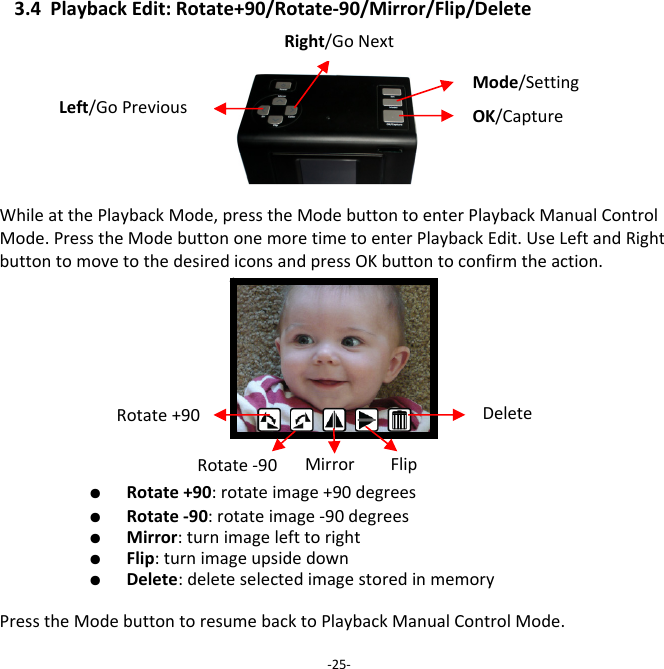
3.4PlaybackEdit:Rotate+90/Rotate‐90/Mirror/Flip/DeleteWhileatthePlaybackMode,presstheModebuttontoenterPlaybackManualControlMode.PresstheModebuttononemoretimetoenterPlaybackEdit.UseLeftandRightbuttontomovetothedesirediconsandpressOKbuttontoconfirmtheaction.  ●  Rotate+90:rotateimage+90degrees   ●  Rotate‐90:rotateimage‐90degrees   ●  Mirror:turnimagelefttoright   ●  Flip:turnimageupsidedown   ●  Delete:deleteselectedimagestoredinmemory  PresstheModebuttontoresumebacktoPlaybackManualControlMode.‐25‐Rotate+90 DeleteRotate‐90 Mirror FlipMode/SettingLeft/GoPreviousRight/GoNextOK/Capture
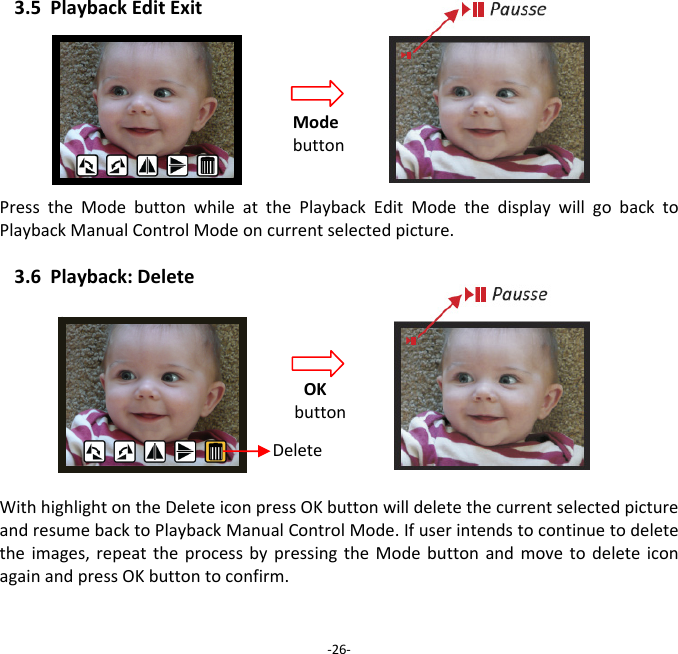
3.5PlaybackEditExitPresstheModebuttonwhileatthePlaybackEditModethedisplaywillgobacktoPlaybackManualControlModeoncurrentselectedpicture. 3.6Playback:DeleteWithhighlightontheDeleteiconpressOKbuttonwilldeletethecurrentselectedpictureandresumebacktoPlaybackManualControlMode.Ifuserintendstocontinuetodeletetheimages,repeattheprocessbypressingtheModebuttonandmovetodeleteiconagainandpressOKbuttontoconfirm.‐26‐Modebutton OKbutton Delete
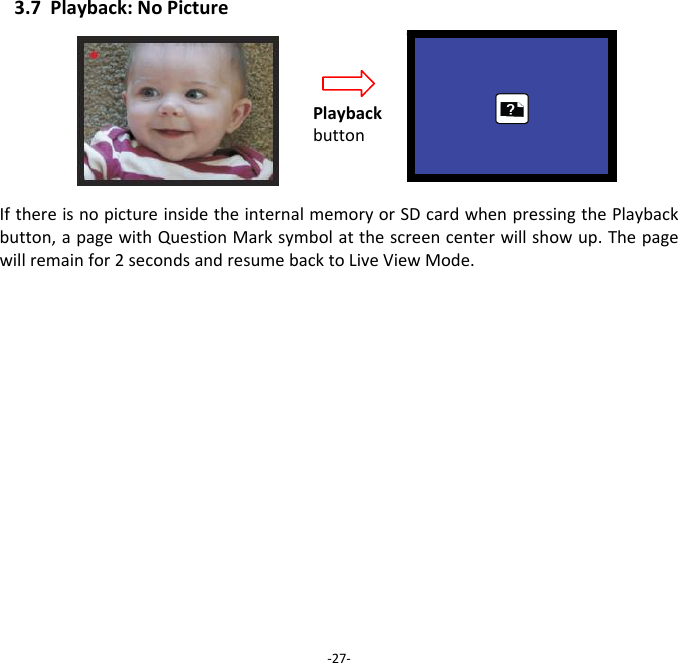
3.7Playback:NoPictureIfthereisnopictureinsidetheinternalmemoryorSDcardwhenpressingthePlaybackbutton,apagewithQuestionMarksymbolatthescreencenterwillshowup.Thepagewillremainfor2secondsandresumebacktoLiveViewMode.‐27‐Playbackbutton
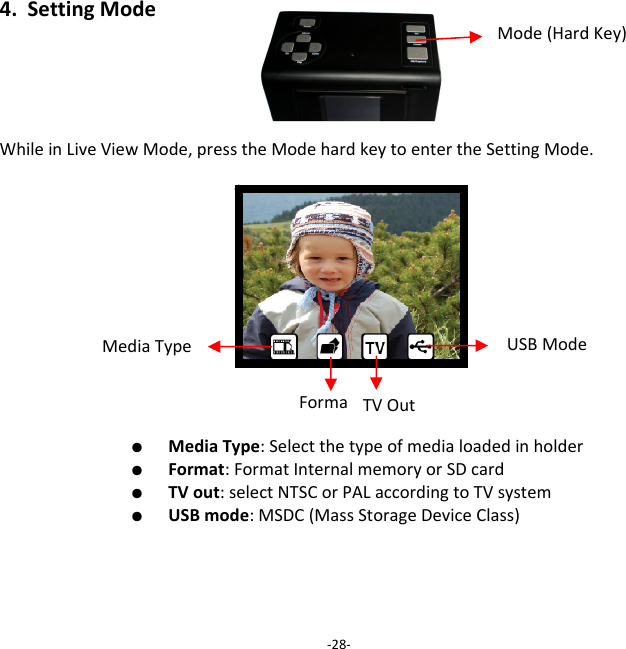
4.SettingModeWhileinLiveViewMode,presstheModehardkeytoentertheSettingMode.  ●  MediaType:Selectthetypeofmedialoadedinholder  ●  Format:FormatInternalmemoryorSDcard  ●  TVout:selectNTSCorPALaccordingtoTVsystem  ●  USBmode:MSDC(MassStorageDeviceClass)‐28‐Mode(HardKey)MediaType USBModeFormat TVOut
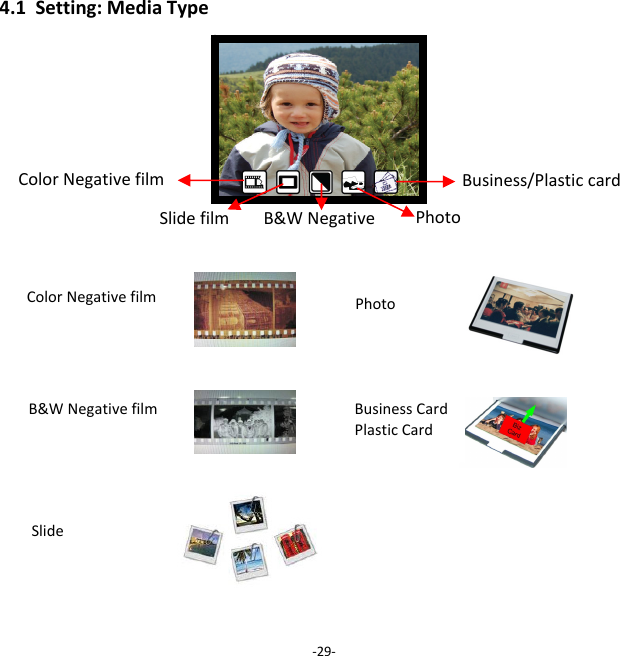
4.1Setting:MediaType‐29‐Slidefilm B&WNegativeColorNegativefilm ColorNegativefilm B&WNegativefilmSlide Business/PlasticcardPhoto Photo BusinessCardPlasticCard
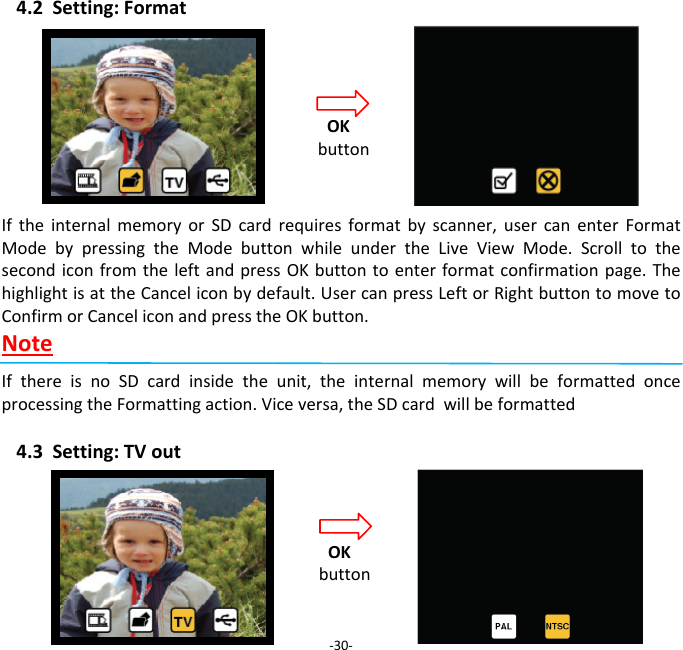
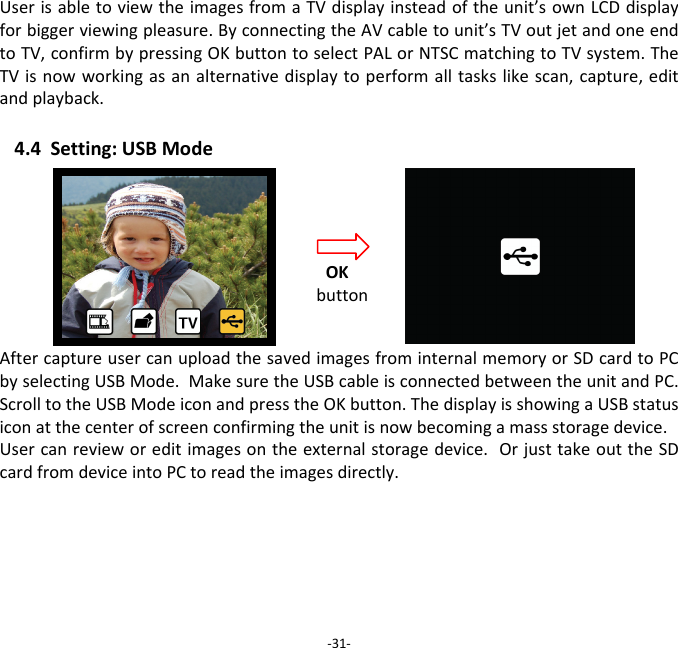
4.2Setting:FormatIftheinternalmemoryorSDcardrequiresformatbyscanner,usercanenterFormatModebypressingtheModebuttonwhileundertheLiveViewMode.ScrolltothesecondiconfromtheleftandpressOKbuttontoenterformatconfirmationpage.ThehighlightisattheCanceliconbydefault.UsercanpressLeftorRightbuttontomovetoConfirmorCanceliconandpresstheOKbutton.NoteIfthereisnoSDcardinsidetheunit,theinternalmemorywillbeformattedonceprocessingtheFormattingaction.Viceversa,theSDcardwillbeformatted4.3Setting:TVout ‐30‐OKbuttonOKbutton
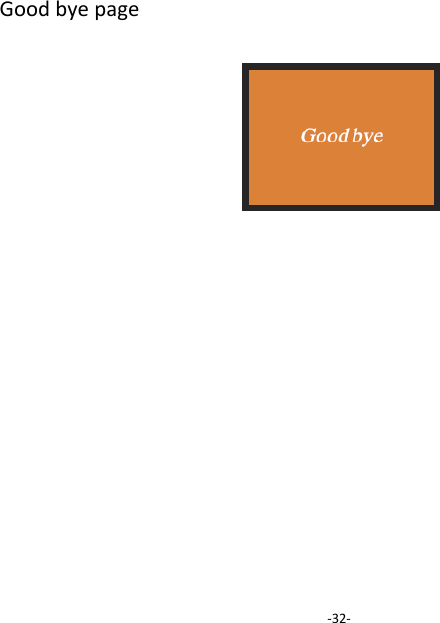
UserisabletoviewtheimagesfromaTVdisplayinsteadoftheunit’sownLCDdisplayforbiggerviewingpleasure.ByconnectingtheAVcabletounit’sTVoutjetandoneendtoTV,confirmbypressingOKbuttontoselectPALorNTSCmatchingtoTVsystem.TheTVisnowworkingasanalternativedisplaytoperformalltaskslikescan,capture,editandplayback.4.4Setting:USBModeAftercaptureusercanuploadthesavedimagesfrominternalmemoryorSDcardtoPCbyselectingUSBMode.MakesuretheUSBcableisconnectedbetweentheunitandPC.ScrolltotheUSBModeiconandpresstheOKbutton.ThedisplayisshowingaUSBstatusiconatthecenterofscreenconfirmingtheunitisnowbecomingamassstoragedevice.Usercanrevieworeditimagesontheexternalstoragedevice.OrjusttakeouttheSDcardfromdeviceintoPCtoreadtheimagesdirectly. ‐31‐OKbutton
Goodbyepage‐32‐
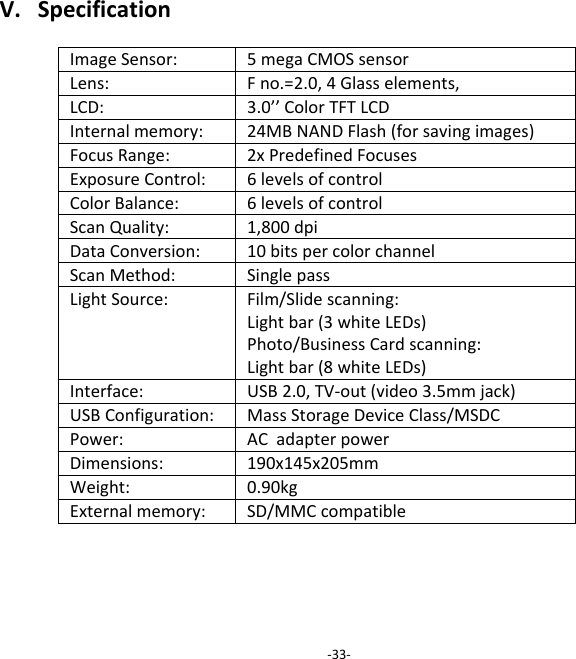
V.SpecificationImageSensor:5megaCMOSsensor Lens:Fno.=2.0,4Glasselements,LCD:3.0’’ColorTFTLCDInternalmemory:24MBNANDFlash(forsavingimages) FocusRange:2xPredefinedFocusesExposureControl:6levelsofcontrolColorBalance:6levelsofcontrolScanQuality:1,800dpiDataConversion:10bitspercolorchannelScanMethod:SinglepassLightSource:Film/Slidescanning:Lightbar(3whiteLEDs)Photo/BusinessCardscanning:Lightbar(8whiteLEDs)Interface:USB2.0,TV‐out(video3.5mmjack) USBConfiguration:MassStorageDeviceClass/MSDCPower:ACadapterpowerDimensions:190x145x205mmWeight:0.90kgExternalmemory:SD/MMCcompatible‐33‐
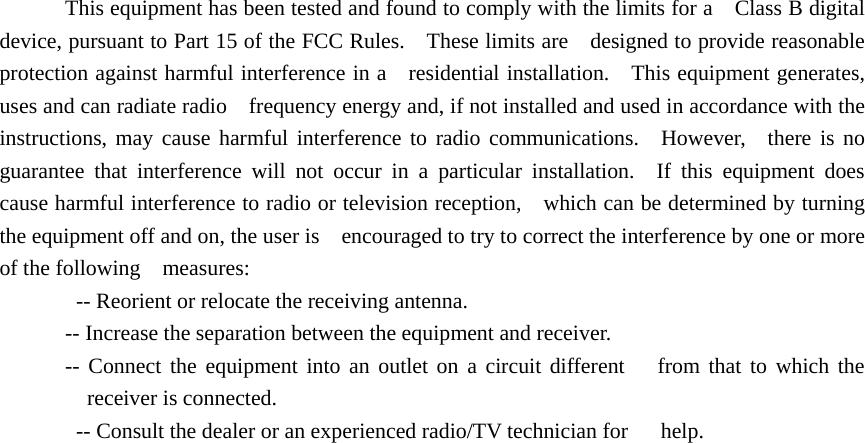
This equipment has been tested and found to comply with the limits for a    Class B digital device, pursuant to Part 15 of the FCC Rules.    These limits are    designed to provide reasonable protection against harmful interference in a   residential installation.    This equipment generates, uses and can radiate radio    frequency energy and, if not installed and used in accordance with the   instructions, may cause harmful interference to radio communications.  However,  there is no guarantee that interference will not occur in a particular installation.  If this equipment does cause harmful interference to radio or television reception,    which can be determined by turning the equipment off and on, the user is    encouraged to try to correct the interference by one or more of the following  measures:     -- Reorient or relocate the receiving antenna.     -- Increase the separation between the equipment and receiver.     -- Connect the equipment into an outlet on a circuit different   from that to which the receiver is connected.     -- Consult the dealer or an experienced radio/TV technician for      help.
 FCC ID: WFZSCND503H1231  This device complies with Part 15 of the FCC Rules. Operation is subject to the following two conditions: (1) this device may not cause harmful interference, and (2) this device must accept any interference received, including interference that may cause undesired operation.

Navigation menu