EUCHNER KG 02 Safety Switch User Manual

EUCHNER GmbH Co.KG Safety Switch

Contents

user manual

ENOperating InstructionsInterlocking/Locking  Modules  MGB2-I..-MLI-... / MGB2-L..-MLI-... (Modular) from V1.00.0
Operating Instructions Interlocking/Locking ModulesMGB2-I..-MLI-... / MGB2-L..-MLI-... (Modular)  2(Translation of the original operating instructions) 2500234-01-08/18Contents1.  About this document ............................................................................................. 41.1. Scope ............................................................................................................................................ 41.1.1.  Notes on older product versions ......................................................................................41.2.  Target group ..................................................................................................................................41.3.  Key to symbols ...............................................................................................................................41.4.  Supplementary documents ..............................................................................................................42.  Correct use .......................................................................................................... 53.  Description of the safety function .......................................................................... 74.  Exclusion of liability and warranty ......................................................................... 95.  General safety precautions ................................................................................... 96. Function ............................................................................................................. 106.1.  Interlocking module MGB2-I... (or a correspondingly congured MGB2-L2) .........................................106.2.  Locking module MGB2-L... .............................................................................................................106.2.1.  Guard locking for version MGB2-L1 ................................................................................106.2.2.  Guard locking for version MGB2-L2 ................................................................................106.3.  Control of guard locking MGB2-L1 and MGB2-L2 .............................................................................117.  System overview................................................................................................. 127.1.  Interlocking/locking module MGB2-I../MGB2-L.. ...............................................................................127.2.  Handle module MGB2-H-….............................................................................................................137.3.  Escape release MGB-E-... (optional) ................................................................................................137.4.  Dimension drawings ...................................................................................................................... 147.4.1.  Interlocking/locking module MGB2-I.../MGB2-L... .............................................................147.4.2.  Handle module MGB2-H... ..............................................................................................147.4.3.  Escape release MGB-E-...  ..............................................................................................157.4.4.  Assembly of MGB2-L, MGB2-H and MGB-E (example on prole 40x40) ...............................167.4.5.  Drilling pattern, complete system with bus module MBM and  optional extension module MCM .....................................................................................177.4.6.  Drilling pattern escape release MGB-E ............................................................................188.  Manual release ................................................................................................... 198.1.  Auxiliary release............................................................................................................................198.2.  Lockout mechanism ...................................................................................................................... 208.3.  Escape release (optional) ..............................................................................................................208.3.1.  Preparing escape release ..............................................................................................219. Mounting ............................................................................................................ 229.1.  Replacing modules........................................................................................................................239.2.  Mounting submodules ...................................................................................................................239.3.  Replacing submodules ..................................................................................................................249.3.1.  Replacing faulty submodules ..........................................................................................249.3.2.  Replacing submodule with a submodule with a different function (changing conguration) ...249.3.3.  Fitting and removing lenses and labels for controls and indicators ....................................25
32500234-01-08/18 (Translation of the original operating instructions)Operating Instructions Interlocking/Locking ModulesMGB2-I..-MLI-... / MGB2-L..-MLI-... (Modular)  EN10.  Changing the door hinge position ........................................................................ 2610.1.  Changing the interlocking/locking module to a different door hinge position ......................................2610.2.  Changing actuating direction of the handle module ..........................................................................2611.  Protection against environmental effects ............................................................. 2812.  Controls and indicators ....................................................................................... 2813.  Electrical connection .......................................................................................... 2913.1.  Connecting modules .....................................................................................................................2913.2.  Using submodules ........................................................................................................................3014.  Data blocks for interlocking/locking module MGB2-I or MGB2-L .......................... 3115. Setup ................................................................................................................. 3115.1.  Teach-in operation (only for MGB2 unicode) .....................................................................................3115.2.  Mechanical function test ................................................................................................................3215.3.  Electrical function test ...................................................................................................................3215.4.  Replacing a module  .....................................................................................................................3216.  System status table, module LEDs ....................................................................... 3316.1.  System indications if there are faults (module LEDs) ........................................................................3316.2.  System indications during setup, teach-in and normal operation .......................................................3417.  System status table (slot LEDs) ........................................................................... 3518.  Technical data .................................................................................................... 3618.1.  Radio frequency approvals.............................................................................................................3719.  Troubleshooting and assistance ........................................................................... 3819.1.  Resetting general faults ................................................................................................................. 3819.2.  Fault on actuating the escape release ............................................................................................3819.3.  Resetting system to factory settings ..............................................................................................3820. Service .............................................................................................................. 3921.  Inspection and service ........................................................................................ 3922.  Declaration of conformity ................................................................................... 40
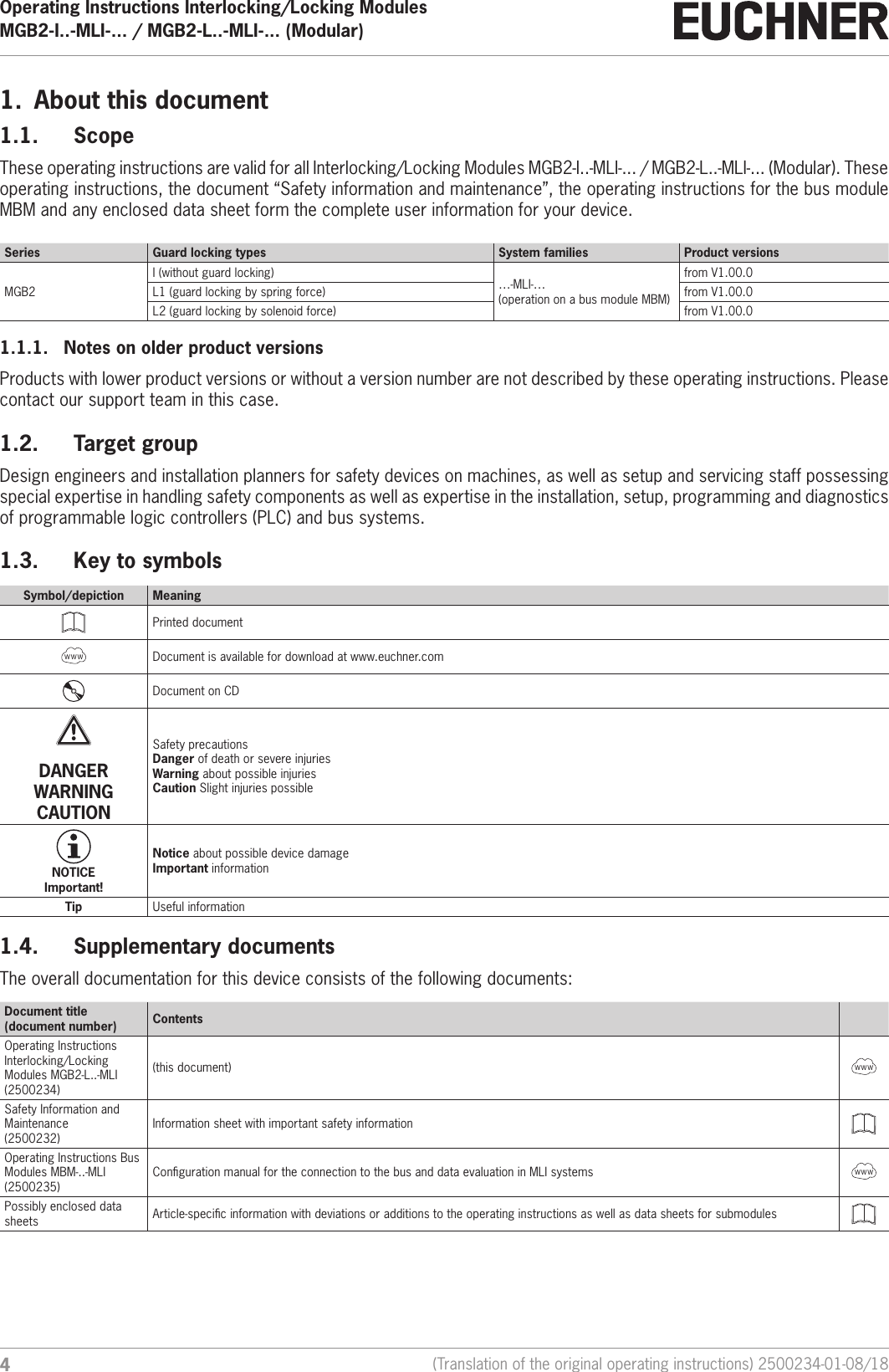
Operating Instructions Interlocking/Locking ModulesMGB2-I..-MLI-... / MGB2-L..-MLI-... (Modular)  4(Translation of the original operating instructions) 2500234-01-08/181.  About this document1.1.  ScopeThese operating instructions are valid for all Interlocking/Locking Modules MGB2-I..-MLI-... / MGB2-L..-MLI-... (Modular). These operating instructions, the document “Safety information and maintenance”, the operating instructions for the bus module MBM and any enclosed data sheet form the complete user information for your device.Series Guard locking types System families Product versionsMGB2I (without guard locking) …-MLI-…  (operation on a bus module MBM)from V1.00.0L1 (guard locking by spring force) from V1.00.0L2 (guard locking by solenoid force) from V1.00.01.1.1.  Notes on older product versionsProducts with lower product versions or without a version number are not described by these operating instructions. Please contact our support team in this case.1.2.  Target groupDesign engineers and installation planners for safety devices on machines, as well as setup and servicing staff possessing special expertise in handling safety components as well as expertise in the installation, setup, programming and diagnostics of programmable logic controllers (PLC) and bus systems.1.3.  Key to symbolsSymbol/depiction MeaningPrinted documentInternetwww Document is available for download at www.euchner.comDocument on CDDANGER WARNING CAUTIONSafety precautionsDanger of death or severe injuriesWarning about possible injuriesCaution Slight injuries possibleNOTICE Important!Notice about possible device damageImportant informationTip Useful information1.4.  Supplementary documentsThe overall documentation for this device consists of the following documents:Document title(document number) ContentsOperating Instructions Interlocking/Locking Modules MGB2-L..-MLI(2500234)(this document)InternetwwwSafety Information and Maintenance(2500232)Information sheet with important safety informationOperating Instructions Bus Modules MBM-..-MLI (2500235)Conguration manual for the connection to the bus and data evaluation in MLI systemsInternetwwwPossibly enclosed data sheets Article-specic information with deviations or additions to the operating instructions as well as data sheets for submodules
52500234-01-08/18 (Translation of the original operating instructions)Operating Instructions Interlocking/Locking ModulesMGB2-I..-MLI-... / MGB2-L..-MLI-... (Modular)  ENImportant!Always read all documents to gain a complete overview of safe installation, setup and use of the device. The documents can be downloaded from www.euchner.com. For this purpose enter the doc. no. in the search box.2.  Correct useThe modular devices described here can only be operated with a suitable bus module MBM-...-MLI-.... For the MGB2-I... the following applies:Along with the bus module MBM, the system consists of at least one interlocking module MGB2-I... and one handle module MGB2-H…The safety system MGB2-I... is an interlocking device without guard locking (type4). Devices with unicode evaluation possess a high coding level, devices with multicode evaluation possess a low coding level.In combination with a movable guard and the machine control, this safety component prevents dangerous machine functions from occurring while the guard is open. A stop command is triggered if the guard is opened during the dangerous machine function.This means: ÌStarting commands that cause a dangerous machine function must become active only when the guard is closed. ÌOpening the guard triggers a stop command. ÌClosing a guard must not cause automatic starting of a dangerous machine function. A separate start command must be issued. For exceptions, refer to ENISO12100 or relevant C-standards.For the MGB2-L... the following applies:Along with the bus module MBM, the system consists of at least one locking module MGB2-L... and one handle module MGB2-H… The safety system MGB2-L... is an interlocking device with guard locking (type4). Devices with unicode evaluation possess a high coding level, devices with multicode evaluation possess a low coding level.In combination with a movable guard and the machine control, this safety component prevents the guard from being opened while a dangerous machine function is being performed.This means: ÌThe unlocking of the guard locking by the control system triggers a stop command. ÌStarting commands that cause a dangerous machine function must become active only when the guard is closed and locked. ÌThe guard locking device must not be unlocked until the dangerous machine function has ended. ÌClosing and locking a guard must not cause automatic starting of a dangerous machine function. A separate start com-mand must be issued. For exceptions, refer to ENISO12100 or relevant C-standards.For MGB2-I.. /MGB2-L..Before the device is used, a risk assessment must be performed on the machine, e.g. in accordance with the following standards: ÌENISO13849-1, Safety of machinery – Safety-related parts of control systems – Part 1: General principles for design ÌENISO12100, Safety of machinery – General principles for design – Risk assessment and risk reduction ÌENIEC62061, Safety of machinery – Functional safety of safety-related electrical, electronic and programmable elec-tronic control systems.
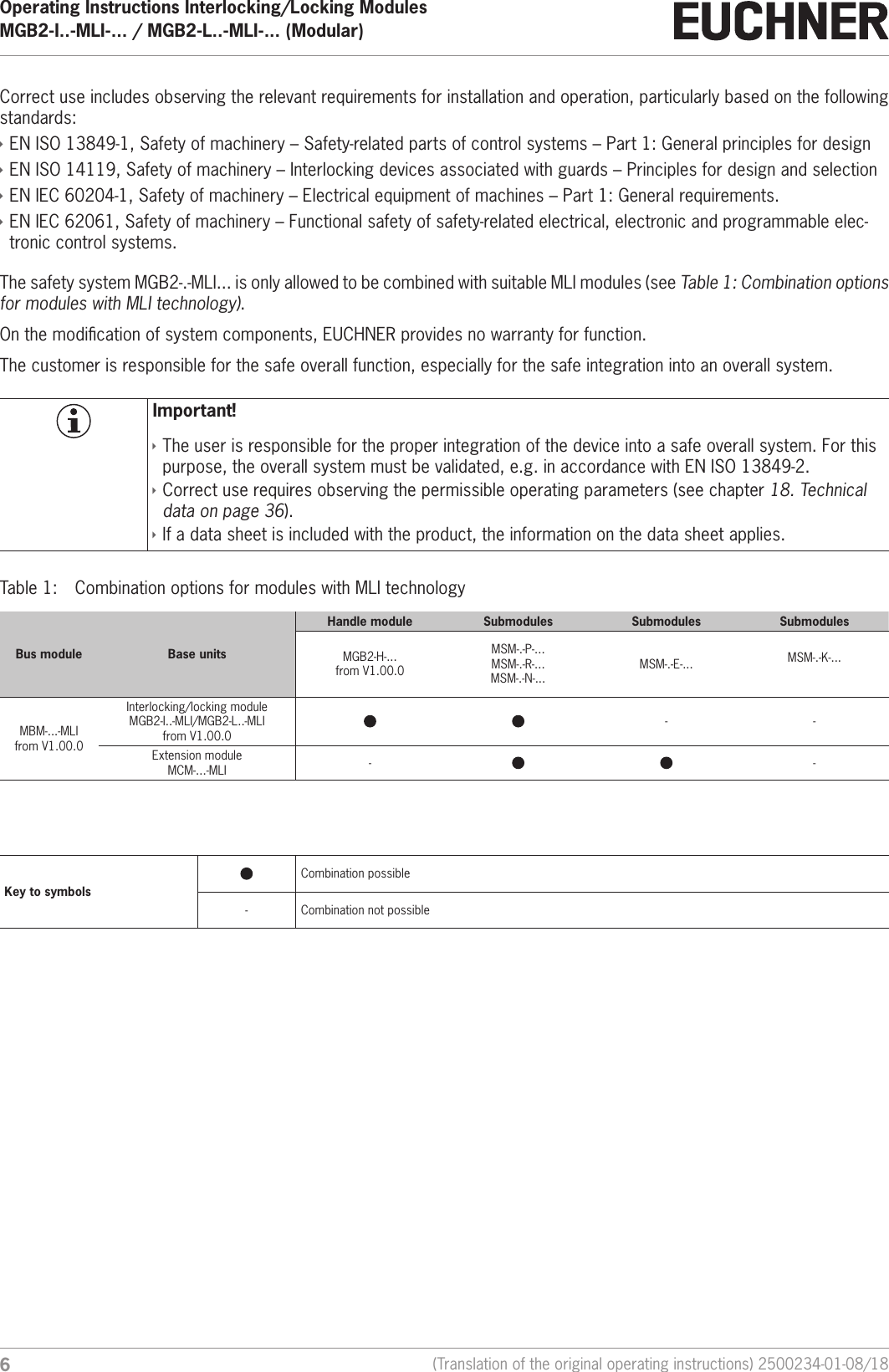
Operating Instructions Interlocking/Locking ModulesMGB2-I..-MLI-... / MGB2-L..-MLI-... (Modular)  6(Translation of the original operating instructions) 2500234-01-08/18Correct use includes observing the relevant requirements for installation and operation, particularly based on the following standards: ÌENISO13849-1, Safety of machinery – Safety-related parts of control systems – Part 1: General principles for design ÌENISO14119, Safety of machinery – Interlocking devices associated with guards – Principles for design and selection ÌENIEC60204-1, Safety of machinery – Electrical equipment of machines – Part 1: General requirements. ÌENIEC62061, Safety of machinery – Functional safety of safety-related electrical, electronic and programmable elec-tronic control systems. The safety system MGB2-.-MLI... is only allowed to be combined with suitable MLI modules (see Table 1: Combination options for modules with MLI technology).On the modication of system components, EUCHNER provides no warranty for function.The customer is responsible for the safe overall function, especially for the safe integration into an overall system.Important! ÌThe user is responsible for the proper integration of the device into a safe overall system. For this purpose, the overall system must be validated, e.g. in accordance with ENISO13849-2. ÌCorrect use requires observing the permissible operating parameters (see chapter 18. Technical data on page 36). ÌIf a data sheet is included with the product, the information on the data sheet applies.Table 1:  Combination options for modules with MLI technologyBus module Base unitsHandle module Submodules Submodules SubmodulesMGB2-H-...from V1.00.0MSM-.-P-...MSM-.-R-...MSM-.-N-...MSM-.-E-... MSM-.-K-...MBM-...-MLIfrom V1.00.0Interlocking/locking moduleMGB2-I..-MLI/MGB2-L..-MLIfrom V1.00.0- -Extension moduleMCM-...-MLI - -Key to symbolsCombination possible- Combination not possible
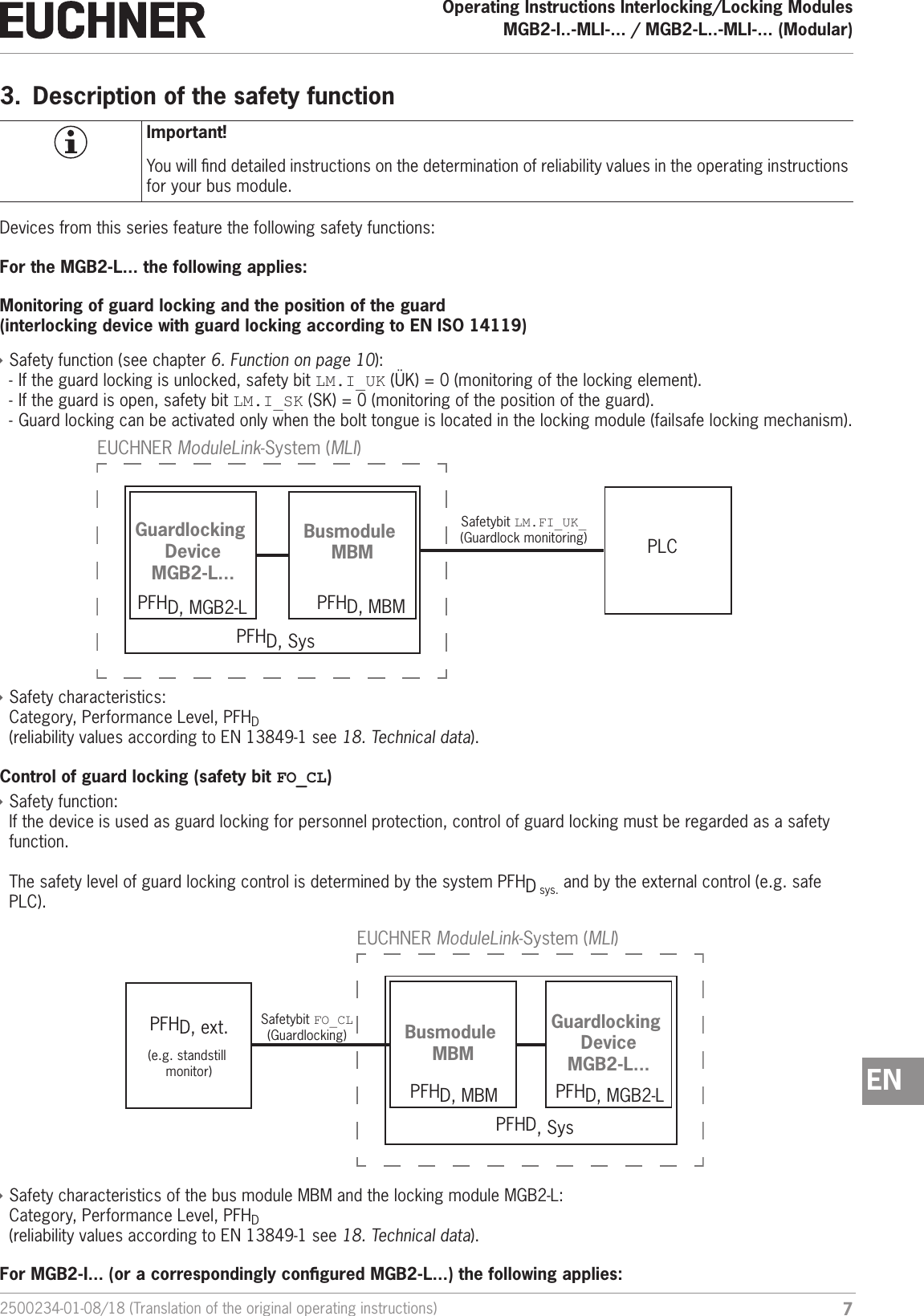
72500234-01-08/18 (Translation of the original operating instructions)Operating Instructions Interlocking/Locking ModulesMGB2-I..-MLI-... / MGB2-L..-MLI-... (Modular)  EN3.  Description of the safety functionImportant!You will nd detailed instructions on the determination of reliability values in the operating instructions for your bus module.Devices from this series feature the following safety functions:For the MGB2-L... the following applies:Monitoring of guard locking and the position of the guard (interlocking device with guard locking according to ENISO14119) ÌSafety function (see chapter 6. Function on page 10):  - If the guard locking is unlocked, safety bit LM.I_UK (ÜK)=0 (monitoring of the locking element). - If the guard is open, safety bit LM.I_SK (SK)=0 (monitoring of the position of the guard). - Guard locking can be activated only when the bolt tongue is located in the locking module (failsafe locking mechanism).PLCPFHD, SysPFHD, MBMPFHD, MGB2-LGuardlocking DeviceMGB2-L...Busmodule MBMEUCHNER ModuleLink-System (MLI)Safetybit LM.FI_UK_(Guardlock monitoring) ÌSafety characteristics:  Category, Performance Level, PFHD (reliability values according to EN13849-1 see 18. Technical data).Control of guard locking (safety bit FO_CL) ÌSafety function: If the device is used as guard locking for personnel protection, control of guard locking must be regarded as a safety function.  The safety level of guard locking control is determined by the system PFHD sys. and by the external control (e.g. safe PLC).PFHD, ext.PFHD, SysGuardlocking DeviceMGB2-L...Busmodule MBMEUCHNER ModuleLink-System (MLI)(e.g. standstill monitor)Safetybit FO_CL(Guardlocking)PFHD, MBM PFHD, MGB2-L ÌSafety characteristics of the bus module MBM and the locking module MGB2-L:  Category, Performance Level, PFHD  (reliability values according to EN13849-1 see 18. Technical data).For MGB2-I... (or a correspondingly congured MGB2-L...) the following applies:
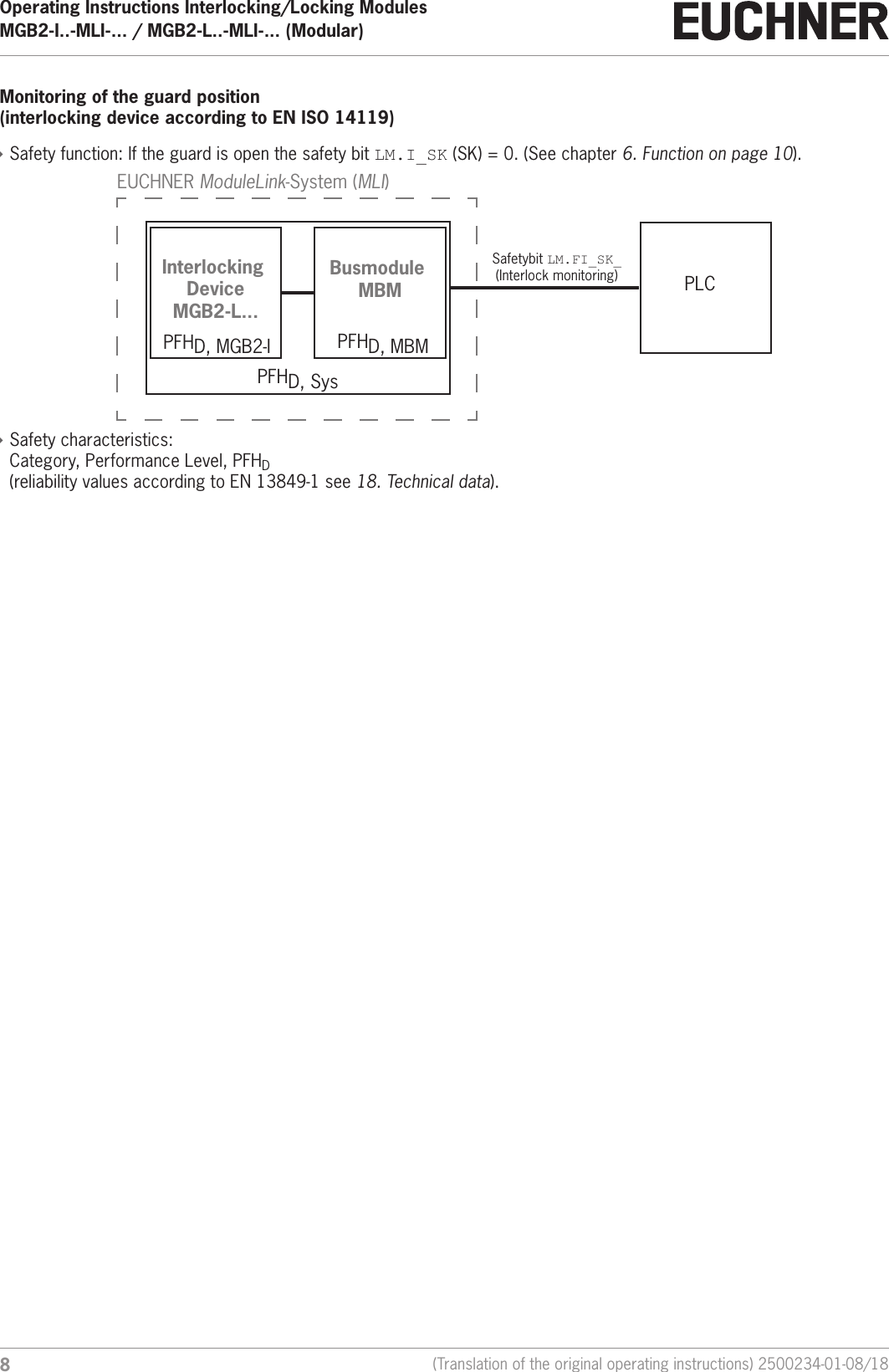
Operating Instructions Interlocking/Locking ModulesMGB2-I..-MLI-... / MGB2-L..-MLI-... (Modular)  8(Translation of the original operating instructions) 2500234-01-08/18Monitoring of the guard position (interlocking device according to ENISO14119) ÌSafety function: If the guard is open the safety bit LM.I_SK (SK)=0. (See chapter 6. Function on page 10).PLCPFHD, SysPFHD, MBMPFHD, MGB2-IInterlocking DeviceMGB2-L...Busmodule MBMEUCHNER ModuleLink-System (MLI)Safetybit LM.FI_SK_(Interlock monitoring) ÌSafety characteristics:  Category, Performance Level, PFHD (reliability values according to EN13849-1 see 18. Technical data).
92500234-01-08/18 (Translation of the original operating instructions)Operating Instructions Interlocking/Locking ModulesMGB2-I..-MLI-... / MGB2-L..-MLI-... (Modular)  EN4.  Exclusion of liability and warrantyIn case of failure to comply with the conditions for correct use stated above, or if the safety instructions are not followed, or if any servicing is not performed as required, liability will be excluded and the warranty void.5.  General safety precautionsSafety switches fulll personnel protection functions. Incorrect installation or tampering can lead to fatal injuries to personnel.Check the safe function of the guard and, if necessary, other safety functions particularly Ìafter any setup work Ìeach time after replacement of a component relevant to safety  Ìafter an extended period without use Ìafter every fault Ìafter any change to the DIP switch settingsIndependent of these checks, the safe function of the guard should be checked at suitable intervals as part of the mainte-nance schedule.WARNINGDanger to life due to improper installation or due to bypassing (tampering). Safety components perform a personnel protection function. ÌSafety components must not be bypassed, turned away, removed or otherwise rendered ineffec-tive. On this topic pay attention in particular to the measures for reducing the possibility of bypass-ing according to ENISO14119:2013, section 7. ÌThe switching operation is allowed to be triggered only by the intended handle module MGB2-H… that is positively fastened to the guard. ÌPrevent bypassing by means of replacement actuators (only for multicode evaluation). For this purpose, restrict access to actuators and to keys for releases, for example. ÌMounting, electrical connection and setup only by authorized personnel possessing the following knowledge: - specialist knowledge in handling safety components  - knowledge about the applicable EMC regulations - knowledge about the applicable regulations on occupational safety and accident prevention.Important!Prior to use, read the operating instructions and keep these in a safe place. Ensure the operating instructions are always available during mounting, setup and servicing. For this reason you should archive a printed copy of the operating instructions. You can download the operating instructions from www.euchner.com.
Operating Instructions Interlocking/Locking ModulesMGB2-I..-MLI-... / MGB2-L..-MLI-... (Modular)  10 (Translation of the original operating instructions) 2500234-01-08/186.  Function6.1.  Interlocking module MGB2-I... (or a correspondingly congured MGB2-L2)Together with a handle module, the interlocking module makes it possible to interlock movable guards. The combination also serves as a mechanical door stop at the same time.The following switch-on conditions apply to safety bit LM.FI_SK (SK): ÌGuard closed ÌBolt tongue inserted in the interlocking moduleSee also chapter 16.2. System indications during setup, teach-in and normal operation on page 34 and the operating instructions for bus module MBM.The interlocking module detects the position of the guard and the position of the bolt tongue. The bolt tongue in the handle module is moved into and out of the interlocking module by actuating the door handle.6.2.  Locking module MGB2-L...Together with a handle module, the locking module makes it possible to lock movable guards. The combination also serves as a mechanical door stop at the same time. There are various congurations for the control of the guard locking (see section 6.3. Control of guard locking MGB2-L1 and MGB2-L2). The following descriptions in 6.2.1 and 6.2.2 describe the function of the guard locking with the factory setting. Important!To operate the device as guard locking for personnel protection according to ENISO14119, the safety bit LM.FI_UK (ÜK) must be evaluated.The following switch-on conditions apply to the safety bit LM.FI_UK (ÜK): ÌGuard closed ÌBolt tongue inserted in the locking module ÌGuard locking in locking position (guard locking monitoring)See also chapter 16.2. System indications during setup, teach-in and normal operation on page 34 and the operating instructions for bus module MBM.The locking module detects the position of the guard and the position of the bolt tongue. The position of the guard locking is also monitored. The bolt tongue in the handle module is moved into and out of the locking module by actuating the door handle.If the bolt tongue is fully inserted into the locking module, the guard locking can lock the bolt tongue in this position. De-pending on the version, this locking is by spring force or solenoid force.6.2.1.  Guard locking for version MGB2-L1(Guard locking actuated by spring force and released by power-ON)Guard locking: Close guard; no voltage at the solenoid  (with factory setting: safety bit LM.FO_CL =0.) Releasing guard locking: Apply voltage to the solenoid (with factory setting: safety bit LM.FO_CL =1.).The spring-operated guard locking functions in accordance with the closed-circuit current principle. If the voltage is interrupted at the solenoid, the guard locking remains active and the guard cannot be opened directly.Important!If the guard is open when the power supply is interrupted and is then closed, guard locking is activated. This can lead to persons being locked in unintentionally.As long as the guard locking is closed, the bolt tongue cannot be pulled out of the locking module and the guard is locked.If voltage is applied to the guard locking solenoid, the guard locking is opened and bolt tongue is released. The guard can be opened.6.2.2.  Guard locking for version MGB2-L2(Guard locking actuated by power-ON and released by spring force)
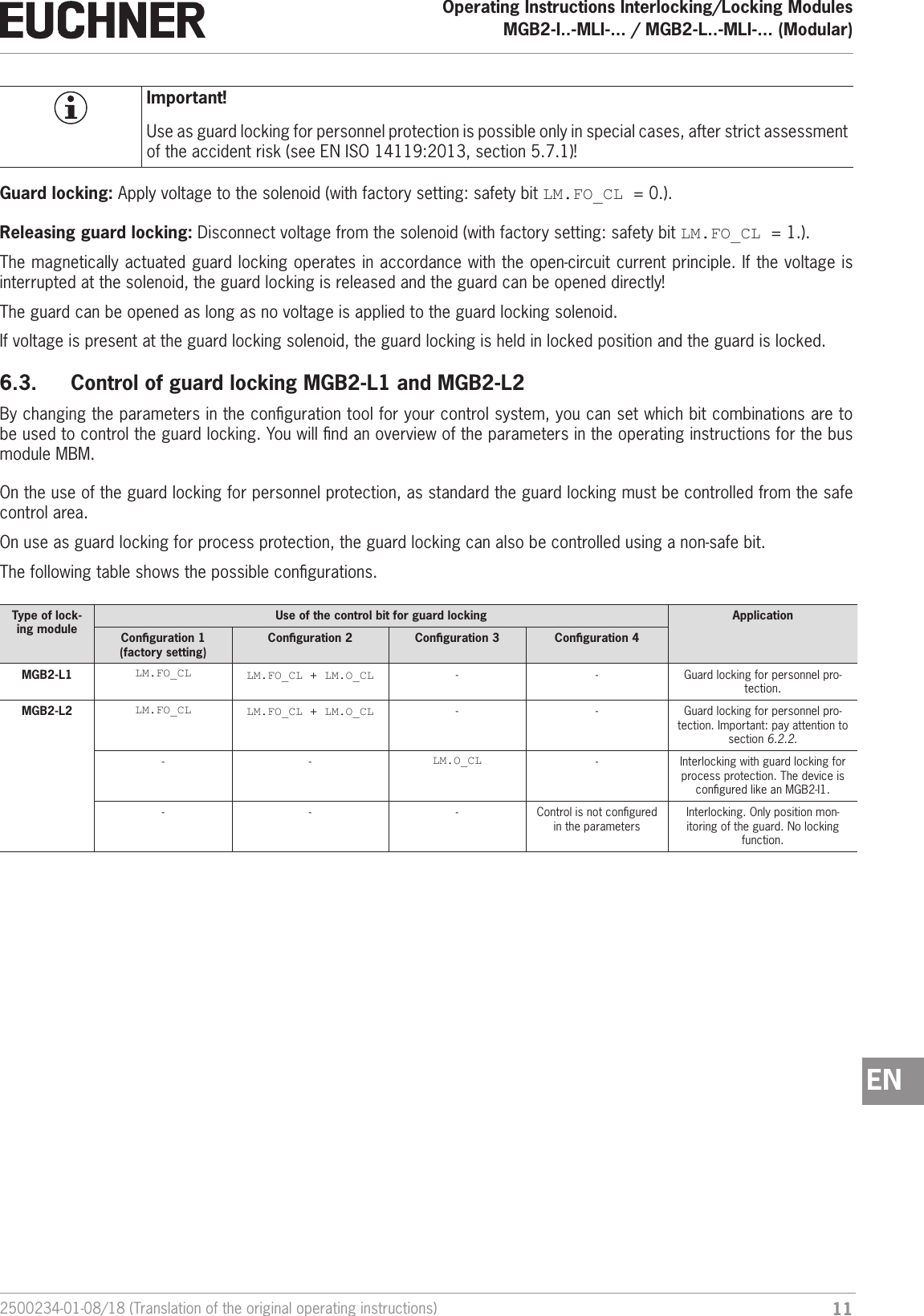
112500234-01-08/18 (Translation of the original operating instructions)Operating Instructions Interlocking/Locking ModulesMGB2-I..-MLI-... / MGB2-L..-MLI-... (Modular)  ENImportant!Use as guard locking for personnel protection is possible only in special cases, after strict assessment of the accident risk (see ENISO14119:2013, section 5.7.1)!Guard locking: Apply voltage to the solenoid (with factory setting: safety bit LM.FO_CL =0.).Releasing guard locking: Disconnect voltage from the solenoid (with factory setting: safety bit LM.FO_CL =1.).The magnetically actuated guard locking operates in accordance with the open-circuit current principle. If the voltage is interrupted at the solenoid, the guard locking is released and the guard can be opened directly! The guard can be opened as long as no voltage is applied to the guard locking solenoid.If voltage is present at the guard locking solenoid, the guard locking is held in locked position and the guard is locked.6.3.  Control of guard locking MGB2-L1 and MGB2-L2By changing the parameters in the conguration tool for your control system, you can set which bit combinations are to be used to control the guard locking. You will nd an overview of the parameters in the operating instructions for the bus module MBM.On the use of the guard locking for personnel protection, as standard the guard locking must be controlled from the safe control area.On use as guard locking for process protection, the guard locking can also be controlled using a non-safe bit.The following table shows the possible congurations.Type of lock-ing moduleUse of the control bit for guard locking ApplicationConguration 1  (factory setting)Conguration 2 Conguration 3 Conguration 4MGB2-L1 LM.FO_CL LM.FO_CL + LM.O_CL - - Guard locking for personnel pro-tection.MGB2-L2 LM.FO_CL LM.FO_CL + LM.O_CL - - Guard locking for personnel pro-tection. Important: pay attention to section 6.2.2.- - LM.O_CL - Interlocking with guard locking for process protection. The device is congured like an MGB2-I1.- - - Control is not congured in the parametersInterlocking. Only position mon-itoring of the guard. No locking function.
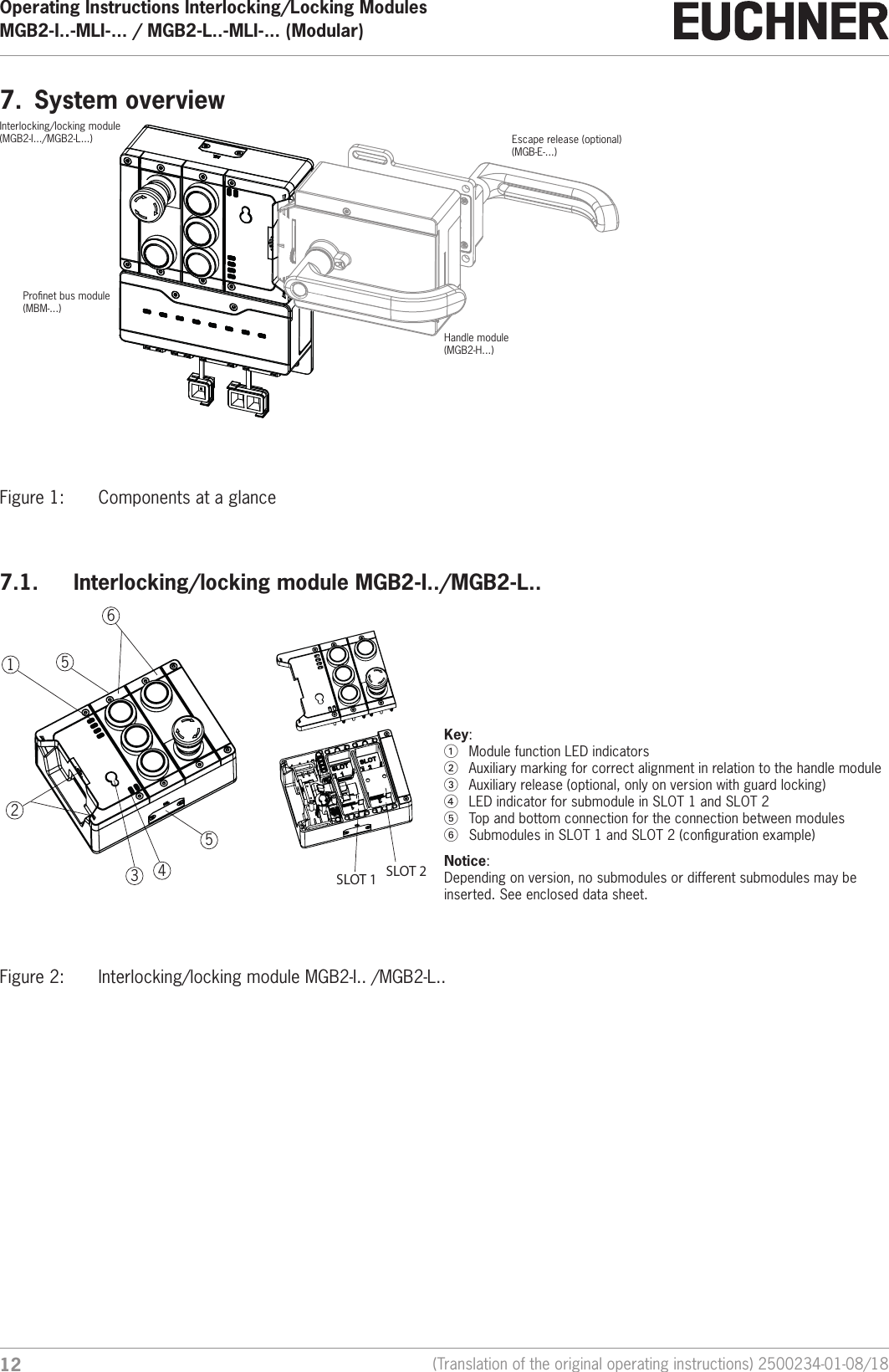
Operating Instructions Interlocking/Locking ModulesMGB2-I..-MLI-... / MGB2-L..-MLI-... (Modular)  12 (Translation of the original operating instructions) 2500234-01-08/187.  System overviewEscape release (optional)(MGB-E-...)Handle module(MGB2-H...)Interlocking/locking module(MGB2-I.../MGB2-L...)Pronet bus module(MBM-...)Figure 1:  Components at a glance7.1.  Interlocking/locking module MGB2-I../MGB2-L..1234565   SLOT 1 SLOT 2Key:1  Module function LED indicators2  Auxiliary marking for correct alignment in relation to the handle module3  Auxiliary release (optional, only on version with guard locking)4  LED indicator for submodule in SLOT 1 and SLOT 25  Top and bottom connection for the connection between modules6  Submodules in SLOT 1 and SLOT 2 (conguration example)Notice:  Depending on version, no submodules or different submodules may be inserted. See enclosed data sheet.Figure 2:  Interlocking/locking module MGB2-I.. /MGB2-L..
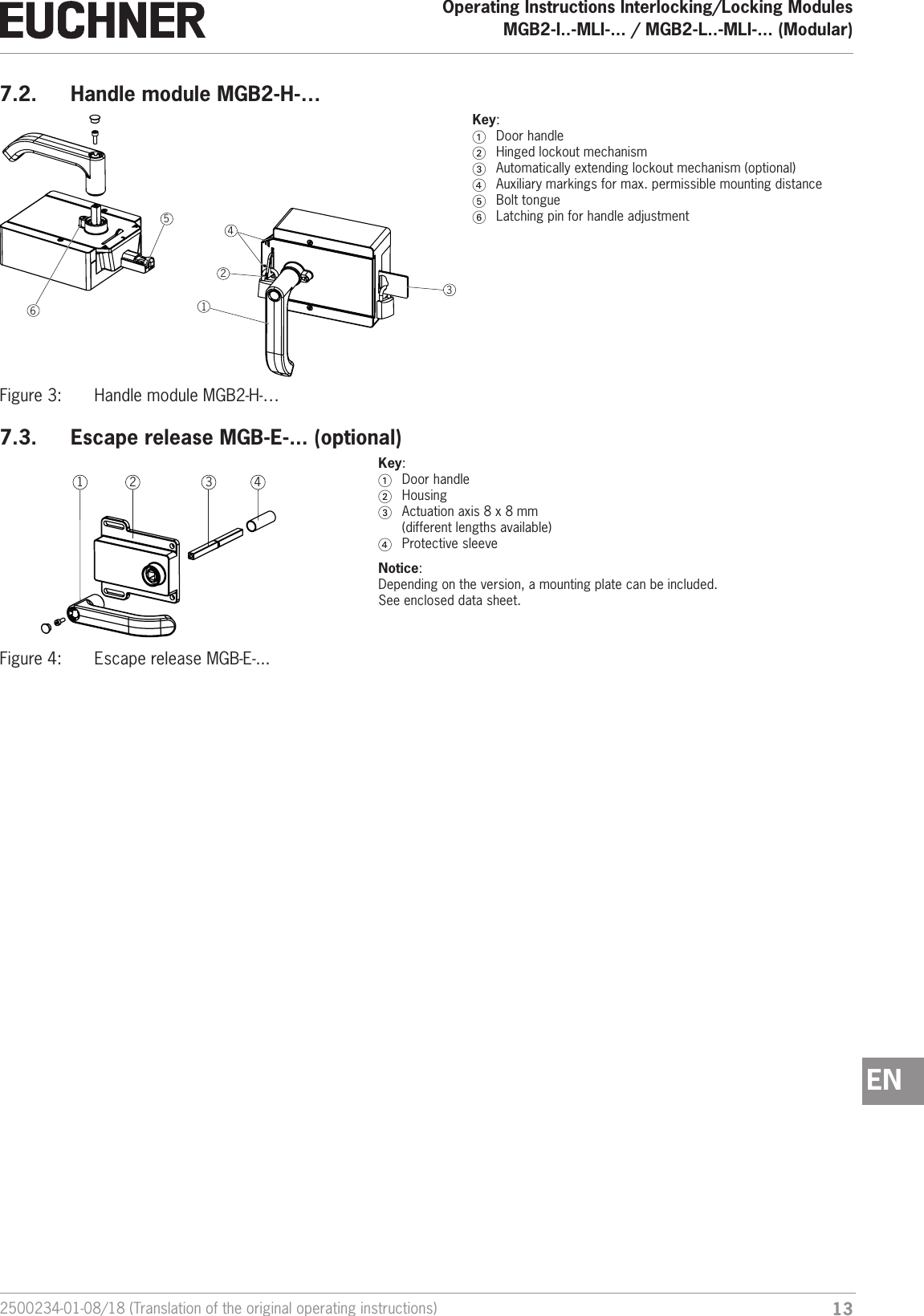
132500234-01-08/18 (Translation of the original operating instructions)Operating Instructions Interlocking/Locking ModulesMGB2-I..-MLI-... / MGB2-L..-MLI-... (Modular)  EN7.2.  Handle module MGB2-H-…   123456Key:1  Door handle2  Hinged lockout mechanism3  Automatically extending lockout mechanism (optional)4  Auxiliary markings for max. permissible mounting distance5  Bolt tongue6  Latching pin for handle adjustmentFigure 3:  Handle module MGB2-H-…7.3.  Escape release MGB-E-... (optional)1 2 3 4  Key:1  Door handle2 Housing3  Actuation axis 8 x 8 mm  (different lengths available)4  Protective sleeveNotice:  Depending on the version, a mounting plate can be included.  See enclosed data sheet.Figure 4:  Escape release MGB-E-...
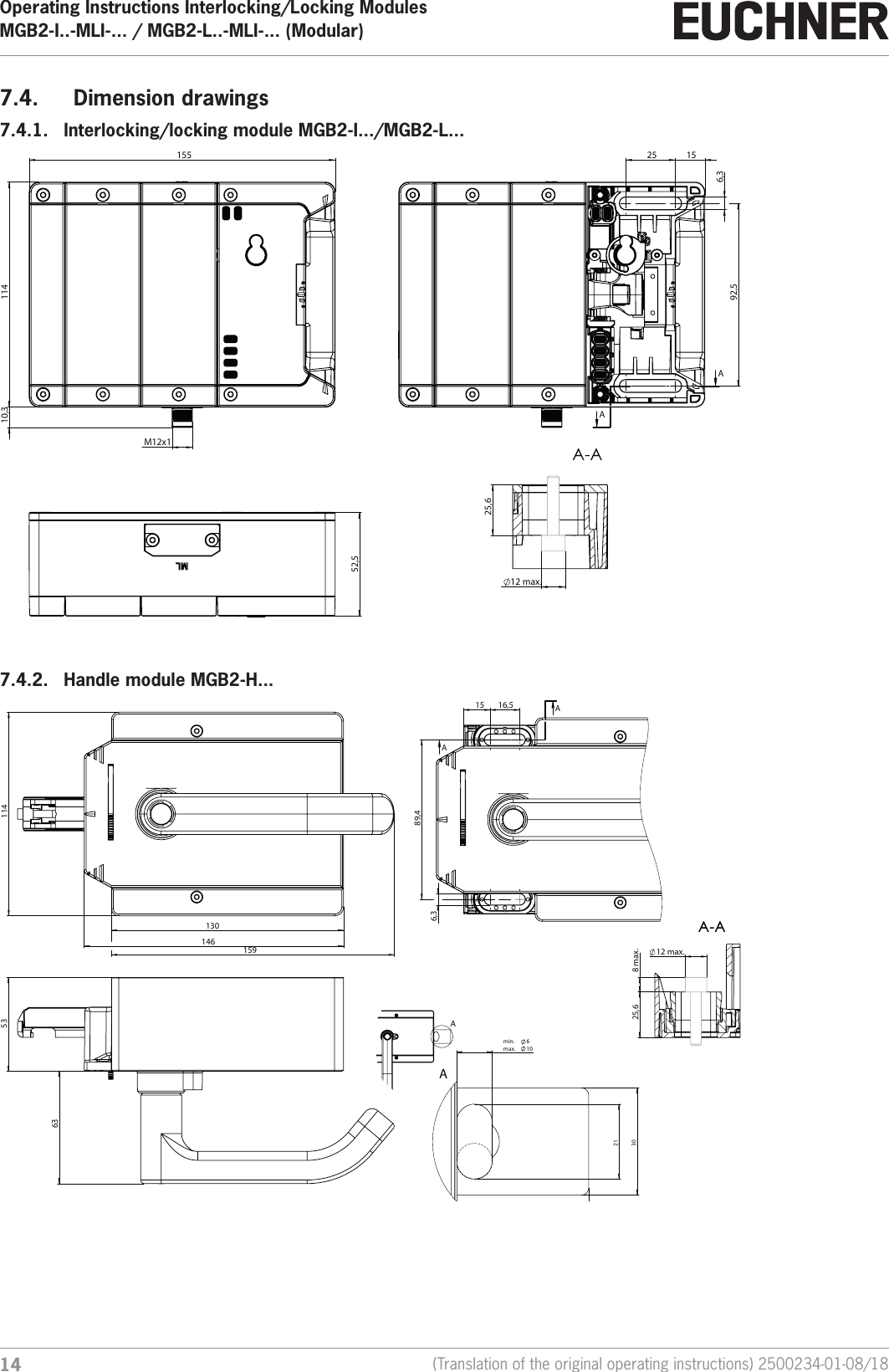
Operating Instructions Interlocking/Locking ModulesMGB2-I..-MLI-... / MGB2-L..-MLI-... (Modular)  14 (Translation of the original operating instructions) 2500234-01-08/187.4.  Dimension drawings7.4.1.  Interlocking/locking module MGB2-I.../MGB2-L...    155  114  M12x1  10,3  52,5  92,5  15  25  6,3 AA 25,6 12 max. A-A7.4.2.  Handle module MGB2-H...    130  146  114  159  53  63  16,5  89,4  15  6,3 AA A-A12 max.  8 max.  25,6 A-AA 37  30  21 min.   6max.  10A
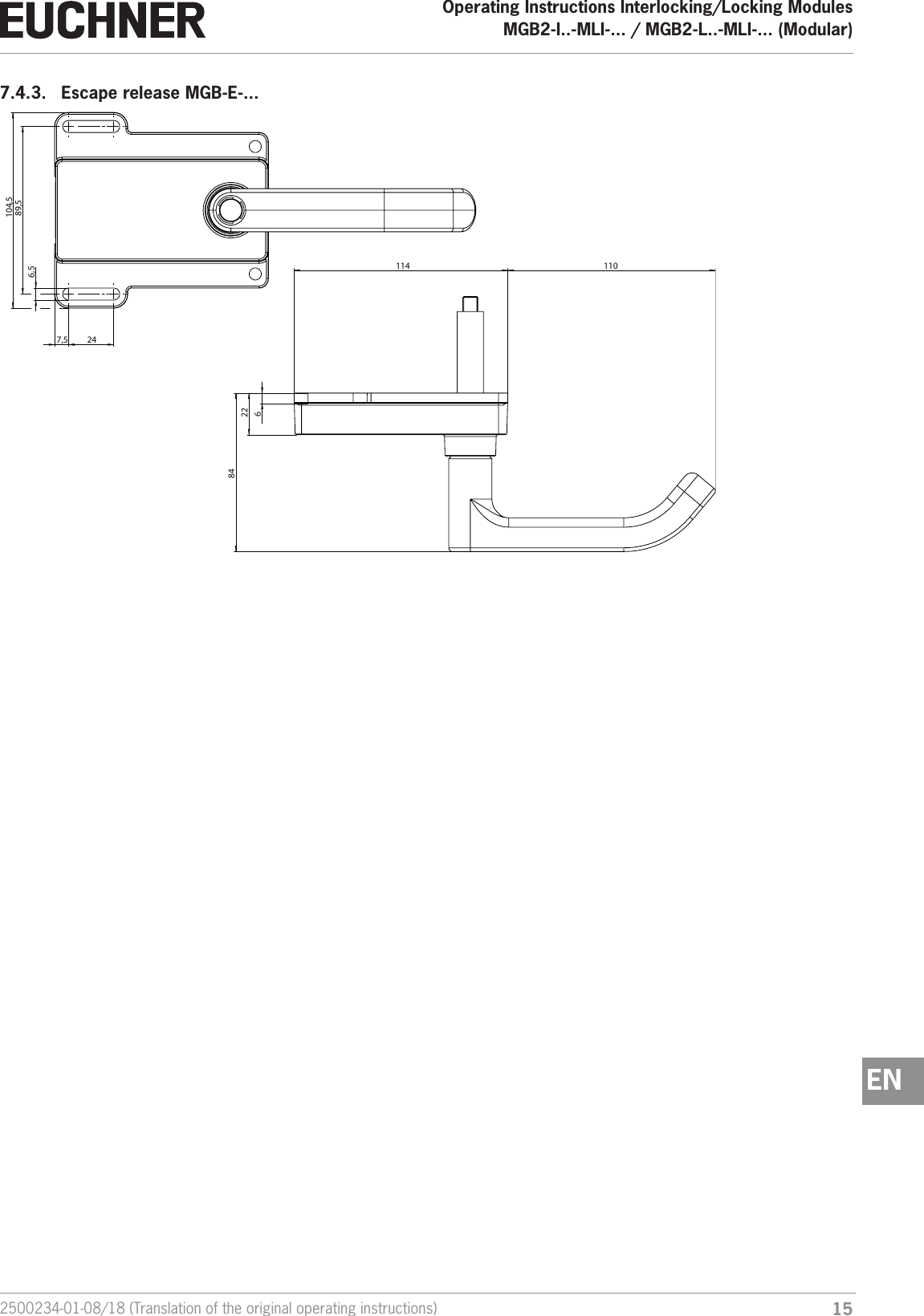
152500234-01-08/18 (Translation of the original operating instructions)Operating Instructions Interlocking/Locking ModulesMGB2-I..-MLI-... / MGB2-L..-MLI-... (Modular)  EN7.4.3.  Escape release MGB-E-...     89,5  104,5  24  7,5  6,5  114   110  22  84  6
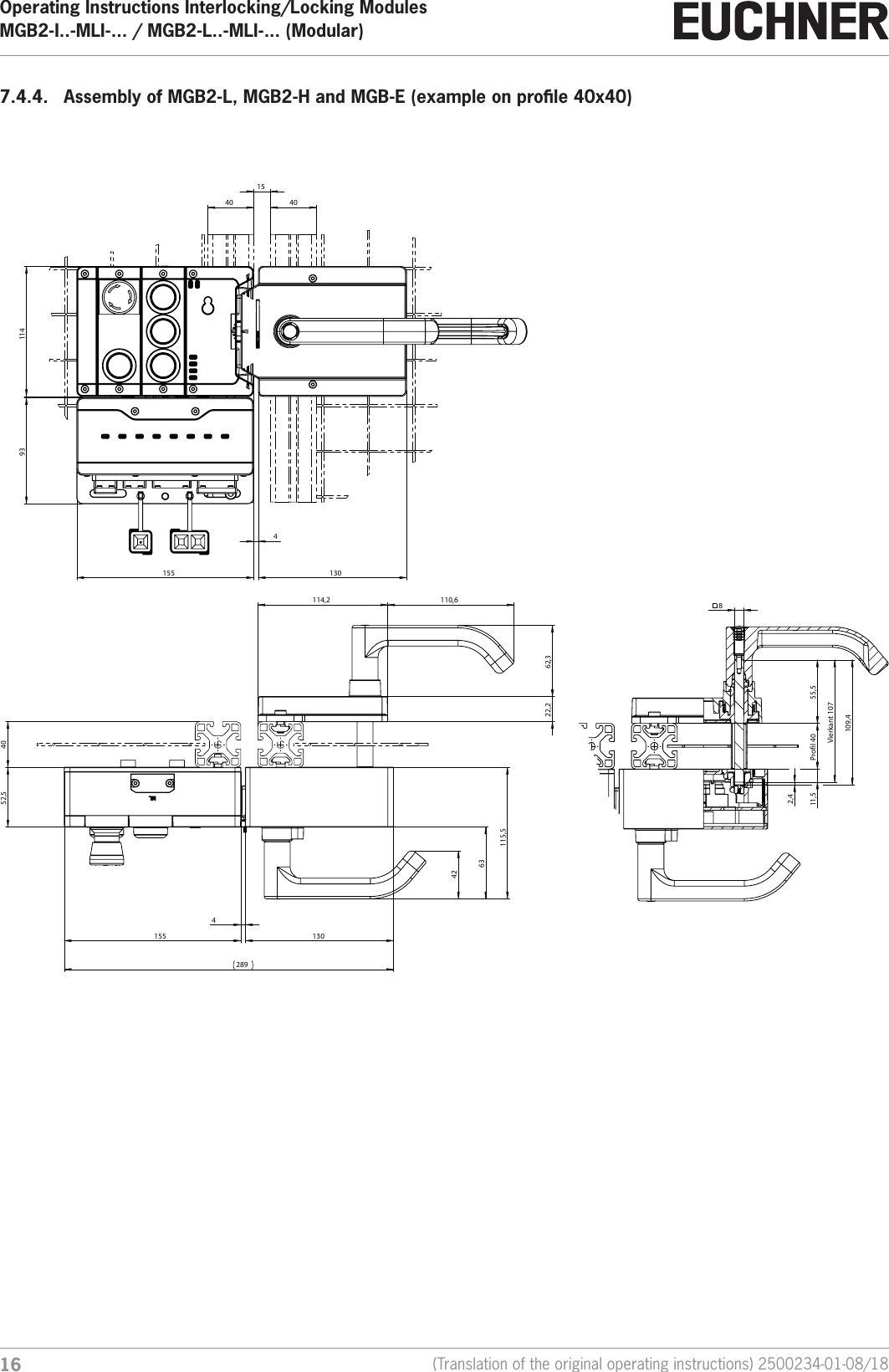
Operating Instructions Interlocking/Locking ModulesMGB2-I..-MLI-... / MGB2-L..-MLI-... (Modular)  16 (Translation of the original operating instructions) 2500234-01-08/187.4.4.  Assembly of MGB2-L, MGB2-H and MGB-E (example on prole 40x40) 40  15  40  155  4  130  114  93  Prol 40   8  55,5  Vierkant 107  2,4  11,5  109,4  114,2   110,6  62,3  22,2  40  130  63  52,5  155  4  42  115,5  289
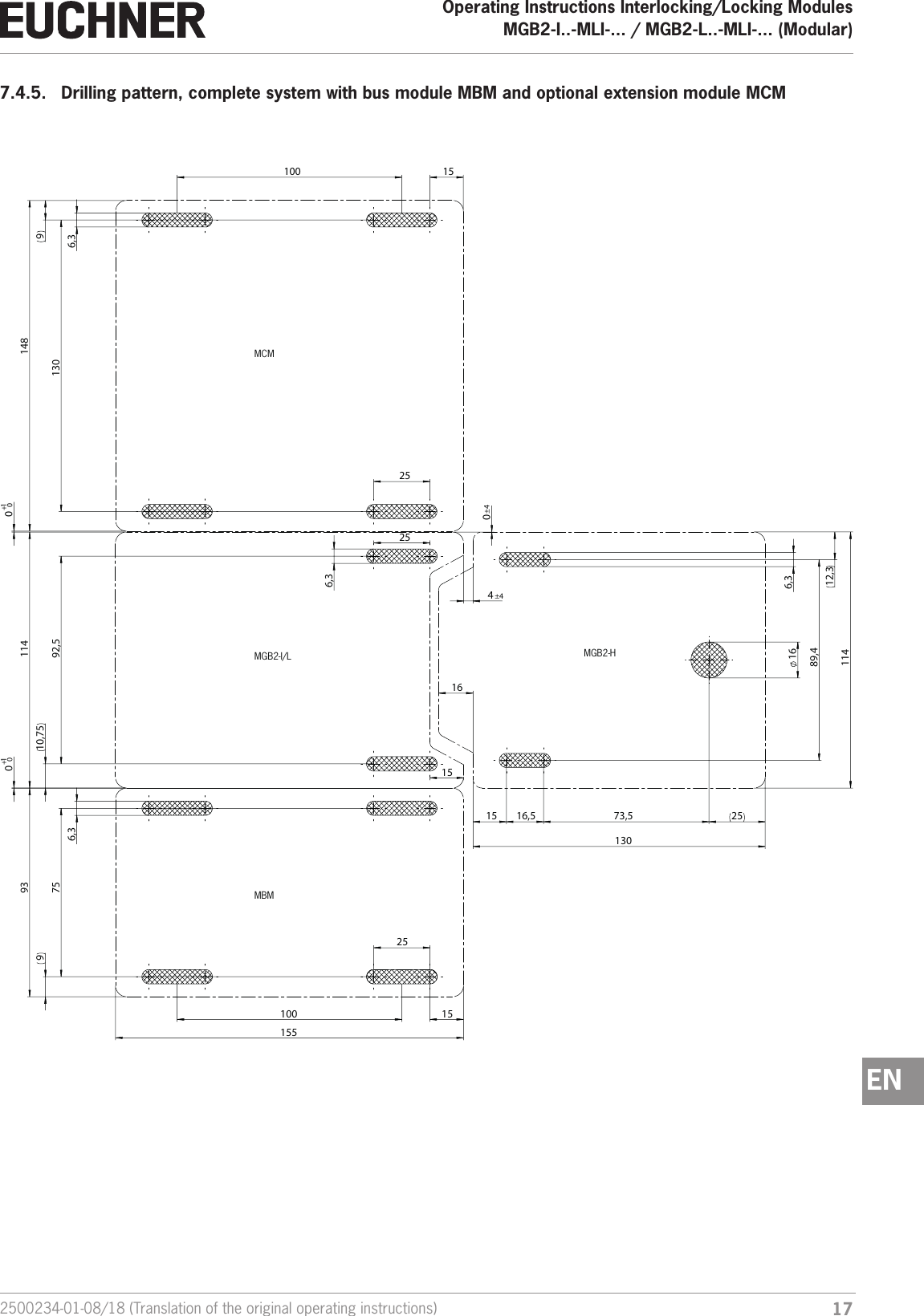
172500234-01-08/18 (Translation of the original operating instructions)Operating Instructions Interlocking/Locking ModulesMGB2-I..-MLI-... / MGB2-L..-MLI-... (Modular)  EN7.4.5.  Drilling pattern, complete system with bus module MBM and optional extension module MCM     ++ 1  114  89,4 16  73,5  6,3  12,3  130  25  130  92,5  75  0 10 0 0 25  16,5  15  4 ±4 15  10,75  100  100  155  93   114   148  15  15  6,3  6,3  9  9  6,3  0 ±4 25  25  16 MGB2-I/L MGB2-HMCMMBM
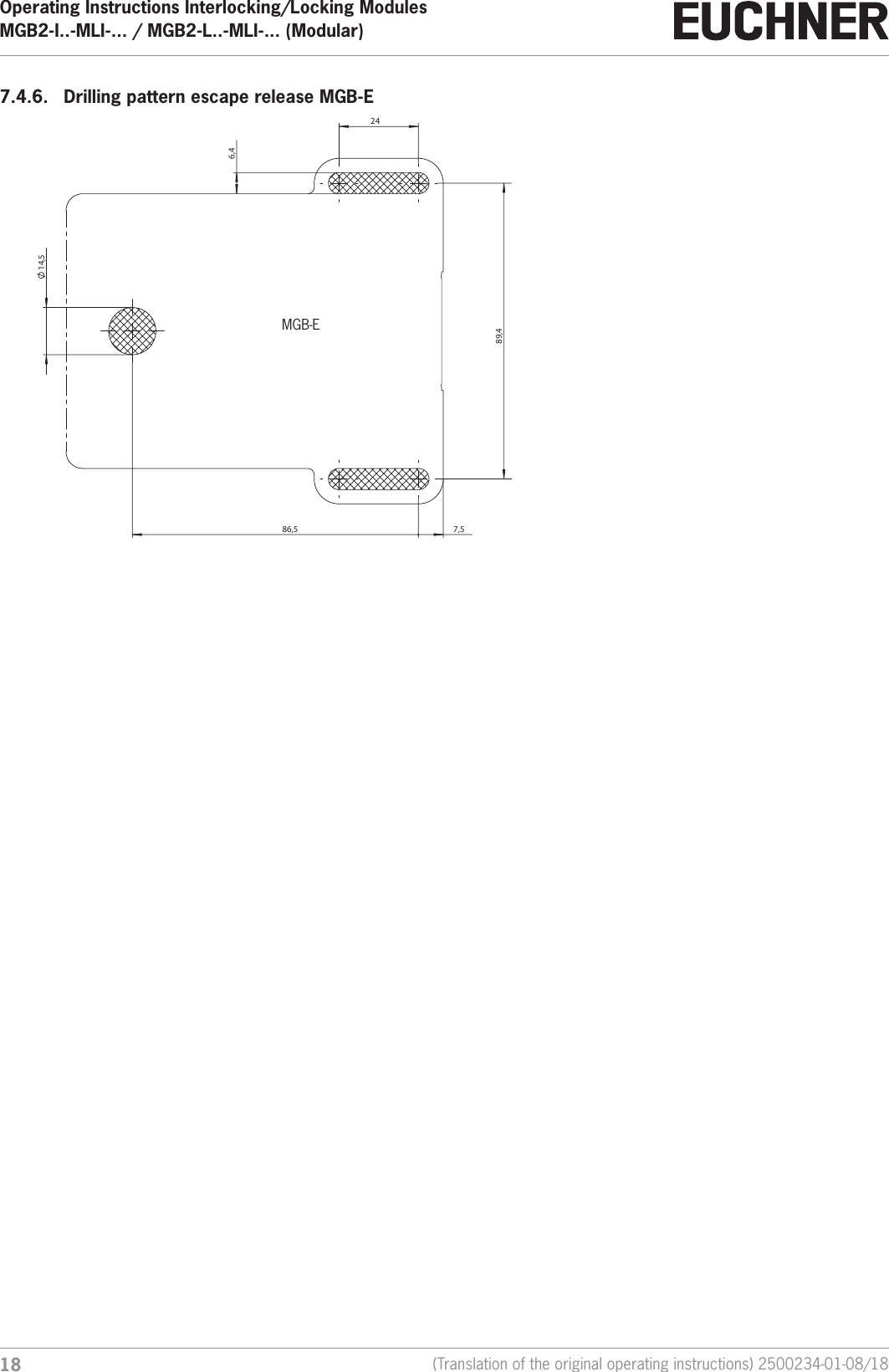
Operating Instructions Interlocking/Locking ModulesMGB2-I..-MLI-... / MGB2-L..-MLI-... (Modular)  18 (Translation of the original operating instructions) 2500234-01-08/187.4.6.  Drilling pattern escape release MGB-E   14,5    86,5     7,5    89,4    24    6,4  MGB-E
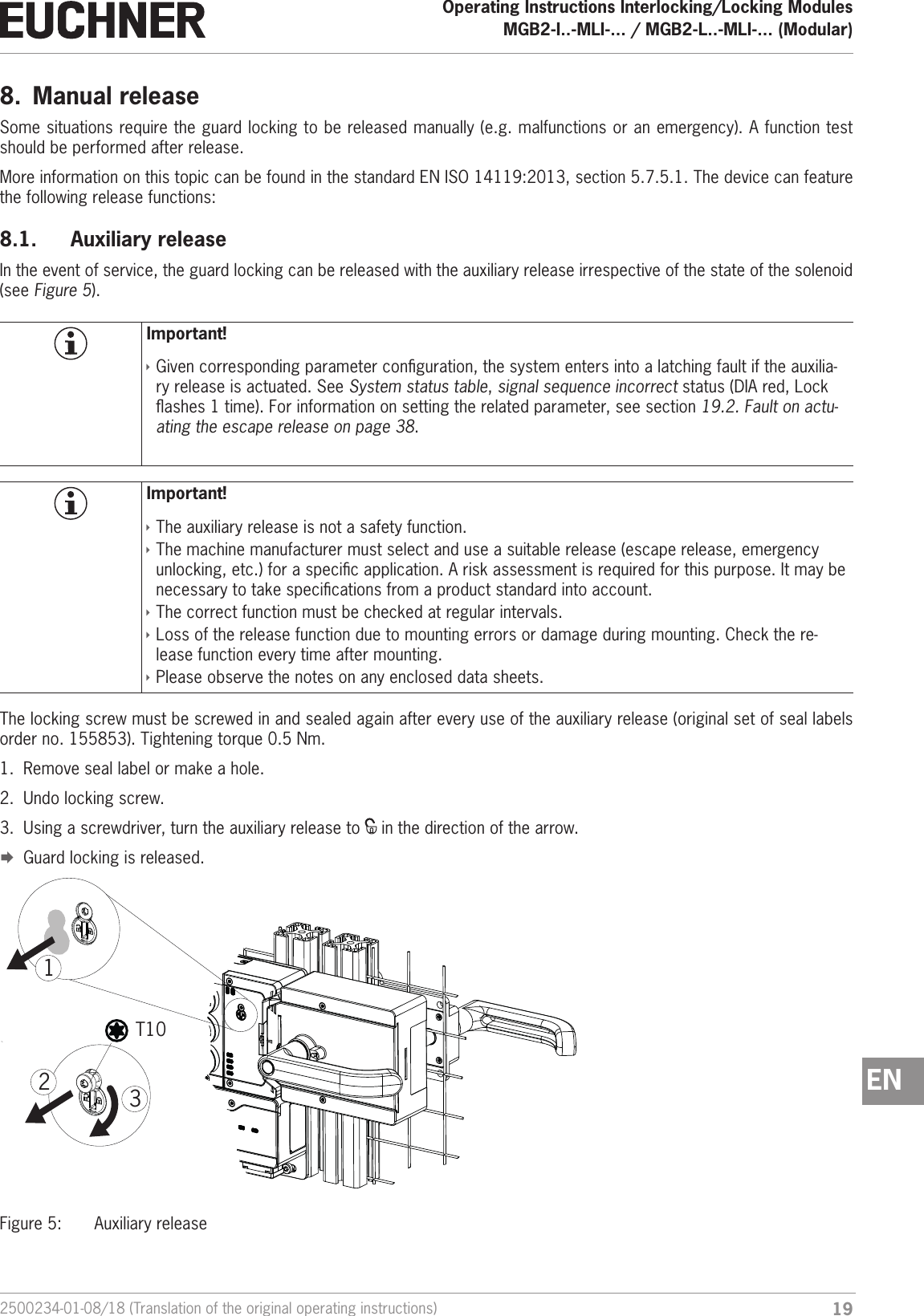
192500234-01-08/18 (Translation of the original operating instructions)Operating Instructions Interlocking/Locking ModulesMGB2-I..-MLI-... / MGB2-L..-MLI-... (Modular)  EN8.  Manual releaseSome situations require the guard locking to be released manually (e.g. malfunctions or an emergency). A function test should be performed after release.More information on this topic can be found in the standard ENISO14119:2013, section 5.7.5.1. The device can feature the following release functions:8.1.  Auxiliary releaseIn the event of service, the guard locking can be released with the auxiliary release irrespective of the state of the solenoid (see Figure 5).Important! ÌGiven corresponding parameter conguration, the system enters into a latching fault if the auxilia-ry release is actuated. See System status table, signal sequence incorrect status (DIA red, Lock ashes 1 time). For information on setting the related parameter, see section 19.2. Fault on actu-ating the escape release on page 38. Important! ÌThe auxiliary release is not a safety function. ÌThe machine manufacturer must select and use a suitable release (escape release, emergency unlocking, etc.) for a specic application. A risk assessment is required for this purpose. It may be necessary to take specications from a product standard into account. ÌThe correct function must be checked at regular intervals. ÌLoss of the release function due to mounting errors or damage during mounting. Check the re-lease function every time after mounting.  ÌPlease observe the notes on any enclosed data sheets.The locking screw must be screwed in and sealed again after every use of the auxiliary release (original set of seal labels order no. 155853). Tightening torque 0.5 Nm.1.  Remove seal label or make a hole.2.  Undo locking screw.3.  Using a screwdriver, turn the auxiliary release to   in the direction of the arrow. ¨Guard locking is released.T10312Figure 5:  Auxiliary release
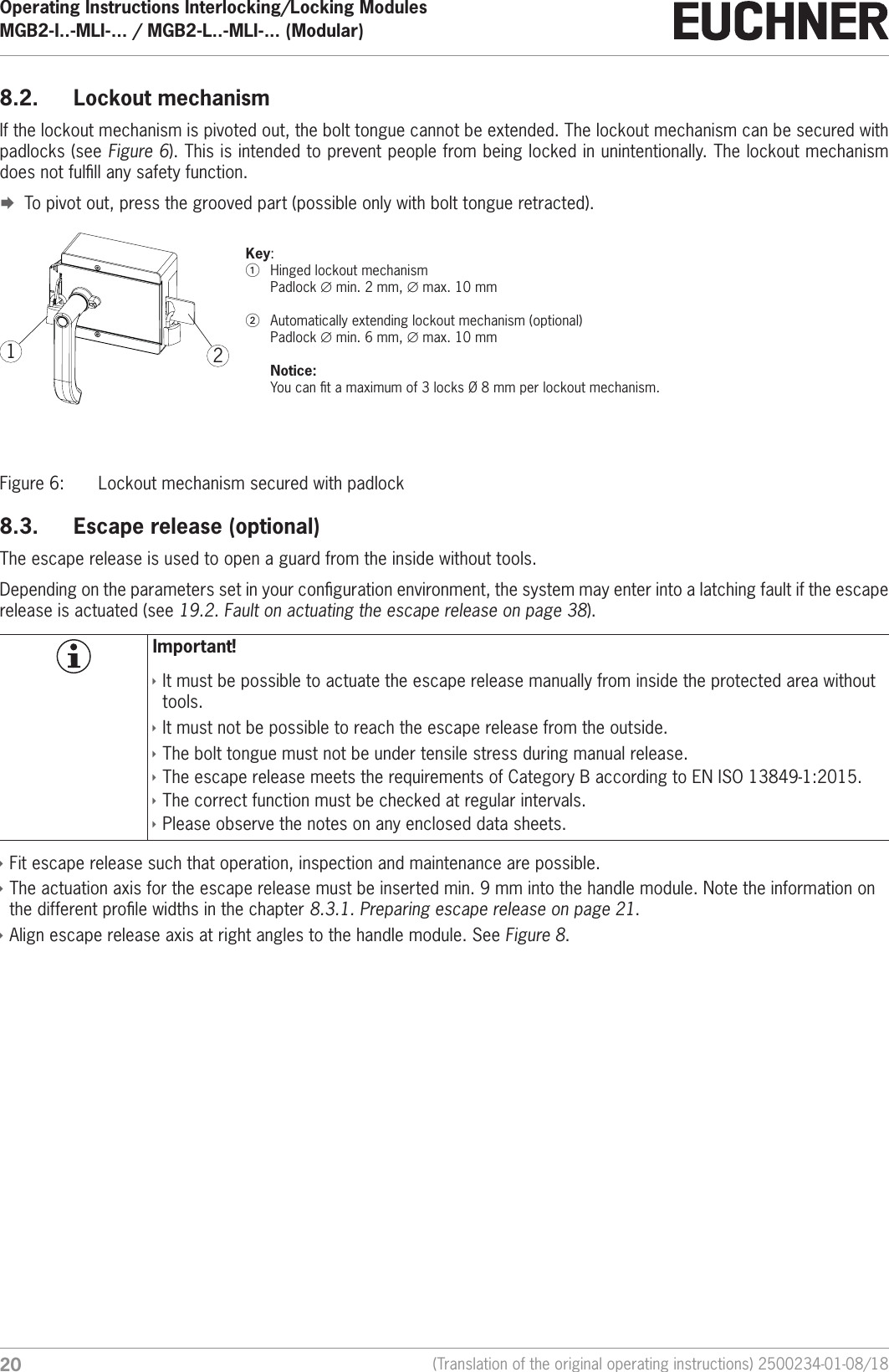
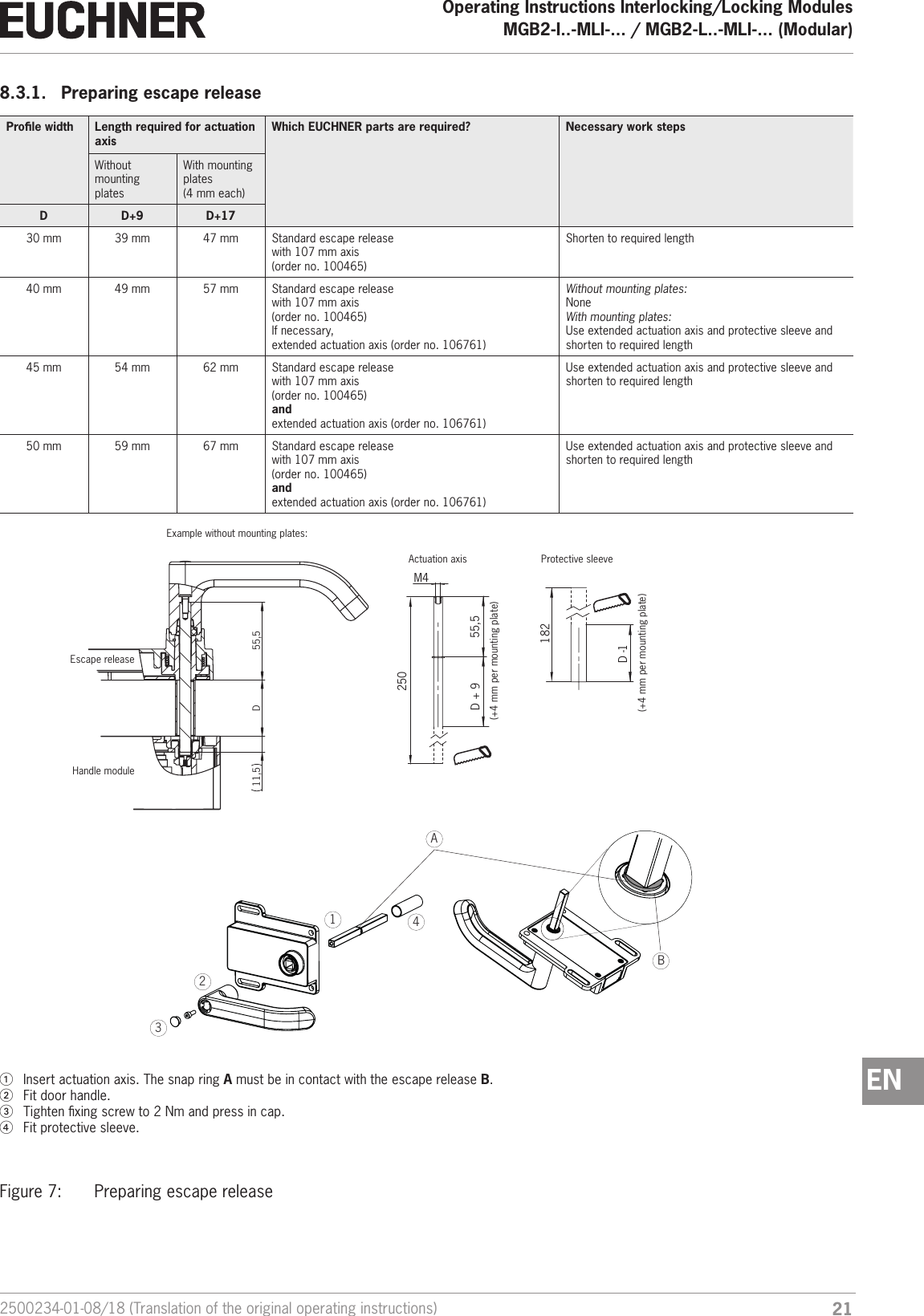
Operating Instructions Interlocking/Locking ModulesMGB2-I..-MLI-... / MGB2-L..-MLI-... (Modular)  20 (Translation of the original operating instructions) 2500234-01-08/188.2.  Lockout mechanismIf the lockout mechanism is pivoted out, the bolt tongue cannot be extended. The lockout mechanism can be secured with padlocks (see Figure 6). This is intended to prevent people from being locked in unintentionally. The lockout mechanism does not fulll any safety function. ¨To pivot out, press the grooved part (possible only with bolt tongue retracted).21Key:1  Hinged lockout mechanism Padlock ∅min. 2mm, ∅max. 10 mm2  Automatically extending lockout mechanism (optional) Padlock ∅min. 6mm, ∅max. 10 mm  Notice:  You can t a maximum of 3 locks Ø8mm per lockout mechanism.Figure 6:  Lockout mechanism secured with padlock8.3.  Escape release (optional)The escape release is used to open a guard from the inside without tools.Depending on the parameters set in your conguration environment, the system may enter into a latching fault if the escape release is actuated (see 19.2. Fault on actuating the escape release on page 38). Important! ÌIt must be possible to actuate the escape release manually from inside the protected area without tools. ÌIt must not be possible to reach the escape release from the outside. ÌThe bolt tongue must not be under tensile stress during manual release. ÌThe escape release meets the requirements of Category B according to ENISO13849-1:2015. ÌThe correct function must be checked at regular intervals. ÌPlease observe the notes on any enclosed data sheets. ÌFit escape release such that operation, inspection and maintenance are possible. ÌThe actuation axis for the escape release must be inserted min. 9 mm into the handle module. Note the information on the different prole widths in the chapter 8.3.1. Preparing escape release on page 21. ÌAlign escape release axis at right angles to the handle module. See Figure 8.
212500234-01-08/18 (Translation of the original operating instructions)Operating Instructions Interlocking/Locking ModulesMGB2-I..-MLI-... / MGB2-L..-MLI-... (Modular)  EN8.3.1.  Preparing escape releaseProle width Length required for actuation axisWhich EUCHNER parts are required? Necessary work stepsWithout mounting platesWith mounting plates  (4 mm each)D D+9 D+1730 mm 39 mm  47 mm Standard escape release  with 107 mm axis(order no. 100465)Shorten to required length40 mm 49 mm  57 mm Standard escape release  with 107 mm axis(order no. 100465)If necessary,extended actuation axis (order no. 106761)Without mounting plates: NoneWith mounting plates: Use extended actuation axis and protective sleeve and shorten to required length45 mm 54 mm  62 mm Standard escape release  with 107 mm axis(order no. 100465)and extended actuation axis (order no. 106761)Use extended actuation axis and protective sleeve and shorten to required length50 mm 59 mm  67 mm Standard escape release  with 107 mm axis(order no. 100465)and extended actuation axis (order no. 106761)Use extended actuation axis and protective sleeve and shorten to required length55,5M4250182D + 9D -1 D  11,5   55,5 Example without mounting plates:Escape releaseHandle moduleActuation axis Protective sleeve(+4 mm per mounting plate)(+4 mm per mounting plate)1  Insert actuation axis. The snap ring A must be in contact with the escape release B. 2  Fit door handle.3  Tighten xing screw to 2Nm and press in cap.4  Fit protective sleeve.1324ABFigure 7:  Preparing escape release
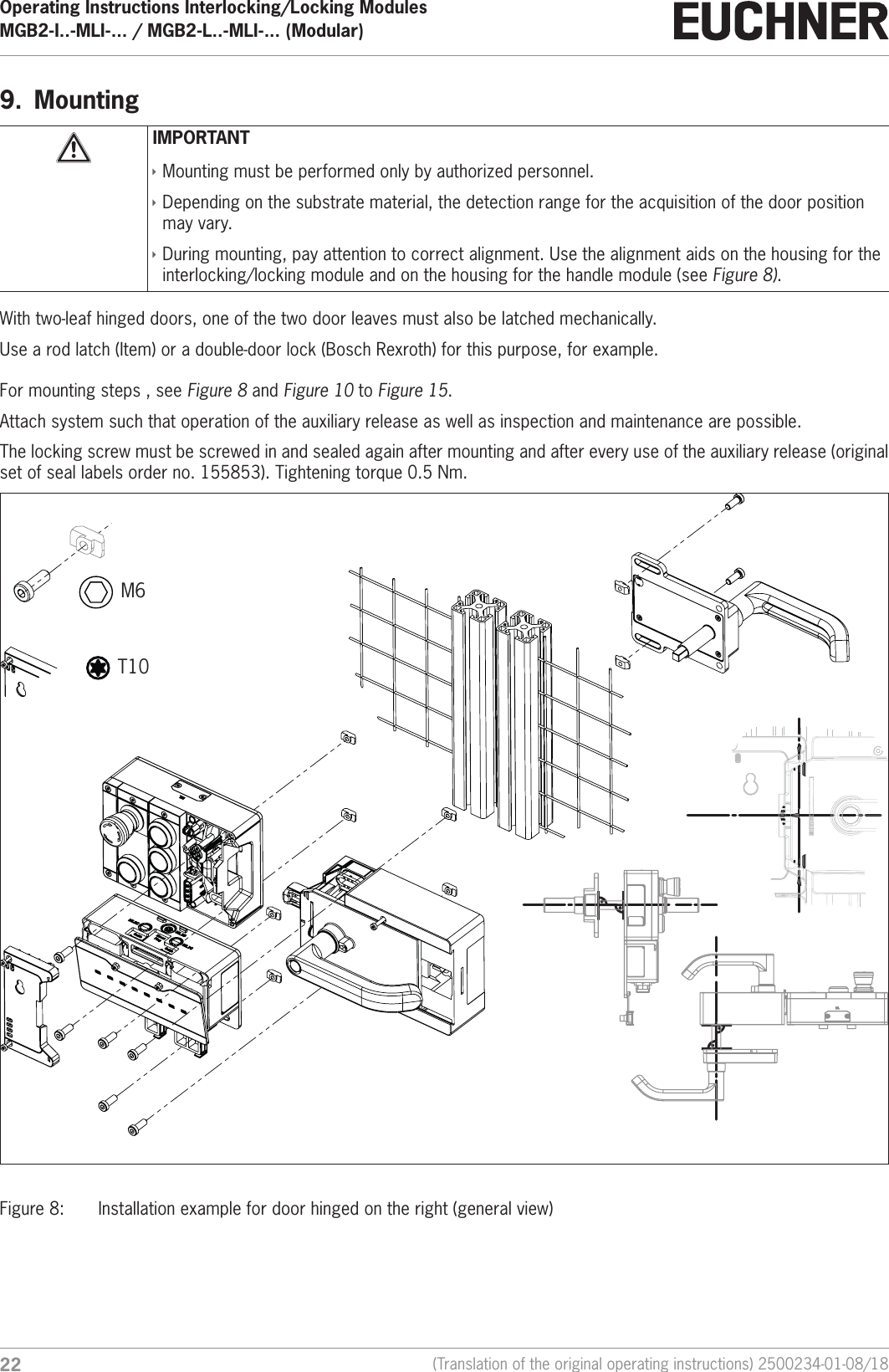
Operating Instructions Interlocking/Locking ModulesMGB2-I..-MLI-... / MGB2-L..-MLI-... (Modular)  22 (Translation of the original operating instructions) 2500234-01-08/189.  MountingIMPORTANT ÌMounting must be performed only by authorized personnel. ÌDepending on the substrate material, the detection range for the acquisition of the door position may vary. ÌDuring mounting, pay attention to correct alignment. Use the alignment aids on the housing for the interlocking/locking module and on the housing for the handle module (see Figure 8). With two-leaf hinged doors, one of the two door leaves must also be latched mechanically.Use a rod latch (Item) or a double-door lock (Bosch Rexroth) for this purpose, for example.For mounting steps , see Figure 8 and Figure 10 to Figure 15.Attach system such that operation of the auxiliary release as well as inspection and maintenance are possible.The locking screw must be screwed in and sealed again after mounting and after every use of the auxiliary release (original set of seal labels order no. 155853). Tightening torque 0.5 Nm.M6 T10Figure 8:  Installation example for door hinged on the right (general view)
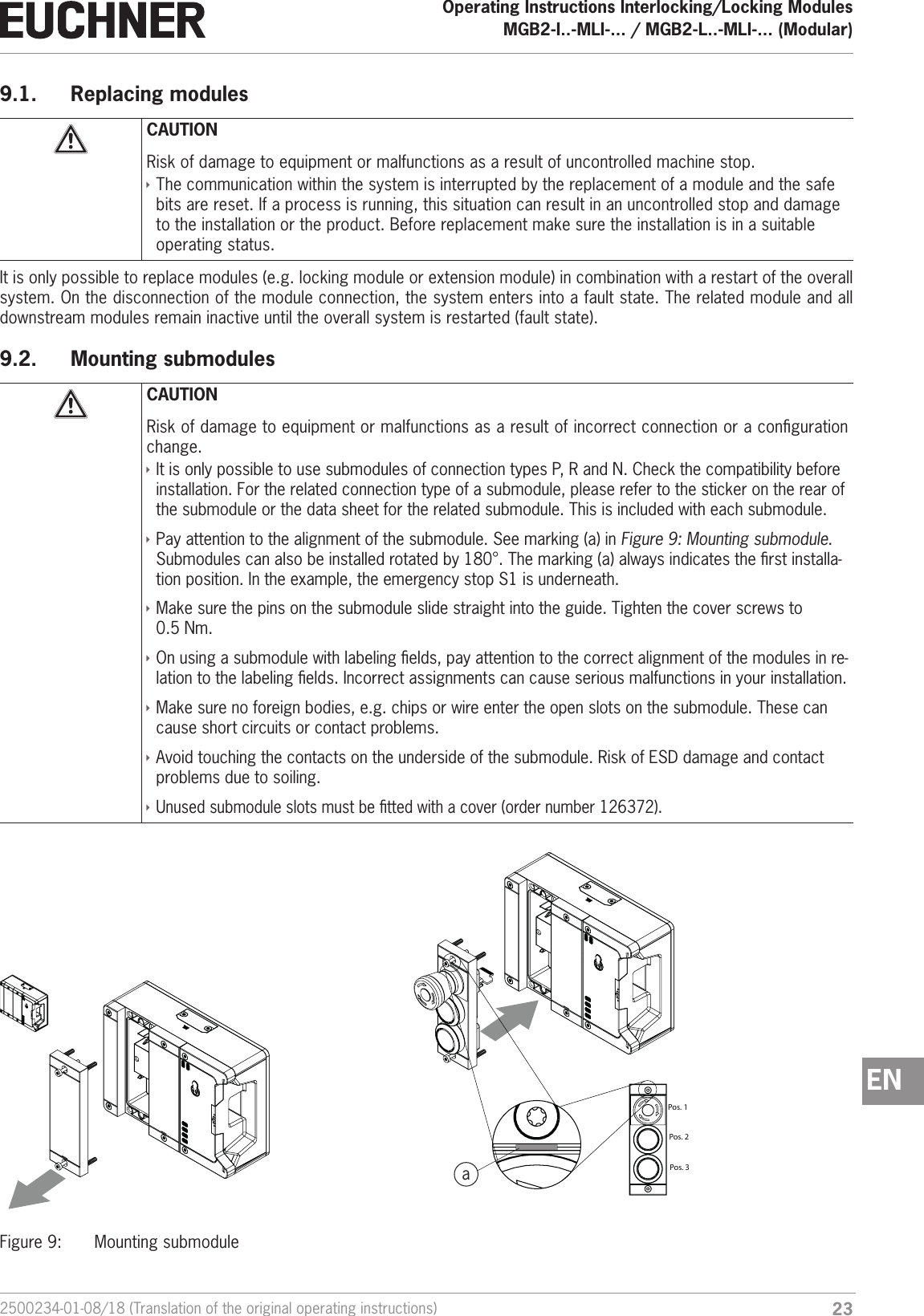
232500234-01-08/18 (Translation of the original operating instructions)Operating Instructions Interlocking/Locking ModulesMGB2-I..-MLI-... / MGB2-L..-MLI-... (Modular)  EN9.1.  Replacing modulesCAUTIONRisk of damage to equipment or malfunctions as a result of uncontrolled machine stop.  ÌThe communication within the system is interrupted by the replacement of a module and the safe bits are reset. If a process is running, this situation can result in an uncontrolled stop and damage to the installation or the product. Before replacement make sure the installation is in a suitable operating status.It is only possible to replace modules (e.g. locking module or extension module) in combination with a restart of the overall system. On the disconnection of the module connection, the system enters into a fault state. The related module and all downstream modules remain inactive until the overall system is restarted (fault state).9.2.  Mounting submodulesCAUTIONRisk of damage to equipment or malfunctions as a result of incorrect connection or a conguration change. ÌIt is only possible to use submodules of connection types P, R and N. Check the compatibility before installation. For the related connection type of a submodule, please refer to the sticker on the rear of the submodule or the data sheet for the related submodule. This is included with each submodule. ÌPay attention to the alignment of the submodule. See marking (a) in Figure 9: Mounting submodule. Submodules can also be installed rotated by 180°. The marking (a) always indicates the rst installa-tion position. In the example, the emergency stop S1 is underneath. ÌMake sure the pins on the submodule slide straight into the guide. Tighten the cover screws to 0.5Nm. ÌOn using a submodule with labeling elds, pay attention to the correct alignment of the modules in re-lation to the labeling elds. Incorrect assignments can cause serious malfunctions in your installation.  ÌMake sure no foreign bodies, e.g. chips or wire enter the open slots on the submodule. These can cause short circuits or contact problems. ÌAvoid touching the contacts on the underside of the submodule. Risk of ESD damage and contact problems due to soiling. ÌUnused submodule slots must be tted with a cover (order number 126372).                              Pos. 1Pos. 2Pos. 3aFigure 9:  Mounting submodule
Operating Instructions Interlocking/Locking ModulesMGB2-I..-MLI-... / MGB2-L..-MLI-... (Modular)  24 (Translation of the original operating instructions) 2500234-01-08/189.3.  Replacing submodulesCAUTIONRisk of damage to equipment or malfunctions as a result of uncontrolled machine stop.  ÌThe communication within the system is interrupted by the replacement of a submodule and the safe bits are reset. If a process is running, this situation can result in an uncontrolled stop and damage to the installation or the product. Before replacement make sure the installation is in a suitable operating status.NOTICEPay attention to the information on the replacement of a submodule in the operating instructions for the related module. On submodules with a safety function, the correct function must be tested after replacement before the system enters normal operation again.The replacement of submodules MSM while in operation is also possible (pay attention to safety instruction above). As soon as the system detects a correct submodule, the submodule is ready for operation. The system reacts as follows on a replacement: 1. If the submodule MSM is removed, the SLOT LED illuminates red, interrupted by 1x green ash. In addition, the SF LED on the bus module MBM illuminates red2. If the submodule MSM contains a safety function, the related bit on the bus is cleared as soon as the submodule has been removed3. If an identical submodule is inserted with the same alignment, the fault display goes out and the bit is transmitted on the bus again to suit the actual situation.9.3.1.  Replacing faulty submodulesImportant!If alignment detection is active, the system checks the alignment of the newly inserted submodule and compares it to the submodule inserted last. The alignment of the previous submodule must be retained in this situation because otherwise the conguration of the device will change. If a conguration change is required, pay attention to the sequence in 9.3.2. Replacing submodule with a submodule with a different function (changing conguration). You will nd information on switching on and off the alignment detection in the operating instructions for your bus module MBM.9.3.2.  Replacing submodule with a submodule with a different function (changing conguration)The system saves the last conguration of your system. The conguration changes if ÌYou replace a submodule with a submodule with a different function or  ÌYou t the same submodule rotated by 180°.Adapt the conguration in the conguration software for your control system.Then the new conguration must be taught-in by restarting the bus module MBM. You will nd further information in the operating instructions for your bus module MBM.
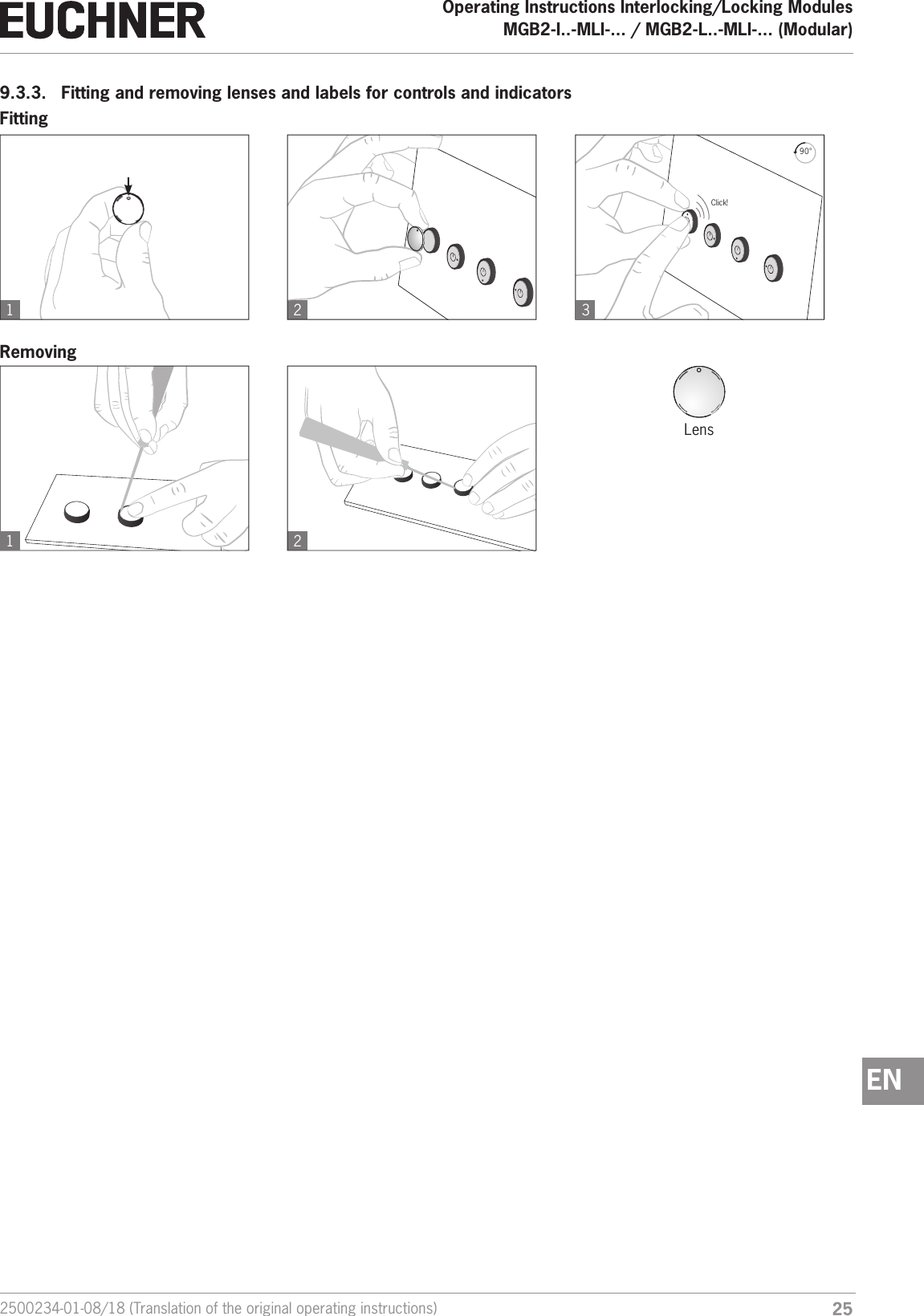
252500234-01-08/18 (Translation of the original operating instructions)Operating Instructions Interlocking/Locking ModulesMGB2-I..-MLI-... / MGB2-L..-MLI-... (Modular)  EN9.3.3.  Fitting and removing lenses and labels for controls and indicators1 22390°Click!1FittingRemovingLens
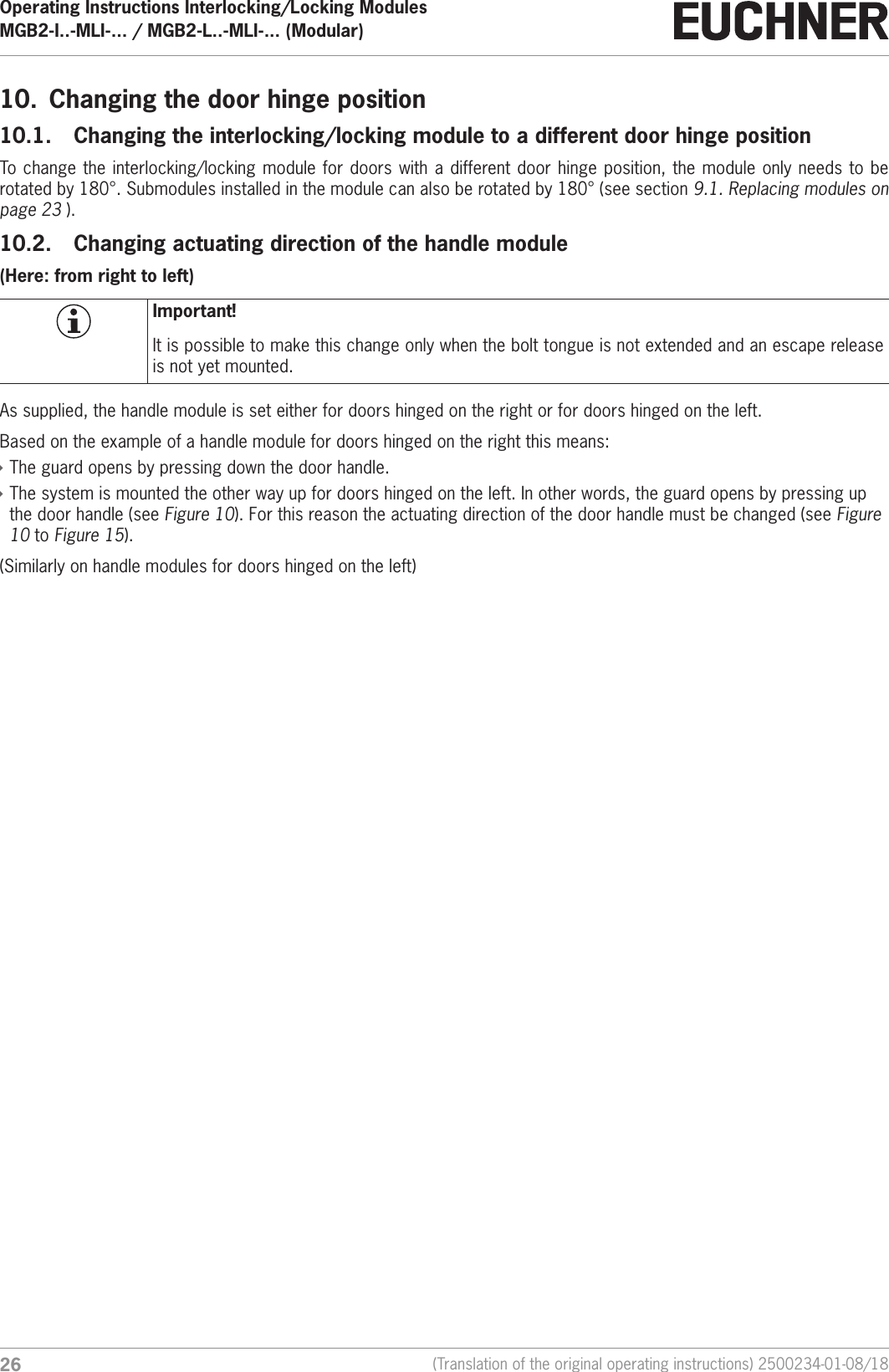
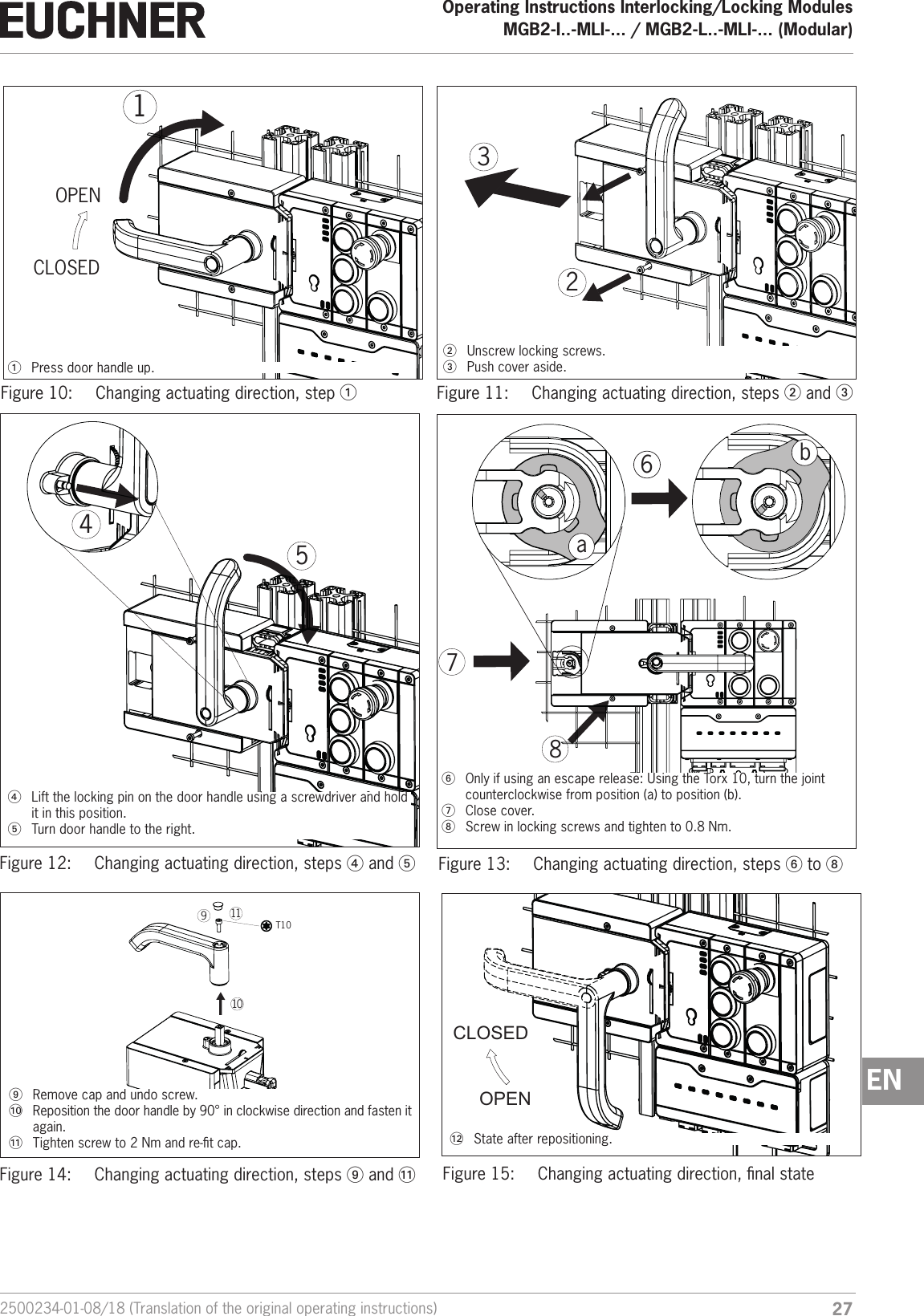
Operating Instructions Interlocking/Locking ModulesMGB2-I..-MLI-... / MGB2-L..-MLI-... (Modular)  26 (Translation of the original operating instructions) 2500234-01-08/1810.  Changing the door hinge position10.1.  Changing the interlocking/locking module to a different door hinge positionTo change the interlocking/locking module for doors with a different door hinge position, the module only needs to be rotated by 180°. Submodules installed in the module can also be rotated by 180° (see section 9.1. Replacing modules on page 23 ).10.2.  Changing actuating direction of the handle module(Here: from right to left)Important!It is possible to make this change only when the bolt tongue is not extended and an escape release is not yet mounted.As supplied, the handle module is set either for doors hinged on the right or for doors hinged on the left. Based on the example of a handle module for doors hinged on the right this means: ÌThe guard opens by pressing down the door handle. ÌThe system is mounted the other way up for doors hinged on the left. In other words, the guard opens by pressing up the door handle (see Figure 10). For this reason the actuating direction of the door handle must be changed (see Figure 10 to Figure 15). (Similarly on handle modules for doors hinged on the left)
272500234-01-08/18 (Translation of the original operating instructions)Operating Instructions Interlocking/Locking ModulesMGB2-I..-MLI-... / MGB2-L..-MLI-... (Modular)  ENCLOSEDOPEN1321  Press door handle up.2  Unscrew locking screws.3  Push cover aside.Figure 10:  Changing actuating direction, step 1Figure 11:  Changing actuating direction, steps 2 and 3544  Lift the locking pin on the door handle using a screwdriver and hold it in this position.5  Turn door handle to the right.6ab786  Only if using an escape release: Using the Torx 10, turn the joint counterclockwise from position (a) to position (b).7  Close cover.8  Screw in locking screws and tighten to 0.8 Nm.Figure 12:  Changing actuating direction, steps 4 and 5Figure 13:  Changing actuating direction, steps 6 to 8  T1091011OPENCLOSED  9  Remove cap and undo screw.AT  Reposition the door handle by 90° in clockwise direction and fasten it again.A  Tighten screw to 2Nm and re-t cap. A  State after repositioning.Figure 14:  Changing actuating direction, steps 9 and A Figure 15:  Changing actuating direction, nal state
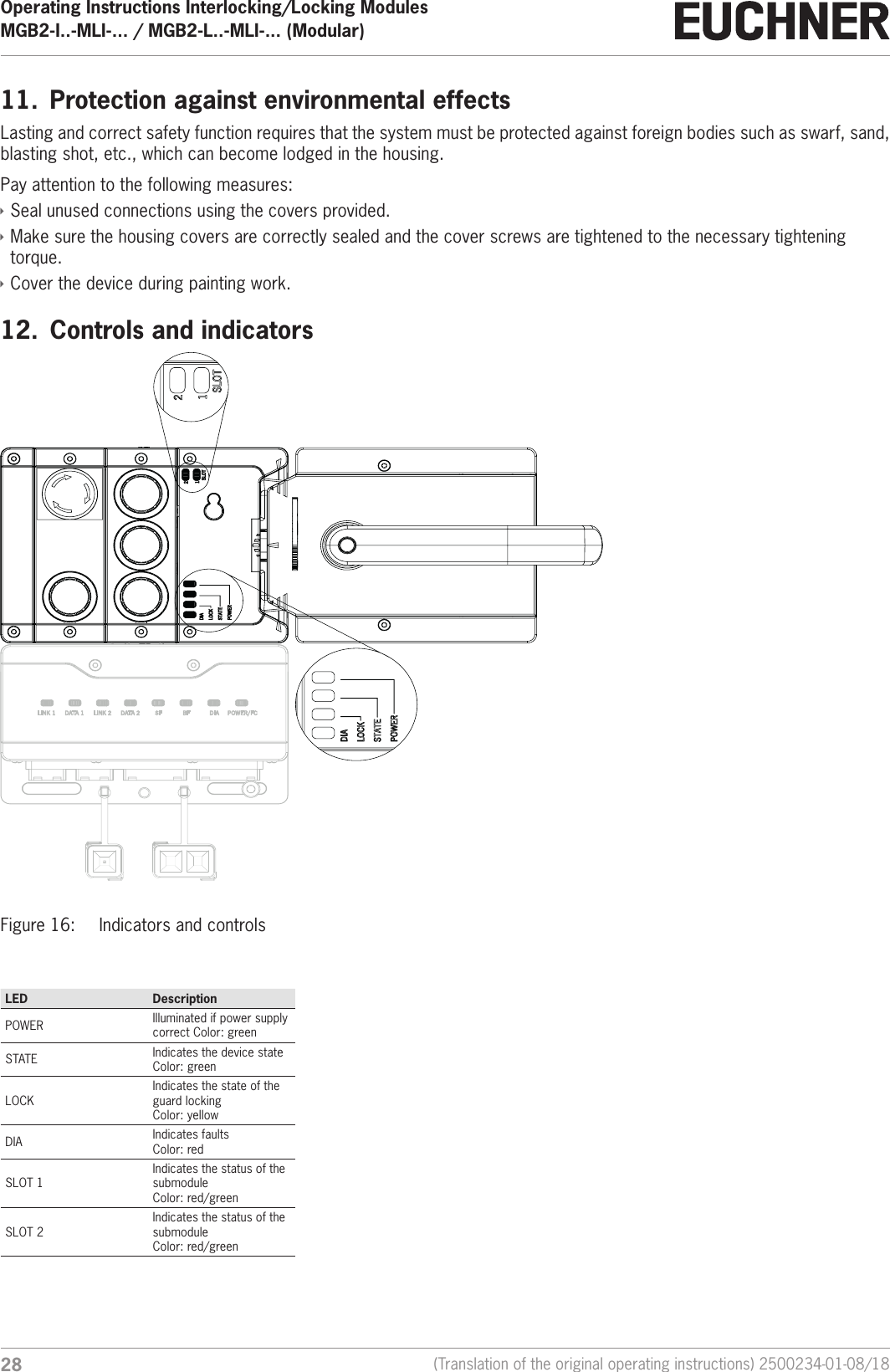
Operating Instructions Interlocking/Locking ModulesMGB2-I..-MLI-... / MGB2-L..-MLI-... (Modular)  28 (Translation of the original operating instructions) 2500234-01-08/1811.  Protection against environmental effectsLasting and correct safety function requires that the system must be protected against foreign bodies such as swarf, sand, blasting shot, etc., which can become lodged in the housing. Pay attention to the following measures: ÌSeal unused connections using the covers provided. ÌMake sure the housing covers are correctly sealed and the cover screws are tightened to the necessary tightening torque. ÌCover the device during painting work.12.  Controls and indicatorsFigure 16:  Indicators and controls LED DescriptionPOWER Illuminated if power supply correct Color: greenSTATE Indicates the device stateColor: greenLOCKIndicates the state of the guard lockingColor: yellowDIA Indicates faultsColor: redSLOT 1Indicates the status of the submoduleColor: red/greenSLOT 2Indicates the status of the submoduleColor: red/green
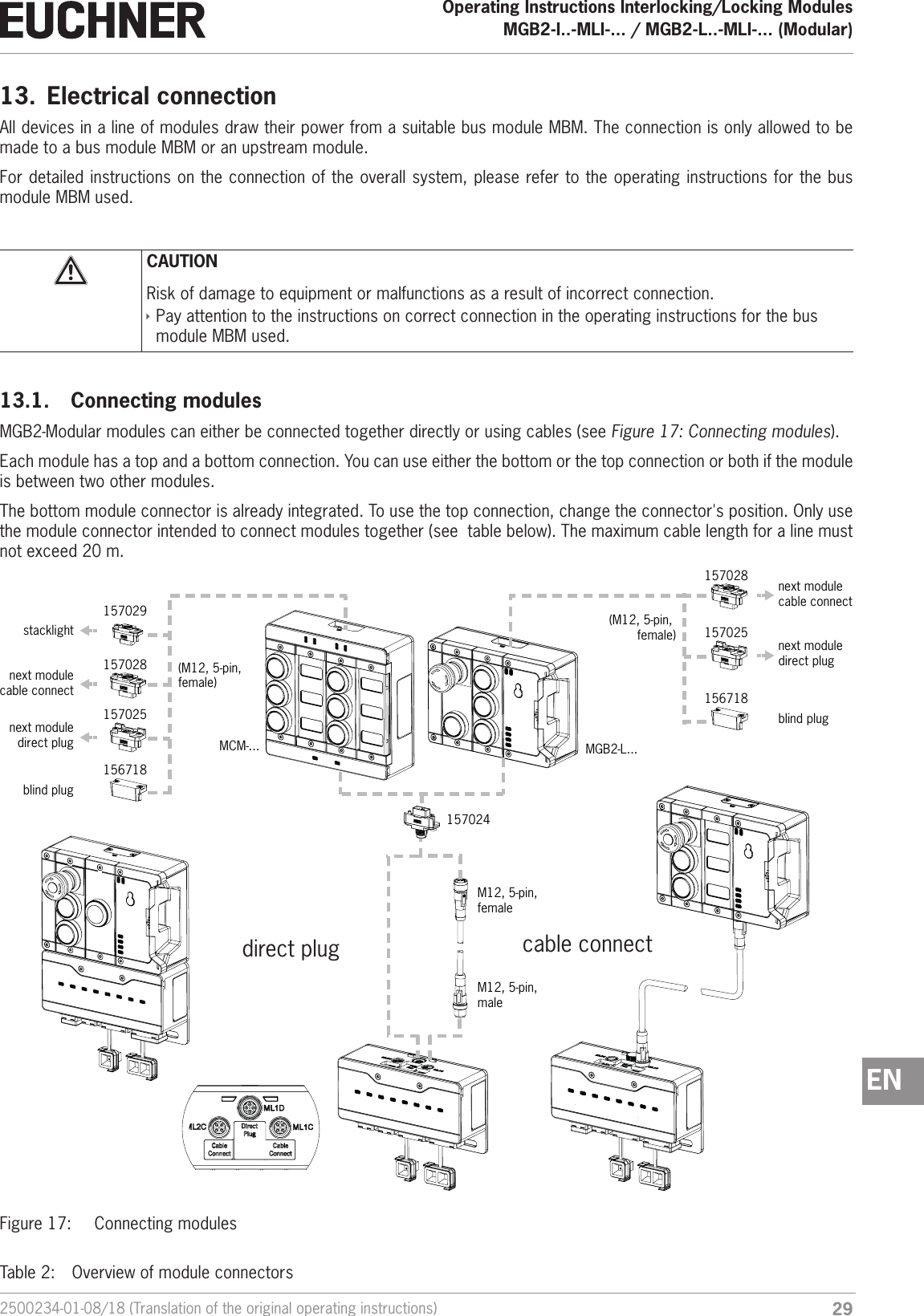
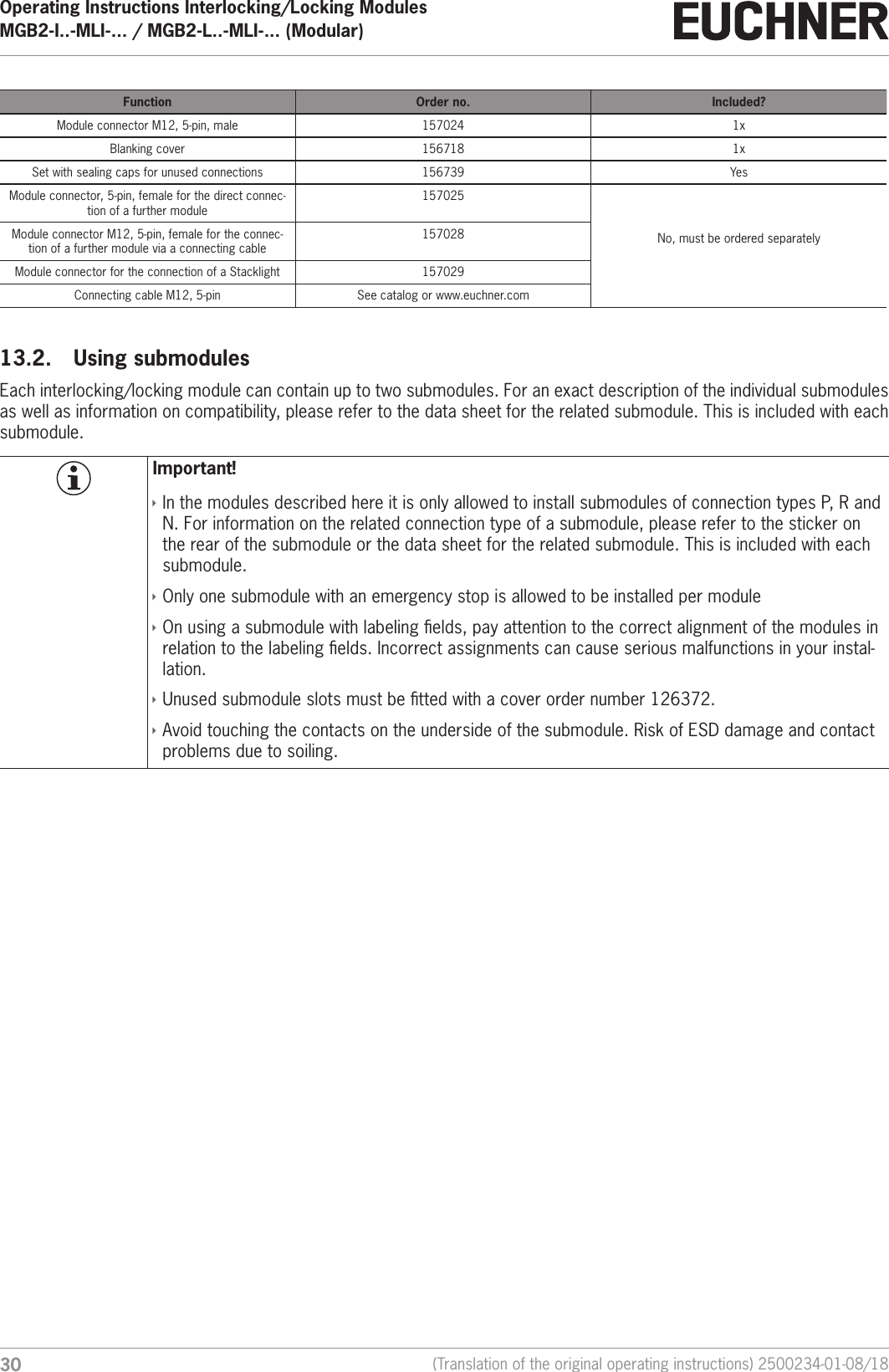
292500234-01-08/18 (Translation of the original operating instructions)Operating Instructions Interlocking/Locking ModulesMGB2-I..-MLI-... / MGB2-L..-MLI-... (Modular)  EN13.  Electrical connectionAll devices in a line of modules draw their power from a suitable bus module MBM. The connection is only allowed to be made to a bus module MBM or an upstream module. For detailed instructions on the connection of the overall system, please refer to the operating instructions for the bus module MBM used.CAUTIONRisk of damage to equipment or malfunctions as a result of incorrect connection. ÌPay attention to the instructions on correct connection in the operating instructions for the bus module MBM used.13.1.  Connecting modulesMGB2-Modular modules can either be connected together directly or using cables (see Figure 17: Connecting modules).Each module has a top and a bottom connection. You can use either the bottom or the top connection or both if the module is between two other modules. The bottom module connector is already integrated. To use the top connection, change the connector's position. Only use the module connector intended to connect modules together (see  table below). The maximum cable length for a line must not exceed 20 m. 156718157025next moduledirect plugblind plugstacklightM12, 5-pin, male M12, 5-pin, female 157024MGB2-L...MCM-...direct plug cable connect157028157029next modulecable connect(M12, 5-pin, female)156718157025next moduledirect plugblind plug157028next modulecable connect(M12, 5-pin, female)Figure 17:  Connecting modulesTable 2:  Overview of module connectors
Operating Instructions Interlocking/Locking ModulesMGB2-I..-MLI-... / MGB2-L..-MLI-... (Modular)  30 (Translation of the original operating instructions) 2500234-01-08/18Function Order no. Included?Module connector M12, 5-pin, male 157024 1xBlanking cover 156718 1xSet with sealing caps for unused connections 156739 YesModule connector, 5-pin, female for the direct connec-tion of a further module157025No, must be ordered separatelyModule connector M12, 5-pin, female for the connec-tion of a further module via a connecting cable157028Module connector for the connection of a Stacklight 157029Connecting cable M12, 5-pin See catalog or www.euchner.com13.2.  Using submodulesEach interlocking/locking module can contain up to two submodules. For an exact description of the individual submodules as well as information on compatibility, please refer to the data sheet for the related submodule. This is included with each submodule.Important! ÌIn the modules described here it is only allowed to install submodules of connection types P, R and N. For information on the related connection type of a submodule, please refer to the sticker on the rear of the submodule or the data sheet for the related submodule. This is included with each submodule. ÌOnly one submodule with an emergency stop is allowed to be installed per module ÌOn using a submodule with labeling elds, pay attention to the correct alignment of the modules in relation to the labeling elds. Incorrect assignments can cause serious malfunctions in your instal-lation.  ÌUnused submodule slots must be tted with a cover order number 126372. ÌAvoid touching the contacts on the underside of the submodule. Risk of ESD damage and contact problems due to soiling.
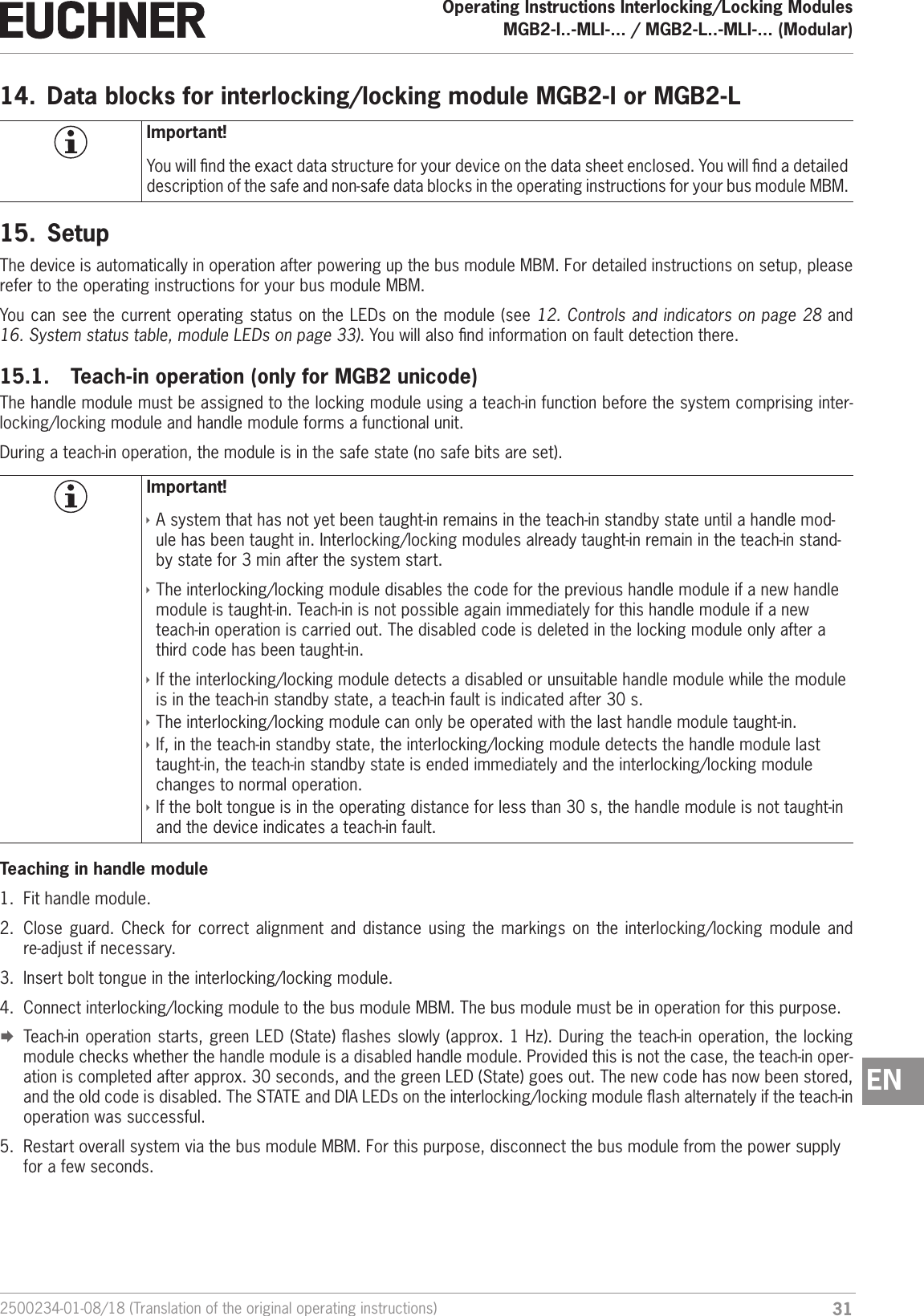
312500234-01-08/18 (Translation of the original operating instructions)Operating Instructions Interlocking/Locking ModulesMGB2-I..-MLI-... / MGB2-L..-MLI-... (Modular)  EN14.  Data blocks for interlocking/locking module MGB2-I or MGB2-LImportant!You will nd the exact data structure for your device on the data sheet enclosed. You will nd a detailed description of the safe and non-safe data blocks in the operating instructions for your bus module MBM.15.  SetupThe device is automatically in operation after powering up the bus module MBM. For detailed instructions on setup, please refer to the operating instructions for your bus module MBM.You can see the current operating status on the LEDs on the module (see 12. Controls and indicators on page 28 and 16. System status table, module LEDs on page 33). You will also nd information on fault detection there.15.1.  Teach-in operation (only for MGB2 unicode)The handle module must be assigned to the locking module using a teach-in function before the system comprising inter-locking/locking module and handle module forms a functional unit.During a teach-in operation, the module is in the safe state (no safe bits are set).Important! ÌA system that has not yet been taught-in remains in the teach-in standby state until a handle mod-ule has been taught in. Interlocking/locking modules already taught-in remain in the teach-in stand-by state for 3 min after the system start. ÌThe interlocking/locking module disables the code for the previous handle module if a new handle module is taught-in. Teach-in is not possible again immediately for this handle module if a new teach-in operation is carried out. The disabled code is deleted in the locking module only after a third code has been taught-in. ÌIf the interlocking/locking module detects a disabled or unsuitable handle module while the module is in the teach-in standby state, a teach-in fault is indicated after 30 s. ÌThe interlocking/locking module can only be operated with the last handle module taught-in. ÌIf, in the teach-in standby state, the interlocking/locking module detects the handle module last taught-in, the teach-in standby state is ended immediately and the interlocking/locking module changes to normal operation. ÌIf the bolt tongue is in the operating distance for less than 30 s, the handle module is not taught-in and the device indicates a teach-in fault.Teaching in handle module1.  Fit handle module.2.  Close guard. Check for correct alignment and distance using the markings on the interlocking/locking module and re-adjust if necessary.3.  Insert bolt tongue in the interlocking/locking module.4.  Connect interlocking/locking module to the bus module MBM. The bus module must be in operation for this purpose. ¨Teach-in operation starts, green LED (State) ashes slowly (approx. 1 Hz). During the teach-in operation, the locking module checks whether the handle module is a disabled handle module. Provided this is not the case, the teach-in oper-ation is completed after approx. 30 seconds, and the green LED (State) goes out. The new code has now been stored, and the old code is disabled. The STATE and DIA LEDs on the interlocking/locking module ash alternately if the teach-in operation was successful.5.  Restart overall system via the bus module MBM. For this purpose, disconnect the bus module from the power supply for a few seconds.
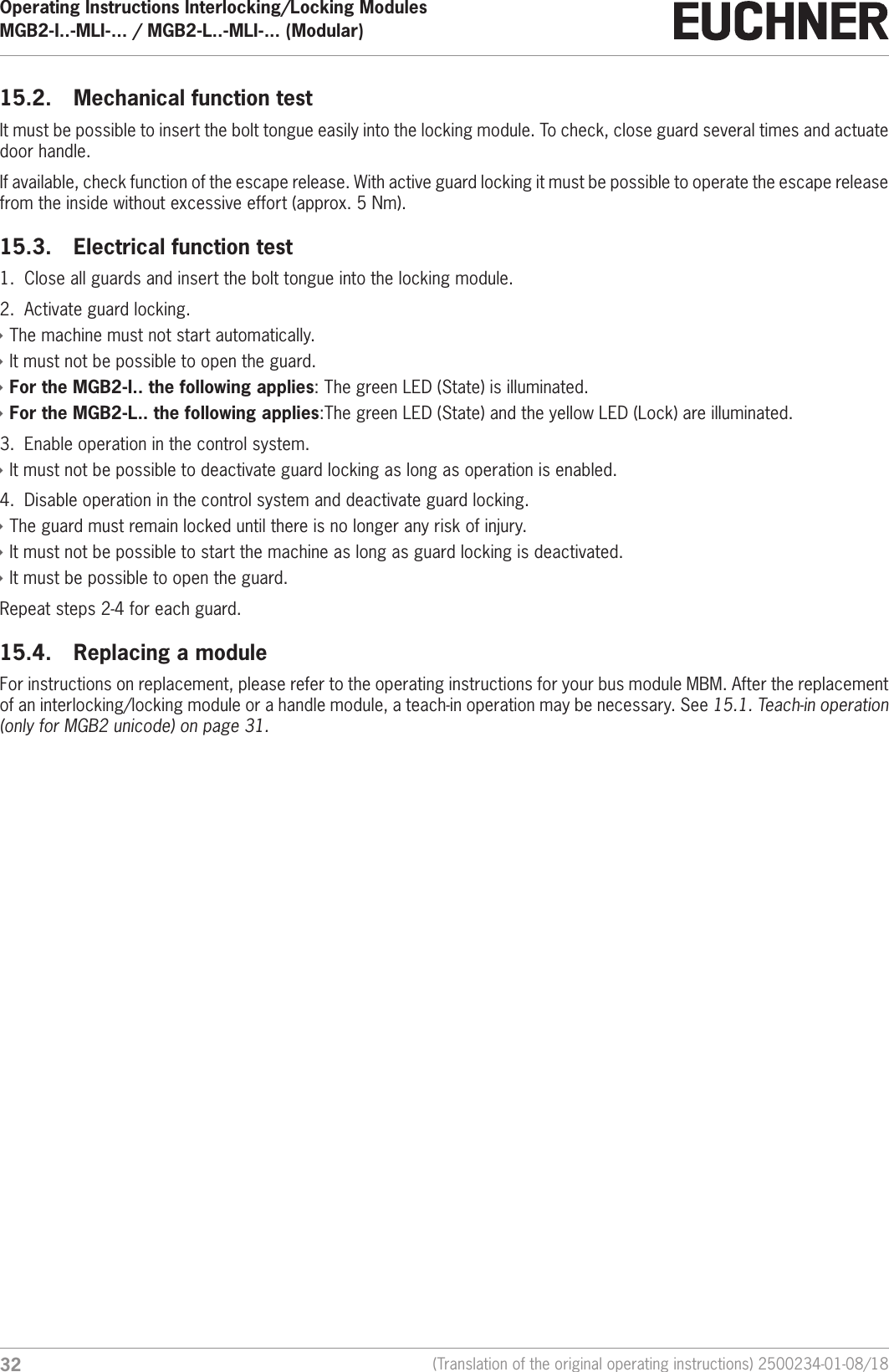
Operating Instructions Interlocking/Locking ModulesMGB2-I..-MLI-... / MGB2-L..-MLI-... (Modular)  32 (Translation of the original operating instructions) 2500234-01-08/1815.2.  Mechanical function testIt must be possible to insert the bolt tongue easily into the locking module. To check, close guard several times and actuate door handle.If available, check function of the escape release. With active guard locking it must be possible to operate the escape release from the inside without excessive effort (approx. 5 Nm).15.3.  Electrical function test1.  Close all guards and insert the bolt tongue into the locking module.2.  Activate guard locking. ÌThe machine must not start automatically. ÌIt must not be possible to open the guard. ÌFor the MGB2-I.. the following applies: The green LED (State) is illuminated. ÌFor the MGB2-L.. the following applies:The green LED (State) and the yellow LED (Lock) are illuminated.3.  Enable operation in the control system. ÌIt must not be possible to deactivate guard locking as long as operation is enabled.4.  Disable operation in the control system and deactivate guard locking. ÌThe guard must remain locked until there is no longer any risk of injury. ÌIt must not be possible to start the machine as long as guard locking is deactivated. ÌIt must be possible to open the guard.Repeat steps 2-4 for each guard.15.4.  Replacing a module For instructions on replacement, please refer to the operating instructions for your bus module MBM. After the replacement of an interlocking/locking module or a handle module, a teach-in operation may be necessary. See 15.1. Teach-in operation (only for MGB2 unicode) on page 31.
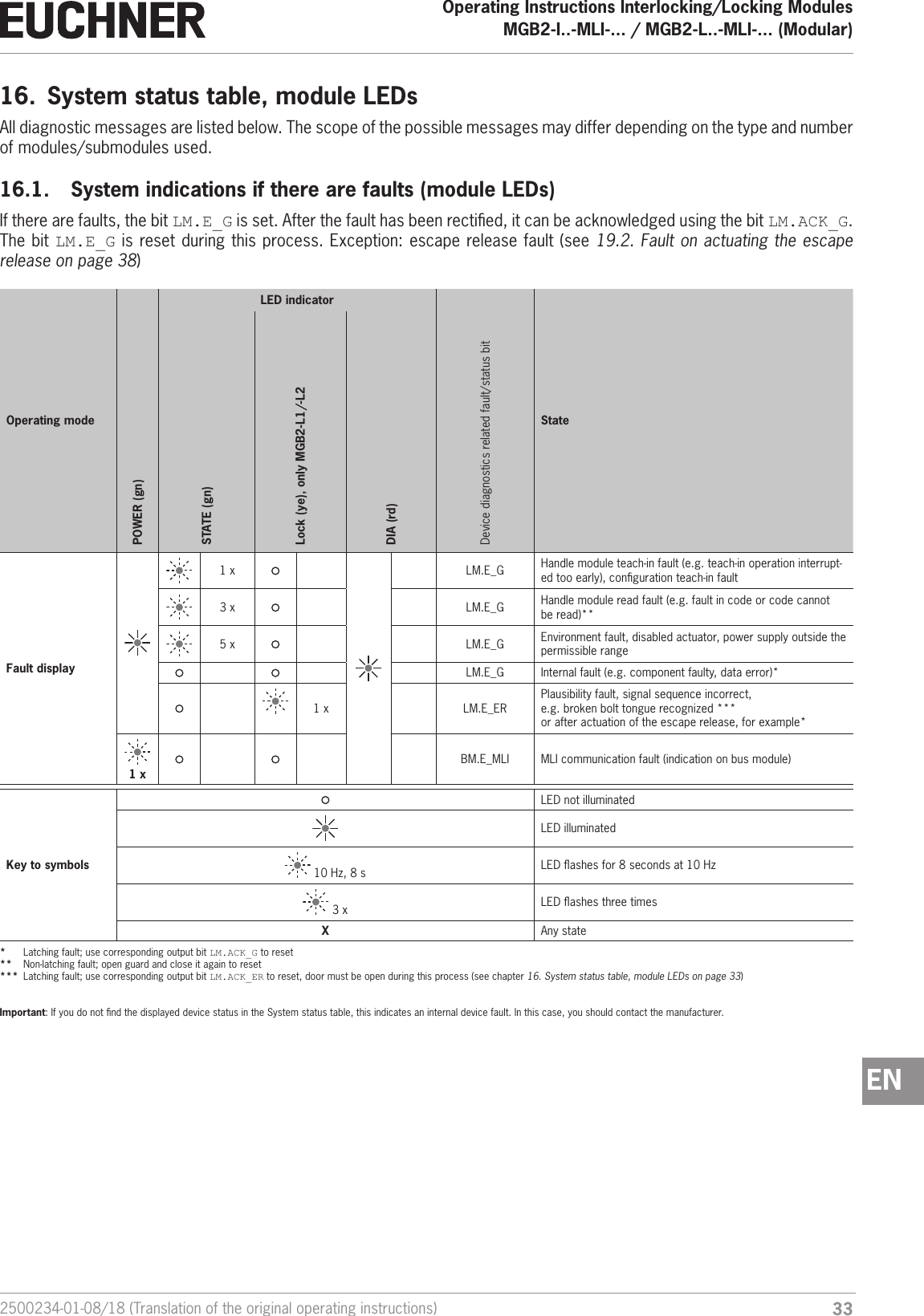
332500234-01-08/18 (Translation of the original operating instructions)Operating Instructions Interlocking/Locking ModulesMGB2-I..-MLI-... / MGB2-L..-MLI-... (Modular)  EN16.  System status table, module LEDsAll diagnostic messages are listed below. The scope of the possible messages may differ depending on the type and number of modules/submodules used. 16.1.  System indications if there are faults (module LEDs)If there are faults, the bit LM.E_G is set. After the fault has been rectied, it can be acknowledged using the bit LM.ACK_G. The bit LM.E_G is reset during this process. Exception: escape release fault (see 19.2. Fault on actuating the escape release on page 38) Operating modeLED indicatorDevice diagnostics related fault/status bit StatePOWER (gn)STATE (gn)Lock (ye), only MGB2-L1/-L2DIA (rd)Fault display1 x LM.E_G Handle module teach-in fault (e.g. teach-in operation interrupt-ed too early), conguration teach-in fault3 x LM.E_G Handle module read fault (e.g. fault in code or code cannot be read)**5 x LM.E_G Environment fault, disabled actuator, power supply outside the permissible rangeLM.E_G Internal fault (e.g. component faulty, data error)*1 x LM.E_ERPlausibility fault, signal sequence incorrect,  e.g. broken bolt tongue recognized ***or after actuation of the escape release, for example* 1 xBM.E_MLI MLI communication fault (indication on bus module)Key to symbolsLED not illuminatedLED illuminated 10 Hz, 8 s LED ashes for 8 seconds at 10 Hz 3 x LED ashes three timesXAny state*  Latching fault; use corresponding output bit LM.ACK_G to reset**  Non-latching fault; open guard and close it again to reset***  Latching fault; use corresponding output bit LM.ACK_ER to reset, door must be open during this process (see chapter 16. System status table, module LEDs on page 33)Important: If you do not nd the displayed device status in the System status table, this indicates an internal device fault. In this case, you should contact the manufacturer.
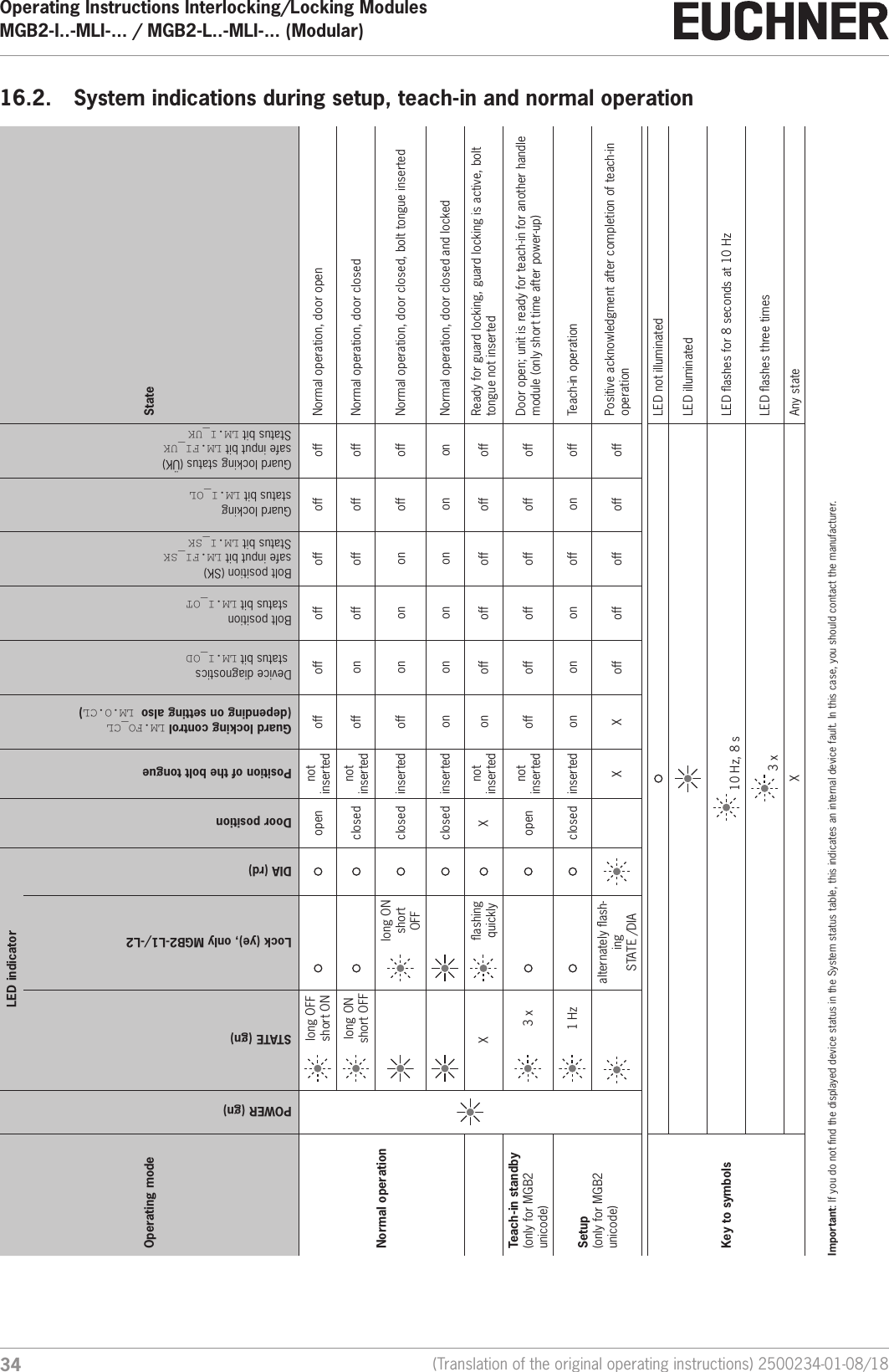
Operating Instructions Interlocking/Locking ModulesMGB2-I..-MLI-... / MGB2-L..-MLI-... (Modular)  34 (Translation of the original operating instructions) 2500234-01-08/1816.2.  System indications during setup, teach-in and normal operationOperating modeLED indicatorDoor positionPosition of the bolt tongueGuard locking control LM.FO_CL  (depending on setting also LM.O.CL)Device diagnostics  status bit LM.I_ODBolt position  status bit LM.I_OTBolt position (SK)  safe input bit LM.FI_SKStatus bit LM.I_SKGuard locking status bit LM.I_OLGuard locking status (ÜK) safe input bit LM.FI_UKStatus bit LM.I_UKStatePOWER (gn)STATE (gn)Lock (ye), only MGB2-L1/-L2DIA (rd)Normal operationlong OFF short ON open not inserted off off off off off off Normal operation, door openlong ON  short OFF closed not inserted off on off off off off Normal operation, door closedlong ON  short OFFclosed inserted off on on on off off Normal operation, door closed, bolt tongue inserted closed inserted on on on on on on Normal operation, door closed and lockedXashing quickly Xnot inserted on off off off off off Ready for guard locking, guard locking is active, bolt tongue not insertedTeach-in standby(only for MGB2 unicode)3 x open not inserted off off off off off off Door open; unit is ready for teach-in for another handle module (only short time after power-up)Setup(only for MGB2 unicode)1 Hz closed inserted on on on off on off Teach-in operation    alternately ash-ing STATE /DIAX X off off off off off Positive acknowledgment after completion of teach-in operationKey to symbolsLED not illuminatedLED illuminated 10 Hz, 8 s LED ashes for 8 seconds at 10 Hz 3 x LED ashes three timesX Any stateImportant: If you do not nd the displayed device status in the System status table, this indicates an internal device fault. In this case, you should contact the manufacturer.
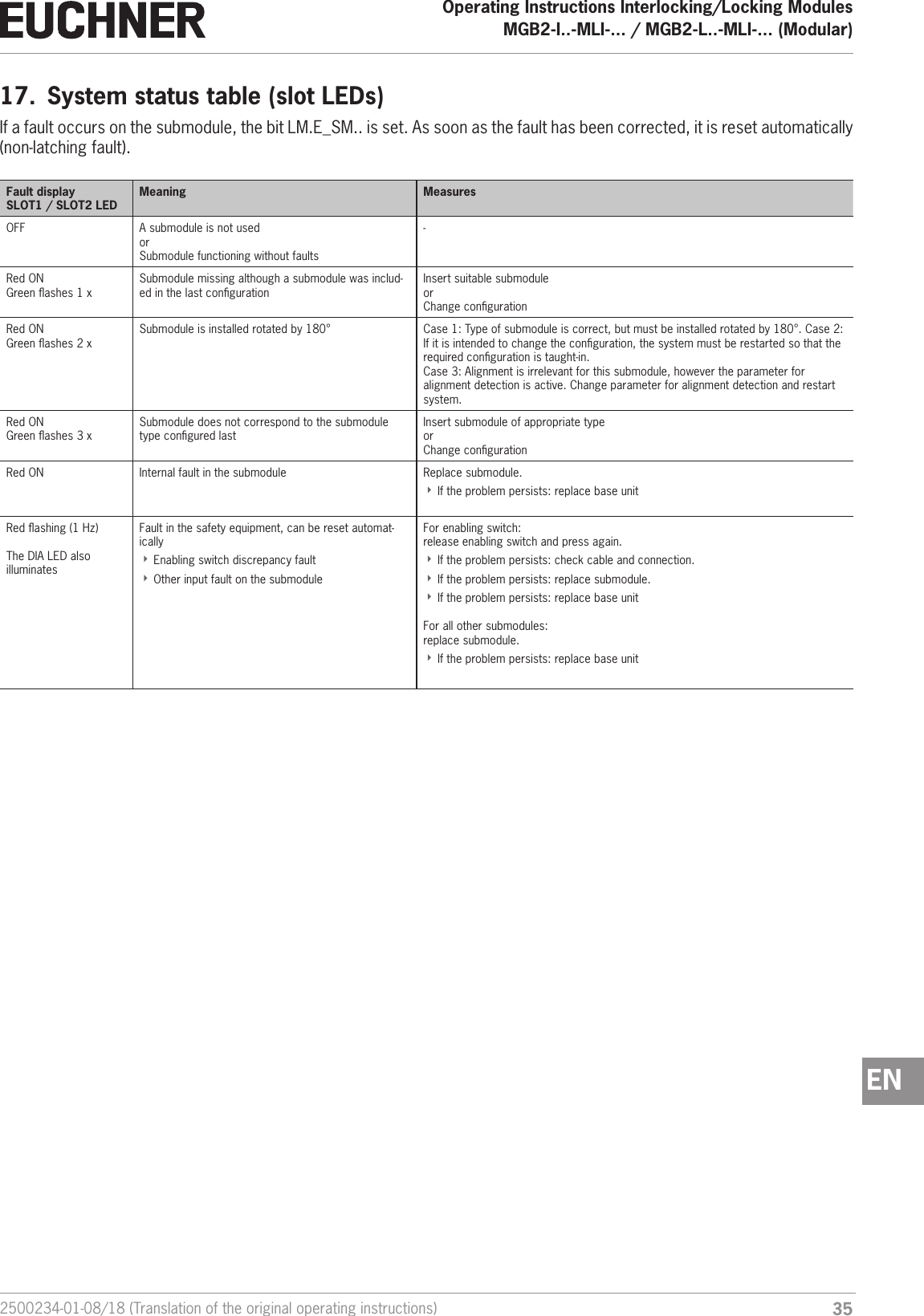
352500234-01-08/18 (Translation of the original operating instructions)Operating Instructions Interlocking/Locking ModulesMGB2-I..-MLI-... / MGB2-L..-MLI-... (Modular)  EN17.  System status table (slot LEDs)If a fault occurs on the submodule, the bit LM.E_SM.. is set. As soon as the fault has been corrected, it is reset automatically (non-latching fault).Fault displaySLOT1 / SLOT2 LEDMeaning MeasuresOFF A submodule is not usedorSubmodule functioning without faults-Red ONGreen ashes 1 xSubmodule missing although a submodule was includ-ed in the last congurationInsert suitable submoduleorChange congurationRed ONGreen ashes 2 xSubmodule is installed rotated by 180° Case 1: Type of submodule is correct, but must be installed rotated by 180°. Case 2: If it is intended to change the conguration, the system must be restarted so that the required conguration is taught-in.Case 3: Alignment is irrelevant for this submodule, however the parameter for alignment detection is active. Change parameter for alignment detection and restart system.Red ONGreen ashes 3 xSubmodule does not correspond to the submodule type congured lastInsert submodule of appropriate typeorChange congurationRed ON Internal fault in the submodule Replace submodule.  ÌIf the problem persists: replace base unitRed ashing (1Hz)The DIA LED also illuminatesFault in the safety equipment, can be reset automat-ically ÌEnabling switch discrepancy fault ÌOther input fault on the submoduleFor enabling switch: release enabling switch and press again.  ÌIf the problem persists: check cable and connection.  ÌIf the problem persists: replace submodule.  ÌIf the problem persists: replace base unitFor all other submodules: replace submodule.  ÌIf the problem persists: replace base unit
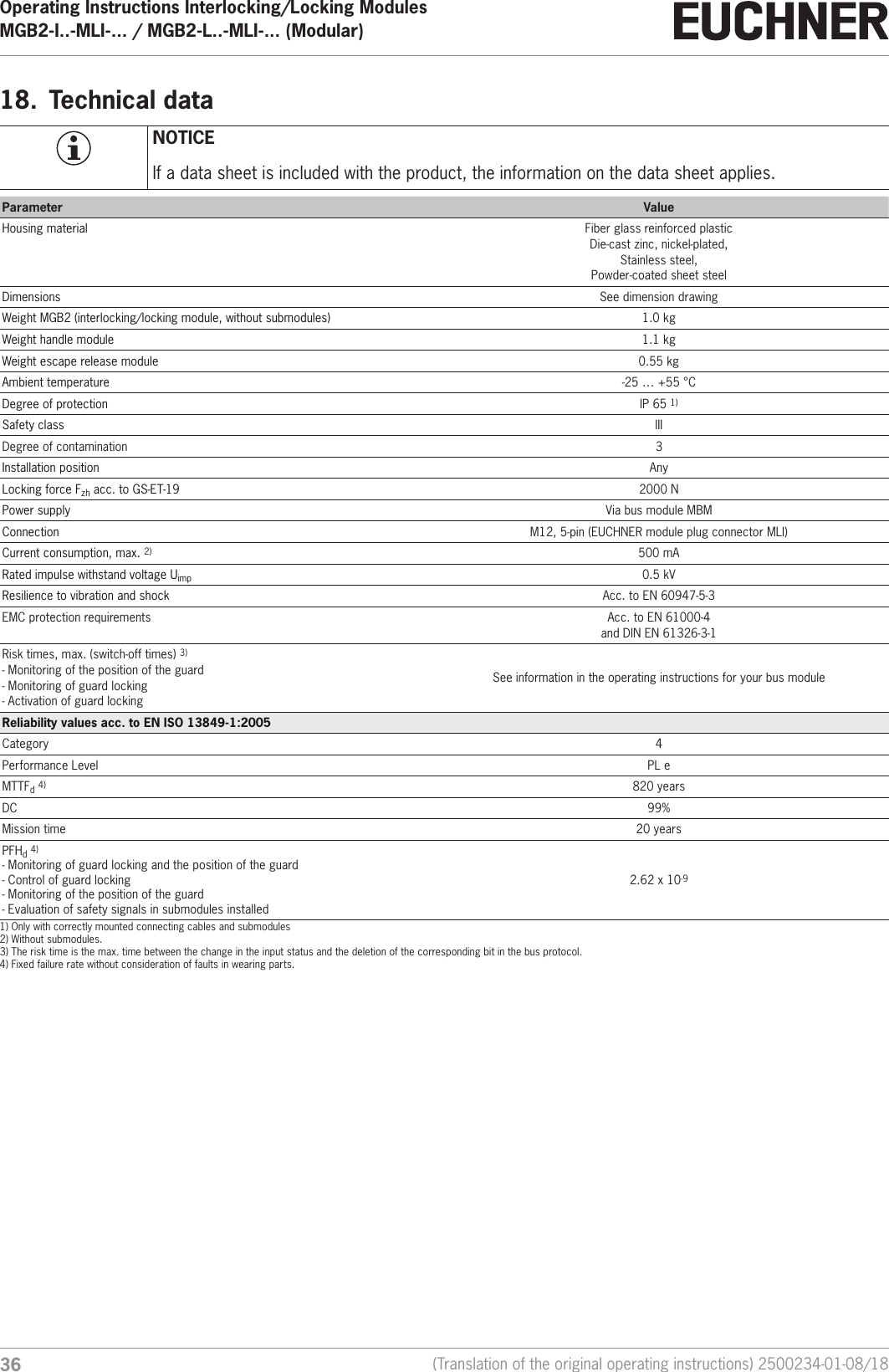
Operating Instructions Interlocking/Locking ModulesMGB2-I..-MLI-... / MGB2-L..-MLI-... (Modular)  36 (Translation of the original operating instructions) 2500234-01-08/1818.  Technical dataNOTICEIf a data sheet is included with the product, the information on the data sheet applies.Parameter ValueHousing material Fiber glass reinforced plasticDie-cast zinc, nickel-plated,Stainless steel, Powder-coated sheet steelDimensions See dimension drawingWeight MGB2 (interlocking/locking module, without submodules) 1.0 kgWeight handle module 1.1 kgWeight escape release module 0.55 kgAmbient temperature -25 … +55 °CDegree of protection IP 65 1) Safety class IIIDegree of contamination 3Installation position AnyLocking force Fzh acc. to GS-ET-19 2000 NPower supply Via bus module MBMConnection M12, 5-pin (EUCHNER module plug connector MLI)Current consumption, max. 2) 500 mARated impulse withstand voltage Uimp 0.5 kVResilience to vibration and shock Acc. to EN60947-5-3EMC protection requirements Acc. to EN61000-4  and DINEN61326-3-1Risk times, max. (switch-off times) 3)- Monitoring of the position of the guard- Monitoring of guard locking- Activation of guard lockingSee information in the operating instructions for your bus moduleReliability values acc. to ENISO13849-1:2005Category 4Performance Level PL eMTTFd 4) 820 yearsDC 99%Mission time 20 yearsPFHd 4)- Monitoring of guard locking and the position of the guard- Control of guard locking- Monitoring of the position of the guard- Evaluation of safety signals in submodules installed2.62 x 10-91) Only with correctly mounted connecting cables and submodules2) Without submodules.3) The risk time is the max. time between the change in the input status and the deletion of the corresponding bit in the bus protocol.4) Fixed failure rate without consideration of faults in wearing parts.
372500234-01-08/18 (Translation of the original operating instructions)Operating Instructions Interlocking/Locking ModulesMGB2-I..-MLI-... / MGB2-L..-MLI-... (Modular)  EN18.1.  Radio frequency approvalsFCC ID:  2AJ58-02IC:     22052-02FCC/IC-RequirementsThis device complies with part 15 of the FCC Rules and with Industry Canada’s licence-exempt RSSs. Operation is subject to the following two conditions:1) This device may not cause harmful interference, and 2) this device must accept any interference received, including interference that may cause undesired operation. Changes or modications not expressly approved by the party responsible for compliance could void the user‘s authorityto operate the equipment.NOTE: This equipment has been tested and found to comply with the limits for a Class A digital device, pursuant to part 15 of the FCC Rules. These limits are designed to provide reasonable protection against harmful interference when the equipment is operated in a commercial environment. This equipment generates, uses, and can radiate radio frequency energy and, if not installed and used in accordance with the instruction manual, may cause harmful interference to radio communications.Operation of this equipment in a residential area is likely to cause harmful interference in which case the user will be required to correct the interference at his own expense.Le présent appareil est conforme aux CNR d’Industrie Canada applicables aux appareils radio exempts de licence. L’exploita-tion est autorisée aux deux conditions suivantes :(1) l’appareil ne doit pas produire de brouillage, et (2) l’utilisateur de l’appareil doit accepter tout brouillage radioélectrique subi, même si le brouillage est susceptible d’en compromettre le fonctionnement.
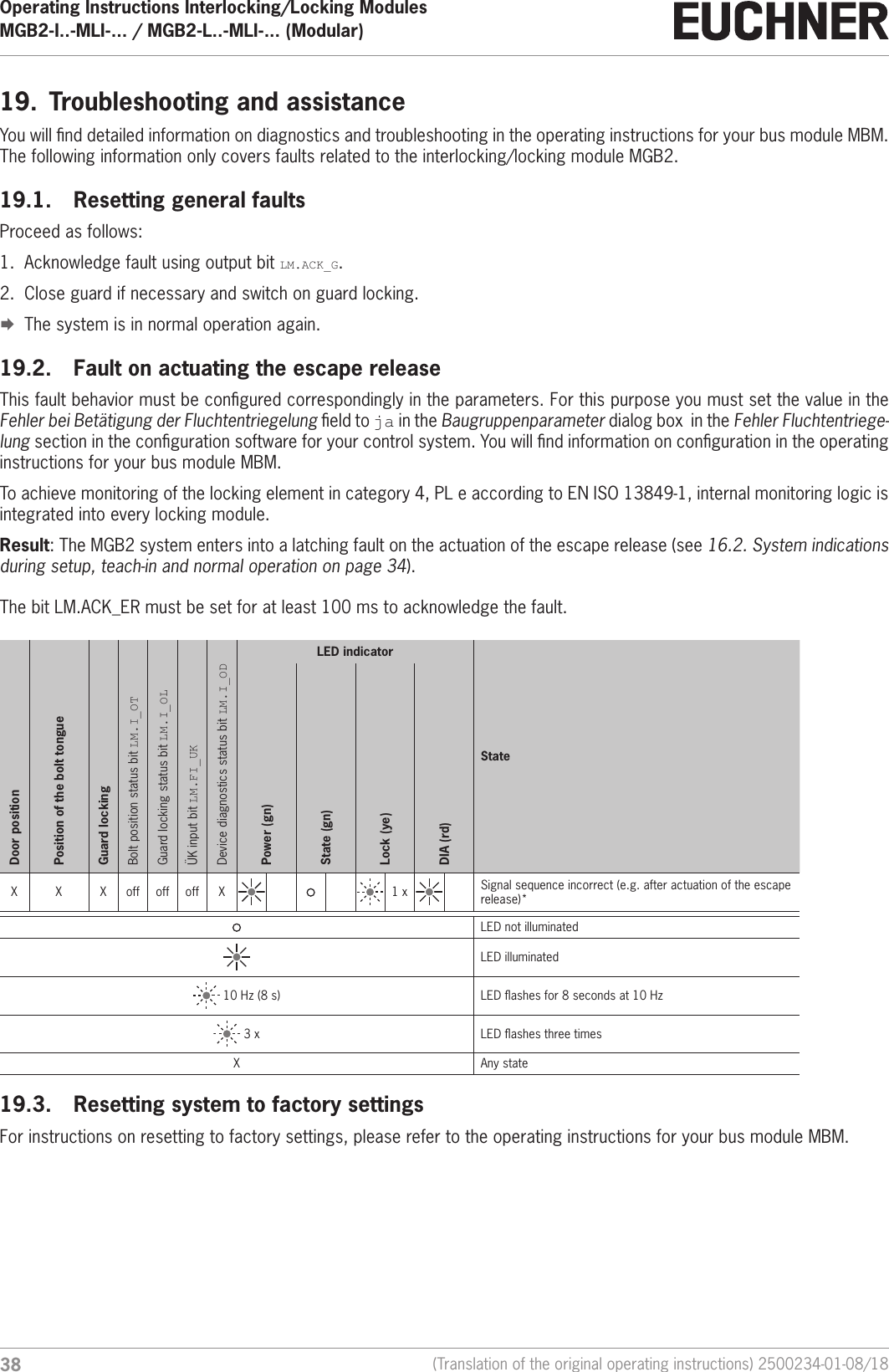
Operating Instructions Interlocking/Locking ModulesMGB2-I..-MLI-... / MGB2-L..-MLI-... (Modular)  38 (Translation of the original operating instructions) 2500234-01-08/1819.  Troubleshooting and assistanceYou will nd detailed information on diagnostics and troubleshooting in the operating instructions for your bus module MBM. The following information only covers faults related to the interlocking/locking module MGB2.19.1.  Resetting general faultsProceed as follows:1.  Acknowledge fault using output bit LM.ACK_G.2.  Close guard if necessary and switch on guard locking. ¨The system is in normal operation again.19.2.  Fault on actuating the escape releaseThis fault behavior must be congured correspondingly in the parameters. For this purpose you must set the value in the Fehler bei Betätigung der Fluchtentriegelung eld to ja in the Baugruppenparameter dialog box  in the Fehler Fluchtentriege-lung section in the conguration software for your control system. You will nd information on conguration in the operating instructions for your bus module MBM.To achieve monitoring of the locking element in category 4, PL e according to ENISO13849-1, internal monitoring logic is integrated into every locking module.Result: The MGB2 system enters into a latching fault on the actuation of the escape release (see 16.2. System indications during setup, teach-in and normal operation on page 34).The bit LM.ACK_ER must be set for at least 100 ms to acknowledge the fault.Door positionPosition of the bolt tongueGuard lockingBolt position status bit LM.I_OTGuard locking status bit LM.I_OLÜK input bit LM.FI_UKDevice diagnostics status bit LM.I_ODLED indicatorStatePower (gn)State (gn)Lock (ye)DIA (rd)X X X off off off X 1 x Signal sequence incorrect (e.g. after actuation of the escape release)*LED not illuminatedLED illuminated 10 Hz (8 s) LED ashes for 8 seconds at 10 Hz 3 x LED ashes three timesX Any state19.3.  Resetting system to factory settingsFor instructions on resetting to factory settings, please refer to the operating instructions for your bus module MBM.
392500234-01-08/18 (Translation of the original operating instructions)Operating Instructions Interlocking/Locking ModulesMGB2-I..-MLI-... / MGB2-L..-MLI-... (Modular)  EN20.  ServiceIf service support is required, please contact:EUCHNER GmbH + Co. KGKohlhammerstraße 16D-70771 Leinfelden-EchterdingenService telephone:+49 711 7597-500E-mail:support@euchner.deInternet:www.euchner.com21.  Inspection and serviceWARNINGLoss of the safety function because of damage to the device.In case of damage, the affected module must be replaced completely. Only accessories or spare parts that can be ordered from www.euchner.com may be replaced.Regular inspection of the following is necessary to ensure trouble-free long-term operation: ÌCheck the safety function (see chapter 15.3. Electrical function test on page 32) ÌCheck the secure fastening of the devices and the connections ÌCheck for soilingNo servicing is required. Repairs to the device are only allowed to be made by the manufacturer.NOTICEThe year of manufacture can be seen in the lower right corner of the type label.
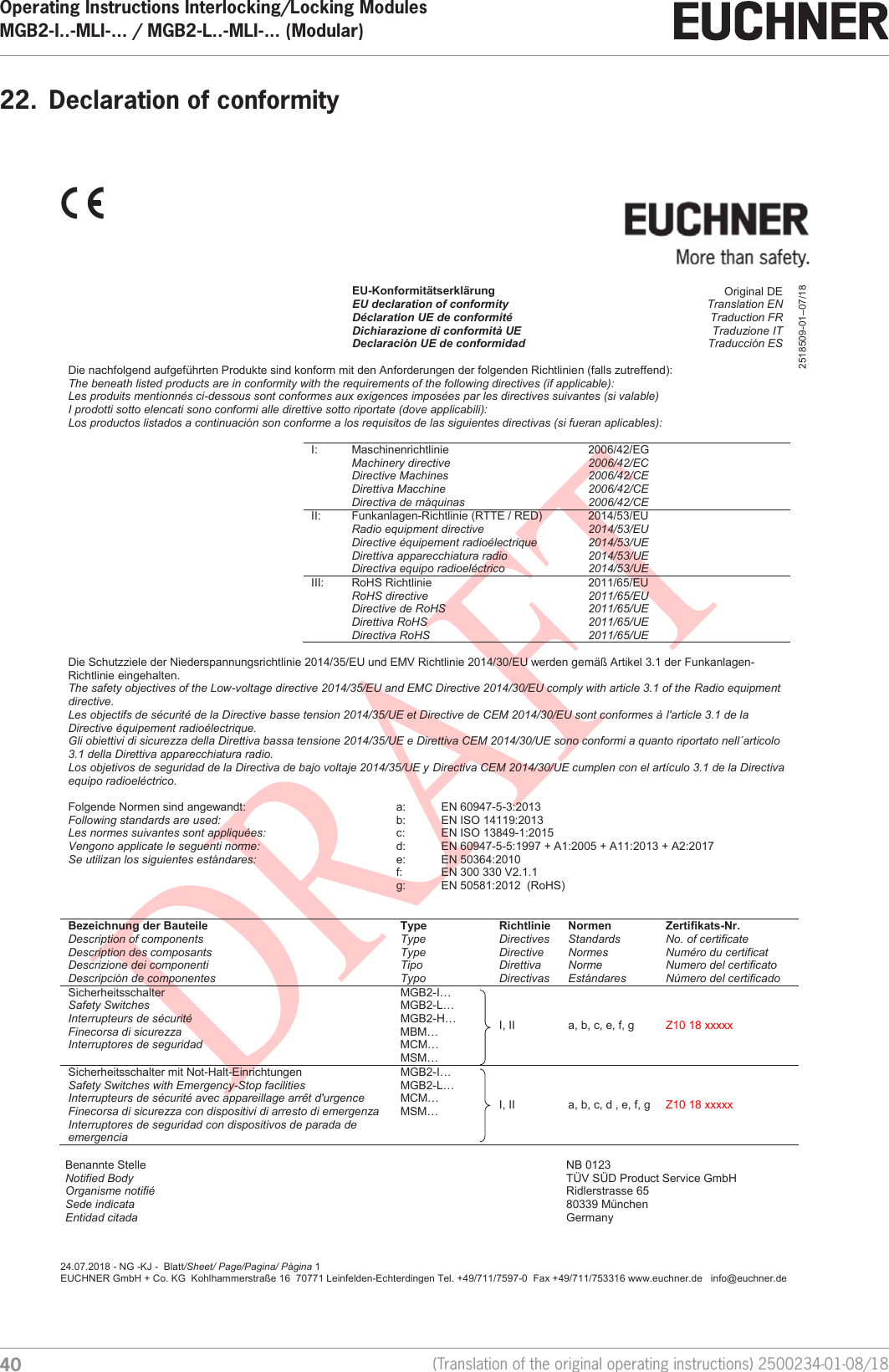
Operating Instructions Interlocking/Locking ModulesMGB2-I..-MLI-... / MGB2-L..-MLI-... (Modular)  40 (Translation of the original operating instructions) 2500234-01-08/1822.  Declaration of conformity                          24.07.2018 - NG -KJ -  Blatt/Sheet/ Page/Pagina/ Página 1 EUCHNER GmbH + Co. KG  Kohlhammerstraße 16  70771 Leinfelden-Echterdingen Tel. +49/711/7597-0  Fax +49/711/753316 www.euchner.de   info@euchner.de      EU-Konformitätserklärung                                                   Original DE   EU declaration of conformity                                                           Translation EN   Déclaration UE de conformité                                                       Traduction FR  Dichiarazione di conformità UE Traduzione IT  Declaración UE de conformidad Traducción ES  Die nachfolgend aufgeführten Produkte sind konform mit den Anforderungen der folgenden Richtlinien (falls zutreffend): The beneath listed products are in conformity with the requirements of the following directives (if applicable): Les produits mentionnés ci-dessous sont conformes aux exigences imposées par les directives suivantes (si valable) I prodotti sotto elencati sono conformi alle direttive sotto riportate (dove applicabili): Los productos listados a continuación son conforme a los requisitos de las siguientes directivas (si fueran aplicables):  I: Maschinenrichtlinie  Machinery directive  Directive Machines  Direttiva Macchine Directiva de máquinas   2006/42/EG 2006/42/EC 2006/42/CE 2006/42/CE 2006/42/CE  II: Funkanlagen-Richtlinie (RTTE / RED) Radio equipment directive Directive équipement radioélectrique Direttiva apparecchiatura radio Directiva equipo radioeléctrico 2014/53/EU  2014/53/EU  2014/53/UE 2014/53/UE 2014/53/UE   III: RoHS Richtlinie RoHS directive Directive de RoHS Direttiva RoHS Directiva RoHS 2011/65/EU 2011/65/EU  2011/65/UE 2011/65/UE 2011/65/UE   Die Schutzziele der Niederspannungsrichtlinie 2014/35/EU und EMV Richtlinie 2014/30/EU werden gemäß Artikel 3.1 der Funkanlagen-Richtlinie eingehalten. The safety objectives of the Low-voltage directive 2014/35/EU and EMC Directive 2014/30/EU comply with article 3.1 of the Radio equipment directive. Les objectifs de sécurité de la Directive basse tension 2014/35/UE et Directive de CEM 2014/30/EU sont conformes à l'article 3.1 de la Directive équipement radioélectrique. Gli obiettivi di sicurezza della Direttiva bassa tensione 2014/35/UE e Direttiva CEM 2014/30/UE sono conformi a quanto riportato nell´articolo 3.1 della Direttiva apparecchiatura radio. Los objetivos de seguridad de la Directiva de bajo voltaje 2014/35/UE y Directiva CEM 2014/30/UE cumplen con el artículo 3.1 de la Directiva equipo radioeléctrico.  Folgende Normen sind angewandt: a: EN 60947-5-3:2013   Following standards are used: b: EN ISO 14119:2013            Les normes suivantes sont appliquées: c: EN ISO 13849-1:2015 Vengono applicate le seguenti norme: d: EN 60947-5-5:1997 + A1:2005 + A11:2013 + A2:2017 Se utilizan los siguientes estándares: e: EN 50364:2010  f: EN 300 330 V2.1.1  g: EN 50581:2012  (RoHS)   Bezeichnung der Bauteile  Type Richtlinie Normen Zertifikats-Nr.  Description of components Type Directives Standards No. of certificate Description des composants Type Directive Normes Numéro du certificat Descrizione dei componenti Tipo Direttiva Norme Numero del certificato Descripción de componentes Typo Directivas Estándares Número del certificado Sicherheitsschalter  Safety Switches  Interrupteurs de sécurité Finecorsa di sicurezza Interruptores de seguridad MGB2-I…  MGB2-L…  MGB2-H… MBM… MCM… MSM… I, II a, b, c, e, f, g Z10 18 xxxxx Sicherheitsschalter mit Not-Halt-Einrichtungen Safety Switches with Emergency-Stop facilities Interrupteurs de sécurité avec appareillage arrêt d'urgence Finecorsa di sicurezza con dispositivi di arresto di emergenza Interruptores de seguridad con dispositivos de parada de emergencia MGB2-I… MGB2-L… MCM… MSM…  I, II a, b, c, d , e, f, g Z10 18 xxxxx    Benannte Stelle   Notified Body  Organisme notifié  Sede indicata  Entidad citada  NB 0123 TÜV SÜD Product Service GmbH Ridlerstrasse 65 80339 München Germany 2518509-01–07/18
412500234-01-08/18 (Translation of the original operating instructions)Operating Instructions Interlocking/Locking ModulesMGB2-I..-MLI-... / MGB2-L..-MLI-... (Modular)  EN                          24.07.2018 - NG -KJ -  Blatt/Sheet/ Page/Pagina/ Página 2 EUCHNER GmbH + Co. KG  Kohlhammerstraße 16  70771 Leinfelden-Echterdingen Tel. +49/711/7597-0  Fax +49/711/753316 www.euchner.de   info@euchner.de           Leinfelden, Juli 2018 i.A. Dipl.-Ing. Richard Holz i.A. Dipl.-Ing. (FH) Duc Binh Nguyen  Leiter Elektronik-Entwicklung Dokumentationsbevollmächtigter EUCHNER GmbH + Co. KG Manager Electronic Development Documentation manager Kohlhammerstraße 16 Responsable Développement Électronique Responsable documentation 70771 Leinfelden-Echterdingen Direttore Sviluppo Elettronica Responsabilità della documentazione Germany Director de desarrollo electrónico Agente documenta                                           Die alleinige Verantwortung für die Ausstellung dieser Konformitätserklärung trägt der Hersteller: This declaration of conformity is issued under the sole responsibility of the manufacturer: La présente déclaration de conformité est établie sous la seule responsabilité du fabricant: La presente dichiarazione di conformità è rilasciata sotto la responsabilità esclusiva del fabbricante: La presente declaración de conformidad se expide bajo la exclusiva responsabilidad del fabricante: EUCHNER GmbH + Co. KG Kohlhammerstraße 16 70771 Leinfelden-Echterdingen Germany
Euchner GmbH + Co. KGKohlhammerstraße 16D-70771 Leinfelden-Echterdingeninfo@euchner.dewww.euchner.comEdition:2500234-01-08/18Title: Operating Instructions Interlocking/Locking Modules MGB2-I..-MLI-... / MGB2-L..-MLI-... (Modular) and   from V1.00.0 (Translation of the original operating instructions)Copyright:© EUCHNER GmbH + Co. KG, 08/2018Subject to technical modications; no responsibility is accept-ed for the accuracy of this information.

Navigation menu