Eaton HHB1POWR Wireless Sensor User Manual range extndr outC1

Eaton Corporation Wireless Sensor range extndr outC1

Manual

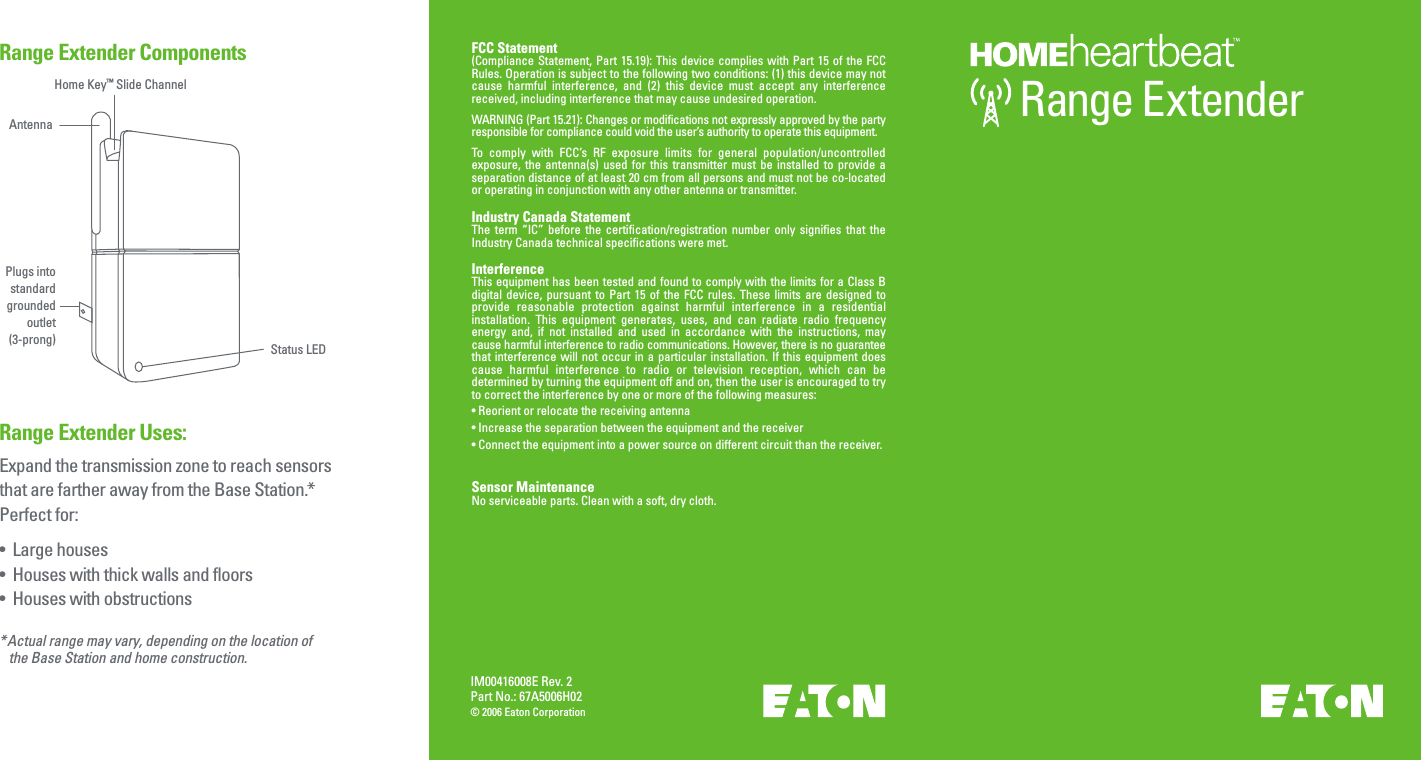
IM00416008E Rev. 2Part No.: 67A5006H02© 2006 Eaton CorporationRange Extender Uses:Range Extender ComponentsRange ExtenderHome Key™ Slide ChannelAntennaPlugs intostandardgroundedoutlet(3-prong) Status LEDExpand the transmission zone to reach sensors that are farther away from the Base Station.* Perfect for:•  Large houses•  Houses with thick walls and floors•  Houses with obstructions*Actual range may vary, depending on the location of   the Base Station and home construction.FCC Statement(Compliance Statement, Part  15.19):  This device complies  with  Part 15 of  the  FCC Rules. Operation is subject to the following two conditions: (1) this device may not cause  harmful  interference,  and  (2)  this  device  must  accept  any  interference received, including interference that may cause undesired operation.WARNING (Part 15.21): Changes or modifications not expressly approved by the party responsible for compliance could void the user’s authority to operate this equipment.To  comply  with  FCC’s  RF  exposure  limits  for  general  population/uncontrolled exposure,  the  antenna(s)  used  for  this transmitter  must  be  installed  to  provide  a separation distance of at least 20 cm from all persons and must not be co-located or operating in conjunction with any other antenna or transmitter.Industry Canada StatementThe  term  “IC”  before  the  certification/registration  number  only  signifies  that  the Industry Canada technical specifications were met.InterferenceThis equipment has been tested and found to comply with the limits for a Class B digital  device,  pursuant  to  Part  15  of  the  FCC  rules.  These  limits  are  designed  to provide  reasonable  protection  against  harmful  interference  in  a  residential installation.  This  equipment  generates,  uses,  and  can  radiate  radio  frequency energy  and,  if  not  installed  and  used  in  accordance  with  the  instructions,  may cause harmful interference to radio communications. However, there is no guarantee that interference will not occur  in  a particular installation. If this  equipment  does cause  harmful  interference  to  radio  or  television  reception,  which  can  be determined by turning the equipment off and on, then the user is encouraged to try to correct the interference by one or more of the following measures:• Reorient or relocate the receiving antenna• Increase the separation between the equipment and the receiver• Connect the equipment into a power source on different circuit than the receiver.Sensor Maintenance No serviceable parts. Clean with a soft, dry cloth.
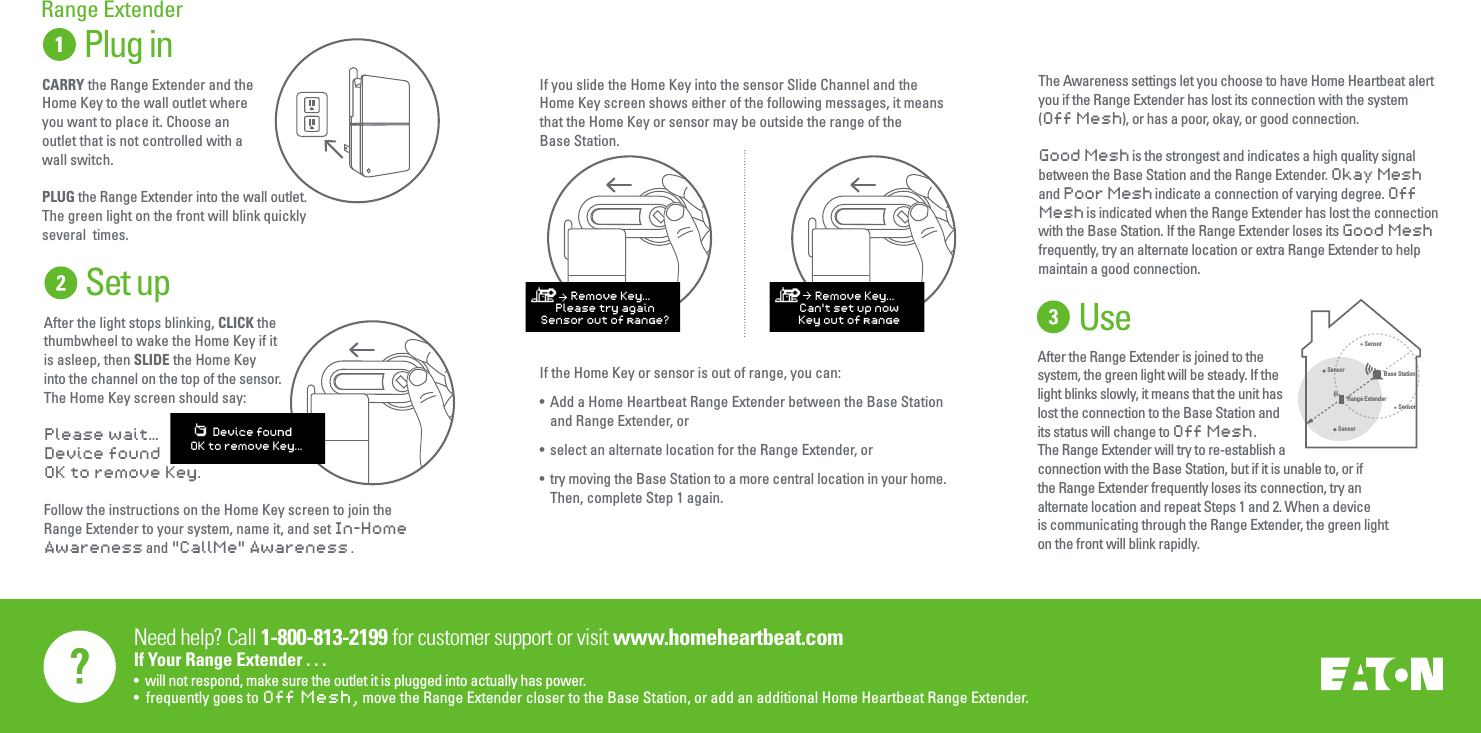
Need help? Call 1-800-813-2199 for customer support or visit www.homeheartbeat.comIf Your Range Extender . . .•  will not respond, make sure the outlet it is plugged into actually has power.•  frequently goes to Off Mesh,  move the Range Extender closer to the Base Station, or add an additional Home Heartbeat Range Extender.     Plug inCARRY the Range Extender and the Home Key to the wall outlet where you want to place it. Choose an outlet that is not controlled with a wall switch. PLUG the Range Extender into the wall outlet. The green light on the front will blink quickly several  times.Range ExtenderThe Awareness settings let you choose to have Home Heartbeat alert you if the Range Extender has lost its connection with the system (Off Mesh), or has a poor, okay, or good connection.Good Mesh is the strongest and indicates a high quality signal between the Base Station and the Range Extender. Okay Mesh and Poor Mesh indicate a connection of varying degree. Off Mesh is indicated when the Range Extender has lost the connection with the Base Station. If the Range Extender loses its Good Mesh frequently, try an alternate location or extra Range Extender to help maintain a good connection.  SensorSensorRange ExtenderSensorBase StationSensorUseAfter the Range Extender is joined to the system, the green light will be steady. If the light blinks slowly, it means that the unit has lost the connection to the Base Station and its status will change to Off Mesh. The Range Extender will try to re-establish a connection with the Base Station, but if it is unable to, or if the Range Extender frequently loses its connection, try an alternate location and repeat Steps 1 and 2. When a device is communicating through the Range Extender, the green light on the front will blink rapidly.Set upAfter the light stops blinking, CLICK the thumbwheel to wake the Home Key if it is asleep, then SLIDE the Home Key into the channel on the top of the sensor.The Home Key screen should say: Please wait…Device foundOK to remove Key.Follow the instructions on the Home Key screen to join the Range Extender to your system, name it, and set In-Home Awareness and "CallMe" Awareness .    Device foundOK to remove Key...If you slide the Home Key into the sensor Slide Channel and the Home Key screen shows either of the following messages, it means that the Home Key or sensor may be outside the range of the Base Station.If the Home Key or sensor is out of range, you can:•  Add a Home Heartbeat Range Extender between the Base Station  and Range Extender, or•  select an alternate location for the Range Extender, or•  try moving the Base Station to a more central location in your home.  Then, complete Step 1 again.    Remove Key...Please try againSensor out of range?    Remove Key...Can't set up nowKey out of range
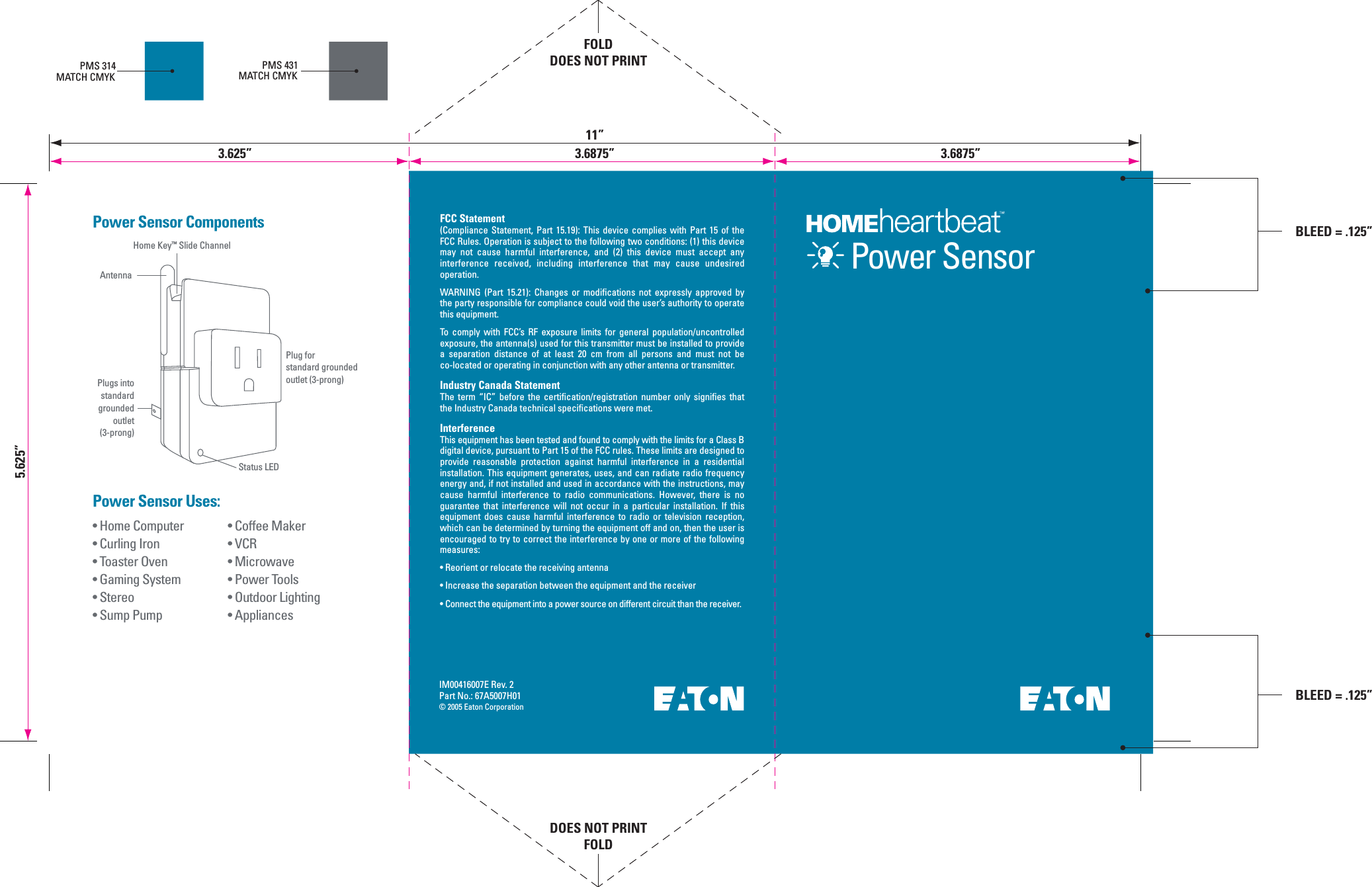
IM00416007E Rev. 2Part No.: 67A5007H01© 2005 Eaton Corporation• Coffee Maker• VCR• Microwave• Power Tools• Outdoor Lighting• Appliances• Home Computer• Curling Iron• Toaster Oven• Gaming System• Stereo• Sump PumpPower Sensor Uses:Power Sensor ComponentsPMS 314MATCH CMYKPMS 431MATCH CMYKHome Key™ Slide ChannelAntennaPlug forstandard groundedoutlet (3-prong)Power SensorPlugs intostandardgroundedoutlet(3-prong)Status LEDFCC Statement(Compliance  Statement,  Part  15.19):  This  device  complies  with  Part  15  of  the FCC Rules. Operation is subject to the following two conditions: (1) this device may  not  cause  harmful  interference,  and  (2)  this  device  must  accept  any interference  received,  including  interference  that  may  cause  undesired operation.WARNING  (Part  15.21):  Changes  or  modifications  not  expressly  approved  by the party responsible for compliance could void the user’s authority to operate this equipment.To  comply  with  FCC’s  RF  exposure  limits  for  general  population/uncontrolled exposure, the antenna(s) used for this transmitter must be installed to provide a  separation  distance  of  at  least  20  cm  from  all  persons  and  must  not  be co-located or operating in conjunction with any other antenna or transmitter.Industry Canada StatementThe  term  “IC”  before  the  certification/registration  number  only  signifies  that the Industry Canada technical specifications were met.InterferenceThis equipment has been tested and found to comply with the limits for a Class B digital device, pursuant to Part 15 of the FCC rules. These limits are designed to provide  reasonable  protection  against  harmful  interference  in  a  residential installation. This equipment generates, uses, and can radiate radio frequency energy and, if not installed and used in accordance with the instructions, may cause  harmful  interference  to  radio  communications.  However,  there  is  no guarantee  that  interference  will  not  occur  in  a  particular  installation.  If  this equipment  does  cause  harmful  interference  to  radio  or  television  reception, which can be determined by turning the equipment off and on, then the user is encouraged to try to correct the interference by one or more of the following measures:• Reorient or relocate the receiving antenna• Increase the separation between the equipment and the receiver• Connect the equipment into a power source on different circuit than the receiver.5.625”FOLDDOES NOT PRINTDOES NOT PRINTFOLD11”3.625” 3.6875”BLEED = .125”3.6875”BLEED = .125”
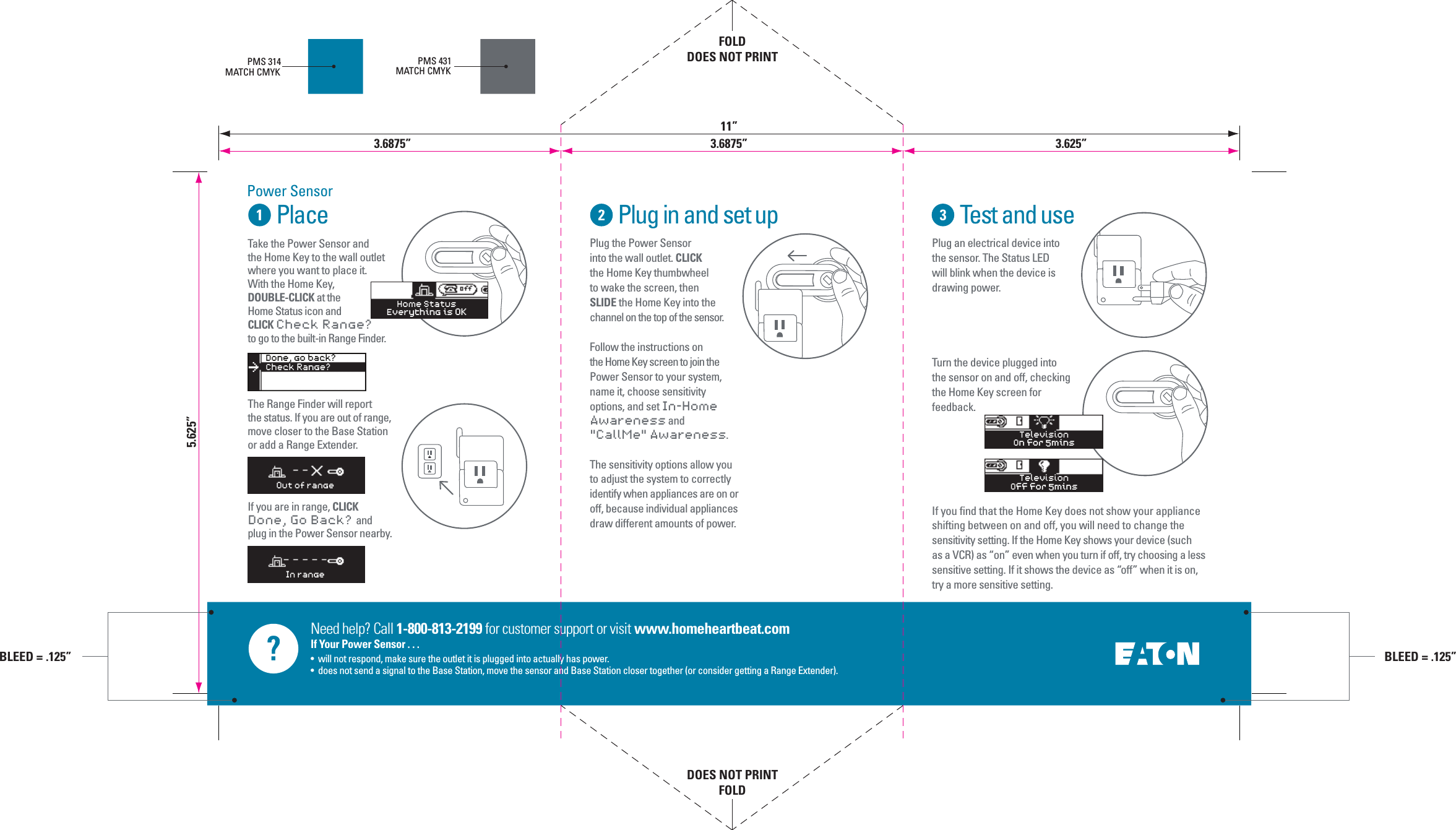
Need help? Call 1-800-813-2199 for customer support or visit www.homeheartbeat.comIf Your Power Sensor . . .•  will not respond, make sure the outlet it is plugged into actually has power.•  does not send a signal to the Base Station, move the sensor and Base Station closer together (or consider getting a Range Extender).PlacePower SensorPlug in and set up Test and usePlug the Power Sensor into the wall outlet. CLICK the Home Key thumbwheel to wake the screen, then SLIDE the Home Key into the channel on the top of the sensor.Follow the instructions on the Home Key screen to join the Power Sensor to your system, name it, choose sensitivity options, and set In-Home Awareness and "CallMe" Awareness.The sensitivity options allow you to adjust the system to correctly identify when appliances are on or off, because individual appliances draw different amounts of power.Plug an electrical device into the sensor. The Status LED will blink when the device is drawing power. Turn the device plugged into the sensor on and off, checking the Home Key screen for feedback.If you find that the Home Key does not show your appliance shifting between on and off, you will need to change the sensitivity setting. If the Home Key shows your device (such as a VCR) as “on” even when you turn if off, try choosing a less sensitive setting. If it shows the device as “off” when it is on, try a more sensitive setting.  PMS 314MATCH CMYKPMS 431MATCH CMYKTelevisionOff for 5minsTelevisionOn for 5minsOut of rangeIn rangeDone, go back?Check Range?>Home StatusEverything is OKTake the Power Sensor andthe Home Key to the wall outlet where you want to place it. With the Home Key, DOUBLE-CLICK at the Home Status icon and CLICK Check Range? to go to the built-in Range Finder.The Range Finder will report the status. If you are out of range, move closer to the Base Station or add a Range Extender.If you are in range, CLICK Done, Go Back?  and plug in the Power Sensor nearby. 5.625”FOLDDOES NOT PRINTDOES NOT PRINTFOLD3.6875” 3.6875”11”3.625”BLEED = .125”BLEED = .125”

Navigation menu