Eaton HHB1WSOC Monitoring Device User Manual Manual

Eaton Corporation Monitoring Device Manual

Manual

Water Shut-offControllerUser’s Guide
2
3ContentsIntroduction ........................................................ 41. Water Shut-Off Controller Uses ...... ... ... ... ... ... ... 4Water Shut-Off Controller Components ........................ 5Getting Started ..................................................... 6Installing the Water Shut-Off Controller ....................... 71. Prepare ..................................................... 82. Place ....................................................... 93. Set Up .....................................................114. Test ........................................................ 175. Choose Sensor Controllers .. ... ... ... ... ... ... ... ... .. 196. Use ......................................................... 22Compliance Information .........................................27
4IntroductionThe Home Heartbeat Water Shut-Off Controller is designed to help you manage the flow of water into your home. You can use any Home Heartbeat sensor as a “controller” in combination with the Water Shut-Off Controller. For example, when used with Water Sensors, the system can be set to automatically shut off the water to your home in the event of a burst pipe or appliance leak. Or, you can add an Attention Sensor to shut off your main line with the press of a button. Your Home Key can be used to open and close the valve, or you can choose to operate the unit manually. This Guide will introduce you to Water Shut-Off Controller and assist you with setup and use.Water Shut-Off  Controller UsesTo shut off water in response to leaks from home appliances and products connected to main water lines, such as:•  Washing machines•  Toilets•  Refrigerator automatic    ice-makers•  Kitchen, bath or laundry    room sinksGreat for use in:•  Family Home•  Vacation Home•  Rental Properties
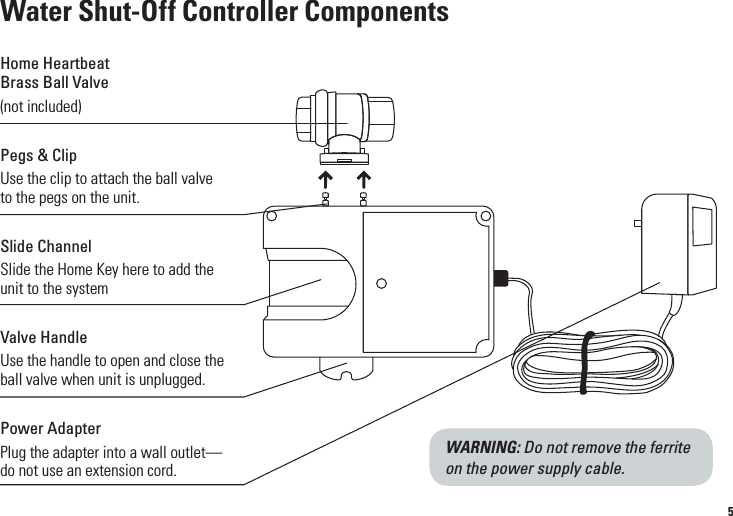
5Water Shut-Off Controller ComponentsHome Heartbeat  Brass Ball Valve (not included)Pegs & Clip Use the clip to attach the ball valve to the pegs on the unit.Slide Channel Slide the Home Key here to add the unit to the systemValve Handle Use the handle to open and close the ball valve when unit is unplugged.Power Adapter Plug the adapter into a wall outlet—do not use an extension cord. WARNING: Do not remove the ferrite  on the power supply cable.
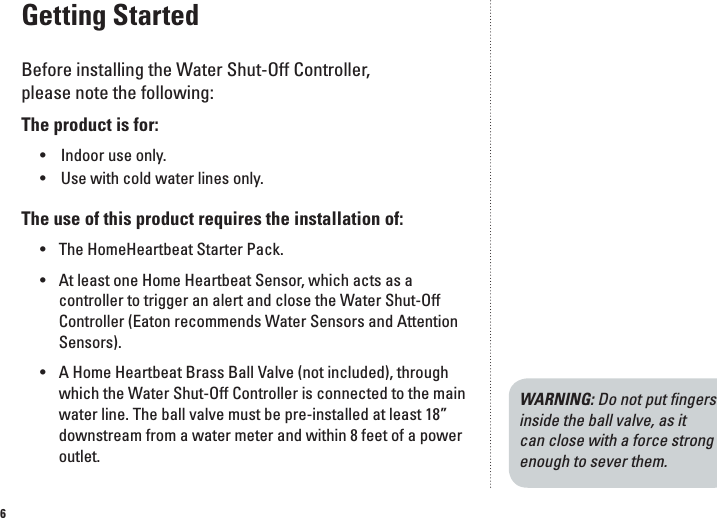
6Getting StartedBefore installing the Water Shut-Off Controller,  please note the following:The product is for:  •  Indoor use only.   •  Use with cold water lines only.The use of this product requires the installation of:•  The HomeHeartbeat Starter Pack.•  At least one Home Heartbeat Sensor, which acts as a controller to trigger an alert and close the Water Shut-Off Controller (Eaton recommends Water Sensors and Attention Sensors).•  A Home Heartbeat Brass Ball Valve (not included), through which the Water Shut-Off Controller is connected to the main water line. The ball valve must be pre-installed at least 18” downstream from a water meter and within 8 feet of a power outlet. WARNING: Do not put fingers inside the ball valve, as it can close with a force strong enough to sever them.
7Installing the Water Shut-Off ControllerFollow these steps to install the Water Shut-Off Controller:1.  Place the Water Shut-Off Controller by joining it to the brass ball valve that was installed on your main water line.2.  Set up the Water Shut-Off Controller using the Home Key.3.  Test that the system is working.4.  Choose sensor controllers that, on alert, will communicate with the Water Shut-Off Controller to shut off the water to your home.5.  Use the product—get alerts, and open and  shut the valve.
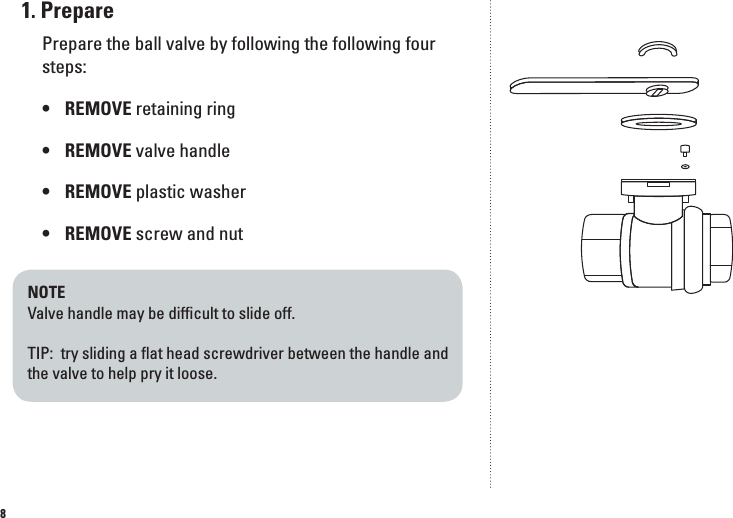
81. PreparePrepare the ball valve by following the following four steps:•  REMOVE retaining ring•  REMOVE valve handle•  REMOVE plastic washer•  REMOVE screw and nutNOTEValve handle may be difficult to slide off.TIP:  try sliding a flat head screwdriver between the handle and the valve to help pry it loose.
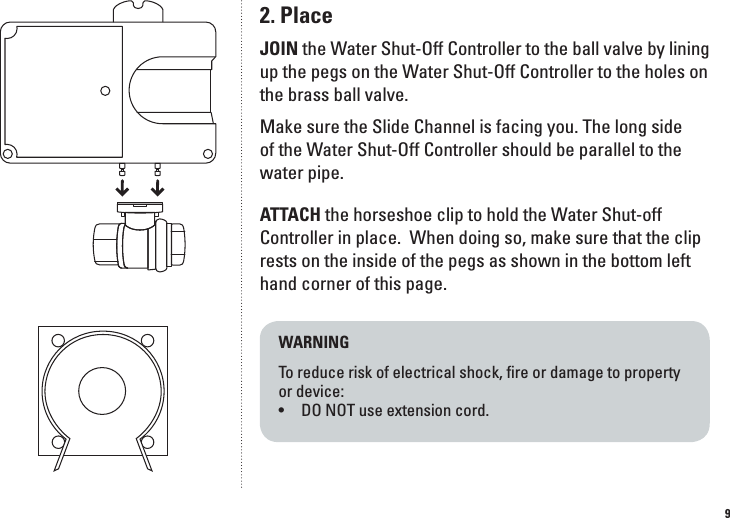
92. PlaceJOIN the Water Shut-Off Controller to the ball valve by lining up the pegs on the Water Shut-Off Controller to the holes on the brass ball valve. Make sure the Slide Channel is facing you. The long side of the Water Shut-Off Controller should be parallel to the water pipe. ATTACH the horseshoe clip to hold the Water Shut-off Controller in place.  When doing so, make sure that the clip rests on the inside of the pegs as shown in the bottom left hand corner of this page.  WARNINGTo reduce risk of electrical shock, fire or damage to property  or device: •  DO NOT use extension cord.
10CAUTIONTo reduce the risk of pinching your fingers, keep your hands away from the water shut-off controller when you connect  the power.PLUG IN the Water Shut-Off Controller to a nearby outlet. DO NOT use an extension cord. You will hear the Water Shut-Off Controller rotate the ball valve 180 degrees. The green LED light will blink while the unit checks its position.* Wait for it to stop blinking before moving to Step 2.  *Each time the Water Shut-Off Controller is first turned on (for example, during installation or after a power outage), it rotates the ball valve 180 degrees to check its position.
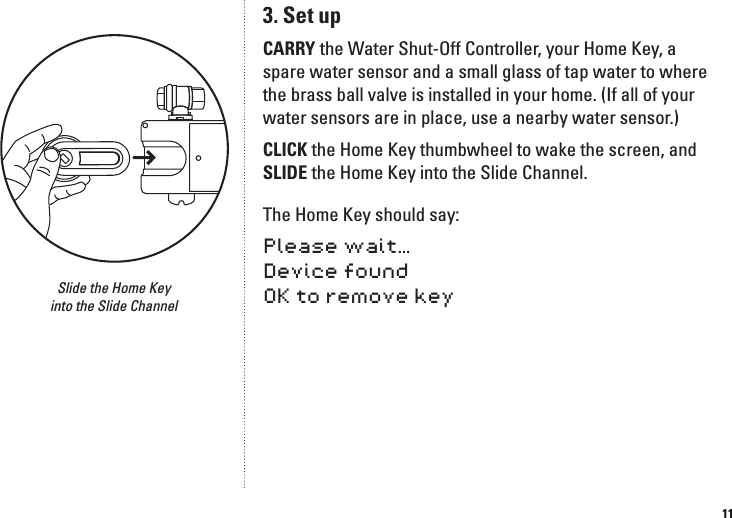
113. Set upCARRY the Water Shut-Off Controller, your Home Key, a spare water sensor and a small glass of tap water to where the brass ball valve is installed in your home. (If all of your water sensors are in place, use a nearby water sensor.) CLICK the Home Key thumbwheel to wake the screen, and SLIDE the Home Key into the Slide Channel. The Home Key should say: Please wait… Device found OK to remove keySlide the Home Key  into the Slide Channel
12If you slide the Home Key into the Slide Channel and the Home Key screen shows either of the following messages, the Home Key or Water Shut-Off Controller may be outside the range of the Base Station. If you see either of these messages, you should add a Home Heartbeat Range Extender between the Base Station and Water Shut-Off Controller. This addition will expand the transmission zone of the Base Station to the Controller. Then, you can repeat Step 2.J]egn]C]q&&&Hd]Yk]ljqY_YafK]fkgjgmlg^jYf_]7J]egn]C]q&&&;Yflk]lmhfgoC]qgmlg^jYf_]
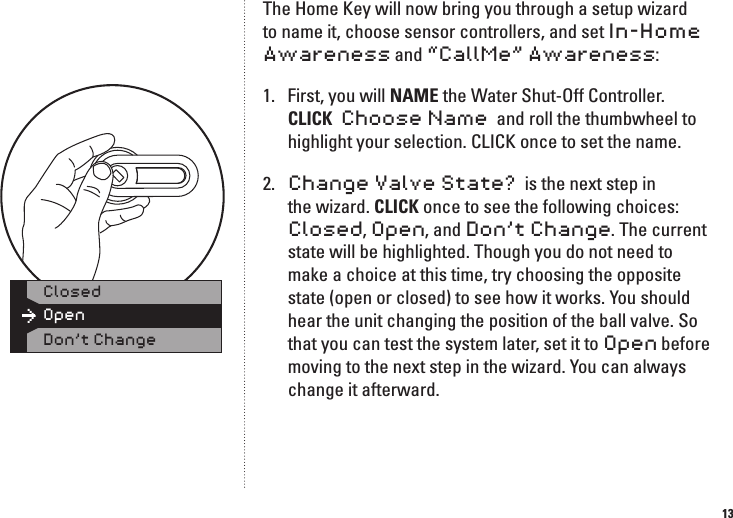
13The Home Key will now bring you through a setup wizard to name it, choose sensor controllers, and set In-Home Awareness and “CallMe” Awareness:1.  First, you will NAME the Water Shut-Off Controller. CLICK  Choose Name  and roll the thumbwheel to highlight your selection. CLICK once to set the name.2.  Change Valve State?  is the next step in the wizard. CLICK once to see the following choices: Closed, Open, and Don’t Change. The current state will be highlighted. Though you do not need to make a choice at this time, try choosing the opposite state (open or closed) to see how it works. You should hear the unit changing the position of the ball valve. So that you can test the system later, set it to Open before moving to the next step in the wizard. You can always change it afterward.OpenClosedDon’t Change
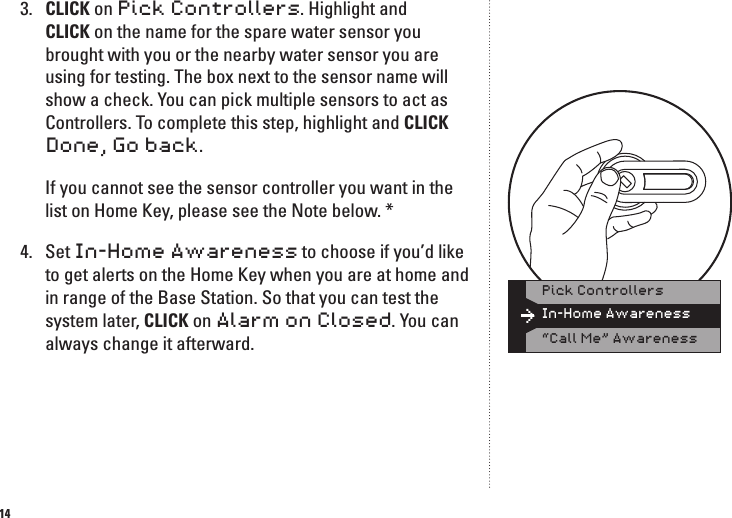
143.  CLICK on Pick Controllers. Highlight and CLICK on the name for the spare water sensor you brought with you or the nearby water sensor you are using for testing. The box next to the sensor name will show a check. You can pick multiple sensors to act as Controllers. To complete this step, highlight and CLICK Done, Go back.   If you cannot see the sensor controller you want in the list on Home Key, please see the Note below. *4.  Set In-Home Awareness to choose if you’d like to get alerts on the Home Key when you are at home and in range of the Base Station. So that you can test the system later, CLICK on Alarm on Closed. You can always change it afterward.In-Home AwarenessPick Controllers“Call Me” Awareness
155.  Set “CallMe” Awareness to choose if you’d like to receive alerts about the Water Shut-Off Controller through your cell phone or email.** CLICK to select one of the following options: ”Don’t call me”, “Call me on Closed”, “Call me on Open”, or “Call me on Changing”.6.  After all of these options are set, the screen will automatically highlight “Done, go back?” CLICK once to finish setting up the Water Shut-Off Controller.*  Note: If you cannot see the sensor controller you want on your Home Key, it means that the sensor is not set for in-home alerts or “CallMe” Awareness. You can check the setting for that sensor after moving through the setup wizard. For now, choose one and allow the Home Key to bring you through the next options, In-Home Awareness and “CallMe” Awareness. After you’ve completed setup, use your Home Key, highlight the icon you’d like to use as a controller, and DOUBLE-CLICK. Make sure that:
161.  The controller is in range of the Base Station.2.  It is set to “Alarm on ___” under the In-Home Awareness setting, and/or is set to “Call me on ___” under the “CallMe” Awareness setting.  If you choose a sensor as a controller and later change its In-Home Awareness setting to “Don’t alert” and/or its “CallMe” Awareness setting to “Don’t call me”, it will be automatically removed as a sensor controller under the Water Shut-Off Controller menu called “Pick controllers?”**   In addition to setting sensor and Global “CallMe” options on the Home Key, you must register with Home Heartbeat Support (1-800-813-2199 or www.homeheartbeat.com) to get remote alerts.
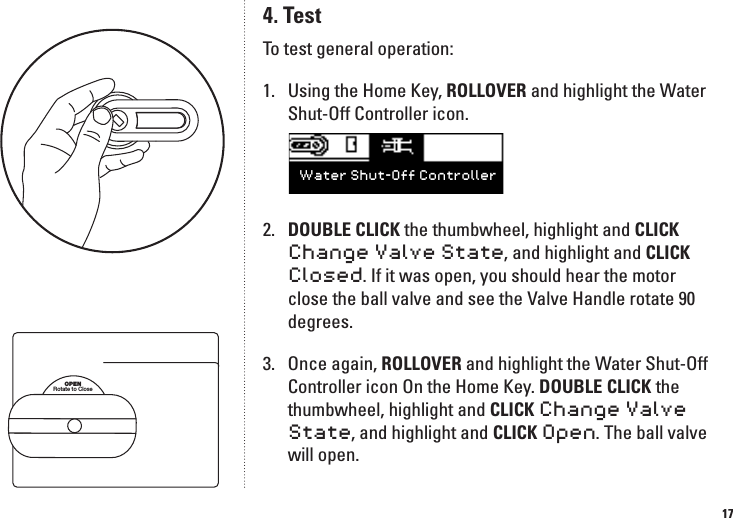
174. TestTo test general operation:1.  Using the Home Key, ROLLOVER and highlight the Water Shut-Off Controller icon. 2.   DOUBLE CLICK the thumbwheel, highlight and CLICK Change Valve State, and highlight and CLICK Closed. If it was open, you should hear the motor close the ball valve and see the Valve Handle rotate 90 degrees. 3.   Once again, ROLLOVER and highlight the Water Shut-Off Controller icon On the Home Key. DOUBLE CLICK the thumbwheel, highlight and CLICK Change Valve State, and highlight and CLICK Open. The ball valve will open.Water Shut-Off ControllerOPENRotate to Close
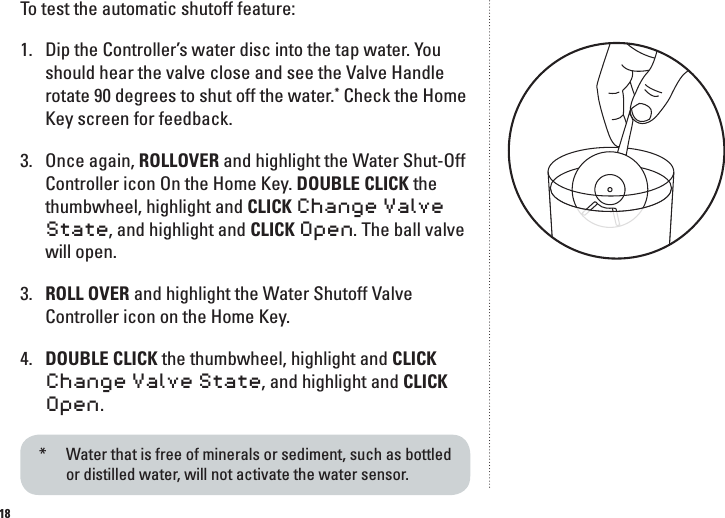
18To test the automatic shutoff feature:1.  Dip the Controller’s water disc into the tap water. You should hear the valve close and see the Valve Handle rotate 90 degrees to shut off the water.* Check the Home Key screen for feedback.3.   Once again, ROLLOVER and highlight the Water Shut-Off Controller icon On the Home Key. DOUBLE CLICK the thumbwheel, highlight and CLICK Change Valve State, and highlight and CLICK Open. The ball valve will open.3.   ROLL OVER and highlight the Water Shutoff Valve Controller icon on the Home Key.4.   DOUBLE CLICK the thumbwheel, highlight and CLICK Change Valve State, and highlight and CLICK Open.*   Water that is free of minerals or sediment, such as bottled  or distilled water, will not activate the water sensor.
195. Choose sensor controllersNow that you’ve installed and tested the Water Shut-Off Controller, you can consider the types of situations when you’d want it to close its valve and shut off the water to your home. During this step, you can choose one or several Home Heartbeat Sensors to use as controllers. The Water Sensor works well as a controller because it can sense the presence of water and, when set to “Alarm on Wet”, will communicate back to the Water Shut-Off Controller to shut its valve. It can be placed below washing machine, toilet, or sink hookups to help reduce damage if they burst from aged or faulty pipes or seals.In addition to your Home Key, the Attention Sensor can be used as a controller to shut the Water Shut-Off Controller valve from a convenient location, such as your kitchen. For example, you may want to shut off the main water to your vacation home before leaving. If you set the Attention sensor to alarm in the In-Home Awareness setting and press the front of it, it will shut the valve. The LED on the
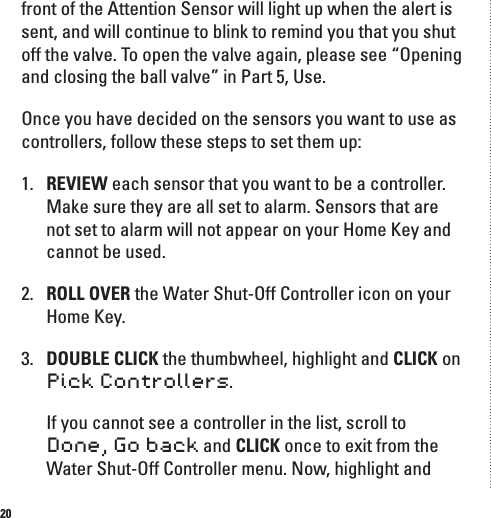
20front of the Attention Sensor will light up when the alert is sent, and will continue to blink to remind you that you shut off the valve. To open the valve again, please see “Opening and closing the ball valve” in Part 5, Use.Once you have decided on the sensors you want to use as controllers, follow these steps to set them up:1.  REVIEW each sensor that you want to be a controller. Make sure they are all set to alarm. Sensors that are not set to alarm will not appear on your Home Key and cannot be used. 2.  ROLL OVER the Water Shut-Off Controller icon on your Home Key. 3.  DOUBLE CLICK the thumbwheel, highlight and CLICK on Pick Controllers. If you cannot see a controller in the list, scroll to Done, Go back and CLICK once to exit from the Water Shut-Off Controller menu. Now, highlight and
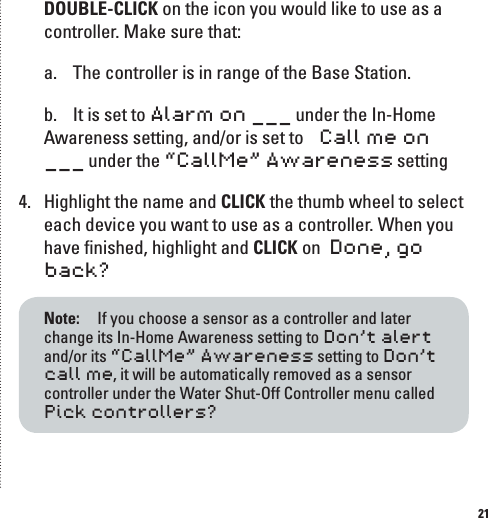
21DOUBLE-CLICK on the icon you would like to use as a controller. Make sure that: a.  The controller is in range of the Base Station.b.  It is set to Alarm on ___ under the In-Home Awareness setting, and/or is set to   Call me on ___ under the “CallMe” Awareness setting4.  Highlight the name and CLICK the thumb wheel to select each device you want to use as a controller. When you have finished, highlight and CLICK on  Done, go back?Note:   If you choose a sensor as a controller and later change its In-Home Awareness setting to Don’t alert and/or its “CallMe” Awareness setting to Don’t call me, it will be automatically removed as a sensor controller under the Water Shut-Off Controller menu called  Pick controllers?
226. UseGetting alertsAfter correct setup, the Water Shut-Off Controller will shut off the main water to your home if any or all of the controllers send an alert. If a controller alerts, you will see a full-screen alert flashing red on the Home Key or receive an alert on your cell phone or through email, depending on how you’ve set up the system.If the system fails to send an alert There are two cases when the Home Heartbeat system might fail to send an alert to your Home Key, cell phone, or email. In these cases, the Water Shut-Off Controller ball valve will not close, and you should check it as soon as possible. When an alert is triggered by a sensor controller but does not reach the Base Station
23The ball valve will not close. The sensor will keep trying to send the message to the Base Station. If the message does not reach the Base Station after an hour, the icon for the sensor controller on the Home Key will display a question mark and amber background.When an alert triggered by a sensor controller reaches the Base Station, but the Base Station fails to send it to the Water Shut-Off ControllerThe ball valve will not close. The Home Key will notify you and the Base Station will keep trying to send notice of the alert to the valve. If you have “CallMe” Awareness set, the system will send you a text message about the issue to your cell phone or email. After addressing the cause of the alertAfter the issue that caused the alert has been addressed, you can re-open the Water Shut-Off Controller ball valve either using the Home Key or manually by following the steps in the next section, Opening and closing the ball valve.
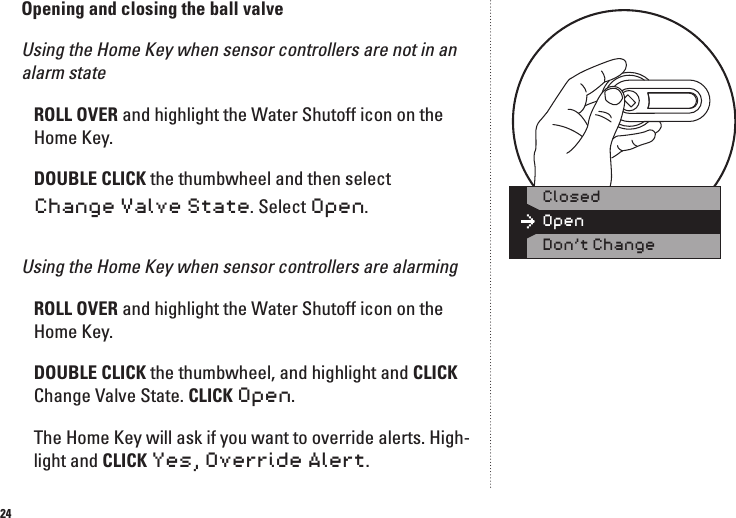
24Opening and closing the ball valve Using the Home Key when sensor controllers are not in an alarm state ROLL OVER and highlight the Water Shutoff icon on the Home Key. DOUBLE CLICK the thumbwheel and then select Change Valve State. Select Open.Using the Home Key when sensor controllers are alarmingROLL OVER and highlight the Water Shutoff icon on the Home Key. DOUBLE CLICK the thumbwheel, and highlight and CLICK Change Valve State. CLICK Open.The Home Key will ask if you want to override alerts. High-light and CLICK Yes, Override Alert. OpenClosedDon’t Change
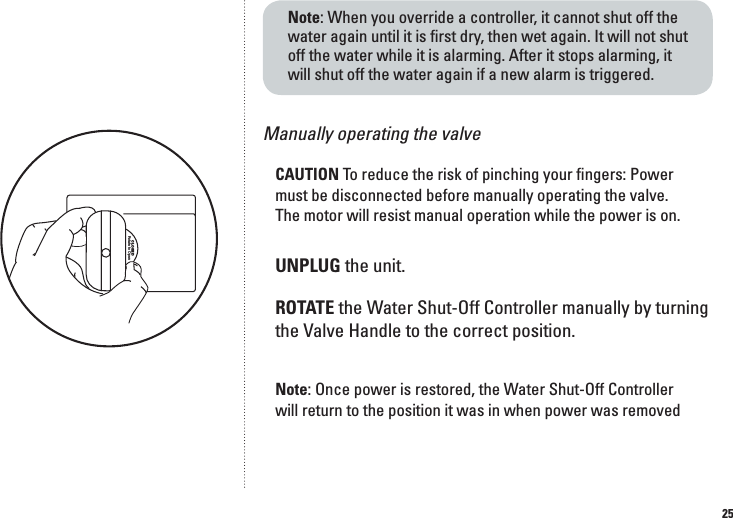
25Note: When you override a controller, it cannot shut off the water again until it is first dry, then wet again. It will not shut off the water while it is alarming. After it stops alarming, it will shut off the water again if a new alarm is triggered.Manually operating the valve CAUTION To reduce the risk of pinching your fingers: Power must be disconnected before manually operating the valve. The motor will resist manual operation while the power is on. UNPLUG the unit.  ROTATE the Water Shut-Off Controller manually by turning the Valve Handle to the correct position.Note: Once power is restored, the Water Shut-Off Controller will return to the position it was in when power was removedCLOSEDRotate to Open
26Compliance Information(Compliance Statement, Part 15.19): This device complies with Part 15 of the FCCRules. Operation is subject to the following two conditions: (1) this device may not cause harmful interference, and (2) this device must accept any interference received, including interference that may cause undesired operation.WARNING (Part 15.21): Changes or modifications not expressly approved by the party responsible for compliance could void the user’s authority to operate this equipment.To comply with FCC’s RF exposure limits for general population/uncontrolled exposure, the antenna(s) used for this transmitter must be installed to provide a separation distance of at least 20 cm from all persons and must not be co-located or operating in conjunction with any other antenna or transmitter.Industry Canada StatementThe term “IC” before the certification/registration number only signifies that the Industry Canada technical specifications were met.InterferenceThis equipment has been tested and found to comply with the limits for a Class B digital device, pursuant to Part 15 of the FCC rules. These limits are designed to provide reasonable protection against harmful interference in a residential installation. This equipment generates, uses, and can radiate radio frequency energy and, if not installed and used in
27accordance with the instructions, may cause harmful interference to radio communications. However, there is no guarantee that interference will not occur in a particular installation. If this equipment does cause harmful interference to radio or television reception, which can be determined by turning the equipment off and on, then the user is encouraged to try to correct the interference by one or more of the following measures:•  Reorient or relocate the receiving antenna•  Increase the separation between the equipment and the receiver•  Connect the equipment into a power source on different circuit than  the receiver.Sensor MaintenanceNo serviceable parts. Clean with a soft, dry cloth.
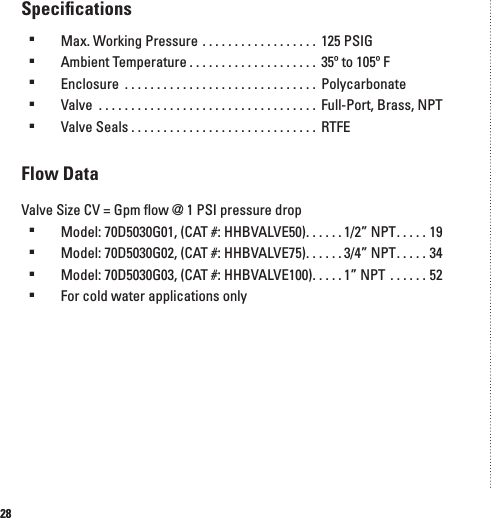
28Specificationsn  Max. Working Pressure . . . . . . . . . . . . . . . . . . 125 PSIGn  Ambient Temperature . . . . . . . . . . . . . . . . . . . . 35º to 105º Fn  Enclosure .............................. Polycarbonaten  Valve .................................. Full-Port, Brass, NPTn  Valve Seals ............................. RTFEFlow DataValve Size CV = Gpm flow @ 1 PSI pressure drop n  Model: 70D5030G01, (CAT #: HHBVALVE50) . . . . . . 1/2” NPT . . . . . 19n  Model: 70D5030G02, (CAT #: HHBVALVE75) . . . . . . 3/4” NPT . . . . . 34n  Model: 70D5030G03, (CAT #: HHBVALVE100) . . . . . 1” NPT  . . . . . . 52n  For cold water applications only
29Notes:
31Notes:
Eaton Electrical Inc.1000 Cherrington ParkwayMoon Township, PA 15108www.homeheartbeat.com© 2006 Eaton CorporationAll Rights ReservedIM00416010E  Rev. 1Part No.: 67A5017H01 Need help?Call Home Heartbeat Support  (1-800-813-2199 or www.homeheart-beat.com) to get information  and instructions for service.

Navigation menu