Eaton HHB2BATR Wireless Sensor User Manual Temp Sensor P2

Eaton Corporation Wireless Sensor Temp Sensor P2

Contents

Manual Temp Sensor P2

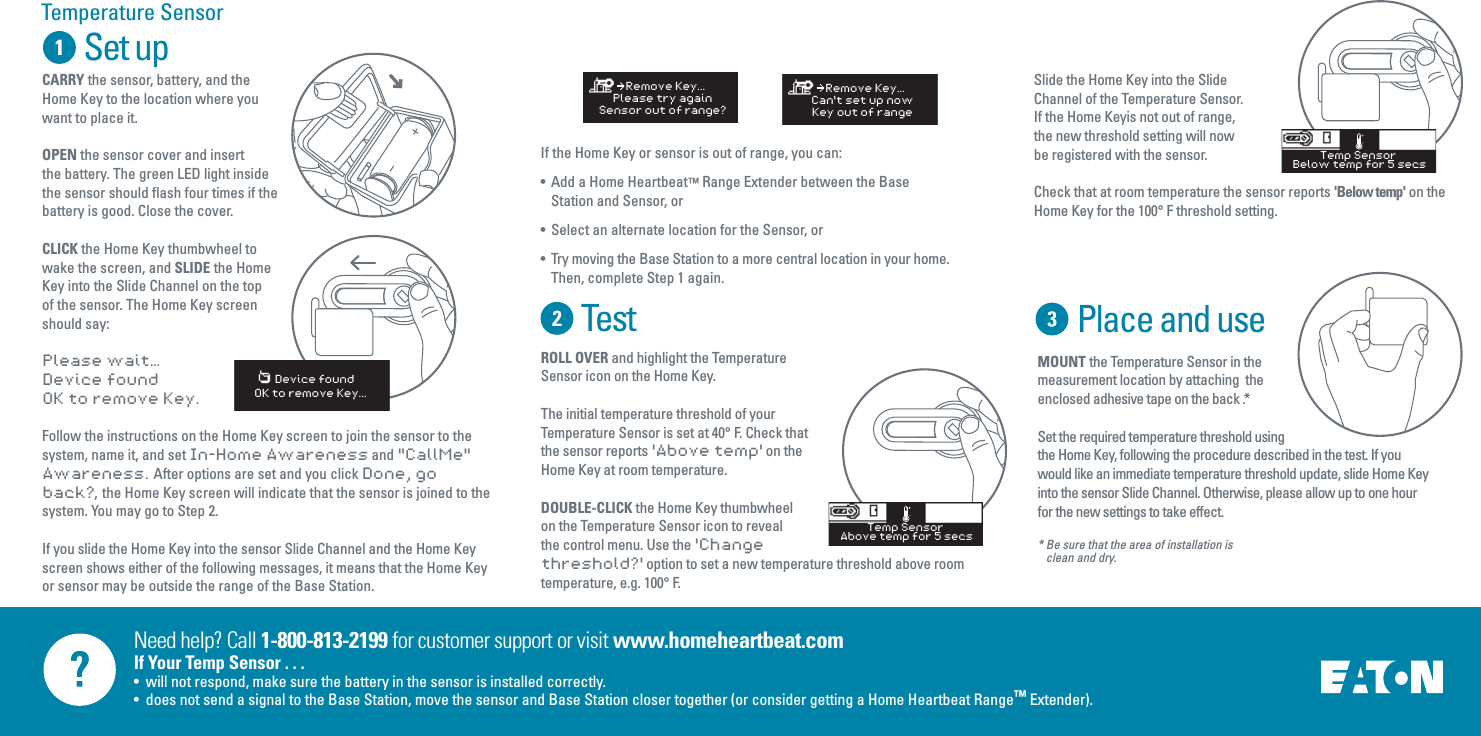
Need help? Call 1-800-813-2199 for customer support or visit www.homeheartbeat.comIf Your Temp Sensor . . .•  will not respond, make sure the battery in the sensor is installed correctly.•  does not send a signal to the Base Station, move the sensor and Base Station closer together (or consider getting a Home Heartbeat Range™ Extender).Set upTestIf the Home Key or sensor is out of range, you can:•  Add a Home Heartbeat™ Range Extender between the Base     Station and Sensor, or•  Select an alternate location for the Sensor, or•  Try moving the Base Station to a more central location in your home.  Then, complete Step 1 again.Temperature SensorCARRY the sensor, battery, and the Home Key to the location where you want to place it. OPEN the sensor cover and insert the battery. The green LED light inside the sensor should flash four times if the battery is good. Close the cover.CLICK the Home Key thumbwheel to wake the screen, and SLIDE the Home Key into the Slide Channel on the top of the sensor. The Home Key screen should say: Please wait…Device foundOK to remove Key.Follow the instructions on the Home Key screen to join the sensor to the system, name it, and set In-Home Awareness and "CallMe" Awareness.  After options are set and you click Done, go back?,  the Home Key screen will indicate that the sensor is joined to the system. You may go to Step 2.If you slide the Home Key into the sensor Slide Channel and the Home Key screen shows either of the following messages, it means that the Home Key or sensor may be outside the range of the Base Station.   Device foundOK to remove Key...ROLL OVER and highlight the Temperature Sensor icon on the Home Key.The initial temperature threshold of your Temperature Sensor is set at 40° F. Check that the sensor reports 'Above temp' on the Home Key at room temperature.DOUBLE-CLICK the Home Key thumbwheel on the Temperature Sensor icon to reveal the control menu. Use the 'Change threshold?' option to set a new temperature threshold above room temperature, e.g. 100° F.  Slide the Home Key into the Slide Channel of the Temperature Sensor. If the Home Keyis not out of range, the new threshold setting will now be registered with the sensor. Check that at room temperature the sensor reports 'Below temp' on the Home Key for the 100° F threshold setting.    Remove Key...Please try againSensor out of range?    Remove Key...Can't set up nowKey out of rangeTemp Sensor Above temp for 5 secsTemp Sensor Below temp for 5 secsPlace and useMOUNT the Temperature Sensor in the measurement location by attaching  the enclosed adhesive tape on the back .*Set the required temperature threshold using the Home Key, following the procedure described in the test. If you would like an immediate temperature threshold update, slide Home Key into the sensor Slide Channel. Otherwise, please allow up to one hour for the new settings to take effect.* Be sure that the area of installation is           clean and dry.

Navigation menu