Ecovacs Robotics RC1712 2.4G wireless module User Manual

Ecovacs Robotics Co., Ltd. 2.4G wireless module

User manual

Instruction Manual
Congratulations on the purchase of your ECOVACS ROBOTICS DEEBOT! We hope it brings you many years of satisfaction. We believe that your new robot will help keep your home clean and give you more quality time to do other things.Live Smart. Enjoy Life.Should you encounter situations that have not been properly addressed in this Instruction Manual, please contact our Customer Service Center where a technician will be able to help you with your specic problem or question.   For more information, please visit the ECOVACS ROBOTICS ofcial website: HYPERLINK "http://www.ecovacs.com/" \h www.ecovacs.comThe company reserves the right to make technological and/or design changes to this product for continuous improvement.Thank you for choosing WINBOT!Instruction Manual ..............................................................................................................2EN
3EN1. Important Safety Instructions ...........................................................................................................................................42. Package Contents and Technical Specifications ...........................................................................................................63. Operating WINBOT ..........................................................................................................................................................104. Maintenance .....................................................................................................................................................................195. Status Indicator Light and Sounds ................................................................................................................................236. Troubleshooting ..............................................................................................................................................................24Contents
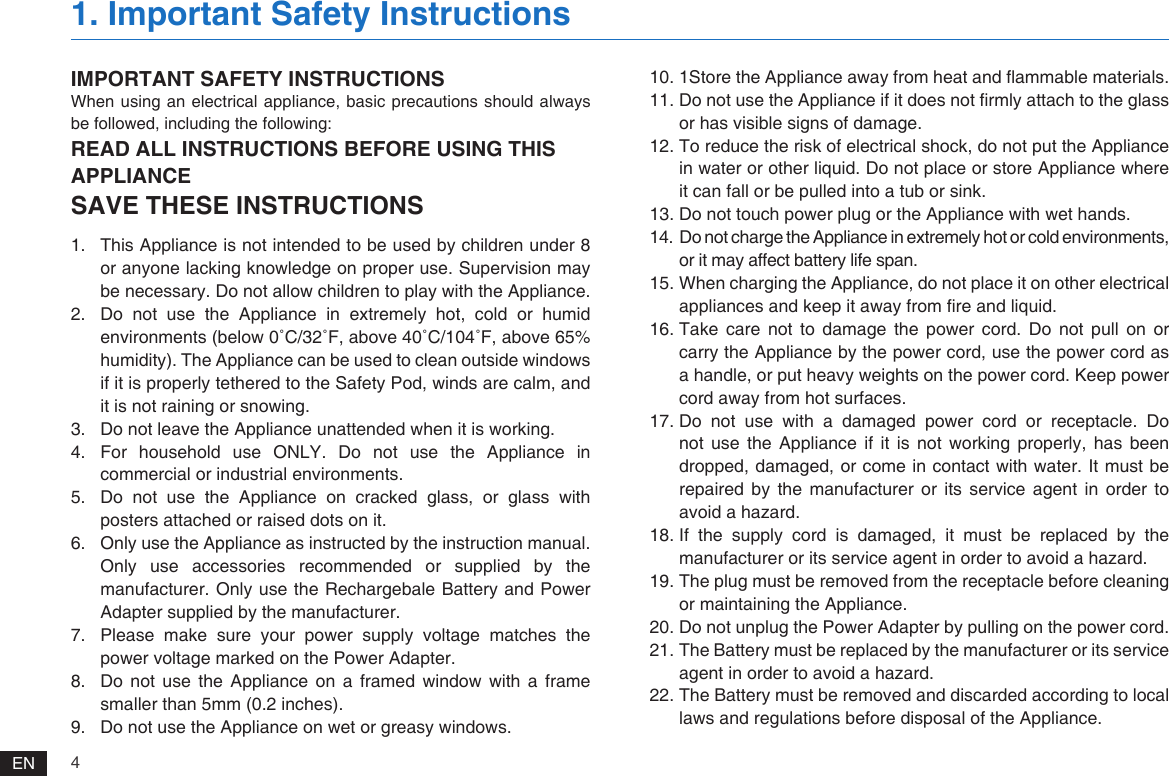
4EN1.  This Appliance is not intended to be used by children under 8 or anyone lacking knowledge on proper use. Supervision may be necessary. Do not allow children to play with the Appliance.2.  Do not use the Appliance in extremely hot, cold or humid environments (below 0˚C/32˚F, above 40˚C/104˚F, above 65% humidity). The Appliance can be used to clean outside windows if it is properly tethered to the Safety Pod, winds are calm, and it is not raining or snowing.3.  Do not leave the Appliance unattended when it is working.4.  For  household  use  ONLY.  Do  not  use  the  Appliance  in commercial or industrial environments.5.  Do not use the Appliance on cracked glass, or glass with posters attached or raised dots on it.6.  Only use the Appliance as instructed by the instruction manual. Only use accessories recommended or supplied by the manufacturer. Only use the Rechargebale Battery and Power Adapter supplied by the manufacturer.7.  Please  make  sure  your  power  supply  voltage  matches  the power voltage marked on the Power Adapter.8.  Do not use the Appliance on a framed window with a frame smaller than 5mm (0.2 inches).9.  Do not use the Appliance on wet or greasy windows. 10. 1Store the Appliance away from heat and ammable materials.11. Do not use the Appliance if it does not rmly attach to the glass or has visible signs of damage.12. To reduce the risk of electrical shock, do not put the Appliance in water or other liquid. Do not place or store Appliance where it can fall or be pulled into a tub or sink.13. Do not touch power plug or the Appliance with wet hands.14. Do not charge the Appliance in extremely hot or cold environments, or it may affect battery life span.15. When charging the Appliance, do not place it on other electrical appliances and keep it away from re and liquid.16. Take care not to damage the power cord. Do not pull on or carry the Appliance by the power cord, use the power cord as a handle, or put heavy weights on the power cord. Keep power cord away from hot surfaces. 17. Do not use with a damaged power cord or receptacle. Do not use the Appliance if it is not working properly, has been dropped, damaged, or come in contact with water. It must be repaired by the manufacturer or its service agent in order to avoid a hazard.18. If the supply cord is damaged, it must be replaced by the manufacturer or its service agent in order to avoid a hazard.19. The plug must be removed from the receptacle before cleaning or maintaining the Appliance.20. Do not unplug the Power Adapter by pulling on the power cord.21. The Battery must be replaced by the manufacturer or its service agent in order to avoid a hazard.22. The Battery must be removed and discarded according to local laws and regulations before disposal of the Appliance.IMPORTANT SAFETY INSTRUCTIONSWhen using an electrical appliance, basic precautions should always be followed, including the following:READ ALL INSTRUCTIONS BEFORE USING THIS APPLIANCESAVE THESE INSTRUCTIONS1. Important Safety Instructions
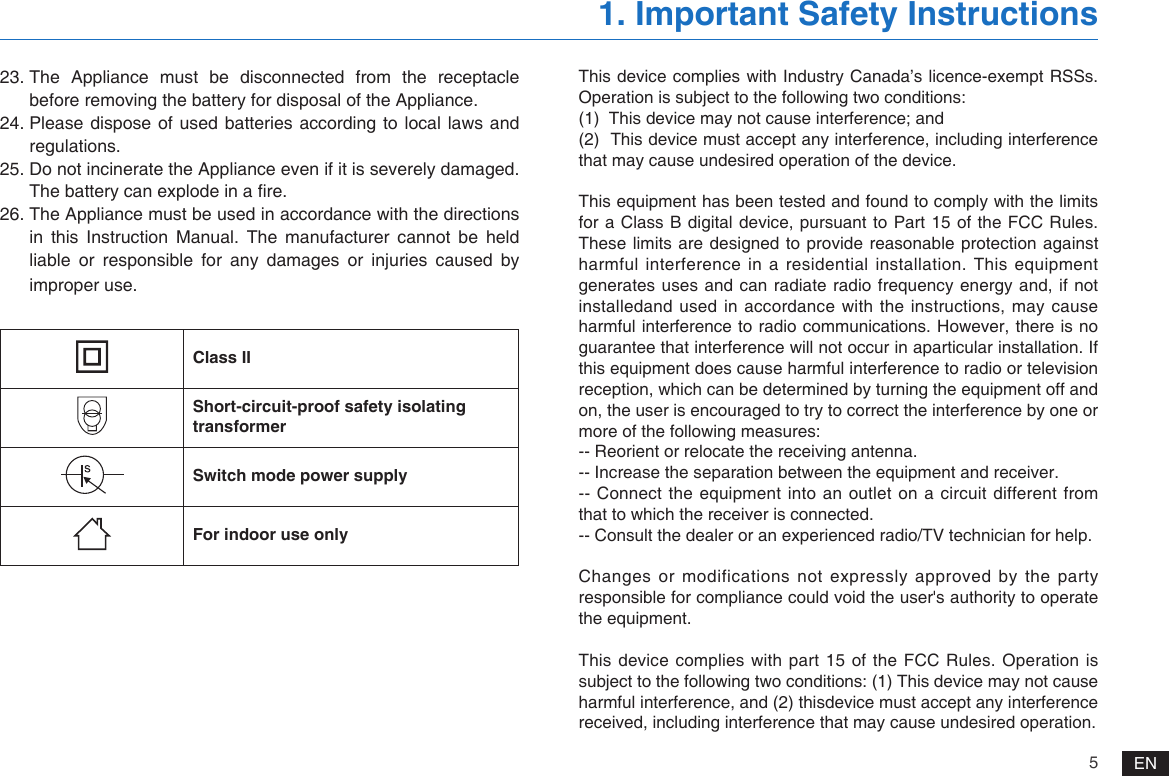
5EN23. The Appliance must be disconnected from the receptacle before removing the battery for disposal of the Appliance.24. Please dispose of used batteries  according to  local laws and regulations.25. Do not incinerate the Appliance even if it is severely damaged. The battery can explode in a re.26. The Appliance must be used in accordance with the directions in this Instruction Manual. The manufacturer cannot be held liable or responsible for any damages or injuries caused by improper use.1. Important Safety InstructionsClass IIShort-circuit-proof safety isolating transformerSwitch mode power supplyFor indoor use onlyThis device complies with Industry Canada’s licence-exempt RSSs. Operation is subject to the following two conditions:(1)  This device may not cause interference; and(2)  This device must accept any interference, including interference that may cause undesired operation of the device.This equipment has been tested and found to comply with the limits for a Class B digital device, pursuant  to Part 15 of the FCC Rules. These limits are designed to provide reasonable protection against harmful interference in a residential installation. This equipment generates uses and can radiate radio frequency energy and, if not installedand used in accordance with the instructions, may cause harmful interference to radio communications. However, there is no guarantee that interference will not occur in aparticular installation. If this equipment does cause harmful interference to radio or television reception, which can be determined by turning the equipment off and on, the user is encouraged to try to correct the interference by one or more of the following measures:-- Reorient or relocate the receiving antenna.-- Increase the separation between the equipment and receiver.-- Connect the equipment into an outlet on a circuit different from that to which the receiver is connected.-- Consult the dealer or an experienced radio/TV technician for help. Changes or modifications not expressly approved by the party responsible for compliance could void the user's authority to operate the equipment. This device complies  with part 15  of the FCC Rules. Operation is subject to the following two conditions: (1) This device may not cause harmful interference, and (2) thisdevice must accept any interference received, including interference that may cause undesired operation.
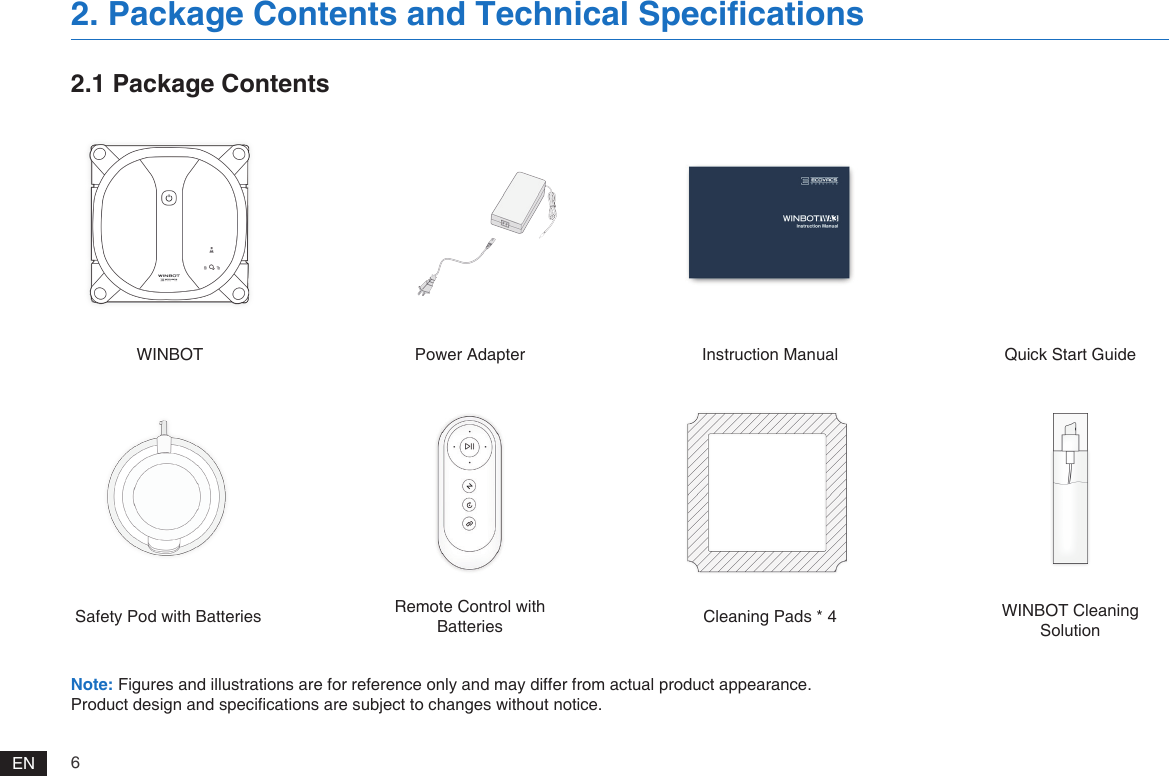
6EN2.1 Package ContentsWINBOTSafety Pod with BatteriesPower AdapterRemote Control with BatteriesInstruction ManualCleaning Pads * 4Quick Start GuideWINBOT Cleaning Solution2. Package Contents and Technical Specifications Note: Figures and illustrations are for reference only and may differ from actual product appearance.Product design and specications are subject to changes without notice.
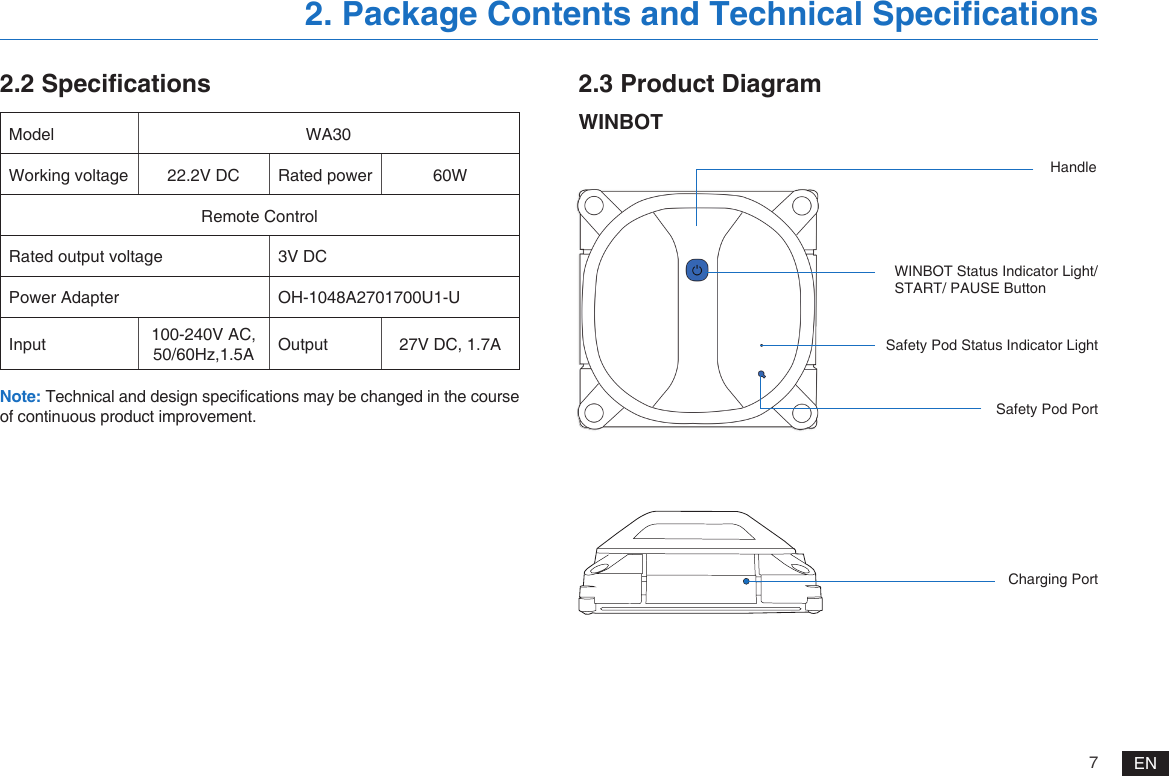
7EN2.2 Specifications 2.3 Product DiagramWINBOT2. Package Contents and Technical Specifications Model WA30Working voltage 22.2V DC Rated power  60WRemote ControlRated output voltage 3V DCPower Adapter OH-1048A2701700U1-UInput 100-240V AC, 50/60Hz,1.5A Output 27V DC, 1.7ANote: Technical and design specications may be changed in the course of continuous product improvement.HandleCharging PortSafety Pod Status Indicator LightSafety Pod Port WINBOT Status Indicator Light/START/ PAUSE Button
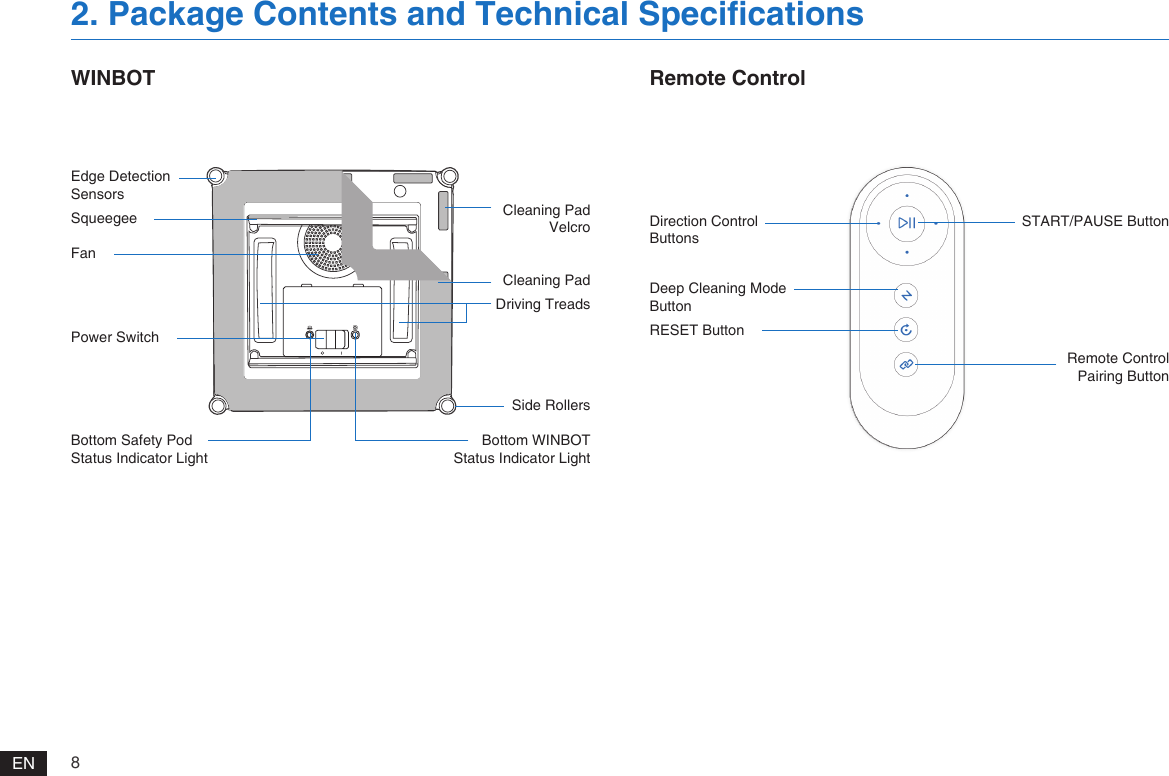
8ENWINBOT2. Package Contents and Technical Specifications Remote ControlDirection Control ButtonsEdge Detection SensorsSqueegeeFanPower SwitchBottom Safety Pod Status Indicator LightCleaning PadDriving TreadsCleaning Pad VelcroSide Rollers Bottom WINBOT Status Indicator LightDeep Cleaning Mode ButtonRESET ButtonSTART/PAUSE ButtonRemote Control Pairing Button
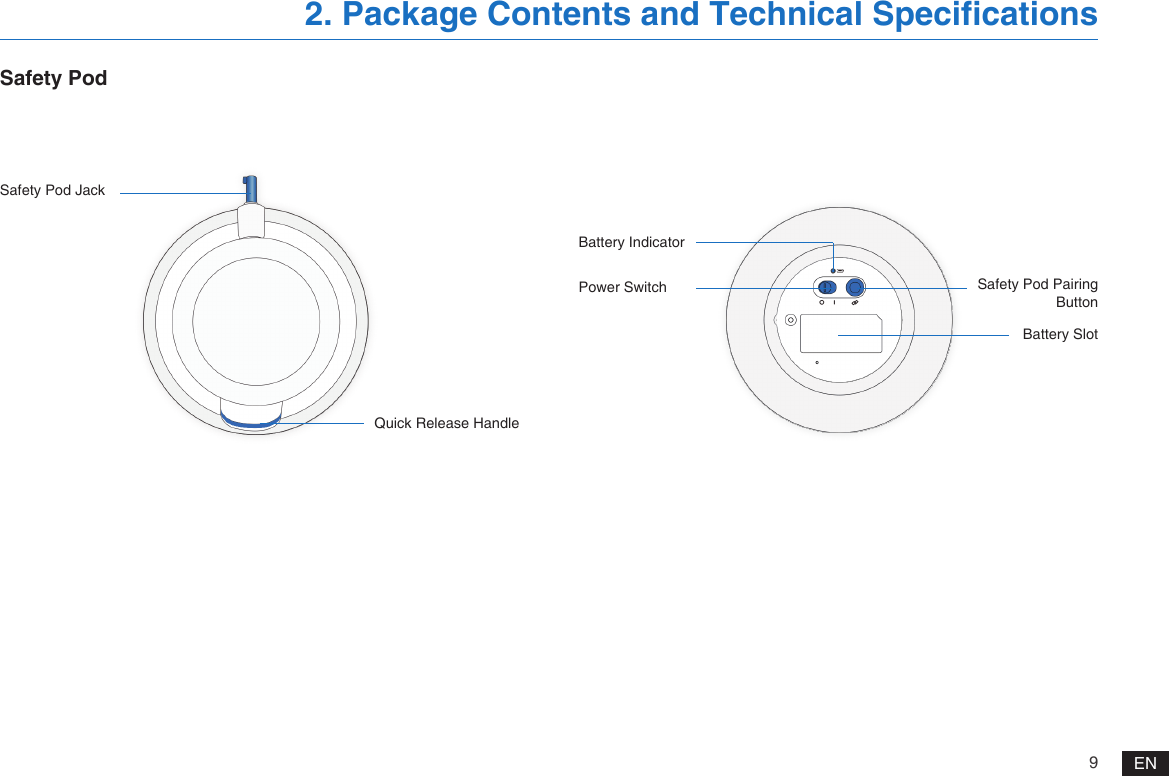
9ENSafety PodSafety Pod JackBattery IndicatorPower SwitchQuick Release HandleBattery SlotSafety Pod Pairing Button2. Package Contents and Technical Specifications
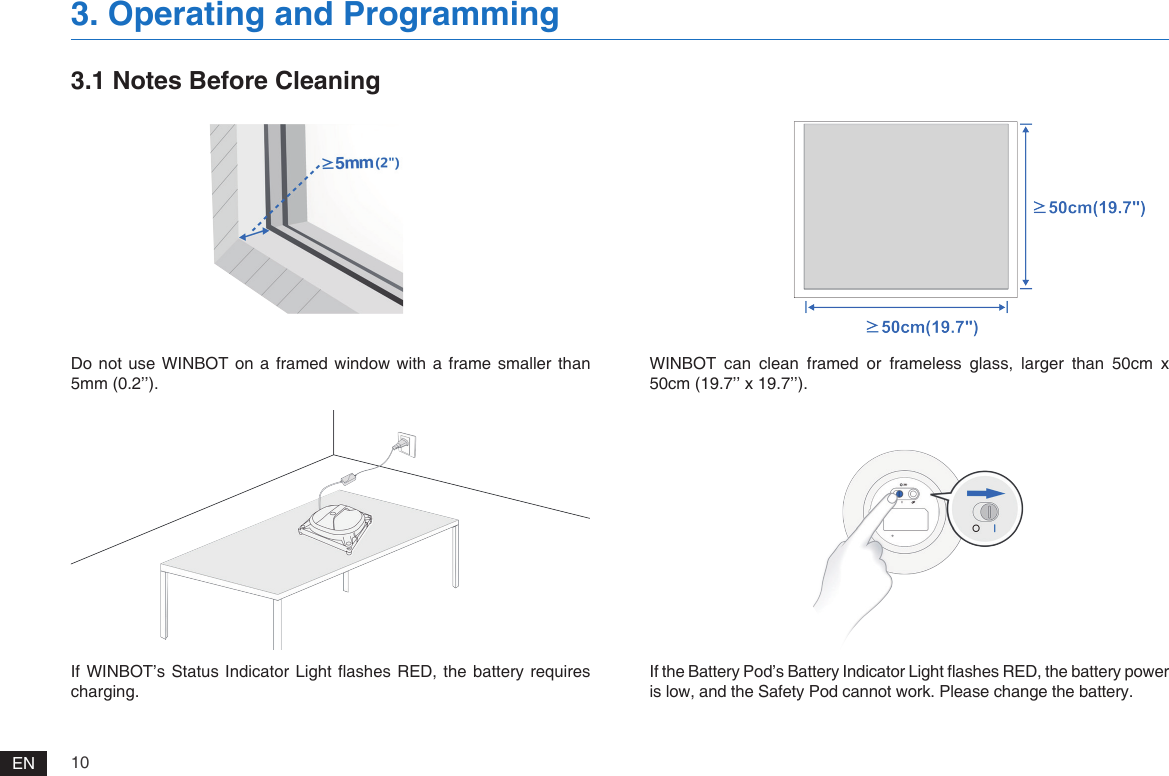
10ENDo not  use WINBOT  on a  framed  window  with  a frame  smaller than 5mm (0.2’’).If WINBOT’s Status  Indicator Light ashes  RED,  the battery requires charging.WINBOT  can  clean  framed  or  frameless  glass,  larger  than  50cm  x 50cm (19.7’’ x 19.7’’).If the Battery Pod’s Battery Indicator Light ashes RED, the battery power is low, and the Safety Pod cannot work. Please change the battery.3.1 Notes Before Cleaning3. Operating and Programming
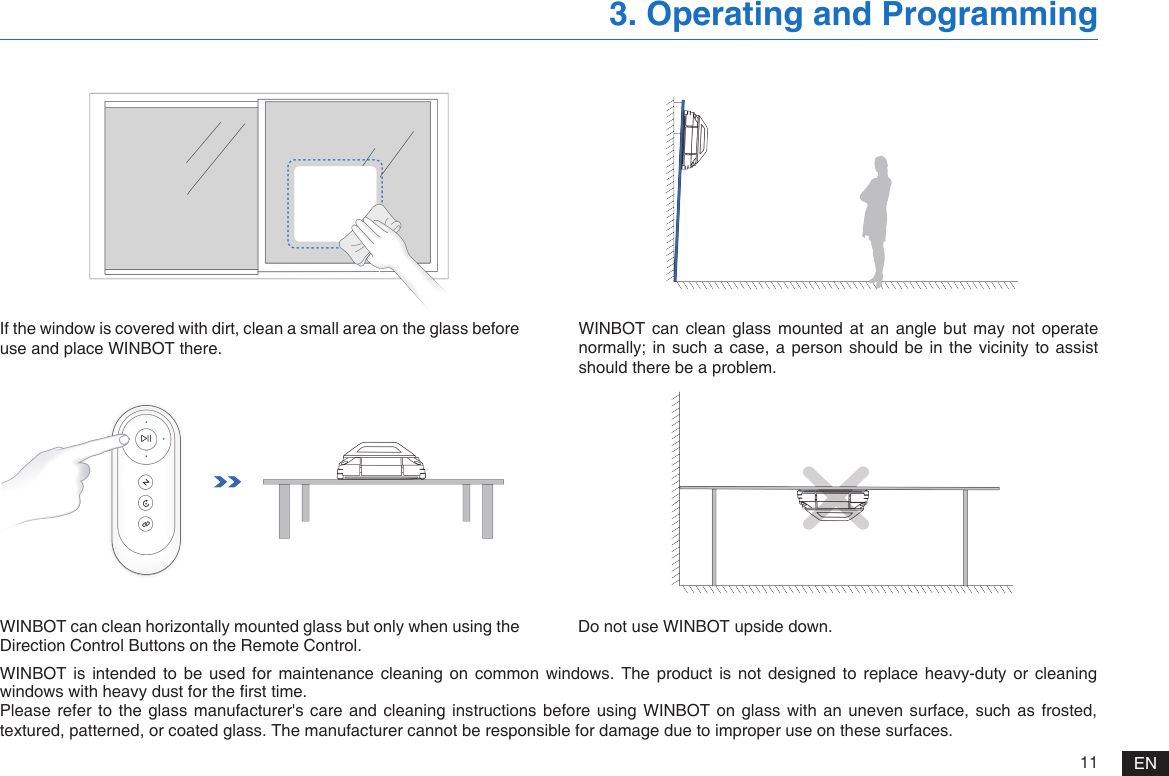
11 ENWINBOT  is  intended  to  be  used  for  maintenance  cleaning  on  common  windows.  The  product  is  not  designed  to  replace  heavy-duty  or  cleaning windows with heavy dust for the rst time.Please refer  to the  glass  manufacturer's  care  and cleaning  instructions before  using WINBOT  on glass  with  an  uneven  surface, such  as frosted, textured, patterned, or coated glass. The manufacturer cannot be responsible for damage due to improper use on these surfaces.3. Operating and ProgrammingWINBOT can clean horizontally mounted glass but only when using the Direction Control Buttons on the Remote Control. Do not use WINBOT upside down.If the window is covered with dirt, clean a small area on the glass before use and place WINBOT there.WINBOT  can  clean glass  mounted  at  an  angle  but  may  not operate normally; in such a case, a person should be in the vicinity to assist should there be a problem.
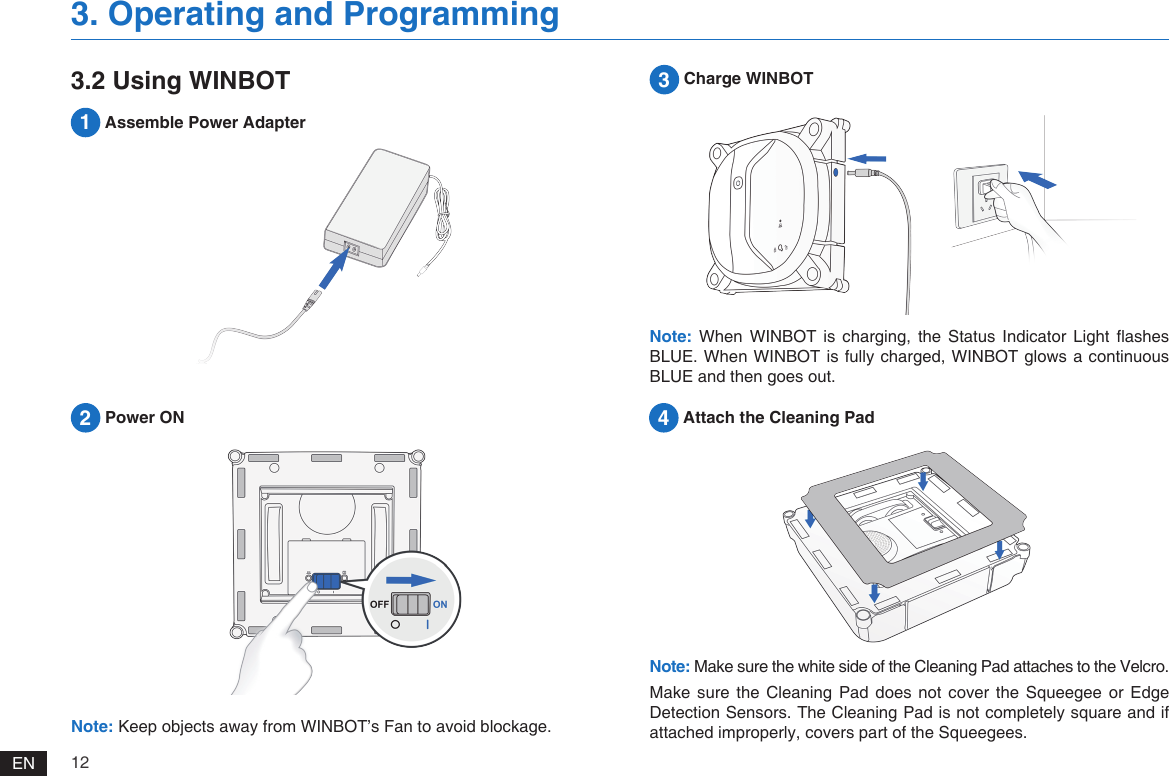
12EN2 Power ON3. Operating and ProgrammingNote: Keep objects away from WINBOT’s Fan to avoid blockage.3 Charge WINBOTNote: When  WINBOT  is  charging,  the  Status  Indicator Light  ashes BLUE. When WINBOT is fully charged, WINBOT glows a continuous BLUE and then goes out.3.2 Using WINBOT4 Attach the Cleaning Pad1 Assemble Power AdapterNote: Make sure the white side of the Cleaning Pad attaches to the Velcro. Make  sure  the Cleaning  Pad  does  not  cover  the  Squeegee  or Edge Detection Sensors. The Cleaning Pad is not completely square and if attached improperly, covers part of the Squeegees.
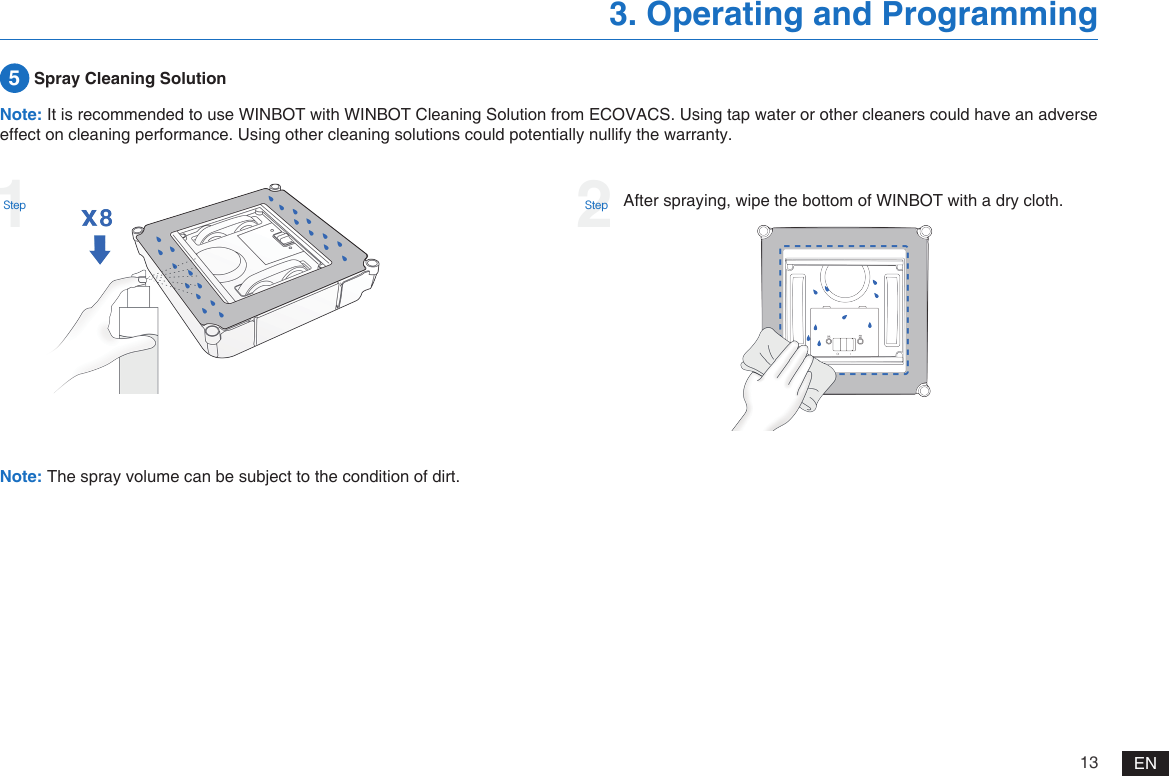
13 EN3. Operating and Programming5 Spray Cleaning SolutionAfter spraying, wipe the bottom of WINBOT with a dry cloth.Note: The spray volume can be subject to the condition of dirt.Note: It is recommended to use WINBOT with WINBOT Cleaning Solution from ECOVACS. Using tap water or other cleaners could have an adverse effect on cleaning performance. Using other cleaning solutions could potentially nullify the warranty.1Step2Step
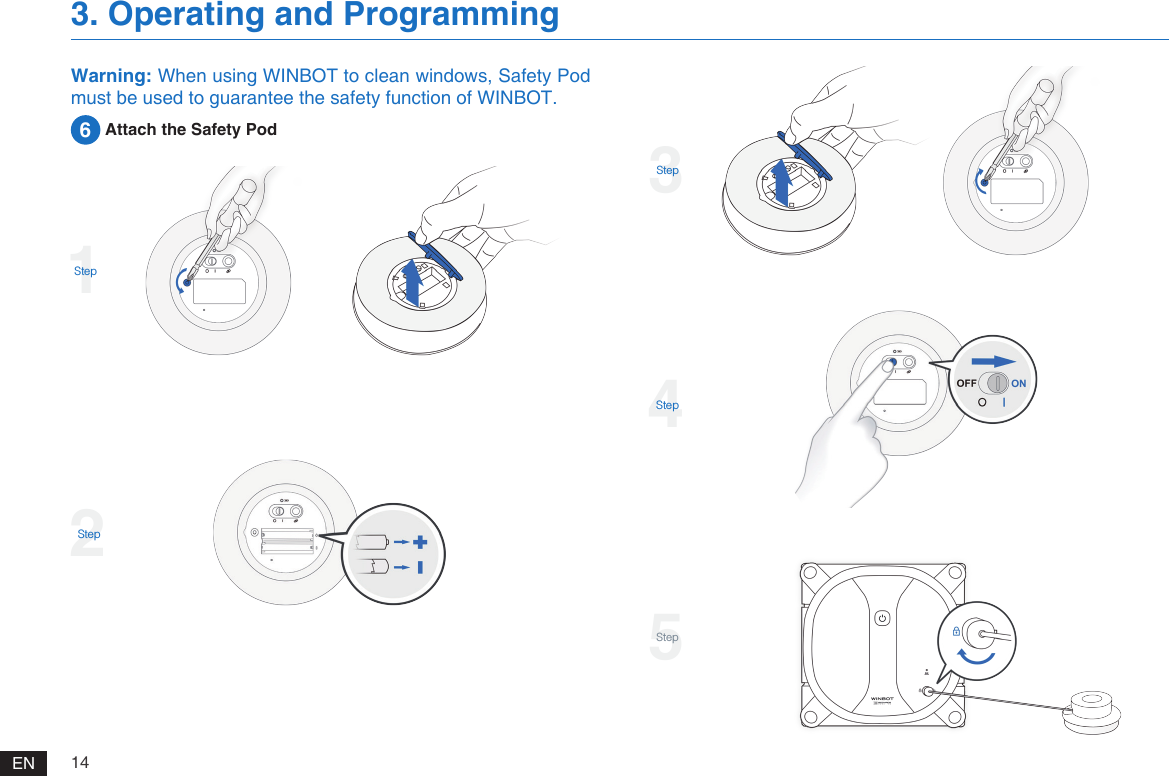
14EN3. Operating and Programming3Step4Step5StepWarning: When using WINBOT to clean windows, Safety Pod must be used to guarantee the safety function of WINBOT.6 Attach the Safety Pod1Step2Step
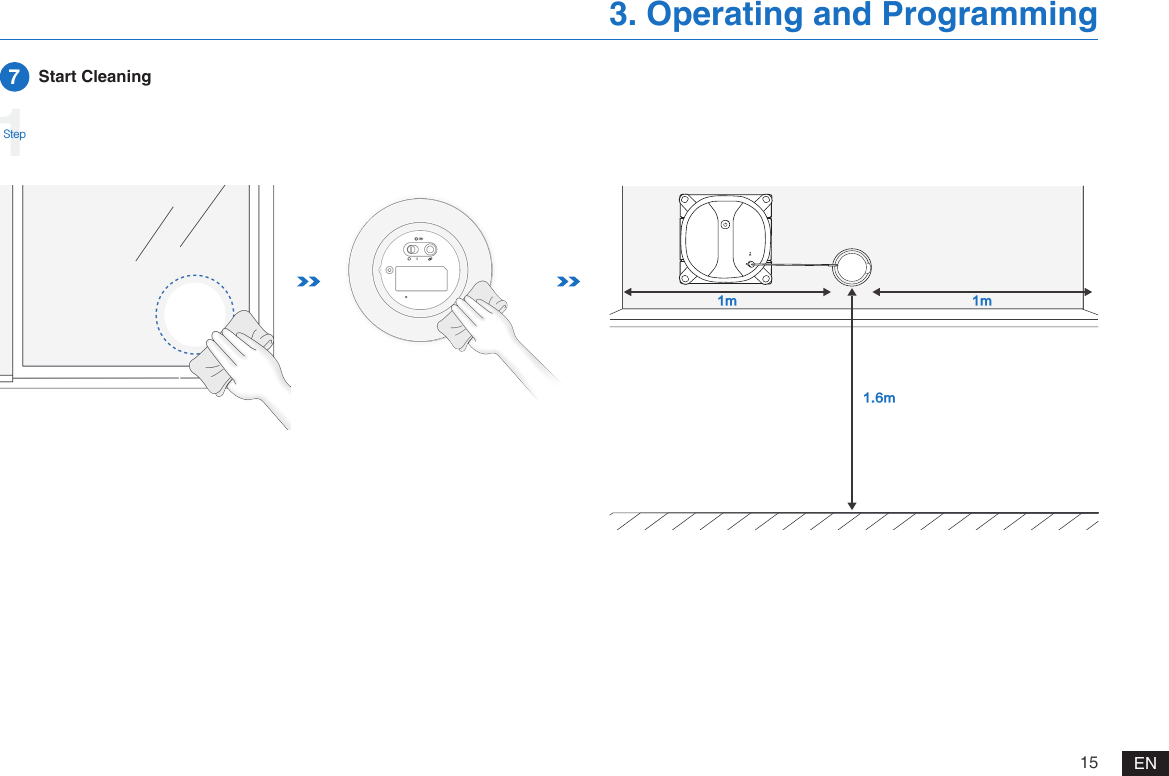
15 EN3. Operating and Programming7  Start Cleaning1StepNN N
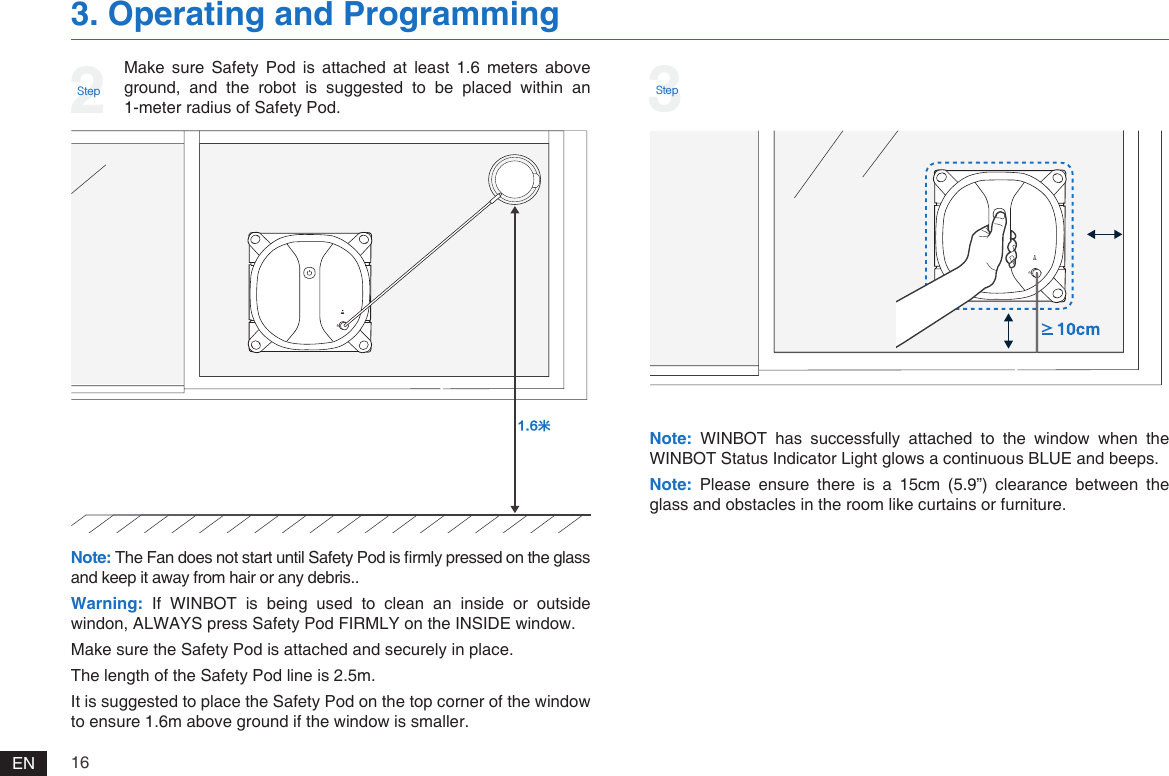
16EN3. Operating and ProgrammingMake  sure  Safety  Pod  is  attached  at  least  1.6  meters  above ground, and the robot is suggested to be placed within an 1-meter radius of Safety Pod. 2StepNote: WINBOT  has  successfully  attached  to  the  window  when  the WINBOT Status Indicator Light glows a continuous BLUE and beeps. Note: Please  ensure  there  is  a  15cm  (5.9”)  clearance  between  the glass and obstacles in the room like curtains or furniture. Note: The Fan does not start until Safety Pod is rmly pressed on the glass and keep it away from hair or any debris..Warning: If  WINBOT  is  being  used  to  clean  an  inside  or  outside windon, ALWAYS press Safety Pod FIRMLY on the INSIDE window. Make sure the Safety Pod is attached and securely in place.The length of the Safety Pod line is 2.5m.It is suggested to place the Safety Pod on the top corner of the window to ensure 1.6m above ground if the window is smaller.ㆠ3Step
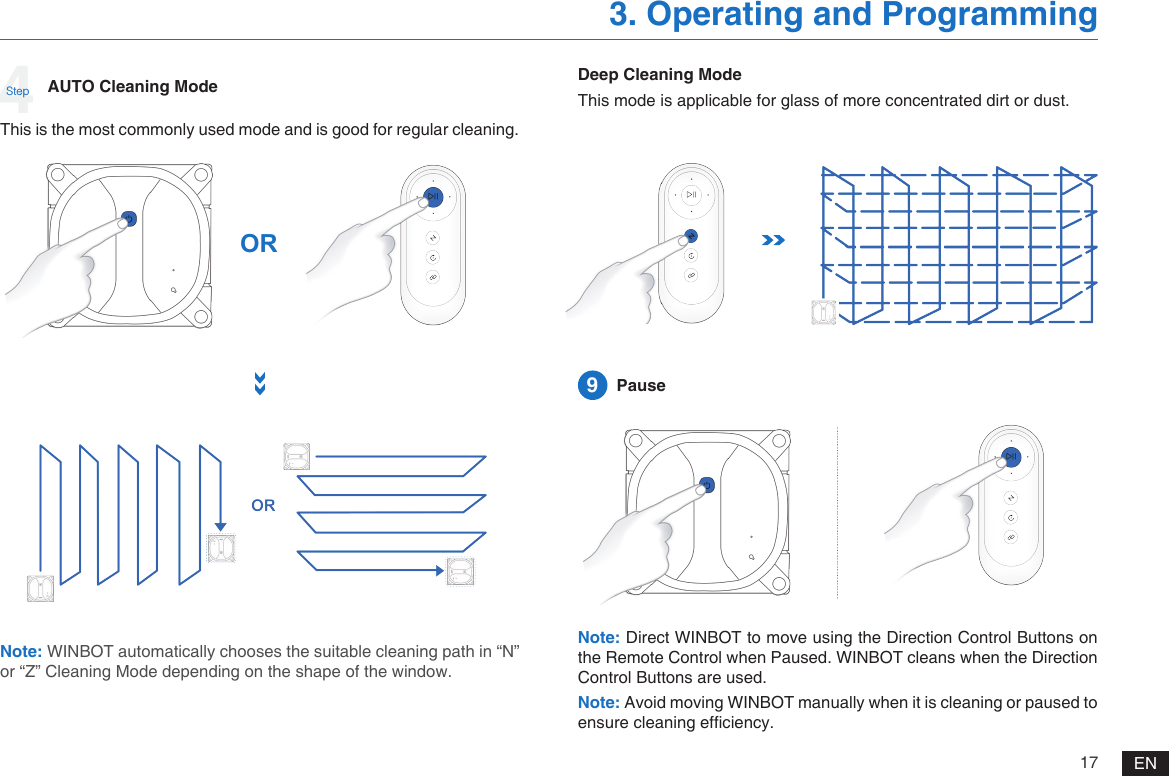
17 EN3. Operating and ProgrammingNote: WINBOT automatically chooses the suitable cleaning path in “N” or “Z” Cleaning Mode depending on the shape of the window.AUTO Cleaning ModeThis is the most commonly used mode and is good for regular cleaning.ORDeep Cleaning ModeThis mode is applicable for glass of more concentrated dirt or dust.Note: Direct WINBOT to move using the Direction Control Buttons on the Remote Control when Paused. WINBOT cleans when the Direction Control Buttons are used. Note: Avoid moving WINBOT manually when it is cleaning or paused to ensure cleaning efciency. 9  Pause4Step
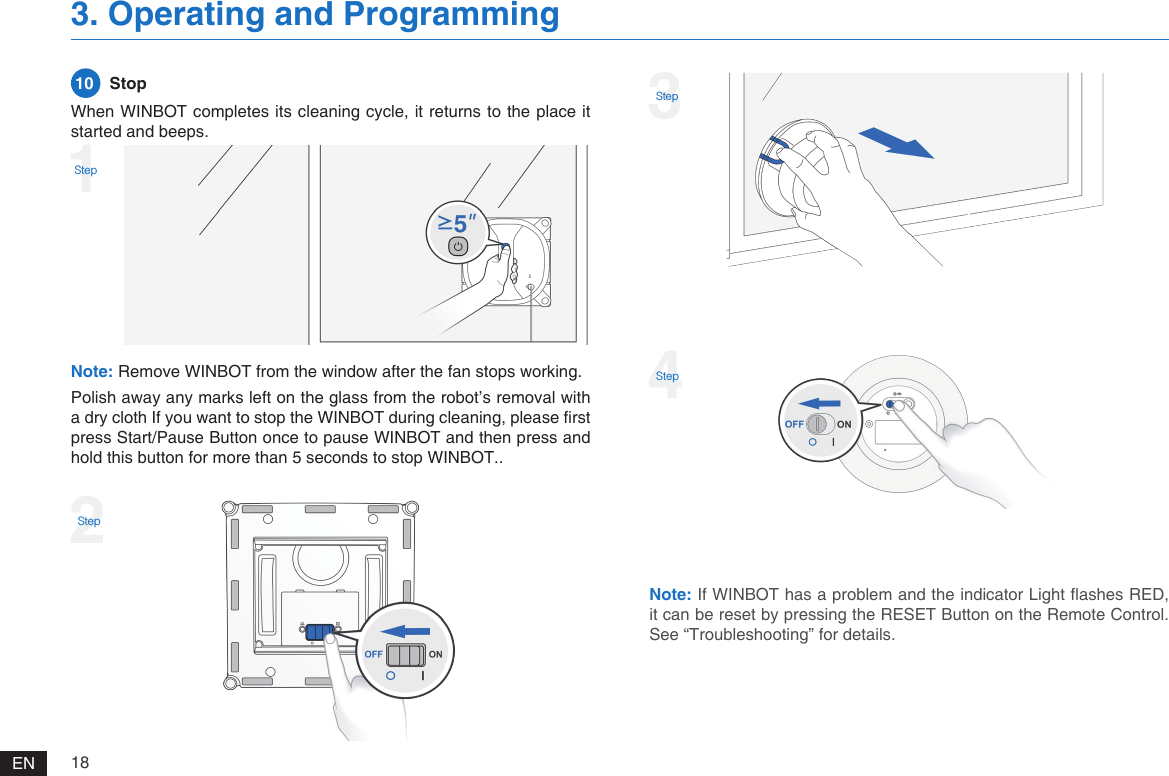
18EN3. Operating and ProgrammingNote: Remove WINBOT from the window after the fan stops working. Polish away any marks left on the glass from the robot’s removal with a dry cloth If you want to stop the WINBOT during cleaning, please rst press Start/Pause Button once to pause WINBOT and then press and hold this button for more than 5 seconds to stop WINBOT..When WINBOT completes its cleaning cycle, it returns to the place it started and beeps. 10   Stop1Step2Step3StepNote: If WINBOT has a problem and the indicator Light ashes RED, it can be reset by pressing the RESET Button on the Remote Control. See “Troubleshooting” for details.4Step
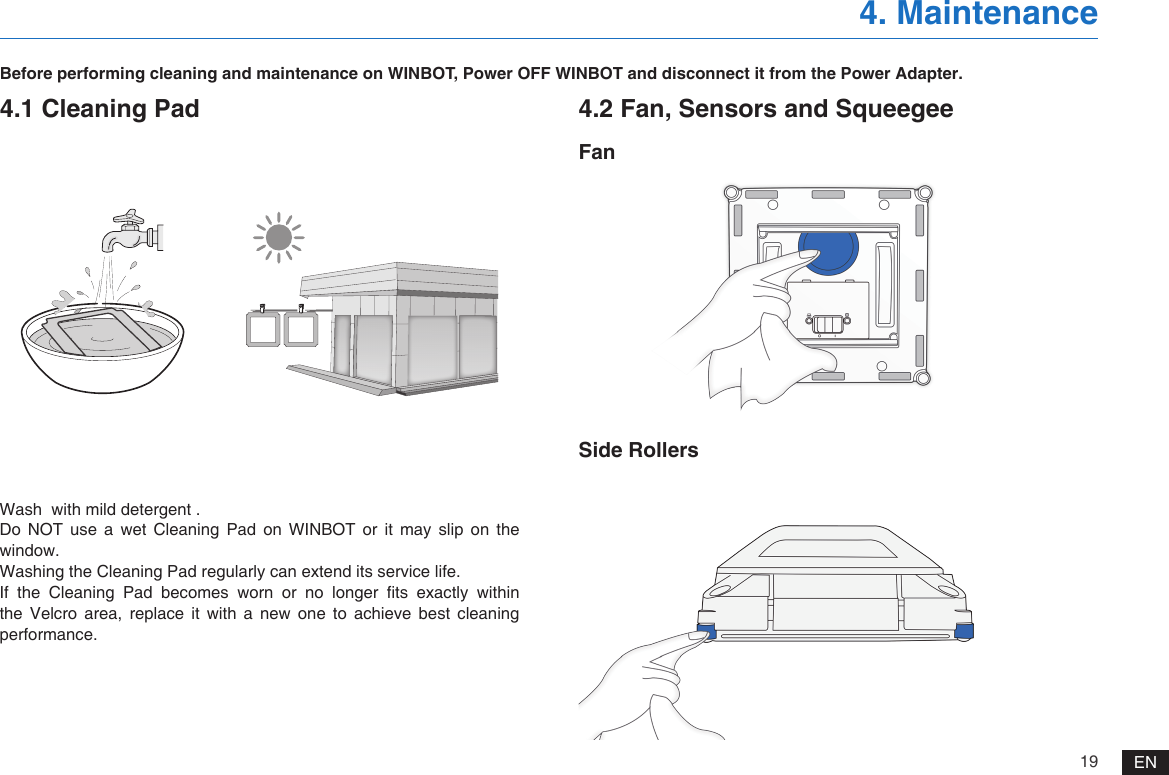
19 EN4. MaintenanceBefore performing cleaning and maintenance on WINBOT, Power OFF WINBOT and disconnect it from the Power Adapter.4.1 Cleaning PadWash  with mild detergent .Do  NOT  use  a  wet  Cleaning  Pad  on  WINBOT  or  it  may  slip  on  the window.Washing the Cleaning Pad regularly can extend its service life.If  the  Cleaning  Pad  becomes  worn  or  no  longer  ts  exactly  within the Velcro area, replace it with a new one to achieve best cleaning performance.4.2 Fan, Sensors and SqueegeeFanSide Rollers
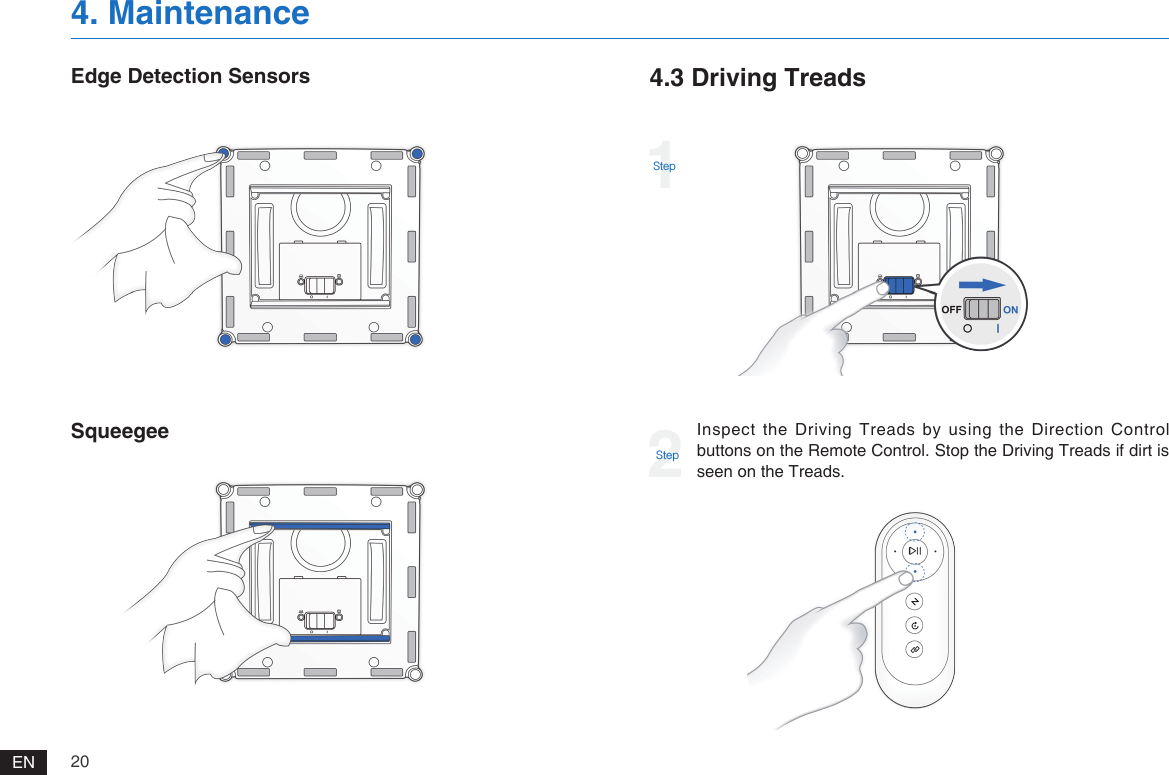
20EN4. MaintenanceEdge Detection SensorsSqueegee4.3 Driving Treads1StepInspect the Driving Treads by using the Direction Control buttons on the Remote Control. Stop the Driving Treads if dirt is seen on the Treads.2Step
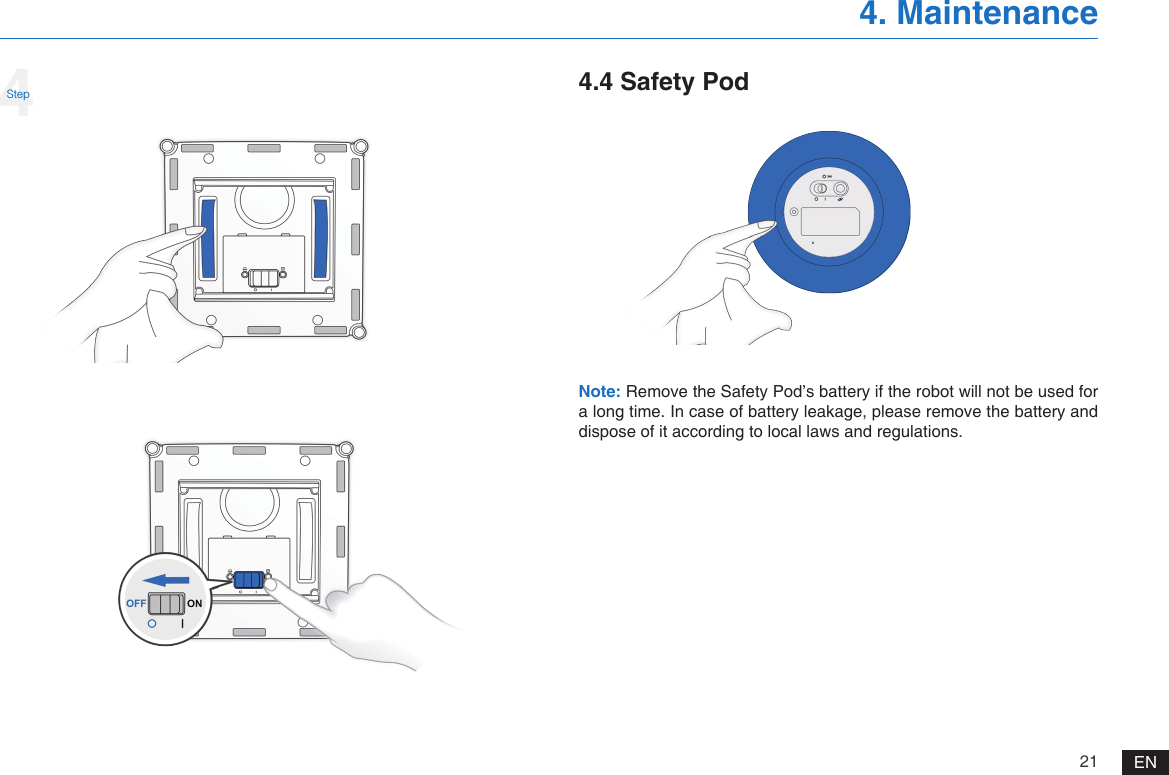
21 EN4. Maintenance4Step 4.4 Safety PodNote: Remove the Safety Pod’s battery if the robot will not be used for a long time. In case of battery leakage, please remove the battery and dispose of it according to local laws and regulations.
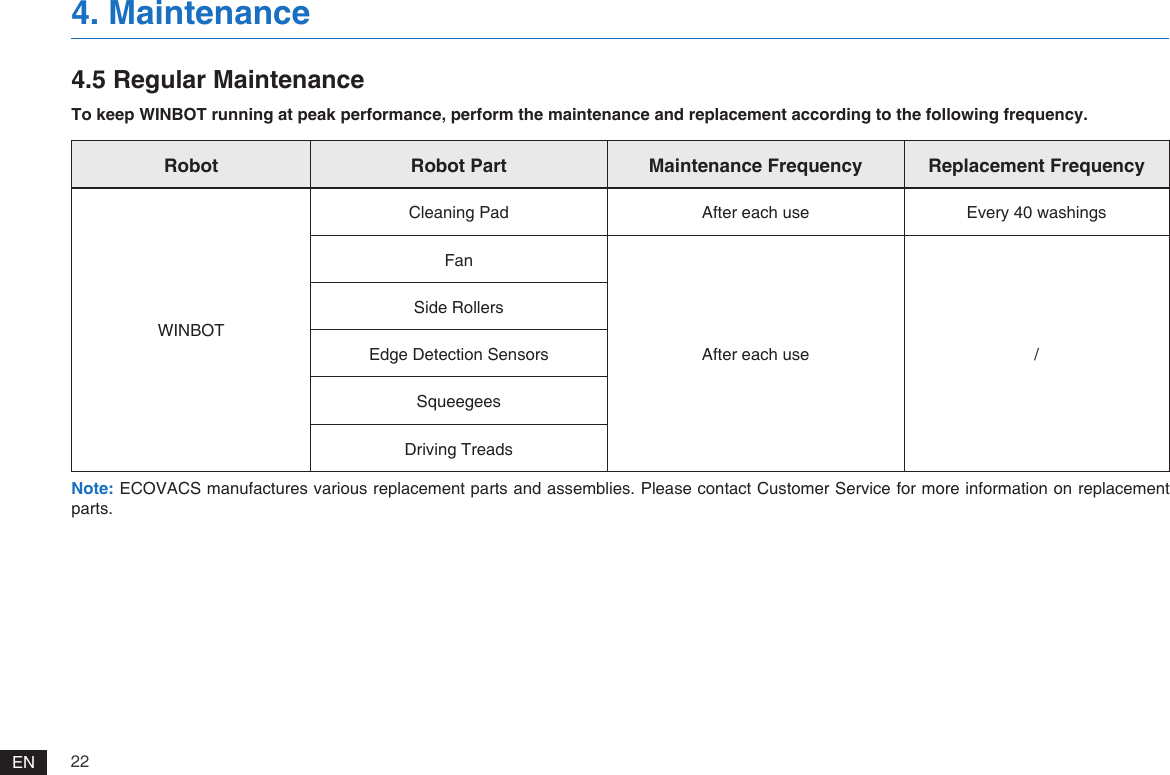
22EN4. Maintenance4.5 Regular MaintenanceTo keep WINBOT running at peak performance, perform the maintenance and replacement according to the following frequency.Note: ECOVACS manufactures various replacement parts and assemblies. Please contact Customer Service for more information on replacement parts.Robot Robot Part Maintenance Frequency Replacement FrequencyWINBOTCleaning Pad After each use Every 40 washingsFanAfter each use /Side RollersEdge Detection SensorsSqueegeesDriving Treads
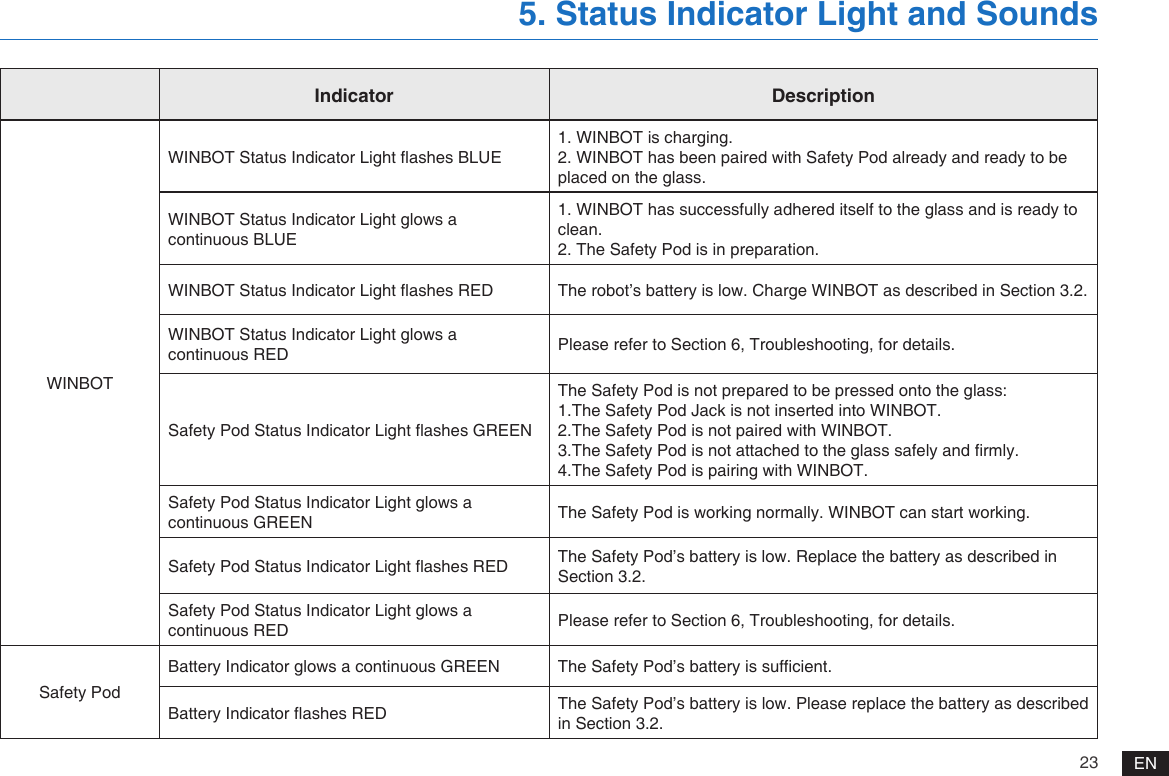
23 EN5. Status Indicator Light and SoundsIndicator DescriptionWINBOTWINBOT Status Indicator Light ashes BLUE1. WINBOT is charging.2. WINBOT has been paired with Safety Pod already and ready to be placed on the glass. WINBOT Status Indicator Light glows a continuous BLUE1. WINBOT has successfully adhered itself to the glass and is ready to clean. 2. The Safety Pod is in preparation.WINBOT Status Indicator Light ashes RED The robot’s battery is low. Charge WINBOT as described in Section 3.2.WINBOT Status Indicator Light glows a continuous RED Please refer to Section 6, Troubleshooting, for details.Safety Pod Status Indicator Light ashes GREENThe Safety Pod is not prepared to be pressed onto the glass:1.The Safety Pod Jack is not inserted into WINBOT.2.The Safety Pod is not paired with WINBOT.3.The Safety Pod is not attached to the glass safely and rmly.4.The Safety Pod is pairing with WINBOT.Safety Pod Status Indicator Light glows a continuous GREEN The Safety Pod is working normally. WINBOT can start working.Safety Pod Status Indicator Light ashes RED The Safety Pod’s battery is low. Replace the battery as described in Section 3.2.Safety Pod Status Indicator Light glows a continuous RED Please refer to Section 6, Troubleshooting, for details.Safety PodBattery Indicator glows a continuous GREEN The Safety Pod’s battery is sufcient.Battery Indicator ashes RED The Safety Pod’s battery is low. Please replace the battery as described in Section 3.2.
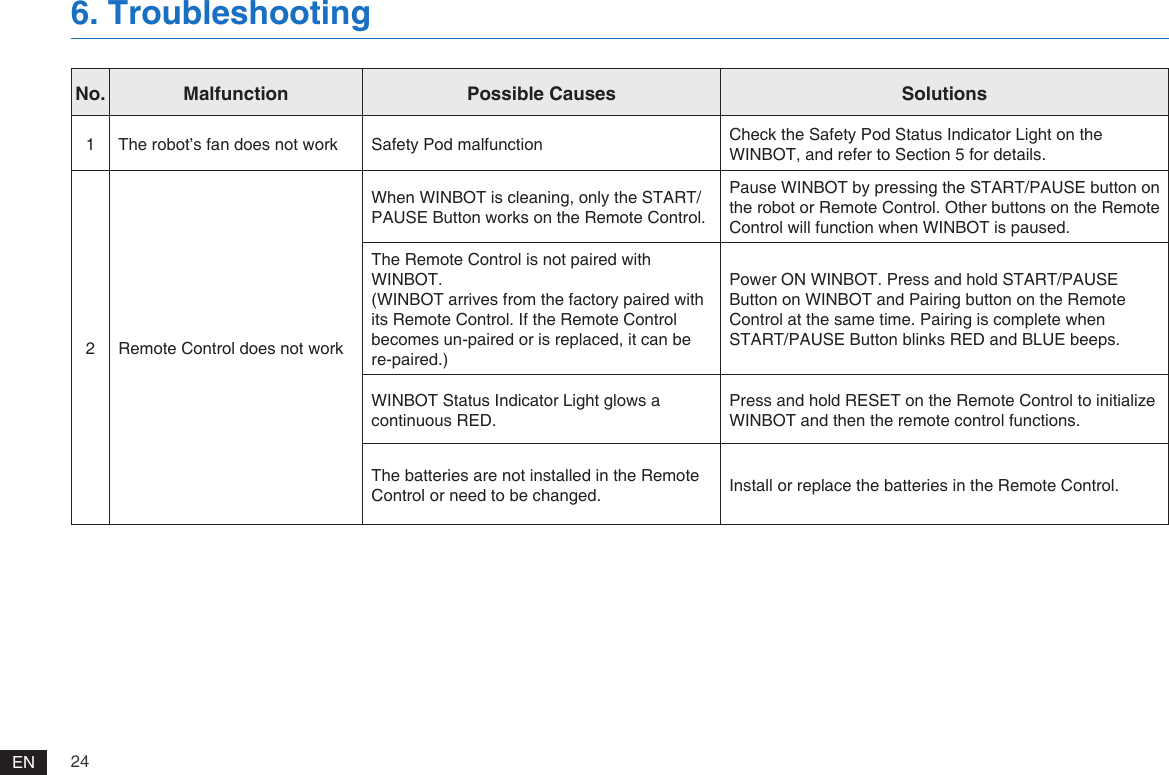
24EN6. TroubleshootingNo. Malfunction Possible Causes Solutions1 The robot’s fan does not work Safety Pod malfunction Check the Safety Pod Status Indicator Light on the WINBOT, and refer to Section 5 for details.2 Remote Control does not workWhen WINBOT is cleaning, only the START/PAUSE Button works on the Remote Control. Pause WINBOT by pressing the START/PAUSE button on the robot or Remote Control. Other buttons on the Remote Control will function when WINBOT is paused.The Remote Control is not paired with WINBOT.(WINBOT arrives from the factory paired with its Remote Control. If the Remote Control becomes un-paired or is replaced, it can be re-paired.)Power ON WINBOT. Press and hold START/PAUSE Button on WINBOT and Pairing button on the Remote Control at the same time. Pairing is complete when START/PAUSE Button blinks RED and BLUE beeps.WINBOT Status Indicator Light glows a continuous RED.Press and hold RESET on the Remote Control to initialize WINBOT and then the remote control functions.The batteries are not installed in the Remote Control or need to be changed. Install or replace the batteries in the Remote Control.
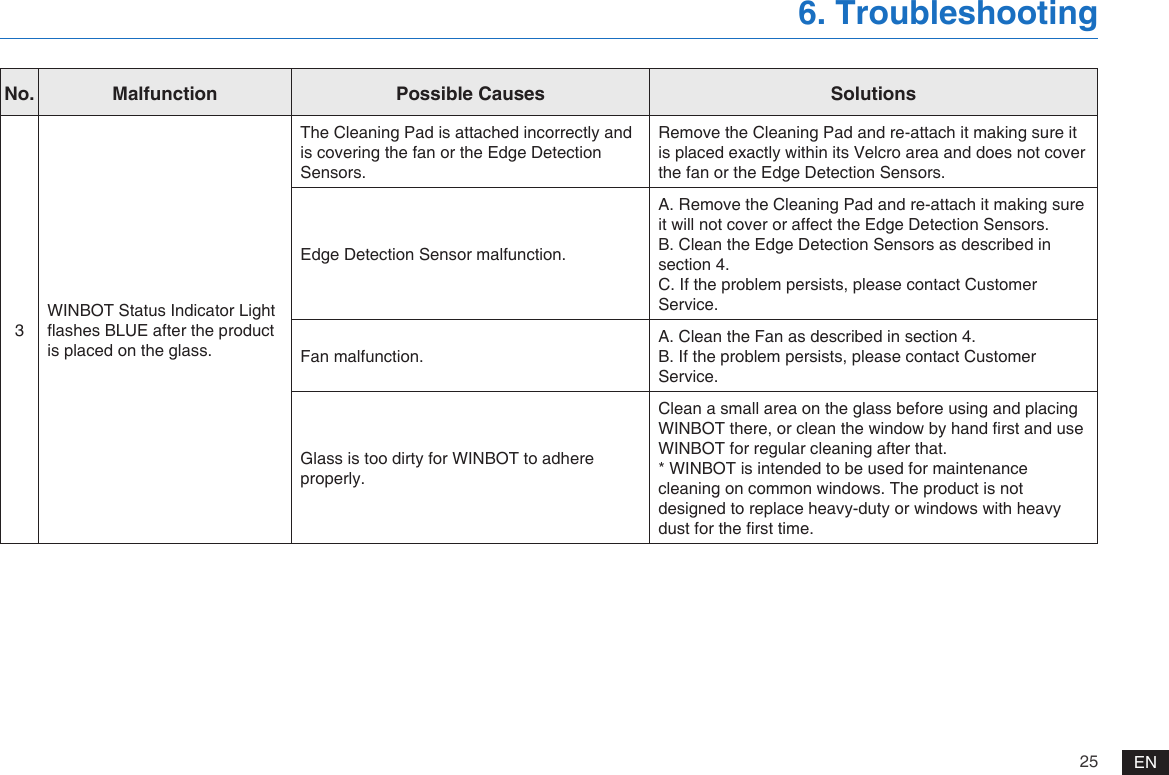
25 EN6. TroubleshootingNo. Malfunction Possible Causes Solutions3WINBOT Status Indicator Light ashes BLUE after the product is placed on the glass.The Cleaning Pad is attached incorrectly and is covering the fan or the Edge Detection Sensors.Remove the Cleaning Pad and re-attach it making sure it is placed exactly within its Velcro area and does not cover the fan or the Edge Detection Sensors.Edge Detection Sensor malfunction.A. Remove the Cleaning Pad and re-attach it making sure it will not cover or affect the Edge Detection Sensors.B. Clean the Edge Detection Sensors as described in section 4.C. If the problem persists, please contact Customer Service. Fan malfunction.A. Clean the Fan as described in section 4. B. If the problem persists, please contact Customer Service.Glass is too dirty for WINBOT to adhere properly.Clean a small area on the glass before using and placing WINBOT there, or clean the window by hand rst and use WINBOT for regular cleaning after that.* WINBOT is intended to be used for maintenance cleaning on common windows. The product is not designed to replace heavy-duty or windows with heavy dust for the rst time.
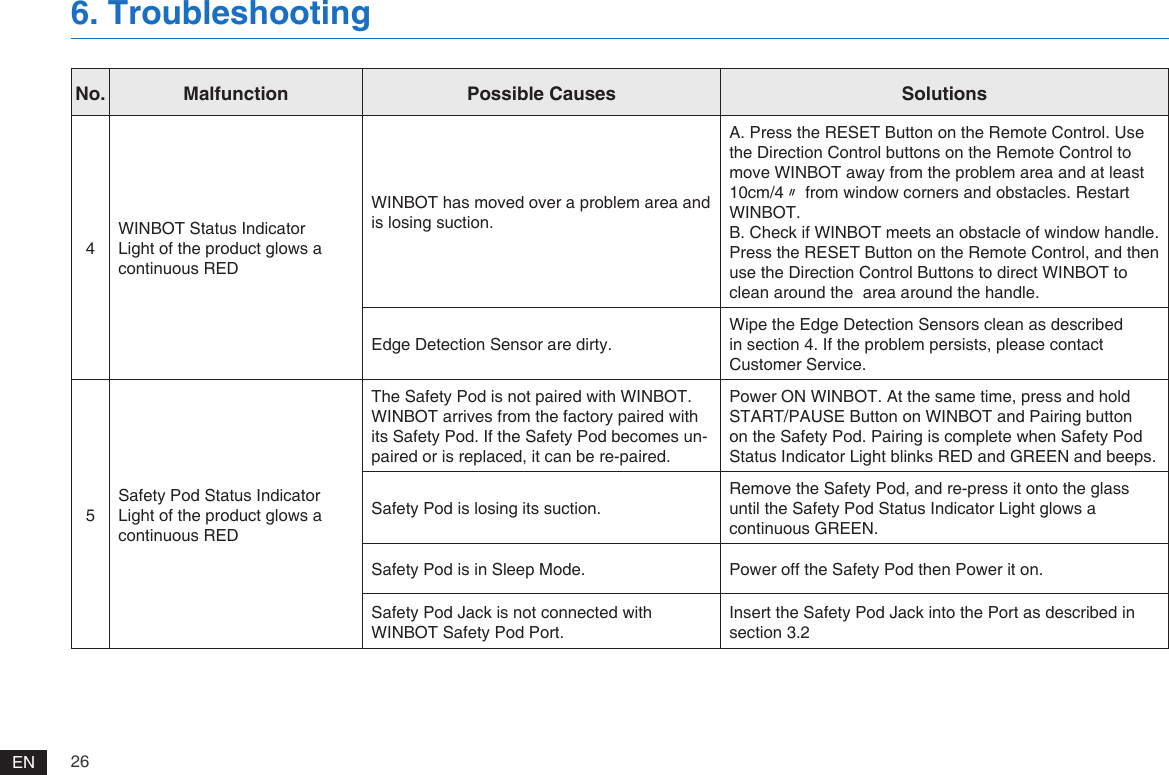
26EN6. TroubleshootingNo. Malfunction Possible Causes Solutions4WINBOT Status Indicator Light of the product glows a continuous REDWINBOT has moved over a problem area and is losing suction. A. Press the RESET Button on the Remote Control. Use the Direction Control buttons on the Remote Control to move WINBOT away from the problem area and at least 10cm/4〃 from window corners and obstacles. Restart WINBOT.B. Check if WINBOT meets an obstacle of window handle. Press the RESET Button on the Remote Control, and then use the Direction Control Buttons to direct WINBOT to clean around the  area around the handle.  Edge Detection Sensor are dirty.Wipe the Edge Detection Sensors clean as described in section 4. If the problem persists, please contact Customer Service.5Safety Pod Status Indicator Light of the product glows a continuous REDThe Safety Pod is not paired with WINBOT.WINBOT arrives from the factory paired with its Safety Pod. If the Safety Pod becomes un-paired or is replaced, it can be re-paired.Power ON WINBOT. At the same time, press and hold START/PAUSE Button on WINBOT and Pairing button on the Safety Pod. Pairing is complete when Safety Pod Status Indicator Light blinks RED and GREEN and beeps.Safety Pod is losing its suction.Remove the Safety Pod, and re-press it onto the glass until the Safety Pod Status Indicator Light glows a continuous GREEN.Safety Pod is in Sleep Mode.   Power off the Safety Pod then Power it on.Safety Pod Jack is not connected with WINBOT Safety Pod Port. Insert the Safety Pod Jack into the Port as described in section 3.2
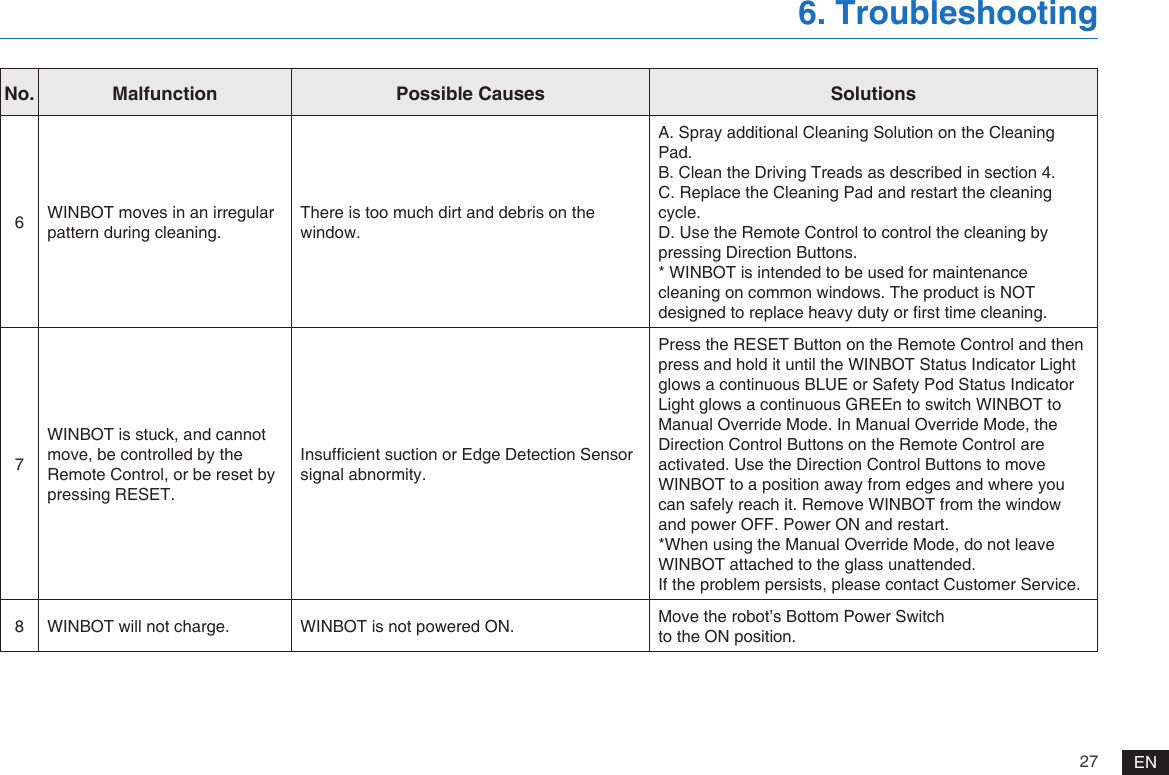
27 EN6. TroubleshootingNo. Malfunction Possible Causes Solutions6WINBOT moves in an irregular pattern during cleaning.There is too much dirt and debris on the window.A. Spray additional Cleaning Solution on the Cleaning Pad.B. Clean the Driving Treads as described in section 4.C. Replace the Cleaning Pad and restart the cleaning cycle.D. Use the Remote Control to control the cleaning by pressing Direction Buttons.* WINBOT is intended to be used for maintenance cleaning on common windows. The product is NOT designed to replace heavy duty or rst time cleaning. 7WINBOT is stuck, and cannot move, be controlled by the Remote Control, or be reset by pressing RESET. Insufcient suction or Edge Detection Sensor signal abnormity.Press the RESET Button on the Remote Control and then press and hold it until the WINBOT Status Indicator Light glows a continuous BLUE or Safety Pod Status Indicator Light glows a continuous GREEn to switch WINBOT to Manual Override Mode. In Manual Override Mode, the Direction Control Buttons on the Remote Control are activated. Use the Direction Control Buttons to move WINBOT to a position away from edges and where you can safely reach it. Remove WINBOT from the window and power OFF. Power ON and restart.*When using the Manual Override Mode, do not leave WINBOT attached to the glass unattended. If the problem persists, please contact Customer Service.8WINBOT will not charge.  WINBOT is not powered ON. Move the robot’s Bottom Power Switchto the ON position.
WA30-EN01-IM2017R00Ecovacs Robotics Co., LtdNo. 18 You Xiang Road, Wuzhong District, Suzhou City, Jiangsu Province, P.R.China

Navigation menu