Effinet Systems EFL0632X Gaming LCD Monitor User Manual EFL0632X Manual
Effinet Systems, Inc. Gaming LCD Monitor EFL0632X Manual
Users Manual
Model No. : EFL-0632X Page : 1 of 10
Approval No.:6.3-NEC-STD Revision No.: 2.2
Engineering Specification
Model No. EFL-0632X
6.3inches High resolution LCD Monitor
- NEC TFT LCD Panel
- High performance up-Scaling characteristic
- Automatic Scanning
- Enhanced Video Quality
- Power Supply with enhanced Design Margin
- Test Pattern for Burn-in & Self Check
- Option
z Touch Screen(3M, … )
Customer’s logo display
on Booting is available
Model No. : EFL-0632X Page : 2 of 10
Approval No.:6.3-NEC-STD Revision No.: 2.2
Table of Contents
1. GENERAL DESCRIPTION ............................................................................................................... 3
1-1. Overview ....................................................................................................................................................3
1-2. FCC RF INTERFERENCE STATEMENT..................................................................................... 3
1-2. Quick reference table of Characteristics ....................................................................................................4
2. USER CONTROL & OSD.................................................................................................................. 5
2-1. Key Control Board .....................................................................................................................................5
2-2. OSD Menu Screen......................................................................................................................................6
2-3. OSD Control Functions ................................................................................................................... 7
3. CONNECTOR PIN DESCRIPTIONS................................................................................................ 7
3-1. 15 Pin D-SUB Connector...........................................................................................................................8
3-2. Serial(RS-232C) Connector .......................................................................................................................8
4. STANDARD DISPLAY MODE ........................................................................................................8
5. MECHANICAL STRUCTURE........................................................................................................ 10
Model No. : EFL-0632X Page : 3 of 10
Approval No.:6.3-NEC-STD Revision No.: 2.2
1. GENERAL DESCRIPTION
1-1. Overview
Effinet open frame LCD Monitor EFL-0632X is a high performance TFT LCD monitor providing high
quality image from the analog RGB input.
This monitor supports wide range signal input from VGA to XGA resolution at vertical refresh
rate of 60 to 75Hz. It includes integrated signal processing unit, named LSP(LCD Signal Processor),
which had all electronic function for user application.
It is designed for industrial use with Auto power on, up scaling performance adequate for low-resolution
application and enhanced design margin for reliability
1-2. FCC RF INTERFERENCE STATEMENT
NOTE :
This equipment has been tested and found to comply with the limits for a Class B digital device, pursuant
to Part 15 of the FCC Rules. These limits are designed to provide reasonable protection against harmful
interference in a residential installation.
This equipment generates, uses and can radiate radio frequency energy and, if not installed and used in
accordance with the instructions, may cause harmful interference to radio communications. However,
there is no guarantee that interference will not occur in a particular installation.
If this equipment does cause harmful interference to radio or television reception which can be determined
by turning the equipment off and on, the user is encouraged to try to correct the interference by one or
more of the following measures.
- Reorient or relocate the receiving antenna.
- Increase the separation between the equipment and receiver.
- Connect the equipment into an outlet on a circuit different from that to which the receiver is connected.
- Consult the dealer or an experienced radio, TV technical for help.
- Only shielded interface cable should be used.
Finally, any changes or modifications to the equipment by the user not expressly approved by the grantee
or manufacturer could void the users authority to operate such equipment.
Model No. : EFL-0632X Page : 4 of 10
Approval No.:6.3-NEC-STD Revision No.: 2.2
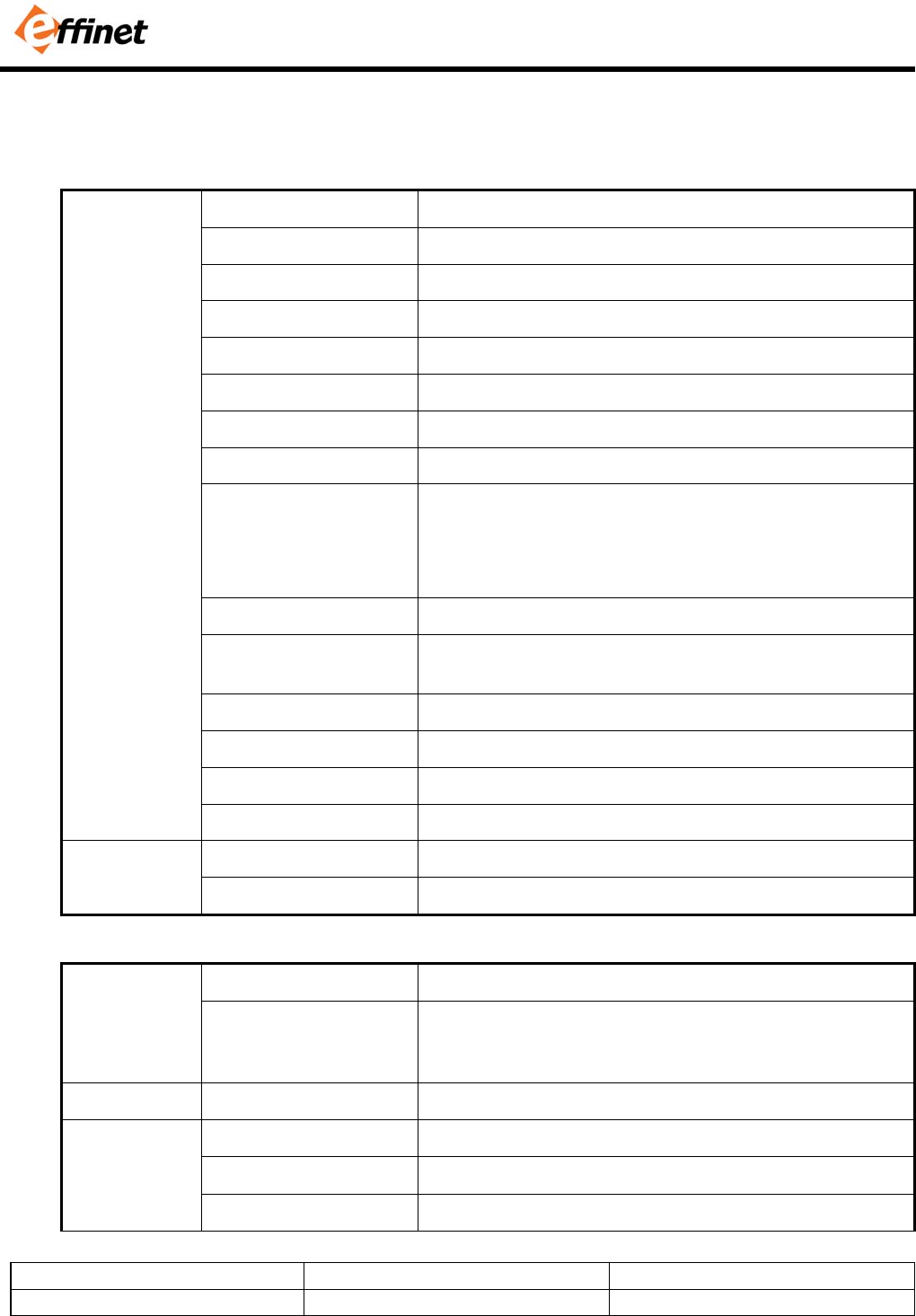
1-2. Quick reference table of Characteristics
Size 6.3” Diagonal
Active Display Area 129.02 x 96.77 mm
Type No. NEC, NL10276BC12
Number of Pixels 1024 (H) x 768 (V)
Pixel Arrangement RGB Vertical Stripe
Pixel Pitch 0.126 mm x 0.126 mm
Color Depth 16.7M True Color
Surface Treatments Hard Coating (3H), Haze 44%
Viewing Angle
(CR≥ 10)
Horizontal : θL 60 degrees
θR 60 degrees
Vertical : Φ H 45 degrees
Φ L 60 degrees
Contrast Ratio Typ.500 : 1
Response Time
Rise time(tr) : 6ms(Typ.)
Fall time(tf) : 15ms(Typ.)
Average Brightness Typ. 250 cd/ m2
Frame Rate Typ. 60Hz
Panel Dimension (WHD) 178.8 x 126.8 x 12.0 mm
Panel
CCFT 2 Lamp
Horizontal 30 ~ 60KHz
Scanning
Frequency Vertical 50 ~ 75Hz
.
Prime 1024 x 768 @ 60 Hz
Resolution Standard 720x400 @70 Hz, 640x480 @60/67/72/75 Hz
800x600 @56/60/72/75 Hz
1024x768 @60/70/75 Hz
Input Signal RGB (Video / Sync) RGB Analog (0.7Vp-p, 75ohms) / H/V Separate(TTL)
Type Separate H/V sync, Composite, SOG(Sync-On-Green)
Level TTL level (V high ≥ 2.0V, V low ≤ 0.8V)
Sync
Polarity Positive or Negative
Model No. : EFL-0632X Page : 5 of 10
Approval No.:6.3-NEC-STD Revision No.: 2.2
Input Signal
Interface
RGB 15pin D-Sub
AC Input AC 90 ~ 265V @60/50Hz, Universal Power
max. power dissipation 12Watts
Power
DC Adaptor Rating DC 12V 3A
Regulation(Safety , Ergonomics, EMC) CUL(UL+CSA), CE
Operating Temperature : 10 to 50ºC / Humidity : 8 to 80% Environmental
Conditions Storage Temperature : -20 to 60ºC / Humidity : 5 to 90%
White Color Temperature 6500°K : CIE x=0.313±0.015 / y=0.329±0.015
Demonstrated MTBF More than 20,000 hours
Touch Panel 3M Touch / 13-4041-01
Controller EXII-1760SC
Touch Screen
(Optional)
Controller Interface Serial Interface
2. USER CONTROL & OSD
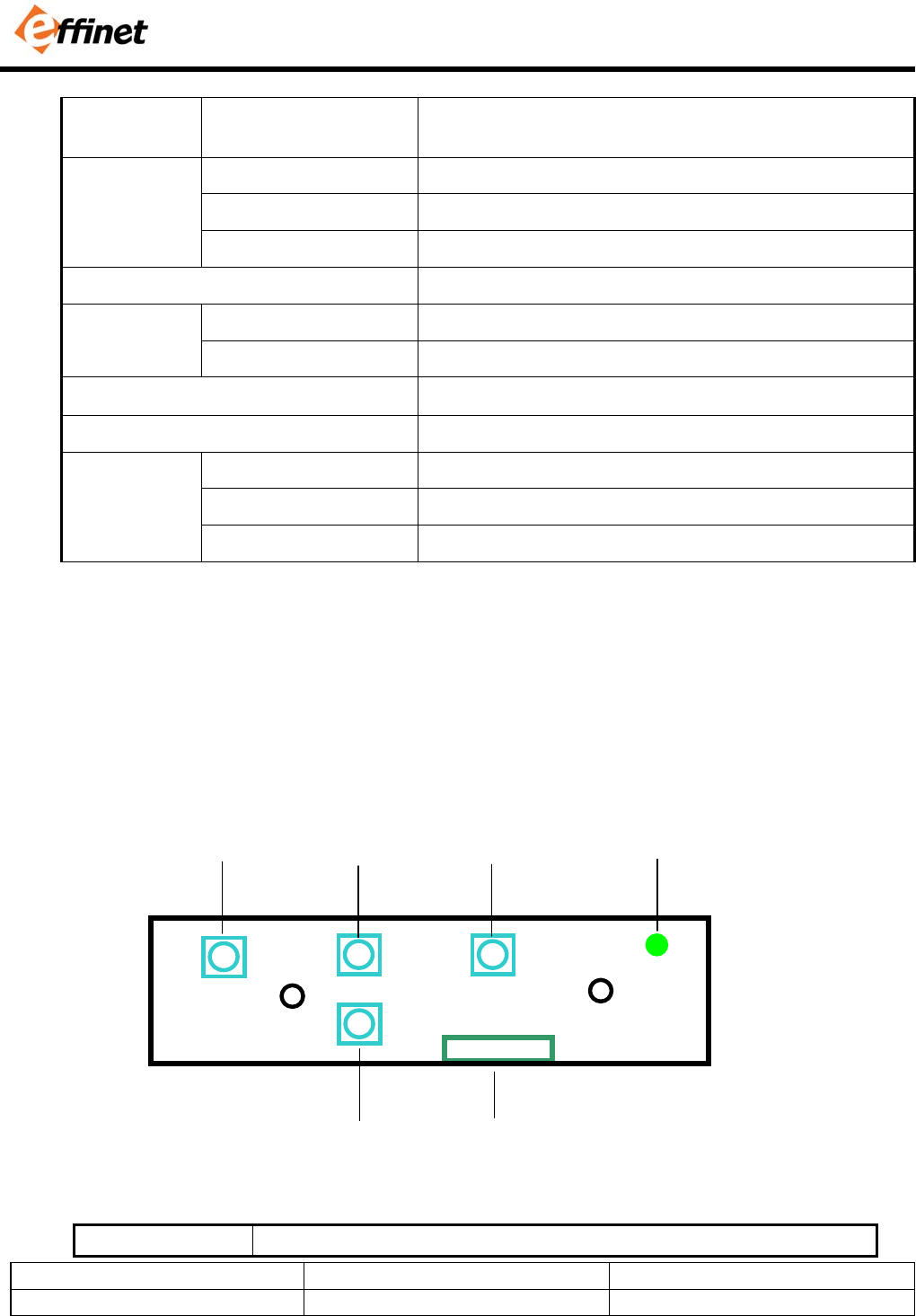
2-1. Key Control Board
SWITCH NAME SWITCH FUNCTIONS
Cable
Connect
SEL
(AUTO)
UP
(+)
DOWN
(-)
MENU Status
LED
Model No. : EFL-0632X Page : 6 of 10
Approval No.:6.3-NEC-STD Revision No.: 2.2
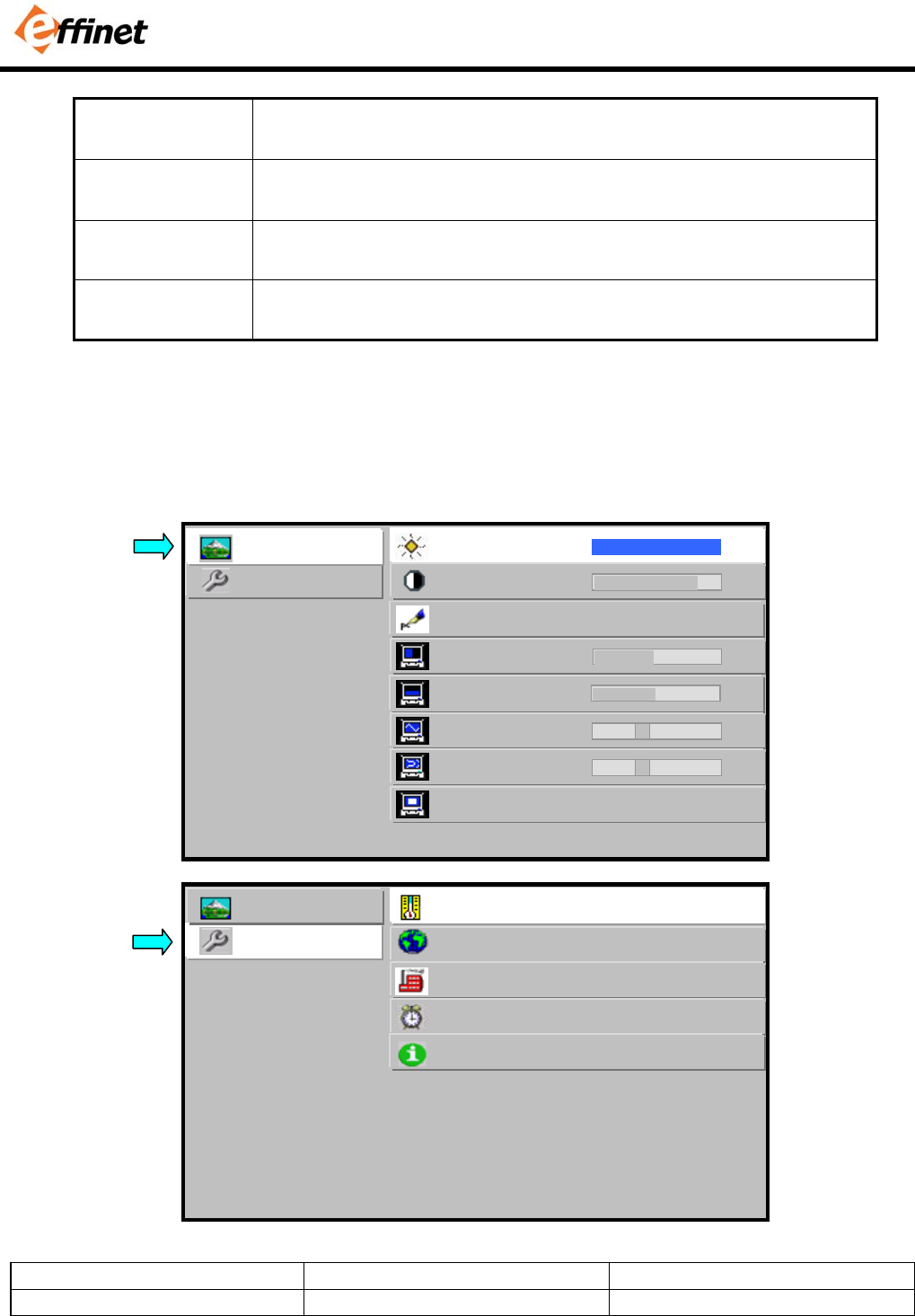
MENU Activate / Deactivate the OSD Menu Window.
Move cursor to Sub Menu from Main menu.
SEL
(AUTO)
Move cursor in the Sub-Menu(Brightness ↔ Mode)
Auto Tracking (Pressing “SEL” key)
UP(+) Move cursor at Main Menu(Picture / Utility)
Increase the value of the selected function
DOWN(-) Move cursor at Main Menu(Picture / Utility)
Decrease the value of the selected function.
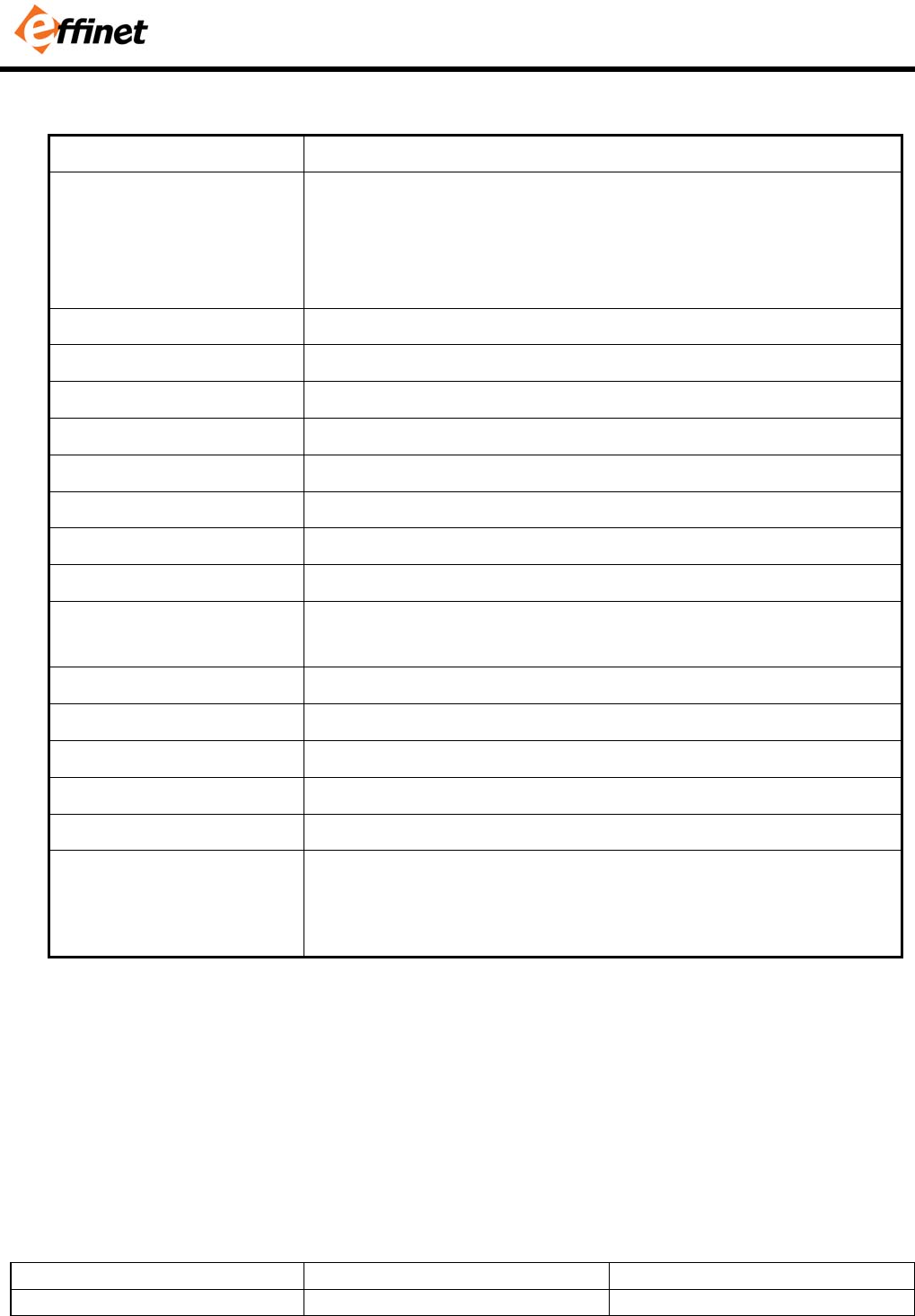
2-2. OSD Menu Screen
UTILITY
PICTURE brightness -
100 +
contrast -
80 +
sharpness 4
h position -
50 +
v position -
50 +
phase -
18 +
frequency -
105 +
mode normal fill to aspect ratio
1 2 3 4 5
UTILITY
PICTURE color temp 6500 7300 9300 user
language english german
factory press <up> to reset
power on time 10 hr
information 800 x 600 / 60Hz
Model No. : EFL-0632X Page : 7 of 10
Approval No.:6.3-NEC-STD Revision No.: 2.2
2-3. OSD Control Functions
CONTROL FUNCTION
Auto Tracking Automatic screen adjustment process.
If there is any noise on the screen or screen shift, just press “ SEL”
button.
Since this monitor is equipped with “Auto Tracking” function, it will
automatically configure the monitor setting.
Brightness Adjust the brightness level of the Display
Contrast Adjust the contrast level of the Display.
Sharpness Adjuust the sharpness level of the Display.
H position Adjust the position of the display horizontally.
V position Adjust the position of the display vertically.
Phase Adjust the clock phase of the display.
Frequency Adjust the clock frequency of the display
Mode Select the video aspect ratio. It depends on the input video format.
Color Temp Choose different preset color temperatures
(6500/7300/9300) or set your own customized color parameters.
Red /Green / Blue GAIN Adjust the Red/ Green / Blue Gain
Language Select the OSD language
Factory Recall the factory setting value.
Power On time Displayed the total power on time.
Information Displayed the resolution of input signal
Self Test Pattern To enter auto burn-in mode, press “Up” key first and then “Sel” key
simultaneously for 3 seconds.
On this mode, Red – Green – Blue – White – Black test pattern will be
displayed. Press Menu key for returning normal display mode.
3. CONNECTOR PIN DESCRIPTIONS
Model No. : EFL-0632X Page : 8 of 10
Approval No.:6.3-NEC-STD Revision No.: 2.2
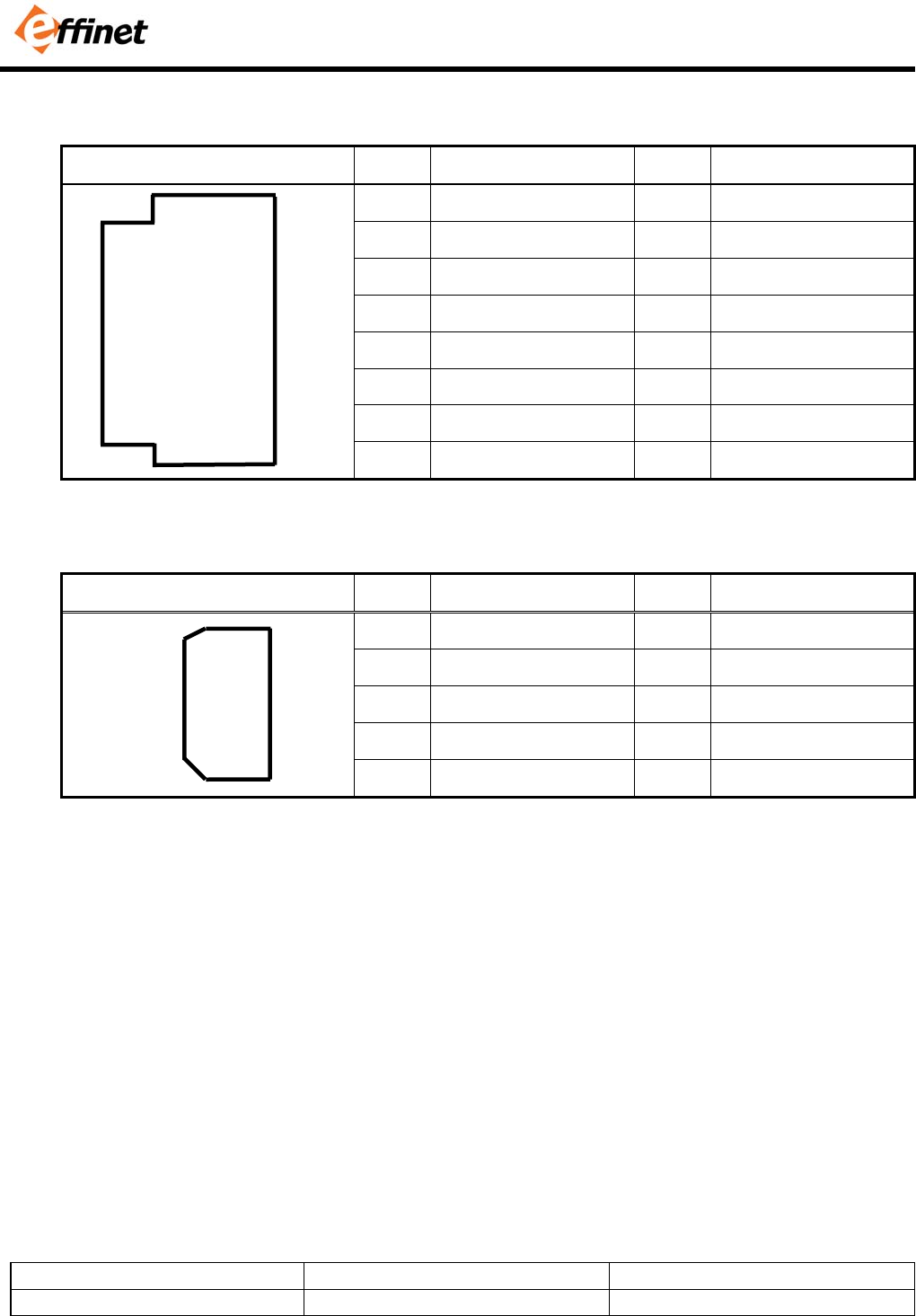
3-1. 15 Pin D-SUB Connector
Shape and pin number Pin Description Pin Description
1 Red 9 No Connection
2 Green 10 Ground - Sync
3 Blue 11 No Connection
4 Ground 12 No Connection
5 Ground 13 Horizontal Sync
6 Ground - Red 14 Vertical Sync
7 Ground - Green 15 No Connection
8 Ground - Blue
3-2. Serial(RS-232C) Connector
Shape and pin number Pin Description Pin Description
1 DCD 6 DSR
2 RXD 7 RTS
3 TXD 8 CTS
4 DTR 9 N/A
5 Ground
4. STANDARD DISPLAY MODE
1
2
3
4
5
6
7
8
9
10
11
12
13
14
15
6
7
8
9
1
2
3
4
5
Model No. : EFL-0632X Page : 9 of 10
Approval No.:6.3-NEC-STD Revision No.: 2.2
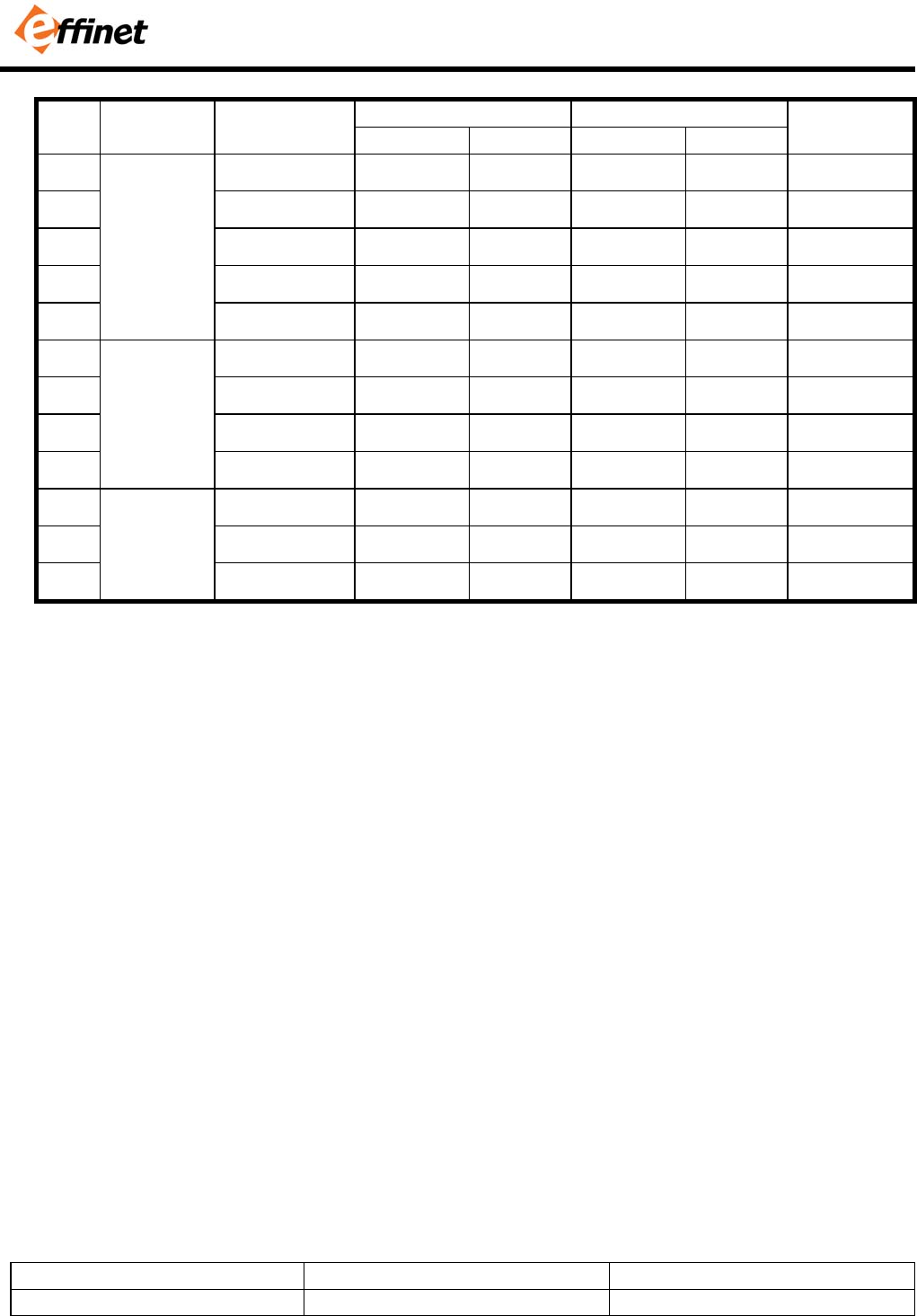
Horizontal Vertical
No. Mode Resolution
Frequency Polarity Frequency Polarity
Pixel clock
1 720 x 400 31.47 KHz N 70.0 Hz P 28.322 MHz
2 640 x 480 31.47 KHz N 60.0 Hz N 25.175 MHz
3 640 x 480 35.00 KHz N 66.7 Hz N 30.240 MHz
4 640 x 480 37.86 KHz N 72.8 Hz N 31.500 MHz
5
VGA
640 x 480 37.50 KHZ N 75.0 Hz N 31.500 MHz
6 800 X 600 35.16 KHz N / P 56.3 Hz N / P 36.000 MHz
7 800 X 600 37.88 KHz P 60.3 Hz P 40.000 MHz
8 800 X 600 48.08 KHz P 72.2 Hz P 50.000 MHz
9
SVGA
800 X 600 46.87 KHz P 75.0 Hz P 49.500 MHz
10 1024 X 768 48.36 KHz N 60.0 Hz N 65.000 MHz
11 1024 X 768 56.49 KHz N 70.1 Hz N 75.000 MHz
12
XGA
1024 X 768 60.02 KHz P 75.0 Hz P 78.750 MHz
Model No. : EFL-0632X Page : 10 of 10
Approval No.:6.3-NEC-STD Revision No.: 2.2
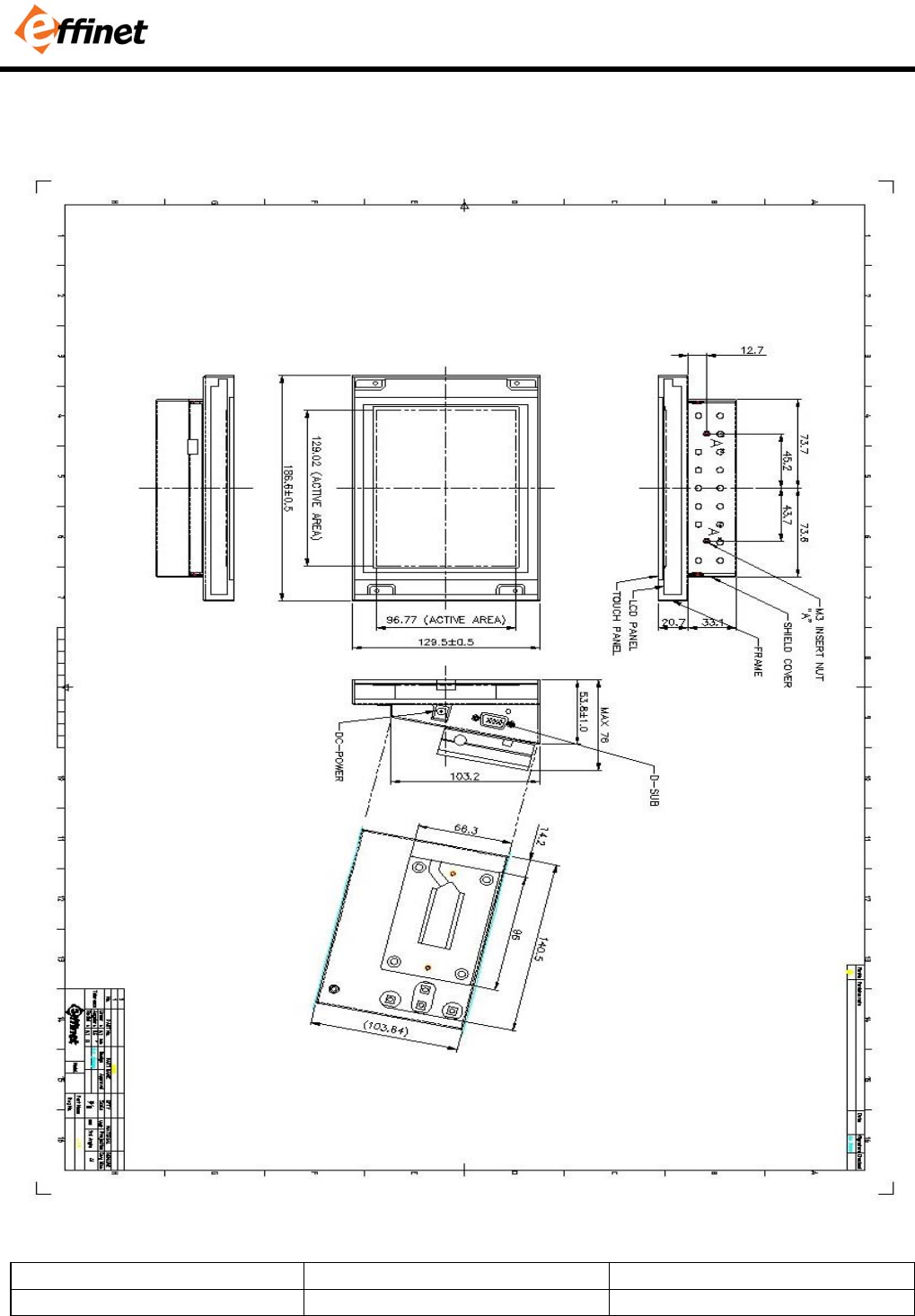
5. MECHANICAL STRUCTURE