Electronic Warfare Associates SRCEDFB Remote Control Electronic Door Lock FOB User Manual UserManualBooklet111010 3

Electronic Warfare Associates, Inc. Remote Control Electronic Door Lock FOB UserManualBooklet111010 3

Contents

Users Manual 2

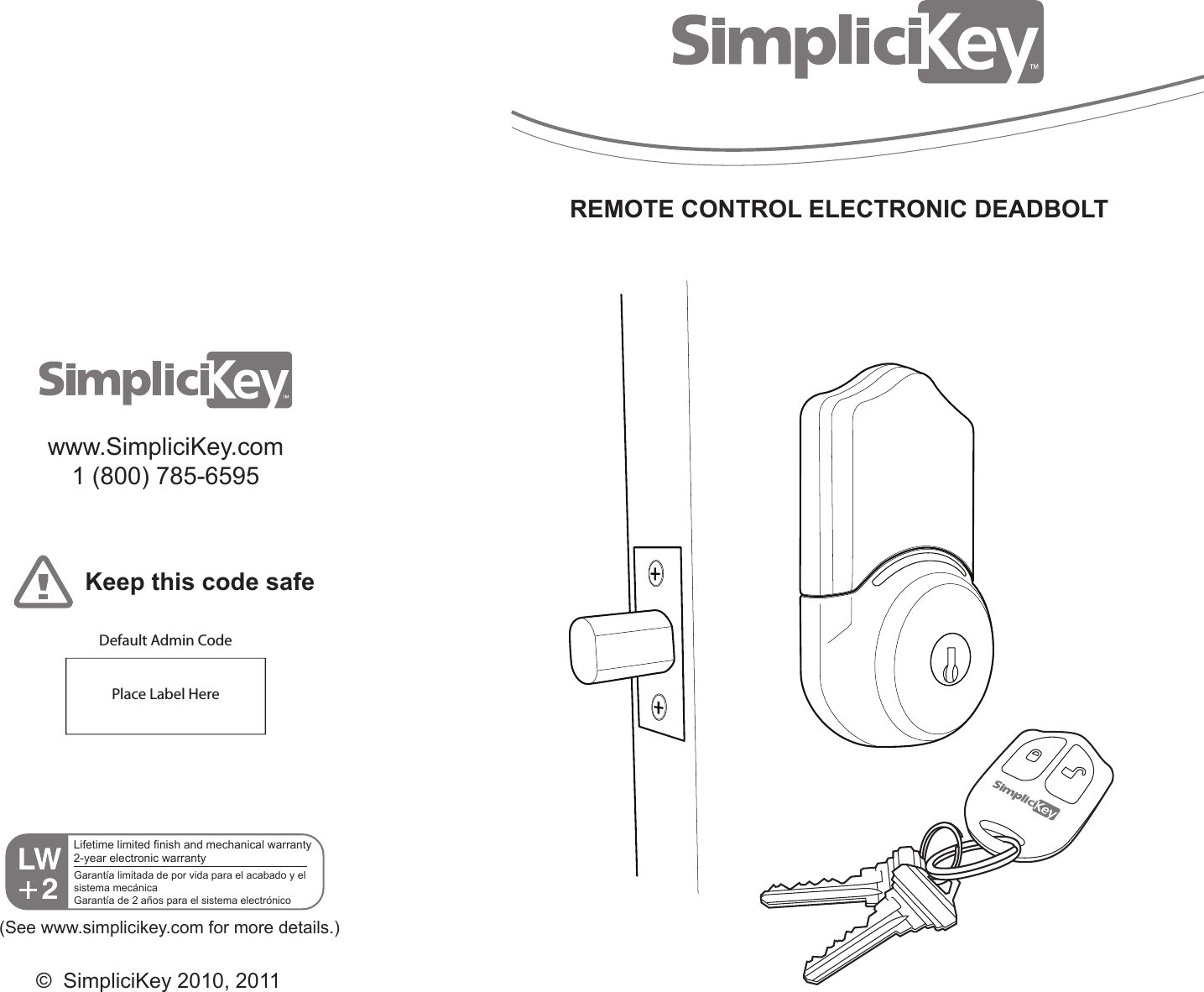
REMOTE CONTROL ELECTRONIC DEADBOLTwww.SimpliciKey.com1 (800) 785-6595Keep this code safePlace Label HereDefault Admin Code(See www.simplicikey.com for more details.)©  SimpliciKey 2010, 2011Lifetime limited finish and mechanical warranty2-year electronic warrantyGarantía limitada de por vida para el acabado y el sistema mecánicaGarantía de 2 años para el sistema electrónico
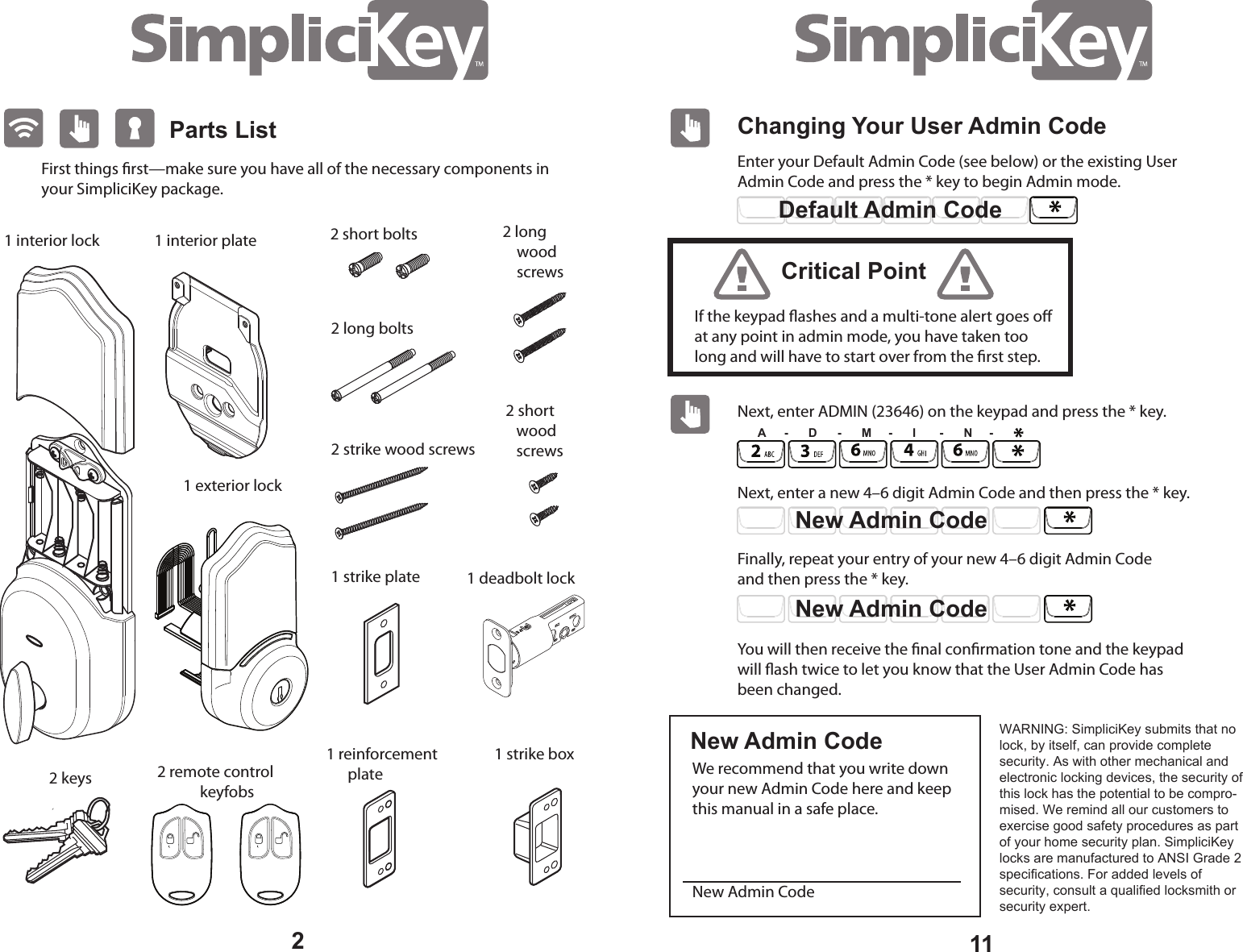
Parts List1 interior plateFirst things rst—make sure you have all of the necessary components in your SimpliciKey package. 2 remote control            keyfobs1 deadbolt lock 1 strike plate 1 reinforcement       plate 1 strike box 2 keys 2 short    wood    screws 2 long     wood     screws 2 long bolts 2 strike wood screws2 short bolts 1 interior lock 1 exterior lock 211Changing Your User Admin CodeEnter your Default Admin Code (see below) or the existing User Admin Code and press the * key to begin Admin mode.  Next, enter ADMIN (23646) on the keypad and press the * key.  Next, enter a new 4–6 digit Admin Code and then press the * key. Finally, repeat your entry of your new 4–6 digit Admin Code and then press the * key. We recommend that you write down your new Admin Code here and keep this manual in a safe place. New Admin CodeYou will then receive the nal conrmation tone and the keypad will ash twice to let you know that the User Admin Code has been changed.Default Admin CodeIf the keypad ashes and a multi-tone alert goes o at any point in admin mode, you have taken too long and will have to start over from the rst step.Critical PointNew Admin CodeNew Admin CodeNew Admin CodeA     -      D      -      M     -      I       -      N     -WARNING: SimpliciKey submits that no lock, by itself, can provide complete security. As with other mechanical and electronic locking devices, the security of this lock has the potential to be compro-mised. We remind all our customers to exercise good safety procedures as part of your home security plan. SimpliciKey locks are manufactured to ANSI Grade 2 specifications. For added levels of security, consult a qualified locksmith or security expert.
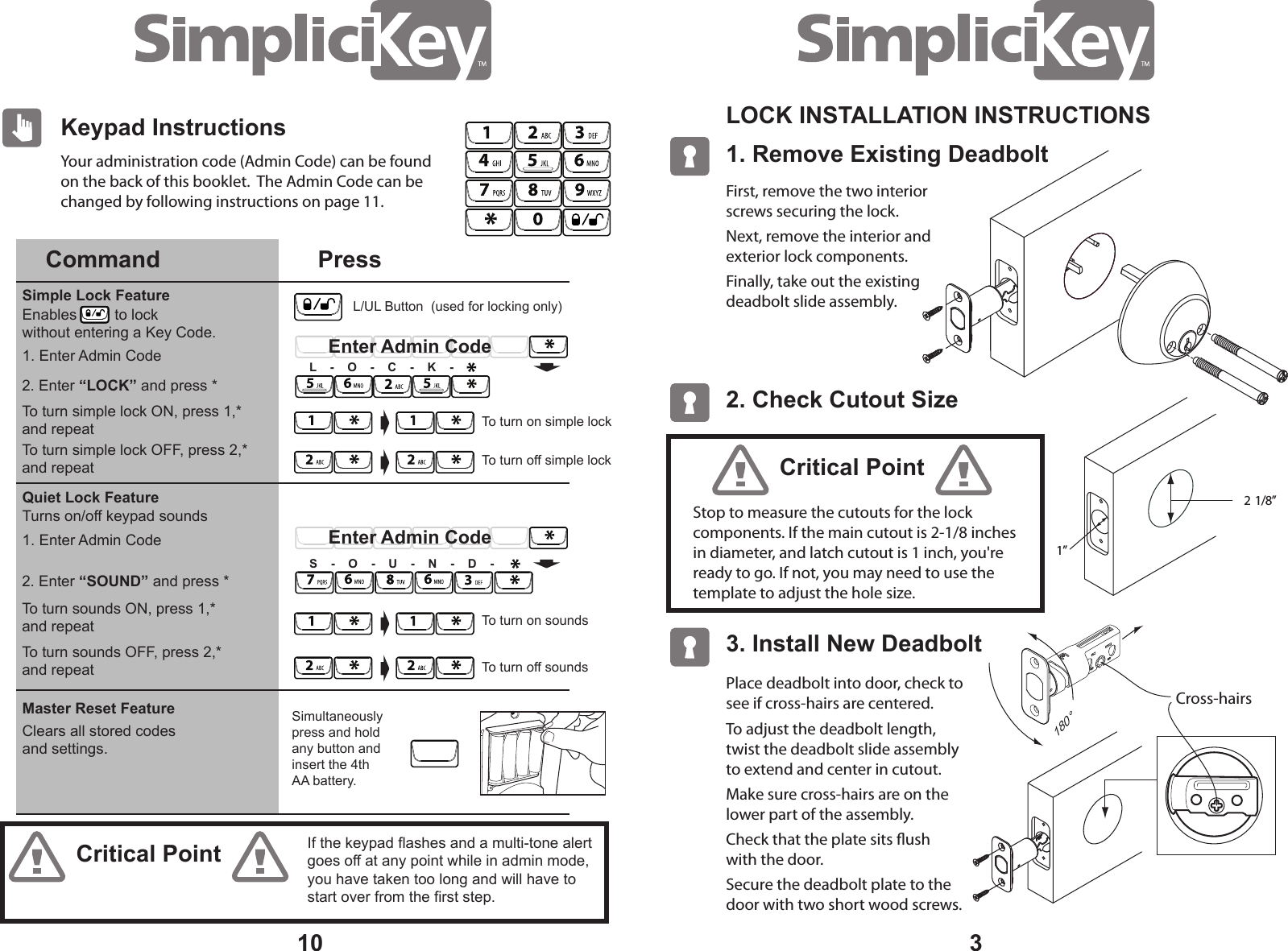
3Your administration code (Admin Code) can be found on the back of this booklet.  The Admin Code can be changed by following instructions on page 11.101. Remove Existing Deadbolt LOCK INSTALLATION INSTRUCTIONS 2. Check Cutout Size 2  1/8” 1” 3. Install New Deadbolt First, remove the two interior screws securing the lock.Next, remove the interior and exterior lock components. Finally, take out the existing  deadbolt slide assembly.Place deadbolt into door, check to see if cross-hairs are centered.To adjust the deadbolt length, twist the deadbolt slide assembly       to extend and center in cutout.Make sure cross-hairs are on the      lower part of the assembly.Check that the plate sits ush      with the door.Secure the deadbolt plate to the     door with two short wood screws.Cross-hairs 180°Stop to measure the cutouts for the lock  components. If the main cutout is 2-1/8 inches in diameter, and latch cutout is 1 inch, you're ready to go. If not, you may need to use the template to adjust the hole size.Critical PointCritical PointKeypad InstructionsCommand PressQuiet Lock FeatureSimple Lock FeatureMaster Reset Feature2. Enter “LOCK” and press *To turn simple lock ON, press 1,* and repeatTo turn simple lock OFF, press 2,* and repeat2. Enter “SOUND” and press *To turn sounds ON, press 1,* and repeatTo turn sounds OFF, press 2,* and repeatSimultaneously press and holdany button and insert the 4th AA battery.Enables         to lock  without entering a Key Code.Clears all stored codesand settings.1. Enter Admin Code1. Enter Admin CodeTurns on/off keypad soundsTo turn off simple lockTo turn on simple lockEnter Admin CodeL    -    O    -    C    -    K    -To turn off soundsTo turn on soundsEnter Admin CodeS    -    O    -    U    -    N    -    D    -If the keypad flashes and a multi-tone alert goes off at any point while in admin mode, you have taken too long and will have to start over from the first step.L/UL Button  (used for locking only)
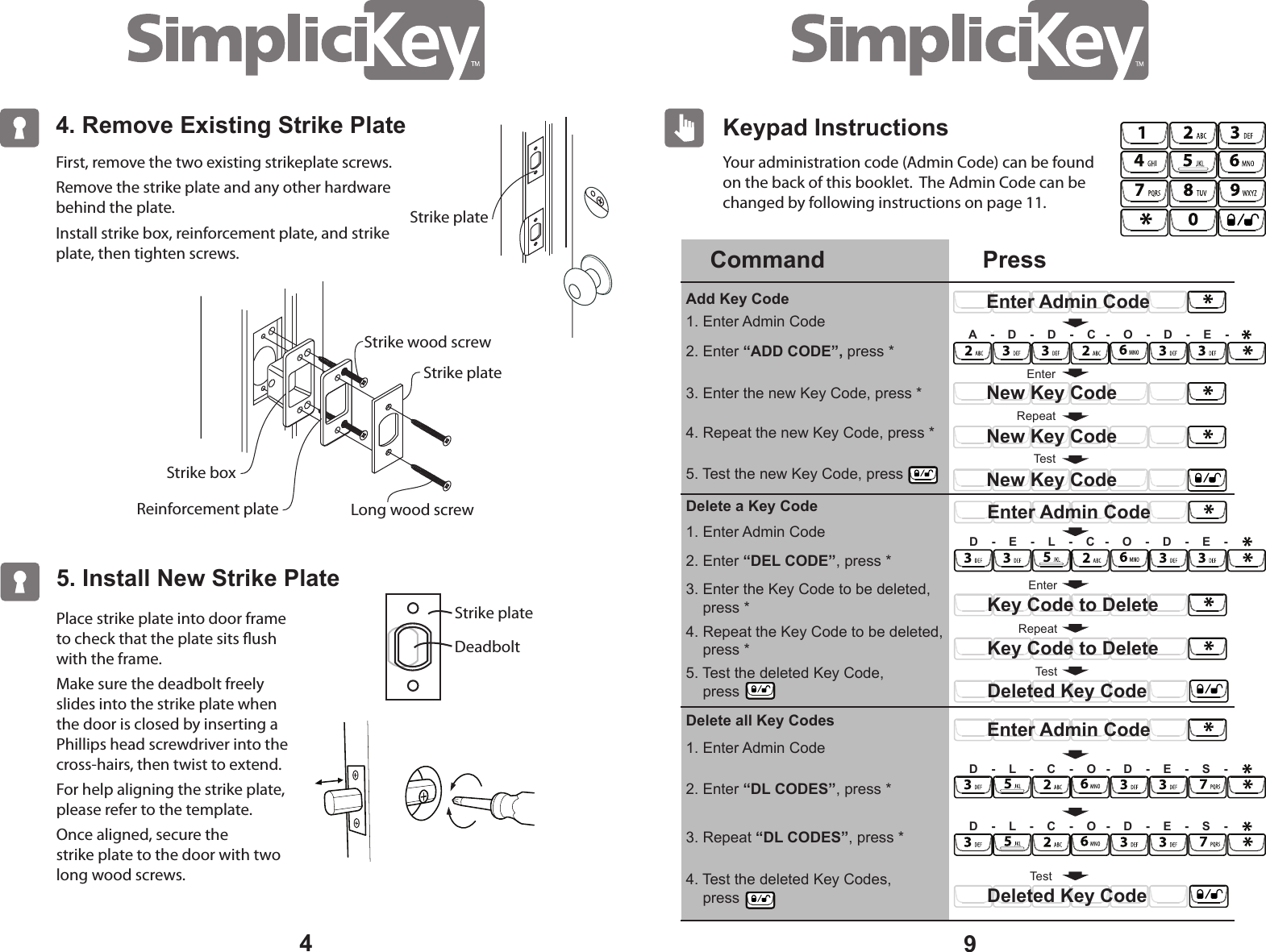
Your administration code (Admin Code) can be found on the back of this booklet.  The Admin Code can be changed by following instructions on page 11.94. Remove Existing Strike Plate4First, remove the two existing strikeplate screws. Remove the strike plate and any other hardware behind the plate.Install strike box, reinforcement plate, and strike plate, then tighten screws.5. Install New Strike PlatePlace strike plate into door frame to check that the plate sits ush with the frame.Make sure the deadbolt freely slides into the strike plate when the door is closed by inserting a Phillips head screwdriver into the cross-hairs, then twist to extend.For help aligning the strike plate, please refer to the template.Once aligned, secure the    strike plate to the door with two long wood screws.DeadboltStrike plateStrike plateStrike boxStrike plateStrike wood screwLong wood screwKeypad InstructionsCommand PressAdd Key CodeDelete a Key CodeDelete all Key Codes2. Enter “ADD CODE”, press *1. Enter Admin Code1. Enter Admin Code1. Enter Admin Code2. Enter “DEL CODE”, press *2. Enter “DL CODES”, press *3. Repeat “DL CODES”, press *3. Enter the new Key Code, press *4. Repeat the new Key Code, press *5. Test the new Key Code, press3. Enter the Key Code to be deleted,     press *4. Repeat the Key Code to be deleted,     press *4. Test the deleted Key Codes,     press RepeatEnterEnter Admin CodeNew Key CodeNew Key CodeTestNew Key CodeA    -    D    -    D    -    C   -    O    -    D    -    E    -RepeatKey Code to DeleteEnterKey Code to DeleteTestDeleted Key CodeEnter Admin CodeD    -    E    -    L    -    C   -    O    -    D    -    E    -TestDeleted Key CodeEnter Admin CodeD    -    L    -    C    -    O   -    D    -    E    -    S    -D    -    L    -    C    -    O   -    D    -    E    -    S    -Reinforcement plate5. Test the deleted Key Code,     press
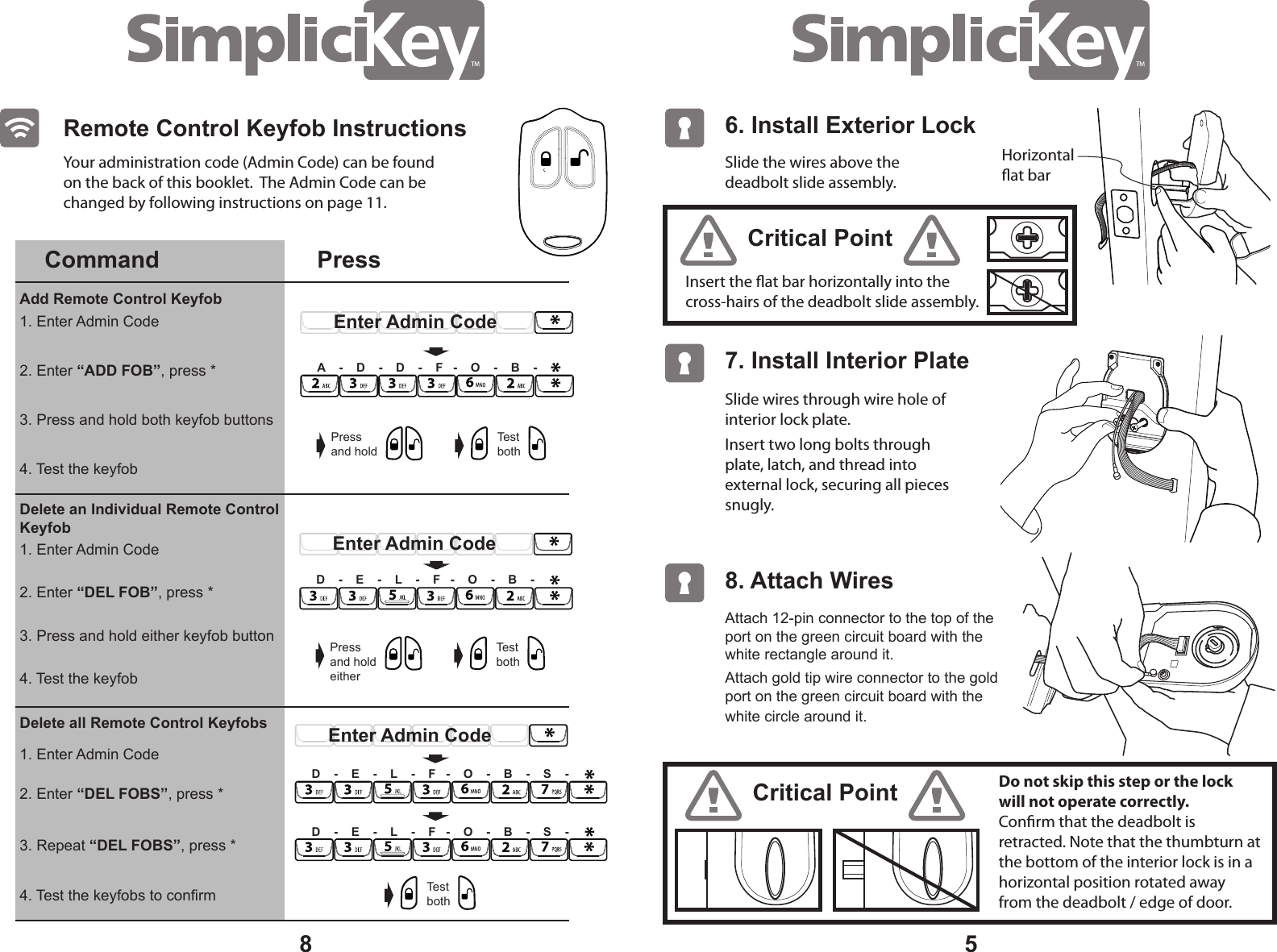
5Slide the wires above the deadbolt slide assembly. Insert the at bar horizontally into the cross-hairs of the deadbolt slide assembly.Slide wires through wire hole of interior lock plate.Insert two long bolts through plate, latch, and thread into external lock, securing all pieces snugly. Your administration code (Admin Code) can be found on the back of this booklet.  The Admin Code can be changed by following instructions on page 11.Critical PointCritical PointDo not skip this step or the lock will not operate correctly. Conrm that the deadbolt is retracted. Note that the thumbturn at the bottom of the interior lock is in a horizontal position rotated away from the deadbolt / edge of door. 6. Install Exterior Lock 7. Install Interior Plate Attach 12-pin connector to the top of the port on the green circuit board with the white rectangle around it.  Attach gold tip wire connector to the gold port on the green circuit board with the white circle around it.  8. Attach Wires8Horizontalat barRemote Control Keyfob InstructionsCommand PressAdd Remote Control Keyfob 1. Enter Admin Code1. Enter Admin CodeDelete an Individual Remote Control Keyfob Delete all Remote Control Keyfobs2. Enter “ADD FOB”, press *2. Enter “DEL FOBS”, press *3. Press and hold both keyfob buttons4. Test the keyfobs to confirmA    -    D    -    D    -    F   -    O    -    B    -Pressand holdTest bothEnter Admin CodePressand holdeitherTest bothEnter Admin CodeD    -    E    -    L    -    F   -    O    -    B    -Enter Admin CodeD    -    E    -    L    -    F   -    O    -    B    -    S    -4. Test the keyfob1. Enter Admin Code2. Enter “DEL FOB”, press *3. Press and hold either keyfob button4. Test the keyfob3. Repeat “DEL FOBS”, press *Test bothD    -    E    -    L    -    F   -    O    -    B    -    S    -
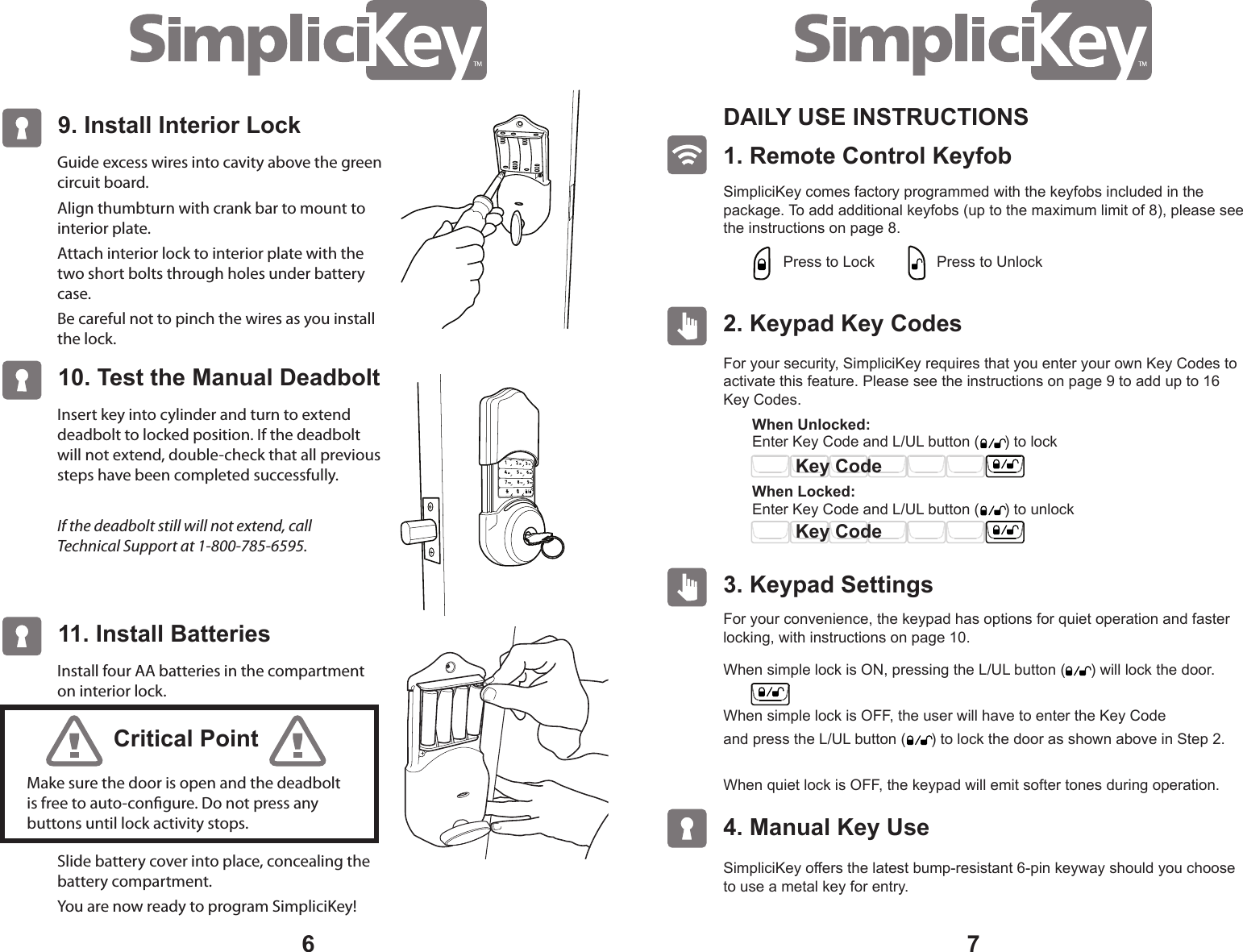
76Guide excess wires into cavity above the green circuit board.Align thumbturn with crank bar to mount to interior plate.Attach interior lock to interior plate with the two short bolts through holes under battery case.Be careful not to pinch the wires as you install the lock.9. Install Interior Lock Insert key into cylinder and turn to extend deadbolt to locked position. If the deadbolt will not extend, double-check that all previous steps have been completed successfully.If the deadbolt still will not extend, call  Technical Support at 1-800-785-6595.10. Test the Manual DeadboltInstall four AA batteries in the compartment on interior lock.Slide battery cover into place, concealing the battery compartment.You are now ready to program SimpliciKey!11. Install BatteriesMake sure the door is open and the deadbolt is free to auto-congure. Do not press any buttons until lock activity stops.Critical Point1. Remote Control Keyfob DAILY USE INSTRUCTIONS SimpliciKey comes factory programmed with the keyfobs included in the package. To add additional keyfobs (up to the maximum limit of 8), please see the instructions on page 8.2. Keypad Key Codes For your security, SimpliciKey requires that you enter your own Key Codes to activate this feature. Please see the instructions on page 9 to add up to 16 Key Codes.For your convenience, the keypad has options for quiet operation and faster locking, with instructions on page 10. SimpliciKey offers the latest bump-resistant 6-pin keyway should you choose to use a metal key for entry.3. Keypad Settings 4. Manual Key Use Press to LockEnter Key Code and L/UL button (      ) to lock When Unlocked: When Locked: Press to UnlockWhen simple lock is ON, pressing the L/UL button (      ) will lock the door.When simple lock is OFF, the user will have to enter the Key Code and press the L/UL button (      ) to lock the door as shown above in Step 2.When quiet lock is OFF, the keypad will emit softer tones during operation.   Key CodeKey CodeEnter Key Code and L/UL button (      ) to unlock

Navigation menu