Electronics Tomorrow A480110813 BLE Vibration Alarm User Manual A480

Electronics Tomorrow Ltd. BLE Vibration Alarm A480

User Manual

Instruction Manual [For iPod, iPhone and iPad User]
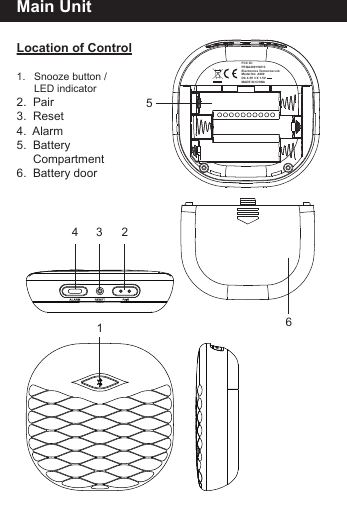
Main UnitLocation of Control1.   Snooze button /       LED indicator2.  Pair3.  Reset4.  Alarm5.  Battery     Compartment6.  Battery door654 3 21FCC ID: PEQA480110813Electronics Tomorrow Ltd.Model No: A480DC 4.5V 3 X 1.5V - - -MADE IN CHINA
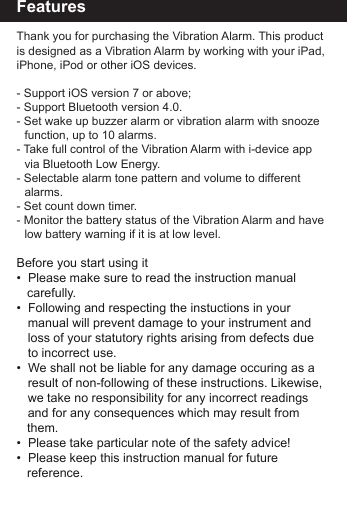
FeaturesThank you for purchasing the Vibration Alarm. This product is designed as a Vibration Alarm by working with your iPad, iPhone, iPod or other iOS devices.- Support iOS version 7 or above;- Support Bluetooth version 4.0.- Set wake up buzzer alarm or vibration alarm with snooze    function, up to 10 alarms.- Take full control of the Vibration Alarm with i-device app     via Bluetooth Low Energy.- Selectable alarm tone pattern and volume to different     alarms. - Set count down timer. - Monitor the battery status of the Vibration Alarm and have    low battery warning if it is at low level.Before you start using it•  Please make sure to read the instruction manual    carefully.•  Following and respecting the instuctions in your   manual will prevent damage to your instrument and   loss of your statutory rights arising from defects due   to incorrect use.•  We shall not be liable for any damage occuring as a   result of non-following of these instructions. Likewise,  we take no responsibility for any incorrect readings   and for any consequences which may result from    them.•  Please take particular note of the safety advice!•  Please keep this instruction manual for future         reference.
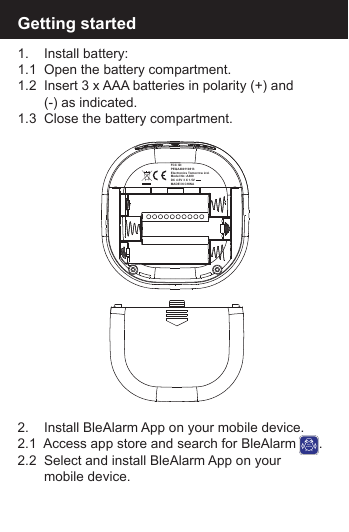
Getting started1.    Install battery:1.1  Open the battery compartment.1.2  Insert 3 x AAA batteries in polarity (+) and        (-) as indicated.1.3  Close the battery compartment.2.    Install BleAlarm App on your mobile device.2.1  Access app store and search for BleAlarm      .2.2  Select and install BleAlarm App on your        mobile device.BLEALARMFCC ID: PEQA480110813Electronics Tomorrow Ltd.Model No: A480DC 4.5V 3 X 1.5V - - -MADE IN CHINA
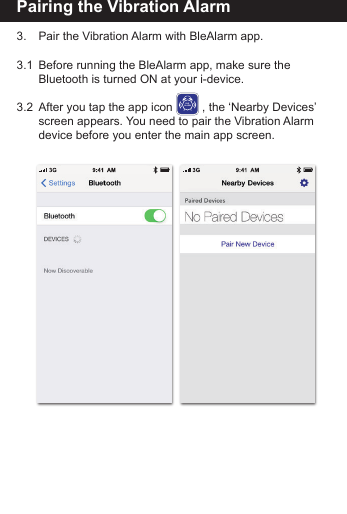
Pairing the Vibration Alarm3.    Pair the Vibration Alarm with BleAlarm app.3.1  Before running the BleAlarm app, make sure the        Bluetooth is turned ON at your i-device. 3.2  After you tap the app icon         , the ‘Nearby Devices’    screen appears. You need to pair the Vibration Alarm    device before you enter the main app screen.BLEALARM
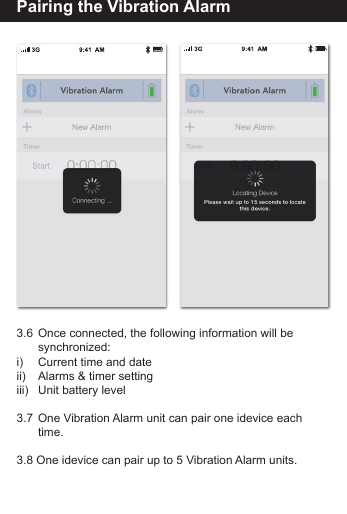
Pairing the Vibration Alarm3.3  Tap “ Pair New Device”   to search for nearby  devices.3.4   Press and hold the [PAIR]        button on the Vibration   Alarm device for 5   seconds. You can find   the flashing LED will turn   from red to blue.3.5  The New Vibration Alarm   will be displayed on App   and is ready for pairing.   Tap the "New Vibration   Alarm" will start the pairing  and connection process.   Once the Vibration Alarm   is paired, it will start time   and data synchronization.
Pairing the Vibration Alarm3.6  Once connected, the following information will be         synchronized:i)     Current time and dateii)     Alarms & timer settingiii)    Unit battery level3.7  One Vibration Alarm unit can pair one idevice each         time.3.8 One idevice can pair up to 5 Vibration Alarm units.
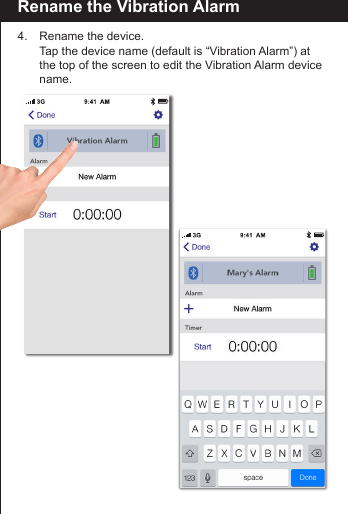
Rename the Vibration Alarm4.    Rename the device.  Tap the device name (default is “Vibration Alarm”) at        the top of the screen to edit the Vibration Alarm device   name.
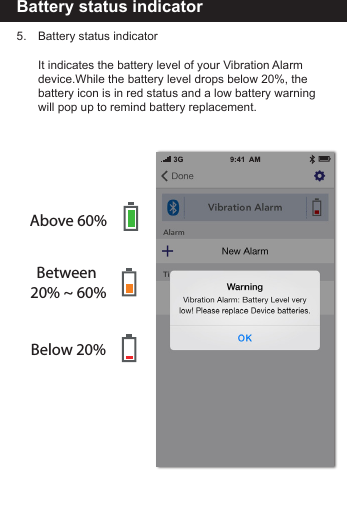
Battery status indicator5.     Battery status indicator     It indicates the battery level of your Vibration Alarm         device.While the battery level drops below 20%, the         battery icon is in red status and a low battery warning        will pop up to remind battery replacement.Above 60%Between 20% ~ 60%Below 20%
Setting the alarm time6.    Setting the alarm time6.1 Tap [New Alarm] to create a new alarm or tap the             existing alarm to modify.6.2  On alarm setting screen, you can edit and adjust the          item  below:i)       Alarm Name: Tap to edit you preferred name to this           alarm.ii)      Time: Scroll up and down to adjust the alarm time.iii)   Day of Week: Tap to select which day of week to enable         the  alarm.    - If none is selected, it alarms once only.    - If all days are selected, it alarms daily. iv)   Sound pattern: Tap to select which tone pattern (5           options plus one random pattern available) is applied to         this  alarm.
Setting the alarm timev)   Alarm volume level: Tap to select the alarm sound        volume level (three options: Low, Med and High).vi)   Vibration strength: Tap to select the vibration strength      (four options: Off, Low, Med and High).6.3  Complete the alarm setting.i)    Tap [Done] to save the alarm setting and go back to        main screen.ii)   Tap [Cancel] to restore to the original alarm setting and      go back to main screen.iii)   Tap [Delete Alarm] to delete the current alarm and go      back to main screen.
Snooze operation7.  Using the SNOOZE function7.1  When the alarm sounds, press [Snooze] and alarm will     repeat every 5 minutes up to three times.7.2  Above default value can be adjusted by setting the      “Maximum Snoozes” and “Snooze Duration” in the      preference screen.
To turn off the alarm 8.   To disable the alarm8.1  When alarm sounds,   press [Snooze] once to  stop the alarm and   activate the snooze   funtion, or press [Alarm]   to disable the alarm completely. 8.2  If no button is pressed,   The alarm will sound for   1 minute and stop   automatically. If Snooze  Enabled setting is ON,   the alarm will repeat   every 5 minutes. You can  press the [Snooze] button  to stop the alarm, or can   press [Alarm] button to  turn off the alarm and   stop the snooze function completely.8.3 User can tap the alarm   time to disable the alarm  completely ( Please   make sure your app is  paired with the device)
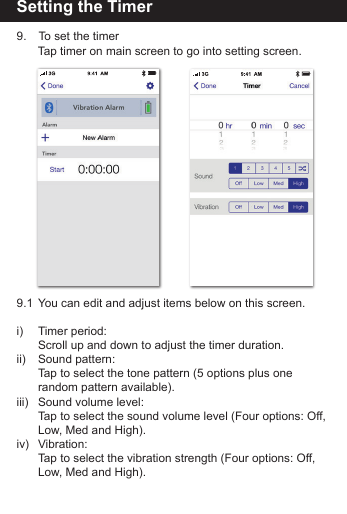
Setting the Timer9.   To set the timer   Tap timer on main screen to go into setting screen.9.1  You can edit and adjust items below on this screen.i)   Timer period:   Scroll up and down to adjust the timer duration.ii)   Sound pattern:   Tap to select the tone pattern (5 options plus one      random pattern available).iii)  Sound volume level:   Tap to select the sound volume level (Four options: Off,    Low, Med and High).iv) Vibration:      Tap to select the vibration strength (Four options: Off,    Low, Med and High).
Setting the timer9.2  Using the Timer    In the Home screen, tap “Start” under Timer to start       counting.     Tap “Stop” to stop counting and “Start” to start counting      again.Tap [Reset] to reset the time duration value.
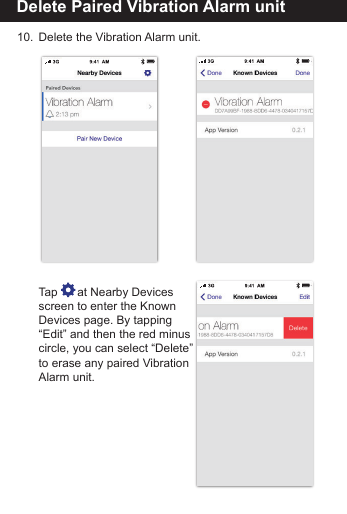
Delete Paired Vibration Alarm unit10.  Delete the Vibration Alarm unit.   Tap      at Nearby Devices  screen to enter the Known   Devices page. By tapping  “Edit” and then the red minus  circle, you can select “Delete”  to erase any paired Vibration  Alarm unit.
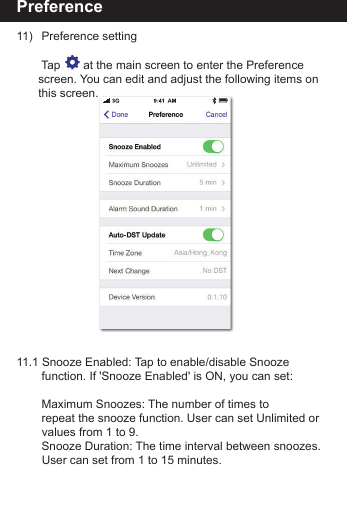
Preference11)   Preference setting     Tap       at the main screen to enter the Preference        screen. You can edit and adjust the following items on      this screen.11.1 Snooze Enabled: Tap to enable/disable Snooze       function. If 'Snooze Enabled' is ON, you can set:     Maximum Snoozes: The number of times to         repeat the snooze function. User can set Unlimited or       values from 1 to 9.     Snooze Duration: The time interval between snoozes.       User can set from 1 to 15 minutes.
Preference11.2 Alarm Sound Duration: The alarm duration. User can      set from 1 to 15 minutes.11.3 Auto DST update: It will adjust Daylight Saving Time      (DST) automatically based on your idevice time zone      setting. The alarm clock will be automatically one hour      ahead of Standard Time in summer time and will be       back to the normal Standard Time when back to winter        time, according to your idevice’s time zone.11.4 Tap [Done] to save the setting or Tap [Cancel] to        restore the setting.
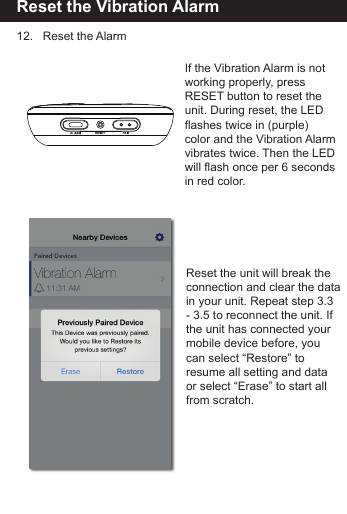
Reset the Vibration Alarm12.   Reset the AlarmReset the unit will break the connection and clear the data in your unit. Repeat step 3.3- 3.5 to reconnect the unit. If the unit has connected your mobile device before, you can select “Restore” to resume all setting and dataor select “Erase” to start all from scratch.If the Vibration Alarm is notworking properly, press RESET button to reset the unit. During reset, the LED flashes twice in (purple)color and the Vibration Alarmvibrates twice. Then the LED will flash once per 6 secondsin red color.
Vibration Alarmunit
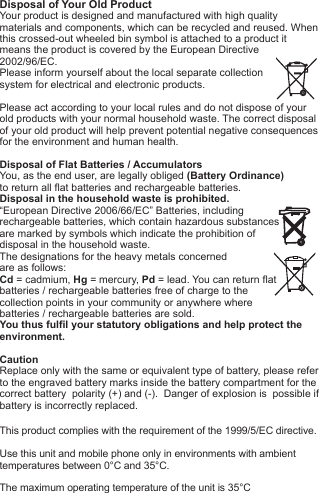
Disposal of Your Old ProductYour product is designed and manufactured with high quality materials and components, which can be recycled and reused. When this crossed-out wheeled bin symbol is attached to a product itmeans the product is covered by the European Directive2002/96/EC.Please inform yourself about the local separate collectionsystem for electrical and electronic products. Please act according to your local rules and do not dispose of yourold products with your normal household waste. The correct disposal of your old product will help prevent potential negative consequences for the environment and human health. Disposal of Flat Batteries / AccumulatorsYou, as the end user, are legally obliged (Battery Ordinance) to return all flat batteries and rechargeable batteries. Disposal in the household waste is prohibited. “European Directive 2006/66/EC” Batteries, including rechargeable batteries, which contain hazardous substancesare marked by symbols which indicate the prohibition ofdisposal in the household waste. The designations for the heavy metals concerned are as follows: Cd = cadmium, Hg = mercury, Pd = lead. You can return flatbatteries / rechargeable batteries free of charge to thecollection points in your community or anywhere wherebatteries / rechargeable batteries are sold.You thus fulfil your statutory obligations and help protect the environment.CautionReplace only with the same or equivalent type of battery, please refer to the engraved battery marks inside the battery compartment for the correct battery  polarity (+) and (-).  Danger of explosion is  possible if battery is incorrectly replaced.This product complies with the requirement of the 1999/5/EC directive.Use this unit and mobile phone only in environments with ambienttemperatures between 0°C and 35°C.The maximum operating temperature of the unit is 35°C
018-140077BAC

Navigation menu