Ember EMBER2002 Modular Spread Spectrum Transmitter User Manual DevKitUser
Ember Corporation Modular Spread Spectrum Transmitter DevKitUser
Ember >
Users Manual
C o m p a n y C o n f i d e n t i a l
EmberNet Developer Kit
User’s Guide
120-0002-210 December 2002
C o m p a n y C o n f i d e n t i a l
Copyright © 2002 by Ember Corporation
All rights reserved
The information in this document is subject to change without notice. The statements, configurations, technical data,
and recommendations in this document are believed to be accurate and reliable, but are presented without express or
implied warranty. Users must take full responsibility for their applications of any products specified in this document.
The information in this document is the property of Ember Corporation.
EmberNet and Ember are a trademarks of Ember Corporation.
All other trademarks are the property of their respective holders.
FCC Compliance for the EmberNet Node
Compliance Statement ( Part 15.19 )
The EmberNet Node complies with Part 15 of the FCC Rules and with RSS-210 of Industry Canada.
Operation is subject to the following two conditions:
--This device may not cause harmful interference, and
--This device must accept any interference received, including interference that may cause undesired operation.
Warning ( Part 15.21 )
Changes or modifications not expressly approved by the party responsible for compliance could void the userís
authority to operate the equipment.
RF Exposure ( OET Bulletin 65 )
To comply with FCC RF exposure requirements for mobile transmitting devices, this transmitter should only be used or
installed at locations where there is at least 20cm separation distance between the antenna and all persons.
The EmberNet Node is intended for installation in mobile devices, and is not intended for installation in portable devices.

EmberNet Developer Kit User’s Guide 120-0002-210 iii
C o m p a n y C o n f i d e n t i a l
Contents
Preface
About This Guide vii
Associated EmberNet Documentation vii
Getting Help vii
CHAPTER 1 EmberNet Developer Kit Overview
Developer Kit Requirements 1-2
Developer Kit Components 1-3
Hardware Components 1-3
Software Components 1-4
Support Services 1-4
Hardware Components 1-5
EmberNet Node 1-5
EmberNet Node Components 1-6
EmberNet Node Connections 1-7
EmberNet Breakout Boards 1-8
Breakout board components and connections 1-9

iv EmberNet Developer Kit User’s Guide 120-0002-210
C o m p a n y C o n f i d e n t i a l
EmberNet Gateway 1-9
EmberNet Gateway Components 1-10
EmberNet Gateway Connections 1-10
Radio antenna 1-11
USB Programmer with cable 1-11
Software Components 1-12
GCC Compiler 1-12
Alternate Compiler 1-12
EmberNet Node Binary for EmberNet Node Hardware 1-12
EmberNet Host API and EmberNet SPI Protocol (ESP) Command
Set 1-12
Sample Applications 1-13
Application Template 1-13
CHAPTER 2 Connecting the Hardware
Attaching antennae 2-2
About the antennae 2-2
EmberNet Node antenna 2-2
EmberNet Gateway antenna 2-4
Connecting the antennae 2-5
Connecting the EmberNet Breakout Board 2-6
Breakout board components and connections 2-6
Select Processor 2-9
Set the Serial Select Dip Switch (SW4) 2-10
Set the LED Select Dip Switch (SW3) 2-10
Installing the EmberNet Gateway 2-11
Connecting the Gateway 2-11
CHAPTER 3 Using the EmberNet Developer Kit Software
Installing the GCC Compiler 3-2
To install the compiler 3-2
To compile the sample applications 3-2
About the sample applications 3-3
To run the default sample application 3-3
Using the Application Template 3-4
To use the applicatoin template 3-4

EmberNet Developer Kit User’s Guide 120-0002-210 v
C o m p a n y C o n f i d e n t i a l
Using your Implementer ID 3-4
Implementer code 3-5
Project code 3-5
Tag 3-5
Defining services using your implementer ID 3-5
CHAPTER 4 Installing and Using the USB Programmer
Installing the USB Programmer Software 4-2
To install the USB Programmer software: 4-2
Attach the USB Programmer 4-3
To attach the USB Programmer: 4-3
Configuring the ISP Super programmer software 4-6
To configure the USB programmer: 4-6
Programming the Processor 4-8
To program the processor: 4-8

vi EmberNet Developer Kit User’s Guide 120-0002-210
C o m p a n y C o n f i d e n t i a l
EmberNet Developer Kit User’s Guide 120-0002-210 vii
C o m p a n y C o n f i d e n t i a l
Preface
About This Guide
This guide introduces you to the components of the EmberNet Developer Kit and
provides basic instruction for their use.
Associated EmberNet Documentation
EmberNet Overview
EmberNet Application Development Guide
EmberNet View User’s Guide
EmberNet Node Technical Specification
EmberNet Gateway Technical Specification
EmberNet Developer Kit User’s Guide 120-0002-210 1-1
C o m p a n y C o n f i d e n t i a l
CHAPTER 1 EmberNet Developer Kit Overview
Overview
There are three versions of the EmberNet Developer Kit, a Standard, Advanced and
a Premium version. Each Kit contains a number of hardware and software compo-
nents to assist you in building an Ember Enabled application. This chapter provides
a listing of components and their functions.
EmberNet Developer Kit Overview
1-2 120-0002-210 EmberNet Developer Kit User’s Guide
C o m p a n y C o n f i d e n t i a l
EmberNet Developer Kit Components
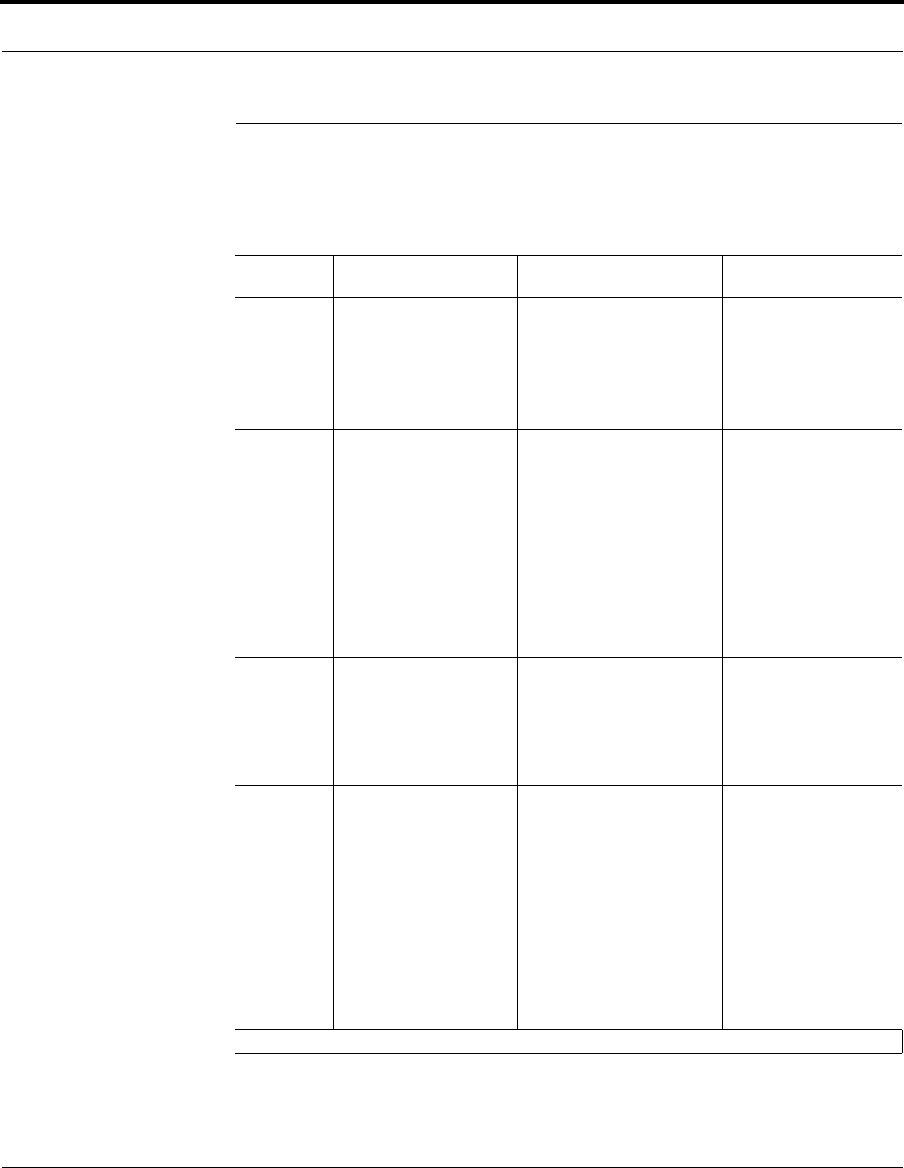
The following table outlines the components for each EmberNet Developer Kit.
Table 1-1: EmberNet Developer Kits
Standard Advanced Premium
Hardware 8 - EmberNet Nodes
8 - EmberNet Breakout Boards
1 - EmberNet Gateway
1 - USB Programmer
1 - 6ft. Ethernet patch cable
9 - 9V power supplies
12 - EmberNet Nodes
12 - EmberNet Breakout Boards
12 - EmberNet/Ethernet connection
boards
1 - EmberNet Gateway
1 - USB Programmer
1 - 6ft. Ethernet patch cable
13 - 9V power supplies
12 - EmberNet Nodes
12 - EmberNet Breakout Boards
12 - EmberNet/Ethernet connec-
tion boards
1 - EmberNet Gateway
1 - USB Programmer
1 - 6ft. Ethernet patch cable
13 - 9V power supplies
Software and
Documenta-
tion
1 - EmberNet Developer Kit CD
1 - AVR-GCC 3.2.C Compiler
(Win 32)
1 - EmberNet Node Binary
1 - EmberNet Host API Specifi-
cations & Libraries
1 - Sample Application
1 - EmberNet View
EmberNet Documentation
1 - EmberNet Developer Kit CD
1 - AVR-GCC 3.2.C Compiler (Win
32)
1 - EmberNet Node Binary
1 - EmberNet Host API Specifica-
tions & Libraries
1 - Sample Application
1 - EmberNet View
1 - EmberNet Simulator v1.0 (Linux)
1 - EmberNet Node Binary for
EmberNet Simulator
1 - EmberNet/Ethernet Debug Appli-
cation
EmberNet Documentation
1 - EmberNet Developer Kit CD
1 - AVR-GCC 3.2.C Compiler
(Win 32)
1 - EmberNet Node Binary
1 - EmberNet Host API Specifi-
cations & Libraries
1 - Sample Application
1 - EmberNet View
1 - EmberNet Simulator v1.0
(Linux)
1 - EmberNet Node Binary for
EmberNet Simulator
1 - EmberNet/Ethernet Debug
Application
EmberNet Documentation
Training and
Support
1 year - Web based support Annual Support
1 - Training Seat
Telephone, email and web support
Premium Support
• 3 days - custom engineer-
ing(*T&E excluded)
• 2 days (up to 5 students) -
Onsite training (*T&E
excluded)
• Telephone, email and web
support.
Optional
Upgrades for
additional fee
Discounted first seat training
Per incident support:
• $750 per three incidents
• First three incidents free upon
completion of training
EmberNet Debug Kit includes:
8 - EmberNet/Ethernet Connec-
tion Boards
1 - EmberNet Simulator
1 - EmberNet/Ethernet Debug
application
Additional training seats
Annual support
Custom engineering
• Additional Training seats
• Custom Engineeringz
• Additional Training seats
• Additional Custom Engi-
neering
* Travel and Entertainments
EmberNet Developer Kit User’s Guide 120-0002-210 1-3
Developer Kit Requirements
C o m p a n y C o n f i d e n t i a l
Developer Kit Requirements
Most modern PCs provide the necessary requirements for developing Ember
Enabled applications. Refer to the GCC documentation for specific details on the
compiler’s requirements, but in general, the following should be sufficient:
• Windows 98 and later
• An available USB port for downloading images to the EmberNet Node or appli-
cation code to the processor.
• Adobe Acrobat reader (available via free download from www.adobe.com) for
viewing the documentation.
Additionally you may require these optional components
• if you would like to connect and manage your EmberNet Gateway directly from
your PC
•Ethernet connection port on your PC
•cross-over cable
• if you would like to connect and manage your EmberNet Gateway via your
local area network
•local area network connection
•standard serial cable
•HyperTerminal (a Windows Accessory component)
EmberNet Developer Kit Overview
1-4 120-0002-210 EmberNet Developer Kit User’s Guide
C o m p a n y C o n f i d e n t i a l
Developer Kit Components
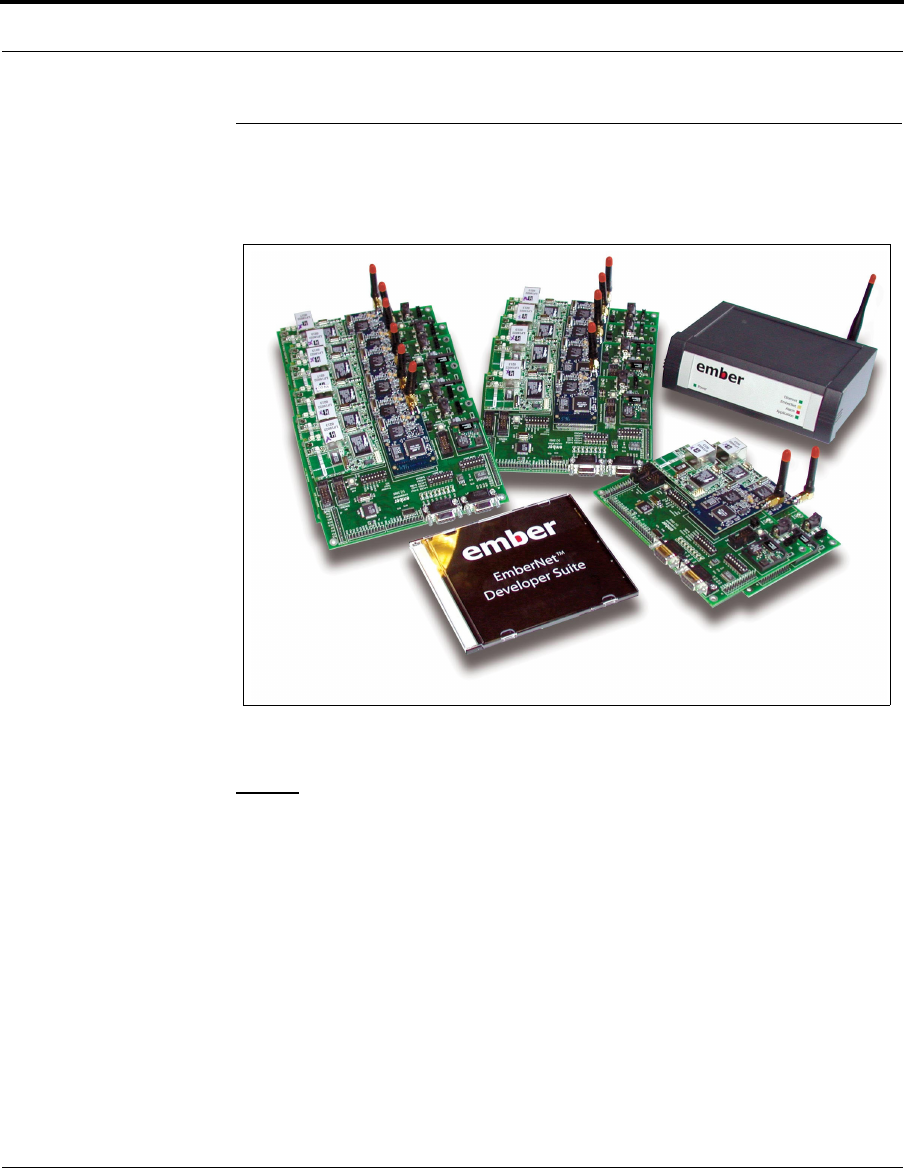
The components of the EmberNet Developer Kit include both hardware and soft-
ware components, as well as support services.
Figure 1-1: EmberNet Advanced Developer Kit
NOTE: An Implementer ID number was included in your EmberNet Devel-
oper Kit. This ID number MUST be used as described in Chapter 3 in order to
ensure that your application will not interfere with other EmberNet networks.
Hardware Components
The hardware components of the development kit include the following:
• Either 8 or 12 EmberNet Nodes (attached to Breakout Boards)
• Either 8 or 12 EmberNet Breakout Boards (including pre-mounted RabbitCore
boards for debugging, and 9V power supplies)
• One EmberNet Gateway and 9V power supply
• Either 8 or 12 medium profile antennae for the EmberNet Nodes
EmberNet Developer Kit User’s Guide 120-0002-210 1-5
Developer Kit Components
C o m p a n y C o n f i d e n t i a l
• One medium profile antenna for the EmberNet Gateway
• One USB Programmer with cable, programming applications, and documenta-
tion
• One 6-foot Ethernet patch cable
Software Components
The software in the EmberNet Developer Kit includes the following:
• EmberNet Developer Suite CD, which includes:
• EmberNet Host API
• Source code
• EmberNet Node binary for EmberNet Node hardware
• EmberNet Debug Logging Utility
• Application template
• Sample applications
• GNU/GCC compiler
NOTE: If you are interested in purchasing a commercial compiler, we
recommend the IAR Embedded Workbench from IAR Systems. Refer
to www.iar.com for more information and pricing, or to download a
free demo copy.
• EmberNet Documentation
NOTE: The EmberNet documentation is provided in Adobe Acrobat
format (pdf). To view the documentation, you need the Adobe Acrobat
reader, available free from www.adobe.com.
Support Services
The EmberNet Developer Kit also provides you with access to Ember’s Technical
Support resources, including training, phone and e-mail support, and the Ember
Support web site. Refer to www.ember.com for more details on these services.
EmberNet Developer Kit Overview
1-6 120-0002-210 EmberNet Developer Kit User’s Guide
C o m p a n y C o n f i d e n t i a l
Hardware Components
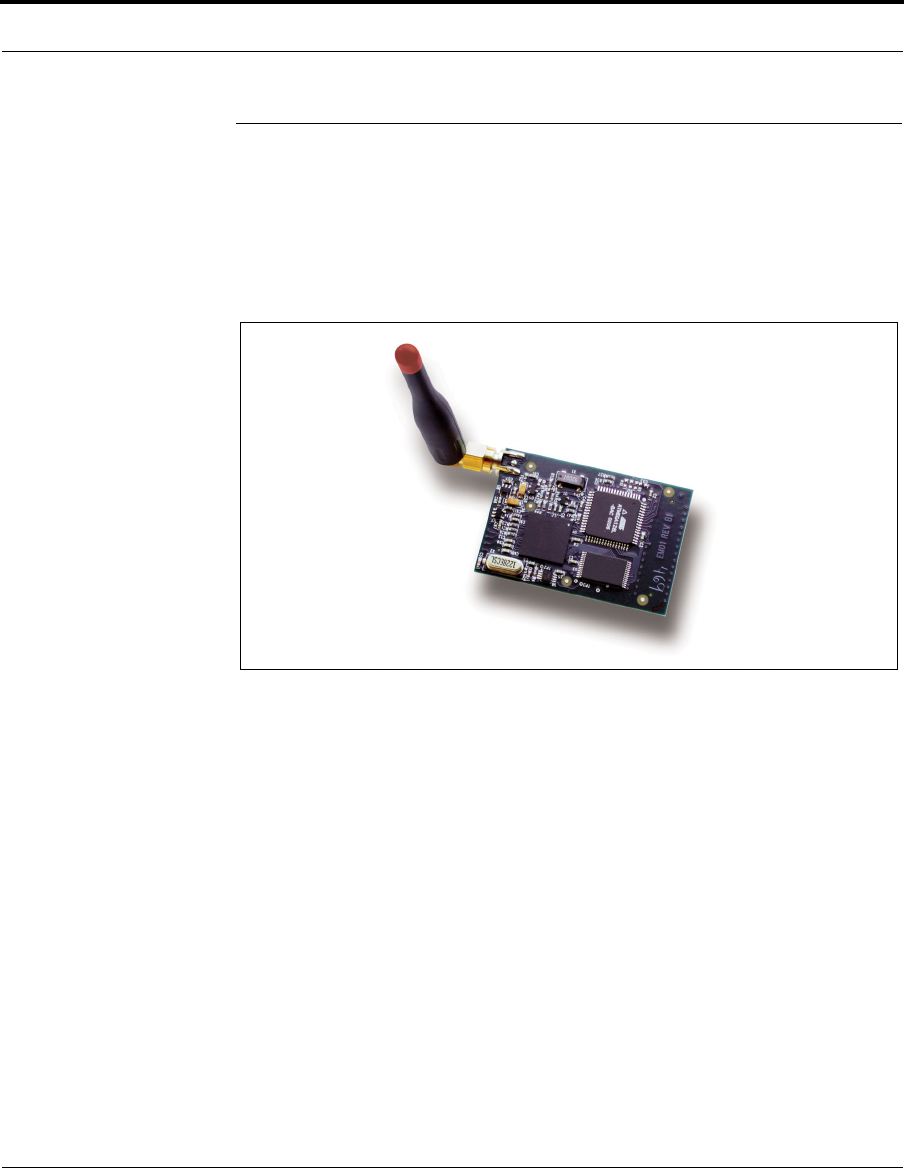
EmberNet Node
An EmberNet Node is a small-footprint module (2.2" x 1.5") that connects to a car-
rier board (the EmberNet breakout board for development and the customized
board for integration into an OEM product) and the EmberNet Gateway.
Figure 1-2: EmberNet Node, top view
An EmberNet Node is the primary component of an EmberNet network—it imple-
ments the protocols that enable EmberNet networks to organize themselves and
route messages across the network on behalf of the applications.
EmberNet Developer Kit User’s Guide 120-0002-210 1-7
Hardware Components
C o m p a n y C o n f i d e n t i a l
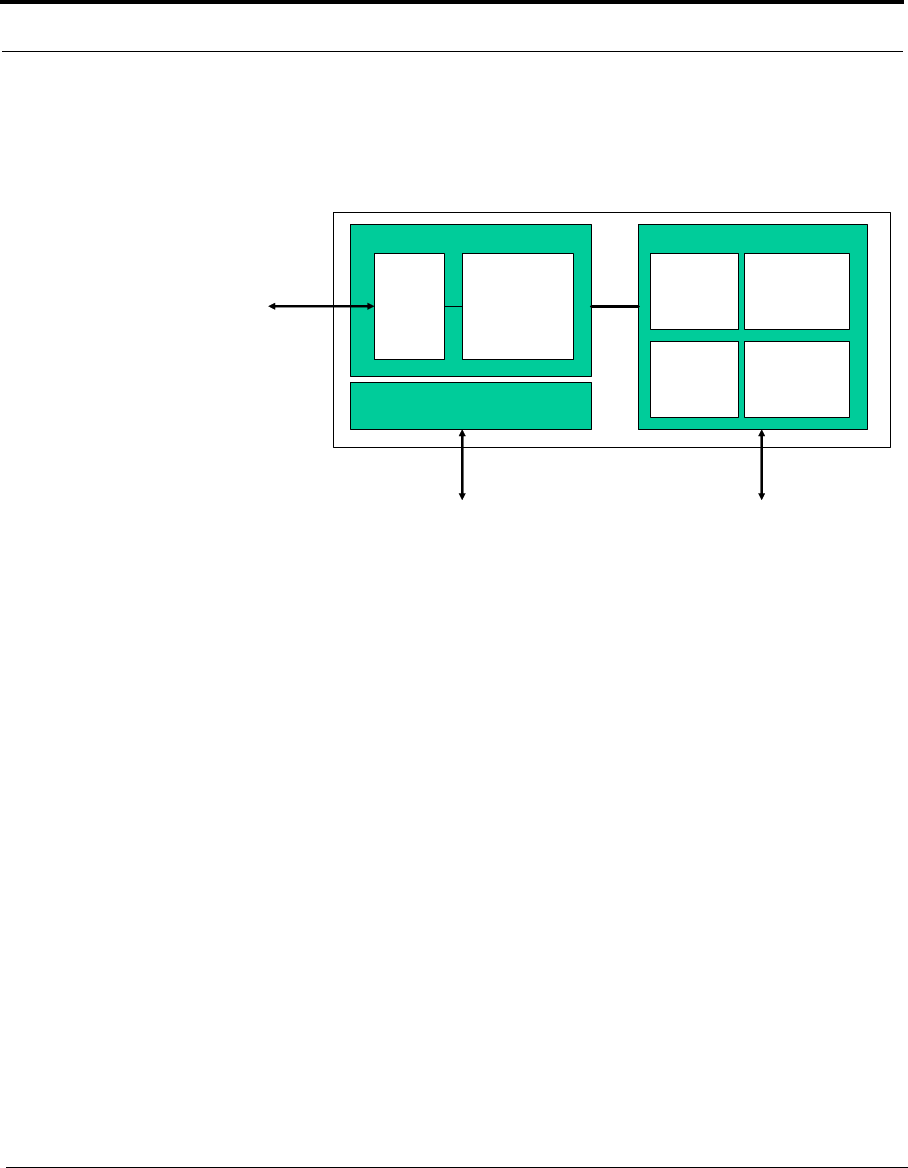
EmberNet Node Components
The following block diagram represents the components of an EmberNet Node.
Figure 1-3: Block diagram of EmberNet Node
The main components of an EmberNet Node include:
•An 8-bit micro controller which runs the EmberNet Protocol Stack and any
application code you may wish to develop. In most cases, the EmberNet Node is
embedded into a larger system, where the application code runs on the host pro-
cessor and communicates with the EmberNet Node via the high-speed serial
interface using the SPI or the EmberNet Host API commands.
An EmberNet Node can also be used in stand-alone fashion (attached to an
EmberNet Breakout Board or another carrier board for power) as a repeater.
You can choose to run application components or whole applications in the
EmberNet Node.
• The direct sequence spread spectrum baseband controls the radio and mediates
communications between the radio and the Node’s processor. Because the
EmberNet Node’s processor is small, some of the work, such as encryption, is
given to the baseband.
• The radio communicates by way of the main RF channel.
PA/LNA
902-928MHz
DSSS
Transceiver
DSSS
Baseband
AES-128
Crypto
Engine
EmberNet
Network
Processor
Flash/RAM
RF Digital
RF
Interface
SPI
Interface
Power Supply/Filtering
Unregulated
Power
EmberNet Developer Kit Overview
1-8 120-0002-210 EmberNet Developer Kit User’s Guide
C o m p a n y C o n f i d e n t i a l
Information is transmitted into and out of the EmberNet Node in two ways. The pri-
mary communications channel is a RF channel, which uses a 900MHz frequency-
hopping spread-spectrum radio by which the EmberNet Node communicates with
its neighboring nodes. In addition, a high-speed synchronous serial interface (SPI)
is used for the EmberNet node to communicate with its host processor on the
embedded device.
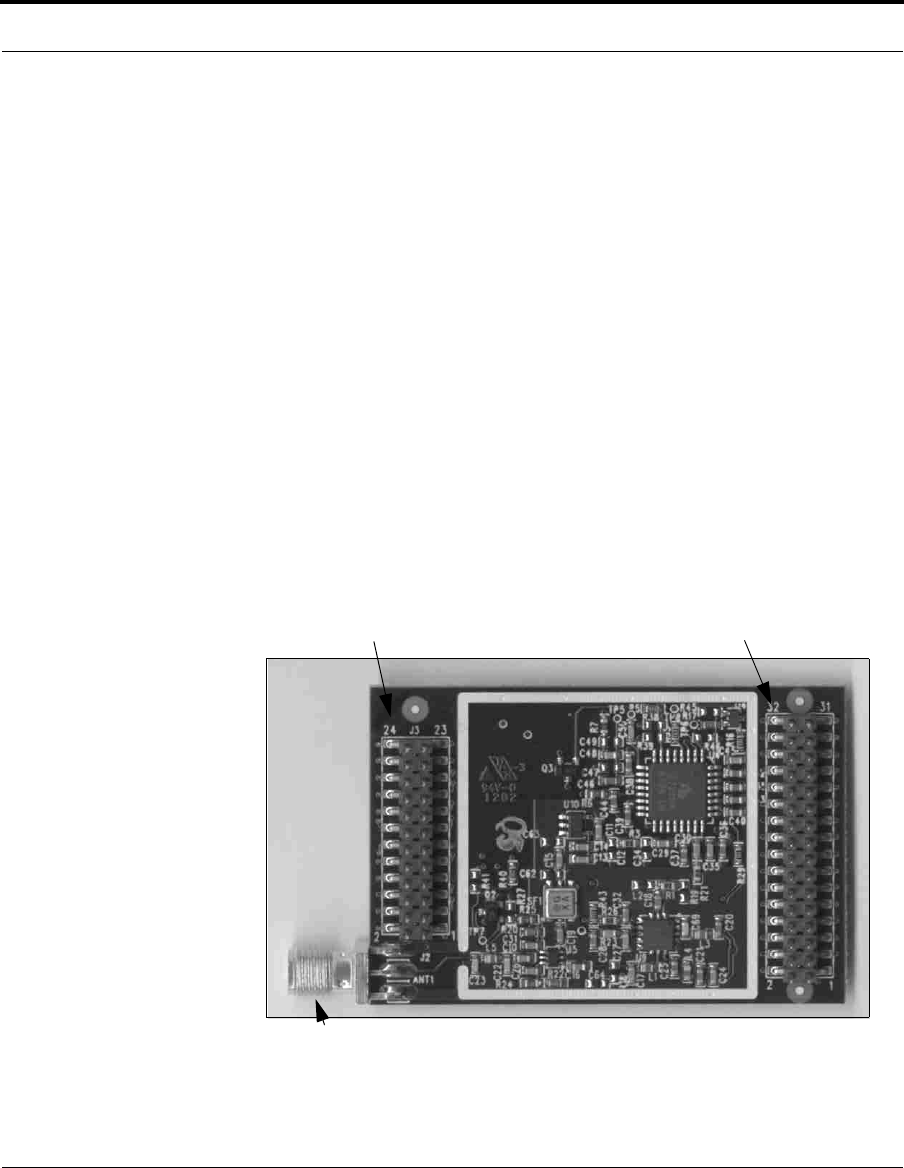
EmberNet Node Connections
The EmberNet Node has the following connections:
• The J1 and J3 connectors are used to attach the node to the EmberNet breakout
board or your customized carrier board. These connections allow the EmberNet
Node to communicate with the host processor on the carrier board. For pinout
information on these connectors, refer to the EmberNet Node Technical Specifi-
cation.
• The J2 antenna controller SMA connector connects the antenna to the
EmberNet Node. Refer to Chapter 2 for more information about the antennae
and how to connect them to nodes.
•Power is supplied to the node via DC power through the carrier board
Figure 1-4: EmberNet Node connections
J1 Connector
J3 Connector
J2 Antenna Controller SMA
EmberNet Developer Kit User’s Guide 120-0002-210 1-9
Hardware Components
C o m p a n y C o n f i d e n t i a l
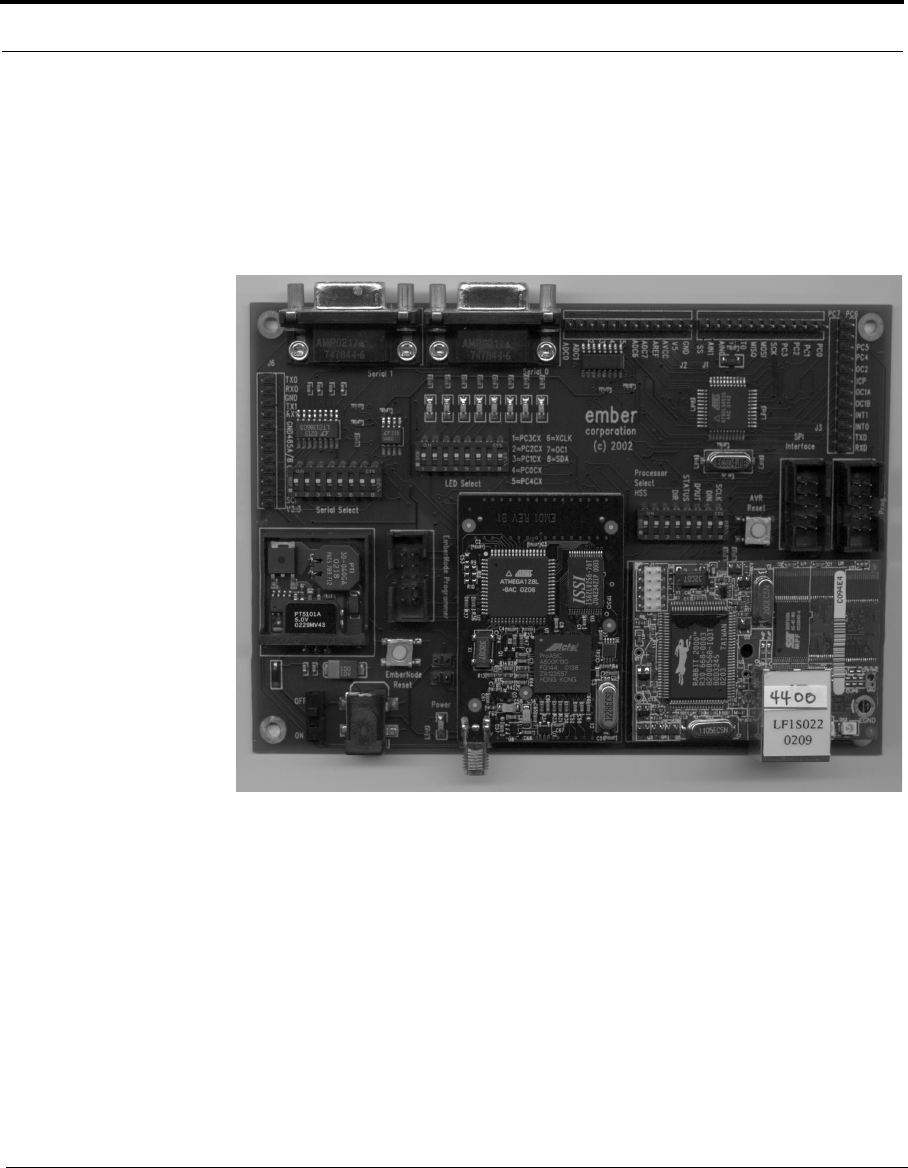
EmberNet Breakout Boards
The EmberNet breakout boards are the carrier boards on which an EmberNet Node
resides for development only; a custom carrier board will be designed to specifi-
cally fit the equipment for which the application is being developed. The following
illustration shows the breakout board with an attached EmberNet Node.
Figure 1-5: EmberNet Breakout Board with attached EmberNet Node
EmberNet Developer Kit Overview
1-10 120-0002-210 EmberNet Developer Kit User’s Guide
C o m p a n y C o n f i d e n t i a l
Breakout board components and connections
The breakout board consists of several components and connections. The Atmel
8535 processor provides on-board processing capabilities. The SW1 dip switch and
offboard processor connector allows the use of an alternative processor. The Rab-
bitCore board provides an Ethernet connection for debugging. Two serial connec-
tions and four other connections provide communications with the devices under
development. For a complete listing of EmberNet Breakout Board components,
refer to Chapter 2.
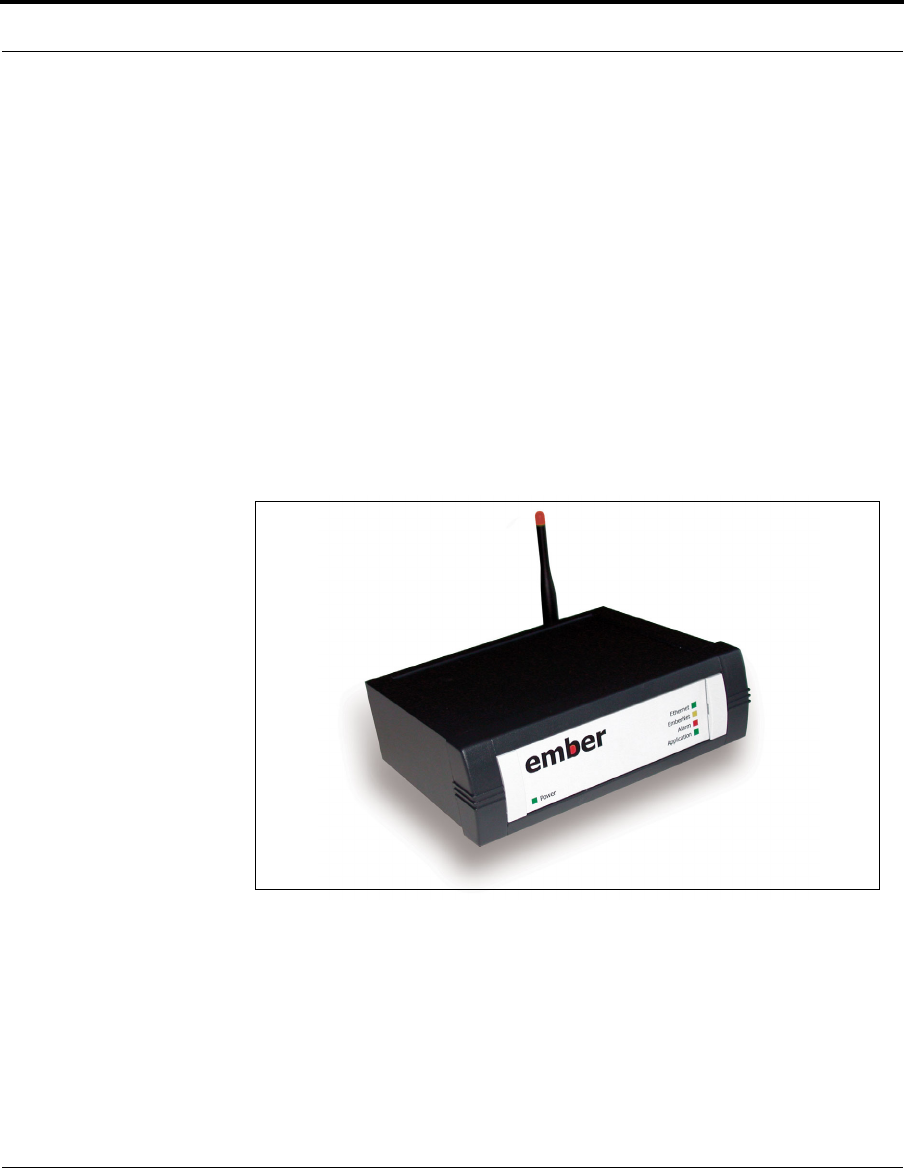
EmberNet Gateway
The EmberNet Gateway provides a link between an EmberNet network and a TCP/
IP Ethernet network, allowing you to collect data, monitor network status, and per-
form limited management, configuration, and debugging of your network.
Figure 1-6: EmberNet Gateway
EmberNet Developer Kit User’s Guide 120-0002-210 1-11
Hardware Components
C o m p a n y C o n f i d e n t i a l
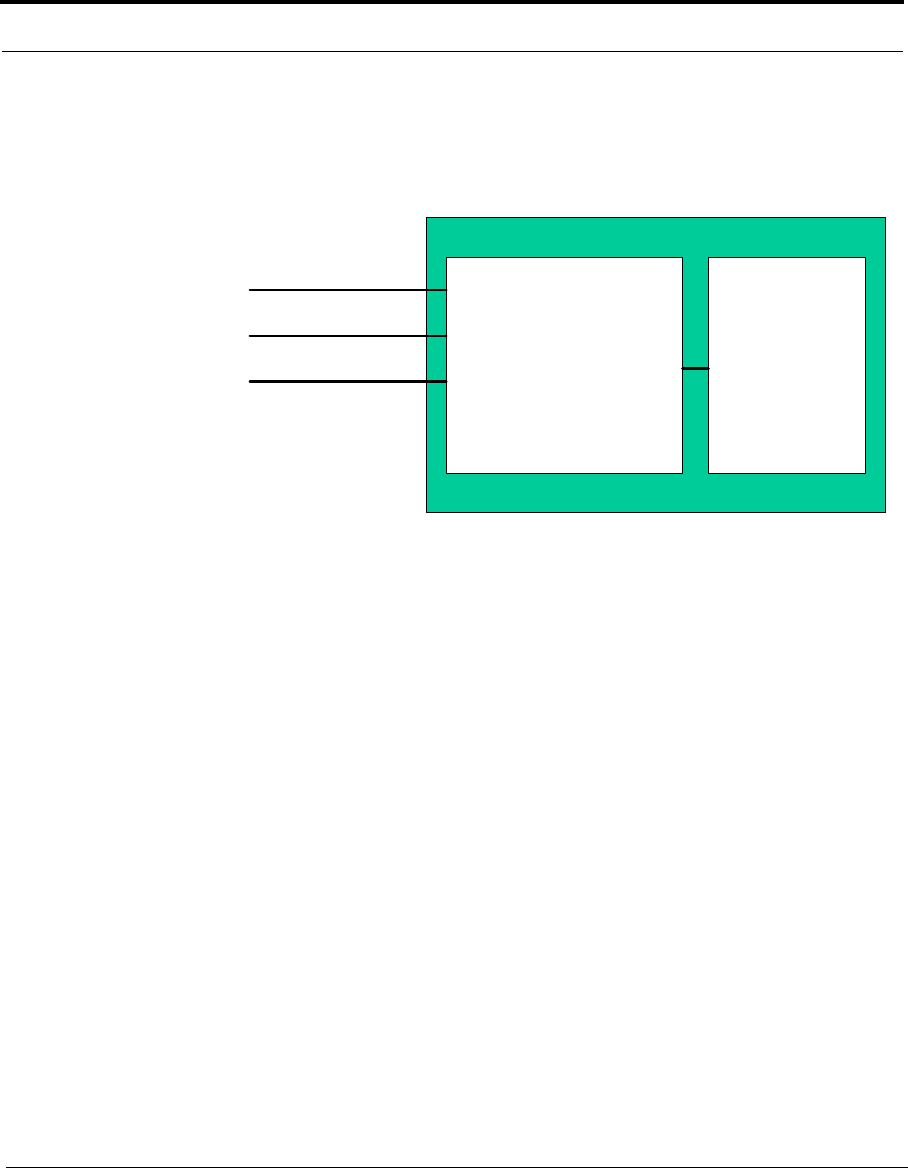
EmberNet Gateway Components
The following block diagram represents the components of an EmberNet Gateway.
The EmberNet Gateway is comprised of two main components:
•A StrongARM single board computer (SBC) that runs LINUX and runs an
http server. It includes:
• The Apache web server provides access to data from the network.
• A CGI server so that external applications can query data from the network.
• The EmberNet Protocol Stack server allows the Gateway to use the same
host API running on the EmberNet Node.
• The EmberNet View application provides the ability to use a web browser to
monitor and configure your EmberNet. For more information, refer to the
EmberNet View User’s Guide (document 120-0004-100).
•An EmberNet Node to provide access to the EmberNet network.
The SBC and the EmberNet node communicate using the EmberNet Host API over
the SPI high-speed serial interface, just as an EmberNet Node communicates with a
host processor on a carrier board.
EmberNet Gateway Connections
• Power is supplied to the EmberNet Gateway via a 9V power supply.
• An RJ-45 Ethernet connection provides access to the TCP/IP Ethernet network.
• A (DB-9) serial connection (RS-232) allows you to connect the Gateway to any
serial device for configuration.
EmberNet Node
StrongARM
Linux
Computer
w/ Intrinsyc Linux
Power Input
Ethernet
Serial Port
EmberNet Developer Kit Overview
1-12 120-0002-210 EmberNet Developer Kit User’s Guide
C o m p a n y C o n f i d e n t i a l
Radio antenna
Your development kit includes 12 medium profile antennae to be attached to the
EmberNet Nodes and one medium profile antenna to attach to the EmberNet Node
that resides in the EmberNet Gateway. Refer to Chapter 2 for details.
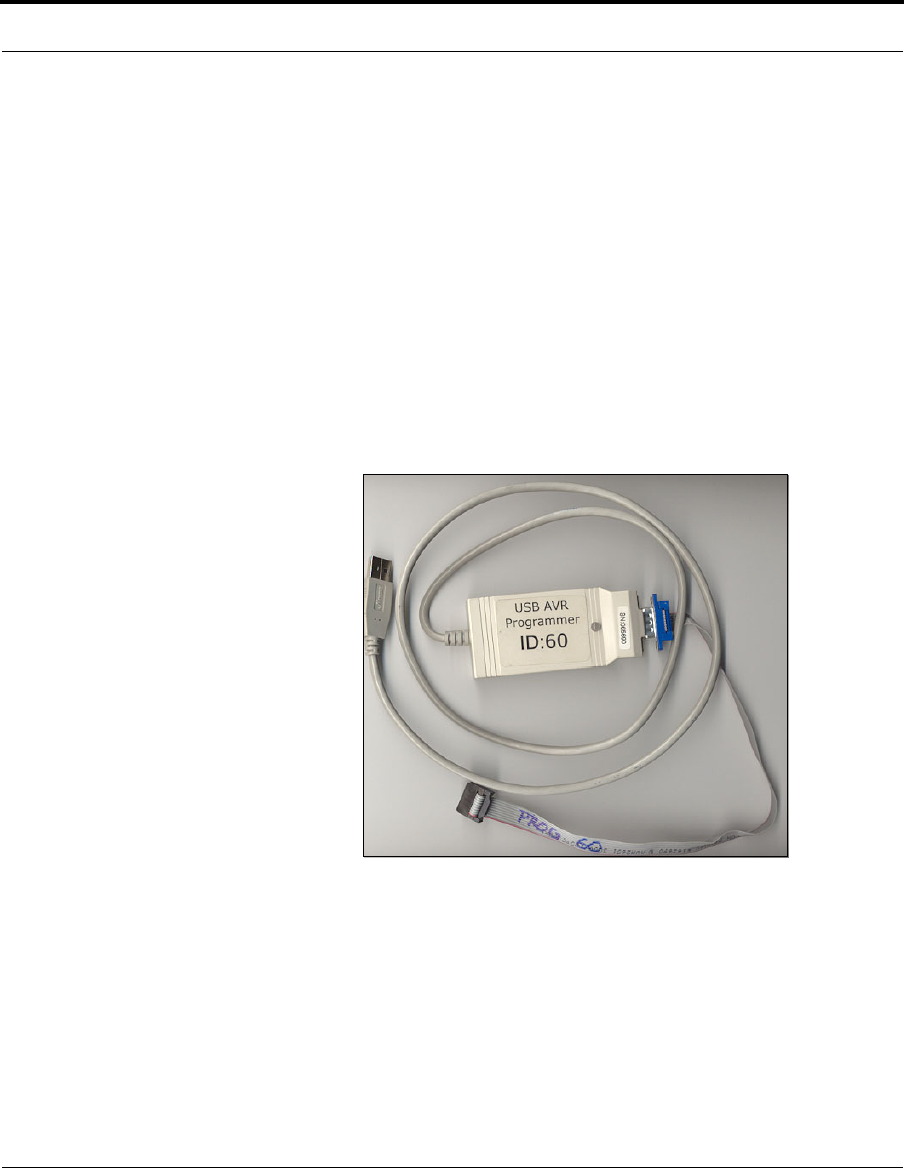
USB Programmer with cable
The USB programmer (including the programmer itself, USB cable, software, and
documentation) is used to:
• download an image from your development system into flash memory on an
EmberNet Node via a programming port on the breakout board.
• download application code to the host processor on the breakout board.
Figure 1-7: Serial Device Programmer with cable
The software files associated with the USB Programmer (for Windows only) are
included on the Setup and Installation CD-ROM included in the USB kit. For more
information on installing and using the USB Programmer, refer to Chapter 4.
EmberNet Developer Kit User’s Guide 120-0002-210 1-13
Software Components
C o m p a n y C o n f i d e n t i a l
Software Components
A number of EmberNet software tools are used in the development of Ember
Enabled devices.
GCC Compiler
The EmberNet Developer Kit includes the Win32 build of avr-gcc 3.2, the GCC
Compiler for a Windows development environments. The AVR-GCC C compiler is
made available under the GNU general public license. There are a number of web
sites, including www.avrfreaks.com and gcc.gnu.org, that offer documentation and
support via discussion boards for this compiler.
Alternate Compiler
If you are interested in purchasing a commercial compiler, we recommend the IAR
Embedded Workbench from IAR Systems. Refer to www.iar.com for more infor-
mation and pricing, or to download a free demo copy.
EmberNet Node Binary for EmberNet Node Hardware
The EmberNet Node binary contains the software image for the EmberNet Node.
This image is provided in the event that you need to reload it onto the EmberNet
Node.
EmberNet Host API and EmberNet SPI Protocol (ESP) Command Set
The EmberNet Host API is a set of commands that allows the EmberNet Node and
the host processor to communicate across the high-speed SPI interface. The API
should be used if you are using the ATMel 8535 processor on the breakout board
for application development. For more information on the API, refer to the Ember-
Net Application Development Guide (document 120-0003-100).
For development using another processor, you should use the API source code and
the EmberNet SPI Protocol (ESP) command set to port the API to the processor of
your choice.
EmberNet Developer Kit Overview
1-14 120-0002-210 EmberNet Developer Kit User’s Guide
C o m p a n y C o n f i d e n t i a l
EmberNet Debug Logging Utility
The EmberNet Debug Logging Utility provides a means for testing and analyzing
EmberNet applications. EmberNet Nodes attached to the breakout board can gen-
erate a variety of debugging messages (configurable through EmberNet Host API)
and send them through the Ethernet connection to the EmberNet Debug Logger
Utility, a Java program that collects and formats the raw data.
Sample Applications
A few sample applications are included in the EmberNet Developer Kit so that you
can examine sample source code for an Ember Enabled application. For more infor-
mation on the sample applications, refer to Chapter 3. You can also check
support.ember.com for additional sample applications.
Application Template
A template is included for assisting in the development of the application for your
Ember Enabled device. Refer to Chapter 3 for information on using the template.
EmberNet Developer Kit User’s Guide 120-0002-210 2-1
C o m p a n y C o n f i d e n t i a l
CHAPTER 2 Connecting the Hardware
Overview
In general, when developing an Ember Enabled device with the Developer Kit, use
the following steps:
1. Attach the antennae to the EmberNet Nodes and EmberNet Gateways.
2. Attach the EmberNet Breakout Board to the development system PC and to any
external devices (sensors, external processor, etc.)
3. Write the application code using the EmberNet Host API. Refer to the Ember-
Net Application Development Guide.
4. Download the application code to the processor using the USB programmer.
Refer to Chapter 4 for information on installing and using the USB programmer.
5. Install the EmberNet Gateway to monitor the application using EmberNet View.
Refer to the EmberNet View User’s Guide for more details on using this moni-
toring tool.
6. Use the EmberNet Debug Logging Utility to test and analyze EmberNet appli-
cations. Refer to Chapter 5 for information on installing and using the Ember-
Net Debug Logging Utility.
This chapter discusses attaching antennae to EmberNet Nodes and Gateways, con-
necting an EmberNet Breakout Board for development, and installing an EmberNet
Gateway.
Connecting the Hardware
2-2 120-0002-210 EmberNet Developer Kit User’s Guide
C o m p a n y C o n f i d e n t i a l
Attaching antennae
The EmberNet Developer Kit includes twelve medium profile antennae for use
with the EmberNet Nodes and one medium profile antenna for the EmberNet Gate-
way. These antennae can be used during the design and development of your
EmberNet network.
EmberNet Nodes and EmberNet Gateways are not shipped with pre-installed anten-
nae, so you will need to attach them BEFORE powering on the EmberNet Node or
EmberNet Gateway..
CAUTION!
Always connect an antenna to the EmberNet Node or EmberNet Gate-
way prior to power up. Failure to do so could cause permanent dam-
age to the EmberNet Node, EmberNet Gateway or the EmberNet
Breakout Board.
EmberNet Developer Kit User’s Guide 120-0002-210 2-3
Attaching antennae
C o m p a n y C o n f i d e n t i a l
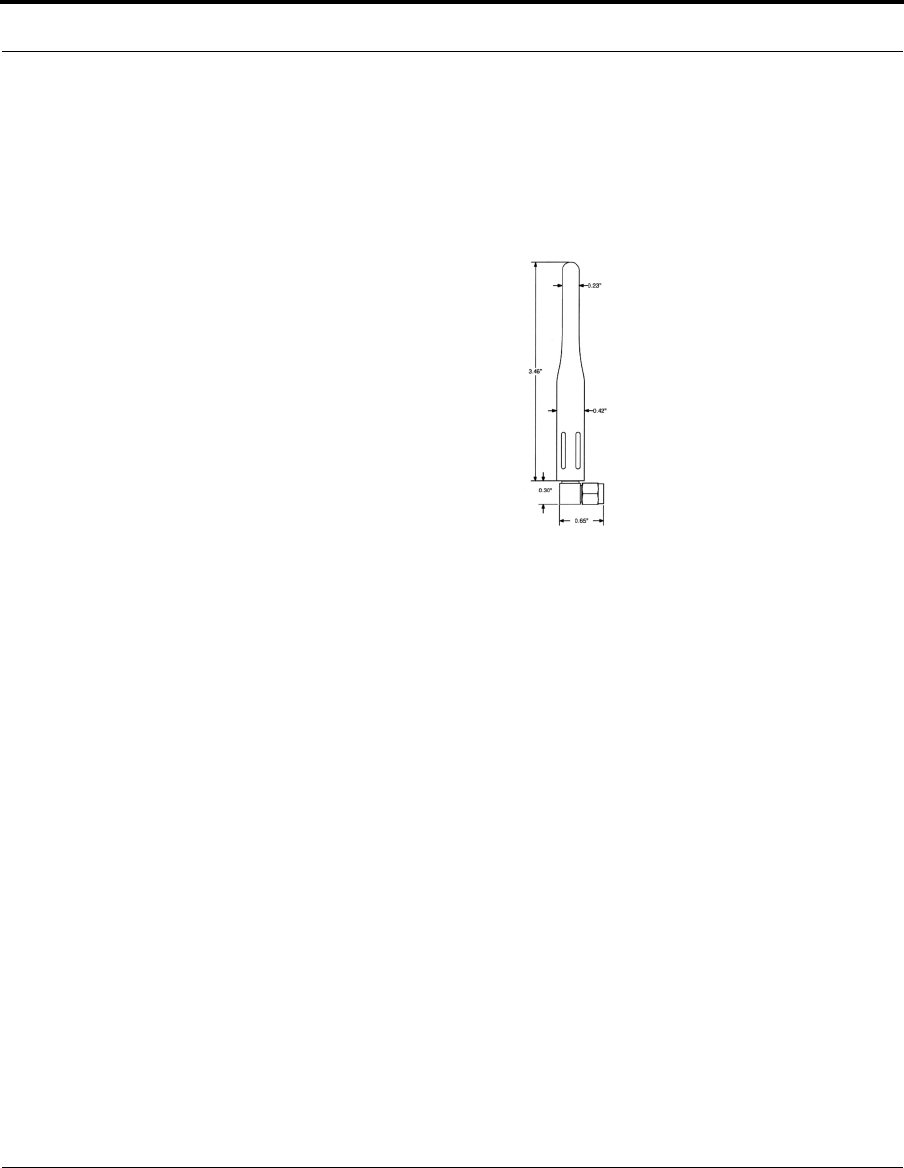
EmberNet antenna
This 916 MHz 1/4-wave medium profile antenna is used on the EmberNet Nodes
and EmberNet Gateway. It has a right-angle RP-SMA female connector that is FCC
Part 15-compliant.
Figure 2-1: EmberNet antenna
Features of this antenna include:
• Medium profile (3.46 inches) whip
• High performance
• Omni-directional pattern
• Rugged construction
• Used with plastic (requires proximity grounding) or metal enclosures
Connecting the Hardware
2-4 120-0002-210 EmberNet Developer Kit User’s Guide
C o m p a n y C o n f i d e n t i a l
Connecting the antennae
The antennae have FCC Part 15-compliant RP-SMA female connectors that mate
with RP-SMA male connectors on an EmberNet Node, which are factory-installed
on the EmberNet Breakout Boards and EmberNet Gateways.
CAUTION!
Always connect the antenna to the EmberNet Node prior to power up.
Failure to do so could cause permanent damage to the EmberNet
Node, EmberNet Gateway or the EmberNet Breakout Board..
To install an antenna on an EmberNet Node, perform the following steps:
1. If attaching an antenna to an EmberNet Gateway, connect a medium profile
antenna’s RP-SMA connector to the RP-SMA connector of the node in the
EmberNet Gateway.
2. If attaching an antenna to an EmberNet Node on the breakout board, connect a
medium profile antenna’s RP-SMA connector to the EmberNet Node RP-SMA
connector.
3. Adjust the antenna, by hand, turning it so it is vertical.
4. Tighten the antenna’s RP-SMA connector, not to exceed 8 in-lb. of torque. Use
an 8 in-lb. calibrated torque wrench if you are uncertain about the amount of
torque you are applying.
5. Repeat steps until you have connected all antennae to all of the EmberNet
Nodes.