EnergyICT NV EPIO-RF EPIO-RF User Manual EMNL000015 05 EN EpIO

EnergyICT NV EPIO-RF EMNL000015 05 EN EpIO

Users manual

            EpIO    Installation Manual             Serial Number            Article Code EINF100004   Document Code EMNL000015_05_EN EpIO     EnergyICT   n.v. – Th. Sevenslaan 104A - B-8500 Kortrijk - Tel: +32 56 245 694 (support) - Fax: +32 56 245 699 www.EnergyICT.com - support@EnergyICT.com
                                                 Copyright  EnergyICT n.v. Copyright 2007 by EnergyICT n.v. All rights reserved. The information in this document is subject to change without notice and does not represent a commitment on the part of EnergyICT. The software described in this document is furnished under a license agreement, and may be used or copied only in accordance with the terms of that agreement. No part of this document may be reproduced, transmitted, transcribed, stored in any retrieval system, or translated into any language by any means, electronic or mechanical, including photocopying and recording, for any purpose other than the licensee's personal use without the express written permission of EnergyICT. In no event will EnergyICT be responsible for any damages, including any lost profits, lost savings or other incidental or consequential damages arising out of the use of this product.   Disclaimer  The information contained in this message (including any attachments) is confidential and intended solely for the attention and use of the named addressee(s). It must not be disclosed to any person without our authority. If you are not the intended recipient, please delete it from your system immediately - any disclosure, copying or distribution thereof or any action taken or omitted to be taken in reliance thereon is prohibited and may be unlawful.
                                                                                                             1/20 Table of Contents    Safety Precautions .................................................................................................2 Notice on Interference ...........................................................................................3 Power Supply Wiring Safety Guidelines ....................................................................4 Chapter 1: Introduction .................................................................................. 5 About the EpIO .....................................................................................................6 Components..........................................................................................................8 Chapter 2: Mounting and Wiring................................................................... 11 Mounting Instructions .......................................................................................... 12 Power Supply Wiring Instructions.......................................................................... 14 Wiring Instructions .............................................................................................. 15 Chapter 3: Digital Outputs ............................................................................ 16 Appendix ....................................................................................................... 17 Humidity/Temperature Sensor .............................................................................. 18 Temperature Sensor ............................................................................................ 20
                                                                                                             2/20 Safety Precautions  Precautions   The EpIO has been designed and tested in accordance with the  EN61000-6-4 norm and the EN61000-6-2 norm and has left the factory in a safe condition. The present installation manual contains important information and warnings which have to be followed by the user to ensure safe operation and to retain the unit in safe condition.  Interventions   Any interventions to the EpIO must be done by technical service staff only.   Note     Changes or modifications not expressly approved by the responsible    party for compliance (EnergyICT®) could void the user's authority     to operate the equipment.  Removing the protective panel  Before removing the protective panel, make sure the device power is switched off.   Note    The protective panel can only be opened by qualified electricians.   Distance Limitations  Depending on the location, the distance to a remote node should be no more than 100 – 150 meters.
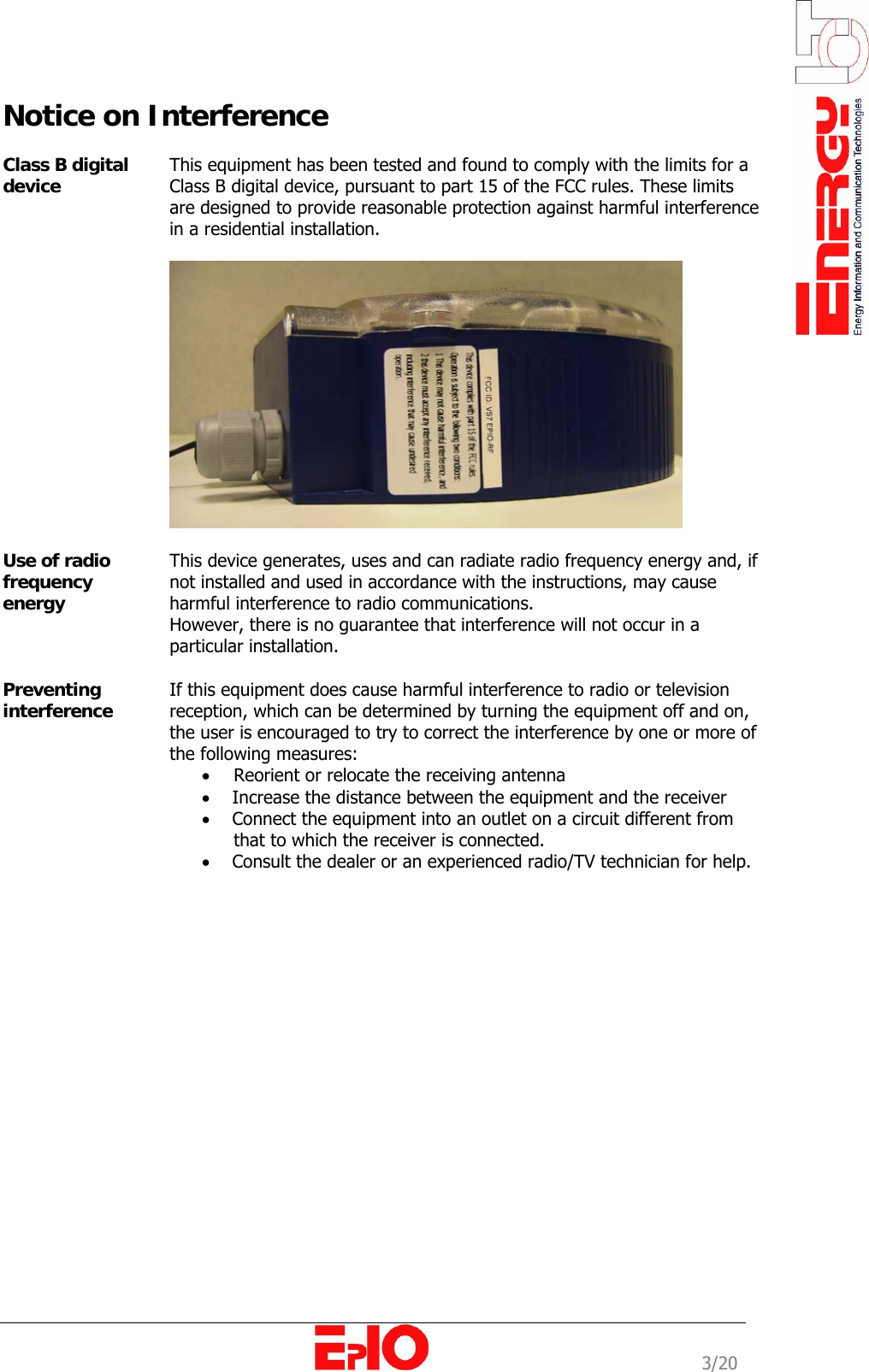
                                                                                                             3/20 Notice on Interference  Class B digital device  This equipment has been tested and found to comply with the limits for a Class B digital device, pursuant to part 15 of the FCC rules. These limits are designed to provide reasonable protection against harmful interference in a residential installation.    Use of radio frequency energy  This device generates, uses and can radiate radio frequency energy and, if not installed and used in accordance with the instructions, may cause harmful interference to radio communications. However, there is no guarantee that interference will not occur in a particular installation.  Preventing interference  If this equipment does cause harmful interference to radio or television reception, which can be determined by turning the equipment off and on, the user is encouraged to try to correct the interference by one or more of the following measures: • Reorient or relocate the receiving antenna •     Increase the distance between the equipment and the receiver •     Connect the equipment into an outlet on a circuit different from   that to which the receiver is connected. •     Consult the dealer or an experienced radio/TV technician for help.
                                                                                                             4/20 Power Supply Wiring Safety Guidelines  Securing the device  To ensure safe operation, the EpIO must be secured externally 16A maximum.   Switch  For safety reasons, the EpIO must be installed close to an easily accessible switch that removes power from the device.   Wiring  The following additional guidelines must be taken into account:  • The power supply wiring must be double isolated  • The power supply wiring must be mechanically secured.  Protective earth  The power supply must be connected to the power connector of the EpIO, preferably by means of solid wiring. The device must be properly grounded, using the power connector’s protective earth pin.   Caution    The power wiring must guarantee a permanent connection to the         protective earth.
                                                                                                             5/20 Chapter 1: Introduction   Overview   Introduction   This chapter provides the user with an introduction to the EpIO, its main internal components and its main functions. Chapter description  This chapter describes the following topics:  Topic  Page   About the EpIO   [6]   Components   [8]
                                                                                                             6/20 About the EpIO  Purpose   The EpIO designed by EnergyICT® serves as the last point in the meter reading chain, just before the meter itself. EpIO’s are manufactured as universal models for all energy meters and contain multiple interfaces towards the meters. These devices can be used to monitor temperature and humidity as well. Network Setup   Ideally, multiple EpIO’s are used in combination with a master data concentrator (RTU+®  V6, WebRTU® Z2 or RTU+®  Server). The network between the data concentrator and the EpIO’s is self-forming and self-healing, with the data concentrator acting as central master and the EpIO’s acting as slaves. It is self-forming because after installation, each device auto-configures itself and detects if any devices are in the vicinity, thereby creating a network capable of expanding itself without any manual intervention. Each EpIO sends its consumption data via RF directly or indirectly to the data concentrator. Indirect communication is possible thanks to the dual role of the EpIO: It can send its own data to the data concentrator but can also act as a repeater for the data of another EpIO simultaneously. Moreover, the network is self-healing due to automatic repair when one device fails (due to disconnection, fire, etc…): a remote EpIO simply detects another EpIO in its vicinity to send its data to.  This network communication is very similar to the one used by routers on the Internet, that communicate amongst each other and update their internal routing tables, in order to recalculate a new routing path should a router fail. But contrary to this mesh-networking by routers, EpIO’s can never serve as master, only as slave or as submaster; in which case a single EpIO collects the data from multiple EpIO’s before sending it to the master data concentrator.  Design   The EpIO is built into a robust ABS box resisting easily to any industrial environment.    Main Functions    The table below lists the main function of the EpIO:   Function  Description  Data transfer   The EpIO can transfer data (channel status, pulse counts...):  • Directly to the master concentrator        (RTU+® V6) • Indirectly to the master concentrator by sending the data via other EpIO’s Control output   The master concentrator can drive the EpIO to turn certain loads on or off via the EpIO’s digital outputs.   Types/options     After the assembly of the EpIO no changes can be made to the unit. Take in consideration the type and option you want before ordering.      The table below lists the 2 EpIO types:   Article Code  Description EINF100004  INF EpIO 2DO RF EINF100005  INF EpIO 2DO 2DI RS485 Mbus RF
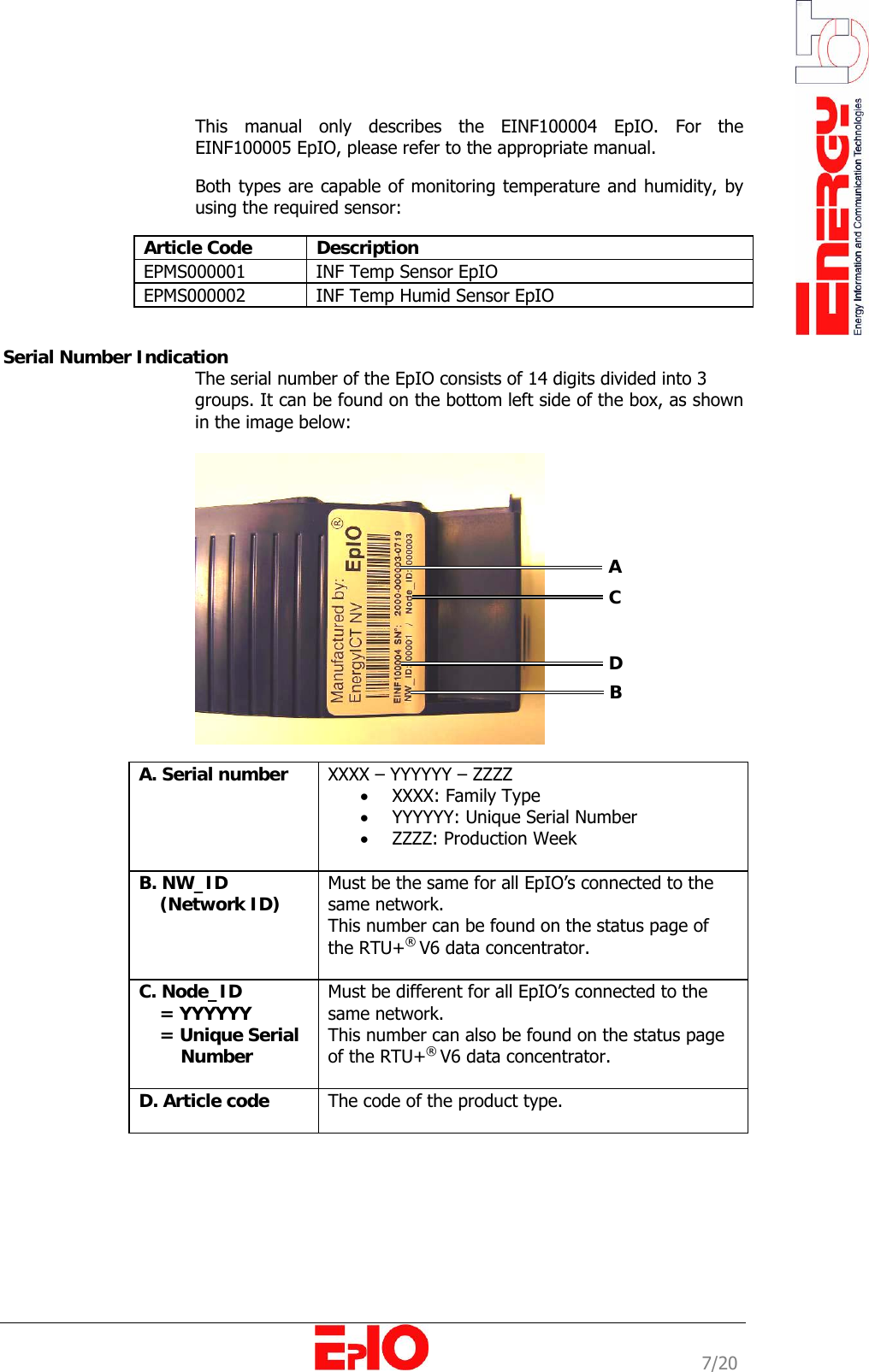
                                                                                                             7/20  This manual only describes the EINF100004 EpIO. For the EINF100005 EpIO, please refer to the appropriate manual.  Both types are capable of monitoring temperature and humidity, by using the required sensor:  Article Code  Description EPMS000001  INF Temp Sensor EpIO EPMS000002  INF Temp Humid Sensor EpIO   Serial Number Indication       The serial number of the EpIO consists of 14 digits divided into 3  groups. It can be found on the bottom left side of the box, as shown in the image below:    A. Serial number  XXXX – YYYYYY – ZZZZ • XXXX: Family Type • YYYYYY: Unique Serial Number • ZZZZ: Production Week  B. NW_ID      (Network ID)  Must be the same for all EpIO’s connected to the same network. This number can be found on the status page of the RTU+® V6 data concentrator.  C. Node_ID      = YYYYYY     = Unique Serial         Number Must be different for all EpIO’s connected to the same network.  This number can also be found on the status page of the RTU+® V6 data concentrator.   D. Article code   The code of the product type.    A C D B
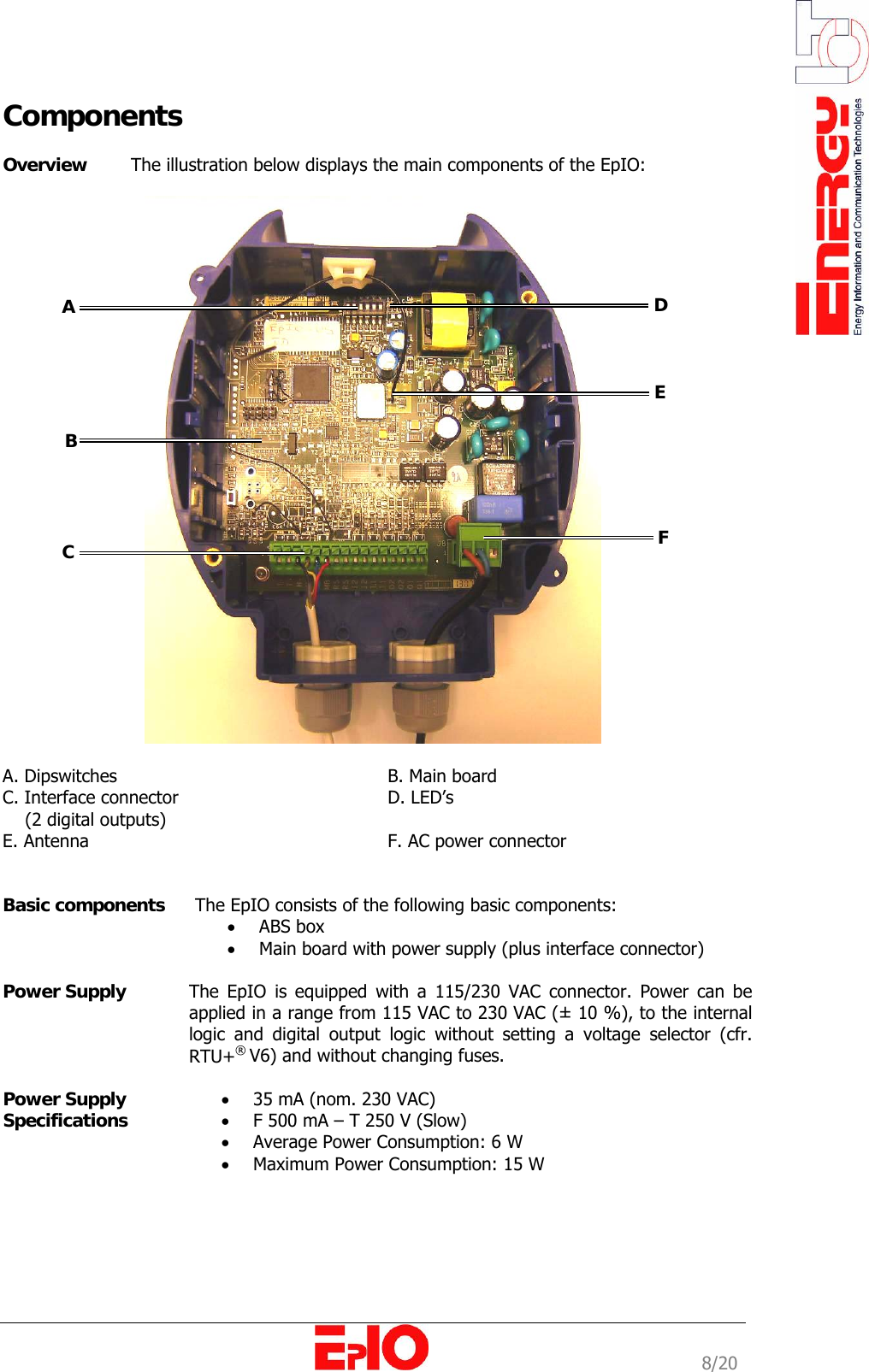
                                                                                                             8/20 Components  Overview   The illustration below displays the main components of the EpIO:    A. Dipswitches      B. Main board C. Interface connector    D. LED’s     (2 digital outputs)  E. Antenna      F. AC power connector           Basic components   The EpIO consists of the following basic components:  • ABS box  • Main board with power supply (plus interface connector)   Power Supply   The EpIO is equipped with a 115/230 VAC connector. Power can be applied in a range from 115 VAC to 230 VAC (± 10 %), to the internal logic and digital output logic without setting a voltage selector (cfr. RTU+® V6) and without changing fuses.  Power Supply  Specifications • 35 mA (nom. 230 VAC) • F 500 mA – T 250 V (Slow) • Average Power Consumption: 6 W • Maximum Power Consumption: 15 W   A  B  C  D EF
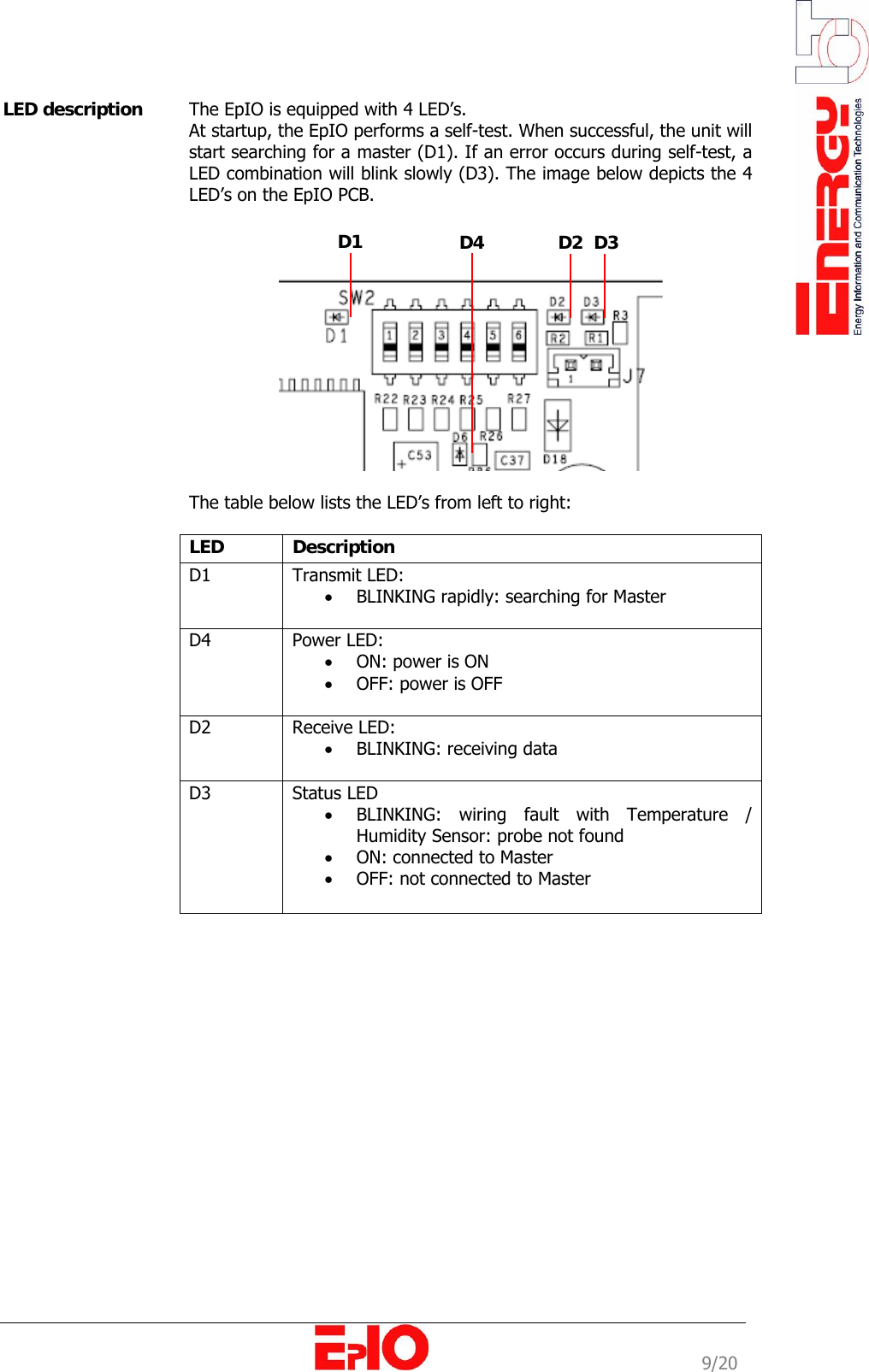
                                                                                                             9/20 LED description  The EpIO is equipped with 4 LED’s.  At startup, the EpIO performs a self-test. When successful, the unit will start searching for a master (D1). If an error occurs during self-test, a LED combination will blink slowly (D3). The image below depicts the 4 LED’s on the EpIO PCB.       The table below lists the LED’s from left to right:   LED   Description  D1   Transmit LED: • BLINKING rapidly: searching for Master  D4   Power LED:  • ON: power is ON • OFF: power is OFF  D2   Receive LED:  • BLINKING: receiving data  D3   Status LED • BLINKING: wiring fault with Temperature / Humidity Sensor: probe not found • ON: connected to Master  • OFF: not connected to Master                  D1 D4 D2 D3
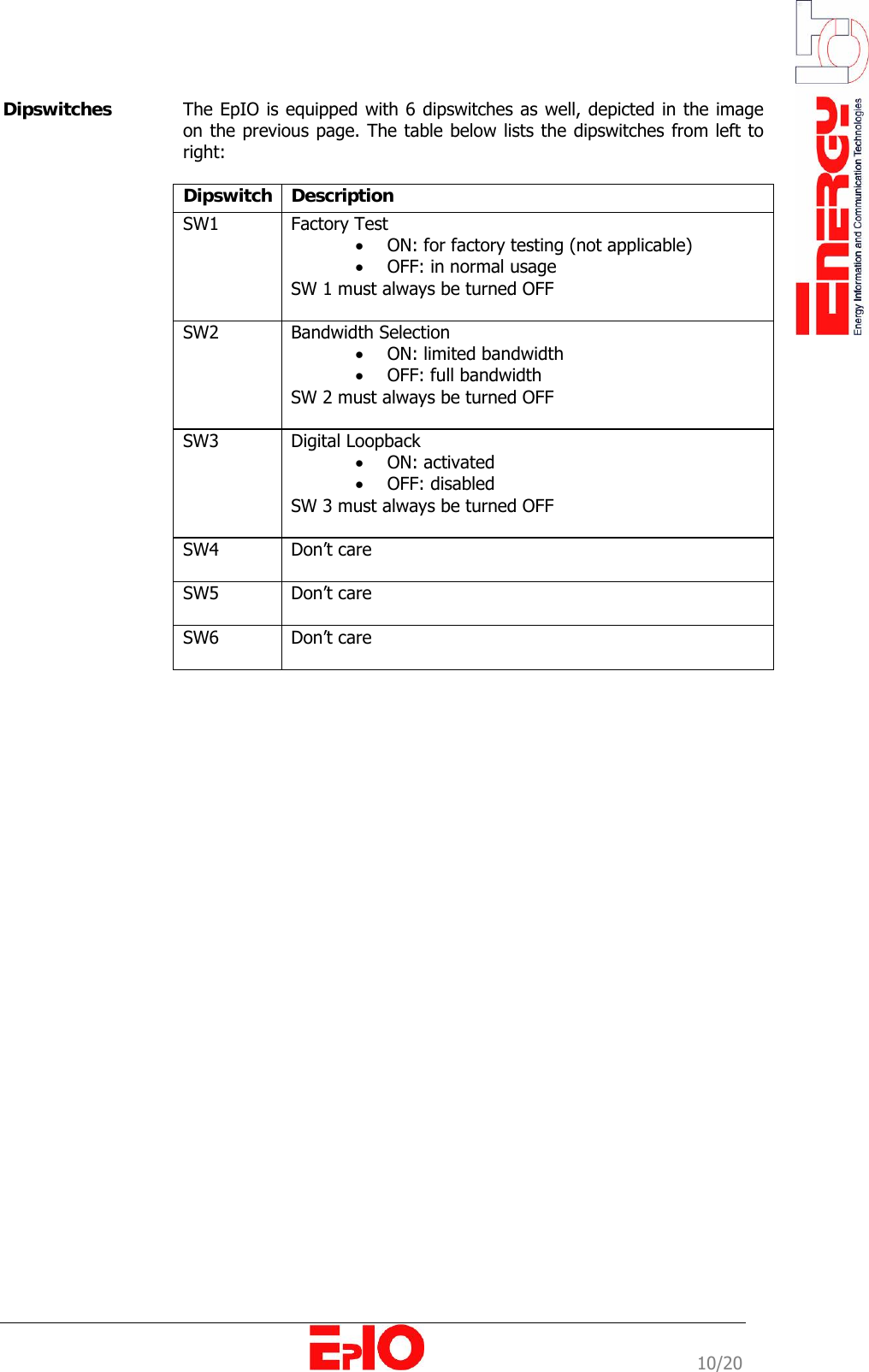
                                                                                                             10/20 Dipswitches  The EpIO is equipped with 6 dipswitches as well, depicted in the image on the previous page. The table below lists the dipswitches from left to right:  Dipswitch   Description  SW1   Factory Test • ON: for factory testing (not applicable) • OFF: in normal usage SW 1 must always be turned OFF  SW2   Bandwidth Selection • ON: limited bandwidth  • OFF: full bandwidth  SW 2 must always be turned OFF  SW3   Digital Loopback • ON: activated  • OFF: disabled SW 3 must always be turned OFF  SW4   Don’t care  SW5   Don’t care  SW6   Don’t care
                                                                                                             11/20 Chapter 2: Mounting and Wiring   Overview   Introduction   This chapter provides information on the physical installation of the EpIO device, including mounting and wiring instructions.   Chapter description  This chapter describes the following topics:   Topic  Page  Mounting Instructions   [12]  Power Supply Wiring Instructions   [14]  Wiring Instructions   [15]      Protective Panel
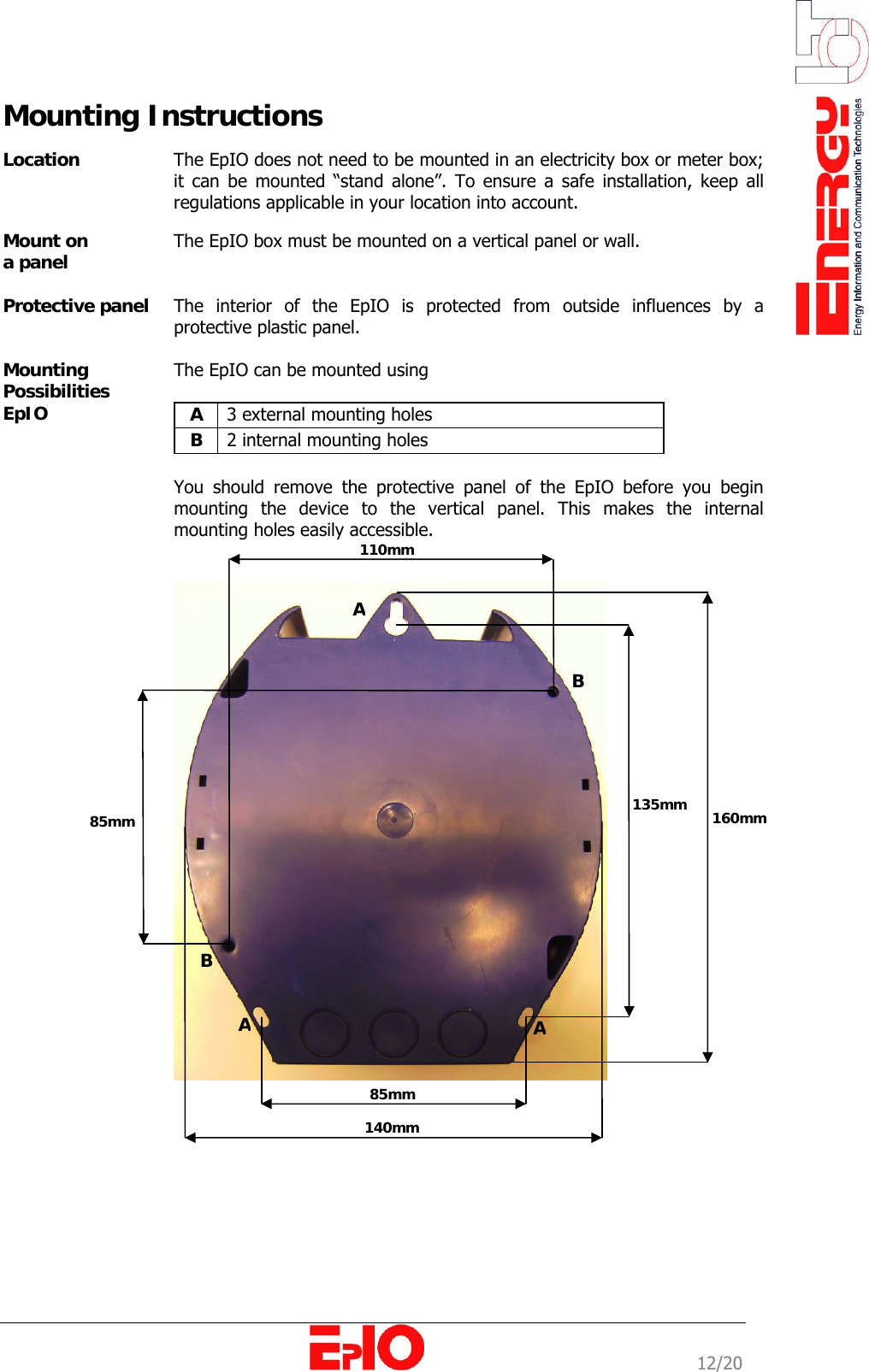
                                                                                                             12/20 Mounting Instructions  Location  The EpIO does not need to be mounted in an electricity box or meter box; it can be mounted “stand alone”. To ensure a safe installation, keep all regulations applicable in your location into account.  Mount on  a panel   The EpIO box must be mounted on a vertical panel or wall.  Protective panel   The interior of the EpIO is protected from outside influences by a protective plastic panel.   Mounting Possibilities EpIO The EpIO can be mounted using   A  3 external mounting holes B  2 internal mounting holes  You should remove the protective panel of the EpIO before you begin mounting the device to the vertical panel. This makes the internal mounting holes easily accessible.     160mm 135mm 140mm 85mm 110mm 85mm BB  A AA
                                                                                                             13/20      65mm 18mm 47mm
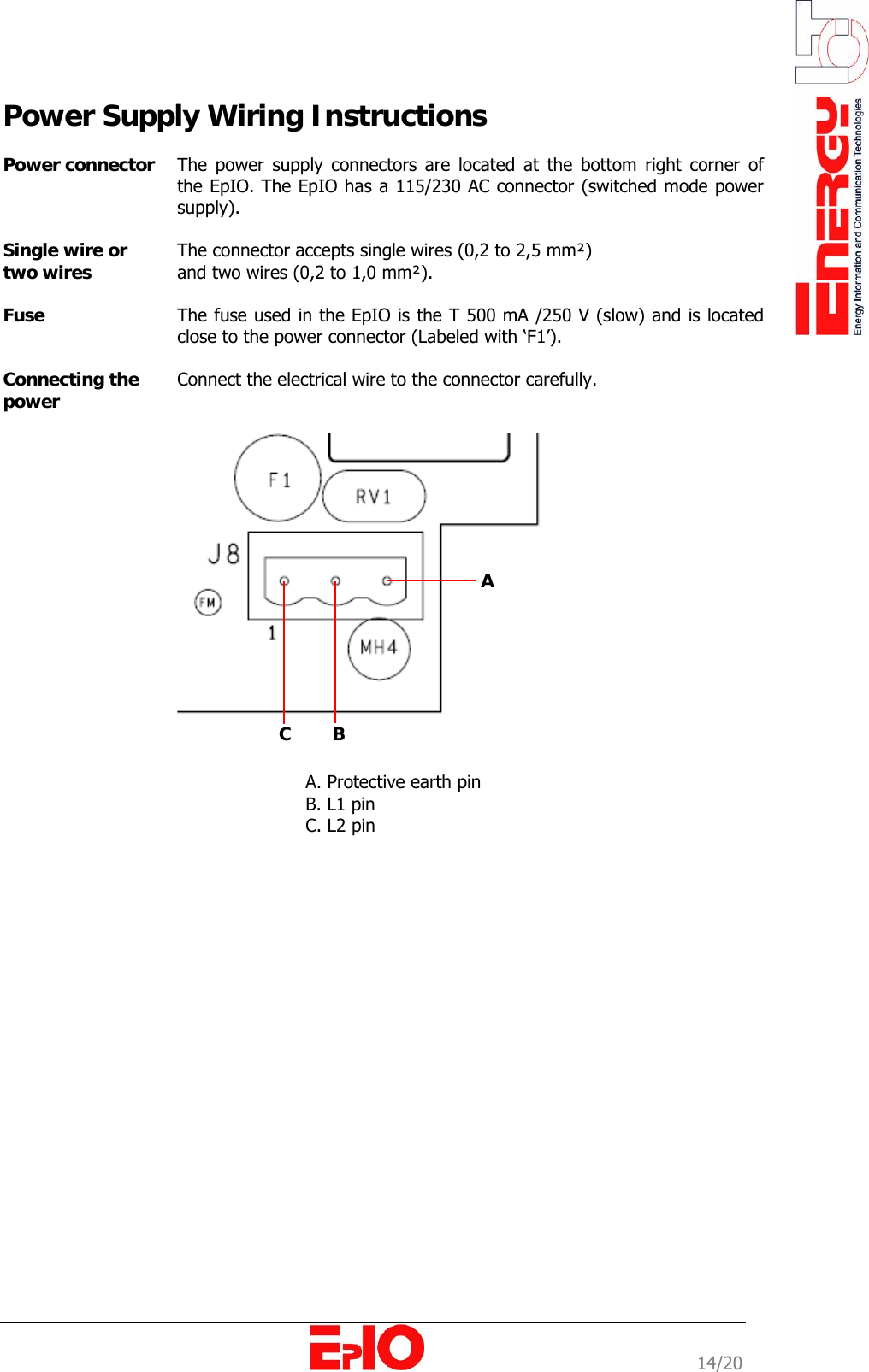
                                                                                                             14/20 Power Supply Wiring Instructions  Power connector  The power supply connectors are located at the bottom right corner of the EpIO. The EpIO has a 115/230 AC connector (switched mode power supply).   Single wire or two wires  The connector accepts single wires (0,2 to 2,5 mm²)  and two wires (0,2 to 1,0 mm²).   Fuse   The fuse used in the EpIO is the T 500 mA /250 V (slow) and is located close to the power connector (Labeled with ‘F1’).   Connecting the power  Connect the electrical wire to the connector carefully.      A. Protective earth pin B. L1 pin C. L2 pin  A C        B
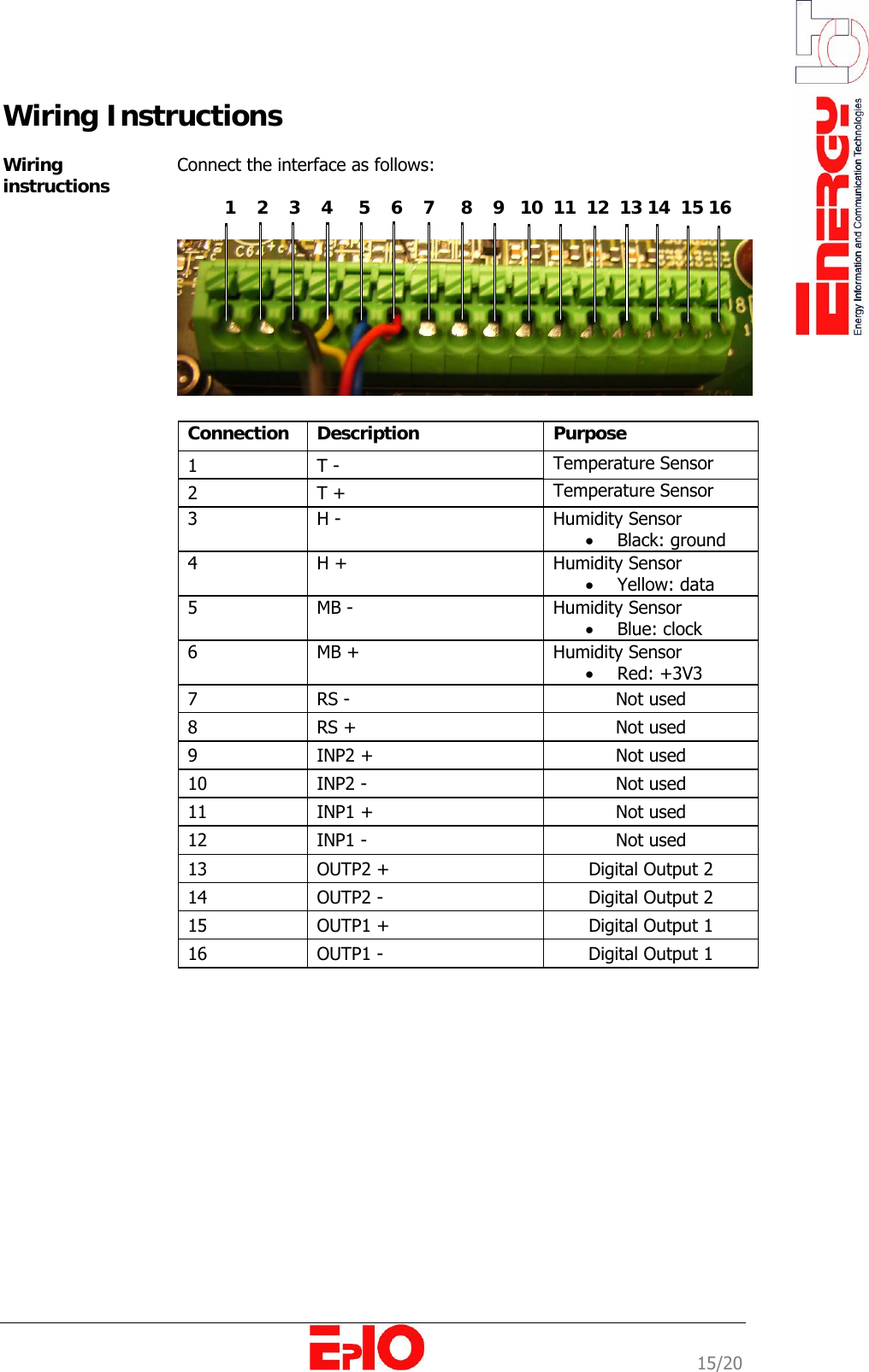
                                                                                                             15/20 Wiring Instructions  Wiring instructions  Connect the interface as follows:            1    2    3    4     5    6    7     8    9   10  11  12  13 14  15 16     Connection  Description  Purpose  1   T -  Temperature Sensor 2   T +   Temperature Sensor 3   H -  Humidity Sensor • Black: ground 4   H +  Humidity Sensor • Yellow: data 5   MB -  Humidity Sensor • Blue: clock 6   MB +  Humidity Sensor • Red: +3V3 7   RS -   Not used 8   RS +  Not used 9  INP2 +  Not used 10  INP2 -  Not used 11  INP1 +  Not used 12  INP1 -  Not used 13  OUTP2 +  Digital Output 2 14  OUTP2 -  Digital Output 2 15  OUTP1 +  Digital Output 1 16  OUTP1 -  Digital Output 1
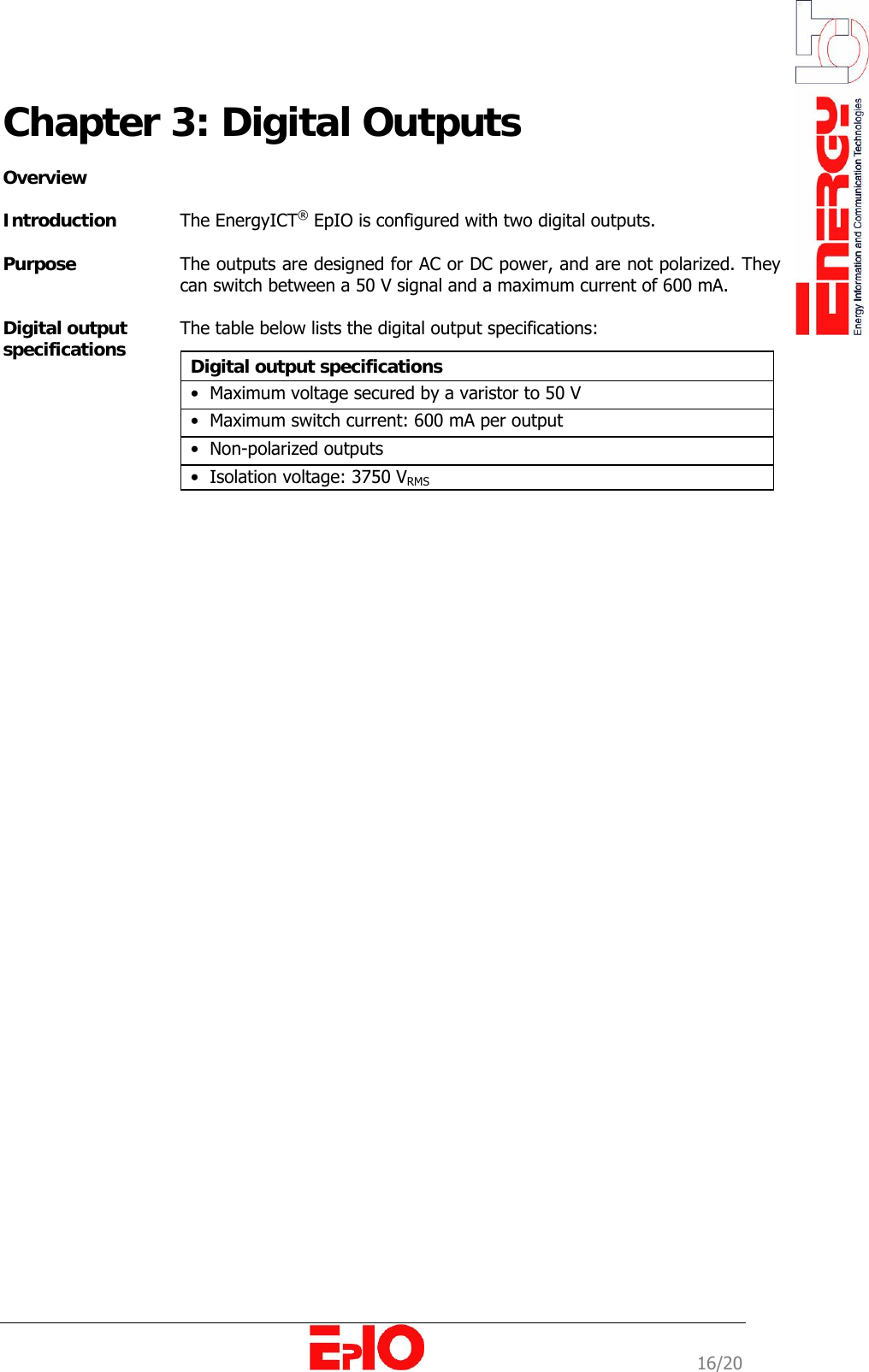
                                                                                                             16/20 Chapter 3: Digital Outputs   Overview  Introduction  The EnergyICT® EpIO is configured with two digital outputs.   Purpose   The outputs are designed for AC or DC power, and are not polarized. They can switch between a 50 V signal and a maximum current of 600 mA.  Digital output  specifications  The table below lists the digital output specifications:   Digital output specifications  •  Maximum voltage secured by a varistor to 50 V •  Maximum switch current: 600 mA per output •  Non-polarized outputs  •  Isolation voltage: 3750 VRMS
                                                                                                             17/20 Appendix  Overview  Introduction   The appendix provides the user with information on external sensors that can be connected to the EpIO. Chapter description  This chapter describes the following topics:  Topic  Page   Humidity/ Temperature  Sensor   [18]   Temperature  Sensor  [20]
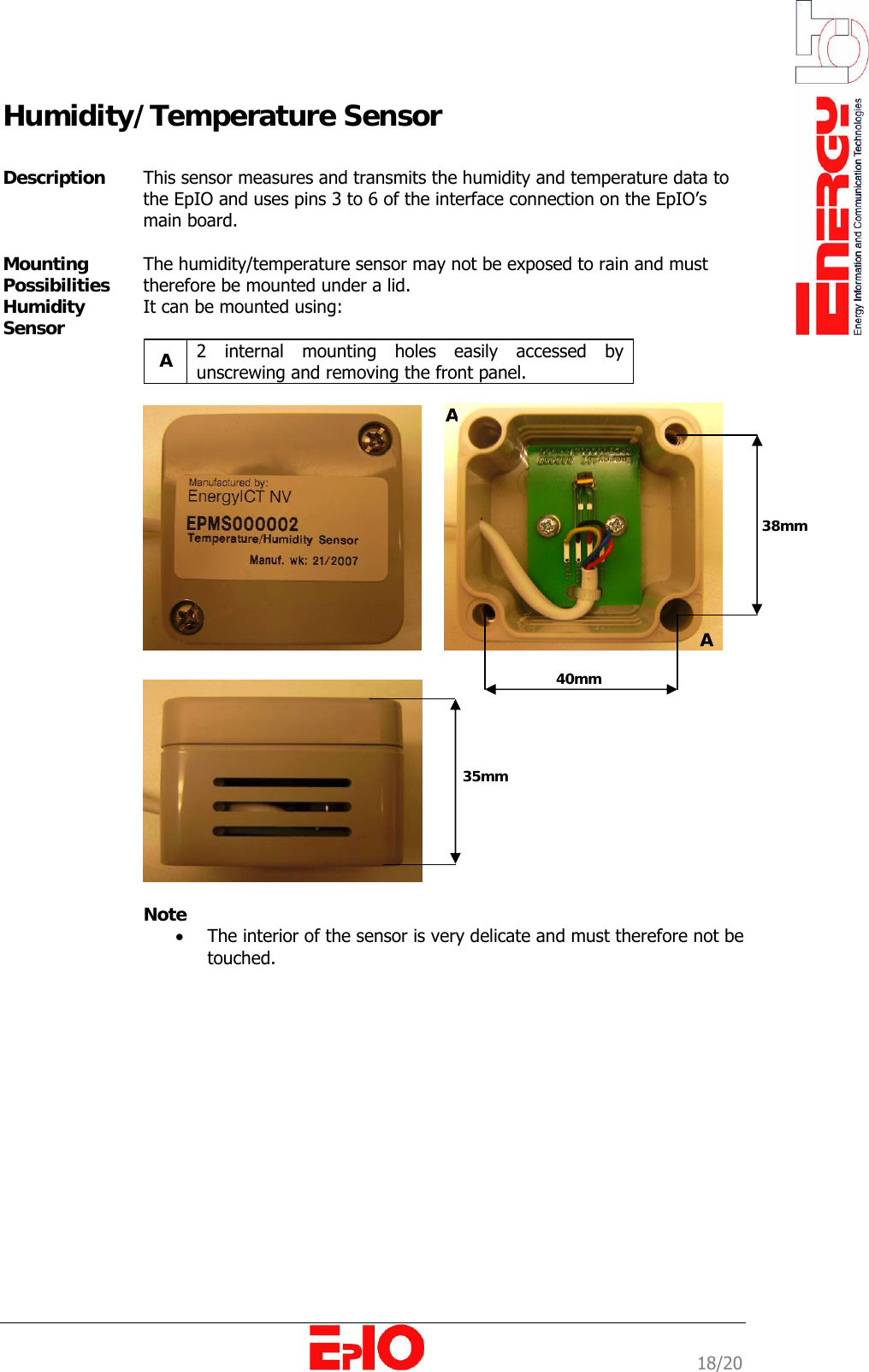
                                                                                                             18/20 Humidity/Temperature Sensor  Description   This sensor measures and transmits the humidity and temperature data to the EpIO and uses pins 3 to 6 of the interface connection on the EpIO’s main board.  Mounting Possibilities Humidity Sensor  The humidity/temperature sensor may not be exposed to rain and must therefore be mounted under a lid. It can be mounted using:  A  2 internal mounting holes easily accessed by unscrewing and removing the front panel.      Note • The interior of the sensor is very delicate and must therefore not be touched.  38mm 40mm AA 35mm
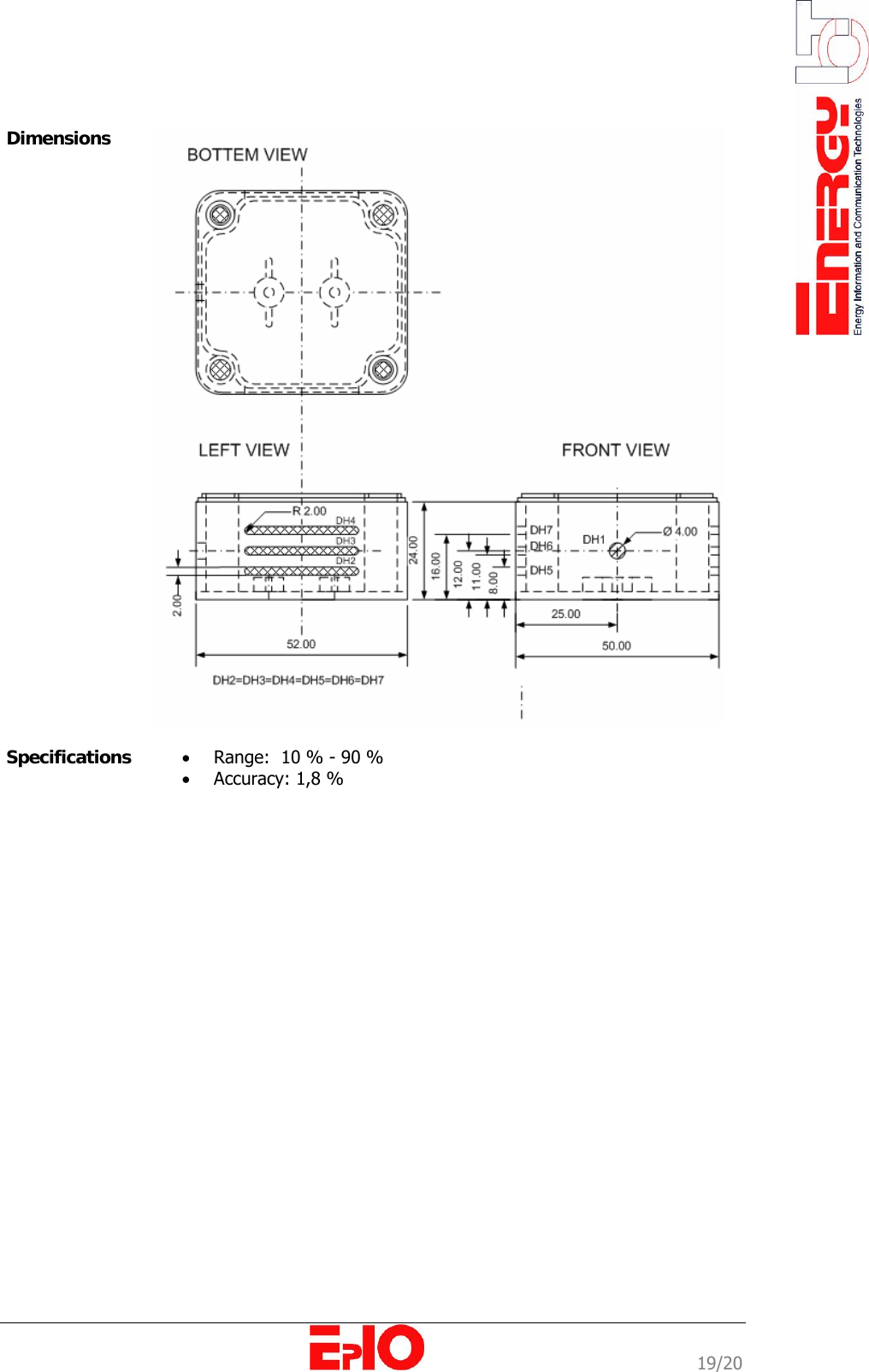
                                                                                                             19/20              Dimensions   Specifications  • Range:  10 % - 90 % • Accuracy: 1,8 %
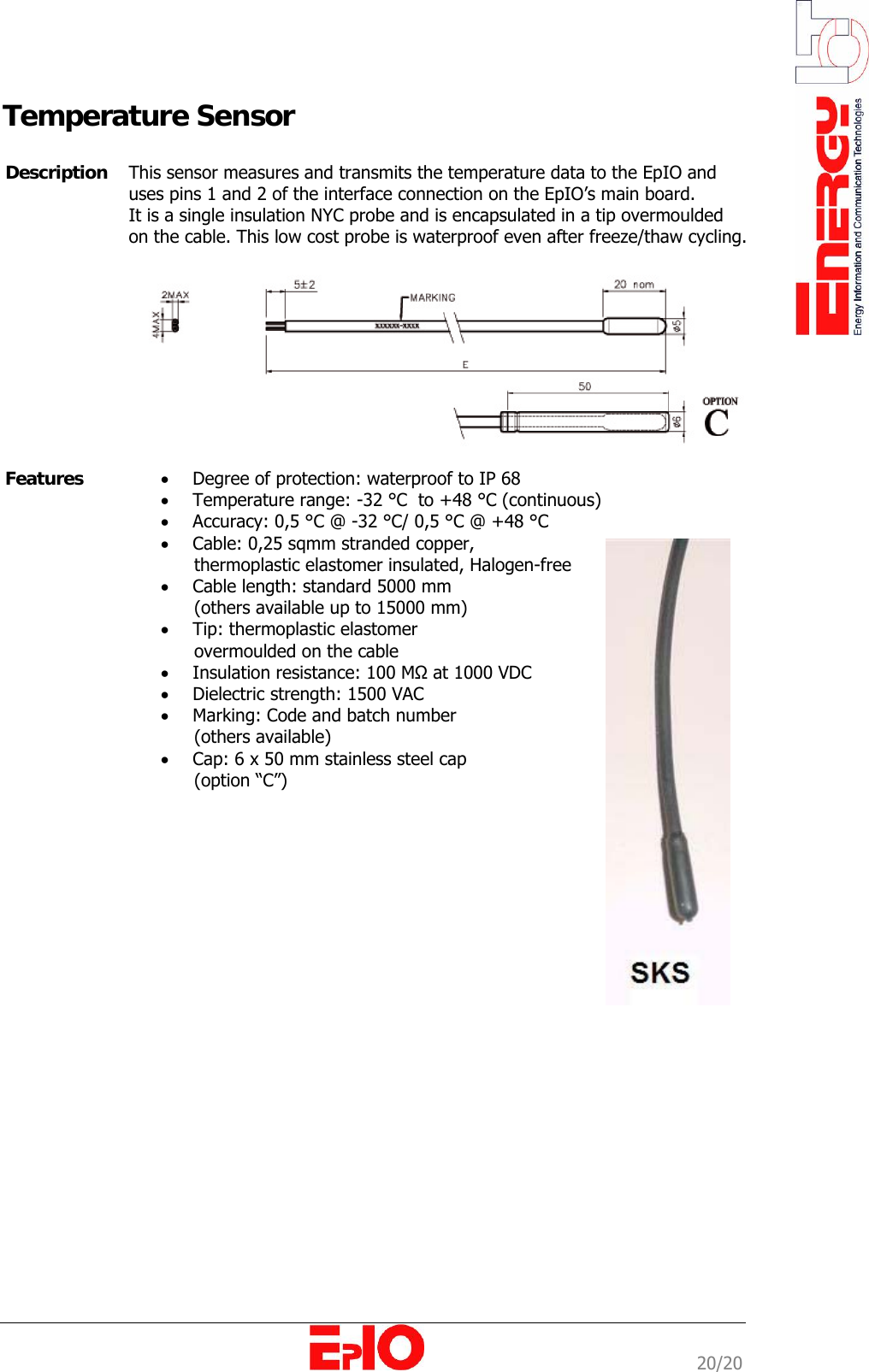
                                                                                                             20/20 Temperature Sensor           Description  This sensor measures and transmits the temperature data to the EpIO and uses pins 1 and 2 of the interface connection on the EpIO’s main board. It is a single insulation NYC probe and is encapsulated in a tip overmoulded on the cable. This low cost probe is waterproof even after freeze/thaw cycling.    Features  • Degree of protection: waterproof to IP 68 • Temperature range: -32 °C  to +48 °C (continuous) • Accuracy: 0,5 °C @ -32 °C/ 0,5 °C @ +48 °C  • Cable: 0,25 sqmm stranded copper,        thermoplastic elastomer insulated, Halogen-free • Cable length: standard 5000 mm        (others available up to 15000 mm) • Tip: thermoplastic elastomer        overmoulded on the cable • Insulation resistance: 100 MΩ at 1000 VDC • Dielectric strength: 1500 VAC • Marking: Code and batch number        (others available)  • Cap: 6 x 50 mm stainless steel cap        (option “C”)

Navigation menu